EE-332 Operating System
Department of Electrical Engineering | The University of Faisalabad
Zeeshan Iqbal BEE-FA18-022 (Computer)
Experiment # 1
Title:
Introduction to Linux.
Objective:
To study and execute the commands in UNIX.
Apparatus:
Computer System.
COMMANDS:
1. Date Command:
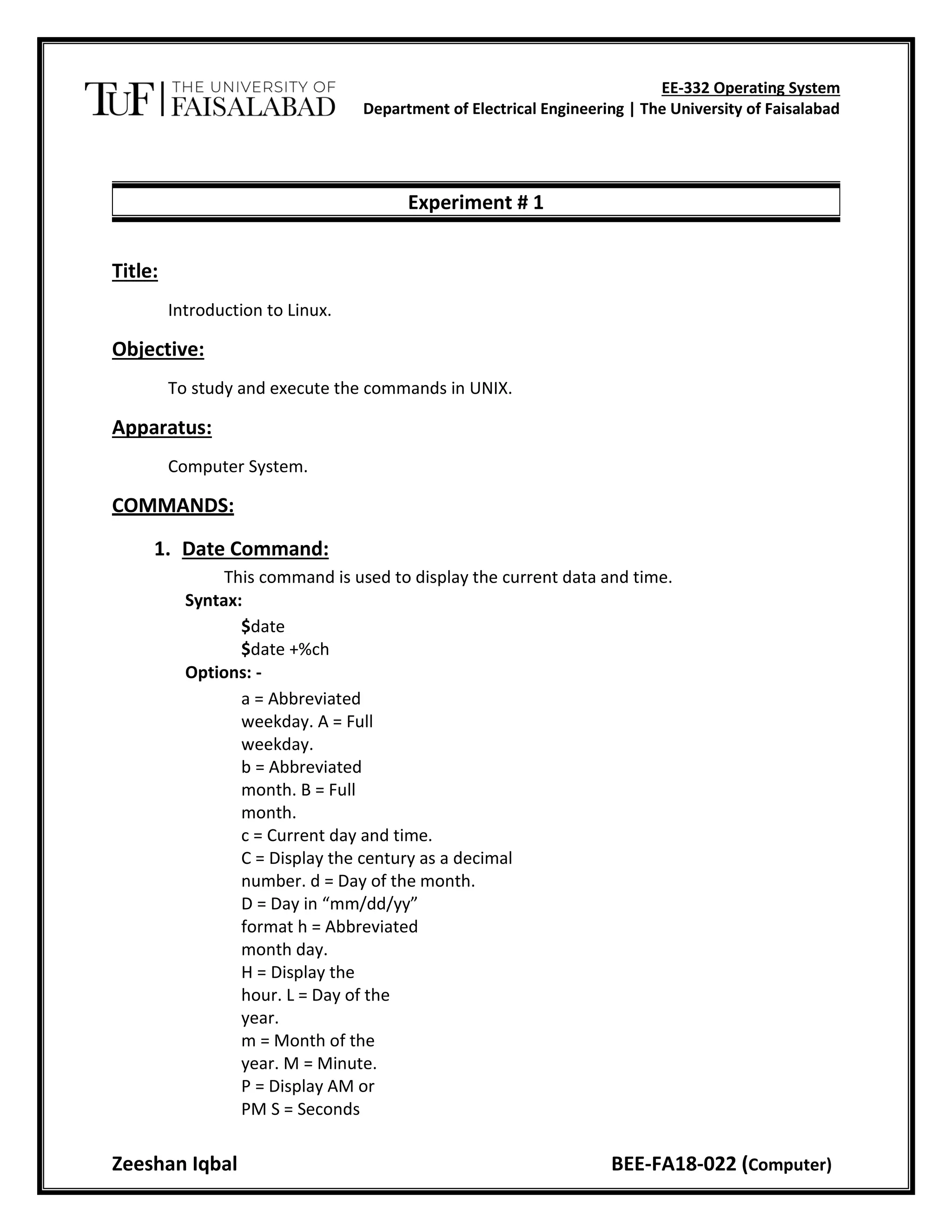
This command is used to display the current data and time.
Syntax:
$date
$date +%ch
Options: -
a = Abbreviated
weekday. A = Full
weekday.
b = Abbreviated
month. B = Full
month.
c = Current day and time.
C = Display the century as a decimal
number. d = Day of the month.
D = Day in “mm/dd/yy”
format h = Abbreviated
month day.
H = Display the
hour. L = Day of the
year.
m = Month of the
year. M = Minute.
P = Display AM or
PM S = Seconds
EE-332 Operating System
Department of Electrical Engineering | The University of Faisalabad
Zeeshan Iqbal BEE-FA18-022 (Computer)
T = HH:MM: SS
format u = Week of
the year.
y = Display the year in 2
digits. Y = Display the full
year.
Z=Timezone.
Output:
2. Calendar Command:
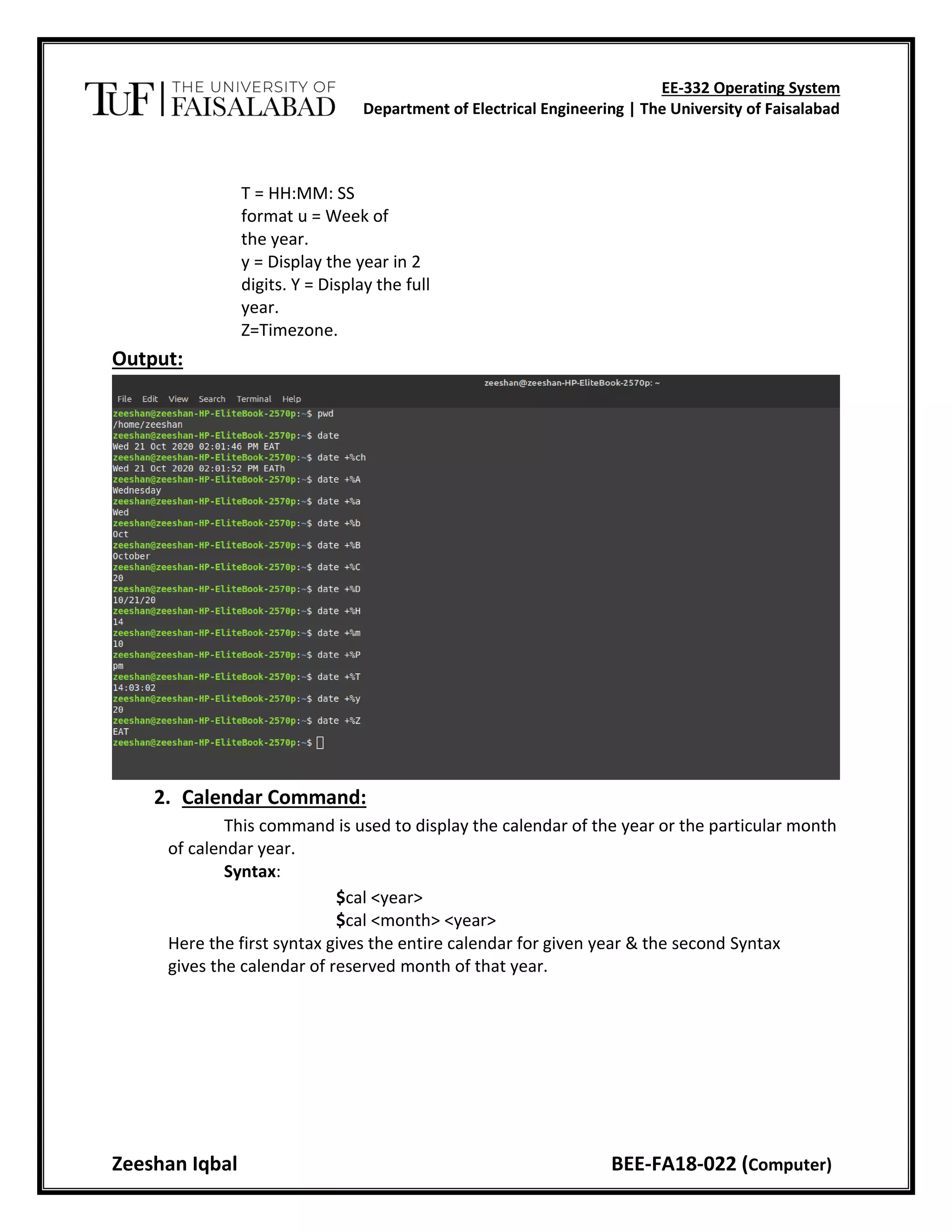
This command is used to display the calendar of the year or the particular month
of calendar year.
Syntax:
$cal <year>
$cal <month> <year>
Here the first syntax gives the entire calendar for given year & the second Syntax
gives the calendar of reserved month of that year.
EE-332 Operating System
Department of Electrical Engineering | The University of Faisalabad
Zeeshan Iqbal BEE-FA18-022 (Computer)
Output:
3. Echo Command:
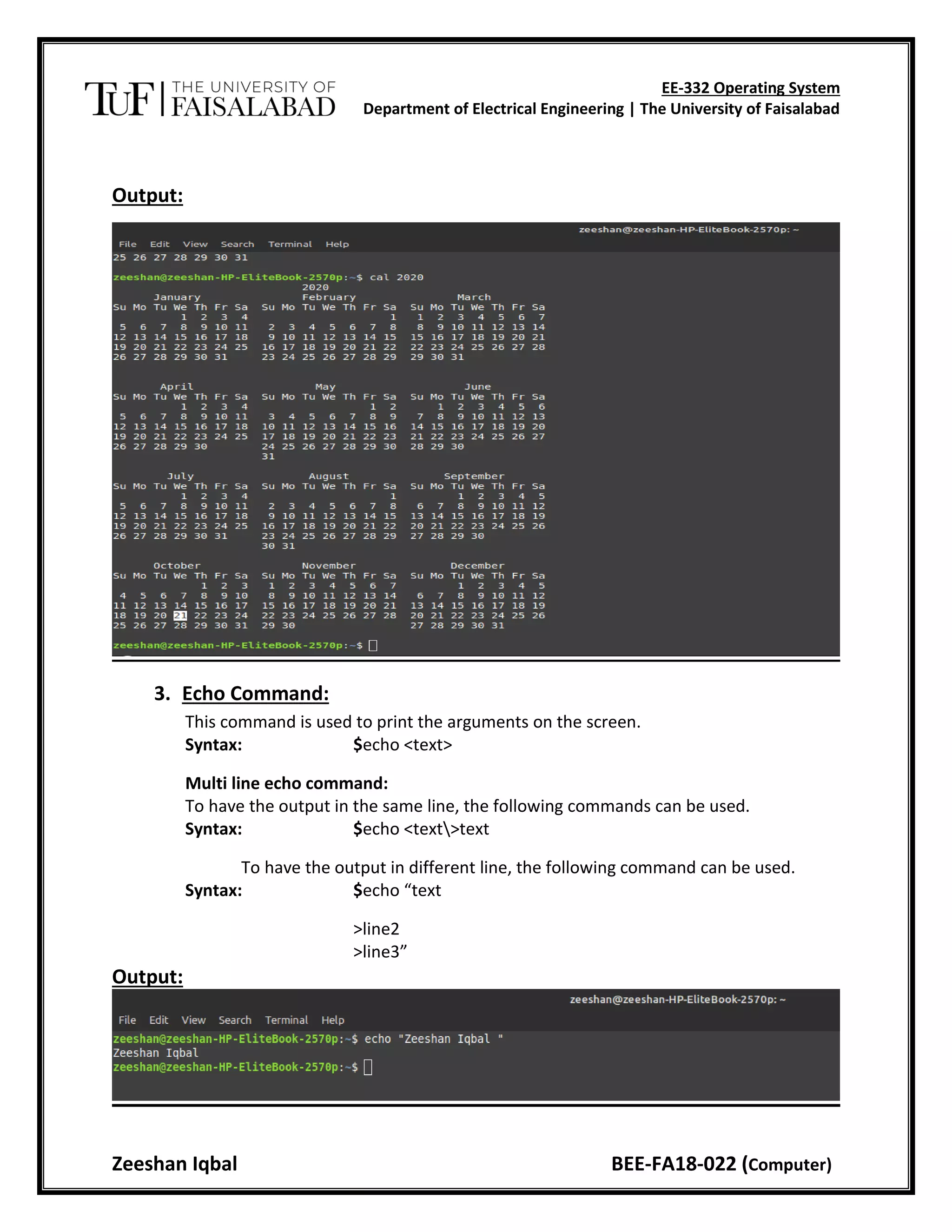
This command is used to print the arguments on the screen.
Syntax: $echo <text>
Multi line echo command:
To have the output in the same line, the following commands can be used.
Syntax: $echo <text>text
To have the output in different line, the following command can be used.
Syntax: $echo “text
>line2
>line3”
Output:
EE-332 Operating System
Department of Electrical Engineering | The University of Faisalabad
Zeeshan Iqbal BEE-FA18-022 (Computer)
4. Banner Command:
It is used to display the arguments in „#‟ symbol.
Syntax: $banner <arguments>
5. ’who’ Command:
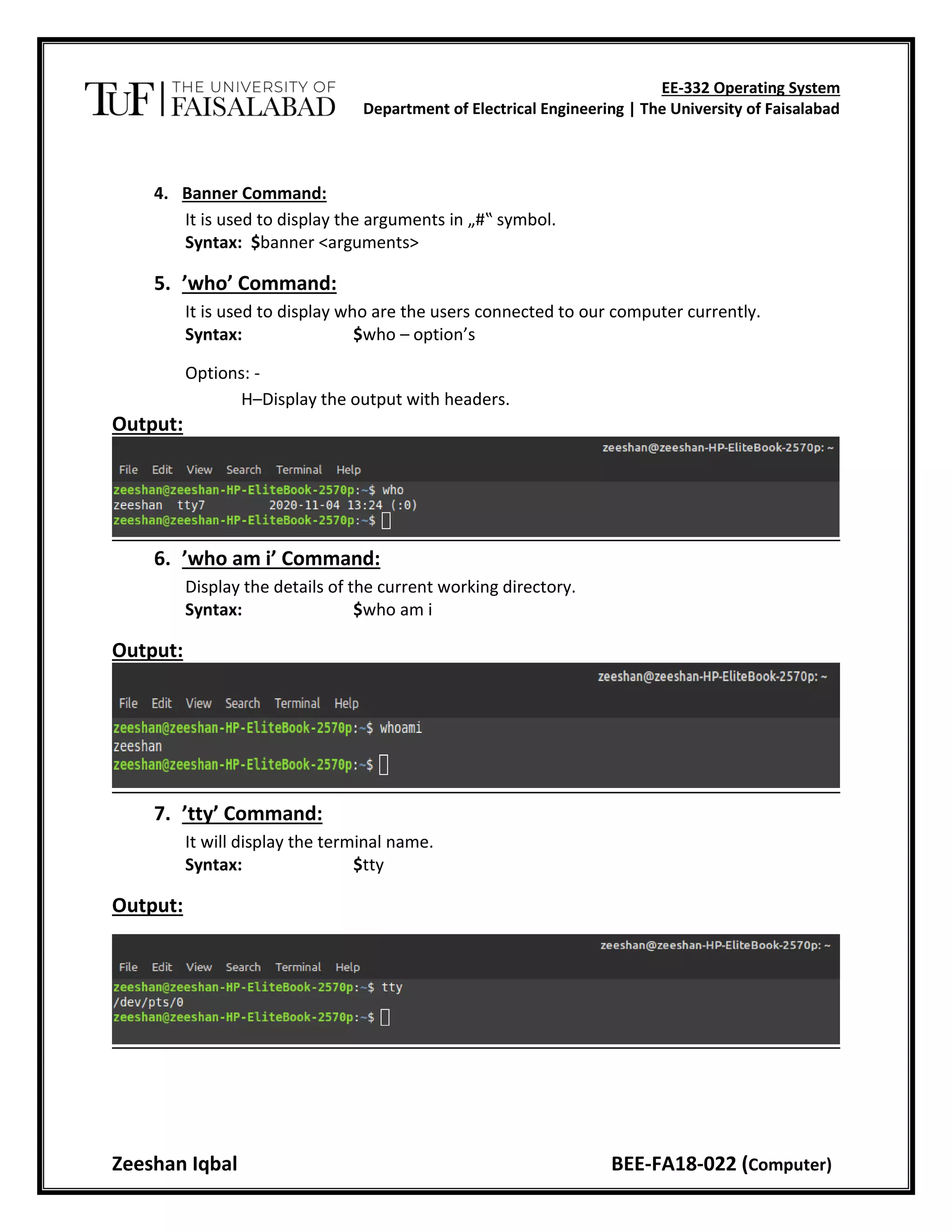
It is used to display who are the users connected to our computer currently.
Syntax: $who – option’s
Options: -
H–Display the output with headers.
Output:
6. ’who am i’ Command:
Display the details of the current working directory.
Syntax: $who am i
Output:
7. ’tty’ Command:
It will display the terminal name.
Syntax: $tty
Output:
EE-332 Operating System
Department of Electrical Engineering | The University of Faisalabad
Zeeshan Iqbal BEE-FA18-022 (Computer)
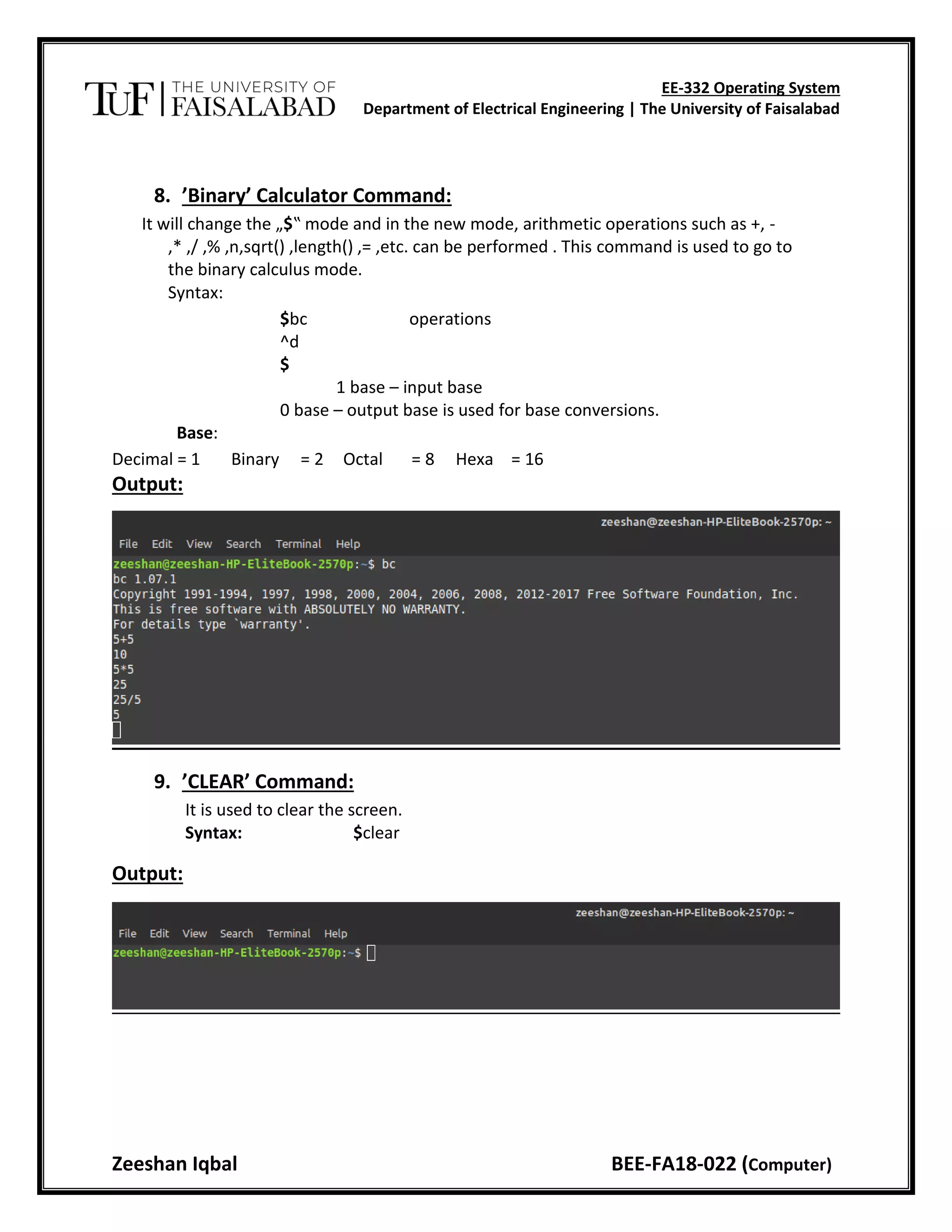
8. ’Binary’ Calculator Command:
It will change the „$‟ mode and in the new mode, arithmetic operations such as +, -
,* ,/ ,% ,n,sqrt() ,length() ,= ,etc. can be performed . This command is used to go to
the binary calculus mode.
Syntax:
$bc operations
^d
$
1 base – input base
0 base – output base is used for base conversions.
Base:
Decimal = 1 Binary = 2 Octal = 8 Hexa = 16
Output:
9. ’CLEAR’ Command:
It is used to clear the screen.
Syntax: $clear
Output:
EE-332 Operating System
Department of Electrical Engineering | The University of Faisalabad
Zeeshan Iqbal BEE-FA18-022 (Computer)
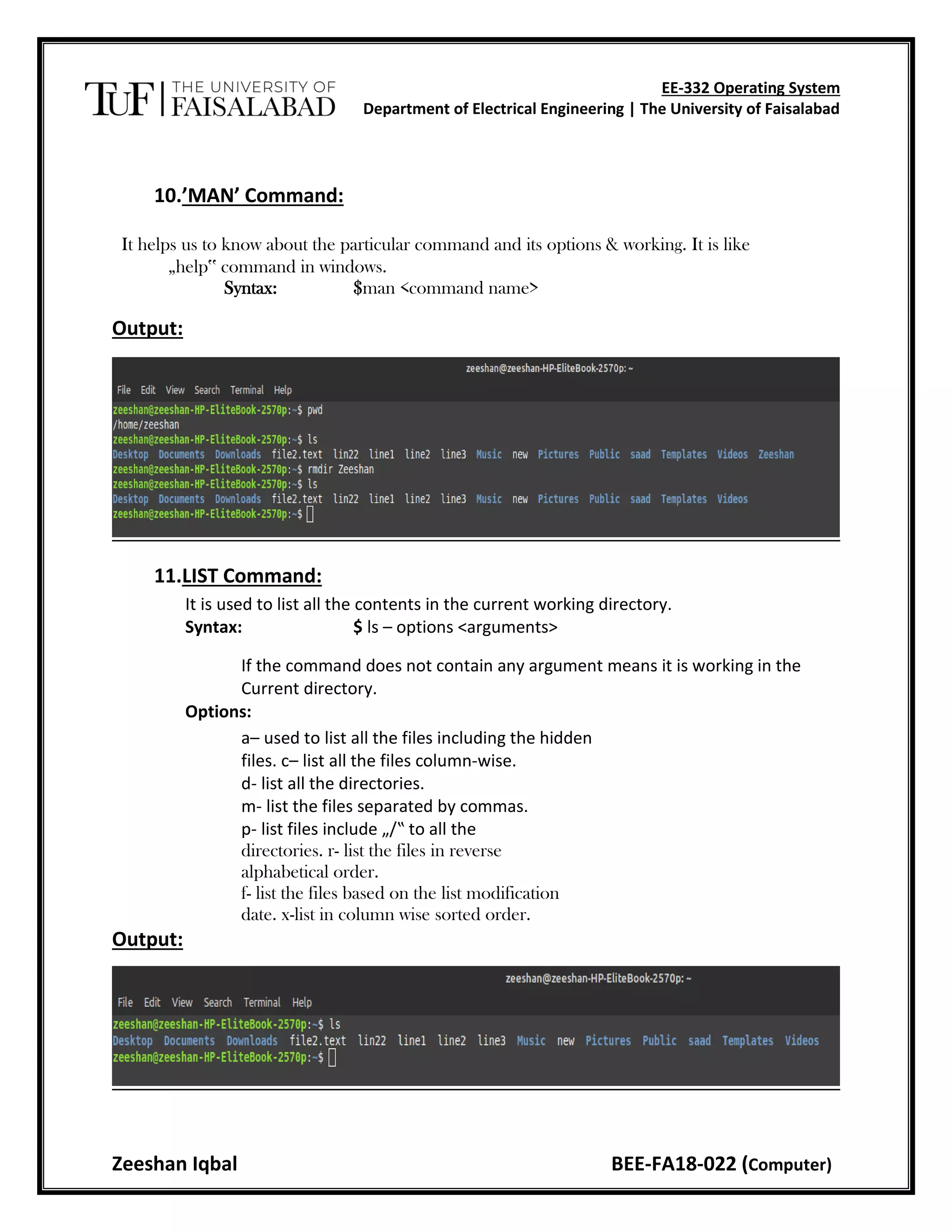
10.’MAN’ Command:
It helps us to know about the particular command and its options & working. It is like
„help‟ command in windows.
Syntax: $man <command name>
Output:
11.LIST Command:
It is used to list all the contents in the current working directory.
Syntax: $ ls – options <arguments>
If the command does not contain any argument means it is working in the
Current directory.
Options:
a– used to list all the files including the hidden
files. c– list all the files column-wise.
d- list all the directories.
m- list the files separated by commas.
p- list files include „/‟ to all the
directories. r- list the files in reverse
alphabetical order.
f- list the files based on the list modification
date. x-list in column wise sorted order.
Output:
EE-332 Operating System
Department of Electrical Engineering | The University of Faisalabad
Zeeshan Iqbal BEE-FA18-022 (Computer)
DIRECTORY RELATED COMMANDS:
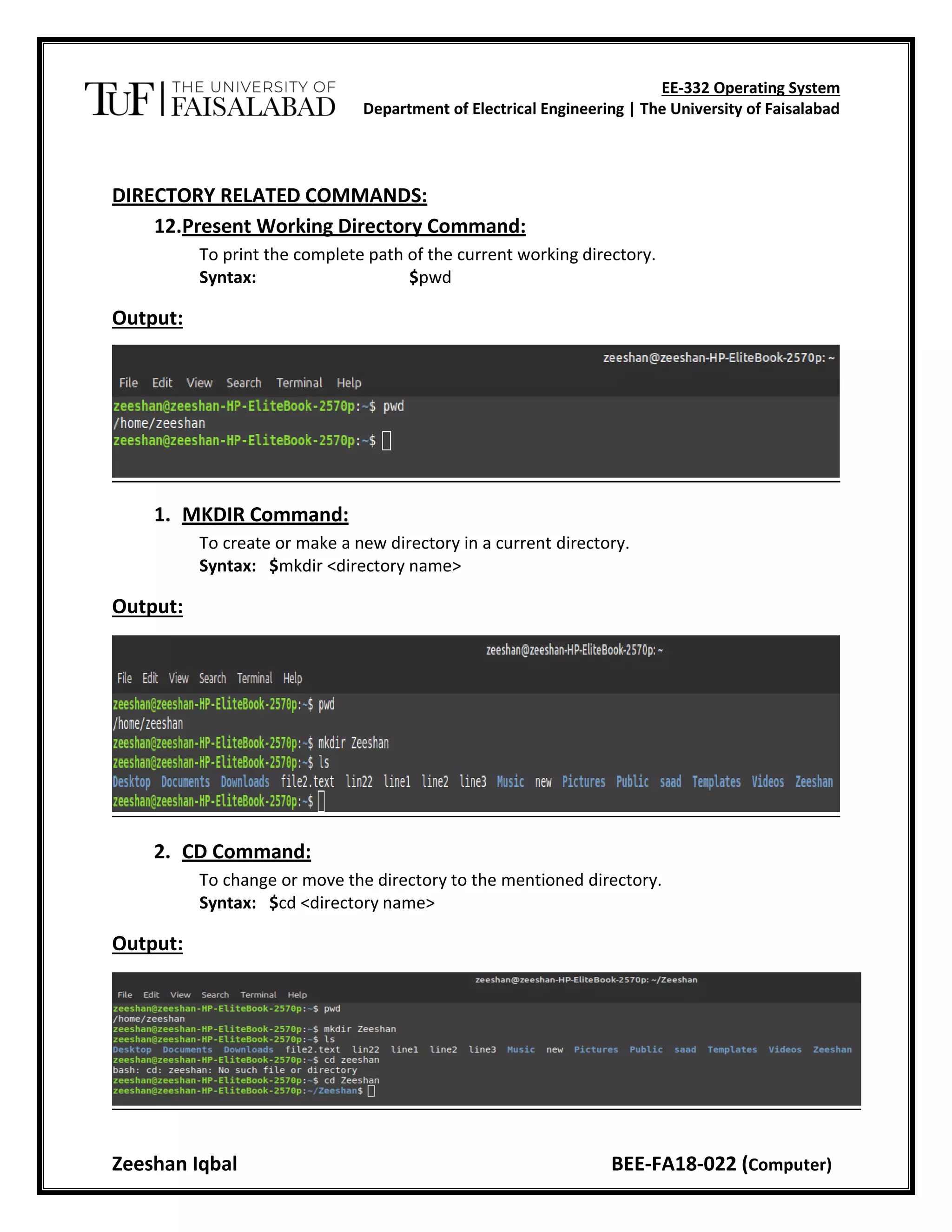
12.Present Working Directory Command:
To print the complete path of the current working directory.
Syntax: $pwd
Output:
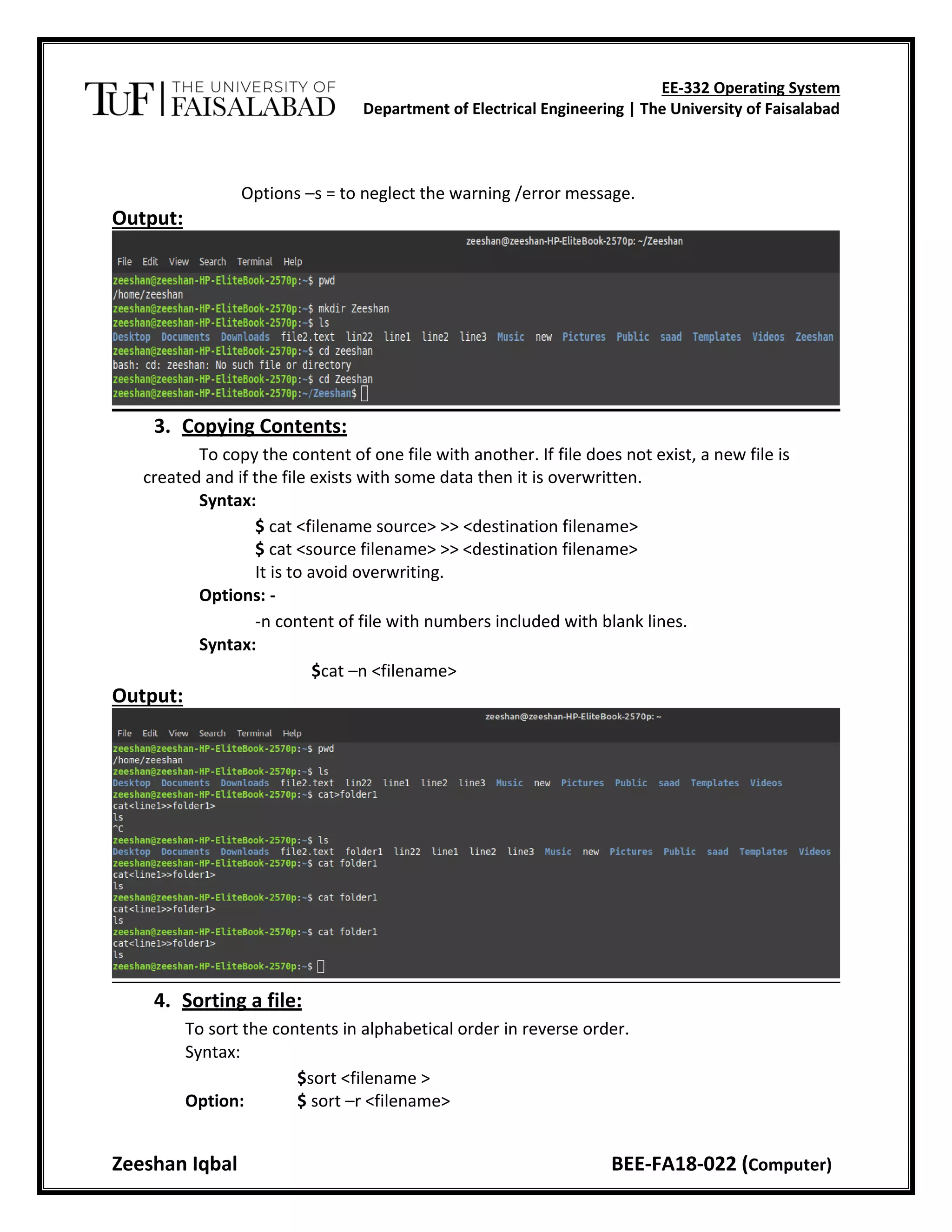
1. MKDIR Command:
To create or make a new directory in a current directory.
Syntax: $mkdir <directory name>
Output:
2. CD Command:
To change or move the directory to the mentioned directory.
Syntax: $cd <directory name>
Output:
EE-332 Operating System
Department of Electrical Engineering | The University of Faisalabad
Zeeshan Iqbal BEE-FA18-022 (Computer)
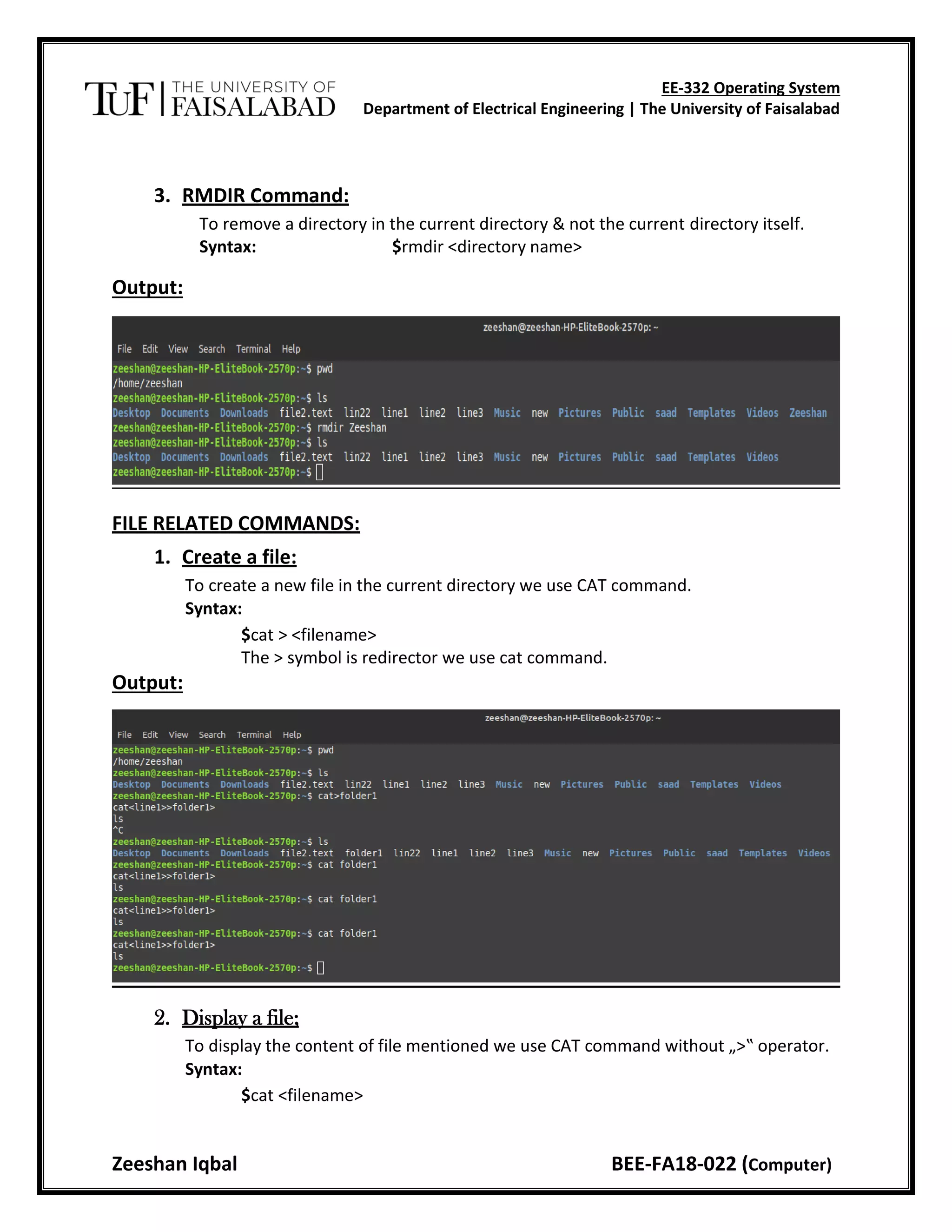
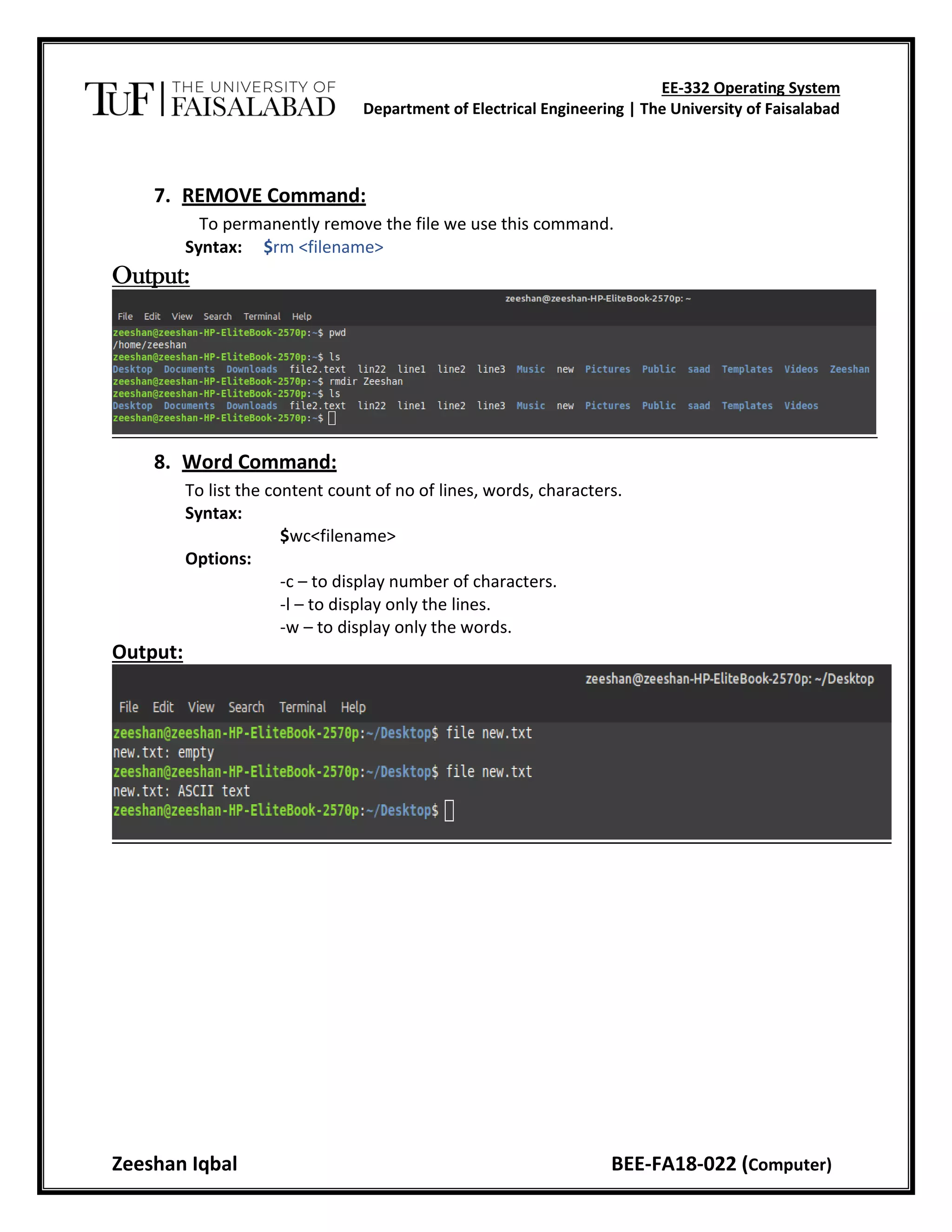
3. RMDIR Command:
To remove a directory in the current directory & not the current directory itself.
Syntax: $rmdir <directory name>
Output:
FILE RELATED COMMANDS:
1. Create a file:
To create a new file in the current directory we use CAT command.
Syntax:
$cat > <filename>
The > symbol is redirector we use cat command.
Output:
2. Display a file;
To display the content of file mentioned we use CAT command without „>‟ operator.
Syntax:
$cat <filename>
EE-332 Operating System
Department of Electrical Engineering | The University of Faisalabad
Zeeshan Iqbal BEE-FA18-022 (Computer)
Options –s = to neglect the warning /error message.
Output:
3. Copying Contents:
To copy the content of one file with another. If file does not exist, a new file is
created and if the file exists with some data then it is overwritten.
Syntax:
$ cat <filename source> >> <destination filename>
$ cat <source filename> >> <destination filename>
It is to avoid overwriting.
Options: -
-n content of file with numbers included with blank lines.
Syntax:
$cat –n <filename>
Output:
4. Sorting a file:
To sort the contents in alphabetical order in reverse order.
Syntax:
$sort <filename >
Option: $ sort –r <filename>
EE-332 Operating System
Department of Electrical Engineering | The University of Faisalabad
Zeeshan Iqbal BEE-FA18-022 (Computer)
Output:
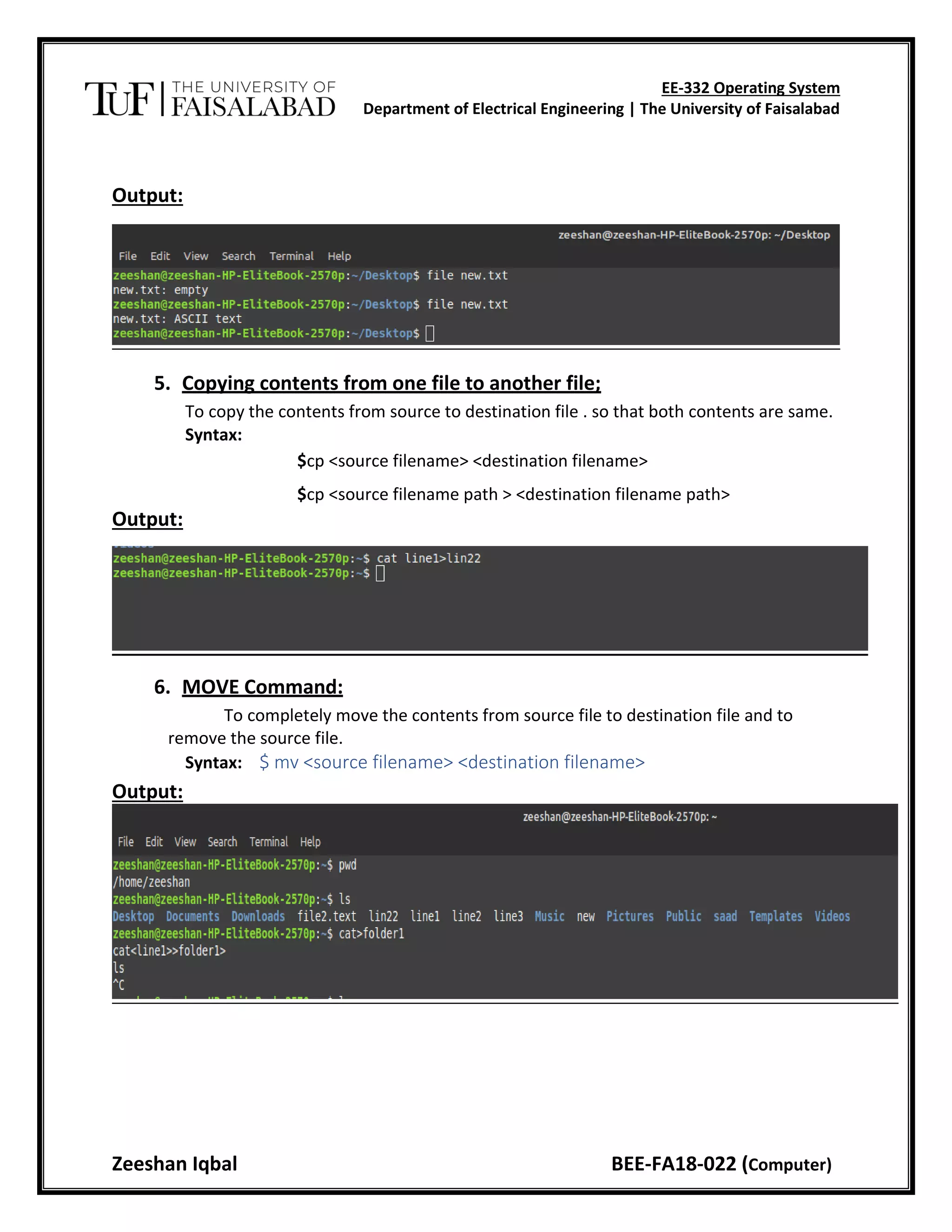
5. Copying contents from one file to another file;
To copy the contents from source to destination file . so that both contents are same.
Syntax:
$cp <source filename> <destination filename>
$cp <source filename path > <destination filename path>
Output:
6. MOVE Command:
To completely move the contents from source file to destination file and to
remove the source file.
Syntax: $ mv <source filename> <destination filename>
Output:
EE-332 Operating System
Department of Electrical Engineering | The University of Faisalabad
Zeeshan Iqbal BEE-FA18-022 (Computer)
7. REMOVE Command:
To permanently remove the file we use this command.
Syntax: $rm <filename>
Output:
8. Word Command:
To list the content count of no of lines, words, characters.
Syntax:
$wc<filename>
Options:
-c – to display number of characters.
-l – to display only the lines.
-w – to display only the words.
Output:
EE-332 Operating System
Department of Electrical Engineering | The University of Faisalabad
Zeeshan Iqbal BEE-FA18-022 (Computer)
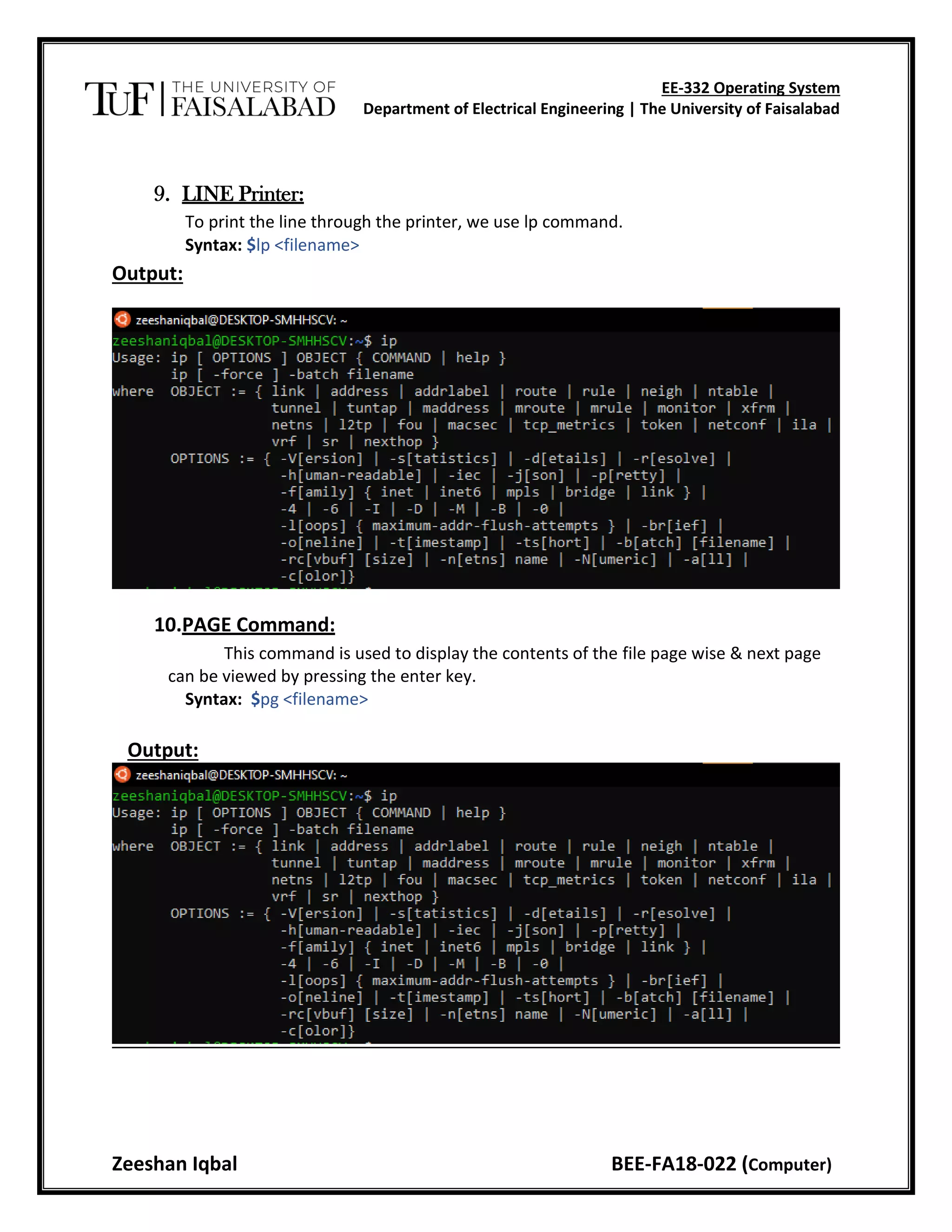
9. LINE Printer:
To print the line through the printer, we use lp command.
Syntax: $lp <filename>
Output:
10.PAGE Command:
This command is used to display the contents of the file page wise & next page
can be viewed by pressing the enter key.
Syntax: $pg <filename>
Output:

Introduction of Linux

  • 1.
    EE-332 Operating System Departmentof Electrical Engineering | The University of Faisalabad Zeeshan Iqbal BEE-FA18-022 (Computer) Experiment # 1 Title: Introduction to Linux. Objective: To study and execute the commands in UNIX. Apparatus: Computer System. COMMANDS: 1. Date Command: This command is used to display the current data and time. Syntax: $date $date +%ch Options: - a = Abbreviated weekday. A = Full weekday. b = Abbreviated month. B = Full month. c = Current day and time. C = Display the century as a decimal number. d = Day of the month. D = Day in “mm/dd/yy” format h = Abbreviated month day. H = Display the hour. L = Day of the year. m = Month of the year. M = Minute. P = Display AM or PM S = Seconds
  • 2.
    EE-332 Operating System Departmentof Electrical Engineering | The University of Faisalabad Zeeshan Iqbal BEE-FA18-022 (Computer) T = HH:MM: SS format u = Week of the year. y = Display the year in 2 digits. Y = Display the full year. Z=Timezone. Output: 2. Calendar Command: This command is used to display the calendar of the year or the particular month of calendar year. Syntax: $cal <year> $cal <month> <year> Here the first syntax gives the entire calendar for given year & the second Syntax gives the calendar of reserved month of that year.
  • 3.
    EE-332 Operating System Departmentof Electrical Engineering | The University of Faisalabad Zeeshan Iqbal BEE-FA18-022 (Computer) Output: 3. Echo Command: This command is used to print the arguments on the screen. Syntax: $echo <text> Multi line echo command: To have the output in the same line, the following commands can be used. Syntax: $echo <text>text To have the output in different line, the following command can be used. Syntax: $echo “text >line2 >line3” Output:
  • 4.
    EE-332 Operating System Departmentof Electrical Engineering | The University of Faisalabad Zeeshan Iqbal BEE-FA18-022 (Computer) 4. Banner Command: It is used to display the arguments in „#‟ symbol. Syntax: $banner <arguments> 5. ’who’ Command: It is used to display who are the users connected to our computer currently. Syntax: $who – option’s Options: - H–Display the output with headers. Output: 6. ’who am i’ Command: Display the details of the current working directory. Syntax: $who am i Output: 7. ’tty’ Command: It will display the terminal name. Syntax: $tty Output:
  • 5.
    EE-332 Operating System Departmentof Electrical Engineering | The University of Faisalabad Zeeshan Iqbal BEE-FA18-022 (Computer) 8. ’Binary’ Calculator Command: It will change the „$‟ mode and in the new mode, arithmetic operations such as +, - ,* ,/ ,% ,n,sqrt() ,length() ,= ,etc. can be performed . This command is used to go to the binary calculus mode. Syntax: $bc operations ^d $ 1 base – input base 0 base – output base is used for base conversions. Base: Decimal = 1 Binary = 2 Octal = 8 Hexa = 16 Output: 9. ’CLEAR’ Command: It is used to clear the screen. Syntax: $clear Output:
  • 6.
    EE-332 Operating System Departmentof Electrical Engineering | The University of Faisalabad Zeeshan Iqbal BEE-FA18-022 (Computer) 10.’MAN’ Command: It helps us to know about the particular command and its options & working. It is like „help‟ command in windows. Syntax: $man <command name> Output: 11.LIST Command: It is used to list all the contents in the current working directory. Syntax: $ ls – options <arguments> If the command does not contain any argument means it is working in the Current directory. Options: a– used to list all the files including the hidden files. c– list all the files column-wise. d- list all the directories. m- list the files separated by commas. p- list files include „/‟ to all the directories. r- list the files in reverse alphabetical order. f- list the files based on the list modification date. x-list in column wise sorted order. Output:
  • 7.
    EE-332 Operating System Departmentof Electrical Engineering | The University of Faisalabad Zeeshan Iqbal BEE-FA18-022 (Computer) DIRECTORY RELATED COMMANDS: 12.Present Working Directory Command: To print the complete path of the current working directory. Syntax: $pwd Output: 1. MKDIR Command: To create or make a new directory in a current directory. Syntax: $mkdir <directory name> Output: 2. CD Command: To change or move the directory to the mentioned directory. Syntax: $cd <directory name> Output:
  • 8.
    EE-332 Operating System Departmentof Electrical Engineering | The University of Faisalabad Zeeshan Iqbal BEE-FA18-022 (Computer) 3. RMDIR Command: To remove a directory in the current directory & not the current directory itself. Syntax: $rmdir <directory name> Output: FILE RELATED COMMANDS: 1. Create a file: To create a new file in the current directory we use CAT command. Syntax: $cat > <filename> The > symbol is redirector we use cat command. Output: 2. Display a file; To display the content of file mentioned we use CAT command without „>‟ operator. Syntax: $cat <filename>
  • 9.
    EE-332 Operating System Departmentof Electrical Engineering | The University of Faisalabad Zeeshan Iqbal BEE-FA18-022 (Computer) Options –s = to neglect the warning /error message. Output: 3. Copying Contents: To copy the content of one file with another. If file does not exist, a new file is created and if the file exists with some data then it is overwritten. Syntax: $ cat <filename source> >> <destination filename> $ cat <source filename> >> <destination filename> It is to avoid overwriting. Options: - -n content of file with numbers included with blank lines. Syntax: $cat –n <filename> Output: 4. Sorting a file: To sort the contents in alphabetical order in reverse order. Syntax: $sort <filename > Option: $ sort –r <filename>
  • 10.
    EE-332 Operating System Departmentof Electrical Engineering | The University of Faisalabad Zeeshan Iqbal BEE-FA18-022 (Computer) Output: 5. Copying contents from one file to another file; To copy the contents from source to destination file . so that both contents are same. Syntax: $cp <source filename> <destination filename> $cp <source filename path > <destination filename path> Output: 6. MOVE Command: To completely move the contents from source file to destination file and to remove the source file. Syntax: $ mv <source filename> <destination filename> Output:
  • 11.
    EE-332 Operating System Departmentof Electrical Engineering | The University of Faisalabad Zeeshan Iqbal BEE-FA18-022 (Computer) 7. REMOVE Command: To permanently remove the file we use this command. Syntax: $rm <filename> Output: 8. Word Command: To list the content count of no of lines, words, characters. Syntax: $wc<filename> Options: -c – to display number of characters. -l – to display only the lines. -w – to display only the words. Output:
  • 12.
    EE-332 Operating System Departmentof Electrical Engineering | The University of Faisalabad Zeeshan Iqbal BEE-FA18-022 (Computer) 9. LINE Printer: To print the line through the printer, we use lp command. Syntax: $lp <filename> Output: 10.PAGE Command: This command is used to display the contents of the file page wise & next page can be viewed by pressing the enter key. Syntax: $pg <filename> Output: