Introduction of
Application Certification


               Copyright © Copyright© 2010 Samsung Co., Ltd. All rights reserved. reserved
                           2010 Samsung Electronics Electronics, Co., Ltd. All rights 1
Contents

 Introduction of Certification

 Certification Process

 Developer Support

 Frequently Occurred Defects

 Conclusion


                                 Copyright © 2010 Samsung Electronics Co., Ltd. All rights reserved.   2
Introduction of Certification


                     Copyright © 2010 Samsung Electronics Co., Ltd. All rights reserved.   3
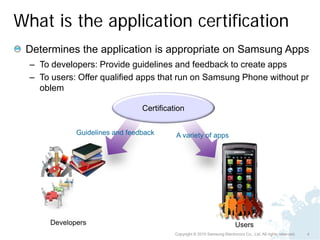
What is the application certification
 Determines the application is appropriate on Samsung Apps
  – To developers: Provide guidelines and feedback to create apps
  – To users: Offer qualified apps that run on Samsung Phone without pr
    oblem

                                 Certification


              Guidelines and feedback      A variety of apps


       Developers                                                           Users
                                           Copyright © 2010 Samsung Electronics Co., Ltd. All rights reserved.   4
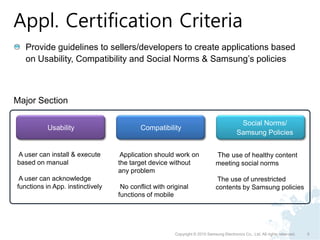
Appl. Certification Criteria
   Provide guidelines to sellers/developers to create applications based
   on Usability, Compatibility and Social Norms & Samsung’s policies


Major Section

                                                                                          Social Norms/
           Usability                      Compatibility
                                                                                         Samsung Policies


A user can install & execute       Application should work on                 The use of healthy content
based on manual                   the target device without                  meeting social norms
                                  any problem
 A user can acknowledge                                                      The use of unrestricted
functions in App. instinctively    No conflict with original                 contents by Samsung policies
                                  functions of mobile


                                                       Copyright © 2010 Samsung Electronics Co., Ltd. All rights reserved.   5
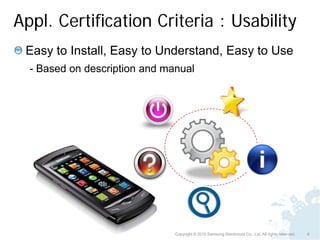
Appl. Certification Criteria : Usability
 Easy to Install, Easy to Understand, Easy to Use
  - Based on description and manual


                               Copyright © 2010 Samsung Electronics Co., Ltd. All rights reserved.   6
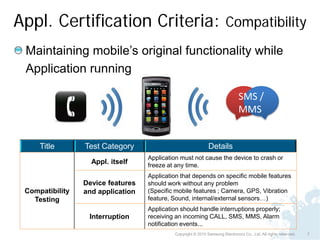
Appl. Certification Criteria: Compatibility
 Maintaining mobile’s original functionality while
 Application running

                                                                                SMS /
                                                                                MMS


     Title       Test Category                                 Details
                                   Application must not cause the device to crash or
                   Appl. itself    freeze at any time.
                                   Application that depends on specific mobile features
                 Device features   should work without any problem
 Compatibility   and application   (Specific mobile features ; Camera, GPS, Vibration
   Testing                         feature, Sound, internal/external sensors…)
                                   Application should handle interruptions properly;
                  Interruption     receiving an incoming CALL, SMS, MMS, Alarm
                                   notification events...
                                             Copyright © 2010 Samsung Electronics Co., Ltd. All rights reserved.   7
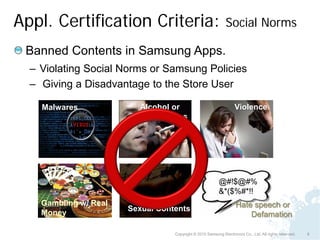
Appl. Certification Criteria:                                 Social Norms

 Banned Contents in Samsung Apps.
  – Violating Social Norms or Samsung Policies
  – Giving a Disadvantage to the Store User

    Malwares             Alcohol or                                Violence
                         drug usages


                                                          @#!$@#%
                                                          &*($%#*!!
    Gambling w/ Real                                               Hate speech or
                       Sexual Contents
    Money                                                              Defamation

                                  Copyright © 2010 Samsung Electronics Co., Ltd. All rights reserved.   8
Certification process


                        Copyright © 2010 Samsung Electronics Co., Ltd. All rights reserved.   9
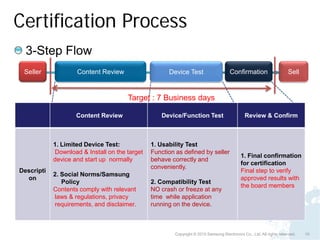
Certification Process
  3-Step Flow
 Seller             Content Review                   Device Test                     Confirmation                    Sell


                                      Target : 7 Business days

                    Content Review                 Device/Function Test                      Review & Confirm


            1. Limited Device Test:            1. Usability Test
            Download & Install on the target   Function as defined by seller
                                                                                           1. Final confirmation
            device and start up normally       behave correctly and
                                                                                           for certification
                                               conveniently.
Descripti                                                                                  Final step to verify
            2. Social Norms/Samsung
  on                                                                                       approved results with
               Policy                          2. Compatibility Test
                                                                                           the board members
            Contents comply with relevant      NO crash or freeze at any
            laws & regulations, privacy        time while application
            requirements, and disclaimer.      running on the device.


                                                       Copyright © 2010 Samsung Electronics Co., Ltd. All rights reserved.   10
Developer Support


                    Copyright © 2010 Samsung Electronics Co., Ltd. All rights reserved.   11
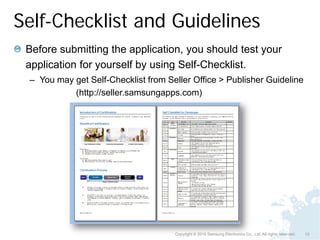
Self-Checklist and Guidelines
 Before submitting the application, you should test your
 application for yourself by using Self-Checklist.
 – You may get Self-Checklist from Seller Office > Publisher Guideline
           (http://seller.samsungapps.com)


                                     Copyright © 2010 Samsung Electronics Co., Ltd. All rights reserved.   12
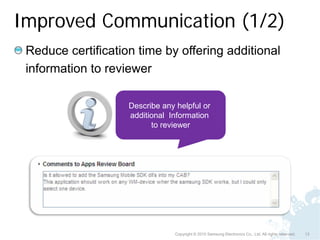
Improved Communication (1/2)
 Reduce certification time by offering additional
 information to reviewer

                    Describe any helpful or
                    additional Information
                          to reviewer


                                 Copyright © 2010 Samsung Electronics Co., Ltd. All rights reserved.   13
Improved Communication (2/2)
 Any Questions ? Any concerns?
 – Contact us at apps.cert.op@samsung.com


                          Send us any questions
                               or concerns
                          on certification process
                                or criteria


                           Copyright © 2010 Samsung Electronics Co., Ltd. All rights reserved.   14
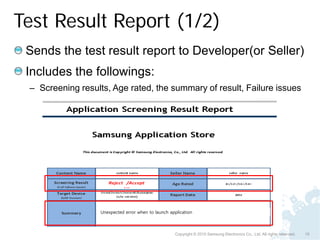
Test Result Report (1/2)
 Sends the test result report to Developer(or Seller)
 Includes the followings:
 – Screening results, Age rated, the summary of result, Failure issues


                   Unexpected error when to launch application


                                                      Copyright © 2010 Samsung Electronics Co., Ltd. All rights reserved.   15
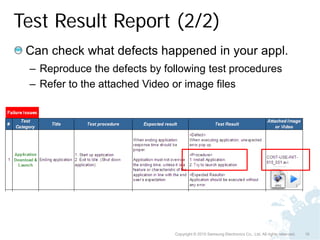
Test Result Report (2/2)
 Can check what defects happened in your appl.
 – Reproduce the defects by following test procedures
 – Refer to the attached Video or image files


                              Copyright © 2010 Samsung Electronics Co., Ltd. All rights reserved.   16
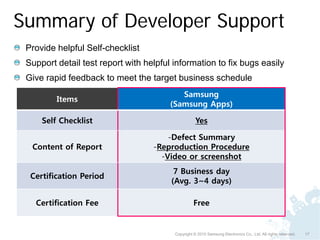
Summary of Developer Support
 Provide helpful Self-checklist
 Support detail test report with helpful information to fix bugs easily
 Give rapid feedback to meet the target business schedule
                                           Samsung
         Items
                                        (Samsung Apps)

     Self Checklist                                 Yes

                                       -Defect Summary
  Content of Report                -Reproduction Procedure
                                     -Video or screenshot
                                         7 Business day
  Certification Period
                                        (Avg. 3~4 days)

   Certification Fee                               Free


                                         Copyright © 2010 Samsung Electronics Co., Ltd. All rights reserved.   17
Frequently Occurred Defects


                   Copyright © 2010 Samsung Electronics Co., Ltd. All rights reserved.   18
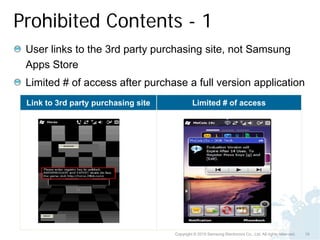
Prohibited Contents - 1
 User links to the 3rd party purchasing site, not Samsung
 Apps Store
 Limited # of access after purchase a full version application
 Link to 3rd party purchasing site            Limited # of access


                                     Copyright © 2010 Samsung Electronics Co., Ltd. All rights reserved.   19
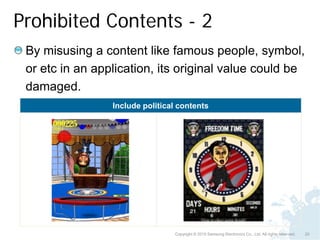
Prohibited Contents - 2
 By misusing a content like famous people, symbol,
 or etc in an application, its original value could be
 damaged.
                 Include political contents


                                 Copyright © 2010 Samsung Electronics Co., Ltd. All rights reserved.   20
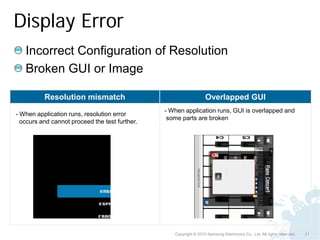
Display Error
   Incorrect Configuration of Resolution
   Broken GUI or Image

          Resolution mismatch                                      Overlapped GUI
                                                - When application runs, GUI is overlapped and
- When application runs, resolution error
                                                 some parts are broken
  occurs and cannot proceed the test further.


                                                   Copyright © 2010 Samsung Electronics Co., Ltd. All rights reserved.   21
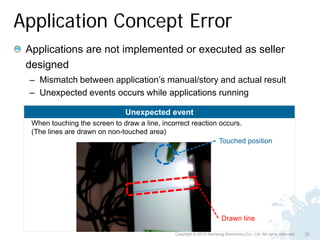
Application Concept Error
 Applications are not implemented or executed as seller
 designed
 – Mismatch between application’s manual/story and actual result
 – Unexpected events occurs while applications running

                               Unexpected event
  When touching the screen to draw a line, incorrect reaction occurs.
  (The lines are drawn on non-touched area)
                                                              Touched position


                                                                        Drawn line

                                               Copyright © 2010 Samsung Electronics Co., Ltd. All rights reserved.   22
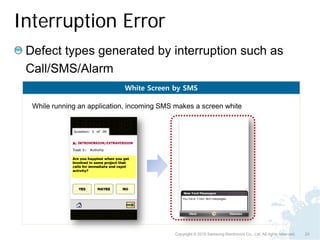
Interruption Error
 Defect types generated by interruption such as
 Call/SMS/Alarm
                             White Screen by SMS

  While running an application, incoming SMS makes a screen white


                                            Copyright © 2010 Samsung Electronics Co., Ltd. All rights reserved.   23
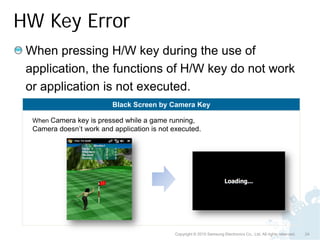
HW Key Error
 When pressing H/W key during the use of
 application, the functions of H/W key do not work
 or application is not executed.
                          Black Screen by Camera Key

  When Camera key is pressed while a game running,
  Camera doesn’t work and application is not executed.


                                              Copyright © 2010 Samsung Electronics Co., Ltd. All rights reserved.   24
Rotation Error
 When rotating mobile while applications running,
 application’s image is broken or application does
 not work normally.
                        Image broken by Rotation
         [Portrait mode]                                   [Landscape mode]


                                                Screen image is broken.
      Resolution is correct.                    Some functions do not work.
      All functions work well                   (A user can not hit the ball)

                                       Copyright © 2010 Samsung Electronics Co., Ltd. All rights reserved.   25
Conclusion


             Copyright © 2010 Samsung Electronics Co., Ltd. All rights reserved.   26
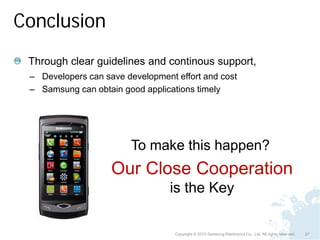
Conclusion
 Through clear guidelines and continous support,
 – Developers can save development effort and cost
 – Samsung can obtain good applications timely


                        To make this happen?
                    Our Close Cooperation
                                  is the Key

                                   Copyright © 2010 Samsung Electronics Co., Ltd. All rights reserved.   27
Dive into
 Copyright © 2010 Samsung Electronics Co., Ltd. All rights reserved.   28

introduction of application certification

  • 1.
    Introduction of Application Certification Copyright © Copyright© 2010 Samsung Co., Ltd. All rights reserved. reserved 2010 Samsung Electronics Electronics, Co., Ltd. All rights 1
  • 2.
    Contents Introduction ofCertification Certification Process Developer Support Frequently Occurred Defects Conclusion Copyright © 2010 Samsung Electronics Co., Ltd. All rights reserved. 2
  • 3.
    Introduction of Certification Copyright © 2010 Samsung Electronics Co., Ltd. All rights reserved. 3
  • 4.
    What is theapplication certification Determines the application is appropriate on Samsung Apps – To developers: Provide guidelines and feedback to create apps – To users: Offer qualified apps that run on Samsung Phone without pr oblem Certification Guidelines and feedback A variety of apps Developers Users Copyright © 2010 Samsung Electronics Co., Ltd. All rights reserved. 4
  • 5.
    Appl. Certification Criteria Provide guidelines to sellers/developers to create applications based on Usability, Compatibility and Social Norms & Samsung’s policies Major Section Social Norms/ Usability Compatibility Samsung Policies A user can install & execute Application should work on The use of healthy content based on manual the target device without meeting social norms any problem A user can acknowledge The use of unrestricted functions in App. instinctively No conflict with original contents by Samsung policies functions of mobile Copyright © 2010 Samsung Electronics Co., Ltd. All rights reserved. 5
  • 6.
    Appl. Certification Criteria: Usability Easy to Install, Easy to Understand, Easy to Use - Based on description and manual Copyright © 2010 Samsung Electronics Co., Ltd. All rights reserved. 6
  • 7.
    Appl. Certification Criteria:Compatibility Maintaining mobile’s original functionality while Application running SMS / MMS Title Test Category Details Application must not cause the device to crash or Appl. itself freeze at any time. Application that depends on specific mobile features Device features should work without any problem Compatibility and application (Specific mobile features ; Camera, GPS, Vibration Testing feature, Sound, internal/external sensors…) Application should handle interruptions properly; Interruption receiving an incoming CALL, SMS, MMS, Alarm notification events... Copyright © 2010 Samsung Electronics Co., Ltd. All rights reserved. 7
  • 8.
    Appl. Certification Criteria: Social Norms Banned Contents in Samsung Apps. – Violating Social Norms or Samsung Policies – Giving a Disadvantage to the Store User Malwares Alcohol or Violence drug usages @#!$@#% &*($%#*!! Gambling w/ Real Hate speech or Sexual Contents Money Defamation Copyright © 2010 Samsung Electronics Co., Ltd. All rights reserved. 8
  • 9.
    Certification process Copyright © 2010 Samsung Electronics Co., Ltd. All rights reserved. 9
  • 10.
    Certification Process 3-Step Flow Seller Content Review Device Test Confirmation Sell Target : 7 Business days Content Review Device/Function Test Review & Confirm 1. Limited Device Test: 1. Usability Test Download & Install on the target Function as defined by seller 1. Final confirmation device and start up normally behave correctly and for certification conveniently. Descripti Final step to verify 2. Social Norms/Samsung on approved results with Policy 2. Compatibility Test the board members Contents comply with relevant NO crash or freeze at any laws & regulations, privacy time while application requirements, and disclaimer. running on the device. Copyright © 2010 Samsung Electronics Co., Ltd. All rights reserved. 10
  • 11.
    Developer Support Copyright © 2010 Samsung Electronics Co., Ltd. All rights reserved. 11
  • 12.
    Self-Checklist and Guidelines Before submitting the application, you should test your application for yourself by using Self-Checklist. – You may get Self-Checklist from Seller Office > Publisher Guideline (http://seller.samsungapps.com) Copyright © 2010 Samsung Electronics Co., Ltd. All rights reserved. 12
  • 13.
    Improved Communication (1/2) Reduce certification time by offering additional information to reviewer Describe any helpful or additional Information to reviewer Copyright © 2010 Samsung Electronics Co., Ltd. All rights reserved. 13
  • 14.
    Improved Communication (2/2) Any Questions ? Any concerns? – Contact us at apps.cert.op@samsung.com Send us any questions or concerns on certification process or criteria Copyright © 2010 Samsung Electronics Co., Ltd. All rights reserved. 14
  • 15.
    Test Result Report(1/2) Sends the test result report to Developer(or Seller) Includes the followings: – Screening results, Age rated, the summary of result, Failure issues Unexpected error when to launch application Copyright © 2010 Samsung Electronics Co., Ltd. All rights reserved. 15
  • 16.
    Test Result Report(2/2) Can check what defects happened in your appl. – Reproduce the defects by following test procedures – Refer to the attached Video or image files Copyright © 2010 Samsung Electronics Co., Ltd. All rights reserved. 16
  • 17.
    Summary of DeveloperSupport Provide helpful Self-checklist Support detail test report with helpful information to fix bugs easily Give rapid feedback to meet the target business schedule Samsung Items (Samsung Apps) Self Checklist Yes -Defect Summary Content of Report -Reproduction Procedure -Video or screenshot 7 Business day Certification Period (Avg. 3~4 days) Certification Fee Free Copyright © 2010 Samsung Electronics Co., Ltd. All rights reserved. 17
  • 18.
    Frequently Occurred Defects Copyright © 2010 Samsung Electronics Co., Ltd. All rights reserved. 18
  • 19.
    Prohibited Contents -1 User links to the 3rd party purchasing site, not Samsung Apps Store Limited # of access after purchase a full version application Link to 3rd party purchasing site Limited # of access Copyright © 2010 Samsung Electronics Co., Ltd. All rights reserved. 19
  • 20.
    Prohibited Contents -2 By misusing a content like famous people, symbol, or etc in an application, its original value could be damaged. Include political contents Copyright © 2010 Samsung Electronics Co., Ltd. All rights reserved. 20
  • 21.
    Display Error Incorrect Configuration of Resolution Broken GUI or Image Resolution mismatch Overlapped GUI - When application runs, GUI is overlapped and - When application runs, resolution error some parts are broken occurs and cannot proceed the test further. Copyright © 2010 Samsung Electronics Co., Ltd. All rights reserved. 21
  • 22.
    Application Concept Error Applications are not implemented or executed as seller designed – Mismatch between application’s manual/story and actual result – Unexpected events occurs while applications running Unexpected event When touching the screen to draw a line, incorrect reaction occurs. (The lines are drawn on non-touched area) Touched position Drawn line Copyright © 2010 Samsung Electronics Co., Ltd. All rights reserved. 22
  • 23.
    Interruption Error Defecttypes generated by interruption such as Call/SMS/Alarm White Screen by SMS While running an application, incoming SMS makes a screen white Copyright © 2010 Samsung Electronics Co., Ltd. All rights reserved. 23
  • 24.
    HW Key Error When pressing H/W key during the use of application, the functions of H/W key do not work or application is not executed. Black Screen by Camera Key When Camera key is pressed while a game running, Camera doesn’t work and application is not executed. Copyright © 2010 Samsung Electronics Co., Ltd. All rights reserved. 24
  • 25.
    Rotation Error Whenrotating mobile while applications running, application’s image is broken or application does not work normally. Image broken by Rotation [Portrait mode] [Landscape mode] Screen image is broken. Resolution is correct. Some functions do not work. All functions work well (A user can not hit the ball) Copyright © 2010 Samsung Electronics Co., Ltd. All rights reserved. 25
  • 26.
    Conclusion Copyright © 2010 Samsung Electronics Co., Ltd. All rights reserved. 26
  • 27.
    Conclusion Through clearguidelines and continous support, – Developers can save development effort and cost – Samsung can obtain good applications timely To make this happen? Our Close Cooperation is the Key Copyright © 2010 Samsung Electronics Co., Ltd. All rights reserved. 27
  • 28.
    Dive into Copyright© 2010 Samsung Electronics Co., Ltd. All rights reserved. 28