



Improving Enterprise Application
Quality with MOTODEV App Validator


Eric Cloninger (ericc@motorola.com)
Product Line Manager, Development Tools

                                                                                                                           #appval
MOTOROLA and the Stylized M Logo are trademarks or registered trademarks of Motorola Trademark Holdings, LLC. All other
trademarks are the property of their respective owners. © 2012 Motorola Mobility, Inc. All rights reserved.               moto.ly/appvalint
Improving Enterprise Application Quality with MOTODEV App Validator


Agenda

• Asset management in an Android project
• The Matrix of Pain
• The MOTODEV App Validator
• Extending the MOTODEV App Validator
• Q&A


  © 2012 Motorola Mobility, Inc.                                                     #appval   2
Improving Enterprise Application Quality with MOTODEV App Validator


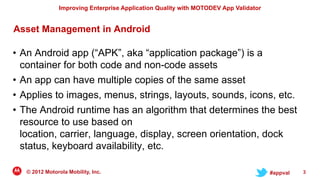
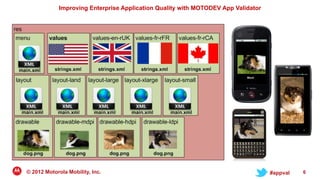
Asset Management in Android

• An Android app (“APK”, aka “application package”) is a
  container for both code and non-code assets
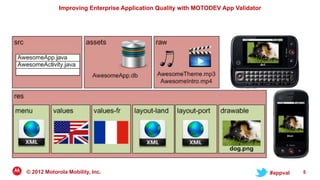
• An app can have multiple copies of the same asset
• Applies to images, menus, strings, layouts, sounds, icons, etc.
• The Android runtime has an algorithm that determines the best
  resource to use based on
  location, carrier, language, display, screen orientation, dock
  status, keyboard availability, etc.

   © 2012 Motorola Mobility, Inc.                                                     #appval   3
Improving Enterprise Application Quality with MOTODEV App Validator


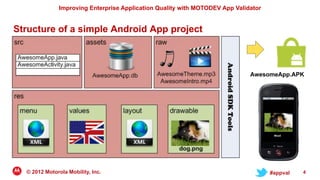
Structure of a simple Android App project


                                                                              AwesomeApp.APK


  © 2012 Motorola Mobility, Inc.                                                     #appval   4
Improving Enterprise Application Quality with MOTODEV App Validator


© 2012 Motorola Mobility, Inc.                                                     #appval   5
Improving Enterprise Application Quality with MOTODEV App Validator


© 2012 Motorola Mobility, Inc.                                                     #appval   6
Improving Enterprise Application Quality with MOTODEV App Validator


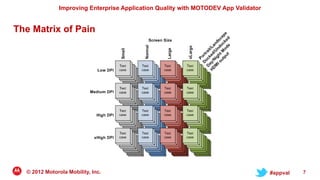
The Matrix of Pain


  © 2012 Motorola Mobility, Inc.                                                     #appval   7
Improving Enterprise Application Quality with MOTODEV App Validator


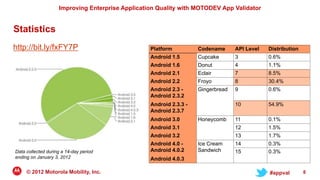
Statistics
http://bit.ly/fxFY7P                              Platform          Codename      API Level   Distribution
                                                  Android 1.5       Cupcake       3           0.6%
                                                  Android 1.6       Donut         4           1.1%
                                                  Android 2.1       Eclair        7           8.5%
                                                  Android 2.2       Froyo         8           30.4%
                                                  Android 2.3 -     Gingerbread   9           0.6%
                                                  Android 2.3.2
                                                  Android 2.3.3 -                 10          54.9%
                                                  Android 2.3.7
                                                  Android 3.0       Honeycomb     11          0.1%
                                                  Android 3.1                     12          1.5%
                                                  Android 3.2                     13          1.7%
                                                  Android 4.0 -     Ice Cream     14          0.3%
Data collected during a 14-day period             Android 4.0.2     Sandwich      15          0.3%
ending on January 3, 2012                         Android 4.0.3

     © 2012 Motorola Mobility, Inc.                                                           #appval        8
Improving Enterprise Application Quality with MOTODEV App Validator


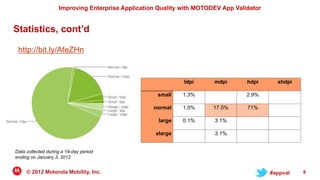
Statistics, cont’d

 http://bit.ly/AfeZHn


                                                             ldpi      mdpi       hdpi      xhdpi

                                                    small    1.3%                 2.9%

                                                   normal    1.0%      17.5%      71%

                                                     large   0.1%      3.1%

                                                    xlarge             3.1%


Data collected during a 14-day period
ending on January 3, 2012


     © 2012 Motorola Mobility, Inc.                                                       #appval   9
Improving Enterprise Application Quality with MOTODEV App Validator


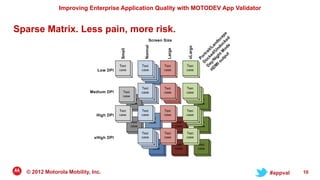
Sparse Matrix. Less pain, more risk.


  © 2012 Motorola Mobility, Inc.                                                     #appval   10
Improving Enterprise Application Quality with MOTODEV App Validator


Static Analysis

•   Solves a different problem set than runtime tests
•   Finds “Matrix of Pain” issues that runtime tests don‟t
•   Catches errors early in the development cycle
•   Automatable / scriptable systems


     © 2012 Motorola Mobility, Inc.                                                     #appval   11
MOTODEV App Validator
Improving Enterprise Application Quality with MOTODEV App Validator


MOTODEV App Validator

• Free static analysis tool that runs on Mac, Windows, and Linux
• Available as Eclipse plugins, a stand-alone command line tool,
  and as a drag-and-drop web app
• Operates on .APK files as well as contents of Eclipse projects
• Highly customizable for your needs
• Generates output as text, CSV, or XML for easy integration into
  existing development processes
• Download at http://moto.ly/mdsdl
   © 2012 Motorola Mobility, Inc.                                                     #appval   13
Improving Enterprise Application Quality with MOTODEV App Validator


MOTODEV App Validator – What it does

• Determines if an app requests too few or too many permissions
• Reports missing localized or default strings and missing
  drawable resources
• Discovers duplicate IDs in layouts
• Code problems (e.g. open database cursors that aren‟t closed)
• 35 unique conditions tested, described at the MOTODEV site
  – http://moto.ly/appvaldocs
  – More checkers and conditions added with each release

  © 2012 Motorola Mobility, Inc.                                                     #appval   14
Demo
 App Validator &
MOTODEV Studio
Improving Enterprise Application Quality with MOTODEV App Validator


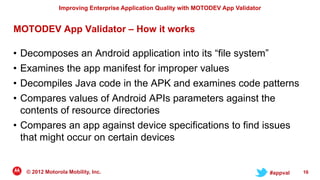
MOTODEV App Validator – How it works

• Decomposes an Android application into its “file system”
• Examines the app manifest for improper values
• Decompiles Java code in the APK and examines code patterns
• Compares values of Android APIs parameters against the
  contents of resource directories
• Compares an app against device specifications to find issues
  that might occur on certain devices


    © 2012 Motorola Mobility, Inc.                                                     #appval   16
Improving Enterprise Application Quality with MOTODEV App Validator


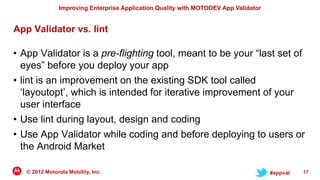
App Validator vs. lint

• App Validator is a pre-flighting tool, meant to be your “last set of
  eyes” before you deploy your app
• lint is an improvement on the existing SDK tool called
  „layoutopt‟, which is intended for iterative improvement of your
  user interface
• Use lint during layout, design and coding
• Use App Validator while coding and before deploying to users or
  the Android Market

   © 2012 Motorola Mobility, Inc.                                                     #appval   17
Demo
 App Validator on
the command line
Improving Enterprise Application Quality with MOTODEV App Validator


Command Line
Usage:
APPVALIDATOR [OPTION[PRM]]...
APPVALIDATOR [OPTION[PRM]]... -input [FILE] [OPTION[PRM]]...

Options:
-sdk SDKPATH             Specify an Android SDK to be used during validation instead of the default one
-c CHK [PRM]             Specify a checker to be run by supplying its ID (CHK) and specific checker parameters (PRM).
-dc CHK[.CND]            Specify a checker or condition that should not run by supplying its ID. The other checkers will run normally.
-d [DEV]                 Specify a device that will be checked against your application for incompatibilities. Use 'none' to skip.
-wx [CHK[.CND]]          Increases the warning level for all or for a particular set of checkers or conditions specified by CHK and CND IDs
-xw [CHK[.CND]]          Decreases warning level for all or for the particular set of checkers or conditions specified by CHK and CND IDs
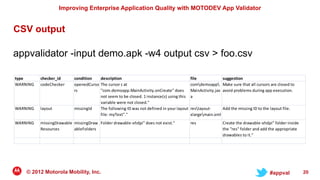
-output [TYPE]           Format output to the specified type. TYPE can be [text (default) | csv | xml].
-limit [COUNT]           Limit the number of output entries.
-list-checkers           List available checkers
-list-devices            List available devices
-describe-device [DEV]   Show information about a specific device
-help [CHK]              See information about general usage or about a checker by specifying its ID (CHK)
-vN                      Specify verbosity level, where N is one of: 0 (default, most succinct), 1, 2 (most verbose)
-wN                      Specify warning level, where N is one of: 0 (most severe warnings only), 1, 2 (default), 3, 4 (all warnings)


     © 2012 Motorola Mobility, Inc.                                                                                      #appval         19
Improving Enterprise Application Quality with MOTODEV App Validator


CSV output

appvalidator -input demo.apk -w4 output csv > foo.csv

type      checker_id      condition   description                                       file             suggestion
WARNING   codeChecker     openedCurso The cursor c at                                   comdemoapp Make sure that all cursors are closed to
                          rs          "com.demoapp.MainActivity.onCreate" does          MainActivity.jav avoid problems during app execution.
                                      not seem to be closed. 1 instance(s) using this   a
                                      variable were not closed."
WARNING   layout          missingId   The following ID was not defined in your layout   reslayout-     Add the missing ID to the layout file.
                                      file: myText"."                                   xlargemain.xml
WARNING   missingDrawable missingDraw Folder drawable-xhdpi" does not exist."           res              Create the drawable-xhdpi" folder inside
          Resources       ableFolders                                                                    the "res" folder and add the appropriate
                                                                                                         drawables to it."


    © 2012 Motorola Mobility, Inc.                                                                                                 #appval          20
Demo
App Validator @ MOTODEV
   moto.ly/webvalidator
Improving Enterprise Application Quality with MOTODEV App Validator


MOTODEV Testing Programs


• Online App Validator
  – http://moto.ly/webvalidator


• MOTOREADY App Testing for Motorola XOOM™
  • http://developer.motorola.com/testing/motoready/

   © 2012 Motorola Mobility, Inc.                                                     #appval   22
Improving Enterprise Application Quality with MOTODEV App Validator


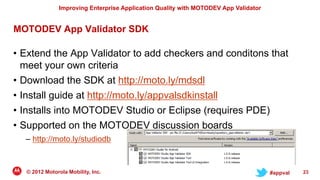
MOTODEV App Validator SDK

• Extend the App Validator to add checkers and conditons that
  meet your own criteria
• Download the SDK at http://moto.ly/mdsdl
• Install guide at http://moto.ly/appvalsdkinstall
• Installs into MOTODEV Studio or Eclipse (requires PDE)
• Supported on the MOTODEV discussion boards
  – http://moto.ly/studiodb


  © 2012 Motorola Mobility, Inc.                                                     #appval   23
Improving Enterprise Application Quality with MOTODEV App Validator


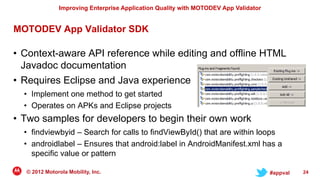
MOTODEV App Validator SDK

• Context-aware API reference while editing and offline HTML
  Javadoc documentation
• Requires Eclipse and Java experience
  • Implement one method to get started
  • Operates on APKs and Eclipse projects
• Two samples for developers to begin their own work
  • findviewbyid – Search for calls to findViewById() that are within loops
  • androidlabel – Ensures that android:label in AndroidManifest.xml has a
    specific value or pattern

  © 2012 Motorola Mobility, Inc.                                                     #appval   24
Improving Enterprise Application Quality with MOTODEV App Validator


Thank you

• Slides available at slideshare.net/motodev later today
• “Office hours” with the MOTODEV Tools team and developer
  support members, February 15, 1:00 PM PT (21:00 UTC)
• Follow-up email, including a link to the recording, to registered
  attendees
• Q&A


   © 2012 Motorola Mobility, Inc.                                                     #appval   25

MOTODEV App Validator

  • 1.
    Improving Enterprise Application Qualitywith MOTODEV App Validator Eric Cloninger (ericc@motorola.com) Product Line Manager, Development Tools #appval MOTOROLA and the Stylized M Logo are trademarks or registered trademarks of Motorola Trademark Holdings, LLC. All other trademarks are the property of their respective owners. © 2012 Motorola Mobility, Inc. All rights reserved. moto.ly/appvalint
  • 2.
    Improving Enterprise ApplicationQuality with MOTODEV App Validator Agenda • Asset management in an Android project • The Matrix of Pain • The MOTODEV App Validator • Extending the MOTODEV App Validator • Q&A © 2012 Motorola Mobility, Inc. #appval 2
  • 3.
    Improving Enterprise ApplicationQuality with MOTODEV App Validator Asset Management in Android • An Android app (“APK”, aka “application package”) is a container for both code and non-code assets • An app can have multiple copies of the same asset • Applies to images, menus, strings, layouts, sounds, icons, etc. • The Android runtime has an algorithm that determines the best resource to use based on location, carrier, language, display, screen orientation, dock status, keyboard availability, etc. © 2012 Motorola Mobility, Inc. #appval 3
  • 4.
    Improving Enterprise ApplicationQuality with MOTODEV App Validator Structure of a simple Android App project AwesomeApp.APK © 2012 Motorola Mobility, Inc. #appval 4
  • 5.
    Improving Enterprise ApplicationQuality with MOTODEV App Validator © 2012 Motorola Mobility, Inc. #appval 5
  • 6.
    Improving Enterprise ApplicationQuality with MOTODEV App Validator © 2012 Motorola Mobility, Inc. #appval 6
  • 7.
    Improving Enterprise ApplicationQuality with MOTODEV App Validator The Matrix of Pain © 2012 Motorola Mobility, Inc. #appval 7
  • 8.
    Improving Enterprise ApplicationQuality with MOTODEV App Validator Statistics http://bit.ly/fxFY7P Platform Codename API Level Distribution Android 1.5 Cupcake 3 0.6% Android 1.6 Donut 4 1.1% Android 2.1 Eclair 7 8.5% Android 2.2 Froyo 8 30.4% Android 2.3 - Gingerbread 9 0.6% Android 2.3.2 Android 2.3.3 - 10 54.9% Android 2.3.7 Android 3.0 Honeycomb 11 0.1% Android 3.1 12 1.5% Android 3.2 13 1.7% Android 4.0 - Ice Cream 14 0.3% Data collected during a 14-day period Android 4.0.2 Sandwich 15 0.3% ending on January 3, 2012 Android 4.0.3 © 2012 Motorola Mobility, Inc. #appval 8
  • 9.
    Improving Enterprise ApplicationQuality with MOTODEV App Validator Statistics, cont’d http://bit.ly/AfeZHn ldpi mdpi hdpi xhdpi small 1.3% 2.9% normal 1.0% 17.5% 71% large 0.1% 3.1% xlarge 3.1% Data collected during a 14-day period ending on January 3, 2012 © 2012 Motorola Mobility, Inc. #appval 9
  • 10.
    Improving Enterprise ApplicationQuality with MOTODEV App Validator Sparse Matrix. Less pain, more risk. © 2012 Motorola Mobility, Inc. #appval 10
  • 11.
    Improving Enterprise ApplicationQuality with MOTODEV App Validator Static Analysis • Solves a different problem set than runtime tests • Finds “Matrix of Pain” issues that runtime tests don‟t • Catches errors early in the development cycle • Automatable / scriptable systems © 2012 Motorola Mobility, Inc. #appval 11
  • 12.
  • 13.
    Improving Enterprise ApplicationQuality with MOTODEV App Validator MOTODEV App Validator • Free static analysis tool that runs on Mac, Windows, and Linux • Available as Eclipse plugins, a stand-alone command line tool, and as a drag-and-drop web app • Operates on .APK files as well as contents of Eclipse projects • Highly customizable for your needs • Generates output as text, CSV, or XML for easy integration into existing development processes • Download at http://moto.ly/mdsdl © 2012 Motorola Mobility, Inc. #appval 13
  • 14.
    Improving Enterprise ApplicationQuality with MOTODEV App Validator MOTODEV App Validator – What it does • Determines if an app requests too few or too many permissions • Reports missing localized or default strings and missing drawable resources • Discovers duplicate IDs in layouts • Code problems (e.g. open database cursors that aren‟t closed) • 35 unique conditions tested, described at the MOTODEV site – http://moto.ly/appvaldocs – More checkers and conditions added with each release © 2012 Motorola Mobility, Inc. #appval 14
  • 15.
    Demo App Validator& MOTODEV Studio
  • 16.
    Improving Enterprise ApplicationQuality with MOTODEV App Validator MOTODEV App Validator – How it works • Decomposes an Android application into its “file system” • Examines the app manifest for improper values • Decompiles Java code in the APK and examines code patterns • Compares values of Android APIs parameters against the contents of resource directories • Compares an app against device specifications to find issues that might occur on certain devices © 2012 Motorola Mobility, Inc. #appval 16
  • 17.
    Improving Enterprise ApplicationQuality with MOTODEV App Validator App Validator vs. lint • App Validator is a pre-flighting tool, meant to be your “last set of eyes” before you deploy your app • lint is an improvement on the existing SDK tool called „layoutopt‟, which is intended for iterative improvement of your user interface • Use lint during layout, design and coding • Use App Validator while coding and before deploying to users or the Android Market © 2012 Motorola Mobility, Inc. #appval 17
  • 18.
    Demo App Validatoron the command line
  • 19.
    Improving Enterprise ApplicationQuality with MOTODEV App Validator Command Line Usage: APPVALIDATOR [OPTION[PRM]]... APPVALIDATOR [OPTION[PRM]]... -input [FILE] [OPTION[PRM]]... Options: -sdk SDKPATH Specify an Android SDK to be used during validation instead of the default one -c CHK [PRM] Specify a checker to be run by supplying its ID (CHK) and specific checker parameters (PRM). -dc CHK[.CND] Specify a checker or condition that should not run by supplying its ID. The other checkers will run normally. -d [DEV] Specify a device that will be checked against your application for incompatibilities. Use 'none' to skip. -wx [CHK[.CND]] Increases the warning level for all or for a particular set of checkers or conditions specified by CHK and CND IDs -xw [CHK[.CND]] Decreases warning level for all or for the particular set of checkers or conditions specified by CHK and CND IDs -output [TYPE] Format output to the specified type. TYPE can be [text (default) | csv | xml]. -limit [COUNT] Limit the number of output entries. -list-checkers List available checkers -list-devices List available devices -describe-device [DEV] Show information about a specific device -help [CHK] See information about general usage or about a checker by specifying its ID (CHK) -vN Specify verbosity level, where N is one of: 0 (default, most succinct), 1, 2 (most verbose) -wN Specify warning level, where N is one of: 0 (most severe warnings only), 1, 2 (default), 3, 4 (all warnings) © 2012 Motorola Mobility, Inc. #appval 19
  • 20.
    Improving Enterprise ApplicationQuality with MOTODEV App Validator CSV output appvalidator -input demo.apk -w4 output csv > foo.csv type checker_id condition description file suggestion WARNING codeChecker openedCurso The cursor c at comdemoapp Make sure that all cursors are closed to rs "com.demoapp.MainActivity.onCreate" does MainActivity.jav avoid problems during app execution. not seem to be closed. 1 instance(s) using this a variable were not closed." WARNING layout missingId The following ID was not defined in your layout reslayout- Add the missing ID to the layout file. file: myText"." xlargemain.xml WARNING missingDrawable missingDraw Folder drawable-xhdpi" does not exist." res Create the drawable-xhdpi" folder inside Resources ableFolders the "res" folder and add the appropriate drawables to it." © 2012 Motorola Mobility, Inc. #appval 20
  • 21.
    Demo App Validator @MOTODEV moto.ly/webvalidator
  • 22.
    Improving Enterprise ApplicationQuality with MOTODEV App Validator MOTODEV Testing Programs • Online App Validator – http://moto.ly/webvalidator • MOTOREADY App Testing for Motorola XOOM™ • http://developer.motorola.com/testing/motoready/ © 2012 Motorola Mobility, Inc. #appval 22
  • 23.
    Improving Enterprise ApplicationQuality with MOTODEV App Validator MOTODEV App Validator SDK • Extend the App Validator to add checkers and conditons that meet your own criteria • Download the SDK at http://moto.ly/mdsdl • Install guide at http://moto.ly/appvalsdkinstall • Installs into MOTODEV Studio or Eclipse (requires PDE) • Supported on the MOTODEV discussion boards – http://moto.ly/studiodb © 2012 Motorola Mobility, Inc. #appval 23
  • 24.
    Improving Enterprise ApplicationQuality with MOTODEV App Validator MOTODEV App Validator SDK • Context-aware API reference while editing and offline HTML Javadoc documentation • Requires Eclipse and Java experience • Implement one method to get started • Operates on APKs and Eclipse projects • Two samples for developers to begin their own work • findviewbyid – Search for calls to findViewById() that are within loops • androidlabel – Ensures that android:label in AndroidManifest.xml has a specific value or pattern © 2012 Motorola Mobility, Inc. #appval 24
  • 25.
    Improving Enterprise ApplicationQuality with MOTODEV App Validator Thank you • Slides available at slideshare.net/motodev later today • “Office hours” with the MOTODEV Tools team and developer support members, February 15, 1:00 PM PT (21:00 UTC) • Follow-up email, including a link to the recording, to registered attendees • Q&A © 2012 Motorola Mobility, Inc. #appval 25