Introducing DWR (Direct Web
                 Remoting)
       BOOBUN Ashish – 20th November 2009
Agenda
   Ajax
   Introduction to DWR
   Steps to create a DWR web application
   DWR configurations
   Callback Mechanism
   Converters
   DWR .js file
   Comet with DWR
   Advantages
AJAX
   Asynchronous JavaScript and XML
   Collection of technologies used on client site to develop interactive
    web application
        Document Object Model (DOM)
        XML, JSON, HTML, plain text
        XMLHttpRequest (XHR) – for asynchronous
         communication
        JavaScript
   Retrieve data asynchronously from server while preserving the
    current state of the user interface
   Services on server had to be accessed via URL, with request
    parameters. For e.g. http://www.google.co.uk/search?q=ajax
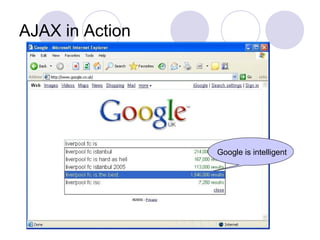
AJAX in Action


                 Google is intelligent
DWR Explained
   An open source library that resides between Java and JavaScript
    code.
   An implementation of AJAX in Java.
   Enables Java code on the server and JavaScript code in a browser
    to interact and call each other as simply as possible.
      Making the process resemble as a “Remote Procedure call”.
      Handles the low-level communication using the
        XMLHttpRequest object.
   DWR consists of two parts:
      A Java Servlet on the server to capture DWR’s request and
       sends response back to the browser
      JavaScript on browser side that handles request and response
       and dynamically update part of the web page accordingly.
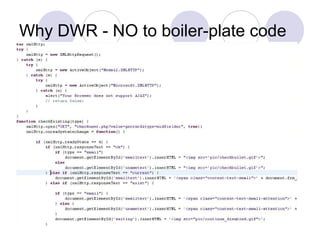
Why DWR - NO to boiler-plate code
Steps to create a DWR-enable AJAX
application
   Add maven dependency for DWR
   Add DWR servlet and DWR servlet mapping in web.xml
   Write Java service class and its corresponding methods
   Include DWR configuration (in spring bean configuration
    file, if using DWR v2.x. Else specify in dwr.xml if using
    v1.x) to state what classes and method of the backend
    will be exposed.
       Note that we will be integrating DWR with Spring
   Write client-side JavaScript code and invoke methods
    that has been exposed in an RPC style.
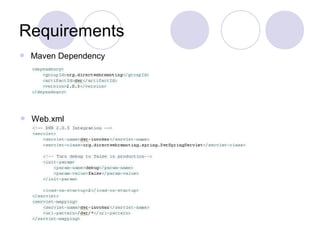
Requirements
   Maven Dependency


   Web.xml
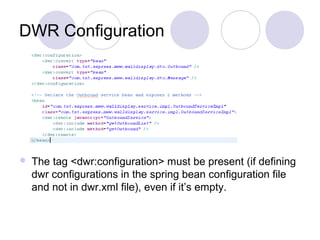
DWR Configuration


   The tag <dwr:configuration> must be present (if defining
    dwr configurations in the spring bean configuration file
    and not in dwr.xml file), even if it’s empty.
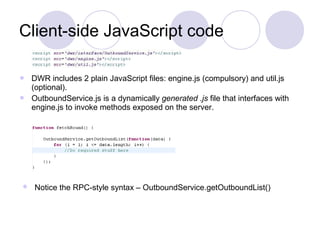
Client-side JavaScript code

 DWR includes 2 plain JavaScript files: engine.js (compulsory) and util.js
  (optional).
 OutboundService.js is a dynamically generated .js file that interfaces with
  engine.js to invoke methods exposed on the server.


   Notice the RPC-style syntax – OutboundService.getOutboundList()
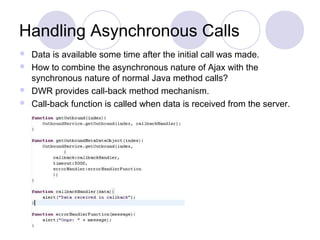
Handling Asynchronous Calls
 Data is available some time after the initial call was made.
 How to combine the asynchronous nature of Ajax with the
  synchronous nature of normal Java method calls?
 DWR provides call-back method mechanism.
 Call-back function is called when data is received from the server.
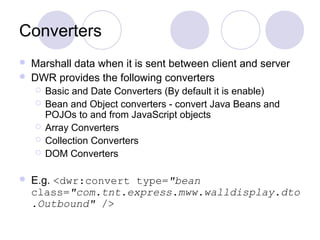
Converters
   Marshall data when it is sent between client and server
   DWR provides the following converters
       Basic and Date Converters (By default it is enable)
       Bean and Object converters - convert Java Beans and
        POJOs to and from JavaScript objects
       Array Converters
       Collection Converters
       DOM Converters

   E.g. <dwr:convert type="bean
    class="com.tnt.express.mww.walldisplay.dto
    .Outbound" />
DWR .js files
   Engine.js
      Used to marshal calls from the dynamically generated interface
       JavaScript function, so it is needed wherever DWR is used.
      Also contain set option methods related to timeout, errorHandler,
       warningHandler.

   Util.js
      Contains a number of utility functions to help you update your
        web pages with JavaScript data
      Can use it outside of DWR scope

      E.g. of utility methods
            $(id) – document.getElementById(id)
            DWRUtil.getValue(id) – get the value of the HTML element with id.
Comet with DWR
   Long-lived HTTP
   Reversing the usual communication flow
   Allow the server to start answering the browser’s
    request for information very slowly by pushing data to
    the browser without the latter ever explicitly requesting it
   Disadvantage:
       Server can be overloaded with too many connection
       Server takes too much time to push data in IE 6 browser
Advantages of using DWR
   DWR uses an “RPC-style mechanism” whereas almost all other forms
    of AJAX take a URL-based approach.
      DWR eliminate the needs of having each method (service) on the
        server to be addressable via URL.
   No need to map parameters and return value to HTML input form and
    responses respectively.
   DWR is packaged with JavaScript utility functions that allows you to
    dynamically modify HTML tags.
   The code for the service class is a simple POJO, and not tied to HTTP
    at all. Easier to unit test.
                                      You can write AJAX web app at
                                       the same rate as Jack Bauer
                                              works at CTU
   Codes is simpler, less verbose.
Question???

Introducing dwr (direct web remoting)

  • 1.
    Introducing DWR (DirectWeb Remoting) BOOBUN Ashish – 20th November 2009
  • 2.
    Agenda  Ajax  Introduction to DWR  Steps to create a DWR web application  DWR configurations  Callback Mechanism  Converters  DWR .js file  Comet with DWR  Advantages
  • 3.
    AJAX  Asynchronous JavaScript and XML  Collection of technologies used on client site to develop interactive web application  Document Object Model (DOM)  XML, JSON, HTML, plain text  XMLHttpRequest (XHR) – for asynchronous communication  JavaScript  Retrieve data asynchronously from server while preserving the current state of the user interface  Services on server had to be accessed via URL, with request parameters. For e.g. http://www.google.co.uk/search?q=ajax
  • 4.
    AJAX in Action Google is intelligent
  • 5.
    DWR Explained  An open source library that resides between Java and JavaScript code.  An implementation of AJAX in Java.  Enables Java code on the server and JavaScript code in a browser to interact and call each other as simply as possible.  Making the process resemble as a “Remote Procedure call”.  Handles the low-level communication using the XMLHttpRequest object.  DWR consists of two parts:  A Java Servlet on the server to capture DWR’s request and sends response back to the browser  JavaScript on browser side that handles request and response and dynamically update part of the web page accordingly.
  • 6.
    Why DWR -NO to boiler-plate code
  • 7.
    Steps to createa DWR-enable AJAX application  Add maven dependency for DWR  Add DWR servlet and DWR servlet mapping in web.xml  Write Java service class and its corresponding methods  Include DWR configuration (in spring bean configuration file, if using DWR v2.x. Else specify in dwr.xml if using v1.x) to state what classes and method of the backend will be exposed.  Note that we will be integrating DWR with Spring  Write client-side JavaScript code and invoke methods that has been exposed in an RPC style.
  • 8.
    Requirements  Maven Dependency  Web.xml
  • 9.
    DWR Configuration  The tag <dwr:configuration> must be present (if defining dwr configurations in the spring bean configuration file and not in dwr.xml file), even if it’s empty.
  • 10.
    Client-side JavaScript code DWR includes 2 plain JavaScript files: engine.js (compulsory) and util.js (optional).  OutboundService.js is a dynamically generated .js file that interfaces with engine.js to invoke methods exposed on the server.  Notice the RPC-style syntax – OutboundService.getOutboundList()
  • 11.
    Handling Asynchronous Calls Data is available some time after the initial call was made.  How to combine the asynchronous nature of Ajax with the synchronous nature of normal Java method calls?  DWR provides call-back method mechanism.  Call-back function is called when data is received from the server.
  • 12.
    Converters  Marshall data when it is sent between client and server  DWR provides the following converters  Basic and Date Converters (By default it is enable)  Bean and Object converters - convert Java Beans and POJOs to and from JavaScript objects  Array Converters  Collection Converters  DOM Converters  E.g. <dwr:convert type="bean class="com.tnt.express.mww.walldisplay.dto .Outbound" />
  • 13.
    DWR .js files  Engine.js  Used to marshal calls from the dynamically generated interface JavaScript function, so it is needed wherever DWR is used.  Also contain set option methods related to timeout, errorHandler, warningHandler.  Util.js  Contains a number of utility functions to help you update your web pages with JavaScript data  Can use it outside of DWR scope  E.g. of utility methods  $(id) – document.getElementById(id)  DWRUtil.getValue(id) – get the value of the HTML element with id.
  • 14.
    Comet with DWR  Long-lived HTTP  Reversing the usual communication flow  Allow the server to start answering the browser’s request for information very slowly by pushing data to the browser without the latter ever explicitly requesting it  Disadvantage:  Server can be overloaded with too many connection  Server takes too much time to push data in IE 6 browser
  • 15.
    Advantages of usingDWR  DWR uses an “RPC-style mechanism” whereas almost all other forms of AJAX take a URL-based approach.  DWR eliminate the needs of having each method (service) on the server to be addressable via URL.  No need to map parameters and return value to HTML input form and responses respectively.  DWR is packaged with JavaScript utility functions that allows you to dynamically modify HTML tags.  The code for the service class is a simple POJO, and not tied to HTTP at all. Easier to unit test. You can write AJAX web app at the same rate as Jack Bauer works at CTU  Codes is simpler, less verbose.
  • 16.