Google App Engine
By Sameer SatyamAcademic Presentation
Topics
• Cloud Computing
• Why PaaS?
• Google App Engine
• GAE Timeline
• Why Google App Engine?
• Architecture
• Working
• Deployment Cycle
• Physical Deployment Diagram
• Runtime Environments
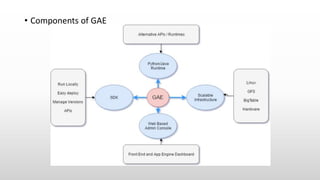
• Components of GAE
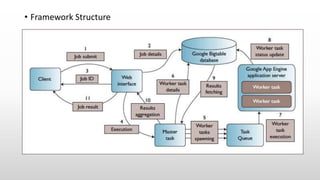
• Framework Structure
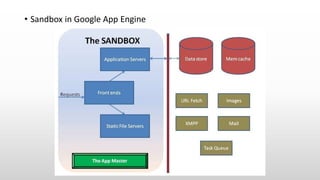
• Sandbox in GAE
• Services
• Usage Limits
• Discussion
• References
Cloud Computing
• According to the IEEE Computer Society Cloud Computing is: "A
paradigm in which information is permanently stored in servers on
the Internet and cached temporarily on clients that include desktops,
entertainment centers, table computers, notebooks, wall computers,
handhelds, etc.“
• Basic components such as client computers, distributed servers and
data centers.
• Types- Private, Public and Hybrid clouds.
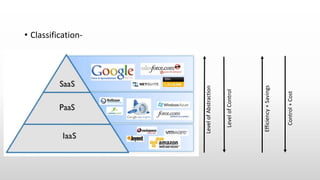
• Classification-
LevelofAbstraction
LevelofControl
Efficiency+Savings
Control+Cost
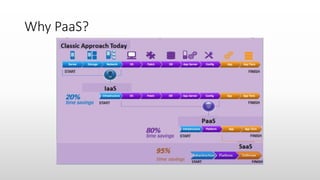
Why PaaS?
For Normal Users
• Increase deployment speed &
agility
• Reduce length & complexity of app
lifecycle
• Prevent loss in revenue
• Automate provisioning,
management, and auto-scaling of
applications and services on IaaS
platform
• Support continuous delivery
• Reduce infrastructure operation
costs
• Automation of admin tasks
For Developers
• No need to focus on
provisioning, managing, or
monitoring the compute,
storage, network and software
• Create prototypes and deploy
code rapidly
• No need to worry about
middleware, backup and
recovery
• Easily scalable
• Work in team from anywhere
Google App Engine
• Released in April 2008 by Google as PaaS to build Web Applications
on cloud
• Built on top of Google’s scale Infrastructure
• Dynamic Web Server, with full support for common web technologies
• Automatic scaling and load balancing
• Transactional DataStore Model
• Integration with Google Accounts through APIs
GAE Timeline
Time Feature
Apr 2008 Python launch
May 2008 Memcache, Image API
Jul 2008 Logs Export
Aug 2008 Batch write/delete
Oct 2008 HTTPS support
Dec 2008 Status dashboard, quota details
Feb 2009 Billing, larger files
Apr 2009 Java launch, DB import, Cron support, SDC
May 2009 Key-only queries
Jun 2009 Task queues
Aug 2009 Kindless queries
Sep 2009 XMPP
Oct 2009 Incoming Email
Dec 2009 Blobstore
Feb 2010 Data cursors, Async Urlfetch, App stats
Mar 2010 Denial-of-Service filtering, Availability option
May 2010 OpenID, OAuth, App Engine for Business, new bulkloader
Why Google App Engine?
• Automatic scaling and load balancing
• Lower total cost of ownership
• Web administration console & diagnostic utilities
• Enhances developing and deploying of web applications
• Multi-language support (Java, Python, GO, PHP..)
• Full featured SDK for local development
• Rich set of Google APIs
• Secure environment and easy to maintain
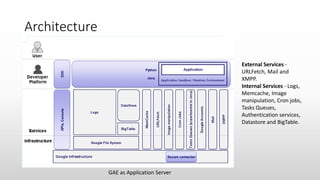
Architecture
External Services -
URLFetch, Mail and
XMPP.
Internal Services - Logs,
Memcache, Image
manipulation, Cron jobs,
Tasks Queues,
Authentication services,
Datastore and BigTable.
GAE as Application Server
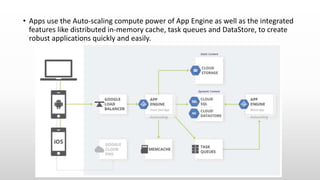
• Apps use the Auto-scaling compute power of App Engine as well as the integrated
features like distributed in-memory cache, task queues and DataStore, to create
robust applications quickly and easily.
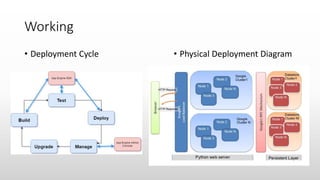
Working
• Deployment Cycle • Physical Deployment Diagram
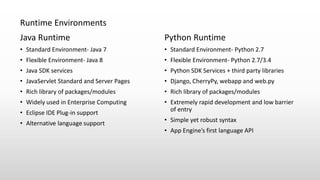
Java Runtime
• Standard Environment- Java 7
• Flexible Environment- Java 8
• Java SDK services
• JavaServlet Standard and Server Pages
• Rich library of packages/modules
• Widely used in Enterprise Computing
• Eclipse IDE Plug-in support
• Alternative language support
Python Runtime
• Standard Environment- Python 2.7
• Flexible Environment- Python 2.7/3.4
• Python SDK Services + third party libraries
• Django, CherryPy, webapp and web.py
• Rich library of packages/modules
• Extremely rapid development and low barrier
of entry
• Simple yet robust syntax
• App Engine’s first language API
Runtime Environments
• Components of GAE
• Framework Structure
• Sandbox in Google App Engine
Services
• DataStore – Provides a noSQL schemaless object datastore with a query
engine and transactions
• User Services
• User Accounts- Basic login and logout using API
• User Authentication- User authentication services
• Blobstore – Allows application to serve binary objects larger than entities
in the Datastore
• Memcache – Small memory shared among App Engine instances fast
access
• URLFetch – Retrieves web resources easily and efficiently
• Mail – Send and receive emails using Google’s infrastructure
• XMPP - Enables applications to send and receive chat messages from
any XMPP-compatible chat messaging service
• Task Queue - Application can perform tasks outside of responding to
web requests, this schedules tasks by adding in queue
• Image Manipulation – This service lets the application manipulate
images. With this API, it can resize, crop, rotate and flip images in
JPEG and PNG formats.
• Logging - Helps to read both application and request logs
programmatically using the Logs API.
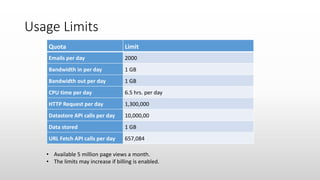
Usage Limits
Quota Limit
Emails per day 2000
Bandwidth in per day 1 GB
Bandwidth out per day 1 GB
CPU time per day 6.5 hrs. per day
HTTP Request per day 1,300,000
Datastore API calls per day 10,000,00
Data stored 1 GB
URL Fetch API calls per day 657,084
• Available 5 million page views a month.
• The limits may increase if billing is enabled.
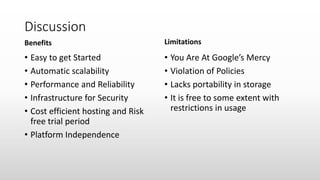
Discussion
Benefits
• Easy to get Started
• Automatic scalability
• Performance and Reliability
• Infrastructure for Security
• Cost efficient hosting and Risk
free trial period
• Platform Independence
Limitations
• You Are At Google’s Mercy
• Violation of Policies
• Lacks portability in storage
• It is free to some extent with
restrictions in usage
References
• Rabi Prasad Padhy, Manas Ranjan Patra and Suresh Chandra Satapathy, ”X-
as-a-Service: Cloud Computing with Google App Engine, Amazon Web
Services, Microsoft Azure and Force.com”,International Journal of
Computer Science and Telecommunications [Volume 2, Issue 9, December
2011].
• Maciej Malawski Maciej Kuzniar, Piotr Wjcik, Marian Bubak,”How to Use
Google App Engine for Free Computing”,1089-7801$26.00 2011 IEEE.
• Alexander Zahariev,”Google App Engine”,Helsinki University of Technology
2010 B. Website.
• https://appengine.google.com/
• http://en.wikipedia.org/wiki/GoogleAppEngine
• http://code.google.com/p/googleappengine/issues/list
• googleappengine.blogspot.com
Thank You

Google App Engine

  • 1.
    Google App Engine BySameer SatyamAcademic Presentation
  • 2.
    Topics • Cloud Computing •Why PaaS? • Google App Engine • GAE Timeline • Why Google App Engine? • Architecture • Working • Deployment Cycle • Physical Deployment Diagram • Runtime Environments • Components of GAE • Framework Structure • Sandbox in GAE • Services • Usage Limits • Discussion • References
  • 3.
    Cloud Computing • Accordingto the IEEE Computer Society Cloud Computing is: "A paradigm in which information is permanently stored in servers on the Internet and cached temporarily on clients that include desktops, entertainment centers, table computers, notebooks, wall computers, handhelds, etc.“ • Basic components such as client computers, distributed servers and data centers. • Types- Private, Public and Hybrid clouds.
  • 4.
  • 5.
  • 6.
    For Normal Users •Increase deployment speed & agility • Reduce length & complexity of app lifecycle • Prevent loss in revenue • Automate provisioning, management, and auto-scaling of applications and services on IaaS platform • Support continuous delivery • Reduce infrastructure operation costs • Automation of admin tasks For Developers • No need to focus on provisioning, managing, or monitoring the compute, storage, network and software • Create prototypes and deploy code rapidly • No need to worry about middleware, backup and recovery • Easily scalable • Work in team from anywhere
  • 7.
    Google App Engine •Released in April 2008 by Google as PaaS to build Web Applications on cloud • Built on top of Google’s scale Infrastructure • Dynamic Web Server, with full support for common web technologies • Automatic scaling and load balancing • Transactional DataStore Model • Integration with Google Accounts through APIs
  • 8.
    GAE Timeline Time Feature Apr2008 Python launch May 2008 Memcache, Image API Jul 2008 Logs Export Aug 2008 Batch write/delete Oct 2008 HTTPS support Dec 2008 Status dashboard, quota details Feb 2009 Billing, larger files Apr 2009 Java launch, DB import, Cron support, SDC May 2009 Key-only queries Jun 2009 Task queues Aug 2009 Kindless queries Sep 2009 XMPP Oct 2009 Incoming Email Dec 2009 Blobstore Feb 2010 Data cursors, Async Urlfetch, App stats Mar 2010 Denial-of-Service filtering, Availability option May 2010 OpenID, OAuth, App Engine for Business, new bulkloader
  • 9.
    Why Google AppEngine? • Automatic scaling and load balancing • Lower total cost of ownership • Web administration console & diagnostic utilities • Enhances developing and deploying of web applications • Multi-language support (Java, Python, GO, PHP..) • Full featured SDK for local development • Rich set of Google APIs • Secure environment and easy to maintain
  • 10.
    Architecture External Services - URLFetch,Mail and XMPP. Internal Services - Logs, Memcache, Image manipulation, Cron jobs, Tasks Queues, Authentication services, Datastore and BigTable. GAE as Application Server
  • 11.
    • Apps usethe Auto-scaling compute power of App Engine as well as the integrated features like distributed in-memory cache, task queues and DataStore, to create robust applications quickly and easily.
  • 12.
    Working • Deployment Cycle• Physical Deployment Diagram
  • 13.
    Java Runtime • StandardEnvironment- Java 7 • Flexible Environment- Java 8 • Java SDK services • JavaServlet Standard and Server Pages • Rich library of packages/modules • Widely used in Enterprise Computing • Eclipse IDE Plug-in support • Alternative language support Python Runtime • Standard Environment- Python 2.7 • Flexible Environment- Python 2.7/3.4 • Python SDK Services + third party libraries • Django, CherryPy, webapp and web.py • Rich library of packages/modules • Extremely rapid development and low barrier of entry • Simple yet robust syntax • App Engine’s first language API Runtime Environments
  • 14.
  • 15.
  • 16.
    • Sandbox inGoogle App Engine
  • 17.
    Services • DataStore –Provides a noSQL schemaless object datastore with a query engine and transactions • User Services • User Accounts- Basic login and logout using API • User Authentication- User authentication services • Blobstore – Allows application to serve binary objects larger than entities in the Datastore • Memcache – Small memory shared among App Engine instances fast access • URLFetch – Retrieves web resources easily and efficiently • Mail – Send and receive emails using Google’s infrastructure
  • 18.
    • XMPP -Enables applications to send and receive chat messages from any XMPP-compatible chat messaging service • Task Queue - Application can perform tasks outside of responding to web requests, this schedules tasks by adding in queue • Image Manipulation – This service lets the application manipulate images. With this API, it can resize, crop, rotate and flip images in JPEG and PNG formats. • Logging - Helps to read both application and request logs programmatically using the Logs API.
  • 19.
    Usage Limits Quota Limit Emailsper day 2000 Bandwidth in per day 1 GB Bandwidth out per day 1 GB CPU time per day 6.5 hrs. per day HTTP Request per day 1,300,000 Datastore API calls per day 10,000,00 Data stored 1 GB URL Fetch API calls per day 657,084 • Available 5 million page views a month. • The limits may increase if billing is enabled.
  • 20.
    Discussion Benefits • Easy toget Started • Automatic scalability • Performance and Reliability • Infrastructure for Security • Cost efficient hosting and Risk free trial period • Platform Independence Limitations • You Are At Google’s Mercy • Violation of Policies • Lacks portability in storage • It is free to some extent with restrictions in usage
  • 21.
    References • Rabi PrasadPadhy, Manas Ranjan Patra and Suresh Chandra Satapathy, ”X- as-a-Service: Cloud Computing with Google App Engine, Amazon Web Services, Microsoft Azure and Force.com”,International Journal of Computer Science and Telecommunications [Volume 2, Issue 9, December 2011]. • Maciej Malawski Maciej Kuzniar, Piotr Wjcik, Marian Bubak,”How to Use Google App Engine for Free Computing”,1089-7801$26.00 2011 IEEE. • Alexander Zahariev,”Google App Engine”,Helsinki University of Technology 2010 B. Website. • https://appengine.google.com/ • http://en.wikipedia.org/wiki/GoogleAppEngine • http://code.google.com/p/googleappengine/issues/list • googleappengine.blogspot.com
  • 22.