Tribute to rvm


                               Introducing cvm
                 The best way to manage your C++ applications dependencies


                                                                 Offirmo, 18/01/2013
cvm
C++ Version Manager


  a tool
      to automatically manage
        your C++ application's dependencies
Once upon a time…

…there was a programmer…


…who was developping an honest C++
application…
His C++ app was not standalone…


His app was based on a C++ lib called :


He was using                          of course.


He was also unit-testing using : UnitTest++


…and using cmake to build. (and gcc of course)
One day, the app got (somewhat) ready to go in
production.


         The programmer set up a clean linux
box
          and began installing his app…
          (Note : it's a server app)


   Then the troubles arrived...
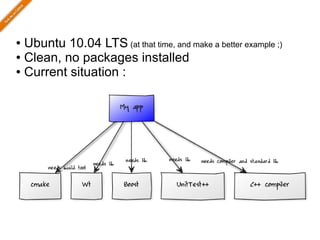
● Ubuntu 10.04 LTS (at that time, and make a better example ;)
● Clean, no packages installed

● Current situation :
● My app : git clone https://github.com/abcd/xyz
  ● So I need git : sudo apt-get install git

● Need gcc & co. : sudo apt-get install build-essentials

● Need wt : sudo apt-get install witty witty-dbg witty-

dev
● Need Boost : sudo apt-get install libboost-dev
● Nedd UnitTest++, which has no packet :

    wget …
    make     (yes, it's a very simple lib)
● Need cmake : sudo             apt-get install cmake
● Let's compile :

    cmake ../xyz
    make

                 Fail !!!
●First cmake can't find UnitTest++ that I installed
manually in a custom dir, so :
     export … (have fun with pathes)
●Then cmake of Ubuntu 10.04 is too old for my
app, I need to install latest from source :
     wget …
     ./bootstrap --prefix="…"
     make                                       Pain !!!
     make install
●   Default Wt is also too old :               Pain!!!
     git clone …
     cmake ../… -PREFIX … -DCONFIGDIR …
     make
                                               Fail !!!
     make install
     --> but FAIL because Boost is too old !
●   So for Boost :
      ...
            Well, you get it…
Pain ! Fail ! %$# !
 Completely value-less task !
Utter loss of time and energy !
Unworthy of us programmers !
proposed solution : the cvm tool
sudo apt-get install git
git clone git://github.com/Offirmo/cvm.git
                                   cvm
(add cvm/bin to the path)
     cvm
git clone git://github.com/abcd/myapp.git
                                myapp

cvm new myapp

cd myapp
cvm set_compfile   Installation of
cvm update
cvm upgrade
                   dependencies
                                            Done !
mkdir ../build
cd ../build
                                App build
cvm_exec cmake ../myapp
cvm_exec make
The magic…
●   The app provides a «component file» listing its
    dependencies :
    (simplified)
    # As far as I know, no particular gcc version is required
    require compiler.gcc
    require lib.std

    # need a recent version
    require lib.UnitTest++, version : 1.4+

    # need a recent version
    require lib.Boost,      version : 1.51+

    # need a recent version
    require lib.Wt,         version : 3.2.3
The magic…
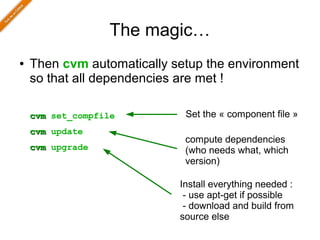
●   Then cvm automatically setup the environment
    so that all dependencies are met !

    cvm set_compfile         Set the « component file »
    cvm update
                             compute dependencies
    cvm upgrade              (who needs what, which
                             version)

                            Install everything needed :
                             - use apt-get if possible
                             - download and build from
                            source else
The magic…
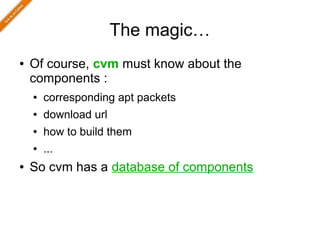
●   Of course, cvm must know about the
    components :
    ●   corresponding apt packets
    ●   download url
    ●   how to build them
    ●   ...
●   So cvm has a database of components
Does it ring a bell ?
●   Other languages have such a tool for a while
    ●   ex. ruby "bundler" http://gembundler.com/


●   It's a shame that C++ still didn't have it !
    ●   Fixed ;)
More awesomness...
●   cvm installs everything in user-land
    ●   No need to be admin (except for apt-get install)
●   cvm doesn't mess with the env vars
    ●   set them on demand, hence the cvm_exec wrapper
●   cvm can ensure exact components versions
    ●   Perfect for production environment
●   cvm can maintain separate sets of components
    ●   So you can have different versions of the
        components for different apps/versions
More awesomness...
●   cvm has more nice features
    ●   Not listed here for brievity, see «bonuses»
●   cvm is easy to install
    ●   Just bash scripts !
●   cvm is totally free
    ●   Copyfree license, do whatever you want with it !
Current status
● cvm works (at last for me on my machine ;)
● It is still rough :


  ● compfile syntax still in progress


  ● multi-users usage needs to be enhanced


  ● only 16 components at this time (jan-2013)


    ● But easy to add some !


  ● Code and architecture would benefit from a little

    cleanup to ease contributions
● Comments and suggestions are welcomed !


● Fork me on github ! (doc on internals coming soon)
One more thing...
●   Why c.v.m. ?
    ●   Because of rvm (ruby version manager) https://rvm.io/


●   Like rvm, cvm is meant to play with multiple
    compilers : gcc 4.7 (for C++11), clang...
    ●   This feature is not available yet (jan-2013)
Thank you !


https://github.com/Offirmo/cvm
Bonuses
Dependencies handling
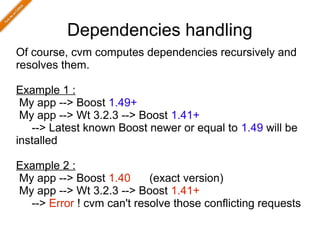
Of course, cvm computes dependencies recursively and
resolves them.

Example 1 :
 My app --> Boost 1.49+
 My app --> Wt 3.2.3 --> Boost 1.41+
   --> Latest known Boost newer or equal to 1.49 will be
installed

Example 2 :
My app --> Boost 1.40      (exact version)
My app --> Wt 3.2.3 --> Boost 1.41+
  --> Error ! cvm can't resolve those conflicting requests
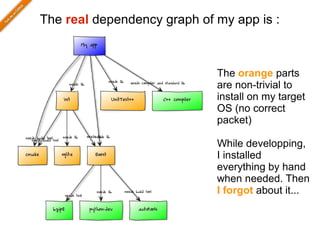
The real dependency graph of my app is :


                             The orange parts
                             are non-trivial to
                             install on my target
                             OS (no correct
                             packet)

                             While developping,
                             I installed
                             everything by hand
                             when needed. Then
                             I forgot about it...
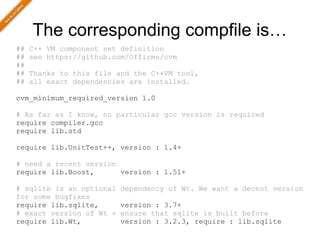
The corresponding compfile is…
##   C++ VM component set definition
##   see https://github.com/Offirmo/cvm
##
##   Thanks to this file and the C++VM tool,
##   all exact dependencies are installed.

cvm_minimum_required_version 1.0

# As far as I know, no particular gcc version is required
require compiler.gcc
require lib.std

require lib.UnitTest++, version : 1.4+

# need a recent version
require lib.Boost,      version : 1.51+

# sqlite is an optional   dependency of Wt. We want a decent version
for some bugfixes
require lib.sqlite,       version : 3.7+
# exact version of Wt +   ensure that sqlite is built before
require lib.Wt,           version : 3.2.3, require : lib.sqlite
Additional features
● cvm automatically set env vars needed by
autotools and cmake, so they correctly find the
manually installed libs (over the system one)
● cvm can automatically detect headers for libs

that don't provide a «make install»
● cvm automatically creates a folder with all

headers so you can provide it to your IDE code
indexer (ex. Eclipse)
● cvm try to save resources by caching common

resources : downloaded archives and source
code (src not duplicated if out-of-src build is
available)
Links :
● https://rvm.io/

● http://gembundler.com/


S/O
● http://stackoverflow.com/q/14263324/587407

● http://stackoverflow.com/q/1827705/587407


Image credits :
● http://tecfa.unige.ch/tecfa/teaching/UVLibre/0001/bin17/troubles.html

● wikipedia

Introducing cvm...

  • 1.
    Tribute to rvm Introducing cvm The best way to manage your C++ applications dependencies Offirmo, 18/01/2013
  • 2.
    cvm C++ Version Manager a tool to automatically manage your C++ application's dependencies
  • 3.
    Once upon atime… …there was a programmer… …who was developping an honest C++ application…
  • 4.
    His C++ appwas not standalone… His app was based on a C++ lib called : He was using of course. He was also unit-testing using : UnitTest++ …and using cmake to build. (and gcc of course)
  • 5.
    One day, theapp got (somewhat) ready to go in production. The programmer set up a clean linux box and began installing his app… (Note : it's a server app) Then the troubles arrived...
  • 6.
    ● Ubuntu 10.04LTS (at that time, and make a better example ;) ● Clean, no packages installed ● Current situation :
  • 7.
    ● My app: git clone https://github.com/abcd/xyz ● So I need git : sudo apt-get install git ● Need gcc & co. : sudo apt-get install build-essentials ● Need wt : sudo apt-get install witty witty-dbg witty- dev ● Need Boost : sudo apt-get install libboost-dev ● Nedd UnitTest++, which has no packet : wget … make (yes, it's a very simple lib) ● Need cmake : sudo apt-get install cmake ● Let's compile : cmake ../xyz make Fail !!!
  • 8.
    ●First cmake can'tfind UnitTest++ that I installed manually in a custom dir, so : export … (have fun with pathes) ●Then cmake of Ubuntu 10.04 is too old for my app, I need to install latest from source : wget … ./bootstrap --prefix="…" make Pain !!! make install ● Default Wt is also too old : Pain!!! git clone … cmake ../… -PREFIX … -DCONFIGDIR … make Fail !!! make install --> but FAIL because Boost is too old ! ● So for Boost : ... Well, you get it…
  • 9.
    Pain ! Fail! %$# ! Completely value-less task ! Utter loss of time and energy ! Unworthy of us programmers !
  • 10.
    proposed solution :the cvm tool sudo apt-get install git git clone git://github.com/Offirmo/cvm.git cvm (add cvm/bin to the path) cvm git clone git://github.com/abcd/myapp.git myapp cvm new myapp cd myapp cvm set_compfile Installation of cvm update cvm upgrade dependencies Done ! mkdir ../build cd ../build App build cvm_exec cmake ../myapp cvm_exec make
  • 11.
    The magic… ● The app provides a «component file» listing its dependencies : (simplified) # As far as I know, no particular gcc version is required require compiler.gcc require lib.std # need a recent version require lib.UnitTest++, version : 1.4+ # need a recent version require lib.Boost, version : 1.51+ # need a recent version require lib.Wt, version : 3.2.3
  • 12.
    The magic… ● Then cvm automatically setup the environment so that all dependencies are met ! cvm set_compfile Set the « component file » cvm update compute dependencies cvm upgrade (who needs what, which version) Install everything needed : - use apt-get if possible - download and build from source else
  • 13.
    The magic… ● Of course, cvm must know about the components : ● corresponding apt packets ● download url ● how to build them ● ... ● So cvm has a database of components
  • 14.
    Does it ringa bell ? ● Other languages have such a tool for a while ● ex. ruby "bundler" http://gembundler.com/ ● It's a shame that C++ still didn't have it ! ● Fixed ;)
  • 15.
    More awesomness... ● cvm installs everything in user-land ● No need to be admin (except for apt-get install) ● cvm doesn't mess with the env vars ● set them on demand, hence the cvm_exec wrapper ● cvm can ensure exact components versions ● Perfect for production environment ● cvm can maintain separate sets of components ● So you can have different versions of the components for different apps/versions
  • 16.
    More awesomness... ● cvm has more nice features ● Not listed here for brievity, see «bonuses» ● cvm is easy to install ● Just bash scripts ! ● cvm is totally free ● Copyfree license, do whatever you want with it !
  • 17.
    Current status ● cvmworks (at last for me on my machine ;) ● It is still rough : ● compfile syntax still in progress ● multi-users usage needs to be enhanced ● only 16 components at this time (jan-2013) ● But easy to add some ! ● Code and architecture would benefit from a little cleanup to ease contributions ● Comments and suggestions are welcomed ! ● Fork me on github ! (doc on internals coming soon)
  • 18.
    One more thing... ● Why c.v.m. ? ● Because of rvm (ruby version manager) https://rvm.io/ ● Like rvm, cvm is meant to play with multiple compilers : gcc 4.7 (for C++11), clang... ● This feature is not available yet (jan-2013)
  • 19.
  • 20.
  • 21.
    Dependencies handling Of course,cvm computes dependencies recursively and resolves them. Example 1 : My app --> Boost 1.49+ My app --> Wt 3.2.3 --> Boost 1.41+ --> Latest known Boost newer or equal to 1.49 will be installed Example 2 : My app --> Boost 1.40 (exact version) My app --> Wt 3.2.3 --> Boost 1.41+ --> Error ! cvm can't resolve those conflicting requests
  • 22.
    The real dependencygraph of my app is : The orange parts are non-trivial to install on my target OS (no correct packet) While developping, I installed everything by hand when needed. Then I forgot about it...
  • 23.
    The corresponding compfileis… ## C++ VM component set definition ## see https://github.com/Offirmo/cvm ## ## Thanks to this file and the C++VM tool, ## all exact dependencies are installed. cvm_minimum_required_version 1.0 # As far as I know, no particular gcc version is required require compiler.gcc require lib.std require lib.UnitTest++, version : 1.4+ # need a recent version require lib.Boost, version : 1.51+ # sqlite is an optional dependency of Wt. We want a decent version for some bugfixes require lib.sqlite, version : 3.7+ # exact version of Wt + ensure that sqlite is built before require lib.Wt, version : 3.2.3, require : lib.sqlite
  • 24.
    Additional features ● cvmautomatically set env vars needed by autotools and cmake, so they correctly find the manually installed libs (over the system one) ● cvm can automatically detect headers for libs that don't provide a «make install» ● cvm automatically creates a folder with all headers so you can provide it to your IDE code indexer (ex. Eclipse) ● cvm try to save resources by caching common resources : downloaded archives and source code (src not duplicated if out-of-src build is available)
  • 25.
    Links : ● https://rvm.io/ ●http://gembundler.com/ S/O ● http://stackoverflow.com/q/14263324/587407 ● http://stackoverflow.com/q/1827705/587407 Image credits : ● http://tecfa.unige.ch/tecfa/teaching/UVLibre/0001/bin17/troubles.html ● wikipedia