Subversion
Why I need a version control system?
How many VCS?
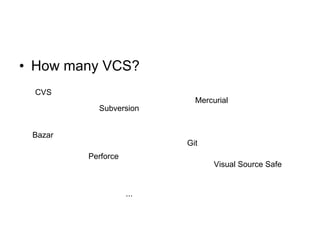
How many VCS? CVS Subversion Mercurial Git Bazar Perforce Visual Source Safe ...
How to choose VCS?
My project Project SISMA Peoples: Software Engineers Geophysics researchers and PhD Artifact: Word Documents reStructuredText documents Computational softwares (Bash, C, C++, Fortran) Other project (Java) Security concerns: Authorizations and Authentication needed Other constraints: Big repo, need of sparse checkout Binary data Clients needed for Windows, Mac and Linux
My Choice Subversion Reasons: Central repository model Path Based authorization Selective checkout Fewer concepts HTTP Friendly (subset of WebDAV) Works on Linux, Mac and Windows Word comparison (through TortoiseSVN)
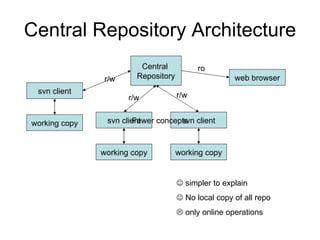
Central Repository Architecture Central  Repository working copy svn client working copy svn client working copy svn client web browser r/w r/w r/w ro    simpler to explain    No local copy of all repo    only online operations Fewer concepts
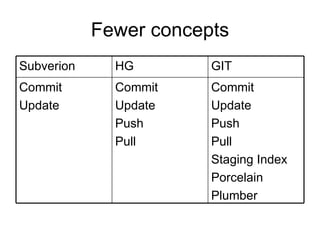
Fewer concepts Commit Update Push Pull Staging Index Porcelain Plumber Commit Update Push Pull Commit Update GIT HG Subverion
Clients Linux and Mac: svn client Windows: TortoiseSVN $ svn help usage: svn <subcommand> [options] [args] Subversion command-line client, version 1.6.3. Type 'svn help <subcommand>' for help on a specific subcommand. Type 'svn --version' to see the program version and RA modules or 'svn --version --quiet' to see just the version number.
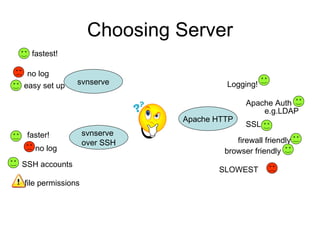
Choosing Server Apache HTTP svnserve svnserve  over SSH fastest! faster! Logging! no  log no  log easy set up SSH accounts file permissions Apache Auth SSL firewall friendly browser friendly e.g.LDAP SLOWEST
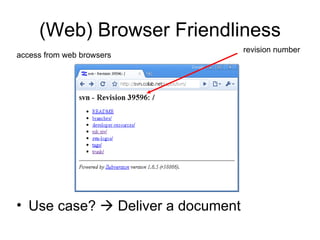
(Web) Browser Friendliness revision number access from web browsers Use case?    Deliver a document
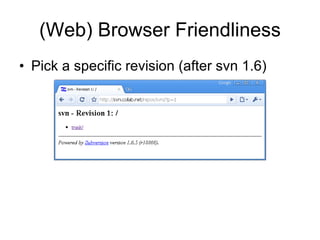
(Web) Browser Friendliness Pick a specific revision (after svn 1.6)
Authentication  and Authorization  (corporate secrets) Why bother about?  Because is a requirement: Copyright on some artifacts Artifacts from different partners Non disclosures agreements Secrets! How? Path Based Authentication ( http://svnbook.red-bean.com/nightly/en/svn.serverconfig.pathbasedauthz.html ) Coarse Grained   Difficult to maintain   Doesn’t know anything about history   The only choice  
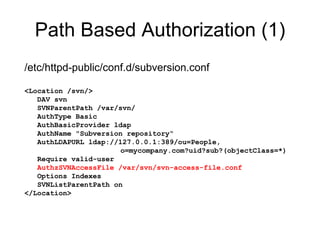
Path Based Authorization (1) /etc/httpd-public/conf.d/subversion.conf  <Location /svn/> DAV svn SVNParentPath /var/svn/ AuthType Basic AuthBasicProvider ldap AuthName &quot;Subversion repository“ AuthLDAPURL ldap://127.0.0.1:389/ou=People, o=mycompany.com?uid?sub?(objectClass=*) Require valid-user AuthzSVNAccessFile /var/svn/svn-access-file.conf Options Indexes SVNListParentPath on </Location>
Path Based Authorization (2) /var/svn/svn-access-file.conf [groups] mycompany = bob, alice partner1 = charlie, bravo [project1:/] @mycompany=rw @partner1=r [project1:/secrets] @mycompany=rw  @partner1= [project1:/partner-contribution] @mycompany=rw  @partner1=rw   The real file is much bigger! 434 lines   You can split it!   If not well formatted…   Difficult to test write without actually write in the repository!
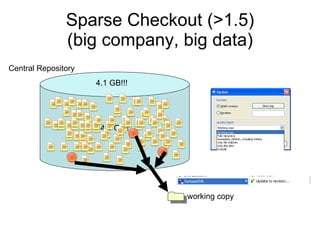
Sparse Checkout (>1.5) (big company, big data) working copy 4.1 Gb!! Central Repository 4.1 GB!!!
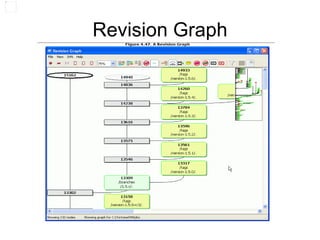
Tortoise SVN Windows Client Integrates with Windows Explorer  Supports basic operations Check Out Update Commit Show Log Other operations Repository Browser Visual Comparison of Word Files Revision Graph
Lab Creating a local repo  Creating a repo on beanstalkapp.com Making the first Checkout Visual comparing Word documents Visual comparing Images Visualizing the history of a document Using revision graph (with comparing) Repo Browser con trash-cli (in locale) Esempio di sparse checkout Repair move
Non solo Subversion Subversion server, local mercurial: hgsubversion Using some TortoiseSVN comparison facilities in TortoiseHG: http://blog.andreafrancia.it/2009/09/how-compare-word-documents-in.html
Links Per imparare ad usare Subversion: http://svnbook.red-bean.com /   Per la scelta: http :// versioncontrolblog.com/ Hosting privato (ad esempio): http://beanstalkapp.com/ Hostint opensource (ad esempio): http:// code.google.com/hosting/createProject   blog.andreafrancia.it: http://blog.andreafrancia.it/2009/10/utilities-for-managing-svnignore.html http://blog.andreafrancia.it/2009/07/il-protocollo-di-subversion-si-rinnova.html http://blog.andreafrancia.it/2008/12/creare-un-repository-personale-svnssh.html
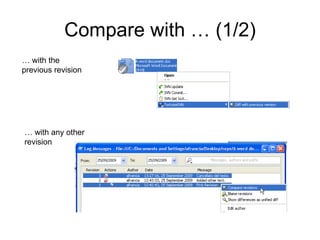
Visual comparison Create a repo. Check out the repo in a wc. Create a Word Document and write something in it. Commit adding the file. Modify the document and commit again. Show differences.
Compare with … (1/2) … with any other revision … with the previous revision
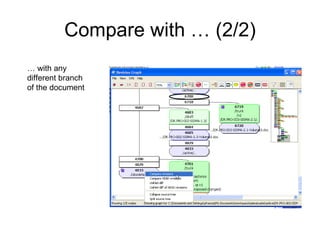
Compare with … (2/2) … with any different branch of the document
Revision Graph

Subversion @ JUG Milano 11 dic 2009

  • 1.
  • 2.
    Why I needa version control system?
  • 3.
  • 4.
    How many VCS?CVS Subversion Mercurial Git Bazar Perforce Visual Source Safe ...
  • 5.
  • 6.
    My project ProjectSISMA Peoples: Software Engineers Geophysics researchers and PhD Artifact: Word Documents reStructuredText documents Computational softwares (Bash, C, C++, Fortran) Other project (Java) Security concerns: Authorizations and Authentication needed Other constraints: Big repo, need of sparse checkout Binary data Clients needed for Windows, Mac and Linux
  • 7.
    My Choice SubversionReasons: Central repository model Path Based authorization Selective checkout Fewer concepts HTTP Friendly (subset of WebDAV) Works on Linux, Mac and Windows Word comparison (through TortoiseSVN)
  • 8.
    Central Repository ArchitectureCentral Repository working copy svn client working copy svn client working copy svn client web browser r/w r/w r/w ro  simpler to explain  No local copy of all repo  only online operations Fewer concepts
  • 9.
    Fewer concepts CommitUpdate Push Pull Staging Index Porcelain Plumber Commit Update Push Pull Commit Update GIT HG Subverion
  • 10.
    Clients Linux andMac: svn client Windows: TortoiseSVN $ svn help usage: svn <subcommand> [options] [args] Subversion command-line client, version 1.6.3. Type 'svn help <subcommand>' for help on a specific subcommand. Type 'svn --version' to see the program version and RA modules or 'svn --version --quiet' to see just the version number.
  • 11.
    Choosing Server ApacheHTTP svnserve svnserve over SSH fastest! faster! Logging! no log no log easy set up SSH accounts file permissions Apache Auth SSL firewall friendly browser friendly e.g.LDAP SLOWEST
  • 12.
    (Web) Browser Friendlinessrevision number access from web browsers Use case?  Deliver a document
  • 13.
    (Web) Browser FriendlinessPick a specific revision (after svn 1.6)
  • 14.
    Authentication andAuthorization (corporate secrets) Why bother about? Because is a requirement: Copyright on some artifacts Artifacts from different partners Non disclosures agreements Secrets! How? Path Based Authentication ( http://svnbook.red-bean.com/nightly/en/svn.serverconfig.pathbasedauthz.html ) Coarse Grained  Difficult to maintain  Doesn’t know anything about history  The only choice 
  • 15.
    Path Based Authorization(1) /etc/httpd-public/conf.d/subversion.conf <Location /svn/> DAV svn SVNParentPath /var/svn/ AuthType Basic AuthBasicProvider ldap AuthName &quot;Subversion repository“ AuthLDAPURL ldap://127.0.0.1:389/ou=People, o=mycompany.com?uid?sub?(objectClass=*) Require valid-user AuthzSVNAccessFile /var/svn/svn-access-file.conf Options Indexes SVNListParentPath on </Location>
  • 16.
    Path Based Authorization(2) /var/svn/svn-access-file.conf [groups] mycompany = bob, alice partner1 = charlie, bravo [project1:/] @mycompany=rw @partner1=r [project1:/secrets] @mycompany=rw @partner1= [project1:/partner-contribution] @mycompany=rw @partner1=rw  The real file is much bigger! 434 lines  You can split it!  If not well formatted…  Difficult to test write without actually write in the repository!
  • 17.
    Sparse Checkout (>1.5)(big company, big data) working copy 4.1 Gb!! Central Repository 4.1 GB!!!
  • 18.
    Tortoise SVN WindowsClient Integrates with Windows Explorer Supports basic operations Check Out Update Commit Show Log Other operations Repository Browser Visual Comparison of Word Files Revision Graph
  • 19.
    Lab Creating alocal repo Creating a repo on beanstalkapp.com Making the first Checkout Visual comparing Word documents Visual comparing Images Visualizing the history of a document Using revision graph (with comparing) Repo Browser con trash-cli (in locale) Esempio di sparse checkout Repair move
  • 20.
    Non solo SubversionSubversion server, local mercurial: hgsubversion Using some TortoiseSVN comparison facilities in TortoiseHG: http://blog.andreafrancia.it/2009/09/how-compare-word-documents-in.html
  • 21.
    Links Per impararead usare Subversion: http://svnbook.red-bean.com / Per la scelta: http :// versioncontrolblog.com/ Hosting privato (ad esempio): http://beanstalkapp.com/ Hostint opensource (ad esempio): http:// code.google.com/hosting/createProject blog.andreafrancia.it: http://blog.andreafrancia.it/2009/10/utilities-for-managing-svnignore.html http://blog.andreafrancia.it/2009/07/il-protocollo-di-subversion-si-rinnova.html http://blog.andreafrancia.it/2008/12/creare-un-repository-personale-svnssh.html
  • 22.
    Visual comparison Createa repo. Check out the repo in a wc. Create a Word Document and write something in it. Commit adding the file. Modify the document and commit again. Show differences.
  • 23.
    Compare with …(1/2) … with any other revision … with the previous revision
  • 24.
    Compare with …(2/2) … with any different branch of the document
  • 25.