Command Line Tool in
Swift
Mercari Inc. @kitasuke
CLI tool or script might be
needed for pre-action before
build
Why using Swift?
First step to use
Swift in your project
CLI tool, not Script
4 dependency management
4 flexible extension
How developing with
Xcode?
References
Carthage, SwiftCov
Framework
Commandant is a Swift
framework for parsing
command-line arguments
Project directory
4 Carthage
4 xcodeproj
4 xcworkspace
4 Makefile
4 script
Workspace structure
4 Main target
4 Static framework target
4 Test target
4 xcconfigs
4 framework projects
Configurations
Create a project
Clean up files and add
main.swift
Add a framework
Run Carthage
carthage update --use-submodules
github "Carthage/Commandant"
github "jspahrsummers/xcconfigs"
github "ishkawa/APIKit"
github "ikesyo/Himotoki"
Set xcconfigs
Run bootstrap script
objc-build-scripts: standardize
how Objective-C projects are
bootstrapped after cloning
New workspace
Add all the projects into here
Add frameworks
General → Linked Frameworks
and Libraries
Copy frameworks in
Build Phrases
Destination is frameworks
Runpath in Buld Settings for
main target
/Library/Frameworks/***.framework/
Versions/Current/Frameworks/
Embedded Content Contains
Swift Code for framework
target
Set to YES, default is NO
Add components.plist for
pkgbuild command
<plist version="1.0">
<array>
<dict>
<key>BundleIsVersionChecked</key>
<false/>
<key>BundleOverwriteAction</key>
<string>upgrade</string>
<key>ChildBundles</key>
<array>
<dict>
<key>BundleOverwriteAction</key>
<string></string>
<key>RootRelativeBundlePath</key>
<string>Library/Frameworks/***.framework/Versions/A/Frameworks/***.framework</string>
</dict>
</array>
<key>RootRelativeBundlePath</key>
<string>Library/Frameworks/***.framework</string>
</dict>
</array>
</plist>
Run install command
pkgbuild
--component-plist
--identifier
--install-location
--root
--version
Adding command
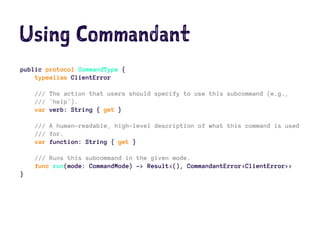
Using Commandant
public protocol CommandType {
typealias ClientError
/// The action that users should specify to use this subcommand (e.g.,
/// `help`).
var verb: String { get }
/// A human-readable, high-level description of what this command is used
/// for.
var function: String { get }
/// Runs this subcommand in the given mode.
func run(mode: CommandMode) -> Result<(), CommandantError<ClientError>>
}
Debugging
Arguments Passed on Launch in
scheme setting
Demo
Start your Swift life
from now !
Thank you

Command Line Tool in swift