INTERNET
SECURITY
YOUR
TEACHER
SRIJAN
MUKHOPADHYA
Y
- Hey there!
I am extremely happy to be here with you guys
today.
- I look forward to an amazing session with all of
you!
- Let’s have a great time!
TOPICS
OF
DISCUSSION
WHAT IS
CYBERSECURITY?
FACTS ABOUT
CYBERSECURITY
CYBER
SAFETY AND
LIFE ON THE
INTERNET
IT’S FUN
TIME!
WHAT IS
CYBERCRIME?
A LITTLE
HISTORY ON
THE CYBER
WORLD
WHAT IS
CYBERSECURITY?
WHAT IS
CYBERCRIME?
Cybersecurity is when
someone protects
networks, electronic
devices and data from
falling into wrong hands.
WHAT IS CYBERSECURITY?
It is also the practice of
ensuring safety, integrity,
and security of one’s
information over the
cyberspace.
WHAT IS CYBERSPACE?
Cyberspace is anything that has
to do with the Internet.
For example: We use the Internet to
communicate and stay connected to
our friends and family. We play
video games, download music, and
watch TV shows and movies after
homework is done. Grownups use it
do things like banking, shopping,
and other important everyday
activities online as well.
WHAT IS
CYBERCRIME?
Cybercrime is criminal
activities carried out by
means of computers or
the internet.
The former descriptions were
"computer crime" or "crime by
computer".
The Internet brought other new
terms, like "digital", "electronic",
"virtual" , "IT", "high-tech" and
“technology-enabled" crime.
SOME
COMMON
ONLINE
ISSUES
WE
FACE
TODAY
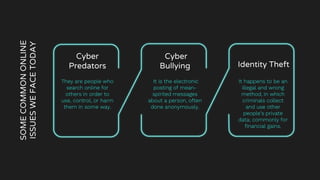
Cyber
Predators
They are people who
search online for
others in order to
use, control, or harm
them in some way.
Identity Theft
It happens to be an
illegal and wrong
method, in which
criminals collect
and use other
people’s private
data; commonly for
financial gains.
Cyber
Bullying
It is the electronic
posting of mean-
spirited messages
about a person, often
done anonymously.
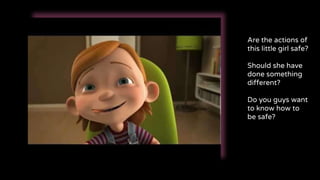
Are the actions of
this little girl safe?
Should she have
done something
different?
Do you guys want
to know how to
be safe?
MEET ALIA
She is a school going girl just
like the rest of you and loves to
play games and watching
cartoons on the internet.
She will help you understand
the concept of Internet.
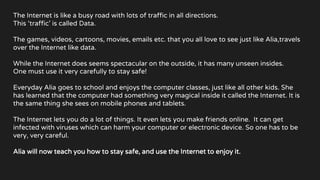
The Internet is like a busy road with lots of traffic in all directions.
This ‘traffic’ is called Data.
The games, videos, cartoons, movies, emails etc. that you all love to see just like Alia,travels
over the Internet like data.
While the Internet does seems spectacular on the outside, it has many unseen insides.
One must use it very carefully to stay safe!
Everyday Alia goes to school and enjoys the computer classes, just like all other kids. She
has learned that the computer had something very magical inside it called the Internet. It is
the same thing she sees on mobile phones and tablets.
The Internet lets you do a lot of things. It even lets you make friends online. It can get
infected with viruses which can harm your computer or electronic device. So one has to be
very, very careful.
Alia will now teach you how to stay safe, and use the Internet to enjoy it.
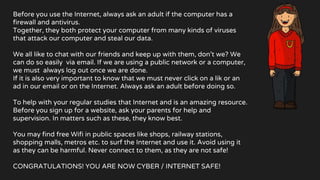
Before you use the Internet, always ask an adult if the computer has a
firewall and antivirus.
Together, they both protect your computer from many kinds of viruses
that attack our computer and steal our data.
We all like to chat with our friends and keep up with them, don’t we? We
can do so easily via email. If we are using a public network or a computer,
we must always log out once we are done.
If it is also very important to know that we must never click on a lik or an
ad in our email or on the Internet. Always ask an adult before doing so.
To help with your regular studies that Internet and is an amazing resource.
Before you sign up for a website, ask your parents for help and
supervision. In matters such as these, they know best.
You may find free Wifi in public spaces like shops, railway stations,
shopping malls, metros etc. to surf the Internet and use it. Avoid using it
as they can be harmful. Never connect to them, as they are not safe!
CONGRATULATIONS! YOU ARE NOW CYBER / INTERNET SAFE!
A LITTLE HISTORY ON
THE CYBER WORLD
FACTS ABOUT
INTERNET SECURITY
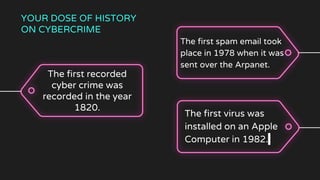
The first spam email took
place in 1978 when it was
sent over the Arpanet.
The first recorded
cyber crime was
recorded in the year
1820.
The first virus was
installed on an Apple
Computer in 1982.
YOUR DOSE OF HISTORY
ON CYBERCRIME
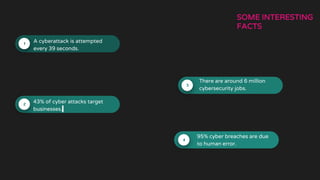
95% cyber breaches are due
to human error.
There are around 6 million
cybersecurity jobs.
43% of cyber attacks target
businesses.
A cyberattack is attempted
every 39 seconds.
SOME INTERESTING
FACTS
CYBER SAFETY AND
LIFE ON THE INTERNET
UNDERSTAND LIFE ON THE
INTERNET
The Internet has turned our
existence upside down. It has
revolutionized communications, to
the extent that it is now our
preferred medium of everyday
communication. In almost
everything we do, we use the
Internet. Ordering a pizza, buying a
television, sharing a moment with a
friend, sending a picture over
instant messaging.
The Internet has so much control
over almost every aspect of
human life, not only our private
lives but, also various public
services.
There are unforeseen
consequences to sharing our
private and public information and
the results could damage our
presence on the internet.
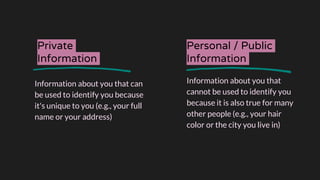
Private
Information
Information about you that can
be used to identify you because
it's unique to you (e.g., your full
name or your address)
Personal / Public
Information
Information about you that
cannot be used to identify you
because it is also true for many
other people (e.g., your hair
color or the city you live in)
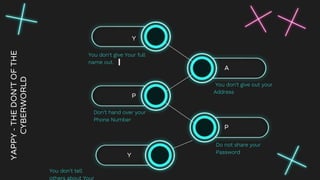
YAPPY
-
THE
DON’T
OF
THE
CYBERWORLD
Y
You don't give Your full
name out.
P
Don’t hand over your
Phone Number
A
You don't give out your
Address
P
Do not share your
Password
Y
You don't tell
others about Your
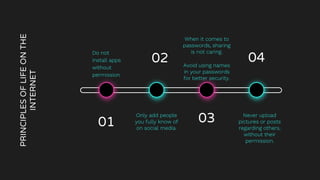
PRINCIPLES
OF
LIFE
ON
THE
INTERNET
Do not
install apps
without
permission.
01
When it comes to
passwords, sharing
is not caring.
Avoid using names
in your passwords
for better security.
Only add people
you fully know of
on social media.
Never upload
pictures or posts
regarding others,
without their
permission.
03
02 04
WHOA!
Let’s have a chat on security now...
PASSWORD
SECURITY
GRASP
THE
CONCEPT
OF
PASSWORD
SECURITY
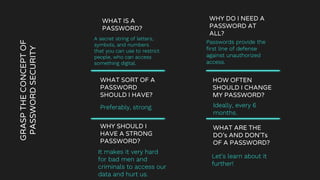
WHAT IS A
PASSWORD?
A secret string of letters,
symbols, and numbers
that you can use to restrict
people, who can access
something digital.
WHY DO I NEED A
PASSWORD AT
ALL?
Passwords provide the
first line of defense
against unauthorized
access.
HOW OFTEN
SHOULD I CHANGE
MY PASSWORD?
Ideally, every 6
months.
WHAT SORT OF A
PASSWORD
SHOULD I HAVE?
Preferably, strong.
WHY SHOULD I
HAVE A STRONG
PASSWORD?
It makes it very hard
for bad men and
criminals to access our
data and hurt us.
WHAT ARE THE
DO’s AND DON'Ts
OF A PASSWORD?
Let’s learn about it
further!
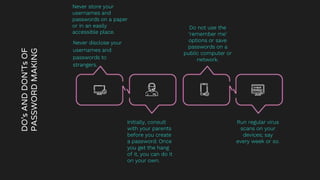
DO’s
AND
DON’Ts
OF
PASSWORD
MAKING
Never disclose your
usernames and
passwords to
strangers.
Do not use the
‘remember me’
options or save
passwords on a
public computer or
network.
Initially, consult
with your parents
before you create
a password. Once
you get the hang
of it, you can do it
on your own.
Run regular virus
scans on your
devices; say
every week or so.
Never store your
usernames and
passwords on a paper
or in an easily
accessible place.
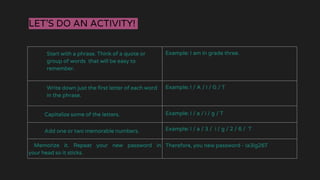
LET’S DO AN ACTIVITY!
Start with a phrase. Think of a quote or
group of words that will be easy to
remember.
Example: I am in grade three.
Write down just the first letter of each word
in the phrase.
Example: I / A / I / G / T
Capitalize some of the letters. Example: I / a / i / g / T
Add one or two memorable numbers. Example: I / a / 3 / i / g / 2 / 6 / T
Memorize it. Repeat your new password in
your head so it sticks.
Therefore, you new password - Ia3ig26T
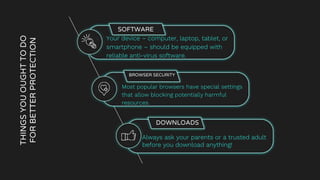
THINGS
YOU
OUGHT
TO
DO
FOR
BETTER
PROTECTION
SOFTWARE
● Your device – computer, laptop, tablet, or
smartphone – should be equipped with
reliable anti-virus software.
BROWSER SECURITY
● Most popular browsers have special settings
that allow blocking potentially harmful
resources.
DOWNLOADS
Always ask your parents or a trusted adult
before you download anything!
IT'S FUN TIME!
LET’S ENJOY A
LITTLE
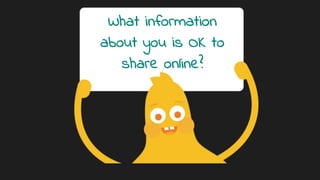
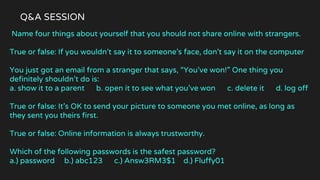
Name four things about yourself that you should not share online with strangers.
True or false: If you wouldn’t say it to someone’s face, don’t say it on the computer
You just got an email from a stranger that says, “You’ve won!” One thing you
definitely shouldn’t do is:
a. show it to a parent b. open it to see what you’ve won c. delete it d. log off
True or false: It’s OK to send your picture to someone you met online, as long as
they sent you theirs first.
True or false: Online information is always trustworthy.
Which of the following passwords is the safest password?
a.) password b.) abc123 c.) Answ3RM3$1 d.) Fluffy01
Q&A SESSION
ANSWERS
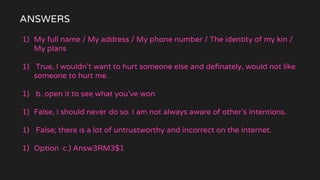
1) My full name / My address / My phone number / The identity of my kin /
My plans
1) True, I wouldn’t want to hurt someone else and definately, would not like
someone to hurt me.
1) b. open it to see what you’ve won
1) False, I should never do so. I am not always aware of other’s intentions.
1) False; there is a lot of untrustworthy and incorrect on the Internet.
1) Option c.) Answ3RM3$1
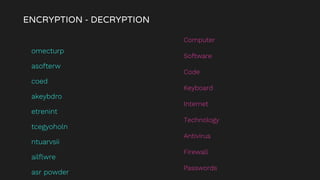
ENCRYPTION - DECRYPTION
omecturp
asofterw
coed
akeybdro
etrenint
tcegyoholn
ntuarvsii
ailflwre
asr powder
Computer
Software
Code
Keyboard
Internet
Technology
Antivirus
Firewall
Passwords
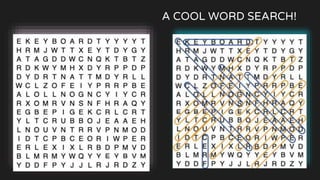
A COOL WORD SEARCH!
THANK
YOU!

Internet / Cyber Security

  • 1.
  • 2.
    YOUR TEACHER SRIJAN MUKHOPADHYA Y - Hey there! Iam extremely happy to be here with you guys today. - I look forward to an amazing session with all of you! - Let’s have a great time!
  • 3.
    TOPICS OF DISCUSSION WHAT IS CYBERSECURITY? FACTS ABOUT CYBERSECURITY CYBER SAFETYAND LIFE ON THE INTERNET IT’S FUN TIME! WHAT IS CYBERCRIME? A LITTLE HISTORY ON THE CYBER WORLD
  • 4.
  • 5.
    Cybersecurity is when someoneprotects networks, electronic devices and data from falling into wrong hands. WHAT IS CYBERSECURITY? It is also the practice of ensuring safety, integrity, and security of one’s information over the cyberspace. WHAT IS CYBERSPACE? Cyberspace is anything that has to do with the Internet. For example: We use the Internet to communicate and stay connected to our friends and family. We play video games, download music, and watch TV shows and movies after homework is done. Grownups use it do things like banking, shopping, and other important everyday activities online as well.
  • 6.
    WHAT IS CYBERCRIME? Cybercrime iscriminal activities carried out by means of computers or the internet. The former descriptions were "computer crime" or "crime by computer". The Internet brought other new terms, like "digital", "electronic", "virtual" , "IT", "high-tech" and “technology-enabled" crime.
  • 7.
    SOME COMMON ONLINE ISSUES WE FACE TODAY Cyber Predators They are peoplewho search online for others in order to use, control, or harm them in some way. Identity Theft It happens to be an illegal and wrong method, in which criminals collect and use other people’s private data; commonly for financial gains. Cyber Bullying It is the electronic posting of mean- spirited messages about a person, often done anonymously.
  • 8.
    Are the actionsof this little girl safe? Should she have done something different? Do you guys want to know how to be safe?
  • 9.
    MEET ALIA She isa school going girl just like the rest of you and loves to play games and watching cartoons on the internet. She will help you understand the concept of Internet.
  • 10.
    The Internet islike a busy road with lots of traffic in all directions. This ‘traffic’ is called Data. The games, videos, cartoons, movies, emails etc. that you all love to see just like Alia,travels over the Internet like data. While the Internet does seems spectacular on the outside, it has many unseen insides. One must use it very carefully to stay safe! Everyday Alia goes to school and enjoys the computer classes, just like all other kids. She has learned that the computer had something very magical inside it called the Internet. It is the same thing she sees on mobile phones and tablets. The Internet lets you do a lot of things. It even lets you make friends online. It can get infected with viruses which can harm your computer or electronic device. So one has to be very, very careful. Alia will now teach you how to stay safe, and use the Internet to enjoy it.

  • 11.
    Before you usethe Internet, always ask an adult if the computer has a firewall and antivirus. Together, they both protect your computer from many kinds of viruses that attack our computer and steal our data. We all like to chat with our friends and keep up with them, don’t we? We can do so easily via email. If we are using a public network or a computer, we must always log out once we are done. If it is also very important to know that we must never click on a lik or an ad in our email or on the Internet. Always ask an adult before doing so. To help with your regular studies that Internet and is an amazing resource. Before you sign up for a website, ask your parents for help and supervision. In matters such as these, they know best. You may find free Wifi in public spaces like shops, railway stations, shopping malls, metros etc. to surf the Internet and use it. Avoid using it as they can be harmful. Never connect to them, as they are not safe! CONGRATULATIONS! YOU ARE NOW CYBER / INTERNET SAFE!
  • 12.
    A LITTLE HISTORYON THE CYBER WORLD FACTS ABOUT INTERNET SECURITY
  • 13.
    The first spamemail took place in 1978 when it was sent over the Arpanet. The first recorded cyber crime was recorded in the year 1820. The first virus was installed on an Apple Computer in 1982. YOUR DOSE OF HISTORY ON CYBERCRIME
  • 14.
    95% cyber breachesare due to human error. There are around 6 million cybersecurity jobs. 43% of cyber attacks target businesses. A cyberattack is attempted every 39 seconds. SOME INTERESTING FACTS
  • 15.
    CYBER SAFETY AND LIFEON THE INTERNET
  • 16.
    UNDERSTAND LIFE ONTHE INTERNET The Internet has turned our existence upside down. It has revolutionized communications, to the extent that it is now our preferred medium of everyday communication. In almost everything we do, we use the Internet. Ordering a pizza, buying a television, sharing a moment with a friend, sending a picture over instant messaging. The Internet has so much control over almost every aspect of human life, not only our private lives but, also various public services. There are unforeseen consequences to sharing our private and public information and the results could damage our presence on the internet.
  • 17.
    Private Information Information about youthat can be used to identify you because it's unique to you (e.g., your full name or your address) Personal / Public Information Information about you that cannot be used to identify you because it is also true for many other people (e.g., your hair color or the city you live in)
  • 20.
    YAPPY - THE DON’T OF THE CYBERWORLD Y You don't giveYour full name out. P Don’t hand over your Phone Number A You don't give out your Address P Do not share your Password Y You don't tell others about Your
  • 21.
    PRINCIPLES OF LIFE ON THE INTERNET Do not install apps without permission. 01 Whenit comes to passwords, sharing is not caring. Avoid using names in your passwords for better security. Only add people you fully know of on social media. Never upload pictures or posts regarding others, without their permission. 03 02 04
  • 22.
    WHOA! Let’s have achat on security now...
  • 25.
  • 26.
    GRASP THE CONCEPT OF PASSWORD SECURITY WHAT IS A PASSWORD? Asecret string of letters, symbols, and numbers that you can use to restrict people, who can access something digital. WHY DO I NEED A PASSWORD AT ALL? Passwords provide the first line of defense against unauthorized access. HOW OFTEN SHOULD I CHANGE MY PASSWORD? Ideally, every 6 months. WHAT SORT OF A PASSWORD SHOULD I HAVE? Preferably, strong. WHY SHOULD I HAVE A STRONG PASSWORD? It makes it very hard for bad men and criminals to access our data and hurt us. WHAT ARE THE DO’s AND DON'Ts OF A PASSWORD? Let’s learn about it further!
  • 28.
    DO’s AND DON’Ts OF PASSWORD MAKING Never disclose your usernamesand passwords to strangers. Do not use the ‘remember me’ options or save passwords on a public computer or network. Initially, consult with your parents before you create a password. Once you get the hang of it, you can do it on your own. Run regular virus scans on your devices; say every week or so. Never store your usernames and passwords on a paper or in an easily accessible place.
  • 29.
    LET’S DO ANACTIVITY! Start with a phrase. Think of a quote or group of words that will be easy to remember. Example: I am in grade three. Write down just the first letter of each word in the phrase. Example: I / A / I / G / T Capitalize some of the letters. Example: I / a / i / g / T Add one or two memorable numbers. Example: I / a / 3 / i / g / 2 / 6 / T Memorize it. Repeat your new password in your head so it sticks. Therefore, you new password - Ia3ig26T
  • 30.
    THINGS YOU OUGHT TO DO FOR BETTER PROTECTION SOFTWARE ● Your device– computer, laptop, tablet, or smartphone – should be equipped with reliable anti-virus software. BROWSER SECURITY ● Most popular browsers have special settings that allow blocking potentially harmful resources. DOWNLOADS Always ask your parents or a trusted adult before you download anything!
  • 31.
    IT'S FUN TIME! LET’SENJOY A LITTLE
  • 32.
    Name four thingsabout yourself that you should not share online with strangers. True or false: If you wouldn’t say it to someone’s face, don’t say it on the computer You just got an email from a stranger that says, “You’ve won!” One thing you definitely shouldn’t do is: a. show it to a parent b. open it to see what you’ve won c. delete it d. log off True or false: It’s OK to send your picture to someone you met online, as long as they sent you theirs first. True or false: Online information is always trustworthy. Which of the following passwords is the safest password? a.) password b.) abc123 c.) Answ3RM3$1 d.) Fluffy01 Q&A SESSION
  • 33.
    ANSWERS 1) My fullname / My address / My phone number / The identity of my kin / My plans 1) True, I wouldn’t want to hurt someone else and definately, would not like someone to hurt me. 1) b. open it to see what you’ve won 1) False, I should never do so. I am not always aware of other’s intentions. 1) False; there is a lot of untrustworthy and incorrect on the Internet. 1) Option c.) Answ3RM3$1
  • 34.
    ENCRYPTION - DECRYPTION omecturp asofterw coed akeybdro etrenint tcegyoholn ntuarvsii ailflwre asrpowder Computer Software Code Keyboard Internet Technology Antivirus Firewall Passwords
  • 35.
    A COOL WORDSEARCH!
  • 36.