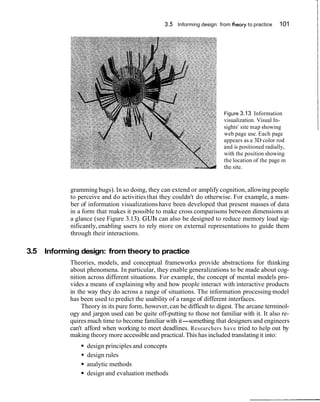
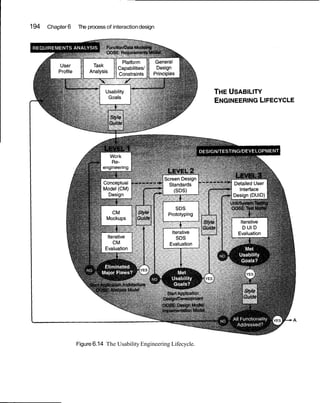
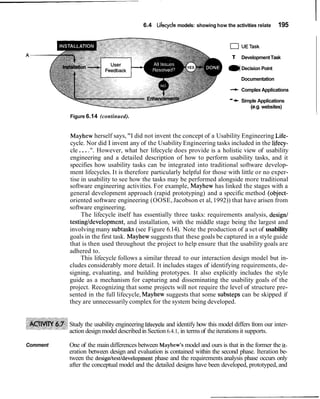
A
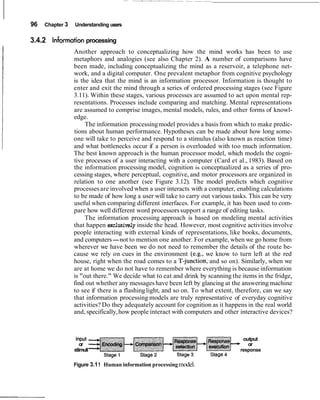
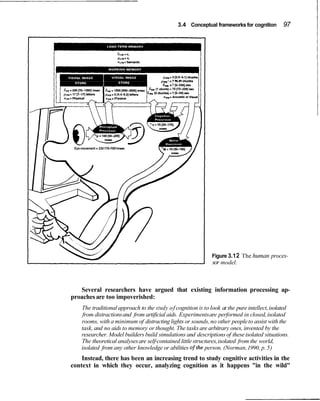
INTER, ,CTIOW
DESIGNI
beyond human-computer interaction
Color Plate 1
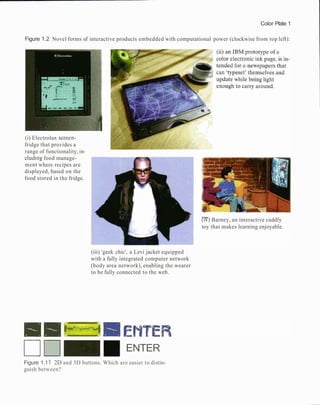
Figure 1.2 Novel forms of interactive products embedded with computational power (clockwise from top left):
(i) Electrolux screen-
fridge that provides a
range of functionality, in-
cluding food manage-
ment where recipes are
displayed, based on the
food stored in the fridge.
(iii) 'geek chic', a Levi jacket equipped
with a fully integrated computer network
(body area network), enabling the wearer
to be fully connected to the web.
ENTER
[IV)Barney, an interactive cuddly
toy that makes learning enjoyable.
Figure 1.1 1 2D and 3D buttons. Which are easier to distin-
guish between?
Color Plate 2
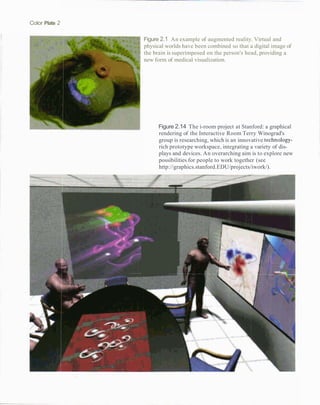
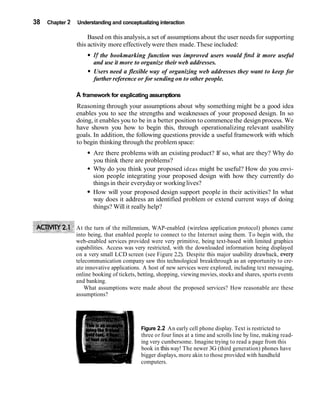
Figure 2.1 An example of augmented reality. Virtual and
physical worlds have been combined so that a digital image of
the brain is superimposed on the person's head, providing a
new form of medical visualization.
Figure 2.14 The i-room project at Stanford: a graphical
rendering of the Interactive Room Terry Winograd's
group is researching, which is an innovative technology-
rich prototype workspace, integrating a variety of dis-
plays and devices. An overarching aim is to explore new
possibilities for people to work together (see
http://graphics.stanford.EDU/projects/iwork/).
-
. -
I.. , .
Color Plate 3
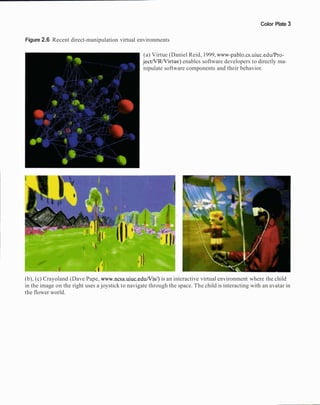
Figure 2.6 Recent direct-manipulation virtual environments
(a) Virtue (Daniel Reid, 1999, www-pablo.cs.uiuc.edulPro-
jectNRNirtue) enables software developers to directly ma-
nipulate software components and their behavior.
(b), (c) Crayoland (Dave Pape, www.ncsa.uiuc.eduNis/)is an interactive virtual environment where the child
in the image on the right uses a joystick to navigate through the space. The child is interacting with an avatar in
the flower world.
Color Plate 4
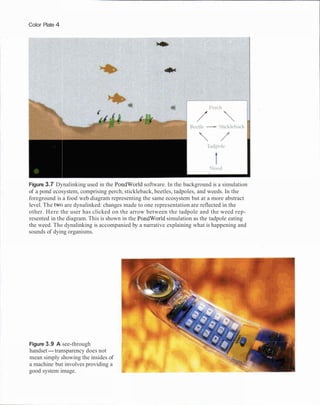
Figure 3.7 Dynalinking used in the PondWorld software. In the background is a simulation
of a pond ecosystem, comprising perch, stickleback, beetles, tadpoles, and weeds. In the
foreground is a food web diagram representing the same ecosystem but at a more abstract
level. The two are dynalinked: changes made to one representation are reflected in the
other. Here the user has clicked on the arrow between the tadpole and the weed rep-
resented in the diagram. This is shown in the PondWorld simulation as the tadpole eating
the weed. The dynalinking is accompanied by a narrative explaining what is happening and
sounds of dying organisms.
Figure 3.9 A see-through
handset-transparency does not
mean simply showing the insides of
a machine but involves providing a
good system image.
Color Plate5
Figure 4.1 'l'he rooftop gar-
den in BowieWorld, a collab-
orative virtual environment
(CVE) supported by
Worlds.com. The User takes
part by "dressing up" as an
avatar. There are hundreds of
avatars to choose from, in-
cluding penguins and real
people. Once avatars have
entered a world, they can ex-
plore it and chat with other
avatars.
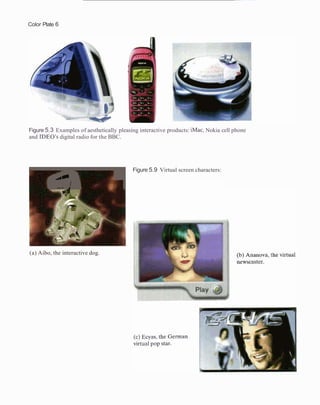
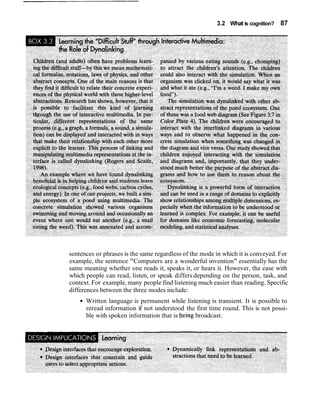
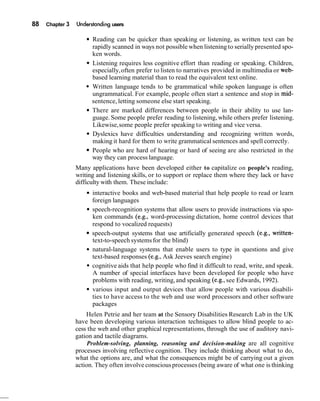
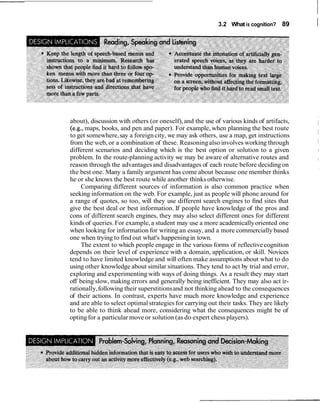
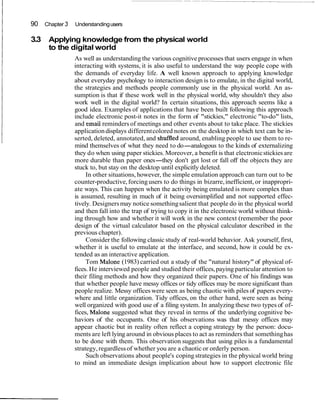
Color Plate 6
Figure 5.3 Examples of aesthetically pleasing interactive products: iMac, Nokia cell phone
and IDEO's digital radio for the BBC.
1
Figure 5.9 Virtual screen characters:
(a) Aibo, the interactive dog.
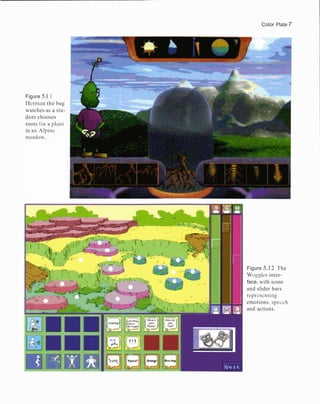
Color Plate 7
Figure 5.1 1
I-lerman the bug
watches as a stu-
dent chooses
roots for a plant
in an Alpinc
meadow.
Figure 5.12 The
Woggles inter-
face, with icons
and slider bars
repl-escnting
emotions. specch
and actions.
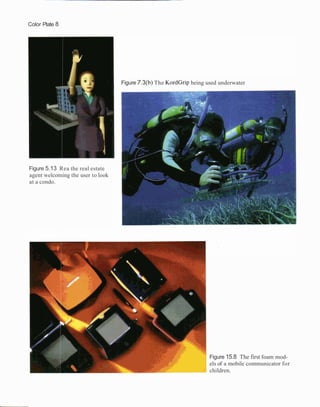
Color Plate 8
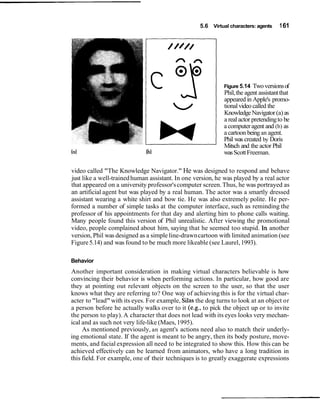
Figure 5.13 Rea the real estate
agent welcoming the user to look
at a condo.
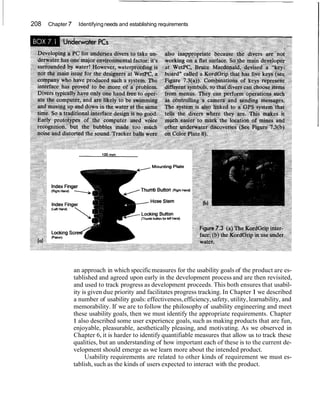
Figure 7.3(b) The KordGrip being used underwater
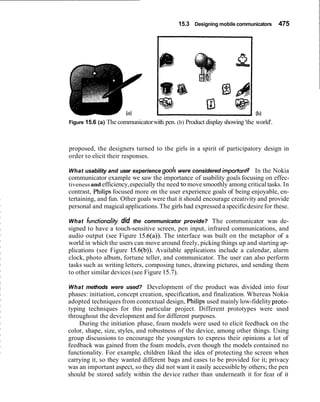
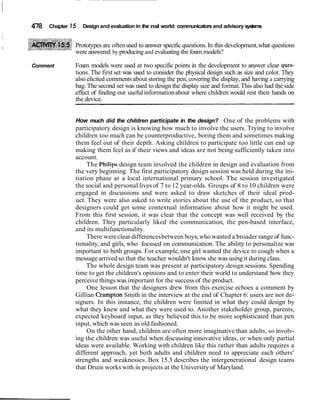
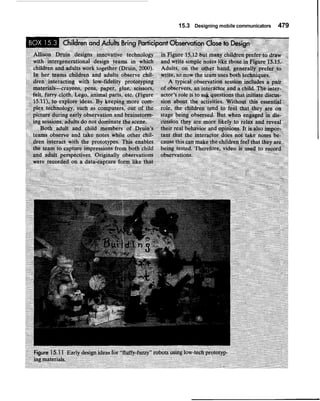
Figure 15.8 The first foam mod-
els of a mobile communicator for
children.
INTERACTION'
DESIGN
beyond human-computer interaction
John Wiley & Sons, Inc.
ACQUISITIONSEDITOR Gaynor Redvers-MuttonlPaulCrockett
MARKETINGMANAGER Katherine Hepburn
SENIOR PRODUCTION EDITOR Ken Santor
COVER DESIGNER Madelyn Lesure
ILLUSTRATIONEDITOR Anna Melhorn
ILLUSTRATIONS Tech-Graphics,Inc.
COVER IMAGE "Thoughts in Passage 11" by Michael Jon March.
Courtesy of Grand Image Publishing
This book wasset in 10112TimesTen by UG I GGS InformationServices,Inc., and printed
and bound by R. R. DonnelleylCrawfordsville.The cover and the color insert were printed
by Phoenix Color Corporation.
This book is printed on acid free paper. m
Copyright O 2002 John Wiley &Sons,Inc. All rights reserved.
No part of this publicationmay be reproduced, stored in a retrievalsystem or transmitted in any
form or by any means,electronic,mechanical,photocopying,recording,scanning or otherwise,
except as permitted under Sections107 or 108 of the 1976 United States CopyrightAct, without
either the prior written permission of the Publisher,or authorization through paymentof the
appropriate per-copy fee to the CopyrightClearance Center, 222 Rosewood Drive, Danvers, MA
01923, (508) 750-8400, fax (508) 750-4470.Requests to the Publisherfor permission should be
addressed to the Permissions Department, John Wiley &Sons, Inc., 605 Third Avenue, New
York, NY 10158-0012, (212) 850-6011,fax (212) 850-6008,E-Mail:
PERMREQ@WILEY.COM.
To order booksor for customer service please call 1(800)225-5945.
Library of CongressCataloging in Publication Data.
Preece, Jennifer.
Interaction design: beyond human-computer interaction1Jennifer Preece, Yvonne Rogers, Helen
Sharp.
p. cm.
Includes bibliographicalreferencesand index.
ISBN 0-471-49278-7 (paper : alk. paper)
1. Human-computer interaction. I. Rogers, Yvonne. 11. Sharp, Helen. 111. Title.
QA76.9.H85 P72 2002
004'.01'94c21
Printed in the United States of America 2001006730
Preface
Welcome to Interaction Design: Beyond Human-Computer Interaction, and our in-
teractive website at ID-Book.com
This textbook is for undergraduate and masters students from a range of back-
grounds studying classes in human-computer interaction, interaction design, web
design, etc. A broad range of professionals and technology users will also find this
book useful, and so will graduate students who are moving into this area from re-
lated disciplines.
Our book is called Interaction Design: Beyond Human-Computer Interaction
because it is concerned with a broader scope of issues, topics, and paradigms than
has traditionally been the scope of human-computer interaction (HCI). This reflects
the exciting times we are living in, when there has never been a greater need for in-
teraction designers and usability engineers to develop current and next-generation
interactive technologies. To be successful they will need a mixed set of skills from
psychology, human-computer interaction, web design, computer science, informa-
tion systems, marketing, entertainment, and business.
What exactly do we mean by interaction design? In essence, we define interac-
tion design as:
"designinginteractive products to support people in their everyday and workinglives".
This entails creating user experiences that enhance and extend the way people
work, communicate, and interact. Now that it is widely accepted that HCI has
moved beyond designing computer systems for one user sitting in front of one ma-
chine to embrace new paradigms, we, likewise, have covered a wider range of is-
sues. These include ubiquitous computing and pervasive computing that make use
of wireless and collaborative technologies. We also have tried to make the book
up-to-date with many examplesfrom contemporary research.
The book has 15 chapters and includes discussion of how cognitive,social, and
affective issues apply to interaction design. A central theme is that design and eval-
uation are interleaving, highly iterative processes, with some roots in theory but
which rely strongly on good practice to create usable products. The book has a
'hands-on' orientation and explains how to carry out a variety of techniques. It also
has a strong pedagogical design and includes many activities (with detailed com-
ments), assignments,and the special pedagogicfeatures discussed below.
The style of writing is intended to be accessible to students, as well as profes-
sionals and general readers, so it is conversational and includes anecdotes, car-
toons, and case studies. Many of the examples are intended to relate to readers'
own experiences. The book and the associated website encourage readers to be ac-
tive when reading and to think about seminal issues. For example, one feature we
have included in the book is the "dilemma," where a controversial topic is aired.
The aim is for readers to understand that much of interaction design needs consid-
vi Preface
eration of the issues,and that they need to learn to weigh-upthe pros and cons and
be prepared to make trade-offs.We particularly want readers to realize that there
is rarely a right or wrong answer although there are good designs and poor designs.
This book is accompanied by a website, which provides a variety of resources
and interactivities, The website offers a place where readerscan learn how to design
websites and other kinds of multimedia interfaces. Rather than just provide a list of
guidelines and design principles, we have developed various interactivities, includ-
ing online tutorials and step-by-step exercises, intended to support learning by
doing.
Special features
We use both the textbook and the web to teach about interaction design. To pro-
mote good pedagogicalpractice we include the following features:
Chapter design
Each chapter is designed to motivate and support learning:
Aims are provided so that readers develop an accurate model of what to ex-
pect in the chapter.
Key points at the end of the chapter summarize what is important.
Activities are included throughout the book and are considered an essential
ingredient for learning. They encourage readers to extend and apply their
knowledge.Commentsare offered directly after the activities, because peda-
gogic research suggests that turning to the back of the text annoys readers
and discourageslearning.
An assignment is provided at the end of each chapter. This can be set as a
group or individual project. The aim is for students to put into practice and
consolidate knowledge and skills either from the chapter that they have just
studied or from several chapters. Some of the assignments build on each
other and involve developing and evaluating designs or actual products.
Hints and guidance are provided on the website.
Boxes provide additional and highlighted information for readers to reflect
upon in more depth.
Dilemmas offer honest and thought-provokingcoverage of controversial or
problematicissues.
Further reading suggestions are provided at the end of each chapter. These
refer to seminal work in the field, interesting additional material, or work
that has been heavily drawn upon in the text.
Interviews with nine practitioners and visionariesin the field enable readers
to gain a personal perspective of the interviewees' work, their philosophies,
their ideas about what is important, and their contributionsto the field.
Cartoons are included to make the book enjoyable.
How to use this book vii
ID-Book.com website
The aim of the website is to provide you with an opportunity to learn about inter-
action design in ways that go "beyond the book." Additional in-depth material,
hands-on interactivities,a student's corner and informal tutorials will be provided.
Specificfeatures planned include:
Hands-on interactivities,including designing a questionnaire, customizing a
set of heuristics, doing a usability analysison 'real' data, and interactive tools
to support physical design.
Recent case studies.
Student's corner where you will be able to send in your designs, thoughts,
written articles which, if suitable, will be posted on the site at specified times
during the year.
Hints and guidance on the assignments outlined in the book.
Suggestions for additional material to be used in seminars, lab classes, and
lectures.
Key terms and concepts(with links to where to find out more about them).
Readership
This book will be useful to a wide range of readers with different needs and
aspirations.
Students from Computer Science, Software Engineering, Information Systems,
Psychology, Sociology, and related disciplines studying courses in Interaction De-
sign and Human-Computer Interaction will learn the knowledge, skills, and tech-
niques for designing and evaluatingstate-of-the-art products, and websites,as well
as traditional computer systems.
Web and Interaction Designers, and Usability Professionals will find plenty to
satisfy their need for immediate answers to problems as well as for buildingskills to
satisfy the demands of today's fast moving technical market.
Users, who want to understand why certain products can be used with ease
while others are unpredictable and frustrating, will take pleasure in discovering
that there is a discipline with practices that produce usable systems.
Researchers and developers who are interested in exploiting the potential of the
web, wireless,and collaborativetechnologies will find that, as well as offeringguid-
ance, techniques, and much food for thought, a special effort has been made to in-
clude examples of state-of-the-art systems.
In the next section we recommend various routes through the text for different
kinds of readers.
How to use this book
Interaction Design is not a linear design process but is essentially iterative and
some readers and experienced instructors will want tb find their own way through
the chapters. Others, and particularly those with less experience, may prefer to
viii Preface
work through chapter by chapter. Readers will also have different needs. For ex-
ample,students in Psychology will come with different backgroundknowledge and
needs from those in Computer Science. Similarly, professionals wanting to learn
the fundamentals in a one-week course have different needs. This book and the
website are designed for using in various ways. The following suggestions are pro-
vided to help you decide which way is best for you.
From beginning to end
There are fifteen chapters so students can study one chapter per week during a
fifteen-week semester course. Chapter15 containsdesign and evaluationcase studies.
Our intention is that these case studies help to draw together the contents of the
rest of the book by showing how design and evaluation are done in the real world.
However,some readers may prefer to dip into them along the way.
Getting a quick overview
For those who want to get a quick overview or just the essence of the book, we
suggest you read Chapters 1, 6, and 10. These chapters are recommended for
everyone.
Suggestions for computer science students
In addition to reading Chapters 1,6,and 10, Chapters 7 and 8 contain the material
that will feel most familiar to any students who have been introduced to software
development.These chapters cover the process of interaction design and the activi-
ties it involves, including establishing requirements, conceptual design, and physi-
cal design. The book itself does not include any coding exercises, but the website
will provide tools and widgets with which to interact.
For those followingthe ACM-IEEE Curriculum (2001)*,you will find that this
text and website cover most of this curriculum. The topics listed under each of the
followingheadingsare discussed in the chapters shown:
HC1 Foundations of Human-Computer Interaction (Chapters 1-5, 14,
website).
HC2 Building a simple graphical user interface (Chapters 1,6,8,10and the
website).
HC3 Human-Centered SoftwareEvaluation (Chapters 1,10-15, website).
HC4 Human-Centered Software Design (Chapters 1,6-9,15).
HC5 Graphical User-Interface Design (Chapters 2 and 8 and the website.
Many relevant examples are discussed in Chapters 1-5 integrated with dis-
cussion of cognitiveand socialissues).
*ACM-IEEE Curriculum (2001) [computer.org/education/cc2001/]is under development at the time of
writing this book.
How to use thisbook ix
HC6 Graphical User-Interface Programming (touched upon only in Chap-
ters 7-9 and on the website).
HC7 HCI Aspects of Multimedia Information Systems and the web (inte-
grated into the discussion of Chapters 1-5, and in examples throughout the
text, and on the website).
HC8 HCI Aspects of Group Collaboration and CommunicationTechnology
(discussedin 1-5, particularlyin Chapter 4. Chapters 6-15 discuss design and
evaluation and some examples cover these systems,as does the website.)
Suggestions for information systems students
Information systemsstudentswill benefitfrom reading the whole text, but instructors
may want to find additional examples of their own to illustrate how issues apply to
businessapplications.Some students may be tempted to skip Chapters3-5 but we rec-
ommend that they should read these chapters since they provide important founda-
tional material.This book does not cover how to develop business cases or marketing.
Suggestions for psychology and cognitive science students
Chapters 3-5 cover how theory and research findingshave been applied to interac-
tion design. They discuss the relevant issues and provide a wide range of studies
and systems that have been informed by cognitive, social, and affective issues.
Chapters1and 2 also cover important conceptual knowledge, necessary for having
a good groundingin interaction design.
Practitioner and short course route
Many people want the equivalent of a short intensive 2-5 day course. The best
route for them is to read Chapters 1,6,10and 11 and dip into the rest of the book
for reference. For those who want practical skills,we recommendChapter 8.
Plan your own path
For people who do not want to follow the "beginning-to-end"approach or the sug-
gestionsabove, there are many ways to use the text. Chapters 1,6,10and 11 provide
a good overview of the topic. Chapter 1is an introduction to key issues in the disci-
pline and Chapters 6 and 10 offer introductions to design and evaluation.Then go
to Chapters 2-5 for user issues, then on to the other design chapters, 2-9, dipping
into the evaluationchapters10-14 and the case studiesin15. Another approach is to
start with one or two of the evaluation chapters after first reading Chapters 1, 6, 10
and 11, then move into the design section, drawingon Chapters 2-5 as necessary.
Web designer route
Web designers who have a backgroundin technology and want to learn how to de-
sign usable and effective websites are advised to read Chapters 1, 7, 8, 13 and 14.
x Preface
These chapters cover key issues that are important when designing and evaluating
the usability of websites. A worked assignment runs through these chapters.
Usability professionals' route
Usabilityprofessionalswho want to extend their knowledgeof evaluation techniques
and read about the social and psychologicalissues that underpin design of the web,
wireless, and collaborative systems are advised to read Chapter 1 for an overview,
then selectfrom Chapters10-14 on usability testing.Chapters 3,4, and 5 provide dis-
cussion of seminal user issues (cognitive,social, and affective aspects).There is new
material throughout the rest of the book, which will also be of interest for dipping
into as needed.This group may also be particularlyinterestedin Chapter 8 which,to-
gether with material on the book website,provides practical design examples.
Acknowledgements
Many people have helped to make this book a reality. We have benefited from the
advice and support of our many professional colleagues across the world, our stu-
dents,friends,and familiesand we thank you all. We also warmly thank the following
people for reviewing the manuscript and making many helpful suggestions for im-
provements: Liam Bannon, Sara Bly, Penny Collings, Paul Dourish, Jean Gasen,
Peter Gregor,Stella Mills, Rory O'Connor, Scott Toolson,Terry Winograd,Richard
Furuta, Robert J.K. Jacob, Blair Nonnecke, William Buxton, Carol Traynor, Blaise
Liffich, Jan Scott, Sten Hendrickson, Ping Zhang, Lyndsay Marshall,Gary Perlman,
Andrew Dillon, Michael Harrison, Mark Crenshaw, Laurie Dingers, David Carr,
Steve Howard,David Squires, George Weir, MarilynTremaine,Bob Fields,Frances
Slack, Ian Graham, Alan O'Callaghan, Sylvia Wilbur, and several anonymous re-
viewers. We also thank Geraldine Fitzpatrick,Tim and Dirk from DSTC (Australia)
for their feedback on Chapters 1 and 4, Mike Scaife, Harry Brignull, Matt Davies,
the HCCS Masters students at Sussex University (2000-2001), Stephanie Wilson
and the students from the School of Informatics at City University and Information
Systems Department at UMBCfor their comments.
We are particularly grateful to Sara Bly, Karen Holtzblatt, Jakob Nielsen,Abi-
gail Sellen,Suzanne Robertson, Gitta Salomon,Ben Shneiderman, Gillian Cramp-
ton Smith, and Terry Winograd for generously contributingin-depth interviews.
Lili Cheng and her colleagues allowed us to use the Hutchworld case study.
Bill Killam provided the TRZS case study. Keith Cogdillsupplied the MEDLZNE-
plus case study. We thank Lili, Bill, and Keith for supplying the basic reports and
commenting on various drafts. Jon Lazar and Dorine Andrews contributed mater-
ial for the section on questionnaires,which we thank them for.
We are grateful to our Editors Paul Crockett and Gaynor Redvers-Mutton and
the production team at Wiley: Maddy Lesure, Susannah Barr, Anna Melhorn,
Gemma Quilter, and Ken Santor. Without their help and skill this book would not
have been produced. Bill Zobrist and Simon Plumtree played a significant role in
persuading us to work with Wiley and we thank them too.
About the authors xi
I About the authors
The authors are all senior academics with a background in teaching, researching,
and consulting in the UK, USA, Canada, Australia, and Europe. Having worked
together on two other successful text books, they bring considerable experience in
curriculum development, using a variety of media for distance learning as well as
face-to-face teaching.They have considerableknowledge of creating learning texts
and websites that motivate and support learningfor a range of students.
All three authors are specialistsin interaction design and human-computer in-
teraction (HCI). In addition they bring skills from other discipline~.Yvonne
Rogers is a cognitive scientist, Helen Sharp is a software engineer, and Jenny
Preece works in information systems. Their complementary knowledge and skills
enable them to cover the breadth of concepts in interactiondesign and HCI to pro-
duce an interdisciplinary text and website. They have collaborated closely, sup-
porting and commenting upon each other's work to produce a high degree of
integration of ideas with one voice. They have shared everything from initial con-
cepts,through writing, design and production.
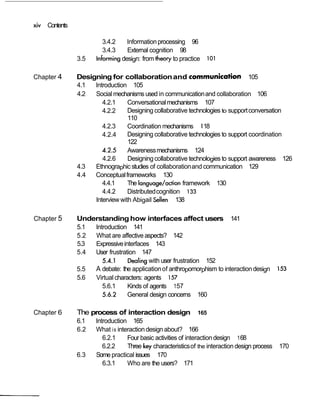
Contents
Chapter 1 What is interaction design? 1
1.I Introduction 1
1.2 Good and poor design 2
1.2.1 What to design 4
1.3 What is interaction design? 6
1.3.1 The makeupof interaction design 6
1.3.2 Working together as a multidisciplinaryteam 9
1.3.3 Interaction design in business 10
1.4 What is involved in the processof interactiondesign? 12
1.5 The goals of interaction design 13
1.5.1 Usability goals 1A
1.5.2 User experience goals 18
1.6 More on usability: designand usabilityprinciples 20
1.6.1 Heuristicsand usabilityprinciples 26
Interviewwith GittaSalomon 31
Chapter 2 Understanding and concep~alizinginteraction 35
2.1 lntroduction 35
2.2 Understandingthe problem space 36
2.3 Conceptualmodels 39
2.3.1 Conceptualmodelsbased on activities 41
2.3.2 Conceptualmodelsbased on objects 51
2.3.3 A case of mix and match? 54
2.4 Interface metaphors 55
2.5 Interactionparadigms 60
2.6 From conceptualmodels to physical design 64
Interview with Terry Winograd 70
Chapter 3 Understanding users 73
3.1 Introduction 73
3.2 What is cognition? 74
3.3 Applying knowledgefrom the physicalworld to the digitalworld 90
3.4 Conceptual frameworks for cognition 92
3.4.1 Mental models 92
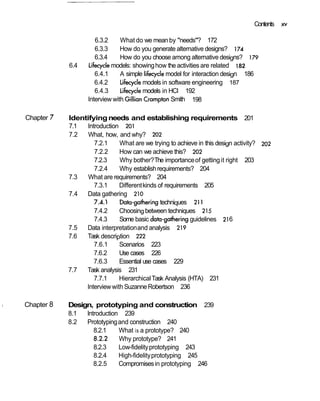
xiv Contents
3.4.2 Informationprocessing 96
3.4.3 External cognition 98
3.5 Informingdesign: from theory to practice 101
Chapter 4 Designing for collaborationand communica~ion 105
4.1 Introduction 105
4.2 Social mechanisms used in communicationand collaboration 106
4.2.1 Conversationalmechanisms 107
4.2.2 Designing collaborative technologies to supportconversation
110
4.2.3 Coordination mechanisms 118
4.2.4 Designing collaborative technologies to support coordination
122
4.2.5 Awarenessmechanisms 124
4.2.6 Designingcollaborative technologies to support awareness 126
4.3 Ethnographic studies of collaborationand communication 129
4.4 Conceptualframeworks 130
4.4.1 The language/action framework 130
4.4.2 Distributedcognition 133
Interview with Abigail Sellen 138
Chapter 5 Understandinghow interfaces affect users 141
5.1 lntroduction 141
5.2 What are affectiveaspects? 142
5.3 Expressiveinterfaces 143
5.4 User frustration 147
5.4.1 Dealingwith user frustration 152
5.5 A debate: the applicationof anthropomorphism to interactiondesign 153
5.6 Virtual characters: agents 157
5.6.1 Kinds of agents 157
5.6.2 General design concerns 160
Chapter 6 The process of interaction design 165
6.1 Introduction 165
6.2 What is interactiondesign about? 166
6.2.1 Four basic activities of interactiondesign 168
6.2.2 Three key characteristicsof the interactiondesign process 170
6.3 Some practical issues 170
6.3.1 Who are the users? 171
Contents xv
Chapter 7
1 Chapter 8
6.3.2 What do we mean by "needs"? 172
6.3.3 How do you generate alternative designs? 174
6.3.4 How do you choose among alternative designs? 179
6.4 Lifecycle models: showinghow the activities are related I82
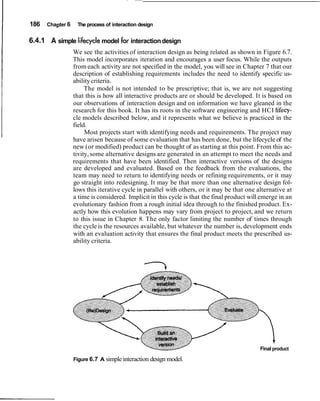
6.4.1 A simple lifecyclemodel for interaction design 186
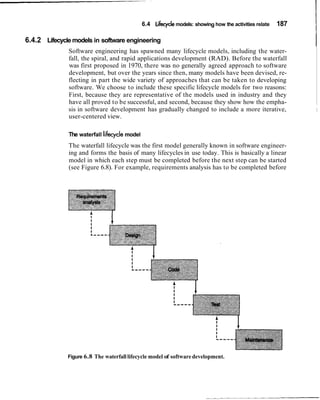
6.4.2 Lifecyclemodels in software engineering 187
6.4.3 Lifecyclemodels in HCI 192
Interview with Gillian CramptonSmith 198
Identifyingneeds and establishing requirements 201
7.1 Introduction 201
7.2 What, how, and why? 202
7.2.1 What are we trying to achieve in this design activity? 202
7.2.2 How can we achieve this? 202
7.2.3 Why bother?The importanceof gettingit right 203
7.2.4 Why establishrequirements? 204
7.3 What are requirements? 204
7.3.1 Differentkinds of requirements 205
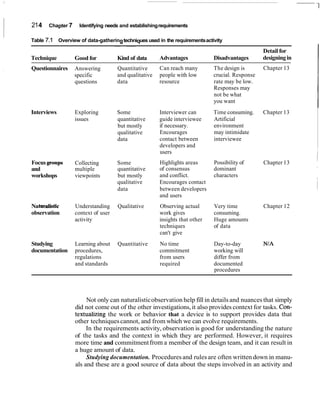
7.4 Data gathering 210
7.4.1 Data-gatheringtechniques 211
7.4.2 Choosing between techniques 215
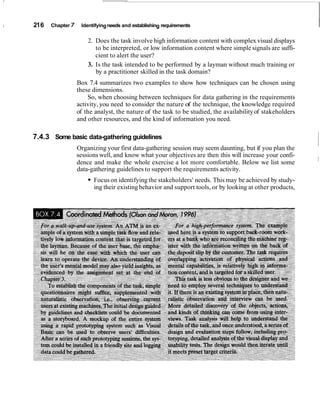
7.4.3 Some basic datmgatheringguidelines 216
7.5 Data interpretationand analysis 219
7.6 Task description 222
7.6.1 Scenarios 223
7.6.2 Use cases 226
7.6.3 Essential use cases 229
7.7 Task analysis 231
7.7.1 HierarchicalTask Analysis (HTA) 231
Interviewwith SuzanneRobertson 236
Design, prototyping and construction 239
8.1 lntroduction 239
8.2 Prototypingand construction 240
8.2.1 What is a prototype? 240
8.2.2 Why prototype? 241
8.2.3 Low-fidelityprototyping 243
8.2.4 High-fidelityprototyping 245
8.2.5 Compromisesin prototyping 246
xvi Contents
8.2.6 Construction: from design to implementation 248
8.3 Conceptualdesign: moving from requirementsto first design 249
8.3.1 Three perspectives for developinga conceptual model 250
8.3.2 Expandingthe conceptual model 257
8.3.3 Using scenarios in conceptual design 259
8.3.4 Using prototypesin conceptual design 262
8.4 Physical design: getting concrete 264
8.4.1 Guidelines for physical design 266
8.4.2 Different kinds of widget 268
8.5 Tool support 275
Chapter 9 User-centeredapproaches to interaction design 279
9.1 Introduction 279
9.2 Why is it important to involveusers at all? 280
9.2.1 Degrees of involvement 281
9.3 What is a user-centeredapproach? 285
9.4 Understandingusers' work: applying ethnography in design 288
9.4.1 Coherence 293
9.4.2 Contextual Design 295
9.5 involvingusers in design: Participatory Design 306
9.5.1 PICTIVE 307
9.5.2 CARD 309
Interview with Karen Holtzblatt 313
Chapter 10 Introducing evaluation 317
10.1 Introduction 317
10.2 What, why, and when to evaluate 318
10.2.1 Whatto evaluate 318
10.2.2 Why you need to evaluate 319
10.2.3 When to evaluate 323
10.3 Hutchworldcase study 324
10.3.1 How the team got started: early design ideas 324
10.3.2 How was the testing done? 327
10.3.3 Was it tested again? 333
10.3.4 Looking to the future 334
10.4 Discussion 336
Chapter 11 An evaluation framework 339
11.1 Introduction 339
Contents xvii
11.2 Evaluation paradigms and techniques 340
11.2.1 Evaluationparadigms 341
11.2.2 Techniques 345
11.3 D E C I D E: A framework to guide evaluation 348
11.3.1 Determinethe goals 348
11.3.2 Explore the questions 349
11.3.3 Choose the evaluationparadigm and techniques 349
11.3.4 identify the practicalissues 350
11.3.5 Decide how to deal with the ethical issues 351
11.3.6 Evaluate, interpret, and present the data 355
11.4 pilotstudies 356
Chapter 12 Observing users 359
12.1 Introduction 359
12.2 Goals, questionsand paradigms 360
12.2.1 What and when to observe 361
12.2.2 Approaches to observation 363
12.3 How to observe 364
12.3.1 In controlledenvironments 365
12.3.2 In the field 368
12.3.3 Participantobservation and ethnography 370
12.4 Data collection 373
12.4.1 Notes plus still camera 374
12.4.2 Audio recording plus still camera 374
12.4.3 Video 374
12.5 Indirect observation: tracking users' activities 377
12.5.1 Diaries 377
12.5.2 Interaction logging 377
12.6 Analyzing, interpreting and presentingdata 379
12.6.1 Qualitativeanalysis to tell a story 380
12.6.2 Qualitativeanalysis for categorization 381
12.6.3 Quantitative data analysis 384
12.6.4 Feeding the findingsback into design 384
Interview with Sara Bb 387
Chapter 13 Asking users and experts 389
13.1 introduction 389
13.2 Aking users: interviews 390
13.2.1 Developing questions and planning an interview 390
xviii Contents
13.2.2 Unstructuredinterviews 392
13.2.3 Structuredinterviews 394
13.2.4 Semi-structuredinterviews 394
13.2.5 Group interviews 396
13.2.6 Other sources of interview-like feedback 397
13.2.7 Data analysis and interpretation 398
13.3 Asking users: Questionnaires 398
13.3.1 Designing questionnaires 398
13.3.2 Question and response format 400
13.3.3 Administering questionnaires 404
13.3.4 Online questionnaires 405
13.3.5 Analyzing questionnairedata 407
13.4 Asking experts: Inspections 407
13.4.1 Heuristic evaluation 408
13.4.2 Doing heuristic evaluation 410
13.4.3 Heuristic evaluationof websites 412
13.4.4 Heuristicsfor other devices 419
13.5 Asking experts: walkthroughs 420
I 3.5.1 Cognitive walkthroughs 420
13.5.2 Pluralistic walkthroughs 423
Interviewwith Jakob Nielsen 426
Chapter 14 Testing and modeling users 429
14.1 Introduction 429
14.2 User testing 430
14.2.1 Testing MEDLINE~~us432
14.3 Doing user testing 438
14.3.1 Determinethe goals and explore the questions 439
14.3.2 Choose the paradigm and techniques 439
14.3.3 Identify the practical issues: Design typical tasks 439
14.3.4 Identify the practicalissues: Selecttypical users 440
14.3.5 Identifythe practicalissues: Prepare the testing
conditions 441
14.3.6 Identifythe practicalissues: Plan how to run the tests 442
14.3.7 Deal with ethical issues 443
14.3.8 Evaluate, analyze, and presentthe data 443
14.4 Experiments 443
14.4.1 Variables and conditions 444
14.4.2 Allocation of participantsto conditions 445
Contents xix
14.4.3 Other issues 446
14.4.4 Data collectionand analysis 446
14.5 Predictivemodels 448
14.5.1 The W M S model 449
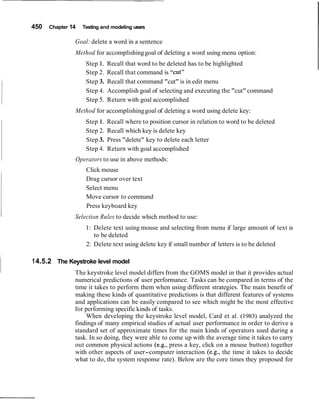
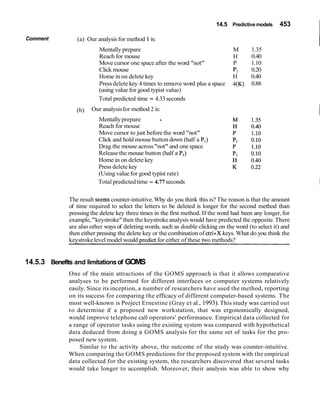
14.5.2 The Keystrokelevel model 450
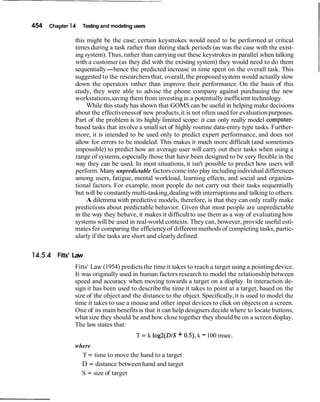
14.5.3 Benefits and limitations of W M S 453
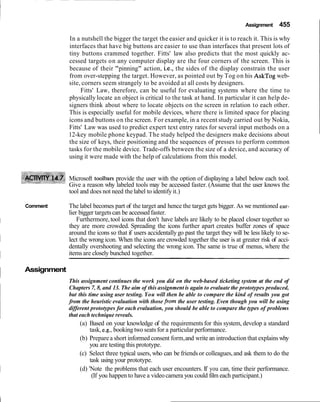
14.5.4 Fitts' Law 454
Interviewwith Ben Shneiderman 457
Chapter 15 Design and evaluationin the real world: communicators
and advisory systems 461
15.1 Introduction 461
15.2 Key Issues 462
15.3 Designingmobile communicators 463
15.3.1 Background 463
15.3.2 Nokia's approachto developing a communicator 464
15.3.3 Philip's approach to designing a communicator for children
474
15.4 Redesigning part of a large interactivephone-basedresponse system 482
15.4.1 Background 483
15.4.2 The redesign 483
Reflectionsfrom the Authors 491
References 493
Credits 503
Index 509
I
by Gary Perlman
As predicted by many visionaries, devices everywhere are getting "smarter." My
camera has a multi-modal hierarchical menu and form interface. Even my toaster
has a microprocessor. Computing is not just for computers anymore. So when the
authors wrote the subtitle "beyond human-computer interaction," they wanted to
convey that the book generalizes the human side to people, both individuals and
groups, and the computer side to desktop computers, handheld computers, phones,
cameras ...maybe even toasters.
My own interest in this book is motivated by having been a software developer
for 20 years, during which time I was a professor and consultant for 12. Would the
book serve as a textbook for students? Would it help bring software development
practice into a new age of human-centered interaction design?
A textbook for students ...
More than anything, I think students need to be motivated, inspired, challenged,
and I think this book, particularly Chapters 1-5, will do that. Many students will
not have the motivating experience of seeing projects and products fail because of
a lack of attention, understanding, and zeal for the user, but as I read the opening
chapters, I imagined students thinking, "This is what I've been looking for!" The in-
terviews will provide students with the wisdom of well-chosen experts: what's im-
portant, what worked (or didn't), and why. I see students making career choices
based on this motivating material.
The rest of the book covers the art and some of the science of interaction de-
sign, the basic knowledge needed by practitioners and future innovators. Chapters
6-9 give a current view of analysis,design, and prototyping, and the book's website
should add motivating examples. Chapters 10-14 cover evaluation in enough depth
to facilitate understanding, not just rote application. Chapter 15 brings it all to-
gether, adding more depth. For each topic, there are ample pointers to further
reading, whichis important because interaction design is not a one-book discipline.
Finally, the book itself is pedagogically well designed. Each chapter describes
its aims, contains examples and subtopics, and ends with key points, assignments,
and an annotated bibliographyfor more detail.
A guide for development teams .. .
When I lead or consult on software projects, I face the same problem over and over:
many people in marketing and software development-these are the people who
have the most input into design, but it applies to any members of multidisciplinary
teams-have little knowledge or experience building systems with a user-centered
xxii Foreword
focus. A user-centeredfocusrequires close work with users (not just customer-buy-
ers), from analysis through design, evaluation, and maintenance. A lack of user-
centered focus results in products and services that often do not meet the needs of
their intended users. Don Norman's design books have convinced many that these
problems are not unique to software,so this book's focus on interaction designfeels
right.
To help software teams adopt a user-centered focus, I've searched for books
with end-to-end coverage from analysis, to design, to implementation (possibly of
prototypes), to evaluation (with iteration). Some books have tried to please all au-
diences and have become encyclopedias of user interface development, covering
topics worth knowing, but not in enough detail for readers to understand them.
Some books have tried to cover theory in depth and tried to appeal to developers
who have little interest in theory. Whatever the reasons for these choices, the re-
sults have been lacking. This book has chosen fewer topics and covered them in
more depth; enough depth, I think, to put the ideasinto practice. I think the mater-
ial is presented in a way that is understandable by a wide audience, which is impor-
tant in order for the book to be useful to whole multidisciplinaryteams.
A recommended book . ..
I've been waitingfor this book for many years. I think it's been worth the wait.
As the director of the HCI Bibliography project (www.hcibib.org), a free-ac-
cess HCI portal receiving a half-million hits per year, I receive many requests for
suggestions for books, particularly from students and software development man-
agers. To answer that question, I maintain a list of recommended readings in ten
categories (with 20,000 hits per year). Until now, it's been hard to recommend just
one book from that list. I point people to some books for motivation,other books
for process, and books for specific topics (e.g., task analysis, ergonomics, usability
testing).This book fitswell into half the categoriesin my list and makes it easier to
recommend one book to get started and to have on hand for development.
I welcome the commitment of the authors to building a website for the book.
It's a practice that has been adopted by other books in the field to offer additional
information and keep the book current. The site also presents interactive content
to aid in tasks like conductingsurveys and heuristic evaluations. I look forward to
seeing the book's site present new materials, but as director of www.hcibib.org, I
hope they use links to instead of re-inventing existingresources.
Gary Perlman
Columbus
October 2001
Foreword xxiii
About Gary Perlman
Gary Perlman is a consulting research scientist at the OCLC-Online Computer Li-
brary Center (www.oclc.org) where he works on user interfaces for bibliographic
and full-text retrieval. His research interests are in making information technology
more useful and usable for people.
He has also held research and academic positions at Bell Labs in Murray Hill,
New Jersey; Wang Institute of Graduate Studies; Massachusetts Institute of Tech-
nology; Carnegie-Mellon University;and The Ohio State University. Dr. Perlman's
Ph.D. is in experimental psychology from the University of California, San Diego.
He is the author of over 75 publications in the areas of mathematics education, sta-
tistical computing, hypertext, and user interface development. He has lectured and
consulted internationally since 1980.
He is best known in the HCI community as the director of the HCI Bibliogra-
phy (www.hcibib.org), a free-access online resource of over 20,000 records
searched hundreds of thousands of times each year.
A native of Montreal, Canada, Gary now lives in Columbus, Ohio with his wife
and two sons.
What is interaction design?
1 .I Introduction
1.2 Good and poor design
1.2.1 What to design
1.3 What is interactiondesign?
1.3.1 The makeup of interactiondesign
1.3.2 Working together as a multidisciplinaryteam
1 3.3 Interaction design in business
1.4 What is involved in the processof interaction design?
1.5 The goals of interactiondesign
1.5.1Usabilitygoals
1.5.2User experience goals
1.6.More on usability: design and usability principles
1.1 Introduction
How many interactive products are there in everyday use? Think for a minute
about what you use in a typical day: cell phone, computer, personal organizer, re-
mote control, soft drink machine,coffee machine,ATM, ticket machine,library in-
formation system, the web, photocopier, watch, printer, stereo, calculator, video
game.. . the list is endless. Now think for a minute about how usable they are.
How many are actually easy, effortless,and enjoyable to use? All of them, several,
or just one or two? This list is probablyconsiderablyshorter. Why is this so?
Think about when some devicecaused you considerablegrief-how much time
did you waste trying to get it to work? Two well-known interactive devices that
cause numerous people immense grief are the photocopier that doesn't copy the
way they want and the VCR that records a different program from the one they
thought they had set or none at all. Why do you think these things happen time and
time again? Moreover,can anything be done about it?
Many products that require users to interact with them to carry out their tasks
(e.g., buyinga ticket onlinefrom the web,photocopying an article,pre-recordinga TV
program) have not necessarily been designed with the users in mind. Typically, they
have been engineered assystemsto performset functions.While they may work effec-
tivelyfrom an engineering perspective,it is often at the expenseof how the system will
be used by real people. The aim of interaction design is to redress this concern by
2 Chapter 1 What is interactiondesign?
bringing usability into the design process.In essence,it is about developinginteractive
products1
that are easy, effective,and enjoyableto use-from the users' perspective.
In this chapter we begin by examining what interaction design is. We look at
the difference between good and poor design, highlighting how products can differ
radically in their usability. We then describe what and who is involved in interac-
tion design. In the last part of the chapter we outline core aspects of usability and
how these are used to assess interactive products. An assignment is presented at
the end of the chapter in which you have the opportunity to put into practice what
you have read, by evaluating an interactive product using various usabilitycriteria.
The main aims of the chapter are to:
Explain the difference between good and poor interaction design.
Describe what interaction design is and how it relates to human-computer
interaction and other fields.
Explain what usability is.
Describe what is involved in the process of interaction design.
Outline the different forms of guidance used in interaction design.
Enable you to evaluate an interactive product and explain what is good and
bad about it in terms of the goals and principlesof interaction design.
1.2 Good and poor design
A central concern of interaction design is to develop interactive products that are
usable. By this is generally meant easy to learn, effective to use, and provide an en-
joyable user experience. A good place to start thinking about how to design usable
interactive products is to compare examples of well and poorly designed ones.
Through identifying the specific weaknesses and strengths of different interactive
systems, we can begin to understand what it means for something to be usable or
not. Here, we begin with an example of a poorly designed system-voice mail-
that is used in many organizations (businesses, hotels, and universities). We then
compare this with an answering machine that exemplifies good design.
Imagine the following scenario. You're staying at a hotel for a week while on a
business trip. You discover you have left your cell (mobile) phone at home so you
have to rely on the hotel's facilities. The hotel has a voice-mail system for each
room. To find out if you have a message, you pick up the handset and listen to the
tone. If it goes "beep beep beep" there is a message. To find out how to access the
message you have to read a set of instructions next to the phone.
You read and follow the first step:
"1.Touch 491".
The system responds, "You have reached the Sunny Hotel voice message center.
Please enter the room number for which you would like to leave a message."
'We use the term interactive products generically to refer to all classesof interactive systems,
technologies,environments, tools,applications,and devices.
1.2 Good and poor design 3
You wait to hear how to listen to a recorded message. But there are no further
instructions from the phone. You look down at the instruction sheet again and
read:
"2. Touch*, your room number, and #". You do so and the system replies,
"You have reached the mailbox for room 106. To leave a message type in your
password."
You type in the room number again and the system replies, "Please enter room
number again and then your password."
You don't know what your password is. You thought it was the same as your
room number. But clearly not. At this point you give up and call reception for help.
The person at the desk explains the correct procedure for recording and listening
to messages. This involves typing in, at the appropriate times, the room number
and the extension number of the phone (the latter is your password,which is differ-
ent from the room number). Moreover, it takes six steps to access a message and
five steps to leave a message. You go out and buy a new cell phone.
What is problematicwith this voice-mailsystem?
It is infuriating.
It is confusing.
It is inefficient,requiring you to carry out a number of steps for basic tasks.
It is difficult to use.
It has no means of letting you know at a glance whether any messages have
been left or how many there are. You have to pick up the handset tofind out
and then go through a series of steps to listen to them.
It is not obvious what to do: the instructions are provided partially by the
system and partiallyby a card beside the phone.
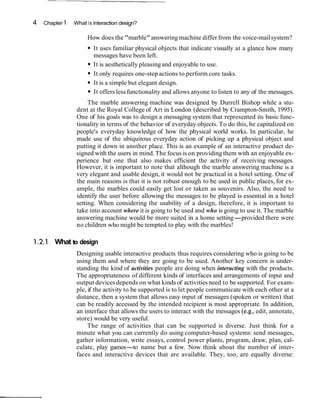
Now consider the following phone answering machine. Figure 1.1shows two
smallsketches of an answeringmachine phone. Incoming messages are represented
using physical marbles. The number of marbles that have moved into the pinball-
like chute indicates the number of messages. Dropping one of these marbles into a
slot in the machine causes the recorded message to play. Dropping the same mar-
ble into another slot on the phone dials the caller who left the message.
Figure 1 .1 Two small
sketchesshowinganswer-
ing phone.
4 Chapter 1 What is interaction design?
How does the "marble"answering machine differ from the voice-mailsystem?
It uses familiar physical objects that indicate visually at a glance how many
messages have been left.
It is aesthetically pleasingand enjoyable to use.
It only requires one-step actions to perform core tasks.
It is a simple but elegant design.
It offers lessfunctionality and allows anyone to listen to any of the messages.
The marble answering machine was designed by Durrell Bishop while a stu-
dent at the Royal College of Art in London (described by Crampton-Smith, 1995).
One of his goals was to design a messaging system that represented its basic func-
tionality in terms of the behavior of everyday objects. To do this, he capitalized on
people's everyday knowledge of how the physical world works. In particular, he
made use of the ubiquitous everyday action of picking up a physical object and
putting it down in another place. This is an example of an interactive product de-
signed with the users in mind.The focus is on providing them with an enjoyable ex-
perience but one that also makes efficient the activity of receiving messages.
However, it is important to note that although the marble answering machine is a
very elegant and usable design, it would not be practical in a hotel setting. One of
the main reasons is that it is not robust enough to be used in public places, for ex-
ample, the marbles could easily get lost or taken as souvenirs. Also, the need to
identify the user before allowing the messages to be played is essential in a hotel
setting. When considering the usability of a design, therefore, it is important to
take into account where it is going to be used and who is going to use it. The marble
answering machine would be more suited in a home setting-provided there were
no children who might be tempted to play with the marbles!
1.2.1 What to design
Designing usable interactive products thus requires considering who is going to be
using them and where they are going to be used. Another key concern is under-
standing the kind of activities people are doing when interacting with the products.
The appropriateness of different kinds of interfaces and arrangements of input and
output devicesdepends on what kinds of activities need to be supported. For exam-
ple, if the activity to be supported is to let people communicate with each other at a
distance, then a system that allows easy input of messages (spoken or written) that
can be readily accessed by the intended recipient is most appropriate. In addition,
an interface that allows the users to interact with the messages (e.g., edit, annotate,
store) would be very useful.
The range of activities that can be supported is diverse. Just think for a
minute what you can currently do using computer-based systems: send messages,
gather information, write essays, control power plants, program, draw, plan, cal-
culate, play games-to name but a few. Now think about the number of inter-
faces and interactive devices that are available. They, too, are equally diverse:
1.2 Good and poor design 5
multimedia applications, virtual-reality environments, speech-based systems, per-
sonal digital assistants and large displays-to name but a few. There are also
many ways of designing the way users can interact with a system (e.g., via the use
of menus, commands, forms, icons, etc.). Furthermore, more and more novel
forms of interaction are appearing that comprise physical devices with embedded
computational power, such as electronic ink, interactive toys, smart fridges, and
networked clothing (See Figure 1.2 on Color Plate 1). What this all amounts to is
a multitude of choices and decisions that confront designers when developing in-
teractive products.
A key question for interaction design is: how do you optimize the users' inter-
actions with a system, environment or product, so that they match the users' activi-
ties that are being supported and extended? One could use intuition and hope for
the best. Alternatively, one can be more principled in deciding which choices to
make by basing them on an understanding of the users. This involves:
taking into account what people are good and bad at
considering what might help people with the way they currently do things
thinking through what might provide quality user experiences
listening to what people want and getting them involved in the design
using"tried and tested" user-based techniques during the design process
The aim of this book is to cover these aspects with the goal of teaching you how to
carry out interaction design. In particular, it focuses on how to identify users'
needs, and from this understanding, move to designing usable, useful, and enjoy-
able systems.
How does making a phone call differ when using:
a public phone box
a cell phone?
How have these devicesbeen designed to take intoaccount (a) the kind of users, (b) type
of activity beingsupported,and (c) contextof use?
Comment (a) Public phones are designed to be used by the general public. Many have Braille em-
bossed on the keys and speaker volume control to enable people who are blind and
hard of hearing to use them.
Cell phones are intended for all user groups, although they can be difficult to use for
people who are blind or have limited manual dexterity.
(b) Most phone boxes are designed with a simple mode of interaction: insert card or
money and key in the phone number. If engaged or unable to connect the money or
card is returned when the receiver is replaced. There is also the option of allowing the
caller to make a follow-on call by pressing a button rather than collecting the money
and reinsertingit again. This function enables the making of multiple calls to be more
efficient.
I 6 Chapter 1 What is interactiondesign?
Cell phones havea more complex mode of interaction. More functionalityis provided,
requiringthe user tospend time learninghow to use them. For example,users can save
phone numbers in an address book and then assign these to "hotkeys,"allowing them
to be calledsimply through pressingone or two keys.
(c) Phone boxes are intended to be used in public places,say on the street or in a bus sta-
tion, and so have been designed to give the user a degree of privacy and noise protec-
tion through the use of hoodsand booths.
Cell phones have have been designedto be used any place and any time. However,lit-
tle consideration has been given to how such flexibility affects others who may be in
the same publicplace (e.g.,sitting on trains and buses).
I
1.3 What is interaction design?
I By interaction design,we mean
I
designing interactive products to support people in their everyday and working lives.
In particular, it is about creating user experiences that enhance and extend the way
people work, communicate and interact. Winograd (1997) describes it as "the de-
sign of spaces for human communication and interaction." In this sense, it is about
finding ways of supporting people. This contrasts with software engineering, which
focuses primarily on the production of software solutions for given applications. A
simple analogy to another profession, concerned with creating buildings,may clar-
ify this distinction. In his account of interaction design, Terry Winograd asks how
architects and civil engineers differ when faced with the problem of building a
house. Architects are concerned with the people and their interactions with each
other and within the house being built. For example, is there the right mix of family
and private spaces? Are the spaces for cooking and eating in close proximity? Will
people live in the space being designed in the way it was intended to be used? In
contrast, engineers are interested in issues to do with realizing the project. These
include practical concerns like cost, durability, structural aspects, environmental
aspects, fire regulations, and construction methods. Just as there is a difference
between designing and building a house, so too, is there a distinction between in-
teraction design and software engineering. In a nutshell, interaction design is re-
lated to software engineering in the same way as architecture is related to civil
engineering.
1.3.1 The makeup of interactiondesign
It has always been acknowledged that for interaction design to succeed many disci-
plines need to be involved. The importance of understanding how users act and
react to events and how they communicate and interact together has led people
from a variety of disciplines,such as psychologists and sociologists, to become in-
volved. Likewise, the growing importance of understanding how to design different
kinds of interactive media in effective and aesthetically pleasing ways has led to a
1.3 What is interaction design? 7
diversity of other practitioners becoming involved, including graphic designers,
artists, animators, photographers, film experts, and product designers. Below we
outline a brief history of interaction design.
In the early days, engineers designed hardware systems for engineers to use.
The computer interface was relatively straightforward, comprising various switch
panels and dials that controlled a set of internal registers. With the advent of moni-
tors (then referred to as visual display units or VDUs) and personal workstationsin
the late '70s and early '80s, interface design came into being (Grudin, 1990). The
new concept of the user interface presented many challenges:
Terror. You have to confront the documentation. You have to learn a new language. Did
you ever use the word 'interface' before you started using the computer?
-Advertisingexecutive Arthur Einstein (1990)
One of the biggest challenges at that time was to develop computers that could
be accessible and usable by other people, besides engineers, to support tasks in-
volving human cognition (e.g., doing sums, writing documents, managing accounts,
drawing plans). To make this possible, computer scientists and psychologists be-
came involved in designing user interfaces. Computer scientists and software engi-
neers developed high-level programming languages (e.g., BASIC, Prolog), system
architectures, software design methods, and command-based languages to help in
such tasks, while psychologists provided information about human capabilities
(e.g., memory,decision making).
The scope afforded by the interactive computing technology of that time (i.e.,
the combined use of visual displays and interactive keyboards) brought about
many new challenges. Research into and development of graphical user inter-
faces (GUI for short, pronounced "goo-ee") for office-based systems took off in
a big way. There was much research into the design of widgets (e.g., menus, win-
dows, palettes, icons) in terms of how best to structure and present them in a
GUI.
In the mid '80s, the next wave of computing technologies-including speech
recognition, multimedia, information visualization, and virtual reality-presented
even more opportunities for designing applications to support even more people.
Education and training were two areas that received much attention. Interactive
learning environments,educational software, and trainingsimulators were some of
the main outcomes. To build these new kinds of interactive systems, however, re-
quired a different kind of expertise from that of psychologists and computer pro-
grammers. Educational technologists, developmental psychologists, and training
experts joined in the enterprise.
As further waves of technological development surfaced in the '90s-network-
ing, mobile computing, and infrared sensing-the creation of a diversity of applica-
tions for all people became a real possibility. All aspects of a person's life-at
home, on the move, at school, at leisure as well as at work, alone, with family or
friends-began to be seen as areas that could be enhanced and extended by design-
ing and integrating various arrangements of computer technologies. New ways of
learning,communicating, working,discovering,and living were envisioned.
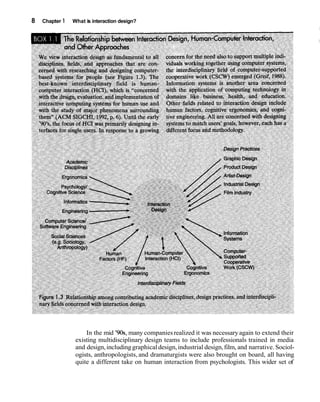
8 Chapter 1 What is interaction design?
In the mid '90s, many companiesrealized it was necessaryagain to extend their
existing multidisciplinary design teams to include professionals trained in media
and design,includinggraphicaldesign,industrial design,film, and narrative. Sociol-
ogists, anthropologists, and dramaturgists were also brought on board, all having
quite a different take on human interaction from psychologists. This wider set of
1.3 What is interaction design? 9
people were thought to have the right mix of skills and understanding of the differ-
ent application areas necessary to design the new generation of interactive systems.
For example, designing a reminder application for the family requires understand-
ing how families interact; creating an interactive story kit for children requires un-
derstanding how children write and understand narrative, and developing an
interactive guide for art-gallery visitors requires appreciating what people do and
how they move through publicspaces.
Now in the 'OOs, the possibilitiesafforded by emerging hardware capabilities-
e.g., radio-frequency tags, large interactive screens, and information appliances-
has led to a further realization that engineers, who know about hardware, software,
and electronics are needed to configure,assemble, and program the consumer elec-
tronics and other devices to be able to communicate with each other (often re-
ferred to as middleware).
1.3.2 Working together as a multidisciplinaryteam
Bringing together so many people with different backgrounds and training has
meant many more ideas being generated, new methods being developed, and more
creative and original designs being produced. However, the down side is the costs
involved. The more people there are with different backgrounds in a design team,
the more difficult it can be to communicate and progress forward the designs being
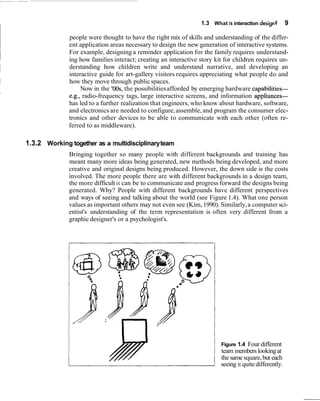
generated. Why? People with different backgrounds have different perspectives
and ways of seeing and talking about the world (see Figure 1.4). What one person
values as important others may not even see (Kim,1990). Similarly,a computer sci-
entist's understanding of the term representation is often very different from a
graphic designer's or a psychologist's.
Figure 1.4 Four different
team members lookingat
the same square,but each
seeing it quitedifferently.
10 Chapter 1 What is interaction design?
What this means in practice is that confusion, misunderstanding, and com-
munication breakdowns can often surface in a team. The various team members
may have different ways of talking about design and may use the same terms to
mean quite different things. Other problems can arise when a group of people is
"thrown" together who have not worked as a team. For example, the Philips Vi-
sion of the Future Project found that its multidisciplinary teams-who were re-
sponsible for developing ideas and products for the future-experienced a
number of difficulties, namely, that project team members did not always have a
clear idea of who needed what information, when, and in what form (Lambourne
et al.,1997).
practice, the makeup of a given design team depends on the kind of interactive product
ing built. Who do you think would need to be involved in developing:
(a) a public kiosk providing information about the exhibits available in a science
museum?
(b) an interactive educational website to accompany a TV series?
Comment Each team will need a pumber of different people with different skill sets. For example, the
first interactive product would need:
(a) graphic and inteiaction designers, museum curators, educational advisors, software
engineers, software designers, usability engineers, ergonomists
The second project would need:
(b) TV producers, graphic and interaction designers, teachers, video experts, software
engineers, software designers, usability engineers
In addition, as both systeds are being developed for use by the general public, representa-
tive users, such as school children and parents, should be involved.
In practice, design teams often end up being quite large, especially if they are working on a
big project to meet a fixed deadline. For example, it is common to find teams of fifteen peo-
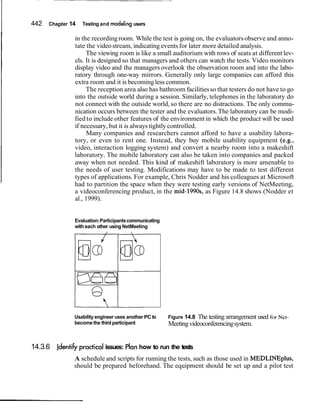
ple or more working on a website project for an extensive period of time, like six months.
This means that a number of people from each area of expertise are likely to be working as
part of the project team.
1.3.3 Interaction design in business
Interaction design is dbw big business. In particular, website consultants, start-
up companies, and mobile computing industries have all realized its pivotal role
in successful interactive hroducts. To get noticed in the highly competitive field
of web products requires standing out. Being able to say that your product is
easy and effective to use is seen as central to this. Marketing departments are re-
alizing how branding, the number of hits, customer return rate, and customer
satisfaction are greatly affected by the usability of a website. Furthermore, the
presence or absence of good interaction design can make or break a company.
1.3 What is interaction design? 11
One infamous dot.com fashion clothes company that failed to appreciate the im-
portance of good interaction design paid heavily for its oversight, becoming
bankrupt within a few months of going public.' Their approach had been to go
for an "all singing and all dancing," glossy 3D graphical interface. One of the
problems with this was that it required several minutes to download. Further-
more, it often took more than 20 minutes to place an order by going through a
painfully long and slow process of filling out an online form-only to discover
that the order was not successful. Customers simply got frustrated with the site
and never returned.
In response to the growing demand for interaction design, an increasing
number of consultancies are establishing themselves as interaction design ex-
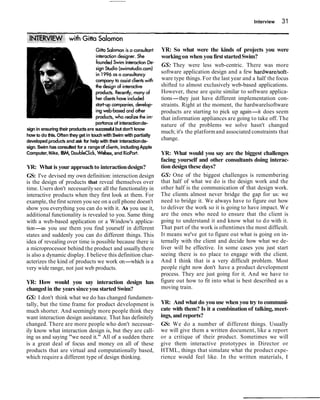
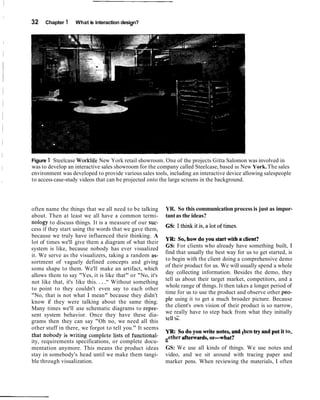
perts. One such company is Swim, set up by Gitta Salomon to assist clients with
the design of interactive products (see the interview with her at the end of this
chapter). She points out how often companies realize the importance of interac-
tion design but don't know how to do it themselves. So they get in touch with
companies, like Swim, with their partially developed products and ask them for
help. This can come in the form of an expert "crit" in which a detailed review of
the usability and design of the product is given (for more on expert evaluation,
see Chapter 13). More extensively, it can involve helping clients create their
products.
Another established design company that practices interaction design is IDEO,
which now has many branches worldwide. Drawing on over 20 years of experience
in the area, they design products, services, and environments for other companies,
pioneering new user experiences (Spreenberg et al., 1995). They have developed
'This happened before the dot.comcrash in 2001.
12 Chapter 1 What is interaction design?
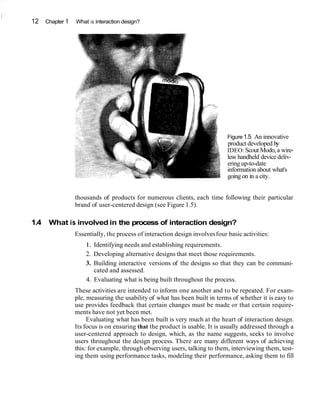
Figure 1.5 An innovative
product developed by
IDEO:Scout Modo,a wire-
less handheld device deliv-
ering up-to-date
information about what's
going on in a city.
thousands of products for numerous clients, each time following their particular
brand of user-centered design (see Figure 1.5).
1.4 What is involved in the process of interaction design?
Essentially, the process of interaction design involvesfour basic activities:
1. Identifying needs and establishing requirements.
2. Developing alternative designs that meet those requirements.
3. Building interactive versions of the designs so that they can be communi-
cated and assessed.
4. Evaluating what is being built throughout the process.
These activities are intended to inform one another and to be repeated. For exam-
ple, measuring the usability of what has been built in terms of whether it is easy to
use provides feedback that certain changes must be made or that certain require-
ments have not yet been met.
Evaluating what has been built is very much at the heart of interaction design.
Its focus is on ensuring that the product is usable. It is usually addressed through a
user-centered approach to design, which, as the name suggests, seeks to involve
users throughout the design process. There are many different ways of achieving
this: for example, through observing users, talking to them, interviewing them, test-
ing them using performance tasks, modeling their performance, asking them to fill
1.5 The goals of interaction design 13
in questionnaires, and even asking them to become co-designers.The findings from
the different ways of engaging and eliciting knowledge from users are then inter-
preted with respect to ongoingdesign activities(we give more detail about all these
aspects of evaluation in Chapters10-14).
Equally important as involving users in evaluating an interactive product is un-
derstanding what people currently do. This form of research should take place be-
fore buildingany interactive product. Chapters 3,4, and 5 cover a lot of this ground
by explaining in detail how people act and interact with one another, with informa-
tion, and with various technologies, together with describing their strengths and
weaknesses. Such knowledge can greatly help designers determine which solutions
to choose from the many design alternatives available and how to develop and test
these further. Chapter 7 describes how an understanding of users' needs can be
translated to requirements, while Chapter 9 explains how to involve users effec-
tively in the design process.
A main reason for having a better understanding of users is that different
users have different needs and interactive products need to be designed accord-
ingly. For example, children have different expectations about how they want
to learn or play from adults. They may find having interactive quizzes and cartoon
characters helping them along to be highly motivating, whereas most adults find
them annoying. Conversely, adults often like talking-heads discussionsabout top-
ics, but children find them boring. Just as everyday objects like clothes, food, and
games are designed differently for children, teenagers, and adults, so, too, must in-
teractive products be designed to match the needs of different kinds of users.
In addition to the four basic activities of design, there are three key character-
istics of the interaction design process:
1. Users should be involved through the development of the project.
2. Specificusability and user experience goals should be identified,clearly doc-
umented, and agreed upon at the beginningof the project.
3. Iteration through the four activitiesis inevitable.
We have already mentioned the importance of involving users and will return to
this topic throughout the book. Iterative design will also be addressed later when
we talk about the various design and evaluation methods by which this can be
achieved. In the next section we describe usability and user experience goals.
1.5 The goals of interaction design
Part of the process of understanding users' needs, with respect to designing an in-
teractive system to support them, is to be clear about your primary objective. Is it
to design a very efficient system that will allow users to be highly productive in
their work, or is it to design a system that will be challengingand motivatingso that
it supports effective learning, or is it something else? We call these top-level con-
cerns usabilitygoals and user experience goals. The two differ in terms of how they
are operationalized, i.e., how they can be met and through what means. Usability
14 Chapter 1 What is interaction design?
goals are concerned with meeting specific usability criteria (e.g., efficiency) and
user experience goals are largely concerned with explicating the quality of the user
experience (e.g., to be aesthetically pleasing).
1.5.1 Usability goals
To recap, usability is generally regarded as ensuring that interactive products are
easy to learn, effective to use, and enjoyablefrom the user's perspective. It involves
optimizing the interactions people have with interactive products to enable them to
carry out their activities at work, school, and in their everyday life. More specifi-
cally, usabilityis broken down into the following goals:
effectiveto use (effectiveness)
efficient to use (efficiency)
safe to use (safety)
have good utility (utility)
easy to learn (learnability)
easy to remember how to use (memorability)
For each goal, we describe it in more detail and provide a key question.
Effectiveness is a very general goal and refers to how good a system is at doing
what it is supposed to do.
Question: Is the system capable of allowing people to learn well,carry out their
work efficiently, access the information they need, buy the goods they want, and
so on?
Efficiency refers to the way a system supports users in carrying out their tasks.
The answering machine described at the beginning of the chapter was considered
efficient in that it let the user carry out common tasks (e.g., listening to messages)
through a minimal number of steps. In contrast, the voice-mail system was consid-
ered inefficient because it required the user to carry out many steps and learn an
arbitrary set of sequencesfor the same common task. This implies that an efficient
way of supporting common tasks is to let the user use single button or key presses.
An example of where this kind of efficiency mechanism has been effectively em-
ployed is in e-tailing. Once users have entered all the necessary personal details on
an e-commerce site to make a purchase, they can let the site save all their personal
details. Then, if they want to make another purchase at that site, they don't have
to re-enter all their personal details again. A clever mechanism patented by
Amazon.com is the one-click option, which requires users only to click a single but-
ton when they want to make another purchase.
Question: Once users have learned how to use a system to carry out their tasks,
can they sustain a high level of productivity?
Safety involves protecting the user from dangerous conditionsand undesirable
situations. In relation to the first ergonomic aspect, it refers to the external condi-
tions where people work. For example,where there are hazardousconditions-like
X-ray machines or chemical plants--operators should be able to interact with and
control computer-basedsystems remotely.The second aspect refers to helping any
1.5 The goals of interaction design 15
kind of user in any kind of situation avoid the dangers of carrying out unwanted ac-
tions aceidentally. It also refers to the perceived fears users might have of the con-
sequences of making errors and how this affects their behavior. To make
computer-based systems safer in this sense involves (i) preventing the user from
making serious errors by reducing the risk of wrong keyslbuttonsbeing mistakenly
activated (an example is not placing the quit or delete-file command right next to
the save command on a menu) and (ii) providing users with various means of re-
covery should they make errors. Safe interactive systems should engender confi-
dence and allow the user the opportunity to explore the interface to try out new
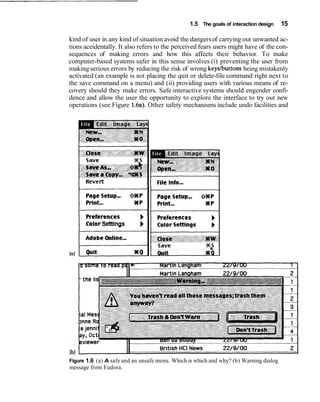
operations (see Figure 1.6a).Other safety mechanisms include undo facilities and
ColorSettings b
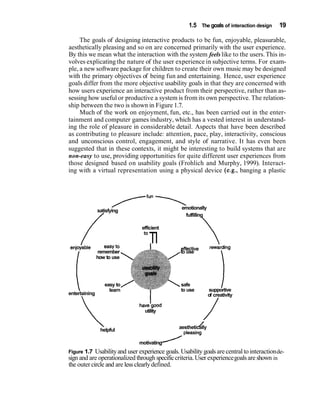
lb)
Figure 1.6 (a) A safe and an unsafe menu. Which is which and why? (b) Warning dialog
message from Eudora.
16 Chapter 1 What is interactiondesign?
confirmatory dialog boxes that give users another chance to consider their inten-
tions (a well-known example used in e-mail applications is the appearance of a dia-
log box, after the user has highlighted messages to be deleted, saying: "Are you
sure you want to delete all these messages?"See Figure 1.6(b)).
Question: Does the system prevent users from making serious errors and, if
they do make an error, does it permit them to recover easily?
Utility refers to the extent to which the system provides the right kind of func-
tionality so that users can do what they need or want to do. An example of a system
with high utility is an accounting software package providing a powerful computa-
tional tool that accountantscan use to work out tax returns. A example of a system
with low utility is a software drawing tool that does not allow users to draw free-
hand but forces them to use a mouse to create their drawings, using only polygon
shapes.
Question: Does the system provide an appropriate set of functions that enable
users to carry out all their tasks in the way they want to do them?
Learnability refers to how easy a system is to learn to use. It is well known that
people don't like spending a long time learning how to use a system. They want to
get started straight away and become competent at carrying out tasks without too
much effort.This is especiallyso for interactive products intended for everyday use
(e.g., interactive TV, email)and those used only infrequently (e.g., videoconferenc-
ing). To a certain extent, people are prepared to spend longer learning more com-
plex systems that provide a wider range of functionality(e.g., web authoring tools,
word processors). In these situations, CD-ROM and online tutorials can help by
providing interactive step-by-step material with hands-on exercises. However,
many peoplefind these tedious and often difficult to relate to the tasks they want to
1.5 The goals of interactiondesign 17
accomplish. A key concern is determining how much time users are prepared to
spend learning a system. There seems little point in developing a range of function-
ality if the majority of users are unable or not prepared to spend time learning how
to use it.
Question: How easy is it and how long does it take (i) to get started using a sys-
tem to perform core tasks and (ii) to learn the range of operations to perform a
wider set of tasks?
Memorability refers to how easy a system is to remember how to use, once
learned. This is especially important for interactive systems that are used infre-
quently. If users haven't used a system or an operation for a few months or longer,
they should be able to remember or at least rapidly be reminded how to use it.
Users shouldn't have to keep relearning how to carry out tasks. Unfortunately, this
tends to happen when the operations required to be learned are obscure, illogical,
or poorly sequenced. Users need to be helped to remember how to do tasks. There
are many ways of designing the interaction to support this. For example, users can
be helped to remember the sequence of operations at different stages of a task
through meaningful icons, command names, and menu options. Also, structuring
options and icons so they are placed in relevant categories of options (e.g., placing
all the drawing tools in the same place on the screen) can help the user remember
where to look to find a particular tool at a given stage of a task.
Question: What kinds of interface support have been provided to help users re-
member how to carry out tasks, especially for systems and operations that are used
infrequently?
How long do you think it should take to learn how to use the following interactiveproducts
and how long doesit actually take most people to learn them? How memorable are they?
(a) using a VCR to play a video
(b) using a VCR to pre-record two programs
(c) usingan authoringtool to create a website
Comment (a) To play a video should be as simple as turning the radio on, should take less than 30
seconds to work out, and then should be straightforward to do subsequently. Most
people are able to fathom how to play a video. However, some systems require the
user to switch to the "video"channel using one or two remote control devices,select-
ing from a choice of 50 or more channels.Other settings may also need to be config-
ured before the video will play.Most people are able to rememberhow to playa video
once they have used a particularVCR.
(b) This is a more complex operation and should take a couple of minutes to learn how to
do and to check that the programmingis correct. In reality,many VCRs are so poorly
designed that 80% of the populationis unable to accomplish this task, despite several
attempts. Very few people remember how to pre-record a program, largely because
the interaction required to do this is poorly designed, with poor or no feedback,and is
often illogical from the user's perspective. Of those, only a few will bother to go
through the manual again.
18 Chapter 1 Whpt is interactiondesign?
(c) A well-designed authoring too1should let the user create a basic page in about 20 min-
utes. Learning the full range of operations and possibilities is likely to take much
longer, possibly a few days. In reality, there are some good authoring tools that allow
the user to get started straight away, providing templates that they can adapt. Most
users will extend their repertoire, taking another hour or so to learn more functions.
However, very few peopleactually learn to use the full range of functions provided by
the authoring tool. Users will tend to remember frequently used operations (e.g., cut
and paste, inserting images),especiallyif they are consistent with the way they are car-
ried out in other softwareapplications. However, less frequently used operations may
need to be relearned (e.g., formattingtables).
The usabilitygoals discussed so far are well suited to the design of businesssystems
intended to support working practices. In particular, they are highly relevant for
companiesand organizationswho are introducingor updating applicationsrunning
on desktop and networked systems-that are intended to increase productivity by
improving and enhancing how work gets done. As well as couching them in terms
of specific questions, usability goals are turned into usability criteria. These are
specificobjectives that enable the usability of a product to be assessed in terms of
how it can improve (or not) a user's performance.Examples of commonly used us-
ability criteria are time to complete a task (efficiency), time to learn a task (learn-
ability), and the number of errors made when carrying out a given task over time
(memorability).
1.5.2 User experience goals
The realization that new technologies are offering increasing opportunities for sup-
porting people in their everydaylives has led researchers and practitioners to con-
sider further goals. The emergence of technologies (e.g., virtual reality, the web,
mobile computing) in a diversity of application areas (e.g., entertainment, educa-

tion, home, public areas) has brought about a much wider set of concerns. As well
as focusing primarily on improving efficiency and productivity at work, interaction
design is increasinglyconcerning itself with creatingsystems that are:
satisfying
enjoyable
fun
entertaining
helpful
motivating
aesthetically pleasing
supportive of creativity
rewarding
emotionallyfulfilling
1.5 The goals of interaction design 19
The goals of designing interactive products to be fun, enjoyable, pleasurable,
aesthetically pleasing and so on are concerned primarily with the user experience.
By this we mean what the interaction with the system feels like to the users.This in-
volves explicating the nature of the user experience in subjective terms. For exam-
ple, a new software package for children to create their own music may be designed
with the primary objectives of being fun and entertaining. Hence, user experience
goals differ from the more objective usability goals in that they are concerned with
how users experience an interactive product from their perspective, rather than as-
sessing how useful or productive a system is from its own perspective. The relation-
ship between the two is shown in Figure 1.7.
Much of the work on enjoyment, fun, etc., has been carried out in the enter-
tainment and computer games industry, which has a vested interest in understand-
ing the role of pleasure in considerable detail. Aspects that have been described
as contributing to pleasure include: attention, pace, play, interactivity, conscious
and unconscious control, engagement, and style of narrative. It has even been
suggested that in these contexts, it might be interesting to build systems that are
non-easy to use, providing opportunities for quite different user experiences from
those designed based on usability goals (Frohlich and Murphy, 1999). Interact-
ing with a virtual representation using a physical device (e.g., banging a plastic
TfUn----,satisfying
emotionally
/ fulfilling
efficient
TIenjoiable easy to effective rewarding
i
remember to use
how to use
easy to safe
learn
/
1to use supportive
entertaining

of creativity
havetgood
utility
 /
helpful
aesthetically
motivating
Figure 1.7 Usabilityand user experience goals. Usability goalsarecentral to interactionde-
sign and are operationalized through specificcriteria.User experiencegoalsare shown in
the outer circle and are less clearlydefined.
20 Chapter 1 What is interaction design?
I
hammer to hit a virtual nail represented on the computer screen) compared with
using a more efficient way to do the same thing (e.g.,selecting an option using com-
mand keys) may require more effort but could, conversely, result in a more enjoy-
able and fun experience.
Recognizingand understandingthe trade-offsbetween usabilityand user expe-
rience goals is important. In particular, this enables designers to become aware of
the consequences of pursuing different combinations of them in relation to fulfill-
ing different users' needs. Obviously, not all of the usability goals and user experi-
ence goals apply to every interactive product being developed.Some combinations
will also be incompatible.For example, it may not be possible or desirable to de-
sign a process control system that is both safe and fun. As stressed throughout this
chapter, what is important depends on the use context, the task at hand, and who
the intended users are.
elow are a number of proposed interactive products. What do you think are the key usabil-
y goals and user experience goals for each of them?
(a) a mobile device that allows young children to communicate with each other and play
collaborative games
(b) a video and computer conferencing system that allowsstudents to learn at home
(c) an Internet application that allows the general public to access their medical records
via interactive TV
(d) a CAD system for architects and engineers
(e) an online community that provides support for people who have recently been
bereaved
Comment (a) Such a collaborative device should be easy to use, effective, efficient, easy to learn
and use,fun and entertaining.
(b) Such a learning device should be easy to learn, easy to use, effective, motivating and
rewarding.
(c) Such a personal system needs to be safe, easy to use and remember how to use, effi-
cient and effective.
(d) Such a tool needs to be easy to learn, easy to remember, have good utility, be safe, ef-
ficient, effective, support creativity and be aesthetically pleasing.
(e) Such a system needs to be easy to learn, easy to use, motivating, emotionally satisfy-
ing and rewarding.
1.6 More on usability: design and usability principles
Another way of conceptualizing usabilityis in terms of design principles.These are
generalizableabstractions intended to orient designers towards thinking about dif-
ferent aspects of their designs. A well-known example is feedback: systemsshould
be designed to provide adequate feedback to the users to ensure they know what to
1.6 More on usability: designand usability principles 21
do next in their tasks. Design principles are derived from a mix of theory-based
knowledge, experience, and common sense. They tend to be written in a prescrip-
tive manner, suggesting to designers what to provide and what to avoid at the inter-
face-if you like, the do's and don'ts of interaction design. More specifically, they
are intended to help designers explain and improve the design (Thimbleby, 1990).
However, they are not intended to specify how to design an actual interface (e.g.,
telling the designer how to design a particular icon or how to structure a web por-
tal) but act more like a set of reminders to designers, ensuring that they have pro-
vided certain things at the interface.
A number of design principles have been promoted. The best known are con-
cerned with how to determine what users should see and do when carrying out
their tasks using an interactive product. Here we briefly describe the most common
ones: visibility,feedback, constraints, mapping, consistency,and affordances. Each
of these has been written about extensively by Don Norman (1988) in his bestseller
The Design of Everyday Things.
Visibility The importance of visibilityis exemplified by our two contrasting exam-
ples at the beginning of the chapter. The voice-mailsystem made the presence and
number of waiting messages invisible,while the answer machine made both aspects
highly visible. The more visible functions are, the more likely users will be able to
know what to do next. In contrast, when functions are "out of sight," it makes them
more difficult to find and know how to use. Norman (1988) describes the controls
of a car to emphasize this point. The controls for different operations are clearly
visible (e.g., indicators, headlights, horn, hazard warning lights), indicating what
can be done. The relationship between the way the controls have been positioned
in the car and what they do makes it easy for the driver tofind the appropriate con-
trol for the task at hand.
Feedback Related to the concept of visibility is feedback. This is best illustrated
by an analogy to what everyday life would be like without it. Imagine trying to play
a guitar, slice bread using a knife, or write using a pen if none of the actions pro-
duced any effect for several seconds. There would be an unbearable delay before
the music was produced, the bread was cut, or the words appeared on the paper,
making it almost impossiblefor the person to continue with the next strum, saw, or
stroke.
Feedback is about sending back information about what action has been done
and what has been accomplished,allowing the person to continue with the activity.
Various kinds of feedback are available for interaction design-audio, tactile, ver-
bal, visual, and combinations of these. Deciding which combinations are appropri-
ate for different kinds of activities and interactivities is central. Using feedback in
the right way can also provide the necessary visibilityfor user interaction.
Constraints The design concept of constraining refers to determining ways of re-
stricting the kind of user interaction that can take place at a given moment. There
are various ways this can be achieved. A common design practice in graphical user
interfaces is to deactivate certain menu options by shading them, thereby restrict-
22 Chapter 1 What is interactiondesign?
Figure 1.8 A menu illustratingrestricted availability of optionsas an exampleof logical
constraining.Shaded areasindicatedeactivated options.
ing the user to only actions permissible at that stage of the activity (see Figure 1.8).
One of the advantages of this form of constrainingis it prevents the user from se-
lecting incorrect options and thereby reduces the chance of making a mistake. The
use of different kinds of graphical representations can also constrain a person's in-
terpretation of a problem or information space. For example, flow chart diagrams
show which objectsare related to which, thereby constrainingthe way the informa-
tion can be perceived.
Norman (1999) classifiesconstraintsinto three categories: physical, logical,and
cultural. Physical constraints refer to the way physical objects restrict the move-
ment of things. For example, the way an external disk can be placed into a disk
drive is physically constrained by its shape and size, so that it can be inserted in
only one way. Likewise,keys on a pad can usually be pressed in only one way.
Logical constraints rely on people's understanding of the way the world works
(cf. the marbles answering machine design). They rely on people's common-sense
reasoning about actions and their consequences.Picking up a physical marble and
placing it in another location on the phone would be expected by most people to
1.6 More on usability: design and usability principles 23
Figure 1.9 (a) Naturalmapping between rewind, play,and fast forward on a tape recorder
device. (b) An alternative arbitrarymapping.
trigger something else to happen. Making actions and their effects obvious enables
people to logically deduce what further actions are required. Disabling menu op-
tions when not appropriate for the task in hand provides logicalconstraining. Jt al-
lows users to reason why (or why not) they have been designed this way and what
options are available.
Cultural constraints rely on learned conventions, like the use of red for warn-
ing, the use of certain kinds of audio signals for danger, and the use of the smiley
face to represent happy emotions. Most cultural constraints are arbitrary in the
sense that their relationship with what is being represented is abstract, and could
have equally evolved to be represented in another form (e.g., the use of yellow in-
stead of red for warning). Accordingly,they have to be learned. Once learned and
accepted by a cultural group, they become universally accepted conventions. Two
universally accepted interface conventions are the use of windowing for display-
ing information and the use of icons on the desktop to represent operations and
documents.
Mapping This refers to the relationship between controls and their effects in the
world. Nearly all artifacts need some kind of mapping between controls and effects,
whether it is a flashlight,car, power plant, or cockpit. An example of a good map-
ping between control and effect is the up and down arrows used to represent the up
and down movement of the cursor, respectively, on a computer keyboard. The
mapping of the relative position of controls and their effectsis also important. Con-
sider the various musical playing devices (e.g., MP3, CD player, tape recorder).
How are the controls of playing, rewinding, and fast forward mapped onto the de-
sired effects? They usually follow a common convention of providing a sequence of
buttons, with the play button in the middle, the rewind button on the left and the
fast-forward on the right. This configuration maps directly onto the directionality
of the actions (see Figure 1.9a).Imagine how difficult it would be if the mappings in
Figure 1.9b were used. Look at Figure 1.10 and determine from the various map-
pings which is good and which would cause problems to the person usingit.
Figure 1.10 Four possiblecombinations of arrow-key mappings.Which is the most natural
mapping?
24 Chapter 1 What is interaction design?
Consistency This refers to designing interfaces to have similar operations and use
similar elements for achieving similar tasks. In particular, a consistent interface is
one that follows rules, such as using the same operation to select all objects. For
example, a consistent operation is using the same input action to highlight any
graphical object at the interface, such as always clicking the left mouse button. In-
consistent interfaces,on the other hand, allow exceptions to a rule. An example of
this is where certain graphical objects (e.g., email messages presented in a table)
can be highlighted only by using the right mouse button, while all other operations
are highlighted using the left button. A problem with this kind of inconsistency is
that it is quite arbitrary, making it difficult for users to remember and making the
users more prone to mistakes.
One of the benefits of consistent interfaces,therefore, is that they are easier to
learn and use. Users have to learn only a single mode of operation that is applicable
to all objects.This principle works wellfor simple interfaces with limited operations,
like a mini CD player with a small number of operations mapped onto separate but-
tons. Here, all the user has to do is learn what each button represents and select ac-
cordingly. However, it can be more problematicto apply the concept of consistency
to more complex interfaces, especially when many different operations need to be
designed for. For example, consider how to design an interface for an application
that offers hundreds of operations (e.g. a word-processing application). There is
simply not enough space for a thousand buttons, each of which maps onto an indi-
vidual operation. Even if there were, it would be extremely difficult and time-
consuming for the user to search through them all to find the desired operation.
A much more effective design solution is to create categories of commands
that can be mapped into subsets of operations. For the word-processing applica-
tion, the hundreds of operations available are categorized into subsets of different
menus. All commands that are concerned with file operations (e.g., save, open,
close) are placed together in the same file menu. Likewise, all commands con-
cerned with formatting text are placed in a format menu. Selecting an operation
then becomes a matter of homing in on the right category (menu) of options and
scanning it for the desired one, rather than scrolling through one long list. How-
ever, the consistency rule of having a visible one-to-one mapping between com-
mand and operation is broken. Operations are not immediately visible at the
interface, but are instead hidden under different categoriesof menus. Furthermore,
some menu items are immediately visible, when a top-level menu is first pulled
down, while others remain hidden until the visible items are scrolled over. Thus,
users need to learn what items are visible in each menu category and which are hid-
den in submenus.
The way the items are divided between the categories of menu items can also
appear inconsistent to users. Various operations appear in menus where they do
not belong. For example,the sorting operation (very usefulfor listing referencesor
names in alphabetical order) in Microsoft Word 2001 is in the Table menu (the
Mac Version). In the previous Word 98 version,it was in both the Tools and Table
menus. I always thought of it as a Tool operation (like Word Count), and became
very frustrated to discover that as a default for Word 2001 it is only in the Table
menu. This makes it inconsistentfor me in two ways: (i) with the previous version
and (ii) in the categoryit has been placed. Of course, I can customize the new ver-
1.6 More on usability: design and usability principles 25
sion so that the menus are structured in the way I think they should be, but this all
takes considerable time (especially when I use different machines at work, home,
and when travelling).
Another problem with consistency is determining what aspect of an interface
to make consistent with what else. There are often many choices, some of which
can be inconsistent with other aspects of the interface or ways of carrying out ac-
tions. Consider the design problem of developing a mechanism to let users lock
their files on a shared server. Should the designer try to design it to be consistent
with the way people lock things in the outside world (called external consistency)
or with the way they lock objects in the existing system (called internal consis-
tency)? However, there are many different ways of locking objects in the physical
world (e.g., placing in a safe, using a padlock, using a key, using a child safety lock),
just as there are different ways of locking electronically (e.g., using PIN numbers,
passwords, permissions, moving the physical switches on floppy disks). The prob-
lem facing designers is knowingwhich one to be consistent with.
Ahbrdance is a term used to refer to an attribute of an object that allows people
to know how to use it. For example, a mouse button invites pushing (in so doing ac-
tivating clicking) by the way it is physicallyconstrained in its plasticshell. At a very
simple level, to afford means "to give a clue" (Norman, 1988). When the affor-
dances of a physical object are perceptually obvious it is easy to know how to inter-
act with it. For example, a door handle affords pulling, a cup handle affords
grasping, and a mouse button affords pushing. Norman introduced this concept in
the late '80s in his discussion of the design of everyday objects. Since then, it has
been much popularized, being used to describe how interface objects should be de-
signed so that they make obvious what can be done to them. For example, graphi-
cal elements like buttons, icons, links, and scroll bars are talked about with respect
to how to make it appear obvious how they should be used: icons should be de-
signed to afford clicking, scroll bars to afford moving up and down, buttons to af-
ford pushing.
Unfortunately, the term affordance has become rather a catch-all phrase, los-
ing much of its potency as a design principle. Norman (1999), who was largely re-
sponsible for originally promoting the concept in his book The Design of Everyday
Things (1988), now despairs at the way it has come to be used in common parlance:
"Zput an affordance there,"a participant would say, "I wonder if the object affords
clicking... "affordances this, affordances that. And no data, just opinion. Yikes!What
had I unleashed upon the world? Norman's (1999)reaction to a recent CHI-Web
discussion.
He has since tried to clarify his argument about the utility of the concept by saying
there are two kinds of affordance: perceived and real. Physical objects are said to
have real affordances, like grasping, that are perceptuallyobviousand do not have to
be learned. In contrast, user interfaces that are screen-based are virtual and do not
have these kinds of real affordances. Using this distinction, he argues that it does not
make sense to try to design for real affordancesat the interface--exceptwhen design-
ing physical devices, like control consoles, where affordances like pulling and press-
ing are helpful in guiding the user to know what to do. Alternatively, screen-based
26 Chapter 1 What is interaction design?
interfaces are better conceptualized as perceived affordances, which are essentially
learned conventions. In conclusion, Norman argues that other design concepts--con-
ventions,feedback and cultural and logical constraints-are far more useful for help-
ing designers developgraphicaluser interfaces.
1.6.1 Heuristics and usability principles
When design principles are used in practice they are commonly referred to as
heuristics. This term emphasizes that something has to be done with them when
they are applied to a given problem. In particular, they need to be interpreted in
the design context, drawingon past experience of, for example, how to designfeed-
back and what it means forsomething to be consistent.
Another form of guidance is usabilityprinciples.An exampleis "speak the user's
language." These are quite similar to design principles, except that they tend to be
more prescriptive. In addition, whereas design principles tend to be used mainly for
informing a design, usability principles are used mostly as the basis for evaluating
prototypes and existingsystems.In particular,they providethe frameworkfor heuris-
tic evaluation (see Chapter 13). They, too, are called heuristics when used as part of
1.6 More on usability: design and usability principles 27
an evaluation. Below are the ten main usability principles, developed by Nielsen
(2001) and his colleagues. Note how some of them overlap with the design principles.
1. Visibility of system status-always keep users informed about what is going
on, through providing appropriate feedback within reasonable time
2. Match between system and the real world-speak the users' language, using
words, phrases and concepts familiar to the user, rather than system-
oriented terms
3. User control andfreedom-provide ways of allowing users to easily escape
from places they unexpectedly find themselves, by using clearly marked
'emergency exits'
4. Consistency and standards-avoid making users wonder whether different
words,situations, or actions mean the same thing
5. Help users recognize, diagnose, and recover from errors-use plain lan-
guage to describe the nature of the problem and suggest a way of solving it
6. error prevention-where possible prevent errors occurringin the first place
7. Recognition rather than recall-make objects, actions, and options visible
8. Flexibility and efficiency of use-provide accelerators that are invisible to
novice users, but allow more experienced users to carry out tasks more
quickly
9. Aestheticand minimalist design-avoid using information that is irrelevant
or rarely needed
10. Help and documentation-provide information that can be easily searched
and provides help in a set of concrete steps that can easily be followed
One of the main design principleswhich Nielsen has proselytized,especially for website de-
sign, is simplicity. He proposes that designersgo through all of their design elementsand re-
move them one by one. If a design works just as well without an element, then remove it. Do
you think this is a good design principle? If you have your own website, try doing this and
seeing what happens. At what point does the interaction break down?
Comment Simplicity is certainly an important design principle. Many designers try to cram too much into
a screenfulof space, makingit unwieldyfor people to find what they are interestedin. Remov-
ing design elements to see what can be discarded without affecting the overall function of the
website can be a salutary lesson. Unnecessary icons, buttons, boxes, lines, graphics, shading,
and text can be stripped, leavinga cleaner,crisper, and easier-to-navigatewebsite.However, a
certain amount of graphics, shading, coloring, and formattingcan make a site aesthetically
pleasingand enjoyableto use. Plain vanillasites with just listsof text and a few hyperlinks may
not be as appealingand may put certain visitorsoff returning.The key is getting the right bal-
ance between aestheticappealand the right amount and kind of informationper page.
Design and usability principles have also been operationalized into even more spe-
cific prescriptions called rules.These are guidelines that should be followed. An ex-
ample is "always place the quit or exit button at the bottom of the first menu list in
an application."
28 Chapter 1 What is interaction design?
Assignment
This assignment is intended for you to put into practice what you have read about inthis chap-
ter. Specifically, the objective is to enable you to define usability and user experience goals and
to use design and usability principles for evaluating the usability of an interactive product.
Find a handheld device (e.g. remote control, handheld computer, or cell phone) and ex-
amine how it has been designed, paying particular attention to how the user is meant to in-
teract with it.
(a) From your first impressions, write down what first comes to mind as to what is good
and bad about the way the device works. Then list (i) its functionality and (ii) the
range of tasks a typical user would want to do using it. Is the functionality greater,
equal, or less than what the user wants to do?
(b) Based on your reading of this chapter and any other material you have come across,
compile your own set of usability and user experience goals that you think will be
I Summary 29
most useful in evaluating the device. Decide which are the most important ones and
explain why.
(c) Translate the core usability and user experience goals you have selected into two or
three questions. Then use them to assess how well your device fares (e.g., Usability
goals. What specific mechanisms have been used to ensure safety? How easy is it to
learn? User experience goals:Is it fun to use? Does the user get frustrated easily? If
so, why?).
(d) Repeat (b) and (c) for design concepts and usability principles (again choose a rele-
vant set).
(e) Finally, discuss possible improvements to the interface based on your usability
evaluation.
Summary
In this chapter we have looked at what interaction design is and how it has evolved. We ex-
amined briefly its makeup and the various processes involved. We pointed out how the no-
tion of usability is fundamental to interaction design. This was explained in some detail,
describing what it is and how it is operationalized to assess the appropriateness, effective-
ness, and quality of interactive products. A number of high-level design principles were also
introduced that provide different forms of guidance for interaction design.
30 Chapter 1 What is interaction design?
Key points
Interaction design is concerned with designing interactive products to support people in
their everydayand workinglives.
Interaction design is multidisciplinary,involving many inputs from wide-reaching disci-
plines and fields.
Interaction design is now big business: many companies want it but don't know how to
do it.
I
Optimizing the interaction between users and interactive products requires taking into
account a number of interdependent factors, includingcontext of use, type of task, and
kind of user.
Interactive products need to be designed to match usability goals like ease of use and
learning.
User experience goals are concernedwith creatingsystems that enhance the user experi-
encein terms of makingit enjoyable, fun, helpful, motivating,and pleasurable.
Design and usability principles,like feedback and simplicity, are useful heuristics for an-
alyzingand evaluating aspects of an interactiveproduct.
Further reading
Here we recommend a few seminal readings. A more compre-
hensive list of useful books, articles, websites, videos, and
other material can be found at our website.
WINOGRAD, T. (1997) From computing machinery to inter-
action design. In P. Denning and R. Metcalfe (eds.) Beyond
Calculation: the Next Fifty Years of Computing. New York:
Springer-Verlag, 14S162. Terry Winograd provides an
overview of how interaction design has emerged as a new
area, explaining how it does not fit into any existing design
or computing fields. He describes the new demands and
challenges facing the profession.
NORMAN, D. (1988) The Design of Everyday Things. New
York: Doubleday, (especially Chapter 1). Norman's writing
is highly accessible and enjoyable to read. He writes exten-
sivelyabout the design and usability of everyday objectslike
doors, faucets, and fridges. These examples provide much
food for thought in relation to designing interfaces. The
Voyager CD-ROM (sadly, now no longer published) of his
collected works ~rovidesadditional videos and animations
NORMAN, D. (1999) ACM Interactions Magazine, MayIJune,
38-42. Affordances,conventions and design. This is a short
and thought-provokingcritique of design principles.
GRUDIN,J. (1990) The computer reaches out: the historical
continuity of interface design. In CHZ'90 Proc. 261-268.
GRUDIN, J. (1989) The case against user interfaceconsistency.
Communicationsof the ACM, 32(10),1164-1173.
Jonathan Grudin is a prolific writer and many of his earlier
works provide thought-provoking and well documented ac-
counts of topical issues in HCI. The first paper talks about
how interface design has expanded to wver many more as-
pects in its relativelyshort history.The second paper, consid-
ered a classic of its time, discusses why the concept of
consistency-which had been universally accepted as good in-
terfacedesign up until then-was in fact highly problematic.
Interactions, JanuarylFebruary 2000, ACM. This special
issue provides a collection of visions, critiques, and sound
bites on the achievementsand future of HCI from a number
of researchers,designers,and practitioners.
that illustrate in an entertaining way many of the problems, IDEO providesa well illustrated online archiveof a range of
design ideas and issues raised in the text. interactive productsit has designed. (see www.ideo.com)
Interview 31
portanceof interactionde-
sign in ensuring their productsare successful but don't know
how to do this. Often they get in touch withSwim with partially
developed productsand ask for help with their interactionde-
sign. Swim has consulted for a rangeof clienk, includingApple
Computer,Nike, IBM, DoubleClick,Webex, and RioPort.
YR: What is your approachto interactiondesign?
GS: I've devised my own definition: interaction design
is the design of products that reveal themselves over
time. Users don't necessarilysee all the functionality in
interactive products when they first look at them. For
example, the first screen you see on a cell phone doesn't
show you everything you can do with it. As you use it,
additional functionality is revealed to you. Same thing
with a web-based application or a Window's applica-
tion-as you use them you find yourself in different
states and suddenly you can do different things. This
idea of revealing over time is possible because there is
a microprocessor behind the product and usually there
is also a dynamic display. I believe this definition char-
acterizes the kind of products we work on-which is a
very wide range, not just web products.
YR: How would you say interaction design has
changed in the yearssince you started Swim?
GS: I don't think what we do has changed fundamen-
tally, but the time frame for product development is
much shorter. And seemingly more people think they
want interaction design assistance. That has definitely
changed. There are more people who don't necessar-
ily know what interaction design is, but they are call-
ing us and saying "we need it." All of a sudden there
is a great deal of focus and money on all of these
products that are virtual and computationally based,
which require a different type of design thinking.
YR: So what were the kinds of projects you were
workingon when youfirststartedSwim?
GS: They were less web-centric. There was more
software application design and a few hardwarelsoft-
ware type things. For the last year and a half the focus
shifted to almost exclusively web-based applications.
However, these are quite similar to software applica-
tions-they just have different implementation con-
straints. Right at the moment, the hardwarelsoftware
products are starting to pick up again-it does seem
that information appliances are going to take off. The
nature of the problems we solve hasn't changed
much; it's the platformand associated constraints that
change.
YR: What would you say are the biggest challenges
facing yourself and other consultants doing interac-
tion design these days?
GS: One of the biggest challenges is remembering
that half of what we do is the design work and the
other half is the communication of that design work.
The clients almost never bridge the gap for us: we
need to bridge it. We always have to figure out how
to deliver the work so it is going to have impact. We
are the ones who need to ensure that the client is
going to understand it and know what to do with it.
That part of the work is oftentimes the most difficult.
It means we've got to figure out what is going on in-
ternally with the client and decide how what we de-
liver will be effective. In some cases you just start
seeing there is no place to engage with the client.
And I think that is a very difficult problem. Most
people right now don't have a product development
process. They are just going for it. And we have to
figure out how to fit into what is best described as a
moving train.
YR: And what do you use when you try to communi-
cate with them? Is it a combination of talking, meet-
ings,and reports?
GS: We do a number of different things. Usually
we will give them a written document, like a report
or a critique of their product. Sometimes we will
give them interactive prototypes in Director or
HTML, things that simulate what the product expe-
rience would feel like. In the written materials, I
32 Chapter 1 What is interaction design?
Figure 1 Steelcase Worklife New York retail showroom. One of the projects Gitta Salomon was involved in
was to develop an interactive sales showroom for the company called Steelcase, based in New York.The sales
environment was developed to provide various sales tools, including an interactive device allowing salespeople
to access case-study videos that can be projected onto the large screens in the background.
often name the things that we all need to be talking YR. So this communication process is just as impor-
about. Then at least we all have a common termi- tantas the ideas?
nology to discuss things. It is a measure of our suc- GS: 1think it is, a lot of times.
cess if they start using the words that we gave them,
because we truly have influenced their thinking. A y ~ ,so, how do you start witha client?
lot of times we'll give them a diagram of what their
system is like, because nobody has ever visualized GS: For clients who already have something built, I
find that usually the best way for us to get started, is
it. We serve as the visualizers, taking a random as-
to begin with the client doing a comprehensive demo
sortment of vaguely defined concepts and giving
of their product for us. We will usually spend a whole
some shape to them. We'll make an artifact, which
allows them to say "Yes, it is like that" or "No, it's
day collecting information. Besides the demo, they
not like that, it's like this. . . ." Without something tell us about their target market, competitors, and a
whole range of things. It then takes a longer period ofto point to they couldn't even say to each other
time for us to use the product and observe other peo-
"No, that is not what 1 mean" because they didn't
ple using it to get a much broader picture. Becauseknow if they were talking about the same thing.
the client's own vision of their product is so narrow,Many times we'll use schematic diagrams to repre-
we really have to step back from what they initiallysent system behavior. Once they have these dia- .--
grams then they can say "Oh no, we need all this tell Ub.
other stuff in there, we forgot to tell you." It seems
that nobody is writing complete lists of functional- YR: Sodo you writenotes, andthen try and put it to-
ity, requirements specifications, or complete docu- gether afterwards,Orwhat?
mentation anymore. This means the product ideas GS: We use all kinds of things. We use notes and
stay in somebody's head until we make them tangi- video, and we sit around with tracing paper and
ble through visualization. marker pens. When reviewing the materials, 1 often
Interview 33
try and bring them together in some sort of thematic
way. It's often mind-boggling to bring a software
product that's been thrown together into any kind of
coherent framework. It's easy to write a shopping list
of observations, but we want to assemble a larger
structure and framework and that takes several weeks
to construct. We need time to reflect and stew on
what was done and what maybe should have been
done. We need to highlight the issues and put them
into some kind of larger order. If you always operate
at a low level of detail, like worrying and critiquing
the size of a button, you end up solving only local is-
sues. You never really get to the big interaction de-
sign problems of the product, the ones that should be
solved first.
YR: If you're given a prototype or product to evalu-
ate and you discover that it is redly bad, what do you
do?
GS: Well, I never have the guts to go in and say
something is fundamentally flawed. And that's maybe
not the best strategy anyway, because it's your word
against theirs. Instead, I think it is always about mak-
ing the case for why something is wrong or flawed.
Sometimes I think we are like lawyers. We have to as-
semble the case for what's wrong with the product.
We have to make a convincing argument. A lot of
times I think the kind of argumentation we do is very
much like what lawyers do.
YR: Finally, how do you see interaction design mov-
ing in the next five years? More of the same kind of
problems with new emerging technologies? Or do
you think there are going to be more challenges, es-
peciallywith the hardwarelsoftware integration?
GS: I think there will be different constraints as new
technologies arise. No matter what we are designing,
we have to understand the constraints of the imple-
mentation. And yes, different things will happen when
we get more into designing hardwarelsoftware prod-
ucts. There are different kinds of cost constraints and
different kinds of interactions you can do when there is
special purpose hardware involved. Whereas designing
the interaction for applications requires visual design
expertise, designing information appliances or other
hardware products requires experience with product
design. Definitely, there will be some new challenges.
Hopefully, in the next few years, people will stop
looking for interaction design rules. There's been a bit
of a push towards making interaction design a science
lately. Maybe this has happened because so many peo-
ple are trying to do it and they don't know where to
start because they don't have much experience. I'm
hoping people will start understanding that interaction
designis a design discipline-that there are some guide-
linesand ways to do good practice-andcreativitycom-
bined with analytical thinking are necessary to arrive at
good products. And then, even more so than now, it is
going to get interesting and be a really exciting time.
Chapter 2
Understanding and
conceptualizing interaction
2.1 Introduction
2.2 Understanding the problem space
2.3 Conceptualmodels
2.3.1 Conceptual models based on activities
2.3.2 Conceptual modelsbased on objects
2.3.3 A case of mix and match?
2.4 Interface metaphors
2.5 Interaction paradigms
2.6 From conceptualmodels to physicaldesign
Introduction
Imagine you have been asked to design an application to let people organize,
store, and retrieve their email in a fast, efficient and enjoyable way. What would
you do? How would you start? Would you begin by sketching out how the inter-
face might look, work out how the system architecture will be structured, or
even just start coding? Alternatively, would you start by asking users about their
current experiences of saving email, look at existing email tools and, based on
this, begin thinking about why, what, and how you were going to design the
application?
Interaction designers would begin by doing the latter. It is important to real-
ize that having a clear understanding of what, why, and how you are going to de-
sign something, before writing any code, can save enormous amounts of time and
effort later on in the design process. Ill-thought-out ideas, incompatible and un-
usable designs can be ironed out while it is relatively easy and painless to do.
Once ideas are committed to code (which typically takes considerable effort,
time, and money), they become much harder to throw away-and much more
painful. Such preliminary thinking through of ideas about user needs1
and what
'User needs here are the range of possiblerequirements,includinguser wants and experiences.
36 Chapter 2 Understandingand conceptualizing interaction
kinds of designs might be appropriate is, however, a skill that needs to be
learned. It is not something that can be done overnight through following a
checklist, but requires practice in learning to identify, understand, and examine
the issues-just like learning to write an essay or to program. In this chapter we
describe what is involved. In particular, we focus on what it takes to understand
and conceptualize interaction.
The main aims of this chapter are to:
Explain what is meant by the problem space.
Explain how to conceptualize interaction.
Describe what a conceptual model is and explain the different kinds.
Discuss the pros and cons of using interface metaphors as conceptual models.
Debate the pros and cons of using realism versus abstraction at the interface.
Outline the relationship between conceptual design and physical design.
2.2 Understanding the problem space
In the process of creating an interactive product, it can be temping to begin at the
"nuts and bolts" level of the design. By this, we mean working out how to design
the physical interface and what interaction styles to use (e.g., whether to use
menus, forms, speech, icons, or commands). A problem with trying to solve a de-
sign problem beginning at this level is that critical usability goals and user needs
may be overlooked. For example, consider the problem of providing drivers with
better navigation and traffic information. How might you achieve this? One could
tackle the problem by thinking straight away about a good technology or kind
of interface to use. For example, one might think that augmented reality, where
images are superimposed on objects in the real world (see Figure 2.1 on Color
Plate 2), would be appropriate, since it can be useful for integrating additional in-
formation with an ongoing activity (e.g., overlaying X-rays on a patient during an
operation). In the context of driving, it could be effective for displaying informa-
tion to drivers who need to find out where they are going and what to do at certain
points during their journey. In particular, images of places and directions to follow
could be projected inside the car, on the dashboard or rear-view mirror. However,
there is a major problem with this proposal: it is likely to be very unsafe. It could
easily distract drivers, luring them to switch their attention from the road to where
the images were being projected.
A problem in starting to solve a design problem at the physical level, therefore,
is that usability goals can be easily overlooked. While it is certainly necessary at
some point to decide on the design of physical aspects, it is better to make these
kinds of design decisions after understanding the nature of the problem space. By
this, we mean conceptualizing what you want to create and articulating why you
want to do so. This requires thinking through how your design will support people
in their everyday or work activities.In particular, you need to ask yourself whether
the interactive product you have in mind will achieve what you hope it will. If so,
2.2 Understanding the problem space 37
how? In the above example, this involves finding out what is problematic with ex-
isting forms of navigating while driving (e.g., trying to read maps while moving the
steering wheel) and how to ensure that drivers can continue to drive safely without
being distracted.
Clarifying your usability and user experience goals is a central part of working
out the problem space. This involves making explicit your implicit assumptions and
claims. Assumptions that are found to be vague can highlight design ideas that
need to be better formulated. The process of going through them can also help to
determine relevant user needs for a given activity.In many situations, this involves
identifying human activities and interactivities that are problematic and working
out how they might be improved through being supported with a different form of
interaction. In other situations it can be more speculative, requiring thinking
through why a novel and innovative use of a new technology will be potentially
useful.
Below is another scenario in which the problem space focuses on solving an
identified problem with an existing product. Initial assumptions are presented first,
followed by a further explanation of what lies behind these (assumptions are high-
lighted in italics):
A large software company has decided to develop an upgrade of its web browser.
They assume that there is a need for a new one, which has better and more powerful
functionality.They begin by carrying out an extensive study of people's actual use of
web browsers, talking to lots of different kinds of users and observing them using
their browsers. One of their main findings is that many people do not use the
bookmarking feature effectively. A common finding is that it is too restrictive and
underused. In fathoming why this is the case, it was considered that the process of
placing web addresses into hierarchical folders was an inadequate way of supporting
the user activity of needing to mark hundreds and sometimes thousands of websites
such that any one of them could be easily returned to or forwarded onto other
people. A n implication of the study was that a new way of saving and retrieving web
addresses was needed.
In working out why users find the existing feature of bookmarking cumber-
some to use, a further assumption was explicated:
The existing way of organizing saved (favorite) web addresses into folders is
inefjicient because it takes too long and is prone to errors.
A number of underlying reasons why this was assumed to be the case were fur-
ther identified, including:
It is easy to lose web addresses by placing them accidentally into the wrong
folders.
It is not easy to move web addresses between folders.
It is not obvious how .tomove a number of addresses from the saved favorite
list into another folder simultaneously.
It is not obvious how to reorder web addresses once placed in folders.
38 Chapter 2 Understanding and conceptualizing interaction
Based on this analysis,a set of assumptions about the user needs for supporting
this activity more effectivelywere then made.These included:
If the bookmarking function was improved users would find it more useful
and use it more to organize their web addresses.
Users need a flexible way of organizing web addresses they want to keep for
further reference or for sending on to other people.
A framework for explicating assumptions
Reasoning through your assumptions about why something might be a good idea
enables you to see the strengths and weaknesses of your proposed design. In so
doing, it enables you to be in a better position to commence the design process. We
have shown you how to begin this, through operationalizing relevant usability
goals. In addition, the following questions provide a useful framework with which
to begin thinking through the problem space:
Are there problems with an existing product? If so, what are they? Why do
you think there are problems?
Why do you think your proposed ideas might be useful? How do you envi-
sion people integrating your proposed design with how they currently do
things in their everydayor workinglives?
How will your proposed design support people in their activities? In what
way does it address an identified problem or extend current ways of doing
things? Will it really help?
At the turn of the millennium, WAP-enabled (wireless application protocol) phones came
into being, that enabled people to connect to the Internet using them. To begin with, the
web-enabled services provided were very primitive, being text-based with limited graphics
capabilities. Access was very restricted, with the downloaded information being displayed
on a very small LCD screen (see Figure 2.2). Despite this major usability drawback, every
telecommunication company saw this technological breakthrough as an opportunity to cre-
ate innovative applications. A host of new services were explored, including text messaging,
online booking of tickets, betting, shopping, viewing movies, stocks and shares, sports events
and banking.
What assumptions were made about the proposed services? How reasonable are these
assumptions?
Figure 2.2 An early cell phone display. Text is restricted to
three or four lines at a time and scrolls line by line, making read-
ing very cumbersome. Imagine trying to read a page from this
book in thisway! The newer 3G (third generation) phones have
bigger displays, more akin to those provided with handheld
computers.
2.3 Conceptual models 39
Comment The problem space for this scenario was very open-ended. There was no identifiable problem
that needed to be improved or fixed. Alternatively, the new WAP technology provided op-
portunities to create new facilities and experiences for people. One of the main assumptions
is that people want to be kept informed of up-to-the-minute news (e.g. sports, stocks and
share prices) wherever they are. Other assumptions included:
That people want to be able to decide what to do in an evening while on their way
home from work (e.g., checking TV listings, movies, making restaurant reservations).
That people want to be able to interact with information on the move (e.g., reading
email on the train).
That users are prepared to put up with a very small display and will be happy browsing
and interacting with information using a restricted set of commands via a small number
of tiny buttons.
That people will be happy doing things on a mobile phone that they normally do using
their PCs (e.g., reading email, surfing the web, playing video games, doing their
shopping).
It is reasonable to assume that people want flexibility. They like to be able to find out
about news and events wherever they are (just look at the number of people who take a
radio with them to a soccer match to find out the scores of other matches being played at the
same time). People also like to use their time productively when traveling, as in making
phone calls. Thus it is reasonable to assume they would like to read and send email on the
move. The most troublesome assumption is whether people are prepared to interact with the
range of services proposed using such a restricted mode of interactivity. In particular, it is
questionable whether most people are prepared to give up what they have been used to (e.g.
large screen estate, ability to type messages using a normal-sized keyboard) for the flexibility
of having access to very restricted Internet-based information via a cell phone they can keep
in their pocket.
One of the benefits of working through your assumptions for a problem space
before building anything is that it can highlight problematic concerns. In so doing,
it can identify ideas that need to be reworked, before it becomes too late in the de-
sign process to make changes. Having a good understanding of the problem space
can also help greatly in formulating what it is you want to design. Another key as-
pect of conceptualizing the problem space is to think about the overall structure of
what will be built and how this will be conveyed to the users. In particular, this in-
volves developing a conceptual model.
2.3 Conceptual models
"The most important thing to design is the user's conceptual model. Everything else
should be subordinated to making that model clear, obvious, and substantial. That
is almost exactly the opposite of how most software is designed." (David Liddle,
1996, p. 17)
40 Chapter 2 Understanding and conceptualizinginteraction
By a conceptual model is meant:
a description of the proposed system in terms of a set of integrated ideas and concepts
about what it should do, behave and look like, that will be understandableby the users
in the manner intended.
To develop a conceptual model involves envisioning the proposed product, based
on the users' needs and other requirements identified. To ensure that it is designed
to be understandable in the manner intended requires doing iterative testing of the
product as it is developed. A key aspect of this design process is initially to decide
what the users will be doing when carrying out their tasks. For example, will they
be primarily searching for information, creating documents, communicating with
other users, recording events, or some other activity? At this stage, the interaction
mode that would best support this needs to be considered. For example, would al-
lowing the users to browse be appropriate, or would allowing them to ask questions
directly to the system in their native language be more effective? Decisions about
which kind of interaction style to use (e.g., whether to use a menu-based system,
speech input, commands) should be made in relation to the interaction mode.
Thus, decisions about which mode of interaction to support differ from those
made about which style of interaction to have; the former being at a higher level
of abstraction. The former are also concerned with determining the nature of the
users' activities to support, while the latter are concerned with the selection of
specific kinds of interface.
Once a set of possible ways of interacting with an interactive system has been
identified, the design of the conceptual model then needs to be thought through
in terms of actual concrete solutions. This entails working out the behavior of the
interface, the particular interaction styles that will be used, and the "look and
feel" of the interface. At this stage of "fleshing out," it is always a good idea to
explore a number of possible designs and to assess the merits and problems of
each one.
Another way of designing an appropriate conceptual model is to select an in-
terface metaphor. This can provide a basic structure for the conceptual model that
is couched in knowledge users are familiar with. Examples of well-known interface
metaphors are the desktop and search engines (which we will cover in Section 2.4).
Interaction paradigms can also be used to guide the formation of an appropriate
conceptual metaphor. They provide particular ways of thinking about interaction
design, such as designing for desktop applications or ubiquitous computing (these
will also be covered in Section 2.5).
As with any aspect of interaction design, the process of fleshing out conceptual
models should be done iteratively, using a number of methods. These include
sketching out ideas, storyboarding, describing possible scenarios, and prototyping
aspects of the proposed behavior of the system. All these methods will be covered
in Chapter 8, which focuses on doing conceptual design. Here, we describe the dif-
ferent kinds of conceptual models, interface metaphors, and interaction paradigms
to give you a good understanding of the various types prior to thinking about how
to design them.
2.3 Conceptual models 41
There are a number of different kinds of conceptual models. These can be bro-
ken down into two main categories: those based on activities and those based on
objects.
2.3.1 Conceptual models based on activities
The most common types of activities that users are likely to be engaged in when in-
teracting with systems are:
1. instructing
2. conversing
3. manipulating and navigating
4. exploring and browsing
A first thing to note is that the various kinds of activity are not mutually exclusive,
as they can be carried out together. For example, it is possible for someone to give
instructions while conversing or navigate an environment while browsing. How-
ever, each has different properties and suggests different ways of being developed
at the interface. The first one is based on the idea of letting the user issue instruc-
tions to the system when performing tasks. This can be done in various interaction
styles: typing in commands, selecting options from menus in a windows environ-
ment or on a touch screen, speaking aloud commands, pressing buttons, or using a
combination of function keys. The second one is based on the user conversing with
the system as though talking to someone else. Users speak to the system or type in
questions to which the system replies via text or speech output. The third type is
based on allowing users to manipulate and navigate their way through an environ-
ment of virtual objects. It assumes that the virtual environment shares some of the
properties of the physical world, allowing users to use their knowledge of how
physical objects behave when interacting with virtual objects. The fourth kind is
based on the system providing information that is structured in such a way as to
allow users to find out or learn things, without having to formulate specific ques-
tions to the system.
A company is building a wireless informationsystem to help tourists find their way around
an unfamiliar city. What would they need to find out in order to develop a conceptual
model?
Comment To begin, they would need to ask: what do tourists want? Typically,they want to find out
lots of things,such as how to get from A to B, where the post office is and where a good Chi-
nese restaurantis.They then need to consider how best to support the activity of requesting
information. Is it preferable to enable the tourists to ask questions of the system as if they
were having a conversation with another human being? Or would it be more appropriateto
allow them to ask questionsas if giving instructionsto a machine? Alternatively,would they
prefer a system that structures informationin the form of lists, maps, and recommendations
that they could then exploreat their leisure?
42 Chapter 2 Understanding and conceptualizinginteraction
Comment
1. Instructing
This kind of conceptual model describes how users carry out their tasks through in-
structing the system what to do. Examples include giving instructions to a system to
perform operations like tell the time, print a file, and remind the user of an ap-
pointment. A diverse r.?nge of devices has been designed based on this model, in-
cluding VCRs, hi-fi systems, alarm clocks, and computers. The way in which the
user issues instructions can vary from pressing buttons to typing in strings of char-
acters. Many activities are readily supported by giving instructions.
Operating systems like Unix and DOS have been specifically designed as com-
mand-based systems, to which the user issues instructions at the prompt as a com-
mand or set of commands. In Windows and other GUI-based systems, control keys
or the selection of menu options via a mouse are used. Well-known applications that
are command-based include word processing, email, and CAD. Typically, a wide
range of functions is provided from which users choose when they want to do some-
thing to the object they are working on. For example, a user writing a report using a
word processor will want to format the document, count the numbers of words typed,
and check the spelling. The user will need to instruct the system to do these opera-
tions by issuing apprbpriate commands. Typically, commands are carried out in a se-
quence, with the system responding appropriately (or not) as instructed.
One of the main benefits of an instruction-based conceptual model is that it
supports quick and efficient interaction. It is particularly suited to repetitive kinds
of actions performed on multiple objects. Examples include the repetitive actions
of saving, deleting, and organizing email messages or files.
There are many different kinds of vending machines in the world. Each offers a range of
goods, requiring the user initially to part with some money.Figure 2.3 shows photos of two
different vending machines, one that provides soft drinks and the other a range of snacks.
Both support the interaction style of issuing instructions. However, the way they do it is
quite different.
What instructionsmust be issued to obtain a can of soft drink from the first machine and
a bar of chocolate from the second? Why has it been necessary to design a more complex
mode of interaction for the second vending machine? What problems can arise with this
mode of interaction?
The first vending machine has been designed on a very simple instruction-basedconceptual
model.There are a small numberof drinks to choose from and each is represented by a large
button displaying the label of each drink. The user simply has to press one button and
(hopefully) this will have the effect of returning the selected drink. The second machine is
more complex, offering a wider range of snacks. The trade-off for providing more choices,
however, is that the user can no longer instruct the machine by using a simple one-press ac-
tion but is required to use a more complex process, involving: (i) reading off the code (e.g.,
C12) under the item chosen, then (ii) keying this into the number pad adjacent to the dis-
played items, and (iii) checking the price of the selected option and ensuring that the
amount of money inserted is the same or more (dependingon whether or not the machine
provides change). Problems that can arise from this mode of interaction are the customer
2.3 Conceptual models 43
Figure 2.3 Two vending machines, (a) one selling soft drinks, (b) the other selling a range of
snacks.
misreading the code and or mistyping in the code, resulting in the machine not issuing the
snack or providing the wrong sort.
A better way of designing an interface for a large number of choices of variable cost is to
continue to use direct mapping, but use buttons that show miniature versions of the snacks
placed in a large matrix (rather than showing actual versions). This would use the available
space at the front of the vending machine more economically. The customer would need
only to press the button of the object chosen and put in the correct amount of money.
Much research has been carried out on how to optimize command-based and
other instruction-giving systems with respect to usabilty goals. The form of the
commands (e.g., the use of abbreviations, full names, icons, and/or labels), their
syntax (how best to combine different commands), and their organization (e.g.,
how to structure options in different menus) are examples of some of the main
areas that have been investigated (Shneiderman, 1998). In addition, various cogni-
tive issues have been investigated that we will look at in the next chapter, such as
the problems people have in remembering the names of a set of commands. Less
44 Chapter 2 Understandingand conceptualizinginteraction
research has been carried out, however, on the best way to design the ordering and
sequencing of button pressing for physical devices like cell phones, calculators, re-
mote controls and vending machines.
Another ubiquitous vending machine is the ticket machine. Typically, a number of instruc-
tions have to be given in a sequence when using one of these. Consider ticket machines de-
signed to issue train tickets at railway stations-how often have you (or the person in front
of you) struggled to work out how to purchase a ticket and made a mistake? How many in-
structions have to be given? What order are they given in? Is it logical or arbitrary? Could
the interaction have been designed any differently to make it more obvious to people how to
issue instructions to the machine to get the desired train ticket?
Comment Ticketing machines vary enormously from country to country and from application to appli-
cation. There seems to be little attempt to standardize. Therefore, a person's knowledge of
the Eurostar ticketing machine will not be very useful when buying a ticket for the Sydney
Monorail or cinema tickets for the Odeon. Sometimes the interaction has been designed to
get you to specify the type of ticket first (e.g. adult, child), the kind of ticket (e.g. single, re-
turn, special saver), then the destination, and finally to insert their money. Others require
that the user insert a credit card first, before selecting the destination and the type of ticket.
2. Conversing
This conceptual model is based on the idea of a person conversing with a system,
where the system acts as a dialog partner. In particular, the system is designed to
respond in a way another human being might when having a conversation with
someone else. It differs from the previous category of instructing in being intended
to reflect a more two-way communication process, where the system acts more like
a partner than a machine that simply obeys orders. This kind of conceptual model
has been found to be most useful for applications in which the user needs to find
out specific kinds of information or wants to discuss issues. Examples include advi-
sory systems, help facilities, and search engines. The proposed tourist application
described earlier would fit into this category.
The kinds of conversation that are supported range from simple voice-recognition
menu-driven systems that are interacted with via phones to more complex natural-lan-
guage-based systems that involve the system parsing and responding to user queries
typed in by the user. Examples of the former include banking, ticket booking, and
train time inquiries, where the user talks to the system in single-word phrases (e.g.,
yes, no, three) in responseto promptsfrom the system. Examples of the latter include
search engines and help systems, where the user typesin a specificquery (e.g., how do
I change the margin widths?) to which the system responds by giving various answers.
A main benefit of a conceptual model based on holding a conversation is that it
allows people, especially novices, to interact with a system in a way they are already
familiar with. For example, the search engine "Ask Jeeves for Kids!" allows chil-
dren to ask a question in a way they would when asking their teachers or parents-
rather than making them reformulate their question in terms of key words and
Boolean logic. A disadvantage of this approach, however, is the misunderstandings
that can arise when the search engine is unable to answer the child's question in the
2.3 Conceptual models 45
You asked: How many legs does a ceyipede have?
Jeeves knows these answers:
Where can I find a definition for the math term
leg?
Where can I find a concise encvclo~ediaarticle on ?, .
centipedes?
Where can I see an image of the human-
appendix?
Why does my leg or other limb fall asleep?
Where can I find advice on controlling the garden pest ?
millipedes and centipedes?
Figure 2.4 Theresponsefrom"Ask
ources from Britannica.com on JeevesforKids!"searchenginewhen
asked"how manylegsdoesacen-
tipedehave?"
way the child expects.For example,a child might type in a seeminglysimple question,
like "How many legs does a centipede have?" which the search engine finds difficult
to answer. Instead, the search engine replies by suggesting a number of possible web-
sites that may be relevant but-as can be seen in Figure 2.4-can be off the mark.
Another problem that can arise from a conversational-based, conceptual
model is that certain kinds of tasks are transformed into cumbersome and one-
sided interactions. This is especially the case for automated phone-based systems
that use auditory menus to advance the conversation. Users have to listen to a
voice providing several options, then make a selection, and repeat through further
layers of menus before accomplishing their goal (e.g., reaching a real human, pay-
ing a bill). Here is the beginning of a dialog between a user who wants to find out
about car insurance and an insurance company's reception system:
<user dials an insurance company>
"Welcome to St. Paul's Insurance Company. Press 1 if new
customer, 2 if you are an existing customer".
<user presses 1>
"Thank you for calling St. Paul's Insurance Company. If you
require house insurance press 1, car insurance press 2,
travel insurance press 3, health insurance press 4, other
press 5"
<user presses 2>
"You have reached the car insurance division. If you re-
quire information about fully comprehensive insurance press
1, 3rd-party insurance press 2 . . ."
46 Chapter 2 Understandingand conceptualizinginterakion
81 Randy Glasberw.
$ww.01asbergen.com 1
"If you'd like to press 1, press 3.
If you'd like to press 3,press 8.
If you'd like to press 8, press S..."
A recent development based on the conversing conceptual model is animated
agents. Various kinds of characters, ranging from "real" people appearing at the
interface (e.g., videoed personal assistants and guides) to cartoon characters (e.g.,
virtual and imaginary creatures), have been designed to act as the partners in the
conversation with the system. In so doing, the dialog partner has become highly
visible and tangible, appearing to both act and talk like a human being (or crea-
ture). The user is able to see, hear, and even touch the partner (when it is a physi-
cal toy) they are talking with, whereas with other systems based on a dialog
partner (e.g., help systems) they can only hear or read what the system is saying.
Many agents have also been designed to exhibit desirable human-like qualities
(e.g., humorous, happy, enthusiastic, pleasant, gentle) that are conveyed through
facial expressions and lifelike physical movements (head and lip movements,
body movements). Others have been designed more in line with Disney-like car-
toon characters, exhibiting exaggerated behaviors (funny voices, larger-than-life
facial expressions).
Animated agents that exhibit human-like or creature-like physical behavior as
well as "talk" can be more believable. The underlying conceptual model is con-
veyed much more explicitly through having the system act and talk via a visible
agent. An advantage is that it can make it easier for people to work out that the in-
terface agent (or physical toy) they are conversing with is not a human being, but a
synthetic character that has been given certain human qualities. In contrast, when
the dialog partner is hidden from view, it is more difficult to discern what is behind
it and just how intelligent it is. The lack of visible cues can lead users into thinking
it is more intelligent than it actually is. If the dialog partner then fails to understand
their questions or comments, users are likely to lose patience with it. Moreover,
2.3 Conceptual models 47
they are likely to be less forgiving of it (having been fooled into thinking the dialog
partner is more intelligent than it really is) than of a dialog partner that is repre-
sented as a cartoon character at the interface (having only assumed it was a simple
partner). The flip side of imbuing dialog partners with a physical presence at the in-
terface, however, is that they can turn out to be rather annoying (for more on this
topic see Chapter 5).
3. Manipulating and navigating
This conceptual model describes the activity of manipulating objects and navigat-
ing through virtual spaces by exploiting users' knowledge of how they do this in the
physical world. For example, virtual objects can be manipulated by moving, select-
ing, opening, closing, and zooming in and out of them. Extensions to these actions
can also be included, such as manipulating objects or navigating through virtual
spaces, in ways not possible in the real world. For example, some virtual worlds
have been designed to allow users to teleport from place to place or to transform
one object into another.
A well known instantidtion of this kind of conceptual model is direct manip-
ulation. According to Ben Shneiderman (1983), who coined the term, direct-
manipulation interfaces possess three fundamental properties:
continuous representation of the objects and actions of interest
rapid reversible incremental actions with immediate feedback about the
object of interest
physical actions and button pressing instead of issuing commands with
complex syntax
Benefitsof direct manipulation interfaces include:
helps beginners learn basicfunctionality rapidly
experienced users can work rapidly on a wide range of tasks
infrequent users can remember how to carry out operations over time
no need for error messages,except very rarely
users can immediately see if their actions are furthering their goals and if not
do something else
useis experience less anxiety
users gain confidence and mastery and feel in control
Apple Computer Inc. was one of the first computer companies to design an op-
erating environment using direct manipulation as its central mode of interaction.
The highly successful Macintosh desktop demonstrates the main principles of di-
rect manipulation (see Figure 2.5). To capitalize on people's understanding of
what happens to physical objects in the real world, they used a number of visual
and auditory cues at the interface that were intended to emulate them. One of
Chapter
Figure 2.5 Original Macintoshdesktop interface.
their assumptions was that people expect their physical actions to have physical
results, so when a drawing tool is used, a corresponding line should appear and
when a file is placed in the trash can a corresponding sound or visual cue show-
ing it has been successfully thrown away is used (Apple Computer Inc., 1987). A
number of specific visual and auditory cues were used to provide such feedback,
including various animations and sounds (e.g. shrinking and expanding icons ac-
companied with 'shhhlicc' and 'crouik' sounds to represent opening and closing
of files). Much of this interaction design was geared towards providing clues to
the user to know what to do, to feel comfortable, and to enjoy exploring the
interface.
Many other kinds of direct manipulation interfaces have been developed, in-
cluding video games, data visualization tools and CAD systems. Virtual environ-
ments and virtual reality have similarly employed a range of interaction
mechanismsthat enable users to interact with and navigate through a simulated3D
physical world. For example, users can move around and explore aspects of a 3D
environment (e.g., the interior of a building) while also moving objects around in

the virtual environment, (e.g., rearranging the furniture in a simulated living
room). Figure 2.6 on Color Plate 3 shows screen shots of some of these.
While direct manipulation and virtual environments provide a very versatile
mode of interaction, they do have a number of drawbacks. At a conceptual level,
some people may take the underlying conceptual model too literally and expect
certain things to happen at the interface in the way they would in the physical
world. A well known example of this phenomenon is of new Mac users being terri-
2.3 Conceptual models 49
fied of dragging the icon of their floppy disk to the trash can icon on the desktop to
eject it from the computer for fear of deleting it in the same way files are when
placed in the trash can. The conceptual confusion arises because the designers
opted to use the same action (dropping) on the same object (trash can) for two

completely different operations, deleting and ejecting. Another problem is that not
all tasks can be described by objects and not all actions can be done directly. Some
tasks are better achieved through issuing instructions and having textual descrip-
tions rather than iconic representations. Imagine if email messages were repre-
sented as small icons in your mailbox with abbreviations of who they were from
and when they were sent. Moreover, you could only move them around by drag-
ging them with a mouse. Very quickly they would take up your desk space and you
would find it impossibleto keep track of them all.
4. Exploringand browsing
This conceptual model is based on the idea of allowing people to explore and
browse information, exploiting their knowledge of how they do this with existing
media (e.g., books, magazines, TV, radio, libraries, pamphlets, brochures). When
people go to a tourist office,a bookstore, or a dentist's surgery, often they scan and
flick through parts of the information displayed, hoping to find something interest-
ing to read. CD-ROMs, web pages, portals and e-commerce sites are applications
based on this kind of conceptual model. Much thought needs to go into structuring
the information in ways that will support effective navigation, allowing people to
search, browse, and find different kinds of information.
What conceptual models are the following applications based on?
(a) a 3D video game, say a car-racing game with a steering wheel and tactile, audio, and
visual feedback
(b) the Windows environment
(c) a web browser
Commenf (a) A 3D video game is based on a direct manipulation/virtual environment conceptual
model.
(b) The Windows environment is based on a hybrid form of conceptual model. It com-
bines a manipulating mode of interaction where users interact with menus, scrollbars,
documents, and icons, an instructing mode of interaction where users can issue com-
mands through selecting menu options and combining various function keys, and a
conversational model of interaction where agents (e.g. Clippy) are used to guide
users in their actions.
(c) A web browser is also based on a hybrid form of conceptual model, allowing users to
explore and browse information via hyperlinks and also to instruct the network what
to search for and what results to present and save.
50 Chapter 2 Understandingand conceptualizinginteraction
2.3 Conceptual models 51
Which conceptualmodel or combinationof modelsdo you think is most suited to supporting
the followinguser activities?
(a) downloading musicoff the web
(b) programming
Comment (a) The activity involves selecting, saving, cataloging and retrieving large files from an
external source. Users need to be able to browse and listen to samples of the music
and then instruct the machine to save and catalog the files in an order that they can
readily access at subsequent times. A conceptual model based on instructing and
navigatingwould seem appropriate.
(b) Programming involves various activities including checking, debugging, copying li-
braries, editing, testing, and annotating.An environment that supports this range of
tasks needs to be flexible.A conceptual model that allows visualization and easy ma-
nipulation of code plus efficient instructing of the system on how to check, debug,
copy,etc.,is essential.
2.3.2 Conceptual models based on objects
The second category of conceptual models is based on an object or artifact, such as
a tool, a book, or a vehicle. These tend to be more specific than conceptual models
based on activities, focusing on the way a particular object is used in a particular
context. They are often based on an analogy with something in the physical world.
An example of a highly successful conceptual model based on an object is the
spreadsheet (Winograd, 1996). The object this is based on is the ledger sheet.
The first spreadsheet was designed by Dan Bricklin, and called VisiCalc. It en-
abled people to carry out a range of tasks that previously could only be done very
laboriously and with much difficulty using other software packages, a calculator, or
by hand (see Figure 2.7). The main reasons why the spreadsheet has become so
successful are first, that Bricklin understood what kind of tool would be useful to
people in the financial world (like accountants) and second, he knew how to design
it so that it could be used in the way that these people would find useful. Thus, at
the outset, he understood (i) the kinds of activities involved in the financial side of
business, and (ii) the problems people were having with existing tools when trying
to achieve these activities.
A core financial activity is forecasting. This requires projecting financial results
based on assumptions about a company, such as projected and actual sales, invest-
ments,infrastructure,and costs. The amount of profitor lossis calculatedfor different
projections. For example, a company may want to determine how much loss it will
incur before it will start making a profit, based on different amounts of investment,for
different periodsof time. Financial analysts need to see a spread of projectionsfor dif-
ferent time periods. Doing this kind of multiple projectingby hand requires much ef-
fort and is subject to errors. Using a calculator can reduce the computational load of
doing numerous sums, but it still requires the person to do much key pressing and
writingdown of partial results-again making the processvulnerable to errors.
To tackle these problems, Bricklinexploited the interactivity provided by micro-
computers and developed an application that was capable of interactive financial
52 Chapter 2 Understanding and conceptualizing interaction
Entry Type V 40' v ~ l wL Rrcalculal~ooOsdsf Memory ImICdltD(
fur tabct for ~ p a M l n 9 l n l i ~ ~ l o lI1 R IICtOSS
HDvr mlny K memory
IebLIl lDVd5 /fC dQWR GQtURIRB
avaUlbtt It liMhrnp M
Currsnr Enrw 5 Cwrdkll?%es

WI 01 room
 Dhad+antndtcatw d
mi^ keyswtll move
e w e rag sod down I( - /
Edh line Rashmg block
men4 wstmg wpue
/ ;;$? Jws81twF~lma'c
Cursor Two w~ndawawhen the
screen 4 BP'*
(obpsr Format (SI) Vatu. Enlty
Figure 2.7 Referencecardshowing annotatedscreen dumpfor VisiCalc
modeling. Key aspects of his conceptual model were: (i) to create a spreadsheet that
was analogous to a ledger sheet in the way it looked, with columns and rows, which
allowed people to capitalize on their familiarity with how to use this kind of repre-
sentation, (ii) to make the spreadsheet interactive, by allowing the user to input and
change data in any of the cells in the columns or rows, and (iii) to get the computer
to perform a range of different calculations and recalculationsin response to user
input. For example, the last column can be programmed to display the sum of all the
cells in the columns preceding it. With the computer doing all the calculations, to-
gether with an easy-to-learn-and-use interface, users were provided with an easy-to-
understand tool. Moreover, it gave them a new way of effortlessly working out any
2.3 Conceptual models 53
number of forecasts-greatly extending what they could do before with existing
tools.
Another popular accounting tool intended for the home market, based on a con-
ceptual model of an object, is Quicken. This used paper checks and registers for its
basic structure. Other examples of conceptual models based on objects include most
operating environments (e.g., Windows and the Mac desktop) and web portals. All
provide the user with a familiar frame of referencewhen starting the application.
54 Chapter 2 Understanding and conceptualizinginteraction
2.3.3 A case of mix and match?
As we have pointed out, which kind of conceptual model is optimal for a given ap-
plication obviously depends on the nature of the activity to be supported. Some are
clearly suited to supporting a given activity (e.g., using manipulation and naviga-
tion for a flightsimulator) while for others, it is less clear what might be best (e.g.,
writing and planning activities may be suited to both manipulation and giving in-
structions). In such situations, it is often the case that some form of hybrid concep-
tual model that combines different interaction styles is appropriate. For example,
the tourist application in Activity 2.2 may end up being optimally designed based
on a combination of conversing and exploring models. The user could ask specific
questions by typing them in or alternatively browse through information. Shopping
on the Internet is also often supported by a range of interaction modes. Sometimes
the user may be browsing and navigating, other times communicating with an
agent, at yet other times parting with credit card details via an instruction-based
form fill-in. Hence, which mode of interaction is "active" depends on the stage of
the activity that is being carried out.
2.4 Interface metaphors 55
The down side of mixing interaction moqes is that the underlying conceptual
model can end up being more complex and ambiguous, making it more difficult
for the user to understand and learn. For example, some operating and word-pro-
cessing systems now make it possible for the user to carry out the same activity in
a number of different ways (e.g., to delete a file the user can issue a command
like CtrlD, speak to the computer by saying "delete file," or drag an icon of the
file to the recycle bin). Users will have to learn the different styles to decide
which they prefer. Inevitably, the learning curve will be steeper, but in the long
run the benefits are that it enables users to decide how they want to interact with
the system.
2.4 Interface metaphors
Another way of describing conceptual models is in terms of interface metaphors.
By this is meant a conceptual model that has been developed to be similar in
some way to aspects of a physical entity (or entities) but that also has its own be-
haviors and properties. Such models can be based on an activity or an object or
both. As well as being categorized as conceptual models based on objects, the
desktop and the spreadsheet are also examples of interface metaphors. Another
example of an interface metaphor is a "search engine." The tool has been de-
signed to invite comparison with a physical object-a mechanical engine with
several parts working-together with an everyday action-searching by looking
through numerous files in many different places to extract relevant information.
The functions supported by a search engine also include other features besides
those belonging to an engine that searches, such as listing and prioritizing the re-
sults of a search. It also does these actions in quite different ways from how a me-
chanical engine works or how a human being might search a library for books on
a given topic. The similarities alluded to by the use of the term "search engine,"
therefore, are at a very general conceptual level. They are meant to conjure up
the essence of the process of finding relevant information, enabling the user to
leverage off this "anchor" further understanding of other aspects of the function-
ality provided.
Interface metaphors are based on conceptual models that combine familiar
knowledge with new concepts. As mentioned in Box 2.2, the Star was based on a
conceptual model of the familiar knowledge of an office. Paper, folders, filing cabi-
nets, and mailboxes were represented as icons on the screen and were designed to
possess some of the properties of their physical counterparts. Dragging a document
icon across the desktop screen was seen as equivalent to picking up a piece of
paper in the physical world and moving it (but of course is a very different action).
Similarly, dragging an electronic document onto an electronic folder was seen as
being analogous to placinga physical document into a physical cabinet. In addition,
new concepts that were incorporated as part of the desktop metaphor were opera-
tions that couldn't be performed in the physical world. For example, electronic files
could be placed onto an icon of a printer on the desktop, resulting in the computer
printing them out.
I 56 Chapter 2 Understanding and conceptualizing interaction
Interface metaphors are often actually composites, i.e., they combine quite different pieces
of familiar knowledge with the system functionality. We already mentioned the "search en-
gine" as one such example. Can you think of any others?
Comment Some other examplesinclude:
Scrollbar--combinesthe concept of a scroll with a bar, as in bar chart
Toolbar--combinesthe idea of a set of tools with a bar
Portal website-a gateway to a particularcollection of pages of networked information
Benefits of interface metaphors
Interface metaphors have proven to be highly successful, providing users with a
familiar orienting device and helping them understand and learn how to use a sys-
tem. People find it easier to learn and talk about what they are doing at the com-
2.4 Interface metaphors 57
puter interface in terms familiar to them-whether they are computer-phobic or
highly experienced programmers. Metaphorically based commands used in Unix,
like "lint" and "pipe," have very concrete meanings in everyday language that,
when used in the context of the Unix operating system, metaphorically represent
some aspect of the operations they refer to. Although their meaning may appear
obscure, especially to the novice, they make sense when understood in the context
of programming. For example, Unix allows the programmer to send the output of
one program to another by using the pipe (1) symbol. Once explained,it is easy to
imagine the output from one container going to another via a pipe.
Can you think of any bizarre computing metaphors that have become common parlance
whose originalsource of referenceis (or always was) obscure?
Cornrnent A couple of intriguingones are:
Java-The programing language Java originally was called Oak, but that name had
already been taken. It is not clear how the developersmoved from Oak to Java. Java
is a name commonly associated with coffee. Other Java-based metaphors that have
been spawned include Java beans (a reusable software component) and the steaming
coffee-cupicon that appears in the top left-hand corner of Java applets.
Bluetooth-Bluetoothis used in a computing context to describe the wireless technol-
ogy that is able to unite technology,communication,and consumer electronics. The
name is taken from King Harald Blue Tooth, who was a 10th century legendary
Viking king responsible for uniting Scandinavia and thus getting people to talk to
each other.
Opposition to using interfacemetaphors
A mistake sometimes made by designers is to try to design an interface metaphor
to look and behave literally like the physical entity it is being compared with.
This misses the point about the benefit of developing interface metaphors. As
stressed earlier, they are meant to be used to map familiar to unfamiliar knowl-
edge, enabling users to understand and learn about the new domain. Designing
interface metaphors only as literal models of the thing being compared with has
understandably led to heavy criticism. One of the most outspoken critics is Ted
Nelson (1990) who considers metaphorical interfaces as "using old half-ideas as
crutches" (p. 237). Other objections to the use of metaphors in interaction design
include:
Breaks the rules. Several commentators have criticized the use of interface
metaphors because of the cultural and logical contradictionsinvolved in accommo-
dating the metaphor when instantiated as a GUI. A pet hate is the recycle bin (for-
merly trash can) that sits on the desktop. Logically and culturally (i.e., in the real
world), it should be placed under the desk. If this same rule were followed in the
virtual desktop, users would not be able to see the bin because it would be oc-
cluded by the desktop surface. A counter-argument to this objection is that it does
58 Chapter 2 Understanding and conceptualizing interaction
not matter whether rules are contravened. Once people understand why the bin is
on the desktop, they readily accept that the real-world rule had to be broken.
Moreover, the unexpected juxtaposition of the bin on the desktop can draw to the
user's attention the additional functionality that it provides.
Too constraining. Another argument against interface metaphors is that they
are too constraining, restricting the kinds of computational tasks that would be
useful at the interface. An example is trying to open a file that is embedded in
several hundreds of files in a directory. Having to scan through hundreds of icons
on a desktop or scroll through a list of files seems a very inefficient way of doing
this. As discussed earlier, a better way is to allow the user to instruct the computer
to open the desired file by typing in its name (assuming they can remember the
name of the file).
Conflicts with design principles. By trying to design the interface metaphor to
fit in with the constraints of the physical world, designers are forced into making
bad design solutions that conflict with basic design principles. Ted Nelson sets up
the trash can again as an example of such violation: "a hideous failure of consis-
tency is the garbage can on the Macintosh, which means either "destroy this" or
"eject it for safekeeping" (Nelson,1990).
Not being able to understand the system functionality beyond the metaphor. It
has been argued that users may get fixed in their understanding of the system based
on the interface metaphor. In so doing, they may find it difficult to see what else
can be done with the system beyond the actions suggested by the interface
metaphor. Nelson (1990) also argues that the similarity of interface metaphors to
any real objects in the world is so tenuous that it gets in the way more than it helps.
We would argue the opposite: because the link is tenuous and there are only a cer-
tain number of similarities, it enables the user to see both the dissimilarities and
how the metaphor has been extended.
Overly literal translation of existing bad designs. Sometimes designers fall into
the trap of trying to create a virtual object to resemble a familiar physical object
that is itself badly designed. A well-known example is the virtual calculator,
which is designed to look and behave like a physical calculator. The interface of
many physical calculators, however, has been poorly designed in the first place,
based on poor conceptual models, with excessive use of modes, poor labeling of
functions, and difficult-to-manipulate key sequences (Mullet and Sano, 1995).
The design of the calculator in Figure 2.10(a) has even gone as far as replicating
functions needing shift keys (e.g., deg, oct, and hex), which could have been re-
designed as dedicated software buttons. Trying to use a virtual calculator that has
been designed to emulate a poorly designed physical calculator is much harder
than using the physical device itself. A better approach would have been for the
designers to think about how to use the computational power of the computer to
support the kinds of tasks people need to do when doing calculations (cf. the
spreadsheet design). The calculator in Figure 2.10(b) has tried to do this to some
extent, by moving the buttons closer to each other (minimizing the amount of
mousing) and providing flexible display modes with one-to-one mappings with
different functions.
2.4 Interface metaphors 59
(b)
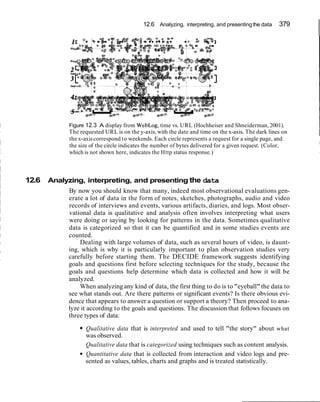
Figure 2.10 Two virtualcalculatorswhere (a)has been designed tooliterallyand
(b)more appropriatelyfor a computerscreen.
Limits the designer's imagination in conjuring up new paradigms and models.
Designers may h a t e on "tired" ideas, based on well known technologies, that they
know people are very familiar with. Examples include travel and books for repre-
senting interaction with the web and hypermedia. One of the dangers of always
looking backwards is that it restricts the designer in thinking of what new function-
ality to provide. For example, Gentner and Nielsen (1996) discuss how they used a
book metaphor for designing the user interface to Sun Microsystems' online docu-
mentation. In hindsight they realized how it had blinkered them in organizing the
online material, preventing them from introducing desirable functions such as the
ability to reorder chapters according to their relevance scores after being searched.
Clearly, there are pitfalls in using interface metaphors in interaction design. In-
deed, this approach has led to some badly designed conceptual models, that have
resulted in confusion and frustration. However, this does not have to be the case.
Provided designers are aware of the dangers and try to develop interface
metaphors that effectively combine familiar knowledge with new functionality in a
meaningful way, then many of the above problems can be avoided. Moreover, as
we have seen with the spreadsheet example, the use of analogy as a basis for a con-
ceptual model can be very innovative and successful, opening up the realm of com-
puters and their applications to a greater diversityof people.
60 Chapter 2 Understandingand conceptualizing interaction
amine a web browser interface and describe the various forms of analogy and composite
erface metaphors that have been used in its design. What familiar knowledge has been
combinedwithnewfunctionality?
Comment Many aspectsof a web browserhave been combined tocreatea compositeinterfacemetaphor:
a range of toolbars,such as a button bar, navigation bar,favorite bar, history bar
tabs,menus,organizers
searchengines,guides
bookmarks,favorites
iconsfor familiar objects likestoplights, home
These have been combinedwith other operations and functions,includingsaving,search-
ing,downloading,listing, and navigating.
2.5 Interaction paradigms
At a more general level, another source of inspiration for informing the design of a
conceptual model is an interaction paradigm. By this it is meant a particular philos-
ophy or way of thinking about interaction design. It is intended to orient designers
to the kinds of questions they need to ask. For many years the prevailing paradigm
in interaction design was to develop applications for the desktop-intended to be
used by single users sitting in front of a CPU, monitor, keyboard and mouse. A
dominant part of this approach was to design software applications that would run
using a GUI or WIMP interface (windows, icons, mouse and pull-down menus, al-
ternatively referred to as windows,icons, menus and pointers).
As mentioned earlier, a recent trend has been to promote paradigms that move
"beyond the desktop." With the advent of wireless, mobile, and handheld technolo-
gies,developers started designingapplicationsthat could be used in a diversityof ways
besides running only on an individual's desktop machine. For example,in September,
2000, the clothes company Levis, with the Dutch electronics company Philips,started
selling the first commerciale-jacket-incorporating wires into the lining of the jacket
to create a body-area network (BAN) for hooking up various devices, e.g., mobile
phone, MP3, microphone,and headphone (see Figure 1.2(iii)in Color Plate1).If the
phone rings, the MP3 player cuts out the music automatically to let the wearer listen
to the call. Another innovation was handheld interactivedevices,like the Palmpilot,
for which a range of applications were programmed.One was to program the Palmpi-
lot as a multipurpose identity key, allowing guests to check in to certain hotels and
enter their room without having to interact with the receptionist at the front desk.
A number of alternative interaction paradigms have been proposed by re-
searchers intended to guide future interaction design and system development (see
Figure 2.11). These include:
ubiquitous computing (technology embedded in the environment)
pervasive computing (seamlessintegration of technologies)
wearable computing (or wearables)
2.5 Interactionparadigms 61 I
Figure 2.11 Examples of new interaction paradigms: (a) Some of the original devices devel-
oped as part of the ubiquitous computing paradigm. Tabs are small hand-sized wireless
computers which know where they are and who they are with. Pads are paper-sized devices
connected to the system via radio. They know where they are and who they are with. Live-
boards are large wall sized devices. The "Dangling String" created by artist Natalie Jeremi-
jenko was attached directly to the ethernet that ran overhead in the ceiling. It spun around
depending on the level of digital traffic.
(b) Ishii and Ulmer, MIT Lab (1997) Tangible bits: from GUIs of desktop PCs to Tangible
User Interfaces. The paradigm is concerned with establishing a new type of HCI called
"Tangible User Interfaces" (TUIs). TUIs augment the real physical world by coupling digi-
tal information to everyday physical objects and environments.
(c) Affective Computing: The project, called "BlueEyes," is creating devices with embedded
technology that gather information about people. This face (with movable eyebrows, eyes
and mouth) tracks your movements and facial expressions and responds accordingly.
62 Chapter 2 Understanding and conceptualizing interaction
tangible bits, augmented reality, and physicallvirtualintegration
attentive environments (computers attend to user's needs)
the Workaday World (social aspects of technology use)
Ubiquitous computing ("ubicomp'~.The late Mark Weiser (1991), an influen-
tial visionary, proposed the interaction paradigm of ubiquitous computing (Figure
2.11). His vision was for computers to disappear into the environment so that we
would be no longer aware of them and would use them without thinking about
them. As part of this process, they should "invisibly" enhance the world that al-
ready exists rather than create artificialones. Existing computing technology, e.g.,
multimedia-based systems and virtual reality, currently do not allow us to do this.
Instead, we are forced to focus our attention on the multimedia representations on
the screen (e.g., buttons, menus, scrollbars) or to move around in a virtual simu-
lated world, manipulating virtual objects.
So, how can technologies be designed to disappear into the background?
Weiser did not mean ubiquity in the sense of simply making computers portable so
that they can be moved from the desk into our pockets or used on trains or in bed.
He meant that technology be designed to be integrated seamlessly into the physical
world in ways that extend human capabilities. One of his prototypes was a "tabs,
pads, and boards" setup whereby hundreds of computer devices equivalent in size
to post-it notes, sheets of paper, and blackboards would be embedded in offices.
Like the spreadsheet, such devices are assumed to be easy to use, because they cap-
italize on existing knowledge about how to interact and use everyday objects. Also
like the spreadsheet, they provide much greater computational power. One of
Weiser's ideas was that the tabs be connected to one another, enabling them to be-
come multipurpose, includingacting as a calendar, diary, identification card, and an
interactive device to be used with a PC.
Ubiquitous computing will produce nothing fundamentally new, but by making
everything faster and easier to do, with less strain and fewermental gymnastics, it will
transform what is apparently possible (Weiser, 1991, p. 940).
Pervasive computing. Pervasive computing is a direct follow-on of ideas arising
from ubiquitous computing.The idea is that people should be able to access and in-
teract with information any place and any time, using a seamless integration of
technologies. Such technologies are often referred to as smart devices or informa-
tion appliances-designed to perform a particular activity. Commercial products
include cell phones and handheld devices, like PalmPilots. On the domestic front,
other examples currentIy being prototyped include intelligent fridges that signal
the user when stocks are low, interactive microwave ovens that allow users to ac-
cess information from the web while cooking, and smart pans that beep when the
food is cooked.
Wearable computing. Many of the ideas behind ubiquitous computing have
since inspired other researchers to develop technologies that are part of the envi-
ronment. The MIT Media Lab has created several such innovations. One example
is wearable computing (Mann, 1996). The combination of multimedia and wireless
2.5 Interaction paradigms 63
communication presented many opportunities for thinking about how to embed
such technologies on people in the clothes they wear. Jewelry, head-mounted caps,
glasses,shoes, and jackets have all been experimented with to provide the user with
a means of interacting with digital information while on the move in the physical
world. Applications that have been developed include automatic diaries that keep
users up to date on what is happening and what they need to do throughout the
day, and tour guides that inform users of relevant information as they walk through
an exhibition and other public places (Rhodes et al., 1999).
Tangible bits, augmented reality, and physicaUvirtua1 integration. Another de-
velopment that has evolved from ubiquitous computing is tangible user interfaces
or tangible bits (Ishii and Ullmer, 1997). The focus of this paradigm is the "integra-
tion of computational augmentations into the physical environment", in other
words, finding ways to combine digital information with physical objects and sur-
faces (e.g., buildings) to allow people to carry out their everyday activities. Exam-
ples include physical books embedded with digital information,greeting cards that
play a digital animation when opened, and physical bricks attached to virtual ob-
jects that when grasped have a similar effect on the virtual objects. Another illus-
tration of this approach is the one described in Chapter 1 of an enjoyable interface,
in which a person could use a physical hammer to hit a physical key with corre-
sponding virtual representations of the action being displayed on a screen.
Another part of this paradigm is augmented reality, where virtual representa-
tions are superimposed on physical devices and objects (as shown in Figure 2.1 on
Color Plate 2). Bridging the gulf between physical and virtual worlds is also cur-
rently undergoing much research. One of the earlier precursors of this work was
the Digital Desk (Wellner, 1993). Physical office tools, like books, documents and
paper, were integrated with virtual representations, using projectors and video
cameras. Both virtual and real documents were seamlessly combined.
Attentive environments and transparent computing. This interaction paradigm
proposes that the computer attend to user's needs through anticipating what the
user wants to do. Instead of users being in control, deciding what they want to do and
where to go, the burden should be shifted onto the computer. In this sense the mode
of interaction is much more implicit: computer interfaces respond to the user's ex-
pressions and gestures. Sensor-rich environments are used to detect the user's cur-
rent state and needs. For example, cameras can detect where people are looking on
a screen and decide what to display accordingly. The system should be able to de-
termine when someone wants to make a call and which websites they want to visit
at particular times. IBM's BlueEyes project is developing a range of computational
devices that use non-obtrusive sensing technology, including videos and micro-
phones, to track and identify users' actions. This information is then analyzed with
respect to where users are looking, what they are doing, their gestures, and their fa-
cial expressions. In turn, this is coded in terms of the users' physical, emotional or
informational state and is then used to determine what information they would
like. For example, a BlueEyes-enabled computer could become active when a user
first walks into a room, firing up any new email messages that have arrived. If the
user shakes his or her head, it would be interpreted by the computer as "I don't
want to read them,"and instead show a listing of their appointmentsfor that day.
64 Chapter 2 Understanding and conceptualizinginteraction
The Workaday World. In the new paradigms mentioned above, the emphasis is
on exploring how technological devices can be linked with each other and digital
information in novel ways that allow people to do things they could not do before.
In contrast, the Workaday World paradigm is driven primarily by conceptual and
mundane concerns. It was proposed by Tom Moran and Bob Anderson (1990),
when working at Xerox PARC. They were particularly concerned with the need to
understand the social aspects of technology use in a way that could be useful for
designers. The Workaday World paradigmfocuses on the essentialcharacter of the
workplace in terms of people's everyday activities, relationships, knowledge, and
resources. It seeks to unravel the "set of patterns that convey the richness of the
settings in which technologies live-the complex, unpredictable, multiform rela-
tionships that hold among the various aspects of working life" (p. 384).
2.6 From conceptual models to physical design
As we emphasize throughout this book, interaction design is an iterative process. It
involves cycling through various design processes at different levels of detail. Pri-
marily it involves: thinking through a design problem, understanding the user's
needs, coming up with possible conceptual models, prototyping them, evaluating
them with respect to usability and user experience goals, thinking about the design
implications of the evaluation studies, making changes to the prototypes with re-
spect to these, evaluating the changed prototypes, thinking through whether the
changes have improved the interface and interaction, and so on. Interaction design
may also require going back to the original data to gather and check the require-
ments. Throughout the iterations, it is important to think through and understand
whether the conceptual model being developed is working in the way intended and
to ensure that it is supporting the user's tasks.
Throughout this book we describe the way you should go about doing interac-
tion design. Each iteration should involve progressing through the design in more
depth. A first pass through an iteration should involve essentially thinking about
the problem space and identifying some initial user requirements. A second pass
should involve more extensive information gathering about users' needs and the
problems they experience with the way they currently carry out their activities
(see Chapter 7). A third pass should continue explicating the requirements, lead-
ing to thinking through possible conceptual models that would be appropriate (see
Chapter 8). A fourth pass should begin "fleshing out" some of these using a vari-
ety of user-centered methods. A number of user-centered methods can be used to
create prototypes of the potential candidates. These include using storyboarding
to show how the interaction between the users and the system will take place and
the laying out of cards and post-it notes to show the possible structure of and navi-
gation through a website. Throughout the process, the various prototypes of the
conceptual models should be evaluated to see if they meet users' needs. Informally
asking users what they think is always a good starting point (see Chapter 12). A
number of other techniques can also be used at different stages of the develop-
ment of the prototypes, depending on the particular information required (see
Chapters 13 and 14).
2.6 From conceptual models to physical design 65
Many issues will need to be addressed when developing and testing initial pro-
totypes of conceptual models. These include:
the way informationis to be presented and interacted with at the interface
what combinations of media to use (e.g., whether to use sound and
animations)
the kind of feedback that will be provided
what combinations of input and output devices to use (e.g., whether to use
speech,keyboard plus mouse, handwriting recognition)
whether to provide agents and in what format
whether to design operations to be hardwired and activated through physical
buttons or to represent them on the screen as part of the software
what kinds of help to provide and in what format
While working through these design decisions about the nature of the interac-
tion to be supported, issues concerning the actual physical design will need to be
addressed. These will often fall out of the conceptualdecisions about the way infor-
mation is to be represented, the kind of media to be used, and so on. For example,
these would typically include:
information presentation
-which dialogs and interaction styles to use (e.g., form fill-ins, speech input,
menus)
-how to structure items in graphical objects, like windows, dialog boxes and
menus (e.g., how many items, where to place them in relation to each
other)
feedback
-what navigation mechanisms to provide (e.g., forward and backward
buttons)
media combination
-which kinds of icons to use
Many of these physical design decisions will be specific to the interactive prod-
uct being built. For example, designing a calendar application intended to be used
by business people to run on a handheld computer will have quite different con-
straints and concerns from designing a tool forscheduling trains to run over a large
network, intended to be used by a team of operators via multiple large displays.
The way the information will be structured, the kinds of graphical representations
that will be appropriate, and the layout of the graphics on the screens will be quite
different.
These kinds of design decisions are very practical, needing user testing to en-
sure that they meet with the usabilitygoals. It is likely that numerous trade-offs will
surface,so it is important to recognizethat there is no right or wrong way to resolve
these. Each decision has to be weighed with respect to the others. For example, if
you decide that a good way of providing visibility for the calendar application on
the handheld device is to have a set of "soft" navigation buttons permanently as
66 Chapter 2 Understondingand conceptualizing interaction
2.6 From conceptualmodels to physical design 67
68 Chapter 2 Understanding and conceptualizing interaction
part of the visual display, you then need to consider the consequences of doing this
for the rest of the information that needs to be interacted with. Will it still be possi-
ble to structure the display to show the calendar as days in a week or a month, all
on one screen?
This part of the design process is highly dependent on the context and essen-
tially involves lots of juggling between design decisions. If you visit our website you
can try out some of the interactivities provided,where you have to make such deci-
sions when designing the physicallayout for variousinterfaces. Here, we provide the
background and rationale that can help you make appropriate choices when faced
with a seriesof design decisions (primarily Chapters 3-5 and 8).For example, we ex-
plain why you shouldn't cram a screen full of information; why certain techniques
are better than others for helpingusers remember how to carry out their tasks at the
interface; and why certain kinds of agents appear more believablethan others.
Assignment
The aim of this assignment is for you to think about the appropriateness of different kinds of
conceptual model that have been designed for similar kinds of physical and electronic artifacts.
(a) Describe the conceptual model that underlie the design of:
a personal pocket-sized calendarldiary (one week to a page)
a wall calendar (one month to a page, usually with a picturelphoto)
a wall planner (displaying the whole year)
What is the main kind of activity and object they are based on? How do they differ
for each of the three artifacts? What metaphors have been used in the design of
their physical interface (think about the way time is conceptualized for each of
them)? Do users understand the conceptual models these are based on in the ways
intended (ask a few people to explain how they use them)? Do they match the dif-
ferent user needs?
(b) Now describe the conceptual models that underlie the design of:
an electronic personal calendar found on a personal organizer or handheld
computer
a shared calendar found on the web
How do they differ from the equivalent physical artifacts? What new functionality
has been provided? What interface metaphors have been used? Are the functions
and interface metaphor well integrated? What problems do users have with these
interactive kinds of calendars? Why do you think this is?
Summary
This chapter has explained the importance of conceptualizing interaction design before try-
ing to build anything. It has stressed throughout the need always to be clear and explicit
about the rationale and assumptions behind any design decision made. It described a taxon-
omy of conceptual models and the different properties of each. It also discussed interface
metaphors and interaction paradigms as other ways of informing the design of conceptual
models.
References 69
Key points
It is important to have a good understanding of the problem space, specifying what it is
you are doing, why and how it will support users in the way intended.
A fundamental aspect of interaction design is to develop a conceptual model.
There are various kinds of conceptual models that are categorized according to the activ-
ity or object they are based on.
Interaction modes (e.g., conversing, instructing) provide a structure for thinking about
which conceptual model to develop.
Interaction styles (e.g., menus, form fill-ins) are specifickinds of interfaces that should be
decided upon after the conceptual model has been chosen.
Decisions about conceptual design also should be made before commencing any physical
design (e.g., designing an icon).
Interface metaphors are commonly used as part of a conceptual model.
Many interactive systems are based on a hybrid conceptual model. Such models can pro-
vide more flexibility, but this can make them harder to learn.
3D realism is not necessarily better than 2D or other forms of representation when in-
stantiating a conceptual model: what is most effective depends on the users' activities
when interacting with a system.
General interaction paradigms, like WIMP and ubiquitous computing, provide a particu-
lar way of thinking about how to design a conceptual model.
Further reading
LAUREL, B. (1990) (ed.) The Art of Human Computer De-
sign has a number of papers on conceptual models and inter-
face metaphors. T W ~that are definitely worth reading are:
Tom Erickson, "Working with interface metaphors" (pp.
65-74), which is a practical hands-on guide to designing in-
terface metaphors (covered later in this book), and Ted Nel-
son's polemic, "The right way to think about software
design" (pp. 229-234), which is a scathing attack on the use
of interface metaphors.
JOHNSON, M. AND LAKOFF,G. (1980) Metaphors We Live
By. The University of Chicago Press. Those wanting to find
out more about how metaphors are used in everyday con-
versationsshould take a look at this text.
There are many good articles on the topic of interface
agents.A classicis:
LANIER, J. (1995) Agents of alienation, ACM Interactions,
2(3), 66-72. The Art of Human Computer Design also pro-
vides several thought-provoking articles, including one
called "Interface agents: metaphors with character" by
Brenda Laurel (pp. 355-366) and another called "Guides:
characterizing the interface" by Tim Oren et al. (pp.
367-382).
BANNON, L. (1977) "Problems in human-machine interac-
tion and communication." Proc HCI'97, San Francisco.
Bannon presents a critical review of the agent approach to
interface design.
MIT's Media Lab (www.media.mit.edu) is a good starting
place to find out what is currently happening in the world of
agents, wearables,and other new interaction paradigms.
70 Chapter 2 Understanding and conceptualizing interaction
this I mean a human dialog not in the sense of using
ordinary language, but in the sense of thinking about
the sequence and the flow of interaction. So I think
interaction design is about designing a space for peo-
ple, where that space has to have a temporal flow. It
has to have a dialog with the person.
YR: Could you tell me a bit more about what you
think is involved in interactiondesign?
ticles on hat topic. His book, BringingDesign to Sofhvare,
brings together the perspectives of a number of leadingre-
searchersand designers. See Color Plate 2 for an example of
his latest research.
YR: Tell me about your background and how you
moved into interactiondesign.
TW: I got into interaction design through a couple of
intermediate steps. I started out doing research into
artificial intelligence. I became interested in how peo-
ple interact with computers, in particular, when using
ordinary language. It became clear after years of
working on that, however, that the computer was a
long way off from matching human abilities. More-
over, using natural language with a computer when it
doesn't really understand you can be very frustrating
and in fact a very bad way to interact with it. So,
rather than trying to get the computer to imitate the
person, I became interested in other ways of taking
advantage of what the computer can do well and what
the person can do well. That led me into the general
field of HCI. As I began to look at what was going on
in that field and to study it, it became clear that it was
not the same as other areas of computer science. The
key issues were about how the technology fits with
what people could do and what they wanted to do. In
contrast, most of computer science is really domi-
nated by how the mechanisms operate.
I was very attracted to thinking more in the style
of design disciplines, like product design, urban de-
sign, architecture, and so on. I realized that there was
an approach that you might call a design way, that
puts the technical asspects into the background with
respect to understanding the interaction. Through
looking at these design disciplines, I realized that
there was something unique about interaction design,
which is that it has a dialogic temporal element. By
TW: One of the biggest influences is product design.
I think that interaction design overlaps with it, be-
cause they both take a very strong user-oriented view.
Both are concerned with finding a user group, under-
standing their needs, then using that understanding to
come up with new ideas. They may be ones that the
users don't even realize they need. It is then a matter
of trying to translate who it is, what they are doing,
and why they are doing it into possible innovations.
In the case of product design it is products. In the case
of interaction design it is the way that the computer
system interacts with the person.
YR. What do you think are importantinputs into the
design process?
TW: One of the characteristics of design fields as op-
posed to traditional engineering fields is that there is
much more dependence on case studies and examples
than on formulas. Whereas an engineer knows how to
calculate something, an architect or a designer is
working in a tradition where there is a history over
time of other things people have done. People have
said that the secret of great design is to know what to
steal and to know when some element or some way of
doing things that worked before will be appropriate
to your setting and then adapt it. Of course you can't
apply it directly, so I think a big part of doing good
design is experience and exposure. You have to have
seen a lot of things in practice and understood what is
good and bad about them, to then use these to inform
your design.
YR: How do you see the relationship between study-
ing interactiondesignand the practice of it? Is there a
good dialog between researchand practice?
TW: Academicstudy of interaction design is a tricky
area because so much of it depends on a kind of
tacit knowledge that comes through experience and
Interview 71
exposure. It is not the kind of thing you can set
down easily as, say, you can scientific formulas. A
lot of design tends to be methodological. It is not
about the design per se but is more about how you
go about doing design, in particular, knowing what
are the appropriate steps to take and how you put
them together.
YR: How do you see the field of interaction design
taking on board the current explosion in new tech-
nologies-for example mobile, ubiquitous, infrared,
and so on? Is it different, say, from 20 years ago when
it was just aboutdesigning software applications to sit
on the desktop?
TW:I think a real change in people's thinking has
been to move from interface design to interaction de-
sign. This has been pushed by the fact that we do have
all kinds of devices nowadays. Interface design used
to mean graphical interfaces, which meant designing
menus and other widgets. But now when you're talk-
ing about handheld devices, gesture interfaces, tele-
phone interfaces and so on, it is clear that you can't
focus just on the widgets. The widgets may be part of
any one of these devices but the design thinking as a
whole has to focus on the interaction.
YR: Whatadvice would you give to a student coming
into the field on what they should be learning and
lookingfor?
TW: I think a student who wants to learn this field
should think of it as a kind of dual process, that is
what Donald Schon calls "reflection in action,"
needing both the action and the reflection. It is im-
portant to have experience with trying to build
things. That experience can be from outside work,
projects, and courses where you are actually en-
gaged in making something work. At the same time
you need to be able to step back and look at it not as
"What do I need to do next?" but from the perspec-
tive of what you are doing and how that fits into the
larger picture.
YR: Are there any classic case studies that stand out
as good exemplarsof interactiondesign?
TW:You need to understand what has been impor-
tant in the past. I still use the Xerox Star as an exem-
plar because so much of what we use today was there.
When you go back to look at the Star you see it in the
context of when it was first created. I also think some
exemplars that are very interesting are ones that never
actually succeeded commercially. For example, I use
the PenPoint system that was developed for pen com-
puters by Go. Again, they were thinking fresh. They
set out to do something different and they were much
more conscious of the design issues than somebody
who wassimplyadapting the next version of something
that already existed. Palmpilot is another good exam-
ple, because they looked at the problem in a different
way to make something work. Another interesting ex-
emplar, which other people may not agree with, is Mi-
crosoft Bob--not because it was a successful program,
because it wasn't, but because it was a first exploration
of a certain style of interaction, using animated agents.
You can see very clearly from these exemplars what
design trade-offs the designers were making and why
and then you can look at the consequences.
YR: Finally, what are the biggest challenges facing
people workingin this area?
TW: I think one of the biggest challenges is what
Pelle Ehn calls the dialectic between tradition and
transcendence. That is, people work and live in cer-
tain ways already, and they understand how to adapt
that within a small range, but they don't have an un-
derstanding or a feel for what it would mean to make
a radical change, for example, to change their way of
doing business on the Internet before it was around,
or to change their way of writing from pen and paper
when word processors weren't around. I think what
the designer is trying to do is envision things for users
that the users can't yet envision. The hard part is not
fixing little problems, but designing things that are
both innovative and that work.
Chapter 3
Understanding users
3.1 Introduction
3.2 What is cognition?
3.3 Applying knowledge from the physical world to the digital world
3.4 Conceptual frameworksfor cognition
3.4.1 Mental models
3.4.2 Informationprocessing
3.4.3 Externalcognition
3.5 Informing design: from theory to practice
Introduction
Imagine trying to drive a car by using just a computer keyboard. The four arrow
keys are used for steering, the space bar for braking, and the return key for acceler-
ating. To indicate left you need to press the F1 key and to indicate right the F2 key.
To sound your horn you need to press the F3 key. To switch the headlights on you
need to use the F4 key and, to switch the windscreen wipers on, the F5 key. Now
imagine as you are driving along a road a ball is suddenly kicked in front of you.
What would you do? Bash the arrow keys and the space bar madly while pressing
the F4 key? How would you rate your chances of missing the ball?
Most of us would balk at the very idea of driving a car this way. Many early
video games, however, were designed along these lines: the user had to press an ar-
bitrary combination of function keys to drive or navigate through the game. There
was little, if any, consideration of the user's capabilities.While some users regarded
mastering an arbitrary set of keyboard controls as a challenge, many users found
them very limiting, frustrating, and difficult to use. More recently, computer con-
soles have been designed with the user's capabilities and the demands of the activ-
ity in mind. Much better ways of controlling and interacting, such as through using
joysticks and steering wheels, are provided that map much better onto the physical
and cognitiveaspects of driving and navigating.
In this chapter we examine some of the core cognitive aspects of interaction de-
sign. Specifically,we consider what humans are good and bad at and show how this
knowledgecan be used to inform the design of technologiesthat both extend human
capabilitiesand compensatefor their weaknesses. We also look at some of the influ-
ential cognitively based conceptual frameworks that have been developed for ex-
plaining the way humans interact with computers. (Other ways of conceptualizing
74 Chapter 3 Understandingusers
human behavior that focus on the social and affective aspects of interaction design
are presented in the following two chapters.)
The main aims of this chapter are to:
Explain what cognition is and why it is important for interaction design.
Describe the main ways cognition has been applied to interaction design.
Provide a number of examples in which cognitive research has led to the de-
sign of more effective interactive products.
Explain what mental models are.
Give examplesof conceptualframeworksthat are useful for interactiondesign.
Enable you to try to elicit a mental model and be able to understand what it
means.
3.2 What is cognition?
Cognition is what goes on in our heads when we carry out our everyday activities.
It involves cognitive processes,like thinking, remembering, learning, daydreaming,
decision making, seeing, reading, writing and talking. As Figure 3.1 indicates, there
are many different kinds of cognition. Norman (1993) distinguishes between two
general modes: experiential and reflective cognition. The former is a state of mind
in which we perceive, act, and react to events around us effectively and effortlessly.
It requires reaching a certain level of expertise and engagement. Examples include
driving a car, reading a book, having a conversation, and playing a video game. In
contrast, reflective cognition involves thinking, comparing, and decision-making.
This kind of cognition is what leads to new ideas and creativity. Examples include
designing, learning, and writing a book. Norman points out that both modes are
essential for everyday life but that each requires different kinds of technological
support.
What goes on in the mind?
perceiving
thinking understandingothers
remembering talking with othersi1
making decisions
Figure 3.1 What goes on
in the mind?
3.2 What is cognition? 75
Cognition has also been described in terms of specifickinds of processes.These
include:
attention
perception and recognition
memory
learning
reading, speaking, and listening
problem solving, planning, reasoning, decision making
It is important to note that many of these cognitive processes are interdepen-
dent: several may be involved for a given activity. For example, when you try to
learn material for an exam, you need to attend to the material, perceive, and recog-
nize it, read it, think about it, and try to remember it. Thus, cognition typically in-
volves a range of processes. It is rare for one to occur in isolation. Below we
describe the various kinds in more detail, followed by a summary box highlighting
core design implicationsfor each. Most relevant (and most thoroughly researched)
for interaction design is memory, which we describe in greatest detail.
Attention is the process of selecting things to concentrate on, at a point in time,
from the range of possibilitiesavailable. Attention involves our auditory andlor vi-
sual senses. An example of auditory attention is waiting in the dentist's waiting
room for our name to be called out to know when it is our time to go in. An exam-
ple of attention involving the visual senses is scanning the football results in a news-
paper to attend to information about how our team has done. Attention allows us
to focus on information that is relevant to what we are doing. The extent to which
this process is easy or difficult depends on (i) whether we have clear goals and (ii)
whether the information we need is salient in the environment:
(i) Our goals If we know exactly what we want to find out, we try to match this
with the information that is available. For example, if we have just landed at an air-
port after a long flight and want to find out who had won the World Cup, we might
scan the headlines at the newspaper stand, check the web, call a friend, or ask
someone in the street.
When we are not sure exactly what we are looking for we may browse through
information, allowing it to guide our attention to interesting or salient items. For
example, when we go to a restaurant we may have the general goal of eating a meal
but only a vague idea of what we want to eat. We peruse the menu to find things
that whet our appetite, letting our attention be drawn to the imaginative descrip-
tions of various dishes. After scanning through the possibilitiesand imagining what
each dish might be like (plus taking into account other factors, such as cost, who we
are with, what the specials are, what the waiter recommends, whether we want a
two- or three-course meal, and so on), we may then make a decision.
(ii) Information presentation The way information is displayed can also greatly in-
fluence how easy or difficult it is to attend to appropriate pieces of information.
Look at Figure 3.2 and try the activity. Here, the information-searching tasks are
very precise, requiring specificanswers.The information density is identical in both
76 Chapter 3 Understandingusers
Figure 3.2 Two different ways of struc-
turing the same information at the inter-
face: one makes it much easier to find
information than the other. Look at the
top screen and: (i) find the price for a
double room at the Quality Inn in Co-
lumbia; (ii) find the phone number of the
Days Inn in Charleston. Then look at the
bottom screen and (i) find the price of a
double room at the Holiday 1nnin
Bradley; (ii) find the phone number of- , ,
the Quality Inn in ~edford.Which took
longer to do? In an early study Tullis
found that the two screens produced
quite different results: it took an average
of 3.2 seconds to search the top screen
and 5.5 seconds to find the same kind of
information in the bottom screen. Why is
this so, considering that both displays
have the same density of information
(31%)?The primary reason is the way
the characters are grouped in the display:
in the top they are grouped into vertical
categories of information (e.g., place,
kind of accommodation, phone number,
and rates) that have columns of space be-
tween them. In the bottom screen the in-
formation is bunched up together,
making it much harder to search through.
displays. However, it is much harder to find the information in the bottom screen
than in the top screen. The reason for this is that the information is very poorly
structured in the bottom, making it difficult to find the information. In the top the
information has been ordered into meaningful categories with blank spacing be-
tween them, making it easier to select the necessary information.
Perception refers to how information is acquired from the environment, via the
different sense organs (e.g.,eyes, ears, fingers) and transformed into experiences of
objects, events, sounds, and tastes (Roth, 1986). It is a complex process, involving
other cognitive processes such as memory, attention, and language. Vision is the
3.2 What is cognition? 77
most dominant sense for sighted individuals, followed by hearing and touch. With
respect to interaction design, it is important to present information in a way that
can be readily perceived in the manner intended. For example, there are many
ways to design icons. The key is to make them easily distinguishable from one an-
other and to make it simple to recognize what they are intended to represent (not
like the ones in Figure 3.4).
Combinations of different media need also to be designed to allow users to rec-
ognize the composite information represented in them in the way intended. The
use of sound and animation together needs to be coordinated so they happen in a
logical sequence. An example of this is the design of lip-synch applications, where
the animation of an avatar's or agent's face to make it appear to be talking, must be
carefully synchronized with the speech that is emitted. A slight delay between the
two can make it difficult and disturbing to perceive what is happening-as some-
times happens when film dubbing gets out of synch. A general design principle is
78 Chapter 3 Understanding users
Figure 3.4 Poor icon set. What
do you think the icons mean
and why are they so bad?
that information needs to be represented in an appropriate form to facilitate the
perception and recognition of its underlying meaning.
Memory involves recalling various kinds of knowledge that allow us to act ap-
propriately. It is very versatile, enabling us to do many things. For example, it al-
lows us to recognize someone's face, remember someone's name, recall when we
last met them and know what we said to them last. Simply, without memory we
would not be able to function.
It is not possible for us to remember everything that we see, hear, taste, smell,
or touch, nor would we want to, as our brains would get completely overloaded. A
filtering process is used to decide what information gets further processed and
memorized. This filtering process, however, is not without its problems. Often we
3.2 What is cognition? 79
forget things we would dearly love to remember and conversely remember things
we would love to forget. For example, we may find it difficult to remember every-
day things like people's names and phone numbers or academic knowledge like
mathematical formulae. On the other hand, we may effortlesslyremember trivia or
tunes that cycle endlessly through our heads.
How does this filtering process work? Initially,encoding takes place, determin-
ing which information is attended to in the environment and how it is interpreted.
The extent to which it takes place affects our ability to recall that information later.
The more attention that is paid to something and the more it is processed in terms
of thinking about it and comparing it with other knowledge, the more likely it is to
be remembered. For example, when learning about a topic it is much better to re-
flect upon it, carry out exercises, have discussions with others about it, and write
notes than just passively read a book or watch a video about it. Thus, how informa-
tion is interpreted when it is encountered greatly affects how it is represented in
memory and how it is used later.
Another factor that affects the extent to which information can be subse-
quently retrieved is the context in which it is encoded. One outcome is that some-
times it can be difficult for people to recall information that was encoded in a
different context from the one they currently are in. Consider the following sce-
nario:
You are on a train and someonecomes up to you and says hello.You don't recognize
him for a few momentsbut then realize it is one of your neighbors. You are only used to
seeing your neighbor in the hallway of your apartment block and seeing him out of
context makes him difficultto recognize initially.
Another well-known memory phenomenon is that people are much better at rec-
ognizing things than recalling things. Furthermore, certain kinds of information are
easier to recognize than others. In particular, people are very good at recognizing
thousands of pictures, even if they have only seen them briefly before.
Try to remember the dates of all the members of your family's and your closest friends'
birthdays. How many can you remember? Then try to describe what is on the cover of the
last DVDICD or record you bought. Which is easiest and why?
Comment It is likely that you remembered much better what was on the CD/DVD/record cover (the
image, the colors, the title) than the birthdays of your family and friends. People are very
good at remembering visual cues about things, for example the color of items, the location
of objects (a book being on the top shelf), and marks on an object (e.g., a scratch on a
watch, a chip on a cup). In contrast, people find other kinds of information persistently
difficult to learn and remember, especially arbitrary material like birthdays and phone
numbers.
Instead of requiring users to recall from memory a command name from a pos-
sible set of hundreds or even thousands, GUIs provide visually based options that
80 Chapter 3 Understandingusers
users can browse through until they recognize the operation they want to perform
(see Figure 3.5(a) and (b)). Likewise, web browsers provide a facilityof bookmark-
ing or saving favorite URLs that have been visited, providing a visual list. This
means that users need only recognize a name of a site when scanning through the
saved list of URLs.
Figure 3.5(a) A DOS-based interface, requiring the user to type in commands.
3.2 What is cognition? 81
FileFolder
FJe Folder
FilePol&
Attached are the 6les I menboned in the meehng.
Have a good weekendl
- HWi
Figure 3.5(b)A Windows-based interface, with menus, icons, and buttons.
What strategiesdo you use to help you remember things?
Comment People often write down what they need to remember on a piece of paper. They also ask
others to remind them. Another approach is to use various mental strategies,like mnemon-
ics. A mnemonicinvolves taking the first letters of a set of words in a phrase or set of con-
cepts and using them to make a more memorable phrase, often using bizarre and
idiosyncraticconnections. For example,some people have problems working out where east
is in relation to west and vice versa (i.e.,is it to the left or right). A mnemonic to help figure
this out is to take the first letters of the four main points of the compass and then use them in
the phrase "Never Eat Shredded Wheat" mentally recited in a clockwisesequence.
A growing problem for computer users is file management. The number of
documents created, images and videoclips downloaded, emails and attachments
saved, URLs bookmarked, and so on increases every day. A major problem is find-
ing them again. Naming is the most common means of encoding them, but trying to
remember a name of a file you created some time back can be very difficult, espe-
cially if there are tens of thousands of named files. How might such a process be fa-
cilitated, bearing in mind people's memory abilities? Mark Lansdale, a British
psychologist, has been researching this problem of information retrieval for many
--
82 Chapter 3 Understandingusers
3.2 What is cognition? 83
years. He suggests that it is profitable to view this process as involving two memory
processes: recall-directed, followed by recognition-based scanning. The first refers
to using memorized information about the required file to get as close to it as possi-
ble. The more exact this is, the more success the user will have in tracking down the
desired file. The second happens when recall has failed to produce what a user
wants and so requires reading through directories of files.
To illustrate the difference between these two processes, consider the following
scenario: a user is trying to access a couple of websites visited the day before that
compared the selling price of cars offered by different dealers.The user is able to re-
call the name of one website: "alwaysthecheapest.com". She types this in and the
website appears. This is an example of successful recall-directed memory. However,
the user is unable to remember the name of the second one. She vaguely remembers
it was something like 'autobargains.com'; but typing this in proves unsuccessful. In-
stead, she switches to scanning her bookmarks/favorites,going to the list of most re-
cent onessaved.She notices two or three URLs that could be the one desired, and on
the second attempt she finds the website she is looking for. In this situation, the user
initially tries recall-directedmemory and when this fails,adopts the second strategy
of recognition-basedscanning-which takes longer but eventuallyresultsin success.
Lansdale proposes that file management systems should be designed to opti-
mize both kinds of memory processes. In particular, systems should be devel-
oped that let users use whatever memory they have to limit the area being
searched and then represent the information in this area of the interface so as to
maximally assist them in finding what they need. Based on this theory, he has
developed a prototype system called MEMOIRS that aims at improving users'
recall of information they had encoded so as to make it easier to recall later
(Lansdale and Edmunds, 1992). The system was designed to be flexible, provid-
ing the user with a range of ways of encoding documents mnemonically, includ-
ing time stamping (see Figure 3.6), flagging, and attribution (e.g., color, text,
icon, sound or image).
More flexible ways of helping users track down the files they want are now be-
ginning to be introduced as part of commercial applications. For example, various
search and find tools, like Apple's Sherlock, have been designed to enable the user
to type a full or partial name or phrase that the system then tries to match by listing
all the files it identifies containing the requested nametphrase. This method, how-
ever, is still quite limited, in that it allows users to encode and retrieve files using
only alphanumericals.
84 Chapter 3 Understanding users
I Full-SizedDocument /
This is a full-sized document,an
exact replica of the original
which was scannedinto the
MEMOIRS system using a
Truvel24-bit colour scanner
TY~ssrMI-nudd4uxol..D
ru,npl.rof,bon$,"d
i h u h x r i r u u x d l l t o l h
UEMOrnS.Ism70 """I.
,Y""r,2eb,,rdourumx.
u/I Miniature
(80 X 110pixels)
uFull-sized Document
Figure 3.6 Memoirs tool.
3.2 What is cognition? 85
How else might banks solve the problem of providing a secure system while making the
memory load relatively easy for people wanting to use phone banking? How does phone
banking compare with online banking?
Comment An alternative approach is to provide the customers with a PIN number (it could be the
same as that of their ATM card) and ask them to key this in on their phone keypad, followed
by asking one or two questions like their zip or post code, as a backup. Online banking has
similar security risks to phone banking and hence this requires a number of security mea-
sures to be enforced. These include that the user sets up a nickname and a password. For ex-
ample, some banks require typing in three randomly selected letters from a password each
time the user logs on. This is harder to do online than when asked over the phone, mainly
86 Chapter 3 Understandingusers
because it interferes with the normally highly automated process of typing in a password.
You really have to think about what letters and numbers are in your password;for example,
has it got two letter f's after the number 6, or just one?
Learning can be considered in terms of (i) how to use a computer-based appli-
cation or (ii) using a computer-based application to understand a given topic. Jack
Carroll (1990) and his colleagues have written extensively about how to design inter-
faces to help learners develop computer-based skills. A main observation is that peo-
ple find it very hard to learn by following sets of instructions in a manual. Instead,
they much prefer to "learn through doing." GUIs and direct manipulation interfaces
are good environments for supporting this kind of learning bysupportingexploratory
interaction and importantly allowing users to "undo" their actions, i.e., return to a
previous state if they make a mistake by clicking on the wrong option. Carroll has
also suggested that another way of helping learners is by using a "training-wheels"
approach. This involves restricting the possible functions that can be carried out by a
novice to the basics and then extending these as the novice becomes more experi-
enced. The underlying rationale is to make initial learning more tractable, helping
the learner focus on simple operations before moving on to more complex ones.
There have also been numerous attempts to harness the capabilities of differ-
ent technologies to help learners understand topics. One of the main benefits of in-
teractive technologies, such as web-based, multimedia, and virtual reality, is that
they provide alternative ways of representing and interacting with information that
are not possible with traditional technologies (e.g., books, video). In so doing, they
have the potential of offering learners the ability to explore ideas and concepts in
different ways.
Ask a grandparent,child, or other person who has not used a cell phone before to make and
answer a call using it. What is strikingabout their behavior?
Comment First-timeusersoften try to apply their understanding of a land-line phone to operatinga cell
phone. However, there are marked differences in the way the two phones operate,even for
the simplest of tasks, like making a call. First, the power has to be switched on when using a
cell phone,by pressing a button (but not so with land-line phones), then the number has to be
keyed in,including at all times the area code (in the UK), even if the callee is in thesame area
(but not so with land-lines), and finally the "make a call" button must be pressed (but not so
with land-line phones). First-time users may intuitivelyknow how to switch the phone on but
not know which key to hit, or that it has to be held down for a couple of seconds.They may
also forgetto key in the area code if they are in the same area as the person they are calling,
and to press the"make a call"key.They may alsoforget to press the"end a call" button (this
is achieved through putting the receiver down with a land-line phone). Likewise, when an-
swering a call, the first-time user may forget to press the "accept a call" button or not know
which one to press.These additionalactionsare quick to learn,once the user understands the
need to explicitlyinstruct the cell phone when they want to make,accept,or end a call.
Reading, speaking and listening: these three forms of language processing
have both similar and different properties. One similarity is that the meaning of
3.2 What is cognition? 87
sentences or phrases is the same regardless of the mode in which it is conveyed. For
example, the sentence "Computers are a wonderful invention" essentially has the
same meaning whether one reads it, speaks it, or hears it. However, the ease with
which people can read, listen, or speak differs depending on the person, task, and
context. For example, many people find listening much easier than reading. Specific
differences between the three modes include:
Written language is permanent while listening is transient. It is possible to
reread information if not understood the first time round. This is not possi-
ble with spoken information that is being broadcast.
88 Chapter 3 Understanding users
Reading can be quicker than speaking or listening, as written text can be
rapidly scanned in ways not possible when listening to serially presented spo-
ken words.
Listening requires less cognitive effort than reading or speaking. Children,
especially,often prefer to listen to narratives provided in multimedia or web-
based learning material than to read the equivalent text online.
Written language tends to be grammatical while spoken language is often
ungrammatical. For example, people often start a sentence and stop in mid-
sentence, letting someone else start speaking.
There are marked differences between people in their ability to use lan-
guage. Some people prefer reading to listening,while others prefer listening.
Likewise,some people prefer speaking to writing and vice versa.
Dyslexics have difficulties understanding and recognizing written words,
making it hard for them to write grammatical sentences and spell correctly.
People who are hard of hearing or hard of seeing are also restricted in the
way they can process language.
Many applications have been developed either to capitalize on people's reading,
writing and listening skills, or to support or replace them where they lack or have
difficulty with them. These include:
interactive books and web-based material that help people to read or learn
foreign languages
speech-recognition systems that allow users to provide instructions via spo-
ken commands (e.g., word-processing dictation, home control devices that
respond to vocalized requests)
speech-output systems that use artificially generated speech (e.g., written-
text-to-speech systemsfor the blind)
natural-language systems that enable users to type in questions and give
text-based responses (e.g.,Ask Jeeves search engine)
cognitive aids that help people who find it difficult to read, write, and speak.
A number of special interfaces have been developed for people who have
problems with reading, writing,and speaking (e.g., see Edwards, 1992).
various input and output devices that allow people with various disabili-
ties to have access to the web and use word processors and other software
packages
Helen Petrie and her team at the Sensory Disabilities Research Lab in the UK
have been developing various interaction techniques to allow blind people to ac-
cess the web and other graphical representations, through the use of auditory navi-
gation and tactile diagrams.
Problem-solving, planning, reasoning and decision-making are all cognitive
processes involving reflective cognition. They include thinking about what to do,
what the options are, and what the consequences might be of carrying out a given
action. They often involve consciousprocesses (being aware of what one is thinking
3.2 What is cognition? 89 I
about), discussion with others (or oneself),and the use of various kinds of artifacts,
(e.g., maps, books, and pen and paper). For example, when planning the best route
to get somewhere,say a foreigncity, we may ask others, use a map, get instructions
from the web, or a combination of these. Reasoningalso involves working through
different scenarios and deciding which is the best option or solution to a given
problem. In the route-planning activity we may be aware of alternative routes and
reason through the advantagesand disadvantages of each route before deciding on
the best one. Many a family argument has come about because one member thinks
he or she knows the best route while another thinksotherwise.
Comparing different sources of information is also common practice when
seeking information on the web. For example, just as people will phone around for
a range of quotes, so too, will they use different search engines to find sites that
give the best deal or best information. If people have knowledge of the pros and
cons of different search engines, they may also select different ones for different
kinds of queries. For example,a student may use a more academicallyoriented one
when looking for information for writing an essay, and a more commercially based
one when trying to find out what's happeningin town.
The extent to which people engage in the various forms of reflectivecognition
depends on their level of experience with a domain, application, or skill. Novices
tend to have limited knowledge and will often make assumptions about what to do
using other knowledge about similar situations.They tend to act by trial and error,
exploring and experimenting with ways of doing things. As a result they may start
off being slow, making errors and generally being inefficient. They may also act ir-
rationally,following their superstitionsand not thinking ahead to the consequences
of their actions. In contrast, experts have much more knowledge and experience
and are able to select optimalstrategies for carrying out their tasks. They are likely
to be able to think ahead more, considering what the consequences might be of
optingfor a particular move or solution (as do expert chess players).
90 Chapter 3 Understandingusers
3.3 Applying knowledge from the physical world
to the digital world
As well as understanding the various cognitive processes that users engage in when
interacting with systems, it is also useful to understand the way people cope with
the demands of everyday life. A well known approach to applying knowledge
about everyday psychology to interaction design is to emulate, in the digital world,
the strategies and methods people commonly use in the physical world. An as-
sumption is that if these work well in the physical world, why shouldn't they also
work well in the digital world? In certain situations, this approach seems like a
good idea. Examples of applications that have been built following this approach
include electronic post-it notes in the form of "stickies," electronic "to-do" lists,
and email reminders of meetings and other events about to take place. The stickies
applicationdisplays differentcolored notes on the desktop in which text can be in-
serted, deleted, annotated, and shufffed around, enabling people to use them to re-
mind themselves of what they need to do-analogous to the kinds of externalizing
they do when using paper stickies. Moreover, a benefit is that electronicstickies are
more durable than paper ones-they don't get lost or fall off the objects they are
stuck to, but stay on the desktop until explicitly deleted.
In other situations, however, the simple emulation approach can turn out to be
counter-productive,forcingusers to do things in bizarre,inefficient, or inappropri-
ate ways. This can happen when the activity being emulated is more complex than
is assumed, resulting in much of it being oversimplified and not supported effec-
tively. Designersmay notice somethingsalient that people do in the physical world
and then fall into the trap of trying to copy it in the electronic world without think-
ing through how and whether it will work in the new context (remember the poor
design of the virtual calculator based on the physical calculator described in the
previous chapter).
Consider the following classic study of real-world behavior. Ask yourself, first,
whether it is useful to emulate at the interface, and second, how it could be ex-
tended as an interactive application.
Tom Malone (1983) carried out a study of the "natural history" of physical of-
fices. He interviewed people and studied their offices,paying particular attention to
their filing methods and how they organized their papers. One of his findings was
that whether people have messy offices or tidy offices may be more significant than
people realize. Messy offices were seen as being chaotic with piles of papers every-
where and little organization. Tidy offices, on the other hand, were seen as being
well organized with good use of a filing system. In analyzing these two types of of-
fices, Malone suggested what they reveal in terms of the underlying cognitive be-
haviors of the occupants. One of his observations was that messy offices may
appear chaotic but in reality often reflect a coping strategy by the person: docu-
ments are left lying around in obvious places to act as reminders that somethinghas
to be done with them. This observation suggests that using piles is a fundamental
strategy,regardlessof whether you are a chaotic or orderly person.
Such observations about people's copingstrategies in the physical world bring
to mind an immediate design implication about how to support electronic file
3.3 Applying knowledge from the physical worldto the digital world 91
management: to capitalize on the "pile" phenomenon by trying to emulate it in
the electronic world. Why not let people arrange their electronic files into piles as
they do with paper files? The danger of doing this is that it could heavily constrain
the way people manage their files, when in fact there may be far more effective
and flexible ways of filing in the electronic world. Mark Lansdale (1988) points
out how introducing unstructured piles of electronic documents on a desktop
would be counterproductive, in the same way as building planes to flap their
wings in the way birds do (someone seriously thought of doing this).
But there may be benefits of emulating the pile phenomenon by using it as a
kind of interface metaphor that is extended to offer other functionality. How might
this be achieved? A group of interface designers at Apple Computer (Mandler et
al., 1992) tackled this problem by adopting the philosophy that they were going to
build an application that went beyond physical-world capabilities, providing new
functionality that only the computer could provide and that enhanced the interface.
To begin their design, they carried out a detailed study of office behavior and ana-
lyzed the many ways piles are created and used. They also examined how people
use the default hierarchical file-management systems that computer operating sys-
tems provide. Having a detailed understanding of both enabled them to create a
conceptual model for the new functionality-whichwas to provide various interac-
tive organizational elements based around the notion of using piles. These included
providing the user with the means of creating, ordering, and visualizing piles of
files. Files could also be encoded using various external cues, including date and
color. New functionality that could not be achieved with physical files included the
provision of a scripting facility, enabling files in piles to be ordered in relation to
these cues (see Figure 3.8).
Emulating real-world activity at the interface can be a powerful design strat-
egy, provided that new functionality is incorporated that extends or supports the
users in their tasks in ways not possible in the physical world. The key is really to
understand the nature of the problem being addressed in the electronic world in re-
lation to the various coping and externalizing strategies people have developed to
deal with the physical world.
Figure 3.8 The pile metaphoras it appears at the interface.
portable computer
92 Chapter 3 Understanding users
3.4 Conceptual frameworks for cognition
In the previous section we described the pros and cons of applying knowledge of
people's coping strategies in the physical world to the digital world. Another ap-
proach is to apply theories and conceptual frameworks to interaction design. In this
section we examine three of these approaches, which each have a different perspec-
tive on cognition:
mental models
information processing
external cognition
3.4.1 Mental models
In Chapter 2 we pointed out that a successfulsystem is one based on a conceptual
model that enables users to readily learn a system and use it effectively.What hap-
pens when people are learning and using a system is that they develop knowledge
of how to use the system and, to a lesser extent, how the system works. These two
kinds of knowledge are often referred to as a user's mental model.
Having developed a mental model of an interactive product, it is assumed that
people will use it to make inferences about how to carry out tasks when using the
interactive product. Mental models are also used to fathom what to do when some-
thing unexpected happens with a system and when encountering unfamiliar sys-
tems. The more someone learns about a system and how it functions, the more
their mental model develops. For example, TV engineers have a "deep" mental
model of how TVs work that allows them to work out how to fix them. In contrast.
3.4 Conceptual frameworks for cognition 93
an average citizen is likely to have a reasonably good mental model of how to oper-
ate a TV but a "shallow" mental model of how it works.
Within cognitive psychology, mental models have been postulated as internal
constructions of some aspect of the external world that are manipulated enabling
predictions and inferences to be made (Craik, 1943). This process is thought to in-
volve the "fleshing out" and the "running" of a mental model (Johnson-Laird,
1983). This can involve both unconscious and conscious mental processes, where
images and analogies are activated.
o illustrate how we use mental models in our everyday reasoning, imagine the following
(a) You arrive home from a holiday on a cold winter's night to a cold house. You have a
small baby and you need to get the house warm as quickly as possible. Your house is
centrally heated. Do you set the thermostat as high as possible or turn it to the de-
sired temperature (e.g.70°F)?
(b) You arrivehome from beingout all night,starvinghungry. You look in the fridge and
find all that is left is an uncooked pizza. The instructions on the packet say heat the
oven to 375°Fand then place the pizza in the oven for 20 minutes. Your oven is elec-
tric. How do you heat it up? Do you turn it to the specified temperature or higher?
Comment Most people when asked the first question imagine the scenarioin terms of what they would
do in their own house and choose the first option. When asked why, a typical explanation
that is given is that setting the temperature to be as high as possible increases the rate at
which the room warms up. While many people may believe this, it is incorrect. Thermostats
work by switchingon the-heat and keeping it going at a constantspeed until the desired tem-
perature set is reached, at which point they cut out. They cannot control the rate at which
heat is given out from a heatingsystem.Left at a given setting, thermostats will turn the heat
on and off as necessaryto maintain the desired temperature.
When asked the second question, most people say they would turn the oven to the speci-
fied temperatureand put the pizza in when they think it is at the desired temperature.Some
people answer that they would turn the oven to a higher temperature in order to warm it up
more quickly. Electric ovens work on the same principle as central heating and so turning
the heat up higher will not warm it up any quicker. There is also the problem of the pizza
burning if the oven is too hot!
Why do people use erroneous mental models? It seems that in the above sce-
narios, they are running a mental model based on a general valve theory of the way
something works (Kempton, 1986). This assumes the underlying principle of "more
is more": the more you turn or push something, the more it causes the desired ef-
fect. This principle holds for a range of physical devices, such as taps and radio con-
trols, where the more you turn them, the more water or volume is given. However,
it does not hold for thermostats, which instead function based on the principle of
an on-off switch. What seems to happen is that in everyday life people develop a
core set of abstractions about how things work, and apply these to a range of de-
vices, irrespective of whether they are appropriate.
I 94 Chapter 3 Understanding users
Using incorrect mental models to guide behavior is surprisingly common. Just
watch people at a pedestrian crossing or waiting for an elevator (lift). How many
times do they press the button? A lot of people will press it at least twice. When
asked why, a common reason given is that they think it will make the lights change
faster or ensure the elevator arrives. This seems to be another example of following
the "more is more" philosophy:it is believed that the more times you press the but-
ton, the more likely it is to result in the desired effect.
Another common example of an erroneous mental model is what people do
when the cursor freezes on their computer screen. Most people will bash away at
all manner of keys in the vain hope that this will make it work again. However,ask
them how this will help and their explanations are rather vague. The same is true
when the TV starts acting up: a typical response is to hit the top of the box repeat-
edly with a bare hand or a rolled-up newspaper. Again, ask people why and their
reasoningabout how this behavior will help solve the problem is rather lacking.
The more one observes the way people interact with and behave towardsinter-
active devices, the more one realizes just how strange their behavior can get-
especially when the device doesn't work properly and they don't know what to do.
Indeed, research has shown that people's mental models of the way interactive de-
viceswork is poor, often being incomplete,easily confusable,based on inappropriate
analogies, and superstition (Norman,1983). Not having appropriate mental models
available to guide their behavior is what causes people to become very frustrated-
often resultingin stereotypical"venting"behavior like those described above.
On the other hand, if people could develop better mental models of interactive
systems, they would be in a better position to know how to carry out their tasks ef-
ficiently and what to do if the system started acting up. Ideally, they should be able
to develop a mental model that matches the conceptual model developed by the
designer. But how can you help users to accomplish this? One suggestion is to edu-
cate them better. However, many people are resistant to spending much time
learning about how things work, especially if it involvesreading manuals and other
documentation. An alternative proposal is to design systems to be more transpar-
ent, so that they are easier to understand. This doesn't mean literally revealing the
guts of the system (cf. the way some phone handsets-see Figure 3.9 on Color
Plate 4-and iMacsare made of transparent plastic to reveal the colorful electronic
circuitry inside), but requires developing an easy-to-understand system image (see
Chapter 2 for explanation of this term in relation to conceptual models). Specifi-
cally, this involves providing:
usefulfeedback in response to user input
easy-to-understandand intuitive ways of interacting with the system
In addition, it requires providing the right kind and level of information, in the
form of:
clear and easy-to-follow instructions
appropriate online help and tutorials
context-sensitiveguidancefor users,set at their levelof experience,explaining
how to proceed when they are not sure what to do at a given stage of a task.
3.4 Conceptual frameworks for cognition 95
barn iAe hcias ofhow OocOlr s~rrchucrkr.
A qu'w larc & the nuny sbmmts of b s l r r rewits pipw.
P&iurmweh, wwehby eatettpwy, mlothn r w c h featunr rr rwpkkrd.
lnformatipnw S~cSIwehfiihrinq, intmutbnrlWlr,nd other diilw optknr.
Whrt m ZOIOh.dupaps mi "1%0 F w l iW y * ? TMrrfwSur61bn6 o h r s expbhd.
96 Chapter 3 Understanding users
3.4.2 informationprocessing
Another approach to conceptualizing how the mind works has been to use
metaphors and analogies (see also Chapter 2). A number of comparisons have
been made, including conceptualizing the mind as a reservoir, a telephone net-
work, and a digital computer. One prevalent metaphor from cognitive psychology
is the idea that the mind is an information processor. Information is thought to
enter and exit the mind through a series of ordered processing stages (see Figure
3.11). Within these stages, various processes are assumed to act upon mental rep-
resentations. Processes include comparing and matching. Mental representations
are assumed to comprise images, mental models, rules, and other forms of knowl-
edge.
The information processingmodel provides a basisfrom which to make predic-
tions about human performance. Hypotheses can be made about how long some-
one will take to perceive and respond to a stimulus (also known as reaction time)
and what bottlenecks occur if a person is overloaded with too much information.
The best known approach is the human processor model, which models the cogni-
tive processes of a user interacting with a computer (Card et al., 1983). Based on
the information processing model, cognition is conceptualized as a series of pro-
cessing stages, where perceptual, cognitive, and motor processors are organized in
relation to one another (see Figure 3.12). The model predicts which cognitive
processesare involved when a user interacts with a computer, enabling calculations
to be made of how long a user will take to carry out various tasks. This can be very
useful when comparing different interfaces. For example, it has been used to com-
pare how well different word processorssupport a range of editing tasks.
The information processing approach is based on modeling mental activities
that happen exclusively inside the head. However, most cognitive activities involve
people interacting with external kinds of representations, like books, documents,
and computers-not to mention one another. For example, when we go home from
wherever we have been we do not need to remember the details of the route be-
cause we rely on cues in the environment (e.g., we know to turn left at the red
house, right when the road comes to a T-junction, and so on). Similarly, when we
are at home we do not have to remember where everything is because information
is "out there." We decide what to eat and drink by scanning the items in the fridge,
find out whether any messages have been left by glancing at the answering machine
to see if there is a flashinglight, and so on. To what extent, therefore, can we say
that information processing models are truly representative of everyday cognitive
activities? Do they adequately account for cognition as it happens in the real world
and, specifically,how people interact with computers and other interactive devices?
Input output
or or
stimuli response
Figure 3.11 Human information processingmodel.
3.4 Conceptual frameworks for cognition 97
pw,,"=7 15-91chunks
6, r7 15-2261sec
Eyemovement =230170-7001msec
Figure 3.12 The human proces-
sor model.
Several researchers have argued that existing information processing ap-
proaches are too impoverished:
The traditionalapproach to the study of cognition is to look at the pure intellect,isolated
from distractionsand from artificial aids. Experimentsare performed in closed, isolated
rooms, with a minimum of distracting lights or sounds, no other peopleto assist with the
task, and no aids to memory or thought. The tasks are arbitrary ones, invented by the
researcher. Model builders build simulations and descriptionsof these isolated situations.
The theoretical analysesare self-contained little structures,isolated from the world,
isolated from any other knowledge or abilities ofthe person. (Norman,1990, p. 5)
Instead, there has been an increasing trend to study cognitive activities in the
context in which they occur, analyzing cognition as it happens "in the wild"
98 Chapter 3 Understanding users
(Hutchins,1995). A central goal has been to look at how structures in the environ-
ment can both aid human cognition and reduce cognitive load. A number of alter-
native frameworks have been proposed, including external cognition and
distributed cognition. In this chapter, we look at the ideas behind external cogni-
tion-which has focused most on how to inform interaction design (distributed
cognition is described in the next chapter).
3.4.3 External cognition
People interact with or create information through using a variety of external rep-
resentations, e.g., books, multimedia, newspapers, web pages, maps, diagrams,
notes, drawings,and so on. Furthermore, an impressive range of tools has been de-
veloped throughout history to aid cognition, including pens, calculators,and com-
puter-based technologies.The combination of external representations and physical
tools have greatly extended and supported people's ability to carry out cognitiveac-
tivities (Norman,1993). Indeed, they are such an integral part that it is difficult to
imagine how we would go about much of our everyday life without them.
Externalcognitionis concerned with explainingthe cognitive processesinvolved
when we interact with different external representations (Scaife and Rogers, 1996).
A main goal is to explicate the cognitive benefits of using different representations
for differentcognitive activities and the processesinvolved.The main ones include:
1. externalizing to reduce memory load
2. computational offloading
3. annotating and cognitive tracing
1. Externalizing to reduce memory load
A number of strategies have been developed for transforming knowledge
into external representations to reduce memory load. One such strategy is exter-
nalizing things we find difficultto remember, such as birthdays,appointments, and
addresses. Diaries, personal reminders and calendars are examples of cognitive ar-
tifacts that are commonly used for this purpose, acting as external reminders of
what we need to do at a given time (e.g.,buy a card for a relative's birthday).
Other kinds of external representations that people frequently employ are
notes, like "stickies," shopping lists, and to-do lists. Where these are placed in the
environment can also be crucial. For example, people often place post-it notes in
prominent positions, such as on walls, on the side of computer monitors, by the
front door and sometimes even on their hands, in a deliberate attempt to ensure
they do remind them of what needs to be done or remembered. People also place
things in piles in their offices and by the front door, indicating what needs to be
done urgently and what can wait for a while.
Externalizing,therefore,can help reduce people's memory burden by:
reminding them to do something (e.g., to get something for their mother's
birthday)
3.4 Conceptual frameworks for cognition 99
reminding them of what to do (e.g., to buy a card)
reminding them of when to do something (send it by a certain date)
2. Computationaloffloading
Computationaloffloading occurs when we use a tool or device in conjunction with
an external representation to help us carry out a computation.An example is using
pen and paper to solve a math problem.
(a) Multiply 2 by 3 in your head. Easy. Now try multiplying 234 by 456 in your head.
Not as easy. Try doing the sum using a pen and paper. Then try again with a calcula-
tor. Why is it easier to do the calculation with pen and paper and even easier with a
calculator?
(b) Try doing the same two sums using Roman numerals.
Comment (a) Carrying out the sum using pen and the paper is easier than doing it in your head be-
cause you "offload" some of the computation by writing down partial results and
using them to continue with the calculation. Doing the same sum with a calculator is
even easier, because it requires only eight simple key presses. Even more of the com-
putation has been offloaded onto the tool. You need only follow a simple internal-
ized procedure (key in first number, then the multiplier sign, then next number and
finally the equals sign) and then read of the result from the external display.
(b) Using roman numerals to do the same sum is much harder. 2 by 3 becomes11 x 111,
and 234 by 456 becomes CCXXXllll X CCCCXXXXXVI.The first calculation may
be possible to do in your head or on a bit of paper, but the second is incredibly diffi-
cult to do in your head or even on a piece of paper (unless you are an expert in using
Roman numerals or you "cheat" and transform it into Arabic numerals). Calculators
do not have Roman numerals so it would be impossible to do on a calculator.
Hence, it is much harder to perform the calculations using Roman numerals than alge-
braic numerals-even though the problem is equivalent in both conditions. The reason for
this is the two kinds of representation transform the task into one that is easy and more diffi-
cult, respectively.The kind of tool used also can change the nature of the task to being more
or less easy.
3. Annotatingand cognitive tracing
Another way in which we externalizeour cognition is by modifying representations
to reflect changes that are taking place that we wish to mark. For example, people
often cross things off in a to-do list to show that they have been completed. They
may also reorder objects in the environment, say by creating different piles as the
nature of the work to be done changes. These two kinds of modification are called
annotating and cognitive tracing:
Annotating involves modifying external representations,such as crossing off
or underlining items.
100 Chapbr 3 Understanding users
Cognitive tracing invdves externally manipulating items into different orders
or structures.
Annotating is often used when people go shopping. People usually begin their
shopping by planning what they are going to buy. This often involves looking in
their cupboards and fridge to see what needs stocking up. However, many people
are aware that they won't remember all this in their heads and so often externalize
it as a written shopping list.The act of writing may also remind them of other items
that they need to buy that they may not have noticed when looking through the
cupboards. When they actually go shopping at the store, they may cross off items
on the shopping list as they are placed in the shopping basket or cart. This provides
them with an annotated externalization, allowing them to see at a glance what
items are still left on the list that need to be bought.
Cognitive tracing is useful in situations where the current state of play is in a
state of flux and the person is trying to optimize their current position. This typi-
cally happens when playinggames, such as:
in a card game, the continued rearrangement of a hand of cards into suits, as-
cending order, or same numbers to help determine what cards to keep and
which to play, as the game progresses and tacticschange
in Scrabble, where shuffling around letters in the tray helps a person work
out the best word given the set of letters (Maglio et al.,1999)
It is also a usefulstrategy for letting users know what they have studied in an online
learning package. An interactive diagram can be used to highlight all the nodes vis-
ited, exercisescompleted, and units still to study.
A genera1cognitive principle for interaction design based on the external cog-
nition approach is to provide external representations at the interface that reduce
memory load and facilitate computational offloading. Different kinds of informa-
tion visualizationscan be developed that reduce the amount of effort required to
make inferences about a given topic (e.g., financial forecasting, identifying pro-
3.5 Informing design: from theory to practice 101
Figure 3.13 Information
visualization. Visual In-
sights' site map showing
web page use. Each page
appears as a 3D color rod
and is positioned radially,
with the position showing
the location of the page in
the site.
gramming bugs). In so doing, they can extend or amplify cognition, allowing people
to perceive and do activities that they couldn't do otherwise. For example, a num-
ber of information visualizations have been developed that present masses of data
in a form that makes it possible to make cross comparisons between dimensions at
a glance (see Figure 3.13). GUIs can also be designed to reduce memory load sig-
nificantly,enabling users to rely more on external representations to guide them
through their interactions.
3.5 Informing design: from theory to practice
Theories, models, and conceptual frameworks provide abstractions for thinking
about phenomena. In particular, they enable generalizations to be made about cog-
nition across different situations. For example, the concept of mental models pro-
vides a means of explaining why and how people interact with interactive products
in the way they do across a range of situations. The information processing model
has been used to predict the usability of a range of different interfaces.
Theory in its pure form, however,can be difficult to digest. The arcane terminol-
ogy and jargon used can be quite off-putting to those not familiar with it. It also re-
quires much time to become familiar with it-something that designers and engineers
can't afford when working to meet deadlines. Researchers have tried to help out by
making theory more accessible and practical.This has included translating it into:
design principles and concepts
design rules
analytic methods
design and evaluation methods
102 Chapter 3 Understanding users
A main emphasis has been on transforming theoretical knowledge into tools
that can be used by designers. For example,Card et al's (1983) psychological model
of the human processor, mentioned earlier, was simplified into another model
called GOMS (an acronym standing for goals, operators, methods, and selection
rules). The four components of the GOMS model describe how a user performs a
computer-based task in terms of goals (e.g., save a file) and the selection of meth-
ods and operations from memory that are needed to achieve them. This model has
also been transformed into the keystroke level method that essentially provides a
formula for determining the amount of time each of the methods and operations
takes. One of the main attractions of the GOMS approach is that it allows quantita-
tive predictionsto be made (see Chapter 14 for more on this).
Another approach has been to produce various kinds of design principles,such
as the ones we discussed in Chapter 1. More specific ones have also been proposed
for designing multimedia and virtual reality applications (Rogers and Scaife, 1998).
Thomas Green (1990) has also proposed a framework of cognitive dimensions. His
overarchinggoal is to develop a set of high-levelconcepts that are both valuable and
easy to use for evaluating the designs of informational artifacts,such as software ap-
plications. An example dimension from the framework is "viscosity," which simply
refers to resistance to local change. The analogy of stirring a spoon in syrup (high
viscosity) versus milk (low viscosity) quickly gives the idea. Having understood the
concept in a familiar context, Green then shows how the dimension can be further
explored to describethe variousaspects of interactingwith the information structure
of a software application. In a nutshell, the concept is used to examine "how much
extra work you have to do if you change your mind." Different kinds of viscosity are
described, such as knock-on viscosity, where performing one goal-related action
makes necessary the performance of a whole train of extraneousactions.The reason
for this is constraint density: the new structure that results from performing the first
action violatessome constraint that must be rectified by the second action, which in
turn leads to a different violation,and so on. An exampleis editing a document using
a word processor without widow control. The action of inserting a sentence at the
beginning of the document means that the user must then go through the rest of the
document to check that all the headers and bodies of text still lie on the same page.
Summary 103
Assignment
The aim of this assignment is for you to elicit mental models from people. In particular, the
goal is for you to understand the nature ofpeople's knowledge about an interactive product in
terms of how to use it and how it works.
(a) First, elicit your own mental model. Write down how you think a cash machine
(ATM) works. Then answer the following questions (abbreviated from Payne,1991):
How much money are you allowed to take out?
If you took this out and then went to another machine and tried to withdraw the
same amount, what would happen?
What is on your card?
How is the information used?
What happens if you enter the wrong number?
Why are there pauses between the steps of a transaction?
How long are they? What happens if you type ahead during the pauses?
What happens to the card in the machine?
Why does it stay inside the machine?
Do you count the money? Why?
Next, ask two other people the same set of questions.
(b) Now analyze your answers. Do you get the same or different explanations? What
do the findings indicate? How accurate are people's mental models of the way
ATMs work? How transparent are the ATM systems they are talking about?
(c) Next, try to interpret your findings with respect to the design of the system. Are any
interface features revealed as being particularly problematic? What design recom-
mendations do these suggest?
(d) Finally, how might you design a better conceptual model that would allow users to
develop a better mental model of ATMs (assuming this is a desirable goal)?
This exercise is based on an extensive study carried out by Steve Payne on people's mental
models of ATMs. He found that people do have mental models of ATMs, frequently resorting
to analogies to explain how they work. Moreover, he found that people's explanations were
highly variable and based on ad hoc reasoning.
Summary
This chapter has explained the importance of understanding users, especially their cognitive
aspects. It has described relevant findings and theories about how people carry out their
everyday activities and how to learn from these when designing interactive products. It has
provided illustrations of what happens when you design systems with the user in mind and
what happens when you don't. It has also presented a number of conceptual frameworks
that allow ideas about cognition to be generalized across different situations.
Key points
Cognition comprises many processes, including thinking, attention, learning, memory,
perception, decision-making, planning, reading, speaking, and listening.
104 Chapter 3 Understandingusers
The way an interface is designed can greatly affect how well people can perceive, attend,
learn, and remember how to carry out their tasks.
The main benefits of conceptual frameworks and cognitive theories are that they can ex-
plain user interaction and predict user performance.
The conceptual framework of mental models provides a way of conceptualizing the
user's understanding of the system.
Research findings and theories from cognitive psychology need to be carefully reinter-
preted in the context of interaction design to avoid oversimplification and misapplication.
Further reading
MULLET, K., AND SANO,D. (1995) Designing Visual Inter-
faces. New Jersey: SunSoft Press. This is an excellent book
on the do's and don'ts of interactive graphical design. It in-
cludes many concrete examples that have followed (or not)
design principles based on cognitive issues.
CARROLL, J. (1991) (ed.) Designing Interaction. Cambridge:
Cambridge University Press. This edited volume provides a
good collectionof papers on cognitive aspects of interaction
design.
NORMAN, D. (1988) The Psychology of Everyday Things.
New York: Basic Books.
NORMAN, D. (1993) Things that Make Us Smart. Reading,
MA: Addison-Wesley. These two early books by Don Nor-
man provide many key findingsand observationsabout peo-
ple's behavior and their use of artifacts.They are written in
a stimulatingand thought-provokingway, using many exam-
ples from everyday life to illustrate conceptual issues. He
also presents a number of psychological theories, including
external cognition,in an easilydigestibleform.
ROGERS, Y., RUTHERFORD, A,, AND BIBBY,P. (1992) (eds.)
Models in the Mind. Orlando: Academic Press. This volume
provides a good collection of papers on eliciting, interpret-
ing, and theorizing about mental models in HCI and other
domains.
For more on dynalinking and interactivity see
www.cogs.susx.ac.uklEC0i
Chapter 4
Designing for coIIaboration
and communication
4.1 Introduction
4.2 Social mechanismsin communicationand collaboration
4.2.1 Conversationalmechanisms
4.2.2 Designing collaborative technologiesto support conversation
4.2.3 Coordinationmechanisms
4.2.4 Designing collaborative technologies to supportcoordination
4.2.5 Awarenessmechanisms
4.2.6 Designingcollaborative technologies to support awareness
4.3 Ethnographic studies of collaborationand communication
4.4 Conceptual frameworks
4.4.1 The language/action framework
4.4.2 Distributedcognition
4.1 Introduction
Imagine going into school or work each day and sitting in a room all by yourself
with no distractions. At first, it might seem blissful. You'd be able to get on with
your work. But what if you discovered you had no access to email,phones, the In-
ternet and other people? On top of that there is nowhere to get coffee. How long
would you last? Probably not very long. Humans are inherently social: they live to-
gether, work together, learn together, play together, interact and talk with each
other, and socialize.It seems only natural, therefore,to developinteractivesystems
that support and extend these different kinds of sociality.
There are many kinds of sociality and many ways of studying it. In this chapter
our focus is on how people communicate and collaborate in their working and
everyday lives. We examine how collaborative technologies (also called group-
ware) have been designed to support and extend communication and collabora-
tion. We also look at the social factors that influencethe success or failure of user
adoption of such technologies. Finally,we examine the role played by ethnographic
studies and theoretical frameworksfor informing system design.
106 Chapter 4 Design for collaboration and communication
The main aims of this chapter are to:
IExplain what is meant by communication and collaboration.
Describe the main kinds of social mechanisms that are used by people to
communicate and collaborate.
Outline the range of collaborative systems that have been developed to sup-
port this kind of social behavior.
Consider how field studies and socially-based theories can inform the design
of collaborative systems.
4.2 Social mechanisms in communication and collaboration
I
I
A fundamental aspect of everyday life is talking, during which we pass on knowl-
l
edge to each other. We continuously update each other about news, changes, and
developments on a given project, activity, person, or event. For example, friends
and families keep each other posted on what's happening at work, school, at the
pub, at the club, next door, in soap operas, and in the news. Similarly, people who
work together keep each other informed about their social lives and everyday hap-
penings-as well as what is happening at work, for instance when a project is about
to be completed, plans for a new project, problems with meeting deadlines, rumors
about closures, and so on.
The kinds of knowledge that are circulated in different social circles are di-
verse, varying among social groups and across cultures. The frequency with which
knowledge is disseminated is also highly variable. It can happen continuously
throughout the day, once a day, weekly or infrequently. The means by which com-
munication happens is also flexible-it can take place via face to face conversa-
tions, telephone, videophone, messaging, email, fax, and letters. Non-verbal
communication also plays an important role in augmenting face to face conversa-
tion, involving the use of facial expressions, back channeling (the "aha's" and
"umms"), voice intonation, gesturing, and other kinds of body language.
All this may appear self-evident, especially when one reflects on how we inter-
act with one another. Less obvious is the range of social mechanisms and practices
that have evolved in society to enable us to be social and maintain social order.
Various rules, procedures, and etiquette have been established whose function is to
let people know how they should behave in social groups. Below we describe three
main categories of social mechanisms and explore how technological systems have
been and can be designed to facilitate these:
the use of conversational mechanisms to facilitate the flow of talk and help
overcome breakdowns during it
the use of coordination mechanisms to allow people to work and interact
together
the use of awareness mechanisms to find out what is happening, what others
are doing and, conversely,to let others know what is happening
4.2 Social mechanismsin communicationand collaboration 107
4.2.1 Conversational mechanisms
Talking is something that is effortless and comes naturally to most people. And yet
holding a conversation is a highly skilled collaborative achievement, having many
of the qualities of a musical ensemble. Below we examine what makes up a conver-
sation. We begin by examining what happens at the beginning:
A: Hi there.
B: Hi!
C: Hi.
A: All right?
C: Good. How's it going?
A: Fine, how are you?
C: Good.
B: OK. How's life treating you?
Such mutual greetings are typical. A dialog may then ensue in which the partic-
ipants take turns asking questions, giving replies, and making statements. Then
when one or more of the participants wants to draw the conversation to a close,
they do so by using either implicit or explicit cues. An example of an implicit cue is
when a participant looks at his watch, signaling indirectly to the other participants
that he wants the conversation to draw to a close. The other participants may
choose to acknowledge this cue or carry on and ignore it. Either way, the first par-
ticipant may then offer an explicit signal, by saying, "Well, I must be off now. Got
work to do," or, "Oh dear, look at the time. Must dash. Have to meet someone."
Following the acknowledgment by the other participants of such implicit and ex-
plicit signals,the conversation draws to a close, with a farewell ritual. The different
participants take turns saying, "Bye,""Bye then," "See you,"repeating themselves
several times, until they finallyseparate.
Such conversational mechanisms enable people to coordinate their "talk" with
one another, allowing them to know how to start and stop. Throughout a conversa-
tion further "turn-taking" rules are followed, enabling people to know when to lis-
ten, when it is their cue to speak, and when it is time for them to stop again to allow
the others to speak. Sacks, Schegloff and Jefferson (1978)-who are famous for
their work on conversation analysis-describe these in terms of three basic rules:
rule 1-the current speaker chooses the next speaker by asking an opinion,
question, or request
rule 2-another person decides to start speaking
rule 3-the current speaker continues talking
The rules are assumed to be applied in the above order, so that whenever there
is an opportunity for a change of speaker to occur (e.g., someone comes to the end
of a sentence), rule 1 is applied. If the listener to whom the question or opinion is
addressed does not accept the offer to take the floor, the second rule is applied and
108 Chapter 4 Design for collaboration and communication
someone else taking part in the conversation may take up the opportunity and
offer a view on the matter. If this does not happen then the third rule is applied and
the current speaker continues talking. The rules are cycled through recursively
until someone speaks again.
To facilitate rule following, people use various ways of indicating how long
they are going to talk and on what topic. For example, a speaker might say right at
the beginning of their turn in the conversation that he has three things to say. A
speaker may also explicitly request a change in speaker by saying,"OK, that's all I
want to say on that matter. So, what do you think?" to a listener. More subtle cues
to let others know that their turn in the conversation is coming to an end include
the lowering or raising of the voice to indicate the end of a question or the use of
phrases like, "You know what I mean?" or simply, "OK?" Back channeling (uh-
huh, mmm), body orientation (e.g., moving away from or closer to someone), gaze
(staring straight at someone or glancing away), and gesture (e.g. raising of arms)
are also used in different combinations when talking, to signal to others when
someone wants to hand over or take up a turn in the conversation.
Another way in which conversations are coordinated and given coherence is
through the use of adjacency pairs (Shegloff and Sacks, 1973). Utterances are as-
sumed to come in pairs in which the first part sets up an expectation of what is to
come next and directs the way in which what does come next is heard. For exam-
ple, A may ask a question to which B responds appropriately:
A: So shall we meet at 8:00?
B: Um, can we make it a bit later, say 8:30?
Sometimes adjacency pairs get embedded in each other, so it may take some time
for a person to get a reply to their initial request or statement:
A:So shall we meet at 8:00?
B: Wow, look at him.
A: Yes, what a funny hairdo!
B: Um, can we make it a bit later, say 8:30?
For the most part people are not aware of following conversational mechanisms,
and would be hard pressed to articulate how they can carry on a conversation. Fur-
thermore, people don't necessarily abide by the rules all the time. They may inter-
rupt each other or talk over each other, even when the current speaker has clearly
indicated a desire to hold the floor for the next two minutes to finish an argument.
Alternatively, a listener may not take up a cue from a speaker to answer a question
or take over the conversation, but instead continue to say nothing even though the
speaker may be making it glaringly obvious it is the listener's turn to say some-
thing. Many a time a teacher will try to hand over the conversation to a student in a
seminar, by staring at her and asking a specific question, only to see the student
look at the floor, and say nothing. The outcome is an embarrassing silence, fol-
lowed by either the teacher or another student picking up the conversation again.
Other kinds of breakdowns in conversation arise when someone says something
that is ambiguous and the other person misinterprets it to mean something else. In
4.2 Social mechanisms in communicationand collaboration 109
such situations the participants will collaborate to overcome the misunderstanding
by using repair mechanisms. Consider the following snippet of conversation be-
tween two people:
A: Can you tell me the way to get to the Multiplex Ranger cinema?
B: Yes, you go down here for two blocks and then take a right (pointing to the
right), go on till you get to the lights and then it is on the left.
A: Oh, so I go along here for a couple of blocks and then take a right and the
cinema is at the lights (pointing ahead of him)?
A: No, you go on this street for a couple of blocks (gesturing more vigorously
than before to the street to the right of him while emphasizing the word "this").
B: Ahhhh! I thought you meant that one: so it's this one (pointing in same di-
rection as the other person).
A: Uh-hum, yes that's right, this one.
Detecting breakdowns in conversation requires the speaker and listener to be at-
tending to what the other says (or does not say). Once they have understood the na-
ture of the failure, they can then go about repairing it. As shown in the above
example, when the listener misunderstands what has been communicated, the
speaker repeats what she said earlier, using a stronger voice intonation and more ex-
aggerated gestures. This allows the speaker to repair the mistake and be more ex-
plicit to the listener, allowing her to understand and follow better what they are
saying. Listeners may also signal when they don't understand something or want fur-
ther clarification by using various tokens, like "Huh?", "Quoi?" or "What?" (Sche-
gloff,1982) together with giving a puzzled look (usually frowning).This is especially
the case when the speaker says something that is vague.For example, they might say
"I want it" to their partner, without saying what it is they want. The partner may
reply using a token or, alternatively, explicitly ask, "What do you mean by it?"
Taking turns also provides opportunities for the listener to initiate repair or re-
quest clarification, or for the speaker to detect that there is a problem and to initi-
ate repair. The listener will usually wait for the next turn in the conversation before
interrupting the speaker, to give the speaker the chance to clarify what is being said
by completing the utterance (Suchman, 1987).
How do people repair breakdowns in conversationswhen using the phone or email?
Comment In thesesettings people cannot see each other and so have to rely on other means of repair-
ing their conversations.Furthermore,there are more opportunitiesfor breakdownsto occur
and fewer mechanismsavailable for repair. When a breakdown occurs over the phone, peo-
ple will often shout louder,repeating what they said several times, and use strongerintbna-
tion. When a breakdown occurs via email, people may literally spell out what they meant,
making things much more explicit in a subsequent email. If the message is beyond repair
they may resort to another mode of communication that allows greater flexibility of expies-
sion,either telephoningor speakingto the recipientface to face.
110 Chapter 4 Design for collaboration and communication
Kinds of conversations
Conversations can take a variety of forms, such as an argument, a discussion, a
heated debate, a chat, a t6te-8-tete, or giving someone a "telling off." A well-
known distinction in conversation types is between formal and informal communi-
cation. Formal communication involves assigning certain roles to people and
prescribing a priori the types of turns that people are allowed to take in a conversa-
tion. For example, at a board meeting, it is decided who is allowed to speak, who
speaks when, who manages the turn-taking, and what the participants are allowed
to talk about.
In contrast, informal communication is the chat that goes on when people so-
cialize. It also commonly happens when people bump into each other and talk
briefly. This can occur in corridors, at the coffee machine, when waiting in line, and
walking down the street. Informal conversations include talking about impersonal
things like the weather (a favorite) and the price of living, or more personal things,
like how someone is getting on with a new roommate. It also provides an opportu-
nity to pass on gossip, such as who is going out to dinner with whom. In office set-
tings, such chance conversations have been found to serve a number of functions,
including coordinating group work, transmitting knowledge about office culture,
establishing trust, and general team building (Kraut et al, 1990). It is also the case
that people who are in physical proximity,such as those whose offices or desks are
close to one another, engage much more frequently in these kinds of informal chats
than those who are in different corridors or buildings.Most companies and organi-
zations are well aware of this and often try to design their office space so that peo-
ple who need to work closely together are placed close to one another in the same
physical space.
4.2.2 Designing collaborative technologies to support conversation
As we have seen,"talk" and the way it is managed is integral to coordinating social
activities. One of the challengesconfronting designers is to consider how the differ-
ent kinds of communication can be facilitated and supported in settings where
there may be obstacles preventing it from happening "naturally." A central con-
cern has been to develop systems that allow people to communicate with each
other when they are in physically different locations and thus not able to communi-
cate in the usual face to face manner. In particular, a key issue has been to deter-
mine how to allow people to carry on communicating as if they were in the same
place, even though they are geographicallyseparated-sometimes many thousands
of miles apart.
Email, videoconferencing, videophones, computer conferencing, chatrooms
and messaging are well-known examples of some of the collaborative technologies
that have been developed to enable this to happen. Other less familiar systems are
collaborative virtual environments (CVEs) and media spaces. CVEs are virtual
worlds where people meet and chat. These can be 3D graphical worlds where users
explore rooms and other spaces by teleporting themselves around in the guise of
avatars (See Figure 4.1 on Color Plate 5), or text and graphical "spaces" (often
called MUDS and MOOS) where users communicate with each other via some
4.2 Social mechanisms in communication and collaboration 111
form of messaging. Media spaces are distributed systems comprising audio, video,
and computer systems that "extend the world of desks, chairs, walls and ceilings"
(Harrison et al., 1997),enabling people distributed over space and time to commu-
nicate and interact with one another as if they were physically present. The various
collaborative technologies have been designed to support different kinds of
communication, from informal to formal and from one-to-one to many-to-many
conversations. Collectively, such technologies are often referred to as computer-
mediated communication (CMC).
Do you think it is better to develop technologies that will allow people to talk at a dis-
tance as if they were face to face, or to develop technologies that will support new ways of
conversing?
Comment On the one hand, it seems a good idea to develop technologies supporting people communi-
cating at a distance that emulate the way they hold conversations in face to face situations.
After all, this means of communicating is so well established and second nature to people.
Phones and videoconferencing have been developed to essentially support face to face con-
versations. It is important to note, however, that conversations held in this way are not the
same as when face to face. People have adapted the way they hold conversations to fit in
with the constraints of the respective technologies. As noted earlier, they tend to shout more
when misunderstood over the phone. They also tend to speak more loudly when talking on
the phone, since they can't monitor how well the person can hear them at the other end of
the phone. Likewise, people tend to project themselves more when videoconferencing.
Turn-taking appears to be much more explicit, and greetings and farewells more ritualized.
On the other hand, it is interesting to look at how the new communication technologies
have been extending the way people talk and socialize. For example, SMS text messaging
has provided people with quite different ways of having a conversation at a distance. People
(especially teenagers) have evolved a new form of fragmentary conversation (called "tex-
ting") that they continue over long periods. The conversation comprises short phrases that
are typed in, using the key pad, commenting on what each is doing or thinking, allowing the
other to keep posted on current developments. These kinds of "streamlined" conversations
are coordinated simply by taking turns sending and receiving messages. Online chatting has
also enabled effectively hundreds and even thousands of people to take part in the same
conversations, which is not possible in face to face settings.
The range of systems that support computer-mediated communication is quite
diverse. A summary table of the different types is shown in Table 4.1, highlighting
how they support, extend and differ from face to face communication. A conven-
tionally accepted classificationsystem of CMC is to categorize them in terms of ei-
ther synchronous or asynchronous communication. We have also included a third
category: systems that support CMC in combination with other collaborative ac-
tivities, such as meetings, decision-making, learning, and collaborative authoring
of documents. Although some communication technologies are not strictly speak-
ing computer-based (e.g., phones, video-conferencing) we have included these in
the classification of CMC, as most now are display-based and interacted with or
controlled via an interface. (For more detailed overviews of CMC, see Dix et al.
(Chapter 13,1998) and Baecker et al. (Part 111 and IV,1993).
Table 4.1 Classificationof computer-mediated communication (CMC) into three types: (I) Synchronous
communication, (ii) Asynchronouscommunication and (iii) CMC combined with other activity
i. Synchronouscommunication
Where conversations in real time are supported by letting people talk with each other either using their voices
or through typing. Both modes seek to support non-verbal communication to varying degrees.
Examples:
Talking with voice: video phones, video conferencing (desktop or wall), media spaces.
Talking via typing: text messaging (typing in messages using cell phones), instant messaging (real-time
interaction via PCs) chatrooms, collaborative virtual environments (CVEs).
New kinds of functionality:
CVEs allow communication to take place via a combination of graphical representations of self (in the form
of avatars) with a separate chatbox or overlaying speech bubbles.
CVEs allow people to represent themselves as virtual characters, taking on new personas (e.g., opposite
gender), and expressing themselves in ways not possible in face-to-face settings.
CVEs, MUDSand chatrooms have enabled new forms of conversation mechanisms,such as multi-turn-taking,
where a number of people can contribute and keep track of a multi-streaming text-based conversation.
Instant messaging allows users to multitask by holding numerous conversations at once.
Benefits:
Not having to physicallyface people may increase shy people's confidence and self-esteem to converse more
in "virtual" public.
It allows people to keep abreast of the goings-on in an organization without having to move from their office.
It enables users to send text and images instantly between people using instant messaging.
In offices,instant messaging allows users to fire off quick questions and answers without the time lag of
email or phone-tag.
Problems:
Lack of adequate bandwidth has plagued video communication, resulting in poor-quality images that
frequently break up, judder, have shadows, and appear as unnatural images.
It is difficult to establish eye contact (normally an integral and subconscious part of face-to-face
conversations) in CVEs, video conferencing, and videophones.
Having the possibility of hiding behind a persona, a name, or an avatar in a chatroom gives people the
opportunity to behave differently. Sometimes this can result in people becoming aggressive or intrusive.
ii. Asynchronouscommunication
Where communication between participants takes place remotely and at different times. It relies not on time-
dependent turn-taking but on participants initiating communication and responding to others when they want
or are able to do so.
Examples:
email, bulletin boards, newsgroups, computer conferencing
New kinds offunctionality:
Attachments of different sorts (including annotations, images, music) for email and computer conferencing
can be sent.
Messages can be archived and accessed using various search facilities.
Benefits:
Ubiquity: Can read any place, any time.
Flexibility: Greater autonomy and control of when and how to respond, so can attend to it in own time
rather than having to take a turn in a conversation at a particular cue.
Powerful: Can send the same message to many people.
Makes some things easier to say: Do not have to interact with person so can be easier to say things than when
face to face (e.g., announcing sudden death of colleague, providing feedback on someone's performance).
(Continued)
112
Table 4.1 (Continued)
- - - -
Problems:
Flaming: When a user writesincensed angry emailexpressed in uninhibited language that is much stronger
than normally used when interactingwith the same person face to face.Thisincludes the use of impolite
statements,exclamation marks, capitalized sentencesor words,swearing,and superlatives. Such "charged"
communicationcan lead to misunderstandingsand bad feelingsamong the recipients.
Overload:Many people experiencemessage overload, receiving over 30 emailsor other messages a day.
They find it difficult to cope and may overlook an important message while workingthrough their ever
increasingpile of email-especially if they have not read it for a few days. Various interface mechanisms
have been designed to help people manage their email better, includingfiltering,threading,and the use of
signalingto indicatethe level of importanceof a message (via the sender or recipient),throughcolor coding,
bold font, or exclamation marks placed beside a message.
False expectations: An assumption has evolved that people will read their messagesseveraltimes a day and
reply to them there and then. However, many people have now reverted to treating emailmore like postal
mail, replyingwhen they have the time to do so.
iii. CMCcombinedwith other activity
People often talk with each other while carryingout other activities.For example, designing requires people to
brainstormtogether in meetings, drawing on whiteboards, makingnotes, and using existingdesigns. Teaching
involves talking with students as well as writing on the board and getting students to solve problems
collaboratively.Various meeting- and decision-support systems have been developedto help people work or
learn while talking together.
Examples:
Customizedelectronicmeeting rooms have been built that support people in face-to-face meetings, via the
use of networked workstations,large publicdisplays, and shared software tools, together with various
techniques to help decision-making.One of the earliestsystemswas the University of Arizona's
Groupsystem (see Figure 4.2).
-- - - -
White board Wall mounted projectioiscreen White board
Facilitatorconsole
and network
file server

Work
/
Figure 4.2 Schematicdiagram of a group meeting room, showing relationshipof work-
station, whiteboardsand video projector.
(Continued)
113
114 Chapter 4 Design for collaborationand communication
Table 4.1 (Continued)
Figure 4.3 An ACTIVBoard whiteboard developed by
Promethean (U.K. company) that allows children to take
control of the front-of-class display. This allows them to
add comments and type in queries, rather than having to
raise their hands and hope the teacher sees them.
Networked classrooms: Recently schools and universities have realized the potential of using combinations
of technologies to support learning. For example, wireless communication, portable devices and interactive
whiteboards are being integrated in classroom settings to allow the teacher and students to learn and
communicate with one another in novel interactive ways (see Figure 4.3).
Argumentation tools which record the design rationale and other arguments used in a discussion that lead to
decisions in a design (e.g. gIBIS, Conklin and Begeman, 1989). These are mainly designed for people
working in the same physical location.
Shared authoring and drawing tools that allow people to work on the same document at the same time.This
can be remotely over the web (e.g.,shared authoring tools like Shredit) or on the same drawing surface in
the same room using multiple mouse cursors (e.g., KidPad, Benford et al., 2000).
New kinds of functionality:
Allows new ways of collaboratively creating and editing documents.
Supports new forms of collaborative learning.
Integrates different kinds of tools.
Benefits:
Supports talking while carrying out other activities at the same time, allowing multi-tasking-which is what
happens in face-to-face settings.
Speed and efficiency:allows multiple people to be working an same document at same time.
Greater awareness: allows users to see how one another are progressing in real time.
Problems:
WYSIWIS (what you see is what I see): It can be difficult to see what other people are referring to when in
remote locations, especially if the document is large and different users have different parts of the document
on their screens.
Floor control: Users may want to work on the same piece of text or design, potentially resulting in file
conflicts.These can be overcome by developing various social and technological floor-control policies.
4.2 Social mechanisms in communicationand collaboration 115 I
e of the earliest technological innovations (besides the telephone and telegraph) devel- 1ed for supporting conversations at a distance was the videophone. Despite numerous at-
tempts by the various phone companies to introduce them over the last 50 years (see Figure
4.4), they have failed each time. Why do you think this is so? 1
Comment One of the biggest problems with commercial videophones is that the bandwidth is too low, 1
resulting in poor resolution and slow refresh rate. The net effect is the display of unaccept-
able images: the person in the picture appears to move in sudden jerks;shadows are left be-
hind when a speaker moves, and it is difficult to read lips or establish eye contact. There is
also the social acceptability issue of whether people want to look at pocket-sized images of
each other when talking. Sometimes you don't want people to see what state you are in or
where you are.
Another innovation has been to develop systems that allow people to com-
municate and interact with each other in ways not possible in the physical world.
Rather than try to imitate or facilitate face to face communication (like the
above systems), designers have tried to develop new kinds of interactions. For ex-
ample, ClearBoard was developed to enable facial expressions of participants to
be made visible to others by using a transparent board that showed their face to
the others (Ishii et al., 1993). HyperMirror was designed to provide an environ-
ment in which the participants could feel they were in the same virtual place even
Figure 4.4 (a) One of British Telecom's early videophonesand (b) a recent mobile "visual-
phone" developed in Japan.
- -
I
116 Chapter 4 Design for collaboration and communication I
4.2 Social mechanisms in communication and collaboration 117 I
1 18 Chapter 4 Design for collaborationand communication
Figure 4.7 Hypermirror in action,showing perceptionof virtual personal space. (a) A I
woman is in one room (indicated by arrow on screen), (b) while a man and another woman
in the other room chat to each other. They move apart when they noticethey are "overlap-
ping" her and (c) virtual personalspace is established.
though they were physically in different places (Morikawa and Maesako, 1998).
Mirror reflections of people in different places were synthesized and projected
onto a single screen, so that they appeared side by side in the same virtual space.
In this way, the participants could see both themselves and others in the same
seamless virtual space. Observations of people using the system showed how
quickly they adapted to perceiving themselves and others in this way. For exam-
ple, participants quickly became sensitized to the importance of virtua1,personal
space, moving out of the way if they perceived they were overlapping someone
else on the screen (see Figure 4.7).
4.2.3 Coordination mechanisms
Coordination takes place when a group of people act or interact together to
achieve something. For example, consider what is involved in playing a game of
basketball. Teams have to work out how to play with each other and to plan a set
of tactics that they think will outwit the other team. For the game to proceed both
teams need to follow (and sometimes contravene) the rules of the game. An in-
credible amount of coordination is required within a team and between the com-
peting teams in order to play.
In general, collaborative activities require us to coordinate with each other,
whether playing a team game, moving a piano, navigating a ship, working on a
large software project, taking orders and serving meals in a restaurant, constructing
a bridge or playing tennis. In particular, we need to figure out how to interact with
one another to progress with our various activities. To help us we use a number of
coordinating mechanisms.Primarily, these include:
verbal and non-verbal communication
schedules, rules and conventions
shared external representations
4.2 Social mechanisms in communication and collaboration 119 1
Verbal and non-verbal communication
IWhen people are working closely together they talk to each other, issuing com-
mands and letting others know how they are progressing with their part. For exam-
ple, when two or more people are collaborating together, as in moving a piano,
they shout to each other commands like "Down a bit, left a bit, now straight for-
ward" to coordinate their actions with each other. As in a conversation, nods,
shakes, winks,glances, and hand-raising are also used in combination with such co-
ordination "talk" to emphasize and sometimes replace it.
In formal settings, like meetings, explicit structures such as agendas, memos,
and minutes are employed to coordinate the activity. Meetings are chaired, with
secretaries taking minutes to record what is said and plans of actions agreed
upon. Such minutes are subsequently distributed to members to remind them of
what was agreed in the meeting and for those responsible to act upon what was
agreed.
For time-critical and routinized collaborative activities, especially where it is
difficult to hear others because of the physical conditions, gestures are fre-
quently used (radio-controlled communication systems may also be used). Vari-
ous kinds of hand signals have evolved, with their own set of standardized syntax
and semantics. For example, the arm and baton movements of a conductor coor-
dinate the different players in an orchestra, while the arm and baton movements
of a ground marshal at an airport signal to a pilot how to bring the plane into its
allocated gate.
uch communication is non-verbal? Watch a soap opera on the TV and turn down the
and look at the kinds and frequency of gestures that are used. Are you able to un-
derstand what is going on? How do radio soaps compensate for not being able to use non-
verbal gestures? How do people compensate when chatting online?
Comment Soaps are good to watch for observing non-verbal behavior as they tend to be overcharged,
with actors exaggerating their gestures and facial expressions to convey their emotions. It is
often easy to work out what kind of scene is happening from their posture, body move-
ment, gestures, and facial expressions. In contrast, actors on the radio use their voice a lot
more, relying on intonation and surrounding sound effects to help convey emotions. When
chatting online, people use emoticons and other specially evolved verbal codes.
Schedules, rules, and conventions
A common practice in organizations is to use various kinds of schedules to orga-
nize the people who are part of it. For example, consider how a university manages
to coordinate the people within it with its available resources. A core task is allo-
cating the thousands of lectures and seminars that need to be run each week with
the substantially smaller number of rooms available. A schedule has to be devised
120 Chapter 4 Design for collaborationand communication
that allows students to attend the lectures and seminars for their given courses, tak-
ing into account numerous rules and constraints. These include:
A student cannot attend more than one lecture at a given time.
A professor cannot give more than one lecture or seminar at a given time.
A room cannot be allocated to more than one seminar or lecture at a given
time.
Only a certain number of students can be placed in a room, depending on its
size.
4.2 Social mechanisms in communication and collaboration 121
I
Other coordinating mechanismsthat are employed by groups working together
are rules and conventions. These can be formal or informal. Formal rules, like the
compulsory attendance of seminars, writing monthly reports, and filling in of
timesheets, enable organizations to maintain order and keep track of what its mem-
bers are doing. Conventions, like keeping quiet in a library or removing meal trays
after finishingeating in a cafeteria, are a formof courtesy to others.
I
Shared external representations
I
Shared external representations are commonly used to coordinate people. We
have already mentioned one example, that of shared calendars that appear on
user's monitors as graphical charts, email reminders, and dialog boxes. Other
kinds that are commonly used include forms, checklists, and tables. These are pre-
sented on public noticeboards or as part of other shared spaces. They can also be
attached to documents and folders. They function by providing external informa-
tion of who is working on what, when, where, when a piece of work is supposed to
be finished, and who it goes to next. For example, a shared table of who has com-
pleted the checking of files for a design project (see Figure 4.8), provides the nec-
essary information from which other members of the group can at a glance update
their model of the current progress of that project. Importantly, such external rep-
resentations can be readily updated by annotating. If a project is going to take
longer than planned, this can be indicated on a chart or table by extending the line
representing it, allowingothers to see the change when they pass by and glance up
at the whiteboard.
Shared externalizations allow people to make various inferences about the
changesor delayswith respect to their effect on their current activities. Accordingly,
Figure 4.8 An external representationused to coordinate collaborativework in the form of
a print-out tableshowingwho has completed the checkingof files and whois down to do
what.
122 Chapter 4 Design for collaborationand communication
they may need to reschedule their work and annotate the shared workplan. In so
doing, these kinds of coordination mechanisms are considered to be tangible, pro-
viding important representations of work and responsibility that can be changed
and updated as and when needed.
4.2.4 Designing collaborative technologies to support coordination
Shared calendars, electronic schedulers, project management tools, and workflow
tools that provide interactive forms of scheduling and planning are some of the
main kinds of collaborative technologies that have been developed to support
coordination. A specific mechanism that has been implemented is the use of con-
ventions. For example, a shared workspace system (called POLITeam) that sup-
ported email and document sharing to allow politicians to work together at
different sites introduced a range of conventions.These included how folders and
filesshould be organized in the shared workspace.Interestingly, when the system
was used in practice, it was found that the conventions were often violated (Mark,
et al., 1997). For example, one convention that was set up was that users should
always type in the code of a file when they were using it. In practice, very few peo-
ple did this, as pointed out by an administrator: "They don't type in the right
code. I must correct them. I must sort the documents into the right archive. And
that's annoying".
The tendency of people not to follow conventions can be due to a number of
reasons. If followingconventionsrequires additional work that is extraneous to the
users' ongoing work, they may find it gets in the way. They may also perceive the
convention as an unnecessary burden and "forget" to follow it all the time. Such
"productive laziness"(Rogers, 1993) is quite common. A simple analogy to every-
day life is forgetting to put the top back on the toothpaste tube: it is a very simple
convention to follow and yet we are all guilty sometimes (or even all the time) of
not doing this. While such actions may only take a tiny bit of effort, people often
don't do them because they perceive them as tedious and unnecessary. However,
the consequenceof not doing them can cause grief to others.
When designing coordination mechanisms it is important to consider how so-
cially acceptable they are to people. Failure to do so can result in the users not
using the system in the way intended or simply abandoningit. A key part is getting
the right balance between human coordination and system coordination.Too much
system control and the users will rebel. Too little control and the system breaks
down. Consider the example of file locking, which is a form of concurrency control.
This is used by most shared applications (e.g., shared authoring tools, file-sharing
systems) to prevent users from clashing when trying to work on the same part of a
shared document or file at the same time. With file locking, whenever someone is
working on a file or part of it, it becomes inaccessibleto others. Information about
who is using the file and for how long may be made available to the other users, to
show why they can't work on a particular file. When file-locking mechanisms are
used in this way, however, they are often considered too rigid as a form of coordi-
nation, primarily because they don't let other users negotiate with the first user
about when they can have access to the locked file.
4.2 Social mechanisms in communication and collaboration 123
A more flexibleform of coordination is to include a social policy of floor con-
trol. Whenever a user wants to work on a shared document or file, he must initially
request "the floor." If no one else is using the specified section or file at that time,
then he is given the floor. That part of the document or file then becomes locked,
preventing others from having access to it. If other users want access to the file,
they likewise make a request for the floor. The current user is then notified and can
then let the requester know how long the file will be in use. If not acceptable, the
requester can try to negotiate a time for access to the file. This kind of coordination
mechanism, therefore, provides more scope for negotiation between users on how
to collaborate, rather than simply receiving a point-blank "permission denied" re-
sponse from the system when a file is being used by someone else.
124 Chapter 4 Design for collaboration and communication
Why are whiteboardsso usefulforcoordinatingprojects?How might electronicwhiteboards
be designed to extend this practice?
I
Comment Physical whiteboards are very good as coordinating tools as they displayinformation that is
external and public, making it highly visible for everyone to see. Furthermore,the informa-
tion can be easily annotated to show up-to-date modifications to a schedule. Whiteboards
also have a gravitationalforce, drawing people to them. They provide a meeting place for
people to discussand catch up with latest developments.
Electronicwhiteboards have the added advantagethat important informationcan be ani-
mated to make it stand out. Important information can also be displayed on multiple dis-
plays throughout a building and can be extracted from existing databases and software,
thereby making the project coordinator's work much easier.The boards could also be used
to support on-the-fly meetings in which individuals could use electronic pens to sketch out
ideas-that could then be stored electronically. In such settings they could also be interacted
with via wireless handheld computers, allowing information to be "scraped" off or
"squirted onto the whiteboard.
I 4.2.5 Awareness mechanisms
Awareness involves knowing who is around, what is happening, and who is talk-
ing with whom (Dourish and Bly, 1992). For example, when we are at a party, we
move around the physical space, observing what is going on and who is talking to
whom, eavesdropping on others' conversations and passing on gossip to others. A
specific kind of awareness is peripheral awareness. This refers to a person's abil-
ity to maintain and constantly update a sense of what is going on in the physical
and social context, through keeping an eye on what is happening in the periphery
of their vision. This might include noting whether people are in a good or bad
mood by the way they are talking, how fast the drink and food is being consumed,
who has entered or left the room, how long someone has been absent, and
whether the lonely guy in the corner is finally talking to someone-all while we
are having a conversation with someone else. The combination of direct observa-
tions and peripheral monitoring keeps people informed and updated of what is
happening in the world.
Similar ways of becoming aware and keeping aware take place in other con-
texts, such as a place of study or work. Importantly, this requires fathoming
when is an appropriate time to interact with others to get and pass information
on. Seeing a professor slam the office door signals to students that this is defi-
nitely not a good time to ask for an extension on an assignment deadline. Con-
versely, seeing teachers with beaming faces, chatting openly to other students
suggests they are in a good mood and therefore this would be a good time to ask
them if it would be all right to miss next week's seminar because of an important
family engagement. The knowledge that someone is amenable or not rapidly
spreads through a company, school, or other institution. People are very eager to
pass on both good and bad news to others and will go out of their way to gossip,
loitering in corridors, hanging around at the photocopier and coffee machine
"spreading the word."
4.2 Social mechanisms in communication and collaboration 125
Figure 4.9 An external representation used to
signal to othersa person's availability.
In addition to monitoring the behaviors of others, people will organize their
work and physical environment to enable it to be successfully monitored by others.
This ranges from the use of subtle cues to more blatant ones. An example of a sub-
tle cue is when someone leaves their dorm or office door slightly ajar to indicate
that they can be approached. A more blatant one is the complete closing of their
door together with a "do not disturb" notice prominently on it, signaling to every-
one that under no circumstancesshould they be disturbed (see Figure 4.9).
Overhearing and overseeing
People who work closely together also develop various strategies for coordinating
their work, based on an up-to-date awareness of what the others are doing. This is
especially so for interdependent tasks, where the outcome of one person's activity
is needed for others to be able to carry out their tasks. For example, when putting
on a show, the performers will constantly monitor what one another is doing in
order to coordinate their performance efficiently.
The metaphorical expression "closely-knit teams" exemplifies this way of col-
laborating. People become highly skilled in reading and tracking what others are
doing and the information they are attending to. A well-known study of this phe-
nomenon is described by Christian Heath and Paul Luff (1992), who looked at how
two controllers worked together in a control room in the London Underground.
An overriding observation was that the actions of one controller were tied very
closely to what the other was doing. One of the controllers was responsible for the
movement of trains on the line (controller A), while the other was responsible for
providing information to passengers about the current service (controller B). In
many instances, it was found that controller B overheard what controller A was
doing and saying, and acted accordingly-even though controller A had not said
anything explicitly to him. For example, on overhearing controller A discussing a
problem with a train driver over the in-cab intercom system, controller B inferred
from the ensuing conversation that there was going to be a disruption to the service
126 Chapter 4 Design for collaboration and communication
and so started announcing this to the passengers on the platform before controller
A had even finished talking with the train driver. At other times, the two con-
trollers keep a lookout for each other, monitoring the environment for actions and
events which they might have not noticed but may be important for them to know
about so that they can act appropriately.
hat do you think happens when one person of a closely knit team does not see or hear
ething or misunderstands what has been said, while the others in the group assume they
have seen, heard, or understood what has been said?
Comment In such circumstances, the person is likely to carry on as normal. In some cases this will re-
sult in inappropriate behavior. Repair mechanisms will then need to be set in motion. The
knowledgeable participants may notice that the other person has not acted in the manner
expected. They may then use one of a number of subtle repair mechanisms, say coughing
or glancing at something that needs attending to. If this doesn't work, they may then re-
sort to explicitly stating aloud what had previously been signaled implicitly. Conversely,
the unaware participant may wonder why the event hasn't happened and, likewise, look
over at the other people, cough to get their attention or explicitly ask them a question.
The kind of repair mechanism employed at a given moment will depend on a number of
factors, including the relationship among the participants (e.g., whether one is more se-
nior than the others-this determines who can ask what), perceived fault or responsibility
for the breakdown and the severity of the outcome of not acting there and then on the
new information.
4.2.6 Designing collaborative technologiesto support awareness
The various observations about awareness have led system developers to con-
sider how best to provide awareness information for people who need to work to-
gether but who are not in the same physical space. Various technologies have
been employed along with the design of specific applications to convey informa-
tion about what people are doing and the progress of their ongoing work. As
mentioned previously, audio-video links have been developed to enable remote
colleagues to keep in touch with one another. Some of these systems have also
been developed to provide awareness information about remote partners, allow-
ing them to find out what one another is doing. One of the earliest systems was
Portholes, developed at Xerox PARC research labs (Dourish and Bly,1992). The
system presented regularly-updated digitized video images of people in their of-
ficesfrom a number of different locations (in the US and UK). These were shown
in a matrix display on people's workstations. Clicking on one of the images had
the effect of bringing up a dialog box providingfurther information about that in-
dividual (e.g., name, phone number) together with a set of lightweight action but-
tons (e.g., email the person, listen to a pre-recorded audio snippet). The system
provided changing images of people throughout the day and night in their offices,
letting others see at a glance whether they were in their offices, what they were
working on, and who was around (see Figure 4.10). Informal evaluation of the
4.2 Social mechanisms in communicationand collaboration 127
Figure 4.10 A screen dump of Portholes, showing low resolution monochrome images from
offices in the US and UK PARC sites. (Permission from Xerox Research Centre, Europe)
set-up suggested that having access to such information led to a shared sense of
community.
The emphasis in the design of these early awareness systems was largely on
supporting peripheral monitoring, allowing people to see each other and their
progress. Dourish and Bellotti (1992) refer to this as shared feedback. More recent
distributed awareness systems provide a different kind of awareness information.
Rather than place the onus on participants to find out about each other, they have
been designed to allow users to notify each other about specific kinds of events.
Thus, there is less emphasis on monitoring and being monitored and more on ex-
plicitly letting others know about things. Notification mechanisms are also used to
provide information about the status of shared objects and the progress of collabo-
rative tasks.
Hence, there has been a shift towards supporting a collective "stream of con-
sciousness" that people can attend to when they want to, and likewise provide in-
formation for when they want to. An example of a distributed awareness system is
Elvin, developed at the University of Queensland (Segall and Arnold, 1997),which
provides a range of client services. A highly successful client is Tickertape, which is
a lightweight instant messaging system, showing small color-coded messages that
scroll from right to left across the screen (Fitzpatrick et a]., 1999). It has been most
useful as a "chat" and local organizing tool, allowing people in different locations
to effortlesslysend brief messages and requests to the public tickertape display (see
Figure 4.11). It has been used for a range of functions, including organizing shared
128 Chapter 4 Design for collaborationand communication
Figure 4.11 The Tickertape and Tickerchat interfacefor ELVIN awarenessservice.
events (e.g.lunch dates), making announcements,and as an "always-on"communi-
cation tool for people working together on projects but who are not physically co-
located. It is also often used as a means of mediating help between people. For
example, when I was visiting the University of Queensland, I asked for help over
Tickertape. Within minutes, I was inundated with replies from people logged onto
the system who did not even know me. At the time,I was having problemsworking
out the key mappings between the PC that I was using in Australia and a Unix edi-
tor I couldn't find a way of quitting from on a remote machinein the UK.The sug-
gestions that appeared on Tickertape quickly led to a discussion among the
participants, and within five minutes someone had come over to my desk and
sorted the problem out for me!
In addition to presenting awareness information as streaming text messages,
more abstract forms of representation have been used. For example,a communica-
tion tool called Babble, developed at IBM (Erickson et al., 1999),provides a dy-
namic visualization of the participants in an ongoing chat-like conversation. A
large 2D circle is depicted with colored marbles on each user's monitor. Marbles
inside the circle convey those individuals active in the current conversation. Mar-
bles outside the circle convey users involved in other conversations. The more ac-
tive a participant is in the conversation, the more the corresponding marble is
moved towards the center of the circle. Conversely, the less engaged a person is in
the ongoing conversation,the more the marble moves towards the periphery of the
circle (see Figure 4.12).
0
Figure 4.12 The Babbleinterface,with-
dynamicvisualization of participantsin
ongoing conversation.
4.3 ~thno~ra~hicstudiesof collaboration and communication 129
4.3 Ethnographic studies of collaboration
and communication
One of the main approaches to informing the design of collaborative technolo-
gies that takes into account social concerns is carrying out an ethnographic study
(a type of field study). Observations of the setting, be it home, work, school, pub-
lic place, or other setting, are made, examining the current work and other col-
laborative practices people engage in. The way existing technologies and
everyday artifacts are used is also analyzed. The outcome of such studies can be
very illuminating, revealing how people currently manage in their work and
everyday environments. They also provide a basis from which to consider how
such existing settings might be improved or enhanced through the introduction
of new technologies, and can also expose problematic assumptions about how
collaborative technologies will or should be used in a setting (for more on how to
use ethnography to inform design, see Chapter 9; how to do ethnography is cov-
ered in Chapter 12).
Many studies have analyzed in detail how people carry out their work in differ-
ent settings (Plowman et al., 1995). The findings of these studies are used both to
inform the design of a specific system, intended for a particular workplace, and
more generally, to provide input into the design of new technologies.They can also
highlight problems with existing system design methods. For example, an early
study by Lucy Suchman (1983) looked at the way existing office technologies were
being designed in relation to how people actually worked. She observed what really
happened in a number of offices and found that there was a big mismatch between
the way work was actually accomplished and the way people were supposed to
work using the office technology provided. She argued that designers would be
much better positioned to develop systems that could match the way people be-
have and use technology, if they began by considering the actual details of work
practice.
In her later, much-citedstudy of how pairs of users interacted with an interac-
tive help system-intended as a facility for using with a photocopier-Suchman
(1987) again stressed the point that the design of interactive systems would greatly
benefit from analyses that focused on the unique details of the user's particular sit-
uation-rather than being based on preconceived models of how people ought to
(and will) follow instructions and procedures. Her detailed analysis of how the
help system was unable to help users in many situations, highlighted the inade-
quacy of basing the design of an interactive system purely on an abstract user
model.
Since Suchman's seminal work, a large number of ethnographic studies have
examined how work gets done in a range of companies (e.g.,fashion, design, multi-
media, newspapers) and local government. Other settings have also recently come
under scrutiny to see how technologies are used and what people do at home, in
public places, in schools, and even cyberspace. Here, the objective has been to un-
derstand better the social aspects of each setting and then to come up with implica-
tions for the design of future technologies that will support and extend these. For
more on the way user studies can inform future technologies, see the interview at
the end of this chapter with Abigail Sellen.
130 Chapter 4 Design for collaboration and communication
4.4 Conceptual frameworks
A number of conceptual frameworks of the "social" have been adapted from other
disciplines, like sociology and anthropology. As with the conceptual frameworks
derived from cognitive approaches, the aim has been to provide analytic frame-
works and concepts that are more amenable to design concerns. Below, we briefly
describe two well known approaches, that have quite distinct origins and ways of
informing interaction design. These are:
Languagelactionframework
Distributed cognition
The first describes how a model of the way people communicate was used to in-
form the design of a collaborative technology. The second describes a theory that
is used primarily to analyze how people carry out their work, using a variety of
technologies.
4.4.1 The language/action framework
The basic premise of the language/actionframework is that people act through lan-
guage (Winograd and Flores, 1986). It was developed to inform the design of sys-
tems to help people work more effectively through improving the way they
communicate with one another. It is based on various theories of how people use
language in their everyday activities,most notably speech act theory.
Speech act theory is concerned with the functions utterances have in conversa-
tions (Austin, 1962;Searle,1969). A common function is a request that is asked indi-
rectly (known as an indirect speech act). For example, when someone says, "It's hot
in here" they may really be asking if it would be OK to open the window because
they need some fresh air. Speech acts range from formalized statements (e.g., I
hereby declare you man and wife) to everyday utterances (e.g., how about dinner?).
There are five categories of speech acts:
Assertives-commit the speaker to something being the case
Commissives--committhe speaker to some future action
Declarations-pronouncesomething has happened
Directives-get the listener to do something
Expressives-express a state of affairs,such as apologizingor praisingsomeone
Each utterance can vary in its force.For example, a command to do something has
quite a different force from a polite comment about the state of affairs.
The languagelaction approach was developed further into a framework called
conversations for action (CfA). Essentially, this framework describes the se-
quence of actions that can follow from a speaker making a request of someone
else. It depicts a conversation as a kind of "dance" (see Figure 4.13) involvinga se-
ries of steps that are seen as following the various speech acts. Different dance
steps ensue depending on the speech acts followed. The most straightforward kind
of dance involves progressing from state 1 through to state 5 of the conversation,
4.4 Conceptual frameworks 131
A: Declare
-
/
A: Reject A: Withdraw
6:Withdraw  1
Figure 4.13 Conversationfor action (CfA)diagram(from Winogradand Flores,1986, p. 65).
in a linear order. For example, A (state 1) may request B to do homework (state
2), B may promise to do it after she has watched a TV program (state 3), B may
then report back to A that the homework is done (state 4) and A, having looked
at it, declares that this is the case (state 5). In reality, conversation dances tend to
be more complex. For example, A may look at the homework and see that it is
very shoddy and request that B complete it properly. The conversation is thus
moved back a step. B may promise to do the homework but may in fact not do it
at all, thereby canceling their promise (state 7),or A may say that B doesn't need
to do it any more (state 9). B may also suggest an alternative, like cooking dinner
(moving to state 6).
The CfA framework was used as the basis of a conceptual model for a com-
mercial software product called the Coordinator. The goal was to develop a system
to facilitatecommunication in a variety of work settings,like sales,finance, general
management, and planning. The Coordinator was designed to enable electronic
messages to be sent between people in the form of explicitspeech acts. When send-
ing someone a request, say "Could you get the report to me", the sender was also
required to select the menu option "request." This was placed in the subject header
of the message, thereby explicitly specifying the nature of the speech act. Other
speech-act options included offer, promise,inform, and question (see Figure 4.14).
The system also asked the user to fill in the dates by which the request should be
completed. Another user receiving such a message had the option of responding
with another labeled speech act. These included:
acknowledge
promise
counter-offer
decline
free form
- --- - -
132 Chapter 4 Design for collaborationand communication
Table A: Menu items for initiating a new conversation.
Request Sender wants receiver to do something.
Offer Sender offers to do something, pending acceptance.
Promise Sender promises to do something (requestis implicit).
What if Opens a joint exploration of a space of possibilities.
Inform Sender provides information.
Question A request for information.
Note A simple exchange of messages (as in ordinary E-mail).
Figure 4.14 Menu items for initiatinga conversation.
Thus, the Coordinator was designed to provide a straightforward conversa-
tional structure, allowing users to make clear the status of their work and, like-
wise, to be clear about the status of others' work in terms of various commitments.
To reiterate, a core rationale for developing this system was to try to improve
people's ability to communicate more effectively. Earlier research had shown
how communication could be improved if participants were able to distinguish
among the kinds of commitments people make in conversation and also the time
scales for achieving them. These findings suggested to Winograd and Flores that
they might achieve their goal by designing a communication system that enabled
users to develop a better awareness of the value of using "speech acts." Users
would do this by being explicit about their intentions in their email messages to
one another.
Normally, the application of a theory backed up with empirical research is re-
garded as a fairly innocuous and systematic way of informing system design. How-
ever, in this instance it opened up a very large can of worms. Much of the research
community at the time was incensed by the assumptions made by Winograd and
Flores in applying speech act theory to the design of the Coordinator System.
Many heated debates ensued, often politically charged. A major concern was the
extent to which the system prescribed how people should communicate. It was
pointed out that asking users to specify explicitly the nature of their implicit speech
acts was contrary to what they normally do in conversations. Forcing people to
communicate in such an artificial way was regarded as highly undesirable. While
some people may be very blatant about what they want doing, when they want it
done by, and what they are prepared to do, most people tend to use more subtle
and indirect forms of communication to advance their collaborations with others.
The problem that Winograd and Flores came up against was people's resistance to
radically change their way of communicating.
Indeed, many of the people who tried using the Coordinator System in their
work organizations either abandoned it or resorted to using only the free-form
message facility, which had no explicit demands associated with it. In these con-
4.4 Conceptual frameworks 133
texts, the system failed because it was asking too much of the users to change the
way they communicated and worked. However, it should be noted that the Coordi-
nator was successful in other kinds of organizations, namely those that are highly
structured and need a highly structured system to support them. In particular, the
most successfuluse of the Coordinator and its successors has been in organizations,
like large manufacturing divisions of companies, where there is a great need for
considerable management of orders and where previous support has been mainly
in the form of a hodgepodge of paper forms and inflexible task-specific data pro-
cessing applications (Winograd, 1994). 1
4.4.2 Distributedcognition
In the previous chapter we described how traditional approaches to modeling cog-
nition have focussed on what goes on inside one person's head. We also mentioned
that there has been considerable dissatisfaction with this approach, as it ignores
how people interact with one another and their use of artifacts and external repre-
sentations in their everyday and working activities. To redress this situation, Ed
Hutchins and his colleagues developed the distributed cognition approach as a new
paradigm for conceptualizing human work activities (e.g., Hutchins,1995) (see Fig-
ure 4.15).
The distributed cognition approach describes what happens in a cognitive sys-
tem. Typically, this involves explaining the interactions among people, the artifacts
processes
/
Inputs
(sensory)
Outputs
(motorbehavior) representations
Figure 4.15 Comparison of traditionaland distributedcognition approaches.
134 Chapter 4 Design for collaborationand communication
I
I
Air traffic controller
(ATC)
control center
alert
aob
Propagation of representational states:
1 ATC gives clearance to pilot to fly to higher altitude (verbal)
2 Pilot changes altitude meter (mental and physical)
3 Captain observes pilot (visual)
4 Captain flies to higher altitude (mental and physical)
Figure 4.16 A cognitivesystem in which informationis propagated throughdifferent media.
they use, and the environment they are working in. An example of a cognitive sys-
tem is an airline cockpit, where a top-level goal is to fly the plane. This involves:
the pilot, co-pilot and air traffic controller interacting with one another
the pilot and co-pilot interacting with the instruments in the cockpit
the pilot and co-pilot interacting with the environment in which the plane is
flying (e.g.,sky, runway).
A primary objective of the distributed cognition approach is to describe these
interactions in terms of how information is propagated through different media. By
this is meant how information is represented and re-represented as it moves across
individuals and through the array of artifacts that are used (e.g., maps, instrument
readings, scribbles,spoken word) during activities. These transformations of infor-
mation are referred to as changes in representational state.
This way of describing and analyzing a cognitive activity contrasts with other
cognitive approaches (e.g., the information processingmodel) in that it focuses not
on what is happening inside the heads of each individual but on what is happening
across individualsand artifacts. For example, in the cognitivesystem of the cockpit,
a number of people and artifacts are involved in the activity of "flying to a higher
altitude." The air trafficcontroller initially tells the co-pilot when it is safe to fly to
a higher altitude. The co-pilot then alerts the pilot, who is flying the plane, by mov-
ing a knob on the instrument panel in front of them, indicating that it is now safe to
fly (see Figure 4.16). Hence, the information concerning this activity is transformed
4.4 Conceptual Frameworks 135
through different media (over the radio, through the co-pilot, and via a change in
the position of an instrument).
A distributed cognition analysistypically involves examining:
the distributed problem solving that takes place (including the way people
work together to solve a problem)
the role of verbal and non-verbal behavior (including what is said, what is
implied by glances, winks,etc., and what is not said)
the various coordinatingmechanismsthat are used (e.g., rules, procedures)
the various communicative pathways that take place as a collaborativeactiv-
ity progresses
how knowledge is shared and accessed I
In addition, an important part of a distributed cognition analysis is to identify I
the problems, breakdowns, and concomitant problem-solving processes that
emerge to deal with them. The analysis can be used to predict what would happen
to the way information is propagated through a cognitive system, using a different
arrangement of technologies and artifacts and what the consequencesof this would
be for the current work setting. This is especially useful when designing and evalu-
ating new collaborativetechnologies.
136 Chapter 4 Design For collaboration and communication
There are several other well known conceptual frameworks that are used to
analyze how people collaborate and communicate, including activity theory, eth-
nomethodology,situated action and common ground theory.
Assignment
The aim of this design activity is for you to analyze the design of a collaborative virtual envi-
ronment (CVE)with respect to how it is designedto support collaborationand communication.
Visit an existing CVE (many are freely downloadable) such as V-Chat (vchat.microsoft.
com), one of the many Worlds Away environments (www.worlds.net), or the Palace
(www.communities.com). Try to work out how they have been designed to take into account
the following:
(a) General social issues
What is the purpose of the CVE?
What kinds of conversation mechanisms are supported?
What kinds of coordination mechanisms are provided?
What kinds of social protocols and conventions are used?
What kinds of awareness information is provided?
Does the mode of communication and interaction seem natural or awkward?
(b) Specificinteraction design issues
What form of interaction and communication is supported (e.g., textlaudiolvideo)?
What other visualizations are included? What information do they convey?
How do users switch between different modes of interaction (e.g., exploring and
chatting)? Is the switch seamless?
Are there any social phenomena that occur specific to the context of the CVE that
wouldn't happen in face to face settings (e.g.,flaming)?
(c) Design issues
What other features might you include in the CVE to improve communication
and collaboration?
Further reading 137
Summary
In this chapter we have looked at some core aspects of sociality, namely communication and
collaboration. We examined the main social mechanisms that people use in different settings
in order to collaborate. A number of collaborative technologies have been designed to sup-
port and extend these mechanisms. We looked at representative examples of these, high-
lighting core interaction design concerns. A particular concern is social acceptability that is
critical for the success or failure of technologies intended to be used by groups of people
working or communicating together. We also discussed how ethnographic studies and theo-
retical frameworks can play a valuable role when designing new technologies for work and
other settings.
Key points
Social aspects are the actions and interactions that people engage in at home, work,
school, and in public.
The three main kinds of social mechanism used to coordinate and facilitate social aspects
are conversation, coordination, and awareness.
Talk and the way it is managed is integral to coordinating social activities.
Many kinds of computer-mediated communication systems have been developed to en-
able people to communicate with one another when in physicallydifferent locations.
External representations, rules, conventions, verbal and non-verbal communication are
all used to coordinate activities among people.
It is important to take into account the social protocols people use in face to face collabo-
ration when designing collaborative technologies.
Keeping aware of what others are doing and letting others know what you are doing are
important aspects of collaborative working and socializing.
Ethnographic studies and conceptual frameworks play an important role in understand-
ing the social issues to be taken into account in designing collaborative systems.
Getting the right level of control between users and system is critical when designing col-
laborative systems.
Further reading
DIX,A., FINLAY,J., ABOWD,G., AND BEALE,R. (1998)
Human-Computer Interaction. Upper Saddle River, NJ:
Prentice Hall. This textbook provides a comprehensive
overview of groupware systems and the field of CSCW in
Chapters13 and14.
ENGESTROM, Y AND MIDDLETON, D. (1996) (eds.) Cog-
nition and Communication at Work. Cambridge: Cam-
bridge University Press. A good collection of classic
ethnographic studies that examine the relationship be-
tween different theoretical perspectives and field studies
of work practices.
PREECE,J. (2000) Online Communities: Designing Usability,
Supporting Sociability. New York: John Wiley and Sons.
This book combines usability and sociability issues to do
with designingonlinecommunities.
BAECKER,R. M., GRUDIN, J., BUXTON, W. A. S., AND
GREENBERG, S. (eds.) (1995) Readings in Human-Computer
Interaction: Toward the Year 2000, (second edition) San
Francisco,Ca.: Morgan Kaufmann,1995.
BAECKER, R. M. (ed.) (1993) Readings in Groupware and
Computer-Supported Cooperative Work: Assisting Human-
Human Collaboration, San Mateo, Ca.: Morgan Kaufmann.
These two collections of readingsinclude a number of repre-
sentative papers from the field of CSCW, ranging from so-
cial to system architecture issues.
MUNRO,A.J.,HOOK,K. AND BENYON,D. (eds.) (1999)Social
Navigation of Information Space. New York: Springer Ver-
lag. Provides a number of illuminating papers that explore
how people navigate information spaces in real and virtual
worldsand how peopleinteract withone another in them.
138 Chapter 4 Design for collaborationand communication
Abigail Sellen is a senior re-
searcher at Hewlett Packard
Labs in Bristol, UK. Her
work involves carrying out
user studies to inform the
developmentof future prod-
ucts, includingappliances
and web-basedservices.
She has a backgroundin
coanitive scienceand"
human factors engineering,
having obtainedher doctor-
ate at the University of Cali-
fornia, Son Diego. Prior to
this Abiaail worked at
Xerox Research Labs in Cambridge, UK, and Apple Computer
Inc. She has also worked as an academic researcherat the
Computer Systems Research Institute at the University of
Toronto, Canada and the Applied PsychologyUnit in Cam-
bridge, UK. She has written widely on the social and cognitive
aspects of paper use, video conferencing, input devices,
human memory, and human error, ail with an eye to the de-
sign of new technologies.
YR: Could you tell me what you do at Hewlett
Packard ResearchLabs?
AS: Sure, I've been at HP Labs for a number of
years now as a member of its User Studies and Design
Group. This is a smallish group consisting of five so-
cial scientists and three designers. Our work can best
be described as doing three things: we do projeqts that
are group-led around particular themes, likt for ex-
ample, how people use digital music or how people
capture documents using scanning technology. We do
consulting work for development teams at HP, and
thirdly, we do a little bit of our own individual work,
like writing papers and books, and giving talks.
YR: Right. Could you tell me about user studies,
what they are and why you considerthem important?
AS: OK. User studies essentially involve looking at
how people behave either in their natural habitats or
in the laboratory, both with old technologies and with
new ones. I think there are many different questions
that these kinds of studies can help you answer. Let
me name a few. One question is: who is going to be
the potential user for a particular device or service
that you are thinking of developing? A second ques-
tion-which I think is key-is, what is the potential
value of a particular product for a user? Once we
know this, we can then ask, for a particular situation
or task, what features do we want to deliver and how
best should we deliver those features? This includes,
for example, what would the interface look like? Fi-
nally, I think user studies are important to understand
how users' lives may change and how they will be af-
fected by introducing a new technology. This has to
take into account the social, physical, and technologi-
cal context into which it will be introduced.
YR: So it sounds like you have a set of general
questions you have in mind when you do a user
study. Could you now describe how you would do a
user study and what kinds of things you would be
looking for?
AS: Well, I think there are two different classes of
user studies and both are quite different in the ways
you go about them. There are evaluation studies,
where we take a concept, a prototype or even a devel-
oped technology and look at how it is used and then
try to modify or improve it based on what we find.
The second class of user studies is more about discov-
ering what people's unmet needs may be. This means
trying to develop new concepts and ideas for things
that people may never have thought of before. This is
difficult because you can't necessarily just ask people
what they would like or what they would use. Instead,
you have to make inferences from studying people in
different situations and try to understand from this
what they might need or value.
YR: In the book we mention the importance of tak-
ing into account social aspects, such as awareness of
others, how people communicate with each other and
so on. Do you think these issues are important when
you are doing these two kinds of user studies?
AS: Well, yes, and in particular I think social aspects
really are playing to that second class of user study I
mentioned where you are trying to discover what
people's unmet needs or requirements may be. Here
you are trying to get rich descriptions about what
people do in the context of their everyday lives-
whether this is in their working lives, their home lives,
or lives on the move. I'd say getting the social aspects
understood is often very important in trying to under-
stand what value new products and services might
Interview 139
bring to people's day-to-day activities, and also how
they would fit into those existing activities.
YR: And what about cognitive aspects, such as how
people carry out their tasks, what they remember,
what they are bad at remembering? Is that also im-
portant to look into when you are doing these kinds
of studies?
AS: Yes, if you think about evaluation studies, then
cognitive aspects are extremely important. Looking at
cognitive aspects can help you understand the nature
of the user interaction, in particular what processes
are going on in their heads. This includes issues like
learning how users perceive a device and how they
form a mental model of how something works. Cogni-
tive issues are especially important to consider when
we want to contrast one device with another or think
about new and better ways in which we might design
an interface.
YR: I wonder if you could describe to me briefly one
of your recent studies where you have looked at cog-
nitive and social aspects.
AS: How about a recent study we did to do with
building devices for reading digital documents? When
we first set out on this study, before we could begin to
think about how to build such devices, we had to
begin by asking, "What do we mean by reading?" It
turned out there was not a lot written about the dif-
ferent ways people read in their day-to-day lives. So
the first thing we did was a very broad study looking
at how people read in work situations. The technique
we used here was a combination of asking people to
fill out a diary about their reading activities during the
course of a day and interviewing them at the end of
each day. The interviews were based around what was
written in the diaries, which turned out to be a good
way of unpacking more details about what people had
been doing.
That initial study allowed us to categorize all the
different ways people were reading. What we found
out is that actually you can't talk about reading in a
generic sense but that it falls into at least 10 different
categories. For example, sometimes people skim
read, sometimes they read for the purpose of writing
something, and sometimes they read very reflectively
and deeply, marking up their documents as they go.
What quickly emerged from this first study was that if
you're designing a device for reading it might look
very different depending on the kind of reading the
users are doing. So, for example, if they're reading by
themselves, the screen size and viewing angle may not
be as important as if they're reading with others. If
they're skim reading, the ability to quickly flick
through pages is important. And if they're reading
and writing, then this points to the need for a pen-
based interface. All of these issues become important
design considerations.
This study then led to the development of some
design concepts and ideas for new kinds of reading
devices. At this stage we involved designers to de-
velop different "props" to get feedback and reactions
from potential users. A prop could be anything from
a quick sketch to an animation to a styrofoam 3D
mockup. Once you have this initial design work, you
can then begin to develop working prototypes and
test them with realistic tasks in both laboratory and
natural settings. Some of this work we have already
completed, but the project has had an impact on sev-
eral different research and development efforts.
YR: Would you say that user studies are going to be-
come an increasinglyimportantpart of the interaction
design process, especially as new technologies like
ubiquitous computing and handheld devices come
into being-and where no one really knows what ap-
plications to develop?
AS: Yes. I think the main contribution of user stud-
ies,say,15 years ago was in the area of evaluation and
usability testing. I think that role is changing now in
that user studies researchers are not only those who
evaluate devices and interfaces but also those who de-
velop new concepts. Also, another important devel-
opment is a change in the way the research is carried
out. More and more I am finding that teams are draw-
ing together people from other disciplines, such as so-
ciologists, marketing people, designers, and people
from business and technology development.
YR: So they are essentially working as a multidisci-
plinary team. Finally, what is it like to work in a
large organization like HP, with so many different
departments?
AS: One thing about working for a large organiza-
tion is that you get a lot of variety in what you can
do. You can pick and choose to some extent and, de-
pending on the organization, don't have to be tied to
a particular product. If, on the other hand, you work
140 Chapter 4 Design for collaborationand communication
for a smaller organization such as a start-up com- teams. They put huge pressures on you because they
pany, inevitably there is lots of pressure to get things have huge pressures on them. You really have to
out the door quickly. Things are often very focused. work at effectively incorporating user studies find-
Whether large or small, however, I think one of the ings into the development process. This can be in-
hardest things I have found in working for corporate credibly challenging, but it's also satisfying to have
research is learning to work with the development an impact on real products.
Understanding how interfaces
affect users
5.1 Introduction
5.2 What are affective aspects?
5.3 Expressive interfaces
5.4 User frustration
5.5 A debate: the application of anthropomorphismto interaction design
5.6 Virtual characters: agents
5.6.1 Kinds of agents
5.6.2 General design concerns:believabilityof virtual characters
5.1 Introduction
An overarching goal of interaction design is to develop interactive systems that
elicit positive responsesfrom users, such as feeling at ease, being comfortable, and
enjoying the experience of using them. More recently, designers have become in-
terested in how to design interactive products that elicit specific kinds of emotional
responsesin users, motivating them to learn, play, be creative, and be social. There
is also a growing concern with how to design websites that people can trust, that
make them feel comfortable about divulging personal information or making a
purchase.
We refer to this newly emerging area of interaction design as affective aspects.
In this chapter we look at how and why the design of computer systems cause cer-
tain kinds of emotional responses in users. We begin by looking in general at ex-
pressive interfaces, examining the role of an interface's appearance on users and
how it affects usability. We then examine how computer systems elicit negative re-
sponses, e.g., user frustration. Following this, we present a debate on the controver-
sial topic of anthropomorphism and its implications for designing applications to
have human-like qualities. Finally, we examine the range of virtual characters de-
signed to motivate people to learn, buy, listen, etc., and consider how useful and
appropriate they are.
142 Chapter 5 Understanding how interfaces affect users
The main aims of this chapter are to:
Explain what expressive interfaces are and the affects they can have on
people.
Outline the problems of user frustration and how to reduce them.
Debate the pros and cons of applying anthropomorphism in interaction
design.
Assess the believabilityof different kinds of agents and virtual characters.
Enable you to critique the persuasive impact of e-commerce agents on
customers.
What are affective aspects?
In general, the term "affective" refers to producing an emotional response. For ex-
ample, when people are happy they smile. Affective behavior can also cause an
emotional response in others. So, for example, when someone smiles it can cause
others to feel good and smile back. Emotional skills, especially the ability to ex-
press and recognize emotions, are central to human communication. Most of us are
highly skilled at detecting when someone is angry, happy, sad, or bored by recog-
nizing their facial expressions,way of speaking, and other body signals. We are also
very good at knowing what emotions to express in given situations. For example,
when someone has just heard they have failed an exam we know it is not a good
time to smile and be happy. Instead we try to empathize.
It has been suggested that computers be designed to recognize and express
emotions in the same way humans do (Picard, 1998). The term coined for this ap-
proach is "affective computing". A long-standing area of research in artificialintel-
ligence and artificial life has been to create intelligent robots and other
computer-based systems that behave like humans and other creatures. One well-
known project is MIT's COG, in which a number of researchers are attempting to
build an artificial two-year-old. One of the offspringsof COG is Kismet (Breazeal,
1999),which has been designed to engage in meaningfulsocialinteractions with hu-
mans (see Figure 5.1). Our concern in this chapter takes a different approach: how
can interactive systems be designed (both deliberately and inadvertently) to make
people respond in certain ways?
Figure 5.1 Kismet the robot expressing surprise, anger, and happiness.
5.3 Expressiveinterfaces 143
5.3 Expressive interfaces
A well-known approach to designing affective interfaces is to use expressive icons
and other graphical elements to convey emotional states. These are typically used
to indicate the current state of a computer. For example, a hallmark of the Apple
computer is the icon of a smiling Mac that appears on the screen when the machine
is first started (see Figure 5.2(a)). The smiling icon conveys a sense of friendliness,
inviting the user to feel at ease and even smile back. The appearance of the icon on
the screen can also be very reassuring to users, indicating that their computer is
working fine. This is especially useful when they have just rebooted the computer
after it has crashed and where previous attempts to reboot have failed (usually in-
dicated by a sad icon face-see Figure 5.2(b)). Other ways of conveying the status
of a system are through the use of:
dynamic icons, e.g., a recycle bin expanding when a file is placed into it
animations, e.g., a bee flying across the screen indicating that the computer is
doing something, like checkingfiles
spoken messages, using various kinds of voices, telling the user what needs
to be done
various sounds indicating actions and events (e.g. window closing, files being
dragged, new email arriving)
One of the benefits of these kinds of expressiveembellishments is that they provide
reassuring feedback to the user that can be both informative and fun.
The style of an interface, in terms of the shapes, fonts, colors, and graphical el-
ements that are used and the way they are combined, influences how pleasurable it
is to interact with. The more effective the use of imagery at the interface, the more
engaging and enjoyable it can be (Mullet and Sano, 1995). Conversely, if little
thought is given to the appearance of an interface, it can turn out looking like a
dog's dinner. Until recently, HCI has focused primarily on getting the usability
right, with little attention being paid to how to design aesthetically pleasing inter-
faces. Interestingly, recent research suggests that the aesthetics of an interface can
Figure 5.2 (a) Smilingand (b) sad Apple Macs.
144 Chapter 5 Understanding how interfacesaffect users
have a positive effect on people's perception of the system's usability (Tractin-
sky, 1997). Moreover, when the "look and feel" of an interface is pleasing (e.g.,
beautiful graphics, nice feel to the way the elements have been put together, well-
designed fonts, elegant use of imagesand color) users are likely to be more tolerant
of its usability (e.g., they may be prepared to wait a few more seconds for a website
to download). As we have argued before, interaction design should not just be
about usabilityper se, but should also include aesthetic design,such as how pleasur-
able an interface is to look at (or listen to). The key is to get the right balance be-
tween usability and other design concerns, like aesthetics (See Figure 5.3 on Color
Plate 6).
A question of style or stereotype? Figure 5.4 shows two differently designed dialog boxes.
Describe how they differ in terms of style. Of the two, which one do you prefer? Why?
Which one do you think (i) Europeans would like the most and (ii) Americans would like
the most?
Comment Aaron Marcus, a graphic designer, created the two designs in an attempt to provide appealing
interfaces. Dialog box A was designed for white American females while dialog box B was
designed for European adult male intellectuals. The rationale behind Marcus's ideas was that
European adult male intellectuals like "suave prose, a restrained treatment of information
density, and a classicalapproach to font selection (e.g., the use of serif type in axial symmetric
layouts similar to those found in elegant bronze European building identification signs)." In
contrast, white American females "prefer a more detailed presentation, curvilinear shapes
and the absence of some of the more-brutal terms ...favored by male software engineers."
When the different interfaces were empirically tested by Teasley et al. (1994), their re-
sults did not concur with Marcus's assumptions. In particular, they found that the European
dialog box was liked the best by all people and was considered most appropriate for all
users. Moreover, the round dialog box designed for women was strongly disliked by every-
one. The assumption that women like curvilinear features clearly was not true in this con-
text. At the very least, displaying the font labels in a circular plane makes them more
difficult to read than when presented in the conventionally accepted horizontal plane.
Another popular kind of expressive interface is the friendly interface agent. A
general assumption is that novices will feel more at ease with this kind of "compan-
ion" and will be encouraged to try things out, after listening, watching, following,
and interacting with them. For example, Microsoft pioneered a new class of agent-
based software, called Bob, aimed at new computer users (many of whom were
seen as computer-phobic). The agents were presented as friendly characters, in-
cludinga friendly dog and a cute bunny. An underlying assumption was that having
these kinds of agents on the screen would make the users feel more comfortable
and at ease with using the software. An interface metaphor of a warm, cozy living
room, replete with fire, furnishings, and furniture was provided (see Figure 5.5)-
again intended to convey a comfortable feeling.
Since the creation of Bob, Microsoft has developed other kinds of agents, in-
cluding the infamous "Clippy" (a paper clip that has human-like qualities), as part
2 lt
P L E A S E S P E C I F Y T Y P E
Family
[V
Linespace
-1
Width
pzEqq
Weight Slant
ml,,,
Alignment
Efects
Reverse Outline
Shadow 11aUnderline
Helvetica 12114pt Condensed Bold Roman
> f
Figure 5.4 Square and round dialog boxes designedby Aaron Marcus (1993):(a) dialog box designed for white American women,
and (b) dialog box designed for European adult male intellectuals.
146 Chapter 5 Understanding how interfaces affect users
Figure 5.5 "At home with Bob" software.
of their Windows '98 operating environment.' The agents typically appear at the
bottom of the screen whenever the system "thinks" the user needs help carrying
out a particular task. They, too, are depicted as cartoon characters, with friendly
warm personalities. As mentioned in Chapter 2, one of the problems of using
agents in this more general context is that some users do not like them. More expe-
rienced users who have developed a reasonably good mental model of the system
often find such agent helpers very trying and quickly find them annoyingintrusions,
especially when they distract them from their work. (We return to anthropomor-
phism and the design of interface agents later in Section 5.5).
Users themselves have also been inventive in expressing their emotions at the
computer interface. One well-known method is the use of emoticons. These are
keyboard symbols that are combined in various ways to convey feelings and emo-
tions by siqulating facial expressions like smiling, winking, and frowning on the
screen. The meaning of an emoticon depends on the content of the message and
where it is placed in the message. For example, a smiley face placed at the end of a
message can mean that the sender is happy about a piece of news she has just writ-
ten about. Alternatively, if it is placed at the end of a comment in the body of the
message, it usually indicates that this comment is not intended to be taken seri-
ously. Most emoticons are designed to be interpreted with the viewer's head tilted
over to the left (a result of the way the symbols are represented on the screen).
Some of the best known ones are presented in Table 5.1. A recently created short-
hand language, used primarily by teenagers when online chatting or texting is the
use of abbreviated words. These are formed by keying in various numbers and let-
'on the Mac version of Microsoft's Office 2001,Clippy was replaced by an anthropomorphizedMac
computerwith big feet and a hand that conveys variousgesturesand moods.
5.4 User frustration 147
Table 5.1 Some commonly used emoticons.
Emotion Expression Emoticon Possible meanings
Happy Smile :) or :D (i) Happiness,or (ii) previous
comment not to be takenseriously
I
Sad Mouth down :(or : - Disappointed,unhappy
I
Cheeky Wink
I
) or ) Previouscomment meant as tongue-
in-cheek 1
Mad Brows raised >: Mad about something ,
Very angry Angry face >:-( Very angry,cross
Embarrassed Mouth open :O Embarrassed,shocked
Sick Lookingsick :x Feelingill
Nai've Schoolboyishlook <:-) Smiley wearing a dunce's cap to
convey that the sender is about to ask
a stupid question.
ters in place of words, e.g., "I 1 2 CU 2nite7
'. As well as being creative, the short-
hand can convey emotional connotations.
Expressive forms like emoticons, sounds, icons, and interface agents have been
primarily used to (i) convey emotional states andlor (ii) elicit certain kinds of emo-
tional responsesin users,such as feeling at ease, comfort, and happiness. However,in
many situationscomputer interfacesinadvertently elicit negativeemotional responses.
By far the most common is user frustration, to which we now turn our attention.
5.4 User frustration
Everyone at some time or other gets frustrated when using a computer. The effect
ranges from feeling mildly amused to extremely angry. There are myriads of rea-
sons why such emotional responses occur:
when an application doesn't work properly or crashes
when a system doesn't do what the user wants it to do
when a user's expectations are not met
when a system does not provide sufficient information to let the user know
what to do
when error messages pop up that are vague, obtuse, or condemning
when the appearance of an interface is too noisy, garish, gimmicky, or
patronizing
when a system requires users to carry out many steps to perform a task, only
to discover a mistake was made somewhere along the line and they need to
start all over again
148 Chapter 5 Understandinghow interfacesaffectusers
Provide specificexamples for each of the above categories from your own experience,when
you have become frustrated with an interactive device (e.g., telephone, VCR, vending ma-
chine, PDA, computer). In doing this, write down any further types of frustration that come
to mind. Then prioritize them in terms of how annoying they are. What are the worst types?
Comment In the text below we provide examples of common frustrations experienced when using
computer systems. The worst include unhelpful error messages and excessive housekeeping
tasks. You no doubt came up with many more.
Often user frustration is caused by bad design,no design,inadvertent design,or
ill-thought-out design. It is rarely caused deliberately.However, its impact on users
can be quite drastic and make them abandon the application or tool. Here, we pre-
sent some examples of classic user-frustration provokers that could be avoided or
reduced by putting more thought into the design of the conceptualmodel.
1. Gimmicks
Cause: When a users' expectationsare not met and they are instead presented with
a gimmicky display.
Level of frustration:Mild
This can happen when clicking on a link to a website only to discover that it is still
"under construction." It can be still more annoying when the website displays a
road-sign icon of "men at work" (see Figure 5.6). Although the website owner may
think such signs amusing, it serves to underscore the viewer's frustration at having
made the effort to go to the website only to be told that it is incomplete (or not
even started in some cases). Clicking on linksthat don't work is alsofrustrating.
How to avoid or help reduce the frustration:
By far the best strategy is to avoid using gimmicks to cover up the real crime. In
this example it is much better to put material live on the web only when it is com-
plete and working properly. People very rarely return to sites when they see icons
like the one in Figure5.6.
2. Error Messages
Cause: When a system or application crashes and provides an "unexpected"error
message.
Level of frustration:High
Error messages have a long history in computer interface design, and are notorious
for their incomprehensibility. For example, Nielsen (1993) describesan early system
that was developed that allowed only for one line of error messages. Whenever the
Figure 5.6 Men at work iconsign indicating "website under construction."Ac-
cording to AltaVista,there were over12 million websitescontaining the phrase
"under construction"in January 2001.
5.4 User frustration 149
error message was too long, the system truncated it to fit on the line, which the users
would spend ages trying to decipher.The full message was available only by pressing
the PF1 (help key) function key. While this may have seemed like a natural design
solution to the developers,it was not at all obviousto the users. A much better design
solution would have been to use the one line of the screen to indicate how to find
more informationabout the current error ("press the PF1 key for explanation").
The use of crypticlanguage and developer's jargon in error messages is a major
contributing factor in user frustration. It is one thing to have to cope when some-
thing goes wrong but it is another to have to try to understand an obscure message
that pops up by way of explanation. One of my favorites, which sometimes appears
on the screen when I'm trying to do something perfectly reasonable like paste some I
text into a document, using a word processor, is: "The application Word Wonder
has unexpectedly quit due to a Type 2 error."
It is very clear from what the system has just done (closed the application very
rapidly) that it has just crashed, so such feedback is not very helpful. Letting the
user know that the error is of a Type 2 kind is also not very useful. How is the aver-
age user meant to understand this? Is there a list of error types ready at hand to tell
the user how to solve the problem for each error? Moreover, such a reference in-
vites the user to worry about how many more error types there might be. The tone
of the message is also annoying. The adjective "unexpectedly"seems condescend-
ing, implying almost that it is the fault of the user rather than the computer. Why
include such a word at all? After all, how else could the application have quit? One
could never imagine the opposite situation: an error message pops up saying,"The
application has expectedly quit, due to poor coding in the operating system."
How to avoid or help reduce the frustration:
Ideally, error messages should be treated as how-to-fix-it messages. Instead of
explicating what has happened, they should state the cause of the problem and
what the user needs to do to fix it. Shneiderman (1998) has developed a detailed set
of guidelines on how to develop helpful messages that are easy to read and under-
stand. Box 5.1summarizes the main recommendations.
150 Chapter 5 Understandinghow interfaces affect users
Below are some common error messages expressed in harsh computer jargon that can be
quite threatening and offensive.Rewrite them in more usable, useful, and friendly language
that would help users to understand the cause of the problem and how to fix it. For each
message, imagine a specificcontext where such a problem might occur.
SYNTAX ERROR
INVALIDFILENAME
INVALID DATA
APPLICATION ZETA HAS UNEXPECTEDLYQUIT DUE TO A TYPE 4 ERROR
DRIVE ERROR: ABORT, RETRY OR FAIL? 1
Comment How specificthe given advicecan be will depend on the kind of system it is. Here are sugges- I
tions for hypotheticalsystems.
SYNTAX ERROR-There is a problem with the way you have typed the command.
Check for typos.
INVALID FILENAME-Choose another file name that uses only 20 characters or less
and is lower case without any spaces.
INVALID DATA-There is a problem with the data you have entered. Try again,
checking that no decimalpoints are used.
APPLICATION ZETA HAS UNEXPECTEDLY QUIT DUE TO A TYPE 4
ERROR-The application you were workingon crashed because of an internalmem-
ory problem. Try rebooting and increasing the amount of allocated memory to the
application.
DRIVE ERROR: ABORT, RETRY OR FAIL?-Thereis a problem with reading your
disk.Try insertingit again.
3. Overburdening the user
Cause: Upgrading software so that users are required to carry out excessive house-
keeping tasks
Level of frustration:Medium to high
Another pervasive frustrating user experience is upgrading a piece of software. It is
now common for users to'have to go through this housekeeping task on a regular
basis, especially if they run a number of applications. More often than not it tends
to be a real chore, being very time-consuming and requiring the user to do a whole
range of things, like resetting preferences, sorting out extensions, checking other
configurations, and learning new ways of doing things. Often, problems can de-
velop that are not detected till some time later, when a user tries an operation that
worked fine before but mysteriously now fails. A common problem is that settings
get lost or do not copy over properly during the upgrade. As the number of options
for customizing an application or operating system increases for each new upgrade,
so, too, does the headache of having to reset all the relevant preferences. Wading
through myriads of dialog boxes and menus and figuring out which checkbox to
5.4 User frustration 151
"You do not have the plug-in neededto view the audiolx-pn-real-audioplug-
in-typeinformationon this page.To get plug-in now, view plug-in directory"
Figure 5.7a Typical message in dialog box that appears when trying to run an applet on a
website that needs a plug-in the user does not have.
click on, can be a very arduous task. To add to the frustration, users may also dis-
cover that several of their well-learned procedures for carrying out tasks have been
substantially changed in the upgrade.
A pet frustration of mine over the years has been trying to run various websites
that require me to install a new plug-in. Achieving this is never straightforward. I
have spent huge amounts of time trying to install what I assume to be the correct
plug-in-only to discover that it is not yet available or incompatible with the oper-
ating system or machine I am using.
What typically happens is I'll visit a tempting new website, only to discover
that my browser is not suitably equipped to view it. When my browser fails to run
the applet, a helpful dialog box will pop up saying that a plug-in of X type is re-
quired. It also usually directs me to another website from where the plug-in can be
downloaded (see Figure 5.7a). Websites that offer such plug-ins, however, are not
organized around my specific needs but are designed more like hardware stores
(a bad conceptual model), offering hundreds (maybe even thousands) of plug-ins
covering all manner of applications and systems. Getting the right kind of plug-in
from the vast array available requires knowing a number of things about your ma-
chine and the kind of network you are using. In going through the various options
WEB PLUG-INDIRECTORY
Here is where you find the links to all of the plug-ins available on the net. Simply
find a plug-in you're interestedin, view what platformsit currently (or will 'soon')
supportand click on its link. If you know of a plug-in not listed on this page
please take a moment and tell us about it with our all new reporting system!
Plug-insby Category
The Full List This is the whole list, but I gotta warn ya its getting big
MultiMedia Multi-MediaPlug-Ins, AVI, QuickTime, ShockWave...
Graphics Graphic Plug-Ins, PNG, CMX, DWG...
Sound Sound & MIDIPlug-Ins, MIDI, ReadAudio, Truespeech...
Document Document Viewer Plug-Ins, Acrobat, Envoy, MS Word...
Productivity ProductivityPlug-Ins, Map Viewers, Spell Checkers...
VRMU3-D VRML & QD3D Plug-Ins
Plug-insby platform
IMacintosh MacintoshPlug-Ins
0 3 2 IBM 0512Plug-Ins
Unix Unix Plug-Ins
Windows Windows Plug-Ins
Figure 5.7bDirectory of plug-ins available on a plug-in site directed to fromNetscape.
152 Chapter 5 Understanding how interfacesaffect users
to narrow down which plug-in is required, it is easy to overlook something and end
up with an inappropriate plug-in. Even when the right plug-in has been down-
loaded and placed in the appropriate system folder, it may not work. A number of
other things usually need to be done, like specifying mime-type and suffix. The
whole process can end up taking huge amounts of time, rather than the couple of
minutes most users would assume.
How to avoid or help reduce the frustration:
Users should not have to spend large amounts of time on housekeeping tasks.
Upgradingshould be an effortlessand largely automatic process. Designersneed to
think carefully about the trade-offs incurred when introducing upgrades, especially
the amount of relearning required. Plug-ins that users have to search for, down-
load, and set up themselvesshould be phased out and replaced with more powerful
browsers that automatically download the right plug-ins and place them in the ap-
propriate desktop folder reliably, or, better still, interpret the different file types
themselves.
4. Appearance
Cause: When the appearance of an interface is unpleasant
Level of frustration:Medium
As mentioned earlier, the appearance of an interface can affect its usability. Users
get annoyed by:
websites that are overloaded with text and graphics, making it difficult to
find the information desired and slow to access
* flashing animations,especiallybanner ads, which are very distracting
the copious use of sound effects and Muzak, especially when selecting op-
tions, carrying out actions, starting up CD-ROMs, running tutorials, or
watching website demos
featuritis-an excessive number of operations, represented at the interface
as banks of icons or cascadingmenus
childish designs that keep popping up on the screen, such as certain kinds of
helper agents
poorly laid out keyboards,pads, control panels, and other input devices that
cause the user to press the wrong keys or buttons when trying to do some-
thing else
How to avoid or help reduce the frustration:
Interfaces should be designed to be simple, perceptually salient, and elegant
and to adhere to usability design principles, well-thought-outgraphicdesign princi-
ples, and ergonomic guidelines (e.g. Mullet and Sano,1996).
5.3.1 Dealing with user frustration
One way of coping with computer-inducedfrustration is to vent and take it out on
the computer or other users. As mentioned in Chapter 3, a typical response to see-
ing the cursor freeze on the screen is repeatedly to bash every key on the keyboard.
5.5 A debate: the applicationof anthropomorphism to interaction design 153
Another way of venting anger is through flaming. When upset or annoyed by a
piece of news or something in an email message, people may overreact and re-
spond by writing things in email that they wouldn't dream of saying face to face.
They often use keyboard symbols to emphasize their anger or frustration, e.g., ex-
clamation marks (!!!!), capital letters (WHY DID YOU DO THAT?) and re-
peated question marks (??????) that can be quite offensive to those on the
receivingend. While such venting behavior can make the user feel temporarily less
frustrated, it can be very unproductive and can annoy the recipients. Anyone who
has received a flame knows just how unpleasant it is.
In the previous section, we provided some suggestions on how systems could
be improved to help reduce commonly caused frustrations. Many of the ideas dis-
cussed throughout the book are also concerned with designing technologies and in-
terfaces that are usable, useful, and enjoyable. There will always be situations,
however, in which systems do not function in the way users expect them to, or in
which the user misunderstands something and makes a mistake. In these circum-
stances, error messages (phrased as "how-to-fix-it"advice) should be provided that
explain what the user needs to do.
Another way of providing information is through online help, such as tips,
handy hints, and contextualized advice. Like error messages, these need to be de-
signed to guide users on what to do next when they get stuck and it is not obvious
from the interface what to do. The signaling used at the interface to indicate that
such online help is available needs careful consideration. A cartoon-based agent
with a catchy tune may seem friendly and helpful the first time round but can
quickly become annoying. A help icon or command that is activated by the users
themselves when they want help is often preferable.
5.5 A debate: the application of anthropomorphism
to interaction design
In this section we present a debate. Read through the arguments for and against
the motion and then the evidence provided. Afterwards decide for yourself
whether you support the motion.
154 Chapter 5 Understandinghow interfacesaffect users
I The motion
The use of anthropomorphism in interaction design is an effective technique and
should be exploited further.
Background
A controversial debate in interaction design is whether to exploit the phenomenon
of anthropomorphism (the propensity people have to attribute human qualities to
objects). It is something that people do naturally in their everyday lives and is com-
monly exploited in the design of technologies (e.g., the creation of humanlike ani-
mals and plants in cartoon films, the design of toys that have human qualities). The
approach is also becoming more widespread in interaction design, through the in-
troduction of agents in a range of domains.
What is anthropomorphism? It is well known that people readily attribute
human qualities to their pets and their cars, and, conversely, are willing to accept
human attributes that have been assigned by others to cartoon characters, robots,
toys, and other inanimate objects. Advertisers are well aware of this phenomenon
and often create humanlike characters out of inanimate objects to promote their
products. For example, breakfast cereals, butter, and fruit drinks have all been
transmogrified into characters with human qualities (they move, talk, have person-
alities, and show emotions), enticing the viewer to buy them. Children are espe-
cially susceptible to this kind of "magic," as witnessed in their love of cartoons,
where all manner of inanimate objects are brought to life with humanlike qualities.
Examplesof its application to system design
The finding that people, especially children, have a propensity to accepting and en-
joying objects that have been given humanlike qualities has led many designers
into capitalizing on it, most prevalently in the design of human-computer dialogs
modeled on how humans talk to each other. A range of animated screen charac-
ters, such as agents, friends, advisors and virtual pets, have also been developed.
Anthropomorphism has also been used in the development of cuddly toys that
are embedded with computer systems. Commercial products like ~ c t i ~ a t e s ~ ~
have been designed to try to encourage children to learn through playing with the
cuddly toys. For example, Barney attempts to motivate play in children by using
human-based speech and movement (Strommen, 1998).The toys are programmed
to react to the child and make comments while watching TV together or working
together on a computer-based task (see Figure 1.2 in Color Plate 1). In particular,
Barney is programmed to congratulate the child whenever he or she gets a right an-
swer and also to react to the content on screen with appropriate emotions (e.g.,
cheering at good news and expressingconcern at bad news).
Arguments for exploiting this behavior
An underlying argument in favor of the anthropomorphic approach is that furnish-
ing interactive systems with personalities and other humanlike attributes makes
them more enjoyable and fun to interact with. It is also assumed that they can moti-
5.5 A debate: the application of anthropomorphismto interaction design 155
vate people to carry out the tasks suggested (e.g., learning material, purchasing
goods) more strongly than if they are presented in cold, abstract computer lan-
guage. Being addressed in first person (e.g., "Hello Chris! Nice to see you again.
Welcome back. Now what were we doing last time? Oh yes, exercise 5. Let's start
again.") is much more endearing than being addressed in the impersonal third per-
son ("User 24, commence exercise 5'7, especially for children. It can make them
feel more at ease and reduce their anxiety. Similarly, interacting with screen char-
acters like tutors and wizards can be much pleasanter than interacting with a cold
dialog box or blinking cursor on a blank screen. Typing a question in plain English,
using a search engine like Ask Jeeves (which impersonates the well-known ficti-
tious butler), is more natural and personable than thinking up a set of keywords,as
required by other search engines. At the very least, anthropomorphic interfaces are
a harmless bit of fun.
Arguments against exploiting this behavior
There have been many criticisms of the anthropomorphic approach. Shneiderman
(1998), one of the best known critics, has written at length about the problems of
attributing human qualities to computer systems. His central argument is that an-
thropomorphic interfaces, especially those that use first-person dialog and screen
characters, are downright deceptive. An unpleasant side effect is that they can
make people feel anxious, resulting in them feeling inferior or stupid. A screen
tutor that wags its finger at the user and says, "Now, Chris, that's not right! Try
again. You can do better." is likely to feel more humiliating than a system dialog
box saying, "Incorrect. Try again."
Anthropomorphism can also lead people into a false sense of belief, enticing
them to confidein agents called"software bots" that reside in chatrooms and other
electronic spaces, pretending to be conversant human beings. By far the most com-
mon complaint against computers pretending to have human qualities, however, is
that people find them very annoying and frustrating. Once users discover that the
system cannot really converse like a human or does not possess real human quali-
ties (like having a personality or being sincere), they become quickly disillusioned
and subsequently distrust it. E-commerce sites that pretend to be caring by present-
ing an assortment of virtual assistants, receptionists, and other such helpers are
seen for what they really are-artificial and flaky.Children and adults alike also are
quickly bored and annoyed with applications that are fronted by artificial screen
characters (e.g.,tutor wizards) and simply ignore whatever they might suggest.
Evidence for the motion
A number of studies have investigated people's reactions and responses to comput-
ers that have been designed to be more humanlike. A body of work reported by
Reeves and Nass (1996) has identified several benefits of the anthropomorphic ap-
proach. They found that computers that were designed to flatter and praise users
when they did something right had a positive impact on how they felt about them-
selves. For example, an educational program was designed to say, "Your question
makes an interesting and useful distinction.Great job!" after a user had contributed
156 Chapter 5 Understanding how interfacesaffect users
a new question to it. Students enjoyed the experience and were more willing to con-
tinue working with the computer than were other students who were not praised by
the computer for doing the same things. In another study, Walker et al. (1994) com-
pared people's responses to a talking-face display and an equivalent text-only one
and found that people spent more time with the talking-face display than the text-
only one. When given a questionnaire to fill in, the face-display group made fewer
mistakes and wrote down more comments. In a follow-up study, Sproull et al.
(1996) again found that users reacted quite differently to the two interfaces, with
users presenting themselves in a more positive light to the talking-face display and
generally interacting with it more.
Evidence against the motion
Sproull et al.'s studies also revealed, however, that the talking-face display made
some users feel somewhat disconcerted and displeased. The choice of a stern talk-
ing face may have been a large contributing factor. Perhaps a different kind of re-
sponse would have been elicited if a friendlier smiling face had been used.
Nevertheless, a number of other studies have shown that increasing the "human-
ness" of an interface is counterproductive. People can be misled into believing that
a computer is like a human, with human levels of intelligence. For example, one
study investigating user's responses to interacting with agents at the interface rep-
resented as human guides found that the users expected the agents to be more hu-
manlike than they actually were. In particular, they expected the agents to have
personality, emotion, and motivation-even though the guides were portrayed on
the screen as simple black and white static icons (see Figure 5.8). Furthermore, the
users became disappointed when they discovered the agents did not have any of
these characteristics (Oren et al., 1990). In another study comparing an anthropo-
morphic interface that spoke in the first person and was highly personable (HI
THERE, JOHN! IT'S NICE TO MEET YOU, I SEE YOU ARE READY NOW)
with a mechanisticone that spoke in third person (PRESS THE ENTER KEY TO
Figure 5.8 Guides of histori-
cal characters.
5.6 Virtual characters: agents 157
IBEGIN SESSION), the former was rated by college students as less honest and it
made them feel less responsible for their actions (Quintanar et al.,1982).
Casting your vote: On the basis of this debate and any other articles on the topic
(see Section 5.6 and the recommended readings at the end of this chapter) together
with your experiences with anthropomorphic interfaces, make up your mind
whether you are for or against the motion.
5.6 Virtual characters: agents
~As mentioned in the debate above, a whole new genre of cartoon and life-likechar-
acters has begun appearing on our computer screens-as agents to help us search I
the web, as e-commerce assistants that give us information about products, as char-
acters in video games, as learning companions or instructors in educational pro-
grams, and many more. The best known are videogame stars like Lara Croft and
Super Mario. Other kinds include virtual pop stars (See Figure 5.9 on Color Plate
6), virtual talk-show hosts, virtual bartenders, virtual shop assistants, and virtual
newscasters. Interactive pets (e.g., Aibo) and other artificial anthropomorphized
characters (e.g., Pokemon, Creatures) that are intended to be cared for and played
with by their owners have also proved highly popular.
5.6.1 Kinds of agents
Below we categorize the different kinds of agents in terms of the degree to which
they anthropomorphize and the kind of human or animal qualities they emulate.
These are (1)synthetic characters, (2) animated agents, (3) emotional agents, and
(4) embodied conversational interface agents.
1. Synthetic characters
These are commonly designed as 3D characters in video games or other forms of
entertainment, and can appear as a first-person avatar or a third-person agent.
Much effort goes into designing them to be lifelike, exhibiting realistic human
movements, like walking and running, and having distinct personalities and traits.
The design of the characters' appearance, their facial expressions, and how their
lips move when talking are also considered important interface design concerns.
Bruce Blumberg and his group at MIT are developing autonomous animated
creatures that live in virtual 3D environments. The creatures are autonomous in
that they decide what to do, based on what they can sense of the 3D world, and
how they feel, based on their internal states. One of the earliest creatures to be de-
veloped was Silas T. Dog (Blumberg, 1996). The 3D dog looks like a cartoon crea-
ture (colored bright yellow) but is designed to behave like a real dog (see Figure
5.10). For example, he can walk, run, sit, wag his tail, bark, cock his leg, chase
sticks, and rub his head on people when he is happy. He navigates through his
world by using his "nose" and synthetic vision. He also has been programmed with
various internal goals and needs that he tries to satisfy, including wanting to play
158 Chapter 5 Understanding how interfacesaffect users
Figure 5.10 User interacting with Silas the dog in (a)physical world (b) virtualworld,and 1
(c) close-upof Silas.
and have company. He responds to events in the environment; for example, he be-
comes aggressive if a hamster enters his patch.
A person can interact with Silas by making variousgesturesthat are detected by a
computer-visionsystem.For example,the person can pretend to throw a stick, which
is recognized as an action that Silas responds to. An image of the person is also pro-
jected onto a large screen so that he can be seen in relation to Silas (see Figure 5.10).
Depending on his mood, Silas will run after the stick and return it (e.g., when he is
happy and playful)or cower and refuse to fetch it (e.g., when he is hungry or sad).
2. Animated agents
These are similar to synthetic characters except they tend to be designed to play a
collaborating role at the interface. Typically, they appear at the side of the screen
as tutors, wizards and helpers intended to help users perform a task. This might be
designing a presentation, writing an essay or learning about a topic. Most of the
characters are designed to be cartoon-like rather than resemble human beings.
An example of an animated agent is Herman the Bug, who was developed by In-
tellimedia at North Carolina State University to teach children from kindergarten to
high school about biology (Lester et al., 1997). Herman is a talkative, quirky insect
that flies around the screen and dives into plant structures as it provides problem-
solving advice to students (See Figure 5.11 on Color Plate 7). When providing its ex-
planations it performs a range of activities including walking, flying, shrinking,
expanding,swimming, bungee jumping, acrobatics, and teleporting. Its behavior in-
cludes 30 animatedsegments,160canned audio clips,and a number of songs.Herman
offers adviceon how to perform tasks and also tries to motivatestudents to do them.
3. Emotional agents
These are designed with a predefined personality and set of emotions that are ma-
nipulated by users. The aim is to allow people to change the moods or emotions of
agents and see what effectit has on their behavior. Various mood changers are pro-
5.6 Virtual characters: agents 159
vided at the interface in the form of sliders and icons. The effect of requesting an
animated agent to become very happy, sad, or grumpy is seen through changes to
their behavior, For example, if a user moves a slider to a "scared" position on an
emotional scale, the agent starts behaving scared, hiding behind objects and mak-
ing frightened facial expressions.
The Woggles are one of the earliest forms of emotional agents (Bates,1994). A
group of agents was designed to appear on the screen that played games with one
another, such as hide and seek. They were designed as different colored bouncy
ballswith cute facialexpressions. Users could change their moods (e.g., from happy
to sad) by moving various sliders, which in turn changed their movement (e.g., they
bounced less), facial expression (e.g., they no longer smiled), and how willing they
were to play with the other Woggles (See Figure 5.12 on Color Plate 7).
4. Embodied conversational interface agents
Much of the research on embodied conversational interface agents has been con-
cerned with how to emulate human conversation. This has included modeling vari-
ous conversational mechanismssuch as:
recognizing and responding to verbal and non-verbal input
generating verbal and non-verbal output
coping with breakdowns, turn-taking and other conversational mechanisms
giving signals that indicate the state of the conversation as well as contribut-
ing new suggestionsfor the dialog (Cassell,2000, p.72)
In many ways, this approach is the most anthropomorphic in its aims of all the
agent research and development.
Rea is an embodied real-estate agent with a humanlike body that she uses in
humanlike ways during a conversation (Cassell, 2000). In particular, she uses eye
gaze, body posture, hand gestures, and facial expressions while talking (See Figure
5.13 on Color Plate 8). Although the dialog appears relatively simple, it involves a
sophisticated underlyingset of conversational mechanisms and gesture-recognition
techniques. An example of an actual interaction with Rea is:
Mike approaches the screen and Rea turns to face him and says:
"Hello. How can I help you?"
Mike: "I'm looking to buy a place near MIT."
Rea nods, indicating she is following.
Rea: "I have a house to show you" (picture of a house appears on the screen).
"It is in Somerville."
Mike: "Tell me about it."
Rea looks up and away while she plans what to say.
Rea: "It's big."
Rea makes an expansive gesture with her hands.
160 Chapter 5 Understanding how interfacesaffect users
Mike brings his hands up as if to speak, so Rea does not continue, waiting for
him to speak.
Mike: "Tell me more about it."
Rea: "Sure thing. It has a nice garden .. ."
Which of the various kinds of agents described above do you think are the most convincing?
Is it those that try to be as humanlikeas possibleor those that are designedto be simple,car-
toon-basedanimatedcharacters?
Comment We argue that the agents that are the most successful are ironically those that are least 1
like humans. The reasons for this include that they appear less phony and are not trying
to pretend they are more intelligent or human than they really are. However, others 1
would argue that the more humanlike they are, the more believable they are and hence
the more convincing. I
5.6.2 General design concerns
Believabilityof virtual characters
One of the major concerns when designing agents and virtual characters is how to
make them believable. By believability is meant "the extent to which users inter-
acting with an agent come to believe that it has its own beliefs,desires and person-
ality" (Lester and Stone, 1997, p 17). In other words, a virtual character that a
person can believe in is taken as one that allows users to suspend their disbelief. A
key aspect is to match the personality and mood of the character to its actions. This
requires deciding what are appropriate behaviors (e.g., jumping, smiling, sitting,
raising arms) for different kinds of emotions and moods. How should the emotion
"very happy" be expressed? Through a character jumping up and down with a big
grin on its face? What about moderately happy-through a character jumping up
and down with a small grin on its face? How easy is it for the user to distinguish be-
tween these two and other emotions that are expressed by the agents? How many
emotions are optimal for an agent to express?
Appearance
The appearance of an agent is very important in making it believable. Parsimony and
simplicity are key. Research findings suggest that people tend to prefer simple car-
toon-based screen characters to detailed images that try to resemble the human form
as much as possible (Scaife and Rogers, 2001). Other research has also found that
simple cartoon-like figures are preferable to real people pretending to be artificial
agents.A project carried out by researchers at Apple Computer Inc. in the 80s found
that people reacted quite differently to different representations of the same inter-
face agent. The agent in question, called Phil, was created as part of a promotional
5.6 Virtual characters: agents 161
Figure 5.14 Twoversionsof
Phil,the agent assistantthat
appeared in Apple's promo-
tionalvideo called the
KnowledgeNavigator(a) as
a real actor pretendingto be
a computeragent and (b) as
a cartoon being an agent.
Phil was created by Doris
Mitsch and the actor Phil
wasScottFreeman.
video called "The Knowledge Navigator." He was designed to respond and behave
just like a well-trainedhuman assistant. In one version, he was played by a real actor
that appeared on a university professor'scomputer screen.Thus, he was portrayed as
an artificial agent but was played by a real human. The actor was a smartly dressed
assistant wearing a white shirt and bow tie. He was also extremely polite. He per-
formed a number of simple tasks at the computer interface, such as reminding the
professor of his appointments for that day and alerting him to phone calls waiting.
Many people found this version of Phil unrealistic. After viewing the promotional
video, people complained about him, saying that he seemed too stupid. In another
version, Phil was designed as a simple line-drawncartoon with limited animation (see
Figure5.14) and was found to be much more likeable (see Laurel,1993).
Behavior
Another important consideration in making virtual characters believable is how
convincing their behavior is when performing actions. In particular, how good are
they at pointing out relevant objects on the screen to the user, so that the user
knows what they are referring to? One way of achievingthis is for the virtual char-
acter to "lead"with its eyes. For example, Silasthe dog turns to look at an object or
a person before he actually walks over to it (e.g., to pick the object up or to invite
the person to play). A character that does not lead with its eyes looks very mechan-
ical and as such not very life-like (Maes,1995).
As mentioned previously, an agent's actions need also to match their underly-
ing emotional state. If the agent is meant to be angry, then its body posture, move-
ments, and facial expression all need to be integrated to show this. How this can be
achieved effectively can be learned from animators, who have a long tradition in
this field. For example, one of their techniques is to greatly exaggerate expressions
162 Chapter 5 Understanding how interfacesaffect users
and movements as a way of conveying and drawing attention to an emotional state
of a character.
Mode of interaction
The way the character communicates with the user is alsoimportant. One approach
has been towards emulating human conversationsas much as possible to make the
character's way of talking more convincing.However, as mentioned in the debate
above, a drawback of this kind of masqueradingis that people can get annoyed eas-
ily and feel cheated. Paradoxically, a more believable and acceptable dialog with a
virtual character may prove to be one that is based on a simple art@cialmode of in-
teraction, in which prerecorded speech is played at certain choice points in the in-
teraction and the user's responses are limited to selecting menu options. The
reason why this mode of interaction may ultimately prove more effectiveis because
the user is in a better position to understand what the agent is capable of doing.
There is no pretence of a stupid agent pretending to be a smart human.
Assignment
This assignment requires you to write a critique of the persuasive impact of virtual sales agents
on customers. Consider what it would take for a virtual sales agent to be believable, trustwor-
thy, and convincing, so that customers would be reassured and happy to buy something based
on its recommendations.
(a) Look at some e-commerce sites that use virtual sales agents (use a search engine to
find sites or start with Miss Boo at boo.com, which was working at time of printing)
and answer the following:
What do the virtual agents do?
What type of agent are they?
Do they elicit an emotional response from you? If so, what is it?
What kind of personality do they have?
How is this expressed?
What kinds of behavior do they exhibit?
What are their facial expressions like?
What is their appearance like? Is it realistic or cartoon-like?
Where do they appear on the screen?
How do they communicate with the user (text or speech)?
Is the level of discourse patronizing or at the right level?
Are the agents helpful in guiding the customer towards making a purchase?
Are they too pushy?
What gender are they? Do you think this makes a difference?
Would you trust the agents to the extent that you would be happy to buy a prod-
uct from them? If not, why not?
What else would it take to make the agents persuasive?
Further reading 163
(b) Next, look at an e-commerce website that does not include virtual sales agents but
is based on a conceptual model of browsing (e.g., Amazon.com). How does it com-
pare with the agent-based sites you have just looked at?
Is it easy to find information about products?
What kind of mechanism does the site use to make recommendations and guide
the user in making a purchase?
Is any kind of personalization used at the interface to make the user feel welcome
or special?
Would the site be improved by having an agent? Explain your reasons either
way.
(c) Finally, discuss which site you would trust most and give your reasons for this.
Summary
This chapter has described the different ways interactive products can be designed (both de-
liberately and inadvertently) to make people respond in certain ways. The extent to which
users will learn, buy a product online, chat with others, and so on depends on how comfort-
able they feel when using a product and how well they can trust it. If the interactive product
is frustrating to use, annoying, or patronizing, users easily get angry and despondent, and
often stop using it. If, on the other hand, the system is a pleasure, enjoyable to use, and
makes the users feel comfortable and at ease, then they are likely to continue to use it, make
a purchase, return to the website, continue to learn, etc. This chapter has described various
interface mechanisms that can be used to elicit positive emotional responses in users and
ways of avoiding negative ones.
Key points
Affective aspects of interaction design are concerned with the way interactive systems
make people respond in emotional ways.
Well-designed interfaces can elicit good feelings in people.
Aesthetically pleasing interfaces can be a pleasure to use.
Expressive interfaces can provide reassuring feedback to users as well as be informative
and fun.
Badly designed interfaces often make people frustrated and angry.
Anthropomorphism is the attribution of human qualities to objects.
An increasingly popular form of anthropomorphism is to create agents and other vixtual
characters as part of an interface.
People are more accepting of believable interface agents.
People often prefer simple cartoon-like agents to those that attempt to be humanlike.
Further reading
TURKLE, S. (1995) Life on the Screen. New York: Simon and puter-based applications. Sherry Turkle discusses at length
Schuster.This classic covers a range of social impact and af- how computers, the Internet, software, and the design of in-
fective aspects of how users interact with a variety of corn- terfaces affect our identities.
164 Chapter 5 Understandinghow interfacesaffect users
Two very good papers on interface agents can be found in MAES, P. (1995) Artificial life meets entertainment: lifelike
Brenda Laurel's (ed.) The Art of Human-Computer Interface autonomous agents. Communications of the ACM, 38. (ll),
Design (1990) Reading, MA.: Addison Wesley: 108-114. Pattie Maes has written extensively about the role
and design of intelligent agents at the interface. This paper
LAUREL,B. (1990) Interface agents: metaphor with charac- provides a good review of some of her work in this field.
ter, 355-366
Excerpts from a lively debate between Pattie Maes and Ben
OREN.T.,SALOMON, G., KREITMAN,K., AND DON. A. (1990) Shneiderman on "Direct manipulation vs. interface agents"
Guides:characterizingthe interface, 367-381 can be found ACM Interactions Magazine, 4 (6) (1997),4241.
Chapter 6
The process of interaction design
6.1 Introduction
6.2 What is interactiondesign about?
6.2.1 Four basic activities of interactiondesign
6.2.2 Three key characteristicsof the interactiondesign process
6.3 Some practical issues
6.3.1 Who are the users?
6.3.2 What do we mean by "needs"?
6.3.3 How do you generatealternativedesigns?
6.3.4 How do you choose among alternativedesigns?
6.4 Lifecycle models: showing how the activities are related
6.4.1 A simple lifecyclemodel for interaction design
6.4.2 Lifecyclemodels in software engineering
6.4.3 Lifecyclemodels in HCI
6.1. Introduction
Design is a practical and creative activity,the ultimate intent of which is to develop
a product that helps its users achieve their goals. In previous chapters, we looked
at different kinds of interactive products, issues you need to take into account
when doing interaction design and some of the theoretical basis for the field. This
chapter is the first of four that will explore how we can design and build interactive
products.
Chapter 1 defined interaction design as being concerned with "designing inter-
active products to support people in their everyday and working lives." But how do
you go about doing this?
Developing a product must begin with gaining some understanding of what is
required of it, but where do these requirements come from? Whom do you ask
about them? Underlying good interaction design is the philosophy of user-centered
design, i.e., involving users throughout development, but who are the users? Will
they know what they want or need even if we can find them to ask? For an innova-
tive product, users are unlikely to be able to envision what is possible,so where do
these ideas come from?
In this chapter, we raise and answer these kinds of questions and discuss the
four basic activities and key characteristics of the interaction design process that
166 Chapter 6 The process of interaction design
were introduced in Chapter 1. We also introduce a lifecycle model of interaction
design that captures these activitiesand characteristics.
The main aims of this chapter are to:
Consider what 'doing' interaction design involves.
Ask and provide answers for some important questions about the interaction
design process.
Introduce the idea of a lifecycle model to represent a set of activities and
how they are related.
Describe some lifecycle models from software engineering and HCI and dis-
cuss how they relate to the process of interaction design.
Present a lifecycle model of interaction design.
6.2 What is interaction design about?
There are many fields of design, for example graphic design, architectural design,
industrial and software design. Each discipline has its own interpretation of "de-
signing."We are not going to debate these different interpretations here, as we are
focussing on interaction design, but a general definition of "design" is informative
in beginning to understand what it's about. The definition of design from the Ox-
ford English Dictionary captures the essence of design very well: "(design is) a plan
or scheme conceived in the mind and intended for subsequent execution." The act
of designing therefore involves the development of such a plan or scheme. For the
plan or scheme to have a hope of ultimate execution, it has to be informed with
knowledge about its use and the target domain, together with practical constraints
such as materials, cost, and feasibility. For example, if we conceived of a plan for
building multi-level roads in order to overcome traffic congestion, before the plan
could be executed we would have to consider drivers' attitudes to usingsuch a con-
struction, the viability of the structure, engineering constraints affectingits feasibil-
ity, and cost concerns.
In interaction design, we investigate the artifact's use and target domain by
taking a user-centered ap'proach to development. This means that users' concerns
direct the development rather than technical concerns.
Design is also about trade-offs, about balancing conflicting requirements. If we
take the roads plan again, there may be very strong environmental arguments for
stacking roads higher (less countryside would be destroyed), but these must be bal-
anced against engineering and financial limitations that make the proposition less
attractive. Getting the balance right requires experience, but it also requires the de-
velopment and evaluation of alternative solutions. Generating alternatives is a key
principle in most design disciplines, and one that should be encouraged in interac-
tion design. As Marc Rettig suggested:"To get a good idea, get lots of ideas" (Ret-
tig,1994). However, this is not necessarily easy, and unlike many design disciplines,
interaction designers are not generally trained to generate alternative designs.
However, the ability to brainstorm and contribute alternative ideas can be learned,
and techniques from other design disciplines can be successfully used in interaction
6.2 What is interaction design about? 167
Idesign. For example, Danis and Boies (2000) found that using techniques from
graphic design that encouraged the generation of alternative designs stimulated in-
novative interactive systems design. See also the interview with Gillian Crampton
Smith at the end of this chapter for her views on how other aspects of traditional
design can help produce good interaction design.
Although possible, it is unlikely that just one person will be involved in devel-
oping and using a system and therefore the plan must be communicated. This re-
quires it to be captured and expressed in some suitable form that allows review,
revision, and improvement. There are many ways of doing this, one of the simplest ~being to produce a series of sketches. Other common approaches are to write a de-
scription in natural language, to draw a series of diagrams, and to build prototypes.
A combination of these techniques is likely to be the most effective. When users
are involved, capturing and expressing a design in a suitable format is especially
important since they are unlikely to understand jargon or specialist notations. In
fact, a form that users can interact with is most effective,and building prototypes of
one form or another (see Chapter 8) is an extremely powerful approach.
So interaction design involves developing a plan which is informed by the
product's intended use, target domain, and relevant practical considerations. Alter-
native designs need to be generated, captured, and evaluated by users. For the
evaluation to be successful, the design must be expressed in a form suitable for
users to interact with.
Imagine that you want to design an electronic calendar or diary for yourself. You might use
this system to plan your time, record meetings and appointments, mark down people's birth-
days, and so on, basically the kinds of things you might do with a paper-based calendar.
Draw a sketch of the system outlining its functionality and its general look and feel. Spend
about five minutes on this.
Having produced an outline, now spend five minutes reflecting on how you went about
tackling this activity. What did you do first? Did you have any particular artifacts or experi-
ence to base your design upon? What process did you go through?
Comment The sketch I produced is shown in Figure 6.1. A S you can see, I was quite heavily influenced
by the paper-based books I currently use! I had in mind that this calendar should allow me
to record meetings and appointments, so I need a section representing the days and months.
But I also need a section to take notes. I am a prolific note-taker, and so for me this was a
key requirement. Then I began to wonder about how I could best use hyperlinks. I certainly
want to keep addresses and telephone numbers in my calendar, so maybe there could be a
link between, say, someone's name in the calendar and their entry in my address book that
will give me their contact details when I need them? But I still want the ability to be able to
turn page by page, for when I'm scanning or thinking about how to organize my time. A
search facility would be useful too.
The first thing that came into my head when I started doing this was my own paper-based
book where I keep appointments, maps, telephone numbers, and other small notes. I also
thought about my notebook and how convenient it would be to have the two combined.
Then I sat and sketched different ideas about how it might look (although I'm not very good
at sketching). The sketch in Figure 6.1 is the version I'm happiest with. Note that my sketch
168 Chapter 6 The process of interaction design
link t o
address book
ilinks always
available
link t o
notes section
turn t o
next page
Figure 6.1 An outline sketch of an electronic calendar.
has a strong resemblance to a paper-based book, yet I've also tried to incorporate electronic
capabilities. Maybe once I have evaluated this design and ensured that the tasks I want to
perform are supported, then I will be more receptive to changing the look away from a
paper-based "look and feel."
The exact steps taken to produce a product will vary from designer to designer, from
product to product, and from organization to organization. In this activity, you may have
started by thinking about what you'd like such a system to do for you, or you may have been
thinking about an existing paper calendar. You may have mixed together features of differ-
ent systems or other record-keeping support. Having got or arrived at an idea of what you
wanted, maybe you then imagined what it might look like, either through sketching with
paper and pencil or in your mind.
6.2.1 Four basic activitiesof interaction design
Four basic activities for interaction design were introduced in Chapter 1, some of
which you will have engaged in when doing Activity 6.1. These are: identifying
needs and establishing requirements, developing alternative designs that meet
those requirements, buildinginteractive versionsso that they can be communicated
and assessed, and evaluating them, i.e., measuring their acceptability. They are
fairly generic activitiesand can be found in other designsdisciplines too. For exam-
ple, in architectural design (RIBA, 1988) basic requirements are established in a
work stage called "inception",alternative design options are considered in a "feasi-
bility"stage and "the brief"is developed through outline proposals and scheme de-
6.2 What is interaction design about? 169
sign. During this time, prototypes may be built or perspectives may be drawn to
give clients a better indication of the design being developed. Detail design speci-
fies all components, and working drawings are produced. Finally, the job arrives on
site and building commences.
We will be expanding on each of the basic activities of interaction design in the
next two chapters. Here we give only a brief introduction to each.
Identifyingneeds and establishingrequirements
In order to design something to support people, we must know who our target
users are and what kind of support an interactive product could usefully provide.
These needs form the basis of the product's requirements and underpin subsequent
design and development. This activity is fundamental to a user-centered approach,
and is very important in interaction design; it is discussed further in Chapter 7.
Developing alternative designs
This is the core activity of designing: actually suggesting ideas for meeting the re-
quirements. This activitycan be broken up into two sub-activities:conceptual design
and physical design. Conceptualdesign involvesproducing the conceptual model for
the ~roduct,and a conceptual model describes what the product should do, behave
and look like. Physical design considers the detail of the product including the col-
ors, sounds, and images to use, menu design, and icon design. Alternatives are con-
sidered at every point. You met some of the ideas for conceptual design in Chapter
2; we go into more detail about conceptual and physical design in Chapter 8.
Building interactiveversions of the designs
Interaction design involves designing interactive products. The most sensible way
for users to evaluate such designs, then, is to interact with them. This requires an
interactive version of the designs to be built, but that does not mean that a software
version is required. There are different techniques for achieving "interaction," not
all of which require a working piece of software. For example, paper-based proto-
types are very quick and cheap to build and are very effective for identifying prob-
lems in the early stages of design, and through role-playing users can get a real
sense of what it will be like to interact with the product. This aspect is also covered
in Chapter 8.
Evaluating designs
Evaluation is the process of determining the usability and acceptability of the prod-
uct or design that is measured in terms of a varietyof criteria including the number of
errors users make using it, how appealing it is, how well it matches the requirements,
and so on. Interaction design requires a high level of user involvement throughout
development, and this enhances the chances of an acceptable product being deliv-
ered. In most design situations you will find a number of activities concerned with
170 Chapter 6 The process of interactiondesign
Iquality assurance and testing to make sure that the final product is "fit-for-purpose."
Evaluation does not replace these activities, but complements and enhances them.
We devote Chapters 10 through14 to the important subject of evaluation.
The activitiesof developing alternative designs, building interactive versions of
the design, and evaluation are intertwined: alternatives are evaluated through the
interactive versions of the designs and the results are fed back into further design.
This iteration is one of the key characteristics of the interaction design process,
which we introduced in Chapter 1.
6.2.2 Three key characteristicsof the interaction design process
IThere are three characteristicsthat we believe should form a key part of the interac-
tion design process. These are: a user focus,specific usability criteria, and iteration.
The need to focus on users has been emphasized throughout this book, so you
will not be surprised to see that it forms a central plank of our view on the interac-
tion design process. While a process cannot, in itself, guarantee that a development
will involve users, it can encourage focus on such issues and provide opportunities
for evaluation and user feedback. I
Specific usability and user experience goals should be identified, clearly docu-
mented, and agreed upon at the beginning of the project. They help designers to
choose between different alternative designs and to check on progress as the prod-
uct is developed.
Iteration allows designs to be refined based on feedback. As users and design-
ers engage with the domain and start to discuss requirements, needs, hopes and as-
pirations, then different insights into what is needed, what will help, and what is
feasible will emerge. This leads to a need for iteration, for the activities to inform
each other and to be repeated. However good the designers are and however clear
the users may think their vision is of the required artifact, it will be necessary to re-
vise ideas in light of feedback, several times. This is particularly true if you are try-
ing to innovate. Innovation rarely emerges whole and ready to go. It takes time,
evolution, trial and error, and a great deal of patience. Iteration is inevitable be-
cause designers never get the solution right the first time (Gould and Lewis,1985).
We shall return to these issues and expand upon them in Chapter 9.
6.3 Some practical issues
Before we consider hbw the activities and key characteristics of interaction design
can be pulled together into a coherent process, we want to consider some questions
highlighted by the discussion so far. These questions must be answered if we are
going to be able to "do"interaction design in practice. These are:
Who are the users?
What do we mea; by needs?
How do you generate alternative designs?
How do you choose among alternatives?
6.3 Some practical issues 171
6.3.1 Who are the users?
In Chapter 1, we said that an overarching objective of interaction design is to opti-
mize the interactions people have with computer-based products, and that this re-
quires us to support needs, match wants, and extend capabilities. We also stated
above that the activity of identifying these needs and establishing requirements was
fundamental to interaction design. However, we can't hope to get very far with this
intent until we know who the users are and what they want to achieve. As a starting
point, therefore, we need to know who we consult to find out the users' require-
ments and needs.
Identifying the users may seem like a straightforward activity, but in fact
there are many interpretations of "user." The most obvious definition is those
people who interact directly with the product to achieve a task. Most people
would agree with this definition; however, there are others who can also be
thought of as users. For example, Holtzblatt and Jones (1993) include in their
definition of "users" those who manage direct users, those who receive products
from the system, those who test the system, those who make the purchasing de-
cision, and those who use competitive products. Eason (1987) identifies three
categories of user: primary, secondary and tertiary. Primary users are those
likely to be frequent hands-on users of the system; secondary users are occa-
sional users or those who use the system through an intermediary; and tertiary
users are those affected by the introduction of the system or who will influence
its purchase.
The trouble is that there is a surprisingly wide collection of people who all
have a stake in the development of a successful product. These people are called
stakeholders. Stakeholders are "people or organizations who will be affected by
the system and who have a direct or indirect influence on the system require-
ments" (Kotonya and Sommerville, 1998). Dix et al. (1993) make an observation
that is very pertinent to a user-centered view of development, that "It will fre-
quently be the case that the formal 'client' who orders the system falls very low
on the list of those affected. Be very wary of changes which take power, influ-
ence or control from some stakeholders without returning something tangible in
its place."
Generally speaking, the group of stakeholders for a particular product is
going to be larger than the group of people you'd normally think of as users, al-
though it will of course include users. Based on the definition above, we can see
that the group of stakeholders includes the development team itself as well as its
managers, the direct users and their managers, recipients of the product's out-
put, people who may lose their jobs because of the introduction of the new prod-
uct, and so on.
For example, consider again the calendar system in Activity 6.1. According to
the description we gave you, the user group for the system has just one member:
you. However, the stakeholders for the system would also include people you
make appointments with, people whose birthdays you remember, and even com-
panies that produce paper-based calendars, since the introduction of an elec-
tronic calendar may increase competition and force them to operate differently.
172 Chapter 6 The process of interaction design
This last point may seem a little exaggerated for just one system, but if you think
of others also migrating to an electronic version, and abandoning their paper cal-
endars, then you can see how the companies may be affected by the introduction
of the system.
The net of stakeholders is really quite wide! We do not suggest that you need
to involve all of the stakeholders in your user-centered approach, but it is impor-
tant to be aware of the wider impact of any product you are developing. Identifying
the stakeholders for your project means that you can make an informed decision
about who should be involved and to what degree.
Who do you think are the stakeholders for the check-out system of a large supermarket?
Comment First, there are the check-out operators. These are the people who sit in front of the machine
and pass the customers' purchases over the bar code reader, receive payment, hand over re-
ceipts, etc. Their stake in the success and usability of the system is fairly clear and direct.
Then you have the customers, who want the system to work properly so that they are
charged the right amount for the goods, receive the correct receipt, are served quickly and
efficiently. Also, the customers want the check-out operators to be satisfied and happy in
their work so that they don't have to deal with a grumpy assistant. Outside of this group, you
then have supermarket managers and supermarket owners, who also want the assistants to
be happy and efficient and the customers to be satisfied and not complaining. They also
don't want to lose money because the system can't handle the payments correctly. Other
people who will be affected by the success of the system include other supermarket employ-
ees such as warehouse staff, supermarket suppliers, supermarket owners' families, and local
shop owners whose business would be affected by the success or failure of the system. We
wouldn't suggest that you should ask the local shop owner about requirements for the super-
market check-out system. However, you might want to talk to warehouse staff, especially if
the system links in with stock control or other functions.
6.3.2 What do we mean by "needs"?
If you had asked someone in the street in the late 1990s what she 'needed', I doubt
that the answer would have included interactive television, or a jacket which was
wired for communication, or a smart fridge. If you presented the same person with
these possibilities and asked whether she would buy them if they were available,
then the answer would have been different. When we talk about identifying needs,
therefore, it's not simply a question of asking people, "What do you need?" and
then supplying it, because people don't necessarily know what is possible (see
Suzanne Robertson's interview at the end of Chapter 7 for "un-dreamed-of" re-
quirements). Instead, we have to approach it by understanding the characteristics
and capabilities of the users, what they are trying to achieve, how they achieve it
currently, and whether they would achieve their goals more effectively if they were
supported differently.
There are many dimensions along which a user's capabilities and characteris-
tics may vary, and that will have an impact on the product's design. You have met
6.3 Some practicalissues 173
some of these in Chapter 3. For example, a person's physical characteristics may af-
fect the design: size of hands may affect the size and positioning of input buttons,
and motor abilities may affect the suitability of certain input and output devices;
height is relevant in designing a physical kiosk, for example; and strength in design-
ing a child's toy-a toy should not require too much strength to operate, but may
require strength greater than expected for the target age group to change batteries
or perform other operations suitable only for an adult. Cultural diversity and expe-
rience may affect the terminology the intended user group is used to, or how ner-
vous about technologya set of users may be.
If a product is a new invention, then it can be difficult to identify the users and
representative tasks for them; e.g., before microwave ovens were invented, there
were no users to consult about requirements and there were no representative
tasks to identify. Those developing the oven had to imagine who might want to use
such an oven and what they might want to do with it.
It may be tempting for designers simply to design what they would like, but
their ideas would not necessarily coincide with those of the target user group. It is
imperative that representative users from the real target group be consulted. For
example, a company called Netpliance was developing a new "Internet appli-
ance," i.e., a product that would seamlessly integrate all the services necessary for
the user to achieve a specific task on the Internet (Isensee et al., 2000). They took
a user-centered approach and employed focus group studies and surveys to under-
stand their customers' needs. The marketing department led these efforts, but de-
velopers observed the focus groups to learn more about their intended user group.
Isensee et al. (p. 60) observe that "It is always tempting for developers to create
products they would want to use or similar to what they have done before. How-
ever, in the Internet appliance space, it was essential to develop for a new audi-
ence that desires a simpler product than the computer industry has previously
provided."
In these circumstances, a good indication of future behavior is current or
past behavior. So it is always useful to start by understanding similar behavior
that is already established. Apart from anything else, introducing something new
into people's lives, especially a new "everyday" item such as a microwave oven,
requires a culture change in the target user population, and it takes a long time
to effect a culture change. For example, before cell phones were so widely avail-
able there were no users and no representative tasks available for study, per se.
But there were standard telephones and so understanding the tasks people per-
form with, and in connection with, standard telephones was a useful place to
start. Apart from making a telephone call, users also look up people's numbers,
take messages for others not currently available, and find out the number of the
last person to ring them. These kinds of behavior have been translated into
memories for the telephone, answering machines, and messaging services for
mobiles. In order to maximize the benefit of e-commerce sites, traders have
found that referring back to customers' non-electronic habits and behaviors can
be a good basis for enhancing e-commerce activity (CHI panel, 2000; Lee et al.,
2000).
I 174 Chapter 6 The process of interaction design
6.3.3 How do you generate alternativedesigns?
A common human tendency is to stick with something that we know works. We
probably recognize that a better solution may exist out there somewhere, but it's
very easy to accept this one because we know it works-it's "good enough." Set-
tling for a solution that is good enough is not, in itself, necessarily "bad," but it may
be undesirable because good alternatives may never be considered, and considering
alternative solutions is a crucial step in the process of design. But where do these
alternative ideas come from?
One answer to this question is that they come from the individual designer's
flair and creativity. While it is certainly true that some people are able to produce
wonderfullyinspired designs while others struggle to come up with any ideas at all,
very little in this world is completely new. Normally, innovations arise through
cross-fertilization of ideas from different applications, the evolution of an existing
product through use and observation, or straightforward copying of other, similar
products. For example, if you think of something commonly believed to be an "in-
vention,"such as the steam engine, this was in fact inspired by the observation that
the steam from a kettle boiling on the stove lifted the lid. Clearly there was an
I amount of creativity and engineering involved in making the jump from a boiling
kettle to a steam engine, but the kettle provided the inspiration to translate experi-I
ence gained in one context into a set of principles that could be applied in another.
As an example of evolution, consider the word processor. The capabilities of suites
of office software have gradually increased from the time they first appeared. Ini-
tially,a word processor was just an electronic version of a typewriter, but gradually
other capabilities, including the spell-checker, thesaurus, style sheets, graphical ca-
pabilities, etc., were added.
6.3 Some practical issues 175
So although creativity and invention are often wrapped in mystique, we do un-
derstand something of the process and of how creativity can be enhanced or in-
spired. We know, for instance, that browsing a collection of designs will inspire
designers to consider alternative perspectives, and hence alternative solutions. The
field of case-based reasoning (Maher and Pu, 1997) emerged from the observation
that designers solve new problems by drawing on knowledge gained from solving
previous similar problems. As Schank (1982; p. 22) puts it, "An expert is someone
who gets reminded of just the right prior experience to help him in processing his
current experiences."And while those experiences may be the designer's own, they
can equally well be others'.
A more pragmatic answer to this question, then, is that alternatives come from
looking at other, similar designs, and the process of inspiration and creativity can
be enhanced by prompting a designer's own experience and by looking at others'
ideas and solutions. Deliberately seeking out suitable sources of inspiration is a
valuable step in any design process. These sources may be very close to the in-
tended new product, such as competitors' products, or they may be earlier versions
of similar systems,or something completely different.
nsider again the calendar system introduced at the beginning of the chapter. Reflecting
the process again, what do you think inspired your outline design? See if you can identify
any elements within it that you believe are truly innovative.
Comment For my design, I haven't seen an electronic calendar, although I have seen plenty of other
software-based systems. My main sources of inspiration were my current paper-based books.
Some of the things you might have been thinking of include your existing paper-based
calendar, and other pieces of software you commonly use and find helpful or easy to use in
some way. Maybe you already have access to an electronic calendar, which will have given
you some ideas, too. However, there are probably other aspects that make the design some-
how unique to you and may be innovative to a greater or lesser degree.
All this having been said, under some circumstances the scope to consider alterna-
tive designs may be limited. Design is a process of balancing constraints and con-
stantly trading off one set of requirements with another, and the constraints may be
such that there are very few viable alternatives available. As another example, if
you are designing a software system to run under the Windows operating system,
then elements of the design will be prescribed because you must conform to the
Windows "look and feel," and to other constraints intended to make Windows pro-
grams consistent for the user. We shall return to style guides and standards in
Chapter 8.
If you are producing an upgrade to an existingsystem, then you may face other
constraints, such as wanting to keep the familiar elements of it and retain the same
"look and feel." However, this is not necessarily a rigid rule. Kent Sullivan reports
that when designing the Windows 95 operating system to replace the Windows 3.1
and Windows for Workgroups 3.11 operating systems, they initially focused too
much on consistencywith the earlier versions (Sullivan,1996).
176 Chapter 6 The process of interaction design
1 6.3 Some ~racticalissues 177
- - -- - - - - - - - -
178 Chapter 6 The process of interaction design
6.3 Some practicalissues 179
6.3.4 How do you choose among alternative designs?
Choosing among alternatives is about making design decisions:Will the device use
keyboard entry or a touch screen? Will the device provide an automatic memory
function or not? These decisions will be informed by the information gathered
about users and their tasks, and by the technical feasibility of an idea. Broadly
speaking, though, the decisionsfall into two categories: those that are about exter-
nally visible and measurable features, and those that are about characteristics in-
ternal to the system that cannot be observed or measured without dissecting it.
For example, externally visible and measurable factors for a building design in-
clude the ease of access to the building, the amount of natural light in rooms, the
width of corridors, and the number of power outlets. In a photocopier, externally
visible and measurable factors include the physical size of the machine, the speed
and quality of copying, the different sizes of paper it can use, and so on. Underly-
ing each of these factors are other considerations that cannot be observed or stud-
ied without dissecting the building or the machine. For example, the number of
I 180 Chapter 6 The process of interaction design
power outlets will be dependent on how the wiring within the building is designed
and the capacity of the main power supply; the choice of materials used in a pho-
tocopier may depend on its friction rating and how much it deforms under certain
conditions.
In an interactive product there are similar factors that are externally visible
and measurable and those that are hidden from the users' view. For example, ex-
actly why the response time for a query to a database (or a web page) is, say, 4 sec-
onds will almost certainly depend on technical decisions made when the database
was constructed, but from the users' viewpoint the important observation is the fact
that it does take 4 seconds to respond.
In interaction design, the way in which the users interact with the product is
considered the driving force behind the design and so we concentrate on the exter-
nally visible and measurable behavior. Detailed internal workings are important
only to the extent that they affect the external behavior. This does,not mean that
design decisions concerning a system's internal behavior are any less important:
however, the tasks that the user will perform should influence design decisions no
less than technical issues.
So, one answer to the question posed above is that we choose between alterna-
tive designs by letting users and stakeholders interact with them and by discussing
their experiences, preferences and suggestionsfor improvement. This is fundamen-
tal to a user-centered approach to development. This in turn means that the de-
signs must be available in a form that can be reasonably evaluated with users, not
in technical jargon or notation that seems impenetrable to them.
One form traditionally used for communicatinga design is documentation, e.g.,
a description of how something will work or a diagram showing its components.
The trouble is that a static description cannot capture the dynamics of behavior,
and for an interaction device we need to communicate to the users what it will be
like to actuallyoperate it.
In many design disciplines, prototyping is used to overcome potential client
misunderstandings and to test the technical feasibilityof a suggested design and its
production. Prototyping involves producing a limited version of the product with
the purpose of answeringspecific questions about the design's feasibility or appro-
priateness. Prototypes give a better impression of the user experience than simple
descriptions can ever do, and there are different kinds of prototyping that are suit-
able for different stages of development and for eliciting different kinds of infor-
mation. One experience illustrating the benefits of prototyping is described in Box
6.2. So one important aspect of choosing among alternatives is that prototypes
should be built and evaluated by users. We'll revisit the issue of prototyping in
Chapter 8.
Another basis on which to choose between alternatives is "quality," but this
requires a clear understanding of what "quality" means. People's views of what is
a quality product vary, and we don't always write it down. Whenever we use any-
thing we have some notion of the level of quality we are expecting, wanting, or
needing. Whether this level of quality is expressed formally or informally does not
matter. The point is that it exists and we use it consciously or subconsciously to
evaluate alternative items. For example, if you have to wait too long to download
6.3 Some practical issues 181
a web page, then you are likely to give up and try a differentsite-you are apply-
ing a certain measure of quality associated with the time taken to download the
web page. If one cell phone makes it easy to perform a critical function while an-
other involves several complicated key sequences, then you are likely to buy the
former rather than the latter. You are applying a quality criterion concerned with
efficiency.
Now, if you are the only user of a product, then you don't necessarily have
to express your definition of "quality" since you don't have to communicate it to
anyone else. However, as we have seen, most projects involve many different
stakeholder groups, and you will find that each of them has a different definition
of quality and different acceptable limits for it. For example, although all stake-
holders may agree on targets such as "response time will be fast" or "the menu
structure will be easy to use," exactly what each of them means by this is likely
to vary. Disputes are inevitable when, later in development, it transpires that
"fast" to one set of stakeholders meant "under a second," while to another it
meant "between 2 and 3 seconds." Capturing these different views in clear un-
ambiguous language early in development takes you halfway to producing a
product that will be regarded as "good" by all your stakeholders. It helps to clar-
ify expectations, provides a benchmark against which products of the develop-
ment process can be measured, and gives you a basis on which to choose among
alternatives.
The process of writing down formal, verifiable-andhence measurable-usability
criteria is a key characteristicof an approach to interaction design called usability en-
gineering that has emerged over many years and with variousproponents (Whiteside
182 Chapter 6 The process of interaction design
et al., 1988; Nielsen, 1993). Usability engineering involves specifying quantifiable
measures of product performance, documenting them in a usability specification,
and assessing the product against them. One way in which this approach is used is to
make changes to subsequent versions of a system based on feedback from carefully
documented results of usability tests for the earlier version. We shall return to this
idea later when we discuss evaluation.
Consider the calendar system that you designed in Activity 6.1. Suggest some usability crite-
ria that you could use to determine the calendar's quality. You will find it helpful to think in
terms of the usability goals introduced in Chapter 1: effectiveness, efficiency, safety, utility,
learnability, and memorability. Be as specific as possible. Check your criteria by considering
exactly what you would measure and how you would measure its performance.
Having done that, try to do the same thing for the user experience goals introduced in
Chapter 1;these relate to whether a system is satisfying, enjoyable, motivating, rewarding,
and so on.
Comment Finding measurable characteristicsfor some of these is not easy. Here are some suggestions,
but you may have found others. Note that the criteria must be measurable and very specific.
Effectiveness:Identifying measurable criteria for this goal is particularly difficult since
it is a combination of the other goals. For example, does the system support you in
keeping appointments, taking notes, and so on. In other words, is the calendar used?
EBciency: Assuming that there is a search facility in the calendar, what is the response
time for finding a specificday or a specificappointment?
Safety:How often does data get lost or does the user press the wrong button? This may
be measured, for example, as the number of times this happens per hour of use.
Utility: How many functions offered by the calendar are used every day, how many
every week, how many every month? How many tasks are difficult to complete in a
reasonable time because functionality is missing or the calendar doesn't support the
right subtasks?
Learnability: How long does it take for a novice user to be able to do a series of set
tasks, e.g., make an entry into the calendar for the current date, delete an entry from
the current date, edit an entry in the following day?
Memorability: If the calendar isn't used for a week, how many functions can you re-
member how to perform? How long does it take you to remember how to perform
your most frequent task?
Finding measurable characteristicsfor the user experience criteria is even harder, though.
How do you measure satisfaction,fun, motivation or aesthetics? What is entertaining to one
person may be boring to another; these kinds of criteria are subjective, and so cannot be
measured objectively.
6.4 Lifecyclemodels: showing how the activities are related
Understanding what activities are involved in interaction design is the first step to
being able to do it, but it is also important to consider how the activitiesare related
6.4 Lifecyclemodels: showing how the activitiesrelate 183
to one another so that the full development process can be seen. The term lifecycle
model1
is used to represent a model that captures a set of activities and how they
are related. Sophisticated models also incorporate a description of when and how
to move from one activity to the next and a description of the deliverables for each
activity.The reason such models are popular is that they allow developers, and par-
ticularly managers, to get an overall view of the development effort so that
progress can be tracked, deliverables specified,resources allocated, targets set, and
SO on.
Existing models have varying levels of sophistication and complexity.For pro-
jects involvingonly a few experienced developers, a simple process would probably
be adequate. However, for larger systemsinvolvingtens or hundreds of developers
with hundreds or thousands of users, a simple process just isn't enough to provide
the management structure and discipline necessary to engineer a usable product.
So something is needed that will provide more formality and more discipline. Note
that this does not mean that innovation is lost or that creativity is stifled. It just
I
means that a structured process is used to provide a more stable framework for
creativity.
However simple or complex it appears, any lifecycle model is a simplified
version of reality. It is intended as an abstraction and, as with any good ab-
straction, only the amount of detail required for the task at hand should be in-
cluded. Any organization wishing to put a lifecycle model into practice will
need to add detail specific to its particular circumstances and culture. For ex-
ample, Microsoft wanted to maintain a small-team culture while also making
possible the development of very large pieces of software. To this end, they
have evolved a process that has been called "synch and stabilize," as described
in Box 6.3.
In the next subsection, we introduce our view of what a lifecycle model for in-
teraction design might look like that incorporates the four activities and the three
key characteristics of the interaction design process discussed above. This will form
the basis of our discussion in Chapters 7 and 8. Depending on the kind of system
being developed, it may not be possible or appropriate to follow this model for
every element of the system, and it is certainly true that more detail would be re-
quired to put the lifecycleinto practice in a real project.
Many other lifecycle models have been developed in fields related to interac-
tion design, such as software engineering and HCI, and our model is evolved from
these ideas. To put our interaction design model into context we include here a de-
scription of five lifecycle models, three from software engineering and two from
HCI, and consider how they relate to it.
'Somme~ille(2001) uses the term process model to mean what we call a lifecyclemodel, and refers to
the waterfall model as the software lifecycle.Pressman(1992) talksabout paradigms.In HCI the term
"lifecyclemodel"is used more widely.For thisreason,and becauseothersuse "processmodel" to
represent somethingthat is more detailed than a lifecyclemodel (e.g.,Comer,1997) we have chosen to
use lifecyclemodel.
184 Chapter 6 The process of interactiondesign
6.4 Lifecycle models: showing how the activitiesrelate 185
I 186 Chapter 6 The process of interaction design
I 6.4.1 A simple lifecyclemodel for interactiondesign
We see the activities of interaction design as being related as shown in Figure 6.7.
This model incorporates iteration and encourages a user focus. While the outputs
from each activity are not specified in the model, you will see in Chapter 7 that our
description of establishing requirements includes the need to identify specific us-
abilitycriteria.
The model is not intended to be prescriptive; that is, we are not suggesting
that this is how all interactive products are or should be developed. It is based on
our observations of interaction design and on information we have gleaned in the
research for this book. It has its roots in the software engineering and HCI Iifecy-
cle models described below, and it represents what we believe is practiced in the
field.
Most projects start with identifying needs and requirements. The project may
have arisen because of some evaluation that has been done, but the lifecycle of the
new (or modified) product can be thought of as starting at this point. From this ac-
tivity,some alternative designs are generated in an attempt to meet the needs and
requirements that have been identified. Then interactive versions of the designs
are developed and evaluated. Based on the feedback from the evaluations, the
team may need to return to identifying needs or refining requirements, or it may
go straight into redesigning. It may be that more than one alternative design fol-
lows this iterative cycle in parallel with others, or it may be that one alternative at
a time is considered. Implicit in this cycle is that the final product will emerge in an
evolutionary fashion from a rough initial idea through to the finished product. Ex-
actly how this evolution happens may vary from project to project, and we return
to this issue in Chapter 8. The only factor limiting the number of times through
the cycle is the resources available, but whatever the number is, development ends
with an evaluation activity that ensures the final product meets the prescribed us-
ability criteria.
Final product
Figure 6.7 A simpleinteraction design model.
6.4 Lifecyclemodels: showing how the activities relate 187
I6.4.2 Lifecycle models in software engineering
ISoftware engineering has spawned many lifecycle models, including the water-
fall, the spiral, and rapid applications development (RAD). Before the waterfall
was first proposed in 1970, there was no generally agreed approach to software
development, but over the years since then, many models have been devised, re-
flecting in part the wide variety of approaches that can be taken to developing
software. We choose to include these specific lifecycle models for two reasons:
First, because they are representative of the models used in industry and they
have all proved to be successful, and second, because they show how the empha-
sis in software development has gradually changed to include a more iterative, 1
user-centered view.
The waterfall lifecyclemodel
The waterfall lifecycle was the first model generally known in software engineer-
ing and forms the basis of many lifecycles in use today. This is basically a linear
model in which each step must be completed before the next step can be started
(see Figure 6.8). For example, requirements analysis has to be completed before
Figure 6.8 The waterfalllifecycle model of softwaredevelopment.
188 Chapter 6 The processof interactiondesign
design can begin. The names given to these steps varies, as does the precise defi-
nition of each one, but basically, the lifecycle starts with some requirements
analysis, moves into design, then coding, then implementation, testing, and fi-
nally maintenance. One of the main flaws with this approach is that require-
ments change over time, as businesses and the environment in which they
operate change rapidly. This means that it does not make sense to freeze re-
quirements for months, or maybe years, while the design and implementation
are completed.
Some feedback to earlier stages was acknowledged as desirable and indeed
practical soon after this lifecyclebecame widely used (Figure 6.8 does show some
limited feedback between phases). But the idea of iteration was not embedded in
the waterfall's philosophy.Some level of iteration is now incorporated in most ver-
sions of the waterfall, and review sessions among developers are commonplace.
However, the opportunity to review and evaluate with users was not built into this
model.
The spiral lifecyclemodel
For many years, the waterfall formed the basis of most software developments, but
in 1988 Barry Boehm (1988) suggested the spiral model of software development
(see Figure 6.9). Two features of the spiral model are immediately clear from Fig-
ure 6.9: risk analysis and prototyping. The spiral model incorporates them in an it-
erative framework that allows ideas and progress to be repeatedly checked and
evaluated. Each iteration around the spiral may be based on a different lifecycle
model and may have different activities.
In the spiral's case, it was not the need for user involvement that inspired the
introduction of iteration but the need to identify and control risks. In Boehm's ap-
proach, development plans and specificationsthat are focused on the risks involved
in developing the system drive development rather than the intended functionality,
as was the case with the waterfall. Unlike the waterfall, the spiral explicitly encour-
ages alternatives to be considered, and steps in which problems or potential prob-
lems are encountered to be re-addressed.
The spiral idea has been used by others for interactive devices (see Box 6.4). A
more recent version of the spiral, called the WinWin spiral model (Boehm et al.,
1998), explicitly incorporates the identification of key stakeholders and their re-
spective "win" conditions, i.e., what will be regarded as a satisfactory outcome for
each stakeholder group. A period of stakeholder negotiation to ensure a "win-win"
result is included.
Rapid Applications Development (RAD)
During the 1990s the drive to focus upon users became stronger and resulted in a
number of new approaches to development. The Rapid Applications Development
(RAD) approach attempts to take a user-centered view and to minimize the risk
caused by requirements changing during the course of the project. The ideas be-
6.4 Lifecycle models: showing how the activities relate 189
Review
Cumulative
through
steps
----___
Plan next phases
Develop, verify
next-level product
Figure 6.9 Thespiral lifecyclemodelof softwaredevelopment.
hind RAD began to emerge in the early 1990s,also in response to the inappropri-
ate nature of the linear lifecycle models based on the waterfall. Two key features of
a RAD project are:
Time-limited cycles of approximately six months, at the end of which a sys-
tem or partial system must be delivered. This is called time-boxing. In effect,
this breaks down a large project into many smaller projects that can deliver
products incrementally, and enhances flexibility in terms of the development
techniques used and the maintainability of the final system.
190 Chapter 6 The process of interaction design
JAD (Joint Application Development) workshops in which users and devel-
opers come together to thrash out the requirements of the system (Wood
and Silver, 1995). These are intensive requirements-gathering sessions in
which difficult issuesare faced and decisionsare made. Representativesfrom
each identified stakeholder group should be involved in each workshop so
that all the relevant views can be heard.
A basic RAD lifecycle has five phases (see Figure 6.10): project set-up, JAD
workshops, iterativedesign and build,engineer and test final prototype,implementa-
tion review. The popularity of RAD has led to the emergence of an industry-
standard RAD-based method called DSDM (Dynamic Systems Development
Method) (Millington and Stapleton,1995). This was developed by a non-profit-mak-
ingDSDM consortiummade up of a group of companies that recognized the need for
some standardization in the field. The first of nine principles stated as underlying
DSDM is that "active user involvement is imperative." The DSDM lifecycle is more
complicated than the one we've shown here. It involves five phases: feasibilitystudy,
business study,functional model iteration, design and build iteration, and implemen-
tation.This is only a genericprocessand must be tailoredfor a particularorganization. ~
w closely do you think the RAD lifecycle model relates to the interaction design model
scribed in Section 6.4.1?
Comment RAD and DSDMexplicitlyincorporate user involvement, evaluationand iteration. User in-
volvement, however, appears to be limited to the JAD workshop, and iteration appears to
be limited to the design and build phase. The philosophy underlying the interaction design
model is present, but the flexibilityappears not to be. Our interaction design process would
be appropriatelyused within the design and build stage.
Figure 6.10 A basic RAD lifecycle
model of software development.
6.4 Lifecyclemodels: showing how the activitiesrelate 191
192 Chapter 6 The process of interaction design
RusslanPeacehoops HeadTowardKosovo
fRI JUN $108W6037BDT 1-
6.4.3 Lifecyclemodels in HCI
Another of the traditions from which interaction design has emerged is the field of
HCI (human-computer interaction). Fewer lifecycle models have arisen from this
field than from software engineering and, as you would expect, they have a
stronger tradition of user focus. We describe two of these here. The first one, the
Star, was derived from empirical work on understanding how designers tackled
HCI design problems. This represents a very flexible process with evaluation at its
core. In contrast, the second one, the usability engineering lifecycle, shows a more
structured approach and hails from the usability engineering tradition.
The Star LifecycleModel
About the same time that those involved in software engineering were looking for
alternatives to the waterfall lifecycle,so too were people involved in HCI looking
for alternative ways to support the design of interfaces. In 1989, the Star lifecycle
6.4 Lifecyclemodels: showing how the activities relate 193
I
Figure 6.13 The Star lifecycle
model.
model was proposed by Hartson and Hix (1989) (see Figure 6.13). This emerged
from some empirical work they did looking at how interface designers went about
their work. They identified two different modes of activity: analytic mode and syn-
thetic mode. The former is characterized by such notions as top-down, organizing,
judicial, and formal, working from the systems view towards the user's view; the
latter is characterized by such notions as bottom-up, free-thinking, creative and ad
hoc, working from the user's view towards the systems view. Interface designers
move from one mode to another when designing. A similar behavior has been ob-
served in software designers (Guindon,1990).
Unlike the lifecycle models introduced above, the Star lifecycle does not specify
any ordering of activities. In fact, the activities are highly interconnected: you can
move from any activity to any other, provided you first go through the evaluation
activity. This reflects the findings of the empirical studies. Evaluation is central to
this model, and whenever an activity is completed, its result(s) must be evaluated.
So a project may start with requirements gathering, or it may start with evaluating
an existing situation, or by analyzing existing tasks, and so on.
The Star lifecyclemodel has not been used widelyand successfullyfor large projectsin indus-
try. Consider the benefits of lifecyclemodelsintroducedabove and suggest why this may be.
Comment One reason may be that the Star lifecycle model is extremely flexible.This may be how de-
signers work in practice,but as we commented above, lifecyclemodels are popular because
"they allow developers, and particularly managers, to get an overall view of the develop-
ment effort so that progress can be tracked, deliverablesspecified,resources allocated, tar-
gets set, and so on." With a model as flexible as the Star lifecycle, it is difficult to control
these issues without substantially changing the model itself.
The Usability Engineering Lifecycle
The Usability Engineering Lifecycle was proposed by Deborah Mayhew in 1999
(Mayhew, 1999). Many people have written about usability engineering, and as
- -
194 Chapter 6 The process of interactiondesign
Figure 6.14 The UsabilityEngineering Lifecycle.
6.4 Lifecycle models: showing how the activities relate 195
0UETask
T DevelopmentTask
()Decision Point
Documentation
+ Complex Applications
--t Simple Applications
(e.g.websites)
Figure 6.14 (continued).
I
Mayhew herself says,"I did not invent the concept of a Usability Engineering Life-
cycle. Nor did I invent any of the Usability Engineering tasks included in the lifecy-
cle ... .".However, what her lifecycle does provide is a holistic view of usability
engineering and a detailed description of how to perform usability tasks, and it
specifies how usability tasks can be integrated into traditional software develop-
ment lifecycles. It is therefore particularly helpful for those with little or no exper-
tise in usability to see how the tasks may be performed alongside more traditional
software engineering activities. For example, Mayhew has linked the stages with a
general development approach (rapid prototyping) and a specific method (object-
oriented software engineering (OOSE, Jacobson et al, 1992)) that have arisen from
software engineering.
The lifecycle itself has essentially three tasks: requirements analysis, design1
testingldevelopment, and installation, with the middle stage being the largest and
involving many subtasks (see Figure 6.14). Note the production of a set of usability
goals in the first task. Mayhewsuggests that these goals be captured in a style guide
that is then used throughout the project to help ensure that the usability goals are
adhered to.
This lifecycle follows a similar thread to our interaction design model but in-
cludes considerably more detail. It includes stages of identifying requirements, de-
signing, evaluating, and building prototypes. It also explicitly includes the style
guide as a mechanism for capturing and disseminating the usability goals of the
project. Recognizing that some projects will not require the level of structure pre-
sented in the full lifecycle, Mayhew suggests that some substeps can be skipped if
they are unnecessarily complex for the system being developed.
Study the usability engineering lifecycleand identify how this model differs from our inter-
action design modeldescribedin Section6.4.1, in terms of theiterations it supports.
Comment One of the main differences between Mayhew's model and ours is that in the former the it-
eration between design and evaluation is contained within the second phase. Iteration be-
tween the design/testldevelopment phase and the requirements analysis phase occurs only
after the conceptual model and the detailed designs have been developed, prototyped, and
196 Chapter 6 The processof interactiondesign
evaluated one at a time. Our version models a return to the activity of identifying needs and
establishing requirements after evaluating any element of the design.
Assignment
Nowadays, timepieces (such as clocks, wristwatchesetc) have a variety of functions. They not
only tell the time and date but they can speak to you, remind you when it's time to do some-
thing, and provide a light in the dark, among other things. Mostly, the interface for these de-
vices, however, shows the time in one of two basic ways: as a digital number such as 23:40 or
through an analog display with two or three hands-one to represent the hour, one for the
minutes, and one for the seconds.
In thb assignment, we want you to design an innovative timepiece for your own use. This
could be in the form of a wristwatch, a mantelpiece clock, an electronic clock, or any other
kind of clock you fancy. Your goal is to be inventive and exploratory.We have broken this as- I
signment down into the following steps to make it clearer: I
(a) Think about the interactive product you are designing: what do you want it to do I
for you? Find 3-5 potential users and ask them what they would want. Write a list
of requirements for the clock, together with some usability criteria based on the de- 1
finition of usability used in Chapter1.
(b) Look around for similar devices and seek out other sources of inspiration that you
might find helpful. Make a note of any findings that are interesting, useful or in-
sightful.
(c) Sketch out some initial designs for the clock. Try to develop at least two distinct al-
ternatives that both meet your set of requirements.
(d) Evaluate the two designs, using your usability criteria and by role playing an interac-
tion with your sketches. Involve potential users in the evaluation, if possible. Does it
do what you want? Is the time or other information being displayed alwaysclear?
Design is iterative, so you may want to return to earlier elements of the process be-
fore you choose one of your alternatives.
Once you have a design with which you are satisfied, you can send it to us and we shall
post a representative sample of those we receive to our website. Details of how to format
your submission are available from our website.
Summary
In this chapter, we have looked at the process of interaction design, i.e., what activities are
required in order to design an interactive product, and how lifecycle models show the rela-
tionships between these activities. A simple interaction design model consisting of four ac-
tivities was introduced and issues surrounding the identification of users, generating
alternative designs, and evaluating designs were discussed. Some lifecycle models from soft-
ware engineering and HCI were introduced.
Key points
The interaction design process consists of four basic activities: identifying needs and es-
tablishing requirements, developing alternative designs that meet those requirements,
building interactive versions of the designs so that they can be communicated and as-
sessed, and evaluating them.
Further reading 197
Key characteristics of the interaction design process are explicit incorporationof user in-
volvement,iteration, and specific usability criteria.
Before you can begin to establish requirements, you must understand who the users are
and what their goals are in using the device.
Looking at others' designs provides useful inspiration and encourages designers to con-
sider alternativedesign solutions, which is key to effectivedesign.
Usability criteria, technical feasibility,and users' feedback on prototypes can all be used
to choose among alternatives.
Prototypingis a useful techniquefor facilitating user feedbackon designs at all stages.
Lifecyclemodelsshow how development activitiesrelate to one another.
The interactiondesign processis complementary to lifecyclemodelsfrom other fields.
Further reading
RUDISILL, M., LEWIS, C., POLSON,P. B., AND MCKAY,T. D.
(1995) (eds.) Human-Computer Interface Design: Success
Stories, Emerging Methods, Real-World Context. San Fran-
cisco: Morgan Kaufmann.Thiscollectionof papers describes
the application of different approaches to interface design.
Included here is an account of the Xerox Star development,
some advice on how to choose among methods, and some
practicalexamplesof real-worlddevelopments.
BERGMAN,ERIC (2000) (ed.) Information Appliances and Be-
yond. San Francisco: Morgan Kaufmann. This book is an
edited collection of papers which report on the experience of
designing and building a variety of 'information appliances',
i.e., purpose-built computer-based products which perform a
specific task. For example, the Palm Pilot, mobile telephones,
a vehicle navigationsystem, and interactive toys for children.
MAYHEW,DEBORAH J. (1999) The Usability Engineering
Lifecycle. San Francisco: Morgan Kaufmann. This is a very
practical book about product user interface design. It ex-
plains how to perform usability tasks throughout develop-
ment and provides useful examples along the way to
illustrate the techniques.It links in with two software devel-
opment based methods: rapid prototyping and object-ori-
ented softwareengineering.
SOMMERVILLE, IAN (2001) SofnYare Engineering (6th edi-
tion). Harlow, UK: Addison-Wesley. If you are interested in
pursuing the software engineering aspects of the lifecycle
models section, then this book providesa useful overview of
the main models and their purpose.
NIELSEN,JAKOB (1993) Usability Engineering. San Fran-
cisco: Morgan Kaufmann.Thisis a seminal book on usability
engineering.If you want to find out more about the philoso-
phy, intent, history, or pragmatics of usability engineering,
then this is a good place to start.
198 Chapter 6 The process of interaction design
Department,developinga
program to enable artist-designers to developand apply their
traditionalskills and knowledge to the design of all kindsof
interactiveproductsand systems.
GC: I believe that things should work but they
should also delight. In the past, when it was really dif-
ficult to make things work, that was what people con-
centrated on. But now it's much easier to make
software and much easier to make hardware. We've
got a load of technologies but they're still often not
designed for people-and they're certainly not very
enjoyable to use. If we think about other thingsin our
life, our clothes, our furniture, the things we eat with,
we choose what we use because they have a meaning
beyond their practical use. Good design is partly
about working really well, but it's also about what
something looks like, what it reminds us of, what it
refers to in our broader culturalenvironment. It's this
side that interactive systems haven't really addressed
yet. They're only just beginning to become part of
culture. They are not just a tool for professionalsany
more, but an environment in which we live.
HS: How do you think we can improve things?
GC: The parallel with architecture is quite an inter-
esting one. In architecture, a great deal of time and
expense is put into the initial design; I don't think
very much money or time is put into the initialdesign
of software. If you think of the big software engineer-
ing companies, how many people work in the design
side rather than on the implementation side?
HS: When you say design do you mean conceptual
design,or task design, or somethingelse?
GC: I mean all phases of design. Firstly there's re-
search-finding out about people. This is not neces-
sarily limited to finding out about what they want
necessarily, because if we're designing new things,
they are probably things people don't even know they
could have. At the Royal College of Art we tried to
work with users, but to be inspired by them, and not
constrained by what they know is possible.
The second stage is thinking, "What should this
thing we are designing do?" You could call that con-
ceptual design. Then a third stage is thinking how do
you represent it, how do you give it form? And then
the fourth stage is actually crafting the interface--ex-
actly what color is this pixel? Is this type the right
size, or do you need a size bigger? How much can you
get on a screen?-all those things about the details.
One of the problems companies have is that the
feedback they get is. "I wish it did x." Software looks
as if it's designed, not with a basic model of how it
works that is then expressed on the interface, but as a
load of different functions that are strung together.
The desktop interface, although it has great advan- I
tages, encourages the idea that you have a menu and
you can just add a few more bits when people want
more things. In today's word processors,for instance,
~
there isn't a .clear conceptual model about how it I
works, or an underlying theory people can use to rea-
son about whyit is not workingin the way they expect.
HS: So in trying to put more effort into the design as-
pect of things, do you think we need different people
in the team?
GC: Yes. People in the softwarefield tend to think that
designersare people who know how to give the product
form,which of courseis one of the things they do. But a
graphic designer, for instance, is somebody who also
thinks at a more strategic level, "What is the message
that these people want to get over and to whom?" and
then, "What is the best way to give form to a message
like that?" The part you see is the beautiful design, the
lovely poster or record sleeve, or elegant book, but be-
hind that is a lot of thinking about how to communicate
ideasvia a particular medium.
HS: If you've got people from different disciplines,
have you experienceddifficultiesin communication?
GC: Absolutely. I think that people from different
disciplines have different values, so different results
and different approachesare valued. People have dif-
ferent temperaments, too, that have led them to the
different fields in the first place, and they've been
trained in different ways. In my view the big differ-
ence between the way engineers are trained and the
way designers are trained is that engineers are trained
to focus in on a solution from the beginning whereas
designers are trained to focus out to begin with and
then focus in. They focus out and try lots of different
alternatives, and they pick some and try them out to
see how they go. Then they refine down. This is very
hard for both the engineers and the designers because
the designers are thinking the engineers are trying to
hone in much too quickly and the engineers can't
bear the designers faffing about. They are trained to
get their results in a completely different way.
HS: Is your idea to make each more tolerant of the
other?
GC: Yes, my idea is not to try to make renaissance
people, as I don't think it's feasible. Very few people
can do everything weU. I think the ideal team is made
up of people who are really confident and good at what
they do and open-mined enough to realize there are
very different approaches. There's the scientific ap-
proach, the engineering approach, the design approach.
All three are different and that's their value-you
don't want everybody to be the same. The best combi-
nation is where you have engineers who understand
design and designers who understand engineering.
It's important that people know their limitations
too. If you realize that you need an ergonomist, then
you go and find one and you hire them to consult for
you. So you need to know what you don't know as
well as what you do.
HS: What other aspects of traditional design do you
think help with interactiondesign?
G C I think the ability to visualize things. It allows
people to make quick prototypes or models or sketches
so that a group of people can talk about something
concrete. I think that's invaluable in the process. I
think also making things that people like is just one of
the things that good designers have a feel for.
HS: Do you mean aesthetically like or like in its
wholesense?
GC: In its whole sense. Obviously there's the aes-
thetic of what something looks like or feels like but
Interview 199
there's also the aesthetic of how it works as well. You
can talk about an elegant way of doing something as
well as an elegant look.
HS: Another trait I've seen in designers is being pro-
tectiveof their design.
GC: I think that is both a vice and a virtue. In order
to keep a design coherent you need to keep a grip on
the whole and to push it through as a whole. Other-
wise it can happen that people try to make this a bit
smaller and cut bits out of that, and so on, and before
you know where you are the coherence of the design
is lost. It is quite difficult for a team to hold a coher-
ent vision of a design. If you think of other design
fields, like film-making, for instance, there is one di-
rector and everybody accepts that it's the director's
vision. One of the things that's wrong with products
like Microsoft Word, for instance, is that there's no
coherent idea in it that makes you t
hi
nk, "Oh yes, I
understand how this fits with that."
Design is always a balance between things that
work well and things that look good, and the ideal de-
sign satisfies everything, but in most designs you have
to make trade-offs. If you're making a game it's more
important that people enjoy it and that it looks good
than to worry if some of it's a bit difficult. If you're
making a fighter cockpit then the most important
thing is that pilots don't fall out of the sky, and so this
informs the trade-offs you make. The question is, who
decides how to decide the criteria for the tradeoffs
that inevitably need to be made. This is not a matter
of engineering: it's a matter of values--cultural, emo-
tional, aesthetic.
HS: 1 know this is a controversialissue for some de-
signers. Do you think users should be part of the de-
sign team?
GC: No, I don't. I think it's an abdication of re-
sponsibility. Users should definitely be involved as a
source of inspiration, suggesting ideas, evaluating
proposals-saying, "Yes, we think this would be
great" or "No, we think this is an appalling idea."
But in the end, if designers aren't better than the
general public at designing things, what are they
doing as designers?
Identifying needs and establishing
requirements
7.1 Introduction
7.2 What, how, and why?
7.2.1 What are we trying to achieve in this designactivity?
7.2.2 How can we achieve this?
7.2.3 Why bother?The importanceof getting it right
7.2.4 Why establish requirements?
7.3 What are requirements?
7.3.1 Different kinds of requirements
7.4 Data gathering
7.4.1 Data-gatheringtechniques
7.4.2 Choosing between techniques
7.4.3 Some basic data-gatheringguidelines
7.5 Data interpretationand analysis
7.6 Task description
7.6.1 Scenarios
7.6.2 Use cases
7.6.3 Essential use cases
7.7 Task analysis
7.7.1 HierarchicalTask Analysis (HTA)
7.1 Introduction
An interaction design project may aim to replace or update an established system,
or it may aim to develop a totally innovative product with no obvious precedent.
There may be an initial set of requirements, or the project may have to begin by
producing a set of requirements from scratch. Whatever the initial situation and
whatever the aim of the project, the users' needs, requirements, aspirations, and
expectations have to be discussed, refined, clarified, and probably re-scoped. This
requires an understanding of, among other things, the users and their capabilities,
their current tasks and goals, the conditions under which the product will be used,
and constraints on the product's performance.
202 Chapter 7 Identifying needs and establishing requirements
As we discussed in Chapter 6, identifying users' needs is not as straightforward
as it sounds. Establishing requirements is also not simply writing a wish list of fea-
tures. Given the iterative nature of interaction design,isolating requirements activ-
ities from design activities and from evaluation activities is a little artificial,since in
practice they are all intertwined: some design will take place while requirements
are being established, and the design will evolve through a series of evaluation-re-
design cycles.However, each of these activitiescan be distinguished by its own em-
phasis and its own techniques.
This chapter provides a more detailed overviewof identifyingneeds and estab-
lishing requirements. We introduce different kinds of requirements and explain
some useful techniques.
The main aims of this chapter are to:
Describe different kinds of requirements.
Enable you to identify examples of different kinds of requirements from a
simple description.
Explain how different data-gathering techniques may be used, and enable
you to choose among them for a simple description.
Enable you to develop a "scenario," a "use case," and an "essential use
case" from a simple description.
Enable you to perform hierarchical task analysis on a simple description.
7.2 What, how, and why?
7.2.1 What are we trying to achieve in this design activiiy?
There are two aims. One aim is to understand as much as possible about the users,
their work, and the context of that work, so that the system under development can
support them in achieving their goals; this we call "identifyingneeds." Building on
this,our second aim is to produce, from the needs identified, a set of stable require-
ments that form a sound basis to move forward into thinking about design. This is
not necessarily a major document nor a set of rigid prescriptions, but you need to
be sure that it will not change radically in the time it takes to do some design and
get feedback on the ideas. Because the end goal is to produce this set of require-
ments, we shall sometimes refer to this as the requirements activity.
7.2.2 How can we achieve this?
The whole chapter is devoted to explaining how to achieve these aims, but first we
give an overviewof where we're heading.
At the beginning of the requirements activity, we know that we have a lot to
find out and to clarify. At the end of the activity we will have a set of stable require-
ments that can be moved forward into the design activity. In the middle, there are
activities concerned with gathering data, interpreting or analyzing1
the data, and
'We use interpretationto mean the initial investigationof the data, while analysis is a more detailed
study,using a particular frame of reference and notation.
7.2 What, how, and why? 203
capturing the findings in a form that can be expressed as requirements. Broadly
speaking, these activities progress in a sequential manner: first gather some data,
then interpret it, then extract some requirements from it, but it gets a lot messier
than this, and the activities influence one another as the process iterates. One of the
reasons for this is that once you start to analyze data, you may find that you need to
gather some more data to clarify or confirm some ideas you have. Another reason
is that the way in which you document your requirements may affect your analysis,
since it will enable you to identify and express some aspects more easily than oth-
ers. For example, using a notation which emphasizes the data-flow characteristics
of a situation will lead the analysis to focus on this aspect rather than, for example,
on data structure. Analysis requires some kind of framework, theory or hypothesis
to provide a frame of reference, however informal, and this will inevitably affect
the requirements you extract. To overcome this, it is important to use a comple-
mentary set of data-gathering techniques and data-interpretation techniques, and
to constantly revise and refine the requirements. As we discuss below, there are dif-
ferent kinds of requirements, and each can be emphasized or de-emphasized by the
different techniques.
Identifying needs and establishing requirements is itself an iterative activity in
which the subactivities inform and refine one another. It does not last for a set
number of weeks or months and then finish. In practice, requirements evolve and
develop as the stakeholders interact with designs and see what is possible and how
certain facilities can help them. And as shown in the lifecycle model in Chapter 6,
the activity itself will be repeatedly revisited.
Whybother?The importance of getting it right
An article published in January 2000 (Taylor, 2000) investigated the causes of IT
project failure. The article admits that "there is no single cause of IT project fail-
ure," but requirements issues figured highly in the findings. The research involved
detailed questioning of 38 IT professionals in the UK. When asked about which
project stages caused failure, respondents mentioned "requirements definition"
more than any other phase. When asked about cause of failure, "unclear objectives
and requirements" was mentioned more than anything else, and for critical success
factors, "clear, detailed requirements" was mentioned most often.
As stressed in previous chapters, understanding what the product under de-
velopment should do and ensuring that it supports stakeholders' needs are criti-
cally important activities in any product development. If the requirements are
wrong then the product will at best be ignored and at worst be despised by the
users, and will cause grief and lost productivity. In either case, the implications
for both producer and customer are serious: anxiety and frustration, lost revenue,
loss of customer confidence, and so on. However we look at it, getting the re-
quirements of the product wrong is a very bad move and something to be avoided
at all costs.
Taking a user-centered approach to development is one way to address this. If
users' voices and needs are clearly heard and taken into account, then it is more
likely that the end result will meet users' needs and expectations. Involving users
isn't always easy, however, and we explore in more detail how to do this effectively
204 Chapter 7 Identifying needs and establishingrequirements
in Chapter 9. Here we focus on establishing the requirements, while keeping the
emphasis clearly on users' needs.
7.2.4 Why establish requirements?
IThe activity of understanding what a product should do has been given various la-
bels-for example, requirements gathering, requirements capture, requirements
elicitation, requirements analysis, and requirements engineering. The first two
imply that requirements exist out there and we simply need to pick them up or
catch them. "Elicitation" implies that "others" (presumably the clients or users)
know the requirements and we have to get them to tell us. Requirements, however,
are not that easy to identify. You might argue that, in some cases, customers must
know what the requirements are because they know the tasks that need to be per-
formed, and may have asked for a system to be built in the first place. However,
they may not have articulated requirements as yet, and even if they have an initial
set of requirements, they probably have not explored them in sufficient detail for
development to begin.
The term "requirements analysis" is normally used to describe the activity of
investigating and analyzing an initial set of requirements that have been gath-
ered, elicited, or captured. Analyzing the information gathered is an important
step, since it is this interpretation of the facts, rather than the facts themselves,
that inspires the design. Requirements engineering is a better term than the oth-
ers because it recognizes that developing a set of requirements is an iterative
process of evolution and negotiation, and one that needs to be carefully managed
and controlled.
We chose the term establishingrequirements to represent the fact that require-
ments arise from the data-gathering and interpretation activitiesand have been es-
tablished from a sound understanding of the users' needs. This also implies that
requirements can be justified by and related back to the data collected.
7.3 What are requirements?
Before we go any further, we need to explain what we mean by a requirement. In-
tuitively, you probably have some understanding of what a requirement is, but we
should be clear. A requirement is a statement about an intended product that spec-
ifies what it should do or how it should perform. One of the aims of the require-
ments activity is to make the requirements as specific, unambiguous, and clear as
possible.For example, a requirement for a website might be that the time to down-
load any complete page is less than 5 seconds. Another less precise example might
be that teenage girls should find the site appealing. In the case of this latter exam-
ple, further investigation would be necessary to explore exactly what teenage girls
would find appealing. Requirements come in many different forms and at many dif-
ferent levels of abstraction, but we need to make sure that the requirements are as
clear as possible and that we understand how to tell when they have been fulfilled.
The example requirement shown in Figure 7.1 is expressed using a template from
the Volere process (Robertson and Robertson, 1999), which you'll hear more
about later in this chapter and in Suzanne Robertson's interview at the end of this
7.3 What are requirements? 205
Requirement #: 75 Requirement Type: 9 Eventluse case #: 6
Description: Theproduct&allisueanalert ifa matherstationfailstoWnsmit
readings
Rationale: Failuretotmnsmit madingsmightindiithatthewatherstationisfaulty
andneedsmaintenance,andthatthedata usedtopredictW n g roadsmaybeincomplete.
Source: RoadEngineers
Fit Criterion: Foreachwatbstat20n theproductshallcommunicatetotheuserwhen
themmkdnumberdeachtypedreadingperhourisnotwithinthe manufactud
ep&d rangeaftheacpedeclnumberofreadingsper hour.
Customer Satisfaction: 3 Customer Dissatisfaction: 5
Dependencies:None Conflicts: None
Supporting Materials: SpeciflcaUonaFRasaWeatherStatbn
History: RaisedbyGBS, 28July99
Copyr~ghtO Atlantic 5ysterns Guild
Figure 7.1 An example requirement using the Volere template.*
chapter. This template requires quite a bit of information about the requirement it-
self, including something called a "fit criterion," which is a way of measuring when
the solution meets the requirement. In Chapter 6 we emphasized the need to estab-
lish specific usability criteria for a product early on in development, and this part of
the template encourages this.
7.3.1 Different kinds of requirements
In software engineering, two different kinds of requirements have traditionally
been identified: functional requirements, which say what the system should do, and
non-functional requirements, which say what constraints there are on the system
and its development. For example, a functional requirement for a word processor
may be that it should support a variety of formatting styles. This requirement
might then be decomposed into more specific requirements detailing the kind of
formatting required such as formatting by paragraph, by character, and by docu-
ment, down to a very specific level such as that character formatting must include
20 typefaces, each with bold, italic, and standard options. A non-functional re-
quirement for a word processor might be that it must be able to run on a variety of
platforms such as PCs, Macs and Unix machines. Another might be that it must be
able to function on a computer with 64 MB RAM. A different kind of non-func-
tional requirement would be that it must be delivered in six months' time. This rep-
resents a constraint on the development activity itself rather than on the product
being developed.
If we consider interaction devices in general, other kinds of non-functional re-
quirements become relevant such as physical size, weight, color, and production
*See Figure 7.5 for an explanation of these fields.
206 Chapter 7 identifying needs and establishingrequirements
feasibility. For example, when the PalmPilot was developed (Bergman and Haitani,
2000),an overridingrequirement was that it should be physically as small as possible,
allowing for the fact that it needed to incorporate batteries and an LCD display. In
addition, there were extremely tight constraints on the size of the screen, and that
had implicationsfor the number of pixelsavailableto display information.For exam-
ple, formatting lines or certain typefaces may become infeasible to use if they take up
even one extra pixel. Figure 7.2 shows two screen shots from the PalmPilot develop-
ment. As you can see, removing the line at the left-handside of the display in the top
window releasedsufficientpixels to display the missing"s" in the bottom window.
Interaction design requires us to understand the functionality required and the
constraintsunder which the product must operate or be developed.However,instead
of referring to all requirements that are not functionalas simply "non-functional" re-
quirements, we prefer to refine this into further categories.The following is not an
exhaustive list of the different requirements we need to be looking out for (see the
figurein Suzanne Robertson's interview at the end of this chapter for a more detailed
list), nor is it a tight categorization,however, it does illustrate the variety of require-
ments that need to be captured.
Functional requirements capture what the product should do. For example, a ~functional requirement for a smart fridge might be that it should be able to tell
when the butter tray is empty. Understanding the functional requirements for an
interactive product is very important.
Data requirements capture the type, volatility, sizelamount, persistence, accu-
racy, and value of the amounts of the required data. All interactive devices have to
handle greater or lesser amounts of data. For example, if the system under consid-
/ ~ctivedisplay area
Inactivedisplayborder
Figure 7.2 Every pixel counts.
7.3 What are requirements? 207
eration is to operate in the share-dealing application domain, then the data must be
up-to-date and accurate, and is likely to change many times a day. In the personal
banking domain, data must be accurate, must persist over many months and proba-
bly years, is very valuable, and there is likely to be a lot of it.
Environmental requirements or context of use refer to the circumstances in
which the interactive product will be expected to operate. Four aspects of the envi-
ronment must be considered when establishing requirements. First is the physical
environment such as how much lighting, noise, and dust is expected in the opera-
tional environment. Will users need to wear protective clothing, such as large
gloves or headgear, that might affect the choice of interaction paradigm? How
crowded is the environment? For example, an ATM operates in a very public phys-
ical environment. Using speech to interact with the customer is therefore likely to
be problematic.
The second aspect of the environment is the social environment. The issues
raised in Chapter 4 regarding the social aspects of interaction design, such as col-
laboration and coordination, need to be explored in the context of the current de-
velopment. For example, will data need to be shared? If so, does the sharing have
to be synchronous, e.g., does everyone need to be viewing the data at once, or asyn-
chronous, e.g., two people authoring a report take turns in editing and adding to it?
Other factors include the physical location of fellow team members, e.g., do collab-
orators have to communicate across great distances?
The third aspect is the organizational environment, e.g., how good is user sup-
port likely to be, how easily can it be obtained, and are there facilities or resources
for training? How efficient or stable is the communications infrastructure? How hi-
erarchical is the management? and so on.
Finally, the technical environment will need to be established: for example,
what technologies will the product run on or need to be compatible with, and what
technological limitations might be relevant?
User requirements capture the characteristics of the intended user group. In
Chapter 6 we mentioned the relevance of a user's abilities and skills, and these are
an important aspect of user requirements. But in addition to these, a user may be a
novice, an expert, a casual, or a frequent user. This affects the ways in which inter-
action is designed. For example, a novice user will require step-by-step instructions,
probably with prompting, and a constrained interaction backed up with clear infor-
mation. An expert, on the other hand, will require a flexible interaction with more
wide-ranging powers of control. If the user is a frequent user, then it would be im-
portant to provide short cuts such as function keys rather than expecting them to
type long commands or to have to navigate through a menu structure. A casual or
infrequent user, rather like a novice, will require clear instructions and easily un-
derstood prompts and commands, such as a series of menus. The collection of at-
tributes for a "typical user" is called a user profile. Any one device may have a
number of different user profiles.
Note that user requirements are not the same as usability requirements. We
discuss the latter below.
Usability requirements capture the usability goals and associated measures for
a particular product. In Chapter 6 we introduced the idea of usability engineering,
208 Chapter 7 Identifyingneeds and establishing requirements
an approach in which specificmeasures for the usability goals of the product are es-
tablished and agreed upon early in the development process and are then revisited,
and used to track progress as development proceeds. This both ensures that usabil-
ity is given due priority and facilitates progress tracking. In Chapter 1we described
a number of usability goals: effectiveness,efficiency,safety, utility, learnability, and
memorability. If we are to follow the philosophy of usability engineering and meet
these usability goals, then we must identify the appropriate requirements. Chapter
1 also described some user experience goals, such as making products that are fun,
enjoyable, pleasurable, aesthetically pleasing, and motivating. As we observed in
Chapter 6, it is harder to identify quantifiable measures that allow us to track these
qualities, but an understanding of how important each of these is to the current de-
velopment should emerge as we learn more about the intended product.
Usability requirements are related to other kinds of requirement we must es-
tablish, such as the kinds of users expected to interact with the product.
7.3 What are requirements? 209
uggest one key functional, data, environmental, user and usability requirement for each of
the following scenarios:
(a) A system for use in a university's self-service cafeteria that allows users to pay for
their food using a credit system.
(b) A system to control the functioning of a nuclear power plant.
(c) A system to support distributed design teams, e.g., for car design.
Comment You may have come up with alternative suggestions; these are indicative of the kinds of an-
swer we might expect.
(a) Functional:The system will calculate the total cost of purchases.
Data:The system must have access to the price of products in the cafeteria.
Environmental: Cafeteria users will be carrying a tray and will most likely be in a rea-
sonable rush. The physical environment will be noisy and busy, and users may be
talking with friends and colleagues while using the system.
User: The majority of users are likely to be under 25 and comfortable dealing with
technology.
Usability:The system needs to be simple so that new users can use the system imme-
diately, and memorable for more frequent users. Users won't want to wait around for
the system to finish processing, so it needs to be efficient and to be able to deal easily
with user errors.
(b) Functional:The system will be able to monitor the temperature of the reactors.
Data:The system will need access to temperature readings.
Environmental: The physical environment is likely to be uncluttered and to impose
few restrictions on the console itself unless there is a need to wear protective clothing
(depending on where the console is to be located).
User:The user is likely to be a well-trained engineer or scientist who is competent to
handle technology.
Usability: Outputs from the system, especially warning signals and gauges, must be
clear and unambiguous.
(c) Functional: The system will be able to communicate information between remote
sites.
Data: The system must have access to design information that will be captured in a
common file format (such as AutoCAD).
Environmental: Physically distributed over a wide area. Files and other electronic
media need to be shared. The system must comply with available communication
protocols and be compatible with network technologies.
User: Professional designers, who may be worried about technology but who are
likely to be prepared to spend time learning a system that will help them perform
their jobs better. The design team is likely to be multi-lingual.
Usability: Keeping transmission error rate low is likely to be of high priority.
210 Chapter 7 Identifying needs and establishingrequirements
7.4 Data gathering
So how do we go about determining requirements? Data gathering is an important
part of the requirements activity and also of evaluation. In this chapter, we concen-
trate on data gathering for the requirements activity. Further information about
the techniques we present here and how to apply them in evaluation is in Chapters
12 through 14.
The purpose of data gathering is tr, collect sufficient, relevant, and appropriate
data so that a set of stable requirements can be produced. Even if a set of initial re-
quirements exists, data gathering will be required to expand, clarify, and confirm
those initial requirements. Data gathering needs to cover a wide spectrum of issues
because the different kinds of requirement we need to establish are quite varied, as
we saw above. We need to find out about the tasks that users currently perform and
their associated goals, the context in which the tasks arg performed, and the ratio-
nale for why things are the way they are.
There is essentially a small number of basic techniques for data gathering, but
they are flexible and can be combined and extended in many ways; this makes the
possibilitiesfor data gathering very varied, to give fullleverage on understanding the I
variety of requirements we seek. These techniques are questionnaires, interviews,
focus groups and workshops, naturalistic observation, and studying documentation.
Some of them, such as the interview,require active participation from stakeholders,
while others,such as studying documentation, require no involvementat all. In addi-
tion, various props can be used in data-gathering sessions, such as descriptions of
common tqsks and prototypes of possible new functionality. See Section 7.6 and
Chapter 8 for further information on how to develop these props. Box 7.2 gives an
7.4 Data gathering 211
example of how different methods and props can be combined to gain maximum ad-
vantage, while Box7.3 describesa very differentapproach aimed at prompting inspi-
ration rather than simple data gathering.
7.4.1 Data-gathering techniques I
In addition to the most common forms of data-gathering techniques listed above, if
a system is currently operational then data logging may be used. This involves in-
strumenting the software to record users' activity in a log that can be examined
later. Each of the techniques will yield different kinds of data and are useful in dif-
ferent circumstances. In most cases, they are also used in evaluation, and how to
implement them is described in Chapters 12 and 13. Here we describe what each
technique involvesand explain the circumstancesfor which they are most suitable,in
the context of the requirements activity. The discussion is summarized in Table 7.1
on page 214.
Questionnaires. Most of us are familiar with questionnaires. They are a series I
of questions designed to elicit specific information from us. The questions may re-
quire different kinds of answers: some require a simple YESINO, others ask us to
choose from a set of pre-supplied answers, and others ask for a longer response or
comment. Sometimes questionnaires are sent in electronic form and arrive via
email or are posted on a website, and sometimes they are given to us on paper. In
most cases the questionnaire is administered at a distance, i.e., no one is there to
help you answer the questions or to explain what they mean.
Well-designedquestionnaires are good at getting answers to specific questions
from a large group of people, and especially if that group of people is spread across
a wide geographical area, making it infeasible to visit them all. Questionnaires are
often used in conjunction with other techniques. For example, information ob-
tained through interviews might be corroborated by sending a questionnaire to a
wider group of stakeholders to confirm the conclusions.
Interviews. Interviews involve asking someone a set of questions. Often inter-
views are face-to-face,but they don't have to be. Companiesspend large amounts of
money conducting telephone interviews with their customers finding out what they
like or don't like about their service. If interviewed in their own work or home set-
ting, people may find it easier to talk about their activities by showingthe interviewer
what they do and what systemsand other artifactsthey use. The context can also trig-
ger them to remember certain things, for example a problem they have downloading
email,which they would not have recalled had the interviewtaken place elsewhere.
Interviews can be broadly classified as structured, unstructured or semi-
structured, depending on how rigorously the interviewer sticks to a prepared set of
questions.
In the requirements activity, interviews are good at getting people to explore
issues and unstructured interviews are often used early on to elicit scenarios (see
Section 7.6 below). Interacting with a human rather than a sterile, impersonal piece
of paper or electronicquestionnaire encouragespeople to respond, and can make the
exercise more pleasurable. In the context of establishing requirements, it is equally
important for development team members to meet stakeholders and for users to feel
involved.This on its own may be sufficient motivationto arrange interviews.
212 Chapter 7 Identifyingneeds and establishingrequirements
7.4 Data gathering 213
However, interviews are time consuming and it may not be feasible to visit all
the people you'd like to see.
Focus groups and workshops. Interviews tend to be one on one, and elicit only
one person's perspective. As an alternative or as corroboration, it can be very re-
vealing to get a group of stakeholders together to discuss issues and requirements.
These sessions can be very structured with set topics for discussion, or can be un-
structured. In this latter case, a facilitator is required who can keep the discussion
on track and can provide the necessary focus or redirection when appropriate. In
some development methods, workshops have become very formalized. For exam-
ple, the workshops used in Joint Application Development (Wood and Silver,
1995) are very structured, and their contents and participants are all prescribed.
In the requirements activity,focus groups and workshops are good at gaining a
consensus view and/or highlighting areas of conflict and disagreement. On a social
level it also helps for stakeholders to meet designers and each other, and to express
their views in public. It is not uncommon for one set of stakeholders to be unaware
that their views are different from another's even though they are in the same orga-
nization. On the other hand, these sessions need to be structured carefully and the
participants need to be chosen carefully. It is easy for one or a few people to domi-
nate discussions,especially if they have control, higher status, or influence over the
other participants.
Naturalistic observation. It can be very difficult for humans to explain what
they do or to even describe accurately how they achieve a task. So it is very un-
likely that a designer will get a full and true story from stakeholders by using any of
the techniques listed above. The scenarios and other props used in interviews and
workshops will help prompt people to be more accurate in their descriptions, but
observation provides a richer view. Observation involves spending some time with
the stakeholders as they go about their day-to-day tasks, observing work as it hap-
pens, in its natural setting. A member of the design team shadows a stakeholder,
making notes, asking questions (but not too many), and observing what is being
done in the natural context of the activity.This is an invaluable way to gain insights
into the tasks of the stakeholders that can complement other investigations. The
level of involvement of the observer in the work being observed is variable along a
spectrum with no involvement (outside observation) at one end and full involve-
ment (participant observation) at the other.
214 Chapter 7 Identifying needs and establishingrequirements
Table 7.1 Overview of data-gatheringtechniques used in the requirementsactivity
- - - -
Detail for
Technique Good for Kind of data Advantages Disadvantages designingin
Questionnaires Answering Quantitative Can reach many The design is Chapter 13
specific and qualitative people with low crucial. Response
questions data resource rate may be low.
Responses may
not be what
you want
Interviews Exploring Some Interviewer can Time consuming. Chapter 13
issues quantitative guide interviewee Artificial
but mostly if necessary. environment
qualitative Encourages may intimidate
data contact between interviewee
developers and
users
I
Focus groups
and
workshops
Collecting Some Highlights areas Possibility of Chapter 13
multiple quantitative of consensus dominant
viewpoints but mostly and conflict. characters
qualitative Encourages contact
data between developers
and users
Natutalistic Understanding Qualitative Observing actual Very time Chapter 12
observation context of user work gives consuming.
activity insights that other Huge amounts
techniques of data
can't give
Studying
documentation
Learning about Quantitative No time Day-to-day N/A
procedures, commitment working will
regulations from users differ from
and standards required documented
procedures
Not only can naturalisticobservation help fill in details and nuancesthat simply
did not come out of the other investigations,it also provides context for tasks. Con-
textualizing the work or behavior that a device is to support provides data that
other techniquescannot, and from which we can evolve requirements.
In the requirements activity, observation is good for understanding the nature
of the tasks and the context in which they are performed. However, it requires
more time and commitmentfrom a member of the design team, and it can result in
a huge amount of data.
Studying documentation. Proceduresand rulesare often written down in manu-
als and these are a good source of data about the steps involved in an activity and
7.4 Data gathering 215
any regulations governing a task. Such documentation should not be used as the
only source, however, as everyday practices may augment them and may have been
devised by those concerned to make the procedures work in a practical setting.
Taking a user-centered view of development means that we are interested in the
everyday practices rather than an idealized account.
Other documentation that might be studied includes diaries or job logs that are
written by the stakeholders during the course of their work.
In the requirements activity, studying documentation is good for understanding
legislation and getting some background information on the work. It also doesn't in-
volvestakeholder time, which is a limiting factor on the other techniques.
7.4.2 Choosing between techniques
I
Table 7.1 provides some information to help you choose a set of techniques for a
specific project. It tells you the kind of information you can get, e.g., answers to
specific questions, and the kind of data it yields, e.g., qualitative or quantitative.
It also includes some advantages and disadvantages for each technique. The kind
of information you want will probably be determined by where you are in the
cycle of iterations. For example, at the beginning of the project you may not
have any specific questions that need answering, so it's better to spend time ex-
ploring issues through interviews rather than sending out questionnaires.
Whether you want qualitative or quantitative data may also be affected by the
point in development you have reached, but is also influenced by the kind of
analysis you need to do.
The resources available will influence your choice, too. For example, sending
out questionnaires nationwide requires sufficient time, money, and people to do a
good design, try it out (i.e., pilot it), issue it, collate the results and analyze them. If
you only have three weeks and no one on the team has designed a survey before,
then this is unlikely to be a success.
Finally, the location and accessibility of the stakeholders need to be consid-
ered. It may be attractive to run a workshop for a large group of stakeholders, but
if they are spread across a wide geographical area, it is unlikely to be practical.
Olson and Moran (1996) suggest that choosing between data-gathering tech-
niques rests on two issues: the nature of the data gathering technique itself and the
task to be studied.
Data-gathering techniques differ in two main respects:
1. The amount of time they take and the level of detail and risk associated
with the findings. For example, they claim that a naturalistic observation
will take two days of effort and three months of training, while interviews
take one day of effortand one month of training (p. 276).
2. The knowledge the analyst must hqye about basic cognitive processes.
Tasks can be classifiedalong three scales:
1. Is the task a set of sequential steps or is it a rapidly overlapping series of
subtasks?
1 216 Chapter 7 Identifyingneeds and establishing requirements I
2. Does the task involve high information content with complex visual displays
to be interpreted, or low information content where simple signals are suffi-
cient to alert the user?
3. Is the task intended to be performed by a layman without much training or
by a practitioner skilled in the task domain?
Box 7.4 summarizes two examples to show how techniques can be chosen using
these dimensions.
So, when choosing between techniques for data gathering in the requirements
activity, you need to consider the nature of the technique, the knowledge required
of the analyst, the nature of the task to be studied, the availabilityof stakeholders
and other resources, and the kind of information you need.
7.4.3 Some basic data-gathering guidelines
IOrganizing your first data-gathering session may seem daunting, but if you plan the
I
sessions well, and know what your objectives are then this will increase your confi-
dence and make the whole exercise a lot more comfortable. Below we list some ~
data-gathering guidelines to support the requirements activity.
Focus on identifying the stakeholders' needs. This may be achieved by study-
ing their existingbehavior and support tools, or by looking at other products,
7.4 Data gathering 217
such as a competitor's product or an earlier release of your product under
development.
Involve all the stakeholder groups. It is very important to make sure that
you get all the views of the right people. This may seem an obvious com-
ment, but it is easy to overlook certain sections of the stakeholder popula-
tion if you're not careful. We were told about one case where a large
distribution and logistics company reimplemented their software systems
and were very careful to involve all the clerical, managerial, and warehouse
staff in their development process, but on the day the system went live, the
productivityof the operation fell by 50%. On investigationit was found that
the bottleneck was not in their own company, but in the suppliers' ware-
houses that had to interact with the new system. No one had asked them
how they worked, and the new system was incompatible with their working
routines.
Involving only one representative from each stakeholder group is not
enough, especiallyif the group is large. Everyone you involvein data gather-
ing will have their own perspective on the situation, the task, their job and
how others interact with them. If you only involve one representative stake-
holder then you will only get a narrow view.
Use a combination of data gathering techniques.Each technique will yield a
certain kind of information,from a certain perspective. Using different tech-
niques is one way of making sure that you get different perspectives (called
triangulation, see Chapter lo), and corroboration of findings. For example,
use observationto understand the context of task performance,interviewsto
target specific user groups, questionnaires to reach a wider population, and
focus groups to build a consensus view.
Support the data-gatheringsessions with suitable props,such as task descrip-
tions and prototypes if available. Since the requirements activity is iterative,
prototypes or descriptions generated during one session may be reused or
revisited in another with the same or a different set of stakeholders. Using
props will help to jog people's memoriesand act as a focus for discussions.
Run a pilot session if possible to ensure that your data-gathering session is
likely to go as planned. This is particularly important for questionnaires
where there is no one to help the users with ambiguities or other difficulties,
but also applies to interview questions, workshop formats, and props. Any
data collected during pilot sessions cannot be treated equally with other
data, so don't mix them up. After running the pilot it is likely that some
changes will be needed before running the session"for real."
In an ideal world, you would understand what you are looking for and what
kinds of analysis you want to do, and design the data-capture exercise to col-
lect the data you want. However, data gathering is an expensive and time-
consuming activity that is often tightly constrained on resources. Sometimes
pragmaticconstraints mean that you have to make compromises on the ideal
218 Chapter 7 Identifying needs and establishingrequirements
situation, but before you can make sensiblecompromises, you need to know
what you'd really like.
How you record the data during a face-to-face data-gathering session is just
as important as the technique(s) you use. Video recording,audio recording,
and note taking are the main options. Video and audio recording provide
the most accurate record of the session, but they can generate huge amounts
of data. You also need to decide on practical issues that can have profound
effects on the data collected,such as where to position the camera. Note tak-
ing can be harder unless this is the person's only role in the session, but note
taking always involves an element of interpretation. Taking impartial, accu-
rate notes is difficult but can be improved with practice.
For each of the situations below, consider what kinds of data gathering would be appropri-
ate and how you might use the different techniques introduced above. You should assume
that you are at the beginningof the development and that you have sufficient time and re-
sources to use any of the techniques.
(a) You are developing a new software system to support a small accountant's office.
There is a system running already with which the users are reasonably happy, but it is
looking dated and needs upgrading.
(b) You are looking to develop an innovative device for diabetes sufferers to help them
record and monitor their blood sugar levels. There are some products already on the
market, but they tend to be large and unwieldy. Many diabetessufferersrely on man-
ual recording and monitoring methods involving a ritual with a needle, some chemi-
cals, and a writtenscale.
(c) You are developing a websitefor a young person's fashion e-commercesite.
Comment (a) As this is a small office, there are likely to be few stakeholders.Some period of obser-
vation is always important to understand the context of the new and the old system.
Interviewing the staff rather than giving them questionnairesis likely to be appropri-
ate because there aren't very many of them, and this will yield richer data and give
the developers a chance to meet the users. Accountancy is regulated by a variety of
laws and it would also pay to look at documentation to understand some of the con-
straints from this direction. So we would suggest a series of interviews with the main
users to understand the positive and negative features of the existingsystem, a short
observationsession to understand the context of the system,and a study of documen-
tation surroundingthe regulations.
(b) In this case, your user group is spread about, so talking to all of them is infeasible.
However, it is important to interviewsome, possibly at a local diabeticclinic, making
sure that you have a representativesample. And you would need to observe the ex-
isting manual operation to understand what is required. A further group of stake-
holders would be those who use or have used the other products on the market.
These stakeholders can be questioned to find out the problemswith the existing de-
vices so that the new device can improve on them. A questionnaire sent to a wider
group in order to back up the findings from the interviews would be appropriate, as
might a focus group where possible.
7.5 Data interpretationand analysis 219
I(c) Again,you are not going to be able to interviewall your users. In fact, the user group
may not be very well defined. Interviews backed up by questionnaires and focus
groups would be appropriate. Also, in this case, identlfy~ngsimilar or competingsites
and evaluatingthem will help provide informationfor producingan improved product.
The problems of choosing among data-gathering techniques for the require-
ments activity have been recognized in requirements engineering. For example
ACRE (Acquisition REquirements) is a quite extensiveset of guidance to help re-
quirements engineers choose between a variety of techniques for data gathering,
including interviews and observation. The framework also includes other tech-
niques from software engineering, knowledge engineering, and the social sciences. I
For more information on this framework, see Maiden and Rugg (1996).
I 7.5 Data interpretationand analysis
Once the first data-gathering session has been conducted, interpretation and analy-
sis can begin. It's a good idea to start interpretation as soon after the gathering ses-
sion as possible. The experience will be fresh in the minds of the participants and
this can help overcome any bias caused by the recording approach. It is also a good
idea to discuss the findings with others to get a variety of perspectiveson the data.
The aim of the interpretation is to begin structuring and recording descriptions
of requirements. Using a template such as the one suggested in Volere (Figure 7.5)
highlights the kinds of information you should be looking for and guides the data
interpretation and analysis. Note that many of the entries are concerned with trace-
Requirement #: UniqueId Requirement Type: Tempbte Eventlusecase #: Originof
section therequimmmt
Description: Aoneserrtencsstatemerrtoftheim oftherequinment
Rationale: Whyistherequiamentconeideredimportantor necesea@
Source: WhoraisedUIier e q u i m d
Fit Critierion: A qua- oftherequirementueedtodetemrine*thedut;bn
meektherequirement.
Customer Satisfaction: Meaeumthe Customer Dissatisfaction: UnhappirwwiFitis
ddretoha.ethe uhevlt
i m k
notimplemented
Dependencies: Oharequiments a changeefkit Conflicts: %-that
ictuliione
Supporting Materials: &ntatoeupprtJng infwmation
Histoy: Originandchangestotherequirrsment VoledeCopyright0 Atlantic SystemsGuild
Figure7.5 The Volereshellfor requirements.
220 Chapter 7 Identifying needs and establishing requirements
ability. For example, who raised the requirement and where can more information
about it be found. This information may be captured in documents or in diagrams
drawn during analysis. Providing links with raw data as captured on video or audio
recordingscan be harder, although just as important. Haumer et al. (2000) have de-
veloped a tool that records concrete scenarios using video, speech, and graphic
media, and relates these recorded observations to elements of a corresponding de-
sign. This helps designers to keep track of context and usage information while an-
alyzing and designing for the system.
More focused analysis of the data will follow initial interpretation. Different
techniques and notations exist for investigating different aspects of the system that
will in turn give rise to the different requirements. For example, functional require-
ments have traditionally been analyzed and documented using data-flow diagrams,
Book Flinht
~~
Flight details entered
Fare option displayed
Fare chosen
If new customer
Enter details
EndIf
Display customer details
Passenger detailsentered
Adcl 1 to NumberOfBookings
Bookingconfirmedby email
I
i customer details
Figure 7.6 (a) Class diagram and (b) sequence diagram that might be used to analyze and
capture staticstructure and dynamic behavior (respectively)if the system is beingdeveloped
using an object-orientedapproach.
7.5 Data interpretationand analysis 221
state charts, work-flow charts, etc. (see e.g.,Sommerville,2001). Data requirements
can be expressed using entity-relationship diagrams, for example. If the develop-
ment is to take an object-oriented approach, then functional and data requirements
are combined in class diagrams, with behavior being expressed in state charts and
sequence diagrams, among others. Examples of two such diagrams representing a
portion of a holiday booking system are given in Figure 7.6. These diagrams can be
linked to the requirements through the "Eventluse case" field in the template in
Figure7.5.
We don't go into the detail of how diagrams such as these might be developed,
as whole books are dedicated to them. Instead, we describe four techniques that
have a user-centered focus and are used to understand users' goals and tasks: sce-
narios, use cases, essential use cases, and task analysis. All of them may be pro-
duced during data-gathering sessions,and their output used as props in subsequent
data-gathering sessions.
The requirements activity iterates a number of times before a set of stable re-
quirements evolves. As more interpretation and analysis techniques are applied, a
deeper understanding of requirements will emerge and the requirements descrip- I
tions will expand and clarify. I
-
"oltag,well, I think we all get the g i d of
where sev?vnj was going with the site map.'1
222 Chapter 7 Identifying needs and establishingrequirements
7.6 Task description
Descriptions of business tasks have been used within software development for
many years. During the 1970sand 1980s,"businessscenarios"were commonly used
as the basis for acceptance testing, i.e., the last testing stage before the customer
paid the final fee installment and "accepted" the system. In more recent years, due
to the emphasis on involving users earlier in the development lifecycle and the
large number of new interaction devices now being developed, task descriptions
are used throughout development, from early requirements activities through pro-
totyping, evaluation, and testing. Consequently, more time and effort has been put
into understanding how best to structure and use them.
There are different flavorsof task descriptions, and we shall introduce three of
them here: scenarios, use cases, and essential use cases. Each of these may be used
to describe either existing tasks or envisioned tasks with a new device. They are not
mutually exclusive and are often used in combination to capture different perspec-
tives or to document differentstages during the development lifecycle.
In this section and the next, we use two main examples to illustrate the applica-
tion of techniques. These are a library catalog service and a shared diary or calen-
dar system. The library catalog is similar to any you might find in a public or
7.6 Task description 223
university library, and allows you to access the details of books held in the library:
for example, to search for books by a particular author, or by subject, to identify
the location of a book you want to borrow, and to check on a member's current
loans and status.
The shared calendar application is to support a university department. Mem-
bers of the department currently keep their own calendars and communicate their
whereabouts to the department's administrator, who keeps the information in a
central paper calendar. Unfortunately, the central calendar and the individuals' cal-
endars easily become out of step as members of the department arrange their own
engagements. It is hoped that having a shared calendar in which individuals can
enter their own engagements will help overcome the confusion that often ensues
due to this mismatch.Shared calendars raise some interesting aspects of collabora-
tion and coordination, as discussed in Chapter 4, Box 4.2. In particular, people
don't usually like to have their time filled with appointments without their consent,
and so a mechanism is needed for people to protect some time from being booked
by others.
7.6.1 Scenarios
A scenario is an "informal narrative description" (Carroll, 2000). It describes
human activities or tasks in a story that allows exploration and discussion of con-
texts, needs, and requirements. It does not explicitly describe the use of software or
other technologicalsupport to achieve a task. Using the vocabulary and phrasing of
users means that the scenarios can be understood by the stakeholders, and they are
able to participatefully in the development process. In fact, the constructionof sce-
narios by stakeholders is often the first step in establishing requirements.
Imagine that you have just been invited along to talk to a group of users who
perform data entry for a university admissionsoffice. You walk in, and are greeted
by Sandy, the supervisor,who starts by saying somethinglike:
Well, this is where the admissions forms arrive.We receive about 50 a day during the
peak application period. Brian here opens the forms and checks that they are complete,
that is, that all the documentation has been included. You see, we require copies of
relevant school exam resultsor evidence of work experience before we can process the
application. Depending on the result of this initial inspection, the forms getpassed to....
Telling stories is a natural way for people to explain what they are doing or
how to achievesomething.It is therefore somethingthat stakeholders can easily re-
late to. The focus of such stories is also naturally likely to be about what the users
are trying to achieve, i.e., their goals. Understanding why people do things as they
do and what they are trying to achieve in the process allows us to concentrate on
the human activity rather than interaction with technology.
This is not to say that the human activity should be preserved and reflected in
any new device we are trying to develop, but understanding what people do now is
a good starting point for exploring the constraints,contexts, irritations, facilitators
and so on under which the humans operate. It also allows us to identify the stake-
holders and the productsinvolved in the activity. Repeated reference to a particular
224 Chapter 7 Identifyingneeds and establishingrequirements
form, book, behavior, or location indicates that this is somehowcentral to the activ-
ity being performed and that we should take care to understand what it is and the
role it plays.
A scenario that might be generated by potential users of a library catalog ser-
vice is given below:
Say I want to find a book by George Jeffries. I don't remember the title but I know it was
published before 1995. I go to the catalog and enter my user password. I don't
understand why I have to do this, since I can't get into the library to use the catalog
without passing through security gates. However, once my password has been confirmed,
I am given a choice of searching by author or by date, but not the combination of author
and date. I tend to choose the author option because the date search usually identifies too
many entries. After about 30 seconds the catalog returns saying that there are no entries
for George Jeffries and showing me the list of entries closest to the one I've sought. When
I see the list, I realize that in fact I got the author's first name wrong and it's Gregory, not
George. I choose the entry I want and the system displays the location to tell me where to
find the book.
In this limited scenario of existing system use, there are some things of note:
the importance of getting the author's name right, the annoyance concerning the
need to enter a password,the lack of flexible search possibilities,and the usefulness
of showing a list of similar entries when an exact match isn't clear. These are all in-
dicators of potential design choices for the new catalog system. The scenario also
tells us one (possiblycommon) use of the catalogsystem: to search for a book by an
author when we don't know the title.
The level of detail present in a scenario varies,and there is no particular guid-
ance about how much or how little should be included. Often scenarios are gener-
ated during workshop or interview sessions to help explain or discuss some aspect
of the user's goals. They can be used to imagine potential uses of a device as well as
to capture existing behavior. They are not intended to capture a full set of require-
ments, but are a very personalized account,offering only one perspective.
A simple scenario for the shared-calendar system that was elicited in an infor-
mal interview describes how one function of the calendar might work: to arrange a
meeting betweenseveral people.
The user types in all the names of the meeting participants together with some constraints
such as the length of the meeting, roughly when the meeting needs to take place, and
possibly where it needs to take place. The system then checks against the individuals'
calendars and the central departmental calendar and presents the user with a series of
dates on which everyone is free all at the same time. Then the meeting could be confirmed
and written into peoples' calendars. Some people, though, will want to be asked before
the calendar entry is made. Perhaps the system could email them automatically and ask
that it be conjirmed before it is written in."
An example of a futuristicscenario,devised by Symbian,showing one vision of
how wireless devices might be used in the future is shown in Figure 7.7.
In this chapter, we refer to scenarios only in their role of helping to establish
requirements. They have a continuing role in the design process that we shall re-
turn to in Chapter 8.
7.6 Task description 225
A businesswoman traveling to Parisfmthe US
A businesswoman is traveling from San Francisco to Paris on a business trip. On her
way to the airport she narrowly misses a trafJic delay. She avoids the trafic jam because
her Srnartphone beeps, then sends her a text message warning her of the trafJicaccident
on her normal route from her ofice to the airport.
Upon arrival at the airport, the location-sensitive Srnartphone not@esthe airline that
she will be checking in shortly, and an airline employee immediately finds her and takes
her baggage. Her on-screen display shows that her flight is on time and provides a map to
her gate. On her way to the gate she downloads tourist information such as maps and
events occurring in Paris during her stay.
Once shefinds her seat on the plane, she begins to review all the information she has
downloaded. She notices than an opera is playing in Paris that she has been wanting to
see, and she books her ticket. Her Srnartphone can make the booking using her credit
card number, which it has stored in its memory. This means that she does not need to re-
enter the credit card number each time she uses wcommerce (i.e., wireless commerce),
facilities. The security written into the sofnvare of the Smartphone protects her against
fraud.
The Srnartphone stores the opera booking along with several emails that she writes on
the plane. As soon as she steps off the plane, the Smartphone makes the calls and
automatically sends the emails.
A s she leaves the airport, a map appears on her Smartphone's display, guiding her to
her hotel.
Figure 7.7 A scenario showing how two technologies,a Smartphoneand wcommerce
(wirelesscommerce),might be used.
Capturing scenarios of existing behavior and goals helps in determining new
scenariosand hence in gatheringdata useful for establishingthe new requirements.
The next activity is intended to help you appreciate how a scenario of existing ac-
tivity can help identify the requirements for a future application to support the
same user goal.
I
I
Write a scenario of how you would currently go about choosing a new car. This should be a
brand new car, not a second-hand car. Having written it, think about the important aspects
1 of the task, your priorities and preferences. Then imagine a new interactive product that
1 supportsyou in yourgoal and takes account of these issues. Write a futuristic scenarioshow-
1 ing how this product would support you.
I Comment The following example is a fairly generic view of this process. Yours will be different, but
I you may have identifiedsimilar concerns and priorities.
Thefirst thing I would do is to observe cars on the road and identify ones that I like the
look o j This may take some weeks. I would also try to identify any consumer reports that
will include an assessment of car performance. Hopefully, these initial activities will result
in me identifying a likely car to buy. The next stage will be to visit a car showroom and
see at first hand what the car looks like, and how comfortable it is to sit in. If I still feel
positive about the car, then I'll ask for a test drive. Even a short test drive helps me to
226 Chapter 7 Identifyingneeds and establishingrequirements
understand how well the car handles, how noisy is the engine, how smooth are the gear
changes, and so on. Once I've driven the car myself, I can usually tell whether I would
like to own it or not.
From this scenario, it seems that there are broadly two stages involved in the task: re-
searching the different cars available, and gaining first-hand experience of potential pur-
chases. In the former, observing cars on the road and getting actual and maybe critical
information about them has been highlighted. In the latter, the test drive seems to be quite
significant.
For many people buying a new car, the smell and touch of the car's exterior and interior,
and the driving experience itself are often the most influential factors in choosing a particu-
lar model. Other more factual attributes such as fuel consumption, amount of room inside,
colors available, and price may rule out certain makes and models, but at the end of the day,
cars are often chosen according to how easy they are to handle and how comfortable they
are inside. This makes the test drive a vital part of the process of choosing a new car.
Taking these comments into account, we've come up with the following scenario describ-
ing how a new "one-stop7
' shop for new cars might operate. This product makes use of im-
mersive virtual reality technology that is already used for other applications such as
designing buildings and training bomb disposal experts.
I want to buy a new car, so I go down the street to the local "one-stop car shop. " The
shop has a number of booths in it, and when Igo in I'm directed to an empty booth.
Inside there's a large seat that reminds me of a racing car seat, and in front of that a large
display screen, keyboard and printer. A s Isit down, the display jumps into life. It offers
me the options of browsing through video clips of new cars which have been released in
the last two years, or of searching through video clips of cars by make, by model, or by
year. I can choose as many of these as I like. I also have the option of searching through
and reading or printing consumer reports that have been produced about the cars I'm
interested in. I spend about an hour looking through materials and deciding that I'd like
to experience a couple that look promising. I can of course go away and come back later,
but I'd like to have a go with some of those I've found. By flicking a switch in my
armrest, Z can call up the options for virtual reality simulations for any of the cars I'm
interested in. These are really great as they allow me to take the car for a test drive,
simulating everything about the driving experience in this car, from road holding, to
windscreen display, and front pedal pressure to dash board layout. It even re-createsthe
atmosphere of being inside the car.
Note that the product includes support for the two research activities mentioned in the
original scenario, as well as the important test drive facility. This would be only a first cut
scenario which would then be refined through discussion and further investigation.
7.6.2 Use cases
Use cases also focus on user goals, but the emphasis here is on a user-system inter-
action rather than the user's task itself. They were originally introduced through
the object-oriented community in the book Object-Oriented Sofiware Engineering
(Jacobson et al., 1992). Although their focus is specifically on the interaction be-
tween the user (called an "actor'') and a software system, the stress is still very
much on the user's perspective, not the system's. The term "scenario"is also used
in the context of use cases. In this context, it represents one path through the use
7.6 Task description 227
Icase, i.e,, one particular set of conditions. This meaning is consistent with the defin-
ition given above in that they both represent one specificexample of behavior.
A use case is associated with an actor, and it is the actor's goal in using the
system that the use case wants to capture. In this technique, the main use case
describes what is called the "normal course" through the use case, i.e., the set of
actions that the analyst believes to be most commonly performed. So, for exam-
ple, if through data gathering we have found that most users of the library go to
the catalog to check the location of a book before going to the shelves, then the
normal course for the use case would include this sequence of events. Other pos-
sible sequences, called alternative courses, are then listed at the bottom of the
use case.
A use case for arranging a meeting using the shared calendar application, with
the normal course being that the meeting is written into the calendar automatically,
might be:
1. The user chooses the option to arrange a meeting.
2. The system prompts user for the names of attendees.
3. The user types in a list of names.
4. The system checks that the list is valid.
5. The system prompts the user for meeting constraints.
6. The user types in meeting constraints.
7. The system searches the calendars for a date that satisfies the constraints.
8. The system displays a list of potential dates.
9. The user chooses one of the dates.
10. The system writes the meeting into the calendar.
11. The system emails all the meeting participants informing them of the ap-
pointment.
Alternative courses:
5. If the list of people is invalid,
5.1 The system displaysan error message.
5.2 The system returns to step 2.
8. If no potential dates are found,
8.1 The system displaysa suitable message.
8.2 The system returns to step 5.
Note that the number associated with the alternative course indicates the step in
the normal course that is replaced by this action or set of actions. Also note how
specificthe use case is about how the user and the system will interact.
Use cases may be described graphically.Figure 7.8 shows the use case diagram
for the above calendar example. The actor "Administrator" is associated with the
use case "Arrange a meeting." Another actor we might identify for the calendar
system is the "Departmental member" who updates his own calendar entries, also
shown in Figure 7.8. Actors may be associated with more than one use case, so for
228 Chapter 7 Identifying needs and establishingrequirements
r
Administrator Departmental
member
I I
Figure 7.8 Use case diagram for the shared calendar system showing three use cases and
two actors.
example the actor "Departmental member" can be associated with a use case
"Retrieve contact details" as well as the "Update calendar entry" use case. Each
use case may also be associated with more than one actor.
This kind of description has a different style and a different focus from the sce-
narios described above. The layout is more formal, and the structure of "good" use
cases has been discussed by many (e.g., Cockburn, 1995; Gough et al., 1995; Ben
Achour, 1999). The description also focuses on the user-system interaction rather
than on the user's activities;thus a use case presupposes that technologyis being used.
Thiskind of detailis more useful at conceptualdesign stage than during requirements
or data gathering, but use cases have been found to help some stakeholders express
their viewson how existing systems are used and how a new systemmight work.
To develop a use case, first identify the actors, i.e., the people or other systems
that will be interacting with the system under development. Then examine these
actors and identify their goal or goals in using the system. Each of these will be a
use case.
Library
member
cFigure 7.9 Use case diagram for the library catalog service.
7.6 Task description 229
Consider the example of the library catalog service again. One use case is "Locate book,"
and this would be associated with the "Library member" actor. Identify one other main
actor and an associated use case, and draw a use case diagram.
Write out the use case for "Locate book" including the normal and some alterna-
tive courses. You may assume that the normal course is for users to go to the catalog
to find the location, and that the most common path to find this is through a search by
author.
Comment One other main actor is the "Librarian." A use case for the "Librarian" would be "Update
catalog." Figure 7.9 is the associated use case diagram. There are other use cases you may
have identified.
The use case for "Locate book" might be something like this:
1. The system prompts for user name and password.
2. The user enters his or her user name and password into the catalog system.
3. The system verifies the user's password.
4. The system displaysa menu of choices.
5. The user chooses the search option.
6. The system displaysthe search menu.
7. The user chooses to search by author.
8. The system displaysthe search author screen.
9. The user enters the author's name.
10. The system displayssearch results.
11. The user chooses the required book.
12. The system displaysdetails of chosen book.
13. The user notes location.
14. The user quits catalog system.
Alternative courses:
4. If user password is not valid
4.1 The system displayserror message.
4.2 The system returns to step 1.
5. If user knows the book details
5.1 The user chooses to enter book details.
5.2 The system displays book details screen.
5.3 The user enters book details.
5.4 The system goes to step 12.
7.6.3 Essential use cases
Essential use cases were developed by Constantine and Lockwood (1999) to com-
bat what they see as the limitations of both scenarios and use cases as described
230 Chapter 7 Identifyingneeds and establishingrequirements
USER INTENTION SYSTEM RESPONSIBILITY
arrange a meeting
request meetingattendeesand constraints
identifymeeting attendeesand constraints
suggest potential dates
choose preferred date
book meeting-- - - ---- - -- -
Figure 7.10 An essential usecase forarranging a meetingin the shared calendarapplication.
above. Scenarios are concrete stories that concentrate on realistic and specific
activities. They therefore can obscure broader issues concerned with the wider
organizational view. On the other hand, traditional use cases contain certain as-
sumptions, including the fact that there is a piece of technology to interact with,
and also assumptions about the user interface and the kind of interaction to be
designed.
Essential use cases represent abstractionsfrom scenarios, i.e., they represent a
more general case than a scenario embodies, and try to avoid the assumptions of a
traditional use case. An essential use case is a structured narrative consisting of
three parts: a name that expresses the overall user intention, a stepped description
of user actions, and a stepped descriptionof system responsibility.This division be-
tween user and system responsibilities can be very helpful duringconceptualdesign
when considering task allocation and system scope, i.e., what the user is responsible
for and what the system is to do.
An example essential use case based on the library example given above is
shown in Figure 7.10. Note that the steps are more generalized than those in the
use case in Section 7.6.2, while they are more structured than the scenario in Sec-
tion 7.6.1. For example, the first user intention does not say anything about typ-
ing in a list of names, it simply states that the user identifies meeting attendees.
This could be done by identifying roles, rather than people's names, from an or-
ganizational or project chart, or by choosing names from a list of people whose
calendars the system keeps, or by typing in the names. The point is that at the
time of creating this essential use case, there is no commitment to a particular in-
teraction design.
Instead of actors, essential use cases are associated with user roles. One of the
differences is that an actor could be another system, whereas a user role is just that:
not a particular person, and not another system, but a role that a number of differ-
ent people may play when using the system. Just as with actors, though, producing
an essential use case begins with identifying user roles.
Construct an essential use case "1ocateBook" for the user role "Library member"of the li-
brary catalogservicediscussed in Activity7.4.
7.7 Task analysis 231
Comment locateBook I
USER INTENTION SYSTEM RESPONSIBILITY
identify self
verify identity
request appropriatedetails I
offer known details 1
offer search results 1
notesearch results I
quit system
close
Note that here we don't talk about passwords, but merely state that the users need to
identify themselves. This could be done using fingerprinting, or retinal scanning, or any
other suitable technology. The essential use case does not commit us to technology at this
point. Neitherdoes it specifysearch optionsor details of how to initiate the search.
I
7.7 Task analysisI
Task analysisis used mainly to investigate an existingsituation, not to envision new
systems or devices. It is used to analyze the underlying rationale and purpose of
what people are doing: what are they trying to achieve, why are they trying to
achieve it, and how are they going about it? The information gleaned from task
analysis establishes a foundation of existing practices on which to build new re-
quirements or to design new tasks.
Task analysis is an umbrella term that covers techniques for investigating cog-
nitive processes and physical actions, at a high level of abstraction and in minute
detail. In practice, task analysis techniques have had a mixed reception. The most
widely used version is Hierarchical Task Analysis (HTA) and this is the technique
we introduce in this chapter. Another well-known task analysis technique called
GOMS (goals, operations, methods, and selection rules) that models procedural
knowledge (Card et al., 1983) is described in Chapter 14.
I 7.7.1 Hierarchical task analysis
HierarchicalTask Analysis (HTA) was originally designed to identify training needs
(Annett and Duncan, 1967). It involvesbreaking a task down into subtasksand then
into sub-subtasks and so on. These are then grouped together as plans that specify
how the tasks might be performed in an actual situation. HTA focuses on the physi-
cal and observable actions that are performed, and includes looking at actions that
are not related to software or an interaction device at all. The starting point is a user
goal. This is then examined and the main tasks associated with achieving that goal
are identified.Where appropriate, these tasks are subdivided into subtasks.
Consider the library catalogservice, and the task of borrowing a book. This task
can be decomposed into other tasks such as accessing the library catalog, searching
by name, title,subject,or whatever,making a note of the location of the book, going
to the correct shelf, taking it down off the shelf (provided it is there) and finally tak-
232 Chapter 7 Identifyingneeds and establishingrequirements
0. In order to borrow a book from the library
1 . o to the library
2. fnd the required book
2.1 access library catalog
2.2access the search screen
2.3enter search criteria
2.4 identify required book
2.5 note location
3. go to correct shelf and retrievebook
4. take book to checkoutcounter
plan 0: do 1-3-4. If book isn't on the shelf expected, do 2-3-4.
plan 2: do 2.1-2.4-2.5.If book not identified do 2.2-2.3-2.4-2.5.
Figure 7.11 An HTA for borrowinga book from the library.
it to the check-out counter. This set of tasks and subtasks might be performed in a
different order depending on how much is known about the book, and how familiar
the user might be with the library and the book's likely location. Figure 7.11 shows
these subtasks and some plans for different paths through those subtasks. Indenta-
tion shows the hierarchicalrelationshipbetween tasks and subtasks.
Note how the numbering works for the task analysis: the number of the plan
corresponds to the number of the step to which the plan relates. For example, plan
2 shows how the subtasks in step 2 can be ordered; there is no plan1because step1
has no subtasks associated with it.
An alternative expression of an HTA is a graphical box-and-line notation. Fig-
ure 7.12 shows the graphical version of the HTA in Figure 7.11. Here the subtasks
are represented by named boxes with identifying numbers. The hierarchical rela-
tionship between tasks is shown using a vertical line. If a task is not decomposed
any further then a thick horizontal line is drawn underneath the corresponding box.
plan 0:
do 1-3-4.
If book isn't on the shelf expected, do 2-3-4.
I I I 1
plan 2:
do2.1-2.4-2.5.
If book not identifiedfrom informationavailable, do 2.2-2.3-2.4-2.5.
I I I I I
Figure 7.12 A graphical representationof the task analysis for borrowinga book.
7.7 Task analysis 233
IPlans are also shown in this graphical form.They are written alongside the vertical
line emittingfrom the task being decomposed.For example,in Figure 7.12plan 2 is
specifiednext to the vertical line from box 2 "findrequired book."
ook back at the scenario for arranging a meeting in the shared calendar application. Per-
rm hierarchical task analysis for the goal of arranging a meeting. Include all plans in your
answer. Express the task analysis textually and graphically.
Comment The main tasks involved in this are to find out who needs to be at the meeting, find out the
constraints on the meeting such as length of meeting, range of dates, and location, find a suit-
able date, enter details into the calendar, and inform attendees. Finding a suitable date can
be decomposed into other tasks such as looking in the departmental calendar, looking in in-
dividuals' calendars, and checking potential dates against constraints. The textual version of
the HTA is shown below. Figure 7.13 shows the corresponding graphical representation.
0. In order to arrange a meeting
1. compilea list of meeting attendees
2. compile a list of meeting constraints
3. find a suitable date
3.1 identify dates from departmental calendar
3.2 identify dates from each individual's calendar
3.3 compare ptential dates
3.4 choose one preferreddate
4. enter meeting into calendars
5. inform meetingparticipantsof calendar entry
plan 0: do 1-2-3. If potential dates are identified, do 4-5. If no potential dates can be identi-
fied, repeat 2-3.
plan 3: do 3.1-3.2-3.3-3.4 or do 3.2-3.1 -3.3-3.4
plan 0:
do 1-2-3.
If potentialdates are identified,do 4-5.If not repeat 2-3
I I I I I
plan 3:
do 3.1-3.2-3.3-3.4
- - - -
Figure 7.1 3 A graphical representation of the meeting HTA.
234 Chapter 7 Identifying needs and establishing requirements
What do you think are the main problems with using task analysis on real problems? Think
of more complex tasks such as scheduling delivery trucks, or organizing a large conference.
Comment Real tasks are very complex. One of the main problems with task analysis is that it does not
scale very well. The notation soon becomes unwieldy, making it difficult to follow. Imagine
what it would be like to produce a task analysis in which there were hundreds or even thou-
sands of subtasks.
A second problem is thkt task analysis is limited in the kind of tasks it can model. For ex-
ample, it cannot model tasks that are overlapping or parallel, nor can it model interruptions.
Most people work through interruptions of various kinds, and many significant tasks happen
in parallel.
Assignment
This assignment is thefirst of four assignments that together take you through the complete de-
velopment lifecycle for an interactive product. This assignment requires you to use techniques
described in this chapter for identifying needs and establishing requirements. The further three
assignmentsare at the end bf Chapters8, 13, and 14.
The overall assignment is for you to design and evaluate an interactive website for booking
ticketsonline for eventslike concerts,the theatreand the cinema. This is currently an activity that
in many instances, can be difficult or inconvenient to achieve using traditionalmeans (e.g., wait-
ing for ages on the phone to get hold of an agent, queuing for hours in the rain at a ticket office).
For this assignment, you should:
(a) Identify users' needs for this website. You could do this in a number of ways. For
example, you could observe people using ticket agents, think about your own expe-
rience of purchasing tickets, look at existing websites for booking tickets, talk to
friends and family about their experiences, and so on. Record your data carefully.
(b) Based on your user requirements, choose two different user profiles and produce
one main scenario for each one, capturing how the user is expected to interact with
the system.
(c) Using the scenarios generated from your data gathering, perform a task analysis on
the main task associated with the ticket booking system, i.e., booking a ticket.
(d) Based on the data gathered in part (a) and your subsequent interpretation and
analysis, identify different kinds of requirements for the website, according to the
headings introduced in Section 7.3 above. Write up the requirements in the style of
the Volere template.
Summary
In this chapter, we have looked in more detail at how to identify users' needs and establish
requirements for interaction design. Various data-gathering techniques can be used to collect
data for interpretation and analysis. The most common of these are questionnaires, inter-
views, focus groups, workshops, naturalistic observation, and studying documentation. Each
of these has advantages and disadvantages that must be balanced against your constraints
when choosing which techniques to use for a particular project. They can be combined in
many different ways, and can be supported by props such as scenarios and prototypes. How
Further reading 235
to carry out these techniques is covered in Chapters 12 through 14, Scenarios, use cases, and
essential use cases are helpful techniques for beginning to document the findings from the
data-gathering sessions.Task analysis is a little more structured, but does not scale well.
Key points
Getting the requirements right is crucial to the success of the interactive product.
There are different kinds of requirements: functional, data, environmental, user, and us-
ability. Every system will have requirements under each of these headings.
The most commonly used data-gathering techniquesfor this activityare: questionnaires,in-
terviews, workshopsor focus groups,naturalisticobservation,and studying documentation.
Descriptionsof user tasks such as scenarios,use cases, and essential use cases help users to
articulate existingwork practices.They also help to expressenvisioned use for new devices.
Task analysis techniques help to investigate existingsystemsand current practices.
Further reading
ROBERTSON,SUZANNE, AND ROBERTSON,JAMES (1999) Mas-
tering the Requirements Process. Boston: Addison-Wesley.
In this book, Robertson and Robertson explain a useful
framework for software requirements work (see also the in-
terview with Suzanne Robertson after this chapter).
CONSTANTINE, LARRY L., AND LOCKWOOD, LUCY A. D.
(1999) Software for Use. Boston: Addison-Wesley. This very
readable book provides a concrete approach for modeling
and analyzing software systems. The approach has a user-
centered focus and contains some useful detail. It also in-
cludes more information about essential use cases.
JACOBSON, I., BOOCH, G., AND RUMBAUGH, J. (1992) The
Unified Software Development Process. Boston: Addison-
Wesley.This is not an easy book to read, but it is the defini-
tive guide for developing object-oriented systems using use
cases and the modeling language Unified Modeling Lan-
guage (UML).
BRUEGGE, BERND, AND DUTOIT,ALLEN H. (2000) Object-
oriented Software Engineering. Upper Saddle River, NJ:
Prentice-Hall. This book is a comprehensive treatment of
the whole development process using object-oriented tech-
niquessuch as use cases.The book is organized to help those
involved in project work.
SOMMERVILLE, IAN (2001) Software Engineering (6th ed.).
Boston: Addison-Wesley. If you are interested in pursuing
notations for functional and data requirements, then this
book introduces a variety of notations and techniques used
in softwareengineering.
236 Chapter 7 Identifyingneeds and establishing r
Suzanne Roberston is a
principalof The Atlantic
Systems Guild, an interna-
tional think tank producing
numerous books and semi-
nars whose aim is to make
good ideas to do with sys-
tems engineering more ac-
cessible. Suzanne is
particularlywell known for
her work in systems analysis
and requirementsgathering
activities.
HS: What are requirements?
SR: Well the problem is that "requirements" has
turned into an elastic term. Requirements is an enor-
mously wide field and there are so many different
types of requirements. One person may be talking
about budget, somebody else may be talking about in-
terfacing to an existing piece of software, somebody
else may be talking about a performance require-
ment, somebody else may be talking about the calcu-
lation of an algorithm, somebody else may be talking
about a data definition, and I could go on for hours as
to what requirement means. What we advise people
to do to start with is to look for something we call
"linguistic integrity" within their own project. When
all people who are connected with the project are
talking about requirements, what do they mean? This
gets very emotional, and that's why we came up with
our framework. We gathered together all this experi-
ence of different types of requirements, tried to pick
the most common organization, and then wrote them
down in a framework.
HS: Please would you explain yourframework? (The
version discussed in this interviewis shown in the fig-
ure on page 238. The most recent version may be
downloadedfrom www.systemsguild.com.)
SR: Imagine a huge filing cabinet with 27 drawers, and
in each drawer you've got a category of knowledge that
is related to requirements. In the very first drawer for
example you've got the goals, i.e., the reason for doing
the project. In the second drawer you've got the stake-
holders. These are roles because they could be played
by more than one person, and one person may play
more than one role. You've got the client who's going
to pay for the development, and the customer who's
making the decision about buying it. Then you've got
stakeholders like the project leader, the developers,
the requirements engineers, the designers, the quality
people, and the testers. Then you've got the less obvi-
ous stakeholders like surrounding organizations, pro-
fessional bodies, and other people in the organization
whose work might be affected by the project you're
doing, even if they're never going to use the product.
HS: So do you find the stakeholders by just asking
questions?
SR: Yes, partly that and partly by using the domain
model of the subject matter, whichis in drawer 9,as the
driver to ask more questions about the stakeholders.
For example, for each one of the subject matter areas,
ask who have we got to represent this subject matter?
For each one of the people that we come across, ask
what subject matter are we expecting from them?
Drawer 3contains the end users. I've put them in a
separate drawer because an error that a lot of people
make when they're looking for requirements is that the
only stakeholder they talk about is the end user. They
decide on the end user too quicklyand they missoppor-
tunities. So you end up building a product that is possi-
bly less competitive. I keep them a bit fuzzy to start
with, and as you start to fix on them then you can go
into really deep analysisabout them: What is their psy-
chology? What are their characteristics? What's their
subject-matter knowledge? How do they feel about
their work? How do they feel about technology? All of
these things help you to come up with the most compet-
itive non-functional requirementsfor the product.
HS: How do you resolve conflict between stake-
holders?
SR: Well, part of it is to get the conflicts out in the
open up front, so people stop blaming each other, but
that certainly doesn't resolve it. One of the ways is to
make things very visible all the way through and to
keep reminding people that conflict is respectable,
that it's a sign of creativity, of people having ideas.
The other thing that we do is that in our individual re-
quirements (that is atomic requirements), which end
up living in drawers 9 to17 of this filingcabinet, we've
got a place to say "Conflict: Which other requirement
is this in conflict with?" and we encourage people to
Interview 237
identify them. Sometimes these conflicts resolve lution ideas, and when you get a solution idea, pop it
themselves because they're on people's back burners, in this drawer. This helps requirements engineers, I
and some of the conflicts are resolved by people just think, because we are trained to think of solutions,
talking to one another. We have a point at which we not to dig behind and find the real problem.
cross-check recluirements and look for conflicts and if
we find some that are just not sorting themselves out,
then we stop and have a serious negotiation.
In essence, it's bubbling the conflicts up to the sur-
face. Keep on talking about them and keep them visi-
ble. De-personalize it as much as you can. That helps.
HS: What other things are associated with these
atomicrequirements?
S R . Each one has a unique number and a description
that is as close as you can get to what you think the
thing means. It also has a rationale that helps you to
figure out what it really is. Then the next component is
the fit criterion, which is, "If somebody came up with a
solution to this requirement, how would you know
whether or not it satisfies the requirement?" So this
means making the requirement quantifiable, measur-
able. And it's very powerful because it makes you
think about the requirement. One requirement quite
often turns into several when you really try and quan-
tify it. It also provides a wonderful opportunity for in-
volving testers, because at that point if you write the fit
criterion you can get a tester and ask whether this can
be used as input to writing a cost-effective test. Now
this is different from the way we usuallyuse the testers,
which is to build tests that test our solutions. Here I
want to get them in much earlier, I want them to test
whether this requirement really is a requirement.
HS: How do you go about identifyingrequirements?
SR. For too long we've been saying the stakeholders
should give us their requirements: we'll ask them and
they'll give them to us. We've realized that this is not
practical-partly because there are many require-
ments people don't know they've got. Some require-
ments are conscious and they're usually because things
have gone wrong or they'd like something extra. Some
requirements are unconscious because maybe people
are used to it, or maybe they haven't a clue because
they don't see the overall picture. And then there are
undreamed-of requirements that people just don't
dream they could ever have, because we've all got
boundaries based on what we think technology is ca-
pable of doing or what we know about technology or
what our experience is. So it's not just asking people
for things, it's also inventing requirements. I think
that's where prototyping comes in and scenario model-
ing and storyboarding and all of those sorts of tech-
niques to help people to imagine what they could have.
If you're building a product for the market and
you want to be more competitive you should be in-
venting requirements. Instead of constricting yourself
within the product boundary, say, "Can I push myself
out a bit further? Is there something else I could do
that isn't being done?"
HS: S o what kinds of techniques can people use to
HS: S o what's in drawers18 through27? push out further?
SR: Well here you can get into serious quarrels. The
overall category is "project issues," and people often
say they're not really requirements, and they aren't.
But if the project is not being managed according to
the real work that's being done, in other words the
contents of the drawers, then the project goes off the
rails. In project issues we create links so that a project
manager can manage the project according to what's
happening to the requirements.
In the last drawer we have design ideas. People
say when you're gathering requirements you should
not be concerned with how you're going to solve the
problem. But mostly people tell you requirements in
the form of a solution anyway. The key thing is to
learn how to separate the real requirements from so-
SR: One of the things is to learn how to imagine what
it's like to be somebody else, and this is why going into
other fields, for example family therapy, is helpful.
They've learned an awful lot about how to imagine
you might be somebody else. And that's not some-
thing that software engineers are taught in college
normally and this is why it's very healthy for us to be
bringing together the ideas of psychology and sociol-
ogy and so on with software and systems engineering.
Bringing in these human aspects-the performance,
the usability features, the "look and feel" features-
that's going to make our products more competitive. I
always tell people to read a lot of novels. If you're
having trouble relating to some stakeholders, for ex-
ample, go and read some Jane Austen and then try to
238 Chapter 7 Identifyingneeds and establishingrequirements
imagine what it would have been like to have been the
heroine in Pride and Prejudice. What would it have
been like to have to change your clothes three times a
day? I find this helps me a lot, it frees your mind and
then you can say, "OK, what's it really like to be that
other person?" There's a lot to learn in that area.
HS: So what you're sayingreally is that it's not easy.
SR. It's not easy. I don't think there's any particular
technique. But what we have done is we have come
up with a lot of different "trawling" techniques, along
with recommendations, that can help you.
HS: Do you have any other tips for gathering re-
quirements?
SR: It's important for people to feel that they've
been heard. The waiting room (drawer number 26)
was invented because of a very enthusiastic high-level
stakeholder in a project we were doing. She was very
enthusiastic and keen and very involved. Wonderful!
She really gave us tremendous ideas and support. The
problem was she kept having ideas, and we didn't
know what to do. We didn't want to stop her having
ideas, on the other hand we couldn't always include
them because then we would never get anything built.
So we invented the waiting room. All the good ideas
we have we put in there and every so often we go into
the waiting room and review the ideas. Some of them
get added to the product, some are discarded, and
some are left waiting. The psychology of it is very
good because the idea's in the waiting room, everyone
knows it's in there, but it's not being ignored. When
people feel heard, they feel better and consequently
they're more likely to cooperate and give you time.
The Template
PROJECT DRIVERS NON-FUNCTIONAL REQUIREMENTS
1. The Purpose of the 10. Look and Feel Requirements
Product 11. Usability Requirements
2. Client, Customer and other 12. Performance Requirements
Stakeholders 13. Operational Requirements
3. Users of the Product 14. Maintainability and Portability
Requirements
15. Security Requirements
PROJECT CONSTRAINTS 16. Cultural and Political Requirements
4. Mandated Constraints 17. Legal Requirements
5. Naming Conventions
and Definitions PROJECT ISSUES
6. Relevant Facts and 18. Open Issues
Assumptions 19. Off-the-shelf Solutions
20. New Problems
21. Tasks
FUNCTIONAL REQUIREMENTS 22. Cutover
7. The Scope of the Work 23. Risks
8. The Scope of the 24. Costs
Product 25. User Documentation and Training
9. Functional and Data 26. Waiting Room
Requirements 27. Ideas for Solutions
The VolereRequirementsSpecificationTemplate (01995-2001AtlanticSystemsGuild).
Chapter 8
Design, prototyping and
construction
I
8.1 Introduction
8.2 Prototypingand construction
8.2.1 What is a prototype?
8.2.2 Why prototype?
8.2.3 Low-fidelity prototyping
8.2.4 High-fidelityprototyping
.8.2.5 Compromises in prototyping
8.2.6 Construction: from design to implementation
8.3 Conceptual design: moving from requirements to first design
8.3.1 Three perspectivesFor developinga conceptualmodel
8.3.2 Expandingthe conceptualmodel
8.3.3 Using scenarios in conceptualdesign
8.3.4 Using prototypes in conceptualdesign
8.4 Physical design: getting concrete
8.4.1 Guidelines for physical design
8.4.2 Different kinds of widget
8.5 Tool support
8.1 Introduction
Design activities begin once a set of requirements has been established. Broadly
speaking, there are two types of design: conceptual and physical. The former is
concerned with developing a conceptual model that captures what the product will
do and how it will behave, while the latter is concerned with details of the design
such as screen and menu structures, icons, and graphics. The design emerges itera-
tively, through repeated design-evaluation-redesign cycles involving users.
For users to effectively evaluate the design of an interactive product, design-
ers must produce an interactive version of their ideas. fn the early stages of de-
velopment, these interactive versions may be made of paper and cardboard,
while as design progresses and ideas become more detailed, they may be polished
pieces of software, metal, or plastic that resemble the final product. We have
240 Chapter 8 Design, prototyping and construction
called the activity concerned with building this interactive version prototyping
and construction.
There are two distinct circumstancesfor design: one where you're starting from
scratch and one where you're modifying an existing product. A lot of design comes
from the latter, and it may be tempting to think that additional features can be
added, or existing ones tweaked, without extensive investigation, prototyping or
evaluation. It is true that if changes are not significant then the prototyping and
evaluation activitiescan be scaled down, but they are still invaluable activities that
should not be skipped.
In Chapter 7, we discussed some ways to identify user needs and establish re-
quirements. In this chapter, we look at the activitiesinvolved in progressing a set of
requirements through the cycles of prototyping to construction. We begin by ex-
plaining the role and techniques of prototyping and then explain how prototypes
may be used in the design process. Tool support plays an important part in devel-
opment, but tool support changes so rapidly in this area that we do not attempt to
provide a catalog of current support. Instead, we discuss the kinds of tools that may
be of help and categories of tools that have been suggested. I
The main aims of this chapter are to:
Describe prototyping and different types of prototyping activities.
Enable you to produce a simple prototype.
Enable you to produce a conceptual model for a system and justify your
choices.
Enable you to attempt some aspects of physical design.
Explain the use of scenarios and prototypes in conceptual design.
Discussstandards, guidelines,and rules available to help interaction designers.
Discuss the range of tool support available for interaction design.
8.2 Prototyping and construction
It is often said that users can't tell you what they want, but when they see some-
thing and get to use it, they soon know what they don't want. Having collected in-
formation about work practices and views about what a system should and
shouldn't do, we then need to try out our ideas by building prototypes and iterat-
ing through several versions. And the more iterations, the better the final product
will be.
I 8.2.1 What is a prototype?
When you hear the term prototype, you may imagine something like a scale model
of a building or a bridge, or maybe a piece of software that crashes every few min-
utes. But a prototype can also be a paper-based outline of a screen or set of
screens, an electronic "picture," a video simulation of a task, a three-dimensional
paper and cardboard mockup of a whole workstation, or a simple stack of hyper-
linked screen shots, among other things.
8.2 Protoiypingand construction 241
IIn fact, a prototype can be anything from a paper-based storyboard through to
a complex piece of software, and from a cardboard mockup to a molded or pressed
piece of metal. A prototype allows stakeholders to interact with an envisioned
product, to gain some experience of using it in a realistic setting, and to explore
imagined uses.
For example, when the idea for the Palmpilot was being developed, Jeff
Hawkin (founder of the company) carved up a piece of wood about the size and
shape of the device he had imagined. He used to carry this piece of wood around
with him and pretend to enter information into it, just to see what it would be like
to own such a device (Bergman and Haitani, 2000). This is an example of a very
simple (some might even say bizarre) prototype, but it served its purpose of simu-
lating scenarios of use.
Ehn and Kyng (1991) report on the use of a cardboard box with the label
"Desktop Laser Printer" as a mockup. It did not matter that, in their setup, the
printer was not real. The important point was that the intended users, journalists
and typographers,could experience and envision what it would be like to have one
of these machines on their desks. This may seem a little extreme, but in 1982 when
this was done, desktop laser printers were expensive items of equipment and were
not a common sight around the office.
So a prototype is a limited representation of a design that allows users to inter-
act with it and to explore its suitability.
8.2.2 Whyprototype?
Prototypes are a useful aid when discussing ideas with stakeholders; they are a
communication device among team members, and are an effective way to test out
ideas for yourself. The activitqof building prototypes encourages reflection in de-
sign, as described by Schon (1983) and as recognized by designers from many disci-
plines as an important aspect of the design process. Liddle (1996), talking about
software design, recommends that prototyping should always precede any writing
of code.
Prototypes answer questions and support designers in choosing between alter-
natives. Hence, they serve a variety of purposes: for example, to test out the techni-
cal feasibility of an idea, to clarify some vague requirements, to do some user
testing and evaluation, or to check that a certain design direction is compatible
with the rest of the system development. Which of these is your purpose will influ-
ence the kind of prototype you build. So, for example, if you are trying to clarify
how users might perform a set of tasks and whether your proposed device would
support them in this, you might produce a paper-based mockup. Figure 8.1 shows a
paper-based prototype of the design for a handheld device to help an autistic child
communicate. This prototype shows the intended functions and buttons, their posi-
tioning and labeling, and the overall shape of the device, but none of the buttons
actually work. This kind of prototype is sufficient to investigate scenarios of use
and to decide, for example, whether the buttons are appropriate and the functions
sufficient, but not to test whether the speech is loud enough or the response fast
enough.
242 Chapter 8 Design, prototyping and construction
4 inches
4
Durable casethe
tough plastic
exterior enables
completeprotection
of the device if
dropped, and the
rubberizedouter
casing lessens the 1
impacts of shocks.
In addition,the
exterioris
lightweightand
makes the design
idealfor use in
virtually any
environment
Battery indicator
shows amount of
battery left before
rechargingis
required
Communication
keys-these are
sensitive touch-
panel buttons.On
being triggered, a
recordedmessage
related to that key
is output from
the speaker
In addition, symbols
and photos familiar
to the user can be
used on the keypads
to enable usability
of device to be
immediatein the
case of some
individuals
Amplified speaker
providesexcellentoutput
J
Ringattachment for
beltltrousers.This
enables the device to
hang from a person's
trousedbeltin a similar
way to a key ring
Figure 8.1 A paper-based prototype of a handheld device to support an autisticchild.
Heather Martin and Bill Gaver (2000) describe a different kind of prototyping
with a different purpose. When prototyping audiophotographyproducts, they used
a variety of different techniques including video scenarios similar to the scenarios
we introduced in Chapter 7, but filmed rather than written. At each stage, the pro-
totypes were minimally specified, deliberately leaving some aspects vague so as to
stimulate further ideas and discussion.
8.2 Prototyping and construction 243
8.2.3 Low-fidelity protoiyping
A low-fidelity prototype is one that does not look very much like the final product.
For example, it uses materials that are very different from the intended final ver-
sion, such as paper and cardboard rather than electronic screens and metal. The
lump of wood used to prototype the Palm Pilot described above is a low-fidelity
prototype, as is the cardboard-box laser printer.
Low-fidelity prototypes are useful because they tend to be simple, cheap, and
quick to produce. This also means that they are simple,cheap, and quick to modifyso
they support the exploration of alternative designs and ideas. This is particularly irn-
portant in early stages of development,during conceptualdesign for example,because
prototypes that are used for exploring ideas should be flexible and encourage rather
than discourage exploration and modification. Low-fidelity prototypes are never in-
tended to be kept and integrated into the final product.They are for explorationonly.
I
Storyboarding Storyboarding is one example of low-fidelity prototyping that is
I
often used in conjunction with scenarios, as described in Chapter 7. A storyboard
consists of a series of sketches showing how a user might progress through a task
using the device being developed. It can be a series of sketched screens for a GUI-
based software system, or a series of scene sketches showing how a user can per-
form a task using the device. When used in conjunction with a scenario, the
storyboard brings more detail to the written scenario and offers stakeholders a
chance to role-play with the prototype, interacting with it by stepping through the
scenario. The example storyboard shown in Figure 8.2 (Hartfield and Winograd,
Figure 8.2 An example storyboard.
244 Chapter 8 Design, prototypingand construction
I
People Computer Pr~nter
Give Receive Transfer I
Figure 8.3 Some simple sketchesforlow-fidelity prototyping. I
1996) depictsa person using a new systemfor digitizing images.This exampledoesn't
show detailed drawings of the screens involved, but it describes the steps a user
might go through in order to use the system.
Sketching Low-fidelity prototyping often relies on sketching, and many people
find it difficult to engage in this activity because they are inhibited about the quality
of their drawing. Verplank (1989) suggests that you can teach yourself to get over
this inhibition. He suggests that you should devise your own symbols and icons for
elements you might want to sketch, and practice using them. They don't have to be
anything more than simple boxes, stick figures, and stars. Elements you might re-
quire in a storyboard sketch, for example, include "things7
' such as people, parts of
a computer, desks, books, etc., and actions such as give, find, transfer, and write. If
you are sketching an interface design, then you might need to draw various icons,
dialog boxes, and so on. Some simple examples are shown in Figure 8.3. Try copy-
ing these and using them. The next activity requires other sketching symbols, but
they can still be drawn quite simply.
Producea storyboard that depicts how to fill a car with gas (petrol).
Comment Our attempt is shown in Figure8.4.
Protofyping with Index Cards Using index cards (small pieces of cardboard about
3 X 5 inches) is a successfuland simple way to prototype an interaction, and is used
quite commonlywhen developing websites. Each card represents one screen or one
element of a task. In user evaluations, the user can step through the cards, pretend-
ing to perform the task while interacting with the cards. A more detailed example
of this kind of prototyping is given in Section 8.3.4.
8.2 Prototyping and construction 245
I
Drivecar t o gaspump
Squeezetrigger on
thenozzleuntil
tankis full
Takenozzle frompump ...andput it ~ntothe
car's gas tank
Replacenozzle
when tank is full
Pay cash~er
Figure 8.4 A storyboard depictinghow to fill a car with gas.
Wizard of Oz Another low-fidelity prototyping method called Wizard of Oz
assumes that you have a software-based prototype. In this technique, the user
sits at a computer screen and interacts with the software as though interacting
with the product. In fact, however, the computer is connected to another ma-
chine where a human operator sits and simulates the software's response to the
user. The method takes its name from the classic story of the little girl who is
swept away in a storm and finds herself in the Land of Oz (Baum and Denslow,
1900).
8.2.4 High-fidelityprototyping
High-fidelity prototyping uses materials that you would expect to be in the final
product and produces a prototype that looks much more like the final thing. For
example, a prototype of a software system developed in Visual Basic is higher fi-
delity than a paper-based mockup; a molded piece of plastic with a dummy key-
board is a higher-fidelityprototype of the PalmPilot than the lump of wood.
If you are to build a prototype in software, then clearly you need a software
tool to support this. Common prototyping tools include Macromedia Director, Vi-
sual Basic, and Smalltalk. These are also full-fledged development environments,
so they are powerful tools, but building prototypes using them can also be very
straightforward.
246 Chapter 8 Design, protowing and construction
Table 8.1 Relativeeffectiveness of low- vs. high-fidelityprototypes (Ruddet al., 1996)
Type Advantages Disadvantages
Low-fidelityprototype Lower development cost. Limited error checking.
Evaluate multiple design Poor detailedspecification
concepts. to code to.
Useful communicationdevice. Facilitator-driven.
Addressscreen layout issues. Limited utility after
6 Usefulfor identifyingmarket requirementsestablished.
requirements. Limited usefulness for
Proof-of-concept. usability tests.
Navigationaland flow
limitations.
High-fidelity prototype 6 Complete functionality. More expensiveto develop.
Fully interactive. Time-consuming to create.
User-driven. Inefficientfor proof-of-
Clearly defines navigational concept designs.
scheme. Not effectivefor
Use for explorationand test. requirementsgathering.
Look and feel of final product.
Serves as a living specification.
Marketing and sales tool.
Marc Rettig (1994) argues that more projects should use low-fidelity prototyp-
ing because of the inherent problems with high-fidelity prototyping. He identifies
these problems as:
They take too long to build.
Reviewers and testers tend to comment on superficial aspects rather than
content.
Developers are reluctant to change something they have crafted for hours.
A software prototype can set expectationstoo high.
Just one bug in a high-fidelityprototype can bring the testing to a halt.
High-fidelityprototypingis usefulfor selling ideas to people and for testingout
technical issues. However, the use of paper prototyping and other ideas should be
actively encouraged for exploring issues of content and structure. Further advan-
tages and disadvantages of the two types of prototypingare listed in Table 8.1.
8.2.5 Compromises in protoiyping
By their very nature, prototypes involve compromises: the intention is to produce
somethingquickly to test an aspect of the product. The kind of questionsor choices
8.2 Prototypingand construction 247
that any one prototype allows the designer to answer is therefore limited, and the
prototype must be designed and built with the key issues in mind. In low-fidelity
prototyping, it is fairly clear that compromises have been made. For example, with
a paper-based prototype an obvious compromise is that the device doesn't actually
work! For software-based prototyping, some of the compromises will still be fairly
clear; for example, the response speed may be slow, or the exact icons may be
sketchy, or only a limited amount of functionality may be available.
Two common compromises that often must be traded against each other are
breadth of functionality provided versus depth. These two kinds of prototyping
248 Chapter 8 Design, prototypingand construction
I
are called horizontal prototyping (providing a wide range of functions but with
little detail) and vertical prototyping (providing a lot of detail for only a few
functions).
Other compromises won't be obvious to a user of the system. For example, the
internal structure of the system may not have been carefully designed,and the pro-
totype may contain "spaghetti code" or may be badly partitioned. One of the dan-
gers of producing running prototypes, i.e., ones that users can interact with
automatically,is that they may believe that the prototype is the system.The danger
for developers is that it may lead them to consider fewer alternatives because they
have found one that works and that the users like. However, the compromises
made in order to produce the prototype must not be ignored, particularly the ones
that are less obvious from the outside. We still must produce a good-quality system
and good engineeringprinciples must be adhered to.
8.2.6 Construction: from design to implementation
When the design has been around the iteration cycle enough times to feel confi-
dent that it fits requirements, everything that has been learned through the iter-
ated steps of prototyping and evaluation must be integrated to produce the final
product.
Although prototypes will have undergone extensive user evaluation, they will
not necessarily have been subjected to rigorous quality testing for other character-
istics such as robustness and error-free operation. Constructing a product to be
used by thousands or millions of people running on various platforms and under a
wide range of circumstances requires a different testing regime than producing a
quick prototype to answer specificquestions.
The dilemma box below discusses two different development philosophies.
One approach, called evolutionary prototyping, involves evolving a prototype
into the final product. An alternative approach, called throwaway prototyping,
uses the prototypes as stepping stones towards the final design. In this case, the
8.3 Conceptual design: moving from requirements to first design 249
prototypes are thrown away and the final product is built from scratch. If an evo-
lutionary prototyping approach is to be taken, the prototypes should be subjected
to rigorous testing along the way; for throw-away prototyping such testing is not
necessary.
8.3 Conceptual design: moving from
requirements to first design
Conceptual design is concerned with transforming the user requirements and
needs into a conceptual model. Conceptual models were introduced in Chapter 2,
and here we provide more detail and discuss how to go about developing one. We
defined conceptual model as "a description of the proposed system in terms of a
set of integrated ideas and concepts about what it should do, behave, and look
like, that will be understandable by the users in the manner intended." The basis
for designing this model is the set of user tasks the product will support. There is
no easy transformation to apply to a set of requirements data that will produce
"the best" or even a "good enough" conceptual model. Steeping yourself in the
data and trying to empathize with the users while considering the issues raised in
this section is one of the best ways to proceed. From the requirements and this ex-
perience, a picture of what you want the users' experience to be when using the
new product will emerge.
250 Chapter 8 Design, prototyping and construction
I
Beyer and Holtzblatt (1998), in their method Contextual Design discussed in
Chapter 9, recommend holding review meetings within the team to get different
peoples' perspectives on the data and what they observed. This helps to deepen un-
derstanding and to expose the whole team to different aspects. Ideas will emerge as
this extended understanding of the requirements is established, and these can be
tested against other data and scenarios, discussed with other design team members
and prototyped for testing with users. Other ways to understand the users' experi-
ence are described in Box 8.2.
Ideas for a conceptual model may emerge during data gathering, but remember
what Suzanne Robertson said in her interview at the end of Chapter 7: you must
separate the real requirements from solution ideas.
Key guiding principles of conceptual design are:
Keep an open mind but never forget the users and their context.
Discussideas with other stakeholders as much as possible.
Use low-fidelity prototyping to get rapid feedback.
Iterate, iterate, and iterate. Remember Fudd's first law of creativity: "To get
a good idea, get lots of ideas" (Rettig, 1994).
Considering alternatives and repeatedly thinking about different perspectives
helps to expand the solution space and can help prompt insights. Prototyping (intro-
duced in Section 8.2) and scenarios (introduced in Chapter 7) are two techniques to
help you explore ideas and make design decisions. But before explaininghow these
can help, we need to explore in more detail how to go about envisioning the product.
8.3.1 Three perspectives for developing a conceptual model
Chapter 2 introduced three ways of thinking about a conceptual model: Which in-
teraction mode would best support the users' activities? Is there a suitable interface
metaphor to help users understand the product? Which interaction paradigm will
the product follow?In thissection, we discusseach of these in more detail. In all the
discussions that follow, we are not suggesting that one way of approaching a con-
ceptual design is right for one situation and wrong for another; they all provide dif-
ferent ways of thinking about the product and hence aid in generating alternatives.
Which interaction mode? Which interaction mode is most suitable for the product
depends on the activities the user will engage in while using it. This information is
identified through the requirements activity. The interaction mode refers to how
the user invokes actions when interacting with the device. In Chapter 2 we intro-
duced two different types of interaction mode: those based on activities and those
based on objects. For those based on activities, we introduced four general styles:
instructing, conversing, manipulating and navigating, and exploring and browsing.
Which is best suited to your current design depends on the application domain and
the kind of system being developed. For example, a computer game is most likely
to suit a manipulating and navigating style, while a drawing package has aspects of
instructing and conversing.
8.3 Conceptual design: moving from requirements to first design 251
252 Chapter 8 Design, prototypingand construction
Most conceptual models will be a combination of modes, and it is necessary to
associate different parts of the interaction with different modes. For example, con-
sider the shared calendar example introduced in Chapter 7. One of the user tasks is
finding out what is happening on a particular day. In this instance, instructing is an
appropriate mode of interaction. No dialog is necessary for the system to show the
required information. On the other hand, the user task of trying to arrange a meet-
ing among a set of people may be conducted more like a conversation. We can
imagine that the user begins by selecting the people for the meeting and setting
some constraints on the arrangements such as time limit, urgency, length of meet-
ing, etc. Then the system might respond with a set of possible times and dates for
the user to select. This is much more like a conversation. (You may like to refer
back to the scenario of this task in Chapter 7 and consider how well it matches this
interaction mode.) For the task of planning, the user is likely to want to scan
through pages and browse the days.
Consider the library catalog system introduced in Chapter 7. Identify tasks associated with
this product that would be best supported by each of the interaction modes instructing, con-
versing, manipulating and navigating, and exploring and browsing.
Comment Here are some suggestions. You may have identified others:
(a) Instructing: the user wants to see details of a particular book, such as publisher and
location.
(b) Conversing: the user wants to identify a book on a particular topic but doesn't know
exactly what is required.
8.3 Conceptual design: moving from requirementsto first design 253
(c) Manipulating and navigating: the library books could be represented as icons that
could be interrogatedfor information or manipulated to represent the book being re-
served or borrowed.
(d) Exploringand browsing: the user is lookingfor interestingbooks, with no particular
topicor author in mind.
Models based on objects provide a different perspective since they are struc-
tured around real-world objects. For example, the shared calendar system can be
thought of as an electronic version of a paper calendar, which is a book kept by
each person on their desk or in their bag. Alternatively, it could be thought of as a
planner, a large flat piece of paper that is often pinned up on the wall in offices and I
is far more public. The choice of which objects to choose as a basis for the concep-
tual model is related to the choice of interface metaphor, which we consider below.
Mayhew (1999) identifies a similar distinction between conceptual models:
process-oriented or product-oriented. The former kind of model best fits"an appli-
cation in which there are no clearly identifiable primary work products. In these
applications the main point is to support some work process." Examples of this
might be software to control a chemical processing plant, a financial management
package, or a customer care call-center. On the other hand, a product-oriented
model "will best fit an application in which there are clear, identifiable work prod-
ucts that users individually create, modify and maintain." Examples of this are Mi-
crosoft products such as Excel, Powerpoint, Word, etc. More information about
these kinds of conceptual model is given in Box 8.3.
Is there a suitable interface metaphor? Interface metaphors are another way to
think about conceptual models. They are intended to combine familiar knowledge
with new knowledge in a way that will help the user understand the system. Choos-
ing suitable metaphors and combining new and familiar concepts requires a careful
balance and is based on a sound understanding of the users and their context. For
example, consider an educational system to teach six-year-olds mathematics. You
could use the metaphor of a classroom with a teacher standing at the blackboard.
But if you consider the users of the system and what is likely to engage them, you
will be more likely to choose a metaphor that reminds the children of something
they enjoy, such as a ball game, the circus, a playroom, etc.
Erickson (1990) suggests a three-step process for choosing a good interface
metaphor. The first step is to understand what the system will do. Identifying func-
tional requirements was discussed in Chapter 7. Developing partial conceptual
models and trying them out may be part of the process. The second step is to un-
derstand which bits of the system are likely to cause users problems. Another way
of looking at this is to identify which tasks or subtasks cause problems, are compli-
cated, or are critical. A metaphor is only a partial mapping between the software
and the real thing upon which the metaphor is based. Understanding areas in
which users are likely to have difficultiesmeans that the metaphor can be chosen to
support those aspects. The third step is to generate metaphors. Looking for
metaphors in the users' description of the tasks is a good starting point. Also, any
254 Chapter 8 Design, prototyping and construction
metaphors used in the application domain with which the users may be familiar
may be suitable.
When suitable metaphors have been generated, they need to be evaluated.
Again, Erickson (1990) suggests five questions to ask.
1. How much structure does the metaphor provide? A good metaphor will re-
quire structure, and preferrably familiar structure.
8.3 Conceptual design: moving From requirements to first design 255
2. How much of the metaphor is relevant to the problem? One of the difficul-
ties of using metaphors is that users may think they understand more than
they do and start applying inappropriate elements of the metaphor to the
system, leading to confusion or false expectations.
3. Is the interface metaphor easy to represent? A good metaphor will be asso-
ciated with particular visual and audio elements, as well as words.
256 Chapter 8 Design, protoiypingand construction
4. Will your audience understand the metaphor?
5. How extensible is the metaphor? Does it have extra aspects that may be
useful later on?
In the calendar system, one obvious metaphor we could use is the individual's
paper-based calendar.This is familiar to everyone,and we could combine that famil-
iarity with facilitiessuitablefor an electronicdocumentsuch as hyperlinksand search-
ing. Having thought of thismetaphor,we need to applythe five questionslisted above.
1. Does it supply structure? Yes, it supplies structure based on the familiar
paper-based calendar. However, it does not supply structure for the notion
of sharing information,i.e., other people looking in the calendar, because of
two issues: first, an individual's calendar is very personal, and second, even
if there is a paper-based calendar for a set of people,it can be closed and the
information hidden from casual observers.
2. How much of the metaphor is relevant i.e., how many properties of the
paper-based calendar are applicable to the electronic version? Well, in the
electronic version it isn't appropriate to think of physically turning pages,
but then a facility for looking at one "page" after another is required. The
individual's calendar can be carried around from place to place. Whether or
not we want to encourage that aspect of the metaphor depends on the kind
of interaction paradigm we might consider.Finally, this is a shared calendar,
and normally our personal calendars are not shared.
3. Is the metaphor easy to represent? Yes.
4. Will your audience understand the metaphor? Yes.
5. How extensible is the metaphor? The functionality of a paper-based calen-
dar is fairly limited. However, it is also a book, and we could borrow facili-
ties from electronic books (which are also familiar objects to most of our
audience),so yes, it can be extended.
Another possible interface metaphor for the shared calendarsystem is the wall planner. Ask
the five questionsabove of this metaphor.
Comment (a) Does it supply structure? Yes, it supplies structure based on the wall-planner. This
metaphor embodies the notion of public access more than the paper-based calendar.
In particular,the wall planneris never "closed"to those who are near it.
(b) How much of the metaphor is relevant? Most of this metaphor is relevant. Individu-
als don't walk around with the wall planner, though, so the answer depends on how
the calendaris to be used.
(c) Is the metaphor easy to represent? Yes, it could be represented as a spreadsheet.
(d) Will your audience understand the metaphor? Yes.
(e) How extensible is the metaphor? The functionality of a wall planner is also fairly
limited. There are no obvious ways in which to extend the metaphor to help with this
application.
8.3 Conceptualdesign: movingfrom requirements to first design 257
I
Which interadion paradigm? Interaction paradigms are design philosophies that
help you think about the product being developed. Interaction paradigms include
the now traditional desktop paradigm, with WIMP interface (windows, icons,
menus and pointers), ubiquitous computing, pervasive computing, wearable com-
puting, tangible bits, attentive environments, and the Workaday World. Thinking
about the user tasks with these different paradigms in mind can help provide in-
sight both to choose the interaction paradigm and to inspire a different perspective
on the problem.
Thinking about environmental requirements is particularly relevant when con-
sidering interaction paradigms. For example, consider the shared calendar in the
context of the following paradigms:
Ubiquitous computing. Combining some of our earlier discussions, we could
perhaps imagine the shared calendar as being like a planner on the wall, but
in an electronic form with which people could interact.
Pervasive computing. Carrying around our own copy of the shared calendar
builds directly upon current expectations and experience of personal calen-
dars. We can imagine a system that allows individuals to keep a copy of the
system on their own palmtop computers or PDAs, while also being linked to
a central server somewhere that allows access to other information that is
shared.
Wearable computing. Imagine having an earring or a tie pin telling you that
you have an appointment in an hour's time at a client's office and that you
need to book a taxi? Or maybe asking you whether it is all right to book a
meeting with your colleague on a particular date. What other possibilities
can this model conjure up?
Consider the library catalog system and think about each of the paradigms listed above.
Choose two of them and suggest different kinds of interaction that these paradigmsimply.
Comment We had the following thoughts, but you may have others. The library catalogis likely to be
used only in certain places,such as the library or perhaps in an office. The idea of wearable
computers is not as attractive in this situation as pervasivecomputingwould be,since people
would have to put on the wearable when they arrived at the library. Alternatively, the li-
brary system might be designed to "cut in" on an existing wearable. Both of these solutions
seem a little intrusive. Pervasivecomputing,on the other hand, would allow users to interact
with the catalog whereverin the library they were, rather than having to go to a place where
the PC or card catalogsits. You could possibly have digital books at the end of each library
shelf that gave access to the catalog.
8.3.2 Expanding the conceptual model
Considering the issues in the previous section helps the designer to envision a prod-
uct. These ideas must be thought through in more detail before being prototyped
I 258 Chapter 8 Design, prototypingand construction
or tested with users. One aspect that will need to be decided is what technologies to
use, e.g., mutimedia, virtual reality, or web-based materials, and what input and
output devices best suit the situation, e.g., pen-based, touch screen, speech, key-
board, and so on. These decisions will depend on the constraints on the system,
arisingfrom the requirements you have established. For example, input and output
devices will be influenced particularly by user and environmental requirements.
You also have to decide what concepts need to be communicated between the
user and the product and how they are to be structured, related, and presented.
This means deciding which functions the product will support, how those functions
are related, and what information is required to support them. Although these de-
cisions must be made, remember that they are made only tentatively to begin with
and may change after prototyping and evaluation.
What functions will the product perform? Understanding the tasks the product will
support is a fundamental aspect of developing the conceptual model, but it is also
important to consider more specifically what functions the product will perform,
i.e., how the task will be divided up between the human and the machine. For ex-
ample, in the shared calendar example, the system may suggest dates when a set of
people are able to meet, but is that as far as it should go? Should it automatically
book the dates, or should it email the people concerned informing them of the
meeting or asking if this is acceptable? Or is the human user or the meeting at-
tendee responsible for checking this out? Developing scenarios, essential use cases,
and use cases for the system will help clarify the answers to these questions. Decid-
ing what the system will do and what must be left for the user is sometimes called
task allocation.The trade-off between what to hand over to the device and what to
keep in the control of the user has cognitive implications (see Chapter 3), and is
linked to social aspects of collaboration (see Chapter 4). An example relating to
our shared calendar system was discussed in Box 4.2 of Chapter 4: should the sys-
tem allow users to book meetings in others' calendars without asking their consent
first? In addition, if the cognitive load is too high for the user, then the device may
be too stressful to use. On the other hand, if the device takes on too much and is
too inflexible,then it may not be used at all.
Another aspect concerns the functions the hardware will perform, i.e., what
functions will be hard-wired into the device and what will be left under software
control, and thereby possibly indirectly in the control of the human dser? This
leads to considerations of the architecture of the device, although you Would riot
expect necessarily to have a clear architectural design at this stage of development.
How are the functions related to each other? Functions may be related temporally,
e.g., one must be performed before another, or two can be performed in parallel.
They may also be related through any number of possible categorizations, e.g., all
functions relating to telephone memory storage in a cell phone, or all options for
accessing files in a word processor. The relationships between tasks may constrain
use or may indicate suitable task structures within the device. For example, if a task
is dependent on completion of another task, then you may want to restrict the user
to performing the tasks in strict order. An instance in which this has been put into
8.3 Conceptual design: moving from requirements to first design 259
practice is in some CASE (Computer-Aided Software Engineering) tools designed
to support a specific development approach. Often these tools will insist that cer-
tain diagrams must be drawn before others. For example, in object-oriented soft-
ware development you normally draw class diagrams before sequence diagrams,
and some tools do not allow you to draw a sequence diagram until the relevant
class diagram is in place. If you're working on a small project that doesn't require
this kind of discipline, this can be very frustrating, but from the perspective of a
manager in charge of a large project, having these restrictions in place may be
advantageous.
If task analysis has been performed on relevant tasks, the breakdown will sup-
port these kinds of decisions. For example, in the shared calendar example, the
task analysis performed in Section 7.1shows the subtasks involved and the order in
which the subtasks can be performed. Thus, the system could allow meeting con-
straints to be found before or after the list of people, and the potential dates could
be identified in the individuals' calendars before checking with the departmental
calendar. It is, however, important to get both the list of attendees and meeting I
constraints before looking for potential dates.
What information needs to be available? What data is required to perform a task?
How is this data to be transformed by the system? Data is one of the categories of
requirements we aim to identify and capture through the requirements activity.
During conceptual design, we need to consider the information requirements and
ensure that our model caters for the necessary data and that information is avail-
able as required to perform the task. Detailed issues of structure and display, such
as whether to use an analog display or a digital display, will more likely be dealt
with in the later, physical design activity, but implications arising from the type of
data to be displayed may impact conceptual design issues.
For example, in the task of booking a meeting among a set of people using the
shared calendar, the system needs to be told who is to be at the meeting, how long
the meeting is to take, what its location should be, and what is the latest date on
which the meeting should be booked, e.g., in the next week, next two weeks, etc. In
order to perform the function, the system must have this information and also must
have calendar information for each of the people in the meeting, the set of loca-
tions where the meeting may take place, and ideally some way of knowing how
long a person would have to travel to the location.
8.3.3 Using scenarios in conceptual design
In Chapter 7, we introduced scenarios as informal stories about user tasks and ac-
tivities. They are a powerful mechanism for communicating among team members
and with users. We stated in Chapter 7 that scenarios could be used and refined
through different data-gathering sessions,and they can indeed be used to check out
potential conceptual models.
Scenarios can be used to explicate existing work situations, but they are more
commonly used for expressing proposed or imagined situations to help in concep-
tual design. Often, stakeholders are actively involved in producing and checking
260 Chapter 8 Design, protoypingand construction
through scenarios for a product. B@dkeridentifies four roles that have been sug-
gested forscenarios (B@dker,2000, p. 63):
as a basisfor the overall design
for technical implementation
as a means of cooperation within design teams I
as a means of cooperation across professional boundaries, i.e., as a basis of
communication in a multidisciplinaryteam
In any one project, scenarios may be used for any or all of these. Box 8.4 de-
tails how different scenarios were used throughout the development of a speech-
Scenario 3: Hyper-wonderland
This scenario addresses the positive aspects of how a hypermedia solution will
work.
Thesetting is the Lindholm consuuctionsite sometime in the future.
Kurt has access to a portable PC. The portablesare hooked up to the computer at the
site office via a wireless modem connection,through which the supervisors run the hy-
permediaapplication.
Action: During inspection of one of the caissons1 Kurt takes his portable PC,
switches it on and places the cursor on the required information. He clicks the mouse
button and gets the master file index together with an overview of links. He choosesthe
links of relevancefor the caissonhe is inspecting.
Kurt is pleased that he no longer needs to plan his inspections in advance. This is a
great help because due to the 'event-driven' nature of inspection, constructors never
know where and when an inspection is tajung place. Moreover, it has become much
easierto keep nack of personal notes, reports etc. because they can be entered directly
on the spot.
The access via the construction siteinterface does not force him to deal with compli-
cated keywords either. Instead, he can accessthe relevant information right away, liter-
ally from where he is standing.
A positive side effect concerns his reachability. As long as he has logged in on the
computer, he is within reachof the secretariesand can be contacted when guests arrive
or when he is needed somewhere else on the site. Moreover, he can see at a glance
where his colleaguesare working and get in touch with them when he needs theii help
or advice.
All in all, Kurt feelsthat the new computerapplication has put him more in control of
things.
Scenario 4: Panopticon
This scenario addresses the negative aspects of how a hypermedia solution will
work.
Thesetting is the Lindholmconstruction sitesometime in the future.
Kurt has access to a portable PC. The portables are hooked up to the computer at the
site ofice via a wirelessmodemconnection,through which the supwisors run the hy-
permediaapplication.
Action: Duringinspecting one of the caissons Kurt starts talking to one of the build-
e n about some reinforcement problem. They argue about the recent lab tests. and he
takes out h s portable PC in order to provide some data which justify his arguments. It
takesquite a while beforehe findsa spot where he can place the PC. either there is too
much light, or there is no level surface at a suitable height. Finally, he puts the laptop
on a big box and switches it on. He positions the cursor on the caisson he is currently
inspecting and clicks the mouse to get into the masterfile.The table of contents pops up
and from the overview of links he chooses those of relevance - but no lab test appears
on the screen.Obviously, the file has not been updatedas planned.
Kurt is rather upset.This loss of prestigein front of a contractorengineer would not
have happened if he had planned his inspection as he had in the old days.
Sometimes, he feels l i e a hunted fox especially in Situatlon~where he is drifting
around thinkingabout whatkind of action to take in a particular case. If he has forgot-
ten rolog out hesuddenly has a secretaryon the phone: "I see you are right at caisson
39. so could you not just drop by and take a message?"
All in all Kurt feels that the new computer application has put him under control.
'Used in buildingto hold water back during construction.
Figure 8.8 Example plus and minus scenarios.
8.3 Conceptual design: moving from requirements to first design 261
recognition system. More specifically,scenarios have been used as scripts for user
evaluation of prototypes, providing a concrete example of a task the user will per-
form with the product. Scenarios can also be used to build a shared understanding
among team members of the kind of system being developed. Scenarios are good at
selling ideas to users, managers, and potential customers. For example the scenario
presented in Figure 7.7 was designed to sell ideas to potential customers on how a
product might enhance their lifestyles.
An interesting idea also proposed by Bgdker is the notion of plus and minus
scenarios. These attempt to capture the most positive and the most negative conse-
quences of a particular proposed design solution (see Figure 8.8) thereby helping
designers to gain a more comprehensive view of the proposal.
Consider an in-car navigation device for planning routes, and suggest one plus and one
minus scenario. For the plus scenario, try to think of all the possible benefits of the device.
For the minus scenario, try to imagine everything that could go wrong.
Comment Scenario 1 This plus scenario shows some potential positive aspects of an in-car navigation
system.
"Beth is in a hurry to get to her friend's house. She jumps into the car and switches on her
in-car navigation system. The display appears quickly, showing her local area and
indicating the current location of her car with a bright white dot. She calls up the memory
function of the device and chooses her friend's address. A number of her frequent
destinations are stored like this in the device, ready for her to pick the one she wants. She
chooses the "shortest route" option and the device thinks for a few seconds before
showing her a bird's-eye view of her route. This feature is very useful because she can get
an overall view of where she is going.
Once the engine is started, the display reverts to a close-up view to show the details of
her journey. As she pulls away from the pavement, a calm voice tells her to "drive straight
on for half a mile, then turn left." After half a mile, the voice says again "turn left at the
next junction." As Beth has traveled this route many times before, she doesn't need to be
told when to turn left or right, so she turns offthe voice output and relies only on the
display, which shows sujjicient detail for her to see the location of her car, her destination
and the roads she needs to use."
Scenario 2 This minus scenario shows some potential negative aspects of an in-car naviga-
tion system.
"Beth is in a hurry to get to her friend's house. She gets in her car and turns on the in-car
navigation system. The car's battery is faulty so all the information she had entered into
the device has been lost. She has to tell the device her destination by choosing from a
long list of towns and roads. Eventually, she findsthe right address and asks for the
quickest route. The device takes ages to respond, but aftera couple of minutes displays
an overall view of the route it has found. To Beth's dismay, the route chosen includes
one of the main roads that is being dug up over this weekend, so she cannot use the
route. She needs tofind another route, so she presses the cancel button and tries again to
search for her friend's address through the long list oftowns and roads. By this time, she
is very late."
262 Chapter 8 Design, protoIypingand construction
8.3.4 Using prototypes in conceptual design
The whole point of producing a prototype is to allow some evaluation of the
emerging ideas to take place. As pointed out above, prototypes are built in order to
answer questions. Producing anything concrete requires some consideration of the
details of the design. If the prototype is to be evaluated seriously by users, then
they must be able to see how their tasks might be supported by the product, and
this will require considerationof more detailed aspects.
8.3 Conceptualdesign: moving from requirements to first design 263
IPrototyping is used to get feedback on emerging designs. This feedback may
be from users, or from colleagues, or it may be feedback telling you that the idea
is not technically feasible. Different kinds of prototype are therefore used at dif-
ferent points in the development iterations and with different people. Generally
speaking, low-fidelity prototypes (such as paper-based scenarios) are used ear-
lier in design and higher-fidelity prototypes (such as limited software implemen-
tations) are used later in design. However, low-fidelity prototypes are not very
impressive to look at, so if the feedback you're looking for is approval from peo-
ple who will be basing their judgment on first impressions, then a horizontal,
high-fidelity prototype might suit the job better than one based on post-its or
cards.
Figure 8.9 shows a card-based prototype for the shared calendar system cre-
ated for a user testing session to check that the task flow and the information re- ,
quirements were correct for the task of arranging a meeting. The first card shows
the screen that asks the user for relevant information to find a suitable meeting
date. The second card shows the screen after the system has found some potentially
suitable dates and displays the results. Finally, the third screen depicts the situation
Figure 8.9 A card-based prototype for booking a meeting in the shared calendar system.
264 Chapter 8 Design, prototyping and construction
after a user has chosen one of the dates and is asked to provisionally book the cho-
sen option, to confirm that this should be booked, or to cancel.
Note that at this point we have not decided how the navigation will work, i.e.,
whether there will be a tool bar, menus, etc. But we have included some detailed
aspects of the design, in order to provide enough detail for users to interact with
the prototype.
To illustrate how these cards can be used and the kind of information they can
yield, we held a prototyping session with a potential user of the calendar. The ses-
sion was informal (a kind of "quick and dirty" evaluation that you'll learn more
about in Chapter 11) and lasted about 20 minutes. The user was walked through
the task to see if the work flow was appropriate for the task of booking a meeting.
Generally, the work flow agreed with the user's model of the task, but the session
also highlighted some further considerations that did not arise in the original data
gathering. Some of these had to do with work flow, but others were concerned with
more detailed design. For example, the user suggested that it should be possible to
I
state a range of dates rather than just a "before" date; he also thought that the peo-
ple attending the meeting should have a chance to confirm the date through the
system, and then when everyone had confirmed, the booking could be confirmed
and placed in the calendar. On the detailed design, he thought that date entry
through a matrix rather than a drop-down list would be more comfortable, and he
asked how the possible meeting dates would be ordered. There were many more
comments, all of which would be food for thought in the design. We considered
only the one task, and yet it yielded a lot of very useful information.
oduce a card-based prototype for the library catalog system and the task of borrowing a
ok as described by the scenario,use case,and HTA in Chapter 7. You may alsolike toask
one of your peers to act as a user and step through the task using the prototype.
Comment Our version of the prototypeis shown in Figure8.10.
Physical design: getting concrete
Physical design involves considering more concrete, detailed issuer;of designingthe
interface, such as screen or keypad design, which icons to use, how to structure
menus, etc.
There is no rigid border between conceptual design and physical design. As
you saw above, producing a prototype inevitably means making some detailed de-
cisions, albeit tentatively. Interaction design is inherently iterative, and so some de-
tailed issues will come up during conceptual design; similarly.,during physical
design it will be necessary to revisit decisions made during conceptual design. Ex-
actly where the border lies is not relevant. What is relevant is that the conceptual
design should be allowed to develop freely without being tied to physical con-
straints too early, as this might inhibit creativity.
Design is about making choices and.decisions, and the designer must strive
to balance environmental, user, data and usability requiremen1.s with functional
8.4 Physical design: getting concrete 265
-By AaG-------.--.. -'y--- - - , -- - -
Name
--- ---A~ ~ - , . L - - . .- -1
I- " -em--. -- ..-- -. -1
By Title..- -Title-l~~~+---..---.-i -iI
SEARCH BOCW( RESULTS-------- -
%lf_Mar_kTine - -- -
I
-1 Figure 8.10 A card-based
; prototypefor borrowing a
II book in thelibrary catalog
system.
requirements. These are often in conflict. For example, a cell phone must pro-
vide a lot of functionality but is constrained by having only a small screen and a
small keyboard. This means that the display of information is limited and the
number of unique function keys is also limited, resulting in restricted views of in-
formation and the need to associate multiple functions with function keys. Figure
8.11shows the number of words it can display.
There are many aspects to the physical design of interactive products, and
we can't cover them all in this book. Instead, we introduce some principles of
266 Chapter 8 Design, protoiypingand construction
Figure 8.11 An average cell phone screen can displayonly a short mes-
sage legibly.
good design in the context of some common interface elements. On our website
(www.ID-book.com), you will find more activities and concrete examples of
physical design.
 .
8.4.1 Guidelines for physical design I
The way we design the physicalinterface of the interactive product must not conflict
with the user's cognitive processesinvolved in achieving the task. In Chapter 3, we in-
troduced a number of these processes,such as attention, perception, memory, and so
on, and we must design the physicalform with these human characteristics very much
in mind. For example, to help avoid memory overload, the interface should list op-
tionsfor us instead of making us remember a long list of possibilities. A wide range of
guidelines, principles, and rules has been developed to help designers ensure that
their products are usable, many of which are embodied in style guides and standards
(see Box8.5 formore informationon this). Nielsen's set of guidelineswere introduced
in Chapter 1in the formof heuristics.Another well-known set intended for informing
design is Shneiderman'seight golden rulesof interfacedesign (Shneiderman,1998):
1. Strive for consistency.For example, in every screen have a 'File' menu in the
top left-hand corner. For every action that results in the loss of data, ask for
confirmation of the action to give users a chance to change their minds.
2. Enable frequent users to use shortcuts. For example, in most word-processing
packages, users may move around the functions using menus or shortcut
"quick keys,"or function buttons.
3. Offer informative feedback. Instead of simply saying "Error 404," make it
clear what the error means: "The URL is unknown." This feedback is also
influenced by the kinds of users, since what is meaningful to a scientist may
not be meaningful to a manager or an architect.
4. Design dialogs to yield closure. For example, make it clear when an action
has completed successfully:"printing completed."
5. O#er errorprevention and simple error handling. It is better for the user not
to make any errors, i.e.,for the interface to prevent users from making mis-
takes. However, mistakes are inevitable and the system should be forgiving
about the errors made and support the user in getting back on track.
6. Permit easy reversal of actions. For example, provide an "undo" key where
possible.
7. Support internal locus of control. Users feel more comfortable if they feel in
control of the interaction rather than the device beingin control.
8.4 Physical design: getting concrete 267
8. Reduce short-term memory load. For example, wherever possible, offer
users options rather than ask them to remember information from one
screen to another.
Other guidelines that have been suggested include keeping the interaction simple
and clear, organizing interface elements to aid understanding and use through suit-
able groupings, and designing images to be immediate and generalizable. All of
268 Chapter 8 Design, prototyping and construction
these focus on making the communication between user and product as clear as
possible.
Extensive experience in the art of communication (through posters, text,
books, images, advertising, etc.) is relevant to interaction design. In her interview
at the end of Chapter 6, Gillian Crampton Smith identifies the roles that traditional
designers can play in interaction design; one of them she highlights is the fact that
designers are trained to produce a coherent design that delivers the desired mes-
sage to the intended audience. Including such designers on the team can bring this
experience to bear. Mullet and Sano (1995) identify a number of useful design prin-
ciples arisingfrom the visual arts.
To see how these can be translated into the context of interaction design, we
consider their application to different widgets, i.e., screen elements, in the next
section.
8.4.2 Different kinds of widget
Interfaces are made up of widgets, elements such as dialog boxes, menus, icons,
toolbars, etc. Each element must be designed or chosen from a predesigned set of
widgets. Sometimes these decisions are made for you through the use of a style
guide. Style guides may be commercially produced, such as the Windows style
guide (called commercial style guides), or they may be internal to a company
(called corporate style guides). A style guide dictates the look and feel of the inter-
face, i.e., which widgets should be used for which purpose and what they look like.
For example, study your favorite Windows applications. Which menu is always on
the right-hand side of the toolbar? What icon is used to represent "close" or
"print"? Which typeface is used in menus and dialog boxes? Each Windows prod-
uct has the same look and feel, and this is specified in the Windows style guide. If
you go to a commercial website, you may find that each screen also has the same
look and feel to it. This kind of corporate identity can be captured in a corporate
style guide. More information about standards and style guides is in Box 8.5.
We consider here briefly three main aspects of interface design: menu design,
icon design, and screen layout. These are applicable to a wide range of interactive
products, from standard desktop interfaces for PC software, to mobile communica-
tor functions and microwave ovens.
Menu design Menus provide users with a choice that can be a choice of com-
mands or a choice of options related to a command. They provide the means by
which the user can perform actions related to the task in hand and therefore are
based on task structure and the information required to perform a task.
Menus may be designed as drop-down, pop-up or single-dialog menus. It may
seem obvious how to design a menu, but if you want to make the application easy
to use and provide user satisfaction, some important points must be taken into ac-
count. For example, for pull-down and pop-up menus, the most commonly used
functions should be at the top, to avoid frequent long scans and scrolls. The princi-
ple of grouping can be used to good effect in menu design. For example, the menu
can be divided into collections of items that are related, with each collection being
8.4 Physical design: getting concrete 269
5.2 Grouping options in a menu
Menu options should be groupedwithin a menu to reflect user expectationsand facil-
itate option search.
5.2.1 Logical groups
or more) and these op-
by function or into other
EXAMPLE: Grouping the commands in a word-processingsystem into such categories
as customise, compose, edit, print.
5.2.2 Arbitrary groups
If 8 or more options are arranged arbitrarily in a menu panel, they should be
arrangedinto equally distributed groups utilising the followingequation:
g = i n
where
g is the number of groups
n is the number of options on the panel.
EXAMPLE: Given 19 options in a menu panel, arrange them into 4 groups of about 5
options each.
Figure 8.12 An excerptfrom IS0 9241 concerning how to group itemsin a menu.
separated from others. Opposite operations such as "quit" and "save" should be
clearly separated to avoid accidentally losing work instead of saving it (See Figure
1.6 in Chapter 1).
An excerpt from IS0 9241, a major international standard for interaction de-
sign, considers grouping in menu design, as shown in Figure 8.12.
To show how the design of menus may proceed, we return to the shared calen-
dar. In our initial data gathering, we identified a number of possible tasks that the
user might want to perform using the calendar. These included making an entry, ar-
ranging a meeting among a number of people, entering contact details, and finding
out other people's engagements. Tied to these would also be a number of adminis-
trative and housekeeping actions such as deleting entries, moving entries, editing
entries, and so on. Suppose we stick with just this list. The first question is what to
call the menu entries. Menu names need to be short, clear, and unambiguous. The
space for listing them will be restricted, so they must be short, and you want them
to be distinguishable, i.e., not easily confused with one another so that the user
won't choose the wrong one by mistake. Our current descriptions are really too
long. For example, instead of "find out other people's engagements" we could have
Query entry as a menu option, following through to a dialog box that asks for rele-
vant details.
We need to consider logical groupings. In this case, we could group according
to user goal, i.e., have Query entry, Add entry, Edit entry, Move entry, and Delete
entry grouped together (see Figure 8.13). Similarly, we could group Add contact,
270 Chapter 8 Design, prototyping and construction
CalendarEntry Contacts ArrangeMeeting
Add Entry Add Contact
Edit Entry Edit Contact
Move Entry DeleteContact
Delete Entry
Figure 8.13 Possiblemenu groupingsfor theshared calendar system.
Edit contact and Delete contact together. Finding other people's engagementscould
be generalized to a simple Search option that led to a dialog box in which the
search parameters are specified.Arranging a meeting is also an option that doesn't
clearly group with other commands. This and the Search option may be better rep-
resented as options on a toolbar than as menu items on their own.
Icon design Designing a good icon takes more than a few minutes. You may be
able to think up good icons in a matter of seconds, but such examples are unlikely
to be widely acceptable to your user group. When symbols for representing ladies'
and gents' toilets first appeared in the UK, a number of confused tourists did not
understand the culturally specificicons of a woman wearinga skirt and a man wear-
ing trousers. For example, some people protested that they thought the male icon
was a woman wearing a trouser suit. We are now all used to these symbols, and in-
deed internationally recognized symbols for how to wash clothes, fire exits, road
signs, etc. now exist. However, icons are cultural and context-specific.Designing a
good icon takes time.
At a simple level, designers should always draw on existing traditions or
standards, and certainly should not contradict them. Concrete objects or things
are easier to represent as an icon since they can be just a picture of the item. Ac-
tions are harder but can sometimes be captured. For example, using a picture of
a pair of scissors to represent "cut7
' in a word-processing application provides
sufficient clues as long as the user understands the convention of "cut" for delet-
ing text.
In our shared calendar, if we are going to have the Search and Arrange a Meet-
ing commands on a tool bar, we need to identify a suitable icon for each of them. A
number of possible icons spring to mind for the Search option, mainly because
searching is a fairly common action in many interactive products: a magnifying
glass or a pair of binoculars are commonly used for such options. Arranging a
meeting is a little difficult, though. It's probably easier to focus on the meeting itself
than the act of arranging the meeting, but how do you capture a meeting? You
want the icon to be immediately recognizable, yet it must be small and simple.
What characteristic(s) of a meeting might you capture? One of the things that
comes to mind is a group of people, so maybe we could consider a collection of
stick people? Another element of a meeting is usually a table, but a table on its
own isn't enough, so maybe having a table with a number of people around it
would work?
8.4 Physicaldesign: getting concrete 271
Figure 8.14 A variety of possible icons to represent the "arrange a meeting"function.
Sketch a simple, small icon to represent a set of people around the table, or suggest an icon
of your own. Show it to your peers or friends, tell them that it's an icon for a shared calendar
application, and see if they can understand what it represents.
Comment A variety of attempts are shown in Figure 8.14. The last icon is the icon that paim.net uses
for arranging meetings. This is a different possibilitythat tries to capture the fact that you're
entering data into the planner.
We discussed some cognitive aspects relevant to icon design in Chapter 3. For
example, icons must be designed so that users can readily perceive their meaning
and so that they are distinguishableone from another. Since the size of icons on the
screen is often very small, this can be difficultto achieve, but users must be able to
tell them apart. Look back again at Figure 3.4 and the activity associated with it.
How easy do you think it would be to tell some of these icons apart if they were just
a little smaller, or the screen resolution was lower?
Screen design. There are two aspects to screen design: how the task is split across
a number of screens, and how the individualscreens are designed.
The first aspect can be supported by reference to the task analysis,which broke
down the user's task into subtasks and plans of action. One starting point for screen
design is to translate the task analysis into screens, so that each task or subtask has
its own screen. This will require redesign and adjustment, but it is a starting point.
The interaction could be divided into simple steps, each involving a decision or
simple data entry. However, this can become idiotic, and having too many simple
screens can become just as frustrating as having information all crammed into one
screen. THISis one of the balances to be drawn in screen design. Tasks that are
more complicated than this (and are usually unsuited to simple task analysis) may
require a different model of interaction in which a number of screens are open at
the same time and the user is allowed to switch among them.
272 Chapter 8 Design, prototypingand construction
Another issue affecting the division of a task across screens is that all pertinent
information must be easily available at relevant times.
Guidelines for the second aspect, individual screen design, draw more clearly
from some of the visual communication principles we mentioned above: for exam-
ple, designing the screen so that users' attention is drawn immediately to the salient
points, and using color, motion, boxing and grouping to aid understanding and clar-
ity. Each screen should be designed so that when users first see it, their attention is
focused on something that is appropriate and useful to the task at hand. Anima-
tions can be very distracting if they are not relevant to the task, but are effective if
used judiciously.
Good organization helps users to make sense of an interaction and to inter-
pret it within their own context (as discussed in Chapter 3). This is another ex-
ample where principles of good grouping can be applied, for example, grouping
similar things together or providing separation between dissimilar or unrelated
items. Grouping can be achieved in different ways: by placing things close to-
gether, using colors, boxes, or frames to segregate items, or using shapes to in-
dicate relationships among elements. There is a trade-off between sparsely
populated screens with a lot of open space and overcrowded screens with too
many and too complicated sets of icons. If the screen is overcrowded, then users
8.4 Physicaldesign: getting concrete 273
274 Chapter 8 Design, prototypingand construction
will become confused and distracted. But too much open space and conse-
quently many screens can lead to frequent screen changes, and a disjointed se-
ries of interactions.
information display. Makingsure that the relevant information is available for the
task is one aspect of information display, but another concerns the format. Differ-
8.5 Tool support 275
ent types of information lend themselves to different kinds of display.For example,
data that is discrete in nature, such as sales figures for the last month, could be dis-
played graphically using a digital technique,while data that is continuousin nature,
such as the percentage increase in sales over the last month, is better displayed
using an analogdevice.
If data is to be transferred to the device from a paper-based medium or vice
versa, it makes sense to have the two consistent.This reduces user confusion and
search time in reconcilingdata displayed with data on the paper.
In the shared calendar application,there is potentially a lot of information to
display. If you have five members of the department, each with their own calen-
dars, and the departmental calendar too, then you need to display six sets of en-
gagement information. When we showed the prototype system to our user, he
suggested that dates should be chosen through a matrix of some kind rather than a
drop-down list. Displaying information appropriately can make communication a
lot easier.
8.5 Tool support
The tools available to support the activities described here are wide-ranging and
various. We mentioned development environments when talking about prototypes
in Section 8.2, but other kinds of support are available.
Much research has been done into appropriate support for different kinds of
design and software production, resulting in a huge variety of tools. Because tech-
nology moves so quickly, any discussion of specific tools would be quickly out of
date. Up-to-date information about support tools can be found on our website
(www.ID-book.com).Here we report on some general observationsabout software
tools.
Brad Myers (1995) suggests nine facilities that user interface software tools
might provide:
help design the interface given a specificationof the end users' tasks
help implement the interface given a specificationof the design
create easy-to-use interfaces
allow the designer to rapidly investigate different designs
allow nonprogrammersto design and implement user interfaces
automatically evaluate the interface and propose improvements
allow the end user to customize the interface
provide portability
be easy to use
In a later paper Myers et al. (2000),look at the past, present, and future of user in-
terface tools. Box 8.8 describes some types of tool that have been successful and
some that have been unsuccessful.
- - -
276 Chapter 8 Design, prototypingand construction
Summary 277
Assignment
This Assignment continues work on the web-based ticket reservation system at the end of
Chapter 7.
(a) Based on the information gleaned from the assignment in Chapter 7, suggest three
different conceptual models for this system. YOU should consider each of the as-
pects of a conceptual model discussed in this chapter: interaction paradigm, interac-
tion mode, metaphors, activities it will support, functions, relationships between
functions, and information requirements. Of these, decide which one seems most
appropriate and articulate the reasons why.
(b) Produce the following prototypes for your chosen conceptual model.
(i) Using the scenarios generated for the ticket reservation system, produce a
storyboard for the task of buying a ticket for one of your conceptual models.
Show it to two or three potential users and get some informal feedback.
(ii) Now develop a prototype based on cards and post-it notes to represent the
structure of the ticket reservation task, incorporating the feedback from the
first evaluation. Show this new prototype to a different set of potential users
and get some more informal feedback.
(iii) Using a software-based prototyping tool (e.g., Visual Basic or Director) or web
authoring tool (e.g., Dreamweaver), develop a software-based prototype that
incorporates all the feedback you've had so far. If you do not have experience
in using any of these, create a few HTML web pages to represent the basic
structure of your website.
(c) Consider the web page's detailed design. Sketch out the application's main screen
(home page or data entry). Consider the screen layout, use of colors, navigation
audio, animation, etc. While doing this, use the three main questions introduced in
Box 8.7 as guidance: Where am I? What's here? Where can I go? Write one or two
sentences explaining your choices, and consider whether the choice is a usability
consideration or a user experience consideration.
Summary
This chapter has explored the activities of design prototyping and construction. Prototyping
and scenarios are used throughout the design process to test out ideas for feasibility and user
acceptance. We have looked at the different forms of prototyping, and the activities have en-
couraged you to think about and apply prototyping techniques in the design process.
Key points
Prototyping may be low fidelity (such as paper-based) or high fidelity (such as software-
based).
High-fidelity prototypes may be vertical or horizontal.
Low-fidelity prototypes are quick and easy to produce and modify and are used in the
early stages of design.
There are two aspects to the design activity: conceptual design and physical design.
Conceptual design develops a model of what the product will do and how it will behave,
while physical design specifies the details of the design such as screen layout and menu
structure.
278 Chapter 8 Design, prototyping and construction
We have explored three perspectivesto help you develop conceptual models:an interac-
tion paradigm point of view, an interaction mode point of view, and a metaphorpoint of
view.
Scenariosand prototypescan be used effectively in conceptualdesignto explore ideas.
We have discussed four areas of physical design:menu design, icon design,screen design,
and informationdisplay.
There is a wide variety of support tools available to interaction designers.
Further reading
WINOGRAD, TERRY (1996) Bringing Design to Software. Ad-
dison-Wesley and ACM Press. This book is a collection of
articles all based on the theme of applying ideas from other
design disciplines in software design. It has a good mixture
of interviews, articles, and profiles of exemplary systems,
projects or techniques.Anyone interested in softwaredesign
will find it inspiring.
CARROLL,JOHN M. (ed.) (1995) Scenario-based Design.John
Wiley & Sons, Inc. This volume is an edited collectionof pa-
pers arising from a three-day workshop on use-oriented de-
sign. The book contains a variety of papers including case
studies of scenario use within design, and techniques for
using them with object-oriented development, task models
and usability engineering.Thisis a good place to get a broad
understandingof thisform of development.
MULLET, KEVIN, AND SANO, DARELL (1995) Designing Vi-
sual Interfaces. SunSoft Press. This book is full of practical
guidance for designing interactions that focus on communi-
cation. The ideas here come from communication-oriented
visual designers. Mullet and Sano show how to apply these
techniques to interaction design, and they also show some
common errors made by interaction designers that contra-
vene the principles.
VEEN, JEFFREY (2001) The Art and Science of Web Design.
New Riders. A very bright book, providing a lot of practical
information taken from the visual arts about how to design
websites. It also includes sections on common mistakes to
help you avoid these pitfalls.
MYERS, BRAD, HUDSON, S. E., AND PAUSCH, R. (2000)
Past, present and future of user interface software tools.
ACM Transactions on Computer-Human Interaction, 7(1),
3-28. This paper presents an interesting description of
user interface tools, expanding on the information given in
Box 8.8.
Chapter 9
User-centered approaches
to interaction
9.1 Introduction
9.2 Why is it important to involveusers at all?
9.2.1 Degrees of involvement
9.3 What is a user-centered approach?
9.4 Understandingusers' work: applyingethnography in design
9.4.1 Coherence
9.4.2 Contextual Design
9.5 Involvingusers in design: participatorydesign
9.5.1 PlCTlVE
9.5.2 CARD
1 9.1 Introduction
As you would expect, user-centered development involves finding out a lot about
the users and their tasks, and using this information to inform design. In Chapter 7
we introduced some data-gathering techniques which can be used to collect this in-
formation, including naturalistic observation. Studying people in their "natural"
surroundings as they go about their work can provide insights that other data-gath-
ering techniques cannot, and so interaction designers are keen to use this approach
where appropriate. One particular method that has been used successfully for natu-
ralistic observation in the social sciences is ethnography. It has also been used with
some success in product development but there have been some difficulties know-
ing how to interpret and present the data gathered this way so that it can be trans-
lated into practical design.
Another aspect of user-centered development is user involvement in the devel-
opment process. There are different degrees of involvement, one of which is
through evaluation studies, as discussed in Chapters 10 through 14. Another is for
users to contribute actively to the design itself-to become co-designers. As Gillian
Crampton Smith said in the interview at the end of Chapter 6, users are not design-
ers, but the payoffs for allowing users to contribute to the design themselves are
quite high in terms of user acceptance of the product. So techniques have been de-
veloped that engage users actively and productively in design.
280 Chapter 9 User-centeredapproaches to interactiondesign
In this chapter, we discuss some issues surrounding user involvement, and ex-
pand on the principles underlying a user-centered approach. Then we describe two
approaches to using ethnographic data to inform design and two approaches to in-
volving users actively in design.
The main aims of this chapter are to:
Explain some advantages of involving users in development.
Explain the main principlesof a user-centered approach.
Describe some ethnographic-based methods aimed at understanding users'
work.
Describe some participative design techniques that help users take an active
part in design decisions.
9.2 Why is it important to involve users at all?
We talked in Chapter 6 about the importance of identifying stakeholders and of 1
consulting the appropriate set of people;_Iqthe past, developers would often talk to I
managers or to "proxy-users,"i.e., people w$o role-played as users, when eliciting
requirements. But the best way to ensbre that development continues to take users'
activities into account is to involve rdal users throughout. In this way, developers
can gain a better understanding of their needs and their goals, leading to a more
appropriate, more useable product. However, two other aspects which have noth-
ing to do with functionality are equal y as important if the product is to be usable
and used: expectation management afd ownership.
Expectation management is the process of making sure that the users7
views
and expectations of the new product are realistic. The purpose of expectation man-
agement is to ensure that there are no surprises for users when the product arrives.
If users feel they have been "cheated" by promises that have not been fulfilled,
then this will cause resistance and ma be rejection. Expectation management is rel-
evant whether you are dealing with a~i'organization introducing a new software sys-
tern or a company developing a new ifiteractivetoy. In both cases,the marketing of
the new arrival must be careful not to misrepresent the product. How many times
have you seen an advert for somethi g you thought would be really good to have,
ibut when you see one, discover that t e marketing "hype" was a little exaggerated?
I expect you felt quite disappointed rjnd let down. Well, this is the kind of feeling
that expectation management tries to lavoid.
It is better to exceed users' expedtations than to fall below them. This does not
mean just adding more features, how*, but that the product supports the users7
work more effectively than they expect. Inuolving users throughout development
helps with expectation management because they can see from an early stage what
the product's capabilities are and what they are not. They will also understand bet-
ter how it will affect their jobs and what 'they can expect to do with the product;
they are less likely to be disappointed. Users can also see the capabilities develop
and understand, at least to some extent, why the features are the way they are.
Adequate and timely training is another technique for managing expectations.
If you give people the chance to work with the product before it is released, either
9.2 Whyis it important to involve users at all? 281 I
by training them on the real system or by offering hands-on demonstrations of a
prerelease version, then they will understand better what to expect when the final
product is released.
A second reason for user involvement is ownership. Users who are involved
and feel that they have contributed to a product's development, are more likely to
feel a sense of "ownership" towards it and to be receptive to it when it finally
emerges. Remember Suzanne Robertson's comment in her interview at the end of
Chapter 7 about how important it is for people to feel heard? Well, this is true
throughout development, not just at the requirements stage.
9.2.1 Degrees of involvement
Different degrees of user involvement may be implemented in order to manage ex- I
pectations and to create a feeling of ownership. At one end of the spectrum, users
may be co-opted to the design team so that they are major contributors. For any
one user, this may be on a full-time basis or a part-time basis, and it may be for the
duration of the project or for a limited time only. There are advantages and disad-
vantages to each situation. If a user is co-opted full-time for the whole project, their
input will be consistent and they will become very familiar with the system and its
rationale. However, if the project takes many years they may lose touch with the
rest of the user group, making their input less valuable. If a user is co-opted part-
time for the whole project, she will offer consistent input to development while re-
maining in touch with other users. Depending on the situation, this will need
careful management as the user will be trying to learn new jargon and handle unfa-
miliar material as a member of the design team, yet concurrently trying to fulfill the
demands of their original job. This can become very stressful for the individuals. If
a number of users from each user group are co-opted part-time for a limited pe-
riod, input is not necessarily consistent across the whole project, but careful coordi-
nation between users can alleviate this problem. In this case, one user may be part
of the design team for six months, then another takes over for the next six months,
and so on.
At the other end of the spectrum, users may be kept informed through regular
newsletters or other channels of communication. Provided they are given a chance
to feed into the development process through workshops or similar events, this can
be an effective approach to expectation management and ownership. In a situation
with hundreds or even thousands of users it would not be feasible to involve them
all as members of the team, and so this might be the only viable option.
If you have a large number of users, then a compromise situation is probably
the best. Representatives from each user group may be co-opted onto the team on
a full-time basis, while other users are involved through design workshops, evalua-
tion sessions,and other data-gathering activities.
The individual circumstances of the particular project affect what is realistic
and appropriate. If your end user groups are identifiable, e.g.,you are developing a
product for a particular company, then it is easier to involve them. If, however, you
are developing a product for the open market, it is unlikely that you will be able to
co-opt a user to your design team. Box 9.1 explains how Microsoft involves users in
its developments.
282 Chapter 9 User-centered approaches to interaction design
One of the reasons often cited for not involving users in development is the
amount of time it takes to organize, manage, and control such involvement. This
issue may appear particularly acute in developing systems to run on the Internet
where ever-shorter timescales are being forced on teams-in this fast-moving area,
projects lasting three months or less are common. You might think, therefore, that
it would be particularly difficultto involve users in such projects. However, Braiter-
man et al. (2000) report two case studies showing how to involve users successfully
in large-scale but very short multidisciplinary projects, belying the claim that in-
volving users can waste valuable development time.
The first case study was a three-week project to develop the interaction for a
new web shopping application. The team included a usability designer, an informa-
tion architect, a project manager, content strategists, and two graphic designers. In
such a short timeframe, long research and prototyping sessions were impossible,so
the team produced a hand-drawn paper prototype of the application that was
9.2 Why is it important to involve users at all? 283
revised daily in response to customer testing. The customers were asked to perform
tasks with the prototype, which was manipulated by one of the team in order to
simulate interaction, e.g., changingscreens. After half the sessions were conducted,
the team produced a more formal version of the prototype in Adobe Illustrator.
They found that customers were enthusiastic about using the paper prototype and
were keen to offer improvements.
The second case study involved the development of a website for a video
game publisher over three months. In order to understand what attracts people
to such gaming sites, the multidisciplinary team felt they needed to understand
the essence of gaming. To do this, they met 32 teenage gamers over a ten-day
period, during which they observed and interviewed them in groups and individ-
ually. This allowed the team to understand something of the social nature of
gaming and gave insights into the gamers themselves. During design, the team
also conducted research and testing sessions in their office lab. This led them to
develop new strategies and web designs based on the gamers' habits, likes, and
dislikes.
Box 9.2 describes a situation in which users were asked to manage a software
development project. There were hundreds of potential users, and so in addition,
9.3 What is a user-centeredapproach? 285
users became design team members on a full- and part-time basis; regular design
workshops, debriefing,and training sessionswere also held.
How actively users should be involved is a matter for debate. Some studies
have shown that too much user involvement can lead to problems. This issue is dis-
cussed in the Dilemma box below.
9.3 What is a user-centered approach?
iThroughout this book, we have emphasized the need for a user-centered approach
to development. By this we mean that the real users and their goals, not just tech-
nology, should be the driving force behind development of a product. As a conse-
quence, a well-designed system should make the most of human skill and
judgment, should be directly relevant to the work in hand, and should support
rather than constrain the user. This is less a technique and more a philosophy.
In 1985, Gould and Lewis (1985) laid down three principles they believed I
would lead to a "useful and easy to use computer system."These are very similar to
the three key characteristics of interaction design introduced in Chapter 6.
1. Early focus on users and tasks.This means first understanding who the users
will be by directly studying their cognitive, behavioral, anthropomorphic,
and attitudinal characteristics. This required observing users doing their
normal tasks, studying the nature of those tasks, and then involving users in
the design process.
2. Empirical measurement. Early in development, the reactions and perfor-
mance of intended users to printed scenarios, manuals, etc. is observed and
measured. Later on, users interact with simulations and prototypes and
their performance and reactions are observed, recorded, and analyzed.
3. Iterative design. When problems are found in user testing, they are fixed and
then more tests and observations are carried out to see the effects of the
fixes. This means that design and development is iterative, with cycles of
"design, test, measure, and redesign" being repeated as often as necessary.
Iteration is something we have emphasized throughout these chapters on de-
sign, and it is now widely accepted that iteration is required. When Gould and
Lewis wrote their paper, however, the iterative nature of design was not accepted
by most developers. In fact, they comment in their paper how "obvious" these
principles are, and remark that when they started recommending these to design-
ers, the designers' reactions implied that these principles were indeed obvious.
However, when they asked designers at a human factors symposium for the major
steps in software design, most of them did not cite most of the principles-in fact,
only 2% mentioned all of them. So maybe they had "obvious" merit, but were not
so easy to put into practice. The Olympic Messaging System (OMS) (Gould et al.,
1987) was the first reported large computer-based system to be developed using
these three principles. Here a combination of techniques was used to elicit users'
reactions to designs, from the earliest prototypes through to the final product. In
this case, users were mainly involved in evaluating designs. The OMS is discussed
further in Chapter 10.
286 Chapter 9 User-centered approachesto interaction design
The iterative nature of design and the need to develop usability goals have
been discussed in Chapter 6. Here, we focus on the first principle, early focus on
users and tasks, and suggest five further principles that expand and clarify what this
means:
1. User's tasks and goals are the driving force behind the development. In a
user-centered approach to design, while technology will inform design op-
tions and choices, it should not be the driving force. Instead of saying,
"Where can we deploy this new technology?,"say, "What technologies are
available to provide better support for users' goals?"
2. Users' behavior and context of use are studied and the system is designed
to support them. This is about more than just capturing the tasks and the
users' goals. How people perform their tasks is also significant. Under-
standing behavior highlights priorities, preferences, and implicit inten-
tions. One argument against studying current behavior is that we are
looking to improve work, not to capture bad habits in automation. The
implication is that exposing designers to users is likely to stifle innovation
and creativity, but experience tells us that the opposite is true (Beyer and
HoItzblatt, 1998). In addition, if something is designed to support an ac-
tivity with little understanding of the real work involved, it is likely to be
incompatible with current practice, and users don't like to deviate from
their learned habits if operating a new device with similar properties
(Norman, 1988).
3. Users' characteristics are captured and designed for. When things go
wrong with technology, we often say that it is our fault. But as humans,
we are prone to making errors and we have certain limitations, both cog-
nitive and physical. Products designed to support humans should take
these limitations into account and should limit the mistakes we make.
Cognitive aspects such as attention, memory, and perception issues were
introduced in Chapter 3. Physical aspects include height, mobility, and
strength. Some characteristics are general, such as that about one man in
12 has some form of color blindness, but some characteristics may be as-
sociated more with the job or particular task at hand. So as well as gen-
eral characteristics, we need to capture those specific to the intended user
group.
4. Users are consulted throughout development from earliest phases to the latest
and their input is seriously taken into account. As discussed above, there are
different levels of user involvement and there are different ways in which to
consult users. However involvement is organized, it is important that users
are respected by designers.
5. All design decisions are taken within the context of the users, their work, and
their environment. This does not necessarilymean that users are actively in-
volved in design decisions. As you read in Gillian Crampton Smith's inter-
view at the end of Chapter 6, not everyone believes that it is a good idea for
users to be designers. As long as designers remain aware of the users while
9.3 What is a user-centeredapproach? 287
making their decisions, then this principle will be upheld. Keeping this con-
text in mind can be difficult, but an easily accessible collection of gathered
data is one way to achieve this. Some design teams set up a specific design
room for the project where data and informal records of brainstorming ses-
sions are pinned on the walls or left on the table. (This is discussed again in
Section 9.4.2on Contextual Design.)
Assume that you are involvedin developing a new e-commercesite for sellinggarden plants.
Suggest ways of applyingthe above principlesin this task.
Comment To address the first three principles,we would need to find out about potential users of the
site. As this is a new site, there is no immediateset of users to consult. However, the tasks
and goals, behavior, and characteristics of potential users of this site can be identified by in-
vestigating how people shop in existing online and physical shopping situations-for exam-
ple, shopping throughinteractivetelevision,through other onlinesites, in a garden center, in
the local corner shop, and so on. For each of these, you will find advantages and disadvan-
tages to the shopping environment and you will observe different behaviors.By investigating
behavior and patterns in a physical garden center, you can findout a lot about who might be
interested in buying plants,how these peoplechoose plants, what criteria are important, and
what their buying habits are. From existing online shopping behavior, you could determine
likely contextsof use for the new site.
For the fourth principle, because we don't have an easily tapped set of users available,we
could follow a similar route to the Internet company described in Section 9.2, and try to re-
cruit people we believe to be representative of the group. These people may be involved in
workshops or in evaluationsessions, possibly in a physical shopping environment. Valuable
input can be gained in targeted workshops, focus groups, and evaluation sessions. The last
principle could be supported through the creation of a design room to house all the data
collected.
B 1986by Randy Glaabergen.
"We createdthis model to appeal to the
youth market. The monitor is tattooed and
the CD-ROM tray is pierced with a gold earring."
288 Chapter 9 User-centered approachesto interaction design
9.4 Understandingusers' work:
applying ethnographyin design
Kuhn (1996) provides a good example illustrating the importance of understanding
users' work. She describes a case where a computer system was introduced to cut
down the amount of time spent on conversations between telephone-company re-
pair personnel. Such conversations were regarded as inefficient and "off-task."
What management had failed to realize was that in the conversations workers were
often consulting one another about problems, and were pooling their knowledge to
solve them. By removing the need for conversation, they removed a key mecha-
nism for solving problems. If only the designers had understood the work properly,
they would not have considered removing it.
Ethnography is a method that comes originallyfrom anthropology and literally
means "writing the culture" (Hammersley and Atkinson,1983). It has been used in
the social sciences to display the social organization of activities, and hence to un-
derstand work. It aims to find the order within an activity rather than impose any
framework of interpretation on it. It is a broad-based approach in which users are
observed as they go about their normal activities. The observers immerse them-
selves in the users' environment and participate in their day-to-day work, joining in
conversations, attending meetings, reading documents, and so on. The aim of an
ethnographic study is to make the implicit explicit. Those in the situation, the users
in this case, are so familiar with their surroundings and their daily tasks that they
often don't see the importance of familiar actions or happenings, and hence don't
remark upon them in interviewsor other data-gathering sessions.
There are different ways in which this method can be associated with design.
Beynon-Davies (1997) has suggested that ethnography can be associated with de-
velopment as "ethnography oJ;" "ethnography for," and "ethnography within."
Ethnography of development refers to studies of developers themselves and their
workplace, with the aim of understanding the practices of development (e.g. But-
ton and Sharrock, 1994; Sharp et al., 1999). Ethnography for development yields
ethnographic studies that can be used as a resource for development, e.g., studies
of organizational work. Ethnography within software development is the most
common form of study (e.g., Hughes et al., 1993a);here the techniques associated
with ethnography are integrated into methods and approaches for development
(e.g., Viller and Sommerville,1999).
Because of the very nature of the ethnographic experience,it is very difficult to
describe explicitly what data is collected through such an exercise. It is an experience
rather than a data-collection exercise. However, the experience must be shared with
other team members, and therefore needs to be documentedand rationalized. Box 9.3
provides an example ethnographic account in the form of a description of an ethno-
graphic study of a new media company. In this case, the intention was not explicitly
concerned with designing an interactive product, but was a business-oriented ethnog-
raphy. The style and content of the piece,however, are typical of ethnographies.
Studying the context of work and watching work being done reveals informa-
tion that might be missed by other methods that concentrate on asking about work
away from its natural setting. For example, it can shed light on how people do the
"real" work as opposed to the formal procedures that you'd find in documentation;
9.4 Understanding users' work: applying ethnographyin design 289
290 Chapter 9 User-centered approaches to interaction design
the nature and purposes of collaboration, awareness of other's work, and implicit
goals that may not even be recognized by the workers themselves. For example, I
Heath et al. (1993) have been exploring the implications of ethnographic studies of
real-world settings for the design of cooperative systems. We described their un-
1
derground control room study in Chapter 4, but they have also studied medical
centers, architects' practices, and TV and radio studios. I
In one of their studies Heath et al. (1993) looked at how dealers in a stock ex- I
change work together. A main motivation was to see whether proposed technologi-
cal support for market trading was indeed suitable for that particular setting. One I
of the tasks examined in detail was the process of writing tickets to record deals. It
had been commented upon earlier by others that this process of deal capture, using
"old-fashioned" paper and pencil technology, was currently time-consuming and
prone to error. Based on this finding,it had been further suggested that the existing
way of making deals could be improved by introducing new technologies,including
touch screens to input the details of transactions, and headphones to eliminate dis-
tracting external noise.
However, when Heath et al. began observing the deal capture in practice, they
quickly discovered that these proposals were misguided.In particular, they warned
that these new technologieswould destroy the very means by which the traders cur-
rently communicate and keep informed of what others are up to. Thi: touch screens
would reduce the availabilityof information to others on how deals were progress-
ing, while headphones would impede the dealers' ability to inadvertently monitor
one another's conversations. They pointed out how this kind of peripheral monitor-
ing of other dealers' actions was central to the way deals are done. Moreover, if any
dealers failed to keep up with what the other dealers were doing by continuously
monitoring them, it was likely to affect their position in the market, which ulti-
mately could prove very costly to the bank they were workingfor.
Hence, the ethnographic study proved to be very useful in warning against at-
tempts to integrate new technologies into a workplace without thinking through
the implications for the work practice. As an alternative, Heath et al. suggested
pen-based mobile systems with gestural recognition that could allow deals to be
made efficiently while also allowing the other dealers to continue to monitor one
another unobtrusively.
9.4 Understanding users' work: applying ethnographyin design 291
Hughes et a1(1993) state that "doing" ethnography is about being reasonable,
courteous and unthreatening, and interested in what's happening. This is particu-
larly important when trying to perform studies in people's homes, such as those de-
scribed in Box 9.4. There is, of course, more to it than this. Training and practice
are required to produce good ethnographies.
292 Chapter 9 User-centeredapproaches to interaction design
Collectingethnographicdata is not hard although it may seem a little bewildering
to those accustomed to using a frame of reference to focus the data collection rather
than letting the frame of reference arise from the available data. You collect what is
available, what is "ordinary,"what it is that people do, say, how they work. The data
collected therefore has many forms: documents, notes of your own, pictures, room
layouts. Notebook notes may include snippets of conversation and descriptions of
rooms, meetings, what someone did, or how people reacted to a situation. It is oppor-
tunistic in that you collect what you can collect and make the most of opportunities
presented to you. You don't go in with a firm plan, and so the data you collect is not
specifiablein advance. You have to do it rather than read about it. What you record
can becomemore focused after being in the field for a while.
Look up from reading this book and observe your surroundings. Wherever you are, the
chances are that you can see and hear lots of things, and probably other people too. Start
to make a list of what you observe, and when things change or people move, write down
what has happened and how it happened. For example, if someone spoke, what did his
voice sound like? Angry, calm, whispering, happy? Spend just a few minutes observing
what you can see.
Now think about the same observations but begin to interpret them: imagine that you
have to place the main items or people that you can see into categories. For example, on a
train you might consider who might be getting off at which station, in a bedroom you might
think about how to tidy up the items lying around.
How easy is it to go from the detailed description to the more abstracted one?
Comment As I am writing this,1am in a room on my own. I therefore don't have people to observe, but
my desk is covered with things:a pen, a boarding pass from a recent trip abroad, a rosette from
"U p a w , disks etc. If I look around then1can see the wall-
paper and the curtains, clothes hanging and in piles on the bed. In the background I can hear
cars moving along the road, and the television downstairs. To spend any length of time really
describing any one of the things1observe would take up a lot of words, and that's a lot of data.
If I now consider how to file the things I can see, then I would start to think of categories
such as which are books, which are research papers, what can be thrown away, and so on. It
becomes easier to feel like I'm making progress. The other thing to notice is that some things
1can observe are blocked out of my sphere of interest, such as the cars outside.
In some ways, the goals of design and the goals of ethnography are at opposite
ends of a spectrum. Design is concerned with abstraction and rationalization.
Ethnography, on the other hand, is about detail. An ethnographer's account will be
concerned with the minutiae of observation, while a designer is looking for useful
abstractions that can be used to inform design. One of the difficulties faced by
those wishing to use this very powerful technique is how to harness the data gath-
ered in a form that can be used in design.
Below, we introduce one framework that has been developed specifically to
help structure the presentation of ethnographies in a way that enables designers to
use them (other frameworks to help orient observers and how to organize this kind
r
I 9.4 Understanding users' work: applying ethnography in design 293
of study are described in Chapter 12). This framework has three main dimensions
(Hughes et al,1997):
1. The distributed co-ordination dimension focuses on the distributed nature of
the tasks and activities, and the means and mechanismsby which they are co-
ordinated. This has implicationsfor the kind of automated support required.
2. The plans and procedures dimension focuses on the organizational support
for the work, such as workflow models and organizational charts, and how
these are used to support the work. Understanding this aspect impacts on
how the system is designed to utilize this kind of support.
3. The awareness of work dimension focuses on how people keep themselves
aware of others' work. No-one works in isolation, and it has been shown
that being aware of others' actions and work activities can be a crucial ele-
ment of doing a good job. In the stock market example described above,
this was one aspect that ethnographers identified. Implications here relate
to the sharing of information.
Rather than taking data from ethnographers and interpreting this in design, an al-
ternative approach is to train developers to collect ethnographic data themselves.
This has the advantage of giving the designers first-hand experience of the situa-
tion. Telling someone how to perform a task, or explaining what an experience is
like, is very different from showing them or even gaining the experience them-
selves. Finding people with the skills of ethnographers and interaction designers
may be difficult, but it is possible to provide notational and procedural mechanisms
to allow designers to gain some of the insights first-hand. The two methods de-
scribed below provide such support.
9.4.1 Coherence
The Coherence method (Viller and Sommerville, 1999) combines experiences of
using ethnography to inform design with developments in requirements engineer-
ing. Specifically,it is intended to integrate social analysis with object-oriented analy-
sis from software engineering (which includes producing use cases as described in
Chapter 7). Coherence does not prescribe how to move from the social analysis to
use cases, but claims that presenting the data from an ethnographic study based
around a set of "viewpoints" and "concerns" facilitates the identification of the
product's most important use cases.
294 Chapter 9 User-centered approaches to interaction design
Viewpoints and concerns
Coherence builds upon the framework introduced above and provides a set
of focus questions for each of the three dimensions, here called "viewpoints".
The focus questions (see Figure 9.1) are intended to guide the observer to par-
ticular aspects of the workplace. They can be used as a starting point to which
other questions may be added as experience in the domain and the method
increases.
In addition to viewpoints, Coherence has a set of concerns and associated
questions. Concerns are a kind of goal, and they represent criteria that guide the
requirements activity. These concerns are addressed within each appropriate view-
point. One of the first tasks is to determine whether the concern is indeed relevant
to the viewpoint. If it is relevant, then a set of elaboration questions is used to ex-
plore the concern further. The concerns, which have arisen from experience of
using ethnography in systems design, are:
1. Paperwork and computer work.These are embodiments of plans and proce-
dures, and at the same time are a mechanism for developing and sharing an
awareness of work.
2. Skill and the use of local knowledge. This refers to the "workarounds" that
are developed in organizations and are at the heart of how the real work
gets done.
Distributed coordination
How is the division of labor manifest through the work of individuals and its coordina-
tion with others?
How clear are the boundaries between one person's responsibilities and another's?
What appreciation do people have of the work/tasks/roles of others?
How is the work of individuals oriented towards the others?
Plansand procedures
How do plans and procedures function in the workplace?
DO they always work?
How do they fail?
What happens when they fail?
How, and in what situations, are they circumvented?
Awarenessof work
How does the spatial organization of the workplace facilitate interaction between
workers and with the objects they use?
How do workers organize the space around them? Which artifacts that are kept to
hand are likely to be important to the achievement of everyday work?
What are the notes and lists that the workers regularly refer to?
What are the location(s) of objects, who uses them, how often?
Figure 9.1 Focus questions for the three viewpoints.
9.4 Understanding users' work: applying ethnographyin design 295
Paperworkand computer work
How do forms and other artifacts on paper or screen act as embodiments of the
process?
To what extent do the paper and computer work make it clear to others what stage
people are at in their work?
How flexible is the technology at supporting the work process-is a particular process
enforced, or are alternatives permitted?
Skill and the use of local knowledge
What are the everyday skills employed by individuals and teams in order to get the
work done?
How is local knowledge used and made available, e.g., through the use of personalized
checklists, asking experts, etc.?
To what extent have standard procedures been adapted to take local factors into ac-
count?
Spatial and temporal organization
How does the spatial organization of the workplace reflect how the work is per-
formed?
Which aspects of the work to be supported are time-dependent?
Does any data have a "use-by-date"?
How do workers make sure that they make use of the most up-to-date information?
Organizational memory
How do people learn and remember how to perform their work?
How well do formal records match the reality of how work is done?
Figure 9.2 Elaboration questions for the four concerns.
3. Spatial and temporal organization. This concern looks at the physical layout
of the workplace and areas where time is important.
4. Organizational memory. Formal documents are not the only way in which
things are remembered within an organization. Individuals may keep their
own records, or there may be local gurus.
The elaboration questions associated with these concerns are listed in Figure 9.2
and a sample social concern from the air traffic control domain, together with re-
sultant requirements, is shown in Figure 9.3.
9.4.2 Contextual Design
Contextual Design is another technique that was developed to handle the col-
lection and interpretation of data from fieldwork with the intention of building a
software-based product. It provides a structured approach to gathering and
representing information from fieldwork such as ethnography, with the purpose
Paperwork and computer work
Flight strips embody the process of an aircraft's progress through the sector of airspace
controlled by a suite. As an aircraft approaches the sector, its strip is moved progressively
to the bottom of the rack until it becomes the current strip for the controller to deal with.
The work of the controller can therefore be viewed in terms of dealing with the flow of
strips as aircraft enter, traverse, and leave the controller's sector.
The collection of strips in various racks in a suite provide an 'at a glance' means of de-
termining the current and future workload of a particular controller. The practice of
'cocking out' strips, i.e., raising them slightly in the racks, informs the controller that
there is something non-standard about the flight concerned. This may be done by the as-
sistant controller when inserting the strip, or by the controller as a reminder. Glancing
at the strips provides a controller with an indication of their current and future work-
load, in the same way as it allows other controllers to see the relative loading on other
sectors. This feature of the organization of the strips is used in particular at change over
of shifts, where the incoming controller will spend up to 10 minutes looking over the
shoulder of the out-going controller in order to 'get the picture' of the current state of
the sector.
Flight strips provide incredibly flexible support for the work of controllers. Different
practices exist regarding whether strips are placed into the racks in a top to bottom se-
quence or vice versa. All instructions given by controllers to pilots, and the pilots' ac-
knowledgements, are recorded onto the relevant flight strip. These annotations are made
using a standard set of symbols,and different coloured pens according to the annotator's
role within the controlling team. In this way, flight strips constitute a record of a flight's
progress through a sector.
Requirement 1. The system shall support controllers 'getting the picture' by providing
the ability to determine current and future load for a sector 'at a glance'
Requirement 2. The system shall provide a facility to mark exceptional or non-standard
flights requiring special attention
Requirement 3. Annotations to flight records shall be recorded and presented in such a
way that they identify the person who made them.
Figure 9.3 Elaboration of paperwork and computer work.
of feeding it into design. It has been used on a number of projects, e.g., see
Box 9.5.
Contextual Design has seven parts: Contextual Inquiry, Work Modeling, Con-
solidation,Work Redesign,User Environment Design, Mockup and Test with Cus-
tomers, and Putting It into Practice. In this chapter we are focusing on
understanding users' work, and so shall discuss only the first three steps. Step 4 in-
volves changing work practices, which is outside our scope here. Step 5 produces a
prototype that is used with customers,and the final step concernsthe practicality of
the working system. The activities involved in these last two steps have been dis-
cussed in general terms in Section 8.2.
Contextual inquiry
Contextual inquiry is an approach to ethnographic study used for design that fol-
lows an apprenticeshipmodel: the designer works as an apprentice to the user. The
9.4 Understanding users' work: applying ethnography in design 297
I 298 Chapter 9 User-centered approachesto interaction design
1.
most typicalformat for bontextualinquiry is a contextual interview, which is a com-
bination of observatfbn,discussion, and reconstruction of past events. Contextual
inquiry rests on four main principles:context, partnership, interpretation and focus.
The context principle emphasizes the importance of going to the workplace
and seeing what happens. The partnership principle states that the developer and
the user should collaborate in understanding the work; in a traditional interviewing
or workshop situation, !he intervieweror workshopleader is in control, but in con-
textual inquiry the spirit of partnership means that the understanding is developed
through cooperation.
9.4 Understanding users' work: applying ethnographyin design 299
The interpretation principle says that the observations must be interpreted in
order to be used in design, and this interpretation should also be developed in coop-
eration between the user and the developer. For example, I have a set of paper cards
stuck on my screen at work. They are covered in notes; some list telephone numbers
and some list commandsfor the software I use. Someone coming into my office might
interpret these facts in a number of ways: that I don't have access to a telephone di-
rectory; that I don't have a user manual for my software;that I use the softwareinfre-
quently; that the commands are particularly difficult to remember. The best way to
interpret these facts is to discuss them with me. In fact, I do have a telephone direc-
tory, but I keep the numbers on a note to save me the trouble of looking them up in
the directory. I also have a telephone with a memory, but it isn't clear to me how to
put the numbers in memory, so I use the notes instead. The commands are there be-
cause I often forget them and waste time searching through menu structures.
The fourth principle, the focus principle, was touched upon above in our dis-
cussion of ethnography and was also addressed in Coherence: how do you know
what to look for? In contextual inquiry, it is important that the discussion remains
pertinent for the design being developed. To this end, a project focus is established
to guide the interviewer, which will then be augmented by the individual's own
focus that arises from their perspective and background. The contextual inquiry in-
terview differs from ethnographic studies in a number of ways:
1. It is much shorter than a typical ethnographic study. A contextual inquiry
interview lasts about two or three hours, while an ethnographic study tends
to be longer, probably weeks or months.
2. The interview is much more intense and focused than an ethnographic
study, which takes in a wide view of the environment.
3. In the interview, the designer is not taking on a role of participant observer,
but is inquiring about the work. The designer is observing, and is question-
ing behavior, but is not participating.
4. In the interview, the intention is to design a new system, but when conduct-
ing an ethnography, there is no particular agenda to be followed.
How does the contextual inquiry interview compare with the interviews introduced in
Chapter 7?
Comment We introduced structured, unstructured,and semi-structured interviewsin Chapter 7. Con-
textual inquiry could be viewed as an unstructured interview, but is more wide-ranging than
this.Theinterviewerdoes not have aset list of questions to ask, and can be guided by the in-
terviewee. Contextual inquiry, however, is to be conducted at the interviewee's place of
work, while normal work continues. It incorporatesother data-gatheringtechniques such as
observation althoughother interviews too may be used in conjunctionwith other techniques.
Normally, each team member conducts at least one contextual inquiry session.
Data is collected in the form of notes and perhaps audio and video recording, but a
lot of information is in the observer's head. It is important to review the experience
300 Chapter 9 User-centered approaches to interaction design
and to start documentingthe findingsas soon as possible after thesession. Contextual
Design includes an interpretationsession in which a number of models are generated
(see below). Figures 9.5 to 9.8 show flow,sequence, cultural, and physical models fo-
cused around the system managerof an organization(Holtzblatt and Beyer,1996).
Work Modeling
For customer-centered design, the$rsf task of a design team is to shift focus from the
system that the team is chartered to build and redirect it to the work of potential
customers. Work, and understanding work becomes the primary consideration. But
"work" is a slippery concept. What is work? (Beyer and Holtzblatt, 1998, p. 81)
Contextual design identifies five aspects to modeling "work," each of which
guides the team to take a different perspective on what they have observed:
The workflowmodel (Figure9.5) represents the people involved in the work
and the communication and coordination that takes place among them in
order to achieve the work.
Figure 9.5 An example work flow model.
9.4 Understanding users' work: applying ethnography in design 301
I
I
I
d
U1:Move user to larger disk
Intent: Give user more disk quota
Trigger: User requests higher disk quota
4Requestsmore quotaof customer support
4Customersupport discoversthere's no more room on the user's disk
4Customersupport calls U1
PIntent: Relocateuser to a disk with more free
space withoutlosing any user data
U1looks for a scratch disk
P
Initializesand mounts scratch disk
4 .Creates user d~rectory
8Moves user's files to the new disk
8Uses DIR to check that files are there
4Call user to confirmthe user agrees all files are there
4User checks and confirms
4Delete user files from the old disk
4Send mail to system manager to add new disk to regular startup
4System manager adds new disk
8Done
Figure 9.6 An examplesequencemodel.
The sequence model (Figure 9.6) shows the detailed work steps necessary to
achieve a goal. Sequences are collected during the contextual interview, as
the user works. However, understanding the steps alone is not sufficient,
since although you may be able to streamline the steps themselves,if you do
not understand the goals you may create a nonsensical work sequence. The
sequence model also states the trigger for the set of steps.
The artifact model represents the physical things created to do the work,
such as the sticky notes at my desk, described above. The model consists of
an annotated picture (or drawing) of each significant physical artifact used in
achieving the work.
The cultural model (Figure 9.7) represents constraints on the system caused
by organizational culture. Organizations have cultures, teams build up their
302 Chapter 9 User-centered approaches to interactiondesign
I
Raise problemsthrough
escalation chain.
.I control your computer usage and disk space.
.You should care what the system IS doing
even if you don't want to.
Take responsibilityfor your actions.
Our services cost you.
Figure 9.7 An example cultural model.
own culture, and work is performed in a cultural context. Culture influences
the values and beliefs held by those taking part in the culture, and it deter-
mines rituals, expectations, and behavior. As a simple example, consider the
dress codes for different situations in which you may find yourself. If you
turn up at a baseball game in a three-piece suit, people will think you're a bit
odd. On the other hand, if you turn up at a formal dinner in jeans and T-
shirt, you will be refused entry. The cultural model aims to identify the main
influencers on work, i.e., people or groups who constrain or affect work in
some way.
The physical model (Figure 9.8) shows the physical structure of the work. It
may be a physical plan of the users' work environment, e.g., the office, or it
may be a schematic of a communications network showing how components
are linked together. The model captures the physical characteristics that con-
strain work and may make some work patterns infeasible.
The interpretationsession
The work models are captured during an interpretation session. The team has to
build an agreed view of the customers, their work, and the system to be built. Each
developer therefore has to communicate to all the others on the team everything
learned from her own interviewing experiences. So, after a contextual inquiry in-
terview has been conducted, the team comes together to produce one consolidated
view of the users' work.
9.4 Understanding users' work: applying ethnogmphy in design 303
Multiple inconsisten
-tracking databases
Can'tkeep configuration
databasesin sync if
Figure 9.8 An example physical model.
Certain roles need to be adopted by the participants of this session. The inter-
viewer is the person who has conducted the interviewsand whose models are being
examined. He must describe to the team what happened and in what order. During
this recounting,the other members of the team can question the interviewerfor clar-
ification and extra information. Work modelers draw the work models as they
emerge from the description given by the interviewer. The recorder keeps notes of
the interpretation session that provide a sequential record of the meeting. The rest
of the team (participants) listen to the description, ask questions, suggest design
ideas (which are noted and not discussed at this time), observe, and contribute to the
building of the models. The moderator stage-managesthe meeting, keeps discussions
I 304 Chapter 9 User-centeredapproaches to interaction design
focused on the main issue,keeps the pace of the meeting brisk,encourages everyone
to take part, and notes where in the story the interviewer was in case of interrup-
tions. The rat-hole watcher steers the conversation away from any distractions.
The output from this session is a set of models associated with the particular
contextual inquiry interview. Each contextual inquiry interview generates its own
set of models that is inevitably focused on the interviewee. These sets of models
must be consolidated to gain a more general view of the work as described below.
The thick lightning marks in the flow models represent points at which breakdowns in com-
munication or coordination occur. Alongside each lightning bolt is a description of the cause
for this breakdown. Study the flow model in Figure 9.5 and identify all the breakdowns and
their causes.
Cornment There are five breakdowns:
(a) too many problem reports-manynot real
(b) the flow "problem logged directly to vendor" skips the formal process.
(c) no status updates on ongoing problems
(d) formal process takes too long
(e) tries to sneak uncontrolled account
Consolidatingthe models
The affinity diagram (see Figure 9.9) aims to organize the individualnotes captured in
the interpretation sessions into a hierarchy showing common structures and themes.
Notes are grouped together because they are similar in some fashion. The groups are
not predefined,but must emergefrom the data.The processwas originallyintroduced
into the software quality community from Japan, where it is regarded as one of the
seven quality processes. The affinity diagram is constructed after a cross-section of
users has been interviewed and the correspondinginterpretation sessionscompleted.
The affinity diagram is built by a process of induction. One note is put up first,
and then the team searches for other notes that are related in some way.
The models produced during the interpretation session need to be consolidated
so as to get a more general model of the work, one that is valid across individuals.
The primary aim in consolidatingflow models is to identify key roles. Any one indi-
vidual may take on more than one role, and so it is necessary to identify and com-
pare roles across and among individuals. For example, two different people may
take on the role of quality assessor in different departments, and one of these may
also be a production manager. To do this, the individuals' responsibilities are listed
and a group of them that all lead towards one goal is identified.This goal and its set
of responsibilitiesrepresents one role. Like the affinity diagram, this activity is con-
cerned with grouping elements together along theme lines. Sometimes individuals
use different names for the same role. The artifacts and communications among
people need to be consolidated, too, in terms of flows between roles.
lndividualpoint
captured during
interpretation
lndividualpoint
captured during
interpretation
lndividualpoint
captured during
interpretation
9.4 understanding users' work: applying ethnography in design 305
lndividualpoint lndividualpoint
captured during captured during white
interoretation I Iinter~retation
1 lndividualpoint I 1 lndividualpoint Icaptured during captured during
interpretation I I interpretation
lndividualpoint
captured during
interpretation
lndividualpoint
captured during
interpretation Figure 9.9 The structure
of an affinity diagram.
Consolidated sequence models show the structure of a task and common
strategies. The consolidated sequence model allows the team to identify what really
needs to happen to accomplish the work, and hence what needs to be supported.
Artifact models show how people organize and structure their work, so a con-
solidated model shows common approaches to this across different people. The se-
quence models show the steps in the task, while the artifact model shows what is
manipulated in order to achieve the task.
Physical space also has commonalities. For example, most companies have an
entrance lobby with a receptionist or security guard, then beyond that personal of-
fices and meeting rooms. Within one organization, even if it is distributed across
different buildings, there is commonality of physical structure and hence con-
straints under which the work must be accomplished.
The cultural models help in identifying what matters to people who are doing
the work. The cultural model identifies the influencers, so a consolidated model
shows the set of common influencers within the organization.
I 306 Chapter 9 User-centeredapproachesto interaction design
All together, the consolidated models help designers to understand the users'
intent, strategy to achieve that intent, structures to support the strategy, concepts
to help manage and think about work, and the users' mind set.
I The Design Room
An important element of Contextual Design is the design room, where all the work
models are kept, pinned to the wall. The room is an environment that contains
everything the team knows about the customer and their work. Design discussions
held in the room can refer to data collected at the beginningof the project, and this
can be used to support design ideas and decisions.This physical space in which the
team is surrounded by the data is a key element of Contextual Design.
Contextual Design has been used successfully in a variety of situations from
cell phone design (see Chapter 15) to qffice products (see Box 9.5). Its strength lies
in the fact that it provides a clear route from observing users through to interpret-
ing and structuring the data, prototyping and feeding the results into product devel-
opment. This systematic approach mean&that, with suitable training, interaction
designers can perform the observations and subsequent interpretation themselves,
thus avoidiqg some of the misunderstandings that can happen if observations are
conducted by others. Contextual Design is discussed further in the interview with
Karen Holtzblatt at the end of this chapter.
9.5 Involving users in design: Participatory Design
Another approach to involving users is Participatory Design. In contrast to Contex-
tual Design, users are actively involved in development. The intention is that they
become an equal partner in the design team, and they design the product in coop-
eration with the designers.
The idea of participatory design emerged in Scandinavia in the late 1960s and
early 1970q:There were two influences on this early work: the desire to be able to
communicate information about complex systems, and the labor union movement
pushing for workers to have democratic control over changes in their work. In the
1970s,new laws gave workers the right to have a say in how their working environ-
ment was changed, and such laws are still in force today. A fuller history of the
movement is given in Ehn (1989) and Nygaard (1990).
Several projects at this time attempted to involve users in design and tried to
focus on work rather than on simply producing a product. One of the most dis-
cussed is the UTOPIA project, a cooperative effort between the Nordic Graphics
Workers Union and research institutions in Denmark and Sweden to design com-
puter-based tools for text and image processing.
Involving users in design decisions is not simple, however. Cultural differences
can become acute when users and designers are asked to work tqgether to produce
a specificationfor a system. Bardker et al. (1991) recount the'following scene from
the UTOPIA project:
Late one afternoon, when the designers were almost through with a long presentation of a
proposal for the user interface of an integrated text and image processing system, one of
the typographers commented on the lack of information about typographical code-
9.5 Involvingusers in design: ParticipatoryDesign 307
sort ma chi^rno~k-rrp.The headlinereads: "We didnotwrders& cuttingshowinga parcel-
the blurprinrs,so wemat& our ownmock-ups." sortingmachine mockup.
structure. He didn't think that it was a big error (he was a polite person), but he just
wanted to point out that the computer scientistswho had prepared the proposal had
forgotten to specify how the codes were to be presented on the screen.Would it read
"<bf/"or perhaps just 'Zb"when the text that followed was to be printed in boldface?
In fact, the system being described by the designers was a WYSIWYG (what you
see is what you get) system, and so text that needed to be in bold typeface would
appear as bold (although most typographic systems at that time did require such
codes). The typographer was unable to link his knowledge and experience with
what he was being told. In response to this kind of problem, the project started
using mockups (introduced in Chapter 8). Simulating the working situation helped
workers to draw on their experience and tacit knowledge, and designers to get a
better understanding of the actual work typographers needed to do. An example
mockup for a computer-controlled parcel-sorting system, from another project, is
shown in Figure 9.10 (Ehn and Kyng, 1991). The headline of this newspaper clip-
ping reads, "We did not understand the blueprints, so we made our own mockups".
Mockups are one way to make effective use of the users' experience and
knowledge. Other paper-based prototyping techniques that have been developed
for participatory design are PICTIVE (Muller, 1991) and CARD (Tudor, 1993).
PICTIVE (Plastic Interface for Collaborative Technology Initiatives through
Video Exploration) uses low-fidelityoffice items, such as sticky notes and pens, and
a collection of design objects to investigate specificscreen and window layouts for a
system. The motives for developing the techniques were to:
empower users to act as full participants in the design process
improve knowledge acquisitionfor design
I 308 Chapter 9 User-centered approaches to interaction design
A PICTIVE session may involve one-on-one collaboration or it may involve a
small group. To perform a PICTIVE session you need video recording equipment,
simple office supplies such as pens, pencils, paper, sticky notes, cards, etc., and
some design components prepared by the design team such as dialog boxes, menu
bars, and icons. These plastic design components may be generic or they may be
specific to the system being developed, based on the development so far. The
shared design surface is where the design will be created, jointly between the de-
signers and the users, by manipulating and changing the design components and
using the office supplies to create new elements. The video equipment records what
happens on the shared design surface. Sample design objects and the layout for a
PICTIVE session are shown in Figure 9.11 (Muller,1991).
Before a session, each participant is asked to prepare a "homework assign-
ment." Typically,users are asked to generate scenarios of use for the system, illus-
trating what they would like the system to do for them (along the lines of the
scenarios we discussed in Chapter 7). Developers are asked to develop a set of sys-
tem components that they think may be relevant to the system. These may be
generic elements that will be used in many design exercises, they may be specifi-
cally for the system under discussion,or a combination of these.
The design session itself is divided roughly into four parts (Muller et al., 1995).
First of all, the stakeholders all introduce themselves, specifically describing their
personal and/or organizationalstake in the project. Then there may be some brief
tutorials about the different domains represented at the meeting. The third part of
the meeting concentrates on brainstorming the designs, using the design objects
and the homework assignments.The design objectsare manipulatedduring the ses-
sion to produce a synthesis of each participant's view. The scenarios developed by
the users may help provide concrete detail about the work flow of the design. The
final session is a walkthrough of the design and the decisionsdiscussed. The role of
the video recordingis mainly that of record-keeper, so that there is a complete and
informal record of the design decisionsmade and how they were made.
post-ltTM
Notes
Plastic "Icons"
ImlB
Shared Design
Surface
Pop-up Events Labels (data fields) A A 4
V W ' W ' ~ " '' 8 3
Colored Pens
Figure 9.11 PICTIVEdesign objectsand PICTIVEsetting.
9.5 Involving users in design: ParticipatoryDesign 309
Describe a set of design components you would develop for a PICTIVE session for the
shared calendar application discussed in Chapter 8.
Comment From our earlier design activities,we know that having dialog boxes and icons for arranging
a meeting would be appropriate. Also, different mechanisms for specifying the people to at-
tend the meeting and for choosing dates, e.g., drop-down lists, free text entry, or planner-
style date display. These components could be based on our preliminary designs. We will
also need a menu bar and associated menu lists, calendar page display, and function button
components. It would also be important to have some blank components that could be com-
pleted during the brainstormingsession.
9.5.2 CARD
CARD (Collaborative Analysis of Requirements and Design) is similar to PIC-
TIVE, but uses playing cards with pictures of computers and screen dumps on
them to explore workflow options (see Figure 9.12 for an example set of cards
Figure 9.12 Example of CARD.
310 Chapter 9 User-centeredapproaches to interactiondesign
(Muller et al.,1995)). Whereas PICTIVE concentrates on detailed aspects of the
system, CARD takes a more macroscopicview of the task flow. CARD is a form of
storyboarding(see Chapter 8).
A CARD session could have the same format as that described for PICTIVE.
During the design brainstormingpart of the session, the playing cards are manipu-
lated by the participantsin order to show the work flow between computer screens
or task decision points. The example in Figure 9.12 shows how the task of buying
groceries through a computer screen such as via the Internet can be represented by
Table 9.1 A comparison of techniquesintroduced in this chapter
Participatory
EthJWra~h~ Coherence ContextualDesign Design2
Active user Low level Low level Medium to low Equal partners, users
involvement level can be very influential
Role of Uncover findings Collect and present Steer discussion Equal partners with
designer1 about work ethnographic data users
researcher according to the Interpret findings
viewpoints and
concerns
Length of Typically continuous NIA
study and extensive.
A series of 2-hour A series of Zhour
interviews design sessions
Benefits Yields a good Overcomes the Systematic Users' sense of
understanding of problem of ownership is increased
the work representing Is designed to feed
ethnographic data into the design User contact is
for design process beneficialfor designers
Drawbacks Requires expertise Coverage limited Involves many Users' thinking can
to presenting diagrams and be constrained by
Difficulties ethnographic data notations what they know
translating findings
into design Limited support May be complicated If users are involved
currently for for users to under- too much they get
Requires a long progressing to stand the output bored and it becomes
lead-in time design counter-productive
When to use Most settings where If an ethnographic When a user- Whenever users are
there is sufficient study for interaction centered focus is available and willing
time and expertise design is to be required to become actively
conducted (by involved in design
ethnographer or Particularly useful
designer) for innovative
product design
*Themain differencebetween CARD and PICTIVE lies in thelevel of detailat which design takes place.For the purposeof
this comparison,they can be consideredunder the common titleof ParticipatoryDesign.
Summary 311
playing cards. Note that the cards can be used to represent users' goals or inten-
tions as well as specific computer screens or task elements. Participants can easily
create new cards during the session as deemed appropriate.
CARD can be used to complement PICTIVE as it provides a different granu-
larity of focus. Muller et al. (1995) characterized this as a bifocal view, CARD giv-
ing a macroscopic view, and PICTIVE the microscopic.
At the beginning of this chapter, we explained that there are different levels of
user involvement, from newsletters and workshops through to full-time member-
ship of the design team. Each project will need to decide on the level of user in-
volvement required. To support this involvement, a project may also choose to use
one or a combination of the techniques introduced in Sections 9.4 and 9.5. For ex-
ample, Contextual Design could be used even if one of the users is a member of the
design team; an ethnographic study might be running alongside a series of user
workshops. These techniques expand the level of user involvement. However, each
approach has advantages and disadvantages, and Table 9.1 provides a brief com-
parison between the main techniques introduced in this chapter.
Assignment
This assignment asks you to apply some elements of Coherence and Contextual Design to
your own work or home circumstances.
(a) Using the questionsfor elaborating the viewpointsand concerns in Coherence,study
the environmentof your workplace, universitylibrary or somewhere similar that you
know.Begin by decidingwhichconcernsare relevantto each viewpoint, e.g.,ask,"Are
there paper artifacts used in the workplace?"or "Is local knowledge used?"Then an-
swer thequestionsof elaborationforthe three viewpoints and thefour concerns.
Study your answersto the questionsand see if you can identify prioritiesor con-
straints withinthe organization that you were not aware of before.
(b) Again using your workplaceor similarlocation,attempt to draw thefive Contextual
Design work modelsintroduced in Section 9.4.3.
First of all,identify a key player in the workplace.This may be one of the librari-
ans,a clerk or secretary,or a manager. If possible,run a contextualinquiry interview
by sitting with her while working and asking her to tell you about one major aspect
of work. If this is not possible, then identify one of the main tasks that is visible to
you,such as the librarianissuing books,and sit and watch how the task is performed.
Draw the models from the informationyou have collected. If you find that you
need more data, go back and collect more. Once you feel that the models are
complete, take them back to the person you interviewed (if possible) and ask for
comments.
Summary
This chapter has elaborated on some issues surrounding the involvement of users in the de-
sign process. We have also introduced the method of ethnography as a useful source of in-
formation for a user-centered design process. One of the main disadvantages to using
ethnography is finding a way to represent the output of the study so that it can be fed into
312 Chapter 9 User-centeredapproaches to interactiondesign
the design process. We have described two approaches to design (Coherence and Contextual
Design) that were derived from ethnography and other approaches, to address this problem.
Users may be involved passively or they may be more actively involved in making de-
sign decisions. Participatory design is an approach in which users are co-designers. We have
described two techniques (PICTIVE and CARD) that have helped users' input to be more
effective.
Key Points
Involving users in the design process helps with expectation management and feelings of
ownership, but how and when to involve users is a matter of dispute.
Putting a user-centered approach into practice requires much information about the
users to be gathered and interpreted.
Ethnography is a good method for studying users in their natural surroundings.
Representing the information gleaned from an ethnographic study so that it can be used
in design has been problematic.
The goals of ethnography are to study the details, while the goals of system design are to
produce abstractions; hence they are not immediately compatible.
Coherence is a method that provides focus questions to help guide the ethnographer to-
wards issues that have proved to be important in systems development.
Contextual Design is a method that provides models and techniques for gathering con-
textual data and representing it in a form suitable for practical design.
PICTIVE and CARD are both participatory design techniques that empower users to
take an active part in design decisions.
Further reading
GREENBAUM,JOAN, AND KYNG, MORTEN(eds.) (1991) De- in a rapidly changing world, to develop and ship products
sign at Work: Co-operative Design of Computer Systems. that appeal to mass markets, and to continuallybuild on and
Hillsdale, NJ: Lawrence Erlbaum. This book is a good col- improve market position.-
lection of papers about the co-design of software systems:
both why it is worthwhile and experience of how to do it. WIXON, DENNIS, AND RAMEY, JUDITH (eds.) (1996) Field
Methods Casebook for Software Design. New York: John
BEYER, HUGH AND HOLTZBJ-ATT, KAREN (1998) Contextual Wiley & Sons,Inc. This book is a collection of papers about
Design-' D&% Cmtomer-Centered Systems. Sari Francisco: practical use of field research methods in software design,
MorganKaufmann.Thisbook will tell You more aboutcontex- some of which are directly mentioned in the present chapter.
tual design and the rationale behind the Stepsand the models. three main approaches that these papers cover are- -
CUSUMANO,M.A., AND SELBY, R. W. (1995) Microsoft Se- ethnography, participative design, and contextual design.
crets. London: Harper-Collins Business. This is a fascinating There are 14 chapters describing case studies and three
book based on a two-and-a-half-yearstudy of Microsoft and chapters giving an overview of the main methods. For any-
how they build software. The book details findings about one interested in the practical use of these methods in soft-
strategies to manage an innovative organization competing ware development,it's a fascinating read!
Interview 313
INTERVIEW with Karen Holtzblatt
Karen Holtzblatt is the origi- the physical environment, task, and artifact. We also
nator of Contextual Inquiry, capture individual points on post-it notes. After the
a process for field interpretation session, every person we interviewed
data on product which has a set of models and a set of post-its. Our next step
was theprecursor to Con- is to consolidate all that data because you don't want
textual a complek to be designing from one person, from yourself, or
method for the designOf
from any one interview; we need to look at the struc-systems. Together with
: Hugh Beyer, the codevel- ture of the practice itself. The consolidation step
' oper of~ontextual~ ~ ~ i ~ ~ ,means that we end up with an affinity diagram and
Karen Holtzblattis co- five consolidated models showing the issues across the
founder of IncontextEnter- market.
prises, which specializes in process and product design At that point, we have modeled the work prac-
consulting. tice as it is and we have now six communication de-
vices that the team can dialog with. Each one of them
HS: What is Contextual Design? poses a point of view on which to have the conversa-
KH: If you're going to build something that people
want, there are basically three large steps that you
have to go through. The first question that you ask as
a company is, "What in the world matters to the cus-
tomer such that if we make something, they're likely
to buy it?" So the question is "What matters?" Now
once you identify what the issues are, every corpora-
tion will have the corporate response, or "vision."
Then you have to work out the details and structure it
into a product. In any design process, whether it's for-
malized or not, every company must do those things.
They have to find out what matters, they have to vi-
sion their corporate response, and then they have to
structure it into a system.
Contextual Design gives you team and individual
activities that bring you through those processes in an
orderly fashion so as to bring the cross-functions of an
organization together.So you could say that Contextual
Design is a set of techniques to be used in a customer-
centered design process with design teams. It is also a
set of practices that help people engage in creative and
productive design thinking with customer data and it
helps them co-operate and design together.
HS: What are the steps of Contextual Design?
KH: In the "what matters" piece, we go out into the
field, we talk with people about their work as they do
it: that's Contextual Inquiry and that's a one-on-one,
two to two-and-a-half-hour field interview. Then we
interpret that data with a cross-functional team, and
we model the work with five work models: communi-
cation and coordination, the cultural environment,
tion "what matters?"
Now the team moves into that second piece,
which is "what should our corporate response be?"
We have a visioning process that is a very large
group story-telling about reinventing work practice
given technological possibility and the core compe-
tency of the organization. And after that, we de-
velop storyboards driven by the consolidated data
and the vision. At this point we have not done a sys-
tems design; we want to design the work practice
first, seeing the technology as it will appear within
the work.
To structure the system we start by rolling the
storyboards into a user environment design-the
structure of the system itself, independent of the user
interface and the object model. The user environment
design operates like a software floor plan that struc-
tures the movement inside the product. This is used to
drive the user interface design, which is mocked up in
paper and tested and iterated with the user. When it
has stabilized, the User Environment design, the sto-
ryboards, and the user interface drive development of
the object model.
This is the whole process of Contextual Design,
a full front-end design process. Because it is done
with a cross-functional team, everyone in the organi-
zation knows what they're doing at each point: they
know how to select the data, they know how to work
in groups to get all these different steps done. So not
only do you end up with a set of design thinking
techniques that help you to design, you have an or-
ganizational process that helps the organization ac-
tually do it.
314 Chapter 9 User-centered approachesto interaction design
HS: How did the idea of contextual design emerge?
KH. Contextual Design started with the invention
of Contextual Inquiry in a post-doctoral internship
with John Whiteside at Digital. At the time, usabil-
ity testing and usability issues had been around
maybe eight years or so and he was asking the ques-
tion, "Usability identifies about 10 to 20% of the
fixes at the tail end of the process to make the frost-
ing on the cake look a little better to the user. What
would it take to really infuse usability?" Contextual
Inquiry was my answer to that question. After that,
I took a job with Lou Cohen's Quality group at
DEC, where I picked up the affinity diagram idea.
Also at that time, Pelle Ehn and Kim Madsen were
talking about Morten Kyng's ideas on paper mock-
ups and I added paper prototyping with post-its to
check out the design. Hugh and I hooked up 13
years ago. He's a software and object-oriented de-
veloper. We started working with teams and we no-
ticed that they didn't know how to go from the data
to the design and they didn't know how to structure
the system to think about it. So then we invented
more of the work models and the user environment
design.
So the Contextual Design method came from
looking at the practice; we evolved every single step
of this process based on what people needed. The
whole process was worked out with real people doing
real design in real companies. So, where did it come
from? It came from dialog with the problem.
HS: What are the main problems that organizations
face when putting Contextual Design into practice?
KH: The question is, "What does organizational
change look like?" because that's what we're talking
about. The problem is that people want to change
and they don't want to change. What we communi-
cate to people is that organizational change is piece-
meal. In order to own a process you have to say
what's wrong with it, you have to change it a little
bit, you have to say how whoever invented the
process is wrong and how the people in the organiza-
tion want to fix it, you have to make it fit with your
organizational culture and issues. Most people will
adopt the field-data gathering first and that's all
they'll do and they'll tell me that they don't have
time for anything else and they don't need anything
else, and that's fine. And then they'll wake up one
day and they'll say, "We have all this qualitative
stuff and nobody's using it ... maybe we should
have a debriefing session." So then they have de-
briefing sessions. Then they wake up later on and
they say, "We don't have any way of structuring this
information ... models are a good idea." And basi-
cally they reconstruct the whole process as they hit
the next problem.
Now it's not quite that clean, but my point is that
organizational adoption is about people making it
their own and taking on the parts, changing them,
doing what they can. You have to get somebody to do
something and then once they do something it snow-
balls.
What's nice about the Contextual Design way of
doing everything on paper is that it creates a design
room, the design room creates a talk event, and the
talk event pulls everyone in because they want to I
know what you're doing. Then if they like the data, ,
they feel left out, and because they feel left out they
want to do a project and they want to have a room for I
themselves as well.
The biggest complaint about Contextual Design
is that it takes too long. Some of that is about time,
some of it is about thought. You have people who are
used to coding and now have to think about field
data. They're not used to that.
HS: What's the future direction of Contextual Design?
M:Every process can always be tweaked. I think
the primary parts of Contextual Design are there.
There are interesting directions in which it can go,
but there's only so much we can get our audience to
buy.
I think that for us there are two key things that
we're doing. One is we're starting to talk about design
and what design is, so we can talk about the role of
design in design thinking. And we are still helping
train everyone who wants to learn. But the other
thing we're finding is that sometimes the best way to
support the client is to do the design work for them.
So we have the design wing of the business where we
put together the contextual design teams.
We're working with distributed teams, we're
working with creativity and invention, we're working
with how it impacts with business processes and mar-
keting, we're working with the balance of all those
things. But it's only going to be in the context of a
Interview 315
team that's actually very advanced in the standard tual Design is a scaffolding, they can plug other
process that new process inventions will occur. Out of processesinto it. They take their usability testingand
that will come lessons that can then be put back into they can plug it here,if they have their specialcreativ-
the standard contextual design. For most organiza- ity thing they can plug it here; if they have a focus
tions looking to adopt a customer-centered design group they can plug it here. But most people haven't
process, the standard contextual design is enough for got a backbone fordesign,and ContextualDesign is a
now, they have to get started. And because Contex- good backbone to start with.
Chapter I O
Introducing evaluation
10.1 Introduction
10.2 What, why, and when to evaluate
10.2.1 What to evaluate
10.2.2 Why you need to evaluate
10.2.3 When to evaluate
10.3 Hutchworldcase study
10.3.1 How the team got started: Early design ideas
10.3.2 How was the testingdone?
10.3.3 Was it testedagain?
10.3.4 Looking to the future
10.4 Discussion
10.1 Introduction
Recently I met two web designers who, proud of their newest site, looked at me in
astonishment when I asked if they had tested it with users. "No," they said "but we
know it's OK." So, I probed further and discovered that they had asked the "web
whiz-kids"in their company to look at it. These guys, I was told, knew all the tricks
of web design.
The web's presence has heightened awareness about usability, but unfortu-
nately this reaction is all too common. Designers assume that if they and their col-
leagues can use the software and find it attractive, others will too. Furthermore,
they prefer to avoid doing evaluation because it adds development time and costs
money. So why is evaluation important? Because without evaluation, designers
cannot be sure that their software is usable and is what users want. But what do we
mean by evaluation? There are many definitions and many different evaluation
techniques, some of which involve users directly, while others call indirectly on an
understanding of users' needs and psychology. In this book we define evaluation as
the process of systematicallycollectingdata that informs us about what it is like for
a particular user or group of users to use a product for a particular task in a certain
type of environment.
As you read in Chapter 9, the basic premise of user-centered design is that
users' needs are taken into account throughout design and development. This is
achieved by evaluating the design at various stages as it develops and by amending
I 318 Chapter IO Introducingevaluation
it to suit users7
needs (Gould and Lewis,1985).The design,therefore, progresses in
iterative cycles of design-evaluate redesign. Being an effective interaction designer
requires knowing how to evaluate different kinds of systems at different stages of
development. Furthermore, developing systems in this way usually turns out to be
less expensive than fixingproblems that are discovered after the systems have been
shipped to customers (Karat, 1993). Studies also suggest that the business case for
using systems with good usability is compelling (Dumas and Redish, 1999; May-
hew,1999): thousands of dollars can be saved.
Many techniques are available for supporting design and evaluation. Chapter 9
discussed techniques for involving users in design and part of this involvement
comes through evaluation. In this and the next four chapters you will learn how dif-
ferent techniques are used at different stages of design to examine different aspects
of the design. You will also meet some of the same techniques that are used for
gathering user requirements, but this time used to collect data to evaluate the de-
sign. Another aim is to show you how to do evaluation.
This chapter begins by discussing what evaluation is, why evaluation is impor-
tant, and when to use different evaluation techniques and approaches. Then a case
study is presented about the evaluation techniques used by Microsoft researchers
and the Fred Hutchinson Cancer Research Center in developing HutchWorld
(Cheng et al., 2000), a virtual world to support cancer patients, their families, and
friends. This case study is chosen because it illustrates how a range of techniques is
used during the development of a new product. It introduces some of the practical
problems that evaluators encounter and shows how iterative product development
is informed by a series of evaluation studies. The HutchWorld study also lays the
foundation for the evaluation framework that is discussed in Chapter 11.
The main aims of this chapter are to:
Explain the key concepts and terms used to discuss evaluation.
Discuss and critique the HutchWorld case study.
Examine how different techniques are used at different stages in the devel-
opment of HutchWorld.
Show how developers cope with real-world constraints in the development
of HutchWorld.
10.2 What, why, and when to evaluate
Users want systems that are easy to learn and to use as well as effective, efficient,
safe, and satisfying. Being entertaining, attractive, and challenging, etc. is also es-
sential for some products. So, knowing what to evaluate, why it is important, and
when to evaluate are key skills for interaction designers.
10.2.1 What to evaluate
There is a huge variety of interactive products with a vast array of features that
need to be evaluated. Some features, such as the sequence of links to be followed
to find an item on a website, are often best evaluated in a laboratory, since such a
10.2 What, why, and when to evaluate 319
setting allows the evaluators to control what they want to investigate. Other as-
pects, such as whether a collaborative toy is robust and whether children enjoy in-
teracting with it, are better evaluated in natural settings, so that evaluators can see
what children do when left to their own devices.
You may remember from Chapters 2, 6 and 9 that John Gould and his col-
leagues (Gould et al., 1990; Gould and Lewis, 1985) recommended three similar
principlesfor developing the 1984 OlympicMessage System:
focus on users and their tasks
observe, measure, and analyze their performance with the system
design iteratively
Box 10.1 takes up the evaluation part of the 1984 Olympic Messaging System
story and lists the many evaluation techniques used to examine different parts of
the OMS during its development. Each technique supported Gould et al.'s three
principles.
Since the OMS study, a number of new evaluation techniques have been devel-
oped. There has also been a growing trend towards observing how people interact
with the system in their work, home, and other settings, the goal being to obtain a
better understanding of how the product is (or will be) used in its intended setting.
For example, at work people are frequently being interrupted by phone calls, oth-
ers knocking at their door, email arriving, and so on-to the extent that many tasks
are interrupt-driven. Only rarely does someone carry a task out from beginning to
end without stopping to do something else. Hence the way people carry out an ac-
tivity (e.g., preparing a report) in the real world is very different from how it may
be observed in a laboratory. Furthermore, this observation has implicationsfor the
way products should be designed.
10.2.2 Whyyou need to evaluate
Just as designers shouldn't assume that everyone is like them, they also shouldn't
presume that following design guidelines guarantees good usability, Evaluation is
needed to check that users can use the product and like it. Furthermore, nowadays
users look for much more than just a usable system, as the Nielsen Norman Group,
a usabilityconsultancy company, point out (www.nngroup.com):
"User experience"encompasses all aspects of the end-user's interaction... thefirst
requirement for an exemplary user experience is to meet the exact needs of the customer,
without fuss or bother. Next comes simplicity and elegance that produce products that are
a joy to own, a joy to use."
Bruce Tognazzini, another successful usability consultant, comments
(www.asktog.com) that:
"Iterativedesign, with its repeatingcycle of design and testing, is the only validated
methodology in existence that will consistently produce successful results. If you don't
have user-testing as an integral part of your design process you are going to throw
buckets ofmoney down the drain."
-
320 Chapter 10 Introducingevaluation
10.2 What, why, and when to evaluate 321
Tognazzini points out that there are five good reasons for investing in user
testing:
1. Problems are fixed before the product is shipped, not after.
2. The team can concentrate on real problems, not imaginary ones.
3. Engineers code instead of debating.
4. Time to market is sharply reduced.
5. Finally, upon first release, your sales department has a rock-solid design it
can sell without having to pepper their pitches with how it will all actually
work in release 1.1or 2.0.
Now that there is a diversityof interactive products, it is not surprising that the
range of features to be evaluated is very broad. For example, developers of a new
web browser may want to know if users find items faster with their product. Gov-
ernment authorities may ask if a computerized system for controlling traffic lights
322 Chapter 1O Introducing evaluation
results in fewer accidents. Makers of a toy may ask if six-year-olds can manipulate
the controls and whether they are engaged by its furry case and pixie face. A com-
pany that develops the casing for cell phones may ask if the shape, size, and color
of the case is appealing to teenagers. A new dotcom company may want to assess
market reaction to its new home page design.
This diversity of interactive products, coupled with new user expectations,
poses interesting challenges for evaluators, who, armed with many well tried and
tested techniques, must now adapt them and develop new ones. As well as usabil-
ity, user experience goals can be extremely important for a product's success, as
discussed in Chapter 1.
Think of examplesof the followingsystems and write down the usability and user experience
features that are important for the success of each:
(a) a word processor
(b) a cell phone
(c) a website that sells clothes
(d) an online patient support community
Comment (a) It must be as easy as possible for the intended users to learn and to use and it must be
satisfying. Note, that wrapped into this are characteristics such as consistency,relia-
bility, predictability,etc., that are necessary for ease of use.
(b) A cell phone must also have all the above characteristics;in addition,the physical de-
sign (e.g., color,shape, size, position of keys, etc.) must be usable and attractive (e.g.,
pleasingfeel, shape, and color).
(c) A website that sells clothes needs to have the basic usability features too. In particu-
lar, navigation through the system needs to be straightforward and well supported.
You may have noticed,for example, that some sites always show a site map to indi-
cate where you are. This is an important part of being easy to use. So at a deeper
level you can see that the meaning of "easy to use and to learn" is differentfor differ-
ent systems. In addition, the website must be attractive, with good graphics of the
clothes-who would want to buy clothes they can't see or that look unattractive?
Trust is also a big issue in online shopping, so a well-designed procedure for taking
customer credit card details is essential: it must not only be clear but must take into
account the need to provide feedback that engenderstrust.
(d) An online patient support group must support the exchangeof factual and emotional
information.So as well as the standard usability features, it needs to enable patients
to express emotions either publicly or privately, using emoticons. Some 3D environ-
ments enable users to show themselveson the screen as avatars that can jump, wave,
look happy or sad, move close to another person, or move away. Designers have to
identify the types of social interactions that users want to express (i.e., sociability)
and then find ways to support them (Preece,2000).
From this selection of examples,you can see that success of some interactiveproductsde-
pends on much more than just usability. Aesthetic, emotional, engaging, and motivating
qualitiesare important too.
10.2 What, why, and when to evaluate 323
Usability testing involves measuring the performance of typical users on typical
tasks. In addition, satisfaction can be evaluated through questionnaires and inter-
views. As mentioned in Chapter 1, there has been a growing trend towards devel-
oping ways of evaluating the more subjective user-experience goals, like
emotionally satisfying, motivating,fun to use,etc.
10.2.3 When to evaluate
The product being developed may be a brand-new product or an upgrade of an exist-
ing product. If the product is new, then considerable time is usually invested in mar-
ket research. Designers often support this process by developing mockups of the
potential product that are used to elicit reactions from potential users. As well as
helping to assess market need, this activity contributes to understanding users' needs
and early requirements.As we said in Chapter 8, sketches,screen mockups,and other
low-fidelity prototyping techniquesare used to represent design ideas. Many of these
same techniques are used to elicit users' opinions in evaluation (e.g., questionnaires
and interviews),but the purpose and focusof evaluationis different.The goal of eval-
uation is to assess how well a designfulfillsusers' needs and whether users like it.
In the case of an upgrade, there is limited scope for change and attention is fo-
cused on improving the overall product. This type of design is well suited to usabil-
ity engineering in which evaluations compare user performance and attitudes with
those for previous versions. Some products, such as office systems, go through
many versions,and successful products may reach double-digit version numbers. In
contrast, new products do not have previous versions and there may be nothing
comparable on the market, so more radical changes are possible if evaluation re-
sults indicate a problem.
Evaluations done during design to check that the product continues to meet
users' needs are know as formative evaluations. Evaluations that are done to assess
the success of a finished product, such as those to satisfy a sponsoring agency or to
check that a standard is being upheld, are know as summative evaluation. Agencies
such as National Institute of Standards and Technology (NIST) in the USA, the In-
ternational Standards Organization (ISO) and the British Standards Institute (BSI)
set standards by which products produced by others are evaluated.
Re-read the discussion of the 1984 Olympic Messaging System (OMS) in Box 10.1 and
briefly describe some of the things that were evaluated,why it was necessary to do the evalu-
ations, and when the evaluationswere done.
Comment Because the Olympic Games is such a high-profile event and IBM's reputation was at stake,
the OMS was intensivelyevaluated throughout its development.We're told that early evalua-
tions included obtaining feedback from Olympic officialswith scenarios that used printed
screensand tests of the user guideswith Olympians,their friends,and family.Early evaluations
of simulations were done to test the usabilityof the human-computer dialog. These were done
first in the US and then with peopleoutside of the US. Later on, more formaltestsinvestigated
how well 100 participants could interact with the system. The system's robustness was also
324 Chapter 10 Introducingevaluation
tested when used by many users simultaneously.Finally, tests were done with users from mi-
nority cultural groupsto check that they could understand how to use the OMS.
So how do designers decide which evaluation techniques to use, when to use
them, and how to use the findings?To address these concerns, we provide a case
study showing how a range of evaluation techniques were used during the develop-
ment of a new system. Based on this, we then discuss issues surrounding the
"which, when, and how" questions relating to evaluation.
I 10.3 HutchWorld case study
HutchWorld is a distributed virtual community developed through collaboration
between Microsoft's Virtual Worlds Research Group and librarians and clinicians
at the Fred Hutchinson Cancer Research Center in Seattle, Washington. The sys-
tem enables cancer patients, their caregivers, family, and friends to chat with one
another, tell their stories, discuss their experiences and coping strategies, and gain
emotional and practical support from one another (Cheng et. al., 2000). The design
team decided to focus on this particular population because caregivers and cancer
patients are socially isolated: cancer patients must often avoid physical contact with
others because their treatments suppress their immune systems. Similarly, their
caregivers have to be careful not to transmit infections to patients.
The big question for the team was how to make HutchWorld a useful,engaging,
easy-to-use and emotionally satisfying environment for its users. It also had to pro-
vide privacy when needed and foster trust among participants. A common approach
to evaluation in a large project like Hutchworld is to begin by carrying out a num-
ber of informal studies. Typically, this involves asking a small number of users to
comment on early prototypes. These findings are then fed back into the iterative de-
velopment of the prototypes. This processis then followed by more formal usability
testing and field study techniques. Both aspects are illustrated in this case study. In
addition, you will read about how the development team managed their work while
dealing with the constraints of working with sick people in a hospital environment.
10.3.1 How the design team got started: early design ideas
Before developing this product, the team needed to learn about the patient experi-
ence at the Fred Hutchinson Center. For instance, what is the typical treatment
process, what resources are available to the patient community, and what are the
needs of the different user groups within this community? They had to be particu-
larly careful about doing this because many patients were very sick. Cancer pa-
tients also typically go through bouts of low emotional and physical energy.
Caregivers also may have difficult emotional times, including depression, exhaus-
tion, and stress. Furthermore, users vary along other dimensions,such as education
and experience with computers, age and gender and they come from different cul-
tural backgrounds with different expectations.
It was clear from the onset that developing a virtual community for this popu-
lation would be challenging,and there were many questions that needed to be an-
10.3 HutchWorld case study 325
swered. For example, what kind of world should it be and what should it provide?
What exactly do users want to do there? How will people interact? What should it
look like? To get answers, the team interviewed potential users from all the stake-
holder groups-patients, caregivers, family, friends, clinicians, and social support
staff-and observed their daily activity in the clinic and hospital. They also read the
latest research literature, talked to experts and former patients, toured the Fred
Hutchinson (Hutch) research facilities, read the Hutch web pages, and visited the
Hutch school for pediatric patients and juvenile patient family members. No stone
was left unturned.
The development team decided that HutchWorld should be available for pa-
tients any time of day or night, regardless of their geographical location. The team
knew from reading the research literature that participants in virtual communities
are often more open and uninhibited about themselvesand will talk about problems
and feelingsin a way that would be difficultin face-to-face situations. On the down-
side, the team also knew that the potential for misunderstanding is higher in virtual
communities when there is inadequate non-verbal feedback (e.g., facial expressions
and other body language, tone of voice, etc.). On balance, however, research indi-
cates that social support helps cancer patients both in the psychologicaladjustments
needed to cope and in their physical wellbeing. For example, research showed that
women with breast cancer who received group therapy lived on average twice as
long as those who did not (Spiegel, et al., 1989). The team's motivation to create
HutchWorld was therefore high. The combination of information from research lit-
erature and from observations and interviews with users convinced them that this
was a worthwhile project. But what did they do then?
The team's informal visits to the Fred Hutchinson Center led to the develop-
ment of an early prototype. They followed a user-centered development methodol-
ogy. Having got a good feel for the users' needs, the team brainstormed different
ideas for an organizing theme to shape the conceptual design-a conceptual model
possibly based on a metaphor. After much discussion,they decided to make the de-
sign resemble the outpatient clinic lobby of the Fred Hutchinson Cancer Research
Center. By using this real-world metaphor, they hoped that the users would easily
infer what functionality was available in HutchWorld from their knowledge of the
real clinic. The next step was to decide upon the kind of communication environ-
ment to use. Should it be synchronous or asynchronous? Which would support so-
cial and affective communications best? A synchronous chat environment was
selected because the team thought that this would be more realistic and personal
than an asynchronous environment. They also decided to include 3D photographic
avatars so that users could enjoy having an identifiable online presence and could
easily recognizeeach other.
Figure 10.3 shows the preliminary stages of this design with examples of the
avatars. You can also see the outpatient clinic lobby, the auditorium, the virtual
garden, and the school. Outside the world, at the top right-hand side of the screen,
is a list of commands in a palette and a list of participants. On the right-hand side at
the bottom is a picture of participants' avatars, and underneath the window is the
textual chat window. Participants can move their avatars and make them gesture to
tour the virtual environment. They can also click on objects such as pictures and in-
teract with them.
326 Chapter 1O Introducing evaluation
I
Figure 10.3 Preliminary
design showinga view of
the entrance into Hutch-
World.
The prototype was reviewed with users throughout early development and was
later tested more rigorously in the real environment of the Hutch Center using a
variety of techniques. A Microsoft product called V-Chat was used to develop a
second interactive prototype with the subset of the features in the preliminary de-
sign shown in Figure 10.3; however, only the lobby was fully developed, not the au-
ditorium or school, as you can see in the new prototype in Figure 10.4.
Before testing could begin, the team had to solve some logistical issues. There
were two key questions. Who would provide training for the testers and help for
the patients? And how many systems were needed for testing and where should
they be placed? As in many high-tech companies, the Microsoft team was used to
short, market-driven production schedules, but this time they were in for a shock.
Organizing the testing took much longer than they anticipated, but they soon
wonsays'nowdyr
lSlWeilvs'Har( Lmz wur pun(ectavatarSarahr
ah ewe Whymankpul'
Figure 10.4 The Hutch
V-Chat prototype.
10.3 HutchWorldcase study 327
learned to set realistic expectations that were in synch with hospital activity and the
unexpected delays that occur when working with people who are unwell.
10.3.2 How was the testing done?
The team ran two main sets of user tests. The first set of tests was informally run
onsite at the Fred Hutchinson Center in the hospital setting. After observing the
system in use on computers located in the hospital setting, the team redesigned the
software and then ran formal usability tests in the usabilitylabs at Microsoft.
Test 1: Early observations onsite
In the informal test at the hospital, six computers were set up and maintained by
Hutch staff members. A simple, scaled-back prototype of HutchWorld was built
using the existing product, Microsoft V-Chat and was installed on the computers,
which patients and their families from various hospital locations used. Over the
course of several months, the team trained Hutch volunteers and hosted events in
the V-Chat prototype. The team observed the usage of the space during unsched-
uled times, and they also observed the general usage of the prototype.
Test 1: What was learned?
This V-Chat test brought up major usability issues. First, the user community was
relativelysmall, and there were never enough participants in the chat room for suc-
cessful communication-aconcept known as critical mass. In addition, many of the
patients were not interested in or simultaneously available for chatting. Instead,
they preferred asynchronous communication, which does not require an immediate
response. Patients and their families used the computers for email, journals, discus-
sion lists, and the bulletin boards largely because they could be used at any time
and did not require others to be present at the same time. The team learned that a
strong asynchronous base was essential for communication.
The team also observed that the users used the computers to play games and to
search the web for cancer sites approved by Hutch clinicians. This information was
not included in the virtual environment, and so users were forced to use many dif-
ferent applications. A more "unified" place to find all of the Hutch content was de-
sired that let users rapidly swap among a variety of communication, information,
and entertainment tasks.
Test 1: The redesign
Based on this trial, the team redesigned the software to support more asynchro-
nous communication and to include a variety of communication, information, and
entertainment areas. They did this by making HutchWorld function as a portal that
provides access to information-retrieval tools, communication tools, games, and
other types of entertainment. Other features were incorporated too, including
email,a bulletin board, a text-chat, a web page creation tool, and a way of checking
to see if anyone is around to chat with in the 3D world. The new portal version is
show in Figure 10.5.
328 Chapter 1O Introducing evaluation
,hero I, I P I " ~ F ~ B ~ . * ~ ""0" *ant, "l*th.
funawn m nnd *?anm d Hvtshlnron
cancerasrwrch crmr IS a member ot the
.dt,.na, C.m~rshcnr,"$ cancar B.tu0.k sss the
Internat Barr,-$ Navi~dtm(lh e FHCLC 511e Br
detulr on hew rn naulpr(. tAr Csnlris Vab SI(.
ow caner xsb rctc tar-. irss)
Figure 10.5 HutchWorld
portal version.
Test 2: Usability tests
After redesigning the software, the team then ran usability tests in the Microsoft
usability labs. Seven participants (four male and three female) were tested. Four
of these participants had used chat rooms before and three were regular users.
All had browsed the web and some used other communications software. The
participants were told that they would use a program called HutchWorld that
was designed to provide support for patients and their families. They were then
given five minutes to explore HutchWorld. They worked independently and
while they explored they provided a running commentary on what they were
looking at, what they were thinking, and what they found confusing. This com-
mentary was recorded on video and so were the screens that they visited, so that
the Microsoft evaluator, who watched through a one-way mirror, had a record
of what happened for later analysis. Participants and the evaluator interacted via
a microphone and speakers. When the five-minute exploration period ended,
the participants were asked to complete a series of structured tasks that were de-
signed to test particular features of the HutchWorld interface.
These tasks focused on how participants:
dealt with their virtual identity; that is, how they represented themselves and
were perceived by others
communicated with others
got the information they wanted
found entertainment
Figure 10.6 shows some of the structured tasks. Notice that the instructions are
short, clearly written, and specific.
Welcome to the HutchWorld Usability Study
For this study we are interested in gaining a better understanding of the problems people have when using
the program HutchWorld. HutchWorld is an all-purpose program created to offer information and social
support to patients and their families at the Fred Hutchinson Cancer Research Center.
I The following pages have tasks for you to complete that will help us achieve that better understanding.
While you are completing these tasks, it is important for us know what is going on inside your mind. There-
fore, as you complete each task please tell us what you are looking at, what you are thinking about, what is
confusing to you, and so forth.
ITask #kExplore Hutchworld
Your first task is to spend five minutes exploring HutchWorld.
A. First, open HutchWorld.
B. Now, explore!
Remember, tell us what you are looking at and whatyou are thinking about as you are exploring
HutchWorld
I Task #2All about Your Identity in Hutchworld
A. Point to the 3 dimensional (3D) view of HutchWorld.
B. Point at yourself in the 3D view of HutchWorld.
C. Get a map view in the 3D view of HutchWorld.
D. Walk around in the 3D view: go forward, turn left and turn right.
E. Change the color of your shirt.
F. Change some information about yourself, such as where you are from.
ITask #3All about Communicating with Others
Send someone an email.
Read a message on the HutchWorld Bulletin Board.
Post a message on the HutchWorld Bulletin Board.
Check to see who is currently in HutchWorld.
Find out where the other person in HutchWorld is from.
Make the other person in HutchWorld a friend.
Chat with the other person in HutchWorld
Wave to the other person in HutchWorld.
Whisper to the other person in HutchWorld.
Task #4: All about Getting Information
A. Imagine you have never been to Seattle before. Your task is to find something to do.
B. Find out how to get to the Fred Hutchinson Cancer Research Center.
C. Go to your favorite website. [Or go to Yahoo: www.yahoo.com]
I D. Once you have found a website, resize the screen so you can see the whole web page.
Figure 10.6 A sample of the structured tasks used in the HutchWorld evaluation.
330 Chapter 10 Introducingevaluation
ITask #5: AN about Entertainment
A. Find agame to play.
B. Get a gift froma Gift Cart and send yourself a gift.
C. Go and open your gift.
Figure 10.6 (continued).
During the study, a member of the development team role-played being a par-
ticipant so that the real participants would be sure to have someone with whom to
interact. The evaluator also asked the participants to fill out a short questionnaire
after completing the tasks, with the aim of collecting their opinions about their ex-
periences with HutchWorld. The questionnaire asked:
What did you like about HutchWorld?
What did you not like about HutchWorld?
What did you find confusingor difficult to use in HutchWorld?
How would you suggest improving HutchWorld?
Test 2: What was learned from the usability tests?
When running the usabilitytests, the team collected masses of data that they had to
make sense of by systematical analysis. The following discussion offers a snapshot
of their findings. Some participants' problems started right at the beginning of the
five-minuteexploration. The login page referred to "virtual worlds" rather than the
expected HutchWorld and, even though this might seem trivial, it was enough to
confuse some users. This isn't unusual; developers tend to overlook small things
like this, which is why eyaluationis so important. Even careful, highlyskilled devel-
opers like this team tend to forget that users do not speak their language. Fortu-
nately, finding the "go" button was fairly straightforward. Furthermore, most
participants read the welcome message and used the navigation list, and over half
used the chat buttons, managed to move around the 3D world, and read the
overview. But only one-thd chatted and used the navigation buttons. The five-
minute free-exploration data was also analyzed to determine what people thought
of HutchWorld and how they commented upon the 3D view, the chat area, and the
browse area.
Users' performance on the structured tasks was analyzed in detail and par-
ticipant ratings were tabulated. Participants rated the tasks on a scale of 1-3
where 1 = easy, 2 = OK, 3 = difficult, and bold = needed help. Any activity
that received an average rating above 1.5 across participants was deemed to
need detailed review by the team. Figure 10.7 shows a fragment of the summary
of the analysis.
In addition, the team analyzed all the problems that they observed during
the tests. They then looked at all their data and drew up a table of issues, noting
whether they were a priority to fix and listing recommendations for changes.
StructuredTasks
The followingdescriptions provide examples of some of the problems participants experience.
Resize web screen
Find a game to play
Send self a gift
Opengift
ParticipantAverage:
Get map view. People generally did not immediately know how to find the map view. However, they knew to
look in the chat buttons, and by going through the buttons they found the map view.
Walk in 3 0 view. People found the use of the mouse to move the avatar awkward, especially when they were
trying to turn around. However, once they were used to using the mouse they had no difficulty. For a couple of
people, it was not clear to them that they should click on the avatar and drag it in the desired direction. A cou-
ple of people tried to move by clicking the place they wanted to move to.
1
1
1
3
1.3
Figure 10.7 Participantinformationand ratingsof difficulty in completing the structured tasks.
1 = easy, 2 = okay, 3 = difficultand bold = needed help.
3
1
1
1.9
2
2
2
2.2
2
1
3 3 3 3 3
3
1.7
2
1
3
1.7
3
1
3
2.0
1
2
3
3
1.6
2.0
1.3
2.7
2.6
Figure 10.8 A fragment of the table showing problem rankings.
Issue
Issue# Priority Issue Recommendation
1 high Back button sometimes not working. Fix back button.
2 high People are not paying attention to Make navigation buttons more
navigation buttons. prominent.
3
4
5
6
7
8
9
10
11
12
I
low
low
medium
high
low
medium
low
medium
high
high
I
Fonts too small, hard to read for some
people.
When navigating, people were not aware
overview button would take them back to
the main page.
"Virtual worlds" wording in login screen
confusing.
People frequently clicking on objects in 3D
view expecting something to happen.
People do not readily find map view button.
Moving avatar with mouse took some
getting used to.
People wanted to turn around in 3D view,
but it was awkward to do so.
Confusion about the real worldlvirtual
world distinction.
People do not initially recognize that other
real people could be in HutchWorld, that
they can talk to them and see them.
People not seeinglfinding the chat window.
Tryingto chat to people from the people list
where other chat-like features are (whisper,
etc.)
Make it possibl&to change fonts.
Make the font colors more distinct
from the background color.
Change the overview button to a
home button, change the wording
of the overview page accordingly.
Change wording to "HutchWorld".
Make the 3D view have links to
web pages. For example, when
people click on the help desk the
browser area should show the help
desk information.
Make the icon on the map view
button more map-like.
Encourage the use of the
keyboard. Mention clicking and
dragging the avatar in the
welcome.
Make one of the chat buttons a
button that lets you turn around.
Change wording of overview
description, to make clear Hutch-
World is a "virtual" place made to
"resemble" the FHCRC, and is a
place where anybody can go.
Change wording of overview
description, to make clear Hutch-
World is a place to "chat" with
others who are "currently in" the
virtual HutchWorld.
Make chat window more
prominent. Somehow link chat-
like features of navigation list to
chat window. Change wording of
chat window. Instead of type to
1speak here. type to chat here.
I
10.3 Hutchworldcase study 333
Figure 10.8 (continued).
Figure 10.8 shows part of this table. Notice that issues were ranked in priority:
low, medium, and high. There were just five high-ranking problems that ab-
solutely had to be fixed:
Spread them apart more in the
people list.
Change People button to"Who is
On" button.
Let people add friends at My
profile
Make an append button pop up
when double clickingon a topic.
Change wordingfrom"post a
message"to "write a message"or
"add a message".
Changeso it iseither a bulletin
board,or a discussionarea.
The back button did not always work.
People were not paying attention to navigation buttons, so they needed to be
more prominent.
People frequently clicked on objects in the 3D view and expected something
to happen. A suggestion for fixing this was to provide links to a web page.
People did not realize that there could be other real people in the 3D world
with whom they could chat, so the wording in the overview description had
to be changed.
People were not noticing the chat window and instead were trying to chat to
people in the participant list. The team needed to clarify the instructions
about where to chat.
Who is here list and who has been here list
confused.
Difficultyin findingwho is here.
Went to own profile to make someonea
friend.
Not clear how to appendlreplyto a
discussionin the bulletin board.
Bulletin board language is inconsistent.
13
14
15
16
17
In general, most users found the redesigned software easy to use with little instruc-
tion. By running a variety of tests, the informal onsite test, and the formal usability
test, key problems were identified at an early stage and various usability issues
could be fixed before the actual deployment of the software.
low
medium
low
low
low
10.3.3 Was it tested again?
Following the usability testing, there were more rounds of observation and testing
with six new participants, two males and four females. These tests followed the
same general format as those just described but this time they tested multiple users
at once, to ensure that the virtual world supported multiuser interactions. The tests
were also more detailed and focused. This time the results were more positive, but
I 334 Chapter 10 Introducingevaluation
of course there were still usability problems to be fixed. Then the question arose:
what to do next? In particular, had they done enough testing (see Dilemma)?
After making a few more fixes, the team stopped usability testing with specific
tasks.But the story didn't end here.The next step was to show HutchWorld to can-
cer patients and caregivers in a focus-group setting at the Fred Hutchinson Cancer
Research Center to get their feedback on the final version. Once the team made
adjustments to HutchWorld in response to the focus-groupfeedback, the final step
was to see how well HutchWorld worked in a real clinical environment. It was
therefore taken to a residential building used for long-term patient and family stays
that was fully wired for Internet access. Here, the team observed what happened
when it was used in this natural setting. In particular, they wanted to find out how
HutchWorld would integrate with other aspects of patients' lives, particularly with
their medical care routines and their access to social support. This informal obser-
vation allowed them to examine patterns of use and to see who used which parts of
the system, when, and why.
10.3.4 Looking to the future
Future studies were planned to evaluate the effects of the computers and the soft-
ware in the Fred Hutchinson Center. The focus of these studies will be the social
support and wellbeing of patients and their caregivers in two different conditions.
There will be a control condition in which users (i.e., patients) live in the residential
building without computers and an experimental condition in which users live in
similar conditionsbut with computers, Internet access, and HutchWorld.The team
will evaluate the user data (performance and observation) and surveys collected in
the study to investigate key questions,including:
How does the computer and softwareimpact the social wellbeing of patients
and their caregivers?
What type of computer-based communication best supports this patient
community?
What are the general usage patterns? i.e., which features were used and at
what time of day were they used, etc.?
10.3 HutchWorldcase study 335
How might any medical facility use computers and software like Hutch-
World to provide social support for its patients and caregivers?
There is always more to learn about the efficacy of a design and how much
users enjoy using a product, especially when designing innovative products like
HutchWorld for new environments. This study will provide a longer-term view of
how HutchWorld is used in its natural environment that is not provided by the
other evaluations. It's an ambitious plan because it involves a comparison between
two different environmental settings, one that has computers and HutchWorld and
one that doesn't (see Chapter 13for more on experimental design).
(a) The case study does not say much about early evaluation to test the conceptual de-
sign shown in Figure10.5. What do you think happened?
(b) The evaluators recorded the gender of participants and noted their previous experi-
ence with similarsystems. Why is this important?
(c) Why do you think it was important to give participantsa five-minuteexploration pe-
riod?
(d) Triangulation is a term that describes how different perspectives are used to under-
stand a problem or situation. Often different techniques are used in triangulation.
Which techniques were triangulated in the evaluations of the HutchWorld proto-
type?
(e) The evaluators collected participants' opinions. What kinds of concerns do you think
participantsmight have about using HutchWorld?Hints: personalinformation,med-
ical information,communicatingfeelings,etc.
Comment (a) There was probably much informal discussion with representative users: patients,
medical staff, relatives,friends, and caregivers. The team also visited the clinic and
hospital and observed what happened there. They may also have discussed this with
the physicians and administrators.
(b) It is possible that our culture causes men and women to react differently in certain
circumstances. Experience is an even more important influence than gender, so
knowing how much previous experience users have had with various types of com-
puter systems enables evaluators to make informed judgments about their perfor-
mance.Experts and novices, for example, tend to behave very differently.
(c) The evaluators wanted to see how participants reacted to the system and whether or
not they could log on and get started. The exploration period also gave the partici-
pants time to get used to the system before doing the set tasks.
(d) Data was collected from the five-minuteexploration,from performanceon the struc-
tured tasks, and from the user satisfaction questionnaire.
(e) Comments and medical details are personal and people want privacy. Patients might
be concerned about whether the medical information they get via the computer and
from one another is accurate. Participantsmight be concerned about how clearly and
accurately they are communicating because non-verbal communication is reduced
online.
336 Chapter IO Introducing evaluation
I 10.4 Discussion
In both HutchWorld and the 1984 Olympic Messaging System, a variety of
evaluation techniques were used at different stages of design to answer different
questions."Quick and dirty"observation,in which the evaluators informally exam-
ine how a prototype is used in the natural environment,was very useful in early de-
sign. Following this with rounds of usability testing and redesign revealed
important usability problems. However, usability testing alone is not sufficient.
Field studies were needed to see how users used the system in their natural envi-
ronments, and sometimesthe results were surprising. For example,in the OMS sys-
tem users from different cultures behaved differently. A key issue in the
HutchWorld study was how use of the system would fit with patients' medical rou-
tines and changes in their physical and emotional states. Users' opinions also of-
fered valuable insights. After all, if users don't like a system, it doesn't matter how
successful the usability testingis: they probably won't use it. Questionnaires and in-
terviews were used to collect user's opinions.
An interesting point concerns not only how the different techniques can be
used to address different issues at different stages of design, but also how these
techniques complement each other. Together they provide a broad picture of the
system's usability and reveal different perspectives. In addition, some techniques
are better than others for getting around practical problems. This is a large part of
being a successful evaluator. In the HutchWorld study,for example,there were not
many users, so the evaluators needed to involve them sparingly. For example, a
technique requiring20 users to be available at the same time was not feasible in the
HutchWorld study, whereas there was no problem with such an approach in the
OMS study. Furthermore, the OMS study illustrated how many different tech-
niques,some of which were highly opportunistic,can be brought into play depend-
ing on circumstances. Some practical issues that evaluators routinely have to
address include:
what to do when there are not many users
how to observe users in their natural location (i.e.,field studies) without dis-
turbing them
having appropriate equipment available
dealing with short schedulesand low budgets
not disturbing users or causing them duress or doing anything unethical
collecting"useful"data and being able to analyze it
selecting techniques that match the evaluators' expertise
There are many evaluation techniquesfrom which to choose and these practi-
cal issues play a large role in determining which are selected. Furthermore, selec-
tion depends strongly on the stage in the design and the particular questions to be
answered. In addition, each of the disciplines that contributes to interaction design
has preferred bodies of theory and techniques that can influence this choice. These
issues are discussedfurther in the next chapter.
Further reading 337
Assignment
1. Reconsider the HutchWorld design and evaluation case study and note what was
evaluated, why and when, and what was learned at each stage?
2. How was the design advanced after each round of evaluation?
3. What were the main constraintsthat influenced the evaluation?
4. How did the stages and choice of techniques build on and complement each other
(i.e., triangulate)?
5. Which parts of the evaluation were directed at usabilitygoals and which at user ex-
periencegoals? Which additional goals not mentionedin the study could the evalu-
ations have focused upon?
Summary
The aim of this chapter was to introduce basic evaluationconcepts that will be revisited and
built on in the next four chapters. We selected the HutchWorld case study because it illus-
trates how a team of designers evaluateda novelsystem and coped with a variety of practical
constraints. It also shows how different techniques are needed for different purposes and
how techniquesare used together to gain different perspectiveson a product's usability.This
study highlights how the developmentteam paid careful attention to usability and user expe-
rience goals as they designed and evaluated their system.
Key points
Evaluationand design are very closely integrated in user-centereddesign.
Some of the same techniques are used in evaluation as in the activity of establishing re-
quirements and identifying users' needs, but they are used differently (e.g., interviews
and questionnaires,etc.).
Triangulation involves using combinations of techniques in concert to get different per-
spectivesor to examine data in differentways.
Dealing with constraints,such as gaining access to users or accommodating users' rou-
tines, is an important skill for evaluators to develop.
Further reading
CHENG, L., STONE, L., FARNHAM, S., CLARK, A. M., AND
ZANER-GODSEY,M. (2000) Hutchworld: Lessons Learned. A
Collaborative Project: Fred Hutchinson Cancer Research
Center & Microsofi Research. In the Proceedingsof the Vir-
tual Worlds Conference 2000, Paris, France. This paper de-
scribes the HutchWorld study and, as the title suggests, it
discusses the design lessons that were learned. It also de-
scribes the evaluation studies in more detail.
GOULD, J. D., BOIES,S. J., LEVY, S., RICHARDS, J. T.,AND
SCHOONARD,J. (1990). The 1984 Olympic Message System:
A test of behavioral principlesof system design. In J. Preece
and L. Keller (eds.), Human-Computer Interaction (Read-
ings). Prentice Hall International Ltd., Hemel Hempstead,
UK: 260-283. This edited paper tells the story of the design
and evaluation of the OMS.
GOULD,J. D., BOIES,S. J., LEVY, S., RICHARDS,J. T., AND
SCHOONARD,J. (1987). The 1984 Olympic Message System:
a test of behavioral principlesof systems design. Communi-
cations of the ACM, 30(9),758-769. This is the original, full
version of the OMS paper.
ChapterII
An evaluation framework
1 I . 1 Introduction
1 1.2 Evaluation pradigms and techniques
1 1.2.1 Evaluationparadigms
1 1 2.2 Techniques
11.3 DECIDE: A framework to guide evaluation
11.3.1 Determine the
1 1.3.2 Explore the questions
1 1.3.3 Choose the evaluation pradigmand techniques
1 1.3.4 Identifythe practical issues
1 1.3.5 Decide how to deal with the ethical issues
1 1.3.6 Evaluate, interpretand present the data
1 1.4 Pilot studies
11.1 Introduction
Designing useful and attractive products requires skill and creativity. As products
evolve from initial ideas through conceptual design and prototypes, iterative cycles
of design and evaluation help to ensure that they meet users' needs. But how do
evaluators decide what and when to evaluate? The Hutchworld case study in the
previous chapter described how one team did this, but the circumstancessurround-
ing every product's development are different.Certain techniques work better for
some than for others.
Identifying usability and user experience goals is essential for making every
product successful, and this requires understanding users' needs. The role of eval-
uation is to make sure that this understanding occurs during all the stages of the
product's development. The skillful and sometimes tricky part of doing this is
knowing what to focus on at different stages. Initial requirements get the design
process started, but, as you have seen, understanding requirements tends to hap-
pen by a process of negotiation between designers and users. As designers under-
stand users' needs better, their designs reflect .this understanding. Similarly, as
users see and experience design ideas, they are able to give better feedback that
enables the designers to improve their designs further. The process is cyclical,
with evaluation playing a key role in facilitating understanding between designers
and users.
340 Chapter 11 An evaluation framework
Evaluation is driven by questions about how well the design or particular as-
pects of it satisfy users' needs. Some of these questions provide high-level goals to
guide the evaluation. Others are much more specific.For example,can users find a
particular menu item? Is a graphic useful and attractive? Is the product engaging?
Practical constraints also play a big role in shaping evaluation plans: tight sched-
ules, low budgets, or little access to users constrain what evaluators can do. You
read in chapter 10 how the Hutchworld team had to plan its evaluation around
hospital routines and patients' health.
Experienced designers get to know what works and what doesn't, but those
with little experience can find doing their first evaluation daunting. However, with
careful advance planning, problems can be spotted and ways of dealing with them
can be found. Planning evaluation studies involves thinking about key issues and
asking questions about the process. In this chapter we propose the DECIDE
framework to help you do this.
The main aims of this chapter are to:
Continue to explain the key conceptsand terms used to discuss evaluation.
Describethe evaluationparadigms and techniquesused in interaction design.
Discuss the conceptual, practical, and ethical issues to be considered when
planning evaluation.
Introduce the DECIDE framework to help you plan your own evaluation
studies.
11.2 Evaluation paradigms and techniques
Before we describe the techniques used in evaluation studies, we shall start by
proposing some key terms. Terminology in this field tends to be loose and often
confusing so it is a good idea to be clear from the start what you mean. We start with
the much-used term user studies, defined by Abigail Sellen in her interview at the
end of Chapter 4 as follows: "user studies essentiallyinvolve looking at how people
behave either in their natural [environments], or in the laboratory, both with old
technologies and with new ones." Any kind of evaluation,whether it is a user study
or not, is guided either explicitly or implicitly by a set of beliefs that may also be un-
derpinned by theory. These beliefs and the practices (i.e., the methods or tech-
niques) associated with them are known as an evaluation paradigm, which you
should not confuse with the "interaction paradigms" discussed in Chapter 2. Often
evaluation paradigmsare related to a particulardisciplinein that they stronglyinflu-
ence how people from the discipline think about evaluation. Each paradigm has par-
ticular methods and techniques associated with it. So that you are not confused, we
want to state explicitly that we will not be distinguishing betweenmethods and tech-
niques. We tend to talk about techniques, but you may find that other books call
them methods. An example of the relationship between a paradigm and the tech-
niques used by evaluators following that paradigm can be seen for usability testing,
which is an applied science and engineering paradigm.The techniquesassociated with
usability testing are: user testing in a controlled environment;observation of user ac-
tivity in the controlledenvironmentand the field; and questionnairesand interviews.
11.2 Evaluation paradigmsand techniques 341
11.2.1 Evaluationparadigms
In this book we identify four core evaluation paradigms:(1) "quick and dirty"eval-
uations; (2) usability testing; (3) field studies; and (4) predictive evaluation. Other
texts may use slightly different terms to refer to similar paradigms.
"Quick and dirty" evaluation
~A "quick and dirty"evaluation is a common practice in which designers informally
get feedback from users or consultants to confirm that their ideas are in line with
users' needs and are liked. "Quick and dirty" evaluationscan be done at any stage
and the emphasis is on fast input rather than carefully documented findings. For
example, early in design developers may meet informally with users to get feed-
back on ideas for a new product (Hughes et al., 1994). At later stages similar meet-
ings may occur to try out an idea for an icon, check whether a graphic is liked, or
confirm that information has been appropriately categorized on a webpage. This
approach is often called "quick and dirty" because it is meant to be done in a short
space of time. Getting this kind of feedback is an essential ingredient of successful
design.
As discussed in Chapter 9, any involvement with users will be highly informa-
tive and you can learn a lot early in design by observing what people do and talking
to them informally. The data collected is usually descriptive and informal and it is
fed back into the design process as verbal or written notes,sketches and anecdotes,
etc. Another source comes from consultants, who use their knowledge of user be-
havior, the market place and technical know-how, to review software quickly and
provide suggestions for improvement. It is an approach that has become particu-
larly popular in web design where the emphasis is usually on short tirnescales.
Usability testing
Usability testing was the dominant approach in the 1980s (Whiteside et al., 1998),
and remainsimportant, although, as you will see, fieldstudies and heuristicevalua-
tions have grown in prominence. Usability testinginvolves measuring typical users'
performance on carefully prepared tasks that are typical of those for which the sys-
tem was designed. Users' performanceis generally measured in terms of number of
errors and time to complete the task. As the users perform these tasks, they are
watched and recorded on video and by logging their interactions with software.
This observational data is used to calculate performance times, identify errors, and
help explain why the users did what they did. User satisfactionquestionnaires and
interviews are also used to elicit users' opinions.
The defining characteristic of usability testing is that it is strongly controlled
by the evaluator (Mayhew,1999). There is no mistaking that the evaluator is in
charge! Typically tests take place in laboratory-like conditions that are controlled.
Casual visitors are not allowed and telephone calls are stopped, and there is no
possibility of talking to colleagues, checking email, or doing any of the other
tasks that most of us rapidly switch among in our normal lives. Everything that
342 Chapter 1 1 An evaluation framework
the participant does is recorded-every keypress, comment, pause, expression,
etc., so that it can be used as data.
Quantifying users' performance is a dominant theme in usability testing.
However, unlike research experiments, variables are not manipulated and the
typical number of participants is too small for much statistical analysis. User satis-
faction data from questionnaires tends to be categorized and average ratings are
presented. Sometimes video or anecdotal evidence is also included to illustrate
problems that users encounter. Some evaluators then summarize this data in a us-
ability specification so that developers can use it to test future prototypes or ver-
sions of the product against it. Optimal performance levels and minimal levels of
acceptance are often specified and current levels noted. Changes in the design can
then be agreed and engineered-hence the term "usability engineering." User
testing is explained further in Chapter 14, how to observe users is described in
Chapter 12, and issues concerned with interviews and questionnaires are explored
in Chapter 13.
Field studies
The distinguishing feature of field studies is that they are done in natural settings
with the aim of increasing understanding about what users do naturally and how
technology impacts them. In product design, field studies can be used to (1) help
identify opportunities for new technology; (2) determine requirements for design;
(3) facilitate the introduction of technology; and (4) evaluate technology (Bly,
1997).
Chapter 9 introduced qualitative techniques such as interviews, observation,
participant observation, and ethnography that are used in field studies. The exact
choice of techniques is often influenced by the theory used to analyze the data. The
data takes the form of events and conversations that are recorded as notes, or by
audio or video recording,and later analyzed using a variety of analysis techniques
such as content, discourse, and conversationalanalysis. These techniques vary con-
siderably. In content analysis, for example, the data is analyzed into content cate-
gories, whereas in discourse analysis the use of words and phrases is examined.
Artifacts are also collected.In fact, anything that helps to show what people do in
their natural contextscan be regarded as data.
In this text we distinguish between two overall approaches to field studies.The
first involves observing explicitly and recording what is happening, as an outsider
looking on. Qualitative techniques are used to collect the data, which may then be
analyzed qualitatively or quantitatively.For example,the number of times a partic-
ular event is observed may be presented in a bar graph with means and standard
deviations.
In some field studies the evaluator may be an insider or even a participant.
Ethnography is a particular type of insider evaluationin which the aim is to explore
the details of what happens in a particular social setting. "In the context of human-
computer interaction, ethnography is a means of studying work (or other activities)
in order to inform the design of information systems and understand aspects of
their use" (Shapiro,1995, p. 8).
11.2 Evaluation paradigms and techniques 343
Predictive evaluation
IIn predictive evaluations experts apply their knowledgeof typical users,often guided
by heuristics,to predict usability problems. Another approach involves theoretically-
based models. The key feature of predictiveevaluation is that users need not be pres-
ent, which makes the process quick, relatively inexpensive, and thus attractive to
companies;but it has limitations.
In recent years heuristic evaluation in which experts review the software prod-
uct guided by tried and tested heuristics has become popular (Nielsen and Mack,
1994). As mentioned in Chapter1, usability guidelines (e.g., always provide clearly
marked exits) were designed primarily for evaluating screen-based products (e.g.
form fill-ins, library catalogs, etc.). With the advent of a range of new interactive
products (e.g., the web, mobiles, collaborative technologies), this original set of I
heuristics has been found insufficient. While some are still applicable (e.g., speak
the users' language), others are inappropriate. New sets of heuristics are also
needed that are aimed at evaluating different classes of interactive products. In
particular, specific heuristics are needed that are tailored to evaluating web-based
products, mobile devices, collaborative technologies, computerized toys, etc. These
should be based on a combination of usability and user experience goals, new re-
search findings and market research. Care is needed in using sets of heuristics. As
you will see in Chapter 13, designers are sometimes led astray by findings from
heuristic evaluations that turn out not to be as accurate as they at first seemed.
Table 11.1summarizes the key aspects of each evaluation paradigm for the fol-
lowing issues:
the role of users
who controls the process and the relationship between evaluators and users
during the evaluation
the location of the evaluation
when the evaluation is most useful
the type of data collected and how it is analyzed
how the evaluation findings are fed back into the design process
the philosophy and theory that underlies the evaluation paradigms
Some other terms that you may encounter in your reading are shown in Box11.1.
Think back to the Hutchworldcasestudy.
(a) Which evaluation paradigms were used in thestudy and which were not?
(b) How could the missing evaluation paradigms have been used to inform the design
and why might they not have been used?
Comment (a) The team did some "quick and dirty"evaluation during early development but this is
not stressed in their report. Usability testing played a strong role, with some tests
being carried out at the Fred Hutchinson Center and later tests in Microsoft's usabil-
ity laboratories. Field studies are not strongly featured,but the team does mention
344 Chapter 11 An evaluation framework
Table 11.1 Characteristicsof differentevaluation paradigms
- - -
Evaluation
paradigms "Quick and dirty"
Role of users Natural behavior.
Usability
testing
To carry out
set tasks.
Field studies
Natural behavior.
Predictive
Users generally not
involved.
Who controls Evaluators take
minimum control.
Location Natural
environmentor
laboratory.
Whenused Any time you want
to get feedback
about a design
quickly.Techniques
from other
evaluation
paradigmscan be
used-e.g., experts
review software.
Type of data Usually qualitative,
informal
descriptions.
Fed back Sketches, quotes,
into design descriptive report.
by...
Philosophy User-centered,
highly practical
approach.
Evaluators
strongly in
control.
Laboratory.
With a prototype
or product.
Quantitative.
Sometimes
statistically
validated. Users'
opinions collected
by questionnaire
or interview.
Report of
performance
measures, errors
etc. Findings
provide a
benchmark for
future versions.
Applied approach
based on
experimentation,
i.e., usability
engineering.
Evaluators try
to develop
relationships
with users.
Natural
environment.
Most often used
early in design to
check that users'
needs are being
met or to assess
problemsor design
opportunities.
Qualitative
descriptions
often accompanied
with sketches,
scenarios,
quotes, other
artifacts.
Descriptionsthat
include quotes,
sketches,
anecdotes,and
sometimes time
logs.
May be objective
observationor
ethnographic.
Expert evaluators.
Laboratory-oriented
but often happens
on customer's
premises.
Expert reviews
(often done by
consultants)with a
prototype, but can
occur at any time.
Models are used to
assessspecific
aspectsof a
potential design.
List of problems
from expert reviews.
Quantitative figures
from model, e.g.,
how long it takes to
perform a task
using two designs.
Reviewers provide
a list of problems,
often with
suggestedsolutions.
Times calculated
from models are
given to designers.
Practical heuristics
and practitioner
expertise underpin
expert reviews.
Theory underpins
models.
11.2 Evaluation pradigrns and techniques 345
observing how patients used HutchWorld in the Center. Field studies were planned
in which patients, who have access to HutchWorld and the web, could be systemati-
cally compared with another group who does not have these facilities. However, dis-
tinguishing between evaluationparadigmsisn't always clear-cut.In practice elements
typically found in one may be transferred to another (e.g., the controlled approach
the HutchWorld team planned to use in the field).The only evaluationparadigm that
is not mentionedin the study is predictive evaluation.
(b) Expert reviews could have been done any time during its development but the team
may have thought they were not needed, or there wasn't time, or perhaps they were
performed but not reported.
11.2.2 Techniques
There are many evaluation techniques and they can be categorized in various ways,
but in this text we will examine techniques for:
observing users
asking users their opinions
asking experts their opinions
testing users' performance
modeling users' task performance to predict the efficacy of a user interface
The brief descriptions below offer an overview of each category, which we discuss
in detail in the next three chapters. Be aware that some techniques are used in dif-
ferent ways in different evaluation paradigms.
Observing users
Observation techniques help to identify needs leading to new types of products and
help to evaluate prototypes. Notes, audio, video, and interaction logs are well-
known ways of recording observations and each has benefits and drawbacks. Obvi-
ous challenges for evaluators are how to observe without disturbing the people
being observed and how to analyze the data, particularly when large quantities of
346 Chapter 11 An evaluation framework
video data are collected or when several different types must be integrated to tell
the story (e.g., notes, pictures,sketches from observers). You met several observa-
tion techniquesin Chapter 7 in the context of the requirements activity;in Chapter
12 we will focus on how they are used in evaluation.
Asking users
IAsking users what they think of a product-whetherit does what they want;whether
they like it; whether the aesthetic design appeals; whether they had problems using
it; whether they want to use it again-is an obvious way of getting feedback. Inter-
views and questionnaires are the main techniques for doing this. The questions
asked can be unstructured or tightly structured. They can be asked of a few people
or of hundreds. Interview and questionnairetechniques are also beingdeveloped for
use with emailand the web. We discuss these techniquesin Chapter 13.
Asking experts
Software inspections and reviews are long established techniques for evaluating
software code and structure. During the 1980s versions of similar techniques were
developed for evaluatingusability. Guided by heuristics,experts step through tasks
role-playing typical users and identify problems. Developers like this approach be-
cause it is usually relatively inexpensive and quick to perform compared with labo-
ratory and field evaluations that involve users. In addition, experts frequently
suggest solutions to problems. In Chapter 13 you will learn a few inspection tech-
niques for evaluatingusability.
User testing
Measuring user performance to compare two or more designs has been the bedrock
of usability testing. As we said earlier when discussing usability testing,these tests are
usually conducted in controlled settings and involve typical users performingtypical,
well-defined tasks. Data is collected so that performance can be analyzed. Generally
the time taken to complete a task, the number of errors made, and the navigation
path through the product are recorded. Descriptivestatisticalmeasuressuch as means
and standard deviations are commonly used to report the results. In Chapter 14 you
will learn the basicsof user testing and howit differs fromscientificexperiments.
Modeling users' task performance
There have been various attempts to model human-computer interaction so as to
predict the efficiency and problems associated with different designs at an early
stage without building elaborate prototypes. These techniques are successful for
systems with limited functionalitysuch as telephone systems. GOMS and the key-
stroke model are the best known techniques.They have already been mentioned in
Chapter 3 and in Chapter 14 we examine their role in evaluation.
Table 11.2summarizes the categoriesof techniquesand indicateshow they are
commonly used in the four evaluation paradigms.
11.2 Evaluation paradigms and techniques 347
Table 11.2 The relationshipbetween evaluation paradigms and techniques.
Evaluationparadigms
Techniques "Quick and dirty" Usabilitytesting Field studies Predictive
Observing Importantfor Video and Observation is the N/A
users seeing how users interaction central part of any
behavein their logging, which field study. In
natural can be analyzed ethnographic
environments. to identify studiesevaluators
errors,investigate immerse
routes through themselves in the
the software, environment. In
or calculate other typesof
performance time. studies the
evaluatorlooks on
objectively.
Asking users Discussionswith User satisfaction The evaluator may N/A
usersand questionnaires interview or
potential users are administered discusswhat she
individually, in to collect users' sees with
groupsor focus opinions. participants.
groups. Interviewsmay Ethnographic
also be used to interviews are used
get more details. in ethnographicstudies.
Asking To provide NIA NIA Experts use
experts critiques heuristicsearly in
(called "crit design to predict
reports") of the the efficacy of an
usability of a interface.
prototype.
User N/A Testing typical N/A NIA
testing userson typical
tasks in a
controlled
laboratory-like
setting is the
cornerstoneof
usability testing.
Modeling N/A NIA N/A Models are used to
users' task predict the efficacy
performance of an interface
or compare
performance times
between versions.
I
I
348 Chapter 11 An evaluationframework
C 1969 Rmdy Gl.shgen.
-C
"It's the latest innovation in ofAcesafety.
When your computer mashes, an air bag isactivated
so you won't bang your head in frustration."
I 11.3 DECIDE: A framework to guide evaluation
Well-planned evaluations are driven by clear goals and appropriate questions
(Basili et al., 1994). To guide our evaluations we use the DECIDE framework,
which providesthe followingchecklist to help novice evaluators:
1. ~etermihethe overall goals that the evaluation addresses.
2. Explore the specificquestions to be answered.
3. Choose the evaluation paradigm and techniques to answer the questions.
4. Identify the practical issues that must be addressed,such as selecting partici-
pants.
5. Decide how to deal with the ethical issues.
6. Evaluate, interpret, and present the data.
11.3.1 Determine the goals
What are the high-levelgoals of the evaluation? Who wants it and why? An evalua-
tion to help clarify user needs has different goals from an evaluation to determine
the best metaphor for a conceptual design, or to he-tune an interface, or to exam-
ine how technology changes working practices, or to inform how the next version
of a product should be changed.
Goals should guide an evaluation, so determining what these goals are is the
first step in planning an evaluation. For example, we can restate the general goal
statements just mentioned more clearly as:
Check that the evaluators have understood the users' needs.
Identify the metaphor on which to base the design.
11.3 DECIDE: A framework to guide evaluation 349
Check to ensure that the final interface is consistent.
Investigate the degree to which technology influencesworking practices.
Identify how the interface of an existing product could be engineered to im-
prove its usability.
These goals influence the evaluation approach, that is, which evaluation paradigm
guides the study. For example, engineering a user interface involves a quantitative
engineering style of working in which measurements are used to judge the quality
of the interface. Hence usability testing would be appropriate. Exploring how chil-
dren talk together in order to see if an innovative new groupware product would
help them to be more engaged would probably be better informed by a field
study.
I
11.3.2 Explore the questions I
In order to make goals operational, questions that must be answered to satisfy
them have to be identified. For example, the goal of finding out why many cus-
tomers prefer to purchase paper airline tickets over the counter rather than e-tickets
can be broken down into a number of relevant questions for investigation. What
are customers' attitudes to these new tickets? Perhaps they don't trust the system
and are not sure that they will actually get on the flight without a ticket in their
hand. Do customers have adequate access to computers to make bookings? Are
they concerned about security? Does this electronicsystem have a bad reputation?
Is the user interface to the ticketing system so poor that they can't use it? Maybe
very few people managed to complete the transaction.
Questions can be broken down into very specific sub-questions to make the
evaluation even more specific. For example, what does it mean to ask, "Is the user
interface poor?": Is the system difficult to navigate? Is the terminology confusing
because it is inconsistent? Is response time too slow? Is the feedback confusing or
maybe insufficient? Sub-questions can, in turn, be further decomposed into even
finer-grainedquestions,and so on.
11.3.3 Choose the evaluation paradigm and techniques
Having identified the goals and main questions, the next step is to choose the eval-
uation paradigm and techniques. As discussed in the previous section, the evalua-
tion paradigm determines the kinds of techniques that are used. Practical and
ethicalissues (discussed next) must also be considered and trade-offsmade. For ex-
ample, what seems to be the most appropriate set of techniques may be too expen-
sive, or may take too long, or may require equipment or expertise that is not
available,so compromises are needed.
As you saw in the Hutchworld case study, combinationsof techniques can be
used to obtain different perspectives. Each type of data tells the story from a differ-
ent point of view. Using this triangulation reveals a broad picture.
350 Chapter 11 An evaluation framework
11.3.4 Identify the practical issues
There are many practical issues to consider when doing any kind of evaluation and
it is important to identify them before starting. Some issues that should be consid-
ered include users,facilities and equipment, schedulesand budgets,and evaluators'
expertise. Depending on the availability of resources, compromises may involve
adapting or substitutingtechniques.
Users
It goes without saying that a key aspect of an evaluation is involving appropriate
users. For laboratory studies, users must be found and screened to ensure that they
represent the user population to which the product is targeted. For example, us-
ability tests often need to involve users with a particular level of experience e.g.,
novices or experts, or users with a range of expertise. The number of men and
women within a particular age range, cultural diversity, educational experience,
and personality differencesmay also need to be taken into account, depending on
the kind of product being evaluated. In usability tests participants are typically
screened to ensure that they meet some predetermined characteristic.For example,
they might be tested to ensure that they have attained a certain skill level or fall
within a particular demographic range. Questionnaire surveys require large num-
bers of participants so ways of identifying and reaching a representative sample of
participants are needed. For field studies to be successful, an appropriate and ac-
cessible site must be found where the evaluator can work with the users in their
natural setting.
Another issue to consideris how the users will be involved.The tasks used in a
laboratory study should be representative of those for which the product is de-
signed. However, there are no written rules about the length of time that a user
should be expected to spend on an evaluation task. Ten minutes is too short for
most tasks and two hours is a long time, but what is reasonable? Task times will
vary according to the type of evaluation, but when tasks go on for more than 20
minutes, consider offering breaks. It is accepted that people using computers
should stop, move around and change their position regularly after every 20 min-
utes spent at the keyboard to avoid repetitive strain injury. Evaluators also need to
put users at ease so they are not anxious and will perform normally. Even when
users are paid to participate, it is important to treat them courteously. At no time
should users be treated condescendinglyor made to feel uncomfortablewhen they
make mistakes. Greeting users, explaining that it is the system that is being tested
and not them, and planning an activity to familiarize them with the system before
starting the task all help to put users at ease.
Facilities and equipment
There are many practical issues concerned with using equipment in an evaluation.
For example, when using video you need to think about how you will do the
recording: how many cameras and where do you put them? Some people are dis-
11.3 DECIDE: A framework to guide evaluation 351
turbed by having a camera pointed at them and will not perform normally, so how
can you avoid making them feel uncomfortable?Spare film and batteries may also
be needed.
Schedule and budget constraints
Time and budget constraints are important considerations to keep in mind. It might
seem ideal to have 20 users test your interface, but if you need to pay them, then it
could get costly. Planning evaluations that can be completed on schedule is also im-
portant, particularly in commercial settings. However, as you will see in the inter-
view with Sara Bly in the next chapter, there is never enough time to do
evaluations as you would ideally like, so you have to compromise and plan to do a
good job with the resources and time available.
Expertise
Does the evaluation team have the expertise needed to do the evaluation? For ex-
ample, if no one has used models to evaluate systems before, then basing an eval-
uation on this approach is not sensible. It is no use planning to use experts to
review an interface if none are available. Similarly, running usability tests requires
expertise. Analyzing video can take many hours, so someone with appropriate ex-
pertise and equipment must be available to do it. If statistics are to be used, then a
statistician should be consulted before starting the evaluation and then again later
for analysis, if appropriate.
Informal observation, user performance testing, and questionnaires were used in the Hutch-
World case study. What practical issues are mentioned in the case study? What other issues
do you think the developers had to take into account?
Comment No particular practical issues are mentioned for the informal observation, but there proba-
bly were restrictions on where and what the team could observe. For example, it is likely
that access would be denied to very sick patients and during treatment times. Not surpris-
ingly, user testing posed more problems, such as finding participants, putting equipment in
place, managing the tests, and underestimation of the time needed to work in a hospital set-
ting compared with the fast production times at Microsoft.
11.3.5 w i d e how to deal with the ethical issues
The Associationfor Computing Machinery (ACM) and many other professionalor-
ganizations provide ethical codes (Box 11.2) that they expect their members to up-
hold, particularly if their activities involve other human beings. For example,
people's privacy should be protected, which means that their name should not be as-
sociated with data collected about them or disclosed in written reports (unless they
give permission).Personal records containing details about health, employment, ed-
ucation,financialstatus, and where participantslive should be confidential. Similarly,
352 Chapter 11 An evaluation framework
it should not be possible to identify individuals from comments written in reports.
For example,if a focus group involves nine men and one woman, the pronoun "she7
'
should not be used in the report because it will be obvious to whom it refers.
Most professionalsocieties, universities,governmentand other research offices
require researchers to provide information about activitiesin which human partici-
pants will be involved. This documentation is reviewed by a panel and the re-
searchers are notified whether their plan of work, particularly the details about
how human participants will be treated, is acceptable.
People give their time and their trust when they agree to participatein an evalua-
tion study and both should be respected. But what does it mean to be respectful to
users? What should participants be told about the evaluation? What are participants'
rights? Many institutions and project managers require participants to read and sign
an informedconsentformsimilar to the one in Box11.3. Thisform explainsthe aim of
the tests or research and promises participants that their personal details and perfor-
mance will not be made public and will be used only for the purpose stated. It is an
11.3 DECIDE: A framework to guide evaluation 353
agreement between the evaluator and the evaluation participants that helps to con-
firm the professional relationshipthat exists between them. If your universityor orga-
nizationdoes not providesuch a form it is advisable to developone, partly to protect
yourself in the unhappy event of litigation and partly because the act of constructing it
will remind you what you should consider.
The following guidelines will help ensure that evaluations are done ethically
and that adequate steps to protect users' rights have been taken.
Tell participants the goals of the study and exactly what they should expect if
they participate. The information given to them should include outlining the
process, the approximate amount of time the study will take, the kind of data
that will be collected, and how that data will be analyzed. The form of the
final report should be described and, if possible,a copy offered to them. Any
payment offered should also be clearly stated.
Be sure to explain that demographic, financial, health, or other sensitive in-
formation that users discloseor is discovered from the tests is confidential.A
codingsystem should be used to record each user and, if a user must be iden- I
tified for a follow-up interview, the code and the person's demographic de- I
tails should be stored separately from the data. Anonymity should also be
promised if audio and video are used.
Make sure users know that they are free to stop the evaluation at any time if
they feel uncomfortable with the procedure.
Pay users when possible because this creates a formal relationship in which
mutual commitment and responsibility are expected.
Avoid including quotes or descriptions that inadvertently reveal a person's
identity, as in the example mentioned above, of avoiding use of the pronoun
"she" in the focus group. If quotes need to be reported, e.g., to justify con-
clusions, then it is convention to replace words that would reveal the source
with representative words, in square brackets. We used this convention in
Boxes 9.2 and 9.3.
Ask users' permission in advance to quote them, promise them anonymity,
and offer to show them a copy of the report before it is distributed.
The general rule to remember when doing evaluations is do unto others only what
you would not mind being done to you.
*
I Think back to the HutchWorld case study. What ethical issues did the developers have to
" consider?
Comment The developers of Hutchworld considered all the issues listed above. In addition, because
the study involved patients, they had to be particularlycareful that medical and other per-
sonal information was kept confidential. They were also sensitive to the fact that cancer pa-
tients may become too tired or sick to participate so they reassured them that they could
stop at any time if the task became onerous.
354 Chapter 11 An evaluation framework
Usability laboratories often have a one-way mirror that allows evaluators to watch users
doing their tasks in the laboratory without the users seeing the evaluators.Should users be
told that they are being watched?
Comment Yes, users should be told that they will be observed through a one-way mirror. It is unethical
not to.This honestapproachwill not compromisethestudy because users forgetabout themir-
ror astheyget more absorbedin their tasks.Tellinguserswhatis happeninghelps to build trust.
The recent explosion in Internet and web usage has resulted in more research
on how people use these technologies and their effects on everyday life. Conse-
quently, there are many projects in which developers and researchers are logging
users' interactions, analyzing web traffic, or examining conversations in chatrooms,
bulletin boards, or on email. Unlike most previous evaluations in human-computer
interaction, these studies can be done without users knowing that they are being
studied. This raises ethical concerns, chief among which are issues of privacy, confi-
dentiality, informed consent, and appropriation of others' personal stories (Sharf,
1999). People often say things online that they would not say face to face. Further-
more, many people are unaware that personal information they share online can be
read by someone with technical know-how years later, even after they have deleted
l
it from their personal mailbox (Erickson et al., 1999).
Studiesof user behavior on the Internet may involveloggingusers' interactionsand keeping
a copy of their conversations with others.Should users be told that this is happening?
11.3 DECIDE:A framework to guide evaluation 355
I
Comment Yes, it is better to tell users in advance that they are being logged. As in the previous exam-
ple, the users' knowledge that they are being logged often ceases to be an issue as they be-
come involved in what they are doing.
11.3.6 Evaluate, interpret, and present the data
Choosing the evaluation paradigm and techniques to answer the questions that sat-
isfy the evaluation goal is an important step. So is identifying the practical and ethi-
cal issues to be resolved. However, decisions are also needed about what data to
collect, how to analyze it, and how to present the findings to the development team.
To a great extent the technique used determines the type of data collected, but
there are still some choices. For example, should the data be treated statistically?If
qualitative data is collected, how should it be analyzed and represented? Some gen-
eral questions also need to be asked (Preece et al., 1994): Is the technique reliable?
Will the approach measure what is intended, i.e., what is its validity? Are biases
I
creeping in that will distort the results? Are the results generalizable, i.e., what is
their scope? Is the evaluation ecologically valid or is the fundamental nature of the
process being changed by studying it?
Reliability
The reliabilityor consistencyof a technique is how well it produces the same results
on separate occasions under the same circumstances. Different evaluation
processes have different degrees of reliability. For example, a carefully controlled
experiment will have high reliability. Another evaluator or researcher who follows
exactly the same procedure should get similar results. In contrast, an informal, un-
structured interview will have low reliability: it would be difficult if not impossible
to repeat exactly the same discussion.
Validity
Validity is concerned with whether the evaluation technique measures what it is
supposed to measure. This encompasses both the technique itself and the way it is
performed. If for example, the goal of an evaluation is to find out how users use a
new product in their homes, then it is not appropriate to plan a laboratory experi-
ment. An ethnographic study in users' homes would be more appropriate. If the
goal is to find average performance times for completing a task, then counting only
the number of user errors would be invalid.
Biases
Bias occurs when the results are distorted. For example, expert evaluators per-
forming a heuristic evaluation may be much more sensitive to certain kinds of de-
sign flaws than others. Evaluators collecting observational data may consistently
fail to notice certain types of behavior because they do not deem them important.
356 Chapter 11 An evaluation framework . .
Put another way, they may selectively gather data that they think is important. In-
terviewers may unconsciously influence responses from interviewees by their tone
of voice, their facial expressions,or the way questions are phrased, so it is impor-
tant to be sensitive to the possibilityof biases.
Scope
The scope of an evaluation study refers to how much its findings can be general-
ized. For example, some modeling techniques, like the keystroke model, have a
narrow, precise scope. The model predictsexpert, error-free behavior so, for exam-
ple, the resultscannot be used to describe novices learning to use the system.
Ecologicalvalidity
Ecological validity concerns how the environment in which an evaluation is con-
ducted influencesor even distorts the results. For example, laboratory experiments
are strongly controlled and are quite different from workplace, home,or leisure en-
vironments. Laboratory experiments therefore have low ecological validitybecause
the results are unlikely to represent what happens in the real world. In contrast,
ethnographic studies do not impact the environment, so they have high ecological
validity.
Ecological validity is also affected when participants are aware of being stud-
ied. This is sometimes called the Hawthorne effect after a series of experiments at
the Western Electric Company's Hawthorne factory in the US in the 1920s and
1930s. The studies investigated changes in length of working day, heating, lighting,
etc., but eventually it was discovered that the workers were reacting positively to
being given special treatment rather than just to the experimentalconditions.
11.4 Pilot studies
It is always worth testing plans for an evaluation by doing a pilot study before
launching into the main study. A pilot study is a small trial run of the main study.
The aim is to make sure that the plan is viable before embarking on the real study.
For example, the equipment and instructions for its use can be checked. It is also
an opportunity to practice interviewing skills, or to check that the questions in a
questionnaire are clear or that an experimental procedure works properly. A pilot
study will identify potential problems in advance so that they can be corrected.
Sending out 500 questionnaires and then being told that two of the questions were
very confusingwastes time, annoys participants,and is expensive.
Many evaluators run several pilot studies. As in iterative design, they get feed-
back, amend the procedure, and test it again until they know they have a good
study. If it is difficult to find people to participate or if access to participantsis lim-
ited, colleagues or peers can be asked to comment.Getting comments from peers is
quick and inexpensive and can save a lot of trouble later. In theory, at least, there is
no limit to the number of pilot studies that can be run, although there will be prac-
tical constraints.
Summary 357
Assignment
IFind a journal or conference publication that describes an interestingevaluation study or se-
lect one using www.hcibib.org. Then use the DECIDE framework to determine which para-
digms and techniques were used. Also consider how well it fared on ethical and practical issues.
(a) Which evaluation paradigms and techniques are used?
(b) Is triangulation used? How? '
(c) Comment on the reliability, validity, ecological validity, biases and scope of the
techniques described.
(d) Is there evidence of one or more pilot studies?
(e) What are the strengths and weakness of the study report? Write a 50-100 word cri-
tique that would help the author(s) improve their report.
Summary
This chapter has introduced four core evaluation paradigms and five categories of tech-
niques and has shown how they relate to each other. The DECIDE framework identifies the
main issues that need to be considered when planning an evaluation. It also introduces many
of the basic concepts that will be revisited and built upon in the next three chapters: Chapter
12, which discusses observation techniques; Chapter 13, which examines techniques for gath-
ering users' and experts' opinions; and Chapter 14, which discusses user testing and tech-
niques for modeling users' task performance.
Key points
An evaluation paradigm is an approach in which the methods used are influenced by par-
ticular theories and philosophies. Four evaluation paradigms were identified:
1. "quick and dirty"
2. usability testing
3. field studies
4. predictive evaluation
Methods are combinations of techniques used to answer a question but in this book we
often use the terms "methods" and "techniques" interchangeably. Five categories
were identified:
I. observing users
2. asking users
3. asking experts
4. user testing
5. modeling users' task performance
The DECIDE framework has six parts:
1. Determine the overall goals of the evaluation.
2. Explore the questions that need to be answered to satisfy the goals.
3. choose the evaluation paradigm and techniques to answer the questions.
4. Identify the practical issues that need to be considered.
5. Decide on the ethical issues and how to ensure high ethical standards.
6. Evaluate, interpret, and present the data.
Drawing up a schedule for your evaluation study and doing one or several pilot studies
will help to ensure that the study is well designed and likely to be successful.
358 Chapter 11 An evaluation framework
Further reading
DENZIN, N. K. AND LINCOLN, Y. S. (1994) Handbook of
Qualitative Research. London: Sage. This book is a collec-
tion of chapters by experts in qualitative research. It is an
excellentreference source.
DIX, A., FINLAY,J., ABOWD,G. AND BEALE,R. (1998)
Human-Computer Interaction (2d ed.). London: Prentice
Hall Europe. This book provides a useful introduction to
evaluation.
SHNEIDERMAN,B. (1998) Designing the User Interface:
Strategies for Effective Human-Computer Interaction (3rd
ed.). Reading, MA: Addison-Wesley. This text provides an
alternative way of categorizing evaluation techniques and
offers a good overview.
ROBSON,C. (1993) Real World Research. Oxford, UK:
Blackwell. This book offers a practical introduction to ap-
plied research and evaluation.It is very readable.
WHITESIDE,J., BENNETT,J., AND HOLTZBLA~,K.(1998) US-
abilityengineering:our experience and evolution.In M. He-
lander (ed.), Handbook of Human-Computer Interaction.
Amsterdam: North Holland. This chapter reviews the
strengths and weakness of usabilityengineeringand explains
why ethnographic techniques can provide a useful alterna-
tive in some circumstances,791-817.
Observing users
12.1 Introduction
12.2 Goals, questions, and paradigms
12.2.1 What and when to observe
12.2.2 Approachesto observation
12.3 How to observe
12.3.1 In controlledenvironments
12.3.2 In the field
12.3.3 Participant observationand ethnography
12.4 Data collection
12.4.1 Notes plus stillcamera
12.4.2 Audio recordingplus still camera
12.4.3 Video
12.5 IndirectObservation: tracking user's activities
12.5.1 Diaries
12.5.2 Interaction logging
12.6 Analyzing, interpreting, and presentingdata
12.6.1 Qualitativeanalysis to tell a story
12.6.2 Qualitative analysis for categorization
12.6.3 Quantitativedata analysis
12.6.4 Feeding the findings back into design
Introduction
Observation involves watching and listening to users. Observing users interacting
with software, even casual observing,can tell you an enormous amount about what
they do, the context in which they do it, how well technology supports them, and
what other support is needed. In Chapter 9 we discussed the role of observation and
ethnography in informing design, particularly early in the process. In this chapter
we describe how to observe and do ethnographyand discuss their role in evaluation.
Users can be observed in controlled laboratory-likeconditions, as in usability
testing, or in the natural environments in which the products are used-i.e., the
field. How the observation is done depends on why it is being done and the ap-
proach adopted. There is a variety of structured, less structured, and descriptive
360 Chapter 12 Observing users
observation techniques for evaluators to choose from. Which they select and how
their findings are interpreted will depend upon the evaluation goals, the specific
questions being addressed, and practical constraints. This chapter focuses on how
to select appropriate observation techniques, how to do observation, and how to
analyze the data and present findingsfrom it. We also discussthe benefits and prac-
ticalities associated with each technique. An interview with interaction design con-
sultant Sara Bly at the end of the chapter discusseshow she uses observation in her
work.
The main aims of this chapter are to:
Discuss the benefits and challenges of different types of observation.
Describe how to observe as an on-looker, a participant, and an ethnographer.
I
Discusshow to collect,analyze and present data from observationalevaluation. I
Examine key issuesfor doing think-aloud evaluation, diary studies and inter- I
action logging.
Give you experience in selecting and doing observational evaluation.
In general, observing and talking to users usually go together, but we leave the de-
tails of interview techniques until Chapter 13.
12.2 Goals, questions, and paradigms
Goals and questions provide a focus for observation, as the DECIDE framework
points out. Even studies that use "quick and dirty" observations have a goal; for ex-
ample, to identify or confirm usability and user experience goals in a prototype.
Goals and questions should guide all evaluation studies. Just because some evalua-
tors do not make their goals obvious does not mean that they don't have goals. Ex-
pert evaluators sometimes don't articulate their goals, but as you will read in Sara
Bly's interview they do have them. Even in field studies and ethnography there is a
careful balance between being guided by goals and being open to modifying,shap-
ing, or refocusing the study as you learn about the situation. Being able to keep this
balance is a skill that develops with experience.
(a) Find a small group of people who are using any kind of technology (e.g., computers,
household or entertainment appliances, etc.) and try to answer the question,"What
are these people doing?" Watch for three to five minutes and write down what you
observe.When you havefinished,note how you felt doing this.
(b) If you were to repeat the exercise what would you look for when you next observe
the group?How would you refine your goals?
Comment (a) What was the group doing?Were they talking,working, playing or something else?
How were you able to decide?Did you feel awkward or embarrassed watching? Did
you wonder whether you should tell them that you were observing them?What prob-
lems did you encounter doing this exercise?Was it hard to watch everythingand re-
12.2 Goals, questions, and paradigms 361
member what happened? What were the most important things? Did you wonder if
you should be trying to identify and remember just those things? Was remembering
the order of events tricky? Perhaps you naturally picked up a pen and paper and took
notes. If so, was it difficult to record fast enough? How do you think the people being
watched felt? Did they know they were being watched? Did knowing affect the way
they behaved? Perhaps some of them objected and walked away. If you didn't tell
them, do you think you should have?
(b) Your questions should be more focused. For example, you might ask, what are the
people specifically trying to do and how is the technology being used? Is everyone in
the group using the technology? Is it supporting or hindering the users' goals?
Having a goal,even a very general goal, helps to guide the observation because
there is alwaysso much going on.
I 12.2.1 What and when to observe
Observing is useful at any time during product development.Early in design, ob-
servation helps designers understand users' needs. Other types of observation are
done later to examine whether the developing prototype meets users' needs.
Depending on the type of study, evaluators may be onlookers, participant ob-
servers, or ethnographers. Remember Christian Heath's and Paul Luff's ethno-
graphicstudy of the London Underground discussed in Chapter 4 (Heath and Luff,
1992)?This study demonstrates the power of insightful observation to improve the
redesign of a system. However, in order to understand how London Underground
workers do their jobs the authors needed "insider" knowledge. The degree of im-
mersion that evaluators adopt varies across a broad outsider-insider spectrum.
Where a particular study falls along this spectrum depends on its goal and on the
practical and ethical issues that constrain and shape it.
To understand this notion of an outsider-insider spectrum better, read the scenarios below
and answer the questions that follow.
Scenario 1. A usability consultant joins a group who have been given WAP phones to test
on a visit to Washington, DC. Not knowing the restaurants in the area, they use the WAP
phone to find a list of restaurants within a five-mile radius of their hotel. Several are listed
and while the group waits for a taxi, they find the telephone numbers of a couple, call them
to ask about their menus, select one, make a booking, and head off to the restaurant. The us-
ability consultant observes some problems keying instructions because the buttons seem
small. She also notices that the screen seems rather small, but the person using it is able to
get the information needed and call the restaurant, etc. Discussion with the group supports
the evaluator's impression that there are problems with the interface, but on balance the de-
vice is useful and the group is pleased to get a table at a good restaurant nearby.
Scenario 2. A usability consultant observes how participants perform a pre-planned task
using the WAP phone in a usability laboratory. The task requires the participants to find the
telephone number of a restaurant called Matisse. It takes them several minutes to do this
362 Chapter 12 Observingusers
Comment
and they appear to.have problems. The video recording and interaction log suggest that the
screen is too small for the amount of information they need to access and this is supported
by participants' answers on a user satisfaction questionnaire.
(a) In which situation does the observer take the most control?
(b) What are the advantages and disadvantages of these two types of observation?
(c) When might each type of observation be useful?
(a) The observer takes most control in the second study. The task is predetermined,
the participant is instructed what to do, and she is located in a controlled laboratory
environment.
(b) The advantages of the field study are that the observer got to see how the device
could be used in a real situation to solve a real problem. She experienced the delight
expressed with the overall concept and the frustration with the interface. By watching
how the group used the device "on the move," she gained an understanding of what
they liked and needed. The disadvantage is that the observer was an "insider" in the
group, so how objective could she be? The data is qualitative and while anecdotes
can be very persuasive, how useful are they in evaluation? Maybe she was having
such a good time that her judgment was clouded and she missed hearing negative
comments and didn't notice some people's annoyance. Another study could be done
to find out more, but it is not possible to replicate the exact situation, whereas the
laboratory study is easier to replicate.
The advantages of the laboratory are that several users performed the same task,
so different users' performance could be compared and averages calculated. The ob-
server could also be more objective because she was more of an outsider. The disad-
vantage is that the study is artificial and says nothing about how the device would be
used in the real environment.
(c) Both types of studies have merits. Which is better depends on the goals of the
study. The laboratory study is useful for examining details of the interaction style
to make sure that usability problems with the interface and button design are diag-
nosed and corrected. The field study reveals how the phone is used in a real world
context and how it integrates with or changes users' behavior. Without this study,
it is possible that developers might not have discovered the enthusiasm for the
phone because the reward for doing laboratory tasks is not as compelling as a
good meal!
Table 12.1 Type of okedetion
Observation Controlled environment Field environment
(i.e.,lab-like) (i.e., natural)
Outsider looking on "Quick and dirty" "Quick and dirty"
In usability testing In field studies
Insider ( ~ o tapplicable) Participant observation
(e.g., in ethnography)
12.2 Goals, questions, and paradigms 363
Table 12.1 summarizes this insider-outsider discussion, how it relates to different
types of environments, and how much control evaluators take over the evaluation
process.
12.2.2 Approaches to observation
Observers can be outsiders in the field and in the controlled environments, but they
can't be insiders in a controlled environment. In the field it is possible to have vary-
ing degrees of "insider-outsiderness." In practice these distinctions are more diffi-
cult to describe than to experience!
"Quick and dirty"observation
"Quick and dirty" observations can occur anywhere, anytime. For example, evalua-
tors often go into a school, home, or office to watch and talk to users in a casual
way to get immediate feedback about a prototype or product. Evaluators can also
join a group for a short time, which gives them a slightly more insider role. Quick
and dirty observations are just that, ways of finding out what is happening quickly
and with little formality.
Observation in usability testing
Video and interaction logs capture everything that the user does during a usability
test including keystrokes, mouse clicks, and their conversations. In addition, ob-
servers can watch through a one-way mirror or via a remote TV screen. The obser-
vational data is used to see and analyze what users do and how long they spend on
different aspects of the task. It also provides insights into users' affective reactions.
For example, sighs, tense shoulders, frowns, and scowls speak of users' dissatisfac-
tion and frustrations. The environment is controlled but users often forget that they
are being observed. In addition, many evaluators also supplement findingsfrom the
laboratory with observations in the field.
Observation in field studies
In field studies, as we have said, observers may be anywhere along the outsider-
insider spectrum. Looking on as an outsider, being a participant observer, or being
an ethnographer brings a philosophy and practices that influence what data is col-
lected, how data collection is done, and how the data is analyzed and reported.
Colin Robson (1993) summarizes the possible levels of participation as: complete
participants, more marginal participants, observers who also participate, and peo-
ple who observe from the outside and do not participate.
Whether and in what ways observers influence those being observed depends
on the type of observation and the observer's skills. The goal is to cause as little dis-
ruption as possible. An example of outsider observation is when an observer is in-
terested only in the presence of certain types of behavior. For instance, in a study
364 Chapter 12 Observing users
of the time spent by boys and girls using technology in the classroom, an observer
may go into the classroom to note when technology is used by boys and when by
girls. She could do this by standing at the back of the room with a data sheet on
which she notes the gender of the children who use the computer and how long
they spend using it. In contrast, if the goal is to understand how the computer inte-
grates with other artifacts and social interactions in the classroom, a more holistic
approach would be better. In this situation the evaluator might take more of an in-
sider perspective in which she talks to participants as well as observes. The ob-
server mixes and integrates with participants more, but there is no illusion that she
is anythingother than an observer.
Inside observers may be participant observers or ethnographers. In participant
observation evaluators participate with users in order to learn what they do and
how and why they do it. A fully participant observer observes from the inside as a
member of the group, which means she must not only be present to share experi-
ences, but also learn the social conventionsof the group, including beliefsand pro-
tocols, dress codes, communication conventions, use of language, and non-verbal
communication. "Participant observation combines participation in the lives of the
people under study with maintenance of a professional distance that allows ade-
quate observation and recordingof data" (Fetterman, 1998, p. 34-35).
Ethnographers can be thought of as participant observersor not, depending on
your point of view. Ethnographers themselves debate this issue. Some see partici-
pant observation as virtually synonymous with ethnography (Atkinson and Ham-
mersley, 1994). Others view participant observation as a technique that is used in
ethnography along with informants from the community, interviews with commu-
nity members, and the study of community artifacts (Fetterman, 1998). Ethno-
graphic evaluation is derived from ethnography. Ethnographic studies typically
take weeks, months, or even longer to gain an "inside" understanding of what is
going on in a community. Much shorter studies are usual in interaction design be-
cause of the time constraintsimposed by development schedules.
As in any evaluation study, goals and questions determine whether the obser-
vation will be "quick and dirty," in a controlled environment or in the field, and the
extent to which the observers are outsiders or insiders. Determining goals, explor-
ing questions, and choosing techniques are necessary steps in the DECIDE frame-
work. Practical and ethical issues also have to be identified and decisions made
about how to handle them.
12.3 How to observe
The same basic data-collection tools are used for laboratory and field studies (i.e.,
direct observation, taking notes, collecting video, etc.) but the way in which they
are used is different. In the laboratory the emphasis is on the details of what indi-
viduals do, while in the field the context is important and the focus is on how peo-
ple interact with each other, the technology, and their environment. Furthermore,
the equipment in the laboratory is usually set up in advance and is relatively static,
whereasin the field it usually must be moved around. In this section we discuss how
to observe,and then examine the practicalities and compare data-collectiontools.
12.3 How to observe 365
In controlled environments
The role of the observer is to first collect and then make sense of the stream of
data on video, audiotapes, or notes made while watching users in a controlled envi-
ronment. Many practical issues have to be thought about in advance,including the
following.
It is necessary to decide where users will be located so that the equipment
can be set up. Many usability laboratories, for example, have two or three
wall-mounted,adjustable cameras to record users' activities while they work
on test tasks. One camera might record facial expressions, another might
focus on mouse and keyboard activity, and another might record a broad
view of the participant and capture body language. The stream of data from
the cameras is fed into a video editing and analysis suite where it is anno-
tated and partially edited. Another form of data that can be collected is an
interaction log. This records all the user's key presses. Mobile usability labo-
ratories, as the name suggests, are intended to be moved around, but the
equipment can be bulky. Usually it is taken to a customer's site where a tem-
porary laboratory environment is created.
The equipment needs testing to make sure that it is set up and works as ex-
pected, e.g., it is advisable that the audio is set at the right level to record the
user's voice.
An informed consent form should be available for users to read and sign at
the beginning of the study. A script is also needed to guide how users are
greeted, and to tell them the goals of the study, how long it will last, and to
explain their rights. It is also important to make users feel comfortable and
at ease.
Whether in a real or make-do laboratory one of the problems with this type of ob-
servation is that the observer doesn't know what users are thinking, and can only
guessfrom what she sees.
Think-aloud technique Imagine observing someone who has been asked to evalu-
ate the interfaceof the web search engine Northernlight.The user, who has used the
web only once before,is told to find a list of the books written by the well-knownbi-
ologist StephenJay Gould. He is told to type http://www.northernlight.comand then
proceed however he thinks best. He types the URL and gets a screen similar to the
one in Figure12.1.
Next he goes to the search box but types Stephen Jay Gouild without realizing
that he has made a typing error and added an 'i'. He presses return and gets a
screen similar to the one in Figure12.2.
He is silent. What is going on, you wonder? What is he thinking? One way
around this problem is to collect a think-aloud protocol,using a technique developed
by Erikson and Simon for examining people's problem-solving strategies (Erikson
and Simon,1985).The technique requires people to say out loud everythingthat they
are thinkingand trying to do, so that their thought processes are externalized.
366 Chapter 12 Observingusers
team ofJibmans and
Figure 12.1 Home page of Northernlight search engine (www.northernlight.com).
So, let's imagine an action replay of the situation just described, but this time
the user has been instructed to think aloud:
I'm typing in http://www.northernlight.comas you told me. (types)
Now Ipress the enter key, right? (presses enter key)
(pause and silence)
It's taking a few moments to respond.
Oh! Here it is. (Figure 12.1 appears)
Gosh, there's a lot of stuff on this screen, hmmm, I wonder what I do next. (pauses and
looks at the screen) Probably a simple search. What's apower search and there's all
these otherstoo?
I just want to$nd Stephen JayGould, right, and then it's bound to have a list of his
books? (pause) Well, it looks like I should type his name in this box here. (moves cursor
towards the search box. Positions cursor. Types 'Stephen Jay Gouild'. Pauses, but does
not notice that he has incorrectly included an "i" in Gould, then clicks the search
button.) Well, something seems to be happening. .. (Watches) something is happening.
Ah! What's this... (Looks at screen and Figure 12.2 appears)
Silence...
Now you know more about what the user is trying to achieve but he is silent again.
You can see that he has spelled Gould incorrectly and that he doesn't realize that
he has typed Gouild. What you don't know is what he is thinkingnow or what is he
12.3 How to observe 367
lsepheniqm
aEtccumentsthatbest matchyour search
1
71%.Directories C L k MamageBook 4 MarnageBook Fwr of ltawamba
County, Mississippiwas abstractedby Eioyie Grissom from the originalrecords
and typesel for web publicationby. . lllZEi12M
Pamnal pege: http:/ / vwwv.nmrk-one.com/ -ithissod marr4.html
2.
Union Database. WAME
FNAME OLOSEC SEC GRAVE GRAVRA STATE W K ARM COMPANY
REGIMEM DDATEDATE OPB WAR UNKNOWNCOMMENT REF JOSEPH...
1213111969
Educationalmite: http:/ /wcwc.lsu.edu/ c d projectd dbasast
chalm.la union.htm
Copynghl g4 1997-2000.Northern hgM Technology Inc All nghts resewed
Figure 12.2 The screen that appears in response to searching for Stephen Jay Gouild.
looking at. Has he noticed his typing error or the Barnes and Noble box at the top
left that says "Stephen Jay"?
Try a think-aloud exercise yourself. Go to an e-commercewebsite, such as Amazon.com or
BarnesandNoble.com, and look for something that you want to buy. Think aloud as you
search and notice how you feel and behave. Did you find it difficultto keep speaking all the
way through the task? Did you feel awkward? Did you stop when you got stuck?
Comment You probably felt self-consciousand awkward doing this. Some people say they feel really
embarrassed.At times you may also have started to forgetto speak out loud because it feels
like talking to yourself, which most of us don't do. YOUmay also have found it difficult to
think aloud when the task got difficult. In fact, you probablystopped speaking when the task
became demanding, and that is exactly the time when an evaluator is most eager to hear
your comments.
The occurrence of these silences is one of the biggest problems with the think-
aloud technique.
If a user is silent during a think-aloud protocol, the evaluator could interrupt
.and remind him to think out loud, but that would be intrusive. Another solution is
368 Chapter 12 Observing users
to have two people work together so that they talk to each other. Working with an-
other person is often more natural and revealing because they talk in order to help
each other along. This technique has been found particularly successful with chil-
dren. It is also very effective when evaluatingsystems intended to be used synchro-
nously by groups of users, e.g., shared whiteboards.
I 12.3.2 In the field
Whether the observersets out to be an outsider or an insider,events in the field can
be complex and rapidly changing. There is a lot for evaluators to think about, so
many experts have a framework to structure and focus their observation. The
framework can be quite simple.For example,this is a practitioner's framework that
focuses on just three easy-to-rememberitems to look for:
The person. Who is using the technology at any particular time?
The place.Where are they using it?
The thing. What are they doing with it?
Frameworks like the one above help observers to keep their goals and ques-
tions in sight. Experienced observers may, however, prefer more detailed frame-
works, such as the one suggested by Goetz and LeCompte (1984) below, which
encourages observers to pay greater attention to the context of events, the people
and the technology:
Who is present? How would you characterize them? What is their role?
What is happening? What are people doing and saying and how are they be-
having? Does any of this behavior appear routine? What is their tone and
body language?
When does the activityoccur? How is it related to other activities?
Where is it happening? Do physical conditionsplay a role?
Why is it happening? What precipitated the event or interaction? Do people
have different perspectives?
How is the activity organized?What rules or norms influence behavior?
Colin Robson (1993)suggestsa slightly longer but similar set of items:
Space. What is the physical space like and how is it laid out?
Actors. What are the names and relevant details of the people involved?
Activities.What are the actors doingand why?
Objects. What physical objectsare present, such as furniture?
Acts. What are specificindividualsdoing?
Events. Is what you observe part of a special event?
Goals. What are the actors trying to accomplish?
Feelings.What is the mood of the group and of individuals?
12.3 How to observe 369
(a) Look at Goetz's and LeCompte's framework. Apart from there being more items
than in the first framework, what is the other main difference?
Comment
(b) Now compare this framework with Robson's. What does Robson's attend to that is
not obviousin Goetz's and LeCompte's framework?
(c) Which of the three frameworks do you think would be easiest to rememberand why?
I
(a) The Goetz and LeCompte framework pays much more attention to the context of
the observation.
(b) There is considerable overlap between the two frameworks despite differences in
wording.The maindifference is that Robson's frameworkpays attention to the mood
of the group.
(c) The three-item framework is likely to be easy, but so is the Goetz and LeCompte
framework because it adopts the much used organizing principle "who, what, when,
where, why, how." Robson's framework has two extra items and no obvious way of
remembering them. However, having said that, to me it is more explicit. Which is
used for a particular study depends on the study goals and how much detail is I
needed, and to a degree,it is also a matter of personal preference.
These frameworksare useful not only for providing focus but also for organiz-
ing the observation and data-collection activity. Below is a checklist of things to
plan before going into the field:
State the initialstudy goal and questionsclearly.
Select a framework to guide your activityin the field.
Decide how to record events-i.e., as notes, on audio, or on video, or using a
combination of all three. Make sure you have the appropriate equipment
and that it works. You need a suitable notebook and pens. A laptop com-
puter might be useful but could be cumbersome. Although this is called ob-
servation, photographs, video, interview transcripts and the like will help to
explain what you see and are usefulfor reporting the story to others.
Be prepared to go through your notes and other records as soon as possible
after each evaluation session to flesh out detail and check ambiguities with
other observersor with the people being observed.Thisshould be done rou-
tinely because human memory is unreliable.A basic rule is to do it within 24
hours, but sooner is better!
As you make and review your notes, try to highlight and separate personal
opinion from what happens. Also clearly note anything you want to go back
to. Data collection and analysis go hand in hand to a large extent in field-
work.
Be prepared to refocus your study as you analyze and reflect upon what
you see. Having observed for a while, you will start to identify interesting
370 Chapter 12 Observing users
phenomena that seem relevant. Gradually you will sharpen your ideas
into questions that guide further observation, either with the same group
or with a new but similar group.
Think about how you will gain the acceptance and trust of those you observe.
Adopting a similar style of dress and finding out what interests the group and
showing enthusiasm for what they do will help. Allow time to develop rela-
tionships. Fixing regular times and venues to meet is also helpful, so every-
one knows what to expect. Also, be aware that it will be easier to relate to
some people than others, and it will be tempting to pay attention to those
who receive you well,so make sure you attend to everyone in the group.
Think about how to handle sensitive issues, such as negotiating where you
can go. For example, imagine you are observing the usability of a portable
home communication device. Observing in the living room, study, and
kitchen is likely to be acceptable, but bedrooms and bathrooms are probably
out of bounds. Take time to check what participants are comfortable with
and be accommodating and flexible. Your choice of equipment for data col-
lection will also influence how intrusive you are in people's lives.
Consider working as a team. This can have several benefits;for instance, you
can ~gmpareyour observations. Alternatively, you can agree to focus on dif-
ferent people or different parts of the context. Working as a team is also
likely to generate more reliable data because you can compare notes among
different evaluators.
Consider checking your notes with an informant or members of the group to
ensure that you are understanding what is happening and that you are mak-
ing good interpretations.
plan to look at the situation from different perspectives. For example, you
may focus on particular activities or people. If the situation has a hierarchi-
cal structure, as in many companies, you will get different perspectives from
different layers of management-e.g., end-users, marketing, product devel-
opers, product managers, etc.
12.3.3 Participantobservationand ethnography
Being a participant observer or an ethnographer involves all the practical steps just
mentioned, but especially that the evaluator must be accepted into the group. An
interesting example of participant observation is provided by Nancy Baym's work
(1997) in which she joined an online ~ommunityinterested in soap operas for over
a year in order to understand how the communityfunctioned. She told the commu-
nity what she was doing and offered to share her findings with them. This honest
approach gained her their trust, and they offered support and helpful comments.
As Baym participated she learned about the community, who the key characters
were, how people interacted, their values, and the types of discussions that were
generated. She kept all the messages as data to be referred to later. She also
12.3 How to observe 371
Iadapted interviewing and questionnaire techniques to collect additional informa-
tion. She summarizes her data collection as follows (Baym,1997, p. 104):
The data for this study were obtained from three sources. In October 1991,I saved all the
messages that appeared. ... I collected more messages in 1993. Eighteen participants
responded to a questionnaire Iposted. ... Personal email correspondence with 10 other
... participants provided further information. I posted two notices to the group
explaining the project and offeringto exclude posts by those who preferred not to be
involved. No one declined to participate.
Using this data, Baym examined the group's technical and participatory structure,
its emergent traditions, and its usage with the technology.As the work evolved, she
shared its progress with the group members, who were supportive and helpful.
Drawing on your experience of using email, bulletin boards, UseNet News, or chat rooms,
how might participant observation online differ from face-to-face participant observation?
Comment In online participant observation you don't have to look people in the eye, deal with their
skepticism, or wonder what they think of you, as you do in face-to-face situations. What you
wear, how you look, or the tone of your voice don't matter. However, what you say or don't
say and how you say it are central to the way others will respond to you. Online you only see
part of people's context. You usually can't see how they behave off line, how they present
themselves, their body language, how they spend their day, their personalities, who is pre-
sent but not participating, etc.
As we said the distinction between ethnography and participant observation is
blurred. Some ethnographers believe that ethnography is an open interpretivist ap-
proach in which evaluators keep an open mind about what they will see. Others,
such as David Fetterman from Stanford University, see a stronger role for a theo-
retical underpinning: "before asking the first question in the field the ethnographer
begins with a problem, a theory or model, a research design, specificdata collection
techniques, tools for analysis, and a specific writing style" (Fetterman, 1998, p. 1).
This may sound as if ethnographers have biases, but by making assumptions ex-
plicit and moving between different perspectives, biases are at least reduced.
Ethnographic study allows multiple interpretations of reality; it is interpretivist.
Data collection and analysis often occur simultaneously in ethnography, with
analysis happening at many different levels throughout the study. The question
being investigated is refined as more understanding about the situation is gained.
The checklist below (Fetterman, 1998) for doing ethnography is similar to the
general list just mentioned:
Identify a problem or goal and then ask good questions to be answered by
the study, which may or may not invoke theory depending on your philoso-
phy of ethnography. The observation framework such as those mentioned
above can help to focus the study and stimulate questions.
I 372 Chapter 12 Observingusers
The most important part of fieldwork is just being there to observe, ask
questions, and record what is seen and heard. You need to be aware of peo-
ple's feelings and sensitive to where you should not go.
Collect a variety of data, if possible, such as notes, still pictures, audio and
video, and artifacts as appropriate. Interviews are one of the most important
data-gathering techniques and can be structured, semi-structured, or open.
So-called retrospective interviews are used after the fact to check that inter-
pretations are correct.
As you work in the field, be prepared to move backwards and forwards be-
tween the broad picture and specificquestions. Look at the situation holisti-
cally and then from the perspectives of different stakeholder groups and
participants. Early questions are likely to be broad, but as you get to know
the situation ask more specific questions.
Analyze the data using a holistic approach in which observations are under-
stood within the broad context-i.e., they are contextualized.To do this, first
synthesize your notes, which is best done at the end of each day, and then
check with someone from the community that you have described the situa-
tion accurately. Analysis is usually iterative, building on ideas with each
pass.
I
Look at the steps listed fordoing ethnography and comparethem with the earlier genericset
for field observation (see Section 12.3.2). What is the main difference?
Comment Both sets of steps involve structuringobservations and refining goals and questions through
knowledge gained during the study.Both use similar data collection techniques and rely on
the trust and cooperation of those being observed. Ethnographers tend to be deeply irn-
mersed in the group, whereas not everyone doing field studies takes this approach. Some
ethnographers,such as David Fetterman, are guided by theory;others are strongly against
this and believe that ethnographyshouldbe approached open-mindedly.
During the last ten years ethnography has gained credibility in interaction de-
sign because if products are to be used in a wide variety of environments designers
must know the context and ecology of those environments (Nardi and O'Day,
1999). However, for those unfamiliar with ethnography and general field observa-
tion there are two dilemmas. The first dilemma is, "When have I observed
12.4 Data collection 373
enough?" The second dilemma is, "How can I adapt ethnography so that it better
fits the short developmentcyclesand the mindset of the developers?"
What are the main differences between the stages that Rose et al. (1995) describe and the
steps suggested by Fetterman (1998)?
Comment The list in the "How Can I Adapt Ethnography" dilemma suggests that the evaluators are
not as immersed in the study as Fetterman's process suggests. One aim of the Rose proce-
dure is radically to reduce the time needed to do a study so that it is compatible with system
development. Another aim is to reduce the data to a quantifiable form so that it is familiar
and acceptable to the developers.
12.4 Data collection
Data collection techniques (i.e., taking notes, audio recording, and video record-
ing) are used individually or in combination and are often supplemented with
374 Chapter 12 Observing users
photos from a still camera. When different kinds of data are collected, evalua-
tors have to coordinate them; this requires additional effort but has the advan-
tage of providing more information and different perspectives. Interaction
logging and participant diary studies are also used, as we discuss later in Section
12.5. Which techniques are used will depend on the context, time available, and
the sensitivity of what is being observed. In most settings, audio, photos, and
notes will be sufficient. In others it is essential to collect video data so as to ob-
serve in detail the intricacies of what is going on.
I 12.4.1 Notes plus still camera
Taking notes is the least technical way of collecting data, but it can be difficult and
tiring to write and observe at the same time. Observers also get bored and the
speed at which they write is limited. Working with another person solves some of
these problems and provides another perspective. Handwritten notes are flexible in
the field but must be transcribed.However, this transcriptioncan be the first step in
data analysis, as the evaluator must go through the data and organize it. A laptop
computer can be a useful alternative but it is more obtrusive and cumbersome,and
its batteries need rechargingevery few hours. If a record of images is needed, pho-
tographs, digital images,or sketches are easily collected.
Audio recording plus still camera
Audio can be a useful alternative to note taking and is less intrusive than video. It
allows evaluators to be more mobile than with even the lightest, battery-driven
video cameras, and so is very flexible. Tapes, batteries, and the recorder are now
relativelyinexpensivebut there are two main problems with audio recording. One is
the lack of a visual record, although this can be dealt with by carrying a small cam-
era. The second drawback is transcribing the data, which can be onerous if the con-
tents of many hours of recording have to be transcribed; often, however, only
sections are needed. Using a headset with foot control makes transcribing less oner-
ous. Many studiesdo not need this level of detail;instead,evaluatorsuse the record-
ing to remind them about important detailsand as a source of anecdotesfor reports.
12.4.3 Video
Video has the advantage of capturing both visual and audio data but can be intru-
sive. However, the small, handheld, battery-driven digicams are fairly mobile,inex-
pensive and are commonly used.
A problem with using video is that attention becomes focused on what is seen
through the lens. It is easy to miss other things going on outside of the camera view.
When recordingin noisy conditions,e.g., in rooms with many computers runningor
outside when it is windy, the sound may get muffled.
Analysis of video data can be very time-consumingas there is so much to take
note of. Over 100 hours of analysis time for one hour of video recording is common
for detailed analyses in which everygesture and utterance is analyzed. However, this
12.4 Data co:o(lection 375
610 (B I989Jim Unger
"This is a video of you two watching
the video of our vacation."
level of detail is usually not needed because evaluators often focus on particular
episodes and use the whole recording only for contextual information and reference.
In Table 12.2 we summarize the key features, advantages and drawbacks of
these three combinations of data collection techniques.
Imagine you are a consultant who is employed to help develop a new computerized garden-
planning tool to be used by amateur and professional garden designers. Your goal is to find
out how garden designers use an early prototype as they walk around their clients' gardens
sketching design ideas, taking notes, and asking the clients about what they like and how
they and their families use the garden. What are the advantages and disadvantages of the
three types of data-collection techniques in this environment?
I
Comment Handwritten notes do not require specialist equipment. They are unobtrusive and very flexi-
ble but difficult to do while walking around a garden. Ifit starts to rain there is no equipment
to get wet, but taking notes is tiring, people lose concentration, biases creep in, and hand-
writing can be difficult to decipher. Video captures more information (e.g., the landscape,
where the designers are looking, sketches, comments, etc.) but it is more intrusive, you must
also carry equipment and film and what happens if it starts to rain? You also need access to
376 Chapter 12 Observing users
Table 12.2 Comparison of the three main data-collectiontechniquesused in observation
Criterion
- - -- -
Notes ~ l u scamera Audio ~ l u scamera Video
Equipment Paper, penciland camera Inexpensive, handheld More expensive.Editing,
are easily available. recorder with a good mixing and analysis
microphone. equipment needed.
Headset usefulfor
easy transcription.
Flexibilityof use Very flexible.
Unobtrusive.
Flexible.Relatively
unobtrusive.
Completenessof data Only get what note-taker Can obtain complete
thinksis important and audio recording but
can record in the time visual data is missing.
available. Problem with Notes, photographs,
inexperienced evaluators. sketches can
augment recording but
need coordinating with
the recording.
Disturbanceto users Very low. Low but cassettemust
be changed and
microphone positioned.
Reliability of data May be low. Relieson High but external noise,
humans makinga good e.g. fans in computers
record and knowing can muffle what is said.
what to record.
Analysis Relativelyeasy to Critical discussions can be
transcribe. Rich identified.Transcription
descriptionscan be needed for detailed
produced. analysis. Permanent
Transcribingdata can be original record that
onerous or a useful first can be revisited.
step in data analysis.
Feedback to design Relies strongly on Materialcaptured on
team the authorityof the tape is more convincing
evaluator. than notes but feedback
relies on authorityof
evaluator.
Needs positioningand
focusing camera lens. Even
portable versionscan be
bulky.
Most complete method
of data collecting,especially
if more than one camera
used, but coordinationof
video material is needed.
Can be very obtrusive.Care
needed to avoid Hawthorne
effect.
Can be high but
dependson what camera
is focused on.
Critical incidents can be
identified and tagged.
Automated support needed
for detailed analysis.
Permanent original record
that can be revisited.
Hard to dispute material
captured on video. Video
clips are very powerful
for communicatingideas.
12.5 Indirect observation: tracking users' activities 377
playback and editingfacilities.Audio could be a good compromise, but integratingsketches
and other artifacts later can be a burden and gardenplanning is a highly visual, aestheticac-
tivity. You could also supplement notes and audio with a still camera.
I
I
1 12.5 Indirect observation: tracking users' activities
Sometimes direct observation is not possible because it is obtrusive or evaluators
cannot be present over the duration of the study, and so users' activities are
tracked indirectly. Diaries and interaction logs are two techniques for doing this.
From the records collected evaluators reconstruct what happened and look for us-
ability and user experience problems.
I I
I
12.5.1 Diaries
I
Diaries provide a record of what users did, when they did it, and what they thought
about their interactions with the technology. They are useful when users are scat-
tered and unreachable in person, as in many Internet and web evaluations. Diaries
are inexpensive, require no special equipment or expertise, and are suitable.for
long-term studies. Templates can also be created online to standardize entry for-
mat and enable the data to go straight into a database for analysis. These templates
are like those used in open-ended online questionnaires. However, diary studies
rely on participants being reliable and remembering to complete them, so incen-
tives are needed and the process has to be straightforward and quick. Another
problem is that participants often remember events as being better or worse than
they really were, or taking more or less time than they actually did.
Robinson and Godbey (1997) asked participants in their study to record how
much time Americans spent on various activities. These diaries were completed at
the end of each day and the data was later analyzed to investigate the impact of
television on people's lives. In another diary study, Barry Brown and his colleagues
from Hewlett Packard collected diaries form 22 people to examine when, how, and
why they capture different types of information, such as notes, marks on paper,
scenes, sounds, moving images, etc. (Brown, et al., 2000). The participants were
each given a small handheld camera and told to take a picture every time they cap-
tured information in any form. The study lasted for seven days and the pictures
were used as memory joggers in a subsequent semi-structured interview used to get
participants to elaborate on their activities. Three hundred and eighty-one activi-
ties were recorded. The pictures provided useful contextual information. From this
data the evaluators constructed a framework to inform the design of new digital
cameras and handheld scanners.
12.5.2 Interactionlogging
Interaction logging in which key presses, mouse or other device movements are
recorded has been used in usability testing for many years. Collecting this data is
378 Chapter 12 Observing users
Iusually synchronized with video and audio logs to help evaluators analyze users'
behavior and understand how users worked on the tasks they set. Specialist soft-
ware toolsare used to collect and analyze the data. The log is also time-stamped so
it can be used to calculatehow long a user spends on a particular task or lingered in
a certain part of a website or software application.
Explicit counters that record visits to a website were once a familiar sight.
Recording the number of visitors to a site can be used to justify maintenance and
upgrades to it. For example, if you want to find out whether adding a bulletin
board to an e-commerce website increases the number of visits,being able to com-
pare traffic before and after the addition of the bulletin board is useful. You can
also track how long people stayed at the site, which areas they visited, where they
came from, and where they went next by tracking their Internet Service Provider
(I.S.P.) address. For example, in a study of an interactive art museum by re-
searchers at the University of Southern California, server logs were analyzed by
tracking visitors in this way (McLaughIin et al., 1999). Records of when people
came to the site, what they requested, how long they looked at each page, what
browser they were using, and what country they were from, etc., were collected I
over a seven-month period. The data was analyzed using Webtrends, a commer-
cial analysis tool, and the evaluators discovered that the site was busiest on week-
day evenings. In another study that investigated lurking behavior in listserver
discussion groups, the number of messages posted was compared with list mem-
I
bership over a three-month period to see how lurking behavior differed among I
groups (Nonnecke and Preece, 2000).
An advantage of logging user activity is that it is unobtrusive, but this also
raises ethical concerns that need careful consideration (see the dilemma about ob-
serving without being seen). Another advantage is that large volumes of data can
be logged automatically. However, powerful tools are needed to explore and ana-
lyze this data quantitatively and qualitatively. An increasing number of visualiza-
tion tools are being developed for this purpose; one example is WebLog, which
dynamically shows visits to websites, as illustrated in Figure 12.3 (Hochheiser and
Shneiderman,2000).
12.6 Analyzing, interpreting, and presentingthe data 379
Figure 12.3 A display from WebLog, time vs. URL (Hochheiser and Shneiderman, 2001).
The requested URL is on the y-axis, with the date and time on the x-axis. The dark lines on
the x-axiscorrespond to weekends. Each circle represents a request for a single page, and
the size of the circle indicates the number of bytes delivered for a given request. (Color,
which is not shown here, indicates the Http status response.)
12.6 Analyzing, interpreting, and presenting the data
By now you should know that many, indeed most observational evaluations gen-
erate a lot of data in the form of notes, sketches, photographs, audio and video
records of interviews and events, various artifacts, diaries, and logs. Most obser-
vational data is qualitative and analysis often involves interpreting what users
were doing or saying by looking for patterns in the data. Sometimes qualitative
data is categorized so that it can be quantified and in some studies events are
counted.
Dealing with large volumes of data, such as several hours of video, is daunt-
ing, which is why it is particularly important to plan observation studies very
carefully before starting them. The DECIDE framework suggests identifying
goals and questions first before selecting techniques for the study, because the
goals and questions help determine which data is collected and how it will be
analyzed.
When analyzing any kind of data, the first thing to do is to "eyeball"the data to
see what stands out. Are there patterns or significant events? Is there obvious evi-
dence that appears to answer a question or support a theory? Then proceed to ana-
lyze it according to the goals and questions. The discussion that follows focuses on
three types of data:
Qualitative data that is interpreted and used to tell "the story" about what
was observed.
Qualitative data that is categorized using techniques such as content analysis.
Quantitative data that is collected from interaction and video logs and pre-
sented as values, tables, charts and graphs and is treated statistically.
380 Chapter 12 Observingusers
I12.6.1 Qualitative analysisto tell a story
IMuch of the power of analyzing descriptive data lies in being able to tell a con-
vincing story, illustrated with powerful examples that help to confirm the main
points and will be credible to the development team. It is hard to argue with well-
chosen video excerpts of users interacting with technology or anecdotes from
transcripts.
In the interview with Sara Bly you will read about how she and her colleagues
use data from several sources. At the end of each observation period they review
their data, discuss what they observed, and construct a story from the data. This
story evolves as more data is collected and more insightsare generated. Teamwork
plays an important role in this process because it provides different perspectives
that can be compared. A large part of the analysis involves making "collections"
of incidents or anecdotes that illustrate similar issues. For example, if several peo-
ple comment at differenttimes that it is hard to track down a manager in a partic-
ular work setting, these examples are powerful evidence of the need for better I
communication.
To summarize, the main activities involved in working with qualitative data to I
tell a story are: I
Review the data after each observation session to synthesize and identify
key themes and make collections.
Record the themes in a coherent yet flexible form, with examples. While
post-its enable you to move ideas around and group similar ones, they can
fall off and get lost and are not easily transported, so capture the main points
in another form, either on paper or on a laptop, or make an audio recording.
Record the date and time of each data analysis session. (The raw data should
already be systematicallylogged with dates.)
As themes emerge, you may want to check your understandingwith the peo-
ple you observe or your informants.
Iterate this process until you are sure that your story faithfully represents
what you observed and that you have illustrated it with appropriate exam-
ples from the data.
Report your findings to the development team, preferably in an oral presen-
tation as well as in a written report. Reports vary in form, but it is always
helpful to have a clear, concise overview of the main findings presented at
the beginning.
Analyzing and reporting ethnographic dafa Ethnographers work in a similar
way but emphasize understanding events within the context in which they hap-
pen. Data is collected from participant observation, interviews, and artifacts, and
analysis is continuous with great attention to detail. Ethnographers reconstruct
knowledge to produce detailed descriptions known as rich or thick descriptions.
In these descriptions, quotes, pictures, and anecdotes play a convincing role in
communicating the findings to others. The main activities in analyzing ethno-
12.6 Analyzing, interpreting, and presenting the data 381
graphic data are similar to those just mentioned but notice the emphasis on detail
(Fetterman, 1998):
Look for key events within a group that speak about what drives the group's
activity.
Look for patterns of behavior in various situations and among different play-
ers. With experience, ethnographers build up sets of knowledge from various
sources, asking questions, listening, probing, comparing and contrasting, syn-
thesizing, and evaluating information.
Compare sources of data against each other to provide consistent explana-
tions.
Finally, report your findings in a convincing and honest way. Writing is part
of the analysis since it helps to crystallizeideas.
Software tools, such as NUDIST and Ethnograph, allow ethnographers to code
their notes and artifact descriptions so that they can be sorted, searched, and re-
trieved. For example, using NUDIST, field notes can be searched for key words or
phrases and a report printed listing every occasion the word or phrase is used. The
information can also be printed out as a tree showing the relationship of occur-
rences. Similarly,NUDIST can be used to search a body of text to identify specific
predetermined categories or words for content analysis. The more copious the
notes, the more useful tools like NUDIST are. Furthermore, many exploratory
searches can be done to test hypotheses among different categories of data.
Other computerized tools support basic statistical analysis. For example, some
data can be analyzed using statistical tests (such as chi-square contingency table
analysisor rank correlation) to determine whether particular trends are significant.
12.6.2 Qualitative analysis for categorization
Data from think-aloud protocols, video, or audio transcripts can be analyzed in dif-
ferent ways. These can be coarse-grained or detailed analyses of excerpts from a
protocol in which each word, phrase, utterance, or gesture is analyzed. Sometimes
examining the comment or action in the context of other behavior is sufficient. In
this section we discuss a selection of techniques. Some are used more often in re-
search while others are used more for product development.
Looking for incidents or patterns
Analyzing even a short half-hour videotape would be very time-consuming if
evaluators studied every comment or action in detail. Furthermore, such fine-
grained analyses are often not necessary. A common strategy is to look for criti-
cal incidents, such as times when users were obviously stuck. Such incidents are
usually marked by a comment, silence, looks of puzzlement, etc. Evaluators focus
on these incidents and review them in detail, using the rest of the video as con-
text to inform their analysis. For example, Jurgen Koenemann-Belliveau et al.
(1994) used this approach to compare the efficacy of two versions of a Smalltalk
382 Chapter 12 Observing users
programming manual for supporting novice programmers. They used a form of
critical incident analysis to examine breakdowns or problems in achieving a pro-
gramming task and also to identify possible threats of incidents. This enabled
them to identify specific problems that might otherwise have been overlooked.
Taking this approach, they were able to trace through a sequence of incidents and
achieve a more holistic understanding of the problem. For example they found
that they needed to emphasize how objects interact in teaching object-oriented
programming.
Theory may also be used to guide the study. Wendy Mackay et al. (2000) took
this approach in analyzing a four-minute excerpt from a video of users working
with a new software tool. Using ActivityTheory to guide their analysis,they identi-
fied 19 shifts in attention between different parts of the tool interface and the task
at hand. (In fact, some users spent so much time engaged in these shifts that they
lost track of their original task.) Using the theory helped the evaluators to focus on
relevant incidents.
Whether your analysis is coarse-grainedor finer, whether you are guided by the-
ory or are just lookingfor incidentsand patterns of behavior,you need a way of han-
dling your data and recording your analysis. For example, in another part of their
study, Wendy Mackay et al. (2000) collected and analyzed video excerpts of users
interacting with their tool and constructed a form of paper storyboards. The series
of images taken from the video illustrated the changes made through the task,
while the accompanyingtext descriptions provided details about the precise opera-
tions performed and the difficulties encountered.
A variety of tools are available to record, manipulate and search the data.
NUDIST was mentioned above and Box12.1briefly describes the Observer Video-
Pro tool. Typically reports from these analyses are fed back to the development
team, often accompanied by video clips.
12.6 Analyzing, interpreting, and presenting the data 383
I
What does the Observer Video-Protool allow you to search for in the data collected?
Comment Depending on how the logs have been annotated, using the Observer Video-Pro product,
you can search the data for various things including the following:
Video time-A specifictime, e.g.,02:24:36.04(hh:mm: ss.dd).
Marker-A previously entered free-formatannotation.
Event-A combination of actor, behavior, and modifiers, with optional wildcards (e.g.,
thefirst occurrenceof"glazed look"or"Sarah approachesJanice").
Text-Any word or alphanumerictext stringoccurringin thecoded event recordsor free-
format notes.
Analyzingdata into categories
Content analysis provides another fine grain way of analyzing video data. It is a sys-
tematic, reliable way of coding content into a meaningful set of mutually exclusive
categories (Williams et al., 1988). The content categories are determined by the
evaluation questions and one of its most challenging aspects is determining mean-
ingful categories that are orthogonal-i.e., do not overlap each other in any way.
Deciding on the appropriate granularity is another issue to be addressed. The
content categories must also be reliable so that the analysis can be replicated. This
can be demonstrated by training a second person to use the categories. When train-
ing is complete, both researchers analyze the same data sample. If there is a large
discrepancy between the two analyses, either training was inadequate or the cate-
gorization is not working and needs to be refined. By talking to the researchers you
can determine the source of the problem, which is usually with the categorization.
If so, then a better categorization scheme needs to be devised and re-tested by
doing more inter-researcher reliability tests. However, if the researchers do not
seem to know how to carry out the process then they probably need more training.
When a high level of reliability is reached, it can be quantified by calculating an
inter-research reliability rating. This is the percentage of agreement between the
two researchers, defined as the number of items that both categorized in the same
way expressed as a percentage of the total number of items examined. It provides a
measure of the efficacy of the technique and the categories.
Content analysis per se is not used very often in evaluations because it is very
labor-intensive and time-consuming but a study by Maria Ebling and Bonnie John
(2000) showed how useful it can be. They developed a hierarchical content classifi-
cation for analyzing data when evaluating a graphical interface for a distributed file
system.
Analyzingdiscourse
Another approach to video, and audio analysis is to focus on the dialog, i.e., the
meaning of what is said, rather than the content. Discourse analysis is strongly in-
terpretive, pays great attention to context, and views language not only as reflect-
ing psychological and social aspects but also as constructing it (Coyle, 1995). An
384 Chapter 12 Observing users
underlying assumption of discourse analysis is that there is no objective scientific
truth. Language is a form of social reality that is open to interpretation from differ-
ent perspectives. In this sense, the underlying philosophy of discourse analysis is
similar to that of ethnography. Language is viewed as a constructive tool and dis-
course analysis provides a way of focusing upon how people use language to con-
struct versionsof their worlds (Fiske,1994).
Small changes in wording can change meaning, as the following excerpts indi-
cate (Coyle, 1995):
Discourse analysis is what you do when you are saying that you are doing discourse
analysis....
According to Coyle, discourse analysis is what you do when you are saying that you
are doing discourse analysis....
By adding just three words "According to Coyle," the sense of authority changes,
depending on what the reader knows about Coyle's work and reputation. Some an-
alysts also suggest that a useful approach is to look for variability either within or
between individuals.
Analyzing discourse on the Internet (e.g., in chatrooms, bulletin boards, and
virtual worlds) has started to influencedesigners' understandingabout users' needs
in these environments. Conversation analysis is a very fine-grained form of dis-
course analysis that can be used for this purpose. In conversationalanalysis the se-
mantics of the discourse are examined in fine detail. The focus is on how
conversationsare conducted. This technique is used in sociologicalstudies and ex-
amines how conversations start, how turntaking is structured, and other rules of
conversation. It can also be very useful when comparing conversations that take
place during video-mediated sessions or in computer-mediated communication
such as chatrooms as discussed in Chapter 4.
Quantitative data analysis
Video data collected in usabilitylaboratories is usually annotated as it is observed.
Small teams of evaluators watch monitorsshowing what is being recorded in a con-
trol room out of the users' sight. As they see errors or unusual behavior,one of the
evaluators marks the video and records a brief remark. When the test is finished
evaluators can use the annotated recording to calculate performance times so they
can compared users' performance on different prototypes. The data stream from
the interaction log is used in a similar way to calculate performance times. Typi-
cally this data is further analyzed using simple statisticssuch as means, standard de-
viations, T-tests, etc. Categorized data may also be quantified and analyzed
statistically, as we have said.
12.6.4 Feeding the findings back intodesign
The resultsfrom an evaluation can be reported to the design team in several ways,
as we have indicated.Clearly written reports with an overviewat the beginningand
detailed content list make for easy reading and a good reference document. Includ-
Summary 385
ing anecdotes, quotations, pictures, and video clips helps to bring the study to life,
stimulate interest, and make the written descriptionmore meaningful.Some teams
like quantitativedata, but its value dependson the type of study and its goals. Ver-
bal presentations that include video clips can also be very powerful. Often both
qualitative and quantitative data analysis are useful becuase they provide alterna-
tive perspectives.
Assignment
The aim of this assignment is for you to learn to do field obsewation. To do the assignment
you will need tofind a group of people or a single individual engaged in using one of the fol-
lowing: a mobile phone, a VCR, a photocopying machine, computer software, or some other
type of technology that interests you. Assume that you have been employed to improve the
product, either by doing a redesign or by creating a completely new product. You can observe
people in your family, your friends, or people in your class or local community group.
For this assignmentyou should:
(a) Consider what the basic goal of "improving the product"means. What initial ques-
tions might you ask?
(b) Watch the group (or person) casually to get an understanding of issues that might
create challenges for you doing this assignment and information that might enable
you to refine your questions.
(c) Then plan your study:
(i) Think again about what questions will help direct your observation.What are
you evaluating?
(ii) Decide where on the outsider-insider spectrum of observersyou wish to be.
(iii) Prepare an informed consent form and any scripts that you need to introduce
yourself and your study.
(iv) Decide how you will collect data and prepare any data-collection sheets
needed;acquire and test any equipment needed.
(v) Decide how you will analyze the data that you collect.
(vi) Think through the DECIDE framework. Is everything covered?
(vii) If so, do a pilot study to check your preparation.
(d) Carry out your study but limit its scope. For example, plan two half-hour observa-
tion periods.
(e) Now analyze your data using the method chosen above.
(f) Write a report about what you did and why; describe your data, how you analyzed
it, and your findings.
(g) Suggest some ways in which the product might be improved.
Summary
Observing users in the field enables designers to see how technology is used in context. It is
valuable for confirming designers' understanding of users' needs and for exploring new de-
sign ideas. Various amounts of control,intervention,and involvement with usersare possible.
386 Chapter 12 Observing users
At one end of the spectrum, laboratory studies offer a strongly controlled environment with
little evaluator involvement; at the other, participant observation and ethnography require
deeper involvement with users and understanding of context. Diaries and data-logging tech-
niques provide a way of tracking user activity without intruding.
Key points
Observation in usability testing tends to be objective, from the outside. The observer
watches and analyzes what happens.
In contrast, in participant observation the evaluator works with users to understand their
activities, beliefs and feelings within the context in which the technology is used.
Ethnography uses a set of techniques that include participant observation and interviews.
Ethnographers immerse themselves in the culture that they study.
The way that observational data is collected and analyzed depends on the paradigm in
which it is used: quick and dirty, user testing, or field studies.
Combinations of video, audio and paper records, data logging, and diaries can be used to
collect observation data.
In participant observation, collections of comments, incidents, and artifacts are made
during the observation period. Evaluators are advised to discuss and summarize their
findings as soon after the observation session as possible.
Analyzing video and data logs can be difficult because of the sheer volume of data. It is
important to have clearly specified questions to guide the process and also access to ap-
propriate tools.
Evaluators often flag events in real time and return to examine them in more detail
later. Identifying key events is an effective approach. Fine-grained analyses can be very
time-consuming.
Fuither reading
BLY, S. (1997) Field work: Is it product work? Interactions,
January and February, 25-30. This article provides addi-
tional information to supplement the interview with Sara
Bly. It gives a broad perspective on the role of participant
observation in product development.
BOGDEWIC,S. P. (1992) Participant observation. In B. F.
Crabtree and W. L. Miller (eds.), Doing Qualitative Re-
search. Newbury Park, CA: Sage, 45-69. This chapter pro-
vides an introduction to participant observation.
BROWN, B. A., SELLEN,A. J., AND O'HARA,K. P. (2000). A
diary study of information capture in working life.In the Pro-
ceedings of CHI2000, The Hague, Holland, 438-445. This
paper discusses how cameras were used in a diary study,fol-
lowed by semi-structured interviews, to inform the design of
handheld storage devices.
FETTERMAN,D. M. (1998). Ethnography: Step by Step (2nd
ed.). (Vol. 17). Thousand Oaks, CA: SAGE. This book pro-
vides an introduction to the theory and practice of ethnogra-
phy and is an excellent guide for beginners. In addition, it
has a useful section on computerized tools for ethnography.
ROBSON,C. (1993). Real World Research. Oxford, UK:
Blackwell. Chapter 8 discusses a range of observation
methods. There is a section on doing participant observa-
tion and also on observing from the outside using coding
schemes.
Interview 387
Sara Bly is a user-centered
design consultantwho spe-
cializes in the design and
evaluation of distributed
group technologiesand
practices. As well as having
a Ph.D. in computer science,
Sara pioneers the develop-
ment of rich, qualitative ob-
servationaltechniques for
analyzinggroup interac-
tions and activities that in-
form technology design.
Prior to becoming a consul-
tant, Sara managed the
CollaborativeSystems
I Group at Xerox Palo Alto ResearchCenter PAR^. While at
PARC, Sara also contributed to ground-breakingwork on
shared drawing, awareness systems, and systems that used
non-speech audio to represent information, and to the PARC
Media Spaceproject, in which video, audio, and computing
technologiesare uniquely combined to create a trans-geo-
graphical laboratory.
I JP: Sara, tell us about your work and what especially
interestsyou.
SB: I'm interested in the ways that qualitative stud-
ies, particularly based on ethnographic methods, can
inform design and development of technologies. My
work spans the full gamut of user-centered design,
from early conceptual design through iterative proto-
types to final product deployment. I've worked on a
wide range of projects from complex collaborative
systems to straightforward desktop applications, and
a variety of new technologies. My recent projects in-
clude a cell phone enhancement, a web-based video
application, and the integration of text-based virtual
environments with documents.
I JP: Why do you think qualitative methods are so im-
portantfor evaluating usability?I
SB: I strongly believe that technical systems are
closely bound with the social setting in which they are
used. An important part of evaluation is to look "be-
yond the task." Too often we think of computer sys-
tems in isolation from the rest of the activities in
which the people are involved. It's important to be
able to see the interface in the context of ongoing
practice. Usually the complexities and "messiness" of
everyday life do not lend themselves to constraining
the evaluation to only a few variables for testing.
Qualitative methods are particularly helpful for eval-
uating complex systems that involve several tasks, em-
bedded in other activities that include multiple users.
JP: Can you give me an example?
SB: Recently I was asked to design and evaluate an
application for setting up personal preferences and
purchasing services on the web. I was told it would be
hard to test the interface "in the field" because it was
difficult to get a 45-60 minute test period when the
user wasn't being interrupted. When I pointed out
that interruptions were normal in the environment in
which the product would be used and therefore
should occur in the evaluation too, the client looked
aghast. There was a moment of silence as he realized,
for the first time, that this hadn't been taken into ac-
count in the design and that the interface timed out
after 60 seconds. It was unusable because the user
would have to start all over again after each timeout.
This should have been noticed at the requirements
stage. So why wasn't it? It sounds like such an obvi-
ous thing, but the team was so busy with the intrica-
cies of the design that they failed to realize what the
real world would be like in which the system would be
used. This might sound extreme, but you'd be sur-
prised how often such things happen.
JP: Collaborative applicationsseem particularly diffi-
cult to evaluate out of context.
SB: Yes, you have to evaluate collaborative systems
integrated within an organizational culture in which
working relationships are taken into account. We
know that work practice impacts system design and
that the introduction of a new system impacts work
practice. Consequently, the system and the practice
have to evolve together. Understanding the task or
the interface is impossible without understanding the
environment in which the system will be used.
JP: Much of what you've described involves various
formsof observation. How do you collect and analyze
this data?
SB: It's important that qualitative methods are not
seen as just watching.Any method we use has at least
three critical phases. First, there is the initial assess-
388 Chapter 12 Observingusers
ment of the domain and/or technology and the deter-
mination of the questions to address in the evalua-
tion. Second is the data collection, analysis, and
representation, and third, the communication of the
findings with the development team. I try to start with
a clear understanding of what I need to focus on in
the field. However, I also try hard not to start with as-
sumptions about what will be true. So, 1 start with a
well-defined focus but not a hypothesis. In the field
(or even in the lab), I primarily use interviews and ob-
servations with some self-reporting that often takes
the form of diaries, etc. The data typically consists of
my notes, the audio and/or videotapes from inter-
views and observation time, still pictures, and as
many artifacts as I can appropriately gather (e.g., a
work document covered with post-its, a page from an
old calendar). I also prefer to work with at least one
other colleague so that there is a minimum of two
perspectives on the events and data.
JP: It sounds like keeping track of all this data could
be a problem. How do you organize and analyze it?
SB: Obviously it's critical not to end with the data
collection. Whenever possible, I do immediate de-
briefs after each session in the field with my col-
league, noting individually and collectively whatever
jumped out at us. Subsequently, I use the interview
notes (from everyone involved) and the tapes and ar-
tifacts to construct as much of a picture of what hap-
pened as possible, without putting any judgment on it.
For example, in a recent study six of us were involved
in interviews and observations. We worked in pairs
and tried to vary the pairings as often as possible.
Thus. we had lots of conversations about the data and
the situations before we ever came together. First, we
wrote up the notes from each session (something I try
to do as soon as possible). Next we got together and
began looking across the data. That is, we created
representations of important events (tables, maps,
charts) together. Because we collectively had ob-
served all the events and because we could draw upon
our notes, we could feed the data from each observa-
tion into each finding. Oftentimes, we create collec-
tions, looking for common behaviors or events across
multiple sessions. A collection will highlight activities
that are crucial to the design of the system being eval-
uated. Whatever techniques we use, we always come
back to the data as a reality and validity check.
JP: Is it difficult to get development teams and man-
agers to listen to you? How do you feed your findings
back?
SB: As often as possible, development teams are in-
volved in the process along the way. They participate
in setting the initial goals of the evaluation, occasion-
ally in observation sessions, and as recipients of a
final report. My goal with any project is to ensure that
the final report is not a handoff but rather an interac-
tion that offers a chance to work together on what
we've found.
JP: What are the mainchallengesyou face?
SB: It's always difficult to conduct a field study with
as much time and participation as would be ideal.
Most product cycles are short and the evaluation is
just one of many necessary steps. So it's always a chal-
lenge to do an evaluation that is timely, useful, and
yet based on solid methodology.
A gnawing question for me is how to evaluate a
system in the context of the customer's own envi-
ronment and experience when the system is not
fully developed and ready to deploy? If we can't
bring a product to the field, can we bring the field
to the product? For example, a client recently had
a prototype interface for a system that was intended
to provide a new approach to person-to-person
calls. But using the interface made sense only in
the context of actual real-world interactions. So,
while we certainly could do a standard usability
study of the interface, this approach wouldn't get at
the questions of how well the product would fit into
an actual work situation.
JP: Finally, what about the future? Any comments?
SB: I think the explosion of computing technology is
both exciting and overwhelming. We now have so
much new information constantly available and so
many new devices to master that it's hard to keep up.
Evaluation is going to become ever more critical and
complex and we should use all the techniques at our
disposal as appropriate. I think an increasingly impor-
tant aspect of new interfaces will be not only how well
they support performance, satisfaction, and experi-
ence, but the way in which a user is able to grasp a
conceptual model that is compatible with, but does
not overwhelm their ongoing practice.
Chapter 13
Asking users and experts
13.1 Introduction
13.2 Asking users: interviews
13.2.1 Developing questions and planningan interview
13.2.2 Unstructuredinterviews
13.2.3 Structured interviews
13.2.4 Semi-structuredinterviews
13.2.5 Group interviews
13.2.6 Other sourcesof interview-likefeedback
13.2.7 Data analysis and interpretation
13.3 Asking users: questionnaires
13.3.1 Designingquestionnaires
13.3.2 Question and response format
13.3.3 Administeringquestionnaires
13.3.4 Onlinequestionnaires
13.3.5 Analyzing questionnairedata
13.4 Asking experts: inspections
13.4.1 Heuristic evaluation
13.4.2 Doing heuristic evaluation
13.4.3 Heuristic evaluation of websites
13.4.4 Heuristics for other devices
13.5 Asking experts: walkthroughs
13.5.1 Cognitive walkthroughs
13.5.2 Pluralisticwalkthroughs
13.1 Introduction
In the last chapter we looked at observing users. Another way of finding out what
users do, what they want to do, like, or don't like is to ask them. Interviews and
questionnaires are well-established techniques in social science research, market
research, and human-computer interaction. They are used in "quick and dirty"
evaluation, in usability testing, and in field studies to ask about facts, behavior, be-
liefs, and attitudes. Interviews and questionnaires can be structured (as in the
Hutchworld case study in Chapter lo),or flexibleand more like a discussion, as in
field studies. Often interviews and observation go together in field studies, but in
this chapter we focus specificallyon interviewing techniques.
390 Chapter 13 Asking users and experts
The first part of this chapter discusses interviews and questionnaires. As with
observation, these techniques can be used in the requirements activity (as we de-
scribed in Chapter 7), but in this chapter we focus on their use in evaluation. An-
other way of finding out how well a system is designed is by asking experts for their
opinions. In the second part of the chapter, we look at the techniques of heuristic
evaluation and cognitive walkthrough.These methods involve predicting how usable
interfaces are (or are not). As in the previous chapter, we draw on the DECIDE
framework from Chapter11to help structure studies that use these techniques.
The main aims of this chapter are to:
Discuss when it is appropriate to use different types of interviews and
questionnaires.
Teach you the basics of questionnaire design.
Describe how to do interviews, heuristic evaluation, and walkthroughs.
Describe how to collect, analyze, and present data collected by the tech-
niques mentioned above.
Enable you to discuss the strengths and limitations of the techniques and se-
lect appropriate ones for your own use.
13.2 Asking users: interviews
Interviews can be thought of as a "conversation with a purpose" (Kahn and Can-
nell, 1957). How like an ordinary conversation the interview is depends on the
questions to be answered and the type of interview method used. There are four
main types of interviews: open-ended or unstructured, structured, semi-structured,
and group interviews (Fontana and Frey,1994). The first three types are named ac-
cording to how much control the interviewer imposes on the conversation by fol-
lowing a predetermined set of questions.The fourth involves a small group guided
by an interviewer who facilitates discussionof a specified set of topics.
The most appropriate approach to interviewingdepends on the evaluation goals,
the questions to be addressed, and the paradigm adopted. For example, if the goal is
to gain first impressions about how users react to a new design idea, such as an inter-
active sign, then an informal, open-ended interview is often the best approach. But if
the goal is to get feedback about a particular design feature, such as the layout of a
new web browser, then a structured interviewor questionnaire is often better. This is
because the goals and questions are more specificin the latter case.
13.2.1 Developing questions and planning an interview
When developing interview questions, plan to keep them short, straightforward
and avoid asking too many. Here are some guidelines (Robson,1993):
Avoid long questions because they are difficult to remember.
Avoid compound sentences by splitting them into two separate questions.
For example, instead of, "How do you like this cell phone compared with
13.2 Asking users: interviews 391
I
previous ones that you have owned?"Say,"How do you like this cell phone?
Have you owned other cell phones? If so, How did you like it?" This is eas-
ier for the interviewee and easier for the interviewer to record.
Avoid using jargon and language that the interviewee may not understand
but would be too embarrassed to admit.
Avoid leading questions such as, "Why do you like this style of interaction?"
If used on its own, this question assumes that the person did like it.
Be alert to unconsciousbiases. Be sensitive to your own biases and strive for
neutrality in your questions.
Asking colleagues to review the questions and running a pilot study will help to
identify problems in advance and gain practice in interviewing.
When planning an interview, think about interviewees who may be reticent
to answer questions or who are in a hurry. They are doing you a favor, so try to
make it as pleasant for them as possible and try to make the interviewee feel
comfortable. Including the following steps will help you to achieve this (Robson,
1993):
1. An Introduction in which the interviewer introduces himself and explains
why he is doing the interview, reassures interviewees about the ethical is-
sues, and asks if they mind being recorded, if appropriate. This should be
exactly the same for each interviewee.
2. A warmup session where easy, non-threatening questions come first. These
may include questions about demographic information, such as "Where do
you live?"
3. A main session in which the questions are presented in a logical sequence,
with the more difficultones at the end.
4. A cool-offperiod consisting of a few easy questions (to defuse tension if it
has arisen).
5. A closing session in which the interviewer thanks the interviewee and
switches off the recorder or puts her notebook away, signaling that the in-
terview has ended.
The golden rule is to be professional.Here is some further advice about conducting
interviews (Robson,1993):
Dress in a similar way to the interviewees if possible.If in doubt, dress neatly
and avoid standing out.
Prepare an informed consent form and ask the interviewee to sign it.
If you are recording the interview, which is advisable, make sure your equip-
ment works in advance and you know how to use it.
Record answers exactly; do not make cosmetic adjustments, correct, or
change answersin any way.
392 Chapter 13 Asking users and experts
13.2.2 Unstructuredinterviews
Open-ended or unstructured interviews are at one end of a spectrum of how much
control the interviewer has on the process. They are more like conversations that
focus on a particular topic and may often go into considerable depth. Questions
posed by the interviewer are open, meaning that the format and content of answers
is not predetermined. The interviewee is free to answer as fully or as briefly as she
wishes. Both interviewer and interviewee can steer the interview. Thus one of the
skills necessary for this type of interviewing is to make sure that answers to rele-
vant questions are obtained. It is therefore advisable to be organized and have a
plan of the main things to be covered. Going in without an agenda to accomplish a
goal is not advisable, and should not to be confused with being open to new infor-
mation and ideas.
A benefit of unstructured interviews is that they generate rich data. Intervie-
wees often mention things that the interviewer may not have considered and can be
further explored. But this benefit often comes at a cost. A lot of unstructured data
is generated, which can be very time-consuming and difficult to analyze. It is also
impossible to replicate the process, since each interview takes on its own format.
Typically in evaluation, there is no attempt to analyze these interviews in detail. In-
stead, the evaluator makes notes or records the session and then goes back later to
note the main issues of interest.
The main points to remember when conducting an unstructured interview are:
Make sure you have an interview agenda that supports the study goals and
questions (identified through the DECIDE framework).
Be prepared to follow new lines of enquiry that contribute to your agenda.
Pay attention to ethical issues, particularly the need to get informed consent.
Work on gaining acceptance and putting the interviewees at ease. For exam-
ple, dress as they do and take the time to learn about their world.
Respond with sympathy if appropriate, but be careful not to put ideas into
the heads of respondents.
Always indicate to the interviewee the beginning and end of the interview
session.
Start to order and analyze your data as soon as possible after the interview.
Ananova is a virtual news reporter created by the British Press Association on the website
www.ananova.com,which is similar to the picture in Figure 13.1. Viewers who wish to hear
Ananova report the news must select from the menu beneath her picture and must have
downloaded software that enables them to receive streamingvideo. Those who wish to read
text may do so.
The idea is that Ananova is a life-like, i.e., an 'anthropomorphic' news presenter. She is
designed to speak, move her lips, and blink,and she has some human facialexpressions.She
reads news edited from news reports.Ananova's face, her voice tone, her hair,in fact every-
thing about her was tested with users before the site was launched so that she would appeal
to as many users as possible. She is fashionable and looks as though she is in her twenties or
13.2 Asking users: interviews 393
@ A-A
mo* Home News Enteitainment Sport Budnaol: Weather VldeoRepor(r
Going Out TV Gulde SitsDirectory Ale* Web Search AboutAnanon,
About Ananova
What's happenmg
In the newsroom
Get tnvokd
Why we're here
Howto
Ananow on WAP
Jobs at Ananova
About the company
Contanus
New0
Entetiainment
Sport
Businem
Feedback
peopleHhouseus
Wanted: PAto I
If you enjoy organlsfr
rn~ghrbe just the pet
asststantto our Man
Comment
Figure 13.1 Ananova.com showing Ananova, a virtual news presenter.
early thirties-presumablythe age that market researchers determined fits the profile of the
majority of users-and she is also designed to appeal to older people too.
To see Ananova in action, go to the website (www.annanova.com) and follow the direc-
tions for downloading the software. Alternatively you can do the activity by just looking at
the figure and thinking about the questions.
(a) Suggest unstructured interview questions that seek opinions about whether Ananova
improves the quality of the news service.
(b) Suggest ways of collecting the interview data.
(c) Identify practical and ethical issues that need to be considered.
(a) Possible questions include: Do you think Ananova reading the news is good? Is it
better than having to read it yourself from a news bulletin? In what ways does having
Ananova read the news influence your satisfaction with the service?
(b) Taking notes might be cumbersome and distracting to the interviewee, and it would
be easy to miss important points. An alternative is to audio record the session. Video
recording is not needed as it isn't necessary to see the interviewee. However, it would
be useful to have a camera at hand to take shots of the interface in case the intervie-
wee wanted to refer to aspects of Ananova.
(c) The obvious practical issues are obtaining a cassette recorder, finding participants,
scheduling times for the interviews and finding a quiet place to conduct them. Having
394 Chapter 13 Asking users and experts
a computer available for the interviewee to refer to is important. The ethical issues
include telling the interviewees why you are doing the interviewsand what you will
do with the information, and guaranteeing them anonymity. An informed consent
form may be needed.
13.2.3 Structured interviews
Structured interviews pose predetermined questions similar to those in a question-
naire (see Section 13.3). Structured interviews are useful when the study's goals are
clearly understood and specific questions can be identified. To work best, the ques-
tions need to be short and clearly worded.,Responses may involve selecting from a
set of options that are read aloud or presented on paper. The questions should be re-
fined by asking another evaluator to review them and by running a small pilot study.
Typically the questions are closed, which means that they require a precise answer.
The same questions are used with each participant so the study is standardized.
Semi-structured interviews
Semi-structured interviews combine features of structured and unstructured inter-
views and use both closed and open questions. For consistency the interviewer has
a basic script for guidance, so that the same topics are covered with each intervie-
wee. The interviewer starts with preplanned questions and then probes the inter-
viewee to say more until no new relevant information is forthcoming. For example:
Which websitesdo you visit most frequently?<Answer> Why? <Answer mentions
several but stresses that she prefers hottestmusic.com> And why do you like it?
<Answer> Tell me moreabout x? <silence, followed by an answer> Anything else?
<Answer> Thanks. Are there any other reasons that you haven't mentioned?
It is important not to preempt an answer by phrasinga question to suggest that a
particular answer is expected.For example,"You seemed to like this use of color .. ."
assumes that this is the case and will probably encourage the interviewee to answer
that this is true so as not to offend the interviewer. Children are particularlyprone to
behave in this way. The body language of the interviewer,for example,whether she is
smiling,scowling,lookingdisapproving,etc.,can have a strong influence.
Also the interviewer needs to accommodate silences and not to move on too
quickly. Give the person time to speak. Probes are a device for getting more infor-
mation, especially neutral probes such as, "Do you want to tell me anything else?"
You may also prompt the person to help her along. For example, if the interviewee
is talking about a computer interface but has forgotten the name of a key menu
item, you might want to remind her so that the interview can proceed productively.
However,semi-structured interviews are intended to be broadly replicable, so prob-
ing and prompting should aim to help the interview along without introducing bias.
rite a semi-structured interview script to evaluate whether receiving news from Ananova
appealing and whether Ananova's presentation is realistic. Show two of your peers the
13.2 Asking users: interviews 395
Ananova.com website or Figure 13.1. Then ask them to comment on your interview script.
Refine the questions based on their comments.
Comment You can use questions that have a predetermined set of answer choices. These work well for
fast interviews when the range of answers is known, as in the airport studies where people
tend to be in a rush. Alternatively, open-ended questions can also be used if you want to ex-
plore the range of opinions.
Some questions that you might ask include:
Have you seen Ananova before?
Would you like to receive news from Ananova?
Why?
In your opinion, does Ananova look like a real person?
Some of the questions in Exercise13.2 have a predetermined range of answers,
such as "yes," "no," "maybe." Others, such as the one about interviewees' atti-
tudes, do not have an easily predicted range of responses. But it would help us in
collecting answers if we list possible responses together with boxes that can just be
checked (i.e., ticked). Here's how we could convert the questionsfrom Activity13.2.
Have you seen Ananova before? (Explore previous knowledge)
Interviewerchecks box Yes No Don't remembedknow
Would you like to receive news from Ananova? (Explore initial reaction,
then explore the response)
Interviewer checks box Yes No Don't know
Why?
If response is "Yes" or "No," interviewer says, "Which of the following state-
ments representsyour feelingsbest?"
For "Yes,"Interviewer checksthe box
I don't like typing
This is furdcool
I've never seen a system like this before
It's going to be the way of the future
Another reason (Interviewernotes the reason)
For "No," Interviewerchecks the box
I don't like speech systems
I don't like systems that pretend to be people
It's faster to read
I can't control the pace of presentation
I can't be bothered to download the sofrware
Another reason (Interviewernotes the reason)
In your opinion, does Ananova look like a real person?
Interviewer checks box
RYes, she looks like a real person
No, she doesn't look like a real person
I 396 Chapter 13 Asking users and experts
As you can probably guess, there are problems deciding on the range of possible
answers. Maybe you thought of other ones. In order to get a good range of answers
for the second question, a large number of people would have to be interviewed
before the questionnaire is constructed to identify all the possible answers and then
those could be used to determine what should be offered.
Write three or four semi-structured interview questions to find out if Ananova is popular
with yourfriends.Make the questionsgeneral.
Comment Here are some suggestions:
(a) Would you listen to the news using Ananova?
If yes, then ask, why?
If no, then ask, why not?
(b) Is Ananova's appearance attractive to you?
If yes, then say, Tell me more,what did you like?
If no, then say,What don't you find attractive?
1 (c) Is there anythingelse you want to say about Ananova?
I
Prepare the fullinterviewscript to evaluate Ananova,includinga descriptionof why you are
doing the interview, and an informed consent form, and the exact questions. Use the DE-
CIDE framework for guidance. Practice the interview on your own, audiotape yourself,and
then listen to it and review your performance.Then interview two peers and be reflective.
What did you learn from the experience?
Comment You probably found it harder than you thought to interviewsmoothly and consistently. Did
you notice an improvement when you did thesecond interview? Were some of the questions
poorly worded. Piloting your interview often reveals poor or ambiguous questions that you
then have a chance to refine before holdingthe first proper interview.
Group interviews
One form of group interview is the focus group that is frequently used in marketing,
political campaigning, and social sciences research. Normally three to 10 people are
involved. Participants are selected to provide a representative sample of typical
users; they normally share certain characteristics. For example, in an evaluation of a
university website, a group of administrators, faculty, and students may be called to
form three separate focus groups because they use the web for different purposes.
The benefit of a focus group is that it allows diverse or sensitive issues to be
raised that would otherwise be missed. The method assumes that individuals de-
velop opinions within a social context by talking with others. Often questions posed
to focus groups seem deceptively simple but the idea is to enable people to put for-
ward their own opinions in a supportive environment. A preset agenda is devel-
oped to guide the discussion but there is sufficient flexibility for a facilitator to
13.2 Asking users: interviews 397
follow unanticipated issues as they are raised. The facilitator guides and prompts
discussion and skillfully encourages quiet people to participate and stops verbose
ones from dominating the discussion. The discussion is usually recorded for later
analysisin which participantsmy be invited to explain their commentsmore fully.
Focus groups appear to have high validity because the method is readily under-
stood and findings appear believable (Marshall and Rossman, 1999). Focus groups
are also attractive because they are low-cost,provide quick results, and can easily be
scaled to gather more data. Disadvantagesare that the facilitator needs to be skillful
so that time is not wasted on irrelevant issues. It can also be difficult to get people to-
gether in a suitable location. Getting time with any intervieweescan be difficult, but
the problem is compounded with focus groups because of the number of people in-
volved. For example,in a study to evaluate a university website the evaluators did not
expect that getting participants would be a problem. However, the study was sched-
uled near the end of a semester when studentshad to hand in their work,so strongin-
centives were needed to entice the students to participate in the study. It took an
increase in the participationfee and a good lunch to convincestudentsto participate.
13.2.6 Other sources of interview-like feedback
Telephone interviews are a good way of interviewing people with whom you can-
not meet. You cannot see body language, but apart from this telephone interviews
have much in common with face-to-faceinterviews.
Online interviews, using either asynchronous communication as in email or
synchronous communication as in chats, can also be used. For interviews that in-
volve sensitive issues, answering questions anonymously may be preferable to
meeting face to face. If, however,face to face meetings are desirable but impossible
because of geographical distance, video-conferencingsystems can be used (but re-
member the drawbacks discussed in Chapter 4). Feedback about a product can also
be obtained from customer help lines, consumer groups, and online customer com-
munitiesthat provide help and support.
At various stages of design, it is useful to get quick feedback from a few users.
These short interviews are often more like conversationsin which users are asked
their opinions. Retrospective interviews can be done when doing field studies to
check with participants that the interviewer has correctly understood what was
happening.
398 Chapter 13 Asking users and experts
13.2.7 Data analysis and interpretation
Analysis of unstructured interviews can be time-consuming, though their contents
can be rich. Typically each interview question is examined in depth in a similar way
to observation data discussed in Chapter 12. A coding form may be developed,
which may be predetermined or may be developed during data collection as evalu-
ators are exposed to the range of issues and learn about their relative importance.
Alternatively, comments may be clustered along themes and anonymous quotes
used to illustrate points of interest. Tools such a NUDIST and Ethnograph can be
useful for qualitative analyses as mentioned in Chapter 12. Which type of analysis
is done depends on the goals of the study, as does whether the whole interview is
transcribed, only part of it, or none of it. Data from structured interviews is usually
analyzed quantitatively as in questionnaires which we discuss next.
13.3 Asking users: questionnaires
Questionnaires are a well-established technique for collecting demographic data
and users' opinions. They are similar to interviews and can have closed or open
questions. Effort and skill are needed to ensure that questions are clearly worded
and the data collected can be analyzed efficiently. Questionnaires can be used on
their own or in conjunction with other methods to clarify or deepen understanding.
In the Hutchworld study discussed in Chapter 10, for example, you read how ques-
tionnaires were used along with observation and usability testing. The methods and
questions used depends on the context, interviewees and so on.
The questions asked in a questionnaire, and those used in a structured inter-
view are similar, so how do you know when to use which technique? One advan-
tage of questionnaires is that they can be distributed to a large number of people.
Used in this way, they provide evidence of wide general opinion. On the other
hand, structured interviews are easy and quick to conduct in situations in which
people will not stop to complete a questionnaire.
Designing questionnaires
Many questionnaires start by asking for basic demographic information (e.g., gen-
der, age) and details of user experience (e.g., the time or number of years spent
using computers, level of expertise, etc.). This background information is useful in
findingout the range within the sample group. For instance, a group of people who
are using the web for the first time are likely to express different opinions to an-
other group with five years of web experience. From knowing the sample range, a
designer might develop two different versions or veer towards the needs of one of
the groups more because it represents the target audience.
Following the general questions, specificquestions that contribute to the evalu-
ation goal are asked. If the questionnaire is long, the questions may be subdivided
into related topics to make it easier and more logical to complete.
Box 13.1 contains an excerpt from a paper questionnaire designed to evaluate
users' satisfaction with some specific features of a prototype website for career
changers aged 34-59 years.
400 Chapter 13 Asking users and experts
The following is a checklistof general advice for designinga questionnaire:
Make questions clear and specific.
When possible, ask closed questions and offer a range of answers.
Considerincluding a "no-opinion"option for questions that seek opinions.
Think about the ordering of questions.The impact of a question can be influ-
enced by question order. General questionsshould precede specificones.
Avoid complex multiple questions.
When scales are used, make sure the range is appropriate and does not
overlap.
Make sure that the ordering of scales (discussed below) is intuitive and con-
sistent, and be careful with using negatives. For example,it is more intuitive
in a scale of 1 to 5 for 1 to indicate low agreement and 5 to indicate high
agreement. Also be consistent. For example, avoid using 1 as low on some
scalesand then as high on others. A subtler problem occurs when most ques-
tions are phrased as positive statements and a few are phrased as negatives.
However, advice on this issue is more controversialas some evaluators argue
that changing the direction of questions helps to check the users' intentions.
Scales such as those used in Box13.1 are also preferred by some evaluators.
Avoid jargon and consider whether you need different versions of the ques-
tionnaire for different populations.
Provide clear instructionson how to complete the questionnaire. For exam-
ple, if you want a check put in one of the boxes, then say so. Questionnaires
can make their message clear with careful wordingand good typography.
A balance must be struck between using white space and the need to keep
the questionnaire as compact as possible. Long questionnairescost more and
deter participation.
13.3.2 Question and response format
Different types of questions require different types of responses. Sometimes dis-
crete responses are required, such as "Yes"or "No." For other questionsit is better
to ask users to locate themselves within a range. Still others require a single pre-
ferred opinion. selecting the most appropriate makes it easier for respondents to
be able to answer. Furthermore, questions that accept a specific answer can be cat-
egorized more easily.Some commonly used formats are described below.
Check boxes and ranges
The range of answers to demographic questionnaires is predictable. Gender, for
example, has two options, male or female, so providing two boxes and asking re-
spondents to check the appropriate one, or circle a response, makes sense for col-
lecting this information (as in Box 13.1). A similar approach can be adopted if
13.3 Asking users: questionnaires 401
details of age are needed. But since some people do not like to give their exact age,
many questionnaires ask respondents to specify their age as a range (Box 13.1). A
common design error arises when the ranges overlap. For example,specifying two
ranges as 15-20,20-25 will cause confusion:which box do people who are 20 years
old check? Making the ranges 14-19,20-24 avoids this problem.
A frequently asked question about ranges is whether the interval must be
equal in all cases. The answer is that it depends on what you want to know. For ex-
ample, if you want to collect information for the design of an e-commerce site to
sell life insurance, the target population is going to be mostly people with jobs in
the age range of, say, 21-65 years. You could, therefore, have just three ranges:
under 21,2145 and over 65. In contrast, if you are interested in looking at ten-year
cohort groups for people over 21 the following ranges would be best: under 21,
22-31,3241, etc.
There are a number of different types of rating scales that can be used, each
with its own purpose (see Oppenheim, 1992). Here we describe two commonly
used scales, Likert and semanticdifferentialscales.
The purpose of these is to elicit a range of responses to a question that can be
compared across respondents.They are good for getting people to make judgments
about things, e.g. how easy, how usable etc., and therefore are important for usabil-
ity studies.
Likert scales rely on identifyinga set of statements representinga range of pos-
sible opinions,whilesemanticdifferential scales rely on choosingpairs of wordsthat
represent the range of possible opinions. Likert scales are the most commonly used
scales because identifying suitable statements that respondents will understand is
easier than identifyingsemanticpairs that respondentsinterpret as intended.
Likert Scales
Likert scales are used for measuring opinions, attitudes, and beliefs, and conse-
quently they are widely used for evaluating user satisfaction with products as in the
Hutchworld evaluation described in Chapter 10. For example, users' opinions
about the use of color in a website could be evaluated with a Likert scale using a
range of numbers (1) or with words (2):
(1) The use of color is excellent: (where1represents strongly agree and 5 repre-
sents strongly disagree)
1 2 3 4 5
0 17 17
(2) The use of color is excellent:
strongly strongly
agree agree OK disagree disagree
0 n o 0 0
Below are some steps for designingLikert scales:
Gather a pool of short statements about the features of the product that are
to be evaluated e.g., "This control panel is easy to use." A brainstorming
402 Chapter 13 Asking users and experts
I
session with peers in which you examine the product to be evaluated is a
good way of doing this.
Divide the items into groups with about the same number of positive and nega-
tive statements in each group. Some evaluators prefer to have all negative or
all positive questions,while others use a mix of positive and negative questions,
as we have suggested here. Decidingwhether to phrase the questionnaire posi-
tively or negatively depends partly on the complexity of the questionnaire and
partly on the evaluator's preferences.The designersof QUIS (Box13.2) (Chin
et al., 1988),for example, decided not to mix negative and positive statements
because the questionnaire was already complex enough without forcing partici-
pants to pay attention to the direction of the argument.
Decide on the scale. QUIS (Box 13.2) uses a 9-point scale, and because it is a
general questionnaire that will be used with a wide variety of products it also
includes NIA (not applicable,) as a category. Many questionnaires use 7- or
5-point scales and there are also 3-point scales. Arguments for the number of
points go both ways. Advocates of long scales argue that they help to show
discrimination, as advocated by the QUIS team (Chin et al., 1988). Rating
features on an interface is more difficult for most people than, say, selecting
I
among different flavors of ice cream, and when the task is difficult there is I
evidence to show that people "hedge their bets." Rather than selecting the I
poles of the scales if there is no right or wrong, respondents tend to select I
values nearer the center. The counter-argument is that people cannot be ex-
pected to discern accurately among points on a large scale, so any scale of
more than five points is unnecessarily difficult to use.
Another aspect to consider is whether the scale should have an even or
odd number of points. An odd number provides a clear central point. On the
13.3 Asking users: questionnaires 403
other hand, an even number forces participants to make a decision and pre-
vents them from sitting on the fence.
Select items for the final questionnaire and reword as necessary to make
them clear.
Semantic differential scales
Semantic differential scales are used less frequently than Likert scales. They ex-
plore a range of bipolar attitudes about a particular item. Each pair of attitudes is
represented as a pair of adjectives. The participant is asked to place a cross in one
of a number of positions between the two extremes to indicate agreement with the
poles, as shown in Figure 13.2. The score for the evaluation is found by summing
the scores for each bipolar pair. Scores can then be computed across groups of par-
ticipants. Notice that in this example the poles are mixed so that good and bad fea-
tures are distributed on the right and the left. In this example there are seven
positions on the scale.
Instructions:for each pair of adjectives,place a cross at the point between them
that reflects the extent to which you believe the adjectives describe the home
page. You should place only one cross between the marks on each line.
Attractive 1 I I I I I I I ugly
Clear I I I I I I I I Confusing
Dull I I I I I I I I Colorful
Exciting I I I I I I I I Boring
Annoying 1 I I I I I I J Pleasing
Helpful I I I I I I I I Unhelpful
Poor I I I I I I I I Well designed
Figure 13.2 An exampleof a semantic differentialscale.
Spot the four poorly designedfeatures in Figure 13.3.
Comment Some of the featuresthat could be improvedinclude:
Request for exact age. Many people prefer not to give this information and would
rather position themselvesin a range.
Yearsof experience is indicated with overlappingscales, i.e., <I, 1-3,3-5, etc. How do
you answer if you have 1,3,or 5 years of experience?
The questionnaire doesn't tell you whether you should check one, two, or as many
boxes as you wish.
The space left for people to write their own information is too small, and this will
annoy them and deter them from giving their opinions.
404 Chapter 13 Asking users and experts
2. State your age in years
3. How long have you used the Internet? <1 year
(checkone only) 1-3 years
3-5 years
s5years
4. Do you use the Web to:
purchase goods fl
send e-mail
visit chatrooms rn
use bulletin boards
find information
read the news
I 5. How useful is the Internet to you?
I
Figure 13.3 A question-
naire with poorly designed
features.
13.3.3 Administering questionnaires
Two important issues when using questionnaires are reaching a representa-
tive sample of participants and ensuring a reasonable response rate. For large
surveys, potential respondents need to be selected using a sampling technique.
However, interaction designers tend to use small numbers of participants, often
fewer than twenty users. One hundred percent completion rates often are
achieved with these small samples, but with larger, more remote popula-
tions, ensuring that surveys are returned is a well-known problem. Forty percent
return is generally acceptable for many surveys but much lower rates are
common.
Some ways of encouraging a good response include:
Ensuring the questionnaire is well designed so that participants do not get
annoyed and give up.
Providing a short overview section, as in QUIS (Box 13.2), and telling
respondents to complete just the short version if they do not have time
to complete the whole thing. This ensures that you get something useful
returned.
Including a stamped, self-addressed envelope for its return.
Explaining why you need the questionnaire to be completed and assuring
anonymity.
Contacting respondents through a follow-upletter, phone call or email.
Offeringincentivessuch as payments.
13.3 Asking users: questionnaires 405
1 3.3.4 Online questionnaires
IOnline questionnaires are becoming increasingly common because they are effec-
tive for reaching large numbers of people quickly and easily. There are two types:
email and web-based. The main advantage of email is that you can target specific
users. However, email questionnaires are usually limited to text, whereas web-
based questionnaires are more flexible and can include check boxes, pull-down and
pop-up menus, help screens, and graphics (Figure 13.4). web-based questionnaires
can also provide immediate data validation and can enforce rules such as select
only one response, or certain types of answers such as numerical, which cannot be
done in email or with paper. Other advantages of online questionnaires include
(Lazar and Preece,1999):
Responses are usually received quickly. 1
Copying and postage costs are lower than for paper surveys or often non-
existent. I
Data can be transferred immediately into a database for analysis.
The time required for data analysisis reduced.
Errors in questionnaire design can be corrected easily (though it is better to
avoid them in the first place).
A big problem with web-based questionnaires is obtaining a random sample of
respondents. Few other disadvantages have been reported with online question-
naires, but there is some evidence suggesting that response rates may be lower on-
line than with paper questionnaires (Witmer et al., 1999).
Figure 13.4 An excerptfrom a web-basedquestionnaireshowingpull-downmenus.
406 Chapter 13 Asking users and experts
Developinga web-based questionnaire
IDeveloping a successful web-based questionnaire involves designing it on paper,
developing strategies for reaching the target population, and then turning the
paper version into a web-based version (Lazar and Preece,1999).
It is important to devise the questionnaire on paper first, following the general
guidelines introduced above,such as payingattention to the clarity and consistency
of the questions,questionnaire layout, and so on. Only once the questionnaire has
been reviewed and the questions refined adequately should it be translated into a
web-based version. If reaching your target population is an issue, e.g., if some of
them may not have access to the web, the paper version may be administered to
them, but be careful to maintain consistency between the web-based version and
the originalpaper version.
Identifying a random sample of a population so that the results are indicative
of the whole population may be difficult, if not impossible, to achieve especially if
the size and demographyof the population is not known, as is often the case in In-
ternet research. This has been a criticism of several online surveys including Geor-
gia Tech's GVU survey, one of the first online surveys. This survey collects
demographicand activity information from Internet users and has been distributed I
twice yearly since 1994. The policy that GVU employs to deal with this difficult
sampling issue is to make as many people aware of the GVU survey as possible so
that a wide variety of participants are encouraged to participate. However, even
these efforts do not avoid biased sampling, since participants are self-selecting.In-
deed, some survey experts are vehemently opposed to such methods and instead
propose using national census records to sample offline (Nie & Ebring, 2000). In
some countries, web-based questionnaires are used in conjunction with television
to elicit viewers' opinions of programs and political events, and many such ques-
tionnaires now say that their resultsare "not scientific"when they cite them, mean-
ing that unbiased sampling was not done. A term that is gaining popularity is
convenience sampling, which is another way of saying that the sample includes
those who were available rather than those selected using scientificsampling.
Turning the paper questionnaire into a web-based version requires four steps.
1. Produce an error-free interactive electronicversion from the originalpaper-
based one. This version should provide clear instrllctions and be free of
input errors. For example, if just one box should be checked, the other at-
tempts should be rejected automatically. It may also be useful to embed
feedback and pop-up help within the questionnaire.
2. Make the questionnaire accessible from all common browsers and readable
from different-size monitors and different network locations. Specialized
software or hardware should be avoided. The need to download software
also deters novice users and should be avoided.
3. Make sure information identifying each respondent will be captured and
stored confidentially because the same person may submit several com-
pleted surveys. This can be done by recordingthe Internet domain name or
the IP address of the respondent, which can then be transferred directly to a
13.4 Asking experts: inspections 407
database. However, this action could infringe people's privacy and the legal
situation should be checked. Another way is to access the transfer and refer-
rer logs from the web server, which provide information about the domains
from which the web-based questionnaire was accessed. Unfortunately, peo-
ple can still send from different accounts with different IP addresses, so ad-
ditional identifying information may also be needed.
4. User-test the survey with pilot stddies before distributing.
Commercial questionnaires are becoming available via the Internet. Two ex-
amples are SUM1and MUMMS, which are briefly discussed in Box 13.3.
13.3.5 Analyzing questionnaire data
Having collected a set of questionnaire responses, you need to know what to do
with the data. The first step is to identify any trends or patterns. Using a spread-
sheet like Excel to hold the data can help in this initial analysis. Often only simple
statistics are needed such as the number or percentage of responses in a particular
category. If the number of participants is small, under ten for example, giving ac-
tual numbers is more honest, but for larger numbers of responses percentages are
useful for standardizing the data, particularly if you want to compare two or more
sets of responses. Bar charts can also be used to display data graphically. More ad-
vanced statistical techniques such as cluster analysis can also be used to show
whether there is a relationship between question responses.
13.4 Asking experts: inspections
Sometimes users are not easily accessible or involving them is too expensiveor takes
too long. In such circumstances, experts or combinations of experts and users can
408 Chapter 13 Asking users and experts
provide feedback. Various inspection techniques began to be developed as alterna-
tives to usability testing in the early 1990s. These included various kinds of expert
evaluations or reviews, such as heuristic evaluations and walkthroughs,in which ex-
perts inspect the human-computer interfaceand predict problems users would have
when interacting with it. Typically these techniques are relatively inexpensive and
easy to learn as well as being effective,which makes them appealing. They are simi-
lar to somesoftwareengineeringpracticeswhere code and other types of inspections
have been conducted for years.In addition,they can be used at any stage of a design
project, including early design before well-developed prototypesare available.
13.4.1 Heuristic evaluation
Heuristic evaluation is an informal usability inspection technique developed by
Jakob Nielsen and his colleagues (Nielsen, 1994a)in which experts, guided by a set
of usability principles known as heuristics, evaluate whether user-interface ele-
ments,such as dialog boxes, menus, navigation structure, online help, etc., conform
to the principles. These heuristics closely resemble the high-leveldesign principles
and guidelines discussed in Chapters 1 and 8, e.g., making designs consistent, re-
ducing memory load, and using terms that users understand. When used in evalua-
tion, they are called heuristics. The original set of heuristics was derived
empiricallyfrom an analysis of 249 usability problems (Nielsen, 1994b).We list the
latest here (also in Chapter I), this time expanding them to include some of the
questions addressed when doingevaluation:
Visibility of system status
Are users kept informed about what is going on?
Is appropriate feedback provided within reasonable time about a user's
action?
Match between system and the real world
Is the language used at the interface simple?
Are the words, phrases and conceptsused familiar to the user?
User control and freedom
Are there ways of allowing users to easily escape from places they unex-
pectedly find themselves in?
Consistency and standards
Are the ways of performingsimilar actionsconsistent?
Help users recognize, diagnose, and recover from errors
Are error messages helpful?
Do they use plain language to describe the nature of the problem and sug-
gest a way of solving it?
Error prevention
Is it easy to make errors?
If so where and why?
Recognition rather than recall
Are objects, actions and options always visible?
13.4 Asking experts: inspections 409
Flexibility and eficiency of use
Have accelerators (i.e., shortcuts) been provided that allow more experi-
enced users to carry out tasks more quickly?
Aesthetic and minimalist design
Is any unnecessary and irrelevant information provided?
Help and documentation
Is help informationprovided that can be easilysearched and easilyfollowed?
However, some of these core heuristics are too general for evaluating new
products coming onto the market and there is a strong need for heuristics that are
more closely tailored to specific products. For example, Nielsen (1999) suggests
that the following heuristics are more useful for evaluating commercial websites,
and makes them memorable by introducing the acronym H 0ME R UN:
High-quality content
Often updated
Minimal download time
Ease of use
Relevant to users' needs
Unique to the online medium
Netcentric corporate culture
Different sets of heuristics for evaluating toys, WAP devices,online cornmuni-
ties, wearable computers, and other devices are needed, so evaluators must de-
velop their own by tailoring Nielsen's heuristics and by referring to design
guidelines,market research, and requirements documents. Exactly which heuristics
are the best and how many are needed are debatable and depend on the product.
Using a set of heuristics, expert evaluators work with the product role-playing
typical users and noting the problems they encounter. Although other numbers of
experts can be used, empirical evidence suggests that five evaluators usually iden-
tify around 75% of the total usability problems, as shown in Figure 13.5 (Nielsen,
Figure 13.5 Curve showing
the proportion of usability
problems in an interface
found by heuristic evalua-
tion using variousnumbers
of evaluators.The curve
0%
I I I I I , I I I , I I I representstheaverageof
0 5 10 15 six case studiesof heuristic
Number of Evaluators evaluation.
410 Chapter 13 Asking users and experts
1994a). However, skillful experts can capture many of the usability problems by
themselves, and many consultants now use this technique as the basisfor critiquing
interactive devices-a process that has become know as an expert crit in some
countries. Because users and special facilities are not needed for heuristic evalua-
tion and it is comparatively inexpensive and quick, it is also known as discount
evaluation.
13.4.2 Doing heuristic evaluation
Heuristic evaluation is one of the most straightforward evaluation methods. The
evaluation has three stages:
1. The briefing session in which the experts are told what to do. A prepared
script is useful as a guide and to ensure each person receives the same
briefing.
2. The evaluation period in which each expert typically spends 1-2 hours in-
dependently inspecting the product, using the heuristics for guidance. The
experts need to take at least two passes through the interface. The first
pass gives a feel for the flow of the interaction and the product's scope.
The second pass allows the evaluator to focus on specific interface ele-
13.4 Asking experts: inspections 411
ments in the context of the whole product, and to identify potential usabil-
ity problems.
If the evaluation is for a functioning product, the evaluators need to
have some specific user tasks in mind so that exploration is focused. Suggest-
ing tasks may be helpful but many experts do this automatically. However,
this approach is less easy if the evaluation is done early in design when there
are only screen mockups or a specification; the approach needs to be
adapted to the evaluation circumstances. While working through the inter-
face, specification or mockups, a second person may record the problems
identified, or the evaluator may think aloud. Alternatively, she may take
notes herself. Experts should be encouraged to be as specific as possible and
to record each problem clearly.
3. The debriefing session in which the experts come together to discuss their
findings and to prioritize the problems they found and suggest solutions.
The heuristics focus the experts' attention on particular issues, so selecting ap-
propriate heuristics is therefore critically important. Even so, there is sometimes
less agreement among experts than is desirable, as discussed in the dilemma below.
There are fewer practical and ethical issues in heuristic evaluation than for
other techniques because users are not involved. A week is often cited as the time
needed to train experts to be evaluators (Nielsen and Mack, 1994), but this of
course depends on the person's expertise. The best experts will have expertise in
both interaction design and the product domain. Typical users can be taught to do
412 Chapter 13 Asking users and experts
heuristic evaluation, although there have been claims that it is not very successful
(Nielsen, 1994a). However, some closely related methods take a team approach
that involves users (Bias,1994).
13.4.3 Heuristic evaluation of websites
In this section we examine heuristics for evaluating websites. We begin by dis-
cussing MEDLINEplus, a medical information website created by the National Li-
brary of Medicine (NLM) to provide health information for patients, doctors, and
researchers (Cogdill, 1999). The home page and two other screens are shown in
Figures13.6-13.8.
In 1999 usabilityconsultant Keith Cogdill was commissioned by NLM to evalu-
ate MEDLINEplus. Using a combination of his own knowledge of the users' tasks,
problems that had already been reported by users, and advice from documented
sources (Shneiderman, 1998a; Nielsen, 1993; Dumas and Redish, 1999), Cogdill
identified the seven heuristics listed below. Some of the heuristics resemble
Nielsen's original set, but have been tailored for evaluating MEDLINEplus.
Internal consistency.
The user should not have to speculate about whether different phrases or ac-
tions carry the same meaning.
Figure 13.6 Home page of MEDLINEplus.
I 13.4 Asking experts: inspections 413
Figure 13.7 ClickingHealthTopics on the home page produced this page.
Simple dialog.
The dialog with the user should not include information that is irrelevant,
unnecessary, or rarely needed. The dialog should be presented in terms fa-
miliar to the user and not be system-oriented.
Shortcuts.
The interface should accommodate both novice and experienced users.
Minimizing the user's memory load.
The interface should not require the user to remember information from one
part of the dialog to another.
Preventingerrors.
The interface should prevent errors from occurring.
Feedback.
The system should keep the user informed about what is taking place.
Internal locus of control.
Users who choose system functions by mistake should have an "emergency
exit" that lets them leave the unwanted state without having to engage in an
extended dialog with the system,
These heuristics were given to three expert evaluators who independently eval-
uated MEDLINEplus. Their comments were then compiled and a meeting was
414 Chapter 13 Askingusers and experts
Figure 13.8 Categoriesof links within Health Topicsfor knee injuries.
called to discuss their findingsand suggest strategies for addressing problems. The
followingpoints were among their findings:
Layout.
All pages within MEDLINEplus have a relatively uncomplicated vertical de-
sign. The home page is particularlycompact,and all pages are well suited for
printing. The use of graphics is conservative,minimizing the time needed to
download pages.
Internal consistency.
The formatting of pages and presentation of the logo are consistent across
the website. Justification of text, fonts, font sizes, font colors, use of terms,
and links labels are also consistent.
The experts also suggested improvements,including:
Arrangement of health topics.
Topics should be arranged alphabeticallyas well as in categories.For exam-
pIe, health topics related to cardiovascular conditionscould appear together.
Depth of navigation menu.
Having a higher "fan-out" in the navigation menu in the left margin would
enhance usability. By this they mean that more topics should be listed on the
13.4 Asking experts: inspections 415
surface, giving many short menus rather than a few deep ones (see the exper-
iment on breadth versus depth in Chapter 14 which provides evidence to jus-
tify this.)
Turning design guidelines into heuristics for the web
The following list of guidelines for evaluating websites was compiled from several
sources and grouped into three categories: navigation, access, and information de-
sign (Preece, 2000). These guidelines provide a basis for developing heuristics by
converting them into questions. I
Navigation One of the biggest problems for users of large websites is navigating
around the site. The phrase "lost in cyberspace" is understood by every web user.
The following six guidelines (from Nielsen (1998) and others) are intended to en-
courage good navigation design:
Avoid orphan pages i.e. pages that are not connected to the home page, be-
cause they lead users into dead ends.
Are there any orphan pages? Where do they go to?
Avoid long pages with excessive white space that force scrolling.
Are there any long pages? Do they have lots of white space or are they full
of texts or lists?
Provide navigation support, such as a strong site map that is always present
(Shneiderman, 1998b).
Is there any guidance, e.g. maps, navigation bar, menus, to help users find
their way around the site?
Avoid narrow, deep, hierarchical menus that force users to burrow deep into
the menu structure.
Empirical evidence indicates that broad shallow menus have better usabil-
ity than a few deep menus (Larson and Czerwinski, 1998; Shneiderman,
1998b).
Avoid non-standard link colors.
What color is used for links? Is it blue or another color? If it is another color,
then is it obvious to the user that it is a hyperlink?
Provide consistent look and feel for navigation and information design.
Are menus used, named, and positioned consistently? Are links used
consistently?
Access Accessing many websites can be a problem for people with slow Internet
connections and limited processing power. In addition, browsers are often not sen-
sitive to errors in URLs. Nielsen (1998) suggeststhe following guidelines:
Avoid complex URLs.
Are the URLs complex? Is it easy to make typing mistakes when entering
them?
416 Chapter 13 Asking users and experts
IAvoid long download times that annoy users.
Are there pages with lots of graphics? How long does it take to download
each page?
Information design Information design (i.e.,content comprehension and aesthet-
ics) contributes to users' understanding and impressions of the site as you can see
in Activity 13.6.
Consider the following design guidelines for information design and for each one suggest a
I
' questionthat could be used in heuristic evaluation:
~Outdated or incomplete information is to be avoided (Nielsen, 1998). It creates a poor
impressionwith users.
Good graphical design is important. Reading long sentences, paragraphs, and docu-
ments is difficult on screen, so break material into discrete, meaningful chunks to give
the websitestructure (Lynch and Horton, 1999).
Avoid excessive use of color. Color is useful for indicating different kinds of informa-
tion, i.e., cueing (Preeceet al., 1994).
Avoid gratuitous use of graphics and animation. In addition to increasing download
time, graphics and animation soon become boring and annoying (Lynch and Horton,
1999).
Be consistent. Consistency both within pages (e.g., use of fonts, numbering, terminol-
ogy, etc.) and within the site (e.g., navigation, menu names, etc.) is important for us-
ability and for aesthetically pleasingdesigns.
Comment We suggest the followingquestions; you may have identifiedothers:
Outdated or incompleteinformation.
Do the pages have dates on them? How many pages are old and provide outdated in-
formation?
Good graphical design is important.
Is the page layout structured meaningfully?Is there too much text on each page?
Avoid excessive use of color.
How is color used? Is it used as a form of coding?Is it used to make the site bright and
cheerful? Is it excessiveand garish?
Avoid gratuitoususe of graphicsand animation.
Are there any flashingbanners? Are there complex introductionsequences? Can they
be short-circuited?Do the graphicsadd to the site?
Be Consistent.
Are the same buttons, fonts, numbers, menu styles, etc. used across the site? Are they
used in the same way?
Look at the heuristicsabove and consider how you would use them to evaluate a websitefor
purchasing clothes (e.g., REI.com, which has a home page similar to that in Figure 13.9).
I
I
--
13.4 Asking experts: inspections 417
Comment
Figure 13.9 The home page is similar to that of REI.com.
While you are doing this activity think about whether the grouping into three categories is
useful.
(a) Does it help you focuson what is beingevaluated?
(b) Mightfewer heuristicsbe better? Which might be combinedand what are the trade-offs?
(a) Informal evaluationin which the heuristics were categorized suggests that the three
categories help evaluatorsto focus. However,13 heuristicsis still a lot.
(b) Some heuristics can be combined and given a more general description. For example,
providing navigationsupport and avoidingnarrow,deep, hierarchicalmenuscould be re-
placed with "help usersdevelop a good mental model,"but this is a more abstractstate-
ment and some evaluators might not know what is packed into it. Producing questions
suitablefor heuristicevaluation often resultsin more of them,so there is a trade-off.An
argument for keeping the detailis that it remindsevaluatorsof theissues toconsider. At
present, since the web is relatively new, we can argue that such reminders are
needed. Perhapsin five years they will not be.
Heuristics for online communities
As we have already mentioned,different combinations and types of heuristics are
needed to evaluate differenttypesof applications and interactive products. Another
I 418 Chapter 13 Asking users and experts
kind of web application to which heuristics must be tailored is online communities.
Here, a key concern is how to evaluate not merely usability but also how well social
interaction (i.e., sociability)is supported. This topic has received less attention than
the web but the following nine sets of example questions can be used as a starting
point for developing heuristicsto evaluate online communities(Preece, 2000):
Sociability: Why should I join this community? (What are the benefits for
me? Does the description of the group, its name, its location in the website,
the graphics, etc., tell me about the purpose of the group?)
Usability: How do I join (or leave) the community? (What do I do? Do I
have to register or can I just post, and is this a good thing?)
Sociability: What are the rules? (Is there anything I shouldn't do? Are the
expectations for communal behavior made clear? Is there someone who
checks that people are behaving reasonably?)
Usability: How do I get, read and send messages? (Is there support for new-
comers? IS it clear what I should do? Are templates provided? Can I send
private messages?)
Usability: Can I do what I want to do easily? (Can I navigate the site? Do I
feel comfortable interacting with the software? Can I find the information
and people I want?)
Sociability: Is the community safe? (Are my comments treated with respect?
Is my personal information secure? Do people make aggressive or unaccept-
able remarks to each other?)
Sociability: Can I express myself as I wish? (Is there a way of expressing
emotions, such as using emoticons? Can I show people what I look like or re-
veal aspects of my character? Can I see others? Can I determine who else is
present-perhaps people are looking on but not sending messages?)
Sociability: Do people reciprocate? (If I contribute will others contribute
comments, support and answer my questions?)
Sociability: Why should I come back? (What makes the experience worth-
while? What's in it for me? Do I feel part of a thriving community? Are
there interesting people with whom to communicate? Are there interesting
events?)
Go to the communities in RELcom or to another site that has bulletin boards to which cus-
tomers can send comments. Social interaction was discussed in Chapter 4, and this exercise
involves picking up some of the concepts discussed there and developing heuristics to evalu-
ate online communities. Before starting you will find it useful to familiarize yourself by car-
rying out the following:
read some of the messages
send a message
reply to a message
search for information
notice how many messages have been sent and how recently
13.4 Asking experts: inspections 419
Comment
notice whether you can see the physical relationship between messageseasily
notice whether you can post to people privately using email
notice whether you can gain a sense of what the other people are like and the emo-
tional content of their messages
notice whether there is a sense of community and of individuals being present, etc.
Then use the nine questions above as heuristics to evaluate the site: I
(a) How well do the questions work as heuristicsfor evaluating the online community for
both usabilityand sociabilityissues?
(b) Could these questions form the basis for heuristics for other online communities such Ias Hutchworld discussed in Chapter lo? I
(a) You probably found that these questions helped focus your attention on the main is-
sues of concern. You may also have noticed that some communities are more like
i
ghost towns than communities; they get very few visitors. Unlike the website evalua-
tion it is therefore important to pay attention to social interaction. A community with-
out people is not a community no matter how good the software is that supports it.
(b) HutchWorld is designed to support social interaction and offers many additional fea-
tures such as support for social presence by allowing participants to represent them-
selves as avatars, show pictures of themselves, tell stories, etc. The nine questions
above are useful but may need adapting.
13.4.4 Heuristics for other devices
The examples in the previous activities start to show how heuristics can be tailored
for specific applications.However,some products are even more different than those
from the desktop world of the early 1990s that gave rise to Nielsen's original heuris-
tics. For example, computerized toys are being developed that motivate,entice and
challenge, in innovative ways. Handheld devices sell partly on size, color and other
aesthetic qualities-features that can have a big impact on the user experience but
are not covered by traditional heuristics. Little research has been done on develop-
ing heuristicsfor these products, but Activity13.9 will start you thinkingabout them.
Allison Druin works with children to develop web applications and computerized toys
(Druin, 1999). From doing this work Allison and her team know that children like to:
be in control and not to be controlled
create things
express themselves
be social
collaborate with other children
(a) What kind of tasks should be considered in evaluating a fluffy robot toy dog that can
be programmed to move and to tell personalized stories about itself and children?
The target age group for the toy is 7-9 years.
(b) Suggest heuristics to evaluate the toy.
420 Chapter 13 Asking users and experts
Comment (a) Tasks that you could consider: making the toy tell a story about the owner and two
friends, making the toy move across the room, turn, and speak. You probably
thought of others.
(b) The heuristics could be written to cover: being in control, being flexible, supporting
expression,being motivating,supportingcollaboration and being engaging.These are
based on the issuesraised by Druin,but the last one is aestheticand tactile.Several of
the heuristicsneeded would be more concernedwith user experience (e.g.,motivating,
engaging,etc.) than with usability.
I 13.5 Asking experts: walkthroughs
Walkthroughs are an alternative approach to heuristic evaluation for predicting
users' problems without doing user testing. As the name suggests, they involve
walking through a task with the system and noting problematic usability fea-
tures. Most walkthrough techniques do not involve users. Others, such as plural-
istic walkthroughs, involve a team that includes users, developers, and usability
specialists.
In this section we consider cognitive and pluralistic walkthroughs. Both were
originally developed for desktop systems but can be applied to web-based systems,
handheld devices, and products such as VCRs.
13.5.1 Cognitivewalkthroughs
"Cognitive walkthroughs involve simulating a user's problem-solving process at
each step in the human-computer dialog, checking to see if the user's goals and
memory for actions can be assumed to lead to the next correct action."(Nielsen and
Mack, 1994, p. 6). The defining feature is that they focus on evaluating designs for
ease of learning-a focus that is motivated by observations that users learn by ex-
ploration (Wharton et al., 1994). The steps involved in cognitive walkthroughs are:
1. The characteristics of typical users are identified and documented and sam-
ple tasks are developed that focus on the aspects of the design to be evalu-
ated. A description or prototype of the interface to be developed is also
produced, along with a clear sequence of the actions needed for the users to
complete the task.
2. A designer and one or more expert evaluators then come together to do the
analysis.
3. The evaluators walk through the action sequences for each task, placing it
within the context of a typical scenario, and as they do this they try to an-
swer the followingquestions:
Will the correct action be sufficiently evident to the user? (Will the user
know what to do to achieve the task?)
Will the user notice that the correct action is available? (Can users see the
button or menu item that they should use for the next action? Is it appar-
ent when it is needed?)
13.5 Asking experts:walkthroughs 421
IWill the user associate and interpret the response from the action cor-
rectly? (Will users know from the feedback that they have made a correct
or incorrect choice of action?)
In other words: will users know what to do, see how to do it, and understand
from feedback whether the action was correct or not?
4. As the walkthrough is being done, a record of critical information is com-
piled in which:
The assumptions about what would cause problems and why are
recorded. This involves explaining why users would face difficulties,
Notes about side issues and design changes are made.
A summary of the results is compiled.
5. The design is then revised to fix the problems presented.
I
It is important to document the cognitive walkthrough, keeping account of
what works and what doesn't. A standardized feedback form can be used in which
answers are recorded to the three bulleted questions in step (3) above. The form
can also record the details outlined in points 1-4 as well as the date of the evalua-
tion. Negative answers to any of the questions are carefully documented on a sepa-
rate form, along with details of the system, its version number, the date of the
evaluation, and the evaluators' names. It is also useful to document the severity of
the problems, for example, how likely a problem is to occur and how serious it will
be for users.
The strengths of this technique are that it focuses on users' problems in detail,
yet users do not need to be present, nor is a working prototype necessary. How-
ever, it is very time-consumingand laborious to do. Furthermore the technique has
a narrow focus that can be usefulfor certain types of system but not others.
Example: Finda book at Amazon.com
This example shows a cognitive walkthrough of buying this book at Amazon.com.
Task:to buy a copy of this book from Amazon.com
Typical users: students who use the web regularly
The steps to complete the task are given below. Note that the interface for
Amazon.com may have changed since we did our evaluation.
Step 1.Selecting the correct category of goods on the home page
Q. Will users know what to do?
Answer: Yes-they know that they must find "books."
Q. Will users see how to do it?
Answer: Yes-they have seen menus before and will know to select the appro-
priate item and click go.
Q. Will users understand from feedback whether the action was correct or not?
Answer: Yes-their action takes them to a form that they need to complete to
search for the book.
422 Chapter 13 Asking users and experts
Step 2. Completing the form
Q.Will users know what to do?
Answer: Yes-the online form is like a paper form so they know they have to
complete it.
Answer: No-they may not realize that the form has defaults to prevent inap-
propriate answers because this is different from a paper form.
Q. Will users see how to do it?
Answer: Yes-it is clear where the information goes and there is a button to
tell the system to search for the book.
Q. Will users understand from feedback whether the action was correct or not?
Answer: Yes-they are taken to a picture of the book, a description, and pur-
chase details.
Activity 13.7 was about doing a heuristic evaluation of REI.com or a similar e-commerce re-
tail site. Now go back to that site and do a cognitive walkthrough to buy something, say a
pair of skis. When you have completed the evaluation, compare your findings from the cog-
nitive walkthrough technique with those from heuristic evaluation.
Comment You probably found that the cognitive walkthrough took longer than the heuristic evalua-
tion for evaluating the same part of the site because it examines each step of a task. Conse-
quently, you probably did not see as much of the website. It's likely that you also got much
more detailed findings from the cognitive walkthrough. Cognitive walkthrough is a useful
technique for examining a small part of a system in detail, whereas heuristic evaluation is
useful for examining whole or parts of systems.
Variation of the cognitive walkthrough
A useful variation on this theme is provided by Rick Spencer of Microsoft, who
adapted the cognitive walkthrough technique to make it more effective with
a team who were developing an interactive development environment (IDE)
(Spencer, 2000). When used in its original state, there were two major problems.
First, answering the three questions in step (3) and discussing the answers took
too long. Second, designers tended to be defensive, often invoking long explana-
tions of cognitive theory to justify their designs. This second problem was partic-
ularly difficult because it undermined the efficacy of the technique and the
social relationships of team members. In order to cope with these problems Rick
Spencer adapted the technique by reducing the number of questions and cur-
tailing discussion. This meant that the analysis was more coarse-grained but
could be completed in much less time (about 2.5 hours). He also identified a
leader, the usability specialist, and set strong ground rules for the session, in-
cluding a ban on defending a design, debating cognitive theory, or doing designs
on the fly.
I Assignment 423
These adaptations made the technique more usable, despite losing some of the
detail from the analysis. Perhaps most important of all, he directed the social inter-
actionsof the design team so that they achieved their goal.
13.5.2 Pluralistic walkthroughs
"Pluralistic walkthroughs are another type of walkthrough in which users, develop-
ers and usability experts work together to step through a [task] scenario,discussing
usability issues associated with dialog elements involved in the scenario steps"
(Nielsen and Mack, 1994, p. 5). Each group of experts is asked to assume the role
of typical users. The walkthroughs are then done by following a sequence of steps
(Bias, 1994):
1. Scenarios are developed in the form of a series of hard-copy screens repre-
senting a single path through the interface. Often just two or a few screens
are developed.
2. The scenarios are presented to the panel of evaluators and the panelists are
asked to write down the sequence of actions they would take to move from
one screen to another. They do this individuallywithout conferringwith one
another.
3. When everyone has written down their actions, the panelists discuss the ac-
tions that they suggested for that round of the review. Usually, the repre-
sentative users go first so that they are not influenced by the other panel
members and are not deterred from speaking. Then the usability experts
present their findings, and finally the developersoffer their comments.
4. Then the panel moves on to the next round of screens. This process contin-
ues until all the scenarios have been evaluated.
The benefits of pluralisticwalkthroughsinclude a strong focus on users' tasks. Per-
formance data is produced and many designers like the apparent clarity of work-
ing with quantitative data. The approach also lends itself well to participatory
design practices by involving a multidisciplinary team in which users play a key
role. Limitations include having to get all the experts together at once and then
proceed at the rate of the slowest. Furthermore, only a limited number of scenar-
ios, and hence paths through the interface,can usually be explored because of time
constraints.
Assignment
This assignmentcontinues the work you did on the web-based ticketing system at the end of
Chapters 7 and 8. The aim of this assignment is to evaluate the prototypes produced in the as-
signment of Chapter 8. The assignment takes an iterative form in which we ask you to evaluate
and redesign your prototypes, following the iterative path in the interaction design process de-
scribed in Chapter 6.
(a) For each prototype,return to the feedbackyou collected in Chapter 8 but this time
perform open-ended interviewswith a couple of potentialusers.
424 Chapter 13 Asking users and experts
(b) Based on the feedback from this first evaluation,redesign the softwareIHTMLpro-
totype to take commentson all three prototypesinto account.
(c) Decide on an appropriate set of heuristicsand perform a heuristic evaluationof the
redesigned prototype.
(d) Based on this evaluation, redesign the prototype to overcome the problems you
encountered. 1(e) Design a questionnaire to evaluate the system.The questionnaire may be paper-
based or electronic. If it is electronic, make your software prototype and the
questionnaire available to others and ask a selection of people to evaluate the
system.
Summary
Techniquesfor asking users for their opinions vary from being unstructuredand open-ended
to tightly structured. The former enable exploration of concepts, while the latter provide
structured information and can be replicated with large numbers of users,as in surveys. Pre-
dictive evaluation is done by experts who inspect the designs and offer their opinions. The
value of these techniquesis that they structure the evaluation process,which can in turn help
to prevent problems from being overlooked.In practice, interviews and observations often
go hand in hand, as part of a design process.
Key points
There are three stylesof interviews: structured,semi-structured and unstructured.
Interview questions can be open or closed. Closed questions require the interviewee to
selectfrom a limited rangeof options.Open questionsaccept a free-rangeresponse.
Many interviews are semi-structured. The evaluator has a predetermined agenda but
will probe and follow interesting, relevant directions suggested by the interviewee.
A few structured questions may also be included, for example to collect demographic
information.
Structured and semi-structured interviewsare designed to be replicated.
Focus groups are a form of group interview.
Questionnaires are a comparatively low-cost, quick way of reaching large numbers of
people.
Various rating scalesexist including selection boxes, Likert, and semanticscales.
Inspections can be used for evaluating requirements,mockups,functional prototypes,or
systems.
Five experts typically find around 75% of the usabilityproblems.
Compared to user testing, heuristic evaluation is less expensiveand moreflexible.
User testingand heuristic evaluationoften revealdifferentusability problems.
Other typesof inspectionsinclude pluralisticand cognitivewalkthroughs.
Walkthroughs are very focused and so are suitable for evaluating small parts of
systems.
Further reading 425
Further reading
NIELSEN,J., AND MACK, R. L. (eds.) (1994) Usability Inspec-
tion Methods. New York:John Wiley & Sons.This book con-
tainsan edited collection of chapters on a variety of usability
inspectionmethods.There is a detailed descriptionof heuris-
tic evaluation and walkthroughs and comparisons of these
techniques with other evaluation techniques, particularly
user testing. Jakob Nielsen's website useit.com provides ad-
ditionalinformation and advice on website design.
OPPENHEIM, A. N. (1992) Questionnaire Design, Interview-
ing and Attitude Measurement. London: Pinter Publishers.
This text is useful for reference. It provides a detailed ac-
count of all aspects of questionnaire design,illustrated with
many examples.
PREECE,3. (2000)Online Communities: Designing Usability,
Supporting Sociability. Chichester, UK: John Wiley & Sons.
This book is about the design of web-based online communi-
ties. It suggests guidelines for evaluating for sociability and
usability that can be used as a basisfor heuristics.
ROBSON,C. (1993) Real World Research. Blackwell.Oxford,
UK. Chapter 9 provides basic practical guidance on how to
interview and design questionnaires. It also contains many
examples.
SHNEIDERMAN, B. (1998) Designing the User Interface:
Strategies for Effective Human-Computer Interaction (3rd
Edition) Reading, MA.: Addison-Wesley. Chapter 4 con-
tainsa discussionof the QUIS questionnaire.
426 Chapter 13 Asking users and experts
about getting a very quick glance at what is on a page
and if they don't understand it then leaving it. Typi-
cally application users work a little harder at learning
an application. The basic heuristics that I developed a
long time ago are universal, so they apply to the web
as well. But as well as these global heuristics that are
always true, for example "consistency," there can be
specialized heuristics that apply to particular systems.
But most evaluators use the general heuristics be-
cause the web is still evolving and we are still in the
process of determining what the web-specific heuris-
tics should be.
why he developed the tech-
nique, and how it can be applied to the web.
JP: Jakob, why did you create heuristic evaluation?
JN: It is part of a larger mission I was on in the mid-
'80s, which was to simplify usability engineering, to
get more people using what I call "discount usability
engineering." The idea was to come up with several
simplified methods that would be very easy and fast
to use. Heuristic evaluation can be used for any de-
sign project or any stage in the design process, with-
out budgetary constraints. To succeed it had to be
fast, cheap, and useful.
JP: How canit be adapted for the web?
JN: I think it applies just as much to the web, actually
if anything more, because a typical website will have
tens of thousands of pages. A big one may have hun-
dreds of thousands of pages, much too much to be as-
sessed using traditional usability evaluation methods
such as user testing. User testing is good for testing
the home page or the main navigation system. But if
you look at the individual pages, there is no way that
you can really test them. Even with the discount ap-
proach, which would involve five users, it would still
be hard to test all the pages. So all you are left with is
the notion of doing a heuristic evaluation, where you
just have a few people look at the majority of pages
and judge them according to the heuristics. Now the
heuristics are somewhat different, because people be-
have differently on the web. They are more ruthless
JP: So how do you advise designersto go about eval-
uating a really large website?
JN: Well, you cannot actually test every page. Also,
there is another problem: developing a large website
is incredibly collaborative and involves a lot of differ-
ent people. There may be a central team in charge of
things like the home page, the overall appearance,
and the overall navigation system. But when it comes
to making a product page, it is the product-marketing
manager of, say, Kentucky who is in charge of that.
The division in Kentucky knows about the product
line and the people back at headquarters have no
clue about the details. That's why they have to do
their own evaluations in that department. The big
thing right now is that this is not being done, devel-
opers are not evaluating enough. That's one of the
reasons I want to push the heuristic evaluation
method even further to get it out to all the website
contributors. The uptake of usability methods has
dramatically improved from five years ago, when
many companies didn't have a clue, but the need
today is still great because of the phenomenal devel-
opment of the web.
JP: When should youstartdoing heuristicevaluation?
JN: You should start quite early, maybe not quite as
early as testing a very rough mockup, but as soon as
there is a slightly more substantial prototype. For ex-
ample, if you are building a website that might even-
tually have ten thousand pages, it would be
appropriate to do a heuristic evaluation of, say, the
first ten to twenty pages. By doing this you would
catch quite a lot of usability problems.
Interview 427
JP: How do you combine user testing and heuristic
evaluation?
JN: I suggest a sandwich model where you layer
them on top of each other. Do some early user testing
of two or three drawings. Develop the ideas some-
what, then do a heuristic evaluation. Then evolve the
design further, do some user tests, evolve it and do
heuristic evaluation, and so on. When the design is
nearing completion, heuristic evaluation is very useful
particularly for a very large design.
JP: So, do you have a story to tell us about your con-
sulting experiences, something that opened your eyes
or amused you?
JN:Well, my most interesting project started when I
received an email from a co-founder of a large com-
pany who wanted my opinion on a new idea. We met
and he explained his idea and because I know a lot
about usability, including research studies, I could
warn him that it wouldn't work-it was doomed. This
was very satisfying and seems like the true role for a
usability consultant. I think usability consultants
should have this level of insight. It is not enough to
just clean up after somebody makes the mistake of
starting the wrong project or produces a poor design.
We really should help define which projects should be
done in the first place. Our role is to help identify op-
tions for really improving people's lives, for develop-
ing products that are considerably more efficient,
easier or faster to learn, or whatever the criteria are.
That is the ultimate goal of our entire field.
JP: One last question-how do you think the web
will develop? What will we see next, what do you ex-
pect the future to bring?
JN: I hope we will abandon the page metaphor and
reach back to the earlier days of hypertext. There
are other ideas that would help people navigate the
web better. The web is really an "article-reading" in-
terface. My website useit.com, for example, is
mainly articles, but for many other things people
need a different interface, the current interface just
does not work. I hope we will evolve a more inter-
esting, useful interface that I'll call the "Internet
desktop," which would have a control panel for your
own environment, or another metaphor would be
"your personal secretary." Instead of the old goal
where the computer spits out more information, the
goal would be for the computer to protect you from
too much information. You shouldn't have to actu-
ally go and read all those webpages. You should
have something that would help you prioritize your
time so you would get the most out of the web. But,
pragmatically speaking, these are not going to come
any time soon. My prediction has been that Explorer
Version 8 will be the first good web browser and
that is still my prediction, but there are still a few
versions to come before we reach that level. The
more short-term prediction is really that designers
will take much more responsibility for content and
usability of the web. We need to write webpages so
that people can read them. For instance, we need
headlines that make sense. Even something as sim-
ple as a headline is a user interface, because it's now
being used interactively, not as in a magazine where
you just look at it. So writing the headline, writing
the content, designing the navigation are jobs for the
individual website designers. In combination, such
decisions are really defining the user experience of
the network economy. That's why we really have an
obligation, every one of us, because we are building
the new world and if the new world turns out to be
miserable, we have only ourselves to blame, not Bill
Gates. We've got to design the web for the way users
behave.
Chapter 14
Testing and modeling users
14.1 Introduction
14.2 User testing
14.2.1 Testing MEDLINEplus
14.3 Doing user testing
14.3.1 Determine the goals and explore the questions
14.3.2 Choose the paradigm and techniques
14.3.3 Identify the ~racticalissues: Design typical tasks
14.3.4 Identify the practicalissues: Select typical users
14.3.5 Identify the practicalissues: Prepare the testingconditions
14.3.6 Identify the practical issues: Plan how to run the tests
14.3.7 Deal with ethical issues
14.3.8 Evaluate, analyze and present the data
14.4 Experiments
14.4.1 Variablesand conditions
14.4.2 Allocationof participants to conditions
14.4.3 Other practical issues
14.4.4 Data collectionand analysis
14.5 Predictivemodels
14.5.1 The GOMS model
14.5.2 The Keystrokelevel model
14.5.3 Benefits and limitations of W M S
14.5.4 Fitts' Law
14.1 Introduction
A central aspect of interaction design is user testing. User testing involves measuring
the performance of typical usersdoing typical tasks in controlled laboratory-like con-
ditions. Its goal is to obtain objective performance data to show how usable a system
or product is in terms of usability goals,such as ease of use or learnability.More gen-
erally, usability testing relies on a combination of techniques including observation,
questionnaires and interviews as well as user testing, but user testing is of central
concern, and in this chapter we focus upon it. We also examine key issues in experi-
mental design because user testing has developed from experimental practice, and
although there are important differences between them there is also commonality.
430 Chapter 14 Testing and modelingusers
The last part of the chapter considers how user behavior can be modeled to
predict usability. Here we examine two modeling approaches (based on psycholog-
ical theory) that have been used to predict user performance. Both come from the
well-known GOMS family of approaches: the GOMS model and the Keystroke
level model. We also discuss Fitts' Law.
The main aims of this chapter are to:
Explain how to do user testing.
Discuss how and why a user test differs from an experiment.
Discuss the contribution of user testing to usability testing.
Discuss how to design simple experiments.
Describe the GOMS model, the Keystroke level model and Fitts' law and
discuss when these techniquesare useful.
Explain how to do a simple keystroke level analysis.
14.2 User testing
User testing is an applied form of experimentation used by developers to test
whether the product they develop is usable by the intended user population to
achieve their tasks (Dumas and Redish,1999). In user testing the time it takes typi-
cal users to complete clearly defined, typical tasks is measured and the number and
type of errors they make are recorded. Often the routes that users take through
tasks are also noted, particularly in web-searching tasks. Making sense of this data
is helped by observational data, answers to user-satisfaction questionnaires and in-
terviews, and key stroke logs, which is why these techniques are used along with
user testingin usabilitystudies.
The aim of an experiment is to answer a question or hypothesis to discover
new knowledge.The simplest way that scientists do this is by investigating the rela-
tionship between two things, known as variables. This is done by changing one of
them and observing what happens to the other. To eliminate any other influences
that could distort the results of this manipulation, the scientist attempts to control
the experimental environment as much as possible.
In the early days, experiments were the cornerstone of research and develop-
ment in user-centered design. For example, the Xerox Star team did experiments
to determine how many buttons to put on a mouse, as describedin Box14.1. Other
early experimental researchin HCI examined such things as how many items to put
in a menu and how to design icons.
Because user testing has features in common with scientific experiments, it is
sometimes confused with experiments done for research purposes. Both measure
performance. However, user testing is a systematic approach to evaluating user
performance in order to inform and improve usability design, whereas research
aims to discover new knowledge.
Research requires that the experimental procedure be rigorous and carefully
documented so that it can be replicated by other researchers. User testing should
~ 14.2 User testing 431
be carefully planned and executed, but real-world constraints must be taken into
account and compromises made. It is rarely exactly replicable, though it should be
possible to repeat the tests and obtain similar findings.Experiments are usually val-
idated using statistical tests, whereas user testing rarely employs statistics other
than means and standard deviations.
Typically 5-12 users are involved in user testing (Dumas and Redish, 1999),
but often there are fewer and compromises are made to work within budget and
schedule constraints. "Quick and dirty7
' tests involving just one or two users are
frequently done to get quick feedback about a design idea. Research experiments
generally involve more participants, more tightly controlled conditions, and more
extensive data analysis in which statistical analysis is essential.
432 Chapter 14 Testing and modeling users
14.2.1 Testing MEDLINEplus
In Chapter 13 we described how heuristic evaluation was used to identify usability
problems in the National Library of Medicine (NLM) MEDLINEplus website
(Figure 14.1 Cogdill,1999). We now return to that study and focus on how the user
testing was done to evaluate changes made after heuristic evaluation. This case
study exemplifies the kinds of issues to be considered in user testing, including de-
veloping tasks and test procedures, and approaches to data collection and analysis.
Goals and questions
The goal of the study was to identify usability problems in the revised interface.
More specifically,the evaluators wanted to know if the revised way of categorizing
information, suggested by the expert evaluators, worked. They also wanted to check
that users could navigate the system to find the information they needed. Navigat-
ing around large websites can be a major usability problem, so it was important to
check that the design of MEDLINEplus supported users' navigationstrategies.
Selection of participants
MEDLINEplus was tested with nine participants selected from primary health care
practices in the Washington, DC metropolitan area. This was accomplished by
Figure 14.1 Home page of MEDLINEplus.
14.2 User testing 433
placing recruitment posters in the reception areas of two medical practices. Peo-
ple who wanted to participate were asked to complete a brief questionnaire,
which asked about age, experience in using the web, and frequency of seeking
health-related information. Dr. Cogdill, a usability specialist, then called all those
who used the web more than twice a month. He explained that they would be in-
volved in testing a product from the NLM, but did not mention MEDLINEplus so
that potential testers would not review the site before doing the tests. Seven of the
nine participants were women because balancing for gender was considered less
important than web experience. It was important to find people in the Washington,
DC region so that they could come to the test center and for the number of partici-
pants to fall within the range of 6-12 recommended by usability experts (Dumas
and Redish, 1999).
Developmentof the tasks
The following five tasks were developed in collaboration with NLM staff to check
the categorizing schemes suggested by the expert evaluators and navigation sup-
port. The topics chosen for the tasks were identified from questions most fre-
quently asked by website users:
Task 1: Find information about whether a dark bump on your shoulder
might be skin cancer.
Task 2: Find information about whether it's safe to use Prozac during
pregnancy.
Task 3: Find information about whether there is a vaccine for hepatitis C.
Task 4: Find recommendations about the treatment of breast cancer, specifi-
cally the use of mastectomies.
Task 5: Find information about the dangers associated with drinking alcohol
during pregnancy.
The efficacyof each task was reviewed by colleagues and pilot tested.
The test procedure
The procedure involved five scripts that were prepared in advance and were used
for each participant to ensure that all participants were given the same information
and were treated in the same way. We present these scripts in figures to distinguish
them from our own text. They are included here in their original form.
Testing was done in laboratory-like conditions. When the participants ar-
rived they were greeted individually by the evaluator. He followed the script in
Figure 14.2.
The participant was then asked to sit down at a monitor, and the goals of the
study and test procedure were explained. Figure 14.3 shows the script used by the
evaluator to explain the procedure to each participant (Cogdill, 1999),so that any
performance differences that occurred among participants could not be attributed
to different procedures.
434 Chapter 14 Testing and modeling users
Thank you very much for participating in this study.
The goal of this project is to evaluate the interface of MEDLINEplus. The results of
our evaluation will be summarized and reported to the National Library of Medicine, the
federal agency that has developed MEDLINEplus. Have you ever used MEDLINEplus
before?
You will be asked to use MEDLINEplus to resolve a series of specific, health-related
information needs. You will be asked to "think aloud" as you search for information with
MEDLINEplus.
We will be videotaping only what appears on the computer screen. What you say as
you search for information will also be recorded. Your face will not be videotaped, and
your identity will remain confidential.
1'11 need you to review and sign this statement of informed consent. Please let me
know if you have any questions about it. (He hands an informed consent form similar to
the one in Box 11.3 to the participant.)
Figure 14.2 The script used to greet participants in the MEDLINEplus study.
-
We'll start with a general overview of MEDLINEplus. It's a web-based product devel-
oped by the National Library of Medicine. Its purpose is to link users with sources of au-
thoritative health information on the web.
The purpose of our work today is to explore the MEDLINEplus interface to identify
features that could be improved. We're also interested in finding out about features that
are particularly helpful.
In a few minutes I'll give you five tasks. For each task you'll use MEDLINEplus to
find health-related information.
As you use MEDLINEplus to find the information for each task, please keep in mind
that it is MEDLINEplus that is the subject of this evaluation-notyou.
You should feel free to work on each task at a pace that is normal and comfortable for
you. We will be keeping track of how long it takes you to complete each task, but you
should not feel rushed. Please work on each task at a pace that is normal and comfortable
for you. If any task takes you longer than twenty minutes, we will ask you to move on to
the next task. The Home button on the browser menu has been set to the MEDLINEplus
homepage. We'll ask you to return to this page before starting a new task.
As you work on each task, I'd like you to imagine that it's something you or someone
close to you needs to know.
All answers can be found on MEDLINEplus or on one of the sites it points to. But if
you feel you are unable to complete a task and would like to stop, please say so and we'll
move on to the next task.
Before we proceed, do you have any questions at this point?
Figure 14.3 The script used to explain the procedure.
Before starting the main tasks the participants were invited to explore the web-
site for up to 10 minutes and to think aloud as they moved through the site. Figure
14.4 contains the script used to describe how to do this exploration task.
Each participant was then asked to work through the five tasks and was allowed
up to 20minutes for each task. If they did not finish a task they were asked to stop and
if they forgot to think out loud or appeared to be stuck they were prompted.The eval-
uator used the scriptin Figure14.5to direct participants' behavior (Cogdill,1999).
14.2 User testing 435
Before we begin the tasks, I'd like you to explore MEDLINEplus independently for as
long as ten minutes.
As you explore, please "think aloud." That is, please tell us your thoughts as you en-
counter the differentfeatures of MEDLINEplus.
Feel free to exploreany topics that are of interest to you.
If you complete your independent exploration before the ten minutes are up, please
let me know and we'll proceed with the tasks. Again, please remember to tell us what
you're thinking as you explore MEDLINEplus.
Figure 14.4 Thescript used to introduceand describe the initialexplorationtask.
Please read aloud this task before beginning your use of MEDLINEplusto find the infor-
mation.
After completing each task, please return to the MEDLINEplus home page by click-
ing on the "home"button.
Prompts: "What are you thinking?"
"Are you stuck?"
"Please tell me what you're thinking."
[Iftime exceeds 20 minutes:"I need to ask you to stop working on this task
and proceed to the next one."]
Figure 14.5 The script used to direct participants' behavior.
When all the tasks were completed, the participant was given a post-test ques-
tionnaire consistingof items derived from the QUIS user satisfaction questionnaire
(Chin et al., 1988) described in Chapter 13. Finally, when the questionnaire was
completed, there was a debriefing (Figure 14.6) in which participants were asked
for their opinions.
How did you feel about your performance on the tasks overall?
Tell me about what happened when [cite problem/error/excessivetime].
What would you say was the best thing about the MEDLINEplusinterface?
What would you say was the worst thing about the MEDLINEplusinterface?
Figure 14.6 The debriefingscript used in the MEDLINEplusstudy.
Data collection
Criteria for successfully completing each task were developed in advance. For ex-
ample, participants had to find and access between 3-9 web page URLs. Each
user's search moves were then recorded for each task. For example, the log re-
vealed that Participant A visited the online resources shown in Table 14.1 while
trying to complete the first task.
Completion times were automatically recorded and calculated from the video
and interaction log data. The data from the questionnaire and the debriefingsession
436 Chapter 14 Testing and modeling users
Table 14.1 The resources visited byparticipant A for the first task.
Databases
Home
MEDLINEIPubMed:"dark bump"
MEDLINEIPubMed:"bump"
Home
Dictionaries
External:Online Medical Dictionary
Home
Health Topics
Melanoma (HT)
External: American Cancer Society
were also used to help understand each participant's performance. The data col-
lected contained the following:
start time and completion time
page count (i.e., pages accessed during the search task)
external site count (i.e., number of external sites accessed during the search
task)
medical publications accessed during the search task
the user's search path
any negative comments or mannerisms observed during the search
user satisfaction questionnaire data
What do you notice about how the user testingfits into the overall usability testing?
Comment The user testing is closely integrated with the other techniques used in usability testing-
questionnaires,interviews, thinkaloud,etc. In concert they provide a much broader picture
of the user's interactionthan any single technique would show.
Data analysis
Analysis of the data focused on such things as:
website organization such as arrangement of topics, menu depth, organiza-
tion of links, etc.
browsingefficiencysuch as navigation menu location, text density, etc.
the search features such as search interface consistency,feedback, terms, etc.
For example, Table 14.2 contains the performance data for the nine subjects
for task1. It shows the time to complete the task and the different kinds of searches
undertaken. Similar tables were produced for each task. The exploration and ques-
tionnaire data was also analyzed to help explain the results.
1 14.2 User testing 437
Table 14.2 Performance data for task 1: Find information about whether a dark bump on your shoulder might
be skin cancer. Mean (M)and standarddeviation (SD)for all subieck are also shown.
Time Reason External MEDLINE
to nearest fortask MEDLINEplus sites MEDLINEplus publication
Participant minute termination Pages accessed searches searches
A 12 Successful 5 2 0 2
completion
B 12 Participant 3 2 3
requested
termination
14 Successful 2 1 0 0
completion
D 13 Participant 5 2 1
requested
termination
E 10 Successful 5 3 1 0
completion
9 Participant 3 1 0
requested
termination
5 Successful 2 1 0 0
completion
12 Successful 3 1 0
completion
6 Successful 3 1 0
completion
Examine Table14.2.
(a) Why are letters used to indicate participants?
(b) What do you notice about the completion times when compared with the reasonsfor
terminatingtasks (i.e.,completion records)?
(c) What does the rest of the data tell you?
Comment (a) Participants' namesshould be kept confidentialin reports,so a coding schemeis used.
(b) Completion times are not closely associated with successful completion of this task.
For example, completion times range from 5-14 minutes for successful completion
and from 9-13 minutes for those who asked to terminate the task.
438 Chapter 14 Testing and modelingusers
(c) From the data it appears that there may have been several ways to complete the task
successfully. For example, participants A and C both completed the task successfully
but their recordsof visiting the different resourcesdiffer considerably.
I Conclusions and reporting the findings
The main finding was that reaching external sites was often difficult. Furthermore,
analysis of the search moves revealed that several participants experienced diffi-
culty finding the health topics pages devoted to different types of cancer. The post-
test questionnaire showed that participants' opinions of MEDLINEplus were fairly
neutral. They rated it well for ease of learning but poorly for ease of use because
there were problems in going back to previous screens. These results were fed back
to the developers in an oral presentation and in a written report.
(a) Was the way in which participantswere selected appropriateand were there enough
participants?Justify your comments.
(b) Why do you think participantswere asked to read each new task aloud before start-
ing it and to return to the home page?
1 (c) Was the briefing materialadequate?Justify your comment.
Comments (a) This way of selecting participantswas appropriatefor user testing. The evaluator was
careful to get a number of representative users across the user age range from both
genders. Participantswere screened to ensure that they were experienced web users.
The evaluator decided to select from a local volunteer pool of participants,to ensure
that he got people who wanted to be involved and who lived locally. Since using the
web is voluntary, this is a reasonable approach. The number of participants was ade-
quate for user testing.
(b) Thiswas to make it easy for the evaluator to detect the beginning of a new task on the
video log. Sending the participants back to the home page before starting each new
task ensured that logging always started from the same place. It also helped to orient
the participants.
(c) The briefing material was full and carefully prepared but not excessive. Partici-
pants were told what was expected of them and the prompts were preplanned to
ensure that each participant was treated in the same way. An informed consent
form was also included.
i
14.3 Doing user testing
There are many things to consider before doing user testing. Controlling the test
conditions is central, so careful planning is necessary. This involves ensuring that
the conditions are the same for each participant, that what is being measured is in-
dicative of what is being tested and that assumptions are made explicit in the test
design. Working through the DECIDE framework will help you identify the nec-
essary steps for a successful study.
14.3 Doing user testing 439
THE WALLSTREETJOURNAL
"Oh, the commute in to work was a
breeze, but I've been stuck in Internet
Ixaffic for four hours!"
14.3.1 Determine the goals andExplore the questions
User testing is most suitable for testing prototypes and working systems. Although
the goal of a test can be broad, such as determining how usable a product is, more
specificquestions are needed to focus the study, such as, "can users complete a cer-
tain task within a certain time, or find a particular item, or find the answer to a
question" as in the MEDLINEplus study?
14.3.2 Choose the paradigm and techniques
User testing falls in the usability testing paradigm and sometimes the term "user
testing" is used synonymously with usaplity testing. It involves recording data
using a combination of video and interaction logging, user satisfaction question-
naires, and interviews.
14.3.3 ldentify the practical issues: Design iypicaltasks
Deciding on which tasks to test users' performance is critical. Typically, a number
of "completion" tasks are set, such as finding a website, writing a document or cre-
ating a spreadsheet. Quantitative performance measures are obtained during the
tests that produce the following types ofdata (Wixon and Wilson,1997):
time to complete a task
time to complete a task after a specifiedtime away from the product
440 Chapier 14 Testing and modeling users
number and type of errors per task
number of errors per unit of time
number of navigations to online help or manuals
number of users making a particular error
number of users completing a task successfully
As Deborah Mayhew (1999) reports, these measures slot neatly into usability
engineering specificationswhich specify:
current level of performance
minimum acceptable level of performance
target level of performance
The type of test prepared will depend on the type of prototype available for
testing as well as study goals and questions. For example, whether testing a paper
prototype, a simulation, or a limited part of a system's functionality will influence
the breadth and complexity of the tasks set.
Generally, each task lasts between 5 and 20 minutes and is designed to probe a
problem. Tasks are often straightforward and require the user to find this or do
that, but occasionallythey are more complex, such as create a design, join an online
community or solve a problem, like those described in the MEDLINEplus and
HutchWorld studies. Easy tasks at the beginning of each testing session will help
build users' confidence.
14.3.4 Identify practical issues: Select typical users
Knowing users' characteristics will help to identify typical users for the user testing.
But what is a typical user? Some products are targeted at specific types of users, for
example, seniors, children, novices,or experienced people. HutchWorld, for exam-
ple, has a specific user audience, cancer patients, but their experience with the web
differs so a range of users with different experience was important. It is usually ad-
visable to have equal numbers of males and females unless the product is specifi-
cally being developed for the male or female market. One of the most important
characteristics is previous experience with similar systems. If the user population is
large you can use a short questionnaire to help identify testers, as in the MED-
LINEplus study.
Why is it important to select a representative sample of users whenever possible?
Comment It is important to have a representative sample to ensure that the findings of the user test
can be generalized to the rest of the user population. Selecting participants according to
clear objectives helps evaluators to avoid unwanted bias. For example, if 90% of the par-
ticipants testing a product for 9-12 year-olds were 12, it would not be representative of
the full age range. The results of the test would be distorted by the large group of users at
the top-end of the age range.
I 14.3 Doing user testing 4.41
14.3.5 Identify ~racticalissues: Prepare the testing conditions
User testing requires the testing environment to be controlled to prevent unwanted
influences and noise that will distort the results. Many companies, such as Mi-
crosoft and IBM, test their products in specially designed usability laboratories to
try to prevent this (Lund, 1994). These facilities often include a main testing labo-
ratory, with recording equipment and the product being tested, and an observation
room where the evaluators sit and subsequently analyze the data. There may also
be a reception area for testers, a storage area, and a viewing room for observers.
Such labs are very expensive and labor-intensive to run.
The space may be arranged to superficially mimic features of the real world.
For example, if the product is an office product or for use in a hotel reception area,
the laboratory can be set up to match. But in other respects it is artificial. Sound-
proofing and lack of windows, telephones, fax machines, co-workers, etc. eliminate
most of the normal sources of distraction. Typically there are two to three wall-
mounted video cameras that record the user's behavior, such as hand movements,
facial expression, and general body language. Utterances are also recorded and
often a keystroke log.
The observation room is usually separated from the main laboratory by a one-
way mirror so that evaluators can watch testers but testers cannot see them. Figure
14.7 shows a typical arrangement. Video and other data is fed through to monitors
Figure 14.7 A usability
laboratory in which evalua-
tors watch participants on a
monitor and through a one-
way mirror.
I 442 Chapter 14 Testing and modeling users
in the recordingroom. While the test is going on, the evaluatorsobserve and anno-
tate the videostream, indicating eventsfor later more detailed analysis.
The viewing room is like a small auditorium with rows of seats at different lev-
els. It is designed so that managers and others can watch the tests. Video monitors
display video and the managers overlook the observation room and into the labo-
ratory through one-way mirrors. Generally only large companies can afford this
extra room and it is becomingless common.
The reception area also has bathroom facilitiesso that testers do not have to go
into the outside world during a session. Similarly, telephones in the laboratory do
not connect with the outside world, so there are no distractions. The only commu-
nication occurs between the tester and the evaluators.The laboratory can be modi-
fied to include other features of the environment in which the product will be used
if necessary, but it is always tightly controlled.
Many companies and researchers cannot afford to have a usability labora-
tory, or even to rent one. Instead, they buy mobile usability equipment (e.g.,
video, interaction logging system) and convert a nearby room into a makeshift
laboratory. The mobile laboratory can also be taken into companies and packed
away when not needed. This kind of makeshift laboratory is more amenable to
the needs of user testing. Modifications may have to be made to test different
types of applications. For example, Chris Nodder and his colleagues at Microsoft
had to partition the space when they were testing early versions of NetMeeting,
a videoconferencing product, in the mid-1990s,as Figure 14.8 shows (Nodder et
al., 1999).
Evaluation:Participantscommunicating
with each other using NetMeeting
/ 
Usability engineer uses another PC to Figure 14.8 The testing arrangement used for Net-
become the third participant Meetingvideoconferencingsystem.
14.3.6 jdentify practical issues: planhow to run the tests
A schedule and scripts for running the tests, such as those used in MEDLINEplus,
should be prepared beforehand. The equipment should be set up and a pilot test
14.4 Experiments 443
performed to make sure that everythingis working, the instructions are clear, and
there are no unforeseenglitches.
It's a good idea to start the session with a familiarizationtask,such as browsing
a website in a web usability study, so that participants can get used to the equip-
ment before testingstarts. An easy first task encouragesconfidence;ending with a
fairly easy one makes participants go away feeling good. A contingency plan is
needed for dealingwith people whospend too long on a task, as in MEDLINEplus.
A query from the evaluator asking if the participant is all right can help. If the
participant gets really stuck then the evaluator should tell him to move on to the
next part of the task.
Long tasks and a long testing procedure should be avoided. It is a good idea to
keep the session under one hour. Remember, all the data that is collected has to be
analyzed and if you have nine participants who together generate nine hours of
video, there is a lot to review and analyze.
14.3.7 Deal with ethical issues
As in all types of evaluation, you need to prepare and plan to administer an in-
formed consent form. If the study is situated in a usability laboratory, it is also nec-
essary to point out the presence of one-way mirrors, video cameras, and use of
interaction logging.
14.3.8 Evaluate, analyze, and present the data
Typically performance measures (time to complete specified actions, number of er-
rors, etc.) are recorded from video and interaction logs. Since most user tests involve
a small number of participants, only simple descriptivestatistics can be used to pre-
sent findings: maximum, minimum, average for the group and sometimes standard
deviation,which is a measure of the spread around the mean value. These basic mea-
sures enable evaluators to compare performanceon different prototypes or systems
or across different tasks. An increasing number of analysistools are also available to
support web usabilityanalysis,particularlyvideo analysisas mentioned in Chapter12.
14.4 Experiments
Although classically performed scientificexperimentation is usually too expensive
or just not practicalfor most usability evaluations,there are a few occasionswhen
it is used. For example, in a case study about the testing of a voice responsesystem
discussed later in Chapter 15 plenty of participants were available. The develop-
ment schedule was flexible, and the evaluators knew that quantitative results would
be well received by their clients, so they adopted a more experimental approach
than usual. For this reason, and because the roots of user testingare in scientific ex-
perimentation and many undergraduate projects involve experiments, we will dis-
cuss experimental design.
The aim of an experimentis to answer a questionor to test a hypothesis that pre-
dicts a relationship between two or more events known as variables. For example,
444 Chapter 14 Testing and modeling users
"Will the time to read a screen of text be different if 12-point Helvetica font is used
instead of 12-point Times New Roman?"Such hypotheses are tested by manipulat-
ing one or some of the variablesinvolved.The variable that the researcher manipu-
lates is known as the independent variable, because the conditions to test this
variable are set up independently before the experiment starts. In the example
above, type font is the independent variable. The other variable, time to read the
text, is called the dependent variable because the time to read the text depends on
the way the experimenter manipulates the other variable, in this case which type
font is used.
It is advisable to consult someone who is knowledgeable about relevant statis-
tical tests before doing most experiments, rather than wondering afterwards what
to do with the data that is collected.
14.4.1 Variables and conditions
Designs with one independentvariable
In order to test a hypothesis, the experimenter has to set up the experimental condi-
tions and find ways to control other variables that could influencethe test result. So
for example, in the experiment in which type font is the independent variable,
there are two conditions:
Condition 1 = read screen of text in Helvetica font
Condition 2 = read screen of text in Times New Roman font
It is also helpful to have a control condition against which to compare the re-
sults of the experiment. For example, in the above test you could set up two control
conditions: reading of the same text on printed paper, usingTimes font and reading
of the same text on printed paper, using Helvetica font. The performance measures
for both screen conditions could be compared with the paper versions.
Designs with two or more independentvariables
Experiments are carried out in user testing usually to compare two or more condi-
tions to see if users perform better in one condition than in the other. For example,
we might wish to compare the existing design of a system (e.g., version 5.0) with a
redesigned one (e.g., version 6.0). We would need to design a number of tasks that
users would be tested on for both versions of the system and then compare their
performance across these tasks. If their performance was statistically better in one
condition compared with the other, we could say that the two versions were differ-
ent. Supposing we were then interested in finding out whether the performance of
different user groups was affected by the two versions of the system; how could we
do this? We could split the users into two groups: those who are beginners and
those who are expert users. We would then compare the performance of the two
user groups across the two versions of the system. In so doing, we now have two in-
dependent variables each with two conditions: the version of the system and the ex-
perience of the user.
14.4 Experiments 445
This gives us a 2 X 2 design as shown in the table.
Originaldesign Redesign
Beginners Beginners
Experts Experts
Deciding what it means to "perform better" involves determining what to measure;
that is, what the dependent variables should be. Two commonly used dependent
variables are the time that it takes to complete a task and the number of errors that
users make doing the task.
Hypothesis testing can also be extended to include more variables. For exam-
ple, three variables each with two conditions gives 2 X 2 X 2. In each condition the
aim is to test the main effects of each combination and look for any interactions
among them.
14.4.2 Allocation of participants to conditions
~The discussion so far has assumed that different participants will be used for each
condition but sometimes this is not possible because there are not enough partici-
pants and at other times it is preferable to have all participants take part in all condi-
tions. Three well-known approachesare used: different participantsfor all conditions,
the same participantsfor all conditions,and matched pairsof participants.
Differentparticipants
In different participant design a single group of participants is allocated randomly
to each of the experimental conditions, so that different participants perform in dif-
ferent conditions. There are two major drawbacks with this arrangement. The first
is making sure that you have enough participants. The second is that if small groups
are used for each condition, then the effect of any individual differences among
participants, such as differences in experience and expertise, becomes a problem.
Randomly allocating the participants and pre-testing to identify any participants
that differ strongly from the others helps. An advantage is that there are no order-
ing effects, caused by the influenceof participants' experience of one set of tasks on
performance on the next, as each participant only ever performs in one condition.
Same participants
In same-participant design,all participants perform in all conditions so only halfthe
number of participants is needed; the main reason for this design is to lessen the im-
pact of individual differences and to see how performance varies across conditions
for each participant. However, it is important to ensure that the order in which par-
ticipants perform tasks does not bias the results. For example, if there are two
tasks, A and B, half the participants should do task A followed by task B and the
other half should do task B followed by task A.This is known as counterbalancing.
446 Chapter 14 Testing and modeling users
Counterbalancing neutralizes possible unfair effects of learning from the first task,
i.e., the order effect.
Matched participants
In matched-participants design, participants are matched in pairs based on certain
user characteristics such as expertise and gender. Each pair is then randomly allo-
cated to each experimental condition. This design is used when participants cannot
perform in both conditions. The problem with this arrangement is that other im-
portant variables that haven't been taken into account may influence the results.
For example, experience in using the web could influence the results of tests to
evaluate the navigabilityof a website. So web expertise would be a good criterion
for matching participants.
The advantages and disadvantages of using different experimental designs are
summarized in Table 14.3.
Table 14.3 The advantagesand disadvantages of different experimentaldesigns
Design Advantages Disadvantages
Different participants No order effects Many participantsneeded.
Individual differencesamong
participantsare a problem.
Can be offset to some extent
by randomlyassigningto
groups.
Same participants Eliminatesindividual Need to counterbalanceto
differencesbetween avoid orderingeffects.
experimentalconditions.
Matched participants Same asdifferent participants, Can never be sure that
but theeffectsof individual subjectsare matched across
differencesare reduced. variables.
14.4.3 Other practical issues
Just as in user testing, there are many practical issues to consider and plan, for ex-
ample where will the experiment be conducted, how will the equipment be setup,
how will participants be introduced to the experiment, and what scripts are needed
to standardize the procedure? Pilot studies are particularly valuable in identifying
potential problems with the equipment or the experimental design.
14.4.4 Data collection and analysis
Data should be collected that measures user performance on the tasks set. These
usually include response times, number of errors, and times to complete a task.
14.4 Experiments 447
Analyzing the data involves knowing what to look for. Do the data sets from the
two conditions look different or similar? Are there any extreme atypical values?
Ifso, what do they reflect? Displaying the results on a graph will also help reveal
differences.
The response times, errors, etc. should be averaged across conditions to see if
there are any marked differences.Simple statistical testslike t-tests can revealif these
are significant. For example,a t-test could reveal whether Helvetica or Times font is
slower to read on a screen. If there was no significance then the hypothesis would
have to be refuted, i.e., the claim that Helvetica font is easier to read is not true.
Box 14.2 describes an experiment to test whether broad, shallow menu design
is preferable to deep menus on the web.
448 Chapter 14 Testing and modelingusers
(a) What were the independent and dependent variablesin thisstudy?
(b) Write two possible hypothesisstatements.
(c) How would you categorize the experimentaldesign?
(d) The participants are all described as "experts." Is this adequate? What else do you
want to know about them?
(e) Comment on the description of the tasks. What else do you want to know?
(f) If you know somestatistics,suggest what further analysisof the resultsshould be done.
(g) Three other analyses were done on issues that were not mentioned in this descrip-
tion, but that anyone doing this experiment might have looked at. From your knowl-
edge of interactiondesign,suggest what these analysesmight be and say why.
(h) What are the implicationsof this study for web design?
I Comment (a) The independent variable is menu link structure. The dependent variable is reaction
time to complete a searchsuccessfully
Interaction design _beyond_human_computer_interaction

Interaction design _beyond_human_computer_interaction

  • 1.
  • 2.
    Color Plate 1 Figure1.2 Novel forms of interactive products embedded with computational power (clockwise from top left): (i) Electrolux screen- fridge that provides a range of functionality, in- cluding food manage- ment where recipes are displayed, based on the food stored in the fridge. (iii) 'geek chic', a Levi jacket equipped with a fully integrated computer network (body area network), enabling the wearer to be fully connected to the web. ENTER [IV)Barney, an interactive cuddly toy that makes learning enjoyable. Figure 1.1 1 2D and 3D buttons. Which are easier to distin- guish between?
  • 3.
    Color Plate 2 Figure2.1 An example of augmented reality. Virtual and physical worlds have been combined so that a digital image of the brain is superimposed on the person's head, providing a new form of medical visualization. Figure 2.14 The i-room project at Stanford: a graphical rendering of the Interactive Room Terry Winograd's group is researching, which is an innovative technology- rich prototype workspace, integrating a variety of dis- plays and devices. An overarching aim is to explore new possibilities for people to work together (see http://graphics.stanford.EDU/projects/iwork/). - . - I.. , .
  • 4.
    Color Plate 3 Figure2.6 Recent direct-manipulation virtual environments (a) Virtue (Daniel Reid, 1999, www-pablo.cs.uiuc.edulPro- jectNRNirtue) enables software developers to directly ma- nipulate software components and their behavior. (b), (c) Crayoland (Dave Pape, www.ncsa.uiuc.eduNis/)is an interactive virtual environment where the child in the image on the right uses a joystick to navigate through the space. The child is interacting with an avatar in the flower world.
  • 5.
    Color Plate 4 Figure3.7 Dynalinking used in the PondWorld software. In the background is a simulation of a pond ecosystem, comprising perch, stickleback, beetles, tadpoles, and weeds. In the foreground is a food web diagram representing the same ecosystem but at a more abstract level. The two are dynalinked: changes made to one representation are reflected in the other. Here the user has clicked on the arrow between the tadpole and the weed rep- resented in the diagram. This is shown in the PondWorld simulation as the tadpole eating the weed. The dynalinking is accompanied by a narrative explaining what is happening and sounds of dying organisms. Figure 3.9 A see-through handset-transparency does not mean simply showing the insides of a machine but involves providing a good system image.
  • 6.
    Color Plate5 Figure 4.1'l'he rooftop gar- den in BowieWorld, a collab- orative virtual environment (CVE) supported by Worlds.com. The User takes part by "dressing up" as an avatar. There are hundreds of avatars to choose from, in- cluding penguins and real people. Once avatars have entered a world, they can ex- plore it and chat with other avatars.
  • 7.
    Color Plate 6 Figure5.3 Examples of aesthetically pleasing interactive products: iMac, Nokia cell phone and IDEO's digital radio for the BBC. 1 Figure 5.9 Virtual screen characters: (a) Aibo, the interactive dog.
  • 8.
    Color Plate 7 Figure5.1 1 I-lerman the bug watches as a stu- dent chooses roots for a plant in an Alpinc meadow. Figure 5.12 The Woggles inter- face, with icons and slider bars repl-escnting emotions. specch and actions.
  • 9.
    Color Plate 8 Figure5.13 Rea the real estate agent welcoming the user to look at a condo. Figure 7.3(b) The KordGrip being used underwater Figure 15.8 The first foam mod- els of a mobile communicator for children.
  • 10.
  • 11.
    ACQUISITIONSEDITOR Gaynor Redvers-MuttonlPaulCrockett MARKETINGMANAGERKatherine Hepburn SENIOR PRODUCTION EDITOR Ken Santor COVER DESIGNER Madelyn Lesure ILLUSTRATIONEDITOR Anna Melhorn ILLUSTRATIONS Tech-Graphics,Inc. COVER IMAGE "Thoughts in Passage 11" by Michael Jon March. Courtesy of Grand Image Publishing This book wasset in 10112TimesTen by UG I GGS InformationServices,Inc., and printed and bound by R. R. DonnelleylCrawfordsville.The cover and the color insert were printed by Phoenix Color Corporation. This book is printed on acid free paper. m Copyright O 2002 John Wiley &Sons,Inc. All rights reserved. No part of this publicationmay be reproduced, stored in a retrievalsystem or transmitted in any form or by any means,electronic,mechanical,photocopying,recording,scanning or otherwise, except as permitted under Sections107 or 108 of the 1976 United States CopyrightAct, without either the prior written permission of the Publisher,or authorization through paymentof the appropriate per-copy fee to the CopyrightClearance Center, 222 Rosewood Drive, Danvers, MA 01923, (508) 750-8400, fax (508) 750-4470.Requests to the Publisherfor permission should be addressed to the Permissions Department, John Wiley &Sons, Inc., 605 Third Avenue, New York, NY 10158-0012, (212) 850-6011,fax (212) 850-6008,E-Mail: PERMREQ@WILEY.COM. To order booksor for customer service please call 1(800)225-5945. Library of CongressCataloging in Publication Data. Preece, Jennifer. Interaction design: beyond human-computer interaction1Jennifer Preece, Yvonne Rogers, Helen Sharp. p. cm. Includes bibliographicalreferencesand index. ISBN 0-471-49278-7 (paper : alk. paper) 1. Human-computer interaction. I. Rogers, Yvonne. 11. Sharp, Helen. 111. Title. QA76.9.H85 P72 2002 004'.01'94c21 Printed in the United States of America 2001006730
  • 12.
    Preface Welcome to InteractionDesign: Beyond Human-Computer Interaction, and our in- teractive website at ID-Book.com This textbook is for undergraduate and masters students from a range of back- grounds studying classes in human-computer interaction, interaction design, web design, etc. A broad range of professionals and technology users will also find this book useful, and so will graduate students who are moving into this area from re- lated disciplines. Our book is called Interaction Design: Beyond Human-Computer Interaction because it is concerned with a broader scope of issues, topics, and paradigms than has traditionally been the scope of human-computer interaction (HCI). This reflects the exciting times we are living in, when there has never been a greater need for in- teraction designers and usability engineers to develop current and next-generation interactive technologies. To be successful they will need a mixed set of skills from psychology, human-computer interaction, web design, computer science, informa- tion systems, marketing, entertainment, and business. What exactly do we mean by interaction design? In essence, we define interac- tion design as: "designinginteractive products to support people in their everyday and workinglives". This entails creating user experiences that enhance and extend the way people work, communicate, and interact. Now that it is widely accepted that HCI has moved beyond designing computer systems for one user sitting in front of one ma- chine to embrace new paradigms, we, likewise, have covered a wider range of is- sues. These include ubiquitous computing and pervasive computing that make use of wireless and collaborative technologies. We also have tried to make the book up-to-date with many examplesfrom contemporary research. The book has 15 chapters and includes discussion of how cognitive,social, and affective issues apply to interaction design. A central theme is that design and eval- uation are interleaving, highly iterative processes, with some roots in theory but which rely strongly on good practice to create usable products. The book has a 'hands-on' orientation and explains how to carry out a variety of techniques. It also has a strong pedagogical design and includes many activities (with detailed com- ments), assignments,and the special pedagogicfeatures discussed below. The style of writing is intended to be accessible to students, as well as profes- sionals and general readers, so it is conversational and includes anecdotes, car- toons, and case studies. Many of the examples are intended to relate to readers' own experiences. The book and the associated website encourage readers to be ac- tive when reading and to think about seminal issues. For example, one feature we have included in the book is the "dilemma," where a controversial topic is aired. The aim is for readers to understand that much of interaction design needs consid-
  • 13.
    vi Preface eration ofthe issues,and that they need to learn to weigh-upthe pros and cons and be prepared to make trade-offs.We particularly want readers to realize that there is rarely a right or wrong answer although there are good designs and poor designs. This book is accompanied by a website, which provides a variety of resources and interactivities, The website offers a place where readerscan learn how to design websites and other kinds of multimedia interfaces. Rather than just provide a list of guidelines and design principles, we have developed various interactivities, includ- ing online tutorials and step-by-step exercises, intended to support learning by doing. Special features We use both the textbook and the web to teach about interaction design. To pro- mote good pedagogicalpractice we include the following features: Chapter design Each chapter is designed to motivate and support learning: Aims are provided so that readers develop an accurate model of what to ex- pect in the chapter. Key points at the end of the chapter summarize what is important. Activities are included throughout the book and are considered an essential ingredient for learning. They encourage readers to extend and apply their knowledge.Commentsare offered directly after the activities, because peda- gogic research suggests that turning to the back of the text annoys readers and discourageslearning. An assignment is provided at the end of each chapter. This can be set as a group or individual project. The aim is for students to put into practice and consolidate knowledge and skills either from the chapter that they have just studied or from several chapters. Some of the assignments build on each other and involve developing and evaluating designs or actual products. Hints and guidance are provided on the website. Boxes provide additional and highlighted information for readers to reflect upon in more depth. Dilemmas offer honest and thought-provokingcoverage of controversial or problematicissues. Further reading suggestions are provided at the end of each chapter. These refer to seminal work in the field, interesting additional material, or work that has been heavily drawn upon in the text. Interviews with nine practitioners and visionariesin the field enable readers to gain a personal perspective of the interviewees' work, their philosophies, their ideas about what is important, and their contributionsto the field. Cartoons are included to make the book enjoyable.
  • 14.
    How to usethis book vii ID-Book.com website The aim of the website is to provide you with an opportunity to learn about inter- action design in ways that go "beyond the book." Additional in-depth material, hands-on interactivities,a student's corner and informal tutorials will be provided. Specificfeatures planned include: Hands-on interactivities,including designing a questionnaire, customizing a set of heuristics, doing a usability analysison 'real' data, and interactive tools to support physical design. Recent case studies. Student's corner where you will be able to send in your designs, thoughts, written articles which, if suitable, will be posted on the site at specified times during the year. Hints and guidance on the assignments outlined in the book. Suggestions for additional material to be used in seminars, lab classes, and lectures. Key terms and concepts(with links to where to find out more about them). Readership This book will be useful to a wide range of readers with different needs and aspirations. Students from Computer Science, Software Engineering, Information Systems, Psychology, Sociology, and related disciplines studying courses in Interaction De- sign and Human-Computer Interaction will learn the knowledge, skills, and tech- niques for designing and evaluatingstate-of-the-art products, and websites,as well as traditional computer systems. Web and Interaction Designers, and Usability Professionals will find plenty to satisfy their need for immediate answers to problems as well as for buildingskills to satisfy the demands of today's fast moving technical market. Users, who want to understand why certain products can be used with ease while others are unpredictable and frustrating, will take pleasure in discovering that there is a discipline with practices that produce usable systems. Researchers and developers who are interested in exploiting the potential of the web, wireless,and collaborativetechnologies will find that, as well as offeringguid- ance, techniques, and much food for thought, a special effort has been made to in- clude examples of state-of-the-art systems. In the next section we recommend various routes through the text for different kinds of readers. How to use this book Interaction Design is not a linear design process but is essentially iterative and some readers and experienced instructors will want tb find their own way through the chapters. Others, and particularly those with less experience, may prefer to
  • 15.
    viii Preface work throughchapter by chapter. Readers will also have different needs. For ex- ample,students in Psychology will come with different backgroundknowledge and needs from those in Computer Science. Similarly, professionals wanting to learn the fundamentals in a one-week course have different needs. This book and the website are designed for using in various ways. The following suggestions are pro- vided to help you decide which way is best for you. From beginning to end There are fifteen chapters so students can study one chapter per week during a fifteen-week semester course. Chapter15 containsdesign and evaluationcase studies. Our intention is that these case studies help to draw together the contents of the rest of the book by showing how design and evaluation are done in the real world. However,some readers may prefer to dip into them along the way. Getting a quick overview For those who want to get a quick overview or just the essence of the book, we suggest you read Chapters 1, 6, and 10. These chapters are recommended for everyone. Suggestions for computer science students In addition to reading Chapters 1,6,and 10, Chapters 7 and 8 contain the material that will feel most familiar to any students who have been introduced to software development.These chapters cover the process of interaction design and the activi- ties it involves, including establishing requirements, conceptual design, and physi- cal design. The book itself does not include any coding exercises, but the website will provide tools and widgets with which to interact. For those followingthe ACM-IEEE Curriculum (2001)*,you will find that this text and website cover most of this curriculum. The topics listed under each of the followingheadingsare discussed in the chapters shown: HC1 Foundations of Human-Computer Interaction (Chapters 1-5, 14, website). HC2 Building a simple graphical user interface (Chapters 1,6,8,10and the website). HC3 Human-Centered SoftwareEvaluation (Chapters 1,10-15, website). HC4 Human-Centered Software Design (Chapters 1,6-9,15). HC5 Graphical User-Interface Design (Chapters 2 and 8 and the website. Many relevant examples are discussed in Chapters 1-5 integrated with dis- cussion of cognitiveand socialissues). *ACM-IEEE Curriculum (2001) [computer.org/education/cc2001/]is under development at the time of writing this book.
  • 16.
    How to usethisbook ix HC6 Graphical User-Interface Programming (touched upon only in Chap- ters 7-9 and on the website). HC7 HCI Aspects of Multimedia Information Systems and the web (inte- grated into the discussion of Chapters 1-5, and in examples throughout the text, and on the website). HC8 HCI Aspects of Group Collaboration and CommunicationTechnology (discussedin 1-5, particularlyin Chapter 4. Chapters 6-15 discuss design and evaluation and some examples cover these systems,as does the website.) Suggestions for information systems students Information systemsstudentswill benefitfrom reading the whole text, but instructors may want to find additional examples of their own to illustrate how issues apply to businessapplications.Some students may be tempted to skip Chapters3-5 but we rec- ommend that they should read these chapters since they provide important founda- tional material.This book does not cover how to develop business cases or marketing. Suggestions for psychology and cognitive science students Chapters 3-5 cover how theory and research findingshave been applied to interac- tion design. They discuss the relevant issues and provide a wide range of studies and systems that have been informed by cognitive, social, and affective issues. Chapters1and 2 also cover important conceptual knowledge, necessary for having a good groundingin interaction design. Practitioner and short course route Many people want the equivalent of a short intensive 2-5 day course. The best route for them is to read Chapters 1,6,10and 11 and dip into the rest of the book for reference. For those who want practical skills,we recommendChapter 8. Plan your own path For people who do not want to follow the "beginning-to-end"approach or the sug- gestionsabove, there are many ways to use the text. Chapters 1,6,10and 11 provide a good overview of the topic. Chapter 1is an introduction to key issues in the disci- pline and Chapters 6 and 10 offer introductions to design and evaluation.Then go to Chapters 2-5 for user issues, then on to the other design chapters, 2-9, dipping into the evaluationchapters10-14 and the case studiesin15. Another approach is to start with one or two of the evaluation chapters after first reading Chapters 1, 6, 10 and 11, then move into the design section, drawingon Chapters 2-5 as necessary. Web designer route Web designers who have a backgroundin technology and want to learn how to de- sign usable and effective websites are advised to read Chapters 1, 7, 8, 13 and 14.
  • 17.
    x Preface These chapterscover key issues that are important when designing and evaluating the usability of websites. A worked assignment runs through these chapters. Usability professionals' route Usabilityprofessionalswho want to extend their knowledgeof evaluation techniques and read about the social and psychologicalissues that underpin design of the web, wireless, and collaborative systems are advised to read Chapter 1 for an overview, then selectfrom Chapters10-14 on usability testing.Chapters 3,4, and 5 provide dis- cussion of seminal user issues (cognitive,social, and affective aspects).There is new material throughout the rest of the book, which will also be of interest for dipping into as needed.This group may also be particularlyinterestedin Chapter 8 which,to- gether with material on the book website,provides practical design examples. Acknowledgements Many people have helped to make this book a reality. We have benefited from the advice and support of our many professional colleagues across the world, our stu- dents,friends,and familiesand we thank you all. We also warmly thank the following people for reviewing the manuscript and making many helpful suggestions for im- provements: Liam Bannon, Sara Bly, Penny Collings, Paul Dourish, Jean Gasen, Peter Gregor,Stella Mills, Rory O'Connor, Scott Toolson,Terry Winograd,Richard Furuta, Robert J.K. Jacob, Blair Nonnecke, William Buxton, Carol Traynor, Blaise Liffich, Jan Scott, Sten Hendrickson, Ping Zhang, Lyndsay Marshall,Gary Perlman, Andrew Dillon, Michael Harrison, Mark Crenshaw, Laurie Dingers, David Carr, Steve Howard,David Squires, George Weir, MarilynTremaine,Bob Fields,Frances Slack, Ian Graham, Alan O'Callaghan, Sylvia Wilbur, and several anonymous re- viewers. We also thank Geraldine Fitzpatrick,Tim and Dirk from DSTC (Australia) for their feedback on Chapters 1 and 4, Mike Scaife, Harry Brignull, Matt Davies, the HCCS Masters students at Sussex University (2000-2001), Stephanie Wilson and the students from the School of Informatics at City University and Information Systems Department at UMBCfor their comments. We are particularly grateful to Sara Bly, Karen Holtzblatt, Jakob Nielsen,Abi- gail Sellen,Suzanne Robertson, Gitta Salomon,Ben Shneiderman, Gillian Cramp- ton Smith, and Terry Winograd for generously contributingin-depth interviews. Lili Cheng and her colleagues allowed us to use the Hutchworld case study. Bill Killam provided the TRZS case study. Keith Cogdillsupplied the MEDLZNE- plus case study. We thank Lili, Bill, and Keith for supplying the basic reports and commenting on various drafts. Jon Lazar and Dorine Andrews contributed mater- ial for the section on questionnaires,which we thank them for. We are grateful to our Editors Paul Crockett and Gaynor Redvers-Mutton and the production team at Wiley: Maddy Lesure, Susannah Barr, Anna Melhorn, Gemma Quilter, and Ken Santor. Without their help and skill this book would not have been produced. Bill Zobrist and Simon Plumtree played a significant role in persuading us to work with Wiley and we thank them too.
  • 18.
    About the authorsxi I About the authors The authors are all senior academics with a background in teaching, researching, and consulting in the UK, USA, Canada, Australia, and Europe. Having worked together on two other successful text books, they bring considerable experience in curriculum development, using a variety of media for distance learning as well as face-to-face teaching.They have considerableknowledge of creating learning texts and websites that motivate and support learningfor a range of students. All three authors are specialistsin interaction design and human-computer in- teraction (HCI). In addition they bring skills from other discipline~.Yvonne Rogers is a cognitive scientist, Helen Sharp is a software engineer, and Jenny Preece works in information systems. Their complementary knowledge and skills enable them to cover the breadth of concepts in interactiondesign and HCI to pro- duce an interdisciplinary text and website. They have collaborated closely, sup- porting and commenting upon each other's work to produce a high degree of integration of ideas with one voice. They have shared everything from initial con- cepts,through writing, design and production.
  • 20.
    Contents Chapter 1 Whatis interaction design? 1 1.I Introduction 1 1.2 Good and poor design 2 1.2.1 What to design 4 1.3 What is interaction design? 6 1.3.1 The makeupof interaction design 6 1.3.2 Working together as a multidisciplinaryteam 9 1.3.3 Interaction design in business 10 1.4 What is involved in the processof interactiondesign? 12 1.5 The goals of interaction design 13 1.5.1 Usability goals 1A 1.5.2 User experience goals 18 1.6 More on usability: designand usabilityprinciples 20 1.6.1 Heuristicsand usabilityprinciples 26 Interviewwith GittaSalomon 31 Chapter 2 Understanding and concep~alizinginteraction 35 2.1 lntroduction 35 2.2 Understandingthe problem space 36 2.3 Conceptualmodels 39 2.3.1 Conceptualmodelsbased on activities 41 2.3.2 Conceptualmodelsbased on objects 51 2.3.3 A case of mix and match? 54 2.4 Interface metaphors 55 2.5 Interactionparadigms 60 2.6 From conceptualmodels to physical design 64 Interview with Terry Winograd 70 Chapter 3 Understanding users 73 3.1 Introduction 73 3.2 What is cognition? 74 3.3 Applying knowledgefrom the physicalworld to the digitalworld 90 3.4 Conceptual frameworks for cognition 92 3.4.1 Mental models 92
  • 21.
    xiv Contents 3.4.2 Informationprocessing96 3.4.3 External cognition 98 3.5 Informingdesign: from theory to practice 101 Chapter 4 Designing for collaborationand communica~ion 105 4.1 Introduction 105 4.2 Social mechanisms used in communicationand collaboration 106 4.2.1 Conversationalmechanisms 107 4.2.2 Designing collaborative technologies to supportconversation 110 4.2.3 Coordination mechanisms 118 4.2.4 Designing collaborative technologies to support coordination 122 4.2.5 Awarenessmechanisms 124 4.2.6 Designingcollaborative technologies to support awareness 126 4.3 Ethnographic studies of collaborationand communication 129 4.4 Conceptualframeworks 130 4.4.1 The language/action framework 130 4.4.2 Distributedcognition 133 Interview with Abigail Sellen 138 Chapter 5 Understandinghow interfaces affect users 141 5.1 lntroduction 141 5.2 What are affectiveaspects? 142 5.3 Expressiveinterfaces 143 5.4 User frustration 147 5.4.1 Dealingwith user frustration 152 5.5 A debate: the applicationof anthropomorphism to interactiondesign 153 5.6 Virtual characters: agents 157 5.6.1 Kinds of agents 157 5.6.2 General design concerns 160 Chapter 6 The process of interaction design 165 6.1 Introduction 165 6.2 What is interactiondesign about? 166 6.2.1 Four basic activities of interactiondesign 168 6.2.2 Three key characteristicsof the interactiondesign process 170 6.3 Some practical issues 170 6.3.1 Who are the users? 171
  • 22.
    Contents xv Chapter 7 1Chapter 8 6.3.2 What do we mean by "needs"? 172 6.3.3 How do you generate alternative designs? 174 6.3.4 How do you choose among alternative designs? 179 6.4 Lifecycle models: showinghow the activities are related I82 6.4.1 A simple lifecyclemodel for interaction design 186 6.4.2 Lifecyclemodels in software engineering 187 6.4.3 Lifecyclemodels in HCI 192 Interview with Gillian CramptonSmith 198 Identifyingneeds and establishing requirements 201 7.1 Introduction 201 7.2 What, how, and why? 202 7.2.1 What are we trying to achieve in this design activity? 202 7.2.2 How can we achieve this? 202 7.2.3 Why bother?The importanceof gettingit right 203 7.2.4 Why establishrequirements? 204 7.3 What are requirements? 204 7.3.1 Differentkinds of requirements 205 7.4 Data gathering 210 7.4.1 Data-gatheringtechniques 211 7.4.2 Choosing between techniques 215 7.4.3 Some basic datmgatheringguidelines 216 7.5 Data interpretationand analysis 219 7.6 Task description 222 7.6.1 Scenarios 223 7.6.2 Use cases 226 7.6.3 Essential use cases 229 7.7 Task analysis 231 7.7.1 HierarchicalTask Analysis (HTA) 231 Interviewwith SuzanneRobertson 236 Design, prototyping and construction 239 8.1 lntroduction 239 8.2 Prototypingand construction 240 8.2.1 What is a prototype? 240 8.2.2 Why prototype? 241 8.2.3 Low-fidelityprototyping 243 8.2.4 High-fidelityprototyping 245 8.2.5 Compromisesin prototyping 246
  • 23.
    xvi Contents 8.2.6 Construction:from design to implementation 248 8.3 Conceptualdesign: moving from requirementsto first design 249 8.3.1 Three perspectives for developinga conceptual model 250 8.3.2 Expandingthe conceptual model 257 8.3.3 Using scenarios in conceptual design 259 8.3.4 Using prototypesin conceptual design 262 8.4 Physical design: getting concrete 264 8.4.1 Guidelines for physical design 266 8.4.2 Different kinds of widget 268 8.5 Tool support 275 Chapter 9 User-centeredapproaches to interaction design 279 9.1 Introduction 279 9.2 Why is it important to involveusers at all? 280 9.2.1 Degrees of involvement 281 9.3 What is a user-centeredapproach? 285 9.4 Understandingusers' work: applying ethnography in design 288 9.4.1 Coherence 293 9.4.2 Contextual Design 295 9.5 involvingusers in design: Participatory Design 306 9.5.1 PICTIVE 307 9.5.2 CARD 309 Interview with Karen Holtzblatt 313 Chapter 10 Introducing evaluation 317 10.1 Introduction 317 10.2 What, why, and when to evaluate 318 10.2.1 Whatto evaluate 318 10.2.2 Why you need to evaluate 319 10.2.3 When to evaluate 323 10.3 Hutchworldcase study 324 10.3.1 How the team got started: early design ideas 324 10.3.2 How was the testing done? 327 10.3.3 Was it tested again? 333 10.3.4 Looking to the future 334 10.4 Discussion 336 Chapter 11 An evaluation framework 339 11.1 Introduction 339
  • 24.
    Contents xvii 11.2 Evaluationparadigms and techniques 340 11.2.1 Evaluationparadigms 341 11.2.2 Techniques 345 11.3 D E C I D E: A framework to guide evaluation 348 11.3.1 Determinethe goals 348 11.3.2 Explore the questions 349 11.3.3 Choose the evaluationparadigm and techniques 349 11.3.4 identify the practicalissues 350 11.3.5 Decide how to deal with the ethical issues 351 11.3.6 Evaluate, interpret, and present the data 355 11.4 pilotstudies 356 Chapter 12 Observing users 359 12.1 Introduction 359 12.2 Goals, questionsand paradigms 360 12.2.1 What and when to observe 361 12.2.2 Approaches to observation 363 12.3 How to observe 364 12.3.1 In controlledenvironments 365 12.3.2 In the field 368 12.3.3 Participantobservation and ethnography 370 12.4 Data collection 373 12.4.1 Notes plus still camera 374 12.4.2 Audio recording plus still camera 374 12.4.3 Video 374 12.5 Indirect observation: tracking users' activities 377 12.5.1 Diaries 377 12.5.2 Interaction logging 377 12.6 Analyzing, interpreting and presentingdata 379 12.6.1 Qualitativeanalysis to tell a story 380 12.6.2 Qualitativeanalysis for categorization 381 12.6.3 Quantitative data analysis 384 12.6.4 Feeding the findingsback into design 384 Interview with Sara Bb 387 Chapter 13 Asking users and experts 389 13.1 introduction 389 13.2 Aking users: interviews 390 13.2.1 Developing questions and planning an interview 390
  • 25.
    xviii Contents 13.2.2 Unstructuredinterviews392 13.2.3 Structuredinterviews 394 13.2.4 Semi-structuredinterviews 394 13.2.5 Group interviews 396 13.2.6 Other sources of interview-like feedback 397 13.2.7 Data analysis and interpretation 398 13.3 Asking users: Questionnaires 398 13.3.1 Designing questionnaires 398 13.3.2 Question and response format 400 13.3.3 Administering questionnaires 404 13.3.4 Online questionnaires 405 13.3.5 Analyzing questionnairedata 407 13.4 Asking experts: Inspections 407 13.4.1 Heuristic evaluation 408 13.4.2 Doing heuristic evaluation 410 13.4.3 Heuristic evaluationof websites 412 13.4.4 Heuristicsfor other devices 419 13.5 Asking experts: walkthroughs 420 I 3.5.1 Cognitive walkthroughs 420 13.5.2 Pluralistic walkthroughs 423 Interviewwith Jakob Nielsen 426 Chapter 14 Testing and modeling users 429 14.1 Introduction 429 14.2 User testing 430 14.2.1 Testing MEDLINE~~us432 14.3 Doing user testing 438 14.3.1 Determinethe goals and explore the questions 439 14.3.2 Choose the paradigm and techniques 439 14.3.3 Identify the practical issues: Design typical tasks 439 14.3.4 Identify the practicalissues: Selecttypical users 440 14.3.5 Identifythe practicalissues: Prepare the testing conditions 441 14.3.6 Identifythe practicalissues: Plan how to run the tests 442 14.3.7 Deal with ethical issues 443 14.3.8 Evaluate, analyze, and presentthe data 443 14.4 Experiments 443 14.4.1 Variables and conditions 444 14.4.2 Allocation of participantsto conditions 445
  • 26.
    Contents xix 14.4.3 Otherissues 446 14.4.4 Data collectionand analysis 446 14.5 Predictivemodels 448 14.5.1 The W M S model 449 14.5.2 The Keystrokelevel model 450 14.5.3 Benefits and limitations of W M S 453 14.5.4 Fitts' Law 454 Interviewwith Ben Shneiderman 457 Chapter 15 Design and evaluationin the real world: communicators and advisory systems 461 15.1 Introduction 461 15.2 Key Issues 462 15.3 Designingmobile communicators 463 15.3.1 Background 463 15.3.2 Nokia's approachto developing a communicator 464 15.3.3 Philip's approach to designing a communicator for children 474 15.4 Redesigning part of a large interactivephone-basedresponse system 482 15.4.1 Background 483 15.4.2 The redesign 483 Reflectionsfrom the Authors 491 References 493 Credits 503 Index 509
  • 28.
    I by Gary Perlman Aspredicted by many visionaries, devices everywhere are getting "smarter." My camera has a multi-modal hierarchical menu and form interface. Even my toaster has a microprocessor. Computing is not just for computers anymore. So when the authors wrote the subtitle "beyond human-computer interaction," they wanted to convey that the book generalizes the human side to people, both individuals and groups, and the computer side to desktop computers, handheld computers, phones, cameras ...maybe even toasters. My own interest in this book is motivated by having been a software developer for 20 years, during which time I was a professor and consultant for 12. Would the book serve as a textbook for students? Would it help bring software development practice into a new age of human-centered interaction design? A textbook for students ... More than anything, I think students need to be motivated, inspired, challenged, and I think this book, particularly Chapters 1-5, will do that. Many students will not have the motivating experience of seeing projects and products fail because of a lack of attention, understanding, and zeal for the user, but as I read the opening chapters, I imagined students thinking, "This is what I've been looking for!" The in- terviews will provide students with the wisdom of well-chosen experts: what's im- portant, what worked (or didn't), and why. I see students making career choices based on this motivating material. The rest of the book covers the art and some of the science of interaction de- sign, the basic knowledge needed by practitioners and future innovators. Chapters 6-9 give a current view of analysis,design, and prototyping, and the book's website should add motivating examples. Chapters 10-14 cover evaluation in enough depth to facilitate understanding, not just rote application. Chapter 15 brings it all to- gether, adding more depth. For each topic, there are ample pointers to further reading, whichis important because interaction design is not a one-book discipline. Finally, the book itself is pedagogically well designed. Each chapter describes its aims, contains examples and subtopics, and ends with key points, assignments, and an annotated bibliographyfor more detail. A guide for development teams .. . When I lead or consult on software projects, I face the same problem over and over: many people in marketing and software development-these are the people who have the most input into design, but it applies to any members of multidisciplinary teams-have little knowledge or experience building systems with a user-centered
  • 29.
    xxii Foreword focus. Auser-centeredfocusrequires close work with users (not just customer-buy- ers), from analysis through design, evaluation, and maintenance. A lack of user- centered focus results in products and services that often do not meet the needs of their intended users. Don Norman's design books have convinced many that these problems are not unique to software,so this book's focus on interaction designfeels right. To help software teams adopt a user-centered focus, I've searched for books with end-to-end coverage from analysis, to design, to implementation (possibly of prototypes), to evaluation (with iteration). Some books have tried to please all au- diences and have become encyclopedias of user interface development, covering topics worth knowing, but not in enough detail for readers to understand them. Some books have tried to cover theory in depth and tried to appeal to developers who have little interest in theory. Whatever the reasons for these choices, the re- sults have been lacking. This book has chosen fewer topics and covered them in more depth; enough depth, I think, to put the ideasinto practice. I think the mater- ial is presented in a way that is understandable by a wide audience, which is impor- tant in order for the book to be useful to whole multidisciplinaryteams. A recommended book . .. I've been waitingfor this book for many years. I think it's been worth the wait. As the director of the HCI Bibliography project (www.hcibib.org), a free-ac- cess HCI portal receiving a half-million hits per year, I receive many requests for suggestions for books, particularly from students and software development man- agers. To answer that question, I maintain a list of recommended readings in ten categories (with 20,000 hits per year). Until now, it's been hard to recommend just one book from that list. I point people to some books for motivation,other books for process, and books for specific topics (e.g., task analysis, ergonomics, usability testing).This book fitswell into half the categoriesin my list and makes it easier to recommend one book to get started and to have on hand for development. I welcome the commitment of the authors to building a website for the book. It's a practice that has been adopted by other books in the field to offer additional information and keep the book current. The site also presents interactive content to aid in tasks like conductingsurveys and heuristic evaluations. I look forward to seeing the book's site present new materials, but as director of www.hcibib.org, I hope they use links to instead of re-inventing existingresources. Gary Perlman Columbus October 2001
  • 30.
    Foreword xxiii About GaryPerlman Gary Perlman is a consulting research scientist at the OCLC-Online Computer Li- brary Center (www.oclc.org) where he works on user interfaces for bibliographic and full-text retrieval. His research interests are in making information technology more useful and usable for people. He has also held research and academic positions at Bell Labs in Murray Hill, New Jersey; Wang Institute of Graduate Studies; Massachusetts Institute of Tech- nology; Carnegie-Mellon University;and The Ohio State University. Dr. Perlman's Ph.D. is in experimental psychology from the University of California, San Diego. He is the author of over 75 publications in the areas of mathematics education, sta- tistical computing, hypertext, and user interface development. He has lectured and consulted internationally since 1980. He is best known in the HCI community as the director of the HCI Bibliogra- phy (www.hcibib.org), a free-access online resource of over 20,000 records searched hundreds of thousands of times each year. A native of Montreal, Canada, Gary now lives in Columbus, Ohio with his wife and two sons.
  • 32.
    What is interactiondesign? 1 .I Introduction 1.2 Good and poor design 1.2.1 What to design 1.3 What is interactiondesign? 1.3.1 The makeup of interactiondesign 1.3.2 Working together as a multidisciplinaryteam 1 3.3 Interaction design in business 1.4 What is involved in the processof interaction design? 1.5 The goals of interactiondesign 1.5.1Usabilitygoals 1.5.2User experience goals 1.6.More on usability: design and usability principles 1.1 Introduction How many interactive products are there in everyday use? Think for a minute about what you use in a typical day: cell phone, computer, personal organizer, re- mote control, soft drink machine,coffee machine,ATM, ticket machine,library in- formation system, the web, photocopier, watch, printer, stereo, calculator, video game.. . the list is endless. Now think for a minute about how usable they are. How many are actually easy, effortless,and enjoyable to use? All of them, several, or just one or two? This list is probablyconsiderablyshorter. Why is this so? Think about when some devicecaused you considerablegrief-how much time did you waste trying to get it to work? Two well-known interactive devices that cause numerous people immense grief are the photocopier that doesn't copy the way they want and the VCR that records a different program from the one they thought they had set or none at all. Why do you think these things happen time and time again? Moreover,can anything be done about it? Many products that require users to interact with them to carry out their tasks (e.g., buyinga ticket onlinefrom the web,photocopying an article,pre-recordinga TV program) have not necessarily been designed with the users in mind. Typically, they have been engineered assystemsto performset functions.While they may work effec- tivelyfrom an engineering perspective,it is often at the expenseof how the system will be used by real people. The aim of interaction design is to redress this concern by
  • 33.
    2 Chapter 1What is interactiondesign? bringing usability into the design process.In essence,it is about developinginteractive products1 that are easy, effective,and enjoyableto use-from the users' perspective. In this chapter we begin by examining what interaction design is. We look at the difference between good and poor design, highlighting how products can differ radically in their usability. We then describe what and who is involved in interac- tion design. In the last part of the chapter we outline core aspects of usability and how these are used to assess interactive products. An assignment is presented at the end of the chapter in which you have the opportunity to put into practice what you have read, by evaluating an interactive product using various usabilitycriteria. The main aims of the chapter are to: Explain the difference between good and poor interaction design. Describe what interaction design is and how it relates to human-computer interaction and other fields. Explain what usability is. Describe what is involved in the process of interaction design. Outline the different forms of guidance used in interaction design. Enable you to evaluate an interactive product and explain what is good and bad about it in terms of the goals and principlesof interaction design. 1.2 Good and poor design A central concern of interaction design is to develop interactive products that are usable. By this is generally meant easy to learn, effective to use, and provide an en- joyable user experience. A good place to start thinking about how to design usable interactive products is to compare examples of well and poorly designed ones. Through identifying the specific weaknesses and strengths of different interactive systems, we can begin to understand what it means for something to be usable or not. Here, we begin with an example of a poorly designed system-voice mail- that is used in many organizations (businesses, hotels, and universities). We then compare this with an answering machine that exemplifies good design. Imagine the following scenario. You're staying at a hotel for a week while on a business trip. You discover you have left your cell (mobile) phone at home so you have to rely on the hotel's facilities. The hotel has a voice-mail system for each room. To find out if you have a message, you pick up the handset and listen to the tone. If it goes "beep beep beep" there is a message. To find out how to access the message you have to read a set of instructions next to the phone. You read and follow the first step: "1.Touch 491". The system responds, "You have reached the Sunny Hotel voice message center. Please enter the room number for which you would like to leave a message." 'We use the term interactive products generically to refer to all classesof interactive systems, technologies,environments, tools,applications,and devices.
  • 34.
    1.2 Good andpoor design 3 You wait to hear how to listen to a recorded message. But there are no further instructions from the phone. You look down at the instruction sheet again and read: "2. Touch*, your room number, and #". You do so and the system replies, "You have reached the mailbox for room 106. To leave a message type in your password." You type in the room number again and the system replies, "Please enter room number again and then your password." You don't know what your password is. You thought it was the same as your room number. But clearly not. At this point you give up and call reception for help. The person at the desk explains the correct procedure for recording and listening to messages. This involves typing in, at the appropriate times, the room number and the extension number of the phone (the latter is your password,which is differ- ent from the room number). Moreover, it takes six steps to access a message and five steps to leave a message. You go out and buy a new cell phone. What is problematicwith this voice-mailsystem? It is infuriating. It is confusing. It is inefficient,requiring you to carry out a number of steps for basic tasks. It is difficult to use. It has no means of letting you know at a glance whether any messages have been left or how many there are. You have to pick up the handset tofind out and then go through a series of steps to listen to them. It is not obvious what to do: the instructions are provided partially by the system and partiallyby a card beside the phone. Now consider the following phone answering machine. Figure 1.1shows two smallsketches of an answeringmachine phone. Incoming messages are represented using physical marbles. The number of marbles that have moved into the pinball- like chute indicates the number of messages. Dropping one of these marbles into a slot in the machine causes the recorded message to play. Dropping the same mar- ble into another slot on the phone dials the caller who left the message. Figure 1 .1 Two small sketchesshowinganswer- ing phone.
  • 35.
    4 Chapter 1What is interaction design? How does the "marble"answering machine differ from the voice-mailsystem? It uses familiar physical objects that indicate visually at a glance how many messages have been left. It is aesthetically pleasingand enjoyable to use. It only requires one-step actions to perform core tasks. It is a simple but elegant design. It offers lessfunctionality and allows anyone to listen to any of the messages. The marble answering machine was designed by Durrell Bishop while a stu- dent at the Royal College of Art in London (described by Crampton-Smith, 1995). One of his goals was to design a messaging system that represented its basic func- tionality in terms of the behavior of everyday objects. To do this, he capitalized on people's everyday knowledge of how the physical world works. In particular, he made use of the ubiquitous everyday action of picking up a physical object and putting it down in another place. This is an example of an interactive product de- signed with the users in mind.The focus is on providing them with an enjoyable ex- perience but one that also makes efficient the activity of receiving messages. However, it is important to note that although the marble answering machine is a very elegant and usable design, it would not be practical in a hotel setting. One of the main reasons is that it is not robust enough to be used in public places, for ex- ample, the marbles could easily get lost or taken as souvenirs. Also, the need to identify the user before allowing the messages to be played is essential in a hotel setting. When considering the usability of a design, therefore, it is important to take into account where it is going to be used and who is going to use it. The marble answering machine would be more suited in a home setting-provided there were no children who might be tempted to play with the marbles! 1.2.1 What to design Designing usable interactive products thus requires considering who is going to be using them and where they are going to be used. Another key concern is under- standing the kind of activities people are doing when interacting with the products. The appropriateness of different kinds of interfaces and arrangements of input and output devicesdepends on what kinds of activities need to be supported. For exam- ple, if the activity to be supported is to let people communicate with each other at a distance, then a system that allows easy input of messages (spoken or written) that can be readily accessed by the intended recipient is most appropriate. In addition, an interface that allows the users to interact with the messages (e.g., edit, annotate, store) would be very useful. The range of activities that can be supported is diverse. Just think for a minute what you can currently do using computer-based systems: send messages, gather information, write essays, control power plants, program, draw, plan, cal- culate, play games-to name but a few. Now think about the number of inter- faces and interactive devices that are available. They, too, are equally diverse:
  • 36.
    1.2 Good andpoor design 5 multimedia applications, virtual-reality environments, speech-based systems, per- sonal digital assistants and large displays-to name but a few. There are also many ways of designing the way users can interact with a system (e.g., via the use of menus, commands, forms, icons, etc.). Furthermore, more and more novel forms of interaction are appearing that comprise physical devices with embedded computational power, such as electronic ink, interactive toys, smart fridges, and networked clothing (See Figure 1.2 on Color Plate 1). What this all amounts to is a multitude of choices and decisions that confront designers when developing in- teractive products. A key question for interaction design is: how do you optimize the users' inter- actions with a system, environment or product, so that they match the users' activi- ties that are being supported and extended? One could use intuition and hope for the best. Alternatively, one can be more principled in deciding which choices to make by basing them on an understanding of the users. This involves: taking into account what people are good and bad at considering what might help people with the way they currently do things thinking through what might provide quality user experiences listening to what people want and getting them involved in the design using"tried and tested" user-based techniques during the design process The aim of this book is to cover these aspects with the goal of teaching you how to carry out interaction design. In particular, it focuses on how to identify users' needs, and from this understanding, move to designing usable, useful, and enjoy- able systems. How does making a phone call differ when using: a public phone box a cell phone? How have these devicesbeen designed to take intoaccount (a) the kind of users, (b) type of activity beingsupported,and (c) contextof use? Comment (a) Public phones are designed to be used by the general public. Many have Braille em- bossed on the keys and speaker volume control to enable people who are blind and hard of hearing to use them. Cell phones are intended for all user groups, although they can be difficult to use for people who are blind or have limited manual dexterity. (b) Most phone boxes are designed with a simple mode of interaction: insert card or money and key in the phone number. If engaged or unable to connect the money or card is returned when the receiver is replaced. There is also the option of allowing the caller to make a follow-on call by pressing a button rather than collecting the money and reinsertingit again. This function enables the making of multiple calls to be more efficient.
  • 37.
    I 6 Chapter1 What is interactiondesign? Cell phones havea more complex mode of interaction. More functionalityis provided, requiringthe user tospend time learninghow to use them. For example,users can save phone numbers in an address book and then assign these to "hotkeys,"allowing them to be calledsimply through pressingone or two keys. (c) Phone boxes are intended to be used in public places,say on the street or in a bus sta- tion, and so have been designed to give the user a degree of privacy and noise protec- tion through the use of hoodsand booths. Cell phones have have been designedto be used any place and any time. However,lit- tle consideration has been given to how such flexibility affects others who may be in the same publicplace (e.g.,sitting on trains and buses). I 1.3 What is interaction design? I By interaction design,we mean I designing interactive products to support people in their everyday and working lives. In particular, it is about creating user experiences that enhance and extend the way people work, communicate and interact. Winograd (1997) describes it as "the de- sign of spaces for human communication and interaction." In this sense, it is about finding ways of supporting people. This contrasts with software engineering, which focuses primarily on the production of software solutions for given applications. A simple analogy to another profession, concerned with creating buildings,may clar- ify this distinction. In his account of interaction design, Terry Winograd asks how architects and civil engineers differ when faced with the problem of building a house. Architects are concerned with the people and their interactions with each other and within the house being built. For example, is there the right mix of family and private spaces? Are the spaces for cooking and eating in close proximity? Will people live in the space being designed in the way it was intended to be used? In contrast, engineers are interested in issues to do with realizing the project. These include practical concerns like cost, durability, structural aspects, environmental aspects, fire regulations, and construction methods. Just as there is a difference between designing and building a house, so too, is there a distinction between in- teraction design and software engineering. In a nutshell, interaction design is re- lated to software engineering in the same way as architecture is related to civil engineering. 1.3.1 The makeup of interactiondesign It has always been acknowledged that for interaction design to succeed many disci- plines need to be involved. The importance of understanding how users act and react to events and how they communicate and interact together has led people from a variety of disciplines,such as psychologists and sociologists, to become in- volved. Likewise, the growing importance of understanding how to design different kinds of interactive media in effective and aesthetically pleasing ways has led to a
  • 38.
    1.3 What isinteraction design? 7 diversity of other practitioners becoming involved, including graphic designers, artists, animators, photographers, film experts, and product designers. Below we outline a brief history of interaction design. In the early days, engineers designed hardware systems for engineers to use. The computer interface was relatively straightforward, comprising various switch panels and dials that controlled a set of internal registers. With the advent of moni- tors (then referred to as visual display units or VDUs) and personal workstationsin the late '70s and early '80s, interface design came into being (Grudin, 1990). The new concept of the user interface presented many challenges: Terror. You have to confront the documentation. You have to learn a new language. Did you ever use the word 'interface' before you started using the computer? -Advertisingexecutive Arthur Einstein (1990) One of the biggest challenges at that time was to develop computers that could be accessible and usable by other people, besides engineers, to support tasks in- volving human cognition (e.g., doing sums, writing documents, managing accounts, drawing plans). To make this possible, computer scientists and psychologists be- came involved in designing user interfaces. Computer scientists and software engi- neers developed high-level programming languages (e.g., BASIC, Prolog), system architectures, software design methods, and command-based languages to help in such tasks, while psychologists provided information about human capabilities (e.g., memory,decision making). The scope afforded by the interactive computing technology of that time (i.e., the combined use of visual displays and interactive keyboards) brought about many new challenges. Research into and development of graphical user inter- faces (GUI for short, pronounced "goo-ee") for office-based systems took off in a big way. There was much research into the design of widgets (e.g., menus, win- dows, palettes, icons) in terms of how best to structure and present them in a GUI. In the mid '80s, the next wave of computing technologies-including speech recognition, multimedia, information visualization, and virtual reality-presented even more opportunities for designing applications to support even more people. Education and training were two areas that received much attention. Interactive learning environments,educational software, and trainingsimulators were some of the main outcomes. To build these new kinds of interactive systems, however, re- quired a different kind of expertise from that of psychologists and computer pro- grammers. Educational technologists, developmental psychologists, and training experts joined in the enterprise. As further waves of technological development surfaced in the '90s-network- ing, mobile computing, and infrared sensing-the creation of a diversity of applica- tions for all people became a real possibility. All aspects of a person's life-at home, on the move, at school, at leisure as well as at work, alone, with family or friends-began to be seen as areas that could be enhanced and extended by design- ing and integrating various arrangements of computer technologies. New ways of learning,communicating, working,discovering,and living were envisioned.
  • 39.
    8 Chapter 1What is interaction design? In the mid '90s, many companiesrealized it was necessaryagain to extend their existing multidisciplinary design teams to include professionals trained in media and design,includinggraphicaldesign,industrial design,film, and narrative. Sociol- ogists, anthropologists, and dramaturgists were also brought on board, all having quite a different take on human interaction from psychologists. This wider set of
  • 40.
    1.3 What isinteraction design? 9 people were thought to have the right mix of skills and understanding of the differ- ent application areas necessary to design the new generation of interactive systems. For example, designing a reminder application for the family requires understand- ing how families interact; creating an interactive story kit for children requires un- derstanding how children write and understand narrative, and developing an interactive guide for art-gallery visitors requires appreciating what people do and how they move through publicspaces. Now in the 'OOs, the possibilitiesafforded by emerging hardware capabilities- e.g., radio-frequency tags, large interactive screens, and information appliances- has led to a further realization that engineers, who know about hardware, software, and electronics are needed to configure,assemble, and program the consumer elec- tronics and other devices to be able to communicate with each other (often re- ferred to as middleware). 1.3.2 Working together as a multidisciplinaryteam Bringing together so many people with different backgrounds and training has meant many more ideas being generated, new methods being developed, and more creative and original designs being produced. However, the down side is the costs involved. The more people there are with different backgrounds in a design team, the more difficult it can be to communicate and progress forward the designs being generated. Why? People with different backgrounds have different perspectives and ways of seeing and talking about the world (see Figure 1.4). What one person values as important others may not even see (Kim,1990). Similarly,a computer sci- entist's understanding of the term representation is often very different from a graphic designer's or a psychologist's. Figure 1.4 Four different team members lookingat the same square,but each seeing it quitedifferently.
  • 41.
    10 Chapter 1What is interaction design? What this means in practice is that confusion, misunderstanding, and com- munication breakdowns can often surface in a team. The various team members may have different ways of talking about design and may use the same terms to mean quite different things. Other problems can arise when a group of people is "thrown" together who have not worked as a team. For example, the Philips Vi- sion of the Future Project found that its multidisciplinary teams-who were re- sponsible for developing ideas and products for the future-experienced a number of difficulties, namely, that project team members did not always have a clear idea of who needed what information, when, and in what form (Lambourne et al.,1997). practice, the makeup of a given design team depends on the kind of interactive product ing built. Who do you think would need to be involved in developing: (a) a public kiosk providing information about the exhibits available in a science museum? (b) an interactive educational website to accompany a TV series? Comment Each team will need a pumber of different people with different skill sets. For example, the first interactive product would need: (a) graphic and inteiaction designers, museum curators, educational advisors, software engineers, software designers, usability engineers, ergonomists The second project would need: (b) TV producers, graphic and interaction designers, teachers, video experts, software engineers, software designers, usability engineers In addition, as both systeds are being developed for use by the general public, representa- tive users, such as school children and parents, should be involved. In practice, design teams often end up being quite large, especially if they are working on a big project to meet a fixed deadline. For example, it is common to find teams of fifteen peo- ple or more working on a website project for an extensive period of time, like six months. This means that a number of people from each area of expertise are likely to be working as part of the project team. 1.3.3 Interaction design in business Interaction design is dbw big business. In particular, website consultants, start- up companies, and mobile computing industries have all realized its pivotal role in successful interactive hroducts. To get noticed in the highly competitive field of web products requires standing out. Being able to say that your product is easy and effective to use is seen as central to this. Marketing departments are re- alizing how branding, the number of hits, customer return rate, and customer satisfaction are greatly affected by the usability of a website. Furthermore, the presence or absence of good interaction design can make or break a company.
  • 42.
    1.3 What isinteraction design? 11 One infamous dot.com fashion clothes company that failed to appreciate the im- portance of good interaction design paid heavily for its oversight, becoming bankrupt within a few months of going public.' Their approach had been to go for an "all singing and all dancing," glossy 3D graphical interface. One of the problems with this was that it required several minutes to download. Further- more, it often took more than 20 minutes to place an order by going through a painfully long and slow process of filling out an online form-only to discover that the order was not successful. Customers simply got frustrated with the site and never returned. In response to the growing demand for interaction design, an increasing number of consultancies are establishing themselves as interaction design ex- perts. One such company is Swim, set up by Gitta Salomon to assist clients with the design of interactive products (see the interview with her at the end of this chapter). She points out how often companies realize the importance of interac- tion design but don't know how to do it themselves. So they get in touch with companies, like Swim, with their partially developed products and ask them for help. This can come in the form of an expert "crit" in which a detailed review of the usability and design of the product is given (for more on expert evaluation, see Chapter 13). More extensively, it can involve helping clients create their products. Another established design company that practices interaction design is IDEO, which now has many branches worldwide. Drawing on over 20 years of experience in the area, they design products, services, and environments for other companies, pioneering new user experiences (Spreenberg et al., 1995). They have developed 'This happened before the dot.comcrash in 2001.
  • 43.
    12 Chapter 1What is interaction design? Figure 1.5 An innovative product developed by IDEO:Scout Modo,a wire- less handheld device deliv- ering up-to-date information about what's going on in a city. thousands of products for numerous clients, each time following their particular brand of user-centered design (see Figure 1.5). 1.4 What is involved in the process of interaction design? Essentially, the process of interaction design involvesfour basic activities: 1. Identifying needs and establishing requirements. 2. Developing alternative designs that meet those requirements. 3. Building interactive versions of the designs so that they can be communi- cated and assessed. 4. Evaluating what is being built throughout the process. These activities are intended to inform one another and to be repeated. For exam- ple, measuring the usability of what has been built in terms of whether it is easy to use provides feedback that certain changes must be made or that certain require- ments have not yet been met. Evaluating what has been built is very much at the heart of interaction design. Its focus is on ensuring that the product is usable. It is usually addressed through a user-centered approach to design, which, as the name suggests, seeks to involve users throughout the design process. There are many different ways of achieving this: for example, through observing users, talking to them, interviewing them, test- ing them using performance tasks, modeling their performance, asking them to fill
  • 44.
    1.5 The goalsof interaction design 13 in questionnaires, and even asking them to become co-designers.The findings from the different ways of engaging and eliciting knowledge from users are then inter- preted with respect to ongoingdesign activities(we give more detail about all these aspects of evaluation in Chapters10-14). Equally important as involving users in evaluating an interactive product is un- derstanding what people currently do. This form of research should take place be- fore buildingany interactive product. Chapters 3,4, and 5 cover a lot of this ground by explaining in detail how people act and interact with one another, with informa- tion, and with various technologies, together with describing their strengths and weaknesses. Such knowledge can greatly help designers determine which solutions to choose from the many design alternatives available and how to develop and test these further. Chapter 7 describes how an understanding of users' needs can be translated to requirements, while Chapter 9 explains how to involve users effec- tively in the design process. A main reason for having a better understanding of users is that different users have different needs and interactive products need to be designed accord- ingly. For example, children have different expectations about how they want to learn or play from adults. They may find having interactive quizzes and cartoon characters helping them along to be highly motivating, whereas most adults find them annoying. Conversely, adults often like talking-heads discussionsabout top- ics, but children find them boring. Just as everyday objects like clothes, food, and games are designed differently for children, teenagers, and adults, so, too, must in- teractive products be designed to match the needs of different kinds of users. In addition to the four basic activities of design, there are three key character- istics of the interaction design process: 1. Users should be involved through the development of the project. 2. Specificusability and user experience goals should be identified,clearly doc- umented, and agreed upon at the beginningof the project. 3. Iteration through the four activitiesis inevitable. We have already mentioned the importance of involving users and will return to this topic throughout the book. Iterative design will also be addressed later when we talk about the various design and evaluation methods by which this can be achieved. In the next section we describe usability and user experience goals. 1.5 The goals of interaction design Part of the process of understanding users' needs, with respect to designing an in- teractive system to support them, is to be clear about your primary objective. Is it to design a very efficient system that will allow users to be highly productive in their work, or is it to design a system that will be challengingand motivatingso that it supports effective learning, or is it something else? We call these top-level con- cerns usabilitygoals and user experience goals. The two differ in terms of how they are operationalized, i.e., how they can be met and through what means. Usability
  • 45.
    14 Chapter 1What is interaction design? goals are concerned with meeting specific usability criteria (e.g., efficiency) and user experience goals are largely concerned with explicating the quality of the user experience (e.g., to be aesthetically pleasing). 1.5.1 Usability goals To recap, usability is generally regarded as ensuring that interactive products are easy to learn, effective to use, and enjoyablefrom the user's perspective. It involves optimizing the interactions people have with interactive products to enable them to carry out their activities at work, school, and in their everyday life. More specifi- cally, usabilityis broken down into the following goals: effectiveto use (effectiveness) efficient to use (efficiency) safe to use (safety) have good utility (utility) easy to learn (learnability) easy to remember how to use (memorability) For each goal, we describe it in more detail and provide a key question. Effectiveness is a very general goal and refers to how good a system is at doing what it is supposed to do. Question: Is the system capable of allowing people to learn well,carry out their work efficiently, access the information they need, buy the goods they want, and so on? Efficiency refers to the way a system supports users in carrying out their tasks. The answering machine described at the beginning of the chapter was considered efficient in that it let the user carry out common tasks (e.g., listening to messages) through a minimal number of steps. In contrast, the voice-mail system was consid- ered inefficient because it required the user to carry out many steps and learn an arbitrary set of sequencesfor the same common task. This implies that an efficient way of supporting common tasks is to let the user use single button or key presses. An example of where this kind of efficiency mechanism has been effectively em- ployed is in e-tailing. Once users have entered all the necessary personal details on an e-commerce site to make a purchase, they can let the site save all their personal details. Then, if they want to make another purchase at that site, they don't have to re-enter all their personal details again. A clever mechanism patented by Amazon.com is the one-click option, which requires users only to click a single but- ton when they want to make another purchase. Question: Once users have learned how to use a system to carry out their tasks, can they sustain a high level of productivity? Safety involves protecting the user from dangerous conditionsand undesirable situations. In relation to the first ergonomic aspect, it refers to the external condi- tions where people work. For example,where there are hazardousconditions-like X-ray machines or chemical plants--operators should be able to interact with and control computer-basedsystems remotely.The second aspect refers to helping any
  • 46.
    1.5 The goalsof interaction design 15 kind of user in any kind of situation avoid the dangers of carrying out unwanted ac- tions aceidentally. It also refers to the perceived fears users might have of the con- sequences of making errors and how this affects their behavior. To make computer-based systems safer in this sense involves (i) preventing the user from making serious errors by reducing the risk of wrong keyslbuttonsbeing mistakenly activated (an example is not placing the quit or delete-file command right next to the save command on a menu) and (ii) providing users with various means of re- covery should they make errors. Safe interactive systems should engender confi- dence and allow the user the opportunity to explore the interface to try out new operations (see Figure 1.6a).Other safety mechanisms include undo facilities and ColorSettings b lb) Figure 1.6 (a) A safe and an unsafe menu. Which is which and why? (b) Warning dialog message from Eudora.
  • 47.
    16 Chapter 1What is interactiondesign? confirmatory dialog boxes that give users another chance to consider their inten- tions (a well-known example used in e-mail applications is the appearance of a dia- log box, after the user has highlighted messages to be deleted, saying: "Are you sure you want to delete all these messages?"See Figure 1.6(b)). Question: Does the system prevent users from making serious errors and, if they do make an error, does it permit them to recover easily? Utility refers to the extent to which the system provides the right kind of func- tionality so that users can do what they need or want to do. An example of a system with high utility is an accounting software package providing a powerful computa- tional tool that accountantscan use to work out tax returns. A example of a system with low utility is a software drawing tool that does not allow users to draw free- hand but forces them to use a mouse to create their drawings, using only polygon shapes. Question: Does the system provide an appropriate set of functions that enable users to carry out all their tasks in the way they want to do them? Learnability refers to how easy a system is to learn to use. It is well known that people don't like spending a long time learning how to use a system. They want to get started straight away and become competent at carrying out tasks without too much effort.This is especiallyso for interactive products intended for everyday use (e.g., interactive TV, email)and those used only infrequently (e.g., videoconferenc- ing). To a certain extent, people are prepared to spend longer learning more com- plex systems that provide a wider range of functionality(e.g., web authoring tools, word processors). In these situations, CD-ROM and online tutorials can help by providing interactive step-by-step material with hands-on exercises. However, many peoplefind these tedious and often difficult to relate to the tasks they want to
  • 48.
    1.5 The goalsof interactiondesign 17 accomplish. A key concern is determining how much time users are prepared to spend learning a system. There seems little point in developing a range of function- ality if the majority of users are unable or not prepared to spend time learning how to use it. Question: How easy is it and how long does it take (i) to get started using a sys- tem to perform core tasks and (ii) to learn the range of operations to perform a wider set of tasks? Memorability refers to how easy a system is to remember how to use, once learned. This is especially important for interactive systems that are used infre- quently. If users haven't used a system or an operation for a few months or longer, they should be able to remember or at least rapidly be reminded how to use it. Users shouldn't have to keep relearning how to carry out tasks. Unfortunately, this tends to happen when the operations required to be learned are obscure, illogical, or poorly sequenced. Users need to be helped to remember how to do tasks. There are many ways of designing the interaction to support this. For example, users can be helped to remember the sequence of operations at different stages of a task through meaningful icons, command names, and menu options. Also, structuring options and icons so they are placed in relevant categories of options (e.g., placing all the drawing tools in the same place on the screen) can help the user remember where to look to find a particular tool at a given stage of a task. Question: What kinds of interface support have been provided to help users re- member how to carry out tasks, especially for systems and operations that are used infrequently? How long do you think it should take to learn how to use the following interactiveproducts and how long doesit actually take most people to learn them? How memorable are they? (a) using a VCR to play a video (b) using a VCR to pre-record two programs (c) usingan authoringtool to create a website Comment (a) To play a video should be as simple as turning the radio on, should take less than 30 seconds to work out, and then should be straightforward to do subsequently. Most people are able to fathom how to play a video. However, some systems require the user to switch to the "video"channel using one or two remote control devices,select- ing from a choice of 50 or more channels.Other settings may also need to be config- ured before the video will play.Most people are able to rememberhow to playa video once they have used a particularVCR. (b) This is a more complex operation and should take a couple of minutes to learn how to do and to check that the programmingis correct. In reality,many VCRs are so poorly designed that 80% of the populationis unable to accomplish this task, despite several attempts. Very few people remember how to pre-record a program, largely because the interaction required to do this is poorly designed, with poor or no feedback,and is often illogical from the user's perspective. Of those, only a few will bother to go through the manual again.
  • 49.
    18 Chapter 1Whpt is interactiondesign? (c) A well-designed authoring too1should let the user create a basic page in about 20 min- utes. Learning the full range of operations and possibilities is likely to take much longer, possibly a few days. In reality, there are some good authoring tools that allow the user to get started straight away, providing templates that they can adapt. Most users will extend their repertoire, taking another hour or so to learn more functions. However, very few peopleactually learn to use the full range of functions provided by the authoring tool. Users will tend to remember frequently used operations (e.g., cut and paste, inserting images),especiallyif they are consistent with the way they are car- ried out in other softwareapplications. However, less frequently used operations may need to be relearned (e.g., formattingtables). The usabilitygoals discussed so far are well suited to the design of businesssystems intended to support working practices. In particular, they are highly relevant for companiesand organizationswho are introducingor updating applicationsrunning on desktop and networked systems-that are intended to increase productivity by improving and enhancing how work gets done. As well as couching them in terms of specific questions, usability goals are turned into usability criteria. These are specificobjectives that enable the usability of a product to be assessed in terms of how it can improve (or not) a user's performance.Examples of commonly used us- ability criteria are time to complete a task (efficiency), time to learn a task (learn- ability), and the number of errors made when carrying out a given task over time (memorability). 1.5.2 User experience goals The realization that new technologies are offering increasing opportunities for sup- porting people in their everydaylives has led researchers and practitioners to con- sider further goals. The emergence of technologies (e.g., virtual reality, the web, mobile computing) in a diversity of application areas (e.g., entertainment, educa- tion, home, public areas) has brought about a much wider set of concerns. As well as focusing primarily on improving efficiency and productivity at work, interaction design is increasinglyconcerning itself with creatingsystems that are: satisfying enjoyable fun entertaining helpful motivating aesthetically pleasing supportive of creativity rewarding emotionallyfulfilling
  • 50.
    1.5 The goalsof interaction design 19 The goals of designing interactive products to be fun, enjoyable, pleasurable, aesthetically pleasing and so on are concerned primarily with the user experience. By this we mean what the interaction with the system feels like to the users.This in- volves explicating the nature of the user experience in subjective terms. For exam- ple, a new software package for children to create their own music may be designed with the primary objectives of being fun and entertaining. Hence, user experience goals differ from the more objective usability goals in that they are concerned with how users experience an interactive product from their perspective, rather than as- sessing how useful or productive a system is from its own perspective. The relation- ship between the two is shown in Figure 1.7. Much of the work on enjoyment, fun, etc., has been carried out in the enter- tainment and computer games industry, which has a vested interest in understand- ing the role of pleasure in considerable detail. Aspects that have been described as contributing to pleasure include: attention, pace, play, interactivity, conscious and unconscious control, engagement, and style of narrative. It has even been suggested that in these contexts, it might be interesting to build systems that are non-easy to use, providing opportunities for quite different user experiences from those designed based on usability goals (Frohlich and Murphy, 1999). Interact- ing with a virtual representation using a physical device (e.g., banging a plastic TfUn----,satisfying emotionally / fulfilling efficient TIenjoiable easy to effective rewarding i remember to use how to use easy to safe learn / 1to use supportive entertaining of creativity havetgood utility / helpful aesthetically motivating Figure 1.7 Usabilityand user experience goals. Usability goalsarecentral to interactionde- sign and are operationalized through specificcriteria.User experiencegoalsare shown in the outer circle and are less clearlydefined.
  • 51.
    20 Chapter 1What is interaction design? I hammer to hit a virtual nail represented on the computer screen) compared with using a more efficient way to do the same thing (e.g.,selecting an option using com- mand keys) may require more effort but could, conversely, result in a more enjoy- able and fun experience. Recognizingand understandingthe trade-offsbetween usabilityand user expe- rience goals is important. In particular, this enables designers to become aware of the consequences of pursuing different combinations of them in relation to fulfill- ing different users' needs. Obviously, not all of the usability goals and user experi- ence goals apply to every interactive product being developed.Some combinations will also be incompatible.For example, it may not be possible or desirable to de- sign a process control system that is both safe and fun. As stressed throughout this chapter, what is important depends on the use context, the task at hand, and who the intended users are. elow are a number of proposed interactive products. What do you think are the key usabil- y goals and user experience goals for each of them? (a) a mobile device that allows young children to communicate with each other and play collaborative games (b) a video and computer conferencing system that allowsstudents to learn at home (c) an Internet application that allows the general public to access their medical records via interactive TV (d) a CAD system for architects and engineers (e) an online community that provides support for people who have recently been bereaved Comment (a) Such a collaborative device should be easy to use, effective, efficient, easy to learn and use,fun and entertaining. (b) Such a learning device should be easy to learn, easy to use, effective, motivating and rewarding. (c) Such a personal system needs to be safe, easy to use and remember how to use, effi- cient and effective. (d) Such a tool needs to be easy to learn, easy to remember, have good utility, be safe, ef- ficient, effective, support creativity and be aesthetically pleasing. (e) Such a system needs to be easy to learn, easy to use, motivating, emotionally satisfy- ing and rewarding. 1.6 More on usability: design and usability principles Another way of conceptualizing usabilityis in terms of design principles.These are generalizableabstractions intended to orient designers towards thinking about dif- ferent aspects of their designs. A well-known example is feedback: systemsshould be designed to provide adequate feedback to the users to ensure they know what to
  • 52.
    1.6 More onusability: designand usability principles 21 do next in their tasks. Design principles are derived from a mix of theory-based knowledge, experience, and common sense. They tend to be written in a prescrip- tive manner, suggesting to designers what to provide and what to avoid at the inter- face-if you like, the do's and don'ts of interaction design. More specifically, they are intended to help designers explain and improve the design (Thimbleby, 1990). However, they are not intended to specify how to design an actual interface (e.g., telling the designer how to design a particular icon or how to structure a web por- tal) but act more like a set of reminders to designers, ensuring that they have pro- vided certain things at the interface. A number of design principles have been promoted. The best known are con- cerned with how to determine what users should see and do when carrying out their tasks using an interactive product. Here we briefly describe the most common ones: visibility,feedback, constraints, mapping, consistency,and affordances. Each of these has been written about extensively by Don Norman (1988) in his bestseller The Design of Everyday Things. Visibility The importance of visibilityis exemplified by our two contrasting exam- ples at the beginning of the chapter. The voice-mailsystem made the presence and number of waiting messages invisible,while the answer machine made both aspects highly visible. The more visible functions are, the more likely users will be able to know what to do next. In contrast, when functions are "out of sight," it makes them more difficult to find and know how to use. Norman (1988) describes the controls of a car to emphasize this point. The controls for different operations are clearly visible (e.g., indicators, headlights, horn, hazard warning lights), indicating what can be done. The relationship between the way the controls have been positioned in the car and what they do makes it easy for the driver tofind the appropriate con- trol for the task at hand. Feedback Related to the concept of visibility is feedback. This is best illustrated by an analogy to what everyday life would be like without it. Imagine trying to play a guitar, slice bread using a knife, or write using a pen if none of the actions pro- duced any effect for several seconds. There would be an unbearable delay before the music was produced, the bread was cut, or the words appeared on the paper, making it almost impossiblefor the person to continue with the next strum, saw, or stroke. Feedback is about sending back information about what action has been done and what has been accomplished,allowing the person to continue with the activity. Various kinds of feedback are available for interaction design-audio, tactile, ver- bal, visual, and combinations of these. Deciding which combinations are appropri- ate for different kinds of activities and interactivities is central. Using feedback in the right way can also provide the necessary visibilityfor user interaction. Constraints The design concept of constraining refers to determining ways of re- stricting the kind of user interaction that can take place at a given moment. There are various ways this can be achieved. A common design practice in graphical user interfaces is to deactivate certain menu options by shading them, thereby restrict-
  • 53.
    22 Chapter 1What is interactiondesign? Figure 1.8 A menu illustratingrestricted availability of optionsas an exampleof logical constraining.Shaded areasindicatedeactivated options. ing the user to only actions permissible at that stage of the activity (see Figure 1.8). One of the advantages of this form of constrainingis it prevents the user from se- lecting incorrect options and thereby reduces the chance of making a mistake. The use of different kinds of graphical representations can also constrain a person's in- terpretation of a problem or information space. For example, flow chart diagrams show which objectsare related to which, thereby constrainingthe way the informa- tion can be perceived. Norman (1999) classifiesconstraintsinto three categories: physical, logical,and cultural. Physical constraints refer to the way physical objects restrict the move- ment of things. For example, the way an external disk can be placed into a disk drive is physically constrained by its shape and size, so that it can be inserted in only one way. Likewise,keys on a pad can usually be pressed in only one way. Logical constraints rely on people's understanding of the way the world works (cf. the marbles answering machine design). They rely on people's common-sense reasoning about actions and their consequences.Picking up a physical marble and placing it in another location on the phone would be expected by most people to
  • 54.
    1.6 More onusability: design and usability principles 23 Figure 1.9 (a) Naturalmapping between rewind, play,and fast forward on a tape recorder device. (b) An alternative arbitrarymapping. trigger something else to happen. Making actions and their effects obvious enables people to logically deduce what further actions are required. Disabling menu op- tions when not appropriate for the task in hand provides logicalconstraining. Jt al- lows users to reason why (or why not) they have been designed this way and what options are available. Cultural constraints rely on learned conventions, like the use of red for warn- ing, the use of certain kinds of audio signals for danger, and the use of the smiley face to represent happy emotions. Most cultural constraints are arbitrary in the sense that their relationship with what is being represented is abstract, and could have equally evolved to be represented in another form (e.g., the use of yellow in- stead of red for warning). Accordingly,they have to be learned. Once learned and accepted by a cultural group, they become universally accepted conventions. Two universally accepted interface conventions are the use of windowing for display- ing information and the use of icons on the desktop to represent operations and documents. Mapping This refers to the relationship between controls and their effects in the world. Nearly all artifacts need some kind of mapping between controls and effects, whether it is a flashlight,car, power plant, or cockpit. An example of a good map- ping between control and effect is the up and down arrows used to represent the up and down movement of the cursor, respectively, on a computer keyboard. The mapping of the relative position of controls and their effectsis also important. Con- sider the various musical playing devices (e.g., MP3, CD player, tape recorder). How are the controls of playing, rewinding, and fast forward mapped onto the de- sired effects? They usually follow a common convention of providing a sequence of buttons, with the play button in the middle, the rewind button on the left and the fast-forward on the right. This configuration maps directly onto the directionality of the actions (see Figure 1.9a).Imagine how difficult it would be if the mappings in Figure 1.9b were used. Look at Figure 1.10 and determine from the various map- pings which is good and which would cause problems to the person usingit. Figure 1.10 Four possiblecombinations of arrow-key mappings.Which is the most natural mapping?
  • 55.
    24 Chapter 1What is interaction design? Consistency This refers to designing interfaces to have similar operations and use similar elements for achieving similar tasks. In particular, a consistent interface is one that follows rules, such as using the same operation to select all objects. For example, a consistent operation is using the same input action to highlight any graphical object at the interface, such as always clicking the left mouse button. In- consistent interfaces,on the other hand, allow exceptions to a rule. An example of this is where certain graphical objects (e.g., email messages presented in a table) can be highlighted only by using the right mouse button, while all other operations are highlighted using the left button. A problem with this kind of inconsistency is that it is quite arbitrary, making it difficult for users to remember and making the users more prone to mistakes. One of the benefits of consistent interfaces,therefore, is that they are easier to learn and use. Users have to learn only a single mode of operation that is applicable to all objects.This principle works wellfor simple interfaces with limited operations, like a mini CD player with a small number of operations mapped onto separate but- tons. Here, all the user has to do is learn what each button represents and select ac- cordingly. However, it can be more problematicto apply the concept of consistency to more complex interfaces, especially when many different operations need to be designed for. For example, consider how to design an interface for an application that offers hundreds of operations (e.g. a word-processing application). There is simply not enough space for a thousand buttons, each of which maps onto an indi- vidual operation. Even if there were, it would be extremely difficult and time- consuming for the user to search through them all to find the desired operation. A much more effective design solution is to create categories of commands that can be mapped into subsets of operations. For the word-processing applica- tion, the hundreds of operations available are categorized into subsets of different menus. All commands that are concerned with file operations (e.g., save, open, close) are placed together in the same file menu. Likewise, all commands con- cerned with formatting text are placed in a format menu. Selecting an operation then becomes a matter of homing in on the right category (menu) of options and scanning it for the desired one, rather than scrolling through one long list. How- ever, the consistency rule of having a visible one-to-one mapping between com- mand and operation is broken. Operations are not immediately visible at the interface, but are instead hidden under different categoriesof menus. Furthermore, some menu items are immediately visible, when a top-level menu is first pulled down, while others remain hidden until the visible items are scrolled over. Thus, users need to learn what items are visible in each menu category and which are hid- den in submenus. The way the items are divided between the categories of menu items can also appear inconsistent to users. Various operations appear in menus where they do not belong. For example,the sorting operation (very usefulfor listing referencesor names in alphabetical order) in Microsoft Word 2001 is in the Table menu (the Mac Version). In the previous Word 98 version,it was in both the Tools and Table menus. I always thought of it as a Tool operation (like Word Count), and became very frustrated to discover that as a default for Word 2001 it is only in the Table menu. This makes it inconsistentfor me in two ways: (i) with the previous version and (ii) in the categoryit has been placed. Of course, I can customize the new ver-
  • 56.
    1.6 More onusability: design and usability principles 25 sion so that the menus are structured in the way I think they should be, but this all takes considerable time (especially when I use different machines at work, home, and when travelling). Another problem with consistency is determining what aspect of an interface to make consistent with what else. There are often many choices, some of which can be inconsistent with other aspects of the interface or ways of carrying out ac- tions. Consider the design problem of developing a mechanism to let users lock their files on a shared server. Should the designer try to design it to be consistent with the way people lock things in the outside world (called external consistency) or with the way they lock objects in the existing system (called internal consis- tency)? However, there are many different ways of locking objects in the physical world (e.g., placing in a safe, using a padlock, using a key, using a child safety lock), just as there are different ways of locking electronically (e.g., using PIN numbers, passwords, permissions, moving the physical switches on floppy disks). The prob- lem facing designers is knowingwhich one to be consistent with. Ahbrdance is a term used to refer to an attribute of an object that allows people to know how to use it. For example, a mouse button invites pushing (in so doing ac- tivating clicking) by the way it is physicallyconstrained in its plasticshell. At a very simple level, to afford means "to give a clue" (Norman, 1988). When the affor- dances of a physical object are perceptually obvious it is easy to know how to inter- act with it. For example, a door handle affords pulling, a cup handle affords grasping, and a mouse button affords pushing. Norman introduced this concept in the late '80s in his discussion of the design of everyday objects. Since then, it has been much popularized, being used to describe how interface objects should be de- signed so that they make obvious what can be done to them. For example, graphi- cal elements like buttons, icons, links, and scroll bars are talked about with respect to how to make it appear obvious how they should be used: icons should be de- signed to afford clicking, scroll bars to afford moving up and down, buttons to af- ford pushing. Unfortunately, the term affordance has become rather a catch-all phrase, los- ing much of its potency as a design principle. Norman (1999), who was largely re- sponsible for originally promoting the concept in his book The Design of Everyday Things (1988), now despairs at the way it has come to be used in common parlance: "Zput an affordance there,"a participant would say, "I wonder if the object affords clicking... "affordances this, affordances that. And no data, just opinion. Yikes!What had I unleashed upon the world? Norman's (1999)reaction to a recent CHI-Web discussion. He has since tried to clarify his argument about the utility of the concept by saying there are two kinds of affordance: perceived and real. Physical objects are said to have real affordances, like grasping, that are perceptuallyobviousand do not have to be learned. In contrast, user interfaces that are screen-based are virtual and do not have these kinds of real affordances. Using this distinction, he argues that it does not make sense to try to design for real affordancesat the interface--exceptwhen design- ing physical devices, like control consoles, where affordances like pulling and press- ing are helpful in guiding the user to know what to do. Alternatively, screen-based
  • 57.
    26 Chapter 1What is interaction design? interfaces are better conceptualized as perceived affordances, which are essentially learned conventions. In conclusion, Norman argues that other design concepts--con- ventions,feedback and cultural and logical constraints-are far more useful for help- ing designers developgraphicaluser interfaces. 1.6.1 Heuristics and usability principles When design principles are used in practice they are commonly referred to as heuristics. This term emphasizes that something has to be done with them when they are applied to a given problem. In particular, they need to be interpreted in the design context, drawingon past experience of, for example, how to designfeed- back and what it means forsomething to be consistent. Another form of guidance is usabilityprinciples.An exampleis "speak the user's language." These are quite similar to design principles, except that they tend to be more prescriptive. In addition, whereas design principles tend to be used mainly for informing a design, usability principles are used mostly as the basis for evaluating prototypes and existingsystems.In particular,they providethe frameworkfor heuris- tic evaluation (see Chapter 13). They, too, are called heuristics when used as part of
  • 58.
    1.6 More onusability: design and usability principles 27 an evaluation. Below are the ten main usability principles, developed by Nielsen (2001) and his colleagues. Note how some of them overlap with the design principles. 1. Visibility of system status-always keep users informed about what is going on, through providing appropriate feedback within reasonable time 2. Match between system and the real world-speak the users' language, using words, phrases and concepts familiar to the user, rather than system- oriented terms 3. User control andfreedom-provide ways of allowing users to easily escape from places they unexpectedly find themselves, by using clearly marked 'emergency exits' 4. Consistency and standards-avoid making users wonder whether different words,situations, or actions mean the same thing 5. Help users recognize, diagnose, and recover from errors-use plain lan- guage to describe the nature of the problem and suggest a way of solving it 6. error prevention-where possible prevent errors occurringin the first place 7. Recognition rather than recall-make objects, actions, and options visible 8. Flexibility and efficiency of use-provide accelerators that are invisible to novice users, but allow more experienced users to carry out tasks more quickly 9. Aestheticand minimalist design-avoid using information that is irrelevant or rarely needed 10. Help and documentation-provide information that can be easily searched and provides help in a set of concrete steps that can easily be followed One of the main design principleswhich Nielsen has proselytized,especially for website de- sign, is simplicity. He proposes that designersgo through all of their design elementsand re- move them one by one. If a design works just as well without an element, then remove it. Do you think this is a good design principle? If you have your own website, try doing this and seeing what happens. At what point does the interaction break down? Comment Simplicity is certainly an important design principle. Many designers try to cram too much into a screenfulof space, makingit unwieldyfor people to find what they are interestedin. Remov- ing design elements to see what can be discarded without affecting the overall function of the website can be a salutary lesson. Unnecessary icons, buttons, boxes, lines, graphics, shading, and text can be stripped, leavinga cleaner,crisper, and easier-to-navigatewebsite.However, a certain amount of graphics, shading, coloring, and formattingcan make a site aesthetically pleasingand enjoyableto use. Plain vanillasites with just listsof text and a few hyperlinks may not be as appealingand may put certain visitorsoff returning.The key is getting the right bal- ance between aestheticappealand the right amount and kind of informationper page. Design and usability principles have also been operationalized into even more spe- cific prescriptions called rules.These are guidelines that should be followed. An ex- ample is "always place the quit or exit button at the bottom of the first menu list in an application."
  • 59.
    28 Chapter 1What is interaction design? Assignment This assignment is intended for you to put into practice what you have read about inthis chap- ter. Specifically, the objective is to enable you to define usability and user experience goals and to use design and usability principles for evaluating the usability of an interactive product. Find a handheld device (e.g. remote control, handheld computer, or cell phone) and ex- amine how it has been designed, paying particular attention to how the user is meant to in- teract with it. (a) From your first impressions, write down what first comes to mind as to what is good and bad about the way the device works. Then list (i) its functionality and (ii) the range of tasks a typical user would want to do using it. Is the functionality greater, equal, or less than what the user wants to do? (b) Based on your reading of this chapter and any other material you have come across, compile your own set of usability and user experience goals that you think will be
  • 60.
    I Summary 29 mostuseful in evaluating the device. Decide which are the most important ones and explain why. (c) Translate the core usability and user experience goals you have selected into two or three questions. Then use them to assess how well your device fares (e.g., Usability goals. What specific mechanisms have been used to ensure safety? How easy is it to learn? User experience goals:Is it fun to use? Does the user get frustrated easily? If so, why?). (d) Repeat (b) and (c) for design concepts and usability principles (again choose a rele- vant set). (e) Finally, discuss possible improvements to the interface based on your usability evaluation. Summary In this chapter we have looked at what interaction design is and how it has evolved. We ex- amined briefly its makeup and the various processes involved. We pointed out how the no- tion of usability is fundamental to interaction design. This was explained in some detail, describing what it is and how it is operationalized to assess the appropriateness, effective- ness, and quality of interactive products. A number of high-level design principles were also introduced that provide different forms of guidance for interaction design.
  • 61.
    30 Chapter 1What is interaction design? Key points Interaction design is concerned with designing interactive products to support people in their everydayand workinglives. Interaction design is multidisciplinary,involving many inputs from wide-reaching disci- plines and fields. Interaction design is now big business: many companies want it but don't know how to do it. I Optimizing the interaction between users and interactive products requires taking into account a number of interdependent factors, includingcontext of use, type of task, and kind of user. Interactive products need to be designed to match usability goals like ease of use and learning. User experience goals are concernedwith creatingsystems that enhance the user experi- encein terms of makingit enjoyable, fun, helpful, motivating,and pleasurable. Design and usability principles,like feedback and simplicity, are useful heuristics for an- alyzingand evaluating aspects of an interactiveproduct. Further reading Here we recommend a few seminal readings. A more compre- hensive list of useful books, articles, websites, videos, and other material can be found at our website. WINOGRAD, T. (1997) From computing machinery to inter- action design. In P. Denning and R. Metcalfe (eds.) Beyond Calculation: the Next Fifty Years of Computing. New York: Springer-Verlag, 14S162. Terry Winograd provides an overview of how interaction design has emerged as a new area, explaining how it does not fit into any existing design or computing fields. He describes the new demands and challenges facing the profession. NORMAN, D. (1988) The Design of Everyday Things. New York: Doubleday, (especially Chapter 1). Norman's writing is highly accessible and enjoyable to read. He writes exten- sivelyabout the design and usability of everyday objectslike doors, faucets, and fridges. These examples provide much food for thought in relation to designing interfaces. The Voyager CD-ROM (sadly, now no longer published) of his collected works ~rovidesadditional videos and animations NORMAN, D. (1999) ACM Interactions Magazine, MayIJune, 38-42. Affordances,conventions and design. This is a short and thought-provokingcritique of design principles. GRUDIN,J. (1990) The computer reaches out: the historical continuity of interface design. In CHZ'90 Proc. 261-268. GRUDIN, J. (1989) The case against user interfaceconsistency. Communicationsof the ACM, 32(10),1164-1173. Jonathan Grudin is a prolific writer and many of his earlier works provide thought-provoking and well documented ac- counts of topical issues in HCI. The first paper talks about how interface design has expanded to wver many more as- pects in its relativelyshort history.The second paper, consid- ered a classic of its time, discusses why the concept of consistency-which had been universally accepted as good in- terfacedesign up until then-was in fact highly problematic. Interactions, JanuarylFebruary 2000, ACM. This special issue provides a collection of visions, critiques, and sound bites on the achievementsand future of HCI from a number of researchers,designers,and practitioners. that illustrate in an entertaining way many of the problems, IDEO providesa well illustrated online archiveof a range of design ideas and issues raised in the text. interactive productsit has designed. (see www.ideo.com)
  • 62.
    Interview 31 portanceof interactionde- signin ensuring their productsare successful but don't know how to do this. Often they get in touch withSwim with partially developed productsand ask for help with their interactionde- sign. Swim has consulted for a rangeof clienk, includingApple Computer,Nike, IBM, DoubleClick,Webex, and RioPort. YR: What is your approachto interactiondesign? GS: I've devised my own definition: interaction design is the design of products that reveal themselves over time. Users don't necessarilysee all the functionality in interactive products when they first look at them. For example, the first screen you see on a cell phone doesn't show you everything you can do with it. As you use it, additional functionality is revealed to you. Same thing with a web-based application or a Window's applica- tion-as you use them you find yourself in different states and suddenly you can do different things. This idea of revealing over time is possible because there is a microprocessor behind the product and usually there is also a dynamic display. I believe this definition char- acterizes the kind of products we work on-which is a very wide range, not just web products. YR: How would you say interaction design has changed in the yearssince you started Swim? GS: I don't think what we do has changed fundamen- tally, but the time frame for product development is much shorter. And seemingly more people think they want interaction design assistance. That has definitely changed. There are more people who don't necessar- ily know what interaction design is, but they are call- ing us and saying "we need it." All of a sudden there is a great deal of focus and money on all of these products that are virtual and computationally based, which require a different type of design thinking. YR: So what were the kinds of projects you were workingon when youfirststartedSwim? GS: They were less web-centric. There was more software application design and a few hardwarelsoft- ware type things. For the last year and a half the focus shifted to almost exclusively web-based applications. However, these are quite similar to software applica- tions-they just have different implementation con- straints. Right at the moment, the hardwarelsoftware products are starting to pick up again-it does seem that information appliances are going to take off. The nature of the problems we solve hasn't changed much; it's the platformand associated constraints that change. YR: What would you say are the biggest challenges facing yourself and other consultants doing interac- tion design these days? GS: One of the biggest challenges is remembering that half of what we do is the design work and the other half is the communication of that design work. The clients almost never bridge the gap for us: we need to bridge it. We always have to figure out how to deliver the work so it is going to have impact. We are the ones who need to ensure that the client is going to understand it and know what to do with it. That part of the work is oftentimes the most difficult. It means we've got to figure out what is going on in- ternally with the client and decide how what we de- liver will be effective. In some cases you just start seeing there is no place to engage with the client. And I think that is a very difficult problem. Most people right now don't have a product development process. They are just going for it. And we have to figure out how to fit into what is best described as a moving train. YR: And what do you use when you try to communi- cate with them? Is it a combination of talking, meet- ings,and reports? GS: We do a number of different things. Usually we will give them a written document, like a report or a critique of their product. Sometimes we will give them interactive prototypes in Director or HTML, things that simulate what the product expe- rience would feel like. In the written materials, I
  • 63.
    32 Chapter 1What is interaction design? Figure 1 Steelcase Worklife New York retail showroom. One of the projects Gitta Salomon was involved in was to develop an interactive sales showroom for the company called Steelcase, based in New York.The sales environment was developed to provide various sales tools, including an interactive device allowing salespeople to access case-study videos that can be projected onto the large screens in the background. often name the things that we all need to be talking YR. So this communication process is just as impor- about. Then at least we all have a common termi- tantas the ideas? nology to discuss things. It is a measure of our suc- GS: 1think it is, a lot of times. cess if they start using the words that we gave them, because we truly have influenced their thinking. A y ~ ,so, how do you start witha client? lot of times we'll give them a diagram of what their system is like, because nobody has ever visualized GS: For clients who already have something built, I find that usually the best way for us to get started, is it. We serve as the visualizers, taking a random as- to begin with the client doing a comprehensive demo sortment of vaguely defined concepts and giving of their product for us. We will usually spend a whole some shape to them. We'll make an artifact, which allows them to say "Yes, it is like that" or "No, it's day collecting information. Besides the demo, they not like that, it's like this. . . ." Without something tell us about their target market, competitors, and a whole range of things. It then takes a longer period ofto point to they couldn't even say to each other time for us to use the product and observe other peo- "No, that is not what 1 mean" because they didn't ple using it to get a much broader picture. Becauseknow if they were talking about the same thing. the client's own vision of their product is so narrow,Many times we'll use schematic diagrams to repre- we really have to step back from what they initiallysent system behavior. Once they have these dia- .-- grams then they can say "Oh no, we need all this tell Ub. other stuff in there, we forgot to tell you." It seems that nobody is writing complete lists of functional- YR: Sodo you writenotes, andthen try and put it to- ity, requirements specifications, or complete docu- gether afterwards,Orwhat? mentation anymore. This means the product ideas GS: We use all kinds of things. We use notes and stay in somebody's head until we make them tangi- video, and we sit around with tracing paper and ble through visualization. marker pens. When reviewing the materials, 1 often
  • 64.
    Interview 33 try andbring them together in some sort of thematic way. It's often mind-boggling to bring a software product that's been thrown together into any kind of coherent framework. It's easy to write a shopping list of observations, but we want to assemble a larger structure and framework and that takes several weeks to construct. We need time to reflect and stew on what was done and what maybe should have been done. We need to highlight the issues and put them into some kind of larger order. If you always operate at a low level of detail, like worrying and critiquing the size of a button, you end up solving only local is- sues. You never really get to the big interaction de- sign problems of the product, the ones that should be solved first. YR: If you're given a prototype or product to evalu- ate and you discover that it is redly bad, what do you do? GS: Well, I never have the guts to go in and say something is fundamentally flawed. And that's maybe not the best strategy anyway, because it's your word against theirs. Instead, I think it is always about mak- ing the case for why something is wrong or flawed. Sometimes I think we are like lawyers. We have to as- semble the case for what's wrong with the product. We have to make a convincing argument. A lot of times I think the kind of argumentation we do is very much like what lawyers do. YR: Finally, how do you see interaction design mov- ing in the next five years? More of the same kind of problems with new emerging technologies? Or do you think there are going to be more challenges, es- peciallywith the hardwarelsoftware integration? GS: I think there will be different constraints as new technologies arise. No matter what we are designing, we have to understand the constraints of the imple- mentation. And yes, different things will happen when we get more into designing hardwarelsoftware prod- ucts. There are different kinds of cost constraints and different kinds of interactions you can do when there is special purpose hardware involved. Whereas designing the interaction for applications requires visual design expertise, designing information appliances or other hardware products requires experience with product design. Definitely, there will be some new challenges. Hopefully, in the next few years, people will stop looking for interaction design rules. There's been a bit of a push towards making interaction design a science lately. Maybe this has happened because so many peo- ple are trying to do it and they don't know where to start because they don't have much experience. I'm hoping people will start understanding that interaction designis a design discipline-that there are some guide- linesand ways to do good practice-andcreativitycom- bined with analytical thinking are necessary to arrive at good products. And then, even more so than now, it is going to get interesting and be a really exciting time.
  • 66.
    Chapter 2 Understanding and conceptualizinginteraction 2.1 Introduction 2.2 Understanding the problem space 2.3 Conceptualmodels 2.3.1 Conceptual models based on activities 2.3.2 Conceptual modelsbased on objects 2.3.3 A case of mix and match? 2.4 Interface metaphors 2.5 Interaction paradigms 2.6 From conceptualmodels to physicaldesign Introduction Imagine you have been asked to design an application to let people organize, store, and retrieve their email in a fast, efficient and enjoyable way. What would you do? How would you start? Would you begin by sketching out how the inter- face might look, work out how the system architecture will be structured, or even just start coding? Alternatively, would you start by asking users about their current experiences of saving email, look at existing email tools and, based on this, begin thinking about why, what, and how you were going to design the application? Interaction designers would begin by doing the latter. It is important to real- ize that having a clear understanding of what, why, and how you are going to de- sign something, before writing any code, can save enormous amounts of time and effort later on in the design process. Ill-thought-out ideas, incompatible and un- usable designs can be ironed out while it is relatively easy and painless to do. Once ideas are committed to code (which typically takes considerable effort, time, and money), they become much harder to throw away-and much more painful. Such preliminary thinking through of ideas about user needs1 and what 'User needs here are the range of possiblerequirements,includinguser wants and experiences.
  • 67.
    36 Chapter 2Understandingand conceptualizing interaction kinds of designs might be appropriate is, however, a skill that needs to be learned. It is not something that can be done overnight through following a checklist, but requires practice in learning to identify, understand, and examine the issues-just like learning to write an essay or to program. In this chapter we describe what is involved. In particular, we focus on what it takes to understand and conceptualize interaction. The main aims of this chapter are to: Explain what is meant by the problem space. Explain how to conceptualize interaction. Describe what a conceptual model is and explain the different kinds. Discuss the pros and cons of using interface metaphors as conceptual models. Debate the pros and cons of using realism versus abstraction at the interface. Outline the relationship between conceptual design and physical design. 2.2 Understanding the problem space In the process of creating an interactive product, it can be temping to begin at the "nuts and bolts" level of the design. By this, we mean working out how to design the physical interface and what interaction styles to use (e.g., whether to use menus, forms, speech, icons, or commands). A problem with trying to solve a de- sign problem beginning at this level is that critical usability goals and user needs may be overlooked. For example, consider the problem of providing drivers with better navigation and traffic information. How might you achieve this? One could tackle the problem by thinking straight away about a good technology or kind of interface to use. For example, one might think that augmented reality, where images are superimposed on objects in the real world (see Figure 2.1 on Color Plate 2), would be appropriate, since it can be useful for integrating additional in- formation with an ongoing activity (e.g., overlaying X-rays on a patient during an operation). In the context of driving, it could be effective for displaying informa- tion to drivers who need to find out where they are going and what to do at certain points during their journey. In particular, images of places and directions to follow could be projected inside the car, on the dashboard or rear-view mirror. However, there is a major problem with this proposal: it is likely to be very unsafe. It could easily distract drivers, luring them to switch their attention from the road to where the images were being projected. A problem in starting to solve a design problem at the physical level, therefore, is that usability goals can be easily overlooked. While it is certainly necessary at some point to decide on the design of physical aspects, it is better to make these kinds of design decisions after understanding the nature of the problem space. By this, we mean conceptualizing what you want to create and articulating why you want to do so. This requires thinking through how your design will support people in their everyday or work activities.In particular, you need to ask yourself whether the interactive product you have in mind will achieve what you hope it will. If so,
  • 68.
    2.2 Understanding theproblem space 37 how? In the above example, this involves finding out what is problematic with ex- isting forms of navigating while driving (e.g., trying to read maps while moving the steering wheel) and how to ensure that drivers can continue to drive safely without being distracted. Clarifying your usability and user experience goals is a central part of working out the problem space. This involves making explicit your implicit assumptions and claims. Assumptions that are found to be vague can highlight design ideas that need to be better formulated. The process of going through them can also help to determine relevant user needs for a given activity.In many situations, this involves identifying human activities and interactivities that are problematic and working out how they might be improved through being supported with a different form of interaction. In other situations it can be more speculative, requiring thinking through why a novel and innovative use of a new technology will be potentially useful. Below is another scenario in which the problem space focuses on solving an identified problem with an existing product. Initial assumptions are presented first, followed by a further explanation of what lies behind these (assumptions are high- lighted in italics): A large software company has decided to develop an upgrade of its web browser. They assume that there is a need for a new one, which has better and more powerful functionality.They begin by carrying out an extensive study of people's actual use of web browsers, talking to lots of different kinds of users and observing them using their browsers. One of their main findings is that many people do not use the bookmarking feature effectively. A common finding is that it is too restrictive and underused. In fathoming why this is the case, it was considered that the process of placing web addresses into hierarchical folders was an inadequate way of supporting the user activity of needing to mark hundreds and sometimes thousands of websites such that any one of them could be easily returned to or forwarded onto other people. A n implication of the study was that a new way of saving and retrieving web addresses was needed. In working out why users find the existing feature of bookmarking cumber- some to use, a further assumption was explicated: The existing way of organizing saved (favorite) web addresses into folders is inefjicient because it takes too long and is prone to errors. A number of underlying reasons why this was assumed to be the case were fur- ther identified, including: It is easy to lose web addresses by placing them accidentally into the wrong folders. It is not easy to move web addresses between folders. It is not obvious how .tomove a number of addresses from the saved favorite list into another folder simultaneously. It is not obvious how to reorder web addresses once placed in folders.
  • 69.
    38 Chapter 2Understanding and conceptualizing interaction Based on this analysis,a set of assumptions about the user needs for supporting this activity more effectivelywere then made.These included: If the bookmarking function was improved users would find it more useful and use it more to organize their web addresses. Users need a flexible way of organizing web addresses they want to keep for further reference or for sending on to other people. A framework for explicating assumptions Reasoning through your assumptions about why something might be a good idea enables you to see the strengths and weaknesses of your proposed design. In so doing, it enables you to be in a better position to commence the design process. We have shown you how to begin this, through operationalizing relevant usability goals. In addition, the following questions provide a useful framework with which to begin thinking through the problem space: Are there problems with an existing product? If so, what are they? Why do you think there are problems? Why do you think your proposed ideas might be useful? How do you envi- sion people integrating your proposed design with how they currently do things in their everydayor workinglives? How will your proposed design support people in their activities? In what way does it address an identified problem or extend current ways of doing things? Will it really help? At the turn of the millennium, WAP-enabled (wireless application protocol) phones came into being, that enabled people to connect to the Internet using them. To begin with, the web-enabled services provided were very primitive, being text-based with limited graphics capabilities. Access was very restricted, with the downloaded information being displayed on a very small LCD screen (see Figure 2.2). Despite this major usability drawback, every telecommunication company saw this technological breakthrough as an opportunity to cre- ate innovative applications. A host of new services were explored, including text messaging, online booking of tickets, betting, shopping, viewing movies, stocks and shares, sports events and banking. What assumptions were made about the proposed services? How reasonable are these assumptions? Figure 2.2 An early cell phone display. Text is restricted to three or four lines at a time and scrolls line by line, making read- ing very cumbersome. Imagine trying to read a page from this book in thisway! The newer 3G (third generation) phones have bigger displays, more akin to those provided with handheld computers.
  • 70.
    2.3 Conceptual models39 Comment The problem space for this scenario was very open-ended. There was no identifiable problem that needed to be improved or fixed. Alternatively, the new WAP technology provided op- portunities to create new facilities and experiences for people. One of the main assumptions is that people want to be kept informed of up-to-the-minute news (e.g. sports, stocks and share prices) wherever they are. Other assumptions included: That people want to be able to decide what to do in an evening while on their way home from work (e.g., checking TV listings, movies, making restaurant reservations). That people want to be able to interact with information on the move (e.g., reading email on the train). That users are prepared to put up with a very small display and will be happy browsing and interacting with information using a restricted set of commands via a small number of tiny buttons. That people will be happy doing things on a mobile phone that they normally do using their PCs (e.g., reading email, surfing the web, playing video games, doing their shopping). It is reasonable to assume that people want flexibility. They like to be able to find out about news and events wherever they are (just look at the number of people who take a radio with them to a soccer match to find out the scores of other matches being played at the same time). People also like to use their time productively when traveling, as in making phone calls. Thus it is reasonable to assume they would like to read and send email on the move. The most troublesome assumption is whether people are prepared to interact with the range of services proposed using such a restricted mode of interactivity. In particular, it is questionable whether most people are prepared to give up what they have been used to (e.g. large screen estate, ability to type messages using a normal-sized keyboard) for the flexibility of having access to very restricted Internet-based information via a cell phone they can keep in their pocket. One of the benefits of working through your assumptions for a problem space before building anything is that it can highlight problematic concerns. In so doing, it can identify ideas that need to be reworked, before it becomes too late in the de- sign process to make changes. Having a good understanding of the problem space can also help greatly in formulating what it is you want to design. Another key as- pect of conceptualizing the problem space is to think about the overall structure of what will be built and how this will be conveyed to the users. In particular, this in- volves developing a conceptual model. 2.3 Conceptual models "The most important thing to design is the user's conceptual model. Everything else should be subordinated to making that model clear, obvious, and substantial. That is almost exactly the opposite of how most software is designed." (David Liddle, 1996, p. 17)
  • 71.
    40 Chapter 2Understanding and conceptualizinginteraction By a conceptual model is meant: a description of the proposed system in terms of a set of integrated ideas and concepts about what it should do, behave and look like, that will be understandableby the users in the manner intended. To develop a conceptual model involves envisioning the proposed product, based on the users' needs and other requirements identified. To ensure that it is designed to be understandable in the manner intended requires doing iterative testing of the product as it is developed. A key aspect of this design process is initially to decide what the users will be doing when carrying out their tasks. For example, will they be primarily searching for information, creating documents, communicating with other users, recording events, or some other activity? At this stage, the interaction mode that would best support this needs to be considered. For example, would al- lowing the users to browse be appropriate, or would allowing them to ask questions directly to the system in their native language be more effective? Decisions about which kind of interaction style to use (e.g., whether to use a menu-based system, speech input, commands) should be made in relation to the interaction mode. Thus, decisions about which mode of interaction to support differ from those made about which style of interaction to have; the former being at a higher level of abstraction. The former are also concerned with determining the nature of the users' activities to support, while the latter are concerned with the selection of specific kinds of interface. Once a set of possible ways of interacting with an interactive system has been identified, the design of the conceptual model then needs to be thought through in terms of actual concrete solutions. This entails working out the behavior of the interface, the particular interaction styles that will be used, and the "look and feel" of the interface. At this stage of "fleshing out," it is always a good idea to explore a number of possible designs and to assess the merits and problems of each one. Another way of designing an appropriate conceptual model is to select an in- terface metaphor. This can provide a basic structure for the conceptual model that is couched in knowledge users are familiar with. Examples of well-known interface metaphors are the desktop and search engines (which we will cover in Section 2.4). Interaction paradigms can also be used to guide the formation of an appropriate conceptual metaphor. They provide particular ways of thinking about interaction design, such as designing for desktop applications or ubiquitous computing (these will also be covered in Section 2.5). As with any aspect of interaction design, the process of fleshing out conceptual models should be done iteratively, using a number of methods. These include sketching out ideas, storyboarding, describing possible scenarios, and prototyping aspects of the proposed behavior of the system. All these methods will be covered in Chapter 8, which focuses on doing conceptual design. Here, we describe the dif- ferent kinds of conceptual models, interface metaphors, and interaction paradigms to give you a good understanding of the various types prior to thinking about how to design them.
  • 72.
    2.3 Conceptual models41 There are a number of different kinds of conceptual models. These can be bro- ken down into two main categories: those based on activities and those based on objects. 2.3.1 Conceptual models based on activities The most common types of activities that users are likely to be engaged in when in- teracting with systems are: 1. instructing 2. conversing 3. manipulating and navigating 4. exploring and browsing A first thing to note is that the various kinds of activity are not mutually exclusive, as they can be carried out together. For example, it is possible for someone to give instructions while conversing or navigate an environment while browsing. How- ever, each has different properties and suggests different ways of being developed at the interface. The first one is based on the idea of letting the user issue instruc- tions to the system when performing tasks. This can be done in various interaction styles: typing in commands, selecting options from menus in a windows environ- ment or on a touch screen, speaking aloud commands, pressing buttons, or using a combination of function keys. The second one is based on the user conversing with the system as though talking to someone else. Users speak to the system or type in questions to which the system replies via text or speech output. The third type is based on allowing users to manipulate and navigate their way through an environ- ment of virtual objects. It assumes that the virtual environment shares some of the properties of the physical world, allowing users to use their knowledge of how physical objects behave when interacting with virtual objects. The fourth kind is based on the system providing information that is structured in such a way as to allow users to find out or learn things, without having to formulate specific ques- tions to the system. A company is building a wireless informationsystem to help tourists find their way around an unfamiliar city. What would they need to find out in order to develop a conceptual model? Comment To begin, they would need to ask: what do tourists want? Typically,they want to find out lots of things,such as how to get from A to B, where the post office is and where a good Chi- nese restaurantis.They then need to consider how best to support the activity of requesting information. Is it preferable to enable the tourists to ask questions of the system as if they were having a conversation with another human being? Or would it be more appropriateto allow them to ask questionsas if giving instructionsto a machine? Alternatively,would they prefer a system that structures informationin the form of lists, maps, and recommendations that they could then exploreat their leisure?
  • 73.
    42 Chapter 2Understanding and conceptualizinginteraction Comment 1. Instructing This kind of conceptual model describes how users carry out their tasks through in- structing the system what to do. Examples include giving instructions to a system to perform operations like tell the time, print a file, and remind the user of an ap- pointment. A diverse r.?nge of devices has been designed based on this model, in- cluding VCRs, hi-fi systems, alarm clocks, and computers. The way in which the user issues instructions can vary from pressing buttons to typing in strings of char- acters. Many activities are readily supported by giving instructions. Operating systems like Unix and DOS have been specifically designed as com- mand-based systems, to which the user issues instructions at the prompt as a com- mand or set of commands. In Windows and other GUI-based systems, control keys or the selection of menu options via a mouse are used. Well-known applications that are command-based include word processing, email, and CAD. Typically, a wide range of functions is provided from which users choose when they want to do some- thing to the object they are working on. For example, a user writing a report using a word processor will want to format the document, count the numbers of words typed, and check the spelling. The user will need to instruct the system to do these opera- tions by issuing apprbpriate commands. Typically, commands are carried out in a se- quence, with the system responding appropriately (or not) as instructed. One of the main benefits of an instruction-based conceptual model is that it supports quick and efficient interaction. It is particularly suited to repetitive kinds of actions performed on multiple objects. Examples include the repetitive actions of saving, deleting, and organizing email messages or files. There are many different kinds of vending machines in the world. Each offers a range of goods, requiring the user initially to part with some money.Figure 2.3 shows photos of two different vending machines, one that provides soft drinks and the other a range of snacks. Both support the interaction style of issuing instructions. However, the way they do it is quite different. What instructionsmust be issued to obtain a can of soft drink from the first machine and a bar of chocolate from the second? Why has it been necessary to design a more complex mode of interaction for the second vending machine? What problems can arise with this mode of interaction? The first vending machine has been designed on a very simple instruction-basedconceptual model.There are a small numberof drinks to choose from and each is represented by a large button displaying the label of each drink. The user simply has to press one button and (hopefully) this will have the effect of returning the selected drink. The second machine is more complex, offering a wider range of snacks. The trade-off for providing more choices, however, is that the user can no longer instruct the machine by using a simple one-press ac- tion but is required to use a more complex process, involving: (i) reading off the code (e.g., C12) under the item chosen, then (ii) keying this into the number pad adjacent to the dis- played items, and (iii) checking the price of the selected option and ensuring that the amount of money inserted is the same or more (dependingon whether or not the machine provides change). Problems that can arise from this mode of interaction are the customer
  • 74.
    2.3 Conceptual models43 Figure 2.3 Two vending machines, (a) one selling soft drinks, (b) the other selling a range of snacks. misreading the code and or mistyping in the code, resulting in the machine not issuing the snack or providing the wrong sort. A better way of designing an interface for a large number of choices of variable cost is to continue to use direct mapping, but use buttons that show miniature versions of the snacks placed in a large matrix (rather than showing actual versions). This would use the available space at the front of the vending machine more economically. The customer would need only to press the button of the object chosen and put in the correct amount of money. Much research has been carried out on how to optimize command-based and other instruction-giving systems with respect to usabilty goals. The form of the commands (e.g., the use of abbreviations, full names, icons, and/or labels), their syntax (how best to combine different commands), and their organization (e.g., how to structure options in different menus) are examples of some of the main areas that have been investigated (Shneiderman, 1998). In addition, various cogni- tive issues have been investigated that we will look at in the next chapter, such as the problems people have in remembering the names of a set of commands. Less
  • 75.
    44 Chapter 2Understandingand conceptualizinginteraction research has been carried out, however, on the best way to design the ordering and sequencing of button pressing for physical devices like cell phones, calculators, re- mote controls and vending machines. Another ubiquitous vending machine is the ticket machine. Typically, a number of instruc- tions have to be given in a sequence when using one of these. Consider ticket machines de- signed to issue train tickets at railway stations-how often have you (or the person in front of you) struggled to work out how to purchase a ticket and made a mistake? How many in- structions have to be given? What order are they given in? Is it logical or arbitrary? Could the interaction have been designed any differently to make it more obvious to people how to issue instructions to the machine to get the desired train ticket? Comment Ticketing machines vary enormously from country to country and from application to appli- cation. There seems to be little attempt to standardize. Therefore, a person's knowledge of the Eurostar ticketing machine will not be very useful when buying a ticket for the Sydney Monorail or cinema tickets for the Odeon. Sometimes the interaction has been designed to get you to specify the type of ticket first (e.g. adult, child), the kind of ticket (e.g. single, re- turn, special saver), then the destination, and finally to insert their money. Others require that the user insert a credit card first, before selecting the destination and the type of ticket. 2. Conversing This conceptual model is based on the idea of a person conversing with a system, where the system acts as a dialog partner. In particular, the system is designed to respond in a way another human being might when having a conversation with someone else. It differs from the previous category of instructing in being intended to reflect a more two-way communication process, where the system acts more like a partner than a machine that simply obeys orders. This kind of conceptual model has been found to be most useful for applications in which the user needs to find out specific kinds of information or wants to discuss issues. Examples include advi- sory systems, help facilities, and search engines. The proposed tourist application described earlier would fit into this category. The kinds of conversation that are supported range from simple voice-recognition menu-driven systems that are interacted with via phones to more complex natural-lan- guage-based systems that involve the system parsing and responding to user queries typed in by the user. Examples of the former include banking, ticket booking, and train time inquiries, where the user talks to the system in single-word phrases (e.g., yes, no, three) in responseto promptsfrom the system. Examples of the latter include search engines and help systems, where the user typesin a specificquery (e.g., how do I change the margin widths?) to which the system responds by giving various answers. A main benefit of a conceptual model based on holding a conversation is that it allows people, especially novices, to interact with a system in a way they are already familiar with. For example, the search engine "Ask Jeeves for Kids!" allows chil- dren to ask a question in a way they would when asking their teachers or parents- rather than making them reformulate their question in terms of key words and Boolean logic. A disadvantage of this approach, however, is the misunderstandings that can arise when the search engine is unable to answer the child's question in the
  • 76.
    2.3 Conceptual models45 You asked: How many legs does a ceyipede have? Jeeves knows these answers: Where can I find a definition for the math term leg? Where can I find a concise encvclo~ediaarticle on ?, . centipedes? Where can I see an image of the human- appendix? Why does my leg or other limb fall asleep? Where can I find advice on controlling the garden pest ? millipedes and centipedes? Figure 2.4 Theresponsefrom"Ask ources from Britannica.com on JeevesforKids!"searchenginewhen asked"how manylegsdoesacen- tipedehave?" way the child expects.For example,a child might type in a seeminglysimple question, like "How many legs does a centipede have?" which the search engine finds difficult to answer. Instead, the search engine replies by suggesting a number of possible web- sites that may be relevant but-as can be seen in Figure 2.4-can be off the mark. Another problem that can arise from a conversational-based, conceptual model is that certain kinds of tasks are transformed into cumbersome and one- sided interactions. This is especially the case for automated phone-based systems that use auditory menus to advance the conversation. Users have to listen to a voice providing several options, then make a selection, and repeat through further layers of menus before accomplishing their goal (e.g., reaching a real human, pay- ing a bill). Here is the beginning of a dialog between a user who wants to find out about car insurance and an insurance company's reception system: <user dials an insurance company> "Welcome to St. Paul's Insurance Company. Press 1 if new customer, 2 if you are an existing customer". <user presses 1> "Thank you for calling St. Paul's Insurance Company. If you require house insurance press 1, car insurance press 2, travel insurance press 3, health insurance press 4, other press 5" <user presses 2> "You have reached the car insurance division. If you re- quire information about fully comprehensive insurance press 1, 3rd-party insurance press 2 . . ."
  • 77.
    46 Chapter 2Understandingand conceptualizinginterakion 81 Randy Glasberw. $ww.01asbergen.com 1 "If you'd like to press 1, press 3. If you'd like to press 3,press 8. If you'd like to press 8, press S..." A recent development based on the conversing conceptual model is animated agents. Various kinds of characters, ranging from "real" people appearing at the interface (e.g., videoed personal assistants and guides) to cartoon characters (e.g., virtual and imaginary creatures), have been designed to act as the partners in the conversation with the system. In so doing, the dialog partner has become highly visible and tangible, appearing to both act and talk like a human being (or crea- ture). The user is able to see, hear, and even touch the partner (when it is a physi- cal toy) they are talking with, whereas with other systems based on a dialog partner (e.g., help systems) they can only hear or read what the system is saying. Many agents have also been designed to exhibit desirable human-like qualities (e.g., humorous, happy, enthusiastic, pleasant, gentle) that are conveyed through facial expressions and lifelike physical movements (head and lip movements, body movements). Others have been designed more in line with Disney-like car- toon characters, exhibiting exaggerated behaviors (funny voices, larger-than-life facial expressions). Animated agents that exhibit human-like or creature-like physical behavior as well as "talk" can be more believable. The underlying conceptual model is con- veyed much more explicitly through having the system act and talk via a visible agent. An advantage is that it can make it easier for people to work out that the in- terface agent (or physical toy) they are conversing with is not a human being, but a synthetic character that has been given certain human qualities. In contrast, when the dialog partner is hidden from view, it is more difficult to discern what is behind it and just how intelligent it is. The lack of visible cues can lead users into thinking it is more intelligent than it actually is. If the dialog partner then fails to understand their questions or comments, users are likely to lose patience with it. Moreover,
  • 78.
    2.3 Conceptual models47 they are likely to be less forgiving of it (having been fooled into thinking the dialog partner is more intelligent than it really is) than of a dialog partner that is repre- sented as a cartoon character at the interface (having only assumed it was a simple partner). The flip side of imbuing dialog partners with a physical presence at the in- terface, however, is that they can turn out to be rather annoying (for more on this topic see Chapter 5). 3. Manipulating and navigating This conceptual model describes the activity of manipulating objects and navigat- ing through virtual spaces by exploiting users' knowledge of how they do this in the physical world. For example, virtual objects can be manipulated by moving, select- ing, opening, closing, and zooming in and out of them. Extensions to these actions can also be included, such as manipulating objects or navigating through virtual spaces, in ways not possible in the real world. For example, some virtual worlds have been designed to allow users to teleport from place to place or to transform one object into another. A well known instantidtion of this kind of conceptual model is direct manip- ulation. According to Ben Shneiderman (1983), who coined the term, direct- manipulation interfaces possess three fundamental properties: continuous representation of the objects and actions of interest rapid reversible incremental actions with immediate feedback about the object of interest physical actions and button pressing instead of issuing commands with complex syntax Benefitsof direct manipulation interfaces include: helps beginners learn basicfunctionality rapidly experienced users can work rapidly on a wide range of tasks infrequent users can remember how to carry out operations over time no need for error messages,except very rarely users can immediately see if their actions are furthering their goals and if not do something else useis experience less anxiety users gain confidence and mastery and feel in control Apple Computer Inc. was one of the first computer companies to design an op- erating environment using direct manipulation as its central mode of interaction. The highly successful Macintosh desktop demonstrates the main principles of di- rect manipulation (see Figure 2.5). To capitalize on people's understanding of what happens to physical objects in the real world, they used a number of visual and auditory cues at the interface that were intended to emulate them. One of
  • 79.
    Chapter Figure 2.5 OriginalMacintoshdesktop interface. their assumptions was that people expect their physical actions to have physical results, so when a drawing tool is used, a corresponding line should appear and when a file is placed in the trash can a corresponding sound or visual cue show- ing it has been successfully thrown away is used (Apple Computer Inc., 1987). A number of specific visual and auditory cues were used to provide such feedback, including various animations and sounds (e.g. shrinking and expanding icons ac- companied with 'shhhlicc' and 'crouik' sounds to represent opening and closing of files). Much of this interaction design was geared towards providing clues to the user to know what to do, to feel comfortable, and to enjoy exploring the interface. Many other kinds of direct manipulation interfaces have been developed, in- cluding video games, data visualization tools and CAD systems. Virtual environ- ments and virtual reality have similarly employed a range of interaction mechanismsthat enable users to interact with and navigate through a simulated3D physical world. For example, users can move around and explore aspects of a 3D environment (e.g., the interior of a building) while also moving objects around in the virtual environment, (e.g., rearranging the furniture in a simulated living room). Figure 2.6 on Color Plate 3 shows screen shots of some of these. While direct manipulation and virtual environments provide a very versatile mode of interaction, they do have a number of drawbacks. At a conceptual level, some people may take the underlying conceptual model too literally and expect certain things to happen at the interface in the way they would in the physical world. A well known example of this phenomenon is of new Mac users being terri-
  • 80.
    2.3 Conceptual models49 fied of dragging the icon of their floppy disk to the trash can icon on the desktop to eject it from the computer for fear of deleting it in the same way files are when placed in the trash can. The conceptual confusion arises because the designers opted to use the same action (dropping) on the same object (trash can) for two completely different operations, deleting and ejecting. Another problem is that not all tasks can be described by objects and not all actions can be done directly. Some tasks are better achieved through issuing instructions and having textual descrip- tions rather than iconic representations. Imagine if email messages were repre- sented as small icons in your mailbox with abbreviations of who they were from and when they were sent. Moreover, you could only move them around by drag- ging them with a mouse. Very quickly they would take up your desk space and you would find it impossibleto keep track of them all. 4. Exploringand browsing This conceptual model is based on the idea of allowing people to explore and browse information, exploiting their knowledge of how they do this with existing media (e.g., books, magazines, TV, radio, libraries, pamphlets, brochures). When people go to a tourist office,a bookstore, or a dentist's surgery, often they scan and flick through parts of the information displayed, hoping to find something interest- ing to read. CD-ROMs, web pages, portals and e-commerce sites are applications based on this kind of conceptual model. Much thought needs to go into structuring the information in ways that will support effective navigation, allowing people to search, browse, and find different kinds of information. What conceptual models are the following applications based on? (a) a 3D video game, say a car-racing game with a steering wheel and tactile, audio, and visual feedback (b) the Windows environment (c) a web browser Commenf (a) A 3D video game is based on a direct manipulation/virtual environment conceptual model. (b) The Windows environment is based on a hybrid form of conceptual model. It com- bines a manipulating mode of interaction where users interact with menus, scrollbars, documents, and icons, an instructing mode of interaction where users can issue com- mands through selecting menu options and combining various function keys, and a conversational model of interaction where agents (e.g. Clippy) are used to guide users in their actions. (c) A web browser is also based on a hybrid form of conceptual model, allowing users to explore and browse information via hyperlinks and also to instruct the network what to search for and what results to present and save.
  • 81.
    50 Chapter 2Understandingand conceptualizinginteraction
  • 82.
    2.3 Conceptual models51 Which conceptualmodel or combinationof modelsdo you think is most suited to supporting the followinguser activities? (a) downloading musicoff the web (b) programming Comment (a) The activity involves selecting, saving, cataloging and retrieving large files from an external source. Users need to be able to browse and listen to samples of the music and then instruct the machine to save and catalog the files in an order that they can readily access at subsequent times. A conceptual model based on instructing and navigatingwould seem appropriate. (b) Programming involves various activities including checking, debugging, copying li- braries, editing, testing, and annotating.An environment that supports this range of tasks needs to be flexible.A conceptual model that allows visualization and easy ma- nipulation of code plus efficient instructing of the system on how to check, debug, copy,etc.,is essential. 2.3.2 Conceptual models based on objects The second category of conceptual models is based on an object or artifact, such as a tool, a book, or a vehicle. These tend to be more specific than conceptual models based on activities, focusing on the way a particular object is used in a particular context. They are often based on an analogy with something in the physical world. An example of a highly successful conceptual model based on an object is the spreadsheet (Winograd, 1996). The object this is based on is the ledger sheet. The first spreadsheet was designed by Dan Bricklin, and called VisiCalc. It en- abled people to carry out a range of tasks that previously could only be done very laboriously and with much difficulty using other software packages, a calculator, or by hand (see Figure 2.7). The main reasons why the spreadsheet has become so successful are first, that Bricklin understood what kind of tool would be useful to people in the financial world (like accountants) and second, he knew how to design it so that it could be used in the way that these people would find useful. Thus, at the outset, he understood (i) the kinds of activities involved in the financial side of business, and (ii) the problems people were having with existing tools when trying to achieve these activities. A core financial activity is forecasting. This requires projecting financial results based on assumptions about a company, such as projected and actual sales, invest- ments,infrastructure,and costs. The amount of profitor lossis calculatedfor different projections. For example, a company may want to determine how much loss it will incur before it will start making a profit, based on different amounts of investment,for different periodsof time. Financial analysts need to see a spread of projectionsfor dif- ferent time periods. Doing this kind of multiple projectingby hand requires much ef- fort and is subject to errors. Using a calculator can reduce the computational load of doing numerous sums, but it still requires the person to do much key pressing and writingdown of partial results-again making the processvulnerable to errors. To tackle these problems, Bricklinexploited the interactivity provided by micro- computers and developed an application that was capable of interactive financial
  • 83.
    52 Chapter 2Understanding and conceptualizing interaction Entry Type V 40' v ~ l wL Rrcalculal~ooOsdsf Memory ImICdltD( fur tabct for ~ p a M l n 9 l n l i ~ ~ l o lI1 R IICtOSS HDvr mlny K memory IebLIl lDVd5 /fC dQWR GQtURIRB avaUlbtt It liMhrnp M Currsnr Enrw 5 Cwrdkll?%es WI 01 room Dhad+antndtcatw d mi^ keyswtll move e w e rag sod down I( - / Edh line Rashmg block men4 wstmg wpue / ;;$? Jws81twF~lma'c Cursor Two w~ndawawhen the screen 4 BP'* (obpsr Format (SI) Vatu. Enlty Figure 2.7 Referencecardshowing annotatedscreen dumpfor VisiCalc modeling. Key aspects of his conceptual model were: (i) to create a spreadsheet that was analogous to a ledger sheet in the way it looked, with columns and rows, which allowed people to capitalize on their familiarity with how to use this kind of repre- sentation, (ii) to make the spreadsheet interactive, by allowing the user to input and change data in any of the cells in the columns or rows, and (iii) to get the computer to perform a range of different calculations and recalculationsin response to user input. For example, the last column can be programmed to display the sum of all the cells in the columns preceding it. With the computer doing all the calculations, to- gether with an easy-to-learn-and-use interface, users were provided with an easy-to- understand tool. Moreover, it gave them a new way of effortlessly working out any
  • 84.
    2.3 Conceptual models53 number of forecasts-greatly extending what they could do before with existing tools. Another popular accounting tool intended for the home market, based on a con- ceptual model of an object, is Quicken. This used paper checks and registers for its basic structure. Other examples of conceptual models based on objects include most operating environments (e.g., Windows and the Mac desktop) and web portals. All provide the user with a familiar frame of referencewhen starting the application.
  • 85.
    54 Chapter 2Understanding and conceptualizinginteraction 2.3.3 A case of mix and match? As we have pointed out, which kind of conceptual model is optimal for a given ap- plication obviously depends on the nature of the activity to be supported. Some are clearly suited to supporting a given activity (e.g., using manipulation and naviga- tion for a flightsimulator) while for others, it is less clear what might be best (e.g., writing and planning activities may be suited to both manipulation and giving in- structions). In such situations, it is often the case that some form of hybrid concep- tual model that combines different interaction styles is appropriate. For example, the tourist application in Activity 2.2 may end up being optimally designed based on a combination of conversing and exploring models. The user could ask specific questions by typing them in or alternatively browse through information. Shopping on the Internet is also often supported by a range of interaction modes. Sometimes the user may be browsing and navigating, other times communicating with an agent, at yet other times parting with credit card details via an instruction-based form fill-in. Hence, which mode of interaction is "active" depends on the stage of the activity that is being carried out.
  • 86.
    2.4 Interface metaphors55 The down side of mixing interaction moqes is that the underlying conceptual model can end up being more complex and ambiguous, making it more difficult for the user to understand and learn. For example, some operating and word-pro- cessing systems now make it possible for the user to carry out the same activity in a number of different ways (e.g., to delete a file the user can issue a command like CtrlD, speak to the computer by saying "delete file," or drag an icon of the file to the recycle bin). Users will have to learn the different styles to decide which they prefer. Inevitably, the learning curve will be steeper, but in the long run the benefits are that it enables users to decide how they want to interact with the system. 2.4 Interface metaphors Another way of describing conceptual models is in terms of interface metaphors. By this is meant a conceptual model that has been developed to be similar in some way to aspects of a physical entity (or entities) but that also has its own be- haviors and properties. Such models can be based on an activity or an object or both. As well as being categorized as conceptual models based on objects, the desktop and the spreadsheet are also examples of interface metaphors. Another example of an interface metaphor is a "search engine." The tool has been de- signed to invite comparison with a physical object-a mechanical engine with several parts working-together with an everyday action-searching by looking through numerous files in many different places to extract relevant information. The functions supported by a search engine also include other features besides those belonging to an engine that searches, such as listing and prioritizing the re- sults of a search. It also does these actions in quite different ways from how a me- chanical engine works or how a human being might search a library for books on a given topic. The similarities alluded to by the use of the term "search engine," therefore, are at a very general conceptual level. They are meant to conjure up the essence of the process of finding relevant information, enabling the user to leverage off this "anchor" further understanding of other aspects of the function- ality provided. Interface metaphors are based on conceptual models that combine familiar knowledge with new concepts. As mentioned in Box 2.2, the Star was based on a conceptual model of the familiar knowledge of an office. Paper, folders, filing cabi- nets, and mailboxes were represented as icons on the screen and were designed to possess some of the properties of their physical counterparts. Dragging a document icon across the desktop screen was seen as equivalent to picking up a piece of paper in the physical world and moving it (but of course is a very different action). Similarly, dragging an electronic document onto an electronic folder was seen as being analogous to placinga physical document into a physical cabinet. In addition, new concepts that were incorporated as part of the desktop metaphor were opera- tions that couldn't be performed in the physical world. For example, electronic files could be placed onto an icon of a printer on the desktop, resulting in the computer printing them out.
  • 87.
    I 56 Chapter2 Understanding and conceptualizing interaction Interface metaphors are often actually composites, i.e., they combine quite different pieces of familiar knowledge with the system functionality. We already mentioned the "search en- gine" as one such example. Can you think of any others? Comment Some other examplesinclude: Scrollbar--combinesthe concept of a scroll with a bar, as in bar chart Toolbar--combinesthe idea of a set of tools with a bar Portal website-a gateway to a particularcollection of pages of networked information Benefits of interface metaphors Interface metaphors have proven to be highly successful, providing users with a familiar orienting device and helping them understand and learn how to use a sys- tem. People find it easier to learn and talk about what they are doing at the com-
  • 88.
    2.4 Interface metaphors57 puter interface in terms familiar to them-whether they are computer-phobic or highly experienced programmers. Metaphorically based commands used in Unix, like "lint" and "pipe," have very concrete meanings in everyday language that, when used in the context of the Unix operating system, metaphorically represent some aspect of the operations they refer to. Although their meaning may appear obscure, especially to the novice, they make sense when understood in the context of programming. For example, Unix allows the programmer to send the output of one program to another by using the pipe (1) symbol. Once explained,it is easy to imagine the output from one container going to another via a pipe. Can you think of any bizarre computing metaphors that have become common parlance whose originalsource of referenceis (or always was) obscure? Cornrnent A couple of intriguingones are: Java-The programing language Java originally was called Oak, but that name had already been taken. It is not clear how the developersmoved from Oak to Java. Java is a name commonly associated with coffee. Other Java-based metaphors that have been spawned include Java beans (a reusable software component) and the steaming coffee-cupicon that appears in the top left-hand corner of Java applets. Bluetooth-Bluetoothis used in a computing context to describe the wireless technol- ogy that is able to unite technology,communication,and consumer electronics. The name is taken from King Harald Blue Tooth, who was a 10th century legendary Viking king responsible for uniting Scandinavia and thus getting people to talk to each other. Opposition to using interfacemetaphors A mistake sometimes made by designers is to try to design an interface metaphor to look and behave literally like the physical entity it is being compared with. This misses the point about the benefit of developing interface metaphors. As stressed earlier, they are meant to be used to map familiar to unfamiliar knowl- edge, enabling users to understand and learn about the new domain. Designing interface metaphors only as literal models of the thing being compared with has understandably led to heavy criticism. One of the most outspoken critics is Ted Nelson (1990) who considers metaphorical interfaces as "using old half-ideas as crutches" (p. 237). Other objections to the use of metaphors in interaction design include: Breaks the rules. Several commentators have criticized the use of interface metaphors because of the cultural and logical contradictionsinvolved in accommo- dating the metaphor when instantiated as a GUI. A pet hate is the recycle bin (for- merly trash can) that sits on the desktop. Logically and culturally (i.e., in the real world), it should be placed under the desk. If this same rule were followed in the virtual desktop, users would not be able to see the bin because it would be oc- cluded by the desktop surface. A counter-argument to this objection is that it does
  • 89.
    58 Chapter 2Understanding and conceptualizing interaction not matter whether rules are contravened. Once people understand why the bin is on the desktop, they readily accept that the real-world rule had to be broken. Moreover, the unexpected juxtaposition of the bin on the desktop can draw to the user's attention the additional functionality that it provides. Too constraining. Another argument against interface metaphors is that they are too constraining, restricting the kinds of computational tasks that would be useful at the interface. An example is trying to open a file that is embedded in several hundreds of files in a directory. Having to scan through hundreds of icons on a desktop or scroll through a list of files seems a very inefficient way of doing this. As discussed earlier, a better way is to allow the user to instruct the computer to open the desired file by typing in its name (assuming they can remember the name of the file). Conflicts with design principles. By trying to design the interface metaphor to fit in with the constraints of the physical world, designers are forced into making bad design solutions that conflict with basic design principles. Ted Nelson sets up the trash can again as an example of such violation: "a hideous failure of consis- tency is the garbage can on the Macintosh, which means either "destroy this" or "eject it for safekeeping" (Nelson,1990). Not being able to understand the system functionality beyond the metaphor. It has been argued that users may get fixed in their understanding of the system based on the interface metaphor. In so doing, they may find it difficult to see what else can be done with the system beyond the actions suggested by the interface metaphor. Nelson (1990) also argues that the similarity of interface metaphors to any real objects in the world is so tenuous that it gets in the way more than it helps. We would argue the opposite: because the link is tenuous and there are only a cer- tain number of similarities, it enables the user to see both the dissimilarities and how the metaphor has been extended. Overly literal translation of existing bad designs. Sometimes designers fall into the trap of trying to create a virtual object to resemble a familiar physical object that is itself badly designed. A well-known example is the virtual calculator, which is designed to look and behave like a physical calculator. The interface of many physical calculators, however, has been poorly designed in the first place, based on poor conceptual models, with excessive use of modes, poor labeling of functions, and difficult-to-manipulate key sequences (Mullet and Sano, 1995). The design of the calculator in Figure 2.10(a) has even gone as far as replicating functions needing shift keys (e.g., deg, oct, and hex), which could have been re- designed as dedicated software buttons. Trying to use a virtual calculator that has been designed to emulate a poorly designed physical calculator is much harder than using the physical device itself. A better approach would have been for the designers to think about how to use the computational power of the computer to support the kinds of tasks people need to do when doing calculations (cf. the spreadsheet design). The calculator in Figure 2.10(b) has tried to do this to some extent, by moving the buttons closer to each other (minimizing the amount of mousing) and providing flexible display modes with one-to-one mappings with different functions.
  • 90.
    2.4 Interface metaphors59 (b) Figure 2.10 Two virtualcalculatorswhere (a)has been designed tooliterallyand (b)more appropriatelyfor a computerscreen. Limits the designer's imagination in conjuring up new paradigms and models. Designers may h a t e on "tired" ideas, based on well known technologies, that they know people are very familiar with. Examples include travel and books for repre- senting interaction with the web and hypermedia. One of the dangers of always looking backwards is that it restricts the designer in thinking of what new function- ality to provide. For example, Gentner and Nielsen (1996) discuss how they used a book metaphor for designing the user interface to Sun Microsystems' online docu- mentation. In hindsight they realized how it had blinkered them in organizing the online material, preventing them from introducing desirable functions such as the ability to reorder chapters according to their relevance scores after being searched. Clearly, there are pitfalls in using interface metaphors in interaction design. In- deed, this approach has led to some badly designed conceptual models, that have resulted in confusion and frustration. However, this does not have to be the case. Provided designers are aware of the dangers and try to develop interface metaphors that effectively combine familiar knowledge with new functionality in a meaningful way, then many of the above problems can be avoided. Moreover, as we have seen with the spreadsheet example, the use of analogy as a basis for a con- ceptual model can be very innovative and successful, opening up the realm of com- puters and their applications to a greater diversityof people.
  • 91.
    60 Chapter 2Understandingand conceptualizing interaction amine a web browser interface and describe the various forms of analogy and composite erface metaphors that have been used in its design. What familiar knowledge has been combinedwithnewfunctionality? Comment Many aspectsof a web browserhave been combined tocreatea compositeinterfacemetaphor: a range of toolbars,such as a button bar, navigation bar,favorite bar, history bar tabs,menus,organizers searchengines,guides bookmarks,favorites iconsfor familiar objects likestoplights, home These have been combinedwith other operations and functions,includingsaving,search- ing,downloading,listing, and navigating. 2.5 Interaction paradigms At a more general level, another source of inspiration for informing the design of a conceptual model is an interaction paradigm. By this it is meant a particular philos- ophy or way of thinking about interaction design. It is intended to orient designers to the kinds of questions they need to ask. For many years the prevailing paradigm in interaction design was to develop applications for the desktop-intended to be used by single users sitting in front of a CPU, monitor, keyboard and mouse. A dominant part of this approach was to design software applications that would run using a GUI or WIMP interface (windows, icons, mouse and pull-down menus, al- ternatively referred to as windows,icons, menus and pointers). As mentioned earlier, a recent trend has been to promote paradigms that move "beyond the desktop." With the advent of wireless, mobile, and handheld technolo- gies,developers started designingapplicationsthat could be used in a diversityof ways besides running only on an individual's desktop machine. For example,in September, 2000, the clothes company Levis, with the Dutch electronics company Philips,started selling the first commerciale-jacket-incorporating wires into the lining of the jacket to create a body-area network (BAN) for hooking up various devices, e.g., mobile phone, MP3, microphone,and headphone (see Figure 1.2(iii)in Color Plate1).If the phone rings, the MP3 player cuts out the music automatically to let the wearer listen to the call. Another innovation was handheld interactivedevices,like the Palmpilot, for which a range of applications were programmed.One was to program the Palmpi- lot as a multipurpose identity key, allowing guests to check in to certain hotels and enter their room without having to interact with the receptionist at the front desk. A number of alternative interaction paradigms have been proposed by re- searchers intended to guide future interaction design and system development (see Figure 2.11). These include: ubiquitous computing (technology embedded in the environment) pervasive computing (seamlessintegration of technologies) wearable computing (or wearables)
  • 92.
    2.5 Interactionparadigms 61I Figure 2.11 Examples of new interaction paradigms: (a) Some of the original devices devel- oped as part of the ubiquitous computing paradigm. Tabs are small hand-sized wireless computers which know where they are and who they are with. Pads are paper-sized devices connected to the system via radio. They know where they are and who they are with. Live- boards are large wall sized devices. The "Dangling String" created by artist Natalie Jeremi- jenko was attached directly to the ethernet that ran overhead in the ceiling. It spun around depending on the level of digital traffic. (b) Ishii and Ulmer, MIT Lab (1997) Tangible bits: from GUIs of desktop PCs to Tangible User Interfaces. The paradigm is concerned with establishing a new type of HCI called "Tangible User Interfaces" (TUIs). TUIs augment the real physical world by coupling digi- tal information to everyday physical objects and environments. (c) Affective Computing: The project, called "BlueEyes," is creating devices with embedded technology that gather information about people. This face (with movable eyebrows, eyes and mouth) tracks your movements and facial expressions and responds accordingly.
  • 93.
    62 Chapter 2Understanding and conceptualizing interaction tangible bits, augmented reality, and physicallvirtualintegration attentive environments (computers attend to user's needs) the Workaday World (social aspects of technology use) Ubiquitous computing ("ubicomp'~.The late Mark Weiser (1991), an influen- tial visionary, proposed the interaction paradigm of ubiquitous computing (Figure 2.11). His vision was for computers to disappear into the environment so that we would be no longer aware of them and would use them without thinking about them. As part of this process, they should "invisibly" enhance the world that al- ready exists rather than create artificialones. Existing computing technology, e.g., multimedia-based systems and virtual reality, currently do not allow us to do this. Instead, we are forced to focus our attention on the multimedia representations on the screen (e.g., buttons, menus, scrollbars) or to move around in a virtual simu- lated world, manipulating virtual objects. So, how can technologies be designed to disappear into the background? Weiser did not mean ubiquity in the sense of simply making computers portable so that they can be moved from the desk into our pockets or used on trains or in bed. He meant that technology be designed to be integrated seamlessly into the physical world in ways that extend human capabilities. One of his prototypes was a "tabs, pads, and boards" setup whereby hundreds of computer devices equivalent in size to post-it notes, sheets of paper, and blackboards would be embedded in offices. Like the spreadsheet, such devices are assumed to be easy to use, because they cap- italize on existing knowledge about how to interact and use everyday objects. Also like the spreadsheet, they provide much greater computational power. One of Weiser's ideas was that the tabs be connected to one another, enabling them to be- come multipurpose, includingacting as a calendar, diary, identification card, and an interactive device to be used with a PC. Ubiquitous computing will produce nothing fundamentally new, but by making everything faster and easier to do, with less strain and fewermental gymnastics, it will transform what is apparently possible (Weiser, 1991, p. 940). Pervasive computing. Pervasive computing is a direct follow-on of ideas arising from ubiquitous computing.The idea is that people should be able to access and in- teract with information any place and any time, using a seamless integration of technologies. Such technologies are often referred to as smart devices or informa- tion appliances-designed to perform a particular activity. Commercial products include cell phones and handheld devices, like PalmPilots. On the domestic front, other examples currentIy being prototyped include intelligent fridges that signal the user when stocks are low, interactive microwave ovens that allow users to ac- cess information from the web while cooking, and smart pans that beep when the food is cooked. Wearable computing. Many of the ideas behind ubiquitous computing have since inspired other researchers to develop technologies that are part of the envi- ronment. The MIT Media Lab has created several such innovations. One example is wearable computing (Mann, 1996). The combination of multimedia and wireless
  • 94.
    2.5 Interaction paradigms63 communication presented many opportunities for thinking about how to embed such technologies on people in the clothes they wear. Jewelry, head-mounted caps, glasses,shoes, and jackets have all been experimented with to provide the user with a means of interacting with digital information while on the move in the physical world. Applications that have been developed include automatic diaries that keep users up to date on what is happening and what they need to do throughout the day, and tour guides that inform users of relevant information as they walk through an exhibition and other public places (Rhodes et al., 1999). Tangible bits, augmented reality, and physicaUvirtua1 integration. Another de- velopment that has evolved from ubiquitous computing is tangible user interfaces or tangible bits (Ishii and Ullmer, 1997). The focus of this paradigm is the "integra- tion of computational augmentations into the physical environment", in other words, finding ways to combine digital information with physical objects and sur- faces (e.g., buildings) to allow people to carry out their everyday activities. Exam- ples include physical books embedded with digital information,greeting cards that play a digital animation when opened, and physical bricks attached to virtual ob- jects that when grasped have a similar effect on the virtual objects. Another illus- tration of this approach is the one described in Chapter 1 of an enjoyable interface, in which a person could use a physical hammer to hit a physical key with corre- sponding virtual representations of the action being displayed on a screen. Another part of this paradigm is augmented reality, where virtual representa- tions are superimposed on physical devices and objects (as shown in Figure 2.1 on Color Plate 2). Bridging the gulf between physical and virtual worlds is also cur- rently undergoing much research. One of the earlier precursors of this work was the Digital Desk (Wellner, 1993). Physical office tools, like books, documents and paper, were integrated with virtual representations, using projectors and video cameras. Both virtual and real documents were seamlessly combined. Attentive environments and transparent computing. This interaction paradigm proposes that the computer attend to user's needs through anticipating what the user wants to do. Instead of users being in control, deciding what they want to do and where to go, the burden should be shifted onto the computer. In this sense the mode of interaction is much more implicit: computer interfaces respond to the user's ex- pressions and gestures. Sensor-rich environments are used to detect the user's cur- rent state and needs. For example, cameras can detect where people are looking on a screen and decide what to display accordingly. The system should be able to de- termine when someone wants to make a call and which websites they want to visit at particular times. IBM's BlueEyes project is developing a range of computational devices that use non-obtrusive sensing technology, including videos and micro- phones, to track and identify users' actions. This information is then analyzed with respect to where users are looking, what they are doing, their gestures, and their fa- cial expressions. In turn, this is coded in terms of the users' physical, emotional or informational state and is then used to determine what information they would like. For example, a BlueEyes-enabled computer could become active when a user first walks into a room, firing up any new email messages that have arrived. If the user shakes his or her head, it would be interpreted by the computer as "I don't want to read them,"and instead show a listing of their appointmentsfor that day.
  • 95.
    64 Chapter 2Understanding and conceptualizinginteraction The Workaday World. In the new paradigms mentioned above, the emphasis is on exploring how technological devices can be linked with each other and digital information in novel ways that allow people to do things they could not do before. In contrast, the Workaday World paradigm is driven primarily by conceptual and mundane concerns. It was proposed by Tom Moran and Bob Anderson (1990), when working at Xerox PARC. They were particularly concerned with the need to understand the social aspects of technology use in a way that could be useful for designers. The Workaday World paradigmfocuses on the essentialcharacter of the workplace in terms of people's everyday activities, relationships, knowledge, and resources. It seeks to unravel the "set of patterns that convey the richness of the settings in which technologies live-the complex, unpredictable, multiform rela- tionships that hold among the various aspects of working life" (p. 384). 2.6 From conceptual models to physical design As we emphasize throughout this book, interaction design is an iterative process. It involves cycling through various design processes at different levels of detail. Pri- marily it involves: thinking through a design problem, understanding the user's needs, coming up with possible conceptual models, prototyping them, evaluating them with respect to usability and user experience goals, thinking about the design implications of the evaluation studies, making changes to the prototypes with re- spect to these, evaluating the changed prototypes, thinking through whether the changes have improved the interface and interaction, and so on. Interaction design may also require going back to the original data to gather and check the require- ments. Throughout the iterations, it is important to think through and understand whether the conceptual model being developed is working in the way intended and to ensure that it is supporting the user's tasks. Throughout this book we describe the way you should go about doing interac- tion design. Each iteration should involve progressing through the design in more depth. A first pass through an iteration should involve essentially thinking about the problem space and identifying some initial user requirements. A second pass should involve more extensive information gathering about users' needs and the problems they experience with the way they currently carry out their activities (see Chapter 7). A third pass should continue explicating the requirements, lead- ing to thinking through possible conceptual models that would be appropriate (see Chapter 8). A fourth pass should begin "fleshing out" some of these using a vari- ety of user-centered methods. A number of user-centered methods can be used to create prototypes of the potential candidates. These include using storyboarding to show how the interaction between the users and the system will take place and the laying out of cards and post-it notes to show the possible structure of and navi- gation through a website. Throughout the process, the various prototypes of the conceptual models should be evaluated to see if they meet users' needs. Informally asking users what they think is always a good starting point (see Chapter 12). A number of other techniques can also be used at different stages of the develop- ment of the prototypes, depending on the particular information required (see Chapters 13 and 14).
  • 96.
    2.6 From conceptualmodels to physical design 65 Many issues will need to be addressed when developing and testing initial pro- totypes of conceptual models. These include: the way informationis to be presented and interacted with at the interface what combinations of media to use (e.g., whether to use sound and animations) the kind of feedback that will be provided what combinations of input and output devices to use (e.g., whether to use speech,keyboard plus mouse, handwriting recognition) whether to provide agents and in what format whether to design operations to be hardwired and activated through physical buttons or to represent them on the screen as part of the software what kinds of help to provide and in what format While working through these design decisions about the nature of the interac- tion to be supported, issues concerning the actual physical design will need to be addressed. These will often fall out of the conceptualdecisions about the way infor- mation is to be represented, the kind of media to be used, and so on. For example, these would typically include: information presentation -which dialogs and interaction styles to use (e.g., form fill-ins, speech input, menus) -how to structure items in graphical objects, like windows, dialog boxes and menus (e.g., how many items, where to place them in relation to each other) feedback -what navigation mechanisms to provide (e.g., forward and backward buttons) media combination -which kinds of icons to use Many of these physical design decisions will be specific to the interactive prod- uct being built. For example, designing a calendar application intended to be used by business people to run on a handheld computer will have quite different con- straints and concerns from designing a tool forscheduling trains to run over a large network, intended to be used by a team of operators via multiple large displays. The way the information will be structured, the kinds of graphical representations that will be appropriate, and the layout of the graphics on the screens will be quite different. These kinds of design decisions are very practical, needing user testing to en- sure that they meet with the usabilitygoals. It is likely that numerous trade-offs will surface,so it is important to recognizethat there is no right or wrong way to resolve these. Each decision has to be weighed with respect to the others. For example, if you decide that a good way of providing visibility for the calendar application on the handheld device is to have a set of "soft" navigation buttons permanently as
  • 97.
    66 Chapter 2Understondingand conceptualizing interaction
  • 98.
    2.6 From conceptualmodelsto physical design 67
  • 99.
    68 Chapter 2Understanding and conceptualizing interaction part of the visual display, you then need to consider the consequences of doing this for the rest of the information that needs to be interacted with. Will it still be possi- ble to structure the display to show the calendar as days in a week or a month, all on one screen? This part of the design process is highly dependent on the context and essen- tially involves lots of juggling between design decisions. If you visit our website you can try out some of the interactivities provided,where you have to make such deci- sions when designing the physicallayout for variousinterfaces. Here, we provide the background and rationale that can help you make appropriate choices when faced with a seriesof design decisions (primarily Chapters 3-5 and 8).For example, we ex- plain why you shouldn't cram a screen full of information; why certain techniques are better than others for helpingusers remember how to carry out their tasks at the interface; and why certain kinds of agents appear more believablethan others. Assignment The aim of this assignment is for you to think about the appropriateness of different kinds of conceptual model that have been designed for similar kinds of physical and electronic artifacts. (a) Describe the conceptual model that underlie the design of: a personal pocket-sized calendarldiary (one week to a page) a wall calendar (one month to a page, usually with a picturelphoto) a wall planner (displaying the whole year) What is the main kind of activity and object they are based on? How do they differ for each of the three artifacts? What metaphors have been used in the design of their physical interface (think about the way time is conceptualized for each of them)? Do users understand the conceptual models these are based on in the ways intended (ask a few people to explain how they use them)? Do they match the dif- ferent user needs? (b) Now describe the conceptual models that underlie the design of: an electronic personal calendar found on a personal organizer or handheld computer a shared calendar found on the web How do they differ from the equivalent physical artifacts? What new functionality has been provided? What interface metaphors have been used? Are the functions and interface metaphor well integrated? What problems do users have with these interactive kinds of calendars? Why do you think this is? Summary This chapter has explained the importance of conceptualizing interaction design before try- ing to build anything. It has stressed throughout the need always to be clear and explicit about the rationale and assumptions behind any design decision made. It described a taxon- omy of conceptual models and the different properties of each. It also discussed interface metaphors and interaction paradigms as other ways of informing the design of conceptual models.
  • 100.
    References 69 Key points Itis important to have a good understanding of the problem space, specifying what it is you are doing, why and how it will support users in the way intended. A fundamental aspect of interaction design is to develop a conceptual model. There are various kinds of conceptual models that are categorized according to the activ- ity or object they are based on. Interaction modes (e.g., conversing, instructing) provide a structure for thinking about which conceptual model to develop. Interaction styles (e.g., menus, form fill-ins) are specifickinds of interfaces that should be decided upon after the conceptual model has been chosen. Decisions about conceptual design also should be made before commencing any physical design (e.g., designing an icon). Interface metaphors are commonly used as part of a conceptual model. Many interactive systems are based on a hybrid conceptual model. Such models can pro- vide more flexibility, but this can make them harder to learn. 3D realism is not necessarily better than 2D or other forms of representation when in- stantiating a conceptual model: what is most effective depends on the users' activities when interacting with a system. General interaction paradigms, like WIMP and ubiquitous computing, provide a particu- lar way of thinking about how to design a conceptual model. Further reading LAUREL, B. (1990) (ed.) The Art of Human Computer De- sign has a number of papers on conceptual models and inter- face metaphors. T W ~that are definitely worth reading are: Tom Erickson, "Working with interface metaphors" (pp. 65-74), which is a practical hands-on guide to designing in- terface metaphors (covered later in this book), and Ted Nel- son's polemic, "The right way to think about software design" (pp. 229-234), which is a scathing attack on the use of interface metaphors. JOHNSON, M. AND LAKOFF,G. (1980) Metaphors We Live By. The University of Chicago Press. Those wanting to find out more about how metaphors are used in everyday con- versationsshould take a look at this text. There are many good articles on the topic of interface agents.A classicis: LANIER, J. (1995) Agents of alienation, ACM Interactions, 2(3), 66-72. The Art of Human Computer Design also pro- vides several thought-provoking articles, including one called "Interface agents: metaphors with character" by Brenda Laurel (pp. 355-366) and another called "Guides: characterizing the interface" by Tim Oren et al. (pp. 367-382). BANNON, L. (1977) "Problems in human-machine interac- tion and communication." Proc HCI'97, San Francisco. Bannon presents a critical review of the agent approach to interface design. MIT's Media Lab (www.media.mit.edu) is a good starting place to find out what is currently happening in the world of agents, wearables,and other new interaction paradigms.
  • 101.
    70 Chapter 2Understanding and conceptualizing interaction this I mean a human dialog not in the sense of using ordinary language, but in the sense of thinking about the sequence and the flow of interaction. So I think interaction design is about designing a space for peo- ple, where that space has to have a temporal flow. It has to have a dialog with the person. YR: Could you tell me a bit more about what you think is involved in interactiondesign? ticles on hat topic. His book, BringingDesign to Sofhvare, brings together the perspectives of a number of leadingre- searchersand designers. See Color Plate 2 for an example of his latest research. YR: Tell me about your background and how you moved into interactiondesign. TW: I got into interaction design through a couple of intermediate steps. I started out doing research into artificial intelligence. I became interested in how peo- ple interact with computers, in particular, when using ordinary language. It became clear after years of working on that, however, that the computer was a long way off from matching human abilities. More- over, using natural language with a computer when it doesn't really understand you can be very frustrating and in fact a very bad way to interact with it. So, rather than trying to get the computer to imitate the person, I became interested in other ways of taking advantage of what the computer can do well and what the person can do well. That led me into the general field of HCI. As I began to look at what was going on in that field and to study it, it became clear that it was not the same as other areas of computer science. The key issues were about how the technology fits with what people could do and what they wanted to do. In contrast, most of computer science is really domi- nated by how the mechanisms operate. I was very attracted to thinking more in the style of design disciplines, like product design, urban de- sign, architecture, and so on. I realized that there was an approach that you might call a design way, that puts the technical asspects into the background with respect to understanding the interaction. Through looking at these design disciplines, I realized that there was something unique about interaction design, which is that it has a dialogic temporal element. By TW: One of the biggest influences is product design. I think that interaction design overlaps with it, be- cause they both take a very strong user-oriented view. Both are concerned with finding a user group, under- standing their needs, then using that understanding to come up with new ideas. They may be ones that the users don't even realize they need. It is then a matter of trying to translate who it is, what they are doing, and why they are doing it into possible innovations. In the case of product design it is products. In the case of interaction design it is the way that the computer system interacts with the person. YR. What do you think are importantinputs into the design process? TW: One of the characteristics of design fields as op- posed to traditional engineering fields is that there is much more dependence on case studies and examples than on formulas. Whereas an engineer knows how to calculate something, an architect or a designer is working in a tradition where there is a history over time of other things people have done. People have said that the secret of great design is to know what to steal and to know when some element or some way of doing things that worked before will be appropriate to your setting and then adapt it. Of course you can't apply it directly, so I think a big part of doing good design is experience and exposure. You have to have seen a lot of things in practice and understood what is good and bad about them, to then use these to inform your design. YR: How do you see the relationship between study- ing interactiondesignand the practice of it? Is there a good dialog between researchand practice? TW: Academicstudy of interaction design is a tricky area because so much of it depends on a kind of tacit knowledge that comes through experience and
  • 102.
    Interview 71 exposure. Itis not the kind of thing you can set down easily as, say, you can scientific formulas. A lot of design tends to be methodological. It is not about the design per se but is more about how you go about doing design, in particular, knowing what are the appropriate steps to take and how you put them together. YR: How do you see the field of interaction design taking on board the current explosion in new tech- nologies-for example mobile, ubiquitous, infrared, and so on? Is it different, say, from 20 years ago when it was just aboutdesigning software applications to sit on the desktop? TW:I think a real change in people's thinking has been to move from interface design to interaction de- sign. This has been pushed by the fact that we do have all kinds of devices nowadays. Interface design used to mean graphical interfaces, which meant designing menus and other widgets. But now when you're talk- ing about handheld devices, gesture interfaces, tele- phone interfaces and so on, it is clear that you can't focus just on the widgets. The widgets may be part of any one of these devices but the design thinking as a whole has to focus on the interaction. YR: Whatadvice would you give to a student coming into the field on what they should be learning and lookingfor? TW: I think a student who wants to learn this field should think of it as a kind of dual process, that is what Donald Schon calls "reflection in action," needing both the action and the reflection. It is im- portant to have experience with trying to build things. That experience can be from outside work, projects, and courses where you are actually en- gaged in making something work. At the same time you need to be able to step back and look at it not as "What do I need to do next?" but from the perspec- tive of what you are doing and how that fits into the larger picture. YR: Are there any classic case studies that stand out as good exemplarsof interactiondesign? TW:You need to understand what has been impor- tant in the past. I still use the Xerox Star as an exem- plar because so much of what we use today was there. When you go back to look at the Star you see it in the context of when it was first created. I also think some exemplars that are very interesting are ones that never actually succeeded commercially. For example, I use the PenPoint system that was developed for pen com- puters by Go. Again, they were thinking fresh. They set out to do something different and they were much more conscious of the design issues than somebody who wassimplyadapting the next version of something that already existed. Palmpilot is another good exam- ple, because they looked at the problem in a different way to make something work. Another interesting ex- emplar, which other people may not agree with, is Mi- crosoft Bob--not because it was a successful program, because it wasn't, but because it was a first exploration of a certain style of interaction, using animated agents. You can see very clearly from these exemplars what design trade-offs the designers were making and why and then you can look at the consequences. YR: Finally, what are the biggest challenges facing people workingin this area? TW: I think one of the biggest challenges is what Pelle Ehn calls the dialectic between tradition and transcendence. That is, people work and live in cer- tain ways already, and they understand how to adapt that within a small range, but they don't have an un- derstanding or a feel for what it would mean to make a radical change, for example, to change their way of doing business on the Internet before it was around, or to change their way of writing from pen and paper when word processors weren't around. I think what the designer is trying to do is envision things for users that the users can't yet envision. The hard part is not fixing little problems, but designing things that are both innovative and that work.
  • 104.
    Chapter 3 Understanding users 3.1Introduction 3.2 What is cognition? 3.3 Applying knowledge from the physical world to the digital world 3.4 Conceptual frameworksfor cognition 3.4.1 Mental models 3.4.2 Informationprocessing 3.4.3 Externalcognition 3.5 Informing design: from theory to practice Introduction Imagine trying to drive a car by using just a computer keyboard. The four arrow keys are used for steering, the space bar for braking, and the return key for acceler- ating. To indicate left you need to press the F1 key and to indicate right the F2 key. To sound your horn you need to press the F3 key. To switch the headlights on you need to use the F4 key and, to switch the windscreen wipers on, the F5 key. Now imagine as you are driving along a road a ball is suddenly kicked in front of you. What would you do? Bash the arrow keys and the space bar madly while pressing the F4 key? How would you rate your chances of missing the ball? Most of us would balk at the very idea of driving a car this way. Many early video games, however, were designed along these lines: the user had to press an ar- bitrary combination of function keys to drive or navigate through the game. There was little, if any, consideration of the user's capabilities.While some users regarded mastering an arbitrary set of keyboard controls as a challenge, many users found them very limiting, frustrating, and difficult to use. More recently, computer con- soles have been designed with the user's capabilities and the demands of the activ- ity in mind. Much better ways of controlling and interacting, such as through using joysticks and steering wheels, are provided that map much better onto the physical and cognitiveaspects of driving and navigating. In this chapter we examine some of the core cognitive aspects of interaction de- sign. Specifically,we consider what humans are good and bad at and show how this knowledgecan be used to inform the design of technologiesthat both extend human capabilitiesand compensatefor their weaknesses. We also look at some of the influ- ential cognitively based conceptual frameworks that have been developed for ex- plaining the way humans interact with computers. (Other ways of conceptualizing
  • 105.
    74 Chapter 3Understandingusers human behavior that focus on the social and affective aspects of interaction design are presented in the following two chapters.) The main aims of this chapter are to: Explain what cognition is and why it is important for interaction design. Describe the main ways cognition has been applied to interaction design. Provide a number of examples in which cognitive research has led to the de- sign of more effective interactive products. Explain what mental models are. Give examplesof conceptualframeworksthat are useful for interactiondesign. Enable you to try to elicit a mental model and be able to understand what it means. 3.2 What is cognition? Cognition is what goes on in our heads when we carry out our everyday activities. It involves cognitive processes,like thinking, remembering, learning, daydreaming, decision making, seeing, reading, writing and talking. As Figure 3.1 indicates, there are many different kinds of cognition. Norman (1993) distinguishes between two general modes: experiential and reflective cognition. The former is a state of mind in which we perceive, act, and react to events around us effectively and effortlessly. It requires reaching a certain level of expertise and engagement. Examples include driving a car, reading a book, having a conversation, and playing a video game. In contrast, reflective cognition involves thinking, comparing, and decision-making. This kind of cognition is what leads to new ideas and creativity. Examples include designing, learning, and writing a book. Norman points out that both modes are essential for everyday life but that each requires different kinds of technological support. What goes on in the mind? perceiving thinking understandingothers remembering talking with othersi1 making decisions Figure 3.1 What goes on in the mind?
  • 106.
    3.2 What iscognition? 75 Cognition has also been described in terms of specifickinds of processes.These include: attention perception and recognition memory learning reading, speaking, and listening problem solving, planning, reasoning, decision making It is important to note that many of these cognitive processes are interdepen- dent: several may be involved for a given activity. For example, when you try to learn material for an exam, you need to attend to the material, perceive, and recog- nize it, read it, think about it, and try to remember it. Thus, cognition typically in- volves a range of processes. It is rare for one to occur in isolation. Below we describe the various kinds in more detail, followed by a summary box highlighting core design implicationsfor each. Most relevant (and most thoroughly researched) for interaction design is memory, which we describe in greatest detail. Attention is the process of selecting things to concentrate on, at a point in time, from the range of possibilitiesavailable. Attention involves our auditory andlor vi- sual senses. An example of auditory attention is waiting in the dentist's waiting room for our name to be called out to know when it is our time to go in. An exam- ple of attention involving the visual senses is scanning the football results in a news- paper to attend to information about how our team has done. Attention allows us to focus on information that is relevant to what we are doing. The extent to which this process is easy or difficult depends on (i) whether we have clear goals and (ii) whether the information we need is salient in the environment: (i) Our goals If we know exactly what we want to find out, we try to match this with the information that is available. For example, if we have just landed at an air- port after a long flight and want to find out who had won the World Cup, we might scan the headlines at the newspaper stand, check the web, call a friend, or ask someone in the street. When we are not sure exactly what we are looking for we may browse through information, allowing it to guide our attention to interesting or salient items. For example, when we go to a restaurant we may have the general goal of eating a meal but only a vague idea of what we want to eat. We peruse the menu to find things that whet our appetite, letting our attention be drawn to the imaginative descrip- tions of various dishes. After scanning through the possibilitiesand imagining what each dish might be like (plus taking into account other factors, such as cost, who we are with, what the specials are, what the waiter recommends, whether we want a two- or three-course meal, and so on), we may then make a decision. (ii) Information presentation The way information is displayed can also greatly in- fluence how easy or difficult it is to attend to appropriate pieces of information. Look at Figure 3.2 and try the activity. Here, the information-searching tasks are very precise, requiring specificanswers.The information density is identical in both
  • 107.
    76 Chapter 3Understandingusers Figure 3.2 Two different ways of struc- turing the same information at the inter- face: one makes it much easier to find information than the other. Look at the top screen and: (i) find the price for a double room at the Quality Inn in Co- lumbia; (ii) find the phone number of the Days Inn in Charleston. Then look at the bottom screen and (i) find the price of a double room at the Holiday 1nnin Bradley; (ii) find the phone number of- , , the Quality Inn in ~edford.Which took longer to do? In an early study Tullis found that the two screens produced quite different results: it took an average of 3.2 seconds to search the top screen and 5.5 seconds to find the same kind of information in the bottom screen. Why is this so, considering that both displays have the same density of information (31%)?The primary reason is the way the characters are grouped in the display: in the top they are grouped into vertical categories of information (e.g., place, kind of accommodation, phone number, and rates) that have columns of space be- tween them. In the bottom screen the in- formation is bunched up together, making it much harder to search through. displays. However, it is much harder to find the information in the bottom screen than in the top screen. The reason for this is that the information is very poorly structured in the bottom, making it difficult to find the information. In the top the information has been ordered into meaningful categories with blank spacing be- tween them, making it easier to select the necessary information. Perception refers to how information is acquired from the environment, via the different sense organs (e.g.,eyes, ears, fingers) and transformed into experiences of objects, events, sounds, and tastes (Roth, 1986). It is a complex process, involving other cognitive processes such as memory, attention, and language. Vision is the
  • 108.
    3.2 What iscognition? 77 most dominant sense for sighted individuals, followed by hearing and touch. With respect to interaction design, it is important to present information in a way that can be readily perceived in the manner intended. For example, there are many ways to design icons. The key is to make them easily distinguishable from one an- other and to make it simple to recognize what they are intended to represent (not like the ones in Figure 3.4). Combinations of different media need also to be designed to allow users to rec- ognize the composite information represented in them in the way intended. The use of sound and animation together needs to be coordinated so they happen in a logical sequence. An example of this is the design of lip-synch applications, where the animation of an avatar's or agent's face to make it appear to be talking, must be carefully synchronized with the speech that is emitted. A slight delay between the two can make it difficult and disturbing to perceive what is happening-as some- times happens when film dubbing gets out of synch. A general design principle is
  • 109.
    78 Chapter 3Understanding users Figure 3.4 Poor icon set. What do you think the icons mean and why are they so bad? that information needs to be represented in an appropriate form to facilitate the perception and recognition of its underlying meaning. Memory involves recalling various kinds of knowledge that allow us to act ap- propriately. It is very versatile, enabling us to do many things. For example, it al- lows us to recognize someone's face, remember someone's name, recall when we last met them and know what we said to them last. Simply, without memory we would not be able to function. It is not possible for us to remember everything that we see, hear, taste, smell, or touch, nor would we want to, as our brains would get completely overloaded. A filtering process is used to decide what information gets further processed and memorized. This filtering process, however, is not without its problems. Often we
  • 110.
    3.2 What iscognition? 79 forget things we would dearly love to remember and conversely remember things we would love to forget. For example, we may find it difficult to remember every- day things like people's names and phone numbers or academic knowledge like mathematical formulae. On the other hand, we may effortlesslyremember trivia or tunes that cycle endlessly through our heads. How does this filtering process work? Initially,encoding takes place, determin- ing which information is attended to in the environment and how it is interpreted. The extent to which it takes place affects our ability to recall that information later. The more attention that is paid to something and the more it is processed in terms of thinking about it and comparing it with other knowledge, the more likely it is to be remembered. For example, when learning about a topic it is much better to re- flect upon it, carry out exercises, have discussions with others about it, and write notes than just passively read a book or watch a video about it. Thus, how informa- tion is interpreted when it is encountered greatly affects how it is represented in memory and how it is used later. Another factor that affects the extent to which information can be subse- quently retrieved is the context in which it is encoded. One outcome is that some- times it can be difficult for people to recall information that was encoded in a different context from the one they currently are in. Consider the following sce- nario: You are on a train and someonecomes up to you and says hello.You don't recognize him for a few momentsbut then realize it is one of your neighbors. You are only used to seeing your neighbor in the hallway of your apartment block and seeing him out of context makes him difficultto recognize initially. Another well-known memory phenomenon is that people are much better at rec- ognizing things than recalling things. Furthermore, certain kinds of information are easier to recognize than others. In particular, people are very good at recognizing thousands of pictures, even if they have only seen them briefly before. Try to remember the dates of all the members of your family's and your closest friends' birthdays. How many can you remember? Then try to describe what is on the cover of the last DVDICD or record you bought. Which is easiest and why? Comment It is likely that you remembered much better what was on the CD/DVD/record cover (the image, the colors, the title) than the birthdays of your family and friends. People are very good at remembering visual cues about things, for example the color of items, the location of objects (a book being on the top shelf), and marks on an object (e.g., a scratch on a watch, a chip on a cup). In contrast, people find other kinds of information persistently difficult to learn and remember, especially arbitrary material like birthdays and phone numbers. Instead of requiring users to recall from memory a command name from a pos- sible set of hundreds or even thousands, GUIs provide visually based options that
  • 111.
    80 Chapter 3Understandingusers users can browse through until they recognize the operation they want to perform (see Figure 3.5(a) and (b)). Likewise, web browsers provide a facilityof bookmark- ing or saving favorite URLs that have been visited, providing a visual list. This means that users need only recognize a name of a site when scanning through the saved list of URLs. Figure 3.5(a) A DOS-based interface, requiring the user to type in commands.
  • 112.
    3.2 What iscognition? 81 FileFolder FJe Folder FilePol& Attached are the 6les I menboned in the meehng. Have a good weekendl - HWi Figure 3.5(b)A Windows-based interface, with menus, icons, and buttons. What strategiesdo you use to help you remember things? Comment People often write down what they need to remember on a piece of paper. They also ask others to remind them. Another approach is to use various mental strategies,like mnemon- ics. A mnemonicinvolves taking the first letters of a set of words in a phrase or set of con- cepts and using them to make a more memorable phrase, often using bizarre and idiosyncraticconnections. For example,some people have problems working out where east is in relation to west and vice versa (i.e.,is it to the left or right). A mnemonic to help figure this out is to take the first letters of the four main points of the compass and then use them in the phrase "Never Eat Shredded Wheat" mentally recited in a clockwisesequence. A growing problem for computer users is file management. The number of documents created, images and videoclips downloaded, emails and attachments saved, URLs bookmarked, and so on increases every day. A major problem is find- ing them again. Naming is the most common means of encoding them, but trying to remember a name of a file you created some time back can be very difficult, espe- cially if there are tens of thousands of named files. How might such a process be fa- cilitated, bearing in mind people's memory abilities? Mark Lansdale, a British psychologist, has been researching this problem of information retrieval for many
  • 113.
    -- 82 Chapter 3Understandingusers
  • 114.
    3.2 What iscognition? 83 years. He suggests that it is profitable to view this process as involving two memory processes: recall-directed, followed by recognition-based scanning. The first refers to using memorized information about the required file to get as close to it as possi- ble. The more exact this is, the more success the user will have in tracking down the desired file. The second happens when recall has failed to produce what a user wants and so requires reading through directories of files. To illustrate the difference between these two processes, consider the following scenario: a user is trying to access a couple of websites visited the day before that compared the selling price of cars offered by different dealers.The user is able to re- call the name of one website: "alwaysthecheapest.com". She types this in and the website appears. This is an example of successful recall-directed memory. However, the user is unable to remember the name of the second one. She vaguely remembers it was something like 'autobargains.com'; but typing this in proves unsuccessful. In- stead, she switches to scanning her bookmarks/favorites,going to the list of most re- cent onessaved.She notices two or three URLs that could be the one desired, and on the second attempt she finds the website she is looking for. In this situation, the user initially tries recall-directedmemory and when this fails,adopts the second strategy of recognition-basedscanning-which takes longer but eventuallyresultsin success. Lansdale proposes that file management systems should be designed to opti- mize both kinds of memory processes. In particular, systems should be devel- oped that let users use whatever memory they have to limit the area being searched and then represent the information in this area of the interface so as to maximally assist them in finding what they need. Based on this theory, he has developed a prototype system called MEMOIRS that aims at improving users' recall of information they had encoded so as to make it easier to recall later (Lansdale and Edmunds, 1992). The system was designed to be flexible, provid- ing the user with a range of ways of encoding documents mnemonically, includ- ing time stamping (see Figure 3.6), flagging, and attribution (e.g., color, text, icon, sound or image). More flexible ways of helping users track down the files they want are now be- ginning to be introduced as part of commercial applications. For example, various search and find tools, like Apple's Sherlock, have been designed to enable the user to type a full or partial name or phrase that the system then tries to match by listing all the files it identifies containing the requested nametphrase. This method, how- ever, is still quite limited, in that it allows users to encode and retrieve files using only alphanumericals.
  • 115.
    84 Chapter 3Understanding users I Full-SizedDocument / This is a full-sized document,an exact replica of the original which was scannedinto the MEMOIRS system using a Truvel24-bit colour scanner TY~ssrMI-nudd4uxol..D ru,npl.rof,bon$,"d i h u h x r i r u u x d l l t o l h UEMOrnS.Ism70 """I. ,Y""r,2eb,,rdourumx. u/I Miniature (80 X 110pixels) uFull-sized Document Figure 3.6 Memoirs tool.
  • 116.
    3.2 What iscognition? 85 How else might banks solve the problem of providing a secure system while making the memory load relatively easy for people wanting to use phone banking? How does phone banking compare with online banking? Comment An alternative approach is to provide the customers with a PIN number (it could be the same as that of their ATM card) and ask them to key this in on their phone keypad, followed by asking one or two questions like their zip or post code, as a backup. Online banking has similar security risks to phone banking and hence this requires a number of security mea- sures to be enforced. These include that the user sets up a nickname and a password. For ex- ample, some banks require typing in three randomly selected letters from a password each time the user logs on. This is harder to do online than when asked over the phone, mainly
  • 117.
    86 Chapter 3Understandingusers because it interferes with the normally highly automated process of typing in a password. You really have to think about what letters and numbers are in your password;for example, has it got two letter f's after the number 6, or just one? Learning can be considered in terms of (i) how to use a computer-based appli- cation or (ii) using a computer-based application to understand a given topic. Jack Carroll (1990) and his colleagues have written extensively about how to design inter- faces to help learners develop computer-based skills. A main observation is that peo- ple find it very hard to learn by following sets of instructions in a manual. Instead, they much prefer to "learn through doing." GUIs and direct manipulation interfaces are good environments for supporting this kind of learning bysupportingexploratory interaction and importantly allowing users to "undo" their actions, i.e., return to a previous state if they make a mistake by clicking on the wrong option. Carroll has also suggested that another way of helping learners is by using a "training-wheels" approach. This involves restricting the possible functions that can be carried out by a novice to the basics and then extending these as the novice becomes more experi- enced. The underlying rationale is to make initial learning more tractable, helping the learner focus on simple operations before moving on to more complex ones. There have also been numerous attempts to harness the capabilities of differ- ent technologies to help learners understand topics. One of the main benefits of in- teractive technologies, such as web-based, multimedia, and virtual reality, is that they provide alternative ways of representing and interacting with information that are not possible with traditional technologies (e.g., books, video). In so doing, they have the potential of offering learners the ability to explore ideas and concepts in different ways. Ask a grandparent,child, or other person who has not used a cell phone before to make and answer a call using it. What is strikingabout their behavior? Comment First-timeusersoften try to apply their understanding of a land-line phone to operatinga cell phone. However, there are marked differences in the way the two phones operate,even for the simplest of tasks, like making a call. First, the power has to be switched on when using a cell phone,by pressing a button (but not so with land-line phones), then the number has to be keyed in,including at all times the area code (in the UK), even if the callee is in thesame area (but not so with land-lines), and finally the "make a call" button must be pressed (but not so with land-line phones). First-time users may intuitivelyknow how to switch the phone on but not know which key to hit, or that it has to be held down for a couple of seconds.They may also forgetto key in the area code if they are in the same area as the person they are calling, and to press the"make a call"key.They may alsoforget to press the"end a call" button (this is achieved through putting the receiver down with a land-line phone). Likewise, when an- swering a call, the first-time user may forget to press the "accept a call" button or not know which one to press.These additionalactionsare quick to learn,once the user understands the need to explicitlyinstruct the cell phone when they want to make,accept,or end a call. Reading, speaking and listening: these three forms of language processing have both similar and different properties. One similarity is that the meaning of
  • 118.
    3.2 What iscognition? 87 sentences or phrases is the same regardless of the mode in which it is conveyed. For example, the sentence "Computers are a wonderful invention" essentially has the same meaning whether one reads it, speaks it, or hears it. However, the ease with which people can read, listen, or speak differs depending on the person, task, and context. For example, many people find listening much easier than reading. Specific differences between the three modes include: Written language is permanent while listening is transient. It is possible to reread information if not understood the first time round. This is not possi- ble with spoken information that is being broadcast.
  • 119.
    88 Chapter 3Understanding users Reading can be quicker than speaking or listening, as written text can be rapidly scanned in ways not possible when listening to serially presented spo- ken words. Listening requires less cognitive effort than reading or speaking. Children, especially,often prefer to listen to narratives provided in multimedia or web- based learning material than to read the equivalent text online. Written language tends to be grammatical while spoken language is often ungrammatical. For example, people often start a sentence and stop in mid- sentence, letting someone else start speaking. There are marked differences between people in their ability to use lan- guage. Some people prefer reading to listening,while others prefer listening. Likewise,some people prefer speaking to writing and vice versa. Dyslexics have difficulties understanding and recognizing written words, making it hard for them to write grammatical sentences and spell correctly. People who are hard of hearing or hard of seeing are also restricted in the way they can process language. Many applications have been developed either to capitalize on people's reading, writing and listening skills, or to support or replace them where they lack or have difficulty with them. These include: interactive books and web-based material that help people to read or learn foreign languages speech-recognition systems that allow users to provide instructions via spo- ken commands (e.g., word-processing dictation, home control devices that respond to vocalized requests) speech-output systems that use artificially generated speech (e.g., written- text-to-speech systemsfor the blind) natural-language systems that enable users to type in questions and give text-based responses (e.g.,Ask Jeeves search engine) cognitive aids that help people who find it difficult to read, write, and speak. A number of special interfaces have been developed for people who have problems with reading, writing,and speaking (e.g., see Edwards, 1992). various input and output devices that allow people with various disabili- ties to have access to the web and use word processors and other software packages Helen Petrie and her team at the Sensory Disabilities Research Lab in the UK have been developing various interaction techniques to allow blind people to ac- cess the web and other graphical representations, through the use of auditory navi- gation and tactile diagrams. Problem-solving, planning, reasoning and decision-making are all cognitive processes involving reflective cognition. They include thinking about what to do, what the options are, and what the consequences might be of carrying out a given action. They often involve consciousprocesses (being aware of what one is thinking
  • 120.
    3.2 What iscognition? 89 I about), discussion with others (or oneself),and the use of various kinds of artifacts, (e.g., maps, books, and pen and paper). For example, when planning the best route to get somewhere,say a foreigncity, we may ask others, use a map, get instructions from the web, or a combination of these. Reasoningalso involves working through different scenarios and deciding which is the best option or solution to a given problem. In the route-planning activity we may be aware of alternative routes and reason through the advantagesand disadvantages of each route before deciding on the best one. Many a family argument has come about because one member thinks he or she knows the best route while another thinksotherwise. Comparing different sources of information is also common practice when seeking information on the web. For example, just as people will phone around for a range of quotes, so too, will they use different search engines to find sites that give the best deal or best information. If people have knowledge of the pros and cons of different search engines, they may also select different ones for different kinds of queries. For example,a student may use a more academicallyoriented one when looking for information for writing an essay, and a more commercially based one when trying to find out what's happeningin town. The extent to which people engage in the various forms of reflectivecognition depends on their level of experience with a domain, application, or skill. Novices tend to have limited knowledge and will often make assumptions about what to do using other knowledge about similar situations.They tend to act by trial and error, exploring and experimenting with ways of doing things. As a result they may start off being slow, making errors and generally being inefficient. They may also act ir- rationally,following their superstitionsand not thinking ahead to the consequences of their actions. In contrast, experts have much more knowledge and experience and are able to select optimalstrategies for carrying out their tasks. They are likely to be able to think ahead more, considering what the consequences might be of optingfor a particular move or solution (as do expert chess players).
  • 121.
    90 Chapter 3Understandingusers 3.3 Applying knowledge from the physical world to the digital world As well as understanding the various cognitive processes that users engage in when interacting with systems, it is also useful to understand the way people cope with the demands of everyday life. A well known approach to applying knowledge about everyday psychology to interaction design is to emulate, in the digital world, the strategies and methods people commonly use in the physical world. An as- sumption is that if these work well in the physical world, why shouldn't they also work well in the digital world? In certain situations, this approach seems like a good idea. Examples of applications that have been built following this approach include electronic post-it notes in the form of "stickies," electronic "to-do" lists, and email reminders of meetings and other events about to take place. The stickies applicationdisplays differentcolored notes on the desktop in which text can be in- serted, deleted, annotated, and shufffed around, enabling people to use them to re- mind themselves of what they need to do-analogous to the kinds of externalizing they do when using paper stickies. Moreover, a benefit is that electronicstickies are more durable than paper ones-they don't get lost or fall off the objects they are stuck to, but stay on the desktop until explicitly deleted. In other situations, however, the simple emulation approach can turn out to be counter-productive,forcingusers to do things in bizarre,inefficient, or inappropri- ate ways. This can happen when the activity being emulated is more complex than is assumed, resulting in much of it being oversimplified and not supported effec- tively. Designersmay notice somethingsalient that people do in the physical world and then fall into the trap of trying to copy it in the electronic world without think- ing through how and whether it will work in the new context (remember the poor design of the virtual calculator based on the physical calculator described in the previous chapter). Consider the following classic study of real-world behavior. Ask yourself, first, whether it is useful to emulate at the interface, and second, how it could be ex- tended as an interactive application. Tom Malone (1983) carried out a study of the "natural history" of physical of- fices. He interviewed people and studied their offices,paying particular attention to their filing methods and how they organized their papers. One of his findings was that whether people have messy offices or tidy offices may be more significant than people realize. Messy offices were seen as being chaotic with piles of papers every- where and little organization. Tidy offices, on the other hand, were seen as being well organized with good use of a filing system. In analyzing these two types of of- fices, Malone suggested what they reveal in terms of the underlying cognitive be- haviors of the occupants. One of his observations was that messy offices may appear chaotic but in reality often reflect a coping strategy by the person: docu- ments are left lying around in obvious places to act as reminders that somethinghas to be done with them. This observation suggests that using piles is a fundamental strategy,regardlessof whether you are a chaotic or orderly person. Such observations about people's copingstrategies in the physical world bring to mind an immediate design implication about how to support electronic file
  • 122.
    3.3 Applying knowledgefrom the physical worldto the digital world 91 management: to capitalize on the "pile" phenomenon by trying to emulate it in the electronic world. Why not let people arrange their electronic files into piles as they do with paper files? The danger of doing this is that it could heavily constrain the way people manage their files, when in fact there may be far more effective and flexible ways of filing in the electronic world. Mark Lansdale (1988) points out how introducing unstructured piles of electronic documents on a desktop would be counterproductive, in the same way as building planes to flap their wings in the way birds do (someone seriously thought of doing this). But there may be benefits of emulating the pile phenomenon by using it as a kind of interface metaphor that is extended to offer other functionality. How might this be achieved? A group of interface designers at Apple Computer (Mandler et al., 1992) tackled this problem by adopting the philosophy that they were going to build an application that went beyond physical-world capabilities, providing new functionality that only the computer could provide and that enhanced the interface. To begin their design, they carried out a detailed study of office behavior and ana- lyzed the many ways piles are created and used. They also examined how people use the default hierarchical file-management systems that computer operating sys- tems provide. Having a detailed understanding of both enabled them to create a conceptual model for the new functionality-whichwas to provide various interac- tive organizational elements based around the notion of using piles. These included providing the user with the means of creating, ordering, and visualizing piles of files. Files could also be encoded using various external cues, including date and color. New functionality that could not be achieved with physical files included the provision of a scripting facility, enabling files in piles to be ordered in relation to these cues (see Figure 3.8). Emulating real-world activity at the interface can be a powerful design strat- egy, provided that new functionality is incorporated that extends or supports the users in their tasks in ways not possible in the physical world. The key is really to understand the nature of the problem being addressed in the electronic world in re- lation to the various coping and externalizing strategies people have developed to deal with the physical world. Figure 3.8 The pile metaphoras it appears at the interface. portable computer
  • 123.
    92 Chapter 3Understanding users 3.4 Conceptual frameworks for cognition In the previous section we described the pros and cons of applying knowledge of people's coping strategies in the physical world to the digital world. Another ap- proach is to apply theories and conceptual frameworks to interaction design. In this section we examine three of these approaches, which each have a different perspec- tive on cognition: mental models information processing external cognition 3.4.1 Mental models In Chapter 2 we pointed out that a successfulsystem is one based on a conceptual model that enables users to readily learn a system and use it effectively.What hap- pens when people are learning and using a system is that they develop knowledge of how to use the system and, to a lesser extent, how the system works. These two kinds of knowledge are often referred to as a user's mental model. Having developed a mental model of an interactive product, it is assumed that people will use it to make inferences about how to carry out tasks when using the interactive product. Mental models are also used to fathom what to do when some- thing unexpected happens with a system and when encountering unfamiliar sys- tems. The more someone learns about a system and how it functions, the more their mental model develops. For example, TV engineers have a "deep" mental model of how TVs work that allows them to work out how to fix them. In contrast.
  • 124.
    3.4 Conceptual frameworksfor cognition 93 an average citizen is likely to have a reasonably good mental model of how to oper- ate a TV but a "shallow" mental model of how it works. Within cognitive psychology, mental models have been postulated as internal constructions of some aspect of the external world that are manipulated enabling predictions and inferences to be made (Craik, 1943). This process is thought to in- volve the "fleshing out" and the "running" of a mental model (Johnson-Laird, 1983). This can involve both unconscious and conscious mental processes, where images and analogies are activated. o illustrate how we use mental models in our everyday reasoning, imagine the following (a) You arrive home from a holiday on a cold winter's night to a cold house. You have a small baby and you need to get the house warm as quickly as possible. Your house is centrally heated. Do you set the thermostat as high as possible or turn it to the de- sired temperature (e.g.70°F)? (b) You arrivehome from beingout all night,starvinghungry. You look in the fridge and find all that is left is an uncooked pizza. The instructions on the packet say heat the oven to 375°Fand then place the pizza in the oven for 20 minutes. Your oven is elec- tric. How do you heat it up? Do you turn it to the specified temperature or higher? Comment Most people when asked the first question imagine the scenarioin terms of what they would do in their own house and choose the first option. When asked why, a typical explanation that is given is that setting the temperature to be as high as possible increases the rate at which the room warms up. While many people may believe this, it is incorrect. Thermostats work by switchingon the-heat and keeping it going at a constantspeed until the desired tem- perature set is reached, at which point they cut out. They cannot control the rate at which heat is given out from a heatingsystem.Left at a given setting, thermostats will turn the heat on and off as necessaryto maintain the desired temperature. When asked the second question, most people say they would turn the oven to the speci- fied temperatureand put the pizza in when they think it is at the desired temperature.Some people answer that they would turn the oven to a higher temperature in order to warm it up more quickly. Electric ovens work on the same principle as central heating and so turning the heat up higher will not warm it up any quicker. There is also the problem of the pizza burning if the oven is too hot! Why do people use erroneous mental models? It seems that in the above sce- narios, they are running a mental model based on a general valve theory of the way something works (Kempton, 1986). This assumes the underlying principle of "more is more": the more you turn or push something, the more it causes the desired ef- fect. This principle holds for a range of physical devices, such as taps and radio con- trols, where the more you turn them, the more water or volume is given. However, it does not hold for thermostats, which instead function based on the principle of an on-off switch. What seems to happen is that in everyday life people develop a core set of abstractions about how things work, and apply these to a range of de- vices, irrespective of whether they are appropriate.
  • 125.
    I 94 Chapter3 Understanding users Using incorrect mental models to guide behavior is surprisingly common. Just watch people at a pedestrian crossing or waiting for an elevator (lift). How many times do they press the button? A lot of people will press it at least twice. When asked why, a common reason given is that they think it will make the lights change faster or ensure the elevator arrives. This seems to be another example of following the "more is more" philosophy:it is believed that the more times you press the but- ton, the more likely it is to result in the desired effect. Another common example of an erroneous mental model is what people do when the cursor freezes on their computer screen. Most people will bash away at all manner of keys in the vain hope that this will make it work again. However,ask them how this will help and their explanations are rather vague. The same is true when the TV starts acting up: a typical response is to hit the top of the box repeat- edly with a bare hand or a rolled-up newspaper. Again, ask people why and their reasoningabout how this behavior will help solve the problem is rather lacking. The more one observes the way people interact with and behave towardsinter- active devices, the more one realizes just how strange their behavior can get- especially when the device doesn't work properly and they don't know what to do. Indeed, research has shown that people's mental models of the way interactive de- viceswork is poor, often being incomplete,easily confusable,based on inappropriate analogies, and superstition (Norman,1983). Not having appropriate mental models available to guide their behavior is what causes people to become very frustrated- often resultingin stereotypical"venting"behavior like those described above. On the other hand, if people could develop better mental models of interactive systems, they would be in a better position to know how to carry out their tasks ef- ficiently and what to do if the system started acting up. Ideally, they should be able to develop a mental model that matches the conceptual model developed by the designer. But how can you help users to accomplish this? One suggestion is to edu- cate them better. However, many people are resistant to spending much time learning about how things work, especially if it involvesreading manuals and other documentation. An alternative proposal is to design systems to be more transpar- ent, so that they are easier to understand. This doesn't mean literally revealing the guts of the system (cf. the way some phone handsets-see Figure 3.9 on Color Plate 4-and iMacsare made of transparent plastic to reveal the colorful electronic circuitry inside), but requires developing an easy-to-understand system image (see Chapter 2 for explanation of this term in relation to conceptual models). Specifi- cally, this involves providing: usefulfeedback in response to user input easy-to-understandand intuitive ways of interacting with the system In addition, it requires providing the right kind and level of information, in the form of: clear and easy-to-follow instructions appropriate online help and tutorials context-sensitiveguidancefor users,set at their levelof experience,explaining how to proceed when they are not sure what to do at a given stage of a task.
  • 126.
    3.4 Conceptual frameworksfor cognition 95 barn iAe hcias ofhow OocOlr s~rrchucrkr. A qu'w larc & the nuny sbmmts of b s l r r rewits pipw. P&iurmweh, wwehby eatettpwy, mlothn r w c h featunr rr rwpkkrd. lnformatipnw S~cSIwehfiihrinq, intmutbnrlWlr,nd other diilw optknr. Whrt m ZOIOh.dupaps mi "1%0 F w l iW y * ? TMrrfwSur61bn6 o h r s expbhd.
  • 127.
    96 Chapter 3Understanding users 3.4.2 informationprocessing Another approach to conceptualizing how the mind works has been to use metaphors and analogies (see also Chapter 2). A number of comparisons have been made, including conceptualizing the mind as a reservoir, a telephone net- work, and a digital computer. One prevalent metaphor from cognitive psychology is the idea that the mind is an information processor. Information is thought to enter and exit the mind through a series of ordered processing stages (see Figure 3.11). Within these stages, various processes are assumed to act upon mental rep- resentations. Processes include comparing and matching. Mental representations are assumed to comprise images, mental models, rules, and other forms of knowl- edge. The information processingmodel provides a basisfrom which to make predic- tions about human performance. Hypotheses can be made about how long some- one will take to perceive and respond to a stimulus (also known as reaction time) and what bottlenecks occur if a person is overloaded with too much information. The best known approach is the human processor model, which models the cogni- tive processes of a user interacting with a computer (Card et al., 1983). Based on the information processing model, cognition is conceptualized as a series of pro- cessing stages, where perceptual, cognitive, and motor processors are organized in relation to one another (see Figure 3.12). The model predicts which cognitive processesare involved when a user interacts with a computer, enabling calculations to be made of how long a user will take to carry out various tasks. This can be very useful when comparing different interfaces. For example, it has been used to com- pare how well different word processorssupport a range of editing tasks. The information processing approach is based on modeling mental activities that happen exclusively inside the head. However, most cognitive activities involve people interacting with external kinds of representations, like books, documents, and computers-not to mention one another. For example, when we go home from wherever we have been we do not need to remember the details of the route be- cause we rely on cues in the environment (e.g., we know to turn left at the red house, right when the road comes to a T-junction, and so on). Similarly, when we are at home we do not have to remember where everything is because information is "out there." We decide what to eat and drink by scanning the items in the fridge, find out whether any messages have been left by glancing at the answering machine to see if there is a flashinglight, and so on. To what extent, therefore, can we say that information processing models are truly representative of everyday cognitive activities? Do they adequately account for cognition as it happens in the real world and, specifically,how people interact with computers and other interactive devices? Input output or or stimuli response Figure 3.11 Human information processingmodel.
  • 128.
    3.4 Conceptual frameworksfor cognition 97 pw,,"=7 15-91chunks 6, r7 15-2261sec Eyemovement =230170-7001msec Figure 3.12 The human proces- sor model. Several researchers have argued that existing information processing ap- proaches are too impoverished: The traditionalapproach to the study of cognition is to look at the pure intellect,isolated from distractionsand from artificial aids. Experimentsare performed in closed, isolated rooms, with a minimum of distracting lights or sounds, no other peopleto assist with the task, and no aids to memory or thought. The tasks are arbitrary ones, invented by the researcher. Model builders build simulations and descriptionsof these isolated situations. The theoretical analysesare self-contained little structures,isolated from the world, isolated from any other knowledge or abilities ofthe person. (Norman,1990, p. 5) Instead, there has been an increasing trend to study cognitive activities in the context in which they occur, analyzing cognition as it happens "in the wild"
  • 129.
    98 Chapter 3Understanding users (Hutchins,1995). A central goal has been to look at how structures in the environ- ment can both aid human cognition and reduce cognitive load. A number of alter- native frameworks have been proposed, including external cognition and distributed cognition. In this chapter, we look at the ideas behind external cogni- tion-which has focused most on how to inform interaction design (distributed cognition is described in the next chapter). 3.4.3 External cognition People interact with or create information through using a variety of external rep- resentations, e.g., books, multimedia, newspapers, web pages, maps, diagrams, notes, drawings,and so on. Furthermore, an impressive range of tools has been de- veloped throughout history to aid cognition, including pens, calculators,and com- puter-based technologies.The combination of external representations and physical tools have greatly extended and supported people's ability to carry out cognitiveac- tivities (Norman,1993). Indeed, they are such an integral part that it is difficult to imagine how we would go about much of our everyday life without them. Externalcognitionis concerned with explainingthe cognitive processesinvolved when we interact with different external representations (Scaife and Rogers, 1996). A main goal is to explicate the cognitive benefits of using different representations for differentcognitive activities and the processesinvolved.The main ones include: 1. externalizing to reduce memory load 2. computational offloading 3. annotating and cognitive tracing 1. Externalizing to reduce memory load A number of strategies have been developed for transforming knowledge into external representations to reduce memory load. One such strategy is exter- nalizing things we find difficultto remember, such as birthdays,appointments, and addresses. Diaries, personal reminders and calendars are examples of cognitive ar- tifacts that are commonly used for this purpose, acting as external reminders of what we need to do at a given time (e.g.,buy a card for a relative's birthday). Other kinds of external representations that people frequently employ are notes, like "stickies," shopping lists, and to-do lists. Where these are placed in the environment can also be crucial. For example, people often place post-it notes in prominent positions, such as on walls, on the side of computer monitors, by the front door and sometimes even on their hands, in a deliberate attempt to ensure they do remind them of what needs to be done or remembered. People also place things in piles in their offices and by the front door, indicating what needs to be done urgently and what can wait for a while. Externalizing,therefore,can help reduce people's memory burden by: reminding them to do something (e.g., to get something for their mother's birthday)
  • 130.
    3.4 Conceptual frameworksfor cognition 99 reminding them of what to do (e.g., to buy a card) reminding them of when to do something (send it by a certain date) 2. Computationaloffloading Computationaloffloading occurs when we use a tool or device in conjunction with an external representation to help us carry out a computation.An example is using pen and paper to solve a math problem. (a) Multiply 2 by 3 in your head. Easy. Now try multiplying 234 by 456 in your head. Not as easy. Try doing the sum using a pen and paper. Then try again with a calcula- tor. Why is it easier to do the calculation with pen and paper and even easier with a calculator? (b) Try doing the same two sums using Roman numerals. Comment (a) Carrying out the sum using pen and the paper is easier than doing it in your head be- cause you "offload" some of the computation by writing down partial results and using them to continue with the calculation. Doing the same sum with a calculator is even easier, because it requires only eight simple key presses. Even more of the com- putation has been offloaded onto the tool. You need only follow a simple internal- ized procedure (key in first number, then the multiplier sign, then next number and finally the equals sign) and then read of the result from the external display. (b) Using roman numerals to do the same sum is much harder. 2 by 3 becomes11 x 111, and 234 by 456 becomes CCXXXllll X CCCCXXXXXVI.The first calculation may be possible to do in your head or on a bit of paper, but the second is incredibly diffi- cult to do in your head or even on a piece of paper (unless you are an expert in using Roman numerals or you "cheat" and transform it into Arabic numerals). Calculators do not have Roman numerals so it would be impossible to do on a calculator. Hence, it is much harder to perform the calculations using Roman numerals than alge- braic numerals-even though the problem is equivalent in both conditions. The reason for this is the two kinds of representation transform the task into one that is easy and more diffi- cult, respectively.The kind of tool used also can change the nature of the task to being more or less easy. 3. Annotatingand cognitive tracing Another way in which we externalizeour cognition is by modifying representations to reflect changes that are taking place that we wish to mark. For example, people often cross things off in a to-do list to show that they have been completed. They may also reorder objects in the environment, say by creating different piles as the nature of the work to be done changes. These two kinds of modification are called annotating and cognitive tracing: Annotating involves modifying external representations,such as crossing off or underlining items.
  • 131.
    100 Chapbr 3Understanding users Cognitive tracing invdves externally manipulating items into different orders or structures. Annotating is often used when people go shopping. People usually begin their shopping by planning what they are going to buy. This often involves looking in their cupboards and fridge to see what needs stocking up. However, many people are aware that they won't remember all this in their heads and so often externalize it as a written shopping list.The act of writing may also remind them of other items that they need to buy that they may not have noticed when looking through the cupboards. When they actually go shopping at the store, they may cross off items on the shopping list as they are placed in the shopping basket or cart. This provides them with an annotated externalization, allowing them to see at a glance what items are still left on the list that need to be bought. Cognitive tracing is useful in situations where the current state of play is in a state of flux and the person is trying to optimize their current position. This typi- cally happens when playinggames, such as: in a card game, the continued rearrangement of a hand of cards into suits, as- cending order, or same numbers to help determine what cards to keep and which to play, as the game progresses and tacticschange in Scrabble, where shuffling around letters in the tray helps a person work out the best word given the set of letters (Maglio et al.,1999) It is also a usefulstrategy for letting users know what they have studied in an online learning package. An interactive diagram can be used to highlight all the nodes vis- ited, exercisescompleted, and units still to study. A genera1cognitive principle for interaction design based on the external cog- nition approach is to provide external representations at the interface that reduce memory load and facilitate computational offloading. Different kinds of informa- tion visualizationscan be developed that reduce the amount of effort required to make inferences about a given topic (e.g., financial forecasting, identifying pro-
  • 132.
    3.5 Informing design:from theory to practice 101 Figure 3.13 Information visualization. Visual In- sights' site map showing web page use. Each page appears as a 3D color rod and is positioned radially, with the position showing the location of the page in the site. gramming bugs). In so doing, they can extend or amplify cognition, allowing people to perceive and do activities that they couldn't do otherwise. For example, a num- ber of information visualizations have been developed that present masses of data in a form that makes it possible to make cross comparisons between dimensions at a glance (see Figure 3.13). GUIs can also be designed to reduce memory load sig- nificantly,enabling users to rely more on external representations to guide them through their interactions. 3.5 Informing design: from theory to practice Theories, models, and conceptual frameworks provide abstractions for thinking about phenomena. In particular, they enable generalizations to be made about cog- nition across different situations. For example, the concept of mental models pro- vides a means of explaining why and how people interact with interactive products in the way they do across a range of situations. The information processing model has been used to predict the usability of a range of different interfaces. Theory in its pure form, however,can be difficult to digest. The arcane terminol- ogy and jargon used can be quite off-putting to those not familiar with it. It also re- quires much time to become familiar with it-something that designers and engineers can't afford when working to meet deadlines. Researchers have tried to help out by making theory more accessible and practical.This has included translating it into: design principles and concepts design rules analytic methods design and evaluation methods
  • 133.
    102 Chapter 3Understanding users A main emphasis has been on transforming theoretical knowledge into tools that can be used by designers. For example,Card et al's (1983) psychological model of the human processor, mentioned earlier, was simplified into another model called GOMS (an acronym standing for goals, operators, methods, and selection rules). The four components of the GOMS model describe how a user performs a computer-based task in terms of goals (e.g., save a file) and the selection of meth- ods and operations from memory that are needed to achieve them. This model has also been transformed into the keystroke level method that essentially provides a formula for determining the amount of time each of the methods and operations takes. One of the main attractions of the GOMS approach is that it allows quantita- tive predictionsto be made (see Chapter 14 for more on this). Another approach has been to produce various kinds of design principles,such as the ones we discussed in Chapter 1. More specific ones have also been proposed for designing multimedia and virtual reality applications (Rogers and Scaife, 1998). Thomas Green (1990) has also proposed a framework of cognitive dimensions. His overarchinggoal is to develop a set of high-levelconcepts that are both valuable and easy to use for evaluating the designs of informational artifacts,such as software ap- plications. An example dimension from the framework is "viscosity," which simply refers to resistance to local change. The analogy of stirring a spoon in syrup (high viscosity) versus milk (low viscosity) quickly gives the idea. Having understood the concept in a familiar context, Green then shows how the dimension can be further explored to describethe variousaspects of interactingwith the information structure of a software application. In a nutshell, the concept is used to examine "how much extra work you have to do if you change your mind." Different kinds of viscosity are described, such as knock-on viscosity, where performing one goal-related action makes necessary the performance of a whole train of extraneousactions.The reason for this is constraint density: the new structure that results from performing the first action violatessome constraint that must be rectified by the second action, which in turn leads to a different violation,and so on. An exampleis editing a document using a word processor without widow control. The action of inserting a sentence at the beginning of the document means that the user must then go through the rest of the document to check that all the headers and bodies of text still lie on the same page.
  • 134.
    Summary 103 Assignment The aimof this assignment is for you to elicit mental models from people. In particular, the goal is for you to understand the nature ofpeople's knowledge about an interactive product in terms of how to use it and how it works. (a) First, elicit your own mental model. Write down how you think a cash machine (ATM) works. Then answer the following questions (abbreviated from Payne,1991): How much money are you allowed to take out? If you took this out and then went to another machine and tried to withdraw the same amount, what would happen? What is on your card? How is the information used? What happens if you enter the wrong number? Why are there pauses between the steps of a transaction? How long are they? What happens if you type ahead during the pauses? What happens to the card in the machine? Why does it stay inside the machine? Do you count the money? Why? Next, ask two other people the same set of questions. (b) Now analyze your answers. Do you get the same or different explanations? What do the findings indicate? How accurate are people's mental models of the way ATMs work? How transparent are the ATM systems they are talking about? (c) Next, try to interpret your findings with respect to the design of the system. Are any interface features revealed as being particularly problematic? What design recom- mendations do these suggest? (d) Finally, how might you design a better conceptual model that would allow users to develop a better mental model of ATMs (assuming this is a desirable goal)? This exercise is based on an extensive study carried out by Steve Payne on people's mental models of ATMs. He found that people do have mental models of ATMs, frequently resorting to analogies to explain how they work. Moreover, he found that people's explanations were highly variable and based on ad hoc reasoning. Summary This chapter has explained the importance of understanding users, especially their cognitive aspects. It has described relevant findings and theories about how people carry out their everyday activities and how to learn from these when designing interactive products. It has provided illustrations of what happens when you design systems with the user in mind and what happens when you don't. It has also presented a number of conceptual frameworks that allow ideas about cognition to be generalized across different situations. Key points Cognition comprises many processes, including thinking, attention, learning, memory, perception, decision-making, planning, reading, speaking, and listening.
  • 135.
    104 Chapter 3Understandingusers The way an interface is designed can greatly affect how well people can perceive, attend, learn, and remember how to carry out their tasks. The main benefits of conceptual frameworks and cognitive theories are that they can ex- plain user interaction and predict user performance. The conceptual framework of mental models provides a way of conceptualizing the user's understanding of the system. Research findings and theories from cognitive psychology need to be carefully reinter- preted in the context of interaction design to avoid oversimplification and misapplication. Further reading MULLET, K., AND SANO,D. (1995) Designing Visual Inter- faces. New Jersey: SunSoft Press. This is an excellent book on the do's and don'ts of interactive graphical design. It in- cludes many concrete examples that have followed (or not) design principles based on cognitive issues. CARROLL, J. (1991) (ed.) Designing Interaction. Cambridge: Cambridge University Press. This edited volume provides a good collectionof papers on cognitive aspects of interaction design. NORMAN, D. (1988) The Psychology of Everyday Things. New York: Basic Books. NORMAN, D. (1993) Things that Make Us Smart. Reading, MA: Addison-Wesley. These two early books by Don Nor- man provide many key findingsand observationsabout peo- ple's behavior and their use of artifacts.They are written in a stimulatingand thought-provokingway, using many exam- ples from everyday life to illustrate conceptual issues. He also presents a number of psychological theories, including external cognition,in an easilydigestibleform. ROGERS, Y., RUTHERFORD, A,, AND BIBBY,P. (1992) (eds.) Models in the Mind. Orlando: Academic Press. This volume provides a good collection of papers on eliciting, interpret- ing, and theorizing about mental models in HCI and other domains. For more on dynalinking and interactivity see www.cogs.susx.ac.uklEC0i
  • 136.
    Chapter 4 Designing forcoIIaboration and communication 4.1 Introduction 4.2 Social mechanismsin communicationand collaboration 4.2.1 Conversationalmechanisms 4.2.2 Designing collaborative technologiesto support conversation 4.2.3 Coordinationmechanisms 4.2.4 Designing collaborative technologies to supportcoordination 4.2.5 Awarenessmechanisms 4.2.6 Designingcollaborative technologies to support awareness 4.3 Ethnographic studies of collaborationand communication 4.4 Conceptual frameworks 4.4.1 The language/action framework 4.4.2 Distributedcognition 4.1 Introduction Imagine going into school or work each day and sitting in a room all by yourself with no distractions. At first, it might seem blissful. You'd be able to get on with your work. But what if you discovered you had no access to email,phones, the In- ternet and other people? On top of that there is nowhere to get coffee. How long would you last? Probably not very long. Humans are inherently social: they live to- gether, work together, learn together, play together, interact and talk with each other, and socialize.It seems only natural, therefore,to developinteractivesystems that support and extend these different kinds of sociality. There are many kinds of sociality and many ways of studying it. In this chapter our focus is on how people communicate and collaborate in their working and everyday lives. We examine how collaborative technologies (also called group- ware) have been designed to support and extend communication and collabora- tion. We also look at the social factors that influencethe success or failure of user adoption of such technologies. Finally,we examine the role played by ethnographic studies and theoretical frameworksfor informing system design.
  • 137.
    106 Chapter 4Design for collaboration and communication The main aims of this chapter are to: IExplain what is meant by communication and collaboration. Describe the main kinds of social mechanisms that are used by people to communicate and collaborate. Outline the range of collaborative systems that have been developed to sup- port this kind of social behavior. Consider how field studies and socially-based theories can inform the design of collaborative systems. 4.2 Social mechanisms in communication and collaboration I I A fundamental aspect of everyday life is talking, during which we pass on knowl- l edge to each other. We continuously update each other about news, changes, and developments on a given project, activity, person, or event. For example, friends and families keep each other posted on what's happening at work, school, at the pub, at the club, next door, in soap operas, and in the news. Similarly, people who work together keep each other informed about their social lives and everyday hap- penings-as well as what is happening at work, for instance when a project is about to be completed, plans for a new project, problems with meeting deadlines, rumors about closures, and so on. The kinds of knowledge that are circulated in different social circles are di- verse, varying among social groups and across cultures. The frequency with which knowledge is disseminated is also highly variable. It can happen continuously throughout the day, once a day, weekly or infrequently. The means by which com- munication happens is also flexible-it can take place via face to face conversa- tions, telephone, videophone, messaging, email, fax, and letters. Non-verbal communication also plays an important role in augmenting face to face conversa- tion, involving the use of facial expressions, back channeling (the "aha's" and "umms"), voice intonation, gesturing, and other kinds of body language. All this may appear self-evident, especially when one reflects on how we inter- act with one another. Less obvious is the range of social mechanisms and practices that have evolved in society to enable us to be social and maintain social order. Various rules, procedures, and etiquette have been established whose function is to let people know how they should behave in social groups. Below we describe three main categories of social mechanisms and explore how technological systems have been and can be designed to facilitate these: the use of conversational mechanisms to facilitate the flow of talk and help overcome breakdowns during it the use of coordination mechanisms to allow people to work and interact together the use of awareness mechanisms to find out what is happening, what others are doing and, conversely,to let others know what is happening
  • 138.
    4.2 Social mechanismsincommunicationand collaboration 107 4.2.1 Conversational mechanisms Talking is something that is effortless and comes naturally to most people. And yet holding a conversation is a highly skilled collaborative achievement, having many of the qualities of a musical ensemble. Below we examine what makes up a conver- sation. We begin by examining what happens at the beginning: A: Hi there. B: Hi! C: Hi. A: All right? C: Good. How's it going? A: Fine, how are you? C: Good. B: OK. How's life treating you? Such mutual greetings are typical. A dialog may then ensue in which the partic- ipants take turns asking questions, giving replies, and making statements. Then when one or more of the participants wants to draw the conversation to a close, they do so by using either implicit or explicit cues. An example of an implicit cue is when a participant looks at his watch, signaling indirectly to the other participants that he wants the conversation to draw to a close. The other participants may choose to acknowledge this cue or carry on and ignore it. Either way, the first par- ticipant may then offer an explicit signal, by saying, "Well, I must be off now. Got work to do," or, "Oh dear, look at the time. Must dash. Have to meet someone." Following the acknowledgment by the other participants of such implicit and ex- plicit signals,the conversation draws to a close, with a farewell ritual. The different participants take turns saying, "Bye,""Bye then," "See you,"repeating themselves several times, until they finallyseparate. Such conversational mechanisms enable people to coordinate their "talk" with one another, allowing them to know how to start and stop. Throughout a conversa- tion further "turn-taking" rules are followed, enabling people to know when to lis- ten, when it is their cue to speak, and when it is time for them to stop again to allow the others to speak. Sacks, Schegloff and Jefferson (1978)-who are famous for their work on conversation analysis-describe these in terms of three basic rules: rule 1-the current speaker chooses the next speaker by asking an opinion, question, or request rule 2-another person decides to start speaking rule 3-the current speaker continues talking The rules are assumed to be applied in the above order, so that whenever there is an opportunity for a change of speaker to occur (e.g., someone comes to the end of a sentence), rule 1 is applied. If the listener to whom the question or opinion is addressed does not accept the offer to take the floor, the second rule is applied and
  • 139.
    108 Chapter 4Design for collaboration and communication someone else taking part in the conversation may take up the opportunity and offer a view on the matter. If this does not happen then the third rule is applied and the current speaker continues talking. The rules are cycled through recursively until someone speaks again. To facilitate rule following, people use various ways of indicating how long they are going to talk and on what topic. For example, a speaker might say right at the beginning of their turn in the conversation that he has three things to say. A speaker may also explicitly request a change in speaker by saying,"OK, that's all I want to say on that matter. So, what do you think?" to a listener. More subtle cues to let others know that their turn in the conversation is coming to an end include the lowering or raising of the voice to indicate the end of a question or the use of phrases like, "You know what I mean?" or simply, "OK?" Back channeling (uh- huh, mmm), body orientation (e.g., moving away from or closer to someone), gaze (staring straight at someone or glancing away), and gesture (e.g. raising of arms) are also used in different combinations when talking, to signal to others when someone wants to hand over or take up a turn in the conversation. Another way in which conversations are coordinated and given coherence is through the use of adjacency pairs (Shegloff and Sacks, 1973). Utterances are as- sumed to come in pairs in which the first part sets up an expectation of what is to come next and directs the way in which what does come next is heard. For exam- ple, A may ask a question to which B responds appropriately: A: So shall we meet at 8:00? B: Um, can we make it a bit later, say 8:30? Sometimes adjacency pairs get embedded in each other, so it may take some time for a person to get a reply to their initial request or statement: A:So shall we meet at 8:00? B: Wow, look at him. A: Yes, what a funny hairdo! B: Um, can we make it a bit later, say 8:30? For the most part people are not aware of following conversational mechanisms, and would be hard pressed to articulate how they can carry on a conversation. Fur- thermore, people don't necessarily abide by the rules all the time. They may inter- rupt each other or talk over each other, even when the current speaker has clearly indicated a desire to hold the floor for the next two minutes to finish an argument. Alternatively, a listener may not take up a cue from a speaker to answer a question or take over the conversation, but instead continue to say nothing even though the speaker may be making it glaringly obvious it is the listener's turn to say some- thing. Many a time a teacher will try to hand over the conversation to a student in a seminar, by staring at her and asking a specific question, only to see the student look at the floor, and say nothing. The outcome is an embarrassing silence, fol- lowed by either the teacher or another student picking up the conversation again. Other kinds of breakdowns in conversation arise when someone says something that is ambiguous and the other person misinterprets it to mean something else. In
  • 140.
    4.2 Social mechanismsin communicationand collaboration 109 such situations the participants will collaborate to overcome the misunderstanding by using repair mechanisms. Consider the following snippet of conversation be- tween two people: A: Can you tell me the way to get to the Multiplex Ranger cinema? B: Yes, you go down here for two blocks and then take a right (pointing to the right), go on till you get to the lights and then it is on the left. A: Oh, so I go along here for a couple of blocks and then take a right and the cinema is at the lights (pointing ahead of him)? A: No, you go on this street for a couple of blocks (gesturing more vigorously than before to the street to the right of him while emphasizing the word "this"). B: Ahhhh! I thought you meant that one: so it's this one (pointing in same di- rection as the other person). A: Uh-hum, yes that's right, this one. Detecting breakdowns in conversation requires the speaker and listener to be at- tending to what the other says (or does not say). Once they have understood the na- ture of the failure, they can then go about repairing it. As shown in the above example, when the listener misunderstands what has been communicated, the speaker repeats what she said earlier, using a stronger voice intonation and more ex- aggerated gestures. This allows the speaker to repair the mistake and be more ex- plicit to the listener, allowing her to understand and follow better what they are saying. Listeners may also signal when they don't understand something or want fur- ther clarification by using various tokens, like "Huh?", "Quoi?" or "What?" (Sche- gloff,1982) together with giving a puzzled look (usually frowning).This is especially the case when the speaker says something that is vague.For example, they might say "I want it" to their partner, without saying what it is they want. The partner may reply using a token or, alternatively, explicitly ask, "What do you mean by it?" Taking turns also provides opportunities for the listener to initiate repair or re- quest clarification, or for the speaker to detect that there is a problem and to initi- ate repair. The listener will usually wait for the next turn in the conversation before interrupting the speaker, to give the speaker the chance to clarify what is being said by completing the utterance (Suchman, 1987). How do people repair breakdowns in conversationswhen using the phone or email? Comment In thesesettings people cannot see each other and so have to rely on other means of repair- ing their conversations.Furthermore,there are more opportunitiesfor breakdownsto occur and fewer mechanismsavailable for repair. When a breakdown occurs over the phone, peo- ple will often shout louder,repeating what they said several times, and use strongerintbna- tion. When a breakdown occurs via email, people may literally spell out what they meant, making things much more explicit in a subsequent email. If the message is beyond repair they may resort to another mode of communication that allows greater flexibility of expies- sion,either telephoningor speakingto the recipientface to face.
  • 141.
    110 Chapter 4Design for collaboration and communication Kinds of conversations Conversations can take a variety of forms, such as an argument, a discussion, a heated debate, a chat, a t6te-8-tete, or giving someone a "telling off." A well- known distinction in conversation types is between formal and informal communi- cation. Formal communication involves assigning certain roles to people and prescribing a priori the types of turns that people are allowed to take in a conversa- tion. For example, at a board meeting, it is decided who is allowed to speak, who speaks when, who manages the turn-taking, and what the participants are allowed to talk about. In contrast, informal communication is the chat that goes on when people so- cialize. It also commonly happens when people bump into each other and talk briefly. This can occur in corridors, at the coffee machine, when waiting in line, and walking down the street. Informal conversations include talking about impersonal things like the weather (a favorite) and the price of living, or more personal things, like how someone is getting on with a new roommate. It also provides an opportu- nity to pass on gossip, such as who is going out to dinner with whom. In office set- tings, such chance conversations have been found to serve a number of functions, including coordinating group work, transmitting knowledge about office culture, establishing trust, and general team building (Kraut et al, 1990). It is also the case that people who are in physical proximity,such as those whose offices or desks are close to one another, engage much more frequently in these kinds of informal chats than those who are in different corridors or buildings.Most companies and organi- zations are well aware of this and often try to design their office space so that peo- ple who need to work closely together are placed close to one another in the same physical space. 4.2.2 Designing collaborative technologies to support conversation As we have seen,"talk" and the way it is managed is integral to coordinating social activities. One of the challengesconfronting designers is to consider how the differ- ent kinds of communication can be facilitated and supported in settings where there may be obstacles preventing it from happening "naturally." A central con- cern has been to develop systems that allow people to communicate with each other when they are in physically different locations and thus not able to communi- cate in the usual face to face manner. In particular, a key issue has been to deter- mine how to allow people to carry on communicating as if they were in the same place, even though they are geographicallyseparated-sometimes many thousands of miles apart. Email, videoconferencing, videophones, computer conferencing, chatrooms and messaging are well-known examples of some of the collaborative technologies that have been developed to enable this to happen. Other less familiar systems are collaborative virtual environments (CVEs) and media spaces. CVEs are virtual worlds where people meet and chat. These can be 3D graphical worlds where users explore rooms and other spaces by teleporting themselves around in the guise of avatars (See Figure 4.1 on Color Plate 5), or text and graphical "spaces" (often called MUDS and MOOS) where users communicate with each other via some
  • 142.
    4.2 Social mechanismsin communication and collaboration 111 form of messaging. Media spaces are distributed systems comprising audio, video, and computer systems that "extend the world of desks, chairs, walls and ceilings" (Harrison et al., 1997),enabling people distributed over space and time to commu- nicate and interact with one another as if they were physically present. The various collaborative technologies have been designed to support different kinds of communication, from informal to formal and from one-to-one to many-to-many conversations. Collectively, such technologies are often referred to as computer- mediated communication (CMC). Do you think it is better to develop technologies that will allow people to talk at a dis- tance as if they were face to face, or to develop technologies that will support new ways of conversing? Comment On the one hand, it seems a good idea to develop technologies supporting people communi- cating at a distance that emulate the way they hold conversations in face to face situations. After all, this means of communicating is so well established and second nature to people. Phones and videoconferencing have been developed to essentially support face to face con- versations. It is important to note, however, that conversations held in this way are not the same as when face to face. People have adapted the way they hold conversations to fit in with the constraints of the respective technologies. As noted earlier, they tend to shout more when misunderstood over the phone. They also tend to speak more loudly when talking on the phone, since they can't monitor how well the person can hear them at the other end of the phone. Likewise, people tend to project themselves more when videoconferencing. Turn-taking appears to be much more explicit, and greetings and farewells more ritualized. On the other hand, it is interesting to look at how the new communication technologies have been extending the way people talk and socialize. For example, SMS text messaging has provided people with quite different ways of having a conversation at a distance. People (especially teenagers) have evolved a new form of fragmentary conversation (called "tex- ting") that they continue over long periods. The conversation comprises short phrases that are typed in, using the key pad, commenting on what each is doing or thinking, allowing the other to keep posted on current developments. These kinds of "streamlined" conversations are coordinated simply by taking turns sending and receiving messages. Online chatting has also enabled effectively hundreds and even thousands of people to take part in the same conversations, which is not possible in face to face settings. The range of systems that support computer-mediated communication is quite diverse. A summary table of the different types is shown in Table 4.1, highlighting how they support, extend and differ from face to face communication. A conven- tionally accepted classificationsystem of CMC is to categorize them in terms of ei- ther synchronous or asynchronous communication. We have also included a third category: systems that support CMC in combination with other collaborative ac- tivities, such as meetings, decision-making, learning, and collaborative authoring of documents. Although some communication technologies are not strictly speak- ing computer-based (e.g., phones, video-conferencing) we have included these in the classification of CMC, as most now are display-based and interacted with or controlled via an interface. (For more detailed overviews of CMC, see Dix et al. (Chapter 13,1998) and Baecker et al. (Part 111 and IV,1993).
  • 143.
    Table 4.1 Classificationofcomputer-mediated communication (CMC) into three types: (I) Synchronous communication, (ii) Asynchronouscommunication and (iii) CMC combined with other activity i. Synchronouscommunication Where conversations in real time are supported by letting people talk with each other either using their voices or through typing. Both modes seek to support non-verbal communication to varying degrees. Examples: Talking with voice: video phones, video conferencing (desktop or wall), media spaces. Talking via typing: text messaging (typing in messages using cell phones), instant messaging (real-time interaction via PCs) chatrooms, collaborative virtual environments (CVEs). New kinds of functionality: CVEs allow communication to take place via a combination of graphical representations of self (in the form of avatars) with a separate chatbox or overlaying speech bubbles. CVEs allow people to represent themselves as virtual characters, taking on new personas (e.g., opposite gender), and expressing themselves in ways not possible in face-to-face settings. CVEs, MUDSand chatrooms have enabled new forms of conversation mechanisms,such as multi-turn-taking, where a number of people can contribute and keep track of a multi-streaming text-based conversation. Instant messaging allows users to multitask by holding numerous conversations at once. Benefits: Not having to physicallyface people may increase shy people's confidence and self-esteem to converse more in "virtual" public. It allows people to keep abreast of the goings-on in an organization without having to move from their office. It enables users to send text and images instantly between people using instant messaging. In offices,instant messaging allows users to fire off quick questions and answers without the time lag of email or phone-tag. Problems: Lack of adequate bandwidth has plagued video communication, resulting in poor-quality images that frequently break up, judder, have shadows, and appear as unnatural images. It is difficult to establish eye contact (normally an integral and subconscious part of face-to-face conversations) in CVEs, video conferencing, and videophones. Having the possibility of hiding behind a persona, a name, or an avatar in a chatroom gives people the opportunity to behave differently. Sometimes this can result in people becoming aggressive or intrusive. ii. Asynchronouscommunication Where communication between participants takes place remotely and at different times. It relies not on time- dependent turn-taking but on participants initiating communication and responding to others when they want or are able to do so. Examples: email, bulletin boards, newsgroups, computer conferencing New kinds offunctionality: Attachments of different sorts (including annotations, images, music) for email and computer conferencing can be sent. Messages can be archived and accessed using various search facilities. Benefits: Ubiquity: Can read any place, any time. Flexibility: Greater autonomy and control of when and how to respond, so can attend to it in own time rather than having to take a turn in a conversation at a particular cue. Powerful: Can send the same message to many people. Makes some things easier to say: Do not have to interact with person so can be easier to say things than when face to face (e.g., announcing sudden death of colleague, providing feedback on someone's performance). (Continued) 112
  • 144.
    Table 4.1 (Continued) -- - - Problems: Flaming: When a user writesincensed angry emailexpressed in uninhibited language that is much stronger than normally used when interactingwith the same person face to face.Thisincludes the use of impolite statements,exclamation marks, capitalized sentencesor words,swearing,and superlatives. Such "charged" communicationcan lead to misunderstandingsand bad feelingsamong the recipients. Overload:Many people experiencemessage overload, receiving over 30 emailsor other messages a day. They find it difficult to cope and may overlook an important message while workingthrough their ever increasingpile of email-especially if they have not read it for a few days. Various interface mechanisms have been designed to help people manage their email better, includingfiltering,threading,and the use of signalingto indicatethe level of importanceof a message (via the sender or recipient),throughcolor coding, bold font, or exclamation marks placed beside a message. False expectations: An assumption has evolved that people will read their messagesseveraltimes a day and reply to them there and then. However, many people have now reverted to treating emailmore like postal mail, replyingwhen they have the time to do so. iii. CMCcombinedwith other activity People often talk with each other while carryingout other activities.For example, designing requires people to brainstormtogether in meetings, drawing on whiteboards, makingnotes, and using existingdesigns. Teaching involves talking with students as well as writing on the board and getting students to solve problems collaboratively.Various meeting- and decision-support systems have been developedto help people work or learn while talking together. Examples: Customizedelectronicmeeting rooms have been built that support people in face-to-face meetings, via the use of networked workstations,large publicdisplays, and shared software tools, together with various techniques to help decision-making.One of the earliestsystemswas the University of Arizona's Groupsystem (see Figure 4.2). -- - - - White board Wall mounted projectioiscreen White board Facilitatorconsole and network file server Work / Figure 4.2 Schematicdiagram of a group meeting room, showing relationshipof work- station, whiteboardsand video projector. (Continued) 113
  • 145.
    114 Chapter 4Design for collaborationand communication Table 4.1 (Continued) Figure 4.3 An ACTIVBoard whiteboard developed by Promethean (U.K. company) that allows children to take control of the front-of-class display. This allows them to add comments and type in queries, rather than having to raise their hands and hope the teacher sees them. Networked classrooms: Recently schools and universities have realized the potential of using combinations of technologies to support learning. For example, wireless communication, portable devices and interactive whiteboards are being integrated in classroom settings to allow the teacher and students to learn and communicate with one another in novel interactive ways (see Figure 4.3). Argumentation tools which record the design rationale and other arguments used in a discussion that lead to decisions in a design (e.g. gIBIS, Conklin and Begeman, 1989). These are mainly designed for people working in the same physical location. Shared authoring and drawing tools that allow people to work on the same document at the same time.This can be remotely over the web (e.g.,shared authoring tools like Shredit) or on the same drawing surface in the same room using multiple mouse cursors (e.g., KidPad, Benford et al., 2000). New kinds of functionality: Allows new ways of collaboratively creating and editing documents. Supports new forms of collaborative learning. Integrates different kinds of tools. Benefits: Supports talking while carrying out other activities at the same time, allowing multi-tasking-which is what happens in face-to-face settings. Speed and efficiency:allows multiple people to be working an same document at same time. Greater awareness: allows users to see how one another are progressing in real time. Problems: WYSIWIS (what you see is what I see): It can be difficult to see what other people are referring to when in remote locations, especially if the document is large and different users have different parts of the document on their screens. Floor control: Users may want to work on the same piece of text or design, potentially resulting in file conflicts.These can be overcome by developing various social and technological floor-control policies.
  • 146.
    4.2 Social mechanismsin communicationand collaboration 115 I e of the earliest technological innovations (besides the telephone and telegraph) devel- 1ed for supporting conversations at a distance was the videophone. Despite numerous at- tempts by the various phone companies to introduce them over the last 50 years (see Figure 4.4), they have failed each time. Why do you think this is so? 1 Comment One of the biggest problems with commercial videophones is that the bandwidth is too low, 1 resulting in poor resolution and slow refresh rate. The net effect is the display of unaccept- able images: the person in the picture appears to move in sudden jerks;shadows are left be- hind when a speaker moves, and it is difficult to read lips or establish eye contact. There is also the social acceptability issue of whether people want to look at pocket-sized images of each other when talking. Sometimes you don't want people to see what state you are in or where you are. Another innovation has been to develop systems that allow people to com- municate and interact with each other in ways not possible in the physical world. Rather than try to imitate or facilitate face to face communication (like the above systems), designers have tried to develop new kinds of interactions. For ex- ample, ClearBoard was developed to enable facial expressions of participants to be made visible to others by using a transparent board that showed their face to the others (Ishii et al., 1993). HyperMirror was designed to provide an environ- ment in which the participants could feel they were in the same virtual place even Figure 4.4 (a) One of British Telecom's early videophonesand (b) a recent mobile "visual- phone" developed in Japan.
  • 147.
    - - I 116 Chapter4 Design for collaboration and communication I
  • 148.
    4.2 Social mechanismsin communication and collaboration 117 I
  • 149.
    1 18 Chapter4 Design for collaborationand communication Figure 4.7 Hypermirror in action,showing perceptionof virtual personal space. (a) A I woman is in one room (indicated by arrow on screen), (b) while a man and another woman in the other room chat to each other. They move apart when they noticethey are "overlap- ping" her and (c) virtual personalspace is established. though they were physically in different places (Morikawa and Maesako, 1998). Mirror reflections of people in different places were synthesized and projected onto a single screen, so that they appeared side by side in the same virtual space. In this way, the participants could see both themselves and others in the same seamless virtual space. Observations of people using the system showed how quickly they adapted to perceiving themselves and others in this way. For exam- ple, participants quickly became sensitized to the importance of virtua1,personal space, moving out of the way if they perceived they were overlapping someone else on the screen (see Figure 4.7). 4.2.3 Coordination mechanisms Coordination takes place when a group of people act or interact together to achieve something. For example, consider what is involved in playing a game of basketball. Teams have to work out how to play with each other and to plan a set of tactics that they think will outwit the other team. For the game to proceed both teams need to follow (and sometimes contravene) the rules of the game. An in- credible amount of coordination is required within a team and between the com- peting teams in order to play. In general, collaborative activities require us to coordinate with each other, whether playing a team game, moving a piano, navigating a ship, working on a large software project, taking orders and serving meals in a restaurant, constructing a bridge or playing tennis. In particular, we need to figure out how to interact with one another to progress with our various activities. To help us we use a number of coordinating mechanisms.Primarily, these include: verbal and non-verbal communication schedules, rules and conventions shared external representations
  • 150.
    4.2 Social mechanismsin communication and collaboration 119 1 Verbal and non-verbal communication IWhen people are working closely together they talk to each other, issuing com- mands and letting others know how they are progressing with their part. For exam- ple, when two or more people are collaborating together, as in moving a piano, they shout to each other commands like "Down a bit, left a bit, now straight for- ward" to coordinate their actions with each other. As in a conversation, nods, shakes, winks,glances, and hand-raising are also used in combination with such co- ordination "talk" to emphasize and sometimes replace it. In formal settings, like meetings, explicit structures such as agendas, memos, and minutes are employed to coordinate the activity. Meetings are chaired, with secretaries taking minutes to record what is said and plans of actions agreed upon. Such minutes are subsequently distributed to members to remind them of what was agreed in the meeting and for those responsible to act upon what was agreed. For time-critical and routinized collaborative activities, especially where it is difficult to hear others because of the physical conditions, gestures are fre- quently used (radio-controlled communication systems may also be used). Vari- ous kinds of hand signals have evolved, with their own set of standardized syntax and semantics. For example, the arm and baton movements of a conductor coor- dinate the different players in an orchestra, while the arm and baton movements of a ground marshal at an airport signal to a pilot how to bring the plane into its allocated gate. uch communication is non-verbal? Watch a soap opera on the TV and turn down the and look at the kinds and frequency of gestures that are used. Are you able to un- derstand what is going on? How do radio soaps compensate for not being able to use non- verbal gestures? How do people compensate when chatting online? Comment Soaps are good to watch for observing non-verbal behavior as they tend to be overcharged, with actors exaggerating their gestures and facial expressions to convey their emotions. It is often easy to work out what kind of scene is happening from their posture, body move- ment, gestures, and facial expressions. In contrast, actors on the radio use their voice a lot more, relying on intonation and surrounding sound effects to help convey emotions. When chatting online, people use emoticons and other specially evolved verbal codes. Schedules, rules, and conventions A common practice in organizations is to use various kinds of schedules to orga- nize the people who are part of it. For example, consider how a university manages to coordinate the people within it with its available resources. A core task is allo- cating the thousands of lectures and seminars that need to be run each week with the substantially smaller number of rooms available. A schedule has to be devised
  • 151.
    120 Chapter 4Design for collaborationand communication that allows students to attend the lectures and seminars for their given courses, tak- ing into account numerous rules and constraints. These include: A student cannot attend more than one lecture at a given time. A professor cannot give more than one lecture or seminar at a given time. A room cannot be allocated to more than one seminar or lecture at a given time. Only a certain number of students can be placed in a room, depending on its size.
  • 152.
    4.2 Social mechanismsin communication and collaboration 121 I Other coordinating mechanismsthat are employed by groups working together are rules and conventions. These can be formal or informal. Formal rules, like the compulsory attendance of seminars, writing monthly reports, and filling in of timesheets, enable organizations to maintain order and keep track of what its mem- bers are doing. Conventions, like keeping quiet in a library or removing meal trays after finishingeating in a cafeteria, are a formof courtesy to others. I Shared external representations I Shared external representations are commonly used to coordinate people. We have already mentioned one example, that of shared calendars that appear on user's monitors as graphical charts, email reminders, and dialog boxes. Other kinds that are commonly used include forms, checklists, and tables. These are pre- sented on public noticeboards or as part of other shared spaces. They can also be attached to documents and folders. They function by providing external informa- tion of who is working on what, when, where, when a piece of work is supposed to be finished, and who it goes to next. For example, a shared table of who has com- pleted the checking of files for a design project (see Figure 4.8), provides the nec- essary information from which other members of the group can at a glance update their model of the current progress of that project. Importantly, such external rep- resentations can be readily updated by annotating. If a project is going to take longer than planned, this can be indicated on a chart or table by extending the line representing it, allowingothers to see the change when they pass by and glance up at the whiteboard. Shared externalizations allow people to make various inferences about the changesor delayswith respect to their effect on their current activities. Accordingly, Figure 4.8 An external representationused to coordinate collaborativework in the form of a print-out tableshowingwho has completed the checkingof files and whois down to do what.
  • 153.
    122 Chapter 4Design for collaborationand communication they may need to reschedule their work and annotate the shared workplan. In so doing, these kinds of coordination mechanisms are considered to be tangible, pro- viding important representations of work and responsibility that can be changed and updated as and when needed. 4.2.4 Designing collaborative technologies to support coordination Shared calendars, electronic schedulers, project management tools, and workflow tools that provide interactive forms of scheduling and planning are some of the main kinds of collaborative technologies that have been developed to support coordination. A specific mechanism that has been implemented is the use of con- ventions. For example, a shared workspace system (called POLITeam) that sup- ported email and document sharing to allow politicians to work together at different sites introduced a range of conventions.These included how folders and filesshould be organized in the shared workspace.Interestingly, when the system was used in practice, it was found that the conventions were often violated (Mark, et al., 1997). For example, one convention that was set up was that users should always type in the code of a file when they were using it. In practice, very few peo- ple did this, as pointed out by an administrator: "They don't type in the right code. I must correct them. I must sort the documents into the right archive. And that's annoying". The tendency of people not to follow conventions can be due to a number of reasons. If followingconventionsrequires additional work that is extraneous to the users' ongoing work, they may find it gets in the way. They may also perceive the convention as an unnecessary burden and "forget" to follow it all the time. Such "productive laziness"(Rogers, 1993) is quite common. A simple analogy to every- day life is forgetting to put the top back on the toothpaste tube: it is a very simple convention to follow and yet we are all guilty sometimes (or even all the time) of not doing this. While such actions may only take a tiny bit of effort, people often don't do them because they perceive them as tedious and unnecessary. However, the consequenceof not doing them can cause grief to others. When designing coordination mechanisms it is important to consider how so- cially acceptable they are to people. Failure to do so can result in the users not using the system in the way intended or simply abandoningit. A key part is getting the right balance between human coordination and system coordination.Too much system control and the users will rebel. Too little control and the system breaks down. Consider the example of file locking, which is a form of concurrency control. This is used by most shared applications (e.g., shared authoring tools, file-sharing systems) to prevent users from clashing when trying to work on the same part of a shared document or file at the same time. With file locking, whenever someone is working on a file or part of it, it becomes inaccessibleto others. Information about who is using the file and for how long may be made available to the other users, to show why they can't work on a particular file. When file-locking mechanisms are used in this way, however, they are often considered too rigid as a form of coordi- nation, primarily because they don't let other users negotiate with the first user about when they can have access to the locked file.
  • 154.
    4.2 Social mechanismsin communication and collaboration 123 A more flexibleform of coordination is to include a social policy of floor con- trol. Whenever a user wants to work on a shared document or file, he must initially request "the floor." If no one else is using the specified section or file at that time, then he is given the floor. That part of the document or file then becomes locked, preventing others from having access to it. If other users want access to the file, they likewise make a request for the floor. The current user is then notified and can then let the requester know how long the file will be in use. If not acceptable, the requester can try to negotiate a time for access to the file. This kind of coordination mechanism, therefore, provides more scope for negotiation between users on how to collaborate, rather than simply receiving a point-blank "permission denied" re- sponse from the system when a file is being used by someone else.
  • 155.
    124 Chapter 4Design for collaboration and communication Why are whiteboardsso usefulforcoordinatingprojects?How might electronicwhiteboards be designed to extend this practice? I Comment Physical whiteboards are very good as coordinating tools as they displayinformation that is external and public, making it highly visible for everyone to see. Furthermore,the informa- tion can be easily annotated to show up-to-date modifications to a schedule. Whiteboards also have a gravitationalforce, drawing people to them. They provide a meeting place for people to discussand catch up with latest developments. Electronicwhiteboards have the added advantagethat important informationcan be ani- mated to make it stand out. Important information can also be displayed on multiple dis- plays throughout a building and can be extracted from existing databases and software, thereby making the project coordinator's work much easier.The boards could also be used to support on-the-fly meetings in which individuals could use electronic pens to sketch out ideas-that could then be stored electronically. In such settings they could also be interacted with via wireless handheld computers, allowing information to be "scraped" off or "squirted onto the whiteboard. I 4.2.5 Awareness mechanisms Awareness involves knowing who is around, what is happening, and who is talk- ing with whom (Dourish and Bly, 1992). For example, when we are at a party, we move around the physical space, observing what is going on and who is talking to whom, eavesdropping on others' conversations and passing on gossip to others. A specific kind of awareness is peripheral awareness. This refers to a person's abil- ity to maintain and constantly update a sense of what is going on in the physical and social context, through keeping an eye on what is happening in the periphery of their vision. This might include noting whether people are in a good or bad mood by the way they are talking, how fast the drink and food is being consumed, who has entered or left the room, how long someone has been absent, and whether the lonely guy in the corner is finally talking to someone-all while we are having a conversation with someone else. The combination of direct observa- tions and peripheral monitoring keeps people informed and updated of what is happening in the world. Similar ways of becoming aware and keeping aware take place in other con- texts, such as a place of study or work. Importantly, this requires fathoming when is an appropriate time to interact with others to get and pass information on. Seeing a professor slam the office door signals to students that this is defi- nitely not a good time to ask for an extension on an assignment deadline. Con- versely, seeing teachers with beaming faces, chatting openly to other students suggests they are in a good mood and therefore this would be a good time to ask them if it would be all right to miss next week's seminar because of an important family engagement. The knowledge that someone is amenable or not rapidly spreads through a company, school, or other institution. People are very eager to pass on both good and bad news to others and will go out of their way to gossip, loitering in corridors, hanging around at the photocopier and coffee machine "spreading the word."
  • 156.
    4.2 Social mechanismsin communication and collaboration 125 Figure 4.9 An external representation used to signal to othersa person's availability. In addition to monitoring the behaviors of others, people will organize their work and physical environment to enable it to be successfully monitored by others. This ranges from the use of subtle cues to more blatant ones. An example of a sub- tle cue is when someone leaves their dorm or office door slightly ajar to indicate that they can be approached. A more blatant one is the complete closing of their door together with a "do not disturb" notice prominently on it, signaling to every- one that under no circumstancesshould they be disturbed (see Figure 4.9). Overhearing and overseeing People who work closely together also develop various strategies for coordinating their work, based on an up-to-date awareness of what the others are doing. This is especially so for interdependent tasks, where the outcome of one person's activity is needed for others to be able to carry out their tasks. For example, when putting on a show, the performers will constantly monitor what one another is doing in order to coordinate their performance efficiently. The metaphorical expression "closely-knit teams" exemplifies this way of col- laborating. People become highly skilled in reading and tracking what others are doing and the information they are attending to. A well-known study of this phe- nomenon is described by Christian Heath and Paul Luff (1992), who looked at how two controllers worked together in a control room in the London Underground. An overriding observation was that the actions of one controller were tied very closely to what the other was doing. One of the controllers was responsible for the movement of trains on the line (controller A), while the other was responsible for providing information to passengers about the current service (controller B). In many instances, it was found that controller B overheard what controller A was doing and saying, and acted accordingly-even though controller A had not said anything explicitly to him. For example, on overhearing controller A discussing a problem with a train driver over the in-cab intercom system, controller B inferred from the ensuing conversation that there was going to be a disruption to the service
  • 157.
    126 Chapter 4Design for collaboration and communication and so started announcing this to the passengers on the platform before controller A had even finished talking with the train driver. At other times, the two con- trollers keep a lookout for each other, monitoring the environment for actions and events which they might have not noticed but may be important for them to know about so that they can act appropriately. hat do you think happens when one person of a closely knit team does not see or hear ething or misunderstands what has been said, while the others in the group assume they have seen, heard, or understood what has been said? Comment In such circumstances, the person is likely to carry on as normal. In some cases this will re- sult in inappropriate behavior. Repair mechanisms will then need to be set in motion. The knowledgeable participants may notice that the other person has not acted in the manner expected. They may then use one of a number of subtle repair mechanisms, say coughing or glancing at something that needs attending to. If this doesn't work, they may then re- sort to explicitly stating aloud what had previously been signaled implicitly. Conversely, the unaware participant may wonder why the event hasn't happened and, likewise, look over at the other people, cough to get their attention or explicitly ask them a question. The kind of repair mechanism employed at a given moment will depend on a number of factors, including the relationship among the participants (e.g., whether one is more se- nior than the others-this determines who can ask what), perceived fault or responsibility for the breakdown and the severity of the outcome of not acting there and then on the new information. 4.2.6 Designing collaborative technologiesto support awareness The various observations about awareness have led system developers to con- sider how best to provide awareness information for people who need to work to- gether but who are not in the same physical space. Various technologies have been employed along with the design of specific applications to convey informa- tion about what people are doing and the progress of their ongoing work. As mentioned previously, audio-video links have been developed to enable remote colleagues to keep in touch with one another. Some of these systems have also been developed to provide awareness information about remote partners, allow- ing them to find out what one another is doing. One of the earliest systems was Portholes, developed at Xerox PARC research labs (Dourish and Bly,1992). The system presented regularly-updated digitized video images of people in their of- ficesfrom a number of different locations (in the US and UK). These were shown in a matrix display on people's workstations. Clicking on one of the images had the effect of bringing up a dialog box providingfurther information about that in- dividual (e.g., name, phone number) together with a set of lightweight action but- tons (e.g., email the person, listen to a pre-recorded audio snippet). The system provided changing images of people throughout the day and night in their offices, letting others see at a glance whether they were in their offices, what they were working on, and who was around (see Figure 4.10). Informal evaluation of the
  • 158.
    4.2 Social mechanismsin communicationand collaboration 127 Figure 4.10 A screen dump of Portholes, showing low resolution monochrome images from offices in the US and UK PARC sites. (Permission from Xerox Research Centre, Europe) set-up suggested that having access to such information led to a shared sense of community. The emphasis in the design of these early awareness systems was largely on supporting peripheral monitoring, allowing people to see each other and their progress. Dourish and Bellotti (1992) refer to this as shared feedback. More recent distributed awareness systems provide a different kind of awareness information. Rather than place the onus on participants to find out about each other, they have been designed to allow users to notify each other about specific kinds of events. Thus, there is less emphasis on monitoring and being monitored and more on ex- plicitly letting others know about things. Notification mechanisms are also used to provide information about the status of shared objects and the progress of collabo- rative tasks. Hence, there has been a shift towards supporting a collective "stream of con- sciousness" that people can attend to when they want to, and likewise provide in- formation for when they want to. An example of a distributed awareness system is Elvin, developed at the University of Queensland (Segall and Arnold, 1997),which provides a range of client services. A highly successful client is Tickertape, which is a lightweight instant messaging system, showing small color-coded messages that scroll from right to left across the screen (Fitzpatrick et a]., 1999). It has been most useful as a "chat" and local organizing tool, allowing people in different locations to effortlesslysend brief messages and requests to the public tickertape display (see Figure 4.11). It has been used for a range of functions, including organizing shared
  • 159.
    128 Chapter 4Design for collaborationand communication Figure 4.11 The Tickertape and Tickerchat interfacefor ELVIN awarenessservice. events (e.g.lunch dates), making announcements,and as an "always-on"communi- cation tool for people working together on projects but who are not physically co- located. It is also often used as a means of mediating help between people. For example, when I was visiting the University of Queensland, I asked for help over Tickertape. Within minutes, I was inundated with replies from people logged onto the system who did not even know me. At the time,I was having problemsworking out the key mappings between the PC that I was using in Australia and a Unix edi- tor I couldn't find a way of quitting from on a remote machinein the UK.The sug- gestions that appeared on Tickertape quickly led to a discussion among the participants, and within five minutes someone had come over to my desk and sorted the problem out for me! In addition to presenting awareness information as streaming text messages, more abstract forms of representation have been used. For example,a communica- tion tool called Babble, developed at IBM (Erickson et al., 1999),provides a dy- namic visualization of the participants in an ongoing chat-like conversation. A large 2D circle is depicted with colored marbles on each user's monitor. Marbles inside the circle convey those individuals active in the current conversation. Mar- bles outside the circle convey users involved in other conversations. The more ac- tive a participant is in the conversation, the more the corresponding marble is moved towards the center of the circle. Conversely, the less engaged a person is in the ongoing conversation,the more the marble moves towards the periphery of the circle (see Figure 4.12). 0 Figure 4.12 The Babbleinterface,with- dynamicvisualization of participantsin ongoing conversation.
  • 160.
    4.3 ~thno~ra~hicstudiesof collaborationand communication 129 4.3 Ethnographic studies of collaboration and communication One of the main approaches to informing the design of collaborative technolo- gies that takes into account social concerns is carrying out an ethnographic study (a type of field study). Observations of the setting, be it home, work, school, pub- lic place, or other setting, are made, examining the current work and other col- laborative practices people engage in. The way existing technologies and everyday artifacts are used is also analyzed. The outcome of such studies can be very illuminating, revealing how people currently manage in their work and everyday environments. They also provide a basis from which to consider how such existing settings might be improved or enhanced through the introduction of new technologies, and can also expose problematic assumptions about how collaborative technologies will or should be used in a setting (for more on how to use ethnography to inform design, see Chapter 9; how to do ethnography is cov- ered in Chapter 12). Many studies have analyzed in detail how people carry out their work in differ- ent settings (Plowman et al., 1995). The findings of these studies are used both to inform the design of a specific system, intended for a particular workplace, and more generally, to provide input into the design of new technologies.They can also highlight problems with existing system design methods. For example, an early study by Lucy Suchman (1983) looked at the way existing office technologies were being designed in relation to how people actually worked. She observed what really happened in a number of offices and found that there was a big mismatch between the way work was actually accomplished and the way people were supposed to work using the office technology provided. She argued that designers would be much better positioned to develop systems that could match the way people be- have and use technology, if they began by considering the actual details of work practice. In her later, much-citedstudy of how pairs of users interacted with an interac- tive help system-intended as a facility for using with a photocopier-Suchman (1987) again stressed the point that the design of interactive systems would greatly benefit from analyses that focused on the unique details of the user's particular sit- uation-rather than being based on preconceived models of how people ought to (and will) follow instructions and procedures. Her detailed analysis of how the help system was unable to help users in many situations, highlighted the inade- quacy of basing the design of an interactive system purely on an abstract user model. Since Suchman's seminal work, a large number of ethnographic studies have examined how work gets done in a range of companies (e.g.,fashion, design, multi- media, newspapers) and local government. Other settings have also recently come under scrutiny to see how technologies are used and what people do at home, in public places, in schools, and even cyberspace. Here, the objective has been to un- derstand better the social aspects of each setting and then to come up with implica- tions for the design of future technologies that will support and extend these. For more on the way user studies can inform future technologies, see the interview at the end of this chapter with Abigail Sellen.
  • 161.
    130 Chapter 4Design for collaboration and communication 4.4 Conceptual frameworks A number of conceptual frameworks of the "social" have been adapted from other disciplines, like sociology and anthropology. As with the conceptual frameworks derived from cognitive approaches, the aim has been to provide analytic frame- works and concepts that are more amenable to design concerns. Below, we briefly describe two well known approaches, that have quite distinct origins and ways of informing interaction design. These are: Languagelactionframework Distributed cognition The first describes how a model of the way people communicate was used to in- form the design of a collaborative technology. The second describes a theory that is used primarily to analyze how people carry out their work, using a variety of technologies. 4.4.1 The language/action framework The basic premise of the language/actionframework is that people act through lan- guage (Winograd and Flores, 1986). It was developed to inform the design of sys- tems to help people work more effectively through improving the way they communicate with one another. It is based on various theories of how people use language in their everyday activities,most notably speech act theory. Speech act theory is concerned with the functions utterances have in conversa- tions (Austin, 1962;Searle,1969). A common function is a request that is asked indi- rectly (known as an indirect speech act). For example, when someone says, "It's hot in here" they may really be asking if it would be OK to open the window because they need some fresh air. Speech acts range from formalized statements (e.g., I hereby declare you man and wife) to everyday utterances (e.g., how about dinner?). There are five categories of speech acts: Assertives-commit the speaker to something being the case Commissives--committhe speaker to some future action Declarations-pronouncesomething has happened Directives-get the listener to do something Expressives-express a state of affairs,such as apologizingor praisingsomeone Each utterance can vary in its force.For example, a command to do something has quite a different force from a polite comment about the state of affairs. The languagelaction approach was developed further into a framework called conversations for action (CfA). Essentially, this framework describes the se- quence of actions that can follow from a speaker making a request of someone else. It depicts a conversation as a kind of "dance" (see Figure 4.13) involvinga se- ries of steps that are seen as following the various speech acts. Different dance steps ensue depending on the speech acts followed. The most straightforward kind of dance involves progressing from state 1 through to state 5 of the conversation,
  • 162.
    4.4 Conceptual frameworks131 A: Declare - / A: Reject A: Withdraw 6:Withdraw 1 Figure 4.13 Conversationfor action (CfA)diagram(from Winogradand Flores,1986, p. 65). in a linear order. For example, A (state 1) may request B to do homework (state 2), B may promise to do it after she has watched a TV program (state 3), B may then report back to A that the homework is done (state 4) and A, having looked at it, declares that this is the case (state 5). In reality, conversation dances tend to be more complex. For example, A may look at the homework and see that it is very shoddy and request that B complete it properly. The conversation is thus moved back a step. B may promise to do the homework but may in fact not do it at all, thereby canceling their promise (state 7),or A may say that B doesn't need to do it any more (state 9). B may also suggest an alternative, like cooking dinner (moving to state 6). The CfA framework was used as the basis of a conceptual model for a com- mercial software product called the Coordinator. The goal was to develop a system to facilitatecommunication in a variety of work settings,like sales,finance, general management, and planning. The Coordinator was designed to enable electronic messages to be sent between people in the form of explicitspeech acts. When send- ing someone a request, say "Could you get the report to me", the sender was also required to select the menu option "request." This was placed in the subject header of the message, thereby explicitly specifying the nature of the speech act. Other speech-act options included offer, promise,inform, and question (see Figure 4.14). The system also asked the user to fill in the dates by which the request should be completed. Another user receiving such a message had the option of responding with another labeled speech act. These included: acknowledge promise counter-offer decline free form
  • 163.
    - --- -- 132 Chapter 4 Design for collaborationand communication Table A: Menu items for initiating a new conversation. Request Sender wants receiver to do something. Offer Sender offers to do something, pending acceptance. Promise Sender promises to do something (requestis implicit). What if Opens a joint exploration of a space of possibilities. Inform Sender provides information. Question A request for information. Note A simple exchange of messages (as in ordinary E-mail). Figure 4.14 Menu items for initiatinga conversation. Thus, the Coordinator was designed to provide a straightforward conversa- tional structure, allowing users to make clear the status of their work and, like- wise, to be clear about the status of others' work in terms of various commitments. To reiterate, a core rationale for developing this system was to try to improve people's ability to communicate more effectively. Earlier research had shown how communication could be improved if participants were able to distinguish among the kinds of commitments people make in conversation and also the time scales for achieving them. These findings suggested to Winograd and Flores that they might achieve their goal by designing a communication system that enabled users to develop a better awareness of the value of using "speech acts." Users would do this by being explicit about their intentions in their email messages to one another. Normally, the application of a theory backed up with empirical research is re- garded as a fairly innocuous and systematic way of informing system design. How- ever, in this instance it opened up a very large can of worms. Much of the research community at the time was incensed by the assumptions made by Winograd and Flores in applying speech act theory to the design of the Coordinator System. Many heated debates ensued, often politically charged. A major concern was the extent to which the system prescribed how people should communicate. It was pointed out that asking users to specify explicitly the nature of their implicit speech acts was contrary to what they normally do in conversations. Forcing people to communicate in such an artificial way was regarded as highly undesirable. While some people may be very blatant about what they want doing, when they want it done by, and what they are prepared to do, most people tend to use more subtle and indirect forms of communication to advance their collaborations with others. The problem that Winograd and Flores came up against was people's resistance to radically change their way of communicating. Indeed, many of the people who tried using the Coordinator System in their work organizations either abandoned it or resorted to using only the free-form message facility, which had no explicit demands associated with it. In these con-
  • 164.
    4.4 Conceptual frameworks133 texts, the system failed because it was asking too much of the users to change the way they communicated and worked. However, it should be noted that the Coordi- nator was successful in other kinds of organizations, namely those that are highly structured and need a highly structured system to support them. In particular, the most successfuluse of the Coordinator and its successors has been in organizations, like large manufacturing divisions of companies, where there is a great need for considerable management of orders and where previous support has been mainly in the form of a hodgepodge of paper forms and inflexible task-specific data pro- cessing applications (Winograd, 1994). 1 4.4.2 Distributedcognition In the previous chapter we described how traditional approaches to modeling cog- nition have focussed on what goes on inside one person's head. We also mentioned that there has been considerable dissatisfaction with this approach, as it ignores how people interact with one another and their use of artifacts and external repre- sentations in their everyday and working activities. To redress this situation, Ed Hutchins and his colleagues developed the distributed cognition approach as a new paradigm for conceptualizing human work activities (e.g., Hutchins,1995) (see Fig- ure 4.15). The distributed cognition approach describes what happens in a cognitive sys- tem. Typically, this involves explaining the interactions among people, the artifacts processes / Inputs (sensory) Outputs (motorbehavior) representations Figure 4.15 Comparison of traditionaland distributedcognition approaches.
  • 165.
    134 Chapter 4Design for collaborationand communication I I Air traffic controller (ATC) control center alert aob Propagation of representational states: 1 ATC gives clearance to pilot to fly to higher altitude (verbal) 2 Pilot changes altitude meter (mental and physical) 3 Captain observes pilot (visual) 4 Captain flies to higher altitude (mental and physical) Figure 4.16 A cognitivesystem in which informationis propagated throughdifferent media. they use, and the environment they are working in. An example of a cognitive sys- tem is an airline cockpit, where a top-level goal is to fly the plane. This involves: the pilot, co-pilot and air traffic controller interacting with one another the pilot and co-pilot interacting with the instruments in the cockpit the pilot and co-pilot interacting with the environment in which the plane is flying (e.g.,sky, runway). A primary objective of the distributed cognition approach is to describe these interactions in terms of how information is propagated through different media. By this is meant how information is represented and re-represented as it moves across individuals and through the array of artifacts that are used (e.g., maps, instrument readings, scribbles,spoken word) during activities. These transformations of infor- mation are referred to as changes in representational state. This way of describing and analyzing a cognitive activity contrasts with other cognitive approaches (e.g., the information processingmodel) in that it focuses not on what is happening inside the heads of each individual but on what is happening across individualsand artifacts. For example, in the cognitivesystem of the cockpit, a number of people and artifacts are involved in the activity of "flying to a higher altitude." The air trafficcontroller initially tells the co-pilot when it is safe to fly to a higher altitude. The co-pilot then alerts the pilot, who is flying the plane, by mov- ing a knob on the instrument panel in front of them, indicating that it is now safe to fly (see Figure 4.16). Hence, the information concerning this activity is transformed
  • 166.
    4.4 Conceptual Frameworks135 through different media (over the radio, through the co-pilot, and via a change in the position of an instrument). A distributed cognition analysistypically involves examining: the distributed problem solving that takes place (including the way people work together to solve a problem) the role of verbal and non-verbal behavior (including what is said, what is implied by glances, winks,etc., and what is not said) the various coordinatingmechanismsthat are used (e.g., rules, procedures) the various communicative pathways that take place as a collaborativeactiv- ity progresses how knowledge is shared and accessed I In addition, an important part of a distributed cognition analysis is to identify I the problems, breakdowns, and concomitant problem-solving processes that emerge to deal with them. The analysis can be used to predict what would happen to the way information is propagated through a cognitive system, using a different arrangement of technologies and artifacts and what the consequencesof this would be for the current work setting. This is especially useful when designing and evalu- ating new collaborativetechnologies.
  • 167.
    136 Chapter 4Design For collaboration and communication There are several other well known conceptual frameworks that are used to analyze how people collaborate and communicate, including activity theory, eth- nomethodology,situated action and common ground theory. Assignment The aim of this design activity is for you to analyze the design of a collaborative virtual envi- ronment (CVE)with respect to how it is designedto support collaborationand communication. Visit an existing CVE (many are freely downloadable) such as V-Chat (vchat.microsoft. com), one of the many Worlds Away environments (www.worlds.net), or the Palace (www.communities.com). Try to work out how they have been designed to take into account the following: (a) General social issues What is the purpose of the CVE? What kinds of conversation mechanisms are supported? What kinds of coordination mechanisms are provided? What kinds of social protocols and conventions are used? What kinds of awareness information is provided? Does the mode of communication and interaction seem natural or awkward? (b) Specificinteraction design issues What form of interaction and communication is supported (e.g., textlaudiolvideo)? What other visualizations are included? What information do they convey? How do users switch between different modes of interaction (e.g., exploring and chatting)? Is the switch seamless? Are there any social phenomena that occur specific to the context of the CVE that wouldn't happen in face to face settings (e.g.,flaming)? (c) Design issues What other features might you include in the CVE to improve communication and collaboration?
  • 168.
    Further reading 137 Summary Inthis chapter we have looked at some core aspects of sociality, namely communication and collaboration. We examined the main social mechanisms that people use in different settings in order to collaborate. A number of collaborative technologies have been designed to sup- port and extend these mechanisms. We looked at representative examples of these, high- lighting core interaction design concerns. A particular concern is social acceptability that is critical for the success or failure of technologies intended to be used by groups of people working or communicating together. We also discussed how ethnographic studies and theo- retical frameworks can play a valuable role when designing new technologies for work and other settings. Key points Social aspects are the actions and interactions that people engage in at home, work, school, and in public. The three main kinds of social mechanism used to coordinate and facilitate social aspects are conversation, coordination, and awareness. Talk and the way it is managed is integral to coordinating social activities. Many kinds of computer-mediated communication systems have been developed to en- able people to communicate with one another when in physicallydifferent locations. External representations, rules, conventions, verbal and non-verbal communication are all used to coordinate activities among people. It is important to take into account the social protocols people use in face to face collabo- ration when designing collaborative technologies. Keeping aware of what others are doing and letting others know what you are doing are important aspects of collaborative working and socializing. Ethnographic studies and conceptual frameworks play an important role in understand- ing the social issues to be taken into account in designing collaborative systems. Getting the right level of control between users and system is critical when designing col- laborative systems. Further reading DIX,A., FINLAY,J., ABOWD,G., AND BEALE,R. (1998) Human-Computer Interaction. Upper Saddle River, NJ: Prentice Hall. This textbook provides a comprehensive overview of groupware systems and the field of CSCW in Chapters13 and14. ENGESTROM, Y AND MIDDLETON, D. (1996) (eds.) Cog- nition and Communication at Work. Cambridge: Cam- bridge University Press. A good collection of classic ethnographic studies that examine the relationship be- tween different theoretical perspectives and field studies of work practices. PREECE,J. (2000) Online Communities: Designing Usability, Supporting Sociability. New York: John Wiley and Sons. This book combines usability and sociability issues to do with designingonlinecommunities. BAECKER,R. M., GRUDIN, J., BUXTON, W. A. S., AND GREENBERG, S. (eds.) (1995) Readings in Human-Computer Interaction: Toward the Year 2000, (second edition) San Francisco,Ca.: Morgan Kaufmann,1995. BAECKER, R. M. (ed.) (1993) Readings in Groupware and Computer-Supported Cooperative Work: Assisting Human- Human Collaboration, San Mateo, Ca.: Morgan Kaufmann. These two collections of readingsinclude a number of repre- sentative papers from the field of CSCW, ranging from so- cial to system architecture issues. MUNRO,A.J.,HOOK,K. AND BENYON,D. (eds.) (1999)Social Navigation of Information Space. New York: Springer Ver- lag. Provides a number of illuminating papers that explore how people navigate information spaces in real and virtual worldsand how peopleinteract withone another in them.
  • 169.
    138 Chapter 4Design for collaborationand communication Abigail Sellen is a senior re- searcher at Hewlett Packard Labs in Bristol, UK. Her work involves carrying out user studies to inform the developmentof future prod- ucts, includingappliances and web-basedservices. She has a backgroundin coanitive scienceand" human factors engineering, having obtainedher doctor- ate at the University of Cali- fornia, Son Diego. Prior to this Abiaail worked at Xerox Research Labs in Cambridge, UK, and Apple Computer Inc. She has also worked as an academic researcherat the Computer Systems Research Institute at the University of Toronto, Canada and the Applied PsychologyUnit in Cam- bridge, UK. She has written widely on the social and cognitive aspects of paper use, video conferencing, input devices, human memory, and human error, ail with an eye to the de- sign of new technologies. YR: Could you tell me what you do at Hewlett Packard ResearchLabs? AS: Sure, I've been at HP Labs for a number of years now as a member of its User Studies and Design Group. This is a smallish group consisting of five so- cial scientists and three designers. Our work can best be described as doing three things: we do projeqts that are group-led around particular themes, likt for ex- ample, how people use digital music or how people capture documents using scanning technology. We do consulting work for development teams at HP, and thirdly, we do a little bit of our own individual work, like writing papers and books, and giving talks. YR: Right. Could you tell me about user studies, what they are and why you considerthem important? AS: OK. User studies essentially involve looking at how people behave either in their natural habitats or in the laboratory, both with old technologies and with new ones. I think there are many different questions that these kinds of studies can help you answer. Let me name a few. One question is: who is going to be the potential user for a particular device or service that you are thinking of developing? A second ques- tion-which I think is key-is, what is the potential value of a particular product for a user? Once we know this, we can then ask, for a particular situation or task, what features do we want to deliver and how best should we deliver those features? This includes, for example, what would the interface look like? Fi- nally, I think user studies are important to understand how users' lives may change and how they will be af- fected by introducing a new technology. This has to take into account the social, physical, and technologi- cal context into which it will be introduced. YR: So it sounds like you have a set of general questions you have in mind when you do a user study. Could you now describe how you would do a user study and what kinds of things you would be looking for? AS: Well, I think there are two different classes of user studies and both are quite different in the ways you go about them. There are evaluation studies, where we take a concept, a prototype or even a devel- oped technology and look at how it is used and then try to modify or improve it based on what we find. The second class of user studies is more about discov- ering what people's unmet needs may be. This means trying to develop new concepts and ideas for things that people may never have thought of before. This is difficult because you can't necessarily just ask people what they would like or what they would use. Instead, you have to make inferences from studying people in different situations and try to understand from this what they might need or value. YR: In the book we mention the importance of tak- ing into account social aspects, such as awareness of others, how people communicate with each other and so on. Do you think these issues are important when you are doing these two kinds of user studies? AS: Well, yes, and in particular I think social aspects really are playing to that second class of user study I mentioned where you are trying to discover what people's unmet needs or requirements may be. Here you are trying to get rich descriptions about what people do in the context of their everyday lives- whether this is in their working lives, their home lives, or lives on the move. I'd say getting the social aspects understood is often very important in trying to under- stand what value new products and services might
  • 170.
    Interview 139 bring topeople's day-to-day activities, and also how they would fit into those existing activities. YR: And what about cognitive aspects, such as how people carry out their tasks, what they remember, what they are bad at remembering? Is that also im- portant to look into when you are doing these kinds of studies? AS: Yes, if you think about evaluation studies, then cognitive aspects are extremely important. Looking at cognitive aspects can help you understand the nature of the user interaction, in particular what processes are going on in their heads. This includes issues like learning how users perceive a device and how they form a mental model of how something works. Cogni- tive issues are especially important to consider when we want to contrast one device with another or think about new and better ways in which we might design an interface. YR: I wonder if you could describe to me briefly one of your recent studies where you have looked at cog- nitive and social aspects. AS: How about a recent study we did to do with building devices for reading digital documents? When we first set out on this study, before we could begin to think about how to build such devices, we had to begin by asking, "What do we mean by reading?" It turned out there was not a lot written about the dif- ferent ways people read in their day-to-day lives. So the first thing we did was a very broad study looking at how people read in work situations. The technique we used here was a combination of asking people to fill out a diary about their reading activities during the course of a day and interviewing them at the end of each day. The interviews were based around what was written in the diaries, which turned out to be a good way of unpacking more details about what people had been doing. That initial study allowed us to categorize all the different ways people were reading. What we found out is that actually you can't talk about reading in a generic sense but that it falls into at least 10 different categories. For example, sometimes people skim read, sometimes they read for the purpose of writing something, and sometimes they read very reflectively and deeply, marking up their documents as they go. What quickly emerged from this first study was that if you're designing a device for reading it might look very different depending on the kind of reading the users are doing. So, for example, if they're reading by themselves, the screen size and viewing angle may not be as important as if they're reading with others. If they're skim reading, the ability to quickly flick through pages is important. And if they're reading and writing, then this points to the need for a pen- based interface. All of these issues become important design considerations. This study then led to the development of some design concepts and ideas for new kinds of reading devices. At this stage we involved designers to de- velop different "props" to get feedback and reactions from potential users. A prop could be anything from a quick sketch to an animation to a styrofoam 3D mockup. Once you have this initial design work, you can then begin to develop working prototypes and test them with realistic tasks in both laboratory and natural settings. Some of this work we have already completed, but the project has had an impact on sev- eral different research and development efforts. YR: Would you say that user studies are going to be- come an increasinglyimportantpart of the interaction design process, especially as new technologies like ubiquitous computing and handheld devices come into being-and where no one really knows what ap- plications to develop? AS: Yes. I think the main contribution of user stud- ies,say,15 years ago was in the area of evaluation and usability testing. I think that role is changing now in that user studies researchers are not only those who evaluate devices and interfaces but also those who de- velop new concepts. Also, another important devel- opment is a change in the way the research is carried out. More and more I am finding that teams are draw- ing together people from other disciplines, such as so- ciologists, marketing people, designers, and people from business and technology development. YR: So they are essentially working as a multidisci- plinary team. Finally, what is it like to work in a large organization like HP, with so many different departments? AS: One thing about working for a large organiza- tion is that you get a lot of variety in what you can do. You can pick and choose to some extent and, de- pending on the organization, don't have to be tied to a particular product. If, on the other hand, you work
  • 171.
    140 Chapter 4Design for collaborationand communication for a smaller organization such as a start-up com- teams. They put huge pressures on you because they pany, inevitably there is lots of pressure to get things have huge pressures on them. You really have to out the door quickly. Things are often very focused. work at effectively incorporating user studies find- Whether large or small, however, I think one of the ings into the development process. This can be in- hardest things I have found in working for corporate credibly challenging, but it's also satisfying to have research is learning to work with the development an impact on real products.
  • 172.
    Understanding how interfaces affectusers 5.1 Introduction 5.2 What are affective aspects? 5.3 Expressive interfaces 5.4 User frustration 5.5 A debate: the application of anthropomorphismto interaction design 5.6 Virtual characters: agents 5.6.1 Kinds of agents 5.6.2 General design concerns:believabilityof virtual characters 5.1 Introduction An overarching goal of interaction design is to develop interactive systems that elicit positive responsesfrom users, such as feeling at ease, being comfortable, and enjoying the experience of using them. More recently, designers have become in- terested in how to design interactive products that elicit specific kinds of emotional responsesin users, motivating them to learn, play, be creative, and be social. There is also a growing concern with how to design websites that people can trust, that make them feel comfortable about divulging personal information or making a purchase. We refer to this newly emerging area of interaction design as affective aspects. In this chapter we look at how and why the design of computer systems cause cer- tain kinds of emotional responses in users. We begin by looking in general at ex- pressive interfaces, examining the role of an interface's appearance on users and how it affects usability. We then examine how computer systems elicit negative re- sponses, e.g., user frustration. Following this, we present a debate on the controver- sial topic of anthropomorphism and its implications for designing applications to have human-like qualities. Finally, we examine the range of virtual characters de- signed to motivate people to learn, buy, listen, etc., and consider how useful and appropriate they are.
  • 173.
    142 Chapter 5Understanding how interfaces affect users The main aims of this chapter are to: Explain what expressive interfaces are and the affects they can have on people. Outline the problems of user frustration and how to reduce them. Debate the pros and cons of applying anthropomorphism in interaction design. Assess the believabilityof different kinds of agents and virtual characters. Enable you to critique the persuasive impact of e-commerce agents on customers. What are affective aspects? In general, the term "affective" refers to producing an emotional response. For ex- ample, when people are happy they smile. Affective behavior can also cause an emotional response in others. So, for example, when someone smiles it can cause others to feel good and smile back. Emotional skills, especially the ability to ex- press and recognize emotions, are central to human communication. Most of us are highly skilled at detecting when someone is angry, happy, sad, or bored by recog- nizing their facial expressions,way of speaking, and other body signals. We are also very good at knowing what emotions to express in given situations. For example, when someone has just heard they have failed an exam we know it is not a good time to smile and be happy. Instead we try to empathize. It has been suggested that computers be designed to recognize and express emotions in the same way humans do (Picard, 1998). The term coined for this ap- proach is "affective computing". A long-standing area of research in artificialintel- ligence and artificial life has been to create intelligent robots and other computer-based systems that behave like humans and other creatures. One well- known project is MIT's COG, in which a number of researchers are attempting to build an artificial two-year-old. One of the offspringsof COG is Kismet (Breazeal, 1999),which has been designed to engage in meaningfulsocialinteractions with hu- mans (see Figure 5.1). Our concern in this chapter takes a different approach: how can interactive systems be designed (both deliberately and inadvertently) to make people respond in certain ways? Figure 5.1 Kismet the robot expressing surprise, anger, and happiness.
  • 174.
    5.3 Expressiveinterfaces 143 5.3Expressive interfaces A well-known approach to designing affective interfaces is to use expressive icons and other graphical elements to convey emotional states. These are typically used to indicate the current state of a computer. For example, a hallmark of the Apple computer is the icon of a smiling Mac that appears on the screen when the machine is first started (see Figure 5.2(a)). The smiling icon conveys a sense of friendliness, inviting the user to feel at ease and even smile back. The appearance of the icon on the screen can also be very reassuring to users, indicating that their computer is working fine. This is especially useful when they have just rebooted the computer after it has crashed and where previous attempts to reboot have failed (usually in- dicated by a sad icon face-see Figure 5.2(b)). Other ways of conveying the status of a system are through the use of: dynamic icons, e.g., a recycle bin expanding when a file is placed into it animations, e.g., a bee flying across the screen indicating that the computer is doing something, like checkingfiles spoken messages, using various kinds of voices, telling the user what needs to be done various sounds indicating actions and events (e.g. window closing, files being dragged, new email arriving) One of the benefits of these kinds of expressiveembellishments is that they provide reassuring feedback to the user that can be both informative and fun. The style of an interface, in terms of the shapes, fonts, colors, and graphical el- ements that are used and the way they are combined, influences how pleasurable it is to interact with. The more effective the use of imagery at the interface, the more engaging and enjoyable it can be (Mullet and Sano, 1995). Conversely, if little thought is given to the appearance of an interface, it can turn out looking like a dog's dinner. Until recently, HCI has focused primarily on getting the usability right, with little attention being paid to how to design aesthetically pleasing inter- faces. Interestingly, recent research suggests that the aesthetics of an interface can Figure 5.2 (a) Smilingand (b) sad Apple Macs.
  • 175.
    144 Chapter 5Understanding how interfacesaffect users have a positive effect on people's perception of the system's usability (Tractin- sky, 1997). Moreover, when the "look and feel" of an interface is pleasing (e.g., beautiful graphics, nice feel to the way the elements have been put together, well- designed fonts, elegant use of imagesand color) users are likely to be more tolerant of its usability (e.g., they may be prepared to wait a few more seconds for a website to download). As we have argued before, interaction design should not just be about usabilityper se, but should also include aesthetic design,such as how pleasur- able an interface is to look at (or listen to). The key is to get the right balance be- tween usability and other design concerns, like aesthetics (See Figure 5.3 on Color Plate 6). A question of style or stereotype? Figure 5.4 shows two differently designed dialog boxes. Describe how they differ in terms of style. Of the two, which one do you prefer? Why? Which one do you think (i) Europeans would like the most and (ii) Americans would like the most? Comment Aaron Marcus, a graphic designer, created the two designs in an attempt to provide appealing interfaces. Dialog box A was designed for white American females while dialog box B was designed for European adult male intellectuals. The rationale behind Marcus's ideas was that European adult male intellectuals like "suave prose, a restrained treatment of information density, and a classicalapproach to font selection (e.g., the use of serif type in axial symmetric layouts similar to those found in elegant bronze European building identification signs)." In contrast, white American females "prefer a more detailed presentation, curvilinear shapes and the absence of some of the more-brutal terms ...favored by male software engineers." When the different interfaces were empirically tested by Teasley et al. (1994), their re- sults did not concur with Marcus's assumptions. In particular, they found that the European dialog box was liked the best by all people and was considered most appropriate for all users. Moreover, the round dialog box designed for women was strongly disliked by every- one. The assumption that women like curvilinear features clearly was not true in this con- text. At the very least, displaying the font labels in a circular plane makes them more difficult to read than when presented in the conventionally accepted horizontal plane. Another popular kind of expressive interface is the friendly interface agent. A general assumption is that novices will feel more at ease with this kind of "compan- ion" and will be encouraged to try things out, after listening, watching, following, and interacting with them. For example, Microsoft pioneered a new class of agent- based software, called Bob, aimed at new computer users (many of whom were seen as computer-phobic). The agents were presented as friendly characters, in- cludinga friendly dog and a cute bunny. An underlying assumption was that having these kinds of agents on the screen would make the users feel more comfortable and at ease with using the software. An interface metaphor of a warm, cozy living room, replete with fire, furnishings, and furniture was provided (see Figure 5.5)- again intended to convey a comfortable feeling. Since the creation of Bob, Microsoft has developed other kinds of agents, in- cluding the infamous "Clippy" (a paper clip that has human-like qualities), as part
  • 176.
    2 lt P LE A S E S P E C I F Y T Y P E Family [V Linespace -1 Width pzEqq Weight Slant ml,,, Alignment Efects Reverse Outline Shadow 11aUnderline Helvetica 12114pt Condensed Bold Roman > f Figure 5.4 Square and round dialog boxes designedby Aaron Marcus (1993):(a) dialog box designed for white American women, and (b) dialog box designed for European adult male intellectuals.
  • 177.
    146 Chapter 5Understanding how interfaces affect users Figure 5.5 "At home with Bob" software. of their Windows '98 operating environment.' The agents typically appear at the bottom of the screen whenever the system "thinks" the user needs help carrying out a particular task. They, too, are depicted as cartoon characters, with friendly warm personalities. As mentioned in Chapter 2, one of the problems of using agents in this more general context is that some users do not like them. More expe- rienced users who have developed a reasonably good mental model of the system often find such agent helpers very trying and quickly find them annoyingintrusions, especially when they distract them from their work. (We return to anthropomor- phism and the design of interface agents later in Section 5.5). Users themselves have also been inventive in expressing their emotions at the computer interface. One well-known method is the use of emoticons. These are keyboard symbols that are combined in various ways to convey feelings and emo- tions by siqulating facial expressions like smiling, winking, and frowning on the screen. The meaning of an emoticon depends on the content of the message and where it is placed in the message. For example, a smiley face placed at the end of a message can mean that the sender is happy about a piece of news she has just writ- ten about. Alternatively, if it is placed at the end of a comment in the body of the message, it usually indicates that this comment is not intended to be taken seri- ously. Most emoticons are designed to be interpreted with the viewer's head tilted over to the left (a result of the way the symbols are represented on the screen). Some of the best known ones are presented in Table 5.1. A recently created short- hand language, used primarily by teenagers when online chatting or texting is the use of abbreviated words. These are formed by keying in various numbers and let- 'on the Mac version of Microsoft's Office 2001,Clippy was replaced by an anthropomorphizedMac computerwith big feet and a hand that conveys variousgesturesand moods.
  • 178.
    5.4 User frustration147 Table 5.1 Some commonly used emoticons. Emotion Expression Emoticon Possible meanings Happy Smile :) or :D (i) Happiness,or (ii) previous comment not to be takenseriously I Sad Mouth down :(or : - Disappointed,unhappy I Cheeky Wink I ) or ) Previouscomment meant as tongue- in-cheek 1 Mad Brows raised >: Mad about something , Very angry Angry face >:-( Very angry,cross Embarrassed Mouth open :O Embarrassed,shocked Sick Lookingsick :x Feelingill Nai've Schoolboyishlook <:-) Smiley wearing a dunce's cap to convey that the sender is about to ask a stupid question. ters in place of words, e.g., "I 1 2 CU 2nite7 '. As well as being creative, the short- hand can convey emotional connotations. Expressive forms like emoticons, sounds, icons, and interface agents have been primarily used to (i) convey emotional states andlor (ii) elicit certain kinds of emo- tional responsesin users,such as feeling at ease, comfort, and happiness. However,in many situationscomputer interfacesinadvertently elicit negativeemotional responses. By far the most common is user frustration, to which we now turn our attention. 5.4 User frustration Everyone at some time or other gets frustrated when using a computer. The effect ranges from feeling mildly amused to extremely angry. There are myriads of rea- sons why such emotional responses occur: when an application doesn't work properly or crashes when a system doesn't do what the user wants it to do when a user's expectations are not met when a system does not provide sufficient information to let the user know what to do when error messages pop up that are vague, obtuse, or condemning when the appearance of an interface is too noisy, garish, gimmicky, or patronizing when a system requires users to carry out many steps to perform a task, only to discover a mistake was made somewhere along the line and they need to start all over again
  • 179.
    148 Chapter 5Understandinghow interfacesaffectusers Provide specificexamples for each of the above categories from your own experience,when you have become frustrated with an interactive device (e.g., telephone, VCR, vending ma- chine, PDA, computer). In doing this, write down any further types of frustration that come to mind. Then prioritize them in terms of how annoying they are. What are the worst types? Comment In the text below we provide examples of common frustrations experienced when using computer systems. The worst include unhelpful error messages and excessive housekeeping tasks. You no doubt came up with many more. Often user frustration is caused by bad design,no design,inadvertent design,or ill-thought-out design. It is rarely caused deliberately.However, its impact on users can be quite drastic and make them abandon the application or tool. Here, we pre- sent some examples of classic user-frustration provokers that could be avoided or reduced by putting more thought into the design of the conceptualmodel. 1. Gimmicks Cause: When a users' expectationsare not met and they are instead presented with a gimmicky display. Level of frustration:Mild This can happen when clicking on a link to a website only to discover that it is still "under construction." It can be still more annoying when the website displays a road-sign icon of "men at work" (see Figure 5.6). Although the website owner may think such signs amusing, it serves to underscore the viewer's frustration at having made the effort to go to the website only to be told that it is incomplete (or not even started in some cases). Clicking on linksthat don't work is alsofrustrating. How to avoid or help reduce the frustration: By far the best strategy is to avoid using gimmicks to cover up the real crime. In this example it is much better to put material live on the web only when it is com- plete and working properly. People very rarely return to sites when they see icons like the one in Figure5.6. 2. Error Messages Cause: When a system or application crashes and provides an "unexpected"error message. Level of frustration:High Error messages have a long history in computer interface design, and are notorious for their incomprehensibility. For example, Nielsen (1993) describesan early system that was developed that allowed only for one line of error messages. Whenever the Figure 5.6 Men at work iconsign indicating "website under construction."Ac- cording to AltaVista,there were over12 million websitescontaining the phrase "under construction"in January 2001.
  • 180.
    5.4 User frustration149 error message was too long, the system truncated it to fit on the line, which the users would spend ages trying to decipher.The full message was available only by pressing the PF1 (help key) function key. While this may have seemed like a natural design solution to the developers,it was not at all obviousto the users. A much better design solution would have been to use the one line of the screen to indicate how to find more informationabout the current error ("press the PF1 key for explanation"). The use of crypticlanguage and developer's jargon in error messages is a major contributing factor in user frustration. It is one thing to have to cope when some- thing goes wrong but it is another to have to try to understand an obscure message that pops up by way of explanation. One of my favorites, which sometimes appears on the screen when I'm trying to do something perfectly reasonable like paste some I text into a document, using a word processor, is: "The application Word Wonder has unexpectedly quit due to a Type 2 error." It is very clear from what the system has just done (closed the application very rapidly) that it has just crashed, so such feedback is not very helpful. Letting the user know that the error is of a Type 2 kind is also not very useful. How is the aver- age user meant to understand this? Is there a list of error types ready at hand to tell the user how to solve the problem for each error? Moreover, such a reference in- vites the user to worry about how many more error types there might be. The tone of the message is also annoying. The adjective "unexpectedly"seems condescend- ing, implying almost that it is the fault of the user rather than the computer. Why include such a word at all? After all, how else could the application have quit? One could never imagine the opposite situation: an error message pops up saying,"The application has expectedly quit, due to poor coding in the operating system." How to avoid or help reduce the frustration: Ideally, error messages should be treated as how-to-fix-it messages. Instead of explicating what has happened, they should state the cause of the problem and what the user needs to do to fix it. Shneiderman (1998) has developed a detailed set of guidelines on how to develop helpful messages that are easy to read and under- stand. Box 5.1summarizes the main recommendations.
  • 181.
    150 Chapter 5Understandinghow interfaces affect users Below are some common error messages expressed in harsh computer jargon that can be quite threatening and offensive.Rewrite them in more usable, useful, and friendly language that would help users to understand the cause of the problem and how to fix it. For each message, imagine a specificcontext where such a problem might occur. SYNTAX ERROR INVALIDFILENAME INVALID DATA APPLICATION ZETA HAS UNEXPECTEDLYQUIT DUE TO A TYPE 4 ERROR DRIVE ERROR: ABORT, RETRY OR FAIL? 1 Comment How specificthe given advicecan be will depend on the kind of system it is. Here are sugges- I tions for hypotheticalsystems. SYNTAX ERROR-There is a problem with the way you have typed the command. Check for typos. INVALID FILENAME-Choose another file name that uses only 20 characters or less and is lower case without any spaces. INVALID DATA-There is a problem with the data you have entered. Try again, checking that no decimalpoints are used. APPLICATION ZETA HAS UNEXPECTEDLY QUIT DUE TO A TYPE 4 ERROR-The application you were workingon crashed because of an internalmem- ory problem. Try rebooting and increasing the amount of allocated memory to the application. DRIVE ERROR: ABORT, RETRY OR FAIL?-Thereis a problem with reading your disk.Try insertingit again. 3. Overburdening the user Cause: Upgrading software so that users are required to carry out excessive house- keeping tasks Level of frustration:Medium to high Another pervasive frustrating user experience is upgrading a piece of software. It is now common for users to'have to go through this housekeeping task on a regular basis, especially if they run a number of applications. More often than not it tends to be a real chore, being very time-consuming and requiring the user to do a whole range of things, like resetting preferences, sorting out extensions, checking other configurations, and learning new ways of doing things. Often, problems can de- velop that are not detected till some time later, when a user tries an operation that worked fine before but mysteriously now fails. A common problem is that settings get lost or do not copy over properly during the upgrade. As the number of options for customizing an application or operating system increases for each new upgrade, so, too, does the headache of having to reset all the relevant preferences. Wading through myriads of dialog boxes and menus and figuring out which checkbox to
  • 182.
    5.4 User frustration151 "You do not have the plug-in neededto view the audiolx-pn-real-audioplug- in-typeinformationon this page.To get plug-in now, view plug-in directory" Figure 5.7a Typical message in dialog box that appears when trying to run an applet on a website that needs a plug-in the user does not have. click on, can be a very arduous task. To add to the frustration, users may also dis- cover that several of their well-learned procedures for carrying out tasks have been substantially changed in the upgrade. A pet frustration of mine over the years has been trying to run various websites that require me to install a new plug-in. Achieving this is never straightforward. I have spent huge amounts of time trying to install what I assume to be the correct plug-in-only to discover that it is not yet available or incompatible with the oper- ating system or machine I am using. What typically happens is I'll visit a tempting new website, only to discover that my browser is not suitably equipped to view it. When my browser fails to run the applet, a helpful dialog box will pop up saying that a plug-in of X type is re- quired. It also usually directs me to another website from where the plug-in can be downloaded (see Figure 5.7a). Websites that offer such plug-ins, however, are not organized around my specific needs but are designed more like hardware stores (a bad conceptual model), offering hundreds (maybe even thousands) of plug-ins covering all manner of applications and systems. Getting the right kind of plug-in from the vast array available requires knowing a number of things about your ma- chine and the kind of network you are using. In going through the various options WEB PLUG-INDIRECTORY Here is where you find the links to all of the plug-ins available on the net. Simply find a plug-in you're interestedin, view what platformsit currently (or will 'soon') supportand click on its link. If you know of a plug-in not listed on this page please take a moment and tell us about it with our all new reporting system! Plug-insby Category The Full List This is the whole list, but I gotta warn ya its getting big MultiMedia Multi-MediaPlug-Ins, AVI, QuickTime, ShockWave... Graphics Graphic Plug-Ins, PNG, CMX, DWG... Sound Sound & MIDIPlug-Ins, MIDI, ReadAudio, Truespeech... Document Document Viewer Plug-Ins, Acrobat, Envoy, MS Word... Productivity ProductivityPlug-Ins, Map Viewers, Spell Checkers... VRMU3-D VRML & QD3D Plug-Ins Plug-insby platform IMacintosh MacintoshPlug-Ins 0 3 2 IBM 0512Plug-Ins Unix Unix Plug-Ins Windows Windows Plug-Ins Figure 5.7bDirectory of plug-ins available on a plug-in site directed to fromNetscape.
  • 183.
    152 Chapter 5Understanding how interfacesaffect users to narrow down which plug-in is required, it is easy to overlook something and end up with an inappropriate plug-in. Even when the right plug-in has been down- loaded and placed in the appropriate system folder, it may not work. A number of other things usually need to be done, like specifying mime-type and suffix. The whole process can end up taking huge amounts of time, rather than the couple of minutes most users would assume. How to avoid or help reduce the frustration: Users should not have to spend large amounts of time on housekeeping tasks. Upgradingshould be an effortlessand largely automatic process. Designersneed to think carefully about the trade-offs incurred when introducing upgrades, especially the amount of relearning required. Plug-ins that users have to search for, down- load, and set up themselvesshould be phased out and replaced with more powerful browsers that automatically download the right plug-ins and place them in the ap- propriate desktop folder reliably, or, better still, interpret the different file types themselves. 4. Appearance Cause: When the appearance of an interface is unpleasant Level of frustration:Medium As mentioned earlier, the appearance of an interface can affect its usability. Users get annoyed by: websites that are overloaded with text and graphics, making it difficult to find the information desired and slow to access * flashing animations,especiallybanner ads, which are very distracting the copious use of sound effects and Muzak, especially when selecting op- tions, carrying out actions, starting up CD-ROMs, running tutorials, or watching website demos featuritis-an excessive number of operations, represented at the interface as banks of icons or cascadingmenus childish designs that keep popping up on the screen, such as certain kinds of helper agents poorly laid out keyboards,pads, control panels, and other input devices that cause the user to press the wrong keys or buttons when trying to do some- thing else How to avoid or help reduce the frustration: Interfaces should be designed to be simple, perceptually salient, and elegant and to adhere to usability design principles, well-thought-outgraphicdesign princi- ples, and ergonomic guidelines (e.g. Mullet and Sano,1996). 5.3.1 Dealing with user frustration One way of coping with computer-inducedfrustration is to vent and take it out on the computer or other users. As mentioned in Chapter 3, a typical response to see- ing the cursor freeze on the screen is repeatedly to bash every key on the keyboard.
  • 184.
    5.5 A debate:the applicationof anthropomorphism to interaction design 153 Another way of venting anger is through flaming. When upset or annoyed by a piece of news or something in an email message, people may overreact and re- spond by writing things in email that they wouldn't dream of saying face to face. They often use keyboard symbols to emphasize their anger or frustration, e.g., ex- clamation marks (!!!!), capital letters (WHY DID YOU DO THAT?) and re- peated question marks (??????) that can be quite offensive to those on the receivingend. While such venting behavior can make the user feel temporarily less frustrated, it can be very unproductive and can annoy the recipients. Anyone who has received a flame knows just how unpleasant it is. In the previous section, we provided some suggestions on how systems could be improved to help reduce commonly caused frustrations. Many of the ideas dis- cussed throughout the book are also concerned with designing technologies and in- terfaces that are usable, useful, and enjoyable. There will always be situations, however, in which systems do not function in the way users expect them to, or in which the user misunderstands something and makes a mistake. In these circum- stances, error messages (phrased as "how-to-fix-it"advice) should be provided that explain what the user needs to do. Another way of providing information is through online help, such as tips, handy hints, and contextualized advice. Like error messages, these need to be de- signed to guide users on what to do next when they get stuck and it is not obvious from the interface what to do. The signaling used at the interface to indicate that such online help is available needs careful consideration. A cartoon-based agent with a catchy tune may seem friendly and helpful the first time round but can quickly become annoying. A help icon or command that is activated by the users themselves when they want help is often preferable. 5.5 A debate: the application of anthropomorphism to interaction design In this section we present a debate. Read through the arguments for and against the motion and then the evidence provided. Afterwards decide for yourself whether you support the motion.
  • 185.
    154 Chapter 5Understandinghow interfacesaffect users I The motion The use of anthropomorphism in interaction design is an effective technique and should be exploited further. Background A controversial debate in interaction design is whether to exploit the phenomenon of anthropomorphism (the propensity people have to attribute human qualities to objects). It is something that people do naturally in their everyday lives and is com- monly exploited in the design of technologies (e.g., the creation of humanlike ani- mals and plants in cartoon films, the design of toys that have human qualities). The approach is also becoming more widespread in interaction design, through the in- troduction of agents in a range of domains. What is anthropomorphism? It is well known that people readily attribute human qualities to their pets and their cars, and, conversely, are willing to accept human attributes that have been assigned by others to cartoon characters, robots, toys, and other inanimate objects. Advertisers are well aware of this phenomenon and often create humanlike characters out of inanimate objects to promote their products. For example, breakfast cereals, butter, and fruit drinks have all been transmogrified into characters with human qualities (they move, talk, have person- alities, and show emotions), enticing the viewer to buy them. Children are espe- cially susceptible to this kind of "magic," as witnessed in their love of cartoons, where all manner of inanimate objects are brought to life with humanlike qualities. Examplesof its application to system design The finding that people, especially children, have a propensity to accepting and en- joying objects that have been given humanlike qualities has led many designers into capitalizing on it, most prevalently in the design of human-computer dialogs modeled on how humans talk to each other. A range of animated screen charac- ters, such as agents, friends, advisors and virtual pets, have also been developed. Anthropomorphism has also been used in the development of cuddly toys that are embedded with computer systems. Commercial products like ~ c t i ~ a t e s ~ ~ have been designed to try to encourage children to learn through playing with the cuddly toys. For example, Barney attempts to motivate play in children by using human-based speech and movement (Strommen, 1998).The toys are programmed to react to the child and make comments while watching TV together or working together on a computer-based task (see Figure 1.2 in Color Plate 1). In particular, Barney is programmed to congratulate the child whenever he or she gets a right an- swer and also to react to the content on screen with appropriate emotions (e.g., cheering at good news and expressingconcern at bad news). Arguments for exploiting this behavior An underlying argument in favor of the anthropomorphic approach is that furnish- ing interactive systems with personalities and other humanlike attributes makes them more enjoyable and fun to interact with. It is also assumed that they can moti-
  • 186.
    5.5 A debate:the application of anthropomorphismto interaction design 155 vate people to carry out the tasks suggested (e.g., learning material, purchasing goods) more strongly than if they are presented in cold, abstract computer lan- guage. Being addressed in first person (e.g., "Hello Chris! Nice to see you again. Welcome back. Now what were we doing last time? Oh yes, exercise 5. Let's start again.") is much more endearing than being addressed in the impersonal third per- son ("User 24, commence exercise 5'7, especially for children. It can make them feel more at ease and reduce their anxiety. Similarly, interacting with screen char- acters like tutors and wizards can be much pleasanter than interacting with a cold dialog box or blinking cursor on a blank screen. Typing a question in plain English, using a search engine like Ask Jeeves (which impersonates the well-known ficti- tious butler), is more natural and personable than thinking up a set of keywords,as required by other search engines. At the very least, anthropomorphic interfaces are a harmless bit of fun. Arguments against exploiting this behavior There have been many criticisms of the anthropomorphic approach. Shneiderman (1998), one of the best known critics, has written at length about the problems of attributing human qualities to computer systems. His central argument is that an- thropomorphic interfaces, especially those that use first-person dialog and screen characters, are downright deceptive. An unpleasant side effect is that they can make people feel anxious, resulting in them feeling inferior or stupid. A screen tutor that wags its finger at the user and says, "Now, Chris, that's not right! Try again. You can do better." is likely to feel more humiliating than a system dialog box saying, "Incorrect. Try again." Anthropomorphism can also lead people into a false sense of belief, enticing them to confidein agents called"software bots" that reside in chatrooms and other electronic spaces, pretending to be conversant human beings. By far the most com- mon complaint against computers pretending to have human qualities, however, is that people find them very annoying and frustrating. Once users discover that the system cannot really converse like a human or does not possess real human quali- ties (like having a personality or being sincere), they become quickly disillusioned and subsequently distrust it. E-commerce sites that pretend to be caring by present- ing an assortment of virtual assistants, receptionists, and other such helpers are seen for what they really are-artificial and flaky.Children and adults alike also are quickly bored and annoyed with applications that are fronted by artificial screen characters (e.g.,tutor wizards) and simply ignore whatever they might suggest. Evidence for the motion A number of studies have investigated people's reactions and responses to comput- ers that have been designed to be more humanlike. A body of work reported by Reeves and Nass (1996) has identified several benefits of the anthropomorphic ap- proach. They found that computers that were designed to flatter and praise users when they did something right had a positive impact on how they felt about them- selves. For example, an educational program was designed to say, "Your question makes an interesting and useful distinction.Great job!" after a user had contributed
  • 187.
    156 Chapter 5Understanding how interfacesaffect users a new question to it. Students enjoyed the experience and were more willing to con- tinue working with the computer than were other students who were not praised by the computer for doing the same things. In another study, Walker et al. (1994) com- pared people's responses to a talking-face display and an equivalent text-only one and found that people spent more time with the talking-face display than the text- only one. When given a questionnaire to fill in, the face-display group made fewer mistakes and wrote down more comments. In a follow-up study, Sproull et al. (1996) again found that users reacted quite differently to the two interfaces, with users presenting themselves in a more positive light to the talking-face display and generally interacting with it more. Evidence against the motion Sproull et al.'s studies also revealed, however, that the talking-face display made some users feel somewhat disconcerted and displeased. The choice of a stern talk- ing face may have been a large contributing factor. Perhaps a different kind of re- sponse would have been elicited if a friendlier smiling face had been used. Nevertheless, a number of other studies have shown that increasing the "human- ness" of an interface is counterproductive. People can be misled into believing that a computer is like a human, with human levels of intelligence. For example, one study investigating user's responses to interacting with agents at the interface rep- resented as human guides found that the users expected the agents to be more hu- manlike than they actually were. In particular, they expected the agents to have personality, emotion, and motivation-even though the guides were portrayed on the screen as simple black and white static icons (see Figure 5.8). Furthermore, the users became disappointed when they discovered the agents did not have any of these characteristics (Oren et al., 1990). In another study comparing an anthropo- morphic interface that spoke in the first person and was highly personable (HI THERE, JOHN! IT'S NICE TO MEET YOU, I SEE YOU ARE READY NOW) with a mechanisticone that spoke in third person (PRESS THE ENTER KEY TO Figure 5.8 Guides of histori- cal characters.
  • 188.
    5.6 Virtual characters:agents 157 IBEGIN SESSION), the former was rated by college students as less honest and it made them feel less responsible for their actions (Quintanar et al.,1982). Casting your vote: On the basis of this debate and any other articles on the topic (see Section 5.6 and the recommended readings at the end of this chapter) together with your experiences with anthropomorphic interfaces, make up your mind whether you are for or against the motion. 5.6 Virtual characters: agents ~As mentioned in the debate above, a whole new genre of cartoon and life-likechar- acters has begun appearing on our computer screens-as agents to help us search I the web, as e-commerce assistants that give us information about products, as char- acters in video games, as learning companions or instructors in educational pro- grams, and many more. The best known are videogame stars like Lara Croft and Super Mario. Other kinds include virtual pop stars (See Figure 5.9 on Color Plate 6), virtual talk-show hosts, virtual bartenders, virtual shop assistants, and virtual newscasters. Interactive pets (e.g., Aibo) and other artificial anthropomorphized characters (e.g., Pokemon, Creatures) that are intended to be cared for and played with by their owners have also proved highly popular. 5.6.1 Kinds of agents Below we categorize the different kinds of agents in terms of the degree to which they anthropomorphize and the kind of human or animal qualities they emulate. These are (1)synthetic characters, (2) animated agents, (3) emotional agents, and (4) embodied conversational interface agents. 1. Synthetic characters These are commonly designed as 3D characters in video games or other forms of entertainment, and can appear as a first-person avatar or a third-person agent. Much effort goes into designing them to be lifelike, exhibiting realistic human movements, like walking and running, and having distinct personalities and traits. The design of the characters' appearance, their facial expressions, and how their lips move when talking are also considered important interface design concerns. Bruce Blumberg and his group at MIT are developing autonomous animated creatures that live in virtual 3D environments. The creatures are autonomous in that they decide what to do, based on what they can sense of the 3D world, and how they feel, based on their internal states. One of the earliest creatures to be de- veloped was Silas T. Dog (Blumberg, 1996). The 3D dog looks like a cartoon crea- ture (colored bright yellow) but is designed to behave like a real dog (see Figure 5.10). For example, he can walk, run, sit, wag his tail, bark, cock his leg, chase sticks, and rub his head on people when he is happy. He navigates through his world by using his "nose" and synthetic vision. He also has been programmed with various internal goals and needs that he tries to satisfy, including wanting to play
  • 189.
    158 Chapter 5Understanding how interfacesaffect users Figure 5.10 User interacting with Silas the dog in (a)physical world (b) virtualworld,and 1 (c) close-upof Silas. and have company. He responds to events in the environment; for example, he be- comes aggressive if a hamster enters his patch. A person can interact with Silas by making variousgesturesthat are detected by a computer-visionsystem.For example,the person can pretend to throw a stick, which is recognized as an action that Silas responds to. An image of the person is also pro- jected onto a large screen so that he can be seen in relation to Silas (see Figure 5.10). Depending on his mood, Silas will run after the stick and return it (e.g., when he is happy and playful)or cower and refuse to fetch it (e.g., when he is hungry or sad). 2. Animated agents These are similar to synthetic characters except they tend to be designed to play a collaborating role at the interface. Typically, they appear at the side of the screen as tutors, wizards and helpers intended to help users perform a task. This might be designing a presentation, writing an essay or learning about a topic. Most of the characters are designed to be cartoon-like rather than resemble human beings. An example of an animated agent is Herman the Bug, who was developed by In- tellimedia at North Carolina State University to teach children from kindergarten to high school about biology (Lester et al., 1997). Herman is a talkative, quirky insect that flies around the screen and dives into plant structures as it provides problem- solving advice to students (See Figure 5.11 on Color Plate 7). When providing its ex- planations it performs a range of activities including walking, flying, shrinking, expanding,swimming, bungee jumping, acrobatics, and teleporting. Its behavior in- cludes 30 animatedsegments,160canned audio clips,and a number of songs.Herman offers adviceon how to perform tasks and also tries to motivatestudents to do them. 3. Emotional agents These are designed with a predefined personality and set of emotions that are ma- nipulated by users. The aim is to allow people to change the moods or emotions of agents and see what effectit has on their behavior. Various mood changers are pro-
  • 190.
    5.6 Virtual characters:agents 159 vided at the interface in the form of sliders and icons. The effect of requesting an animated agent to become very happy, sad, or grumpy is seen through changes to their behavior, For example, if a user moves a slider to a "scared" position on an emotional scale, the agent starts behaving scared, hiding behind objects and mak- ing frightened facial expressions. The Woggles are one of the earliest forms of emotional agents (Bates,1994). A group of agents was designed to appear on the screen that played games with one another, such as hide and seek. They were designed as different colored bouncy ballswith cute facialexpressions. Users could change their moods (e.g., from happy to sad) by moving various sliders, which in turn changed their movement (e.g., they bounced less), facial expression (e.g., they no longer smiled), and how willing they were to play with the other Woggles (See Figure 5.12 on Color Plate 7). 4. Embodied conversational interface agents Much of the research on embodied conversational interface agents has been con- cerned with how to emulate human conversation. This has included modeling vari- ous conversational mechanismssuch as: recognizing and responding to verbal and non-verbal input generating verbal and non-verbal output coping with breakdowns, turn-taking and other conversational mechanisms giving signals that indicate the state of the conversation as well as contribut- ing new suggestionsfor the dialog (Cassell,2000, p.72) In many ways, this approach is the most anthropomorphic in its aims of all the agent research and development. Rea is an embodied real-estate agent with a humanlike body that she uses in humanlike ways during a conversation (Cassell, 2000). In particular, she uses eye gaze, body posture, hand gestures, and facial expressions while talking (See Figure 5.13 on Color Plate 8). Although the dialog appears relatively simple, it involves a sophisticated underlyingset of conversational mechanisms and gesture-recognition techniques. An example of an actual interaction with Rea is: Mike approaches the screen and Rea turns to face him and says: "Hello. How can I help you?" Mike: "I'm looking to buy a place near MIT." Rea nods, indicating she is following. Rea: "I have a house to show you" (picture of a house appears on the screen). "It is in Somerville." Mike: "Tell me about it." Rea looks up and away while she plans what to say. Rea: "It's big." Rea makes an expansive gesture with her hands.
  • 191.
    160 Chapter 5Understanding how interfacesaffect users Mike brings his hands up as if to speak, so Rea does not continue, waiting for him to speak. Mike: "Tell me more about it." Rea: "Sure thing. It has a nice garden .. ." Which of the various kinds of agents described above do you think are the most convincing? Is it those that try to be as humanlikeas possibleor those that are designedto be simple,car- toon-basedanimatedcharacters? Comment We argue that the agents that are the most successful are ironically those that are least 1 like humans. The reasons for this include that they appear less phony and are not trying to pretend they are more intelligent or human than they really are. However, others 1 would argue that the more humanlike they are, the more believable they are and hence the more convincing. I 5.6.2 General design concerns Believabilityof virtual characters One of the major concerns when designing agents and virtual characters is how to make them believable. By believability is meant "the extent to which users inter- acting with an agent come to believe that it has its own beliefs,desires and person- ality" (Lester and Stone, 1997, p 17). In other words, a virtual character that a person can believe in is taken as one that allows users to suspend their disbelief. A key aspect is to match the personality and mood of the character to its actions. This requires deciding what are appropriate behaviors (e.g., jumping, smiling, sitting, raising arms) for different kinds of emotions and moods. How should the emotion "very happy" be expressed? Through a character jumping up and down with a big grin on its face? What about moderately happy-through a character jumping up and down with a small grin on its face? How easy is it for the user to distinguish be- tween these two and other emotions that are expressed by the agents? How many emotions are optimal for an agent to express? Appearance The appearance of an agent is very important in making it believable. Parsimony and simplicity are key. Research findings suggest that people tend to prefer simple car- toon-based screen characters to detailed images that try to resemble the human form as much as possible (Scaife and Rogers, 2001). Other research has also found that simple cartoon-like figures are preferable to real people pretending to be artificial agents.A project carried out by researchers at Apple Computer Inc. in the 80s found that people reacted quite differently to different representations of the same inter- face agent. The agent in question, called Phil, was created as part of a promotional
  • 192.
    5.6 Virtual characters:agents 161 Figure 5.14 Twoversionsof Phil,the agent assistantthat appeared in Apple's promo- tionalvideo called the KnowledgeNavigator(a) as a real actor pretendingto be a computeragent and (b) as a cartoon being an agent. Phil was created by Doris Mitsch and the actor Phil wasScottFreeman. video called "The Knowledge Navigator." He was designed to respond and behave just like a well-trainedhuman assistant. In one version, he was played by a real actor that appeared on a university professor'scomputer screen.Thus, he was portrayed as an artificial agent but was played by a real human. The actor was a smartly dressed assistant wearing a white shirt and bow tie. He was also extremely polite. He per- formed a number of simple tasks at the computer interface, such as reminding the professor of his appointments for that day and alerting him to phone calls waiting. Many people found this version of Phil unrealistic. After viewing the promotional video, people complained about him, saying that he seemed too stupid. In another version, Phil was designed as a simple line-drawncartoon with limited animation (see Figure5.14) and was found to be much more likeable (see Laurel,1993). Behavior Another important consideration in making virtual characters believable is how convincing their behavior is when performing actions. In particular, how good are they at pointing out relevant objects on the screen to the user, so that the user knows what they are referring to? One way of achievingthis is for the virtual char- acter to "lead"with its eyes. For example, Silasthe dog turns to look at an object or a person before he actually walks over to it (e.g., to pick the object up or to invite the person to play). A character that does not lead with its eyes looks very mechan- ical and as such not very life-like (Maes,1995). As mentioned previously, an agent's actions need also to match their underly- ing emotional state. If the agent is meant to be angry, then its body posture, move- ments, and facial expression all need to be integrated to show this. How this can be achieved effectively can be learned from animators, who have a long tradition in this field. For example, one of their techniques is to greatly exaggerate expressions
  • 193.
    162 Chapter 5Understanding how interfacesaffect users and movements as a way of conveying and drawing attention to an emotional state of a character. Mode of interaction The way the character communicates with the user is alsoimportant. One approach has been towards emulating human conversationsas much as possible to make the character's way of talking more convincing.However, as mentioned in the debate above, a drawback of this kind of masqueradingis that people can get annoyed eas- ily and feel cheated. Paradoxically, a more believable and acceptable dialog with a virtual character may prove to be one that is based on a simple art@cialmode of in- teraction, in which prerecorded speech is played at certain choice points in the in- teraction and the user's responses are limited to selecting menu options. The reason why this mode of interaction may ultimately prove more effectiveis because the user is in a better position to understand what the agent is capable of doing. There is no pretence of a stupid agent pretending to be a smart human. Assignment This assignment requires you to write a critique of the persuasive impact of virtual sales agents on customers. Consider what it would take for a virtual sales agent to be believable, trustwor- thy, and convincing, so that customers would be reassured and happy to buy something based on its recommendations. (a) Look at some e-commerce sites that use virtual sales agents (use a search engine to find sites or start with Miss Boo at boo.com, which was working at time of printing) and answer the following: What do the virtual agents do? What type of agent are they? Do they elicit an emotional response from you? If so, what is it? What kind of personality do they have? How is this expressed? What kinds of behavior do they exhibit? What are their facial expressions like? What is their appearance like? Is it realistic or cartoon-like? Where do they appear on the screen? How do they communicate with the user (text or speech)? Is the level of discourse patronizing or at the right level? Are the agents helpful in guiding the customer towards making a purchase? Are they too pushy? What gender are they? Do you think this makes a difference? Would you trust the agents to the extent that you would be happy to buy a prod- uct from them? If not, why not? What else would it take to make the agents persuasive?
  • 194.
    Further reading 163 (b)Next, look at an e-commerce website that does not include virtual sales agents but is based on a conceptual model of browsing (e.g., Amazon.com). How does it com- pare with the agent-based sites you have just looked at? Is it easy to find information about products? What kind of mechanism does the site use to make recommendations and guide the user in making a purchase? Is any kind of personalization used at the interface to make the user feel welcome or special? Would the site be improved by having an agent? Explain your reasons either way. (c) Finally, discuss which site you would trust most and give your reasons for this. Summary This chapter has described the different ways interactive products can be designed (both de- liberately and inadvertently) to make people respond in certain ways. The extent to which users will learn, buy a product online, chat with others, and so on depends on how comfort- able they feel when using a product and how well they can trust it. If the interactive product is frustrating to use, annoying, or patronizing, users easily get angry and despondent, and often stop using it. If, on the other hand, the system is a pleasure, enjoyable to use, and makes the users feel comfortable and at ease, then they are likely to continue to use it, make a purchase, return to the website, continue to learn, etc. This chapter has described various interface mechanisms that can be used to elicit positive emotional responses in users and ways of avoiding negative ones. Key points Affective aspects of interaction design are concerned with the way interactive systems make people respond in emotional ways. Well-designed interfaces can elicit good feelings in people. Aesthetically pleasing interfaces can be a pleasure to use. Expressive interfaces can provide reassuring feedback to users as well as be informative and fun. Badly designed interfaces often make people frustrated and angry. Anthropomorphism is the attribution of human qualities to objects. An increasingly popular form of anthropomorphism is to create agents and other vixtual characters as part of an interface. People are more accepting of believable interface agents. People often prefer simple cartoon-like agents to those that attempt to be humanlike. Further reading TURKLE, S. (1995) Life on the Screen. New York: Simon and puter-based applications. Sherry Turkle discusses at length Schuster.This classic covers a range of social impact and af- how computers, the Internet, software, and the design of in- fective aspects of how users interact with a variety of corn- terfaces affect our identities.
  • 195.
    164 Chapter 5Understandinghow interfacesaffect users Two very good papers on interface agents can be found in MAES, P. (1995) Artificial life meets entertainment: lifelike Brenda Laurel's (ed.) The Art of Human-Computer Interface autonomous agents. Communications of the ACM, 38. (ll), Design (1990) Reading, MA.: Addison Wesley: 108-114. Pattie Maes has written extensively about the role and design of intelligent agents at the interface. This paper LAUREL,B. (1990) Interface agents: metaphor with charac- provides a good review of some of her work in this field. ter, 355-366 Excerpts from a lively debate between Pattie Maes and Ben OREN.T.,SALOMON, G., KREITMAN,K., AND DON. A. (1990) Shneiderman on "Direct manipulation vs. interface agents" Guides:characterizingthe interface, 367-381 can be found ACM Interactions Magazine, 4 (6) (1997),4241.
  • 196.
    Chapter 6 The processof interaction design 6.1 Introduction 6.2 What is interactiondesign about? 6.2.1 Four basic activities of interactiondesign 6.2.2 Three key characteristicsof the interactiondesign process 6.3 Some practical issues 6.3.1 Who are the users? 6.3.2 What do we mean by "needs"? 6.3.3 How do you generatealternativedesigns? 6.3.4 How do you choose among alternativedesigns? 6.4 Lifecycle models: showing how the activities are related 6.4.1 A simple lifecyclemodel for interaction design 6.4.2 Lifecyclemodels in software engineering 6.4.3 Lifecyclemodels in HCI 6.1. Introduction Design is a practical and creative activity,the ultimate intent of which is to develop a product that helps its users achieve their goals. In previous chapters, we looked at different kinds of interactive products, issues you need to take into account when doing interaction design and some of the theoretical basis for the field. This chapter is the first of four that will explore how we can design and build interactive products. Chapter 1 defined interaction design as being concerned with "designing inter- active products to support people in their everyday and working lives." But how do you go about doing this? Developing a product must begin with gaining some understanding of what is required of it, but where do these requirements come from? Whom do you ask about them? Underlying good interaction design is the philosophy of user-centered design, i.e., involving users throughout development, but who are the users? Will they know what they want or need even if we can find them to ask? For an innova- tive product, users are unlikely to be able to envision what is possible,so where do these ideas come from? In this chapter, we raise and answer these kinds of questions and discuss the four basic activities and key characteristics of the interaction design process that
  • 197.
    166 Chapter 6The process of interaction design were introduced in Chapter 1. We also introduce a lifecycle model of interaction design that captures these activitiesand characteristics. The main aims of this chapter are to: Consider what 'doing' interaction design involves. Ask and provide answers for some important questions about the interaction design process. Introduce the idea of a lifecycle model to represent a set of activities and how they are related. Describe some lifecycle models from software engineering and HCI and dis- cuss how they relate to the process of interaction design. Present a lifecycle model of interaction design. 6.2 What is interaction design about? There are many fields of design, for example graphic design, architectural design, industrial and software design. Each discipline has its own interpretation of "de- signing."We are not going to debate these different interpretations here, as we are focussing on interaction design, but a general definition of "design" is informative in beginning to understand what it's about. The definition of design from the Ox- ford English Dictionary captures the essence of design very well: "(design is) a plan or scheme conceived in the mind and intended for subsequent execution." The act of designing therefore involves the development of such a plan or scheme. For the plan or scheme to have a hope of ultimate execution, it has to be informed with knowledge about its use and the target domain, together with practical constraints such as materials, cost, and feasibility. For example, if we conceived of a plan for building multi-level roads in order to overcome traffic congestion, before the plan could be executed we would have to consider drivers' attitudes to usingsuch a con- struction, the viability of the structure, engineering constraints affectingits feasibil- ity, and cost concerns. In interaction design, we investigate the artifact's use and target domain by taking a user-centered ap'proach to development. This means that users' concerns direct the development rather than technical concerns. Design is also about trade-offs, about balancing conflicting requirements. If we take the roads plan again, there may be very strong environmental arguments for stacking roads higher (less countryside would be destroyed), but these must be bal- anced against engineering and financial limitations that make the proposition less attractive. Getting the balance right requires experience, but it also requires the de- velopment and evaluation of alternative solutions. Generating alternatives is a key principle in most design disciplines, and one that should be encouraged in interac- tion design. As Marc Rettig suggested:"To get a good idea, get lots of ideas" (Ret- tig,1994). However, this is not necessarily easy, and unlike many design disciplines, interaction designers are not generally trained to generate alternative designs. However, the ability to brainstorm and contribute alternative ideas can be learned, and techniques from other design disciplines can be successfully used in interaction
  • 198.
    6.2 What isinteraction design about? 167 Idesign. For example, Danis and Boies (2000) found that using techniques from graphic design that encouraged the generation of alternative designs stimulated in- novative interactive systems design. See also the interview with Gillian Crampton Smith at the end of this chapter for her views on how other aspects of traditional design can help produce good interaction design. Although possible, it is unlikely that just one person will be involved in devel- oping and using a system and therefore the plan must be communicated. This re- quires it to be captured and expressed in some suitable form that allows review, revision, and improvement. There are many ways of doing this, one of the simplest ~being to produce a series of sketches. Other common approaches are to write a de- scription in natural language, to draw a series of diagrams, and to build prototypes. A combination of these techniques is likely to be the most effective. When users are involved, capturing and expressing a design in a suitable format is especially important since they are unlikely to understand jargon or specialist notations. In fact, a form that users can interact with is most effective,and building prototypes of one form or another (see Chapter 8) is an extremely powerful approach. So interaction design involves developing a plan which is informed by the product's intended use, target domain, and relevant practical considerations. Alter- native designs need to be generated, captured, and evaluated by users. For the evaluation to be successful, the design must be expressed in a form suitable for users to interact with. Imagine that you want to design an electronic calendar or diary for yourself. You might use this system to plan your time, record meetings and appointments, mark down people's birth- days, and so on, basically the kinds of things you might do with a paper-based calendar. Draw a sketch of the system outlining its functionality and its general look and feel. Spend about five minutes on this. Having produced an outline, now spend five minutes reflecting on how you went about tackling this activity. What did you do first? Did you have any particular artifacts or experi- ence to base your design upon? What process did you go through? Comment The sketch I produced is shown in Figure 6.1. A S you can see, I was quite heavily influenced by the paper-based books I currently use! I had in mind that this calendar should allow me to record meetings and appointments, so I need a section representing the days and months. But I also need a section to take notes. I am a prolific note-taker, and so for me this was a key requirement. Then I began to wonder about how I could best use hyperlinks. I certainly want to keep addresses and telephone numbers in my calendar, so maybe there could be a link between, say, someone's name in the calendar and their entry in my address book that will give me their contact details when I need them? But I still want the ability to be able to turn page by page, for when I'm scanning or thinking about how to organize my time. A search facility would be useful too. The first thing that came into my head when I started doing this was my own paper-based book where I keep appointments, maps, telephone numbers, and other small notes. I also thought about my notebook and how convenient it would be to have the two combined. Then I sat and sketched different ideas about how it might look (although I'm not very good at sketching). The sketch in Figure 6.1 is the version I'm happiest with. Note that my sketch
  • 199.
    168 Chapter 6The process of interaction design link t o address book ilinks always available link t o notes section turn t o next page Figure 6.1 An outline sketch of an electronic calendar. has a strong resemblance to a paper-based book, yet I've also tried to incorporate electronic capabilities. Maybe once I have evaluated this design and ensured that the tasks I want to perform are supported, then I will be more receptive to changing the look away from a paper-based "look and feel." The exact steps taken to produce a product will vary from designer to designer, from product to product, and from organization to organization. In this activity, you may have started by thinking about what you'd like such a system to do for you, or you may have been thinking about an existing paper calendar. You may have mixed together features of differ- ent systems or other record-keeping support. Having got or arrived at an idea of what you wanted, maybe you then imagined what it might look like, either through sketching with paper and pencil or in your mind. 6.2.1 Four basic activitiesof interaction design Four basic activities for interaction design were introduced in Chapter 1, some of which you will have engaged in when doing Activity 6.1. These are: identifying needs and establishing requirements, developing alternative designs that meet those requirements, buildinginteractive versionsso that they can be communicated and assessed, and evaluating them, i.e., measuring their acceptability. They are fairly generic activitiesand can be found in other designsdisciplines too. For exam- ple, in architectural design (RIBA, 1988) basic requirements are established in a work stage called "inception",alternative design options are considered in a "feasi- bility"stage and "the brief"is developed through outline proposals and scheme de-
  • 200.
    6.2 What isinteraction design about? 169 sign. During this time, prototypes may be built or perspectives may be drawn to give clients a better indication of the design being developed. Detail design speci- fies all components, and working drawings are produced. Finally, the job arrives on site and building commences. We will be expanding on each of the basic activities of interaction design in the next two chapters. Here we give only a brief introduction to each. Identifyingneeds and establishingrequirements In order to design something to support people, we must know who our target users are and what kind of support an interactive product could usefully provide. These needs form the basis of the product's requirements and underpin subsequent design and development. This activity is fundamental to a user-centered approach, and is very important in interaction design; it is discussed further in Chapter 7. Developing alternative designs This is the core activity of designing: actually suggesting ideas for meeting the re- quirements. This activitycan be broken up into two sub-activities:conceptual design and physical design. Conceptualdesign involvesproducing the conceptual model for the ~roduct,and a conceptual model describes what the product should do, behave and look like. Physical design considers the detail of the product including the col- ors, sounds, and images to use, menu design, and icon design. Alternatives are con- sidered at every point. You met some of the ideas for conceptual design in Chapter 2; we go into more detail about conceptual and physical design in Chapter 8. Building interactiveversions of the designs Interaction design involves designing interactive products. The most sensible way for users to evaluate such designs, then, is to interact with them. This requires an interactive version of the designs to be built, but that does not mean that a software version is required. There are different techniques for achieving "interaction," not all of which require a working piece of software. For example, paper-based proto- types are very quick and cheap to build and are very effective for identifying prob- lems in the early stages of design, and through role-playing users can get a real sense of what it will be like to interact with the product. This aspect is also covered in Chapter 8. Evaluating designs Evaluation is the process of determining the usability and acceptability of the prod- uct or design that is measured in terms of a varietyof criteria including the number of errors users make using it, how appealing it is, how well it matches the requirements, and so on. Interaction design requires a high level of user involvement throughout development, and this enhances the chances of an acceptable product being deliv- ered. In most design situations you will find a number of activities concerned with
  • 201.
    170 Chapter 6The process of interactiondesign Iquality assurance and testing to make sure that the final product is "fit-for-purpose." Evaluation does not replace these activities, but complements and enhances them. We devote Chapters 10 through14 to the important subject of evaluation. The activitiesof developing alternative designs, building interactive versions of the design, and evaluation are intertwined: alternatives are evaluated through the interactive versions of the designs and the results are fed back into further design. This iteration is one of the key characteristics of the interaction design process, which we introduced in Chapter 1. 6.2.2 Three key characteristicsof the interaction design process IThere are three characteristicsthat we believe should form a key part of the interac- tion design process. These are: a user focus,specific usability criteria, and iteration. The need to focus on users has been emphasized throughout this book, so you will not be surprised to see that it forms a central plank of our view on the interac- tion design process. While a process cannot, in itself, guarantee that a development will involve users, it can encourage focus on such issues and provide opportunities for evaluation and user feedback. I Specific usability and user experience goals should be identified, clearly docu- mented, and agreed upon at the beginning of the project. They help designers to choose between different alternative designs and to check on progress as the prod- uct is developed. Iteration allows designs to be refined based on feedback. As users and design- ers engage with the domain and start to discuss requirements, needs, hopes and as- pirations, then different insights into what is needed, what will help, and what is feasible will emerge. This leads to a need for iteration, for the activities to inform each other and to be repeated. However good the designers are and however clear the users may think their vision is of the required artifact, it will be necessary to re- vise ideas in light of feedback, several times. This is particularly true if you are try- ing to innovate. Innovation rarely emerges whole and ready to go. It takes time, evolution, trial and error, and a great deal of patience. Iteration is inevitable be- cause designers never get the solution right the first time (Gould and Lewis,1985). We shall return to these issues and expand upon them in Chapter 9. 6.3 Some practical issues Before we consider hbw the activities and key characteristics of interaction design can be pulled together into a coherent process, we want to consider some questions highlighted by the discussion so far. These questions must be answered if we are going to be able to "do"interaction design in practice. These are: Who are the users? What do we mea; by needs? How do you generate alternative designs? How do you choose among alternatives?
  • 202.
    6.3 Some practicalissues 171 6.3.1 Who are the users? In Chapter 1, we said that an overarching objective of interaction design is to opti- mize the interactions people have with computer-based products, and that this re- quires us to support needs, match wants, and extend capabilities. We also stated above that the activity of identifying these needs and establishing requirements was fundamental to interaction design. However, we can't hope to get very far with this intent until we know who the users are and what they want to achieve. As a starting point, therefore, we need to know who we consult to find out the users' require- ments and needs. Identifying the users may seem like a straightforward activity, but in fact there are many interpretations of "user." The most obvious definition is those people who interact directly with the product to achieve a task. Most people would agree with this definition; however, there are others who can also be thought of as users. For example, Holtzblatt and Jones (1993) include in their definition of "users" those who manage direct users, those who receive products from the system, those who test the system, those who make the purchasing de- cision, and those who use competitive products. Eason (1987) identifies three categories of user: primary, secondary and tertiary. Primary users are those likely to be frequent hands-on users of the system; secondary users are occa- sional users or those who use the system through an intermediary; and tertiary users are those affected by the introduction of the system or who will influence its purchase. The trouble is that there is a surprisingly wide collection of people who all have a stake in the development of a successful product. These people are called stakeholders. Stakeholders are "people or organizations who will be affected by the system and who have a direct or indirect influence on the system require- ments" (Kotonya and Sommerville, 1998). Dix et al. (1993) make an observation that is very pertinent to a user-centered view of development, that "It will fre- quently be the case that the formal 'client' who orders the system falls very low on the list of those affected. Be very wary of changes which take power, influ- ence or control from some stakeholders without returning something tangible in its place." Generally speaking, the group of stakeholders for a particular product is going to be larger than the group of people you'd normally think of as users, al- though it will of course include users. Based on the definition above, we can see that the group of stakeholders includes the development team itself as well as its managers, the direct users and their managers, recipients of the product's out- put, people who may lose their jobs because of the introduction of the new prod- uct, and so on. For example, consider again the calendar system in Activity 6.1. According to the description we gave you, the user group for the system has just one member: you. However, the stakeholders for the system would also include people you make appointments with, people whose birthdays you remember, and even com- panies that produce paper-based calendars, since the introduction of an elec- tronic calendar may increase competition and force them to operate differently.
  • 203.
    172 Chapter 6The process of interaction design This last point may seem a little exaggerated for just one system, but if you think of others also migrating to an electronic version, and abandoning their paper cal- endars, then you can see how the companies may be affected by the introduction of the system. The net of stakeholders is really quite wide! We do not suggest that you need to involve all of the stakeholders in your user-centered approach, but it is impor- tant to be aware of the wider impact of any product you are developing. Identifying the stakeholders for your project means that you can make an informed decision about who should be involved and to what degree. Who do you think are the stakeholders for the check-out system of a large supermarket? Comment First, there are the check-out operators. These are the people who sit in front of the machine and pass the customers' purchases over the bar code reader, receive payment, hand over re- ceipts, etc. Their stake in the success and usability of the system is fairly clear and direct. Then you have the customers, who want the system to work properly so that they are charged the right amount for the goods, receive the correct receipt, are served quickly and efficiently. Also, the customers want the check-out operators to be satisfied and happy in their work so that they don't have to deal with a grumpy assistant. Outside of this group, you then have supermarket managers and supermarket owners, who also want the assistants to be happy and efficient and the customers to be satisfied and not complaining. They also don't want to lose money because the system can't handle the payments correctly. Other people who will be affected by the success of the system include other supermarket employ- ees such as warehouse staff, supermarket suppliers, supermarket owners' families, and local shop owners whose business would be affected by the success or failure of the system. We wouldn't suggest that you should ask the local shop owner about requirements for the super- market check-out system. However, you might want to talk to warehouse staff, especially if the system links in with stock control or other functions. 6.3.2 What do we mean by "needs"? If you had asked someone in the street in the late 1990s what she 'needed', I doubt that the answer would have included interactive television, or a jacket which was wired for communication, or a smart fridge. If you presented the same person with these possibilities and asked whether she would buy them if they were available, then the answer would have been different. When we talk about identifying needs, therefore, it's not simply a question of asking people, "What do you need?" and then supplying it, because people don't necessarily know what is possible (see Suzanne Robertson's interview at the end of Chapter 7 for "un-dreamed-of" re- quirements). Instead, we have to approach it by understanding the characteristics and capabilities of the users, what they are trying to achieve, how they achieve it currently, and whether they would achieve their goals more effectively if they were supported differently. There are many dimensions along which a user's capabilities and characteris- tics may vary, and that will have an impact on the product's design. You have met
  • 204.
    6.3 Some practicalissues173 some of these in Chapter 3. For example, a person's physical characteristics may af- fect the design: size of hands may affect the size and positioning of input buttons, and motor abilities may affect the suitability of certain input and output devices; height is relevant in designing a physical kiosk, for example; and strength in design- ing a child's toy-a toy should not require too much strength to operate, but may require strength greater than expected for the target age group to change batteries or perform other operations suitable only for an adult. Cultural diversity and expe- rience may affect the terminology the intended user group is used to, or how ner- vous about technologya set of users may be. If a product is a new invention, then it can be difficult to identify the users and representative tasks for them; e.g., before microwave ovens were invented, there were no users to consult about requirements and there were no representative tasks to identify. Those developing the oven had to imagine who might want to use such an oven and what they might want to do with it. It may be tempting for designers simply to design what they would like, but their ideas would not necessarily coincide with those of the target user group. It is imperative that representative users from the real target group be consulted. For example, a company called Netpliance was developing a new "Internet appli- ance," i.e., a product that would seamlessly integrate all the services necessary for the user to achieve a specific task on the Internet (Isensee et al., 2000). They took a user-centered approach and employed focus group studies and surveys to under- stand their customers' needs. The marketing department led these efforts, but de- velopers observed the focus groups to learn more about their intended user group. Isensee et al. (p. 60) observe that "It is always tempting for developers to create products they would want to use or similar to what they have done before. How- ever, in the Internet appliance space, it was essential to develop for a new audi- ence that desires a simpler product than the computer industry has previously provided." In these circumstances, a good indication of future behavior is current or past behavior. So it is always useful to start by understanding similar behavior that is already established. Apart from anything else, introducing something new into people's lives, especially a new "everyday" item such as a microwave oven, requires a culture change in the target user population, and it takes a long time to effect a culture change. For example, before cell phones were so widely avail- able there were no users and no representative tasks available for study, per se. But there were standard telephones and so understanding the tasks people per- form with, and in connection with, standard telephones was a useful place to start. Apart from making a telephone call, users also look up people's numbers, take messages for others not currently available, and find out the number of the last person to ring them. These kinds of behavior have been translated into memories for the telephone, answering machines, and messaging services for mobiles. In order to maximize the benefit of e-commerce sites, traders have found that referring back to customers' non-electronic habits and behaviors can be a good basis for enhancing e-commerce activity (CHI panel, 2000; Lee et al., 2000).
  • 205.
    I 174 Chapter6 The process of interaction design 6.3.3 How do you generate alternativedesigns? A common human tendency is to stick with something that we know works. We probably recognize that a better solution may exist out there somewhere, but it's very easy to accept this one because we know it works-it's "good enough." Set- tling for a solution that is good enough is not, in itself, necessarily "bad," but it may be undesirable because good alternatives may never be considered, and considering alternative solutions is a crucial step in the process of design. But where do these alternative ideas come from? One answer to this question is that they come from the individual designer's flair and creativity. While it is certainly true that some people are able to produce wonderfullyinspired designs while others struggle to come up with any ideas at all, very little in this world is completely new. Normally, innovations arise through cross-fertilization of ideas from different applications, the evolution of an existing product through use and observation, or straightforward copying of other, similar products. For example, if you think of something commonly believed to be an "in- vention,"such as the steam engine, this was in fact inspired by the observation that the steam from a kettle boiling on the stove lifted the lid. Clearly there was an I amount of creativity and engineering involved in making the jump from a boiling kettle to a steam engine, but the kettle provided the inspiration to translate experi-I ence gained in one context into a set of principles that could be applied in another. As an example of evolution, consider the word processor. The capabilities of suites of office software have gradually increased from the time they first appeared. Ini- tially,a word processor was just an electronic version of a typewriter, but gradually other capabilities, including the spell-checker, thesaurus, style sheets, graphical ca- pabilities, etc., were added.
  • 206.
    6.3 Some practicalissues 175 So although creativity and invention are often wrapped in mystique, we do un- derstand something of the process and of how creativity can be enhanced or in- spired. We know, for instance, that browsing a collection of designs will inspire designers to consider alternative perspectives, and hence alternative solutions. The field of case-based reasoning (Maher and Pu, 1997) emerged from the observation that designers solve new problems by drawing on knowledge gained from solving previous similar problems. As Schank (1982; p. 22) puts it, "An expert is someone who gets reminded of just the right prior experience to help him in processing his current experiences."And while those experiences may be the designer's own, they can equally well be others'. A more pragmatic answer to this question, then, is that alternatives come from looking at other, similar designs, and the process of inspiration and creativity can be enhanced by prompting a designer's own experience and by looking at others' ideas and solutions. Deliberately seeking out suitable sources of inspiration is a valuable step in any design process. These sources may be very close to the in- tended new product, such as competitors' products, or they may be earlier versions of similar systems,or something completely different. nsider again the calendar system introduced at the beginning of the chapter. Reflecting the process again, what do you think inspired your outline design? See if you can identify any elements within it that you believe are truly innovative. Comment For my design, I haven't seen an electronic calendar, although I have seen plenty of other software-based systems. My main sources of inspiration were my current paper-based books. Some of the things you might have been thinking of include your existing paper-based calendar, and other pieces of software you commonly use and find helpful or easy to use in some way. Maybe you already have access to an electronic calendar, which will have given you some ideas, too. However, there are probably other aspects that make the design some- how unique to you and may be innovative to a greater or lesser degree. All this having been said, under some circumstances the scope to consider alterna- tive designs may be limited. Design is a process of balancing constraints and con- stantly trading off one set of requirements with another, and the constraints may be such that there are very few viable alternatives available. As another example, if you are designing a software system to run under the Windows operating system, then elements of the design will be prescribed because you must conform to the Windows "look and feel," and to other constraints intended to make Windows pro- grams consistent for the user. We shall return to style guides and standards in Chapter 8. If you are producing an upgrade to an existingsystem, then you may face other constraints, such as wanting to keep the familiar elements of it and retain the same "look and feel." However, this is not necessarily a rigid rule. Kent Sullivan reports that when designing the Windows 95 operating system to replace the Windows 3.1 and Windows for Workgroups 3.11 operating systems, they initially focused too much on consistencywith the earlier versions (Sullivan,1996).
  • 207.
    176 Chapter 6The process of interaction design
  • 208.
    1 6.3 Some~racticalissues 177
  • 209.
    - - --- - - - - - - - 178 Chapter 6 The process of interaction design
  • 210.
    6.3 Some practicalissues179 6.3.4 How do you choose among alternative designs? Choosing among alternatives is about making design decisions:Will the device use keyboard entry or a touch screen? Will the device provide an automatic memory function or not? These decisions will be informed by the information gathered about users and their tasks, and by the technical feasibility of an idea. Broadly speaking, though, the decisionsfall into two categories: those that are about exter- nally visible and measurable features, and those that are about characteristics in- ternal to the system that cannot be observed or measured without dissecting it. For example, externally visible and measurable factors for a building design in- clude the ease of access to the building, the amount of natural light in rooms, the width of corridors, and the number of power outlets. In a photocopier, externally visible and measurable factors include the physical size of the machine, the speed and quality of copying, the different sizes of paper it can use, and so on. Underly- ing each of these factors are other considerations that cannot be observed or stud- ied without dissecting the building or the machine. For example, the number of
  • 211.
    I 180 Chapter6 The process of interaction design power outlets will be dependent on how the wiring within the building is designed and the capacity of the main power supply; the choice of materials used in a pho- tocopier may depend on its friction rating and how much it deforms under certain conditions. In an interactive product there are similar factors that are externally visible and measurable and those that are hidden from the users' view. For example, ex- actly why the response time for a query to a database (or a web page) is, say, 4 sec- onds will almost certainly depend on technical decisions made when the database was constructed, but from the users' viewpoint the important observation is the fact that it does take 4 seconds to respond. In interaction design, the way in which the users interact with the product is considered the driving force behind the design and so we concentrate on the exter- nally visible and measurable behavior. Detailed internal workings are important only to the extent that they affect the external behavior. This does,not mean that design decisions concerning a system's internal behavior are any less important: however, the tasks that the user will perform should influence design decisions no less than technical issues. So, one answer to the question posed above is that we choose between alterna- tive designs by letting users and stakeholders interact with them and by discussing their experiences, preferences and suggestionsfor improvement. This is fundamen- tal to a user-centered approach to development. This in turn means that the de- signs must be available in a form that can be reasonably evaluated with users, not in technical jargon or notation that seems impenetrable to them. One form traditionally used for communicatinga design is documentation, e.g., a description of how something will work or a diagram showing its components. The trouble is that a static description cannot capture the dynamics of behavior, and for an interaction device we need to communicate to the users what it will be like to actuallyoperate it. In many design disciplines, prototyping is used to overcome potential client misunderstandings and to test the technical feasibilityof a suggested design and its production. Prototyping involves producing a limited version of the product with the purpose of answeringspecific questions about the design's feasibility or appro- priateness. Prototypes give a better impression of the user experience than simple descriptions can ever do, and there are different kinds of prototyping that are suit- able for different stages of development and for eliciting different kinds of infor- mation. One experience illustrating the benefits of prototyping is described in Box 6.2. So one important aspect of choosing among alternatives is that prototypes should be built and evaluated by users. We'll revisit the issue of prototyping in Chapter 8. Another basis on which to choose between alternatives is "quality," but this requires a clear understanding of what "quality" means. People's views of what is a quality product vary, and we don't always write it down. Whenever we use any- thing we have some notion of the level of quality we are expecting, wanting, or needing. Whether this level of quality is expressed formally or informally does not matter. The point is that it exists and we use it consciously or subconsciously to evaluate alternative items. For example, if you have to wait too long to download
  • 212.
    6.3 Some practicalissues 181 a web page, then you are likely to give up and try a differentsite-you are apply- ing a certain measure of quality associated with the time taken to download the web page. If one cell phone makes it easy to perform a critical function while an- other involves several complicated key sequences, then you are likely to buy the former rather than the latter. You are applying a quality criterion concerned with efficiency. Now, if you are the only user of a product, then you don't necessarily have to express your definition of "quality" since you don't have to communicate it to anyone else. However, as we have seen, most projects involve many different stakeholder groups, and you will find that each of them has a different definition of quality and different acceptable limits for it. For example, although all stake- holders may agree on targets such as "response time will be fast" or "the menu structure will be easy to use," exactly what each of them means by this is likely to vary. Disputes are inevitable when, later in development, it transpires that "fast" to one set of stakeholders meant "under a second," while to another it meant "between 2 and 3 seconds." Capturing these different views in clear un- ambiguous language early in development takes you halfway to producing a product that will be regarded as "good" by all your stakeholders. It helps to clar- ify expectations, provides a benchmark against which products of the develop- ment process can be measured, and gives you a basis on which to choose among alternatives. The process of writing down formal, verifiable-andhence measurable-usability criteria is a key characteristicof an approach to interaction design called usability en- gineering that has emerged over many years and with variousproponents (Whiteside
  • 213.
    182 Chapter 6The process of interaction design et al., 1988; Nielsen, 1993). Usability engineering involves specifying quantifiable measures of product performance, documenting them in a usability specification, and assessing the product against them. One way in which this approach is used is to make changes to subsequent versions of a system based on feedback from carefully documented results of usability tests for the earlier version. We shall return to this idea later when we discuss evaluation. Consider the calendar system that you designed in Activity 6.1. Suggest some usability crite- ria that you could use to determine the calendar's quality. You will find it helpful to think in terms of the usability goals introduced in Chapter 1: effectiveness, efficiency, safety, utility, learnability, and memorability. Be as specific as possible. Check your criteria by considering exactly what you would measure and how you would measure its performance. Having done that, try to do the same thing for the user experience goals introduced in Chapter 1;these relate to whether a system is satisfying, enjoyable, motivating, rewarding, and so on. Comment Finding measurable characteristicsfor some of these is not easy. Here are some suggestions, but you may have found others. Note that the criteria must be measurable and very specific. Effectiveness:Identifying measurable criteria for this goal is particularly difficult since it is a combination of the other goals. For example, does the system support you in keeping appointments, taking notes, and so on. In other words, is the calendar used? EBciency: Assuming that there is a search facility in the calendar, what is the response time for finding a specificday or a specificappointment? Safety:How often does data get lost or does the user press the wrong button? This may be measured, for example, as the number of times this happens per hour of use. Utility: How many functions offered by the calendar are used every day, how many every week, how many every month? How many tasks are difficult to complete in a reasonable time because functionality is missing or the calendar doesn't support the right subtasks? Learnability: How long does it take for a novice user to be able to do a series of set tasks, e.g., make an entry into the calendar for the current date, delete an entry from the current date, edit an entry in the following day? Memorability: If the calendar isn't used for a week, how many functions can you re- member how to perform? How long does it take you to remember how to perform your most frequent task? Finding measurable characteristicsfor the user experience criteria is even harder, though. How do you measure satisfaction,fun, motivation or aesthetics? What is entertaining to one person may be boring to another; these kinds of criteria are subjective, and so cannot be measured objectively. 6.4 Lifecyclemodels: showing how the activities are related Understanding what activities are involved in interaction design is the first step to being able to do it, but it is also important to consider how the activitiesare related
  • 214.
    6.4 Lifecyclemodels: showinghow the activitiesrelate 183 to one another so that the full development process can be seen. The term lifecycle model1 is used to represent a model that captures a set of activities and how they are related. Sophisticated models also incorporate a description of when and how to move from one activity to the next and a description of the deliverables for each activity.The reason such models are popular is that they allow developers, and par- ticularly managers, to get an overall view of the development effort so that progress can be tracked, deliverables specified,resources allocated, targets set, and SO on. Existing models have varying levels of sophistication and complexity.For pro- jects involvingonly a few experienced developers, a simple process would probably be adequate. However, for larger systemsinvolvingtens or hundreds of developers with hundreds or thousands of users, a simple process just isn't enough to provide the management structure and discipline necessary to engineer a usable product. So something is needed that will provide more formality and more discipline. Note that this does not mean that innovation is lost or that creativity is stifled. It just I means that a structured process is used to provide a more stable framework for creativity. However simple or complex it appears, any lifecycle model is a simplified version of reality. It is intended as an abstraction and, as with any good ab- straction, only the amount of detail required for the task at hand should be in- cluded. Any organization wishing to put a lifecycle model into practice will need to add detail specific to its particular circumstances and culture. For ex- ample, Microsoft wanted to maintain a small-team culture while also making possible the development of very large pieces of software. To this end, they have evolved a process that has been called "synch and stabilize," as described in Box 6.3. In the next subsection, we introduce our view of what a lifecycle model for in- teraction design might look like that incorporates the four activities and the three key characteristics of the interaction design process discussed above. This will form the basis of our discussion in Chapters 7 and 8. Depending on the kind of system being developed, it may not be possible or appropriate to follow this model for every element of the system, and it is certainly true that more detail would be re- quired to put the lifecycleinto practice in a real project. Many other lifecycle models have been developed in fields related to interac- tion design, such as software engineering and HCI, and our model is evolved from these ideas. To put our interaction design model into context we include here a de- scription of five lifecycle models, three from software engineering and two from HCI, and consider how they relate to it. 'Somme~ille(2001) uses the term process model to mean what we call a lifecyclemodel, and refers to the waterfall model as the software lifecycle.Pressman(1992) talksabout paradigms.In HCI the term "lifecyclemodel"is used more widely.For thisreason,and becauseothersuse "processmodel" to represent somethingthat is more detailed than a lifecyclemodel (e.g.,Comer,1997) we have chosen to use lifecyclemodel.
  • 215.
    184 Chapter 6The process of interactiondesign
  • 216.
    6.4 Lifecycle models:showing how the activitiesrelate 185
  • 217.
    I 186 Chapter6 The process of interaction design I 6.4.1 A simple lifecyclemodel for interactiondesign We see the activities of interaction design as being related as shown in Figure 6.7. This model incorporates iteration and encourages a user focus. While the outputs from each activity are not specified in the model, you will see in Chapter 7 that our description of establishing requirements includes the need to identify specific us- abilitycriteria. The model is not intended to be prescriptive; that is, we are not suggesting that this is how all interactive products are or should be developed. It is based on our observations of interaction design and on information we have gleaned in the research for this book. It has its roots in the software engineering and HCI Iifecy- cle models described below, and it represents what we believe is practiced in the field. Most projects start with identifying needs and requirements. The project may have arisen because of some evaluation that has been done, but the lifecycle of the new (or modified) product can be thought of as starting at this point. From this ac- tivity,some alternative designs are generated in an attempt to meet the needs and requirements that have been identified. Then interactive versions of the designs are developed and evaluated. Based on the feedback from the evaluations, the team may need to return to identifying needs or refining requirements, or it may go straight into redesigning. It may be that more than one alternative design fol- lows this iterative cycle in parallel with others, or it may be that one alternative at a time is considered. Implicit in this cycle is that the final product will emerge in an evolutionary fashion from a rough initial idea through to the finished product. Ex- actly how this evolution happens may vary from project to project, and we return to this issue in Chapter 8. The only factor limiting the number of times through the cycle is the resources available, but whatever the number is, development ends with an evaluation activity that ensures the final product meets the prescribed us- ability criteria. Final product Figure 6.7 A simpleinteraction design model.
  • 218.
    6.4 Lifecyclemodels: showinghow the activities relate 187 I6.4.2 Lifecycle models in software engineering ISoftware engineering has spawned many lifecycle models, including the water- fall, the spiral, and rapid applications development (RAD). Before the waterfall was first proposed in 1970, there was no generally agreed approach to software development, but over the years since then, many models have been devised, re- flecting in part the wide variety of approaches that can be taken to developing software. We choose to include these specific lifecycle models for two reasons: First, because they are representative of the models used in industry and they have all proved to be successful, and second, because they show how the empha- sis in software development has gradually changed to include a more iterative, 1 user-centered view. The waterfall lifecyclemodel The waterfall lifecycle was the first model generally known in software engineer- ing and forms the basis of many lifecycles in use today. This is basically a linear model in which each step must be completed before the next step can be started (see Figure 6.8). For example, requirements analysis has to be completed before Figure 6.8 The waterfalllifecycle model of softwaredevelopment.
  • 219.
    188 Chapter 6The processof interactiondesign design can begin. The names given to these steps varies, as does the precise defi- nition of each one, but basically, the lifecycle starts with some requirements analysis, moves into design, then coding, then implementation, testing, and fi- nally maintenance. One of the main flaws with this approach is that require- ments change over time, as businesses and the environment in which they operate change rapidly. This means that it does not make sense to freeze re- quirements for months, or maybe years, while the design and implementation are completed. Some feedback to earlier stages was acknowledged as desirable and indeed practical soon after this lifecyclebecame widely used (Figure 6.8 does show some limited feedback between phases). But the idea of iteration was not embedded in the waterfall's philosophy.Some level of iteration is now incorporated in most ver- sions of the waterfall, and review sessions among developers are commonplace. However, the opportunity to review and evaluate with users was not built into this model. The spiral lifecyclemodel For many years, the waterfall formed the basis of most software developments, but in 1988 Barry Boehm (1988) suggested the spiral model of software development (see Figure 6.9). Two features of the spiral model are immediately clear from Fig- ure 6.9: risk analysis and prototyping. The spiral model incorporates them in an it- erative framework that allows ideas and progress to be repeatedly checked and evaluated. Each iteration around the spiral may be based on a different lifecycle model and may have different activities. In the spiral's case, it was not the need for user involvement that inspired the introduction of iteration but the need to identify and control risks. In Boehm's ap- proach, development plans and specificationsthat are focused on the risks involved in developing the system drive development rather than the intended functionality, as was the case with the waterfall. Unlike the waterfall, the spiral explicitly encour- ages alternatives to be considered, and steps in which problems or potential prob- lems are encountered to be re-addressed. The spiral idea has been used by others for interactive devices (see Box 6.4). A more recent version of the spiral, called the WinWin spiral model (Boehm et al., 1998), explicitly incorporates the identification of key stakeholders and their re- spective "win" conditions, i.e., what will be regarded as a satisfactory outcome for each stakeholder group. A period of stakeholder negotiation to ensure a "win-win" result is included. Rapid Applications Development (RAD) During the 1990s the drive to focus upon users became stronger and resulted in a number of new approaches to development. The Rapid Applications Development (RAD) approach attempts to take a user-centered view and to minimize the risk caused by requirements changing during the course of the project. The ideas be-
  • 220.
    6.4 Lifecycle models:showing how the activities relate 189 Review Cumulative through steps ----___ Plan next phases Develop, verify next-level product Figure 6.9 Thespiral lifecyclemodelof softwaredevelopment. hind RAD began to emerge in the early 1990s,also in response to the inappropri- ate nature of the linear lifecycle models based on the waterfall. Two key features of a RAD project are: Time-limited cycles of approximately six months, at the end of which a sys- tem or partial system must be delivered. This is called time-boxing. In effect, this breaks down a large project into many smaller projects that can deliver products incrementally, and enhances flexibility in terms of the development techniques used and the maintainability of the final system.
  • 221.
    190 Chapter 6The process of interaction design JAD (Joint Application Development) workshops in which users and devel- opers come together to thrash out the requirements of the system (Wood and Silver, 1995). These are intensive requirements-gathering sessions in which difficult issuesare faced and decisionsare made. Representativesfrom each identified stakeholder group should be involved in each workshop so that all the relevant views can be heard. A basic RAD lifecycle has five phases (see Figure 6.10): project set-up, JAD workshops, iterativedesign and build,engineer and test final prototype,implementa- tion review. The popularity of RAD has led to the emergence of an industry- standard RAD-based method called DSDM (Dynamic Systems Development Method) (Millington and Stapleton,1995). This was developed by a non-profit-mak- ingDSDM consortiummade up of a group of companies that recognized the need for some standardization in the field. The first of nine principles stated as underlying DSDM is that "active user involvement is imperative." The DSDM lifecycle is more complicated than the one we've shown here. It involves five phases: feasibilitystudy, business study,functional model iteration, design and build iteration, and implemen- tation.This is only a genericprocessand must be tailoredfor a particularorganization. ~ w closely do you think the RAD lifecycle model relates to the interaction design model scribed in Section 6.4.1? Comment RAD and DSDMexplicitlyincorporate user involvement, evaluationand iteration. User in- volvement, however, appears to be limited to the JAD workshop, and iteration appears to be limited to the design and build phase. The philosophy underlying the interaction design model is present, but the flexibilityappears not to be. Our interaction design process would be appropriatelyused within the design and build stage. Figure 6.10 A basic RAD lifecycle model of software development.
  • 222.
    6.4 Lifecyclemodels: showinghow the activitiesrelate 191
  • 223.
    192 Chapter 6The process of interaction design RusslanPeacehoops HeadTowardKosovo fRI JUN $108W6037BDT 1- 6.4.3 Lifecyclemodels in HCI Another of the traditions from which interaction design has emerged is the field of HCI (human-computer interaction). Fewer lifecycle models have arisen from this field than from software engineering and, as you would expect, they have a stronger tradition of user focus. We describe two of these here. The first one, the Star, was derived from empirical work on understanding how designers tackled HCI design problems. This represents a very flexible process with evaluation at its core. In contrast, the second one, the usability engineering lifecycle, shows a more structured approach and hails from the usability engineering tradition. The Star LifecycleModel About the same time that those involved in software engineering were looking for alternatives to the waterfall lifecycle,so too were people involved in HCI looking for alternative ways to support the design of interfaces. In 1989, the Star lifecycle
  • 224.
    6.4 Lifecyclemodels: showinghow the activities relate 193 I Figure 6.13 The Star lifecycle model. model was proposed by Hartson and Hix (1989) (see Figure 6.13). This emerged from some empirical work they did looking at how interface designers went about their work. They identified two different modes of activity: analytic mode and syn- thetic mode. The former is characterized by such notions as top-down, organizing, judicial, and formal, working from the systems view towards the user's view; the latter is characterized by such notions as bottom-up, free-thinking, creative and ad hoc, working from the user's view towards the systems view. Interface designers move from one mode to another when designing. A similar behavior has been ob- served in software designers (Guindon,1990). Unlike the lifecycle models introduced above, the Star lifecycle does not specify any ordering of activities. In fact, the activities are highly interconnected: you can move from any activity to any other, provided you first go through the evaluation activity. This reflects the findings of the empirical studies. Evaluation is central to this model, and whenever an activity is completed, its result(s) must be evaluated. So a project may start with requirements gathering, or it may start with evaluating an existing situation, or by analyzing existing tasks, and so on. The Star lifecyclemodel has not been used widelyand successfullyfor large projectsin indus- try. Consider the benefits of lifecyclemodelsintroducedabove and suggest why this may be. Comment One reason may be that the Star lifecycle model is extremely flexible.This may be how de- signers work in practice,but as we commented above, lifecyclemodels are popular because "they allow developers, and particularly managers, to get an overall view of the develop- ment effort so that progress can be tracked, deliverablesspecified,resources allocated, tar- gets set, and so on." With a model as flexible as the Star lifecycle, it is difficult to control these issues without substantially changing the model itself. The Usability Engineering Lifecycle The Usability Engineering Lifecycle was proposed by Deborah Mayhew in 1999 (Mayhew, 1999). Many people have written about usability engineering, and as
  • 225.
    - - 194 Chapter6 The process of interactiondesign Figure 6.14 The UsabilityEngineering Lifecycle.
  • 226.
    6.4 Lifecycle models:showing how the activities relate 195 0UETask T DevelopmentTask ()Decision Point Documentation + Complex Applications --t Simple Applications (e.g.websites) Figure 6.14 (continued). I Mayhew herself says,"I did not invent the concept of a Usability Engineering Life- cycle. Nor did I invent any of the Usability Engineering tasks included in the lifecy- cle ... .".However, what her lifecycle does provide is a holistic view of usability engineering and a detailed description of how to perform usability tasks, and it specifies how usability tasks can be integrated into traditional software develop- ment lifecycles. It is therefore particularly helpful for those with little or no exper- tise in usability to see how the tasks may be performed alongside more traditional software engineering activities. For example, Mayhew has linked the stages with a general development approach (rapid prototyping) and a specific method (object- oriented software engineering (OOSE, Jacobson et al, 1992)) that have arisen from software engineering. The lifecycle itself has essentially three tasks: requirements analysis, design1 testingldevelopment, and installation, with the middle stage being the largest and involving many subtasks (see Figure 6.14). Note the production of a set of usability goals in the first task. Mayhewsuggests that these goals be captured in a style guide that is then used throughout the project to help ensure that the usability goals are adhered to. This lifecycle follows a similar thread to our interaction design model but in- cludes considerably more detail. It includes stages of identifying requirements, de- signing, evaluating, and building prototypes. It also explicitly includes the style guide as a mechanism for capturing and disseminating the usability goals of the project. Recognizing that some projects will not require the level of structure pre- sented in the full lifecycle, Mayhew suggests that some substeps can be skipped if they are unnecessarily complex for the system being developed. Study the usability engineering lifecycleand identify how this model differs from our inter- action design modeldescribedin Section6.4.1, in terms of theiterations it supports. Comment One of the main differences between Mayhew's model and ours is that in the former the it- eration between design and evaluation is contained within the second phase. Iteration be- tween the design/testldevelopment phase and the requirements analysis phase occurs only after the conceptual model and the detailed designs have been developed, prototyped, and
  • 227.
    196 Chapter 6The processof interactiondesign evaluated one at a time. Our version models a return to the activity of identifying needs and establishing requirements after evaluating any element of the design. Assignment Nowadays, timepieces (such as clocks, wristwatchesetc) have a variety of functions. They not only tell the time and date but they can speak to you, remind you when it's time to do some- thing, and provide a light in the dark, among other things. Mostly, the interface for these de- vices, however, shows the time in one of two basic ways: as a digital number such as 23:40 or through an analog display with two or three hands-one to represent the hour, one for the minutes, and one for the seconds. In thb assignment, we want you to design an innovative timepiece for your own use. This could be in the form of a wristwatch, a mantelpiece clock, an electronic clock, or any other kind of clock you fancy. Your goal is to be inventive and exploratory.We have broken this as- I signment down into the following steps to make it clearer: I (a) Think about the interactive product you are designing: what do you want it to do I for you? Find 3-5 potential users and ask them what they would want. Write a list of requirements for the clock, together with some usability criteria based on the de- 1 finition of usability used in Chapter1. (b) Look around for similar devices and seek out other sources of inspiration that you might find helpful. Make a note of any findings that are interesting, useful or in- sightful. (c) Sketch out some initial designs for the clock. Try to develop at least two distinct al- ternatives that both meet your set of requirements. (d) Evaluate the two designs, using your usability criteria and by role playing an interac- tion with your sketches. Involve potential users in the evaluation, if possible. Does it do what you want? Is the time or other information being displayed alwaysclear? Design is iterative, so you may want to return to earlier elements of the process be- fore you choose one of your alternatives. Once you have a design with which you are satisfied, you can send it to us and we shall post a representative sample of those we receive to our website. Details of how to format your submission are available from our website. Summary In this chapter, we have looked at the process of interaction design, i.e., what activities are required in order to design an interactive product, and how lifecycle models show the rela- tionships between these activities. A simple interaction design model consisting of four ac- tivities was introduced and issues surrounding the identification of users, generating alternative designs, and evaluating designs were discussed. Some lifecycle models from soft- ware engineering and HCI were introduced. Key points The interaction design process consists of four basic activities: identifying needs and es- tablishing requirements, developing alternative designs that meet those requirements, building interactive versions of the designs so that they can be communicated and as- sessed, and evaluating them.
  • 228.
    Further reading 197 Keycharacteristics of the interaction design process are explicit incorporationof user in- volvement,iteration, and specific usability criteria. Before you can begin to establish requirements, you must understand who the users are and what their goals are in using the device. Looking at others' designs provides useful inspiration and encourages designers to con- sider alternativedesign solutions, which is key to effectivedesign. Usability criteria, technical feasibility,and users' feedback on prototypes can all be used to choose among alternatives. Prototypingis a useful techniquefor facilitating user feedbackon designs at all stages. Lifecyclemodelsshow how development activitiesrelate to one another. The interactiondesign processis complementary to lifecyclemodelsfrom other fields. Further reading RUDISILL, M., LEWIS, C., POLSON,P. B., AND MCKAY,T. D. (1995) (eds.) Human-Computer Interface Design: Success Stories, Emerging Methods, Real-World Context. San Fran- cisco: Morgan Kaufmann.Thiscollectionof papers describes the application of different approaches to interface design. Included here is an account of the Xerox Star development, some advice on how to choose among methods, and some practicalexamplesof real-worlddevelopments. BERGMAN,ERIC (2000) (ed.) Information Appliances and Be- yond. San Francisco: Morgan Kaufmann. This book is an edited collection of papers which report on the experience of designing and building a variety of 'information appliances', i.e., purpose-built computer-based products which perform a specific task. For example, the Palm Pilot, mobile telephones, a vehicle navigationsystem, and interactive toys for children. MAYHEW,DEBORAH J. (1999) The Usability Engineering Lifecycle. San Francisco: Morgan Kaufmann. This is a very practical book about product user interface design. It ex- plains how to perform usability tasks throughout develop- ment and provides useful examples along the way to illustrate the techniques.It links in with two software devel- opment based methods: rapid prototyping and object-ori- ented softwareengineering. SOMMERVILLE, IAN (2001) SofnYare Engineering (6th edi- tion). Harlow, UK: Addison-Wesley. If you are interested in pursuing the software engineering aspects of the lifecycle models section, then this book providesa useful overview of the main models and their purpose. NIELSEN,JAKOB (1993) Usability Engineering. San Fran- cisco: Morgan Kaufmann.Thisis a seminal book on usability engineering.If you want to find out more about the philoso- phy, intent, history, or pragmatics of usability engineering, then this is a good place to start.
  • 229.
    198 Chapter 6The process of interaction design Department,developinga program to enable artist-designers to developand apply their traditionalskills and knowledge to the design of all kindsof interactiveproductsand systems. GC: I believe that things should work but they should also delight. In the past, when it was really dif- ficult to make things work, that was what people con- centrated on. But now it's much easier to make software and much easier to make hardware. We've got a load of technologies but they're still often not designed for people-and they're certainly not very enjoyable to use. If we think about other thingsin our life, our clothes, our furniture, the things we eat with, we choose what we use because they have a meaning beyond their practical use. Good design is partly about working really well, but it's also about what something looks like, what it reminds us of, what it refers to in our broader culturalenvironment. It's this side that interactive systems haven't really addressed yet. They're only just beginning to become part of culture. They are not just a tool for professionalsany more, but an environment in which we live. HS: How do you think we can improve things? GC: The parallel with architecture is quite an inter- esting one. In architecture, a great deal of time and expense is put into the initial design; I don't think very much money or time is put into the initialdesign of software. If you think of the big software engineer- ing companies, how many people work in the design side rather than on the implementation side? HS: When you say design do you mean conceptual design,or task design, or somethingelse? GC: I mean all phases of design. Firstly there's re- search-finding out about people. This is not neces- sarily limited to finding out about what they want necessarily, because if we're designing new things, they are probably things people don't even know they could have. At the Royal College of Art we tried to work with users, but to be inspired by them, and not constrained by what they know is possible. The second stage is thinking, "What should this thing we are designing do?" You could call that con- ceptual design. Then a third stage is thinking how do you represent it, how do you give it form? And then the fourth stage is actually crafting the interface--ex- actly what color is this pixel? Is this type the right size, or do you need a size bigger? How much can you get on a screen?-all those things about the details. One of the problems companies have is that the feedback they get is. "I wish it did x." Software looks as if it's designed, not with a basic model of how it works that is then expressed on the interface, but as a load of different functions that are strung together. The desktop interface, although it has great advan- I tages, encourages the idea that you have a menu and you can just add a few more bits when people want more things. In today's word processors,for instance, ~ there isn't a .clear conceptual model about how it I works, or an underlying theory people can use to rea- son about whyit is not workingin the way they expect. HS: So in trying to put more effort into the design as- pect of things, do you think we need different people in the team? GC: Yes. People in the softwarefield tend to think that designersare people who know how to give the product form,which of courseis one of the things they do. But a graphic designer, for instance, is somebody who also thinks at a more strategic level, "What is the message that these people want to get over and to whom?" and then, "What is the best way to give form to a message like that?" The part you see is the beautiful design, the lovely poster or record sleeve, or elegant book, but be- hind that is a lot of thinking about how to communicate ideasvia a particular medium. HS: If you've got people from different disciplines, have you experienceddifficultiesin communication? GC: Absolutely. I think that people from different disciplines have different values, so different results and different approachesare valued. People have dif- ferent temperaments, too, that have led them to the different fields in the first place, and they've been trained in different ways. In my view the big differ-
  • 230.
    ence between theway engineers are trained and the way designers are trained is that engineers are trained to focus in on a solution from the beginning whereas designers are trained to focus out to begin with and then focus in. They focus out and try lots of different alternatives, and they pick some and try them out to see how they go. Then they refine down. This is very hard for both the engineers and the designers because the designers are thinking the engineers are trying to hone in much too quickly and the engineers can't bear the designers faffing about. They are trained to get their results in a completely different way. HS: Is your idea to make each more tolerant of the other? GC: Yes, my idea is not to try to make renaissance people, as I don't think it's feasible. Very few people can do everything weU. I think the ideal team is made up of people who are really confident and good at what they do and open-mined enough to realize there are very different approaches. There's the scientific ap- proach, the engineering approach, the design approach. All three are different and that's their value-you don't want everybody to be the same. The best combi- nation is where you have engineers who understand design and designers who understand engineering. It's important that people know their limitations too. If you realize that you need an ergonomist, then you go and find one and you hire them to consult for you. So you need to know what you don't know as well as what you do. HS: What other aspects of traditional design do you think help with interactiondesign? G C I think the ability to visualize things. It allows people to make quick prototypes or models or sketches so that a group of people can talk about something concrete. I think that's invaluable in the process. I think also making things that people like is just one of the things that good designers have a feel for. HS: Do you mean aesthetically like or like in its wholesense? GC: In its whole sense. Obviously there's the aes- thetic of what something looks like or feels like but Interview 199 there's also the aesthetic of how it works as well. You can talk about an elegant way of doing something as well as an elegant look. HS: Another trait I've seen in designers is being pro- tectiveof their design. GC: I think that is both a vice and a virtue. In order to keep a design coherent you need to keep a grip on the whole and to push it through as a whole. Other- wise it can happen that people try to make this a bit smaller and cut bits out of that, and so on, and before you know where you are the coherence of the design is lost. It is quite difficult for a team to hold a coher- ent vision of a design. If you think of other design fields, like film-making, for instance, there is one di- rector and everybody accepts that it's the director's vision. One of the things that's wrong with products like Microsoft Word, for instance, is that there's no coherent idea in it that makes you t hi nk, "Oh yes, I understand how this fits with that." Design is always a balance between things that work well and things that look good, and the ideal de- sign satisfies everything, but in most designs you have to make trade-offs. If you're making a game it's more important that people enjoy it and that it looks good than to worry if some of it's a bit difficult. If you're making a fighter cockpit then the most important thing is that pilots don't fall out of the sky, and so this informs the trade-offs you make. The question is, who decides how to decide the criteria for the tradeoffs that inevitably need to be made. This is not a matter of engineering: it's a matter of values--cultural, emo- tional, aesthetic. HS: 1 know this is a controversialissue for some de- signers. Do you think users should be part of the de- sign team? GC: No, I don't. I think it's an abdication of re- sponsibility. Users should definitely be involved as a source of inspiration, suggesting ideas, evaluating proposals-saying, "Yes, we think this would be great" or "No, we think this is an appalling idea." But in the end, if designers aren't better than the general public at designing things, what are they doing as designers?
  • 232.
    Identifying needs andestablishing requirements 7.1 Introduction 7.2 What, how, and why? 7.2.1 What are we trying to achieve in this designactivity? 7.2.2 How can we achieve this? 7.2.3 Why bother?The importanceof getting it right 7.2.4 Why establish requirements? 7.3 What are requirements? 7.3.1 Different kinds of requirements 7.4 Data gathering 7.4.1 Data-gatheringtechniques 7.4.2 Choosing between techniques 7.4.3 Some basic data-gatheringguidelines 7.5 Data interpretationand analysis 7.6 Task description 7.6.1 Scenarios 7.6.2 Use cases 7.6.3 Essential use cases 7.7 Task analysis 7.7.1 HierarchicalTask Analysis (HTA) 7.1 Introduction An interaction design project may aim to replace or update an established system, or it may aim to develop a totally innovative product with no obvious precedent. There may be an initial set of requirements, or the project may have to begin by producing a set of requirements from scratch. Whatever the initial situation and whatever the aim of the project, the users' needs, requirements, aspirations, and expectations have to be discussed, refined, clarified, and probably re-scoped. This requires an understanding of, among other things, the users and their capabilities, their current tasks and goals, the conditions under which the product will be used, and constraints on the product's performance.
  • 233.
    202 Chapter 7Identifying needs and establishing requirements As we discussed in Chapter 6, identifying users' needs is not as straightforward as it sounds. Establishing requirements is also not simply writing a wish list of fea- tures. Given the iterative nature of interaction design,isolating requirements activ- ities from design activities and from evaluation activities is a little artificial,since in practice they are all intertwined: some design will take place while requirements are being established, and the design will evolve through a series of evaluation-re- design cycles.However, each of these activitiescan be distinguished by its own em- phasis and its own techniques. This chapter provides a more detailed overviewof identifyingneeds and estab- lishing requirements. We introduce different kinds of requirements and explain some useful techniques. The main aims of this chapter are to: Describe different kinds of requirements. Enable you to identify examples of different kinds of requirements from a simple description. Explain how different data-gathering techniques may be used, and enable you to choose among them for a simple description. Enable you to develop a "scenario," a "use case," and an "essential use case" from a simple description. Enable you to perform hierarchical task analysis on a simple description. 7.2 What, how, and why? 7.2.1 What are we trying to achieve in this design activiiy? There are two aims. One aim is to understand as much as possible about the users, their work, and the context of that work, so that the system under development can support them in achieving their goals; this we call "identifyingneeds." Building on this,our second aim is to produce, from the needs identified, a set of stable require- ments that form a sound basis to move forward into thinking about design. This is not necessarily a major document nor a set of rigid prescriptions, but you need to be sure that it will not change radically in the time it takes to do some design and get feedback on the ideas. Because the end goal is to produce this set of require- ments, we shall sometimes refer to this as the requirements activity. 7.2.2 How can we achieve this? The whole chapter is devoted to explaining how to achieve these aims, but first we give an overviewof where we're heading. At the beginning of the requirements activity, we know that we have a lot to find out and to clarify. At the end of the activity we will have a set of stable require- ments that can be moved forward into the design activity. In the middle, there are activities concerned with gathering data, interpreting or analyzing1 the data, and 'We use interpretationto mean the initial investigationof the data, while analysis is a more detailed study,using a particular frame of reference and notation.
  • 234.
    7.2 What, how,and why? 203 capturing the findings in a form that can be expressed as requirements. Broadly speaking, these activities progress in a sequential manner: first gather some data, then interpret it, then extract some requirements from it, but it gets a lot messier than this, and the activities influence one another as the process iterates. One of the reasons for this is that once you start to analyze data, you may find that you need to gather some more data to clarify or confirm some ideas you have. Another reason is that the way in which you document your requirements may affect your analysis, since it will enable you to identify and express some aspects more easily than oth- ers. For example, using a notation which emphasizes the data-flow characteristics of a situation will lead the analysis to focus on this aspect rather than, for example, on data structure. Analysis requires some kind of framework, theory or hypothesis to provide a frame of reference, however informal, and this will inevitably affect the requirements you extract. To overcome this, it is important to use a comple- mentary set of data-gathering techniques and data-interpretation techniques, and to constantly revise and refine the requirements. As we discuss below, there are dif- ferent kinds of requirements, and each can be emphasized or de-emphasized by the different techniques. Identifying needs and establishing requirements is itself an iterative activity in which the subactivities inform and refine one another. It does not last for a set number of weeks or months and then finish. In practice, requirements evolve and develop as the stakeholders interact with designs and see what is possible and how certain facilities can help them. And as shown in the lifecycle model in Chapter 6, the activity itself will be repeatedly revisited. Whybother?The importance of getting it right An article published in January 2000 (Taylor, 2000) investigated the causes of IT project failure. The article admits that "there is no single cause of IT project fail- ure," but requirements issues figured highly in the findings. The research involved detailed questioning of 38 IT professionals in the UK. When asked about which project stages caused failure, respondents mentioned "requirements definition" more than any other phase. When asked about cause of failure, "unclear objectives and requirements" was mentioned more than anything else, and for critical success factors, "clear, detailed requirements" was mentioned most often. As stressed in previous chapters, understanding what the product under de- velopment should do and ensuring that it supports stakeholders' needs are criti- cally important activities in any product development. If the requirements are wrong then the product will at best be ignored and at worst be despised by the users, and will cause grief and lost productivity. In either case, the implications for both producer and customer are serious: anxiety and frustration, lost revenue, loss of customer confidence, and so on. However we look at it, getting the re- quirements of the product wrong is a very bad move and something to be avoided at all costs. Taking a user-centered approach to development is one way to address this. If users' voices and needs are clearly heard and taken into account, then it is more likely that the end result will meet users' needs and expectations. Involving users isn't always easy, however, and we explore in more detail how to do this effectively
  • 235.
    204 Chapter 7Identifying needs and establishingrequirements in Chapter 9. Here we focus on establishing the requirements, while keeping the emphasis clearly on users' needs. 7.2.4 Why establish requirements? IThe activity of understanding what a product should do has been given various la- bels-for example, requirements gathering, requirements capture, requirements elicitation, requirements analysis, and requirements engineering. The first two imply that requirements exist out there and we simply need to pick them up or catch them. "Elicitation" implies that "others" (presumably the clients or users) know the requirements and we have to get them to tell us. Requirements, however, are not that easy to identify. You might argue that, in some cases, customers must know what the requirements are because they know the tasks that need to be per- formed, and may have asked for a system to be built in the first place. However, they may not have articulated requirements as yet, and even if they have an initial set of requirements, they probably have not explored them in sufficient detail for development to begin. The term "requirements analysis" is normally used to describe the activity of investigating and analyzing an initial set of requirements that have been gath- ered, elicited, or captured. Analyzing the information gathered is an important step, since it is this interpretation of the facts, rather than the facts themselves, that inspires the design. Requirements engineering is a better term than the oth- ers because it recognizes that developing a set of requirements is an iterative process of evolution and negotiation, and one that needs to be carefully managed and controlled. We chose the term establishingrequirements to represent the fact that require- ments arise from the data-gathering and interpretation activitiesand have been es- tablished from a sound understanding of the users' needs. This also implies that requirements can be justified by and related back to the data collected. 7.3 What are requirements? Before we go any further, we need to explain what we mean by a requirement. In- tuitively, you probably have some understanding of what a requirement is, but we should be clear. A requirement is a statement about an intended product that spec- ifies what it should do or how it should perform. One of the aims of the require- ments activity is to make the requirements as specific, unambiguous, and clear as possible.For example, a requirement for a website might be that the time to down- load any complete page is less than 5 seconds. Another less precise example might be that teenage girls should find the site appealing. In the case of this latter exam- ple, further investigation would be necessary to explore exactly what teenage girls would find appealing. Requirements come in many different forms and at many dif- ferent levels of abstraction, but we need to make sure that the requirements are as clear as possible and that we understand how to tell when they have been fulfilled. The example requirement shown in Figure 7.1 is expressed using a template from the Volere process (Robertson and Robertson, 1999), which you'll hear more about later in this chapter and in Suzanne Robertson's interview at the end of this
  • 236.
    7.3 What arerequirements? 205 Requirement #: 75 Requirement Type: 9 Eventluse case #: 6 Description: Theproduct&allisueanalert ifa matherstationfailstoWnsmit readings Rationale: Failuretotmnsmit madingsmightindiithatthewatherstationisfaulty andneedsmaintenance,andthatthedata usedtopredictW n g roadsmaybeincomplete. Source: RoadEngineers Fit Criterion: Foreachwatbstat20n theproductshallcommunicatetotheuserwhen themmkdnumberdeachtypedreadingperhourisnotwithinthe manufactud ep&d rangeaftheacpedeclnumberofreadingsper hour. Customer Satisfaction: 3 Customer Dissatisfaction: 5 Dependencies:None Conflicts: None Supporting Materials: SpeciflcaUonaFRasaWeatherStatbn History: RaisedbyGBS, 28July99 Copyr~ghtO Atlantic 5ysterns Guild Figure 7.1 An example requirement using the Volere template.* chapter. This template requires quite a bit of information about the requirement it- self, including something called a "fit criterion," which is a way of measuring when the solution meets the requirement. In Chapter 6 we emphasized the need to estab- lish specific usability criteria for a product early on in development, and this part of the template encourages this. 7.3.1 Different kinds of requirements In software engineering, two different kinds of requirements have traditionally been identified: functional requirements, which say what the system should do, and non-functional requirements, which say what constraints there are on the system and its development. For example, a functional requirement for a word processor may be that it should support a variety of formatting styles. This requirement might then be decomposed into more specific requirements detailing the kind of formatting required such as formatting by paragraph, by character, and by docu- ment, down to a very specific level such as that character formatting must include 20 typefaces, each with bold, italic, and standard options. A non-functional re- quirement for a word processor might be that it must be able to run on a variety of platforms such as PCs, Macs and Unix machines. Another might be that it must be able to function on a computer with 64 MB RAM. A different kind of non-func- tional requirement would be that it must be delivered in six months' time. This rep- resents a constraint on the development activity itself rather than on the product being developed. If we consider interaction devices in general, other kinds of non-functional re- quirements become relevant such as physical size, weight, color, and production *See Figure 7.5 for an explanation of these fields.
  • 237.
    206 Chapter 7identifying needs and establishingrequirements feasibility. For example, when the PalmPilot was developed (Bergman and Haitani, 2000),an overridingrequirement was that it should be physically as small as possible, allowing for the fact that it needed to incorporate batteries and an LCD display. In addition, there were extremely tight constraints on the size of the screen, and that had implicationsfor the number of pixelsavailableto display information.For exam- ple, formatting lines or certain typefaces may become infeasible to use if they take up even one extra pixel. Figure 7.2 shows two screen shots from the PalmPilot develop- ment. As you can see, removing the line at the left-handside of the display in the top window releasedsufficientpixels to display the missing"s" in the bottom window. Interaction design requires us to understand the functionality required and the constraintsunder which the product must operate or be developed.However,instead of referring to all requirements that are not functionalas simply "non-functional" re- quirements, we prefer to refine this into further categories.The following is not an exhaustive list of the different requirements we need to be looking out for (see the figurein Suzanne Robertson's interview at the end of this chapter for a more detailed list), nor is it a tight categorization,however, it does illustrate the variety of require- ments that need to be captured. Functional requirements capture what the product should do. For example, a ~functional requirement for a smart fridge might be that it should be able to tell when the butter tray is empty. Understanding the functional requirements for an interactive product is very important. Data requirements capture the type, volatility, sizelamount, persistence, accu- racy, and value of the amounts of the required data. All interactive devices have to handle greater or lesser amounts of data. For example, if the system under consid- / ~ctivedisplay area Inactivedisplayborder Figure 7.2 Every pixel counts.
  • 238.
    7.3 What arerequirements? 207 eration is to operate in the share-dealing application domain, then the data must be up-to-date and accurate, and is likely to change many times a day. In the personal banking domain, data must be accurate, must persist over many months and proba- bly years, is very valuable, and there is likely to be a lot of it. Environmental requirements or context of use refer to the circumstances in which the interactive product will be expected to operate. Four aspects of the envi- ronment must be considered when establishing requirements. First is the physical environment such as how much lighting, noise, and dust is expected in the opera- tional environment. Will users need to wear protective clothing, such as large gloves or headgear, that might affect the choice of interaction paradigm? How crowded is the environment? For example, an ATM operates in a very public phys- ical environment. Using speech to interact with the customer is therefore likely to be problematic. The second aspect of the environment is the social environment. The issues raised in Chapter 4 regarding the social aspects of interaction design, such as col- laboration and coordination, need to be explored in the context of the current de- velopment. For example, will data need to be shared? If so, does the sharing have to be synchronous, e.g., does everyone need to be viewing the data at once, or asyn- chronous, e.g., two people authoring a report take turns in editing and adding to it? Other factors include the physical location of fellow team members, e.g., do collab- orators have to communicate across great distances? The third aspect is the organizational environment, e.g., how good is user sup- port likely to be, how easily can it be obtained, and are there facilities or resources for training? How efficient or stable is the communications infrastructure? How hi- erarchical is the management? and so on. Finally, the technical environment will need to be established: for example, what technologies will the product run on or need to be compatible with, and what technological limitations might be relevant? User requirements capture the characteristics of the intended user group. In Chapter 6 we mentioned the relevance of a user's abilities and skills, and these are an important aspect of user requirements. But in addition to these, a user may be a novice, an expert, a casual, or a frequent user. This affects the ways in which inter- action is designed. For example, a novice user will require step-by-step instructions, probably with prompting, and a constrained interaction backed up with clear infor- mation. An expert, on the other hand, will require a flexible interaction with more wide-ranging powers of control. If the user is a frequent user, then it would be im- portant to provide short cuts such as function keys rather than expecting them to type long commands or to have to navigate through a menu structure. A casual or infrequent user, rather like a novice, will require clear instructions and easily un- derstood prompts and commands, such as a series of menus. The collection of at- tributes for a "typical user" is called a user profile. Any one device may have a number of different user profiles. Note that user requirements are not the same as usability requirements. We discuss the latter below. Usability requirements capture the usability goals and associated measures for a particular product. In Chapter 6 we introduced the idea of usability engineering,
  • 239.
    208 Chapter 7Identifyingneeds and establishing requirements an approach in which specificmeasures for the usability goals of the product are es- tablished and agreed upon early in the development process and are then revisited, and used to track progress as development proceeds. This both ensures that usabil- ity is given due priority and facilitates progress tracking. In Chapter 1we described a number of usability goals: effectiveness,efficiency,safety, utility, learnability, and memorability. If we are to follow the philosophy of usability engineering and meet these usability goals, then we must identify the appropriate requirements. Chapter 1 also described some user experience goals, such as making products that are fun, enjoyable, pleasurable, aesthetically pleasing, and motivating. As we observed in Chapter 6, it is harder to identify quantifiable measures that allow us to track these qualities, but an understanding of how important each of these is to the current de- velopment should emerge as we learn more about the intended product. Usability requirements are related to other kinds of requirement we must es- tablish, such as the kinds of users expected to interact with the product.
  • 240.
    7.3 What arerequirements? 209 uggest one key functional, data, environmental, user and usability requirement for each of the following scenarios: (a) A system for use in a university's self-service cafeteria that allows users to pay for their food using a credit system. (b) A system to control the functioning of a nuclear power plant. (c) A system to support distributed design teams, e.g., for car design. Comment You may have come up with alternative suggestions; these are indicative of the kinds of an- swer we might expect. (a) Functional:The system will calculate the total cost of purchases. Data:The system must have access to the price of products in the cafeteria. Environmental: Cafeteria users will be carrying a tray and will most likely be in a rea- sonable rush. The physical environment will be noisy and busy, and users may be talking with friends and colleagues while using the system. User: The majority of users are likely to be under 25 and comfortable dealing with technology. Usability:The system needs to be simple so that new users can use the system imme- diately, and memorable for more frequent users. Users won't want to wait around for the system to finish processing, so it needs to be efficient and to be able to deal easily with user errors. (b) Functional:The system will be able to monitor the temperature of the reactors. Data:The system will need access to temperature readings. Environmental: The physical environment is likely to be uncluttered and to impose few restrictions on the console itself unless there is a need to wear protective clothing (depending on where the console is to be located). User:The user is likely to be a well-trained engineer or scientist who is competent to handle technology. Usability: Outputs from the system, especially warning signals and gauges, must be clear and unambiguous. (c) Functional: The system will be able to communicate information between remote sites. Data: The system must have access to design information that will be captured in a common file format (such as AutoCAD). Environmental: Physically distributed over a wide area. Files and other electronic media need to be shared. The system must comply with available communication protocols and be compatible with network technologies. User: Professional designers, who may be worried about technology but who are likely to be prepared to spend time learning a system that will help them perform their jobs better. The design team is likely to be multi-lingual. Usability: Keeping transmission error rate low is likely to be of high priority.
  • 241.
    210 Chapter 7Identifying needs and establishingrequirements 7.4 Data gathering So how do we go about determining requirements? Data gathering is an important part of the requirements activity and also of evaluation. In this chapter, we concen- trate on data gathering for the requirements activity. Further information about the techniques we present here and how to apply them in evaluation is in Chapters 12 through 14. The purpose of data gathering is tr, collect sufficient, relevant, and appropriate data so that a set of stable requirements can be produced. Even if a set of initial re- quirements exists, data gathering will be required to expand, clarify, and confirm those initial requirements. Data gathering needs to cover a wide spectrum of issues because the different kinds of requirement we need to establish are quite varied, as we saw above. We need to find out about the tasks that users currently perform and their associated goals, the context in which the tasks arg performed, and the ratio- nale for why things are the way they are. There is essentially a small number of basic techniques for data gathering, but they are flexible and can be combined and extended in many ways; this makes the possibilitiesfor data gathering very varied, to give fullleverage on understanding the I variety of requirements we seek. These techniques are questionnaires, interviews, focus groups and workshops, naturalistic observation, and studying documentation. Some of them, such as the interview,require active participation from stakeholders, while others,such as studying documentation, require no involvementat all. In addi- tion, various props can be used in data-gathering sessions, such as descriptions of common tqsks and prototypes of possible new functionality. See Section 7.6 and Chapter 8 for further information on how to develop these props. Box 7.2 gives an
  • 242.
    7.4 Data gathering211 example of how different methods and props can be combined to gain maximum ad- vantage, while Box7.3 describesa very differentapproach aimed at prompting inspi- ration rather than simple data gathering. 7.4.1 Data-gathering techniques I In addition to the most common forms of data-gathering techniques listed above, if a system is currently operational then data logging may be used. This involves in- strumenting the software to record users' activity in a log that can be examined later. Each of the techniques will yield different kinds of data and are useful in dif- ferent circumstances. In most cases, they are also used in evaluation, and how to implement them is described in Chapters 12 and 13. Here we describe what each technique involvesand explain the circumstancesfor which they are most suitable,in the context of the requirements activity. The discussion is summarized in Table 7.1 on page 214. Questionnaires. Most of us are familiar with questionnaires. They are a series I of questions designed to elicit specific information from us. The questions may re- quire different kinds of answers: some require a simple YESINO, others ask us to choose from a set of pre-supplied answers, and others ask for a longer response or comment. Sometimes questionnaires are sent in electronic form and arrive via email or are posted on a website, and sometimes they are given to us on paper. In most cases the questionnaire is administered at a distance, i.e., no one is there to help you answer the questions or to explain what they mean. Well-designedquestionnaires are good at getting answers to specific questions from a large group of people, and especially if that group of people is spread across a wide geographical area, making it infeasible to visit them all. Questionnaires are often used in conjunction with other techniques. For example, information ob- tained through interviews might be corroborated by sending a questionnaire to a wider group of stakeholders to confirm the conclusions. Interviews. Interviews involve asking someone a set of questions. Often inter- views are face-to-face,but they don't have to be. Companiesspend large amounts of money conducting telephone interviews with their customers finding out what they like or don't like about their service. If interviewed in their own work or home set- ting, people may find it easier to talk about their activities by showingthe interviewer what they do and what systemsand other artifactsthey use. The context can also trig- ger them to remember certain things, for example a problem they have downloading email,which they would not have recalled had the interviewtaken place elsewhere. Interviews can be broadly classified as structured, unstructured or semi- structured, depending on how rigorously the interviewer sticks to a prepared set of questions. In the requirements activity, interviews are good at getting people to explore issues and unstructured interviews are often used early on to elicit scenarios (see Section 7.6 below). Interacting with a human rather than a sterile, impersonal piece of paper or electronicquestionnaire encouragespeople to respond, and can make the exercise more pleasurable. In the context of establishing requirements, it is equally important for development team members to meet stakeholders and for users to feel involved.This on its own may be sufficient motivationto arrange interviews.
  • 243.
    212 Chapter 7Identifyingneeds and establishingrequirements
  • 244.
    7.4 Data gathering213 However, interviews are time consuming and it may not be feasible to visit all the people you'd like to see. Focus groups and workshops. Interviews tend to be one on one, and elicit only one person's perspective. As an alternative or as corroboration, it can be very re- vealing to get a group of stakeholders together to discuss issues and requirements. These sessions can be very structured with set topics for discussion, or can be un- structured. In this latter case, a facilitator is required who can keep the discussion on track and can provide the necessary focus or redirection when appropriate. In some development methods, workshops have become very formalized. For exam- ple, the workshops used in Joint Application Development (Wood and Silver, 1995) are very structured, and their contents and participants are all prescribed. In the requirements activity,focus groups and workshops are good at gaining a consensus view and/or highlighting areas of conflict and disagreement. On a social level it also helps for stakeholders to meet designers and each other, and to express their views in public. It is not uncommon for one set of stakeholders to be unaware that their views are different from another's even though they are in the same orga- nization. On the other hand, these sessions need to be structured carefully and the participants need to be chosen carefully. It is easy for one or a few people to domi- nate discussions,especially if they have control, higher status, or influence over the other participants. Naturalistic observation. It can be very difficult for humans to explain what they do or to even describe accurately how they achieve a task. So it is very un- likely that a designer will get a full and true story from stakeholders by using any of the techniques listed above. The scenarios and other props used in interviews and workshops will help prompt people to be more accurate in their descriptions, but observation provides a richer view. Observation involves spending some time with the stakeholders as they go about their day-to-day tasks, observing work as it hap- pens, in its natural setting. A member of the design team shadows a stakeholder, making notes, asking questions (but not too many), and observing what is being done in the natural context of the activity.This is an invaluable way to gain insights into the tasks of the stakeholders that can complement other investigations. The level of involvement of the observer in the work being observed is variable along a spectrum with no involvement (outside observation) at one end and full involve- ment (participant observation) at the other.
  • 245.
    214 Chapter 7Identifying needs and establishingrequirements Table 7.1 Overview of data-gatheringtechniques used in the requirementsactivity - - - - Detail for Technique Good for Kind of data Advantages Disadvantages designingin Questionnaires Answering Quantitative Can reach many The design is Chapter 13 specific and qualitative people with low crucial. Response questions data resource rate may be low. Responses may not be what you want Interviews Exploring Some Interviewer can Time consuming. Chapter 13 issues quantitative guide interviewee Artificial but mostly if necessary. environment qualitative Encourages may intimidate data contact between interviewee developers and users I Focus groups and workshops Collecting Some Highlights areas Possibility of Chapter 13 multiple quantitative of consensus dominant viewpoints but mostly and conflict. characters qualitative Encourages contact data between developers and users Natutalistic Understanding Qualitative Observing actual Very time Chapter 12 observation context of user work gives consuming. activity insights that other Huge amounts techniques of data can't give Studying documentation Learning about Quantitative No time Day-to-day N/A procedures, commitment working will regulations from users differ from and standards required documented procedures Not only can naturalisticobservation help fill in details and nuancesthat simply did not come out of the other investigations,it also provides context for tasks. Con- textualizing the work or behavior that a device is to support provides data that other techniquescannot, and from which we can evolve requirements. In the requirements activity, observation is good for understanding the nature of the tasks and the context in which they are performed. However, it requires more time and commitmentfrom a member of the design team, and it can result in a huge amount of data. Studying documentation. Proceduresand rulesare often written down in manu- als and these are a good source of data about the steps involved in an activity and
  • 246.
    7.4 Data gathering215 any regulations governing a task. Such documentation should not be used as the only source, however, as everyday practices may augment them and may have been devised by those concerned to make the procedures work in a practical setting. Taking a user-centered view of development means that we are interested in the everyday practices rather than an idealized account. Other documentation that might be studied includes diaries or job logs that are written by the stakeholders during the course of their work. In the requirements activity, studying documentation is good for understanding legislation and getting some background information on the work. It also doesn't in- volvestakeholder time, which is a limiting factor on the other techniques. 7.4.2 Choosing between techniques I Table 7.1 provides some information to help you choose a set of techniques for a specific project. It tells you the kind of information you can get, e.g., answers to specific questions, and the kind of data it yields, e.g., qualitative or quantitative. It also includes some advantages and disadvantages for each technique. The kind of information you want will probably be determined by where you are in the cycle of iterations. For example, at the beginning of the project you may not have any specific questions that need answering, so it's better to spend time ex- ploring issues through interviews rather than sending out questionnaires. Whether you want qualitative or quantitative data may also be affected by the point in development you have reached, but is also influenced by the kind of analysis you need to do. The resources available will influence your choice, too. For example, sending out questionnaires nationwide requires sufficient time, money, and people to do a good design, try it out (i.e., pilot it), issue it, collate the results and analyze them. If you only have three weeks and no one on the team has designed a survey before, then this is unlikely to be a success. Finally, the location and accessibility of the stakeholders need to be consid- ered. It may be attractive to run a workshop for a large group of stakeholders, but if they are spread across a wide geographical area, it is unlikely to be practical. Olson and Moran (1996) suggest that choosing between data-gathering tech- niques rests on two issues: the nature of the data gathering technique itself and the task to be studied. Data-gathering techniques differ in two main respects: 1. The amount of time they take and the level of detail and risk associated with the findings. For example, they claim that a naturalistic observation will take two days of effort and three months of training, while interviews take one day of effortand one month of training (p. 276). 2. The knowledge the analyst must hqye about basic cognitive processes. Tasks can be classifiedalong three scales: 1. Is the task a set of sequential steps or is it a rapidly overlapping series of subtasks?
  • 247.
    1 216 Chapter7 Identifyingneeds and establishing requirements I 2. Does the task involve high information content with complex visual displays to be interpreted, or low information content where simple signals are suffi- cient to alert the user? 3. Is the task intended to be performed by a layman without much training or by a practitioner skilled in the task domain? Box 7.4 summarizes two examples to show how techniques can be chosen using these dimensions. So, when choosing between techniques for data gathering in the requirements activity, you need to consider the nature of the technique, the knowledge required of the analyst, the nature of the task to be studied, the availabilityof stakeholders and other resources, and the kind of information you need. 7.4.3 Some basic data-gathering guidelines IOrganizing your first data-gathering session may seem daunting, but if you plan the I sessions well, and know what your objectives are then this will increase your confi- dence and make the whole exercise a lot more comfortable. Below we list some ~ data-gathering guidelines to support the requirements activity. Focus on identifying the stakeholders' needs. This may be achieved by study- ing their existingbehavior and support tools, or by looking at other products,
  • 248.
    7.4 Data gathering217 such as a competitor's product or an earlier release of your product under development. Involve all the stakeholder groups. It is very important to make sure that you get all the views of the right people. This may seem an obvious com- ment, but it is easy to overlook certain sections of the stakeholder popula- tion if you're not careful. We were told about one case where a large distribution and logistics company reimplemented their software systems and were very careful to involve all the clerical, managerial, and warehouse staff in their development process, but on the day the system went live, the productivityof the operation fell by 50%. On investigationit was found that the bottleneck was not in their own company, but in the suppliers' ware- houses that had to interact with the new system. No one had asked them how they worked, and the new system was incompatible with their working routines. Involving only one representative from each stakeholder group is not enough, especiallyif the group is large. Everyone you involvein data gather- ing will have their own perspective on the situation, the task, their job and how others interact with them. If you only involve one representative stake- holder then you will only get a narrow view. Use a combination of data gathering techniques.Each technique will yield a certain kind of information,from a certain perspective. Using different tech- niques is one way of making sure that you get different perspectives (called triangulation, see Chapter lo), and corroboration of findings. For example, use observationto understand the context of task performance,interviewsto target specific user groups, questionnaires to reach a wider population, and focus groups to build a consensus view. Support the data-gatheringsessions with suitable props,such as task descrip- tions and prototypes if available. Since the requirements activity is iterative, prototypes or descriptions generated during one session may be reused or revisited in another with the same or a different set of stakeholders. Using props will help to jog people's memoriesand act as a focus for discussions. Run a pilot session if possible to ensure that your data-gathering session is likely to go as planned. This is particularly important for questionnaires where there is no one to help the users with ambiguities or other difficulties, but also applies to interview questions, workshop formats, and props. Any data collected during pilot sessions cannot be treated equally with other data, so don't mix them up. After running the pilot it is likely that some changes will be needed before running the session"for real." In an ideal world, you would understand what you are looking for and what kinds of analysis you want to do, and design the data-capture exercise to col- lect the data you want. However, data gathering is an expensive and time- consuming activity that is often tightly constrained on resources. Sometimes pragmaticconstraints mean that you have to make compromises on the ideal
  • 249.
    218 Chapter 7Identifying needs and establishingrequirements situation, but before you can make sensiblecompromises, you need to know what you'd really like. How you record the data during a face-to-face data-gathering session is just as important as the technique(s) you use. Video recording,audio recording, and note taking are the main options. Video and audio recording provide the most accurate record of the session, but they can generate huge amounts of data. You also need to decide on practical issues that can have profound effects on the data collected,such as where to position the camera. Note tak- ing can be harder unless this is the person's only role in the session, but note taking always involves an element of interpretation. Taking impartial, accu- rate notes is difficult but can be improved with practice. For each of the situations below, consider what kinds of data gathering would be appropri- ate and how you might use the different techniques introduced above. You should assume that you are at the beginningof the development and that you have sufficient time and re- sources to use any of the techniques. (a) You are developing a new software system to support a small accountant's office. There is a system running already with which the users are reasonably happy, but it is looking dated and needs upgrading. (b) You are looking to develop an innovative device for diabetes sufferers to help them record and monitor their blood sugar levels. There are some products already on the market, but they tend to be large and unwieldy. Many diabetessufferersrely on man- ual recording and monitoring methods involving a ritual with a needle, some chemi- cals, and a writtenscale. (c) You are developing a websitefor a young person's fashion e-commercesite. Comment (a) As this is a small office, there are likely to be few stakeholders.Some period of obser- vation is always important to understand the context of the new and the old system. Interviewing the staff rather than giving them questionnairesis likely to be appropri- ate because there aren't very many of them, and this will yield richer data and give the developers a chance to meet the users. Accountancy is regulated by a variety of laws and it would also pay to look at documentation to understand some of the con- straints from this direction. So we would suggest a series of interviews with the main users to understand the positive and negative features of the existingsystem, a short observationsession to understand the context of the system,and a study of documen- tation surroundingthe regulations. (b) In this case, your user group is spread about, so talking to all of them is infeasible. However, it is important to interviewsome, possibly at a local diabeticclinic, making sure that you have a representativesample. And you would need to observe the ex- isting manual operation to understand what is required. A further group of stake- holders would be those who use or have used the other products on the market. These stakeholders can be questioned to find out the problemswith the existing de- vices so that the new device can improve on them. A questionnaire sent to a wider group in order to back up the findings from the interviews would be appropriate, as might a focus group where possible.
  • 250.
    7.5 Data interpretationandanalysis 219 I(c) Again,you are not going to be able to interviewall your users. In fact, the user group may not be very well defined. Interviews backed up by questionnaires and focus groups would be appropriate. Also, in this case, identlfy~ngsimilar or competingsites and evaluatingthem will help provide informationfor producingan improved product. The problems of choosing among data-gathering techniques for the require- ments activity have been recognized in requirements engineering. For example ACRE (Acquisition REquirements) is a quite extensiveset of guidance to help re- quirements engineers choose between a variety of techniques for data gathering, including interviews and observation. The framework also includes other tech- niques from software engineering, knowledge engineering, and the social sciences. I For more information on this framework, see Maiden and Rugg (1996). I 7.5 Data interpretationand analysis Once the first data-gathering session has been conducted, interpretation and analy- sis can begin. It's a good idea to start interpretation as soon after the gathering ses- sion as possible. The experience will be fresh in the minds of the participants and this can help overcome any bias caused by the recording approach. It is also a good idea to discuss the findings with others to get a variety of perspectiveson the data. The aim of the interpretation is to begin structuring and recording descriptions of requirements. Using a template such as the one suggested in Volere (Figure 7.5) highlights the kinds of information you should be looking for and guides the data interpretation and analysis. Note that many of the entries are concerned with trace- Requirement #: UniqueId Requirement Type: Tempbte Eventlusecase #: Originof section therequimmmt Description: Aoneserrtencsstatemerrtoftheim oftherequinment Rationale: Whyistherequiamentconeideredimportantor necesea@ Source: WhoraisedUIier e q u i m d Fit Critierion: A qua- oftherequirementueedtodetemrine*thedut;bn meektherequirement. Customer Satisfaction: Meaeumthe Customer Dissatisfaction: UnhappirwwiFitis ddretoha.ethe uhevlt i m k notimplemented Dependencies: Oharequiments a changeefkit Conflicts: %-that ictuliione Supporting Materials: &ntatoeupprtJng infwmation Histoy: Originandchangestotherequirrsment VoledeCopyright0 Atlantic SystemsGuild Figure7.5 The Volereshellfor requirements.
  • 251.
    220 Chapter 7Identifying needs and establishing requirements ability. For example, who raised the requirement and where can more information about it be found. This information may be captured in documents or in diagrams drawn during analysis. Providing links with raw data as captured on video or audio recordingscan be harder, although just as important. Haumer et al. (2000) have de- veloped a tool that records concrete scenarios using video, speech, and graphic media, and relates these recorded observations to elements of a corresponding de- sign. This helps designers to keep track of context and usage information while an- alyzing and designing for the system. More focused analysis of the data will follow initial interpretation. Different techniques and notations exist for investigating different aspects of the system that will in turn give rise to the different requirements. For example, functional require- ments have traditionally been analyzed and documented using data-flow diagrams, Book Flinht ~~ Flight details entered Fare option displayed Fare chosen If new customer Enter details EndIf Display customer details Passenger detailsentered Adcl 1 to NumberOfBookings Bookingconfirmedby email I i customer details Figure 7.6 (a) Class diagram and (b) sequence diagram that might be used to analyze and capture staticstructure and dynamic behavior (respectively)if the system is beingdeveloped using an object-orientedapproach.
  • 252.
    7.5 Data interpretationandanalysis 221 state charts, work-flow charts, etc. (see e.g.,Sommerville,2001). Data requirements can be expressed using entity-relationship diagrams, for example. If the develop- ment is to take an object-oriented approach, then functional and data requirements are combined in class diagrams, with behavior being expressed in state charts and sequence diagrams, among others. Examples of two such diagrams representing a portion of a holiday booking system are given in Figure 7.6. These diagrams can be linked to the requirements through the "Eventluse case" field in the template in Figure7.5. We don't go into the detail of how diagrams such as these might be developed, as whole books are dedicated to them. Instead, we describe four techniques that have a user-centered focus and are used to understand users' goals and tasks: sce- narios, use cases, essential use cases, and task analysis. All of them may be pro- duced during data-gathering sessions,and their output used as props in subsequent data-gathering sessions. The requirements activity iterates a number of times before a set of stable re- quirements evolves. As more interpretation and analysis techniques are applied, a deeper understanding of requirements will emerge and the requirements descrip- I tions will expand and clarify. I - "oltag,well, I think we all get the g i d of where sev?vnj was going with the site map.'1
  • 253.
    222 Chapter 7Identifying needs and establishingrequirements 7.6 Task description Descriptions of business tasks have been used within software development for many years. During the 1970sand 1980s,"businessscenarios"were commonly used as the basis for acceptance testing, i.e., the last testing stage before the customer paid the final fee installment and "accepted" the system. In more recent years, due to the emphasis on involving users earlier in the development lifecycle and the large number of new interaction devices now being developed, task descriptions are used throughout development, from early requirements activities through pro- totyping, evaluation, and testing. Consequently, more time and effort has been put into understanding how best to structure and use them. There are different flavorsof task descriptions, and we shall introduce three of them here: scenarios, use cases, and essential use cases. Each of these may be used to describe either existing tasks or envisioned tasks with a new device. They are not mutually exclusive and are often used in combination to capture different perspec- tives or to document differentstages during the development lifecycle. In this section and the next, we use two main examples to illustrate the applica- tion of techniques. These are a library catalog service and a shared diary or calen- dar system. The library catalog is similar to any you might find in a public or
  • 254.
    7.6 Task description223 university library, and allows you to access the details of books held in the library: for example, to search for books by a particular author, or by subject, to identify the location of a book you want to borrow, and to check on a member's current loans and status. The shared calendar application is to support a university department. Mem- bers of the department currently keep their own calendars and communicate their whereabouts to the department's administrator, who keeps the information in a central paper calendar. Unfortunately, the central calendar and the individuals' cal- endars easily become out of step as members of the department arrange their own engagements. It is hoped that having a shared calendar in which individuals can enter their own engagements will help overcome the confusion that often ensues due to this mismatch.Shared calendars raise some interesting aspects of collabora- tion and coordination, as discussed in Chapter 4, Box 4.2. In particular, people don't usually like to have their time filled with appointments without their consent, and so a mechanism is needed for people to protect some time from being booked by others. 7.6.1 Scenarios A scenario is an "informal narrative description" (Carroll, 2000). It describes human activities or tasks in a story that allows exploration and discussion of con- texts, needs, and requirements. It does not explicitly describe the use of software or other technologicalsupport to achieve a task. Using the vocabulary and phrasing of users means that the scenarios can be understood by the stakeholders, and they are able to participatefully in the development process. In fact, the constructionof sce- narios by stakeholders is often the first step in establishing requirements. Imagine that you have just been invited along to talk to a group of users who perform data entry for a university admissionsoffice. You walk in, and are greeted by Sandy, the supervisor,who starts by saying somethinglike: Well, this is where the admissions forms arrive.We receive about 50 a day during the peak application period. Brian here opens the forms and checks that they are complete, that is, that all the documentation has been included. You see, we require copies of relevant school exam resultsor evidence of work experience before we can process the application. Depending on the result of this initial inspection, the forms getpassed to.... Telling stories is a natural way for people to explain what they are doing or how to achievesomething.It is therefore somethingthat stakeholders can easily re- late to. The focus of such stories is also naturally likely to be about what the users are trying to achieve, i.e., their goals. Understanding why people do things as they do and what they are trying to achieve in the process allows us to concentrate on the human activity rather than interaction with technology. This is not to say that the human activity should be preserved and reflected in any new device we are trying to develop, but understanding what people do now is a good starting point for exploring the constraints,contexts, irritations, facilitators and so on under which the humans operate. It also allows us to identify the stake- holders and the productsinvolved in the activity. Repeated reference to a particular
  • 255.
    224 Chapter 7Identifyingneeds and establishingrequirements form, book, behavior, or location indicates that this is somehowcentral to the activ- ity being performed and that we should take care to understand what it is and the role it plays. A scenario that might be generated by potential users of a library catalog ser- vice is given below: Say I want to find a book by George Jeffries. I don't remember the title but I know it was published before 1995. I go to the catalog and enter my user password. I don't understand why I have to do this, since I can't get into the library to use the catalog without passing through security gates. However, once my password has been confirmed, I am given a choice of searching by author or by date, but not the combination of author and date. I tend to choose the author option because the date search usually identifies too many entries. After about 30 seconds the catalog returns saying that there are no entries for George Jeffries and showing me the list of entries closest to the one I've sought. When I see the list, I realize that in fact I got the author's first name wrong and it's Gregory, not George. I choose the entry I want and the system displays the location to tell me where to find the book. In this limited scenario of existing system use, there are some things of note: the importance of getting the author's name right, the annoyance concerning the need to enter a password,the lack of flexible search possibilities,and the usefulness of showing a list of similar entries when an exact match isn't clear. These are all in- dicators of potential design choices for the new catalog system. The scenario also tells us one (possiblycommon) use of the catalogsystem: to search for a book by an author when we don't know the title. The level of detail present in a scenario varies,and there is no particular guid- ance about how much or how little should be included. Often scenarios are gener- ated during workshop or interview sessions to help explain or discuss some aspect of the user's goals. They can be used to imagine potential uses of a device as well as to capture existing behavior. They are not intended to capture a full set of require- ments, but are a very personalized account,offering only one perspective. A simple scenario for the shared-calendar system that was elicited in an infor- mal interview describes how one function of the calendar might work: to arrange a meeting betweenseveral people. The user types in all the names of the meeting participants together with some constraints such as the length of the meeting, roughly when the meeting needs to take place, and possibly where it needs to take place. The system then checks against the individuals' calendars and the central departmental calendar and presents the user with a series of dates on which everyone is free all at the same time. Then the meeting could be confirmed and written into peoples' calendars. Some people, though, will want to be asked before the calendar entry is made. Perhaps the system could email them automatically and ask that it be conjirmed before it is written in." An example of a futuristicscenario,devised by Symbian,showing one vision of how wireless devices might be used in the future is shown in Figure 7.7. In this chapter, we refer to scenarios only in their role of helping to establish requirements. They have a continuing role in the design process that we shall re- turn to in Chapter 8.
  • 256.
    7.6 Task description225 A businesswoman traveling to Parisfmthe US A businesswoman is traveling from San Francisco to Paris on a business trip. On her way to the airport she narrowly misses a trafJic delay. She avoids the trafic jam because her Srnartphone beeps, then sends her a text message warning her of the trafJicaccident on her normal route from her ofice to the airport. Upon arrival at the airport, the location-sensitive Srnartphone not@esthe airline that she will be checking in shortly, and an airline employee immediately finds her and takes her baggage. Her on-screen display shows that her flight is on time and provides a map to her gate. On her way to the gate she downloads tourist information such as maps and events occurring in Paris during her stay. Once shefinds her seat on the plane, she begins to review all the information she has downloaded. She notices than an opera is playing in Paris that she has been wanting to see, and she books her ticket. Her Srnartphone can make the booking using her credit card number, which it has stored in its memory. This means that she does not need to re- enter the credit card number each time she uses wcommerce (i.e., wireless commerce), facilities. The security written into the sofnvare of the Smartphone protects her against fraud. The Srnartphone stores the opera booking along with several emails that she writes on the plane. As soon as she steps off the plane, the Smartphone makes the calls and automatically sends the emails. A s she leaves the airport, a map appears on her Smartphone's display, guiding her to her hotel. Figure 7.7 A scenario showing how two technologies,a Smartphoneand wcommerce (wirelesscommerce),might be used. Capturing scenarios of existing behavior and goals helps in determining new scenariosand hence in gatheringdata useful for establishingthe new requirements. The next activity is intended to help you appreciate how a scenario of existing ac- tivity can help identify the requirements for a future application to support the same user goal. I I Write a scenario of how you would currently go about choosing a new car. This should be a brand new car, not a second-hand car. Having written it, think about the important aspects 1 of the task, your priorities and preferences. Then imagine a new interactive product that 1 supportsyou in yourgoal and takes account of these issues. Write a futuristic scenarioshow- 1 ing how this product would support you. I Comment The following example is a fairly generic view of this process. Yours will be different, but I you may have identifiedsimilar concerns and priorities. Thefirst thing I would do is to observe cars on the road and identify ones that I like the look o j This may take some weeks. I would also try to identify any consumer reports that will include an assessment of car performance. Hopefully, these initial activities will result in me identifying a likely car to buy. The next stage will be to visit a car showroom and see at first hand what the car looks like, and how comfortable it is to sit in. If I still feel positive about the car, then I'll ask for a test drive. Even a short test drive helps me to
  • 257.
    226 Chapter 7Identifyingneeds and establishingrequirements understand how well the car handles, how noisy is the engine, how smooth are the gear changes, and so on. Once I've driven the car myself, I can usually tell whether I would like to own it or not. From this scenario, it seems that there are broadly two stages involved in the task: re- searching the different cars available, and gaining first-hand experience of potential pur- chases. In the former, observing cars on the road and getting actual and maybe critical information about them has been highlighted. In the latter, the test drive seems to be quite significant. For many people buying a new car, the smell and touch of the car's exterior and interior, and the driving experience itself are often the most influential factors in choosing a particu- lar model. Other more factual attributes such as fuel consumption, amount of room inside, colors available, and price may rule out certain makes and models, but at the end of the day, cars are often chosen according to how easy they are to handle and how comfortable they are inside. This makes the test drive a vital part of the process of choosing a new car. Taking these comments into account, we've come up with the following scenario describ- ing how a new "one-stop7 ' shop for new cars might operate. This product makes use of im- mersive virtual reality technology that is already used for other applications such as designing buildings and training bomb disposal experts. I want to buy a new car, so I go down the street to the local "one-stop car shop. " The shop has a number of booths in it, and when Igo in I'm directed to an empty booth. Inside there's a large seat that reminds me of a racing car seat, and in front of that a large display screen, keyboard and printer. A s Isit down, the display jumps into life. It offers me the options of browsing through video clips of new cars which have been released in the last two years, or of searching through video clips of cars by make, by model, or by year. I can choose as many of these as I like. I also have the option of searching through and reading or printing consumer reports that have been produced about the cars I'm interested in. I spend about an hour looking through materials and deciding that I'd like to experience a couple that look promising. I can of course go away and come back later, but I'd like to have a go with some of those I've found. By flicking a switch in my armrest, Z can call up the options for virtual reality simulations for any of the cars I'm interested in. These are really great as they allow me to take the car for a test drive, simulating everything about the driving experience in this car, from road holding, to windscreen display, and front pedal pressure to dash board layout. It even re-createsthe atmosphere of being inside the car. Note that the product includes support for the two research activities mentioned in the original scenario, as well as the important test drive facility. This would be only a first cut scenario which would then be refined through discussion and further investigation. 7.6.2 Use cases Use cases also focus on user goals, but the emphasis here is on a user-system inter- action rather than the user's task itself. They were originally introduced through the object-oriented community in the book Object-Oriented Sofiware Engineering (Jacobson et al., 1992). Although their focus is specifically on the interaction be- tween the user (called an "actor'') and a software system, the stress is still very much on the user's perspective, not the system's. The term "scenario"is also used in the context of use cases. In this context, it represents one path through the use
  • 258.
    7.6 Task description227 Icase, i.e,, one particular set of conditions. This meaning is consistent with the defin- ition given above in that they both represent one specificexample of behavior. A use case is associated with an actor, and it is the actor's goal in using the system that the use case wants to capture. In this technique, the main use case describes what is called the "normal course" through the use case, i.e., the set of actions that the analyst believes to be most commonly performed. So, for exam- ple, if through data gathering we have found that most users of the library go to the catalog to check the location of a book before going to the shelves, then the normal course for the use case would include this sequence of events. Other pos- sible sequences, called alternative courses, are then listed at the bottom of the use case. A use case for arranging a meeting using the shared calendar application, with the normal course being that the meeting is written into the calendar automatically, might be: 1. The user chooses the option to arrange a meeting. 2. The system prompts user for the names of attendees. 3. The user types in a list of names. 4. The system checks that the list is valid. 5. The system prompts the user for meeting constraints. 6. The user types in meeting constraints. 7. The system searches the calendars for a date that satisfies the constraints. 8. The system displays a list of potential dates. 9. The user chooses one of the dates. 10. The system writes the meeting into the calendar. 11. The system emails all the meeting participants informing them of the ap- pointment. Alternative courses: 5. If the list of people is invalid, 5.1 The system displaysan error message. 5.2 The system returns to step 2. 8. If no potential dates are found, 8.1 The system displaysa suitable message. 8.2 The system returns to step 5. Note that the number associated with the alternative course indicates the step in the normal course that is replaced by this action or set of actions. Also note how specificthe use case is about how the user and the system will interact. Use cases may be described graphically.Figure 7.8 shows the use case diagram for the above calendar example. The actor "Administrator" is associated with the use case "Arrange a meeting." Another actor we might identify for the calendar system is the "Departmental member" who updates his own calendar entries, also shown in Figure 7.8. Actors may be associated with more than one use case, so for
  • 259.
    228 Chapter 7Identifying needs and establishingrequirements r Administrator Departmental member I I Figure 7.8 Use case diagram for the shared calendar system showing three use cases and two actors. example the actor "Departmental member" can be associated with a use case "Retrieve contact details" as well as the "Update calendar entry" use case. Each use case may also be associated with more than one actor. This kind of description has a different style and a different focus from the sce- narios described above. The layout is more formal, and the structure of "good" use cases has been discussed by many (e.g., Cockburn, 1995; Gough et al., 1995; Ben Achour, 1999). The description also focuses on the user-system interaction rather than on the user's activities;thus a use case presupposes that technologyis being used. Thiskind of detailis more useful at conceptualdesign stage than during requirements or data gathering, but use cases have been found to help some stakeholders express their viewson how existing systems are used and how a new systemmight work. To develop a use case, first identify the actors, i.e., the people or other systems that will be interacting with the system under development. Then examine these actors and identify their goal or goals in using the system. Each of these will be a use case. Library member cFigure 7.9 Use case diagram for the library catalog service.
  • 260.
    7.6 Task description229 Consider the example of the library catalog service again. One use case is "Locate book," and this would be associated with the "Library member" actor. Identify one other main actor and an associated use case, and draw a use case diagram. Write out the use case for "Locate book" including the normal and some alterna- tive courses. You may assume that the normal course is for users to go to the catalog to find the location, and that the most common path to find this is through a search by author. Comment One other main actor is the "Librarian." A use case for the "Librarian" would be "Update catalog." Figure 7.9 is the associated use case diagram. There are other use cases you may have identified. The use case for "Locate book" might be something like this: 1. The system prompts for user name and password. 2. The user enters his or her user name and password into the catalog system. 3. The system verifies the user's password. 4. The system displaysa menu of choices. 5. The user chooses the search option. 6. The system displaysthe search menu. 7. The user chooses to search by author. 8. The system displaysthe search author screen. 9. The user enters the author's name. 10. The system displayssearch results. 11. The user chooses the required book. 12. The system displaysdetails of chosen book. 13. The user notes location. 14. The user quits catalog system. Alternative courses: 4. If user password is not valid 4.1 The system displayserror message. 4.2 The system returns to step 1. 5. If user knows the book details 5.1 The user chooses to enter book details. 5.2 The system displays book details screen. 5.3 The user enters book details. 5.4 The system goes to step 12. 7.6.3 Essential use cases Essential use cases were developed by Constantine and Lockwood (1999) to com- bat what they see as the limitations of both scenarios and use cases as described
  • 261.
    230 Chapter 7Identifyingneeds and establishingrequirements USER INTENTION SYSTEM RESPONSIBILITY arrange a meeting request meetingattendeesand constraints identifymeeting attendeesand constraints suggest potential dates choose preferred date book meeting-- - - ---- - -- - Figure 7.10 An essential usecase forarranging a meetingin the shared calendarapplication. above. Scenarios are concrete stories that concentrate on realistic and specific activities. They therefore can obscure broader issues concerned with the wider organizational view. On the other hand, traditional use cases contain certain as- sumptions, including the fact that there is a piece of technology to interact with, and also assumptions about the user interface and the kind of interaction to be designed. Essential use cases represent abstractionsfrom scenarios, i.e., they represent a more general case than a scenario embodies, and try to avoid the assumptions of a traditional use case. An essential use case is a structured narrative consisting of three parts: a name that expresses the overall user intention, a stepped description of user actions, and a stepped descriptionof system responsibility.This division be- tween user and system responsibilities can be very helpful duringconceptualdesign when considering task allocation and system scope, i.e., what the user is responsible for and what the system is to do. An example essential use case based on the library example given above is shown in Figure 7.10. Note that the steps are more generalized than those in the use case in Section 7.6.2, while they are more structured than the scenario in Sec- tion 7.6.1. For example, the first user intention does not say anything about typ- ing in a list of names, it simply states that the user identifies meeting attendees. This could be done by identifying roles, rather than people's names, from an or- ganizational or project chart, or by choosing names from a list of people whose calendars the system keeps, or by typing in the names. The point is that at the time of creating this essential use case, there is no commitment to a particular in- teraction design. Instead of actors, essential use cases are associated with user roles. One of the differences is that an actor could be another system, whereas a user role is just that: not a particular person, and not another system, but a role that a number of differ- ent people may play when using the system. Just as with actors, though, producing an essential use case begins with identifying user roles. Construct an essential use case "1ocateBook" for the user role "Library member"of the li- brary catalogservicediscussed in Activity7.4.
  • 262.
    7.7 Task analysis231 Comment locateBook I USER INTENTION SYSTEM RESPONSIBILITY identify self verify identity request appropriatedetails I offer known details 1 offer search results 1 notesearch results I quit system close Note that here we don't talk about passwords, but merely state that the users need to identify themselves. This could be done using fingerprinting, or retinal scanning, or any other suitable technology. The essential use case does not commit us to technology at this point. Neitherdoes it specifysearch optionsor details of how to initiate the search. I 7.7 Task analysisI Task analysisis used mainly to investigate an existingsituation, not to envision new systems or devices. It is used to analyze the underlying rationale and purpose of what people are doing: what are they trying to achieve, why are they trying to achieve it, and how are they going about it? The information gleaned from task analysis establishes a foundation of existing practices on which to build new re- quirements or to design new tasks. Task analysis is an umbrella term that covers techniques for investigating cog- nitive processes and physical actions, at a high level of abstraction and in minute detail. In practice, task analysis techniques have had a mixed reception. The most widely used version is Hierarchical Task Analysis (HTA) and this is the technique we introduce in this chapter. Another well-known task analysis technique called GOMS (goals, operations, methods, and selection rules) that models procedural knowledge (Card et al., 1983) is described in Chapter 14. I 7.7.1 Hierarchical task analysis HierarchicalTask Analysis (HTA) was originally designed to identify training needs (Annett and Duncan, 1967). It involvesbreaking a task down into subtasksand then into sub-subtasks and so on. These are then grouped together as plans that specify how the tasks might be performed in an actual situation. HTA focuses on the physi- cal and observable actions that are performed, and includes looking at actions that are not related to software or an interaction device at all. The starting point is a user goal. This is then examined and the main tasks associated with achieving that goal are identified.Where appropriate, these tasks are subdivided into subtasks. Consider the library catalogservice, and the task of borrowing a book. This task can be decomposed into other tasks such as accessing the library catalog, searching by name, title,subject,or whatever,making a note of the location of the book, going to the correct shelf, taking it down off the shelf (provided it is there) and finally tak-
  • 263.
    232 Chapter 7Identifyingneeds and establishingrequirements 0. In order to borrow a book from the library 1 . o to the library 2. fnd the required book 2.1 access library catalog 2.2access the search screen 2.3enter search criteria 2.4 identify required book 2.5 note location 3. go to correct shelf and retrievebook 4. take book to checkoutcounter plan 0: do 1-3-4. If book isn't on the shelf expected, do 2-3-4. plan 2: do 2.1-2.4-2.5.If book not identified do 2.2-2.3-2.4-2.5. Figure 7.11 An HTA for borrowinga book from the library. it to the check-out counter. This set of tasks and subtasks might be performed in a different order depending on how much is known about the book, and how familiar the user might be with the library and the book's likely location. Figure 7.11 shows these subtasks and some plans for different paths through those subtasks. Indenta- tion shows the hierarchicalrelationshipbetween tasks and subtasks. Note how the numbering works for the task analysis: the number of the plan corresponds to the number of the step to which the plan relates. For example, plan 2 shows how the subtasks in step 2 can be ordered; there is no plan1because step1 has no subtasks associated with it. An alternative expression of an HTA is a graphical box-and-line notation. Fig- ure 7.12 shows the graphical version of the HTA in Figure 7.11. Here the subtasks are represented by named boxes with identifying numbers. The hierarchical rela- tionship between tasks is shown using a vertical line. If a task is not decomposed any further then a thick horizontal line is drawn underneath the corresponding box. plan 0: do 1-3-4. If book isn't on the shelf expected, do 2-3-4. I I I 1 plan 2: do2.1-2.4-2.5. If book not identifiedfrom informationavailable, do 2.2-2.3-2.4-2.5. I I I I I Figure 7.12 A graphical representationof the task analysis for borrowinga book.
  • 264.
    7.7 Task analysis233 IPlans are also shown in this graphical form.They are written alongside the vertical line emittingfrom the task being decomposed.For example,in Figure 7.12plan 2 is specifiednext to the vertical line from box 2 "findrequired book." ook back at the scenario for arranging a meeting in the shared calendar application. Per- rm hierarchical task analysis for the goal of arranging a meeting. Include all plans in your answer. Express the task analysis textually and graphically. Comment The main tasks involved in this are to find out who needs to be at the meeting, find out the constraints on the meeting such as length of meeting, range of dates, and location, find a suit- able date, enter details into the calendar, and inform attendees. Finding a suitable date can be decomposed into other tasks such as looking in the departmental calendar, looking in in- dividuals' calendars, and checking potential dates against constraints. The textual version of the HTA is shown below. Figure 7.13 shows the corresponding graphical representation. 0. In order to arrange a meeting 1. compilea list of meeting attendees 2. compile a list of meeting constraints 3. find a suitable date 3.1 identify dates from departmental calendar 3.2 identify dates from each individual's calendar 3.3 compare ptential dates 3.4 choose one preferreddate 4. enter meeting into calendars 5. inform meetingparticipantsof calendar entry plan 0: do 1-2-3. If potential dates are identified, do 4-5. If no potential dates can be identi- fied, repeat 2-3. plan 3: do 3.1-3.2-3.3-3.4 or do 3.2-3.1 -3.3-3.4 plan 0: do 1-2-3. If potentialdates are identified,do 4-5.If not repeat 2-3 I I I I I plan 3: do 3.1-3.2-3.3-3.4 - - - - Figure 7.1 3 A graphical representation of the meeting HTA.
  • 265.
    234 Chapter 7Identifying needs and establishing requirements What do you think are the main problems with using task analysis on real problems? Think of more complex tasks such as scheduling delivery trucks, or organizing a large conference. Comment Real tasks are very complex. One of the main problems with task analysis is that it does not scale very well. The notation soon becomes unwieldy, making it difficult to follow. Imagine what it would be like to produce a task analysis in which there were hundreds or even thou- sands of subtasks. A second problem is thkt task analysis is limited in the kind of tasks it can model. For ex- ample, it cannot model tasks that are overlapping or parallel, nor can it model interruptions. Most people work through interruptions of various kinds, and many significant tasks happen in parallel. Assignment This assignment is thefirst of four assignments that together take you through the complete de- velopment lifecycle for an interactive product. This assignment requires you to use techniques described in this chapter for identifying needs and establishing requirements. The further three assignmentsare at the end bf Chapters8, 13, and 14. The overall assignment is for you to design and evaluate an interactive website for booking ticketsonline for eventslike concerts,the theatreand the cinema. This is currently an activity that in many instances, can be difficult or inconvenient to achieve using traditionalmeans (e.g., wait- ing for ages on the phone to get hold of an agent, queuing for hours in the rain at a ticket office). For this assignment, you should: (a) Identify users' needs for this website. You could do this in a number of ways. For example, you could observe people using ticket agents, think about your own expe- rience of purchasing tickets, look at existing websites for booking tickets, talk to friends and family about their experiences, and so on. Record your data carefully. (b) Based on your user requirements, choose two different user profiles and produce one main scenario for each one, capturing how the user is expected to interact with the system. (c) Using the scenarios generated from your data gathering, perform a task analysis on the main task associated with the ticket booking system, i.e., booking a ticket. (d) Based on the data gathered in part (a) and your subsequent interpretation and analysis, identify different kinds of requirements for the website, according to the headings introduced in Section 7.3 above. Write up the requirements in the style of the Volere template. Summary In this chapter, we have looked in more detail at how to identify users' needs and establish requirements for interaction design. Various data-gathering techniques can be used to collect data for interpretation and analysis. The most common of these are questionnaires, inter- views, focus groups, workshops, naturalistic observation, and studying documentation. Each of these has advantages and disadvantages that must be balanced against your constraints when choosing which techniques to use for a particular project. They can be combined in many different ways, and can be supported by props such as scenarios and prototypes. How
  • 266.
    Further reading 235 tocarry out these techniques is covered in Chapters 12 through 14, Scenarios, use cases, and essential use cases are helpful techniques for beginning to document the findings from the data-gathering sessions.Task analysis is a little more structured, but does not scale well. Key points Getting the requirements right is crucial to the success of the interactive product. There are different kinds of requirements: functional, data, environmental, user, and us- ability. Every system will have requirements under each of these headings. The most commonly used data-gathering techniquesfor this activityare: questionnaires,in- terviews, workshopsor focus groups,naturalisticobservation,and studying documentation. Descriptionsof user tasks such as scenarios,use cases, and essential use cases help users to articulate existingwork practices.They also help to expressenvisioned use for new devices. Task analysis techniques help to investigate existingsystemsand current practices. Further reading ROBERTSON,SUZANNE, AND ROBERTSON,JAMES (1999) Mas- tering the Requirements Process. Boston: Addison-Wesley. In this book, Robertson and Robertson explain a useful framework for software requirements work (see also the in- terview with Suzanne Robertson after this chapter). CONSTANTINE, LARRY L., AND LOCKWOOD, LUCY A. D. (1999) Software for Use. Boston: Addison-Wesley. This very readable book provides a concrete approach for modeling and analyzing software systems. The approach has a user- centered focus and contains some useful detail. It also in- cludes more information about essential use cases. JACOBSON, I., BOOCH, G., AND RUMBAUGH, J. (1992) The Unified Software Development Process. Boston: Addison- Wesley.This is not an easy book to read, but it is the defini- tive guide for developing object-oriented systems using use cases and the modeling language Unified Modeling Lan- guage (UML). BRUEGGE, BERND, AND DUTOIT,ALLEN H. (2000) Object- oriented Software Engineering. Upper Saddle River, NJ: Prentice-Hall. This book is a comprehensive treatment of the whole development process using object-oriented tech- niquessuch as use cases.The book is organized to help those involved in project work. SOMMERVILLE, IAN (2001) Software Engineering (6th ed.). Boston: Addison-Wesley. If you are interested in pursuing notations for functional and data requirements, then this book introduces a variety of notations and techniques used in softwareengineering.
  • 267.
    236 Chapter 7Identifyingneeds and establishing r Suzanne Roberston is a principalof The Atlantic Systems Guild, an interna- tional think tank producing numerous books and semi- nars whose aim is to make good ideas to do with sys- tems engineering more ac- cessible. Suzanne is particularlywell known for her work in systems analysis and requirementsgathering activities. HS: What are requirements? SR: Well the problem is that "requirements" has turned into an elastic term. Requirements is an enor- mously wide field and there are so many different types of requirements. One person may be talking about budget, somebody else may be talking about in- terfacing to an existing piece of software, somebody else may be talking about a performance require- ment, somebody else may be talking about the calcu- lation of an algorithm, somebody else may be talking about a data definition, and I could go on for hours as to what requirement means. What we advise people to do to start with is to look for something we call "linguistic integrity" within their own project. When all people who are connected with the project are talking about requirements, what do they mean? This gets very emotional, and that's why we came up with our framework. We gathered together all this experi- ence of different types of requirements, tried to pick the most common organization, and then wrote them down in a framework. HS: Please would you explain yourframework? (The version discussed in this interviewis shown in the fig- ure on page 238. The most recent version may be downloadedfrom www.systemsguild.com.) SR: Imagine a huge filing cabinet with 27 drawers, and in each drawer you've got a category of knowledge that is related to requirements. In the very first drawer for example you've got the goals, i.e., the reason for doing the project. In the second drawer you've got the stake- holders. These are roles because they could be played by more than one person, and one person may play more than one role. You've got the client who's going to pay for the development, and the customer who's making the decision about buying it. Then you've got stakeholders like the project leader, the developers, the requirements engineers, the designers, the quality people, and the testers. Then you've got the less obvi- ous stakeholders like surrounding organizations, pro- fessional bodies, and other people in the organization whose work might be affected by the project you're doing, even if they're never going to use the product. HS: So do you find the stakeholders by just asking questions? SR: Yes, partly that and partly by using the domain model of the subject matter, whichis in drawer 9,as the driver to ask more questions about the stakeholders. For example, for each one of the subject matter areas, ask who have we got to represent this subject matter? For each one of the people that we come across, ask what subject matter are we expecting from them? Drawer 3contains the end users. I've put them in a separate drawer because an error that a lot of people make when they're looking for requirements is that the only stakeholder they talk about is the end user. They decide on the end user too quicklyand they missoppor- tunities. So you end up building a product that is possi- bly less competitive. I keep them a bit fuzzy to start with, and as you start to fix on them then you can go into really deep analysisabout them: What is their psy- chology? What are their characteristics? What's their subject-matter knowledge? How do they feel about their work? How do they feel about technology? All of these things help you to come up with the most compet- itive non-functional requirementsfor the product. HS: How do you resolve conflict between stake- holders? SR: Well, part of it is to get the conflicts out in the open up front, so people stop blaming each other, but that certainly doesn't resolve it. One of the ways is to make things very visible all the way through and to keep reminding people that conflict is respectable, that it's a sign of creativity, of people having ideas. The other thing that we do is that in our individual re- quirements (that is atomic requirements), which end up living in drawers 9 to17 of this filingcabinet, we've got a place to say "Conflict: Which other requirement is this in conflict with?" and we encourage people to
  • 268.
    Interview 237 identify them.Sometimes these conflicts resolve lution ideas, and when you get a solution idea, pop it themselves because they're on people's back burners, in this drawer. This helps requirements engineers, I and some of the conflicts are resolved by people just think, because we are trained to think of solutions, talking to one another. We have a point at which we not to dig behind and find the real problem. cross-check recluirements and look for conflicts and if we find some that are just not sorting themselves out, then we stop and have a serious negotiation. In essence, it's bubbling the conflicts up to the sur- face. Keep on talking about them and keep them visi- ble. De-personalize it as much as you can. That helps. HS: What other things are associated with these atomicrequirements? S R . Each one has a unique number and a description that is as close as you can get to what you think the thing means. It also has a rationale that helps you to figure out what it really is. Then the next component is the fit criterion, which is, "If somebody came up with a solution to this requirement, how would you know whether or not it satisfies the requirement?" So this means making the requirement quantifiable, measur- able. And it's very powerful because it makes you think about the requirement. One requirement quite often turns into several when you really try and quan- tify it. It also provides a wonderful opportunity for in- volving testers, because at that point if you write the fit criterion you can get a tester and ask whether this can be used as input to writing a cost-effective test. Now this is different from the way we usuallyuse the testers, which is to build tests that test our solutions. Here I want to get them in much earlier, I want them to test whether this requirement really is a requirement. HS: How do you go about identifyingrequirements? SR. For too long we've been saying the stakeholders should give us their requirements: we'll ask them and they'll give them to us. We've realized that this is not practical-partly because there are many require- ments people don't know they've got. Some require- ments are conscious and they're usually because things have gone wrong or they'd like something extra. Some requirements are unconscious because maybe people are used to it, or maybe they haven't a clue because they don't see the overall picture. And then there are undreamed-of requirements that people just don't dream they could ever have, because we've all got boundaries based on what we think technology is ca- pable of doing or what we know about technology or what our experience is. So it's not just asking people for things, it's also inventing requirements. I think that's where prototyping comes in and scenario model- ing and storyboarding and all of those sorts of tech- niques to help people to imagine what they could have. If you're building a product for the market and you want to be more competitive you should be in- venting requirements. Instead of constricting yourself within the product boundary, say, "Can I push myself out a bit further? Is there something else I could do that isn't being done?" HS: S o what kinds of techniques can people use to HS: S o what's in drawers18 through27? push out further? SR: Well here you can get into serious quarrels. The overall category is "project issues," and people often say they're not really requirements, and they aren't. But if the project is not being managed according to the real work that's being done, in other words the contents of the drawers, then the project goes off the rails. In project issues we create links so that a project manager can manage the project according to what's happening to the requirements. In the last drawer we have design ideas. People say when you're gathering requirements you should not be concerned with how you're going to solve the problem. But mostly people tell you requirements in the form of a solution anyway. The key thing is to learn how to separate the real requirements from so- SR: One of the things is to learn how to imagine what it's like to be somebody else, and this is why going into other fields, for example family therapy, is helpful. They've learned an awful lot about how to imagine you might be somebody else. And that's not some- thing that software engineers are taught in college normally and this is why it's very healthy for us to be bringing together the ideas of psychology and sociol- ogy and so on with software and systems engineering. Bringing in these human aspects-the performance, the usability features, the "look and feel" features- that's going to make our products more competitive. I always tell people to read a lot of novels. If you're having trouble relating to some stakeholders, for ex- ample, go and read some Jane Austen and then try to
  • 269.
    238 Chapter 7Identifyingneeds and establishingrequirements imagine what it would have been like to have been the heroine in Pride and Prejudice. What would it have been like to have to change your clothes three times a day? I find this helps me a lot, it frees your mind and then you can say, "OK, what's it really like to be that other person?" There's a lot to learn in that area. HS: So what you're sayingreally is that it's not easy. SR. It's not easy. I don't think there's any particular technique. But what we have done is we have come up with a lot of different "trawling" techniques, along with recommendations, that can help you. HS: Do you have any other tips for gathering re- quirements? SR: It's important for people to feel that they've been heard. The waiting room (drawer number 26) was invented because of a very enthusiastic high-level stakeholder in a project we were doing. She was very enthusiastic and keen and very involved. Wonderful! She really gave us tremendous ideas and support. The problem was she kept having ideas, and we didn't know what to do. We didn't want to stop her having ideas, on the other hand we couldn't always include them because then we would never get anything built. So we invented the waiting room. All the good ideas we have we put in there and every so often we go into the waiting room and review the ideas. Some of them get added to the product, some are discarded, and some are left waiting. The psychology of it is very good because the idea's in the waiting room, everyone knows it's in there, but it's not being ignored. When people feel heard, they feel better and consequently they're more likely to cooperate and give you time. The Template PROJECT DRIVERS NON-FUNCTIONAL REQUIREMENTS 1. The Purpose of the 10. Look and Feel Requirements Product 11. Usability Requirements 2. Client, Customer and other 12. Performance Requirements Stakeholders 13. Operational Requirements 3. Users of the Product 14. Maintainability and Portability Requirements 15. Security Requirements PROJECT CONSTRAINTS 16. Cultural and Political Requirements 4. Mandated Constraints 17. Legal Requirements 5. Naming Conventions and Definitions PROJECT ISSUES 6. Relevant Facts and 18. Open Issues Assumptions 19. Off-the-shelf Solutions 20. New Problems 21. Tasks FUNCTIONAL REQUIREMENTS 22. Cutover 7. The Scope of the Work 23. Risks 8. The Scope of the 24. Costs Product 25. User Documentation and Training 9. Functional and Data 26. Waiting Room Requirements 27. Ideas for Solutions The VolereRequirementsSpecificationTemplate (01995-2001AtlanticSystemsGuild).
  • 270.
    Chapter 8 Design, prototypingand construction I 8.1 Introduction 8.2 Prototypingand construction 8.2.1 What is a prototype? 8.2.2 Why prototype? 8.2.3 Low-fidelity prototyping 8.2.4 High-fidelityprototyping .8.2.5 Compromises in prototyping 8.2.6 Construction: from design to implementation 8.3 Conceptual design: moving from requirements to first design 8.3.1 Three perspectivesFor developinga conceptualmodel 8.3.2 Expandingthe conceptualmodel 8.3.3 Using scenarios in conceptualdesign 8.3.4 Using prototypes in conceptualdesign 8.4 Physical design: getting concrete 8.4.1 Guidelines for physical design 8.4.2 Different kinds of widget 8.5 Tool support 8.1 Introduction Design activities begin once a set of requirements has been established. Broadly speaking, there are two types of design: conceptual and physical. The former is concerned with developing a conceptual model that captures what the product will do and how it will behave, while the latter is concerned with details of the design such as screen and menu structures, icons, and graphics. The design emerges itera- tively, through repeated design-evaluation-redesign cycles involving users. For users to effectively evaluate the design of an interactive product, design- ers must produce an interactive version of their ideas. fn the early stages of de- velopment, these interactive versions may be made of paper and cardboard, while as design progresses and ideas become more detailed, they may be polished pieces of software, metal, or plastic that resemble the final product. We have
  • 271.
    240 Chapter 8Design, prototyping and construction called the activity concerned with building this interactive version prototyping and construction. There are two distinct circumstancesfor design: one where you're starting from scratch and one where you're modifying an existing product. A lot of design comes from the latter, and it may be tempting to think that additional features can be added, or existing ones tweaked, without extensive investigation, prototyping or evaluation. It is true that if changes are not significant then the prototyping and evaluation activitiescan be scaled down, but they are still invaluable activities that should not be skipped. In Chapter 7, we discussed some ways to identify user needs and establish re- quirements. In this chapter, we look at the activitiesinvolved in progressing a set of requirements through the cycles of prototyping to construction. We begin by ex- plaining the role and techniques of prototyping and then explain how prototypes may be used in the design process. Tool support plays an important part in devel- opment, but tool support changes so rapidly in this area that we do not attempt to provide a catalog of current support. Instead, we discuss the kinds of tools that may be of help and categories of tools that have been suggested. I The main aims of this chapter are to: Describe prototyping and different types of prototyping activities. Enable you to produce a simple prototype. Enable you to produce a conceptual model for a system and justify your choices. Enable you to attempt some aspects of physical design. Explain the use of scenarios and prototypes in conceptual design. Discussstandards, guidelines,and rules available to help interaction designers. Discuss the range of tool support available for interaction design. 8.2 Prototyping and construction It is often said that users can't tell you what they want, but when they see some- thing and get to use it, they soon know what they don't want. Having collected in- formation about work practices and views about what a system should and shouldn't do, we then need to try out our ideas by building prototypes and iterat- ing through several versions. And the more iterations, the better the final product will be. I 8.2.1 What is a prototype? When you hear the term prototype, you may imagine something like a scale model of a building or a bridge, or maybe a piece of software that crashes every few min- utes. But a prototype can also be a paper-based outline of a screen or set of screens, an electronic "picture," a video simulation of a task, a three-dimensional paper and cardboard mockup of a whole workstation, or a simple stack of hyper- linked screen shots, among other things.
  • 272.
    8.2 Protoiypingand construction241 IIn fact, a prototype can be anything from a paper-based storyboard through to a complex piece of software, and from a cardboard mockup to a molded or pressed piece of metal. A prototype allows stakeholders to interact with an envisioned product, to gain some experience of using it in a realistic setting, and to explore imagined uses. For example, when the idea for the Palmpilot was being developed, Jeff Hawkin (founder of the company) carved up a piece of wood about the size and shape of the device he had imagined. He used to carry this piece of wood around with him and pretend to enter information into it, just to see what it would be like to own such a device (Bergman and Haitani, 2000). This is an example of a very simple (some might even say bizarre) prototype, but it served its purpose of simu- lating scenarios of use. Ehn and Kyng (1991) report on the use of a cardboard box with the label "Desktop Laser Printer" as a mockup. It did not matter that, in their setup, the printer was not real. The important point was that the intended users, journalists and typographers,could experience and envision what it would be like to have one of these machines on their desks. This may seem a little extreme, but in 1982 when this was done, desktop laser printers were expensive items of equipment and were not a common sight around the office. So a prototype is a limited representation of a design that allows users to inter- act with it and to explore its suitability. 8.2.2 Whyprototype? Prototypes are a useful aid when discussing ideas with stakeholders; they are a communication device among team members, and are an effective way to test out ideas for yourself. The activitqof building prototypes encourages reflection in de- sign, as described by Schon (1983) and as recognized by designers from many disci- plines as an important aspect of the design process. Liddle (1996), talking about software design, recommends that prototyping should always precede any writing of code. Prototypes answer questions and support designers in choosing between alter- natives. Hence, they serve a variety of purposes: for example, to test out the techni- cal feasibility of an idea, to clarify some vague requirements, to do some user testing and evaluation, or to check that a certain design direction is compatible with the rest of the system development. Which of these is your purpose will influ- ence the kind of prototype you build. So, for example, if you are trying to clarify how users might perform a set of tasks and whether your proposed device would support them in this, you might produce a paper-based mockup. Figure 8.1 shows a paper-based prototype of the design for a handheld device to help an autistic child communicate. This prototype shows the intended functions and buttons, their posi- tioning and labeling, and the overall shape of the device, but none of the buttons actually work. This kind of prototype is sufficient to investigate scenarios of use and to decide, for example, whether the buttons are appropriate and the functions sufficient, but not to test whether the speech is loud enough or the response fast enough.
  • 273.
    242 Chapter 8Design, prototyping and construction 4 inches 4 Durable casethe tough plastic exterior enables completeprotection of the device if dropped, and the rubberizedouter casing lessens the 1 impacts of shocks. In addition,the exterioris lightweightand makes the design idealfor use in virtually any environment Battery indicator shows amount of battery left before rechargingis required Communication keys-these are sensitive touch- panel buttons.On being triggered, a recordedmessage related to that key is output from the speaker In addition, symbols and photos familiar to the user can be used on the keypads to enable usability of device to be immediatein the case of some individuals Amplified speaker providesexcellentoutput J Ringattachment for beltltrousers.This enables the device to hang from a person's trousedbeltin a similar way to a key ring Figure 8.1 A paper-based prototype of a handheld device to support an autisticchild. Heather Martin and Bill Gaver (2000) describe a different kind of prototyping with a different purpose. When prototyping audiophotographyproducts, they used a variety of different techniques including video scenarios similar to the scenarios we introduced in Chapter 7, but filmed rather than written. At each stage, the pro- totypes were minimally specified, deliberately leaving some aspects vague so as to stimulate further ideas and discussion.
  • 274.
    8.2 Prototyping andconstruction 243 8.2.3 Low-fidelity protoiyping A low-fidelity prototype is one that does not look very much like the final product. For example, it uses materials that are very different from the intended final ver- sion, such as paper and cardboard rather than electronic screens and metal. The lump of wood used to prototype the Palm Pilot described above is a low-fidelity prototype, as is the cardboard-box laser printer. Low-fidelity prototypes are useful because they tend to be simple, cheap, and quick to produce. This also means that they are simple,cheap, and quick to modifyso they support the exploration of alternative designs and ideas. This is particularly irn- portant in early stages of development,during conceptualdesign for example,because prototypes that are used for exploring ideas should be flexible and encourage rather than discourage exploration and modification. Low-fidelity prototypes are never in- tended to be kept and integrated into the final product.They are for explorationonly. I Storyboarding Storyboarding is one example of low-fidelity prototyping that is I often used in conjunction with scenarios, as described in Chapter 7. A storyboard consists of a series of sketches showing how a user might progress through a task using the device being developed. It can be a series of sketched screens for a GUI- based software system, or a series of scene sketches showing how a user can per- form a task using the device. When used in conjunction with a scenario, the storyboard brings more detail to the written scenario and offers stakeholders a chance to role-play with the prototype, interacting with it by stepping through the scenario. The example storyboard shown in Figure 8.2 (Hartfield and Winograd, Figure 8.2 An example storyboard.
  • 275.
    244 Chapter 8Design, prototypingand construction I People Computer Pr~nter Give Receive Transfer I Figure 8.3 Some simple sketchesforlow-fidelity prototyping. I 1996) depictsa person using a new systemfor digitizing images.This exampledoesn't show detailed drawings of the screens involved, but it describes the steps a user might go through in order to use the system. Sketching Low-fidelity prototyping often relies on sketching, and many people find it difficult to engage in this activity because they are inhibited about the quality of their drawing. Verplank (1989) suggests that you can teach yourself to get over this inhibition. He suggests that you should devise your own symbols and icons for elements you might want to sketch, and practice using them. They don't have to be anything more than simple boxes, stick figures, and stars. Elements you might re- quire in a storyboard sketch, for example, include "things7 ' such as people, parts of a computer, desks, books, etc., and actions such as give, find, transfer, and write. If you are sketching an interface design, then you might need to draw various icons, dialog boxes, and so on. Some simple examples are shown in Figure 8.3. Try copy- ing these and using them. The next activity requires other sketching symbols, but they can still be drawn quite simply. Producea storyboard that depicts how to fill a car with gas (petrol). Comment Our attempt is shown in Figure8.4. Protofyping with Index Cards Using index cards (small pieces of cardboard about 3 X 5 inches) is a successfuland simple way to prototype an interaction, and is used quite commonlywhen developing websites. Each card represents one screen or one element of a task. In user evaluations, the user can step through the cards, pretend- ing to perform the task while interacting with the cards. A more detailed example of this kind of prototyping is given in Section 8.3.4.
  • 276.
    8.2 Prototyping andconstruction 245 I Drivecar t o gaspump Squeezetrigger on thenozzleuntil tankis full Takenozzle frompump ...andput it ~ntothe car's gas tank Replacenozzle when tank is full Pay cash~er Figure 8.4 A storyboard depictinghow to fill a car with gas. Wizard of Oz Another low-fidelity prototyping method called Wizard of Oz assumes that you have a software-based prototype. In this technique, the user sits at a computer screen and interacts with the software as though interacting with the product. In fact, however, the computer is connected to another ma- chine where a human operator sits and simulates the software's response to the user. The method takes its name from the classic story of the little girl who is swept away in a storm and finds herself in the Land of Oz (Baum and Denslow, 1900). 8.2.4 High-fidelityprototyping High-fidelity prototyping uses materials that you would expect to be in the final product and produces a prototype that looks much more like the final thing. For example, a prototype of a software system developed in Visual Basic is higher fi- delity than a paper-based mockup; a molded piece of plastic with a dummy key- board is a higher-fidelityprototype of the PalmPilot than the lump of wood. If you are to build a prototype in software, then clearly you need a software tool to support this. Common prototyping tools include Macromedia Director, Vi- sual Basic, and Smalltalk. These are also full-fledged development environments, so they are powerful tools, but building prototypes using them can also be very straightforward.
  • 277.
    246 Chapter 8Design, protowing and construction Table 8.1 Relativeeffectiveness of low- vs. high-fidelityprototypes (Ruddet al., 1996) Type Advantages Disadvantages Low-fidelityprototype Lower development cost. Limited error checking. Evaluate multiple design Poor detailedspecification concepts. to code to. Useful communicationdevice. Facilitator-driven. Addressscreen layout issues. Limited utility after 6 Usefulfor identifyingmarket requirementsestablished. requirements. Limited usefulness for Proof-of-concept. usability tests. Navigationaland flow limitations. High-fidelity prototype 6 Complete functionality. More expensiveto develop. Fully interactive. Time-consuming to create. User-driven. Inefficientfor proof-of- Clearly defines navigational concept designs. scheme. Not effectivefor Use for explorationand test. requirementsgathering. Look and feel of final product. Serves as a living specification. Marketing and sales tool. Marc Rettig (1994) argues that more projects should use low-fidelity prototyp- ing because of the inherent problems with high-fidelity prototyping. He identifies these problems as: They take too long to build. Reviewers and testers tend to comment on superficial aspects rather than content. Developers are reluctant to change something they have crafted for hours. A software prototype can set expectationstoo high. Just one bug in a high-fidelityprototype can bring the testing to a halt. High-fidelityprototypingis usefulfor selling ideas to people and for testingout technical issues. However, the use of paper prototyping and other ideas should be actively encouraged for exploring issues of content and structure. Further advan- tages and disadvantages of the two types of prototypingare listed in Table 8.1. 8.2.5 Compromises in protoiyping By their very nature, prototypes involve compromises: the intention is to produce somethingquickly to test an aspect of the product. The kind of questionsor choices
  • 278.
    8.2 Prototypingand construction247 that any one prototype allows the designer to answer is therefore limited, and the prototype must be designed and built with the key issues in mind. In low-fidelity prototyping, it is fairly clear that compromises have been made. For example, with a paper-based prototype an obvious compromise is that the device doesn't actually work! For software-based prototyping, some of the compromises will still be fairly clear; for example, the response speed may be slow, or the exact icons may be sketchy, or only a limited amount of functionality may be available. Two common compromises that often must be traded against each other are breadth of functionality provided versus depth. These two kinds of prototyping
  • 279.
    248 Chapter 8Design, prototypingand construction I are called horizontal prototyping (providing a wide range of functions but with little detail) and vertical prototyping (providing a lot of detail for only a few functions). Other compromises won't be obvious to a user of the system. For example, the internal structure of the system may not have been carefully designed,and the pro- totype may contain "spaghetti code" or may be badly partitioned. One of the dan- gers of producing running prototypes, i.e., ones that users can interact with automatically,is that they may believe that the prototype is the system.The danger for developers is that it may lead them to consider fewer alternatives because they have found one that works and that the users like. However, the compromises made in order to produce the prototype must not be ignored, particularly the ones that are less obvious from the outside. We still must produce a good-quality system and good engineeringprinciples must be adhered to. 8.2.6 Construction: from design to implementation When the design has been around the iteration cycle enough times to feel confi- dent that it fits requirements, everything that has been learned through the iter- ated steps of prototyping and evaluation must be integrated to produce the final product. Although prototypes will have undergone extensive user evaluation, they will not necessarily have been subjected to rigorous quality testing for other character- istics such as robustness and error-free operation. Constructing a product to be used by thousands or millions of people running on various platforms and under a wide range of circumstances requires a different testing regime than producing a quick prototype to answer specificquestions. The dilemma box below discusses two different development philosophies. One approach, called evolutionary prototyping, involves evolving a prototype into the final product. An alternative approach, called throwaway prototyping, uses the prototypes as stepping stones towards the final design. In this case, the
  • 280.
    8.3 Conceptual design:moving from requirements to first design 249 prototypes are thrown away and the final product is built from scratch. If an evo- lutionary prototyping approach is to be taken, the prototypes should be subjected to rigorous testing along the way; for throw-away prototyping such testing is not necessary. 8.3 Conceptual design: moving from requirements to first design Conceptual design is concerned with transforming the user requirements and needs into a conceptual model. Conceptual models were introduced in Chapter 2, and here we provide more detail and discuss how to go about developing one. We defined conceptual model as "a description of the proposed system in terms of a set of integrated ideas and concepts about what it should do, behave, and look like, that will be understandable by the users in the manner intended." The basis for designing this model is the set of user tasks the product will support. There is no easy transformation to apply to a set of requirements data that will produce "the best" or even a "good enough" conceptual model. Steeping yourself in the data and trying to empathize with the users while considering the issues raised in this section is one of the best ways to proceed. From the requirements and this ex- perience, a picture of what you want the users' experience to be when using the new product will emerge.
  • 281.
    250 Chapter 8Design, prototyping and construction I Beyer and Holtzblatt (1998), in their method Contextual Design discussed in Chapter 9, recommend holding review meetings within the team to get different peoples' perspectives on the data and what they observed. This helps to deepen un- derstanding and to expose the whole team to different aspects. Ideas will emerge as this extended understanding of the requirements is established, and these can be tested against other data and scenarios, discussed with other design team members and prototyped for testing with users. Other ways to understand the users' experi- ence are described in Box 8.2. Ideas for a conceptual model may emerge during data gathering, but remember what Suzanne Robertson said in her interview at the end of Chapter 7: you must separate the real requirements from solution ideas. Key guiding principles of conceptual design are: Keep an open mind but never forget the users and their context. Discussideas with other stakeholders as much as possible. Use low-fidelity prototyping to get rapid feedback. Iterate, iterate, and iterate. Remember Fudd's first law of creativity: "To get a good idea, get lots of ideas" (Rettig, 1994). Considering alternatives and repeatedly thinking about different perspectives helps to expand the solution space and can help prompt insights. Prototyping (intro- duced in Section 8.2) and scenarios (introduced in Chapter 7) are two techniques to help you explore ideas and make design decisions. But before explaininghow these can help, we need to explore in more detail how to go about envisioning the product. 8.3.1 Three perspectives for developing a conceptual model Chapter 2 introduced three ways of thinking about a conceptual model: Which in- teraction mode would best support the users' activities? Is there a suitable interface metaphor to help users understand the product? Which interaction paradigm will the product follow?In thissection, we discusseach of these in more detail. In all the discussions that follow, we are not suggesting that one way of approaching a con- ceptual design is right for one situation and wrong for another; they all provide dif- ferent ways of thinking about the product and hence aid in generating alternatives. Which interaction mode? Which interaction mode is most suitable for the product depends on the activities the user will engage in while using it. This information is identified through the requirements activity. The interaction mode refers to how the user invokes actions when interacting with the device. In Chapter 2 we intro- duced two different types of interaction mode: those based on activities and those based on objects. For those based on activities, we introduced four general styles: instructing, conversing, manipulating and navigating, and exploring and browsing. Which is best suited to your current design depends on the application domain and the kind of system being developed. For example, a computer game is most likely to suit a manipulating and navigating style, while a drawing package has aspects of instructing and conversing.
  • 282.
    8.3 Conceptual design:moving from requirements to first design 251
  • 283.
    252 Chapter 8Design, prototypingand construction Most conceptual models will be a combination of modes, and it is necessary to associate different parts of the interaction with different modes. For example, con- sider the shared calendar example introduced in Chapter 7. One of the user tasks is finding out what is happening on a particular day. In this instance, instructing is an appropriate mode of interaction. No dialog is necessary for the system to show the required information. On the other hand, the user task of trying to arrange a meet- ing among a set of people may be conducted more like a conversation. We can imagine that the user begins by selecting the people for the meeting and setting some constraints on the arrangements such as time limit, urgency, length of meet- ing, etc. Then the system might respond with a set of possible times and dates for the user to select. This is much more like a conversation. (You may like to refer back to the scenario of this task in Chapter 7 and consider how well it matches this interaction mode.) For the task of planning, the user is likely to want to scan through pages and browse the days. Consider the library catalog system introduced in Chapter 7. Identify tasks associated with this product that would be best supported by each of the interaction modes instructing, con- versing, manipulating and navigating, and exploring and browsing. Comment Here are some suggestions. You may have identified others: (a) Instructing: the user wants to see details of a particular book, such as publisher and location. (b) Conversing: the user wants to identify a book on a particular topic but doesn't know exactly what is required.
  • 284.
    8.3 Conceptual design:moving from requirementsto first design 253 (c) Manipulating and navigating: the library books could be represented as icons that could be interrogatedfor information or manipulated to represent the book being re- served or borrowed. (d) Exploringand browsing: the user is lookingfor interestingbooks, with no particular topicor author in mind. Models based on objects provide a different perspective since they are struc- tured around real-world objects. For example, the shared calendar system can be thought of as an electronic version of a paper calendar, which is a book kept by each person on their desk or in their bag. Alternatively, it could be thought of as a planner, a large flat piece of paper that is often pinned up on the wall in offices and I is far more public. The choice of which objects to choose as a basis for the concep- tual model is related to the choice of interface metaphor, which we consider below. Mayhew (1999) identifies a similar distinction between conceptual models: process-oriented or product-oriented. The former kind of model best fits"an appli- cation in which there are no clearly identifiable primary work products. In these applications the main point is to support some work process." Examples of this might be software to control a chemical processing plant, a financial management package, or a customer care call-center. On the other hand, a product-oriented model "will best fit an application in which there are clear, identifiable work prod- ucts that users individually create, modify and maintain." Examples of this are Mi- crosoft products such as Excel, Powerpoint, Word, etc. More information about these kinds of conceptual model is given in Box 8.3. Is there a suitable interface metaphor? Interface metaphors are another way to think about conceptual models. They are intended to combine familiar knowledge with new knowledge in a way that will help the user understand the system. Choos- ing suitable metaphors and combining new and familiar concepts requires a careful balance and is based on a sound understanding of the users and their context. For example, consider an educational system to teach six-year-olds mathematics. You could use the metaphor of a classroom with a teacher standing at the blackboard. But if you consider the users of the system and what is likely to engage them, you will be more likely to choose a metaphor that reminds the children of something they enjoy, such as a ball game, the circus, a playroom, etc. Erickson (1990) suggests a three-step process for choosing a good interface metaphor. The first step is to understand what the system will do. Identifying func- tional requirements was discussed in Chapter 7. Developing partial conceptual models and trying them out may be part of the process. The second step is to un- derstand which bits of the system are likely to cause users problems. Another way of looking at this is to identify which tasks or subtasks cause problems, are compli- cated, or are critical. A metaphor is only a partial mapping between the software and the real thing upon which the metaphor is based. Understanding areas in which users are likely to have difficultiesmeans that the metaphor can be chosen to support those aspects. The third step is to generate metaphors. Looking for metaphors in the users' description of the tasks is a good starting point. Also, any
  • 285.
    254 Chapter 8Design, prototyping and construction metaphors used in the application domain with which the users may be familiar may be suitable. When suitable metaphors have been generated, they need to be evaluated. Again, Erickson (1990) suggests five questions to ask. 1. How much structure does the metaphor provide? A good metaphor will re- quire structure, and preferrably familiar structure.
  • 286.
    8.3 Conceptual design:moving From requirements to first design 255 2. How much of the metaphor is relevant to the problem? One of the difficul- ties of using metaphors is that users may think they understand more than they do and start applying inappropriate elements of the metaphor to the system, leading to confusion or false expectations. 3. Is the interface metaphor easy to represent? A good metaphor will be asso- ciated with particular visual and audio elements, as well as words.
  • 287.
    256 Chapter 8Design, protoiypingand construction 4. Will your audience understand the metaphor? 5. How extensible is the metaphor? Does it have extra aspects that may be useful later on? In the calendar system, one obvious metaphor we could use is the individual's paper-based calendar.This is familiar to everyone,and we could combine that famil- iarity with facilitiessuitablefor an electronicdocumentsuch as hyperlinksand search- ing. Having thought of thismetaphor,we need to applythe five questionslisted above. 1. Does it supply structure? Yes, it supplies structure based on the familiar paper-based calendar. However, it does not supply structure for the notion of sharing information,i.e., other people looking in the calendar, because of two issues: first, an individual's calendar is very personal, and second, even if there is a paper-based calendar for a set of people,it can be closed and the information hidden from casual observers. 2. How much of the metaphor is relevant i.e., how many properties of the paper-based calendar are applicable to the electronic version? Well, in the electronic version it isn't appropriate to think of physically turning pages, but then a facility for looking at one "page" after another is required. The individual's calendar can be carried around from place to place. Whether or not we want to encourage that aspect of the metaphor depends on the kind of interaction paradigm we might consider.Finally, this is a shared calendar, and normally our personal calendars are not shared. 3. Is the metaphor easy to represent? Yes. 4. Will your audience understand the metaphor? Yes. 5. How extensible is the metaphor? The functionality of a paper-based calen- dar is fairly limited. However, it is also a book, and we could borrow facili- ties from electronic books (which are also familiar objects to most of our audience),so yes, it can be extended. Another possible interface metaphor for the shared calendarsystem is the wall planner. Ask the five questionsabove of this metaphor. Comment (a) Does it supply structure? Yes, it supplies structure based on the wall-planner. This metaphor embodies the notion of public access more than the paper-based calendar. In particular,the wall planneris never "closed"to those who are near it. (b) How much of the metaphor is relevant? Most of this metaphor is relevant. Individu- als don't walk around with the wall planner, though, so the answer depends on how the calendaris to be used. (c) Is the metaphor easy to represent? Yes, it could be represented as a spreadsheet. (d) Will your audience understand the metaphor? Yes. (e) How extensible is the metaphor? The functionality of a wall planner is also fairly limited. There are no obvious ways in which to extend the metaphor to help with this application.
  • 288.
    8.3 Conceptualdesign: movingfromrequirements to first design 257 I Which interadion paradigm? Interaction paradigms are design philosophies that help you think about the product being developed. Interaction paradigms include the now traditional desktop paradigm, with WIMP interface (windows, icons, menus and pointers), ubiquitous computing, pervasive computing, wearable com- puting, tangible bits, attentive environments, and the Workaday World. Thinking about the user tasks with these different paradigms in mind can help provide in- sight both to choose the interaction paradigm and to inspire a different perspective on the problem. Thinking about environmental requirements is particularly relevant when con- sidering interaction paradigms. For example, consider the shared calendar in the context of the following paradigms: Ubiquitous computing. Combining some of our earlier discussions, we could perhaps imagine the shared calendar as being like a planner on the wall, but in an electronic form with which people could interact. Pervasive computing. Carrying around our own copy of the shared calendar builds directly upon current expectations and experience of personal calen- dars. We can imagine a system that allows individuals to keep a copy of the system on their own palmtop computers or PDAs, while also being linked to a central server somewhere that allows access to other information that is shared. Wearable computing. Imagine having an earring or a tie pin telling you that you have an appointment in an hour's time at a client's office and that you need to book a taxi? Or maybe asking you whether it is all right to book a meeting with your colleague on a particular date. What other possibilities can this model conjure up? Consider the library catalog system and think about each of the paradigms listed above. Choose two of them and suggest different kinds of interaction that these paradigmsimply. Comment We had the following thoughts, but you may have others. The library catalogis likely to be used only in certain places,such as the library or perhaps in an office. The idea of wearable computers is not as attractive in this situation as pervasivecomputingwould be,since people would have to put on the wearable when they arrived at the library. Alternatively, the li- brary system might be designed to "cut in" on an existing wearable. Both of these solutions seem a little intrusive. Pervasivecomputing,on the other hand, would allow users to interact with the catalog whereverin the library they were, rather than having to go to a place where the PC or card catalogsits. You could possibly have digital books at the end of each library shelf that gave access to the catalog. 8.3.2 Expanding the conceptual model Considering the issues in the previous section helps the designer to envision a prod- uct. These ideas must be thought through in more detail before being prototyped
  • 289.
    I 258 Chapter8 Design, prototypingand construction or tested with users. One aspect that will need to be decided is what technologies to use, e.g., mutimedia, virtual reality, or web-based materials, and what input and output devices best suit the situation, e.g., pen-based, touch screen, speech, key- board, and so on. These decisions will depend on the constraints on the system, arisingfrom the requirements you have established. For example, input and output devices will be influenced particularly by user and environmental requirements. You also have to decide what concepts need to be communicated between the user and the product and how they are to be structured, related, and presented. This means deciding which functions the product will support, how those functions are related, and what information is required to support them. Although these de- cisions must be made, remember that they are made only tentatively to begin with and may change after prototyping and evaluation. What functions will the product perform? Understanding the tasks the product will support is a fundamental aspect of developing the conceptual model, but it is also important to consider more specifically what functions the product will perform, i.e., how the task will be divided up between the human and the machine. For ex- ample, in the shared calendar example, the system may suggest dates when a set of people are able to meet, but is that as far as it should go? Should it automatically book the dates, or should it email the people concerned informing them of the meeting or asking if this is acceptable? Or is the human user or the meeting at- tendee responsible for checking this out? Developing scenarios, essential use cases, and use cases for the system will help clarify the answers to these questions. Decid- ing what the system will do and what must be left for the user is sometimes called task allocation.The trade-off between what to hand over to the device and what to keep in the control of the user has cognitive implications (see Chapter 3), and is linked to social aspects of collaboration (see Chapter 4). An example relating to our shared calendar system was discussed in Box 4.2 of Chapter 4: should the sys- tem allow users to book meetings in others' calendars without asking their consent first? In addition, if the cognitive load is too high for the user, then the device may be too stressful to use. On the other hand, if the device takes on too much and is too inflexible,then it may not be used at all. Another aspect concerns the functions the hardware will perform, i.e., what functions will be hard-wired into the device and what will be left under software control, and thereby possibly indirectly in the control of the human dser? This leads to considerations of the architecture of the device, although you Would riot expect necessarily to have a clear architectural design at this stage of development. How are the functions related to each other? Functions may be related temporally, e.g., one must be performed before another, or two can be performed in parallel. They may also be related through any number of possible categorizations, e.g., all functions relating to telephone memory storage in a cell phone, or all options for accessing files in a word processor. The relationships between tasks may constrain use or may indicate suitable task structures within the device. For example, if a task is dependent on completion of another task, then you may want to restrict the user to performing the tasks in strict order. An instance in which this has been put into
  • 290.
    8.3 Conceptual design:moving from requirements to first design 259 practice is in some CASE (Computer-Aided Software Engineering) tools designed to support a specific development approach. Often these tools will insist that cer- tain diagrams must be drawn before others. For example, in object-oriented soft- ware development you normally draw class diagrams before sequence diagrams, and some tools do not allow you to draw a sequence diagram until the relevant class diagram is in place. If you're working on a small project that doesn't require this kind of discipline, this can be very frustrating, but from the perspective of a manager in charge of a large project, having these restrictions in place may be advantageous. If task analysis has been performed on relevant tasks, the breakdown will sup- port these kinds of decisions. For example, in the shared calendar example, the task analysis performed in Section 7.1shows the subtasks involved and the order in which the subtasks can be performed. Thus, the system could allow meeting con- straints to be found before or after the list of people, and the potential dates could be identified in the individuals' calendars before checking with the departmental calendar. It is, however, important to get both the list of attendees and meeting I constraints before looking for potential dates. What information needs to be available? What data is required to perform a task? How is this data to be transformed by the system? Data is one of the categories of requirements we aim to identify and capture through the requirements activity. During conceptual design, we need to consider the information requirements and ensure that our model caters for the necessary data and that information is avail- able as required to perform the task. Detailed issues of structure and display, such as whether to use an analog display or a digital display, will more likely be dealt with in the later, physical design activity, but implications arising from the type of data to be displayed may impact conceptual design issues. For example, in the task of booking a meeting among a set of people using the shared calendar, the system needs to be told who is to be at the meeting, how long the meeting is to take, what its location should be, and what is the latest date on which the meeting should be booked, e.g., in the next week, next two weeks, etc. In order to perform the function, the system must have this information and also must have calendar information for each of the people in the meeting, the set of loca- tions where the meeting may take place, and ideally some way of knowing how long a person would have to travel to the location. 8.3.3 Using scenarios in conceptual design In Chapter 7, we introduced scenarios as informal stories about user tasks and ac- tivities. They are a powerful mechanism for communicating among team members and with users. We stated in Chapter 7 that scenarios could be used and refined through different data-gathering sessions,and they can indeed be used to check out potential conceptual models. Scenarios can be used to explicate existing work situations, but they are more commonly used for expressing proposed or imagined situations to help in concep- tual design. Often, stakeholders are actively involved in producing and checking
  • 291.
    260 Chapter 8Design, protoypingand construction through scenarios for a product. B@dkeridentifies four roles that have been sug- gested forscenarios (B@dker,2000, p. 63): as a basisfor the overall design for technical implementation as a means of cooperation within design teams I as a means of cooperation across professional boundaries, i.e., as a basis of communication in a multidisciplinaryteam In any one project, scenarios may be used for any or all of these. Box 8.4 de- tails how different scenarios were used throughout the development of a speech- Scenario 3: Hyper-wonderland This scenario addresses the positive aspects of how a hypermedia solution will work. Thesetting is the Lindholm consuuctionsite sometime in the future. Kurt has access to a portable PC. The portablesare hooked up to the computer at the site office via a wireless modem connection,through which the supervisors run the hy- permediaapplication. Action: During inspection of one of the caissons1 Kurt takes his portable PC, switches it on and places the cursor on the required information. He clicks the mouse button and gets the master file index together with an overview of links. He choosesthe links of relevancefor the caissonhe is inspecting. Kurt is pleased that he no longer needs to plan his inspections in advance. This is a great help because due to the 'event-driven' nature of inspection, constructors never know where and when an inspection is tajung place. Moreover, it has become much easierto keep nack of personal notes, reports etc. because they can be entered directly on the spot. The access via the construction siteinterface does not force him to deal with compli- cated keywords either. Instead, he can accessthe relevant information right away, liter- ally from where he is standing. A positive side effect concerns his reachability. As long as he has logged in on the computer, he is within reachof the secretariesand can be contacted when guests arrive or when he is needed somewhere else on the site. Moreover, he can see at a glance where his colleaguesare working and get in touch with them when he needs theii help or advice. All in all, Kurt feelsthat the new computerapplication has put him more in control of things. Scenario 4: Panopticon This scenario addresses the negative aspects of how a hypermedia solution will work. Thesetting is the Lindholmconstruction sitesometime in the future. Kurt has access to a portable PC. The portables are hooked up to the computer at the site ofice via a wirelessmodemconnection,through which the supwisors run the hy- permediaapplication. Action: Duringinspecting one of the caissons Kurt starts talking to one of the build- e n about some reinforcement problem. They argue about the recent lab tests. and he takes out h s portable PC in order to provide some data which justify his arguments. It takesquite a while beforehe findsa spot where he can place the PC. either there is too much light, or there is no level surface at a suitable height. Finally, he puts the laptop on a big box and switches it on. He positions the cursor on the caisson he is currently inspecting and clicks the mouse to get into the masterfile.The table of contents pops up and from the overview of links he chooses those of relevance - but no lab test appears on the screen.Obviously, the file has not been updatedas planned. Kurt is rather upset.This loss of prestigein front of a contractorengineer would not have happened if he had planned his inspection as he had in the old days. Sometimes, he feels l i e a hunted fox especially in Situatlon~where he is drifting around thinkingabout whatkind of action to take in a particular case. If he has forgot- ten rolog out hesuddenly has a secretaryon the phone: "I see you are right at caisson 39. so could you not just drop by and take a message?" All in all Kurt feels that the new computer application has put him under control. 'Used in buildingto hold water back during construction. Figure 8.8 Example plus and minus scenarios.
  • 292.
    8.3 Conceptual design:moving from requirements to first design 261 recognition system. More specifically,scenarios have been used as scripts for user evaluation of prototypes, providing a concrete example of a task the user will per- form with the product. Scenarios can also be used to build a shared understanding among team members of the kind of system being developed. Scenarios are good at selling ideas to users, managers, and potential customers. For example the scenario presented in Figure 7.7 was designed to sell ideas to potential customers on how a product might enhance their lifestyles. An interesting idea also proposed by Bgdker is the notion of plus and minus scenarios. These attempt to capture the most positive and the most negative conse- quences of a particular proposed design solution (see Figure 8.8) thereby helping designers to gain a more comprehensive view of the proposal. Consider an in-car navigation device for planning routes, and suggest one plus and one minus scenario. For the plus scenario, try to think of all the possible benefits of the device. For the minus scenario, try to imagine everything that could go wrong. Comment Scenario 1 This plus scenario shows some potential positive aspects of an in-car navigation system. "Beth is in a hurry to get to her friend's house. She jumps into the car and switches on her in-car navigation system. The display appears quickly, showing her local area and indicating the current location of her car with a bright white dot. She calls up the memory function of the device and chooses her friend's address. A number of her frequent destinations are stored like this in the device, ready for her to pick the one she wants. She chooses the "shortest route" option and the device thinks for a few seconds before showing her a bird's-eye view of her route. This feature is very useful because she can get an overall view of where she is going. Once the engine is started, the display reverts to a close-up view to show the details of her journey. As she pulls away from the pavement, a calm voice tells her to "drive straight on for half a mile, then turn left." After half a mile, the voice says again "turn left at the next junction." As Beth has traveled this route many times before, she doesn't need to be told when to turn left or right, so she turns offthe voice output and relies only on the display, which shows sujjicient detail for her to see the location of her car, her destination and the roads she needs to use." Scenario 2 This minus scenario shows some potential negative aspects of an in-car naviga- tion system. "Beth is in a hurry to get to her friend's house. She gets in her car and turns on the in-car navigation system. The car's battery is faulty so all the information she had entered into the device has been lost. She has to tell the device her destination by choosing from a long list of towns and roads. Eventually, she findsthe right address and asks for the quickest route. The device takes ages to respond, but aftera couple of minutes displays an overall view of the route it has found. To Beth's dismay, the route chosen includes one of the main roads that is being dug up over this weekend, so she cannot use the route. She needs tofind another route, so she presses the cancel button and tries again to search for her friend's address through the long list oftowns and roads. By this time, she is very late."
  • 293.
    262 Chapter 8Design, protoIypingand construction 8.3.4 Using prototypes in conceptual design The whole point of producing a prototype is to allow some evaluation of the emerging ideas to take place. As pointed out above, prototypes are built in order to answer questions. Producing anything concrete requires some consideration of the details of the design. If the prototype is to be evaluated seriously by users, then they must be able to see how their tasks might be supported by the product, and this will require considerationof more detailed aspects.
  • 294.
    8.3 Conceptualdesign: movingfrom requirements to first design 263 IPrototyping is used to get feedback on emerging designs. This feedback may be from users, or from colleagues, or it may be feedback telling you that the idea is not technically feasible. Different kinds of prototype are therefore used at dif- ferent points in the development iterations and with different people. Generally speaking, low-fidelity prototypes (such as paper-based scenarios) are used ear- lier in design and higher-fidelity prototypes (such as limited software implemen- tations) are used later in design. However, low-fidelity prototypes are not very impressive to look at, so if the feedback you're looking for is approval from peo- ple who will be basing their judgment on first impressions, then a horizontal, high-fidelity prototype might suit the job better than one based on post-its or cards. Figure 8.9 shows a card-based prototype for the shared calendar system cre- ated for a user testing session to check that the task flow and the information re- , quirements were correct for the task of arranging a meeting. The first card shows the screen that asks the user for relevant information to find a suitable meeting date. The second card shows the screen after the system has found some potentially suitable dates and displays the results. Finally, the third screen depicts the situation Figure 8.9 A card-based prototype for booking a meeting in the shared calendar system.
  • 295.
    264 Chapter 8Design, prototyping and construction after a user has chosen one of the dates and is asked to provisionally book the cho- sen option, to confirm that this should be booked, or to cancel. Note that at this point we have not decided how the navigation will work, i.e., whether there will be a tool bar, menus, etc. But we have included some detailed aspects of the design, in order to provide enough detail for users to interact with the prototype. To illustrate how these cards can be used and the kind of information they can yield, we held a prototyping session with a potential user of the calendar. The ses- sion was informal (a kind of "quick and dirty" evaluation that you'll learn more about in Chapter 11) and lasted about 20 minutes. The user was walked through the task to see if the work flow was appropriate for the task of booking a meeting. Generally, the work flow agreed with the user's model of the task, but the session also highlighted some further considerations that did not arise in the original data gathering. Some of these had to do with work flow, but others were concerned with more detailed design. For example, the user suggested that it should be possible to I state a range of dates rather than just a "before" date; he also thought that the peo- ple attending the meeting should have a chance to confirm the date through the system, and then when everyone had confirmed, the booking could be confirmed and placed in the calendar. On the detailed design, he thought that date entry through a matrix rather than a drop-down list would be more comfortable, and he asked how the possible meeting dates would be ordered. There were many more comments, all of which would be food for thought in the design. We considered only the one task, and yet it yielded a lot of very useful information. oduce a card-based prototype for the library catalog system and the task of borrowing a ok as described by the scenario,use case,and HTA in Chapter 7. You may alsolike toask one of your peers to act as a user and step through the task using the prototype. Comment Our version of the prototypeis shown in Figure8.10. Physical design: getting concrete Physical design involves considering more concrete, detailed issuer;of designingthe interface, such as screen or keypad design, which icons to use, how to structure menus, etc. There is no rigid border between conceptual design and physical design. As you saw above, producing a prototype inevitably means making some detailed de- cisions, albeit tentatively. Interaction design is inherently iterative, and so some de- tailed issues will come up during conceptual design; similarly.,during physical design it will be necessary to revisit decisions made during conceptual design. Ex- actly where the border lies is not relevant. What is relevant is that the conceptual design should be allowed to develop freely without being tied to physical con- straints too early, as this might inhibit creativity. Design is about making choices and.decisions, and the designer must strive to balance environmental, user, data and usability requiremen1.s with functional
  • 296.
    8.4 Physical design:getting concrete 265 -By AaG-------.--.. -'y--- - - , -- - - Name --- ---A~ ~ - , . L - - . .- -1 I- " -em--. -- ..-- -. -1 By Title..- -Title-l~~~+---..---.-i -iI SEARCH BOCW( RESULTS-------- - %lf_Mar_kTine - -- - I -1 Figure 8.10 A card-based ; prototypefor borrowing a II book in thelibrary catalog system. requirements. These are often in conflict. For example, a cell phone must pro- vide a lot of functionality but is constrained by having only a small screen and a small keyboard. This means that the display of information is limited and the number of unique function keys is also limited, resulting in restricted views of in- formation and the need to associate multiple functions with function keys. Figure 8.11shows the number of words it can display. There are many aspects to the physical design of interactive products, and we can't cover them all in this book. Instead, we introduce some principles of
  • 297.
    266 Chapter 8Design, protoiypingand construction Figure 8.11 An average cell phone screen can displayonly a short mes- sage legibly. good design in the context of some common interface elements. On our website (www.ID-book.com), you will find more activities and concrete examples of physical design. . 8.4.1 Guidelines for physical design I The way we design the physicalinterface of the interactive product must not conflict with the user's cognitive processesinvolved in achieving the task. In Chapter 3, we in- troduced a number of these processes,such as attention, perception, memory, and so on, and we must design the physicalform with these human characteristics very much in mind. For example, to help avoid memory overload, the interface should list op- tionsfor us instead of making us remember a long list of possibilities. A wide range of guidelines, principles, and rules has been developed to help designers ensure that their products are usable, many of which are embodied in style guides and standards (see Box8.5 formore informationon this). Nielsen's set of guidelineswere introduced in Chapter 1in the formof heuristics.Another well-known set intended for informing design is Shneiderman'seight golden rulesof interfacedesign (Shneiderman,1998): 1. Strive for consistency.For example, in every screen have a 'File' menu in the top left-hand corner. For every action that results in the loss of data, ask for confirmation of the action to give users a chance to change their minds. 2. Enable frequent users to use shortcuts. For example, in most word-processing packages, users may move around the functions using menus or shortcut "quick keys,"or function buttons. 3. Offer informative feedback. Instead of simply saying "Error 404," make it clear what the error means: "The URL is unknown." This feedback is also influenced by the kinds of users, since what is meaningful to a scientist may not be meaningful to a manager or an architect. 4. Design dialogs to yield closure. For example, make it clear when an action has completed successfully:"printing completed." 5. O#er errorprevention and simple error handling. It is better for the user not to make any errors, i.e.,for the interface to prevent users from making mis- takes. However, mistakes are inevitable and the system should be forgiving about the errors made and support the user in getting back on track. 6. Permit easy reversal of actions. For example, provide an "undo" key where possible. 7. Support internal locus of control. Users feel more comfortable if they feel in control of the interaction rather than the device beingin control.
  • 298.
    8.4 Physical design:getting concrete 267 8. Reduce short-term memory load. For example, wherever possible, offer users options rather than ask them to remember information from one screen to another. Other guidelines that have been suggested include keeping the interaction simple and clear, organizing interface elements to aid understanding and use through suit- able groupings, and designing images to be immediate and generalizable. All of
  • 299.
    268 Chapter 8Design, prototyping and construction these focus on making the communication between user and product as clear as possible. Extensive experience in the art of communication (through posters, text, books, images, advertising, etc.) is relevant to interaction design. In her interview at the end of Chapter 6, Gillian Crampton Smith identifies the roles that traditional designers can play in interaction design; one of them she highlights is the fact that designers are trained to produce a coherent design that delivers the desired mes- sage to the intended audience. Including such designers on the team can bring this experience to bear. Mullet and Sano (1995) identify a number of useful design prin- ciples arisingfrom the visual arts. To see how these can be translated into the context of interaction design, we consider their application to different widgets, i.e., screen elements, in the next section. 8.4.2 Different kinds of widget Interfaces are made up of widgets, elements such as dialog boxes, menus, icons, toolbars, etc. Each element must be designed or chosen from a predesigned set of widgets. Sometimes these decisions are made for you through the use of a style guide. Style guides may be commercially produced, such as the Windows style guide (called commercial style guides), or they may be internal to a company (called corporate style guides). A style guide dictates the look and feel of the inter- face, i.e., which widgets should be used for which purpose and what they look like. For example, study your favorite Windows applications. Which menu is always on the right-hand side of the toolbar? What icon is used to represent "close" or "print"? Which typeface is used in menus and dialog boxes? Each Windows prod- uct has the same look and feel, and this is specified in the Windows style guide. If you go to a commercial website, you may find that each screen also has the same look and feel to it. This kind of corporate identity can be captured in a corporate style guide. More information about standards and style guides is in Box 8.5. We consider here briefly three main aspects of interface design: menu design, icon design, and screen layout. These are applicable to a wide range of interactive products, from standard desktop interfaces for PC software, to mobile communica- tor functions and microwave ovens. Menu design Menus provide users with a choice that can be a choice of com- mands or a choice of options related to a command. They provide the means by which the user can perform actions related to the task in hand and therefore are based on task structure and the information required to perform a task. Menus may be designed as drop-down, pop-up or single-dialog menus. It may seem obvious how to design a menu, but if you want to make the application easy to use and provide user satisfaction, some important points must be taken into ac- count. For example, for pull-down and pop-up menus, the most commonly used functions should be at the top, to avoid frequent long scans and scrolls. The princi- ple of grouping can be used to good effect in menu design. For example, the menu can be divided into collections of items that are related, with each collection being
  • 300.
    8.4 Physical design:getting concrete 269 5.2 Grouping options in a menu Menu options should be groupedwithin a menu to reflect user expectationsand facil- itate option search. 5.2.1 Logical groups or more) and these op- by function or into other EXAMPLE: Grouping the commands in a word-processingsystem into such categories as customise, compose, edit, print. 5.2.2 Arbitrary groups If 8 or more options are arranged arbitrarily in a menu panel, they should be arrangedinto equally distributed groups utilising the followingequation: g = i n where g is the number of groups n is the number of options on the panel. EXAMPLE: Given 19 options in a menu panel, arrange them into 4 groups of about 5 options each. Figure 8.12 An excerptfrom IS0 9241 concerning how to group itemsin a menu. separated from others. Opposite operations such as "quit" and "save" should be clearly separated to avoid accidentally losing work instead of saving it (See Figure 1.6 in Chapter 1). An excerpt from IS0 9241, a major international standard for interaction de- sign, considers grouping in menu design, as shown in Figure 8.12. To show how the design of menus may proceed, we return to the shared calen- dar. In our initial data gathering, we identified a number of possible tasks that the user might want to perform using the calendar. These included making an entry, ar- ranging a meeting among a number of people, entering contact details, and finding out other people's engagements. Tied to these would also be a number of adminis- trative and housekeeping actions such as deleting entries, moving entries, editing entries, and so on. Suppose we stick with just this list. The first question is what to call the menu entries. Menu names need to be short, clear, and unambiguous. The space for listing them will be restricted, so they must be short, and you want them to be distinguishable, i.e., not easily confused with one another so that the user won't choose the wrong one by mistake. Our current descriptions are really too long. For example, instead of "find out other people's engagements" we could have Query entry as a menu option, following through to a dialog box that asks for rele- vant details. We need to consider logical groupings. In this case, we could group according to user goal, i.e., have Query entry, Add entry, Edit entry, Move entry, and Delete entry grouped together (see Figure 8.13). Similarly, we could group Add contact,
  • 301.
    270 Chapter 8Design, prototyping and construction CalendarEntry Contacts ArrangeMeeting Add Entry Add Contact Edit Entry Edit Contact Move Entry DeleteContact Delete Entry Figure 8.13 Possiblemenu groupingsfor theshared calendar system. Edit contact and Delete contact together. Finding other people's engagementscould be generalized to a simple Search option that led to a dialog box in which the search parameters are specified.Arranging a meeting is also an option that doesn't clearly group with other commands. This and the Search option may be better rep- resented as options on a toolbar than as menu items on their own. Icon design Designing a good icon takes more than a few minutes. You may be able to think up good icons in a matter of seconds, but such examples are unlikely to be widely acceptable to your user group. When symbols for representing ladies' and gents' toilets first appeared in the UK, a number of confused tourists did not understand the culturally specificicons of a woman wearinga skirt and a man wear- ing trousers. For example, some people protested that they thought the male icon was a woman wearing a trouser suit. We are now all used to these symbols, and in- deed internationally recognized symbols for how to wash clothes, fire exits, road signs, etc. now exist. However, icons are cultural and context-specific.Designing a good icon takes time. At a simple level, designers should always draw on existing traditions or standards, and certainly should not contradict them. Concrete objects or things are easier to represent as an icon since they can be just a picture of the item. Ac- tions are harder but can sometimes be captured. For example, using a picture of a pair of scissors to represent "cut7 ' in a word-processing application provides sufficient clues as long as the user understands the convention of "cut" for delet- ing text. In our shared calendar, if we are going to have the Search and Arrange a Meet- ing commands on a tool bar, we need to identify a suitable icon for each of them. A number of possible icons spring to mind for the Search option, mainly because searching is a fairly common action in many interactive products: a magnifying glass or a pair of binoculars are commonly used for such options. Arranging a meeting is a little difficult, though. It's probably easier to focus on the meeting itself than the act of arranging the meeting, but how do you capture a meeting? You want the icon to be immediately recognizable, yet it must be small and simple. What characteristic(s) of a meeting might you capture? One of the things that comes to mind is a group of people, so maybe we could consider a collection of stick people? Another element of a meeting is usually a table, but a table on its own isn't enough, so maybe having a table with a number of people around it would work?
  • 302.
    8.4 Physicaldesign: gettingconcrete 271 Figure 8.14 A variety of possible icons to represent the "arrange a meeting"function. Sketch a simple, small icon to represent a set of people around the table, or suggest an icon of your own. Show it to your peers or friends, tell them that it's an icon for a shared calendar application, and see if they can understand what it represents. Comment A variety of attempts are shown in Figure 8.14. The last icon is the icon that paim.net uses for arranging meetings. This is a different possibilitythat tries to capture the fact that you're entering data into the planner. We discussed some cognitive aspects relevant to icon design in Chapter 3. For example, icons must be designed so that users can readily perceive their meaning and so that they are distinguishableone from another. Since the size of icons on the screen is often very small, this can be difficultto achieve, but users must be able to tell them apart. Look back again at Figure 3.4 and the activity associated with it. How easy do you think it would be to tell some of these icons apart if they were just a little smaller, or the screen resolution was lower? Screen design. There are two aspects to screen design: how the task is split across a number of screens, and how the individualscreens are designed. The first aspect can be supported by reference to the task analysis,which broke down the user's task into subtasks and plans of action. One starting point for screen design is to translate the task analysis into screens, so that each task or subtask has its own screen. This will require redesign and adjustment, but it is a starting point. The interaction could be divided into simple steps, each involving a decision or simple data entry. However, this can become idiotic, and having too many simple screens can become just as frustrating as having information all crammed into one screen. THISis one of the balances to be drawn in screen design. Tasks that are more complicated than this (and are usually unsuited to simple task analysis) may require a different model of interaction in which a number of screens are open at the same time and the user is allowed to switch among them.
  • 303.
    272 Chapter 8Design, prototypingand construction Another issue affecting the division of a task across screens is that all pertinent information must be easily available at relevant times. Guidelines for the second aspect, individual screen design, draw more clearly from some of the visual communication principles we mentioned above: for exam- ple, designing the screen so that users' attention is drawn immediately to the salient points, and using color, motion, boxing and grouping to aid understanding and clar- ity. Each screen should be designed so that when users first see it, their attention is focused on something that is appropriate and useful to the task at hand. Anima- tions can be very distracting if they are not relevant to the task, but are effective if used judiciously. Good organization helps users to make sense of an interaction and to inter- pret it within their own context (as discussed in Chapter 3). This is another ex- ample where principles of good grouping can be applied, for example, grouping similar things together or providing separation between dissimilar or unrelated items. Grouping can be achieved in different ways: by placing things close to- gether, using colors, boxes, or frames to segregate items, or using shapes to in- dicate relationships among elements. There is a trade-off between sparsely populated screens with a lot of open space and overcrowded screens with too many and too complicated sets of icons. If the screen is overcrowded, then users
  • 304.
  • 305.
    274 Chapter 8Design, prototypingand construction will become confused and distracted. But too much open space and conse- quently many screens can lead to frequent screen changes, and a disjointed se- ries of interactions. information display. Makingsure that the relevant information is available for the task is one aspect of information display, but another concerns the format. Differ-
  • 306.
    8.5 Tool support275 ent types of information lend themselves to different kinds of display.For example, data that is discrete in nature, such as sales figures for the last month, could be dis- played graphically using a digital technique,while data that is continuousin nature, such as the percentage increase in sales over the last month, is better displayed using an analogdevice. If data is to be transferred to the device from a paper-based medium or vice versa, it makes sense to have the two consistent.This reduces user confusion and search time in reconcilingdata displayed with data on the paper. In the shared calendar application,there is potentially a lot of information to display. If you have five members of the department, each with their own calen- dars, and the departmental calendar too, then you need to display six sets of en- gagement information. When we showed the prototype system to our user, he suggested that dates should be chosen through a matrix of some kind rather than a drop-down list. Displaying information appropriately can make communication a lot easier. 8.5 Tool support The tools available to support the activities described here are wide-ranging and various. We mentioned development environments when talking about prototypes in Section 8.2, but other kinds of support are available. Much research has been done into appropriate support for different kinds of design and software production, resulting in a huge variety of tools. Because tech- nology moves so quickly, any discussion of specific tools would be quickly out of date. Up-to-date information about support tools can be found on our website (www.ID-book.com).Here we report on some general observationsabout software tools. Brad Myers (1995) suggests nine facilities that user interface software tools might provide: help design the interface given a specificationof the end users' tasks help implement the interface given a specificationof the design create easy-to-use interfaces allow the designer to rapidly investigate different designs allow nonprogrammersto design and implement user interfaces automatically evaluate the interface and propose improvements allow the end user to customize the interface provide portability be easy to use In a later paper Myers et al. (2000),look at the past, present, and future of user in- terface tools. Box 8.8 describes some types of tool that have been successful and some that have been unsuccessful.
  • 307.
    - - - 276Chapter 8 Design, prototypingand construction
  • 308.
    Summary 277 Assignment This Assignmentcontinues work on the web-based ticket reservation system at the end of Chapter 7. (a) Based on the information gleaned from the assignment in Chapter 7, suggest three different conceptual models for this system. YOU should consider each of the as- pects of a conceptual model discussed in this chapter: interaction paradigm, interac- tion mode, metaphors, activities it will support, functions, relationships between functions, and information requirements. Of these, decide which one seems most appropriate and articulate the reasons why. (b) Produce the following prototypes for your chosen conceptual model. (i) Using the scenarios generated for the ticket reservation system, produce a storyboard for the task of buying a ticket for one of your conceptual models. Show it to two or three potential users and get some informal feedback. (ii) Now develop a prototype based on cards and post-it notes to represent the structure of the ticket reservation task, incorporating the feedback from the first evaluation. Show this new prototype to a different set of potential users and get some more informal feedback. (iii) Using a software-based prototyping tool (e.g., Visual Basic or Director) or web authoring tool (e.g., Dreamweaver), develop a software-based prototype that incorporates all the feedback you've had so far. If you do not have experience in using any of these, create a few HTML web pages to represent the basic structure of your website. (c) Consider the web page's detailed design. Sketch out the application's main screen (home page or data entry). Consider the screen layout, use of colors, navigation audio, animation, etc. While doing this, use the three main questions introduced in Box 8.7 as guidance: Where am I? What's here? Where can I go? Write one or two sentences explaining your choices, and consider whether the choice is a usability consideration or a user experience consideration. Summary This chapter has explored the activities of design prototyping and construction. Prototyping and scenarios are used throughout the design process to test out ideas for feasibility and user acceptance. We have looked at the different forms of prototyping, and the activities have en- couraged you to think about and apply prototyping techniques in the design process. Key points Prototyping may be low fidelity (such as paper-based) or high fidelity (such as software- based). High-fidelity prototypes may be vertical or horizontal. Low-fidelity prototypes are quick and easy to produce and modify and are used in the early stages of design. There are two aspects to the design activity: conceptual design and physical design. Conceptual design develops a model of what the product will do and how it will behave, while physical design specifies the details of the design such as screen layout and menu structure.
  • 309.
    278 Chapter 8Design, prototyping and construction We have explored three perspectivesto help you develop conceptual models:an interac- tion paradigm point of view, an interaction mode point of view, and a metaphorpoint of view. Scenariosand prototypescan be used effectively in conceptualdesignto explore ideas. We have discussed four areas of physical design:menu design, icon design,screen design, and informationdisplay. There is a wide variety of support tools available to interaction designers. Further reading WINOGRAD, TERRY (1996) Bringing Design to Software. Ad- dison-Wesley and ACM Press. This book is a collection of articles all based on the theme of applying ideas from other design disciplines in software design. It has a good mixture of interviews, articles, and profiles of exemplary systems, projects or techniques.Anyone interested in softwaredesign will find it inspiring. CARROLL,JOHN M. (ed.) (1995) Scenario-based Design.John Wiley & Sons, Inc. This volume is an edited collectionof pa- pers arising from a three-day workshop on use-oriented de- sign. The book contains a variety of papers including case studies of scenario use within design, and techniques for using them with object-oriented development, task models and usability engineering.Thisis a good place to get a broad understandingof thisform of development. MULLET, KEVIN, AND SANO, DARELL (1995) Designing Vi- sual Interfaces. SunSoft Press. This book is full of practical guidance for designing interactions that focus on communi- cation. The ideas here come from communication-oriented visual designers. Mullet and Sano show how to apply these techniques to interaction design, and they also show some common errors made by interaction designers that contra- vene the principles. VEEN, JEFFREY (2001) The Art and Science of Web Design. New Riders. A very bright book, providing a lot of practical information taken from the visual arts about how to design websites. It also includes sections on common mistakes to help you avoid these pitfalls. MYERS, BRAD, HUDSON, S. E., AND PAUSCH, R. (2000) Past, present and future of user interface software tools. ACM Transactions on Computer-Human Interaction, 7(1), 3-28. This paper presents an interesting description of user interface tools, expanding on the information given in Box 8.8.
  • 310.
    Chapter 9 User-centered approaches tointeraction 9.1 Introduction 9.2 Why is it important to involveusers at all? 9.2.1 Degrees of involvement 9.3 What is a user-centered approach? 9.4 Understandingusers' work: applyingethnography in design 9.4.1 Coherence 9.4.2 Contextual Design 9.5 Involvingusers in design: participatorydesign 9.5.1 PlCTlVE 9.5.2 CARD 1 9.1 Introduction As you would expect, user-centered development involves finding out a lot about the users and their tasks, and using this information to inform design. In Chapter 7 we introduced some data-gathering techniques which can be used to collect this in- formation, including naturalistic observation. Studying people in their "natural" surroundings as they go about their work can provide insights that other data-gath- ering techniques cannot, and so interaction designers are keen to use this approach where appropriate. One particular method that has been used successfully for natu- ralistic observation in the social sciences is ethnography. It has also been used with some success in product development but there have been some difficulties know- ing how to interpret and present the data gathered this way so that it can be trans- lated into practical design. Another aspect of user-centered development is user involvement in the devel- opment process. There are different degrees of involvement, one of which is through evaluation studies, as discussed in Chapters 10 through 14. Another is for users to contribute actively to the design itself-to become co-designers. As Gillian Crampton Smith said in the interview at the end of Chapter 6, users are not design- ers, but the payoffs for allowing users to contribute to the design themselves are quite high in terms of user acceptance of the product. So techniques have been de- veloped that engage users actively and productively in design.
  • 311.
    280 Chapter 9User-centeredapproaches to interactiondesign In this chapter, we discuss some issues surrounding user involvement, and ex- pand on the principles underlying a user-centered approach. Then we describe two approaches to using ethnographic data to inform design and two approaches to in- volving users actively in design. The main aims of this chapter are to: Explain some advantages of involving users in development. Explain the main principlesof a user-centered approach. Describe some ethnographic-based methods aimed at understanding users' work. Describe some participative design techniques that help users take an active part in design decisions. 9.2 Why is it important to involve users at all? We talked in Chapter 6 about the importance of identifying stakeholders and of 1 consulting the appropriate set of people;_Iqthe past, developers would often talk to I managers or to "proxy-users,"i.e., people w$o role-played as users, when eliciting requirements. But the best way to ensbre that development continues to take users' activities into account is to involve rdal users throughout. In this way, developers can gain a better understanding of their needs and their goals, leading to a more appropriate, more useable product. However, two other aspects which have noth- ing to do with functionality are equal y as important if the product is to be usable and used: expectation management afd ownership. Expectation management is the process of making sure that the users7 views and expectations of the new product are realistic. The purpose of expectation man- agement is to ensure that there are no surprises for users when the product arrives. If users feel they have been "cheated" by promises that have not been fulfilled, then this will cause resistance and ma be rejection. Expectation management is rel- evant whether you are dealing with a~i'organization introducing a new software sys- tern or a company developing a new ifiteractivetoy. In both cases,the marketing of the new arrival must be careful not to misrepresent the product. How many times have you seen an advert for somethi g you thought would be really good to have, ibut when you see one, discover that t e marketing "hype" was a little exaggerated? I expect you felt quite disappointed rjnd let down. Well, this is the kind of feeling that expectation management tries to lavoid. It is better to exceed users' expedtations than to fall below them. This does not mean just adding more features, how*, but that the product supports the users7 work more effectively than they expect. Inuolving users throughout development helps with expectation management because they can see from an early stage what the product's capabilities are and what they are not. They will also understand bet- ter how it will affect their jobs and what 'they can expect to do with the product; they are less likely to be disappointed. Users can also see the capabilities develop and understand, at least to some extent, why the features are the way they are. Adequate and timely training is another technique for managing expectations. If you give people the chance to work with the product before it is released, either
  • 312.
    9.2 Whyis itimportant to involve users at all? 281 I by training them on the real system or by offering hands-on demonstrations of a prerelease version, then they will understand better what to expect when the final product is released. A second reason for user involvement is ownership. Users who are involved and feel that they have contributed to a product's development, are more likely to feel a sense of "ownership" towards it and to be receptive to it when it finally emerges. Remember Suzanne Robertson's comment in her interview at the end of Chapter 7 about how important it is for people to feel heard? Well, this is true throughout development, not just at the requirements stage. 9.2.1 Degrees of involvement Different degrees of user involvement may be implemented in order to manage ex- I pectations and to create a feeling of ownership. At one end of the spectrum, users may be co-opted to the design team so that they are major contributors. For any one user, this may be on a full-time basis or a part-time basis, and it may be for the duration of the project or for a limited time only. There are advantages and disad- vantages to each situation. If a user is co-opted full-time for the whole project, their input will be consistent and they will become very familiar with the system and its rationale. However, if the project takes many years they may lose touch with the rest of the user group, making their input less valuable. If a user is co-opted part- time for the whole project, she will offer consistent input to development while re- maining in touch with other users. Depending on the situation, this will need careful management as the user will be trying to learn new jargon and handle unfa- miliar material as a member of the design team, yet concurrently trying to fulfill the demands of their original job. This can become very stressful for the individuals. If a number of users from each user group are co-opted part-time for a limited pe- riod, input is not necessarily consistent across the whole project, but careful coordi- nation between users can alleviate this problem. In this case, one user may be part of the design team for six months, then another takes over for the next six months, and so on. At the other end of the spectrum, users may be kept informed through regular newsletters or other channels of communication. Provided they are given a chance to feed into the development process through workshops or similar events, this can be an effective approach to expectation management and ownership. In a situation with hundreds or even thousands of users it would not be feasible to involve them all as members of the team, and so this might be the only viable option. If you have a large number of users, then a compromise situation is probably the best. Representatives from each user group may be co-opted onto the team on a full-time basis, while other users are involved through design workshops, evalua- tion sessions,and other data-gathering activities. The individual circumstances of the particular project affect what is realistic and appropriate. If your end user groups are identifiable, e.g.,you are developing a product for a particular company, then it is easier to involve them. If, however, you are developing a product for the open market, it is unlikely that you will be able to co-opt a user to your design team. Box 9.1 explains how Microsoft involves users in its developments.
  • 313.
    282 Chapter 9User-centered approaches to interaction design One of the reasons often cited for not involving users in development is the amount of time it takes to organize, manage, and control such involvement. This issue may appear particularly acute in developing systems to run on the Internet where ever-shorter timescales are being forced on teams-in this fast-moving area, projects lasting three months or less are common. You might think, therefore, that it would be particularly difficultto involve users in such projects. However, Braiter- man et al. (2000) report two case studies showing how to involve users successfully in large-scale but very short multidisciplinary projects, belying the claim that in- volving users can waste valuable development time. The first case study was a three-week project to develop the interaction for a new web shopping application. The team included a usability designer, an informa- tion architect, a project manager, content strategists, and two graphic designers. In such a short timeframe, long research and prototyping sessions were impossible,so the team produced a hand-drawn paper prototype of the application that was
  • 314.
    9.2 Why isit important to involve users at all? 283 revised daily in response to customer testing. The customers were asked to perform tasks with the prototype, which was manipulated by one of the team in order to simulate interaction, e.g., changingscreens. After half the sessions were conducted, the team produced a more formal version of the prototype in Adobe Illustrator. They found that customers were enthusiastic about using the paper prototype and were keen to offer improvements. The second case study involved the development of a website for a video game publisher over three months. In order to understand what attracts people to such gaming sites, the multidisciplinary team felt they needed to understand the essence of gaming. To do this, they met 32 teenage gamers over a ten-day period, during which they observed and interviewed them in groups and individ- ually. This allowed the team to understand something of the social nature of gaming and gave insights into the gamers themselves. During design, the team also conducted research and testing sessions in their office lab. This led them to develop new strategies and web designs based on the gamers' habits, likes, and dislikes. Box 9.2 describes a situation in which users were asked to manage a software development project. There were hundreds of potential users, and so in addition,
  • 316.
    9.3 What isa user-centeredapproach? 285 users became design team members on a full- and part-time basis; regular design workshops, debriefing,and training sessionswere also held. How actively users should be involved is a matter for debate. Some studies have shown that too much user involvement can lead to problems. This issue is dis- cussed in the Dilemma box below. 9.3 What is a user-centered approach? iThroughout this book, we have emphasized the need for a user-centered approach to development. By this we mean that the real users and their goals, not just tech- nology, should be the driving force behind development of a product. As a conse- quence, a well-designed system should make the most of human skill and judgment, should be directly relevant to the work in hand, and should support rather than constrain the user. This is less a technique and more a philosophy. In 1985, Gould and Lewis (1985) laid down three principles they believed I would lead to a "useful and easy to use computer system."These are very similar to the three key characteristics of interaction design introduced in Chapter 6. 1. Early focus on users and tasks.This means first understanding who the users will be by directly studying their cognitive, behavioral, anthropomorphic, and attitudinal characteristics. This required observing users doing their normal tasks, studying the nature of those tasks, and then involving users in the design process. 2. Empirical measurement. Early in development, the reactions and perfor- mance of intended users to printed scenarios, manuals, etc. is observed and measured. Later on, users interact with simulations and prototypes and their performance and reactions are observed, recorded, and analyzed. 3. Iterative design. When problems are found in user testing, they are fixed and then more tests and observations are carried out to see the effects of the fixes. This means that design and development is iterative, with cycles of "design, test, measure, and redesign" being repeated as often as necessary. Iteration is something we have emphasized throughout these chapters on de- sign, and it is now widely accepted that iteration is required. When Gould and Lewis wrote their paper, however, the iterative nature of design was not accepted by most developers. In fact, they comment in their paper how "obvious" these principles are, and remark that when they started recommending these to design- ers, the designers' reactions implied that these principles were indeed obvious. However, when they asked designers at a human factors symposium for the major steps in software design, most of them did not cite most of the principles-in fact, only 2% mentioned all of them. So maybe they had "obvious" merit, but were not so easy to put into practice. The Olympic Messaging System (OMS) (Gould et al., 1987) was the first reported large computer-based system to be developed using these three principles. Here a combination of techniques was used to elicit users' reactions to designs, from the earliest prototypes through to the final product. In this case, users were mainly involved in evaluating designs. The OMS is discussed further in Chapter 10.
  • 317.
    286 Chapter 9User-centered approachesto interaction design The iterative nature of design and the need to develop usability goals have been discussed in Chapter 6. Here, we focus on the first principle, early focus on users and tasks, and suggest five further principles that expand and clarify what this means: 1. User's tasks and goals are the driving force behind the development. In a user-centered approach to design, while technology will inform design op- tions and choices, it should not be the driving force. Instead of saying, "Where can we deploy this new technology?,"say, "What technologies are available to provide better support for users' goals?" 2. Users' behavior and context of use are studied and the system is designed to support them. This is about more than just capturing the tasks and the users' goals. How people perform their tasks is also significant. Under- standing behavior highlights priorities, preferences, and implicit inten- tions. One argument against studying current behavior is that we are looking to improve work, not to capture bad habits in automation. The implication is that exposing designers to users is likely to stifle innovation and creativity, but experience tells us that the opposite is true (Beyer and HoItzblatt, 1998). In addition, if something is designed to support an ac- tivity with little understanding of the real work involved, it is likely to be incompatible with current practice, and users don't like to deviate from their learned habits if operating a new device with similar properties (Norman, 1988). 3. Users' characteristics are captured and designed for. When things go wrong with technology, we often say that it is our fault. But as humans, we are prone to making errors and we have certain limitations, both cog- nitive and physical. Products designed to support humans should take these limitations into account and should limit the mistakes we make. Cognitive aspects such as attention, memory, and perception issues were introduced in Chapter 3. Physical aspects include height, mobility, and strength. Some characteristics are general, such as that about one man in 12 has some form of color blindness, but some characteristics may be as- sociated more with the job or particular task at hand. So as well as gen- eral characteristics, we need to capture those specific to the intended user group. 4. Users are consulted throughout development from earliest phases to the latest and their input is seriously taken into account. As discussed above, there are different levels of user involvement and there are different ways in which to consult users. However involvement is organized, it is important that users are respected by designers. 5. All design decisions are taken within the context of the users, their work, and their environment. This does not necessarilymean that users are actively in- volved in design decisions. As you read in Gillian Crampton Smith's inter- view at the end of Chapter 6, not everyone believes that it is a good idea for users to be designers. As long as designers remain aware of the users while
  • 318.
    9.3 What isa user-centeredapproach? 287 making their decisions, then this principle will be upheld. Keeping this con- text in mind can be difficult, but an easily accessible collection of gathered data is one way to achieve this. Some design teams set up a specific design room for the project where data and informal records of brainstorming ses- sions are pinned on the walls or left on the table. (This is discussed again in Section 9.4.2on Contextual Design.) Assume that you are involvedin developing a new e-commercesite for sellinggarden plants. Suggest ways of applyingthe above principlesin this task. Comment To address the first three principles,we would need to find out about potential users of the site. As this is a new site, there is no immediateset of users to consult. However, the tasks and goals, behavior, and characteristics of potential users of this site can be identified by in- vestigating how people shop in existing online and physical shopping situations-for exam- ple, shopping throughinteractivetelevision,through other onlinesites, in a garden center, in the local corner shop, and so on. For each of these, you will find advantages and disadvan- tages to the shopping environment and you will observe different behaviors.By investigating behavior and patterns in a physical garden center, you can findout a lot about who might be interested in buying plants,how these peoplechoose plants, what criteria are important, and what their buying habits are. From existing online shopping behavior, you could determine likely contextsof use for the new site. For the fourth principle, because we don't have an easily tapped set of users available,we could follow a similar route to the Internet company described in Section 9.2, and try to re- cruit people we believe to be representative of the group. These people may be involved in workshops or in evaluationsessions, possibly in a physical shopping environment. Valuable input can be gained in targeted workshops, focus groups, and evaluation sessions. The last principle could be supported through the creation of a design room to house all the data collected. B 1986by Randy Glaabergen. "We createdthis model to appeal to the youth market. The monitor is tattooed and the CD-ROM tray is pierced with a gold earring."
  • 319.
    288 Chapter 9User-centered approachesto interaction design 9.4 Understandingusers' work: applying ethnographyin design Kuhn (1996) provides a good example illustrating the importance of understanding users' work. She describes a case where a computer system was introduced to cut down the amount of time spent on conversations between telephone-company re- pair personnel. Such conversations were regarded as inefficient and "off-task." What management had failed to realize was that in the conversations workers were often consulting one another about problems, and were pooling their knowledge to solve them. By removing the need for conversation, they removed a key mecha- nism for solving problems. If only the designers had understood the work properly, they would not have considered removing it. Ethnography is a method that comes originallyfrom anthropology and literally means "writing the culture" (Hammersley and Atkinson,1983). It has been used in the social sciences to display the social organization of activities, and hence to un- derstand work. It aims to find the order within an activity rather than impose any framework of interpretation on it. It is a broad-based approach in which users are observed as they go about their normal activities. The observers immerse them- selves in the users' environment and participate in their day-to-day work, joining in conversations, attending meetings, reading documents, and so on. The aim of an ethnographic study is to make the implicit explicit. Those in the situation, the users in this case, are so familiar with their surroundings and their daily tasks that they often don't see the importance of familiar actions or happenings, and hence don't remark upon them in interviewsor other data-gathering sessions. There are different ways in which this method can be associated with design. Beynon-Davies (1997) has suggested that ethnography can be associated with de- velopment as "ethnography oJ;" "ethnography for," and "ethnography within." Ethnography of development refers to studies of developers themselves and their workplace, with the aim of understanding the practices of development (e.g. But- ton and Sharrock, 1994; Sharp et al., 1999). Ethnography for development yields ethnographic studies that can be used as a resource for development, e.g., studies of organizational work. Ethnography within software development is the most common form of study (e.g., Hughes et al., 1993a);here the techniques associated with ethnography are integrated into methods and approaches for development (e.g., Viller and Sommerville,1999). Because of the very nature of the ethnographic experience,it is very difficult to describe explicitly what data is collected through such an exercise. It is an experience rather than a data-collection exercise. However, the experience must be shared with other team members, and therefore needs to be documentedand rationalized. Box 9.3 provides an example ethnographic account in the form of a description of an ethno- graphic study of a new media company. In this case, the intention was not explicitly concerned with designing an interactive product, but was a business-oriented ethnog- raphy. The style and content of the piece,however, are typical of ethnographies. Studying the context of work and watching work being done reveals informa- tion that might be missed by other methods that concentrate on asking about work away from its natural setting. For example, it can shed light on how people do the "real" work as opposed to the formal procedures that you'd find in documentation;
  • 320.
    9.4 Understanding users'work: applying ethnographyin design 289
  • 321.
    290 Chapter 9User-centered approaches to interaction design the nature and purposes of collaboration, awareness of other's work, and implicit goals that may not even be recognized by the workers themselves. For example, I Heath et al. (1993) have been exploring the implications of ethnographic studies of real-world settings for the design of cooperative systems. We described their un- 1 derground control room study in Chapter 4, but they have also studied medical centers, architects' practices, and TV and radio studios. I In one of their studies Heath et al. (1993) looked at how dealers in a stock ex- I change work together. A main motivation was to see whether proposed technologi- cal support for market trading was indeed suitable for that particular setting. One I of the tasks examined in detail was the process of writing tickets to record deals. It had been commented upon earlier by others that this process of deal capture, using "old-fashioned" paper and pencil technology, was currently time-consuming and prone to error. Based on this finding,it had been further suggested that the existing way of making deals could be improved by introducing new technologies,including touch screens to input the details of transactions, and headphones to eliminate dis- tracting external noise. However, when Heath et al. began observing the deal capture in practice, they quickly discovered that these proposals were misguided.In particular, they warned that these new technologieswould destroy the very means by which the traders cur- rently communicate and keep informed of what others are up to. Thi: touch screens would reduce the availabilityof information to others on how deals were progress- ing, while headphones would impede the dealers' ability to inadvertently monitor one another's conversations. They pointed out how this kind of peripheral monitor- ing of other dealers' actions was central to the way deals are done. Moreover, if any dealers failed to keep up with what the other dealers were doing by continuously monitoring them, it was likely to affect their position in the market, which ulti- mately could prove very costly to the bank they were workingfor. Hence, the ethnographic study proved to be very useful in warning against at- tempts to integrate new technologies into a workplace without thinking through the implications for the work practice. As an alternative, Heath et al. suggested pen-based mobile systems with gestural recognition that could allow deals to be made efficiently while also allowing the other dealers to continue to monitor one another unobtrusively.
  • 322.
    9.4 Understanding users'work: applying ethnographyin design 291 Hughes et a1(1993) state that "doing" ethnography is about being reasonable, courteous and unthreatening, and interested in what's happening. This is particu- larly important when trying to perform studies in people's homes, such as those de- scribed in Box 9.4. There is, of course, more to it than this. Training and practice are required to produce good ethnographies.
  • 323.
    292 Chapter 9User-centeredapproaches to interaction design Collectingethnographicdata is not hard although it may seem a little bewildering to those accustomed to using a frame of reference to focus the data collection rather than letting the frame of reference arise from the available data. You collect what is available, what is "ordinary,"what it is that people do, say, how they work. The data collected therefore has many forms: documents, notes of your own, pictures, room layouts. Notebook notes may include snippets of conversation and descriptions of rooms, meetings, what someone did, or how people reacted to a situation. It is oppor- tunistic in that you collect what you can collect and make the most of opportunities presented to you. You don't go in with a firm plan, and so the data you collect is not specifiablein advance. You have to do it rather than read about it. What you record can becomemore focused after being in the field for a while. Look up from reading this book and observe your surroundings. Wherever you are, the chances are that you can see and hear lots of things, and probably other people too. Start to make a list of what you observe, and when things change or people move, write down what has happened and how it happened. For example, if someone spoke, what did his voice sound like? Angry, calm, whispering, happy? Spend just a few minutes observing what you can see. Now think about the same observations but begin to interpret them: imagine that you have to place the main items or people that you can see into categories. For example, on a train you might consider who might be getting off at which station, in a bedroom you might think about how to tidy up the items lying around. How easy is it to go from the detailed description to the more abstracted one? Comment As I am writing this,1am in a room on my own. I therefore don't have people to observe, but my desk is covered with things:a pen, a boarding pass from a recent trip abroad, a rosette from "U p a w , disks etc. If I look around then1can see the wall- paper and the curtains, clothes hanging and in piles on the bed. In the background I can hear cars moving along the road, and the television downstairs. To spend any length of time really describing any one of the things1observe would take up a lot of words, and that's a lot of data. If I now consider how to file the things I can see, then I would start to think of categories such as which are books, which are research papers, what can be thrown away, and so on. It becomes easier to feel like I'm making progress. The other thing to notice is that some things 1can observe are blocked out of my sphere of interest, such as the cars outside. In some ways, the goals of design and the goals of ethnography are at opposite ends of a spectrum. Design is concerned with abstraction and rationalization. Ethnography, on the other hand, is about detail. An ethnographer's account will be concerned with the minutiae of observation, while a designer is looking for useful abstractions that can be used to inform design. One of the difficulties faced by those wishing to use this very powerful technique is how to harness the data gath- ered in a form that can be used in design. Below, we introduce one framework that has been developed specifically to help structure the presentation of ethnographies in a way that enables designers to use them (other frameworks to help orient observers and how to organize this kind
  • 324.
    r I 9.4 Understandingusers' work: applying ethnography in design 293 of study are described in Chapter 12). This framework has three main dimensions (Hughes et al,1997): 1. The distributed co-ordination dimension focuses on the distributed nature of the tasks and activities, and the means and mechanismsby which they are co- ordinated. This has implicationsfor the kind of automated support required. 2. The plans and procedures dimension focuses on the organizational support for the work, such as workflow models and organizational charts, and how these are used to support the work. Understanding this aspect impacts on how the system is designed to utilize this kind of support. 3. The awareness of work dimension focuses on how people keep themselves aware of others' work. No-one works in isolation, and it has been shown that being aware of others' actions and work activities can be a crucial ele- ment of doing a good job. In the stock market example described above, this was one aspect that ethnographers identified. Implications here relate to the sharing of information. Rather than taking data from ethnographers and interpreting this in design, an al- ternative approach is to train developers to collect ethnographic data themselves. This has the advantage of giving the designers first-hand experience of the situa- tion. Telling someone how to perform a task, or explaining what an experience is like, is very different from showing them or even gaining the experience them- selves. Finding people with the skills of ethnographers and interaction designers may be difficult, but it is possible to provide notational and procedural mechanisms to allow designers to gain some of the insights first-hand. The two methods de- scribed below provide such support. 9.4.1 Coherence The Coherence method (Viller and Sommerville, 1999) combines experiences of using ethnography to inform design with developments in requirements engineer- ing. Specifically,it is intended to integrate social analysis with object-oriented analy- sis from software engineering (which includes producing use cases as described in Chapter 7). Coherence does not prescribe how to move from the social analysis to use cases, but claims that presenting the data from an ethnographic study based around a set of "viewpoints" and "concerns" facilitates the identification of the product's most important use cases.
  • 325.
    294 Chapter 9User-centered approaches to interaction design Viewpoints and concerns Coherence builds upon the framework introduced above and provides a set of focus questions for each of the three dimensions, here called "viewpoints". The focus questions (see Figure 9.1) are intended to guide the observer to par- ticular aspects of the workplace. They can be used as a starting point to which other questions may be added as experience in the domain and the method increases. In addition to viewpoints, Coherence has a set of concerns and associated questions. Concerns are a kind of goal, and they represent criteria that guide the requirements activity. These concerns are addressed within each appropriate view- point. One of the first tasks is to determine whether the concern is indeed relevant to the viewpoint. If it is relevant, then a set of elaboration questions is used to ex- plore the concern further. The concerns, which have arisen from experience of using ethnography in systems design, are: 1. Paperwork and computer work.These are embodiments of plans and proce- dures, and at the same time are a mechanism for developing and sharing an awareness of work. 2. Skill and the use of local knowledge. This refers to the "workarounds" that are developed in organizations and are at the heart of how the real work gets done. Distributed coordination How is the division of labor manifest through the work of individuals and its coordina- tion with others? How clear are the boundaries between one person's responsibilities and another's? What appreciation do people have of the work/tasks/roles of others? How is the work of individuals oriented towards the others? Plansand procedures How do plans and procedures function in the workplace? DO they always work? How do they fail? What happens when they fail? How, and in what situations, are they circumvented? Awarenessof work How does the spatial organization of the workplace facilitate interaction between workers and with the objects they use? How do workers organize the space around them? Which artifacts that are kept to hand are likely to be important to the achievement of everyday work? What are the notes and lists that the workers regularly refer to? What are the location(s) of objects, who uses them, how often? Figure 9.1 Focus questions for the three viewpoints.
  • 326.
    9.4 Understanding users'work: applying ethnographyin design 295 Paperworkand computer work How do forms and other artifacts on paper or screen act as embodiments of the process? To what extent do the paper and computer work make it clear to others what stage people are at in their work? How flexible is the technology at supporting the work process-is a particular process enforced, or are alternatives permitted? Skill and the use of local knowledge What are the everyday skills employed by individuals and teams in order to get the work done? How is local knowledge used and made available, e.g., through the use of personalized checklists, asking experts, etc.? To what extent have standard procedures been adapted to take local factors into ac- count? Spatial and temporal organization How does the spatial organization of the workplace reflect how the work is per- formed? Which aspects of the work to be supported are time-dependent? Does any data have a "use-by-date"? How do workers make sure that they make use of the most up-to-date information? Organizational memory How do people learn and remember how to perform their work? How well do formal records match the reality of how work is done? Figure 9.2 Elaboration questions for the four concerns. 3. Spatial and temporal organization. This concern looks at the physical layout of the workplace and areas where time is important. 4. Organizational memory. Formal documents are not the only way in which things are remembered within an organization. Individuals may keep their own records, or there may be local gurus. The elaboration questions associated with these concerns are listed in Figure 9.2 and a sample social concern from the air traffic control domain, together with re- sultant requirements, is shown in Figure 9.3. 9.4.2 Contextual Design Contextual Design is another technique that was developed to handle the col- lection and interpretation of data from fieldwork with the intention of building a software-based product. It provides a structured approach to gathering and representing information from fieldwork such as ethnography, with the purpose
  • 327.
    Paperwork and computerwork Flight strips embody the process of an aircraft's progress through the sector of airspace controlled by a suite. As an aircraft approaches the sector, its strip is moved progressively to the bottom of the rack until it becomes the current strip for the controller to deal with. The work of the controller can therefore be viewed in terms of dealing with the flow of strips as aircraft enter, traverse, and leave the controller's sector. The collection of strips in various racks in a suite provide an 'at a glance' means of de- termining the current and future workload of a particular controller. The practice of 'cocking out' strips, i.e., raising them slightly in the racks, informs the controller that there is something non-standard about the flight concerned. This may be done by the as- sistant controller when inserting the strip, or by the controller as a reminder. Glancing at the strips provides a controller with an indication of their current and future work- load, in the same way as it allows other controllers to see the relative loading on other sectors. This feature of the organization of the strips is used in particular at change over of shifts, where the incoming controller will spend up to 10 minutes looking over the shoulder of the out-going controller in order to 'get the picture' of the current state of the sector. Flight strips provide incredibly flexible support for the work of controllers. Different practices exist regarding whether strips are placed into the racks in a top to bottom se- quence or vice versa. All instructions given by controllers to pilots, and the pilots' ac- knowledgements, are recorded onto the relevant flight strip. These annotations are made using a standard set of symbols,and different coloured pens according to the annotator's role within the controlling team. In this way, flight strips constitute a record of a flight's progress through a sector. Requirement 1. The system shall support controllers 'getting the picture' by providing the ability to determine current and future load for a sector 'at a glance' Requirement 2. The system shall provide a facility to mark exceptional or non-standard flights requiring special attention Requirement 3. Annotations to flight records shall be recorded and presented in such a way that they identify the person who made them. Figure 9.3 Elaboration of paperwork and computer work. of feeding it into design. It has been used on a number of projects, e.g., see Box 9.5. Contextual Design has seven parts: Contextual Inquiry, Work Modeling, Con- solidation,Work Redesign,User Environment Design, Mockup and Test with Cus- tomers, and Putting It into Practice. In this chapter we are focusing on understanding users' work, and so shall discuss only the first three steps. Step 4 in- volves changing work practices, which is outside our scope here. Step 5 produces a prototype that is used with customers,and the final step concernsthe practicality of the working system. The activities involved in these last two steps have been dis- cussed in general terms in Section 8.2. Contextual inquiry Contextual inquiry is an approach to ethnographic study used for design that fol- lows an apprenticeshipmodel: the designer works as an apprentice to the user. The
  • 328.
    9.4 Understanding users'work: applying ethnography in design 297
  • 329.
    I 298 Chapter9 User-centered approachesto interaction design 1. most typicalformat for bontextualinquiry is a contextual interview, which is a com- bination of observatfbn,discussion, and reconstruction of past events. Contextual inquiry rests on four main principles:context, partnership, interpretation and focus. The context principle emphasizes the importance of going to the workplace and seeing what happens. The partnership principle states that the developer and the user should collaborate in understanding the work; in a traditional interviewing or workshop situation, !he intervieweror workshopleader is in control, but in con- textual inquiry the spirit of partnership means that the understanding is developed through cooperation.
  • 330.
    9.4 Understanding users'work: applying ethnographyin design 299 The interpretation principle says that the observations must be interpreted in order to be used in design, and this interpretation should also be developed in coop- eration between the user and the developer. For example, I have a set of paper cards stuck on my screen at work. They are covered in notes; some list telephone numbers and some list commandsfor the software I use. Someone coming into my office might interpret these facts in a number of ways: that I don't have access to a telephone di- rectory; that I don't have a user manual for my software;that I use the softwareinfre- quently; that the commands are particularly difficult to remember. The best way to interpret these facts is to discuss them with me. In fact, I do have a telephone direc- tory, but I keep the numbers on a note to save me the trouble of looking them up in the directory. I also have a telephone with a memory, but it isn't clear to me how to put the numbers in memory, so I use the notes instead. The commands are there be- cause I often forget them and waste time searching through menu structures. The fourth principle, the focus principle, was touched upon above in our dis- cussion of ethnography and was also addressed in Coherence: how do you know what to look for? In contextual inquiry, it is important that the discussion remains pertinent for the design being developed. To this end, a project focus is established to guide the interviewer, which will then be augmented by the individual's own focus that arises from their perspective and background. The contextual inquiry in- terview differs from ethnographic studies in a number of ways: 1. It is much shorter than a typical ethnographic study. A contextual inquiry interview lasts about two or three hours, while an ethnographic study tends to be longer, probably weeks or months. 2. The interview is much more intense and focused than an ethnographic study, which takes in a wide view of the environment. 3. In the interview, the designer is not taking on a role of participant observer, but is inquiring about the work. The designer is observing, and is question- ing behavior, but is not participating. 4. In the interview, the intention is to design a new system, but when conduct- ing an ethnography, there is no particular agenda to be followed. How does the contextual inquiry interview compare with the interviews introduced in Chapter 7? Comment We introduced structured, unstructured,and semi-structured interviewsin Chapter 7. Con- textual inquiry could be viewed as an unstructured interview, but is more wide-ranging than this.Theinterviewerdoes not have aset list of questions to ask, and can be guided by the in- terviewee. Contextual inquiry, however, is to be conducted at the interviewee's place of work, while normal work continues. It incorporatesother data-gatheringtechniques such as observation althoughother interviews too may be used in conjunctionwith other techniques. Normally, each team member conducts at least one contextual inquiry session. Data is collected in the form of notes and perhaps audio and video recording, but a lot of information is in the observer's head. It is important to review the experience
  • 331.
    300 Chapter 9User-centered approaches to interaction design and to start documentingthe findingsas soon as possible after thesession. Contextual Design includes an interpretationsession in which a number of models are generated (see below). Figures 9.5 to 9.8 show flow,sequence, cultural, and physical models fo- cused around the system managerof an organization(Holtzblatt and Beyer,1996). Work Modeling For customer-centered design, the$rsf task of a design team is to shift focus from the system that the team is chartered to build and redirect it to the work of potential customers. Work, and understanding work becomes the primary consideration. But "work" is a slippery concept. What is work? (Beyer and Holtzblatt, 1998, p. 81) Contextual design identifies five aspects to modeling "work," each of which guides the team to take a different perspective on what they have observed: The workflowmodel (Figure9.5) represents the people involved in the work and the communication and coordination that takes place among them in order to achieve the work. Figure 9.5 An example work flow model.
  • 332.
    9.4 Understanding users'work: applying ethnography in design 301 I I I d U1:Move user to larger disk Intent: Give user more disk quota Trigger: User requests higher disk quota 4Requestsmore quotaof customer support 4Customersupport discoversthere's no more room on the user's disk 4Customersupport calls U1 PIntent: Relocateuser to a disk with more free space withoutlosing any user data U1looks for a scratch disk P Initializesand mounts scratch disk 4 .Creates user d~rectory 8Moves user's files to the new disk 8Uses DIR to check that files are there 4Call user to confirmthe user agrees all files are there 4User checks and confirms 4Delete user files from the old disk 4Send mail to system manager to add new disk to regular startup 4System manager adds new disk 8Done Figure 9.6 An examplesequencemodel. The sequence model (Figure 9.6) shows the detailed work steps necessary to achieve a goal. Sequences are collected during the contextual interview, as the user works. However, understanding the steps alone is not sufficient, since although you may be able to streamline the steps themselves,if you do not understand the goals you may create a nonsensical work sequence. The sequence model also states the trigger for the set of steps. The artifact model represents the physical things created to do the work, such as the sticky notes at my desk, described above. The model consists of an annotated picture (or drawing) of each significant physical artifact used in achieving the work. The cultural model (Figure 9.7) represents constraints on the system caused by organizational culture. Organizations have cultures, teams build up their
  • 333.
    302 Chapter 9User-centered approaches to interactiondesign I Raise problemsthrough escalation chain. .I control your computer usage and disk space. .You should care what the system IS doing even if you don't want to. Take responsibilityfor your actions. Our services cost you. Figure 9.7 An example cultural model. own culture, and work is performed in a cultural context. Culture influences the values and beliefs held by those taking part in the culture, and it deter- mines rituals, expectations, and behavior. As a simple example, consider the dress codes for different situations in which you may find yourself. If you turn up at a baseball game in a three-piece suit, people will think you're a bit odd. On the other hand, if you turn up at a formal dinner in jeans and T- shirt, you will be refused entry. The cultural model aims to identify the main influencers on work, i.e., people or groups who constrain or affect work in some way. The physical model (Figure 9.8) shows the physical structure of the work. It may be a physical plan of the users' work environment, e.g., the office, or it may be a schematic of a communications network showing how components are linked together. The model captures the physical characteristics that con- strain work and may make some work patterns infeasible. The interpretationsession The work models are captured during an interpretation session. The team has to build an agreed view of the customers, their work, and the system to be built. Each developer therefore has to communicate to all the others on the team everything learned from her own interviewing experiences. So, after a contextual inquiry in- terview has been conducted, the team comes together to produce one consolidated view of the users' work.
  • 334.
    9.4 Understanding users'work: applying ethnogmphy in design 303 Multiple inconsisten -tracking databases Can'tkeep configuration databasesin sync if Figure 9.8 An example physical model. Certain roles need to be adopted by the participants of this session. The inter- viewer is the person who has conducted the interviewsand whose models are being examined. He must describe to the team what happened and in what order. During this recounting,the other members of the team can question the interviewerfor clar- ification and extra information. Work modelers draw the work models as they emerge from the description given by the interviewer. The recorder keeps notes of the interpretation session that provide a sequential record of the meeting. The rest of the team (participants) listen to the description, ask questions, suggest design ideas (which are noted and not discussed at this time), observe, and contribute to the building of the models. The moderator stage-managesthe meeting, keeps discussions
  • 335.
    I 304 Chapter9 User-centeredapproaches to interaction design focused on the main issue,keeps the pace of the meeting brisk,encourages everyone to take part, and notes where in the story the interviewer was in case of interrup- tions. The rat-hole watcher steers the conversation away from any distractions. The output from this session is a set of models associated with the particular contextual inquiry interview. Each contextual inquiry interview generates its own set of models that is inevitably focused on the interviewee. These sets of models must be consolidated to gain a more general view of the work as described below. The thick lightning marks in the flow models represent points at which breakdowns in com- munication or coordination occur. Alongside each lightning bolt is a description of the cause for this breakdown. Study the flow model in Figure 9.5 and identify all the breakdowns and their causes. Cornment There are five breakdowns: (a) too many problem reports-manynot real (b) the flow "problem logged directly to vendor" skips the formal process. (c) no status updates on ongoing problems (d) formal process takes too long (e) tries to sneak uncontrolled account Consolidatingthe models The affinity diagram (see Figure 9.9) aims to organize the individualnotes captured in the interpretation sessions into a hierarchy showing common structures and themes. Notes are grouped together because they are similar in some fashion. The groups are not predefined,but must emergefrom the data.The processwas originallyintroduced into the software quality community from Japan, where it is regarded as one of the seven quality processes. The affinity diagram is constructed after a cross-section of users has been interviewed and the correspondinginterpretation sessionscompleted. The affinity diagram is built by a process of induction. One note is put up first, and then the team searches for other notes that are related in some way. The models produced during the interpretation session need to be consolidated so as to get a more general model of the work, one that is valid across individuals. The primary aim in consolidatingflow models is to identify key roles. Any one indi- vidual may take on more than one role, and so it is necessary to identify and com- pare roles across and among individuals. For example, two different people may take on the role of quality assessor in different departments, and one of these may also be a production manager. To do this, the individuals' responsibilities are listed and a group of them that all lead towards one goal is identified.This goal and its set of responsibilitiesrepresents one role. Like the affinity diagram, this activity is con- cerned with grouping elements together along theme lines. Sometimes individuals use different names for the same role. The artifacts and communications among people need to be consolidated, too, in terms of flows between roles.
  • 336.
    lndividualpoint captured during interpretation lndividualpoint captured during interpretation lndividualpoint capturedduring interpretation 9.4 understanding users' work: applying ethnography in design 305 lndividualpoint lndividualpoint captured during captured during white interoretation I Iinter~retation 1 lndividualpoint I 1 lndividualpoint Icaptured during captured during interpretation I I interpretation lndividualpoint captured during interpretation lndividualpoint captured during interpretation Figure 9.9 The structure of an affinity diagram. Consolidated sequence models show the structure of a task and common strategies. The consolidated sequence model allows the team to identify what really needs to happen to accomplish the work, and hence what needs to be supported. Artifact models show how people organize and structure their work, so a con- solidated model shows common approaches to this across different people. The se- quence models show the steps in the task, while the artifact model shows what is manipulated in order to achieve the task. Physical space also has commonalities. For example, most companies have an entrance lobby with a receptionist or security guard, then beyond that personal of- fices and meeting rooms. Within one organization, even if it is distributed across different buildings, there is commonality of physical structure and hence con- straints under which the work must be accomplished. The cultural models help in identifying what matters to people who are doing the work. The cultural model identifies the influencers, so a consolidated model shows the set of common influencers within the organization.
  • 337.
    I 306 Chapter9 User-centeredapproachesto interaction design All together, the consolidated models help designers to understand the users' intent, strategy to achieve that intent, structures to support the strategy, concepts to help manage and think about work, and the users' mind set. I The Design Room An important element of Contextual Design is the design room, where all the work models are kept, pinned to the wall. The room is an environment that contains everything the team knows about the customer and their work. Design discussions held in the room can refer to data collected at the beginningof the project, and this can be used to support design ideas and decisions.This physical space in which the team is surrounded by the data is a key element of Contextual Design. Contextual Design has been used successfully in a variety of situations from cell phone design (see Chapter 15) to qffice products (see Box 9.5). Its strength lies in the fact that it provides a clear route from observing users through to interpret- ing and structuring the data, prototyping and feeding the results into product devel- opment. This systematic approach mean&that, with suitable training, interaction designers can perform the observations and subsequent interpretation themselves, thus avoidiqg some of the misunderstandings that can happen if observations are conducted by others. Contextual Design is discussed further in the interview with Karen Holtzblatt at the end of this chapter. 9.5 Involving users in design: Participatory Design Another approach to involving users is Participatory Design. In contrast to Contex- tual Design, users are actively involved in development. The intention is that they become an equal partner in the design team, and they design the product in coop- eration with the designers. The idea of participatory design emerged in Scandinavia in the late 1960s and early 1970q:There were two influences on this early work: the desire to be able to communicate information about complex systems, and the labor union movement pushing for workers to have democratic control over changes in their work. In the 1970s,new laws gave workers the right to have a say in how their working environ- ment was changed, and such laws are still in force today. A fuller history of the movement is given in Ehn (1989) and Nygaard (1990). Several projects at this time attempted to involve users in design and tried to focus on work rather than on simply producing a product. One of the most dis- cussed is the UTOPIA project, a cooperative effort between the Nordic Graphics Workers Union and research institutions in Denmark and Sweden to design com- puter-based tools for text and image processing. Involving users in design decisions is not simple, however. Cultural differences can become acute when users and designers are asked to work tqgether to produce a specificationfor a system. Bardker et al. (1991) recount the'following scene from the UTOPIA project: Late one afternoon, when the designers were almost through with a long presentation of a proposal for the user interface of an integrated text and image processing system, one of the typographers commented on the lack of information about typographical code-
  • 338.
    9.5 Involvingusers indesign: ParticipatoryDesign 307 sort ma chi^rno~k-rrp.The headlinereads: "We didnotwrders& cuttingshowinga parcel- the blurprinrs,so wemat& our ownmock-ups." sortingmachine mockup. structure. He didn't think that it was a big error (he was a polite person), but he just wanted to point out that the computer scientistswho had prepared the proposal had forgotten to specify how the codes were to be presented on the screen.Would it read "<bf/"or perhaps just 'Zb"when the text that followed was to be printed in boldface? In fact, the system being described by the designers was a WYSIWYG (what you see is what you get) system, and so text that needed to be in bold typeface would appear as bold (although most typographic systems at that time did require such codes). The typographer was unable to link his knowledge and experience with what he was being told. In response to this kind of problem, the project started using mockups (introduced in Chapter 8). Simulating the working situation helped workers to draw on their experience and tacit knowledge, and designers to get a better understanding of the actual work typographers needed to do. An example mockup for a computer-controlled parcel-sorting system, from another project, is shown in Figure 9.10 (Ehn and Kyng, 1991). The headline of this newspaper clip- ping reads, "We did not understand the blueprints, so we made our own mockups". Mockups are one way to make effective use of the users' experience and knowledge. Other paper-based prototyping techniques that have been developed for participatory design are PICTIVE (Muller, 1991) and CARD (Tudor, 1993). PICTIVE (Plastic Interface for Collaborative Technology Initiatives through Video Exploration) uses low-fidelityoffice items, such as sticky notes and pens, and a collection of design objects to investigate specificscreen and window layouts for a system. The motives for developing the techniques were to: empower users to act as full participants in the design process improve knowledge acquisitionfor design
  • 339.
    I 308 Chapter9 User-centered approaches to interaction design A PICTIVE session may involve one-on-one collaboration or it may involve a small group. To perform a PICTIVE session you need video recording equipment, simple office supplies such as pens, pencils, paper, sticky notes, cards, etc., and some design components prepared by the design team such as dialog boxes, menu bars, and icons. These plastic design components may be generic or they may be specific to the system being developed, based on the development so far. The shared design surface is where the design will be created, jointly between the de- signers and the users, by manipulating and changing the design components and using the office supplies to create new elements. The video equipment records what happens on the shared design surface. Sample design objects and the layout for a PICTIVE session are shown in Figure 9.11 (Muller,1991). Before a session, each participant is asked to prepare a "homework assign- ment." Typically,users are asked to generate scenarios of use for the system, illus- trating what they would like the system to do for them (along the lines of the scenarios we discussed in Chapter 7). Developers are asked to develop a set of sys- tem components that they think may be relevant to the system. These may be generic elements that will be used in many design exercises, they may be specifi- cally for the system under discussion,or a combination of these. The design session itself is divided roughly into four parts (Muller et al., 1995). First of all, the stakeholders all introduce themselves, specifically describing their personal and/or organizationalstake in the project. Then there may be some brief tutorials about the different domains represented at the meeting. The third part of the meeting concentrates on brainstorming the designs, using the design objects and the homework assignments.The design objectsare manipulatedduring the ses- sion to produce a synthesis of each participant's view. The scenarios developed by the users may help provide concrete detail about the work flow of the design. The final session is a walkthrough of the design and the decisionsdiscussed. The role of the video recordingis mainly that of record-keeper, so that there is a complete and informal record of the design decisionsmade and how they were made. post-ltTM Notes Plastic "Icons" ImlB Shared Design Surface Pop-up Events Labels (data fields) A A 4 V W ' W ' ~ " '' 8 3 Colored Pens Figure 9.11 PICTIVEdesign objectsand PICTIVEsetting.
  • 340.
    9.5 Involving usersin design: ParticipatoryDesign 309 Describe a set of design components you would develop for a PICTIVE session for the shared calendar application discussed in Chapter 8. Comment From our earlier design activities,we know that having dialog boxes and icons for arranging a meeting would be appropriate. Also, different mechanisms for specifying the people to at- tend the meeting and for choosing dates, e.g., drop-down lists, free text entry, or planner- style date display. These components could be based on our preliminary designs. We will also need a menu bar and associated menu lists, calendar page display, and function button components. It would also be important to have some blank components that could be com- pleted during the brainstormingsession. 9.5.2 CARD CARD (Collaborative Analysis of Requirements and Design) is similar to PIC- TIVE, but uses playing cards with pictures of computers and screen dumps on them to explore workflow options (see Figure 9.12 for an example set of cards Figure 9.12 Example of CARD.
  • 341.
    310 Chapter 9User-centeredapproaches to interactiondesign (Muller et al.,1995)). Whereas PICTIVE concentrates on detailed aspects of the system, CARD takes a more macroscopicview of the task flow. CARD is a form of storyboarding(see Chapter 8). A CARD session could have the same format as that described for PICTIVE. During the design brainstormingpart of the session, the playing cards are manipu- lated by the participantsin order to show the work flow between computer screens or task decision points. The example in Figure 9.12 shows how the task of buying groceries through a computer screen such as via the Internet can be represented by Table 9.1 A comparison of techniquesintroduced in this chapter Participatory EthJWra~h~ Coherence ContextualDesign Design2 Active user Low level Low level Medium to low Equal partners, users involvement level can be very influential Role of Uncover findings Collect and present Steer discussion Equal partners with designer1 about work ethnographic data users researcher according to the Interpret findings viewpoints and concerns Length of Typically continuous NIA study and extensive. A series of 2-hour A series of Zhour interviews design sessions Benefits Yields a good Overcomes the Systematic Users' sense of understanding of problem of ownership is increased the work representing Is designed to feed ethnographic data into the design User contact is for design process beneficialfor designers Drawbacks Requires expertise Coverage limited Involves many Users' thinking can to presenting diagrams and be constrained by Difficulties ethnographic data notations what they know translating findings into design Limited support May be complicated If users are involved currently for for users to under- too much they get Requires a long progressing to stand the output bored and it becomes lead-in time design counter-productive When to use Most settings where If an ethnographic When a user- Whenever users are there is sufficient study for interaction centered focus is available and willing time and expertise design is to be required to become actively conducted (by involved in design ethnographer or Particularly useful designer) for innovative product design *Themain differencebetween CARD and PICTIVE lies in thelevel of detailat which design takes place.For the purposeof this comparison,they can be consideredunder the common titleof ParticipatoryDesign.
  • 342.
    Summary 311 playing cards.Note that the cards can be used to represent users' goals or inten- tions as well as specific computer screens or task elements. Participants can easily create new cards during the session as deemed appropriate. CARD can be used to complement PICTIVE as it provides a different granu- larity of focus. Muller et al. (1995) characterized this as a bifocal view, CARD giv- ing a macroscopic view, and PICTIVE the microscopic. At the beginning of this chapter, we explained that there are different levels of user involvement, from newsletters and workshops through to full-time member- ship of the design team. Each project will need to decide on the level of user in- volvement required. To support this involvement, a project may also choose to use one or a combination of the techniques introduced in Sections 9.4 and 9.5. For ex- ample, Contextual Design could be used even if one of the users is a member of the design team; an ethnographic study might be running alongside a series of user workshops. These techniques expand the level of user involvement. However, each approach has advantages and disadvantages, and Table 9.1 provides a brief com- parison between the main techniques introduced in this chapter. Assignment This assignment asks you to apply some elements of Coherence and Contextual Design to your own work or home circumstances. (a) Using the questionsfor elaborating the viewpointsand concerns in Coherence,study the environmentof your workplace, universitylibrary or somewhere similar that you know.Begin by decidingwhichconcernsare relevantto each viewpoint, e.g.,ask,"Are there paper artifacts used in the workplace?"or "Is local knowledge used?"Then an- swer thequestionsof elaborationforthe three viewpoints and thefour concerns. Study your answersto the questionsand see if you can identify prioritiesor con- straints withinthe organization that you were not aware of before. (b) Again using your workplaceor similarlocation,attempt to draw thefive Contextual Design work modelsintroduced in Section 9.4.3. First of all,identify a key player in the workplace.This may be one of the librari- ans,a clerk or secretary,or a manager. If possible,run a contextualinquiry interview by sitting with her while working and asking her to tell you about one major aspect of work. If this is not possible, then identify one of the main tasks that is visible to you,such as the librarianissuing books,and sit and watch how the task is performed. Draw the models from the informationyou have collected. If you find that you need more data, go back and collect more. Once you feel that the models are complete, take them back to the person you interviewed (if possible) and ask for comments. Summary This chapter has elaborated on some issues surrounding the involvement of users in the de- sign process. We have also introduced the method of ethnography as a useful source of in- formation for a user-centered design process. One of the main disadvantages to using ethnography is finding a way to represent the output of the study so that it can be fed into
  • 343.
    312 Chapter 9User-centeredapproaches to interactiondesign the design process. We have described two approaches to design (Coherence and Contextual Design) that were derived from ethnography and other approaches, to address this problem. Users may be involved passively or they may be more actively involved in making de- sign decisions. Participatory design is an approach in which users are co-designers. We have described two techniques (PICTIVE and CARD) that have helped users' input to be more effective. Key Points Involving users in the design process helps with expectation management and feelings of ownership, but how and when to involve users is a matter of dispute. Putting a user-centered approach into practice requires much information about the users to be gathered and interpreted. Ethnography is a good method for studying users in their natural surroundings. Representing the information gleaned from an ethnographic study so that it can be used in design has been problematic. The goals of ethnography are to study the details, while the goals of system design are to produce abstractions; hence they are not immediately compatible. Coherence is a method that provides focus questions to help guide the ethnographer to- wards issues that have proved to be important in systems development. Contextual Design is a method that provides models and techniques for gathering con- textual data and representing it in a form suitable for practical design. PICTIVE and CARD are both participatory design techniques that empower users to take an active part in design decisions. Further reading GREENBAUM,JOAN, AND KYNG, MORTEN(eds.) (1991) De- in a rapidly changing world, to develop and ship products sign at Work: Co-operative Design of Computer Systems. that appeal to mass markets, and to continuallybuild on and Hillsdale, NJ: Lawrence Erlbaum. This book is a good col- improve market position.- lection of papers about the co-design of software systems: both why it is worthwhile and experience of how to do it. WIXON, DENNIS, AND RAMEY, JUDITH (eds.) (1996) Field Methods Casebook for Software Design. New York: John BEYER, HUGH AND HOLTZBJ-ATT, KAREN (1998) Contextual Wiley & Sons,Inc. This book is a collection of papers about Design-' D&% Cmtomer-Centered Systems. Sari Francisco: practical use of field research methods in software design, MorganKaufmann.Thisbook will tell You more aboutcontex- some of which are directly mentioned in the present chapter. tual design and the rationale behind the Stepsand the models. three main approaches that these papers cover are- - CUSUMANO,M.A., AND SELBY, R. W. (1995) Microsoft Se- ethnography, participative design, and contextual design. crets. London: Harper-Collins Business. This is a fascinating There are 14 chapters describing case studies and three book based on a two-and-a-half-yearstudy of Microsoft and chapters giving an overview of the main methods. For any- how they build software. The book details findings about one interested in the practical use of these methods in soft- strategies to manage an innovative organization competing ware development,it's a fascinating read!
  • 344.
    Interview 313 INTERVIEW withKaren Holtzblatt Karen Holtzblatt is the origi- the physical environment, task, and artifact. We also nator of Contextual Inquiry, capture individual points on post-it notes. After the a process for field interpretation session, every person we interviewed data on product which has a set of models and a set of post-its. Our next step was theprecursor to Con- is to consolidate all that data because you don't want textual a complek to be designing from one person, from yourself, or method for the designOf from any one interview; we need to look at the struc-systems. Together with : Hugh Beyer, the codevel- ture of the practice itself. The consolidation step ' oper of~ontextual~ ~ ~ i ~ ~ ,means that we end up with an affinity diagram and Karen Holtzblattis co- five consolidated models showing the issues across the founder of IncontextEnter- market. prises, which specializes in process and product design At that point, we have modeled the work prac- consulting. tice as it is and we have now six communication de- vices that the team can dialog with. Each one of them HS: What is Contextual Design? poses a point of view on which to have the conversa- KH: If you're going to build something that people want, there are basically three large steps that you have to go through. The first question that you ask as a company is, "What in the world matters to the cus- tomer such that if we make something, they're likely to buy it?" So the question is "What matters?" Now once you identify what the issues are, every corpora- tion will have the corporate response, or "vision." Then you have to work out the details and structure it into a product. In any design process, whether it's for- malized or not, every company must do those things. They have to find out what matters, they have to vi- sion their corporate response, and then they have to structure it into a system. Contextual Design gives you team and individual activities that bring you through those processes in an orderly fashion so as to bring the cross-functions of an organization together.So you could say that Contextual Design is a set of techniques to be used in a customer- centered design process with design teams. It is also a set of practices that help people engage in creative and productive design thinking with customer data and it helps them co-operate and design together. HS: What are the steps of Contextual Design? KH: In the "what matters" piece, we go out into the field, we talk with people about their work as they do it: that's Contextual Inquiry and that's a one-on-one, two to two-and-a-half-hour field interview. Then we interpret that data with a cross-functional team, and we model the work with five work models: communi- cation and coordination, the cultural environment, tion "what matters?" Now the team moves into that second piece, which is "what should our corporate response be?" We have a visioning process that is a very large group story-telling about reinventing work practice given technological possibility and the core compe- tency of the organization. And after that, we de- velop storyboards driven by the consolidated data and the vision. At this point we have not done a sys- tems design; we want to design the work practice first, seeing the technology as it will appear within the work. To structure the system we start by rolling the storyboards into a user environment design-the structure of the system itself, independent of the user interface and the object model. The user environment design operates like a software floor plan that struc- tures the movement inside the product. This is used to drive the user interface design, which is mocked up in paper and tested and iterated with the user. When it has stabilized, the User Environment design, the sto- ryboards, and the user interface drive development of the object model. This is the whole process of Contextual Design, a full front-end design process. Because it is done with a cross-functional team, everyone in the organi- zation knows what they're doing at each point: they know how to select the data, they know how to work in groups to get all these different steps done. So not only do you end up with a set of design thinking techniques that help you to design, you have an or- ganizational process that helps the organization ac- tually do it.
  • 345.
    314 Chapter 9User-centered approachesto interaction design HS: How did the idea of contextual design emerge? KH. Contextual Design started with the invention of Contextual Inquiry in a post-doctoral internship with John Whiteside at Digital. At the time, usabil- ity testing and usability issues had been around maybe eight years or so and he was asking the ques- tion, "Usability identifies about 10 to 20% of the fixes at the tail end of the process to make the frost- ing on the cake look a little better to the user. What would it take to really infuse usability?" Contextual Inquiry was my answer to that question. After that, I took a job with Lou Cohen's Quality group at DEC, where I picked up the affinity diagram idea. Also at that time, Pelle Ehn and Kim Madsen were talking about Morten Kyng's ideas on paper mock- ups and I added paper prototyping with post-its to check out the design. Hugh and I hooked up 13 years ago. He's a software and object-oriented de- veloper. We started working with teams and we no- ticed that they didn't know how to go from the data to the design and they didn't know how to structure the system to think about it. So then we invented more of the work models and the user environment design. So the Contextual Design method came from looking at the practice; we evolved every single step of this process based on what people needed. The whole process was worked out with real people doing real design in real companies. So, where did it come from? It came from dialog with the problem. HS: What are the main problems that organizations face when putting Contextual Design into practice? KH: The question is, "What does organizational change look like?" because that's what we're talking about. The problem is that people want to change and they don't want to change. What we communi- cate to people is that organizational change is piece- meal. In order to own a process you have to say what's wrong with it, you have to change it a little bit, you have to say how whoever invented the process is wrong and how the people in the organiza- tion want to fix it, you have to make it fit with your organizational culture and issues. Most people will adopt the field-data gathering first and that's all they'll do and they'll tell me that they don't have time for anything else and they don't need anything else, and that's fine. And then they'll wake up one day and they'll say, "We have all this qualitative stuff and nobody's using it ... maybe we should have a debriefing session." So then they have de- briefing sessions. Then they wake up later on and they say, "We don't have any way of structuring this information ... models are a good idea." And basi- cally they reconstruct the whole process as they hit the next problem. Now it's not quite that clean, but my point is that organizational adoption is about people making it their own and taking on the parts, changing them, doing what they can. You have to get somebody to do something and then once they do something it snow- balls. What's nice about the Contextual Design way of doing everything on paper is that it creates a design room, the design room creates a talk event, and the talk event pulls everyone in because they want to I know what you're doing. Then if they like the data, , they feel left out, and because they feel left out they want to do a project and they want to have a room for I themselves as well. The biggest complaint about Contextual Design is that it takes too long. Some of that is about time, some of it is about thought. You have people who are used to coding and now have to think about field data. They're not used to that. HS: What's the future direction of Contextual Design? M:Every process can always be tweaked. I think the primary parts of Contextual Design are there. There are interesting directions in which it can go, but there's only so much we can get our audience to buy. I think that for us there are two key things that we're doing. One is we're starting to talk about design and what design is, so we can talk about the role of design in design thinking. And we are still helping train everyone who wants to learn. But the other thing we're finding is that sometimes the best way to support the client is to do the design work for them. So we have the design wing of the business where we put together the contextual design teams. We're working with distributed teams, we're working with creativity and invention, we're working with how it impacts with business processes and mar- keting, we're working with the balance of all those things. But it's only going to be in the context of a
  • 346.
    Interview 315 team that'sactually very advanced in the standard tual Design is a scaffolding, they can plug other process that new process inventions will occur. Out of processesinto it. They take their usability testingand that will come lessons that can then be put back into they can plug it here,if they have their specialcreativ- the standard contextual design. For most organiza- ity thing they can plug it here; if they have a focus tions looking to adopt a customer-centered design group they can plug it here. But most people haven't process, the standard contextual design is enough for got a backbone fordesign,and ContextualDesign is a now, they have to get started. And because Contex- good backbone to start with.
  • 348.
    Chapter I O Introducingevaluation 10.1 Introduction 10.2 What, why, and when to evaluate 10.2.1 What to evaluate 10.2.2 Why you need to evaluate 10.2.3 When to evaluate 10.3 Hutchworldcase study 10.3.1 How the team got started: Early design ideas 10.3.2 How was the testingdone? 10.3.3 Was it testedagain? 10.3.4 Looking to the future 10.4 Discussion 10.1 Introduction Recently I met two web designers who, proud of their newest site, looked at me in astonishment when I asked if they had tested it with users. "No," they said "but we know it's OK." So, I probed further and discovered that they had asked the "web whiz-kids"in their company to look at it. These guys, I was told, knew all the tricks of web design. The web's presence has heightened awareness about usability, but unfortu- nately this reaction is all too common. Designers assume that if they and their col- leagues can use the software and find it attractive, others will too. Furthermore, they prefer to avoid doing evaluation because it adds development time and costs money. So why is evaluation important? Because without evaluation, designers cannot be sure that their software is usable and is what users want. But what do we mean by evaluation? There are many definitions and many different evaluation techniques, some of which involve users directly, while others call indirectly on an understanding of users' needs and psychology. In this book we define evaluation as the process of systematicallycollectingdata that informs us about what it is like for a particular user or group of users to use a product for a particular task in a certain type of environment. As you read in Chapter 9, the basic premise of user-centered design is that users' needs are taken into account throughout design and development. This is achieved by evaluating the design at various stages as it develops and by amending
  • 349.
    I 318 ChapterIO Introducingevaluation it to suit users7 needs (Gould and Lewis,1985).The design,therefore, progresses in iterative cycles of design-evaluate redesign. Being an effective interaction designer requires knowing how to evaluate different kinds of systems at different stages of development. Furthermore, developing systems in this way usually turns out to be less expensive than fixingproblems that are discovered after the systems have been shipped to customers (Karat, 1993). Studies also suggest that the business case for using systems with good usability is compelling (Dumas and Redish, 1999; May- hew,1999): thousands of dollars can be saved. Many techniques are available for supporting design and evaluation. Chapter 9 discussed techniques for involving users in design and part of this involvement comes through evaluation. In this and the next four chapters you will learn how dif- ferent techniques are used at different stages of design to examine different aspects of the design. You will also meet some of the same techniques that are used for gathering user requirements, but this time used to collect data to evaluate the de- sign. Another aim is to show you how to do evaluation. This chapter begins by discussing what evaluation is, why evaluation is impor- tant, and when to use different evaluation techniques and approaches. Then a case study is presented about the evaluation techniques used by Microsoft researchers and the Fred Hutchinson Cancer Research Center in developing HutchWorld (Cheng et al., 2000), a virtual world to support cancer patients, their families, and friends. This case study is chosen because it illustrates how a range of techniques is used during the development of a new product. It introduces some of the practical problems that evaluators encounter and shows how iterative product development is informed by a series of evaluation studies. The HutchWorld study also lays the foundation for the evaluation framework that is discussed in Chapter 11. The main aims of this chapter are to: Explain the key concepts and terms used to discuss evaluation. Discuss and critique the HutchWorld case study. Examine how different techniques are used at different stages in the devel- opment of HutchWorld. Show how developers cope with real-world constraints in the development of HutchWorld. 10.2 What, why, and when to evaluate Users want systems that are easy to learn and to use as well as effective, efficient, safe, and satisfying. Being entertaining, attractive, and challenging, etc. is also es- sential for some products. So, knowing what to evaluate, why it is important, and when to evaluate are key skills for interaction designers. 10.2.1 What to evaluate There is a huge variety of interactive products with a vast array of features that need to be evaluated. Some features, such as the sequence of links to be followed to find an item on a website, are often best evaluated in a laboratory, since such a
  • 350.
    10.2 What, why,and when to evaluate 319 setting allows the evaluators to control what they want to investigate. Other as- pects, such as whether a collaborative toy is robust and whether children enjoy in- teracting with it, are better evaluated in natural settings, so that evaluators can see what children do when left to their own devices. You may remember from Chapters 2, 6 and 9 that John Gould and his col- leagues (Gould et al., 1990; Gould and Lewis, 1985) recommended three similar principlesfor developing the 1984 OlympicMessage System: focus on users and their tasks observe, measure, and analyze their performance with the system design iteratively Box 10.1 takes up the evaluation part of the 1984 Olympic Messaging System story and lists the many evaluation techniques used to examine different parts of the OMS during its development. Each technique supported Gould et al.'s three principles. Since the OMS study, a number of new evaluation techniques have been devel- oped. There has also been a growing trend towards observing how people interact with the system in their work, home, and other settings, the goal being to obtain a better understanding of how the product is (or will be) used in its intended setting. For example, at work people are frequently being interrupted by phone calls, oth- ers knocking at their door, email arriving, and so on-to the extent that many tasks are interrupt-driven. Only rarely does someone carry a task out from beginning to end without stopping to do something else. Hence the way people carry out an ac- tivity (e.g., preparing a report) in the real world is very different from how it may be observed in a laboratory. Furthermore, this observation has implicationsfor the way products should be designed. 10.2.2 Whyyou need to evaluate Just as designers shouldn't assume that everyone is like them, they also shouldn't presume that following design guidelines guarantees good usability, Evaluation is needed to check that users can use the product and like it. Furthermore, nowadays users look for much more than just a usable system, as the Nielsen Norman Group, a usabilityconsultancy company, point out (www.nngroup.com): "User experience"encompasses all aspects of the end-user's interaction... thefirst requirement for an exemplary user experience is to meet the exact needs of the customer, without fuss or bother. Next comes simplicity and elegance that produce products that are a joy to own, a joy to use." Bruce Tognazzini, another successful usability consultant, comments (www.asktog.com) that: "Iterativedesign, with its repeatingcycle of design and testing, is the only validated methodology in existence that will consistently produce successful results. If you don't have user-testing as an integral part of your design process you are going to throw buckets ofmoney down the drain."
  • 351.
    - 320 Chapter 10Introducingevaluation
  • 352.
    10.2 What, why,and when to evaluate 321 Tognazzini points out that there are five good reasons for investing in user testing: 1. Problems are fixed before the product is shipped, not after. 2. The team can concentrate on real problems, not imaginary ones. 3. Engineers code instead of debating. 4. Time to market is sharply reduced. 5. Finally, upon first release, your sales department has a rock-solid design it can sell without having to pepper their pitches with how it will all actually work in release 1.1or 2.0. Now that there is a diversityof interactive products, it is not surprising that the range of features to be evaluated is very broad. For example, developers of a new web browser may want to know if users find items faster with their product. Gov- ernment authorities may ask if a computerized system for controlling traffic lights
  • 353.
    322 Chapter 1OIntroducing evaluation results in fewer accidents. Makers of a toy may ask if six-year-olds can manipulate the controls and whether they are engaged by its furry case and pixie face. A com- pany that develops the casing for cell phones may ask if the shape, size, and color of the case is appealing to teenagers. A new dotcom company may want to assess market reaction to its new home page design. This diversity of interactive products, coupled with new user expectations, poses interesting challenges for evaluators, who, armed with many well tried and tested techniques, must now adapt them and develop new ones. As well as usabil- ity, user experience goals can be extremely important for a product's success, as discussed in Chapter 1. Think of examplesof the followingsystems and write down the usability and user experience features that are important for the success of each: (a) a word processor (b) a cell phone (c) a website that sells clothes (d) an online patient support community Comment (a) It must be as easy as possible for the intended users to learn and to use and it must be satisfying. Note, that wrapped into this are characteristics such as consistency,relia- bility, predictability,etc., that are necessary for ease of use. (b) A cell phone must also have all the above characteristics;in addition,the physical de- sign (e.g., color,shape, size, position of keys, etc.) must be usable and attractive (e.g., pleasingfeel, shape, and color). (c) A website that sells clothes needs to have the basic usability features too. In particu- lar, navigation through the system needs to be straightforward and well supported. You may have noticed,for example, that some sites always show a site map to indi- cate where you are. This is an important part of being easy to use. So at a deeper level you can see that the meaning of "easy to use and to learn" is differentfor differ- ent systems. In addition, the website must be attractive, with good graphics of the clothes-who would want to buy clothes they can't see or that look unattractive? Trust is also a big issue in online shopping, so a well-designed procedure for taking customer credit card details is essential: it must not only be clear but must take into account the need to provide feedback that engenderstrust. (d) An online patient support group must support the exchangeof factual and emotional information.So as well as the standard usability features, it needs to enable patients to express emotions either publicly or privately, using emoticons. Some 3D environ- ments enable users to show themselveson the screen as avatars that can jump, wave, look happy or sad, move close to another person, or move away. Designers have to identify the types of social interactions that users want to express (i.e., sociability) and then find ways to support them (Preece,2000). From this selection of examples,you can see that success of some interactiveproductsde- pends on much more than just usability. Aesthetic, emotional, engaging, and motivating qualitiesare important too.
  • 354.
    10.2 What, why,and when to evaluate 323 Usability testing involves measuring the performance of typical users on typical tasks. In addition, satisfaction can be evaluated through questionnaires and inter- views. As mentioned in Chapter 1, there has been a growing trend towards devel- oping ways of evaluating the more subjective user-experience goals, like emotionally satisfying, motivating,fun to use,etc. 10.2.3 When to evaluate The product being developed may be a brand-new product or an upgrade of an exist- ing product. If the product is new, then considerable time is usually invested in mar- ket research. Designers often support this process by developing mockups of the potential product that are used to elicit reactions from potential users. As well as helping to assess market need, this activity contributes to understanding users' needs and early requirements.As we said in Chapter 8, sketches,screen mockups,and other low-fidelity prototyping techniquesare used to represent design ideas. Many of these same techniques are used to elicit users' opinions in evaluation (e.g., questionnaires and interviews),but the purpose and focusof evaluationis different.The goal of eval- uation is to assess how well a designfulfillsusers' needs and whether users like it. In the case of an upgrade, there is limited scope for change and attention is fo- cused on improving the overall product. This type of design is well suited to usabil- ity engineering in which evaluations compare user performance and attitudes with those for previous versions. Some products, such as office systems, go through many versions,and successful products may reach double-digit version numbers. In contrast, new products do not have previous versions and there may be nothing comparable on the market, so more radical changes are possible if evaluation re- sults indicate a problem. Evaluations done during design to check that the product continues to meet users' needs are know as formative evaluations. Evaluations that are done to assess the success of a finished product, such as those to satisfy a sponsoring agency or to check that a standard is being upheld, are know as summative evaluation. Agencies such as National Institute of Standards and Technology (NIST) in the USA, the In- ternational Standards Organization (ISO) and the British Standards Institute (BSI) set standards by which products produced by others are evaluated. Re-read the discussion of the 1984 Olympic Messaging System (OMS) in Box 10.1 and briefly describe some of the things that were evaluated,why it was necessary to do the evalu- ations, and when the evaluationswere done. Comment Because the Olympic Games is such a high-profile event and IBM's reputation was at stake, the OMS was intensivelyevaluated throughout its development.We're told that early evalua- tions included obtaining feedback from Olympic officialswith scenarios that used printed screensand tests of the user guideswith Olympians,their friends,and family.Early evaluations of simulations were done to test the usabilityof the human-computer dialog. These were done first in the US and then with peopleoutside of the US. Later on, more formaltestsinvestigated how well 100 participants could interact with the system. The system's robustness was also
  • 355.
    324 Chapter 10Introducingevaluation tested when used by many users simultaneously.Finally, tests were done with users from mi- nority cultural groupsto check that they could understand how to use the OMS. So how do designers decide which evaluation techniques to use, when to use them, and how to use the findings?To address these concerns, we provide a case study showing how a range of evaluation techniques were used during the develop- ment of a new system. Based on this, we then discuss issues surrounding the "which, when, and how" questions relating to evaluation. I 10.3 HutchWorld case study HutchWorld is a distributed virtual community developed through collaboration between Microsoft's Virtual Worlds Research Group and librarians and clinicians at the Fred Hutchinson Cancer Research Center in Seattle, Washington. The sys- tem enables cancer patients, their caregivers, family, and friends to chat with one another, tell their stories, discuss their experiences and coping strategies, and gain emotional and practical support from one another (Cheng et. al., 2000). The design team decided to focus on this particular population because caregivers and cancer patients are socially isolated: cancer patients must often avoid physical contact with others because their treatments suppress their immune systems. Similarly, their caregivers have to be careful not to transmit infections to patients. The big question for the team was how to make HutchWorld a useful,engaging, easy-to-use and emotionally satisfying environment for its users. It also had to pro- vide privacy when needed and foster trust among participants. A common approach to evaluation in a large project like Hutchworld is to begin by carrying out a num- ber of informal studies. Typically, this involves asking a small number of users to comment on early prototypes. These findings are then fed back into the iterative de- velopment of the prototypes. This processis then followed by more formal usability testing and field study techniques. Both aspects are illustrated in this case study. In addition, you will read about how the development team managed their work while dealing with the constraints of working with sick people in a hospital environment. 10.3.1 How the design team got started: early design ideas Before developing this product, the team needed to learn about the patient experi- ence at the Fred Hutchinson Center. For instance, what is the typical treatment process, what resources are available to the patient community, and what are the needs of the different user groups within this community? They had to be particu- larly careful about doing this because many patients were very sick. Cancer pa- tients also typically go through bouts of low emotional and physical energy. Caregivers also may have difficult emotional times, including depression, exhaus- tion, and stress. Furthermore, users vary along other dimensions,such as education and experience with computers, age and gender and they come from different cul- tural backgrounds with different expectations. It was clear from the onset that developing a virtual community for this popu- lation would be challenging,and there were many questions that needed to be an-
  • 356.
    10.3 HutchWorld casestudy 325 swered. For example, what kind of world should it be and what should it provide? What exactly do users want to do there? How will people interact? What should it look like? To get answers, the team interviewed potential users from all the stake- holder groups-patients, caregivers, family, friends, clinicians, and social support staff-and observed their daily activity in the clinic and hospital. They also read the latest research literature, talked to experts and former patients, toured the Fred Hutchinson (Hutch) research facilities, read the Hutch web pages, and visited the Hutch school for pediatric patients and juvenile patient family members. No stone was left unturned. The development team decided that HutchWorld should be available for pa- tients any time of day or night, regardless of their geographical location. The team knew from reading the research literature that participants in virtual communities are often more open and uninhibited about themselvesand will talk about problems and feelingsin a way that would be difficultin face-to-face situations. On the down- side, the team also knew that the potential for misunderstanding is higher in virtual communities when there is inadequate non-verbal feedback (e.g., facial expressions and other body language, tone of voice, etc.). On balance, however, research indi- cates that social support helps cancer patients both in the psychologicaladjustments needed to cope and in their physical wellbeing. For example, research showed that women with breast cancer who received group therapy lived on average twice as long as those who did not (Spiegel, et al., 1989). The team's motivation to create HutchWorld was therefore high. The combination of information from research lit- erature and from observations and interviews with users convinced them that this was a worthwhile project. But what did they do then? The team's informal visits to the Fred Hutchinson Center led to the develop- ment of an early prototype. They followed a user-centered development methodol- ogy. Having got a good feel for the users' needs, the team brainstormed different ideas for an organizing theme to shape the conceptual design-a conceptual model possibly based on a metaphor. After much discussion,they decided to make the de- sign resemble the outpatient clinic lobby of the Fred Hutchinson Cancer Research Center. By using this real-world metaphor, they hoped that the users would easily infer what functionality was available in HutchWorld from their knowledge of the real clinic. The next step was to decide upon the kind of communication environ- ment to use. Should it be synchronous or asynchronous? Which would support so- cial and affective communications best? A synchronous chat environment was selected because the team thought that this would be more realistic and personal than an asynchronous environment. They also decided to include 3D photographic avatars so that users could enjoy having an identifiable online presence and could easily recognizeeach other. Figure 10.3 shows the preliminary stages of this design with examples of the avatars. You can also see the outpatient clinic lobby, the auditorium, the virtual garden, and the school. Outside the world, at the top right-hand side of the screen, is a list of commands in a palette and a list of participants. On the right-hand side at the bottom is a picture of participants' avatars, and underneath the window is the textual chat window. Participants can move their avatars and make them gesture to tour the virtual environment. They can also click on objects such as pictures and in- teract with them.
  • 357.
    326 Chapter 1OIntroducing evaluation I Figure 10.3 Preliminary design showinga view of the entrance into Hutch- World. The prototype was reviewed with users throughout early development and was later tested more rigorously in the real environment of the Hutch Center using a variety of techniques. A Microsoft product called V-Chat was used to develop a second interactive prototype with the subset of the features in the preliminary de- sign shown in Figure 10.3; however, only the lobby was fully developed, not the au- ditorium or school, as you can see in the new prototype in Figure 10.4. Before testing could begin, the team had to solve some logistical issues. There were two key questions. Who would provide training for the testers and help for the patients? And how many systems were needed for testing and where should they be placed? As in many high-tech companies, the Microsoft team was used to short, market-driven production schedules, but this time they were in for a shock. Organizing the testing took much longer than they anticipated, but they soon wonsays'nowdyr lSlWeilvs'Har( Lmz wur pun(ectavatarSarahr ah ewe Whymankpul' Figure 10.4 The Hutch V-Chat prototype.
  • 358.
    10.3 HutchWorldcase study327 learned to set realistic expectations that were in synch with hospital activity and the unexpected delays that occur when working with people who are unwell. 10.3.2 How was the testing done? The team ran two main sets of user tests. The first set of tests was informally run onsite at the Fred Hutchinson Center in the hospital setting. After observing the system in use on computers located in the hospital setting, the team redesigned the software and then ran formal usability tests in the usabilitylabs at Microsoft. Test 1: Early observations onsite In the informal test at the hospital, six computers were set up and maintained by Hutch staff members. A simple, scaled-back prototype of HutchWorld was built using the existing product, Microsoft V-Chat and was installed on the computers, which patients and their families from various hospital locations used. Over the course of several months, the team trained Hutch volunteers and hosted events in the V-Chat prototype. The team observed the usage of the space during unsched- uled times, and they also observed the general usage of the prototype. Test 1: What was learned? This V-Chat test brought up major usability issues. First, the user community was relativelysmall, and there were never enough participants in the chat room for suc- cessful communication-aconcept known as critical mass. In addition, many of the patients were not interested in or simultaneously available for chatting. Instead, they preferred asynchronous communication, which does not require an immediate response. Patients and their families used the computers for email, journals, discus- sion lists, and the bulletin boards largely because they could be used at any time and did not require others to be present at the same time. The team learned that a strong asynchronous base was essential for communication. The team also observed that the users used the computers to play games and to search the web for cancer sites approved by Hutch clinicians. This information was not included in the virtual environment, and so users were forced to use many dif- ferent applications. A more "unified" place to find all of the Hutch content was de- sired that let users rapidly swap among a variety of communication, information, and entertainment tasks. Test 1: The redesign Based on this trial, the team redesigned the software to support more asynchro- nous communication and to include a variety of communication, information, and entertainment areas. They did this by making HutchWorld function as a portal that provides access to information-retrieval tools, communication tools, games, and other types of entertainment. Other features were incorporated too, including email,a bulletin board, a text-chat, a web page creation tool, and a way of checking to see if anyone is around to chat with in the 3D world. The new portal version is show in Figure 10.5.
  • 359.
    328 Chapter 1OIntroducing evaluation ,hero I, I P I " ~ F ~ B ~ . * ~ ""0" *ant, "l*th. funawn m nnd *?anm d Hvtshlnron cancerasrwrch crmr IS a member ot the .dt,.na, C.m~rshcnr,"$ cancar B.tu0.k sss the Internat Barr,-$ Navi~dtm(lh e FHCLC 511e Br detulr on hew rn naulpr(. tAr Csnlris Vab SI(. ow caner xsb rctc tar-. irss) Figure 10.5 HutchWorld portal version. Test 2: Usability tests After redesigning the software, the team then ran usability tests in the Microsoft usability labs. Seven participants (four male and three female) were tested. Four of these participants had used chat rooms before and three were regular users. All had browsed the web and some used other communications software. The participants were told that they would use a program called HutchWorld that was designed to provide support for patients and their families. They were then given five minutes to explore HutchWorld. They worked independently and while they explored they provided a running commentary on what they were looking at, what they were thinking, and what they found confusing. This com- mentary was recorded on video and so were the screens that they visited, so that the Microsoft evaluator, who watched through a one-way mirror, had a record of what happened for later analysis. Participants and the evaluator interacted via a microphone and speakers. When the five-minute exploration period ended, the participants were asked to complete a series of structured tasks that were de- signed to test particular features of the HutchWorld interface. These tasks focused on how participants: dealt with their virtual identity; that is, how they represented themselves and were perceived by others communicated with others got the information they wanted found entertainment Figure 10.6 shows some of the structured tasks. Notice that the instructions are short, clearly written, and specific.
  • 360.
    Welcome to theHutchWorld Usability Study For this study we are interested in gaining a better understanding of the problems people have when using the program HutchWorld. HutchWorld is an all-purpose program created to offer information and social support to patients and their families at the Fred Hutchinson Cancer Research Center. I The following pages have tasks for you to complete that will help us achieve that better understanding. While you are completing these tasks, it is important for us know what is going on inside your mind. There- fore, as you complete each task please tell us what you are looking at, what you are thinking about, what is confusing to you, and so forth. ITask #kExplore Hutchworld Your first task is to spend five minutes exploring HutchWorld. A. First, open HutchWorld. B. Now, explore! Remember, tell us what you are looking at and whatyou are thinking about as you are exploring HutchWorld I Task #2All about Your Identity in Hutchworld A. Point to the 3 dimensional (3D) view of HutchWorld. B. Point at yourself in the 3D view of HutchWorld. C. Get a map view in the 3D view of HutchWorld. D. Walk around in the 3D view: go forward, turn left and turn right. E. Change the color of your shirt. F. Change some information about yourself, such as where you are from. ITask #3All about Communicating with Others Send someone an email. Read a message on the HutchWorld Bulletin Board. Post a message on the HutchWorld Bulletin Board. Check to see who is currently in HutchWorld. Find out where the other person in HutchWorld is from. Make the other person in HutchWorld a friend. Chat with the other person in HutchWorld Wave to the other person in HutchWorld. Whisper to the other person in HutchWorld. Task #4: All about Getting Information A. Imagine you have never been to Seattle before. Your task is to find something to do. B. Find out how to get to the Fred Hutchinson Cancer Research Center. C. Go to your favorite website. [Or go to Yahoo: www.yahoo.com] I D. Once you have found a website, resize the screen so you can see the whole web page. Figure 10.6 A sample of the structured tasks used in the HutchWorld evaluation.
  • 361.
    330 Chapter 10Introducingevaluation ITask #5: AN about Entertainment A. Find agame to play. B. Get a gift froma Gift Cart and send yourself a gift. C. Go and open your gift. Figure 10.6 (continued). During the study, a member of the development team role-played being a par- ticipant so that the real participants would be sure to have someone with whom to interact. The evaluator also asked the participants to fill out a short questionnaire after completing the tasks, with the aim of collecting their opinions about their ex- periences with HutchWorld. The questionnaire asked: What did you like about HutchWorld? What did you not like about HutchWorld? What did you find confusingor difficult to use in HutchWorld? How would you suggest improving HutchWorld? Test 2: What was learned from the usability tests? When running the usabilitytests, the team collected masses of data that they had to make sense of by systematical analysis. The following discussion offers a snapshot of their findings. Some participants' problems started right at the beginning of the five-minuteexploration. The login page referred to "virtual worlds" rather than the expected HutchWorld and, even though this might seem trivial, it was enough to confuse some users. This isn't unusual; developers tend to overlook small things like this, which is why eyaluationis so important. Even careful, highlyskilled devel- opers like this team tend to forget that users do not speak their language. Fortu- nately, finding the "go" button was fairly straightforward. Furthermore, most participants read the welcome message and used the navigation list, and over half used the chat buttons, managed to move around the 3D world, and read the overview. But only one-thd chatted and used the navigation buttons. The five- minute free-exploration data was also analyzed to determine what people thought of HutchWorld and how they commented upon the 3D view, the chat area, and the browse area. Users' performance on the structured tasks was analyzed in detail and par- ticipant ratings were tabulated. Participants rated the tasks on a scale of 1-3 where 1 = easy, 2 = OK, 3 = difficult, and bold = needed help. Any activity that received an average rating above 1.5 across participants was deemed to need detailed review by the team. Figure 10.7 shows a fragment of the summary of the analysis. In addition, the team analyzed all the problems that they observed during the tests. They then looked at all their data and drew up a table of issues, noting whether they were a priority to fix and listing recommendations for changes.
  • 362.
    StructuredTasks The followingdescriptions provideexamples of some of the problems participants experience. Resize web screen Find a game to play Send self a gift Opengift ParticipantAverage: Get map view. People generally did not immediately know how to find the map view. However, they knew to look in the chat buttons, and by going through the buttons they found the map view. Walk in 3 0 view. People found the use of the mouse to move the avatar awkward, especially when they were trying to turn around. However, once they were used to using the mouse they had no difficulty. For a couple of people, it was not clear to them that they should click on the avatar and drag it in the desired direction. A cou- ple of people tried to move by clicking the place they wanted to move to. 1 1 1 3 1.3 Figure 10.7 Participantinformationand ratingsof difficulty in completing the structured tasks. 1 = easy, 2 = okay, 3 = difficultand bold = needed help. 3 1 1 1.9 2 2 2 2.2 2 1 3 3 3 3 3 3 1.7 2 1 3 1.7 3 1 3 2.0 1 2 3 3 1.6 2.0 1.3 2.7 2.6
  • 363.
    Figure 10.8 Afragment of the table showing problem rankings. Issue Issue# Priority Issue Recommendation 1 high Back button sometimes not working. Fix back button. 2 high People are not paying attention to Make navigation buttons more navigation buttons. prominent. 3 4 5 6 7 8 9 10 11 12 I low low medium high low medium low medium high high I Fonts too small, hard to read for some people. When navigating, people were not aware overview button would take them back to the main page. "Virtual worlds" wording in login screen confusing. People frequently clicking on objects in 3D view expecting something to happen. People do not readily find map view button. Moving avatar with mouse took some getting used to. People wanted to turn around in 3D view, but it was awkward to do so. Confusion about the real worldlvirtual world distinction. People do not initially recognize that other real people could be in HutchWorld, that they can talk to them and see them. People not seeinglfinding the chat window. Tryingto chat to people from the people list where other chat-like features are (whisper, etc.) Make it possibl&to change fonts. Make the font colors more distinct from the background color. Change the overview button to a home button, change the wording of the overview page accordingly. Change wording to "HutchWorld". Make the 3D view have links to web pages. For example, when people click on the help desk the browser area should show the help desk information. Make the icon on the map view button more map-like. Encourage the use of the keyboard. Mention clicking and dragging the avatar in the welcome. Make one of the chat buttons a button that lets you turn around. Change wording of overview description, to make clear Hutch- World is a "virtual" place made to "resemble" the FHCRC, and is a place where anybody can go. Change wording of overview description, to make clear Hutch- World is a place to "chat" with others who are "currently in" the virtual HutchWorld. Make chat window more prominent. Somehow link chat- like features of navigation list to chat window. Change wording of chat window. Instead of type to 1speak here. type to chat here. I
  • 364.
    10.3 Hutchworldcase study333 Figure 10.8 (continued). Figure 10.8 shows part of this table. Notice that issues were ranked in priority: low, medium, and high. There were just five high-ranking problems that ab- solutely had to be fixed: Spread them apart more in the people list. Change People button to"Who is On" button. Let people add friends at My profile Make an append button pop up when double clickingon a topic. Change wordingfrom"post a message"to "write a message"or "add a message". Changeso it iseither a bulletin board,or a discussionarea. The back button did not always work. People were not paying attention to navigation buttons, so they needed to be more prominent. People frequently clicked on objects in the 3D view and expected something to happen. A suggestion for fixing this was to provide links to a web page. People did not realize that there could be other real people in the 3D world with whom they could chat, so the wording in the overview description had to be changed. People were not noticing the chat window and instead were trying to chat to people in the participant list. The team needed to clarify the instructions about where to chat. Who is here list and who has been here list confused. Difficultyin findingwho is here. Went to own profile to make someonea friend. Not clear how to appendlreplyto a discussionin the bulletin board. Bulletin board language is inconsistent. 13 14 15 16 17 In general, most users found the redesigned software easy to use with little instruc- tion. By running a variety of tests, the informal onsite test, and the formal usability test, key problems were identified at an early stage and various usability issues could be fixed before the actual deployment of the software. low medium low low low 10.3.3 Was it tested again? Following the usability testing, there were more rounds of observation and testing with six new participants, two males and four females. These tests followed the same general format as those just described but this time they tested multiple users at once, to ensure that the virtual world supported multiuser interactions. The tests were also more detailed and focused. This time the results were more positive, but
  • 365.
    I 334 Chapter10 Introducingevaluation of course there were still usability problems to be fixed. Then the question arose: what to do next? In particular, had they done enough testing (see Dilemma)? After making a few more fixes, the team stopped usability testing with specific tasks.But the story didn't end here.The next step was to show HutchWorld to can- cer patients and caregivers in a focus-group setting at the Fred Hutchinson Cancer Research Center to get their feedback on the final version. Once the team made adjustments to HutchWorld in response to the focus-groupfeedback, the final step was to see how well HutchWorld worked in a real clinical environment. It was therefore taken to a residential building used for long-term patient and family stays that was fully wired for Internet access. Here, the team observed what happened when it was used in this natural setting. In particular, they wanted to find out how HutchWorld would integrate with other aspects of patients' lives, particularly with their medical care routines and their access to social support. This informal obser- vation allowed them to examine patterns of use and to see who used which parts of the system, when, and why. 10.3.4 Looking to the future Future studies were planned to evaluate the effects of the computers and the soft- ware in the Fred Hutchinson Center. The focus of these studies will be the social support and wellbeing of patients and their caregivers in two different conditions. There will be a control condition in which users (i.e., patients) live in the residential building without computers and an experimental condition in which users live in similar conditionsbut with computers, Internet access, and HutchWorld.The team will evaluate the user data (performance and observation) and surveys collected in the study to investigate key questions,including: How does the computer and softwareimpact the social wellbeing of patients and their caregivers? What type of computer-based communication best supports this patient community? What are the general usage patterns? i.e., which features were used and at what time of day were they used, etc.?
  • 366.
    10.3 HutchWorldcase study335 How might any medical facility use computers and software like Hutch- World to provide social support for its patients and caregivers? There is always more to learn about the efficacy of a design and how much users enjoy using a product, especially when designing innovative products like HutchWorld for new environments. This study will provide a longer-term view of how HutchWorld is used in its natural environment that is not provided by the other evaluations. It's an ambitious plan because it involves a comparison between two different environmental settings, one that has computers and HutchWorld and one that doesn't (see Chapter 13for more on experimental design). (a) The case study does not say much about early evaluation to test the conceptual de- sign shown in Figure10.5. What do you think happened? (b) The evaluators recorded the gender of participants and noted their previous experi- ence with similarsystems. Why is this important? (c) Why do you think it was important to give participantsa five-minuteexploration pe- riod? (d) Triangulation is a term that describes how different perspectives are used to under- stand a problem or situation. Often different techniques are used in triangulation. Which techniques were triangulated in the evaluations of the HutchWorld proto- type? (e) The evaluators collected participants' opinions. What kinds of concerns do you think participantsmight have about using HutchWorld?Hints: personalinformation,med- ical information,communicatingfeelings,etc. Comment (a) There was probably much informal discussion with representative users: patients, medical staff, relatives,friends, and caregivers. The team also visited the clinic and hospital and observed what happened there. They may also have discussed this with the physicians and administrators. (b) It is possible that our culture causes men and women to react differently in certain circumstances. Experience is an even more important influence than gender, so knowing how much previous experience users have had with various types of com- puter systems enables evaluators to make informed judgments about their perfor- mance.Experts and novices, for example, tend to behave very differently. (c) The evaluators wanted to see how participants reacted to the system and whether or not they could log on and get started. The exploration period also gave the partici- pants time to get used to the system before doing the set tasks. (d) Data was collected from the five-minuteexploration,from performanceon the struc- tured tasks, and from the user satisfaction questionnaire. (e) Comments and medical details are personal and people want privacy. Patients might be concerned about whether the medical information they get via the computer and from one another is accurate. Participantsmight be concerned about how clearly and accurately they are communicating because non-verbal communication is reduced online.
  • 367.
    336 Chapter IOIntroducing evaluation I 10.4 Discussion In both HutchWorld and the 1984 Olympic Messaging System, a variety of evaluation techniques were used at different stages of design to answer different questions."Quick and dirty"observation,in which the evaluators informally exam- ine how a prototype is used in the natural environment,was very useful in early de- sign. Following this with rounds of usability testing and redesign revealed important usability problems. However, usability testing alone is not sufficient. Field studies were needed to see how users used the system in their natural envi- ronments, and sometimesthe results were surprising. For example,in the OMS sys- tem users from different cultures behaved differently. A key issue in the HutchWorld study was how use of the system would fit with patients' medical rou- tines and changes in their physical and emotional states. Users' opinions also of- fered valuable insights. After all, if users don't like a system, it doesn't matter how successful the usability testingis: they probably won't use it. Questionnaires and in- terviews were used to collect user's opinions. An interesting point concerns not only how the different techniques can be used to address different issues at different stages of design, but also how these techniques complement each other. Together they provide a broad picture of the system's usability and reveal different perspectives. In addition, some techniques are better than others for getting around practical problems. This is a large part of being a successful evaluator. In the HutchWorld study,for example,there were not many users, so the evaluators needed to involve them sparingly. For example, a technique requiring20 users to be available at the same time was not feasible in the HutchWorld study, whereas there was no problem with such an approach in the OMS study. Furthermore, the OMS study illustrated how many different tech- niques,some of which were highly opportunistic,can be brought into play depend- ing on circumstances. Some practical issues that evaluators routinely have to address include: what to do when there are not many users how to observe users in their natural location (i.e.,field studies) without dis- turbing them having appropriate equipment available dealing with short schedulesand low budgets not disturbing users or causing them duress or doing anything unethical collecting"useful"data and being able to analyze it selecting techniques that match the evaluators' expertise There are many evaluation techniquesfrom which to choose and these practi- cal issues play a large role in determining which are selected. Furthermore, selec- tion depends strongly on the stage in the design and the particular questions to be answered. In addition, each of the disciplines that contributes to interaction design has preferred bodies of theory and techniques that can influence this choice. These issues are discussedfurther in the next chapter.
  • 368.
    Further reading 337 Assignment 1.Reconsider the HutchWorld design and evaluation case study and note what was evaluated, why and when, and what was learned at each stage? 2. How was the design advanced after each round of evaluation? 3. What were the main constraintsthat influenced the evaluation? 4. How did the stages and choice of techniques build on and complement each other (i.e., triangulate)? 5. Which parts of the evaluation were directed at usabilitygoals and which at user ex- periencegoals? Which additional goals not mentionedin the study could the evalu- ations have focused upon? Summary The aim of this chapter was to introduce basic evaluationconcepts that will be revisited and built on in the next four chapters. We selected the HutchWorld case study because it illus- trates how a team of designers evaluateda novelsystem and coped with a variety of practical constraints. It also shows how different techniques are needed for different purposes and how techniquesare used together to gain different perspectiveson a product's usability.This study highlights how the developmentteam paid careful attention to usability and user expe- rience goals as they designed and evaluated their system. Key points Evaluationand design are very closely integrated in user-centereddesign. Some of the same techniques are used in evaluation as in the activity of establishing re- quirements and identifying users' needs, but they are used differently (e.g., interviews and questionnaires,etc.). Triangulation involves using combinations of techniques in concert to get different per- spectivesor to examine data in differentways. Dealing with constraints,such as gaining access to users or accommodating users' rou- tines, is an important skill for evaluators to develop. Further reading CHENG, L., STONE, L., FARNHAM, S., CLARK, A. M., AND ZANER-GODSEY,M. (2000) Hutchworld: Lessons Learned. A Collaborative Project: Fred Hutchinson Cancer Research Center & Microsofi Research. In the Proceedingsof the Vir- tual Worlds Conference 2000, Paris, France. This paper de- scribes the HutchWorld study and, as the title suggests, it discusses the design lessons that were learned. It also de- scribes the evaluation studies in more detail. GOULD, J. D., BOIES,S. J., LEVY, S., RICHARDS, J. T.,AND SCHOONARD,J. (1990). The 1984 Olympic Message System: A test of behavioral principlesof system design. In J. Preece and L. Keller (eds.), Human-Computer Interaction (Read- ings). Prentice Hall International Ltd., Hemel Hempstead, UK: 260-283. This edited paper tells the story of the design and evaluation of the OMS. GOULD,J. D., BOIES,S. J., LEVY, S., RICHARDS,J. T., AND SCHOONARD,J. (1987). The 1984 Olympic Message System: a test of behavioral principlesof systems design. Communi- cations of the ACM, 30(9),758-769. This is the original, full version of the OMS paper.
  • 370.
    ChapterII An evaluation framework 1I . 1 Introduction 1 1.2 Evaluation pradigms and techniques 1 1.2.1 Evaluationparadigms 1 1 2.2 Techniques 11.3 DECIDE: A framework to guide evaluation 11.3.1 Determine the 1 1.3.2 Explore the questions 1 1.3.3 Choose the evaluation pradigmand techniques 1 1.3.4 Identifythe practical issues 1 1.3.5 Decide how to deal with the ethical issues 1 1.3.6 Evaluate, interpretand present the data 1 1.4 Pilot studies 11.1 Introduction Designing useful and attractive products requires skill and creativity. As products evolve from initial ideas through conceptual design and prototypes, iterative cycles of design and evaluation help to ensure that they meet users' needs. But how do evaluators decide what and when to evaluate? The Hutchworld case study in the previous chapter described how one team did this, but the circumstancessurround- ing every product's development are different.Certain techniques work better for some than for others. Identifying usability and user experience goals is essential for making every product successful, and this requires understanding users' needs. The role of eval- uation is to make sure that this understanding occurs during all the stages of the product's development. The skillful and sometimes tricky part of doing this is knowing what to focus on at different stages. Initial requirements get the design process started, but, as you have seen, understanding requirements tends to hap- pen by a process of negotiation between designers and users. As designers under- stand users' needs better, their designs reflect .this understanding. Similarly, as users see and experience design ideas, they are able to give better feedback that enables the designers to improve their designs further. The process is cyclical, with evaluation playing a key role in facilitating understanding between designers and users.
  • 371.
    340 Chapter 11An evaluation framework Evaluation is driven by questions about how well the design or particular as- pects of it satisfy users' needs. Some of these questions provide high-level goals to guide the evaluation. Others are much more specific.For example,can users find a particular menu item? Is a graphic useful and attractive? Is the product engaging? Practical constraints also play a big role in shaping evaluation plans: tight sched- ules, low budgets, or little access to users constrain what evaluators can do. You read in chapter 10 how the Hutchworld team had to plan its evaluation around hospital routines and patients' health. Experienced designers get to know what works and what doesn't, but those with little experience can find doing their first evaluation daunting. However, with careful advance planning, problems can be spotted and ways of dealing with them can be found. Planning evaluation studies involves thinking about key issues and asking questions about the process. In this chapter we propose the DECIDE framework to help you do this. The main aims of this chapter are to: Continue to explain the key conceptsand terms used to discuss evaluation. Describethe evaluationparadigms and techniquesused in interaction design. Discuss the conceptual, practical, and ethical issues to be considered when planning evaluation. Introduce the DECIDE framework to help you plan your own evaluation studies. 11.2 Evaluation paradigms and techniques Before we describe the techniques used in evaluation studies, we shall start by proposing some key terms. Terminology in this field tends to be loose and often confusing so it is a good idea to be clear from the start what you mean. We start with the much-used term user studies, defined by Abigail Sellen in her interview at the end of Chapter 4 as follows: "user studies essentiallyinvolve looking at how people behave either in their natural [environments], or in the laboratory, both with old technologies and with new ones." Any kind of evaluation,whether it is a user study or not, is guided either explicitly or implicitly by a set of beliefs that may also be un- derpinned by theory. These beliefs and the practices (i.e., the methods or tech- niques) associated with them are known as an evaluation paradigm, which you should not confuse with the "interaction paradigms" discussed in Chapter 2. Often evaluation paradigmsare related to a particulardisciplinein that they stronglyinflu- ence how people from the discipline think about evaluation. Each paradigm has par- ticular methods and techniques associated with it. So that you are not confused, we want to state explicitly that we will not be distinguishing betweenmethods and tech- niques. We tend to talk about techniques, but you may find that other books call them methods. An example of the relationship between a paradigm and the tech- niques used by evaluators following that paradigm can be seen for usability testing, which is an applied science and engineering paradigm.The techniquesassociated with usability testing are: user testing in a controlled environment;observation of user ac- tivity in the controlledenvironmentand the field; and questionnairesand interviews.
  • 372.
    11.2 Evaluation paradigmsandtechniques 341 11.2.1 Evaluationparadigms In this book we identify four core evaluation paradigms:(1) "quick and dirty"eval- uations; (2) usability testing; (3) field studies; and (4) predictive evaluation. Other texts may use slightly different terms to refer to similar paradigms. "Quick and dirty" evaluation ~A "quick and dirty"evaluation is a common practice in which designers informally get feedback from users or consultants to confirm that their ideas are in line with users' needs and are liked. "Quick and dirty" evaluationscan be done at any stage and the emphasis is on fast input rather than carefully documented findings. For example, early in design developers may meet informally with users to get feed- back on ideas for a new product (Hughes et al., 1994). At later stages similar meet- ings may occur to try out an idea for an icon, check whether a graphic is liked, or confirm that information has been appropriately categorized on a webpage. This approach is often called "quick and dirty" because it is meant to be done in a short space of time. Getting this kind of feedback is an essential ingredient of successful design. As discussed in Chapter 9, any involvement with users will be highly informa- tive and you can learn a lot early in design by observing what people do and talking to them informally. The data collected is usually descriptive and informal and it is fed back into the design process as verbal or written notes,sketches and anecdotes, etc. Another source comes from consultants, who use their knowledge of user be- havior, the market place and technical know-how, to review software quickly and provide suggestions for improvement. It is an approach that has become particu- larly popular in web design where the emphasis is usually on short tirnescales. Usability testing Usability testing was the dominant approach in the 1980s (Whiteside et al., 1998), and remainsimportant, although, as you will see, fieldstudies and heuristicevalua- tions have grown in prominence. Usability testinginvolves measuring typical users' performance on carefully prepared tasks that are typical of those for which the sys- tem was designed. Users' performanceis generally measured in terms of number of errors and time to complete the task. As the users perform these tasks, they are watched and recorded on video and by logging their interactions with software. This observational data is used to calculate performance times, identify errors, and help explain why the users did what they did. User satisfactionquestionnaires and interviews are also used to elicit users' opinions. The defining characteristic of usability testing is that it is strongly controlled by the evaluator (Mayhew,1999). There is no mistaking that the evaluator is in charge! Typically tests take place in laboratory-like conditions that are controlled. Casual visitors are not allowed and telephone calls are stopped, and there is no possibility of talking to colleagues, checking email, or doing any of the other tasks that most of us rapidly switch among in our normal lives. Everything that
  • 373.
    342 Chapter 11 An evaluation framework the participant does is recorded-every keypress, comment, pause, expression, etc., so that it can be used as data. Quantifying users' performance is a dominant theme in usability testing. However, unlike research experiments, variables are not manipulated and the typical number of participants is too small for much statistical analysis. User satis- faction data from questionnaires tends to be categorized and average ratings are presented. Sometimes video or anecdotal evidence is also included to illustrate problems that users encounter. Some evaluators then summarize this data in a us- ability specification so that developers can use it to test future prototypes or ver- sions of the product against it. Optimal performance levels and minimal levels of acceptance are often specified and current levels noted. Changes in the design can then be agreed and engineered-hence the term "usability engineering." User testing is explained further in Chapter 14, how to observe users is described in Chapter 12, and issues concerned with interviews and questionnaires are explored in Chapter 13. Field studies The distinguishing feature of field studies is that they are done in natural settings with the aim of increasing understanding about what users do naturally and how technology impacts them. In product design, field studies can be used to (1) help identify opportunities for new technology; (2) determine requirements for design; (3) facilitate the introduction of technology; and (4) evaluate technology (Bly, 1997). Chapter 9 introduced qualitative techniques such as interviews, observation, participant observation, and ethnography that are used in field studies. The exact choice of techniques is often influenced by the theory used to analyze the data. The data takes the form of events and conversations that are recorded as notes, or by audio or video recording,and later analyzed using a variety of analysis techniques such as content, discourse, and conversationalanalysis. These techniques vary con- siderably. In content analysis, for example, the data is analyzed into content cate- gories, whereas in discourse analysis the use of words and phrases is examined. Artifacts are also collected.In fact, anything that helps to show what people do in their natural contextscan be regarded as data. In this text we distinguish between two overall approaches to field studies.The first involves observing explicitly and recording what is happening, as an outsider looking on. Qualitative techniques are used to collect the data, which may then be analyzed qualitatively or quantitatively.For example,the number of times a partic- ular event is observed may be presented in a bar graph with means and standard deviations. In some field studies the evaluator may be an insider or even a participant. Ethnography is a particular type of insider evaluationin which the aim is to explore the details of what happens in a particular social setting. "In the context of human- computer interaction, ethnography is a means of studying work (or other activities) in order to inform the design of information systems and understand aspects of their use" (Shapiro,1995, p. 8).
  • 374.
    11.2 Evaluation paradigmsand techniques 343 Predictive evaluation IIn predictive evaluations experts apply their knowledgeof typical users,often guided by heuristics,to predict usability problems. Another approach involves theoretically- based models. The key feature of predictiveevaluation is that users need not be pres- ent, which makes the process quick, relatively inexpensive, and thus attractive to companies;but it has limitations. In recent years heuristic evaluation in which experts review the software prod- uct guided by tried and tested heuristics has become popular (Nielsen and Mack, 1994). As mentioned in Chapter1, usability guidelines (e.g., always provide clearly marked exits) were designed primarily for evaluating screen-based products (e.g. form fill-ins, library catalogs, etc.). With the advent of a range of new interactive products (e.g., the web, mobiles, collaborative technologies), this original set of I heuristics has been found insufficient. While some are still applicable (e.g., speak the users' language), others are inappropriate. New sets of heuristics are also needed that are aimed at evaluating different classes of interactive products. In particular, specific heuristics are needed that are tailored to evaluating web-based products, mobile devices, collaborative technologies, computerized toys, etc. These should be based on a combination of usability and user experience goals, new re- search findings and market research. Care is needed in using sets of heuristics. As you will see in Chapter 13, designers are sometimes led astray by findings from heuristic evaluations that turn out not to be as accurate as they at first seemed. Table 11.1summarizes the key aspects of each evaluation paradigm for the fol- lowing issues: the role of users who controls the process and the relationship between evaluators and users during the evaluation the location of the evaluation when the evaluation is most useful the type of data collected and how it is analyzed how the evaluation findings are fed back into the design process the philosophy and theory that underlies the evaluation paradigms Some other terms that you may encounter in your reading are shown in Box11.1. Think back to the Hutchworldcasestudy. (a) Which evaluation paradigms were used in thestudy and which were not? (b) How could the missing evaluation paradigms have been used to inform the design and why might they not have been used? Comment (a) The team did some "quick and dirty"evaluation during early development but this is not stressed in their report. Usability testing played a strong role, with some tests being carried out at the Fred Hutchinson Center and later tests in Microsoft's usabil- ity laboratories. Field studies are not strongly featured,but the team does mention
  • 375.
    344 Chapter 11An evaluation framework Table 11.1 Characteristicsof differentevaluation paradigms - - - Evaluation paradigms "Quick and dirty" Role of users Natural behavior. Usability testing To carry out set tasks. Field studies Natural behavior. Predictive Users generally not involved. Who controls Evaluators take minimum control. Location Natural environmentor laboratory. Whenused Any time you want to get feedback about a design quickly.Techniques from other evaluation paradigmscan be used-e.g., experts review software. Type of data Usually qualitative, informal descriptions. Fed back Sketches, quotes, into design descriptive report. by... Philosophy User-centered, highly practical approach. Evaluators strongly in control. Laboratory. With a prototype or product. Quantitative. Sometimes statistically validated. Users' opinions collected by questionnaire or interview. Report of performance measures, errors etc. Findings provide a benchmark for future versions. Applied approach based on experimentation, i.e., usability engineering. Evaluators try to develop relationships with users. Natural environment. Most often used early in design to check that users' needs are being met or to assess problemsor design opportunities. Qualitative descriptions often accompanied with sketches, scenarios, quotes, other artifacts. Descriptionsthat include quotes, sketches, anecdotes,and sometimes time logs. May be objective observationor ethnographic. Expert evaluators. Laboratory-oriented but often happens on customer's premises. Expert reviews (often done by consultants)with a prototype, but can occur at any time. Models are used to assessspecific aspectsof a potential design. List of problems from expert reviews. Quantitative figures from model, e.g., how long it takes to perform a task using two designs. Reviewers provide a list of problems, often with suggestedsolutions. Times calculated from models are given to designers. Practical heuristics and practitioner expertise underpin expert reviews. Theory underpins models.
  • 376.
    11.2 Evaluation pradigrnsand techniques 345 observing how patients used HutchWorld in the Center. Field studies were planned in which patients, who have access to HutchWorld and the web, could be systemati- cally compared with another group who does not have these facilities. However, dis- tinguishing between evaluationparadigmsisn't always clear-cut.In practice elements typically found in one may be transferred to another (e.g., the controlled approach the HutchWorld team planned to use in the field).The only evaluationparadigm that is not mentionedin the study is predictive evaluation. (b) Expert reviews could have been done any time during its development but the team may have thought they were not needed, or there wasn't time, or perhaps they were performed but not reported. 11.2.2 Techniques There are many evaluation techniques and they can be categorized in various ways, but in this text we will examine techniques for: observing users asking users their opinions asking experts their opinions testing users' performance modeling users' task performance to predict the efficacy of a user interface The brief descriptions below offer an overview of each category, which we discuss in detail in the next three chapters. Be aware that some techniques are used in dif- ferent ways in different evaluation paradigms. Observing users Observation techniques help to identify needs leading to new types of products and help to evaluate prototypes. Notes, audio, video, and interaction logs are well- known ways of recording observations and each has benefits and drawbacks. Obvi- ous challenges for evaluators are how to observe without disturbing the people being observed and how to analyze the data, particularly when large quantities of
  • 377.
    346 Chapter 11An evaluation framework video data are collected or when several different types must be integrated to tell the story (e.g., notes, pictures,sketches from observers). You met several observa- tion techniquesin Chapter 7 in the context of the requirements activity;in Chapter 12 we will focus on how they are used in evaluation. Asking users IAsking users what they think of a product-whetherit does what they want;whether they like it; whether the aesthetic design appeals; whether they had problems using it; whether they want to use it again-is an obvious way of getting feedback. Inter- views and questionnaires are the main techniques for doing this. The questions asked can be unstructured or tightly structured. They can be asked of a few people or of hundreds. Interview and questionnairetechniques are also beingdeveloped for use with emailand the web. We discuss these techniquesin Chapter 13. Asking experts Software inspections and reviews are long established techniques for evaluating software code and structure. During the 1980s versions of similar techniques were developed for evaluatingusability. Guided by heuristics,experts step through tasks role-playing typical users and identify problems. Developers like this approach be- cause it is usually relatively inexpensive and quick to perform compared with labo- ratory and field evaluations that involve users. In addition, experts frequently suggest solutions to problems. In Chapter 13 you will learn a few inspection tech- niques for evaluatingusability. User testing Measuring user performance to compare two or more designs has been the bedrock of usability testing. As we said earlier when discussing usability testing,these tests are usually conducted in controlled settings and involve typical users performingtypical, well-defined tasks. Data is collected so that performance can be analyzed. Generally the time taken to complete a task, the number of errors made, and the navigation path through the product are recorded. Descriptivestatisticalmeasuressuch as means and standard deviations are commonly used to report the results. In Chapter 14 you will learn the basicsof user testing and howit differs fromscientificexperiments. Modeling users' task performance There have been various attempts to model human-computer interaction so as to predict the efficiency and problems associated with different designs at an early stage without building elaborate prototypes. These techniques are successful for systems with limited functionalitysuch as telephone systems. GOMS and the key- stroke model are the best known techniques.They have already been mentioned in Chapter 3 and in Chapter 14 we examine their role in evaluation. Table 11.2summarizes the categoriesof techniquesand indicateshow they are commonly used in the four evaluation paradigms.
  • 378.
    11.2 Evaluation paradigmsand techniques 347 Table 11.2 The relationshipbetween evaluation paradigms and techniques. Evaluationparadigms Techniques "Quick and dirty" Usabilitytesting Field studies Predictive Observing Importantfor Video and Observation is the N/A users seeing how users interaction central part of any behavein their logging, which field study. In natural can be analyzed ethnographic environments. to identify studiesevaluators errors,investigate immerse routes through themselves in the the software, environment. In or calculate other typesof performance time. studies the evaluatorlooks on objectively. Asking users Discussionswith User satisfaction The evaluator may N/A usersand questionnaires interview or potential users are administered discusswhat she individually, in to collect users' sees with groupsor focus opinions. participants. groups. Interviewsmay Ethnographic also be used to interviews are used get more details. in ethnographicstudies. Asking To provide NIA NIA Experts use experts critiques heuristicsearly in (called "crit design to predict reports") of the the efficacy of an usability of a interface. prototype. User N/A Testing typical N/A NIA testing userson typical tasks in a controlled laboratory-like setting is the cornerstoneof usability testing. Modeling N/A NIA N/A Models are used to users' task predict the efficacy performance of an interface or compare performance times between versions.
  • 379.
    I I 348 Chapter 11An evaluationframework C 1969 Rmdy Gl.shgen. -C "It's the latest innovation in ofAcesafety. When your computer mashes, an air bag isactivated so you won't bang your head in frustration." I 11.3 DECIDE: A framework to guide evaluation Well-planned evaluations are driven by clear goals and appropriate questions (Basili et al., 1994). To guide our evaluations we use the DECIDE framework, which providesthe followingchecklist to help novice evaluators: 1. ~etermihethe overall goals that the evaluation addresses. 2. Explore the specificquestions to be answered. 3. Choose the evaluation paradigm and techniques to answer the questions. 4. Identify the practical issues that must be addressed,such as selecting partici- pants. 5. Decide how to deal with the ethical issues. 6. Evaluate, interpret, and present the data. 11.3.1 Determine the goals What are the high-levelgoals of the evaluation? Who wants it and why? An evalua- tion to help clarify user needs has different goals from an evaluation to determine the best metaphor for a conceptual design, or to he-tune an interface, or to exam- ine how technology changes working practices, or to inform how the next version of a product should be changed. Goals should guide an evaluation, so determining what these goals are is the first step in planning an evaluation. For example, we can restate the general goal statements just mentioned more clearly as: Check that the evaluators have understood the users' needs. Identify the metaphor on which to base the design.
  • 380.
    11.3 DECIDE: Aframework to guide evaluation 349 Check to ensure that the final interface is consistent. Investigate the degree to which technology influencesworking practices. Identify how the interface of an existing product could be engineered to im- prove its usability. These goals influence the evaluation approach, that is, which evaluation paradigm guides the study. For example, engineering a user interface involves a quantitative engineering style of working in which measurements are used to judge the quality of the interface. Hence usability testing would be appropriate. Exploring how chil- dren talk together in order to see if an innovative new groupware product would help them to be more engaged would probably be better informed by a field study. I 11.3.2 Explore the questions I In order to make goals operational, questions that must be answered to satisfy them have to be identified. For example, the goal of finding out why many cus- tomers prefer to purchase paper airline tickets over the counter rather than e-tickets can be broken down into a number of relevant questions for investigation. What are customers' attitudes to these new tickets? Perhaps they don't trust the system and are not sure that they will actually get on the flight without a ticket in their hand. Do customers have adequate access to computers to make bookings? Are they concerned about security? Does this electronicsystem have a bad reputation? Is the user interface to the ticketing system so poor that they can't use it? Maybe very few people managed to complete the transaction. Questions can be broken down into very specific sub-questions to make the evaluation even more specific. For example, what does it mean to ask, "Is the user interface poor?": Is the system difficult to navigate? Is the terminology confusing because it is inconsistent? Is response time too slow? Is the feedback confusing or maybe insufficient? Sub-questions can, in turn, be further decomposed into even finer-grainedquestions,and so on. 11.3.3 Choose the evaluation paradigm and techniques Having identified the goals and main questions, the next step is to choose the eval- uation paradigm and techniques. As discussed in the previous section, the evalua- tion paradigm determines the kinds of techniques that are used. Practical and ethicalissues (discussed next) must also be considered and trade-offsmade. For ex- ample, what seems to be the most appropriate set of techniques may be too expen- sive, or may take too long, or may require equipment or expertise that is not available,so compromises are needed. As you saw in the Hutchworld case study, combinationsof techniques can be used to obtain different perspectives. Each type of data tells the story from a differ- ent point of view. Using this triangulation reveals a broad picture.
  • 381.
    350 Chapter 11An evaluation framework 11.3.4 Identify the practical issues There are many practical issues to consider when doing any kind of evaluation and it is important to identify them before starting. Some issues that should be consid- ered include users,facilities and equipment, schedulesand budgets,and evaluators' expertise. Depending on the availability of resources, compromises may involve adapting or substitutingtechniques. Users It goes without saying that a key aspect of an evaluation is involving appropriate users. For laboratory studies, users must be found and screened to ensure that they represent the user population to which the product is targeted. For example, us- ability tests often need to involve users with a particular level of experience e.g., novices or experts, or users with a range of expertise. The number of men and women within a particular age range, cultural diversity, educational experience, and personality differencesmay also need to be taken into account, depending on the kind of product being evaluated. In usability tests participants are typically screened to ensure that they meet some predetermined characteristic.For example, they might be tested to ensure that they have attained a certain skill level or fall within a particular demographic range. Questionnaire surveys require large num- bers of participants so ways of identifying and reaching a representative sample of participants are needed. For field studies to be successful, an appropriate and ac- cessible site must be found where the evaluator can work with the users in their natural setting. Another issue to consideris how the users will be involved.The tasks used in a laboratory study should be representative of those for which the product is de- signed. However, there are no written rules about the length of time that a user should be expected to spend on an evaluation task. Ten minutes is too short for most tasks and two hours is a long time, but what is reasonable? Task times will vary according to the type of evaluation, but when tasks go on for more than 20 minutes, consider offering breaks. It is accepted that people using computers should stop, move around and change their position regularly after every 20 min- utes spent at the keyboard to avoid repetitive strain injury. Evaluators also need to put users at ease so they are not anxious and will perform normally. Even when users are paid to participate, it is important to treat them courteously. At no time should users be treated condescendinglyor made to feel uncomfortablewhen they make mistakes. Greeting users, explaining that it is the system that is being tested and not them, and planning an activity to familiarize them with the system before starting the task all help to put users at ease. Facilities and equipment There are many practical issues concerned with using equipment in an evaluation. For example, when using video you need to think about how you will do the recording: how many cameras and where do you put them? Some people are dis-
  • 382.
    11.3 DECIDE: Aframework to guide evaluation 351 turbed by having a camera pointed at them and will not perform normally, so how can you avoid making them feel uncomfortable?Spare film and batteries may also be needed. Schedule and budget constraints Time and budget constraints are important considerations to keep in mind. It might seem ideal to have 20 users test your interface, but if you need to pay them, then it could get costly. Planning evaluations that can be completed on schedule is also im- portant, particularly in commercial settings. However, as you will see in the inter- view with Sara Bly in the next chapter, there is never enough time to do evaluations as you would ideally like, so you have to compromise and plan to do a good job with the resources and time available. Expertise Does the evaluation team have the expertise needed to do the evaluation? For ex- ample, if no one has used models to evaluate systems before, then basing an eval- uation on this approach is not sensible. It is no use planning to use experts to review an interface if none are available. Similarly, running usability tests requires expertise. Analyzing video can take many hours, so someone with appropriate ex- pertise and equipment must be available to do it. If statistics are to be used, then a statistician should be consulted before starting the evaluation and then again later for analysis, if appropriate. Informal observation, user performance testing, and questionnaires were used in the Hutch- World case study. What practical issues are mentioned in the case study? What other issues do you think the developers had to take into account? Comment No particular practical issues are mentioned for the informal observation, but there proba- bly were restrictions on where and what the team could observe. For example, it is likely that access would be denied to very sick patients and during treatment times. Not surpris- ingly, user testing posed more problems, such as finding participants, putting equipment in place, managing the tests, and underestimation of the time needed to work in a hospital set- ting compared with the fast production times at Microsoft. 11.3.5 w i d e how to deal with the ethical issues The Associationfor Computing Machinery (ACM) and many other professionalor- ganizations provide ethical codes (Box 11.2) that they expect their members to up- hold, particularly if their activities involve other human beings. For example, people's privacy should be protected, which means that their name should not be as- sociated with data collected about them or disclosed in written reports (unless they give permission).Personal records containing details about health, employment, ed- ucation,financialstatus, and where participantslive should be confidential. Similarly,
  • 383.
    352 Chapter 11An evaluation framework it should not be possible to identify individuals from comments written in reports. For example,if a focus group involves nine men and one woman, the pronoun "she7 ' should not be used in the report because it will be obvious to whom it refers. Most professionalsocieties, universities,governmentand other research offices require researchers to provide information about activitiesin which human partici- pants will be involved. This documentation is reviewed by a panel and the re- searchers are notified whether their plan of work, particularly the details about how human participants will be treated, is acceptable. People give their time and their trust when they agree to participatein an evalua- tion study and both should be respected. But what does it mean to be respectful to users? What should participants be told about the evaluation? What are participants' rights? Many institutions and project managers require participants to read and sign an informedconsentformsimilar to the one in Box11.3. Thisform explainsthe aim of the tests or research and promises participants that their personal details and perfor- mance will not be made public and will be used only for the purpose stated. It is an
  • 384.
    11.3 DECIDE: Aframework to guide evaluation 353 agreement between the evaluator and the evaluation participants that helps to con- firm the professional relationshipthat exists between them. If your universityor orga- nizationdoes not providesuch a form it is advisable to developone, partly to protect yourself in the unhappy event of litigation and partly because the act of constructing it will remind you what you should consider. The following guidelines will help ensure that evaluations are done ethically and that adequate steps to protect users' rights have been taken. Tell participants the goals of the study and exactly what they should expect if they participate. The information given to them should include outlining the process, the approximate amount of time the study will take, the kind of data that will be collected, and how that data will be analyzed. The form of the final report should be described and, if possible,a copy offered to them. Any payment offered should also be clearly stated. Be sure to explain that demographic, financial, health, or other sensitive in- formation that users discloseor is discovered from the tests is confidential.A codingsystem should be used to record each user and, if a user must be iden- I tified for a follow-up interview, the code and the person's demographic de- I tails should be stored separately from the data. Anonymity should also be promised if audio and video are used. Make sure users know that they are free to stop the evaluation at any time if they feel uncomfortable with the procedure. Pay users when possible because this creates a formal relationship in which mutual commitment and responsibility are expected. Avoid including quotes or descriptions that inadvertently reveal a person's identity, as in the example mentioned above, of avoiding use of the pronoun "she" in the focus group. If quotes need to be reported, e.g., to justify con- clusions, then it is convention to replace words that would reveal the source with representative words, in square brackets. We used this convention in Boxes 9.2 and 9.3. Ask users' permission in advance to quote them, promise them anonymity, and offer to show them a copy of the report before it is distributed. The general rule to remember when doing evaluations is do unto others only what you would not mind being done to you. * I Think back to the HutchWorld case study. What ethical issues did the developers have to " consider? Comment The developers of Hutchworld considered all the issues listed above. In addition, because the study involved patients, they had to be particularlycareful that medical and other per- sonal information was kept confidential. They were also sensitive to the fact that cancer pa- tients may become too tired or sick to participate so they reassured them that they could stop at any time if the task became onerous.
  • 385.
    354 Chapter 11An evaluation framework Usability laboratories often have a one-way mirror that allows evaluators to watch users doing their tasks in the laboratory without the users seeing the evaluators.Should users be told that they are being watched? Comment Yes, users should be told that they will be observed through a one-way mirror. It is unethical not to.This honestapproachwill not compromisethestudy because users forgetabout themir- ror astheyget more absorbedin their tasks.Tellinguserswhatis happeninghelps to build trust. The recent explosion in Internet and web usage has resulted in more research on how people use these technologies and their effects on everyday life. Conse- quently, there are many projects in which developers and researchers are logging users' interactions, analyzing web traffic, or examining conversations in chatrooms, bulletin boards, or on email. Unlike most previous evaluations in human-computer interaction, these studies can be done without users knowing that they are being studied. This raises ethical concerns, chief among which are issues of privacy, confi- dentiality, informed consent, and appropriation of others' personal stories (Sharf, 1999). People often say things online that they would not say face to face. Further- more, many people are unaware that personal information they share online can be read by someone with technical know-how years later, even after they have deleted l it from their personal mailbox (Erickson et al., 1999). Studiesof user behavior on the Internet may involveloggingusers' interactionsand keeping a copy of their conversations with others.Should users be told that this is happening?
  • 386.
    11.3 DECIDE:A frameworkto guide evaluation 355 I Comment Yes, it is better to tell users in advance that they are being logged. As in the previous exam- ple, the users' knowledge that they are being logged often ceases to be an issue as they be- come involved in what they are doing. 11.3.6 Evaluate, interpret, and present the data Choosing the evaluation paradigm and techniques to answer the questions that sat- isfy the evaluation goal is an important step. So is identifying the practical and ethi- cal issues to be resolved. However, decisions are also needed about what data to collect, how to analyze it, and how to present the findings to the development team. To a great extent the technique used determines the type of data collected, but there are still some choices. For example, should the data be treated statistically?If qualitative data is collected, how should it be analyzed and represented? Some gen- eral questions also need to be asked (Preece et al., 1994): Is the technique reliable? Will the approach measure what is intended, i.e., what is its validity? Are biases I creeping in that will distort the results? Are the results generalizable, i.e., what is their scope? Is the evaluation ecologically valid or is the fundamental nature of the process being changed by studying it? Reliability The reliabilityor consistencyof a technique is how well it produces the same results on separate occasions under the same circumstances. Different evaluation processes have different degrees of reliability. For example, a carefully controlled experiment will have high reliability. Another evaluator or researcher who follows exactly the same procedure should get similar results. In contrast, an informal, un- structured interview will have low reliability: it would be difficult if not impossible to repeat exactly the same discussion. Validity Validity is concerned with whether the evaluation technique measures what it is supposed to measure. This encompasses both the technique itself and the way it is performed. If for example, the goal of an evaluation is to find out how users use a new product in their homes, then it is not appropriate to plan a laboratory experi- ment. An ethnographic study in users' homes would be more appropriate. If the goal is to find average performance times for completing a task, then counting only the number of user errors would be invalid. Biases Bias occurs when the results are distorted. For example, expert evaluators per- forming a heuristic evaluation may be much more sensitive to certain kinds of de- sign flaws than others. Evaluators collecting observational data may consistently fail to notice certain types of behavior because they do not deem them important.
  • 387.
    356 Chapter 11An evaluation framework . . Put another way, they may selectively gather data that they think is important. In- terviewers may unconsciously influence responses from interviewees by their tone of voice, their facial expressions,or the way questions are phrased, so it is impor- tant to be sensitive to the possibilityof biases. Scope The scope of an evaluation study refers to how much its findings can be general- ized. For example, some modeling techniques, like the keystroke model, have a narrow, precise scope. The model predictsexpert, error-free behavior so, for exam- ple, the resultscannot be used to describe novices learning to use the system. Ecologicalvalidity Ecological validity concerns how the environment in which an evaluation is con- ducted influencesor even distorts the results. For example, laboratory experiments are strongly controlled and are quite different from workplace, home,or leisure en- vironments. Laboratory experiments therefore have low ecological validitybecause the results are unlikely to represent what happens in the real world. In contrast, ethnographic studies do not impact the environment, so they have high ecological validity. Ecological validity is also affected when participants are aware of being stud- ied. This is sometimes called the Hawthorne effect after a series of experiments at the Western Electric Company's Hawthorne factory in the US in the 1920s and 1930s. The studies investigated changes in length of working day, heating, lighting, etc., but eventually it was discovered that the workers were reacting positively to being given special treatment rather than just to the experimentalconditions. 11.4 Pilot studies It is always worth testing plans for an evaluation by doing a pilot study before launching into the main study. A pilot study is a small trial run of the main study. The aim is to make sure that the plan is viable before embarking on the real study. For example, the equipment and instructions for its use can be checked. It is also an opportunity to practice interviewing skills, or to check that the questions in a questionnaire are clear or that an experimental procedure works properly. A pilot study will identify potential problems in advance so that they can be corrected. Sending out 500 questionnaires and then being told that two of the questions were very confusingwastes time, annoys participants,and is expensive. Many evaluators run several pilot studies. As in iterative design, they get feed- back, amend the procedure, and test it again until they know they have a good study. If it is difficult to find people to participate or if access to participantsis lim- ited, colleagues or peers can be asked to comment.Getting comments from peers is quick and inexpensive and can save a lot of trouble later. In theory, at least, there is no limit to the number of pilot studies that can be run, although there will be prac- tical constraints.
  • 388.
    Summary 357 Assignment IFind ajournal or conference publication that describes an interestingevaluation study or se- lect one using www.hcibib.org. Then use the DECIDE framework to determine which para- digms and techniques were used. Also consider how well it fared on ethical and practical issues. (a) Which evaluation paradigms and techniques are used? (b) Is triangulation used? How? ' (c) Comment on the reliability, validity, ecological validity, biases and scope of the techniques described. (d) Is there evidence of one or more pilot studies? (e) What are the strengths and weakness of the study report? Write a 50-100 word cri- tique that would help the author(s) improve their report. Summary This chapter has introduced four core evaluation paradigms and five categories of tech- niques and has shown how they relate to each other. The DECIDE framework identifies the main issues that need to be considered when planning an evaluation. It also introduces many of the basic concepts that will be revisited and built upon in the next three chapters: Chapter 12, which discusses observation techniques; Chapter 13, which examines techniques for gath- ering users' and experts' opinions; and Chapter 14, which discusses user testing and tech- niques for modeling users' task performance. Key points An evaluation paradigm is an approach in which the methods used are influenced by par- ticular theories and philosophies. Four evaluation paradigms were identified: 1. "quick and dirty" 2. usability testing 3. field studies 4. predictive evaluation Methods are combinations of techniques used to answer a question but in this book we often use the terms "methods" and "techniques" interchangeably. Five categories were identified: I. observing users 2. asking users 3. asking experts 4. user testing 5. modeling users' task performance The DECIDE framework has six parts: 1. Determine the overall goals of the evaluation. 2. Explore the questions that need to be answered to satisfy the goals. 3. choose the evaluation paradigm and techniques to answer the questions. 4. Identify the practical issues that need to be considered. 5. Decide on the ethical issues and how to ensure high ethical standards. 6. Evaluate, interpret, and present the data. Drawing up a schedule for your evaluation study and doing one or several pilot studies will help to ensure that the study is well designed and likely to be successful.
  • 389.
    358 Chapter 11An evaluation framework Further reading DENZIN, N. K. AND LINCOLN, Y. S. (1994) Handbook of Qualitative Research. London: Sage. This book is a collec- tion of chapters by experts in qualitative research. It is an excellentreference source. DIX, A., FINLAY,J., ABOWD,G. AND BEALE,R. (1998) Human-Computer Interaction (2d ed.). London: Prentice Hall Europe. This book provides a useful introduction to evaluation. SHNEIDERMAN,B. (1998) Designing the User Interface: Strategies for Effective Human-Computer Interaction (3rd ed.). Reading, MA: Addison-Wesley. This text provides an alternative way of categorizing evaluation techniques and offers a good overview. ROBSON,C. (1993) Real World Research. Oxford, UK: Blackwell. This book offers a practical introduction to ap- plied research and evaluation.It is very readable. WHITESIDE,J., BENNETT,J., AND HOLTZBLA~,K.(1998) US- abilityengineering:our experience and evolution.In M. He- lander (ed.), Handbook of Human-Computer Interaction. Amsterdam: North Holland. This chapter reviews the strengths and weakness of usabilityengineeringand explains why ethnographic techniques can provide a useful alterna- tive in some circumstances,791-817.
  • 390.
    Observing users 12.1 Introduction 12.2Goals, questions, and paradigms 12.2.1 What and when to observe 12.2.2 Approachesto observation 12.3 How to observe 12.3.1 In controlledenvironments 12.3.2 In the field 12.3.3 Participant observationand ethnography 12.4 Data collection 12.4.1 Notes plus stillcamera 12.4.2 Audio recordingplus still camera 12.4.3 Video 12.5 IndirectObservation: tracking user's activities 12.5.1 Diaries 12.5.2 Interaction logging 12.6 Analyzing, interpreting, and presentingdata 12.6.1 Qualitativeanalysis to tell a story 12.6.2 Qualitative analysis for categorization 12.6.3 Quantitativedata analysis 12.6.4 Feeding the findings back into design Introduction Observation involves watching and listening to users. Observing users interacting with software, even casual observing,can tell you an enormous amount about what they do, the context in which they do it, how well technology supports them, and what other support is needed. In Chapter 9 we discussed the role of observation and ethnography in informing design, particularly early in the process. In this chapter we describe how to observe and do ethnographyand discuss their role in evaluation. Users can be observed in controlled laboratory-likeconditions, as in usability testing, or in the natural environments in which the products are used-i.e., the field. How the observation is done depends on why it is being done and the ap- proach adopted. There is a variety of structured, less structured, and descriptive
  • 391.
    360 Chapter 12Observing users observation techniques for evaluators to choose from. Which they select and how their findings are interpreted will depend upon the evaluation goals, the specific questions being addressed, and practical constraints. This chapter focuses on how to select appropriate observation techniques, how to do observation, and how to analyze the data and present findingsfrom it. We also discussthe benefits and prac- ticalities associated with each technique. An interview with interaction design con- sultant Sara Bly at the end of the chapter discusseshow she uses observation in her work. The main aims of this chapter are to: Discuss the benefits and challenges of different types of observation. Describe how to observe as an on-looker, a participant, and an ethnographer. I Discusshow to collect,analyze and present data from observationalevaluation. I Examine key issuesfor doing think-aloud evaluation, diary studies and inter- I action logging. Give you experience in selecting and doing observational evaluation. In general, observing and talking to users usually go together, but we leave the de- tails of interview techniques until Chapter 13. 12.2 Goals, questions, and paradigms Goals and questions provide a focus for observation, as the DECIDE framework points out. Even studies that use "quick and dirty" observations have a goal; for ex- ample, to identify or confirm usability and user experience goals in a prototype. Goals and questions should guide all evaluation studies. Just because some evalua- tors do not make their goals obvious does not mean that they don't have goals. Ex- pert evaluators sometimes don't articulate their goals, but as you will read in Sara Bly's interview they do have them. Even in field studies and ethnography there is a careful balance between being guided by goals and being open to modifying,shap- ing, or refocusing the study as you learn about the situation. Being able to keep this balance is a skill that develops with experience. (a) Find a small group of people who are using any kind of technology (e.g., computers, household or entertainment appliances, etc.) and try to answer the question,"What are these people doing?" Watch for three to five minutes and write down what you observe.When you havefinished,note how you felt doing this. (b) If you were to repeat the exercise what would you look for when you next observe the group?How would you refine your goals? Comment (a) What was the group doing?Were they talking,working, playing or something else? How were you able to decide?Did you feel awkward or embarrassed watching? Did you wonder whether you should tell them that you were observing them?What prob- lems did you encounter doing this exercise?Was it hard to watch everythingand re-
  • 392.
    12.2 Goals, questions,and paradigms 361 member what happened? What were the most important things? Did you wonder if you should be trying to identify and remember just those things? Was remembering the order of events tricky? Perhaps you naturally picked up a pen and paper and took notes. If so, was it difficult to record fast enough? How do you think the people being watched felt? Did they know they were being watched? Did knowing affect the way they behaved? Perhaps some of them objected and walked away. If you didn't tell them, do you think you should have? (b) Your questions should be more focused. For example, you might ask, what are the people specifically trying to do and how is the technology being used? Is everyone in the group using the technology? Is it supporting or hindering the users' goals? Having a goal,even a very general goal, helps to guide the observation because there is alwaysso much going on. I 12.2.1 What and when to observe Observing is useful at any time during product development.Early in design, ob- servation helps designers understand users' needs. Other types of observation are done later to examine whether the developing prototype meets users' needs. Depending on the type of study, evaluators may be onlookers, participant ob- servers, or ethnographers. Remember Christian Heath's and Paul Luff's ethno- graphicstudy of the London Underground discussed in Chapter 4 (Heath and Luff, 1992)?This study demonstrates the power of insightful observation to improve the redesign of a system. However, in order to understand how London Underground workers do their jobs the authors needed "insider" knowledge. The degree of im- mersion that evaluators adopt varies across a broad outsider-insider spectrum. Where a particular study falls along this spectrum depends on its goal and on the practical and ethical issues that constrain and shape it. To understand this notion of an outsider-insider spectrum better, read the scenarios below and answer the questions that follow. Scenario 1. A usability consultant joins a group who have been given WAP phones to test on a visit to Washington, DC. Not knowing the restaurants in the area, they use the WAP phone to find a list of restaurants within a five-mile radius of their hotel. Several are listed and while the group waits for a taxi, they find the telephone numbers of a couple, call them to ask about their menus, select one, make a booking, and head off to the restaurant. The us- ability consultant observes some problems keying instructions because the buttons seem small. She also notices that the screen seems rather small, but the person using it is able to get the information needed and call the restaurant, etc. Discussion with the group supports the evaluator's impression that there are problems with the interface, but on balance the de- vice is useful and the group is pleased to get a table at a good restaurant nearby. Scenario 2. A usability consultant observes how participants perform a pre-planned task using the WAP phone in a usability laboratory. The task requires the participants to find the telephone number of a restaurant called Matisse. It takes them several minutes to do this
  • 393.
    362 Chapter 12Observingusers Comment and they appear to.have problems. The video recording and interaction log suggest that the screen is too small for the amount of information they need to access and this is supported by participants' answers on a user satisfaction questionnaire. (a) In which situation does the observer take the most control? (b) What are the advantages and disadvantages of these two types of observation? (c) When might each type of observation be useful? (a) The observer takes most control in the second study. The task is predetermined, the participant is instructed what to do, and she is located in a controlled laboratory environment. (b) The advantages of the field study are that the observer got to see how the device could be used in a real situation to solve a real problem. She experienced the delight expressed with the overall concept and the frustration with the interface. By watching how the group used the device "on the move," she gained an understanding of what they liked and needed. The disadvantage is that the observer was an "insider" in the group, so how objective could she be? The data is qualitative and while anecdotes can be very persuasive, how useful are they in evaluation? Maybe she was having such a good time that her judgment was clouded and she missed hearing negative comments and didn't notice some people's annoyance. Another study could be done to find out more, but it is not possible to replicate the exact situation, whereas the laboratory study is easier to replicate. The advantages of the laboratory are that several users performed the same task, so different users' performance could be compared and averages calculated. The ob- server could also be more objective because she was more of an outsider. The disad- vantage is that the study is artificial and says nothing about how the device would be used in the real environment. (c) Both types of studies have merits. Which is better depends on the goals of the study. The laboratory study is useful for examining details of the interaction style to make sure that usability problems with the interface and button design are diag- nosed and corrected. The field study reveals how the phone is used in a real world context and how it integrates with or changes users' behavior. Without this study, it is possible that developers might not have discovered the enthusiasm for the phone because the reward for doing laboratory tasks is not as compelling as a good meal! Table 12.1 Type of okedetion Observation Controlled environment Field environment (i.e.,lab-like) (i.e., natural) Outsider looking on "Quick and dirty" "Quick and dirty" In usability testing In field studies Insider ( ~ o tapplicable) Participant observation (e.g., in ethnography)
  • 394.
    12.2 Goals, questions,and paradigms 363 Table 12.1 summarizes this insider-outsider discussion, how it relates to different types of environments, and how much control evaluators take over the evaluation process. 12.2.2 Approaches to observation Observers can be outsiders in the field and in the controlled environments, but they can't be insiders in a controlled environment. In the field it is possible to have vary- ing degrees of "insider-outsiderness." In practice these distinctions are more diffi- cult to describe than to experience! "Quick and dirty"observation "Quick and dirty" observations can occur anywhere, anytime. For example, evalua- tors often go into a school, home, or office to watch and talk to users in a casual way to get immediate feedback about a prototype or product. Evaluators can also join a group for a short time, which gives them a slightly more insider role. Quick and dirty observations are just that, ways of finding out what is happening quickly and with little formality. Observation in usability testing Video and interaction logs capture everything that the user does during a usability test including keystrokes, mouse clicks, and their conversations. In addition, ob- servers can watch through a one-way mirror or via a remote TV screen. The obser- vational data is used to see and analyze what users do and how long they spend on different aspects of the task. It also provides insights into users' affective reactions. For example, sighs, tense shoulders, frowns, and scowls speak of users' dissatisfac- tion and frustrations. The environment is controlled but users often forget that they are being observed. In addition, many evaluators also supplement findingsfrom the laboratory with observations in the field. Observation in field studies In field studies, as we have said, observers may be anywhere along the outsider- insider spectrum. Looking on as an outsider, being a participant observer, or being an ethnographer brings a philosophy and practices that influence what data is col- lected, how data collection is done, and how the data is analyzed and reported. Colin Robson (1993) summarizes the possible levels of participation as: complete participants, more marginal participants, observers who also participate, and peo- ple who observe from the outside and do not participate. Whether and in what ways observers influence those being observed depends on the type of observation and the observer's skills. The goal is to cause as little dis- ruption as possible. An example of outsider observation is when an observer is in- terested only in the presence of certain types of behavior. For instance, in a study
  • 395.
    364 Chapter 12Observing users of the time spent by boys and girls using technology in the classroom, an observer may go into the classroom to note when technology is used by boys and when by girls. She could do this by standing at the back of the room with a data sheet on which she notes the gender of the children who use the computer and how long they spend using it. In contrast, if the goal is to understand how the computer inte- grates with other artifacts and social interactions in the classroom, a more holistic approach would be better. In this situation the evaluator might take more of an in- sider perspective in which she talks to participants as well as observes. The ob- server mixes and integrates with participants more, but there is no illusion that she is anythingother than an observer. Inside observers may be participant observers or ethnographers. In participant observation evaluators participate with users in order to learn what they do and how and why they do it. A fully participant observer observes from the inside as a member of the group, which means she must not only be present to share experi- ences, but also learn the social conventionsof the group, including beliefsand pro- tocols, dress codes, communication conventions, use of language, and non-verbal communication. "Participant observation combines participation in the lives of the people under study with maintenance of a professional distance that allows ade- quate observation and recordingof data" (Fetterman, 1998, p. 34-35). Ethnographers can be thought of as participant observersor not, depending on your point of view. Ethnographers themselves debate this issue. Some see partici- pant observation as virtually synonymous with ethnography (Atkinson and Ham- mersley, 1994). Others view participant observation as a technique that is used in ethnography along with informants from the community, interviews with commu- nity members, and the study of community artifacts (Fetterman, 1998). Ethno- graphic evaluation is derived from ethnography. Ethnographic studies typically take weeks, months, or even longer to gain an "inside" understanding of what is going on in a community. Much shorter studies are usual in interaction design be- cause of the time constraintsimposed by development schedules. As in any evaluation study, goals and questions determine whether the obser- vation will be "quick and dirty," in a controlled environment or in the field, and the extent to which the observers are outsiders or insiders. Determining goals, explor- ing questions, and choosing techniques are necessary steps in the DECIDE frame- work. Practical and ethical issues also have to be identified and decisions made about how to handle them. 12.3 How to observe The same basic data-collection tools are used for laboratory and field studies (i.e., direct observation, taking notes, collecting video, etc.) but the way in which they are used is different. In the laboratory the emphasis is on the details of what indi- viduals do, while in the field the context is important and the focus is on how peo- ple interact with each other, the technology, and their environment. Furthermore, the equipment in the laboratory is usually set up in advance and is relatively static, whereasin the field it usually must be moved around. In this section we discuss how to observe,and then examine the practicalities and compare data-collectiontools.
  • 396.
    12.3 How toobserve 365 In controlled environments The role of the observer is to first collect and then make sense of the stream of data on video, audiotapes, or notes made while watching users in a controlled envi- ronment. Many practical issues have to be thought about in advance,including the following. It is necessary to decide where users will be located so that the equipment can be set up. Many usability laboratories, for example, have two or three wall-mounted,adjustable cameras to record users' activities while they work on test tasks. One camera might record facial expressions, another might focus on mouse and keyboard activity, and another might record a broad view of the participant and capture body language. The stream of data from the cameras is fed into a video editing and analysis suite where it is anno- tated and partially edited. Another form of data that can be collected is an interaction log. This records all the user's key presses. Mobile usability labo- ratories, as the name suggests, are intended to be moved around, but the equipment can be bulky. Usually it is taken to a customer's site where a tem- porary laboratory environment is created. The equipment needs testing to make sure that it is set up and works as ex- pected, e.g., it is advisable that the audio is set at the right level to record the user's voice. An informed consent form should be available for users to read and sign at the beginning of the study. A script is also needed to guide how users are greeted, and to tell them the goals of the study, how long it will last, and to explain their rights. It is also important to make users feel comfortable and at ease. Whether in a real or make-do laboratory one of the problems with this type of ob- servation is that the observer doesn't know what users are thinking, and can only guessfrom what she sees. Think-aloud technique Imagine observing someone who has been asked to evalu- ate the interfaceof the web search engine Northernlight.The user, who has used the web only once before,is told to find a list of the books written by the well-knownbi- ologist StephenJay Gould. He is told to type http://www.northernlight.comand then proceed however he thinks best. He types the URL and gets a screen similar to the one in Figure12.1. Next he goes to the search box but types Stephen Jay Gouild without realizing that he has made a typing error and added an 'i'. He presses return and gets a screen similar to the one in Figure12.2. He is silent. What is going on, you wonder? What is he thinking? One way around this problem is to collect a think-aloud protocol,using a technique developed by Erikson and Simon for examining people's problem-solving strategies (Erikson and Simon,1985).The technique requires people to say out loud everythingthat they are thinkingand trying to do, so that their thought processes are externalized.
  • 397.
    366 Chapter 12Observingusers team ofJibmans and Figure 12.1 Home page of Northernlight search engine (www.northernlight.com). So, let's imagine an action replay of the situation just described, but this time the user has been instructed to think aloud: I'm typing in http://www.northernlight.comas you told me. (types) Now Ipress the enter key, right? (presses enter key) (pause and silence) It's taking a few moments to respond. Oh! Here it is. (Figure 12.1 appears) Gosh, there's a lot of stuff on this screen, hmmm, I wonder what I do next. (pauses and looks at the screen) Probably a simple search. What's apower search and there's all these otherstoo? I just want to$nd Stephen JayGould, right, and then it's bound to have a list of his books? (pause) Well, it looks like I should type his name in this box here. (moves cursor towards the search box. Positions cursor. Types 'Stephen Jay Gouild'. Pauses, but does not notice that he has incorrectly included an "i" in Gould, then clicks the search button.) Well, something seems to be happening. .. (Watches) something is happening. Ah! What's this... (Looks at screen and Figure 12.2 appears) Silence... Now you know more about what the user is trying to achieve but he is silent again. You can see that he has spelled Gould incorrectly and that he doesn't realize that he has typed Gouild. What you don't know is what he is thinkingnow or what is he
  • 398.
    12.3 How toobserve 367 lsepheniqm aEtccumentsthatbest matchyour search 1 71%.Directories C L k MamageBook 4 MarnageBook Fwr of ltawamba County, Mississippiwas abstractedby Eioyie Grissom from the originalrecords and typesel for web publicationby. . lllZEi12M Pamnal pege: http:/ / vwwv.nmrk-one.com/ -ithissod marr4.html 2. Union Database. WAME FNAME OLOSEC SEC GRAVE GRAVRA STATE W K ARM COMPANY REGIMEM DDATEDATE OPB WAR UNKNOWNCOMMENT REF JOSEPH... 1213111969 Educationalmite: http:/ /wcwc.lsu.edu/ c d projectd dbasast chalm.la union.htm Copynghl g4 1997-2000.Northern hgM Technology Inc All nghts resewed Figure 12.2 The screen that appears in response to searching for Stephen Jay Gouild. looking at. Has he noticed his typing error or the Barnes and Noble box at the top left that says "Stephen Jay"? Try a think-aloud exercise yourself. Go to an e-commercewebsite, such as Amazon.com or BarnesandNoble.com, and look for something that you want to buy. Think aloud as you search and notice how you feel and behave. Did you find it difficultto keep speaking all the way through the task? Did you feel awkward? Did you stop when you got stuck? Comment You probably felt self-consciousand awkward doing this. Some people say they feel really embarrassed.At times you may also have started to forgetto speak out loud because it feels like talking to yourself, which most of us don't do. YOUmay also have found it difficult to think aloud when the task got difficult. In fact, you probablystopped speaking when the task became demanding, and that is exactly the time when an evaluator is most eager to hear your comments. The occurrence of these silences is one of the biggest problems with the think- aloud technique. If a user is silent during a think-aloud protocol, the evaluator could interrupt .and remind him to think out loud, but that would be intrusive. Another solution is
  • 399.
    368 Chapter 12Observing users to have two people work together so that they talk to each other. Working with an- other person is often more natural and revealing because they talk in order to help each other along. This technique has been found particularly successful with chil- dren. It is also very effective when evaluatingsystems intended to be used synchro- nously by groups of users, e.g., shared whiteboards. I 12.3.2 In the field Whether the observersets out to be an outsider or an insider,events in the field can be complex and rapidly changing. There is a lot for evaluators to think about, so many experts have a framework to structure and focus their observation. The framework can be quite simple.For example,this is a practitioner's framework that focuses on just three easy-to-rememberitems to look for: The person. Who is using the technology at any particular time? The place.Where are they using it? The thing. What are they doing with it? Frameworks like the one above help observers to keep their goals and ques- tions in sight. Experienced observers may, however, prefer more detailed frame- works, such as the one suggested by Goetz and LeCompte (1984) below, which encourages observers to pay greater attention to the context of events, the people and the technology: Who is present? How would you characterize them? What is their role? What is happening? What are people doing and saying and how are they be- having? Does any of this behavior appear routine? What is their tone and body language? When does the activityoccur? How is it related to other activities? Where is it happening? Do physical conditionsplay a role? Why is it happening? What precipitated the event or interaction? Do people have different perspectives? How is the activity organized?What rules or norms influence behavior? Colin Robson (1993)suggestsa slightly longer but similar set of items: Space. What is the physical space like and how is it laid out? Actors. What are the names and relevant details of the people involved? Activities.What are the actors doingand why? Objects. What physical objectsare present, such as furniture? Acts. What are specificindividualsdoing? Events. Is what you observe part of a special event? Goals. What are the actors trying to accomplish? Feelings.What is the mood of the group and of individuals?
  • 400.
    12.3 How toobserve 369 (a) Look at Goetz's and LeCompte's framework. Apart from there being more items than in the first framework, what is the other main difference? Comment (b) Now compare this framework with Robson's. What does Robson's attend to that is not obviousin Goetz's and LeCompte's framework? (c) Which of the three frameworks do you think would be easiest to rememberand why? I (a) The Goetz and LeCompte framework pays much more attention to the context of the observation. (b) There is considerable overlap between the two frameworks despite differences in wording.The maindifference is that Robson's frameworkpays attention to the mood of the group. (c) The three-item framework is likely to be easy, but so is the Goetz and LeCompte framework because it adopts the much used organizing principle "who, what, when, where, why, how." Robson's framework has two extra items and no obvious way of remembering them. However, having said that, to me it is more explicit. Which is used for a particular study depends on the study goals and how much detail is I needed, and to a degree,it is also a matter of personal preference. These frameworksare useful not only for providing focus but also for organiz- ing the observation and data-collection activity. Below is a checklist of things to plan before going into the field: State the initialstudy goal and questionsclearly. Select a framework to guide your activityin the field. Decide how to record events-i.e., as notes, on audio, or on video, or using a combination of all three. Make sure you have the appropriate equipment and that it works. You need a suitable notebook and pens. A laptop com- puter might be useful but could be cumbersome. Although this is called ob- servation, photographs, video, interview transcripts and the like will help to explain what you see and are usefulfor reporting the story to others. Be prepared to go through your notes and other records as soon as possible after each evaluation session to flesh out detail and check ambiguities with other observersor with the people being observed.Thisshould be done rou- tinely because human memory is unreliable.A basic rule is to do it within 24 hours, but sooner is better! As you make and review your notes, try to highlight and separate personal opinion from what happens. Also clearly note anything you want to go back to. Data collection and analysis go hand in hand to a large extent in field- work. Be prepared to refocus your study as you analyze and reflect upon what you see. Having observed for a while, you will start to identify interesting
  • 401.
    370 Chapter 12Observing users phenomena that seem relevant. Gradually you will sharpen your ideas into questions that guide further observation, either with the same group or with a new but similar group. Think about how you will gain the acceptance and trust of those you observe. Adopting a similar style of dress and finding out what interests the group and showing enthusiasm for what they do will help. Allow time to develop rela- tionships. Fixing regular times and venues to meet is also helpful, so every- one knows what to expect. Also, be aware that it will be easier to relate to some people than others, and it will be tempting to pay attention to those who receive you well,so make sure you attend to everyone in the group. Think about how to handle sensitive issues, such as negotiating where you can go. For example, imagine you are observing the usability of a portable home communication device. Observing in the living room, study, and kitchen is likely to be acceptable, but bedrooms and bathrooms are probably out of bounds. Take time to check what participants are comfortable with and be accommodating and flexible. Your choice of equipment for data col- lection will also influence how intrusive you are in people's lives. Consider working as a team. This can have several benefits;for instance, you can ~gmpareyour observations. Alternatively, you can agree to focus on dif- ferent people or different parts of the context. Working as a team is also likely to generate more reliable data because you can compare notes among different evaluators. Consider checking your notes with an informant or members of the group to ensure that you are understanding what is happening and that you are mak- ing good interpretations. plan to look at the situation from different perspectives. For example, you may focus on particular activities or people. If the situation has a hierarchi- cal structure, as in many companies, you will get different perspectives from different layers of management-e.g., end-users, marketing, product devel- opers, product managers, etc. 12.3.3 Participantobservationand ethnography Being a participant observer or an ethnographer involves all the practical steps just mentioned, but especially that the evaluator must be accepted into the group. An interesting example of participant observation is provided by Nancy Baym's work (1997) in which she joined an online ~ommunityinterested in soap operas for over a year in order to understand how the communityfunctioned. She told the commu- nity what she was doing and offered to share her findings with them. This honest approach gained her their trust, and they offered support and helpful comments. As Baym participated she learned about the community, who the key characters were, how people interacted, their values, and the types of discussions that were generated. She kept all the messages as data to be referred to later. She also
  • 402.
    12.3 How toobserve 371 Iadapted interviewing and questionnaire techniques to collect additional informa- tion. She summarizes her data collection as follows (Baym,1997, p. 104): The data for this study were obtained from three sources. In October 1991,I saved all the messages that appeared. ... I collected more messages in 1993. Eighteen participants responded to a questionnaire Iposted. ... Personal email correspondence with 10 other ... participants provided further information. I posted two notices to the group explaining the project and offeringto exclude posts by those who preferred not to be involved. No one declined to participate. Using this data, Baym examined the group's technical and participatory structure, its emergent traditions, and its usage with the technology.As the work evolved, she shared its progress with the group members, who were supportive and helpful. Drawing on your experience of using email, bulletin boards, UseNet News, or chat rooms, how might participant observation online differ from face-to-face participant observation? Comment In online participant observation you don't have to look people in the eye, deal with their skepticism, or wonder what they think of you, as you do in face-to-face situations. What you wear, how you look, or the tone of your voice don't matter. However, what you say or don't say and how you say it are central to the way others will respond to you. Online you only see part of people's context. You usually can't see how they behave off line, how they present themselves, their body language, how they spend their day, their personalities, who is pre- sent but not participating, etc. As we said the distinction between ethnography and participant observation is blurred. Some ethnographers believe that ethnography is an open interpretivist ap- proach in which evaluators keep an open mind about what they will see. Others, such as David Fetterman from Stanford University, see a stronger role for a theo- retical underpinning: "before asking the first question in the field the ethnographer begins with a problem, a theory or model, a research design, specificdata collection techniques, tools for analysis, and a specific writing style" (Fetterman, 1998, p. 1). This may sound as if ethnographers have biases, but by making assumptions ex- plicit and moving between different perspectives, biases are at least reduced. Ethnographic study allows multiple interpretations of reality; it is interpretivist. Data collection and analysis often occur simultaneously in ethnography, with analysis happening at many different levels throughout the study. The question being investigated is refined as more understanding about the situation is gained. The checklist below (Fetterman, 1998) for doing ethnography is similar to the general list just mentioned: Identify a problem or goal and then ask good questions to be answered by the study, which may or may not invoke theory depending on your philoso- phy of ethnography. The observation framework such as those mentioned above can help to focus the study and stimulate questions.
  • 403.
    I 372 Chapter12 Observingusers The most important part of fieldwork is just being there to observe, ask questions, and record what is seen and heard. You need to be aware of peo- ple's feelings and sensitive to where you should not go. Collect a variety of data, if possible, such as notes, still pictures, audio and video, and artifacts as appropriate. Interviews are one of the most important data-gathering techniques and can be structured, semi-structured, or open. So-called retrospective interviews are used after the fact to check that inter- pretations are correct. As you work in the field, be prepared to move backwards and forwards be- tween the broad picture and specificquestions. Look at the situation holisti- cally and then from the perspectives of different stakeholder groups and participants. Early questions are likely to be broad, but as you get to know the situation ask more specific questions. Analyze the data using a holistic approach in which observations are under- stood within the broad context-i.e., they are contextualized.To do this, first synthesize your notes, which is best done at the end of each day, and then check with someone from the community that you have described the situa- tion accurately. Analysis is usually iterative, building on ideas with each pass. I Look at the steps listed fordoing ethnography and comparethem with the earlier genericset for field observation (see Section 12.3.2). What is the main difference? Comment Both sets of steps involve structuringobservations and refining goals and questions through knowledge gained during the study.Both use similar data collection techniques and rely on the trust and cooperation of those being observed. Ethnographers tend to be deeply irn- mersed in the group, whereas not everyone doing field studies takes this approach. Some ethnographers,such as David Fetterman, are guided by theory;others are strongly against this and believe that ethnographyshouldbe approached open-mindedly. During the last ten years ethnography has gained credibility in interaction de- sign because if products are to be used in a wide variety of environments designers must know the context and ecology of those environments (Nardi and O'Day, 1999). However, for those unfamiliar with ethnography and general field observa- tion there are two dilemmas. The first dilemma is, "When have I observed
  • 404.
    12.4 Data collection373 enough?" The second dilemma is, "How can I adapt ethnography so that it better fits the short developmentcyclesand the mindset of the developers?" What are the main differences between the stages that Rose et al. (1995) describe and the steps suggested by Fetterman (1998)? Comment The list in the "How Can I Adapt Ethnography" dilemma suggests that the evaluators are not as immersed in the study as Fetterman's process suggests. One aim of the Rose proce- dure is radically to reduce the time needed to do a study so that it is compatible with system development. Another aim is to reduce the data to a quantifiable form so that it is familiar and acceptable to the developers. 12.4 Data collection Data collection techniques (i.e., taking notes, audio recording, and video record- ing) are used individually or in combination and are often supplemented with
  • 405.
    374 Chapter 12Observing users photos from a still camera. When different kinds of data are collected, evalua- tors have to coordinate them; this requires additional effort but has the advan- tage of providing more information and different perspectives. Interaction logging and participant diary studies are also used, as we discuss later in Section 12.5. Which techniques are used will depend on the context, time available, and the sensitivity of what is being observed. In most settings, audio, photos, and notes will be sufficient. In others it is essential to collect video data so as to ob- serve in detail the intricacies of what is going on. I 12.4.1 Notes plus still camera Taking notes is the least technical way of collecting data, but it can be difficult and tiring to write and observe at the same time. Observers also get bored and the speed at which they write is limited. Working with another person solves some of these problems and provides another perspective. Handwritten notes are flexible in the field but must be transcribed.However, this transcriptioncan be the first step in data analysis, as the evaluator must go through the data and organize it. A laptop computer can be a useful alternative but it is more obtrusive and cumbersome,and its batteries need rechargingevery few hours. If a record of images is needed, pho- tographs, digital images,or sketches are easily collected. Audio recording plus still camera Audio can be a useful alternative to note taking and is less intrusive than video. It allows evaluators to be more mobile than with even the lightest, battery-driven video cameras, and so is very flexible. Tapes, batteries, and the recorder are now relativelyinexpensivebut there are two main problems with audio recording. One is the lack of a visual record, although this can be dealt with by carrying a small cam- era. The second drawback is transcribing the data, which can be onerous if the con- tents of many hours of recording have to be transcribed; often, however, only sections are needed. Using a headset with foot control makes transcribing less oner- ous. Many studiesdo not need this level of detail;instead,evaluatorsuse the record- ing to remind them about important detailsand as a source of anecdotesfor reports. 12.4.3 Video Video has the advantage of capturing both visual and audio data but can be intru- sive. However, the small, handheld, battery-driven digicams are fairly mobile,inex- pensive and are commonly used. A problem with using video is that attention becomes focused on what is seen through the lens. It is easy to miss other things going on outside of the camera view. When recordingin noisy conditions,e.g., in rooms with many computers runningor outside when it is windy, the sound may get muffled. Analysis of video data can be very time-consumingas there is so much to take note of. Over 100 hours of analysis time for one hour of video recording is common for detailed analyses in which everygesture and utterance is analyzed. However, this
  • 406.
    12.4 Data co:o(lection375 610 (B I989Jim Unger "This is a video of you two watching the video of our vacation." level of detail is usually not needed because evaluators often focus on particular episodes and use the whole recording only for contextual information and reference. In Table 12.2 we summarize the key features, advantages and drawbacks of these three combinations of data collection techniques. Imagine you are a consultant who is employed to help develop a new computerized garden- planning tool to be used by amateur and professional garden designers. Your goal is to find out how garden designers use an early prototype as they walk around their clients' gardens sketching design ideas, taking notes, and asking the clients about what they like and how they and their families use the garden. What are the advantages and disadvantages of the three types of data-collection techniques in this environment? I Comment Handwritten notes do not require specialist equipment. They are unobtrusive and very flexi- ble but difficult to do while walking around a garden. Ifit starts to rain there is no equipment to get wet, but taking notes is tiring, people lose concentration, biases creep in, and hand- writing can be difficult to decipher. Video captures more information (e.g., the landscape, where the designers are looking, sketches, comments, etc.) but it is more intrusive, you must also carry equipment and film and what happens if it starts to rain? You also need access to
  • 407.
    376 Chapter 12Observing users Table 12.2 Comparison of the three main data-collectiontechniquesused in observation Criterion - - -- - Notes ~ l u scamera Audio ~ l u scamera Video Equipment Paper, penciland camera Inexpensive, handheld More expensive.Editing, are easily available. recorder with a good mixing and analysis microphone. equipment needed. Headset usefulfor easy transcription. Flexibilityof use Very flexible. Unobtrusive. Flexible.Relatively unobtrusive. Completenessof data Only get what note-taker Can obtain complete thinksis important and audio recording but can record in the time visual data is missing. available. Problem with Notes, photographs, inexperienced evaluators. sketches can augment recording but need coordinating with the recording. Disturbanceto users Very low. Low but cassettemust be changed and microphone positioned. Reliability of data May be low. Relieson High but external noise, humans makinga good e.g. fans in computers record and knowing can muffle what is said. what to record. Analysis Relativelyeasy to Critical discussions can be transcribe. Rich identified.Transcription descriptionscan be needed for detailed produced. analysis. Permanent Transcribingdata can be original record that onerous or a useful first can be revisited. step in data analysis. Feedback to design Relies strongly on Materialcaptured on team the authorityof the tape is more convincing evaluator. than notes but feedback relies on authorityof evaluator. Needs positioningand focusing camera lens. Even portable versionscan be bulky. Most complete method of data collecting,especially if more than one camera used, but coordinationof video material is needed. Can be very obtrusive.Care needed to avoid Hawthorne effect. Can be high but dependson what camera is focused on. Critical incidents can be identified and tagged. Automated support needed for detailed analysis. Permanent original record that can be revisited. Hard to dispute material captured on video. Video clips are very powerful for communicatingideas.
  • 408.
    12.5 Indirect observation:tracking users' activities 377 playback and editingfacilities.Audio could be a good compromise, but integratingsketches and other artifacts later can be a burden and gardenplanning is a highly visual, aestheticac- tivity. You could also supplement notes and audio with a still camera. I I 1 12.5 Indirect observation: tracking users' activities Sometimes direct observation is not possible because it is obtrusive or evaluators cannot be present over the duration of the study, and so users' activities are tracked indirectly. Diaries and interaction logs are two techniques for doing this. From the records collected evaluators reconstruct what happened and look for us- ability and user experience problems. I I I 12.5.1 Diaries I Diaries provide a record of what users did, when they did it, and what they thought about their interactions with the technology. They are useful when users are scat- tered and unreachable in person, as in many Internet and web evaluations. Diaries are inexpensive, require no special equipment or expertise, and are suitable.for long-term studies. Templates can also be created online to standardize entry for- mat and enable the data to go straight into a database for analysis. These templates are like those used in open-ended online questionnaires. However, diary studies rely on participants being reliable and remembering to complete them, so incen- tives are needed and the process has to be straightforward and quick. Another problem is that participants often remember events as being better or worse than they really were, or taking more or less time than they actually did. Robinson and Godbey (1997) asked participants in their study to record how much time Americans spent on various activities. These diaries were completed at the end of each day and the data was later analyzed to investigate the impact of television on people's lives. In another diary study, Barry Brown and his colleagues from Hewlett Packard collected diaries form 22 people to examine when, how, and why they capture different types of information, such as notes, marks on paper, scenes, sounds, moving images, etc. (Brown, et al., 2000). The participants were each given a small handheld camera and told to take a picture every time they cap- tured information in any form. The study lasted for seven days and the pictures were used as memory joggers in a subsequent semi-structured interview used to get participants to elaborate on their activities. Three hundred and eighty-one activi- ties were recorded. The pictures provided useful contextual information. From this data the evaluators constructed a framework to inform the design of new digital cameras and handheld scanners. 12.5.2 Interactionlogging Interaction logging in which key presses, mouse or other device movements are recorded has been used in usability testing for many years. Collecting this data is
  • 409.
    378 Chapter 12Observing users Iusually synchronized with video and audio logs to help evaluators analyze users' behavior and understand how users worked on the tasks they set. Specialist soft- ware toolsare used to collect and analyze the data. The log is also time-stamped so it can be used to calculatehow long a user spends on a particular task or lingered in a certain part of a website or software application. Explicit counters that record visits to a website were once a familiar sight. Recording the number of visitors to a site can be used to justify maintenance and upgrades to it. For example, if you want to find out whether adding a bulletin board to an e-commerce website increases the number of visits,being able to com- pare traffic before and after the addition of the bulletin board is useful. You can also track how long people stayed at the site, which areas they visited, where they came from, and where they went next by tracking their Internet Service Provider (I.S.P.) address. For example, in a study of an interactive art museum by re- searchers at the University of Southern California, server logs were analyzed by tracking visitors in this way (McLaughIin et al., 1999). Records of when people came to the site, what they requested, how long they looked at each page, what browser they were using, and what country they were from, etc., were collected I over a seven-month period. The data was analyzed using Webtrends, a commer- cial analysis tool, and the evaluators discovered that the site was busiest on week- day evenings. In another study that investigated lurking behavior in listserver discussion groups, the number of messages posted was compared with list mem- I bership over a three-month period to see how lurking behavior differed among I groups (Nonnecke and Preece, 2000). An advantage of logging user activity is that it is unobtrusive, but this also raises ethical concerns that need careful consideration (see the dilemma about ob- serving without being seen). Another advantage is that large volumes of data can be logged automatically. However, powerful tools are needed to explore and ana- lyze this data quantitatively and qualitatively. An increasing number of visualiza- tion tools are being developed for this purpose; one example is WebLog, which dynamically shows visits to websites, as illustrated in Figure 12.3 (Hochheiser and Shneiderman,2000).
  • 410.
    12.6 Analyzing, interpreting,and presentingthe data 379 Figure 12.3 A display from WebLog, time vs. URL (Hochheiser and Shneiderman, 2001). The requested URL is on the y-axis, with the date and time on the x-axis. The dark lines on the x-axiscorrespond to weekends. Each circle represents a request for a single page, and the size of the circle indicates the number of bytes delivered for a given request. (Color, which is not shown here, indicates the Http status response.) 12.6 Analyzing, interpreting, and presenting the data By now you should know that many, indeed most observational evaluations gen- erate a lot of data in the form of notes, sketches, photographs, audio and video records of interviews and events, various artifacts, diaries, and logs. Most obser- vational data is qualitative and analysis often involves interpreting what users were doing or saying by looking for patterns in the data. Sometimes qualitative data is categorized so that it can be quantified and in some studies events are counted. Dealing with large volumes of data, such as several hours of video, is daunt- ing, which is why it is particularly important to plan observation studies very carefully before starting them. The DECIDE framework suggests identifying goals and questions first before selecting techniques for the study, because the goals and questions help determine which data is collected and how it will be analyzed. When analyzing any kind of data, the first thing to do is to "eyeball"the data to see what stands out. Are there patterns or significant events? Is there obvious evi- dence that appears to answer a question or support a theory? Then proceed to ana- lyze it according to the goals and questions. The discussion that follows focuses on three types of data: Qualitative data that is interpreted and used to tell "the story" about what was observed. Qualitative data that is categorized using techniques such as content analysis. Quantitative data that is collected from interaction and video logs and pre- sented as values, tables, charts and graphs and is treated statistically.
  • 411.
    380 Chapter 12Observingusers I12.6.1 Qualitative analysisto tell a story IMuch of the power of analyzing descriptive data lies in being able to tell a con- vincing story, illustrated with powerful examples that help to confirm the main points and will be credible to the development team. It is hard to argue with well- chosen video excerpts of users interacting with technology or anecdotes from transcripts. In the interview with Sara Bly you will read about how she and her colleagues use data from several sources. At the end of each observation period they review their data, discuss what they observed, and construct a story from the data. This story evolves as more data is collected and more insightsare generated. Teamwork plays an important role in this process because it provides different perspectives that can be compared. A large part of the analysis involves making "collections" of incidents or anecdotes that illustrate similar issues. For example, if several peo- ple comment at differenttimes that it is hard to track down a manager in a partic- ular work setting, these examples are powerful evidence of the need for better I communication. To summarize, the main activities involved in working with qualitative data to I tell a story are: I Review the data after each observation session to synthesize and identify key themes and make collections. Record the themes in a coherent yet flexible form, with examples. While post-its enable you to move ideas around and group similar ones, they can fall off and get lost and are not easily transported, so capture the main points in another form, either on paper or on a laptop, or make an audio recording. Record the date and time of each data analysis session. (The raw data should already be systematicallylogged with dates.) As themes emerge, you may want to check your understandingwith the peo- ple you observe or your informants. Iterate this process until you are sure that your story faithfully represents what you observed and that you have illustrated it with appropriate exam- ples from the data. Report your findings to the development team, preferably in an oral presen- tation as well as in a written report. Reports vary in form, but it is always helpful to have a clear, concise overview of the main findings presented at the beginning. Analyzing and reporting ethnographic dafa Ethnographers work in a similar way but emphasize understanding events within the context in which they hap- pen. Data is collected from participant observation, interviews, and artifacts, and analysis is continuous with great attention to detail. Ethnographers reconstruct knowledge to produce detailed descriptions known as rich or thick descriptions. In these descriptions, quotes, pictures, and anecdotes play a convincing role in communicating the findings to others. The main activities in analyzing ethno-
  • 412.
    12.6 Analyzing, interpreting,and presenting the data 381 graphic data are similar to those just mentioned but notice the emphasis on detail (Fetterman, 1998): Look for key events within a group that speak about what drives the group's activity. Look for patterns of behavior in various situations and among different play- ers. With experience, ethnographers build up sets of knowledge from various sources, asking questions, listening, probing, comparing and contrasting, syn- thesizing, and evaluating information. Compare sources of data against each other to provide consistent explana- tions. Finally, report your findings in a convincing and honest way. Writing is part of the analysis since it helps to crystallizeideas. Software tools, such as NUDIST and Ethnograph, allow ethnographers to code their notes and artifact descriptions so that they can be sorted, searched, and re- trieved. For example, using NUDIST, field notes can be searched for key words or phrases and a report printed listing every occasion the word or phrase is used. The information can also be printed out as a tree showing the relationship of occur- rences. Similarly,NUDIST can be used to search a body of text to identify specific predetermined categories or words for content analysis. The more copious the notes, the more useful tools like NUDIST are. Furthermore, many exploratory searches can be done to test hypotheses among different categories of data. Other computerized tools support basic statistical analysis. For example, some data can be analyzed using statistical tests (such as chi-square contingency table analysisor rank correlation) to determine whether particular trends are significant. 12.6.2 Qualitative analysis for categorization Data from think-aloud protocols, video, or audio transcripts can be analyzed in dif- ferent ways. These can be coarse-grained or detailed analyses of excerpts from a protocol in which each word, phrase, utterance, or gesture is analyzed. Sometimes examining the comment or action in the context of other behavior is sufficient. In this section we discuss a selection of techniques. Some are used more often in re- search while others are used more for product development. Looking for incidents or patterns Analyzing even a short half-hour videotape would be very time-consuming if evaluators studied every comment or action in detail. Furthermore, such fine- grained analyses are often not necessary. A common strategy is to look for criti- cal incidents, such as times when users were obviously stuck. Such incidents are usually marked by a comment, silence, looks of puzzlement, etc. Evaluators focus on these incidents and review them in detail, using the rest of the video as con- text to inform their analysis. For example, Jurgen Koenemann-Belliveau et al. (1994) used this approach to compare the efficacy of two versions of a Smalltalk
  • 413.
    382 Chapter 12Observing users programming manual for supporting novice programmers. They used a form of critical incident analysis to examine breakdowns or problems in achieving a pro- gramming task and also to identify possible threats of incidents. This enabled them to identify specific problems that might otherwise have been overlooked. Taking this approach, they were able to trace through a sequence of incidents and achieve a more holistic understanding of the problem. For example they found that they needed to emphasize how objects interact in teaching object-oriented programming. Theory may also be used to guide the study. Wendy Mackay et al. (2000) took this approach in analyzing a four-minute excerpt from a video of users working with a new software tool. Using ActivityTheory to guide their analysis,they identi- fied 19 shifts in attention between different parts of the tool interface and the task at hand. (In fact, some users spent so much time engaged in these shifts that they lost track of their original task.) Using the theory helped the evaluators to focus on relevant incidents. Whether your analysis is coarse-grainedor finer, whether you are guided by the- ory or are just lookingfor incidentsand patterns of behavior,you need a way of han- dling your data and recording your analysis. For example, in another part of their study, Wendy Mackay et al. (2000) collected and analyzed video excerpts of users interacting with their tool and constructed a form of paper storyboards. The series of images taken from the video illustrated the changes made through the task, while the accompanyingtext descriptions provided details about the precise opera- tions performed and the difficulties encountered. A variety of tools are available to record, manipulate and search the data. NUDIST was mentioned above and Box12.1briefly describes the Observer Video- Pro tool. Typically reports from these analyses are fed back to the development team, often accompanied by video clips.
  • 414.
    12.6 Analyzing, interpreting,and presenting the data 383 I What does the Observer Video-Protool allow you to search for in the data collected? Comment Depending on how the logs have been annotated, using the Observer Video-Pro product, you can search the data for various things including the following: Video time-A specifictime, e.g.,02:24:36.04(hh:mm: ss.dd). Marker-A previously entered free-formatannotation. Event-A combination of actor, behavior, and modifiers, with optional wildcards (e.g., thefirst occurrenceof"glazed look"or"Sarah approachesJanice"). Text-Any word or alphanumerictext stringoccurringin thecoded event recordsor free- format notes. Analyzingdata into categories Content analysis provides another fine grain way of analyzing video data. It is a sys- tematic, reliable way of coding content into a meaningful set of mutually exclusive categories (Williams et al., 1988). The content categories are determined by the evaluation questions and one of its most challenging aspects is determining mean- ingful categories that are orthogonal-i.e., do not overlap each other in any way. Deciding on the appropriate granularity is another issue to be addressed. The content categories must also be reliable so that the analysis can be replicated. This can be demonstrated by training a second person to use the categories. When train- ing is complete, both researchers analyze the same data sample. If there is a large discrepancy between the two analyses, either training was inadequate or the cate- gorization is not working and needs to be refined. By talking to the researchers you can determine the source of the problem, which is usually with the categorization. If so, then a better categorization scheme needs to be devised and re-tested by doing more inter-researcher reliability tests. However, if the researchers do not seem to know how to carry out the process then they probably need more training. When a high level of reliability is reached, it can be quantified by calculating an inter-research reliability rating. This is the percentage of agreement between the two researchers, defined as the number of items that both categorized in the same way expressed as a percentage of the total number of items examined. It provides a measure of the efficacy of the technique and the categories. Content analysis per se is not used very often in evaluations because it is very labor-intensive and time-consuming but a study by Maria Ebling and Bonnie John (2000) showed how useful it can be. They developed a hierarchical content classifi- cation for analyzing data when evaluating a graphical interface for a distributed file system. Analyzingdiscourse Another approach to video, and audio analysis is to focus on the dialog, i.e., the meaning of what is said, rather than the content. Discourse analysis is strongly in- terpretive, pays great attention to context, and views language not only as reflect- ing psychological and social aspects but also as constructing it (Coyle, 1995). An
  • 415.
    384 Chapter 12Observing users underlying assumption of discourse analysis is that there is no objective scientific truth. Language is a form of social reality that is open to interpretation from differ- ent perspectives. In this sense, the underlying philosophy of discourse analysis is similar to that of ethnography. Language is viewed as a constructive tool and dis- course analysis provides a way of focusing upon how people use language to con- struct versionsof their worlds (Fiske,1994). Small changes in wording can change meaning, as the following excerpts indi- cate (Coyle, 1995): Discourse analysis is what you do when you are saying that you are doing discourse analysis.... According to Coyle, discourse analysis is what you do when you are saying that you are doing discourse analysis.... By adding just three words "According to Coyle," the sense of authority changes, depending on what the reader knows about Coyle's work and reputation. Some an- alysts also suggest that a useful approach is to look for variability either within or between individuals. Analyzing discourse on the Internet (e.g., in chatrooms, bulletin boards, and virtual worlds) has started to influencedesigners' understandingabout users' needs in these environments. Conversation analysis is a very fine-grained form of dis- course analysis that can be used for this purpose. In conversationalanalysis the se- mantics of the discourse are examined in fine detail. The focus is on how conversationsare conducted. This technique is used in sociologicalstudies and ex- amines how conversations start, how turntaking is structured, and other rules of conversation. It can also be very useful when comparing conversations that take place during video-mediated sessions or in computer-mediated communication such as chatrooms as discussed in Chapter 4. Quantitative data analysis Video data collected in usabilitylaboratories is usually annotated as it is observed. Small teams of evaluators watch monitorsshowing what is being recorded in a con- trol room out of the users' sight. As they see errors or unusual behavior,one of the evaluators marks the video and records a brief remark. When the test is finished evaluators can use the annotated recording to calculate performance times so they can compared users' performance on different prototypes. The data stream from the interaction log is used in a similar way to calculate performance times. Typi- cally this data is further analyzed using simple statisticssuch as means, standard de- viations, T-tests, etc. Categorized data may also be quantified and analyzed statistically, as we have said. 12.6.4 Feeding the findings back intodesign The resultsfrom an evaluation can be reported to the design team in several ways, as we have indicated.Clearly written reports with an overviewat the beginningand detailed content list make for easy reading and a good reference document. Includ-
  • 416.
    Summary 385 ing anecdotes,quotations, pictures, and video clips helps to bring the study to life, stimulate interest, and make the written descriptionmore meaningful.Some teams like quantitativedata, but its value dependson the type of study and its goals. Ver- bal presentations that include video clips can also be very powerful. Often both qualitative and quantitative data analysis are useful becuase they provide alterna- tive perspectives. Assignment The aim of this assignment is for you to learn to do field obsewation. To do the assignment you will need tofind a group of people or a single individual engaged in using one of the fol- lowing: a mobile phone, a VCR, a photocopying machine, computer software, or some other type of technology that interests you. Assume that you have been employed to improve the product, either by doing a redesign or by creating a completely new product. You can observe people in your family, your friends, or people in your class or local community group. For this assignmentyou should: (a) Consider what the basic goal of "improving the product"means. What initial ques- tions might you ask? (b) Watch the group (or person) casually to get an understanding of issues that might create challenges for you doing this assignment and information that might enable you to refine your questions. (c) Then plan your study: (i) Think again about what questions will help direct your observation.What are you evaluating? (ii) Decide where on the outsider-insider spectrum of observersyou wish to be. (iii) Prepare an informed consent form and any scripts that you need to introduce yourself and your study. (iv) Decide how you will collect data and prepare any data-collection sheets needed;acquire and test any equipment needed. (v) Decide how you will analyze the data that you collect. (vi) Think through the DECIDE framework. Is everything covered? (vii) If so, do a pilot study to check your preparation. (d) Carry out your study but limit its scope. For example, plan two half-hour observa- tion periods. (e) Now analyze your data using the method chosen above. (f) Write a report about what you did and why; describe your data, how you analyzed it, and your findings. (g) Suggest some ways in which the product might be improved. Summary Observing users in the field enables designers to see how technology is used in context. It is valuable for confirming designers' understanding of users' needs and for exploring new de- sign ideas. Various amounts of control,intervention,and involvement with usersare possible.
  • 417.
    386 Chapter 12Observing users At one end of the spectrum, laboratory studies offer a strongly controlled environment with little evaluator involvement; at the other, participant observation and ethnography require deeper involvement with users and understanding of context. Diaries and data-logging tech- niques provide a way of tracking user activity without intruding. Key points Observation in usability testing tends to be objective, from the outside. The observer watches and analyzes what happens. In contrast, in participant observation the evaluator works with users to understand their activities, beliefs and feelings within the context in which the technology is used. Ethnography uses a set of techniques that include participant observation and interviews. Ethnographers immerse themselves in the culture that they study. The way that observational data is collected and analyzed depends on the paradigm in which it is used: quick and dirty, user testing, or field studies. Combinations of video, audio and paper records, data logging, and diaries can be used to collect observation data. In participant observation, collections of comments, incidents, and artifacts are made during the observation period. Evaluators are advised to discuss and summarize their findings as soon after the observation session as possible. Analyzing video and data logs can be difficult because of the sheer volume of data. It is important to have clearly specified questions to guide the process and also access to ap- propriate tools. Evaluators often flag events in real time and return to examine them in more detail later. Identifying key events is an effective approach. Fine-grained analyses can be very time-consuming. Fuither reading BLY, S. (1997) Field work: Is it product work? Interactions, January and February, 25-30. This article provides addi- tional information to supplement the interview with Sara Bly. It gives a broad perspective on the role of participant observation in product development. BOGDEWIC,S. P. (1992) Participant observation. In B. F. Crabtree and W. L. Miller (eds.), Doing Qualitative Re- search. Newbury Park, CA: Sage, 45-69. This chapter pro- vides an introduction to participant observation. BROWN, B. A., SELLEN,A. J., AND O'HARA,K. P. (2000). A diary study of information capture in working life.In the Pro- ceedings of CHI2000, The Hague, Holland, 438-445. This paper discusses how cameras were used in a diary study,fol- lowed by semi-structured interviews, to inform the design of handheld storage devices. FETTERMAN,D. M. (1998). Ethnography: Step by Step (2nd ed.). (Vol. 17). Thousand Oaks, CA: SAGE. This book pro- vides an introduction to the theory and practice of ethnogra- phy and is an excellent guide for beginners. In addition, it has a useful section on computerized tools for ethnography. ROBSON,C. (1993). Real World Research. Oxford, UK: Blackwell. Chapter 8 discusses a range of observation methods. There is a section on doing participant observa- tion and also on observing from the outside using coding schemes.
  • 418.
    Interview 387 Sara Blyis a user-centered design consultantwho spe- cializes in the design and evaluation of distributed group technologiesand practices. As well as having a Ph.D. in computer science, Sara pioneers the develop- ment of rich, qualitative ob- servationaltechniques for analyzinggroup interac- tions and activities that in- form technology design. Prior to becoming a consul- tant, Sara managed the CollaborativeSystems I Group at Xerox Palo Alto ResearchCenter PAR^. While at PARC, Sara also contributed to ground-breakingwork on shared drawing, awareness systems, and systems that used non-speech audio to represent information, and to the PARC Media Spaceproject, in which video, audio, and computing technologiesare uniquely combined to create a trans-geo- graphical laboratory. I JP: Sara, tell us about your work and what especially interestsyou. SB: I'm interested in the ways that qualitative stud- ies, particularly based on ethnographic methods, can inform design and development of technologies. My work spans the full gamut of user-centered design, from early conceptual design through iterative proto- types to final product deployment. I've worked on a wide range of projects from complex collaborative systems to straightforward desktop applications, and a variety of new technologies. My recent projects in- clude a cell phone enhancement, a web-based video application, and the integration of text-based virtual environments with documents. I JP: Why do you think qualitative methods are so im- portantfor evaluating usability?I SB: I strongly believe that technical systems are closely bound with the social setting in which they are used. An important part of evaluation is to look "be- yond the task." Too often we think of computer sys- tems in isolation from the rest of the activities in which the people are involved. It's important to be able to see the interface in the context of ongoing practice. Usually the complexities and "messiness" of everyday life do not lend themselves to constraining the evaluation to only a few variables for testing. Qualitative methods are particularly helpful for eval- uating complex systems that involve several tasks, em- bedded in other activities that include multiple users. JP: Can you give me an example? SB: Recently I was asked to design and evaluate an application for setting up personal preferences and purchasing services on the web. I was told it would be hard to test the interface "in the field" because it was difficult to get a 45-60 minute test period when the user wasn't being interrupted. When I pointed out that interruptions were normal in the environment in which the product would be used and therefore should occur in the evaluation too, the client looked aghast. There was a moment of silence as he realized, for the first time, that this hadn't been taken into ac- count in the design and that the interface timed out after 60 seconds. It was unusable because the user would have to start all over again after each timeout. This should have been noticed at the requirements stage. So why wasn't it? It sounds like such an obvi- ous thing, but the team was so busy with the intrica- cies of the design that they failed to realize what the real world would be like in which the system would be used. This might sound extreme, but you'd be sur- prised how often such things happen. JP: Collaborative applicationsseem particularly diffi- cult to evaluate out of context. SB: Yes, you have to evaluate collaborative systems integrated within an organizational culture in which working relationships are taken into account. We know that work practice impacts system design and that the introduction of a new system impacts work practice. Consequently, the system and the practice have to evolve together. Understanding the task or the interface is impossible without understanding the environment in which the system will be used. JP: Much of what you've described involves various formsof observation. How do you collect and analyze this data? SB: It's important that qualitative methods are not seen as just watching.Any method we use has at least three critical phases. First, there is the initial assess-
  • 419.
    388 Chapter 12Observingusers ment of the domain and/or technology and the deter- mination of the questions to address in the evalua- tion. Second is the data collection, analysis, and representation, and third, the communication of the findings with the development team. I try to start with a clear understanding of what I need to focus on in the field. However, I also try hard not to start with as- sumptions about what will be true. So, 1 start with a well-defined focus but not a hypothesis. In the field (or even in the lab), I primarily use interviews and ob- servations with some self-reporting that often takes the form of diaries, etc. The data typically consists of my notes, the audio and/or videotapes from inter- views and observation time, still pictures, and as many artifacts as I can appropriately gather (e.g., a work document covered with post-its, a page from an old calendar). I also prefer to work with at least one other colleague so that there is a minimum of two perspectives on the events and data. JP: It sounds like keeping track of all this data could be a problem. How do you organize and analyze it? SB: Obviously it's critical not to end with the data collection. Whenever possible, I do immediate de- briefs after each session in the field with my col- league, noting individually and collectively whatever jumped out at us. Subsequently, I use the interview notes (from everyone involved) and the tapes and ar- tifacts to construct as much of a picture of what hap- pened as possible, without putting any judgment on it. For example, in a recent study six of us were involved in interviews and observations. We worked in pairs and tried to vary the pairings as often as possible. Thus. we had lots of conversations about the data and the situations before we ever came together. First, we wrote up the notes from each session (something I try to do as soon as possible). Next we got together and began looking across the data. That is, we created representations of important events (tables, maps, charts) together. Because we collectively had ob- served all the events and because we could draw upon our notes, we could feed the data from each observa- tion into each finding. Oftentimes, we create collec- tions, looking for common behaviors or events across multiple sessions. A collection will highlight activities that are crucial to the design of the system being eval- uated. Whatever techniques we use, we always come back to the data as a reality and validity check. JP: Is it difficult to get development teams and man- agers to listen to you? How do you feed your findings back? SB: As often as possible, development teams are in- volved in the process along the way. They participate in setting the initial goals of the evaluation, occasion- ally in observation sessions, and as recipients of a final report. My goal with any project is to ensure that the final report is not a handoff but rather an interac- tion that offers a chance to work together on what we've found. JP: What are the mainchallengesyou face? SB: It's always difficult to conduct a field study with as much time and participation as would be ideal. Most product cycles are short and the evaluation is just one of many necessary steps. So it's always a chal- lenge to do an evaluation that is timely, useful, and yet based on solid methodology. A gnawing question for me is how to evaluate a system in the context of the customer's own envi- ronment and experience when the system is not fully developed and ready to deploy? If we can't bring a product to the field, can we bring the field to the product? For example, a client recently had a prototype interface for a system that was intended to provide a new approach to person-to-person calls. But using the interface made sense only in the context of actual real-world interactions. So, while we certainly could do a standard usability study of the interface, this approach wouldn't get at the questions of how well the product would fit into an actual work situation. JP: Finally, what about the future? Any comments? SB: I think the explosion of computing technology is both exciting and overwhelming. We now have so much new information constantly available and so many new devices to master that it's hard to keep up. Evaluation is going to become ever more critical and complex and we should use all the techniques at our disposal as appropriate. I think an increasingly impor- tant aspect of new interfaces will be not only how well they support performance, satisfaction, and experi- ence, but the way in which a user is able to grasp a conceptual model that is compatible with, but does not overwhelm their ongoing practice.
  • 420.
    Chapter 13 Asking usersand experts 13.1 Introduction 13.2 Asking users: interviews 13.2.1 Developing questions and planningan interview 13.2.2 Unstructuredinterviews 13.2.3 Structured interviews 13.2.4 Semi-structuredinterviews 13.2.5 Group interviews 13.2.6 Other sourcesof interview-likefeedback 13.2.7 Data analysis and interpretation 13.3 Asking users: questionnaires 13.3.1 Designingquestionnaires 13.3.2 Question and response format 13.3.3 Administeringquestionnaires 13.3.4 Onlinequestionnaires 13.3.5 Analyzing questionnairedata 13.4 Asking experts: inspections 13.4.1 Heuristic evaluation 13.4.2 Doing heuristic evaluation 13.4.3 Heuristic evaluation of websites 13.4.4 Heuristics for other devices 13.5 Asking experts: walkthroughs 13.5.1 Cognitive walkthroughs 13.5.2 Pluralisticwalkthroughs 13.1 Introduction In the last chapter we looked at observing users. Another way of finding out what users do, what they want to do, like, or don't like is to ask them. Interviews and questionnaires are well-established techniques in social science research, market research, and human-computer interaction. They are used in "quick and dirty" evaluation, in usability testing, and in field studies to ask about facts, behavior, be- liefs, and attitudes. Interviews and questionnaires can be structured (as in the Hutchworld case study in Chapter lo),or flexibleand more like a discussion, as in field studies. Often interviews and observation go together in field studies, but in this chapter we focus specificallyon interviewing techniques.
  • 421.
    390 Chapter 13Asking users and experts The first part of this chapter discusses interviews and questionnaires. As with observation, these techniques can be used in the requirements activity (as we de- scribed in Chapter 7), but in this chapter we focus on their use in evaluation. An- other way of finding out how well a system is designed is by asking experts for their opinions. In the second part of the chapter, we look at the techniques of heuristic evaluation and cognitive walkthrough.These methods involve predicting how usable interfaces are (or are not). As in the previous chapter, we draw on the DECIDE framework from Chapter11to help structure studies that use these techniques. The main aims of this chapter are to: Discuss when it is appropriate to use different types of interviews and questionnaires. Teach you the basics of questionnaire design. Describe how to do interviews, heuristic evaluation, and walkthroughs. Describe how to collect, analyze, and present data collected by the tech- niques mentioned above. Enable you to discuss the strengths and limitations of the techniques and se- lect appropriate ones for your own use. 13.2 Asking users: interviews Interviews can be thought of as a "conversation with a purpose" (Kahn and Can- nell, 1957). How like an ordinary conversation the interview is depends on the questions to be answered and the type of interview method used. There are four main types of interviews: open-ended or unstructured, structured, semi-structured, and group interviews (Fontana and Frey,1994). The first three types are named ac- cording to how much control the interviewer imposes on the conversation by fol- lowing a predetermined set of questions.The fourth involves a small group guided by an interviewer who facilitates discussionof a specified set of topics. The most appropriate approach to interviewingdepends on the evaluation goals, the questions to be addressed, and the paradigm adopted. For example, if the goal is to gain first impressions about how users react to a new design idea, such as an inter- active sign, then an informal, open-ended interview is often the best approach. But if the goal is to get feedback about a particular design feature, such as the layout of a new web browser, then a structured interviewor questionnaire is often better. This is because the goals and questions are more specificin the latter case. 13.2.1 Developing questions and planning an interview When developing interview questions, plan to keep them short, straightforward and avoid asking too many. Here are some guidelines (Robson,1993): Avoid long questions because they are difficult to remember. Avoid compound sentences by splitting them into two separate questions. For example, instead of, "How do you like this cell phone compared with
  • 422.
    13.2 Asking users:interviews 391 I previous ones that you have owned?"Say,"How do you like this cell phone? Have you owned other cell phones? If so, How did you like it?" This is eas- ier for the interviewee and easier for the interviewer to record. Avoid using jargon and language that the interviewee may not understand but would be too embarrassed to admit. Avoid leading questions such as, "Why do you like this style of interaction?" If used on its own, this question assumes that the person did like it. Be alert to unconsciousbiases. Be sensitive to your own biases and strive for neutrality in your questions. Asking colleagues to review the questions and running a pilot study will help to identify problems in advance and gain practice in interviewing. When planning an interview, think about interviewees who may be reticent to answer questions or who are in a hurry. They are doing you a favor, so try to make it as pleasant for them as possible and try to make the interviewee feel comfortable. Including the following steps will help you to achieve this (Robson, 1993): 1. An Introduction in which the interviewer introduces himself and explains why he is doing the interview, reassures interviewees about the ethical is- sues, and asks if they mind being recorded, if appropriate. This should be exactly the same for each interviewee. 2. A warmup session where easy, non-threatening questions come first. These may include questions about demographic information, such as "Where do you live?" 3. A main session in which the questions are presented in a logical sequence, with the more difficultones at the end. 4. A cool-offperiod consisting of a few easy questions (to defuse tension if it has arisen). 5. A closing session in which the interviewer thanks the interviewee and switches off the recorder or puts her notebook away, signaling that the in- terview has ended. The golden rule is to be professional.Here is some further advice about conducting interviews (Robson,1993): Dress in a similar way to the interviewees if possible.If in doubt, dress neatly and avoid standing out. Prepare an informed consent form and ask the interviewee to sign it. If you are recording the interview, which is advisable, make sure your equip- ment works in advance and you know how to use it. Record answers exactly; do not make cosmetic adjustments, correct, or change answersin any way.
  • 423.
    392 Chapter 13Asking users and experts 13.2.2 Unstructuredinterviews Open-ended or unstructured interviews are at one end of a spectrum of how much control the interviewer has on the process. They are more like conversations that focus on a particular topic and may often go into considerable depth. Questions posed by the interviewer are open, meaning that the format and content of answers is not predetermined. The interviewee is free to answer as fully or as briefly as she wishes. Both interviewer and interviewee can steer the interview. Thus one of the skills necessary for this type of interviewing is to make sure that answers to rele- vant questions are obtained. It is therefore advisable to be organized and have a plan of the main things to be covered. Going in without an agenda to accomplish a goal is not advisable, and should not to be confused with being open to new infor- mation and ideas. A benefit of unstructured interviews is that they generate rich data. Intervie- wees often mention things that the interviewer may not have considered and can be further explored. But this benefit often comes at a cost. A lot of unstructured data is generated, which can be very time-consuming and difficult to analyze. It is also impossible to replicate the process, since each interview takes on its own format. Typically in evaluation, there is no attempt to analyze these interviews in detail. In- stead, the evaluator makes notes or records the session and then goes back later to note the main issues of interest. The main points to remember when conducting an unstructured interview are: Make sure you have an interview agenda that supports the study goals and questions (identified through the DECIDE framework). Be prepared to follow new lines of enquiry that contribute to your agenda. Pay attention to ethical issues, particularly the need to get informed consent. Work on gaining acceptance and putting the interviewees at ease. For exam- ple, dress as they do and take the time to learn about their world. Respond with sympathy if appropriate, but be careful not to put ideas into the heads of respondents. Always indicate to the interviewee the beginning and end of the interview session. Start to order and analyze your data as soon as possible after the interview. Ananova is a virtual news reporter created by the British Press Association on the website www.ananova.com,which is similar to the picture in Figure 13.1. Viewers who wish to hear Ananova report the news must select from the menu beneath her picture and must have downloaded software that enables them to receive streamingvideo. Those who wish to read text may do so. The idea is that Ananova is a life-like, i.e., an 'anthropomorphic' news presenter. She is designed to speak, move her lips, and blink,and she has some human facialexpressions.She reads news edited from news reports.Ananova's face, her voice tone, her hair,in fact every- thing about her was tested with users before the site was launched so that she would appeal to as many users as possible. She is fashionable and looks as though she is in her twenties or
  • 424.
    13.2 Asking users:interviews 393 @ A-A mo* Home News Enteitainment Sport Budnaol: Weather VldeoRepor(r Going Out TV Gulde SitsDirectory Ale* Web Search AboutAnanon, About Ananova What's happenmg In the newsroom Get tnvokd Why we're here Howto Ananow on WAP Jobs at Ananova About the company Contanus New0 Entetiainment Sport Businem Feedback peopleHhouseus Wanted: PAto I If you enjoy organlsfr rn~ghrbe just the pet asststantto our Man Comment Figure 13.1 Ananova.com showing Ananova, a virtual news presenter. early thirties-presumablythe age that market researchers determined fits the profile of the majority of users-and she is also designed to appeal to older people too. To see Ananova in action, go to the website (www.annanova.com) and follow the direc- tions for downloading the software. Alternatively you can do the activity by just looking at the figure and thinking about the questions. (a) Suggest unstructured interview questions that seek opinions about whether Ananova improves the quality of the news service. (b) Suggest ways of collecting the interview data. (c) Identify practical and ethical issues that need to be considered. (a) Possible questions include: Do you think Ananova reading the news is good? Is it better than having to read it yourself from a news bulletin? In what ways does having Ananova read the news influence your satisfaction with the service? (b) Taking notes might be cumbersome and distracting to the interviewee, and it would be easy to miss important points. An alternative is to audio record the session. Video recording is not needed as it isn't necessary to see the interviewee. However, it would be useful to have a camera at hand to take shots of the interface in case the intervie- wee wanted to refer to aspects of Ananova. (c) The obvious practical issues are obtaining a cassette recorder, finding participants, scheduling times for the interviews and finding a quiet place to conduct them. Having
  • 425.
    394 Chapter 13Asking users and experts a computer available for the interviewee to refer to is important. The ethical issues include telling the interviewees why you are doing the interviewsand what you will do with the information, and guaranteeing them anonymity. An informed consent form may be needed. 13.2.3 Structured interviews Structured interviews pose predetermined questions similar to those in a question- naire (see Section 13.3). Structured interviews are useful when the study's goals are clearly understood and specific questions can be identified. To work best, the ques- tions need to be short and clearly worded.,Responses may involve selecting from a set of options that are read aloud or presented on paper. The questions should be re- fined by asking another evaluator to review them and by running a small pilot study. Typically the questions are closed, which means that they require a precise answer. The same questions are used with each participant so the study is standardized. Semi-structured interviews Semi-structured interviews combine features of structured and unstructured inter- views and use both closed and open questions. For consistency the interviewer has a basic script for guidance, so that the same topics are covered with each intervie- wee. The interviewer starts with preplanned questions and then probes the inter- viewee to say more until no new relevant information is forthcoming. For example: Which websitesdo you visit most frequently?<Answer> Why? <Answer mentions several but stresses that she prefers hottestmusic.com> And why do you like it? <Answer> Tell me moreabout x? <silence, followed by an answer> Anything else? <Answer> Thanks. Are there any other reasons that you haven't mentioned? It is important not to preempt an answer by phrasinga question to suggest that a particular answer is expected.For example,"You seemed to like this use of color .. ." assumes that this is the case and will probably encourage the interviewee to answer that this is true so as not to offend the interviewer. Children are particularlyprone to behave in this way. The body language of the interviewer,for example,whether she is smiling,scowling,lookingdisapproving,etc.,can have a strong influence. Also the interviewer needs to accommodate silences and not to move on too quickly. Give the person time to speak. Probes are a device for getting more infor- mation, especially neutral probes such as, "Do you want to tell me anything else?" You may also prompt the person to help her along. For example, if the interviewee is talking about a computer interface but has forgotten the name of a key menu item, you might want to remind her so that the interview can proceed productively. However,semi-structured interviews are intended to be broadly replicable, so prob- ing and prompting should aim to help the interview along without introducing bias. rite a semi-structured interview script to evaluate whether receiving news from Ananova appealing and whether Ananova's presentation is realistic. Show two of your peers the
  • 426.
    13.2 Asking users:interviews 395 Ananova.com website or Figure 13.1. Then ask them to comment on your interview script. Refine the questions based on their comments. Comment You can use questions that have a predetermined set of answer choices. These work well for fast interviews when the range of answers is known, as in the airport studies where people tend to be in a rush. Alternatively, open-ended questions can also be used if you want to ex- plore the range of opinions. Some questions that you might ask include: Have you seen Ananova before? Would you like to receive news from Ananova? Why? In your opinion, does Ananova look like a real person? Some of the questions in Exercise13.2 have a predetermined range of answers, such as "yes," "no," "maybe." Others, such as the one about interviewees' atti- tudes, do not have an easily predicted range of responses. But it would help us in collecting answers if we list possible responses together with boxes that can just be checked (i.e., ticked). Here's how we could convert the questionsfrom Activity13.2. Have you seen Ananova before? (Explore previous knowledge) Interviewerchecks box Yes No Don't remembedknow Would you like to receive news from Ananova? (Explore initial reaction, then explore the response) Interviewer checks box Yes No Don't know Why? If response is "Yes" or "No," interviewer says, "Which of the following state- ments representsyour feelingsbest?" For "Yes,"Interviewer checksthe box I don't like typing This is furdcool I've never seen a system like this before It's going to be the way of the future Another reason (Interviewernotes the reason) For "No," Interviewerchecks the box I don't like speech systems I don't like systems that pretend to be people It's faster to read I can't control the pace of presentation I can't be bothered to download the sofrware Another reason (Interviewernotes the reason) In your opinion, does Ananova look like a real person? Interviewer checks box RYes, she looks like a real person No, she doesn't look like a real person
  • 427.
    I 396 Chapter13 Asking users and experts As you can probably guess, there are problems deciding on the range of possible answers. Maybe you thought of other ones. In order to get a good range of answers for the second question, a large number of people would have to be interviewed before the questionnaire is constructed to identify all the possible answers and then those could be used to determine what should be offered. Write three or four semi-structured interview questions to find out if Ananova is popular with yourfriends.Make the questionsgeneral. Comment Here are some suggestions: (a) Would you listen to the news using Ananova? If yes, then ask, why? If no, then ask, why not? (b) Is Ananova's appearance attractive to you? If yes, then say, Tell me more,what did you like? If no, then say,What don't you find attractive? 1 (c) Is there anythingelse you want to say about Ananova? I Prepare the fullinterviewscript to evaluate Ananova,includinga descriptionof why you are doing the interview, and an informed consent form, and the exact questions. Use the DE- CIDE framework for guidance. Practice the interview on your own, audiotape yourself,and then listen to it and review your performance.Then interview two peers and be reflective. What did you learn from the experience? Comment You probably found it harder than you thought to interviewsmoothly and consistently. Did you notice an improvement when you did thesecond interview? Were some of the questions poorly worded. Piloting your interview often reveals poor or ambiguous questions that you then have a chance to refine before holdingthe first proper interview. Group interviews One form of group interview is the focus group that is frequently used in marketing, political campaigning, and social sciences research. Normally three to 10 people are involved. Participants are selected to provide a representative sample of typical users; they normally share certain characteristics. For example, in an evaluation of a university website, a group of administrators, faculty, and students may be called to form three separate focus groups because they use the web for different purposes. The benefit of a focus group is that it allows diverse or sensitive issues to be raised that would otherwise be missed. The method assumes that individuals de- velop opinions within a social context by talking with others. Often questions posed to focus groups seem deceptively simple but the idea is to enable people to put for- ward their own opinions in a supportive environment. A preset agenda is devel- oped to guide the discussion but there is sufficient flexibility for a facilitator to
  • 428.
    13.2 Asking users:interviews 397 follow unanticipated issues as they are raised. The facilitator guides and prompts discussion and skillfully encourages quiet people to participate and stops verbose ones from dominating the discussion. The discussion is usually recorded for later analysisin which participantsmy be invited to explain their commentsmore fully. Focus groups appear to have high validity because the method is readily under- stood and findings appear believable (Marshall and Rossman, 1999). Focus groups are also attractive because they are low-cost,provide quick results, and can easily be scaled to gather more data. Disadvantagesare that the facilitator needs to be skillful so that time is not wasted on irrelevant issues. It can also be difficult to get people to- gether in a suitable location. Getting time with any intervieweescan be difficult, but the problem is compounded with focus groups because of the number of people in- volved. For example,in a study to evaluate a university website the evaluators did not expect that getting participants would be a problem. However, the study was sched- uled near the end of a semester when studentshad to hand in their work,so strongin- centives were needed to entice the students to participate in the study. It took an increase in the participationfee and a good lunch to convincestudentsto participate. 13.2.6 Other sources of interview-like feedback Telephone interviews are a good way of interviewing people with whom you can- not meet. You cannot see body language, but apart from this telephone interviews have much in common with face-to-faceinterviews. Online interviews, using either asynchronous communication as in email or synchronous communication as in chats, can also be used. For interviews that in- volve sensitive issues, answering questions anonymously may be preferable to meeting face to face. If, however,face to face meetings are desirable but impossible because of geographical distance, video-conferencingsystems can be used (but re- member the drawbacks discussed in Chapter 4). Feedback about a product can also be obtained from customer help lines, consumer groups, and online customer com- munitiesthat provide help and support. At various stages of design, it is useful to get quick feedback from a few users. These short interviews are often more like conversationsin which users are asked their opinions. Retrospective interviews can be done when doing field studies to check with participants that the interviewer has correctly understood what was happening.
  • 429.
    398 Chapter 13Asking users and experts 13.2.7 Data analysis and interpretation Analysis of unstructured interviews can be time-consuming, though their contents can be rich. Typically each interview question is examined in depth in a similar way to observation data discussed in Chapter 12. A coding form may be developed, which may be predetermined or may be developed during data collection as evalu- ators are exposed to the range of issues and learn about their relative importance. Alternatively, comments may be clustered along themes and anonymous quotes used to illustrate points of interest. Tools such a NUDIST and Ethnograph can be useful for qualitative analyses as mentioned in Chapter 12. Which type of analysis is done depends on the goals of the study, as does whether the whole interview is transcribed, only part of it, or none of it. Data from structured interviews is usually analyzed quantitatively as in questionnaires which we discuss next. 13.3 Asking users: questionnaires Questionnaires are a well-established technique for collecting demographic data and users' opinions. They are similar to interviews and can have closed or open questions. Effort and skill are needed to ensure that questions are clearly worded and the data collected can be analyzed efficiently. Questionnaires can be used on their own or in conjunction with other methods to clarify or deepen understanding. In the Hutchworld study discussed in Chapter 10, for example, you read how ques- tionnaires were used along with observation and usability testing. The methods and questions used depends on the context, interviewees and so on. The questions asked in a questionnaire, and those used in a structured inter- view are similar, so how do you know when to use which technique? One advan- tage of questionnaires is that they can be distributed to a large number of people. Used in this way, they provide evidence of wide general opinion. On the other hand, structured interviews are easy and quick to conduct in situations in which people will not stop to complete a questionnaire. Designing questionnaires Many questionnaires start by asking for basic demographic information (e.g., gen- der, age) and details of user experience (e.g., the time or number of years spent using computers, level of expertise, etc.). This background information is useful in findingout the range within the sample group. For instance, a group of people who are using the web for the first time are likely to express different opinions to an- other group with five years of web experience. From knowing the sample range, a designer might develop two different versions or veer towards the needs of one of the groups more because it represents the target audience. Following the general questions, specificquestions that contribute to the evalu- ation goal are asked. If the questionnaire is long, the questions may be subdivided into related topics to make it easier and more logical to complete. Box 13.1 contains an excerpt from a paper questionnaire designed to evaluate users' satisfaction with some specific features of a prototype website for career changers aged 34-59 years.
  • 431.
    400 Chapter 13Asking users and experts The following is a checklistof general advice for designinga questionnaire: Make questions clear and specific. When possible, ask closed questions and offer a range of answers. Considerincluding a "no-opinion"option for questions that seek opinions. Think about the ordering of questions.The impact of a question can be influ- enced by question order. General questionsshould precede specificones. Avoid complex multiple questions. When scales are used, make sure the range is appropriate and does not overlap. Make sure that the ordering of scales (discussed below) is intuitive and con- sistent, and be careful with using negatives. For example,it is more intuitive in a scale of 1 to 5 for 1 to indicate low agreement and 5 to indicate high agreement. Also be consistent. For example, avoid using 1 as low on some scalesand then as high on others. A subtler problem occurs when most ques- tions are phrased as positive statements and a few are phrased as negatives. However, advice on this issue is more controversialas some evaluators argue that changing the direction of questions helps to check the users' intentions. Scales such as those used in Box13.1 are also preferred by some evaluators. Avoid jargon and consider whether you need different versions of the ques- tionnaire for different populations. Provide clear instructionson how to complete the questionnaire. For exam- ple, if you want a check put in one of the boxes, then say so. Questionnaires can make their message clear with careful wordingand good typography. A balance must be struck between using white space and the need to keep the questionnaire as compact as possible. Long questionnairescost more and deter participation. 13.3.2 Question and response format Different types of questions require different types of responses. Sometimes dis- crete responses are required, such as "Yes"or "No." For other questionsit is better to ask users to locate themselves within a range. Still others require a single pre- ferred opinion. selecting the most appropriate makes it easier for respondents to be able to answer. Furthermore, questions that accept a specific answer can be cat- egorized more easily.Some commonly used formats are described below. Check boxes and ranges The range of answers to demographic questionnaires is predictable. Gender, for example, has two options, male or female, so providing two boxes and asking re- spondents to check the appropriate one, or circle a response, makes sense for col- lecting this information (as in Box 13.1). A similar approach can be adopted if
  • 432.
    13.3 Asking users:questionnaires 401 details of age are needed. But since some people do not like to give their exact age, many questionnaires ask respondents to specify their age as a range (Box 13.1). A common design error arises when the ranges overlap. For example,specifying two ranges as 15-20,20-25 will cause confusion:which box do people who are 20 years old check? Making the ranges 14-19,20-24 avoids this problem. A frequently asked question about ranges is whether the interval must be equal in all cases. The answer is that it depends on what you want to know. For ex- ample, if you want to collect information for the design of an e-commerce site to sell life insurance, the target population is going to be mostly people with jobs in the age range of, say, 21-65 years. You could, therefore, have just three ranges: under 21,2145 and over 65. In contrast, if you are interested in looking at ten-year cohort groups for people over 21 the following ranges would be best: under 21, 22-31,3241, etc. There are a number of different types of rating scales that can be used, each with its own purpose (see Oppenheim, 1992). Here we describe two commonly used scales, Likert and semanticdifferentialscales. The purpose of these is to elicit a range of responses to a question that can be compared across respondents.They are good for getting people to make judgments about things, e.g. how easy, how usable etc., and therefore are important for usabil- ity studies. Likert scales rely on identifyinga set of statements representinga range of pos- sible opinions,whilesemanticdifferential scales rely on choosingpairs of wordsthat represent the range of possible opinions. Likert scales are the most commonly used scales because identifying suitable statements that respondents will understand is easier than identifyingsemanticpairs that respondentsinterpret as intended. Likert Scales Likert scales are used for measuring opinions, attitudes, and beliefs, and conse- quently they are widely used for evaluating user satisfaction with products as in the Hutchworld evaluation described in Chapter 10. For example, users' opinions about the use of color in a website could be evaluated with a Likert scale using a range of numbers (1) or with words (2): (1) The use of color is excellent: (where1represents strongly agree and 5 repre- sents strongly disagree) 1 2 3 4 5 0 17 17 (2) The use of color is excellent: strongly strongly agree agree OK disagree disagree 0 n o 0 0 Below are some steps for designingLikert scales: Gather a pool of short statements about the features of the product that are to be evaluated e.g., "This control panel is easy to use." A brainstorming
  • 433.
    402 Chapter 13Asking users and experts I session with peers in which you examine the product to be evaluated is a good way of doing this. Divide the items into groups with about the same number of positive and nega- tive statements in each group. Some evaluators prefer to have all negative or all positive questions,while others use a mix of positive and negative questions, as we have suggested here. Decidingwhether to phrase the questionnaire posi- tively or negatively depends partly on the complexity of the questionnaire and partly on the evaluator's preferences.The designersof QUIS (Box13.2) (Chin et al., 1988),for example, decided not to mix negative and positive statements because the questionnaire was already complex enough without forcing partici- pants to pay attention to the direction of the argument. Decide on the scale. QUIS (Box 13.2) uses a 9-point scale, and because it is a general questionnaire that will be used with a wide variety of products it also includes NIA (not applicable,) as a category. Many questionnaires use 7- or 5-point scales and there are also 3-point scales. Arguments for the number of points go both ways. Advocates of long scales argue that they help to show discrimination, as advocated by the QUIS team (Chin et al., 1988). Rating features on an interface is more difficult for most people than, say, selecting I among different flavors of ice cream, and when the task is difficult there is I evidence to show that people "hedge their bets." Rather than selecting the I poles of the scales if there is no right or wrong, respondents tend to select I values nearer the center. The counter-argument is that people cannot be ex- pected to discern accurately among points on a large scale, so any scale of more than five points is unnecessarily difficult to use. Another aspect to consider is whether the scale should have an even or odd number of points. An odd number provides a clear central point. On the
  • 434.
    13.3 Asking users:questionnaires 403 other hand, an even number forces participants to make a decision and pre- vents them from sitting on the fence. Select items for the final questionnaire and reword as necessary to make them clear. Semantic differential scales Semantic differential scales are used less frequently than Likert scales. They ex- plore a range of bipolar attitudes about a particular item. Each pair of attitudes is represented as a pair of adjectives. The participant is asked to place a cross in one of a number of positions between the two extremes to indicate agreement with the poles, as shown in Figure 13.2. The score for the evaluation is found by summing the scores for each bipolar pair. Scores can then be computed across groups of par- ticipants. Notice that in this example the poles are mixed so that good and bad fea- tures are distributed on the right and the left. In this example there are seven positions on the scale. Instructions:for each pair of adjectives,place a cross at the point between them that reflects the extent to which you believe the adjectives describe the home page. You should place only one cross between the marks on each line. Attractive 1 I I I I I I I ugly Clear I I I I I I I I Confusing Dull I I I I I I I I Colorful Exciting I I I I I I I I Boring Annoying 1 I I I I I I J Pleasing Helpful I I I I I I I I Unhelpful Poor I I I I I I I I Well designed Figure 13.2 An exampleof a semantic differentialscale. Spot the four poorly designedfeatures in Figure 13.3. Comment Some of the featuresthat could be improvedinclude: Request for exact age. Many people prefer not to give this information and would rather position themselvesin a range. Yearsof experience is indicated with overlappingscales, i.e., <I, 1-3,3-5, etc. How do you answer if you have 1,3,or 5 years of experience? The questionnaire doesn't tell you whether you should check one, two, or as many boxes as you wish. The space left for people to write their own information is too small, and this will annoy them and deter them from giving their opinions.
  • 435.
    404 Chapter 13Asking users and experts 2. State your age in years 3. How long have you used the Internet? <1 year (checkone only) 1-3 years 3-5 years s5years 4. Do you use the Web to: purchase goods fl send e-mail visit chatrooms rn use bulletin boards find information read the news I 5. How useful is the Internet to you? I Figure 13.3 A question- naire with poorly designed features. 13.3.3 Administering questionnaires Two important issues when using questionnaires are reaching a representa- tive sample of participants and ensuring a reasonable response rate. For large surveys, potential respondents need to be selected using a sampling technique. However, interaction designers tend to use small numbers of participants, often fewer than twenty users. One hundred percent completion rates often are achieved with these small samples, but with larger, more remote popula- tions, ensuring that surveys are returned is a well-known problem. Forty percent return is generally acceptable for many surveys but much lower rates are common. Some ways of encouraging a good response include: Ensuring the questionnaire is well designed so that participants do not get annoyed and give up. Providing a short overview section, as in QUIS (Box 13.2), and telling respondents to complete just the short version if they do not have time to complete the whole thing. This ensures that you get something useful returned. Including a stamped, self-addressed envelope for its return. Explaining why you need the questionnaire to be completed and assuring anonymity. Contacting respondents through a follow-upletter, phone call or email. Offeringincentivessuch as payments.
  • 436.
    13.3 Asking users:questionnaires 405 1 3.3.4 Online questionnaires IOnline questionnaires are becoming increasingly common because they are effec- tive for reaching large numbers of people quickly and easily. There are two types: email and web-based. The main advantage of email is that you can target specific users. However, email questionnaires are usually limited to text, whereas web- based questionnaires are more flexible and can include check boxes, pull-down and pop-up menus, help screens, and graphics (Figure 13.4). web-based questionnaires can also provide immediate data validation and can enforce rules such as select only one response, or certain types of answers such as numerical, which cannot be done in email or with paper. Other advantages of online questionnaires include (Lazar and Preece,1999): Responses are usually received quickly. 1 Copying and postage costs are lower than for paper surveys or often non- existent. I Data can be transferred immediately into a database for analysis. The time required for data analysisis reduced. Errors in questionnaire design can be corrected easily (though it is better to avoid them in the first place). A big problem with web-based questionnaires is obtaining a random sample of respondents. Few other disadvantages have been reported with online question- naires, but there is some evidence suggesting that response rates may be lower on- line than with paper questionnaires (Witmer et al., 1999). Figure 13.4 An excerptfrom a web-basedquestionnaireshowingpull-downmenus.
  • 437.
    406 Chapter 13Asking users and experts Developinga web-based questionnaire IDeveloping a successful web-based questionnaire involves designing it on paper, developing strategies for reaching the target population, and then turning the paper version into a web-based version (Lazar and Preece,1999). It is important to devise the questionnaire on paper first, following the general guidelines introduced above,such as payingattention to the clarity and consistency of the questions,questionnaire layout, and so on. Only once the questionnaire has been reviewed and the questions refined adequately should it be translated into a web-based version. If reaching your target population is an issue, e.g., if some of them may not have access to the web, the paper version may be administered to them, but be careful to maintain consistency between the web-based version and the originalpaper version. Identifying a random sample of a population so that the results are indicative of the whole population may be difficult, if not impossible, to achieve especially if the size and demographyof the population is not known, as is often the case in In- ternet research. This has been a criticism of several online surveys including Geor- gia Tech's GVU survey, one of the first online surveys. This survey collects demographicand activity information from Internet users and has been distributed I twice yearly since 1994. The policy that GVU employs to deal with this difficult sampling issue is to make as many people aware of the GVU survey as possible so that a wide variety of participants are encouraged to participate. However, even these efforts do not avoid biased sampling, since participants are self-selecting.In- deed, some survey experts are vehemently opposed to such methods and instead propose using national census records to sample offline (Nie & Ebring, 2000). In some countries, web-based questionnaires are used in conjunction with television to elicit viewers' opinions of programs and political events, and many such ques- tionnaires now say that their resultsare "not scientific"when they cite them, mean- ing that unbiased sampling was not done. A term that is gaining popularity is convenience sampling, which is another way of saying that the sample includes those who were available rather than those selected using scientificsampling. Turning the paper questionnaire into a web-based version requires four steps. 1. Produce an error-free interactive electronicversion from the originalpaper- based one. This version should provide clear instrllctions and be free of input errors. For example, if just one box should be checked, the other at- tempts should be rejected automatically. It may also be useful to embed feedback and pop-up help within the questionnaire. 2. Make the questionnaire accessible from all common browsers and readable from different-size monitors and different network locations. Specialized software or hardware should be avoided. The need to download software also deters novice users and should be avoided. 3. Make sure information identifying each respondent will be captured and stored confidentially because the same person may submit several com- pleted surveys. This can be done by recordingthe Internet domain name or the IP address of the respondent, which can then be transferred directly to a
  • 438.
    13.4 Asking experts:inspections 407 database. However, this action could infringe people's privacy and the legal situation should be checked. Another way is to access the transfer and refer- rer logs from the web server, which provide information about the domains from which the web-based questionnaire was accessed. Unfortunately, peo- ple can still send from different accounts with different IP addresses, so ad- ditional identifying information may also be needed. 4. User-test the survey with pilot stddies before distributing. Commercial questionnaires are becoming available via the Internet. Two ex- amples are SUM1and MUMMS, which are briefly discussed in Box 13.3. 13.3.5 Analyzing questionnaire data Having collected a set of questionnaire responses, you need to know what to do with the data. The first step is to identify any trends or patterns. Using a spread- sheet like Excel to hold the data can help in this initial analysis. Often only simple statistics are needed such as the number or percentage of responses in a particular category. If the number of participants is small, under ten for example, giving ac- tual numbers is more honest, but for larger numbers of responses percentages are useful for standardizing the data, particularly if you want to compare two or more sets of responses. Bar charts can also be used to display data graphically. More ad- vanced statistical techniques such as cluster analysis can also be used to show whether there is a relationship between question responses. 13.4 Asking experts: inspections Sometimes users are not easily accessible or involving them is too expensiveor takes too long. In such circumstances, experts or combinations of experts and users can
  • 439.
    408 Chapter 13Asking users and experts provide feedback. Various inspection techniques began to be developed as alterna- tives to usability testing in the early 1990s. These included various kinds of expert evaluations or reviews, such as heuristic evaluations and walkthroughs,in which ex- perts inspect the human-computer interfaceand predict problems users would have when interacting with it. Typically these techniques are relatively inexpensive and easy to learn as well as being effective,which makes them appealing. They are simi- lar to somesoftwareengineeringpracticeswhere code and other types of inspections have been conducted for years.In addition,they can be used at any stage of a design project, including early design before well-developed prototypesare available. 13.4.1 Heuristic evaluation Heuristic evaluation is an informal usability inspection technique developed by Jakob Nielsen and his colleagues (Nielsen, 1994a)in which experts, guided by a set of usability principles known as heuristics, evaluate whether user-interface ele- ments,such as dialog boxes, menus, navigation structure, online help, etc., conform to the principles. These heuristics closely resemble the high-leveldesign principles and guidelines discussed in Chapters 1 and 8, e.g., making designs consistent, re- ducing memory load, and using terms that users understand. When used in evalua- tion, they are called heuristics. The original set of heuristics was derived empiricallyfrom an analysis of 249 usability problems (Nielsen, 1994b).We list the latest here (also in Chapter I), this time expanding them to include some of the questions addressed when doingevaluation: Visibility of system status Are users kept informed about what is going on? Is appropriate feedback provided within reasonable time about a user's action? Match between system and the real world Is the language used at the interface simple? Are the words, phrases and conceptsused familiar to the user? User control and freedom Are there ways of allowing users to easily escape from places they unex- pectedly find themselves in? Consistency and standards Are the ways of performingsimilar actionsconsistent? Help users recognize, diagnose, and recover from errors Are error messages helpful? Do they use plain language to describe the nature of the problem and sug- gest a way of solving it? Error prevention Is it easy to make errors? If so where and why? Recognition rather than recall Are objects, actions and options always visible?
  • 440.
    13.4 Asking experts:inspections 409 Flexibility and eficiency of use Have accelerators (i.e., shortcuts) been provided that allow more experi- enced users to carry out tasks more quickly? Aesthetic and minimalist design Is any unnecessary and irrelevant information provided? Help and documentation Is help informationprovided that can be easilysearched and easilyfollowed? However, some of these core heuristics are too general for evaluating new products coming onto the market and there is a strong need for heuristics that are more closely tailored to specific products. For example, Nielsen (1999) suggests that the following heuristics are more useful for evaluating commercial websites, and makes them memorable by introducing the acronym H 0ME R UN: High-quality content Often updated Minimal download time Ease of use Relevant to users' needs Unique to the online medium Netcentric corporate culture Different sets of heuristics for evaluating toys, WAP devices,online cornmuni- ties, wearable computers, and other devices are needed, so evaluators must de- velop their own by tailoring Nielsen's heuristics and by referring to design guidelines,market research, and requirements documents. Exactly which heuristics are the best and how many are needed are debatable and depend on the product. Using a set of heuristics, expert evaluators work with the product role-playing typical users and noting the problems they encounter. Although other numbers of experts can be used, empirical evidence suggests that five evaluators usually iden- tify around 75% of the total usability problems, as shown in Figure 13.5 (Nielsen, Figure 13.5 Curve showing the proportion of usability problems in an interface found by heuristic evalua- tion using variousnumbers of evaluators.The curve 0% I I I I I , I I I , I I I representstheaverageof 0 5 10 15 six case studiesof heuristic Number of Evaluators evaluation.
  • 441.
    410 Chapter 13Asking users and experts 1994a). However, skillful experts can capture many of the usability problems by themselves, and many consultants now use this technique as the basisfor critiquing interactive devices-a process that has become know as an expert crit in some countries. Because users and special facilities are not needed for heuristic evalua- tion and it is comparatively inexpensive and quick, it is also known as discount evaluation. 13.4.2 Doing heuristic evaluation Heuristic evaluation is one of the most straightforward evaluation methods. The evaluation has three stages: 1. The briefing session in which the experts are told what to do. A prepared script is useful as a guide and to ensure each person receives the same briefing. 2. The evaluation period in which each expert typically spends 1-2 hours in- dependently inspecting the product, using the heuristics for guidance. The experts need to take at least two passes through the interface. The first pass gives a feel for the flow of the interaction and the product's scope. The second pass allows the evaluator to focus on specific interface ele-
  • 442.
    13.4 Asking experts:inspections 411 ments in the context of the whole product, and to identify potential usabil- ity problems. If the evaluation is for a functioning product, the evaluators need to have some specific user tasks in mind so that exploration is focused. Suggest- ing tasks may be helpful but many experts do this automatically. However, this approach is less easy if the evaluation is done early in design when there are only screen mockups or a specification; the approach needs to be adapted to the evaluation circumstances. While working through the inter- face, specification or mockups, a second person may record the problems identified, or the evaluator may think aloud. Alternatively, she may take notes herself. Experts should be encouraged to be as specific as possible and to record each problem clearly. 3. The debriefing session in which the experts come together to discuss their findings and to prioritize the problems they found and suggest solutions. The heuristics focus the experts' attention on particular issues, so selecting ap- propriate heuristics is therefore critically important. Even so, there is sometimes less agreement among experts than is desirable, as discussed in the dilemma below. There are fewer practical and ethical issues in heuristic evaluation than for other techniques because users are not involved. A week is often cited as the time needed to train experts to be evaluators (Nielsen and Mack, 1994), but this of course depends on the person's expertise. The best experts will have expertise in both interaction design and the product domain. Typical users can be taught to do
  • 443.
    412 Chapter 13Asking users and experts heuristic evaluation, although there have been claims that it is not very successful (Nielsen, 1994a). However, some closely related methods take a team approach that involves users (Bias,1994). 13.4.3 Heuristic evaluation of websites In this section we examine heuristics for evaluating websites. We begin by dis- cussing MEDLINEplus, a medical information website created by the National Li- brary of Medicine (NLM) to provide health information for patients, doctors, and researchers (Cogdill, 1999). The home page and two other screens are shown in Figures13.6-13.8. In 1999 usabilityconsultant Keith Cogdill was commissioned by NLM to evalu- ate MEDLINEplus. Using a combination of his own knowledge of the users' tasks, problems that had already been reported by users, and advice from documented sources (Shneiderman, 1998a; Nielsen, 1993; Dumas and Redish, 1999), Cogdill identified the seven heuristics listed below. Some of the heuristics resemble Nielsen's original set, but have been tailored for evaluating MEDLINEplus. Internal consistency. The user should not have to speculate about whether different phrases or ac- tions carry the same meaning. Figure 13.6 Home page of MEDLINEplus.
  • 444.
    I 13.4 Askingexperts: inspections 413 Figure 13.7 ClickingHealthTopics on the home page produced this page. Simple dialog. The dialog with the user should not include information that is irrelevant, unnecessary, or rarely needed. The dialog should be presented in terms fa- miliar to the user and not be system-oriented. Shortcuts. The interface should accommodate both novice and experienced users. Minimizing the user's memory load. The interface should not require the user to remember information from one part of the dialog to another. Preventingerrors. The interface should prevent errors from occurring. Feedback. The system should keep the user informed about what is taking place. Internal locus of control. Users who choose system functions by mistake should have an "emergency exit" that lets them leave the unwanted state without having to engage in an extended dialog with the system, These heuristics were given to three expert evaluators who independently eval- uated MEDLINEplus. Their comments were then compiled and a meeting was
  • 445.
    414 Chapter 13Askingusers and experts Figure 13.8 Categoriesof links within Health Topicsfor knee injuries. called to discuss their findingsand suggest strategies for addressing problems. The followingpoints were among their findings: Layout. All pages within MEDLINEplus have a relatively uncomplicated vertical de- sign. The home page is particularlycompact,and all pages are well suited for printing. The use of graphics is conservative,minimizing the time needed to download pages. Internal consistency. The formatting of pages and presentation of the logo are consistent across the website. Justification of text, fonts, font sizes, font colors, use of terms, and links labels are also consistent. The experts also suggested improvements,including: Arrangement of health topics. Topics should be arranged alphabeticallyas well as in categories.For exam- pIe, health topics related to cardiovascular conditionscould appear together. Depth of navigation menu. Having a higher "fan-out" in the navigation menu in the left margin would enhance usability. By this they mean that more topics should be listed on the
  • 446.
    13.4 Asking experts:inspections 415 surface, giving many short menus rather than a few deep ones (see the exper- iment on breadth versus depth in Chapter 14 which provides evidence to jus- tify this.) Turning design guidelines into heuristics for the web The following list of guidelines for evaluating websites was compiled from several sources and grouped into three categories: navigation, access, and information de- sign (Preece, 2000). These guidelines provide a basis for developing heuristics by converting them into questions. I Navigation One of the biggest problems for users of large websites is navigating around the site. The phrase "lost in cyberspace" is understood by every web user. The following six guidelines (from Nielsen (1998) and others) are intended to en- courage good navigation design: Avoid orphan pages i.e. pages that are not connected to the home page, be- cause they lead users into dead ends. Are there any orphan pages? Where do they go to? Avoid long pages with excessive white space that force scrolling. Are there any long pages? Do they have lots of white space or are they full of texts or lists? Provide navigation support, such as a strong site map that is always present (Shneiderman, 1998b). Is there any guidance, e.g. maps, navigation bar, menus, to help users find their way around the site? Avoid narrow, deep, hierarchical menus that force users to burrow deep into the menu structure. Empirical evidence indicates that broad shallow menus have better usabil- ity than a few deep menus (Larson and Czerwinski, 1998; Shneiderman, 1998b). Avoid non-standard link colors. What color is used for links? Is it blue or another color? If it is another color, then is it obvious to the user that it is a hyperlink? Provide consistent look and feel for navigation and information design. Are menus used, named, and positioned consistently? Are links used consistently? Access Accessing many websites can be a problem for people with slow Internet connections and limited processing power. In addition, browsers are often not sen- sitive to errors in URLs. Nielsen (1998) suggeststhe following guidelines: Avoid complex URLs. Are the URLs complex? Is it easy to make typing mistakes when entering them?
  • 447.
    416 Chapter 13Asking users and experts IAvoid long download times that annoy users. Are there pages with lots of graphics? How long does it take to download each page? Information design Information design (i.e.,content comprehension and aesthet- ics) contributes to users' understanding and impressions of the site as you can see in Activity 13.6. Consider the following design guidelines for information design and for each one suggest a I ' questionthat could be used in heuristic evaluation: ~Outdated or incomplete information is to be avoided (Nielsen, 1998). It creates a poor impressionwith users. Good graphical design is important. Reading long sentences, paragraphs, and docu- ments is difficult on screen, so break material into discrete, meaningful chunks to give the websitestructure (Lynch and Horton, 1999). Avoid excessive use of color. Color is useful for indicating different kinds of informa- tion, i.e., cueing (Preeceet al., 1994). Avoid gratuitous use of graphics and animation. In addition to increasing download time, graphics and animation soon become boring and annoying (Lynch and Horton, 1999). Be consistent. Consistency both within pages (e.g., use of fonts, numbering, terminol- ogy, etc.) and within the site (e.g., navigation, menu names, etc.) is important for us- ability and for aesthetically pleasingdesigns. Comment We suggest the followingquestions; you may have identifiedothers: Outdated or incompleteinformation. Do the pages have dates on them? How many pages are old and provide outdated in- formation? Good graphical design is important. Is the page layout structured meaningfully?Is there too much text on each page? Avoid excessive use of color. How is color used? Is it used as a form of coding?Is it used to make the site bright and cheerful? Is it excessiveand garish? Avoid gratuitoususe of graphicsand animation. Are there any flashingbanners? Are there complex introductionsequences? Can they be short-circuited?Do the graphicsadd to the site? Be Consistent. Are the same buttons, fonts, numbers, menu styles, etc. used across the site? Are they used in the same way? Look at the heuristicsabove and consider how you would use them to evaluate a websitefor purchasing clothes (e.g., REI.com, which has a home page similar to that in Figure 13.9). I I --
  • 448.
    13.4 Asking experts:inspections 417 Comment Figure 13.9 The home page is similar to that of REI.com. While you are doing this activity think about whether the grouping into three categories is useful. (a) Does it help you focuson what is beingevaluated? (b) Mightfewer heuristicsbe better? Which might be combinedand what are the trade-offs? (a) Informal evaluationin which the heuristics were categorized suggests that the three categories help evaluatorsto focus. However,13 heuristicsis still a lot. (b) Some heuristics can be combined and given a more general description. For example, providing navigationsupport and avoidingnarrow,deep, hierarchicalmenuscould be re- placed with "help usersdevelop a good mental model,"but this is a more abstractstate- ment and some evaluators might not know what is packed into it. Producing questions suitablefor heuristicevaluation often resultsin more of them,so there is a trade-off.An argument for keeping the detailis that it remindsevaluatorsof theissues toconsider. At present, since the web is relatively new, we can argue that such reminders are needed. Perhapsin five years they will not be. Heuristics for online communities As we have already mentioned,different combinations and types of heuristics are needed to evaluate differenttypesof applications and interactive products. Another
  • 449.
    I 418 Chapter13 Asking users and experts kind of web application to which heuristics must be tailored is online communities. Here, a key concern is how to evaluate not merely usability but also how well social interaction (i.e., sociability)is supported. This topic has received less attention than the web but the following nine sets of example questions can be used as a starting point for developing heuristicsto evaluate online communities(Preece, 2000): Sociability: Why should I join this community? (What are the benefits for me? Does the description of the group, its name, its location in the website, the graphics, etc., tell me about the purpose of the group?) Usability: How do I join (or leave) the community? (What do I do? Do I have to register or can I just post, and is this a good thing?) Sociability: What are the rules? (Is there anything I shouldn't do? Are the expectations for communal behavior made clear? Is there someone who checks that people are behaving reasonably?) Usability: How do I get, read and send messages? (Is there support for new- comers? IS it clear what I should do? Are templates provided? Can I send private messages?) Usability: Can I do what I want to do easily? (Can I navigate the site? Do I feel comfortable interacting with the software? Can I find the information and people I want?) Sociability: Is the community safe? (Are my comments treated with respect? Is my personal information secure? Do people make aggressive or unaccept- able remarks to each other?) Sociability: Can I express myself as I wish? (Is there a way of expressing emotions, such as using emoticons? Can I show people what I look like or re- veal aspects of my character? Can I see others? Can I determine who else is present-perhaps people are looking on but not sending messages?) Sociability: Do people reciprocate? (If I contribute will others contribute comments, support and answer my questions?) Sociability: Why should I come back? (What makes the experience worth- while? What's in it for me? Do I feel part of a thriving community? Are there interesting people with whom to communicate? Are there interesting events?) Go to the communities in RELcom or to another site that has bulletin boards to which cus- tomers can send comments. Social interaction was discussed in Chapter 4, and this exercise involves picking up some of the concepts discussed there and developing heuristics to evalu- ate online communities. Before starting you will find it useful to familiarize yourself by car- rying out the following: read some of the messages send a message reply to a message search for information notice how many messages have been sent and how recently
  • 450.
    13.4 Asking experts:inspections 419 Comment notice whether you can see the physical relationship between messageseasily notice whether you can post to people privately using email notice whether you can gain a sense of what the other people are like and the emo- tional content of their messages notice whether there is a sense of community and of individuals being present, etc. Then use the nine questions above as heuristics to evaluate the site: I (a) How well do the questions work as heuristicsfor evaluating the online community for both usabilityand sociabilityissues? (b) Could these questions form the basis for heuristics for other online communities such Ias Hutchworld discussed in Chapter lo? I (a) You probably found that these questions helped focus your attention on the main is- sues of concern. You may also have noticed that some communities are more like i ghost towns than communities; they get very few visitors. Unlike the website evalua- tion it is therefore important to pay attention to social interaction. A community with- out people is not a community no matter how good the software is that supports it. (b) HutchWorld is designed to support social interaction and offers many additional fea- tures such as support for social presence by allowing participants to represent them- selves as avatars, show pictures of themselves, tell stories, etc. The nine questions above are useful but may need adapting. 13.4.4 Heuristics for other devices The examples in the previous activities start to show how heuristics can be tailored for specific applications.However,some products are even more different than those from the desktop world of the early 1990s that gave rise to Nielsen's original heuris- tics. For example, computerized toys are being developed that motivate,entice and challenge, in innovative ways. Handheld devices sell partly on size, color and other aesthetic qualities-features that can have a big impact on the user experience but are not covered by traditional heuristics. Little research has been done on develop- ing heuristicsfor these products, but Activity13.9 will start you thinkingabout them. Allison Druin works with children to develop web applications and computerized toys (Druin, 1999). From doing this work Allison and her team know that children like to: be in control and not to be controlled create things express themselves be social collaborate with other children (a) What kind of tasks should be considered in evaluating a fluffy robot toy dog that can be programmed to move and to tell personalized stories about itself and children? The target age group for the toy is 7-9 years. (b) Suggest heuristics to evaluate the toy.
  • 451.
    420 Chapter 13Asking users and experts Comment (a) Tasks that you could consider: making the toy tell a story about the owner and two friends, making the toy move across the room, turn, and speak. You probably thought of others. (b) The heuristics could be written to cover: being in control, being flexible, supporting expression,being motivating,supportingcollaboration and being engaging.These are based on the issuesraised by Druin,but the last one is aestheticand tactile.Several of the heuristicsneeded would be more concernedwith user experience (e.g.,motivating, engaging,etc.) than with usability. I 13.5 Asking experts: walkthroughs Walkthroughs are an alternative approach to heuristic evaluation for predicting users' problems without doing user testing. As the name suggests, they involve walking through a task with the system and noting problematic usability fea- tures. Most walkthrough techniques do not involve users. Others, such as plural- istic walkthroughs, involve a team that includes users, developers, and usability specialists. In this section we consider cognitive and pluralistic walkthroughs. Both were originally developed for desktop systems but can be applied to web-based systems, handheld devices, and products such as VCRs. 13.5.1 Cognitivewalkthroughs "Cognitive walkthroughs involve simulating a user's problem-solving process at each step in the human-computer dialog, checking to see if the user's goals and memory for actions can be assumed to lead to the next correct action."(Nielsen and Mack, 1994, p. 6). The defining feature is that they focus on evaluating designs for ease of learning-a focus that is motivated by observations that users learn by ex- ploration (Wharton et al., 1994). The steps involved in cognitive walkthroughs are: 1. The characteristics of typical users are identified and documented and sam- ple tasks are developed that focus on the aspects of the design to be evalu- ated. A description or prototype of the interface to be developed is also produced, along with a clear sequence of the actions needed for the users to complete the task. 2. A designer and one or more expert evaluators then come together to do the analysis. 3. The evaluators walk through the action sequences for each task, placing it within the context of a typical scenario, and as they do this they try to an- swer the followingquestions: Will the correct action be sufficiently evident to the user? (Will the user know what to do to achieve the task?) Will the user notice that the correct action is available? (Can users see the button or menu item that they should use for the next action? Is it appar- ent when it is needed?)
  • 452.
    13.5 Asking experts:walkthroughs421 IWill the user associate and interpret the response from the action cor- rectly? (Will users know from the feedback that they have made a correct or incorrect choice of action?) In other words: will users know what to do, see how to do it, and understand from feedback whether the action was correct or not? 4. As the walkthrough is being done, a record of critical information is com- piled in which: The assumptions about what would cause problems and why are recorded. This involves explaining why users would face difficulties, Notes about side issues and design changes are made. A summary of the results is compiled. 5. The design is then revised to fix the problems presented. I It is important to document the cognitive walkthrough, keeping account of what works and what doesn't. A standardized feedback form can be used in which answers are recorded to the three bulleted questions in step (3) above. The form can also record the details outlined in points 1-4 as well as the date of the evalua- tion. Negative answers to any of the questions are carefully documented on a sepa- rate form, along with details of the system, its version number, the date of the evaluation, and the evaluators' names. It is also useful to document the severity of the problems, for example, how likely a problem is to occur and how serious it will be for users. The strengths of this technique are that it focuses on users' problems in detail, yet users do not need to be present, nor is a working prototype necessary. How- ever, it is very time-consumingand laborious to do. Furthermore the technique has a narrow focus that can be usefulfor certain types of system but not others. Example: Finda book at Amazon.com This example shows a cognitive walkthrough of buying this book at Amazon.com. Task:to buy a copy of this book from Amazon.com Typical users: students who use the web regularly The steps to complete the task are given below. Note that the interface for Amazon.com may have changed since we did our evaluation. Step 1.Selecting the correct category of goods on the home page Q. Will users know what to do? Answer: Yes-they know that they must find "books." Q. Will users see how to do it? Answer: Yes-they have seen menus before and will know to select the appro- priate item and click go. Q. Will users understand from feedback whether the action was correct or not? Answer: Yes-their action takes them to a form that they need to complete to search for the book.
  • 453.
    422 Chapter 13Asking users and experts Step 2. Completing the form Q.Will users know what to do? Answer: Yes-the online form is like a paper form so they know they have to complete it. Answer: No-they may not realize that the form has defaults to prevent inap- propriate answers because this is different from a paper form. Q. Will users see how to do it? Answer: Yes-it is clear where the information goes and there is a button to tell the system to search for the book. Q. Will users understand from feedback whether the action was correct or not? Answer: Yes-they are taken to a picture of the book, a description, and pur- chase details. Activity 13.7 was about doing a heuristic evaluation of REI.com or a similar e-commerce re- tail site. Now go back to that site and do a cognitive walkthrough to buy something, say a pair of skis. When you have completed the evaluation, compare your findings from the cog- nitive walkthrough technique with those from heuristic evaluation. Comment You probably found that the cognitive walkthrough took longer than the heuristic evalua- tion for evaluating the same part of the site because it examines each step of a task. Conse- quently, you probably did not see as much of the website. It's likely that you also got much more detailed findings from the cognitive walkthrough. Cognitive walkthrough is a useful technique for examining a small part of a system in detail, whereas heuristic evaluation is useful for examining whole or parts of systems. Variation of the cognitive walkthrough A useful variation on this theme is provided by Rick Spencer of Microsoft, who adapted the cognitive walkthrough technique to make it more effective with a team who were developing an interactive development environment (IDE) (Spencer, 2000). When used in its original state, there were two major problems. First, answering the three questions in step (3) and discussing the answers took too long. Second, designers tended to be defensive, often invoking long explana- tions of cognitive theory to justify their designs. This second problem was partic- ularly difficult because it undermined the efficacy of the technique and the social relationships of team members. In order to cope with these problems Rick Spencer adapted the technique by reducing the number of questions and cur- tailing discussion. This meant that the analysis was more coarse-grained but could be completed in much less time (about 2.5 hours). He also identified a leader, the usability specialist, and set strong ground rules for the session, in- cluding a ban on defending a design, debating cognitive theory, or doing designs on the fly.
  • 454.
    I Assignment 423 Theseadaptations made the technique more usable, despite losing some of the detail from the analysis. Perhaps most important of all, he directed the social inter- actionsof the design team so that they achieved their goal. 13.5.2 Pluralistic walkthroughs "Pluralistic walkthroughs are another type of walkthrough in which users, develop- ers and usability experts work together to step through a [task] scenario,discussing usability issues associated with dialog elements involved in the scenario steps" (Nielsen and Mack, 1994, p. 5). Each group of experts is asked to assume the role of typical users. The walkthroughs are then done by following a sequence of steps (Bias, 1994): 1. Scenarios are developed in the form of a series of hard-copy screens repre- senting a single path through the interface. Often just two or a few screens are developed. 2. The scenarios are presented to the panel of evaluators and the panelists are asked to write down the sequence of actions they would take to move from one screen to another. They do this individuallywithout conferringwith one another. 3. When everyone has written down their actions, the panelists discuss the ac- tions that they suggested for that round of the review. Usually, the repre- sentative users go first so that they are not influenced by the other panel members and are not deterred from speaking. Then the usability experts present their findings, and finally the developersoffer their comments. 4. Then the panel moves on to the next round of screens. This process contin- ues until all the scenarios have been evaluated. The benefits of pluralisticwalkthroughsinclude a strong focus on users' tasks. Per- formance data is produced and many designers like the apparent clarity of work- ing with quantitative data. The approach also lends itself well to participatory design practices by involving a multidisciplinary team in which users play a key role. Limitations include having to get all the experts together at once and then proceed at the rate of the slowest. Furthermore, only a limited number of scenar- ios, and hence paths through the interface,can usually be explored because of time constraints. Assignment This assignmentcontinues the work you did on the web-based ticketing system at the end of Chapters 7 and 8. The aim of this assignment is to evaluate the prototypes produced in the as- signment of Chapter 8. The assignment takes an iterative form in which we ask you to evaluate and redesign your prototypes, following the iterative path in the interaction design process de- scribed in Chapter 6. (a) For each prototype,return to the feedbackyou collected in Chapter 8 but this time perform open-ended interviewswith a couple of potentialusers.
  • 455.
    424 Chapter 13Asking users and experts (b) Based on the feedback from this first evaluation,redesign the softwareIHTMLpro- totype to take commentson all three prototypesinto account. (c) Decide on an appropriate set of heuristicsand perform a heuristic evaluationof the redesigned prototype. (d) Based on this evaluation, redesign the prototype to overcome the problems you encountered. 1(e) Design a questionnaire to evaluate the system.The questionnaire may be paper- based or electronic. If it is electronic, make your software prototype and the questionnaire available to others and ask a selection of people to evaluate the system. Summary Techniquesfor asking users for their opinions vary from being unstructuredand open-ended to tightly structured. The former enable exploration of concepts, while the latter provide structured information and can be replicated with large numbers of users,as in surveys. Pre- dictive evaluation is done by experts who inspect the designs and offer their opinions. The value of these techniquesis that they structure the evaluation process,which can in turn help to prevent problems from being overlooked.In practice, interviews and observations often go hand in hand, as part of a design process. Key points There are three stylesof interviews: structured,semi-structured and unstructured. Interview questions can be open or closed. Closed questions require the interviewee to selectfrom a limited rangeof options.Open questionsaccept a free-rangeresponse. Many interviews are semi-structured. The evaluator has a predetermined agenda but will probe and follow interesting, relevant directions suggested by the interviewee. A few structured questions may also be included, for example to collect demographic information. Structured and semi-structured interviewsare designed to be replicated. Focus groups are a form of group interview. Questionnaires are a comparatively low-cost, quick way of reaching large numbers of people. Various rating scalesexist including selection boxes, Likert, and semanticscales. Inspections can be used for evaluating requirements,mockups,functional prototypes,or systems. Five experts typically find around 75% of the usabilityproblems. Compared to user testing, heuristic evaluation is less expensiveand moreflexible. User testingand heuristic evaluationoften revealdifferentusability problems. Other typesof inspectionsinclude pluralisticand cognitivewalkthroughs. Walkthroughs are very focused and so are suitable for evaluating small parts of systems.
  • 456.
    Further reading 425 Furtherreading NIELSEN,J., AND MACK, R. L. (eds.) (1994) Usability Inspec- tion Methods. New York:John Wiley & Sons.This book con- tainsan edited collection of chapters on a variety of usability inspectionmethods.There is a detailed descriptionof heuris- tic evaluation and walkthroughs and comparisons of these techniques with other evaluation techniques, particularly user testing. Jakob Nielsen's website useit.com provides ad- ditionalinformation and advice on website design. OPPENHEIM, A. N. (1992) Questionnaire Design, Interview- ing and Attitude Measurement. London: Pinter Publishers. This text is useful for reference. It provides a detailed ac- count of all aspects of questionnaire design,illustrated with many examples. PREECE,3. (2000)Online Communities: Designing Usability, Supporting Sociability. Chichester, UK: John Wiley & Sons. This book is about the design of web-based online communi- ties. It suggests guidelines for evaluating for sociability and usability that can be used as a basisfor heuristics. ROBSON,C. (1993) Real World Research. Blackwell.Oxford, UK. Chapter 9 provides basic practical guidance on how to interview and design questionnaires. It also contains many examples. SHNEIDERMAN, B. (1998) Designing the User Interface: Strategies for Effective Human-Computer Interaction (3rd Edition) Reading, MA.: Addison-Wesley. Chapter 4 con- tainsa discussionof the QUIS questionnaire.
  • 457.
    426 Chapter 13Asking users and experts about getting a very quick glance at what is on a page and if they don't understand it then leaving it. Typi- cally application users work a little harder at learning an application. The basic heuristics that I developed a long time ago are universal, so they apply to the web as well. But as well as these global heuristics that are always true, for example "consistency," there can be specialized heuristics that apply to particular systems. But most evaluators use the general heuristics be- cause the web is still evolving and we are still in the process of determining what the web-specific heuris- tics should be. why he developed the tech- nique, and how it can be applied to the web. JP: Jakob, why did you create heuristic evaluation? JN: It is part of a larger mission I was on in the mid- '80s, which was to simplify usability engineering, to get more people using what I call "discount usability engineering." The idea was to come up with several simplified methods that would be very easy and fast to use. Heuristic evaluation can be used for any de- sign project or any stage in the design process, with- out budgetary constraints. To succeed it had to be fast, cheap, and useful. JP: How canit be adapted for the web? JN: I think it applies just as much to the web, actually if anything more, because a typical website will have tens of thousands of pages. A big one may have hun- dreds of thousands of pages, much too much to be as- sessed using traditional usability evaluation methods such as user testing. User testing is good for testing the home page or the main navigation system. But if you look at the individual pages, there is no way that you can really test them. Even with the discount ap- proach, which would involve five users, it would still be hard to test all the pages. So all you are left with is the notion of doing a heuristic evaluation, where you just have a few people look at the majority of pages and judge them according to the heuristics. Now the heuristics are somewhat different, because people be- have differently on the web. They are more ruthless JP: So how do you advise designersto go about eval- uating a really large website? JN: Well, you cannot actually test every page. Also, there is another problem: developing a large website is incredibly collaborative and involves a lot of differ- ent people. There may be a central team in charge of things like the home page, the overall appearance, and the overall navigation system. But when it comes to making a product page, it is the product-marketing manager of, say, Kentucky who is in charge of that. The division in Kentucky knows about the product line and the people back at headquarters have no clue about the details. That's why they have to do their own evaluations in that department. The big thing right now is that this is not being done, devel- opers are not evaluating enough. That's one of the reasons I want to push the heuristic evaluation method even further to get it out to all the website contributors. The uptake of usability methods has dramatically improved from five years ago, when many companies didn't have a clue, but the need today is still great because of the phenomenal devel- opment of the web. JP: When should youstartdoing heuristicevaluation? JN: You should start quite early, maybe not quite as early as testing a very rough mockup, but as soon as there is a slightly more substantial prototype. For ex- ample, if you are building a website that might even- tually have ten thousand pages, it would be appropriate to do a heuristic evaluation of, say, the first ten to twenty pages. By doing this you would catch quite a lot of usability problems.
  • 458.
    Interview 427 JP: Howdo you combine user testing and heuristic evaluation? JN: I suggest a sandwich model where you layer them on top of each other. Do some early user testing of two or three drawings. Develop the ideas some- what, then do a heuristic evaluation. Then evolve the design further, do some user tests, evolve it and do heuristic evaluation, and so on. When the design is nearing completion, heuristic evaluation is very useful particularly for a very large design. JP: So, do you have a story to tell us about your con- sulting experiences, something that opened your eyes or amused you? JN:Well, my most interesting project started when I received an email from a co-founder of a large com- pany who wanted my opinion on a new idea. We met and he explained his idea and because I know a lot about usability, including research studies, I could warn him that it wouldn't work-it was doomed. This was very satisfying and seems like the true role for a usability consultant. I think usability consultants should have this level of insight. It is not enough to just clean up after somebody makes the mistake of starting the wrong project or produces a poor design. We really should help define which projects should be done in the first place. Our role is to help identify op- tions for really improving people's lives, for develop- ing products that are considerably more efficient, easier or faster to learn, or whatever the criteria are. That is the ultimate goal of our entire field. JP: One last question-how do you think the web will develop? What will we see next, what do you ex- pect the future to bring? JN: I hope we will abandon the page metaphor and reach back to the earlier days of hypertext. There are other ideas that would help people navigate the web better. The web is really an "article-reading" in- terface. My website useit.com, for example, is mainly articles, but for many other things people need a different interface, the current interface just does not work. I hope we will evolve a more inter- esting, useful interface that I'll call the "Internet desktop," which would have a control panel for your own environment, or another metaphor would be "your personal secretary." Instead of the old goal where the computer spits out more information, the goal would be for the computer to protect you from too much information. You shouldn't have to actu- ally go and read all those webpages. You should have something that would help you prioritize your time so you would get the most out of the web. But, pragmatically speaking, these are not going to come any time soon. My prediction has been that Explorer Version 8 will be the first good web browser and that is still my prediction, but there are still a few versions to come before we reach that level. The more short-term prediction is really that designers will take much more responsibility for content and usability of the web. We need to write webpages so that people can read them. For instance, we need headlines that make sense. Even something as sim- ple as a headline is a user interface, because it's now being used interactively, not as in a magazine where you just look at it. So writing the headline, writing the content, designing the navigation are jobs for the individual website designers. In combination, such decisions are really defining the user experience of the network economy. That's why we really have an obligation, every one of us, because we are building the new world and if the new world turns out to be miserable, we have only ourselves to blame, not Bill Gates. We've got to design the web for the way users behave.
  • 460.
    Chapter 14 Testing andmodeling users 14.1 Introduction 14.2 User testing 14.2.1 Testing MEDLINEplus 14.3 Doing user testing 14.3.1 Determine the goals and explore the questions 14.3.2 Choose the paradigm and techniques 14.3.3 Identify the ~racticalissues: Design typical tasks 14.3.4 Identify the practicalissues: Select typical users 14.3.5 Identify the practicalissues: Prepare the testingconditions 14.3.6 Identify the practical issues: Plan how to run the tests 14.3.7 Deal with ethical issues 14.3.8 Evaluate, analyze and present the data 14.4 Experiments 14.4.1 Variablesand conditions 14.4.2 Allocationof participants to conditions 14.4.3 Other practical issues 14.4.4 Data collectionand analysis 14.5 Predictivemodels 14.5.1 The GOMS model 14.5.2 The Keystrokelevel model 14.5.3 Benefits and limitations of W M S 14.5.4 Fitts' Law 14.1 Introduction A central aspect of interaction design is user testing. User testing involves measuring the performance of typical usersdoing typical tasks in controlled laboratory-like con- ditions. Its goal is to obtain objective performance data to show how usable a system or product is in terms of usability goals,such as ease of use or learnability.More gen- erally, usability testing relies on a combination of techniques including observation, questionnaires and interviews as well as user testing, but user testing is of central concern, and in this chapter we focus upon it. We also examine key issues in experi- mental design because user testing has developed from experimental practice, and although there are important differences between them there is also commonality.
  • 461.
    430 Chapter 14Testing and modelingusers The last part of the chapter considers how user behavior can be modeled to predict usability. Here we examine two modeling approaches (based on psycholog- ical theory) that have been used to predict user performance. Both come from the well-known GOMS family of approaches: the GOMS model and the Keystroke level model. We also discuss Fitts' Law. The main aims of this chapter are to: Explain how to do user testing. Discuss how and why a user test differs from an experiment. Discuss the contribution of user testing to usability testing. Discuss how to design simple experiments. Describe the GOMS model, the Keystroke level model and Fitts' law and discuss when these techniquesare useful. Explain how to do a simple keystroke level analysis. 14.2 User testing User testing is an applied form of experimentation used by developers to test whether the product they develop is usable by the intended user population to achieve their tasks (Dumas and Redish,1999). In user testing the time it takes typi- cal users to complete clearly defined, typical tasks is measured and the number and type of errors they make are recorded. Often the routes that users take through tasks are also noted, particularly in web-searching tasks. Making sense of this data is helped by observational data, answers to user-satisfaction questionnaires and in- terviews, and key stroke logs, which is why these techniques are used along with user testingin usabilitystudies. The aim of an experiment is to answer a question or hypothesis to discover new knowledge.The simplest way that scientists do this is by investigating the rela- tionship between two things, known as variables. This is done by changing one of them and observing what happens to the other. To eliminate any other influences that could distort the results of this manipulation, the scientist attempts to control the experimental environment as much as possible. In the early days, experiments were the cornerstone of research and develop- ment in user-centered design. For example, the Xerox Star team did experiments to determine how many buttons to put on a mouse, as describedin Box14.1. Other early experimental researchin HCI examined such things as how many items to put in a menu and how to design icons. Because user testing has features in common with scientific experiments, it is sometimes confused with experiments done for research purposes. Both measure performance. However, user testing is a systematic approach to evaluating user performance in order to inform and improve usability design, whereas research aims to discover new knowledge. Research requires that the experimental procedure be rigorous and carefully documented so that it can be replicated by other researchers. User testing should
  • 462.
    ~ 14.2 Usertesting 431 be carefully planned and executed, but real-world constraints must be taken into account and compromises made. It is rarely exactly replicable, though it should be possible to repeat the tests and obtain similar findings.Experiments are usually val- idated using statistical tests, whereas user testing rarely employs statistics other than means and standard deviations. Typically 5-12 users are involved in user testing (Dumas and Redish, 1999), but often there are fewer and compromises are made to work within budget and schedule constraints. "Quick and dirty7 ' tests involving just one or two users are frequently done to get quick feedback about a design idea. Research experiments generally involve more participants, more tightly controlled conditions, and more extensive data analysis in which statistical analysis is essential.
  • 463.
    432 Chapter 14Testing and modeling users 14.2.1 Testing MEDLINEplus In Chapter 13 we described how heuristic evaluation was used to identify usability problems in the National Library of Medicine (NLM) MEDLINEplus website (Figure 14.1 Cogdill,1999). We now return to that study and focus on how the user testing was done to evaluate changes made after heuristic evaluation. This case study exemplifies the kinds of issues to be considered in user testing, including de- veloping tasks and test procedures, and approaches to data collection and analysis. Goals and questions The goal of the study was to identify usability problems in the revised interface. More specifically,the evaluators wanted to know if the revised way of categorizing information, suggested by the expert evaluators, worked. They also wanted to check that users could navigate the system to find the information they needed. Navigat- ing around large websites can be a major usability problem, so it was important to check that the design of MEDLINEplus supported users' navigationstrategies. Selection of participants MEDLINEplus was tested with nine participants selected from primary health care practices in the Washington, DC metropolitan area. This was accomplished by Figure 14.1 Home page of MEDLINEplus.
  • 464.
    14.2 User testing433 placing recruitment posters in the reception areas of two medical practices. Peo- ple who wanted to participate were asked to complete a brief questionnaire, which asked about age, experience in using the web, and frequency of seeking health-related information. Dr. Cogdill, a usability specialist, then called all those who used the web more than twice a month. He explained that they would be in- volved in testing a product from the NLM, but did not mention MEDLINEplus so that potential testers would not review the site before doing the tests. Seven of the nine participants were women because balancing for gender was considered less important than web experience. It was important to find people in the Washington, DC region so that they could come to the test center and for the number of partici- pants to fall within the range of 6-12 recommended by usability experts (Dumas and Redish, 1999). Developmentof the tasks The following five tasks were developed in collaboration with NLM staff to check the categorizing schemes suggested by the expert evaluators and navigation sup- port. The topics chosen for the tasks were identified from questions most fre- quently asked by website users: Task 1: Find information about whether a dark bump on your shoulder might be skin cancer. Task 2: Find information about whether it's safe to use Prozac during pregnancy. Task 3: Find information about whether there is a vaccine for hepatitis C. Task 4: Find recommendations about the treatment of breast cancer, specifi- cally the use of mastectomies. Task 5: Find information about the dangers associated with drinking alcohol during pregnancy. The efficacyof each task was reviewed by colleagues and pilot tested. The test procedure The procedure involved five scripts that were prepared in advance and were used for each participant to ensure that all participants were given the same information and were treated in the same way. We present these scripts in figures to distinguish them from our own text. They are included here in their original form. Testing was done in laboratory-like conditions. When the participants ar- rived they were greeted individually by the evaluator. He followed the script in Figure 14.2. The participant was then asked to sit down at a monitor, and the goals of the study and test procedure were explained. Figure 14.3 shows the script used by the evaluator to explain the procedure to each participant (Cogdill, 1999),so that any performance differences that occurred among participants could not be attributed to different procedures.
  • 465.
    434 Chapter 14Testing and modeling users Thank you very much for participating in this study. The goal of this project is to evaluate the interface of MEDLINEplus. The results of our evaluation will be summarized and reported to the National Library of Medicine, the federal agency that has developed MEDLINEplus. Have you ever used MEDLINEplus before? You will be asked to use MEDLINEplus to resolve a series of specific, health-related information needs. You will be asked to "think aloud" as you search for information with MEDLINEplus. We will be videotaping only what appears on the computer screen. What you say as you search for information will also be recorded. Your face will not be videotaped, and your identity will remain confidential. 1'11 need you to review and sign this statement of informed consent. Please let me know if you have any questions about it. (He hands an informed consent form similar to the one in Box 11.3 to the participant.) Figure 14.2 The script used to greet participants in the MEDLINEplus study. - We'll start with a general overview of MEDLINEplus. It's a web-based product devel- oped by the National Library of Medicine. Its purpose is to link users with sources of au- thoritative health information on the web. The purpose of our work today is to explore the MEDLINEplus interface to identify features that could be improved. We're also interested in finding out about features that are particularly helpful. In a few minutes I'll give you five tasks. For each task you'll use MEDLINEplus to find health-related information. As you use MEDLINEplus to find the information for each task, please keep in mind that it is MEDLINEplus that is the subject of this evaluation-notyou. You should feel free to work on each task at a pace that is normal and comfortable for you. We will be keeping track of how long it takes you to complete each task, but you should not feel rushed. Please work on each task at a pace that is normal and comfortable for you. If any task takes you longer than twenty minutes, we will ask you to move on to the next task. The Home button on the browser menu has been set to the MEDLINEplus homepage. We'll ask you to return to this page before starting a new task. As you work on each task, I'd like you to imagine that it's something you or someone close to you needs to know. All answers can be found on MEDLINEplus or on one of the sites it points to. But if you feel you are unable to complete a task and would like to stop, please say so and we'll move on to the next task. Before we proceed, do you have any questions at this point? Figure 14.3 The script used to explain the procedure. Before starting the main tasks the participants were invited to explore the web- site for up to 10 minutes and to think aloud as they moved through the site. Figure 14.4 contains the script used to describe how to do this exploration task. Each participant was then asked to work through the five tasks and was allowed up to 20minutes for each task. If they did not finish a task they were asked to stop and if they forgot to think out loud or appeared to be stuck they were prompted.The eval- uator used the scriptin Figure14.5to direct participants' behavior (Cogdill,1999).
  • 466.
    14.2 User testing435 Before we begin the tasks, I'd like you to explore MEDLINEplus independently for as long as ten minutes. As you explore, please "think aloud." That is, please tell us your thoughts as you en- counter the differentfeatures of MEDLINEplus. Feel free to exploreany topics that are of interest to you. If you complete your independent exploration before the ten minutes are up, please let me know and we'll proceed with the tasks. Again, please remember to tell us what you're thinking as you explore MEDLINEplus. Figure 14.4 Thescript used to introduceand describe the initialexplorationtask. Please read aloud this task before beginning your use of MEDLINEplusto find the infor- mation. After completing each task, please return to the MEDLINEplus home page by click- ing on the "home"button. Prompts: "What are you thinking?" "Are you stuck?" "Please tell me what you're thinking." [Iftime exceeds 20 minutes:"I need to ask you to stop working on this task and proceed to the next one."] Figure 14.5 The script used to direct participants' behavior. When all the tasks were completed, the participant was given a post-test ques- tionnaire consistingof items derived from the QUIS user satisfaction questionnaire (Chin et al., 1988) described in Chapter 13. Finally, when the questionnaire was completed, there was a debriefing (Figure 14.6) in which participants were asked for their opinions. How did you feel about your performance on the tasks overall? Tell me about what happened when [cite problem/error/excessivetime]. What would you say was the best thing about the MEDLINEplusinterface? What would you say was the worst thing about the MEDLINEplusinterface? Figure 14.6 The debriefingscript used in the MEDLINEplusstudy. Data collection Criteria for successfully completing each task were developed in advance. For ex- ample, participants had to find and access between 3-9 web page URLs. Each user's search moves were then recorded for each task. For example, the log re- vealed that Participant A visited the online resources shown in Table 14.1 while trying to complete the first task. Completion times were automatically recorded and calculated from the video and interaction log data. The data from the questionnaire and the debriefingsession
  • 467.
    436 Chapter 14Testing and modeling users Table 14.1 The resources visited byparticipant A for the first task. Databases Home MEDLINEIPubMed:"dark bump" MEDLINEIPubMed:"bump" Home Dictionaries External:Online Medical Dictionary Home Health Topics Melanoma (HT) External: American Cancer Society were also used to help understand each participant's performance. The data col- lected contained the following: start time and completion time page count (i.e., pages accessed during the search task) external site count (i.e., number of external sites accessed during the search task) medical publications accessed during the search task the user's search path any negative comments or mannerisms observed during the search user satisfaction questionnaire data What do you notice about how the user testingfits into the overall usability testing? Comment The user testing is closely integrated with the other techniques used in usability testing- questionnaires,interviews, thinkaloud,etc. In concert they provide a much broader picture of the user's interactionthan any single technique would show. Data analysis Analysis of the data focused on such things as: website organization such as arrangement of topics, menu depth, organiza- tion of links, etc. browsingefficiencysuch as navigation menu location, text density, etc. the search features such as search interface consistency,feedback, terms, etc. For example, Table 14.2 contains the performance data for the nine subjects for task1. It shows the time to complete the task and the different kinds of searches undertaken. Similar tables were produced for each task. The exploration and ques- tionnaire data was also analyzed to help explain the results.
  • 468.
    1 14.2 Usertesting 437 Table 14.2 Performance data for task 1: Find information about whether a dark bump on your shoulder might be skin cancer. Mean (M)and standarddeviation (SD)for all subieck are also shown. Time Reason External MEDLINE to nearest fortask MEDLINEplus sites MEDLINEplus publication Participant minute termination Pages accessed searches searches A 12 Successful 5 2 0 2 completion B 12 Participant 3 2 3 requested termination 14 Successful 2 1 0 0 completion D 13 Participant 5 2 1 requested termination E 10 Successful 5 3 1 0 completion 9 Participant 3 1 0 requested termination 5 Successful 2 1 0 0 completion 12 Successful 3 1 0 completion 6 Successful 3 1 0 completion Examine Table14.2. (a) Why are letters used to indicate participants? (b) What do you notice about the completion times when compared with the reasonsfor terminatingtasks (i.e.,completion records)? (c) What does the rest of the data tell you? Comment (a) Participants' namesshould be kept confidentialin reports,so a coding schemeis used. (b) Completion times are not closely associated with successful completion of this task. For example, completion times range from 5-14 minutes for successful completion and from 9-13 minutes for those who asked to terminate the task.
  • 469.
    438 Chapter 14Testing and modelingusers (c) From the data it appears that there may have been several ways to complete the task successfully. For example, participants A and C both completed the task successfully but their recordsof visiting the different resourcesdiffer considerably. I Conclusions and reporting the findings The main finding was that reaching external sites was often difficult. Furthermore, analysis of the search moves revealed that several participants experienced diffi- culty finding the health topics pages devoted to different types of cancer. The post- test questionnaire showed that participants' opinions of MEDLINEplus were fairly neutral. They rated it well for ease of learning but poorly for ease of use because there were problems in going back to previous screens. These results were fed back to the developers in an oral presentation and in a written report. (a) Was the way in which participantswere selected appropriateand were there enough participants?Justify your comments. (b) Why do you think participantswere asked to read each new task aloud before start- ing it and to return to the home page? 1 (c) Was the briefing materialadequate?Justify your comment. Comments (a) This way of selecting participantswas appropriatefor user testing. The evaluator was careful to get a number of representative users across the user age range from both genders. Participantswere screened to ensure that they were experienced web users. The evaluator decided to select from a local volunteer pool of participants,to ensure that he got people who wanted to be involved and who lived locally. Since using the web is voluntary, this is a reasonable approach. The number of participants was ade- quate for user testing. (b) Thiswas to make it easy for the evaluator to detect the beginning of a new task on the video log. Sending the participants back to the home page before starting each new task ensured that logging always started from the same place. It also helped to orient the participants. (c) The briefing material was full and carefully prepared but not excessive. Partici- pants were told what was expected of them and the prompts were preplanned to ensure that each participant was treated in the same way. An informed consent form was also included. i 14.3 Doing user testing There are many things to consider before doing user testing. Controlling the test conditions is central, so careful planning is necessary. This involves ensuring that the conditions are the same for each participant, that what is being measured is in- dicative of what is being tested and that assumptions are made explicit in the test design. Working through the DECIDE framework will help you identify the nec- essary steps for a successful study.
  • 470.
    14.3 Doing usertesting 439 THE WALLSTREETJOURNAL "Oh, the commute in to work was a breeze, but I've been stuck in Internet Ixaffic for four hours!" 14.3.1 Determine the goals andExplore the questions User testing is most suitable for testing prototypes and working systems. Although the goal of a test can be broad, such as determining how usable a product is, more specificquestions are needed to focus the study, such as, "can users complete a cer- tain task within a certain time, or find a particular item, or find the answer to a question" as in the MEDLINEplus study? 14.3.2 Choose the paradigm and techniques User testing falls in the usability testing paradigm and sometimes the term "user testing" is used synonymously with usaplity testing. It involves recording data using a combination of video and interaction logging, user satisfaction question- naires, and interviews. 14.3.3 ldentify the practical issues: Design iypicaltasks Deciding on which tasks to test users' performance is critical. Typically, a number of "completion" tasks are set, such as finding a website, writing a document or cre- ating a spreadsheet. Quantitative performance measures are obtained during the tests that produce the following types ofdata (Wixon and Wilson,1997): time to complete a task time to complete a task after a specifiedtime away from the product
  • 471.
    440 Chapier 14Testing and modeling users number and type of errors per task number of errors per unit of time number of navigations to online help or manuals number of users making a particular error number of users completing a task successfully As Deborah Mayhew (1999) reports, these measures slot neatly into usability engineering specificationswhich specify: current level of performance minimum acceptable level of performance target level of performance The type of test prepared will depend on the type of prototype available for testing as well as study goals and questions. For example, whether testing a paper prototype, a simulation, or a limited part of a system's functionality will influence the breadth and complexity of the tasks set. Generally, each task lasts between 5 and 20 minutes and is designed to probe a problem. Tasks are often straightforward and require the user to find this or do that, but occasionallythey are more complex, such as create a design, join an online community or solve a problem, like those described in the MEDLINEplus and HutchWorld studies. Easy tasks at the beginning of each testing session will help build users' confidence. 14.3.4 Identify practical issues: Select typical users Knowing users' characteristics will help to identify typical users for the user testing. But what is a typical user? Some products are targeted at specific types of users, for example, seniors, children, novices,or experienced people. HutchWorld, for exam- ple, has a specific user audience, cancer patients, but their experience with the web differs so a range of users with different experience was important. It is usually ad- visable to have equal numbers of males and females unless the product is specifi- cally being developed for the male or female market. One of the most important characteristics is previous experience with similar systems. If the user population is large you can use a short questionnaire to help identify testers, as in the MED- LINEplus study. Why is it important to select a representative sample of users whenever possible? Comment It is important to have a representative sample to ensure that the findings of the user test can be generalized to the rest of the user population. Selecting participants according to clear objectives helps evaluators to avoid unwanted bias. For example, if 90% of the par- ticipants testing a product for 9-12 year-olds were 12, it would not be representative of the full age range. The results of the test would be distorted by the large group of users at the top-end of the age range.
  • 472.
    I 14.3 Doinguser testing 4.41 14.3.5 Identify ~racticalissues: Prepare the testing conditions User testing requires the testing environment to be controlled to prevent unwanted influences and noise that will distort the results. Many companies, such as Mi- crosoft and IBM, test their products in specially designed usability laboratories to try to prevent this (Lund, 1994). These facilities often include a main testing labo- ratory, with recording equipment and the product being tested, and an observation room where the evaluators sit and subsequently analyze the data. There may also be a reception area for testers, a storage area, and a viewing room for observers. Such labs are very expensive and labor-intensive to run. The space may be arranged to superficially mimic features of the real world. For example, if the product is an office product or for use in a hotel reception area, the laboratory can be set up to match. But in other respects it is artificial. Sound- proofing and lack of windows, telephones, fax machines, co-workers, etc. eliminate most of the normal sources of distraction. Typically there are two to three wall- mounted video cameras that record the user's behavior, such as hand movements, facial expression, and general body language. Utterances are also recorded and often a keystroke log. The observation room is usually separated from the main laboratory by a one- way mirror so that evaluators can watch testers but testers cannot see them. Figure 14.7 shows a typical arrangement. Video and other data is fed through to monitors Figure 14.7 A usability laboratory in which evalua- tors watch participants on a monitor and through a one- way mirror.
  • 473.
    I 442 Chapter14 Testing and modeling users in the recordingroom. While the test is going on, the evaluatorsobserve and anno- tate the videostream, indicating eventsfor later more detailed analysis. The viewing room is like a small auditorium with rows of seats at different lev- els. It is designed so that managers and others can watch the tests. Video monitors display video and the managers overlook the observation room and into the labo- ratory through one-way mirrors. Generally only large companies can afford this extra room and it is becomingless common. The reception area also has bathroom facilitiesso that testers do not have to go into the outside world during a session. Similarly, telephones in the laboratory do not connect with the outside world, so there are no distractions. The only commu- nication occurs between the tester and the evaluators.The laboratory can be modi- fied to include other features of the environment in which the product will be used if necessary, but it is always tightly controlled. Many companies and researchers cannot afford to have a usability labora- tory, or even to rent one. Instead, they buy mobile usability equipment (e.g., video, interaction logging system) and convert a nearby room into a makeshift laboratory. The mobile laboratory can also be taken into companies and packed away when not needed. This kind of makeshift laboratory is more amenable to the needs of user testing. Modifications may have to be made to test different types of applications. For example, Chris Nodder and his colleagues at Microsoft had to partition the space when they were testing early versions of NetMeeting, a videoconferencing product, in the mid-1990s,as Figure 14.8 shows (Nodder et al., 1999). Evaluation:Participantscommunicating with each other using NetMeeting / Usability engineer uses another PC to Figure 14.8 The testing arrangement used for Net- become the third participant Meetingvideoconferencingsystem. 14.3.6 jdentify practical issues: planhow to run the tests A schedule and scripts for running the tests, such as those used in MEDLINEplus, should be prepared beforehand. The equipment should be set up and a pilot test
  • 474.
    14.4 Experiments 443 performedto make sure that everythingis working, the instructions are clear, and there are no unforeseenglitches. It's a good idea to start the session with a familiarizationtask,such as browsing a website in a web usability study, so that participants can get used to the equip- ment before testingstarts. An easy first task encouragesconfidence;ending with a fairly easy one makes participants go away feeling good. A contingency plan is needed for dealingwith people whospend too long on a task, as in MEDLINEplus. A query from the evaluator asking if the participant is all right can help. If the participant gets really stuck then the evaluator should tell him to move on to the next part of the task. Long tasks and a long testing procedure should be avoided. It is a good idea to keep the session under one hour. Remember, all the data that is collected has to be analyzed and if you have nine participants who together generate nine hours of video, there is a lot to review and analyze. 14.3.7 Deal with ethical issues As in all types of evaluation, you need to prepare and plan to administer an in- formed consent form. If the study is situated in a usability laboratory, it is also nec- essary to point out the presence of one-way mirrors, video cameras, and use of interaction logging. 14.3.8 Evaluate, analyze, and present the data Typically performance measures (time to complete specified actions, number of er- rors, etc.) are recorded from video and interaction logs. Since most user tests involve a small number of participants, only simple descriptivestatistics can be used to pre- sent findings: maximum, minimum, average for the group and sometimes standard deviation,which is a measure of the spread around the mean value. These basic mea- sures enable evaluators to compare performanceon different prototypes or systems or across different tasks. An increasing number of analysistools are also available to support web usabilityanalysis,particularlyvideo analysisas mentioned in Chapter12. 14.4 Experiments Although classically performed scientificexperimentation is usually too expensive or just not practicalfor most usability evaluations,there are a few occasionswhen it is used. For example, in a case study about the testing of a voice responsesystem discussed later in Chapter 15 plenty of participants were available. The develop- ment schedule was flexible, and the evaluators knew that quantitative results would be well received by their clients, so they adopted a more experimental approach than usual. For this reason, and because the roots of user testingare in scientific ex- perimentation and many undergraduate projects involve experiments, we will dis- cuss experimental design. The aim of an experimentis to answer a questionor to test a hypothesis that pre- dicts a relationship between two or more events known as variables. For example,
  • 475.
    444 Chapter 14Testing and modeling users "Will the time to read a screen of text be different if 12-point Helvetica font is used instead of 12-point Times New Roman?"Such hypotheses are tested by manipulat- ing one or some of the variablesinvolved.The variable that the researcher manipu- lates is known as the independent variable, because the conditions to test this variable are set up independently before the experiment starts. In the example above, type font is the independent variable. The other variable, time to read the text, is called the dependent variable because the time to read the text depends on the way the experimenter manipulates the other variable, in this case which type font is used. It is advisable to consult someone who is knowledgeable about relevant statis- tical tests before doing most experiments, rather than wondering afterwards what to do with the data that is collected. 14.4.1 Variables and conditions Designs with one independentvariable In order to test a hypothesis, the experimenter has to set up the experimental condi- tions and find ways to control other variables that could influencethe test result. So for example, in the experiment in which type font is the independent variable, there are two conditions: Condition 1 = read screen of text in Helvetica font Condition 2 = read screen of text in Times New Roman font It is also helpful to have a control condition against which to compare the re- sults of the experiment. For example, in the above test you could set up two control conditions: reading of the same text on printed paper, usingTimes font and reading of the same text on printed paper, using Helvetica font. The performance measures for both screen conditions could be compared with the paper versions. Designs with two or more independentvariables Experiments are carried out in user testing usually to compare two or more condi- tions to see if users perform better in one condition than in the other. For example, we might wish to compare the existing design of a system (e.g., version 5.0) with a redesigned one (e.g., version 6.0). We would need to design a number of tasks that users would be tested on for both versions of the system and then compare their performance across these tasks. If their performance was statistically better in one condition compared with the other, we could say that the two versions were differ- ent. Supposing we were then interested in finding out whether the performance of different user groups was affected by the two versions of the system; how could we do this? We could split the users into two groups: those who are beginners and those who are expert users. We would then compare the performance of the two user groups across the two versions of the system. In so doing, we now have two in- dependent variables each with two conditions: the version of the system and the ex- perience of the user.
  • 476.
    14.4 Experiments 445 Thisgives us a 2 X 2 design as shown in the table. Originaldesign Redesign Beginners Beginners Experts Experts Deciding what it means to "perform better" involves determining what to measure; that is, what the dependent variables should be. Two commonly used dependent variables are the time that it takes to complete a task and the number of errors that users make doing the task. Hypothesis testing can also be extended to include more variables. For exam- ple, three variables each with two conditions gives 2 X 2 X 2. In each condition the aim is to test the main effects of each combination and look for any interactions among them. 14.4.2 Allocation of participants to conditions ~The discussion so far has assumed that different participants will be used for each condition but sometimes this is not possible because there are not enough partici- pants and at other times it is preferable to have all participants take part in all condi- tions. Three well-known approachesare used: different participantsfor all conditions, the same participantsfor all conditions,and matched pairsof participants. Differentparticipants In different participant design a single group of participants is allocated randomly to each of the experimental conditions, so that different participants perform in dif- ferent conditions. There are two major drawbacks with this arrangement. The first is making sure that you have enough participants. The second is that if small groups are used for each condition, then the effect of any individual differences among participants, such as differences in experience and expertise, becomes a problem. Randomly allocating the participants and pre-testing to identify any participants that differ strongly from the others helps. An advantage is that there are no order- ing effects, caused by the influenceof participants' experience of one set of tasks on performance on the next, as each participant only ever performs in one condition. Same participants In same-participant design,all participants perform in all conditions so only halfthe number of participants is needed; the main reason for this design is to lessen the im- pact of individual differences and to see how performance varies across conditions for each participant. However, it is important to ensure that the order in which par- ticipants perform tasks does not bias the results. For example, if there are two tasks, A and B, half the participants should do task A followed by task B and the other half should do task B followed by task A.This is known as counterbalancing.
  • 477.
    446 Chapter 14Testing and modeling users Counterbalancing neutralizes possible unfair effects of learning from the first task, i.e., the order effect. Matched participants In matched-participants design, participants are matched in pairs based on certain user characteristics such as expertise and gender. Each pair is then randomly allo- cated to each experimental condition. This design is used when participants cannot perform in both conditions. The problem with this arrangement is that other im- portant variables that haven't been taken into account may influence the results. For example, experience in using the web could influence the results of tests to evaluate the navigabilityof a website. So web expertise would be a good criterion for matching participants. The advantages and disadvantages of using different experimental designs are summarized in Table 14.3. Table 14.3 The advantagesand disadvantages of different experimentaldesigns Design Advantages Disadvantages Different participants No order effects Many participantsneeded. Individual differencesamong participantsare a problem. Can be offset to some extent by randomlyassigningto groups. Same participants Eliminatesindividual Need to counterbalanceto differencesbetween avoid orderingeffects. experimentalconditions. Matched participants Same asdifferent participants, Can never be sure that but theeffectsof individual subjectsare matched across differencesare reduced. variables. 14.4.3 Other practical issues Just as in user testing, there are many practical issues to consider and plan, for ex- ample where will the experiment be conducted, how will the equipment be setup, how will participants be introduced to the experiment, and what scripts are needed to standardize the procedure? Pilot studies are particularly valuable in identifying potential problems with the equipment or the experimental design. 14.4.4 Data collection and analysis Data should be collected that measures user performance on the tasks set. These usually include response times, number of errors, and times to complete a task.
  • 478.
    14.4 Experiments 447 Analyzingthe data involves knowing what to look for. Do the data sets from the two conditions look different or similar? Are there any extreme atypical values? Ifso, what do they reflect? Displaying the results on a graph will also help reveal differences. The response times, errors, etc. should be averaged across conditions to see if there are any marked differences.Simple statistical testslike t-tests can revealif these are significant. For example,a t-test could reveal whether Helvetica or Times font is slower to read on a screen. If there was no significance then the hypothesis would have to be refuted, i.e., the claim that Helvetica font is easier to read is not true. Box 14.2 describes an experiment to test whether broad, shallow menu design is preferable to deep menus on the web.
  • 479.
    448 Chapter 14Testing and modelingusers (a) What were the independent and dependent variablesin thisstudy? (b) Write two possible hypothesisstatements. (c) How would you categorize the experimentaldesign? (d) The participants are all described as "experts." Is this adequate? What else do you want to know about them? (e) Comment on the description of the tasks. What else do you want to know? (f) If you know somestatistics,suggest what further analysisof the resultsshould be done. (g) Three other analyses were done on issues that were not mentioned in this descrip- tion, but that anyone doing this experiment might have looked at. From your knowl- edge of interactiondesign,suggest what these analysesmight be and say why. (h) What are the implicationsof this study for web design? I Comment (a) The independent variable is menu link structure. The dependent variable is reaction time to complete a searchsuccessfully