Integrating practical
     Author/Presenter: David Fergusson
            Technology Masters –
Alain Roy, Ben Clifford, Rebbeca Breu, Carlos
 Aranda, Emidio Giorgio, Tony Calanduci,
        Steve Crouch, Tilaye Alemu

           SFK Master – Ted Wen
SfK = simulation of typical
    e-Science Research

    Collaboration between scientists (your group)
    Exploring large amounts of Data to find particular patterns of interest
         Astronomy
         Particle physics
         Biomedicine
         Geophysics

           ….
    Using results of other researchers’ work
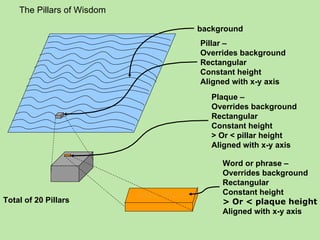
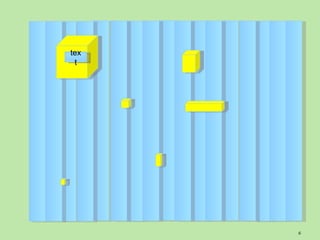
The Pillars of Wisdom

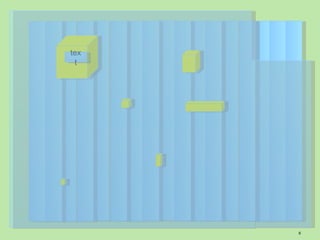
                                         background
                                         Pillar –
                                         Overrides background
                                         Rectangular
                                         Constant height
                                         Aligned with x-y axis
                                            Plaque –
                                            Overrides background
                                            Rectangular
                                            Constant height
                                            > Or < pillar height
                                            Aligned with x-y axis

                                              Word or phrase –
                                              Overrides background
                                              Rectangular
                            Wise Words        Constant height
Total of 20 Pillars                           > Or < plaque height
                                              Aligned with x-y axis
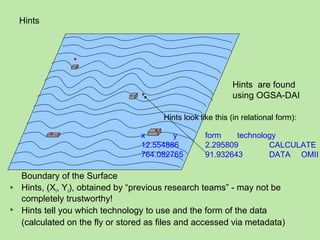
Hints


                                                            Hints are found
                                                            using OGSA-DAI

                                       Hints look like this (in relational form):

                                 x       y          form    technology
                                 12.554886          2.295809        CALCULATE
                                 764.082765         91.932643       DATA OMII

  Boundary of the Surface
 Hints, (Xi, Yi), obtained by “previous research teams” - may not be
  completely trustworthy!
 Hints tell you which technology to use and the form of the data
  (calculated on the fly or stored as files and accessed via metadata)
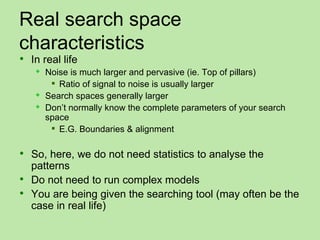
Real search space
characteristics
 In real life
      Noise is much larger and pervasive (ie. Top of pillars)
         Ratio of signal to noise is usually larger
      Search spaces generally larger
      Don’t normally know the complete parameters of your search
       space
         E.G. Boundaries & alignment

 So, here, we do not need statistics to analyse the
  patterns
 Do not need to run complex models
 You are being given the searching tool (may often be the
  case in real life)
tex
 t


      6
tex
 t


      7
tex
 t


      8
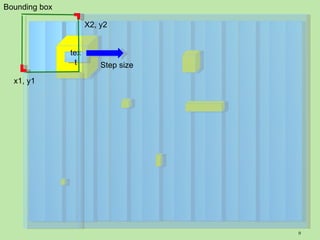
Bounding box

                     X2, y2


               tex
                t        Step size
  x1, y1


                                     9
tex
 t


      10
tex
 t


      11
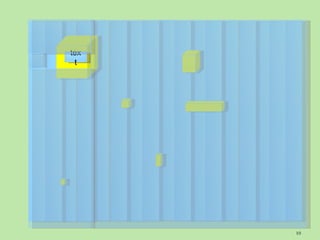
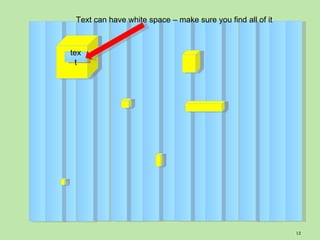
Text can have white space – make sure you find all of it


tex
 t


                                                            12
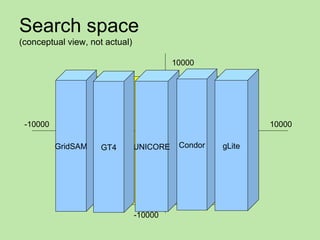
Search space
(conceptual view, not actual)

                                          10000


                                          Computed data area


 -10000                                                        10000

          GridSAM   GT4         UNICORE    Condor      gLite

                                           Stored data area


                                -10000
Framework


Expected to
 Write program(s) / script(s)
   To   run explorations across Surface,
      E.G. interfacing tools for displaying result with
       technologies that deliver those results
   to   find
      Pillars, then plaques
 Do visualisation on Plaques to read Wisdom
  Words
 Recognise the pattern
 Making full use of capabilities
Scanner tool
 Use the Scanner tool to search for a pillar in a given area
 From the command line,
 java -jar sfkscan-XXX.jar <x1> <y1> <x2>
  <y2> <step_size>
      (XXX = technology name: glite globus condor
       unicore gridsam)
      X1y1 = bottom left, x2y2 = top right
 If a pillar is found in the given area, the word on the
  plaque will be printed on the screen.
 It can be saved in a text file to view better if the word
  wraps on the screen.
 This can be done through redirecting the output to a file.
                                                              15
Parameters
 Area = -10,000 to 10,000
 Step size range = 0.0001 -> 0.1
 Each technology has sample pillar that
  you will be given.

 30 pillars in total


                                           16
Semantic Grid Integrating Practical
 Objectives
      Use the lessons learned in the Semantic Grid Practical
      Query the metadata stored in a Globus container
 Procedure
      After you find all the words hidden in the pillars…
      Connect to issgc-client-01.polytech.unice.fr
      Use the query-all-notes command in the Globus installation
      Instructions: http://www.dia.fi.upm.es/~ocorcho/ISSGC2009/
       web/index_integrating.html
 Results
      The results are the name of the elements you were querying
       to the Metadata Query Service: 8 words
      Combining these words with the previous ones from the
       pillars you get the final solution
      http://www.dia.fi.upm.es/~ocorcho/ISSGC2009/Inte
       gratingWeb/integrating.html
Reporting colums

 Browse to
 http://dc06.nesc.ed.ac.uk:8080/sfk/
 To enter discovered pillars:
   Group   - this is your group number, (do not
    add for other groups!)
   Text - the whole text you found on the pillar
    (need to find all of it)
   x1, y1, x2, y2 - specify a bounding box that
    includes all of that text

                                                    18
Reporting your results
 Each team will get
    5 minutes during session 56
    2 minutes to change over and get started!
 Maximum number of slides
    Title
    4 others
 What you learnt and insights gained
    Results of the search
    Technologies used
    Evaluation of technologies
    Evaluation of your strategies
       Team organisation, roles and how they worked
Instructions
Technology-specific instructions for the integrating practical:

Submission: (When a pillar is found, submit it to this website)
http://dc06.nesc.ed.ac.uk:8080/sfk/
   Condor:
http://pages.cs.wisc.edu/~roy/grid_school_2009/integrating.html
2. GridSAM:
http://www.ecs.soton.ac.uk/~stc/ISSGC09/GridSAMIntegratingPractical.htm
3. gLite:
http://issgc-server-01.polytech.unice.fr/glite/issgc09/glite-integrating-practical.html
4. Globus:
http://www.ci.uchicago.edu/~benc/issgc09/integrating.html
5. UNICORE:
http://www.fz-juelich.de/jsc/unicore/ISSGC09/
6. OGSA-DAI:
http://homepages.nesc.ac.uk/~elias/issgc09/html/hints.html
7. Semantic Grid
http://www.dia.fi.upm.es/~ocorcho/ISSGC2009/IntegratingWeb/integrating.html
                                                                                          20

Integrating Practical2009

  • 1.
    Integrating practical Author/Presenter: David Fergusson Technology Masters – Alain Roy, Ben Clifford, Rebbeca Breu, Carlos Aranda, Emidio Giorgio, Tony Calanduci, Steve Crouch, Tilaye Alemu SFK Master – Ted Wen
  • 2.
    SfK = simulationof typical e-Science Research  Collaboration between scientists (your group)  Exploring large amounts of Data to find particular patterns of interest  Astronomy  Particle physics  Biomedicine  Geophysics ….  Using results of other researchers’ work
  • 3.
    The Pillars ofWisdom background Pillar – Overrides background Rectangular Constant height Aligned with x-y axis Plaque – Overrides background Rectangular Constant height > Or < pillar height Aligned with x-y axis Word or phrase – Overrides background Rectangular Wise Words Constant height Total of 20 Pillars > Or < plaque height Aligned with x-y axis
  • 4.
    Hints Hints are found using OGSA-DAI Hints look like this (in relational form): x y form technology 12.554886 2.295809 CALCULATE 764.082765 91.932643 DATA OMII Boundary of the Surface  Hints, (Xi, Yi), obtained by “previous research teams” - may not be completely trustworthy!  Hints tell you which technology to use and the form of the data (calculated on the fly or stored as files and accessed via metadata)
  • 5.
    Real search space characteristics In real life  Noise is much larger and pervasive (ie. Top of pillars)  Ratio of signal to noise is usually larger  Search spaces generally larger  Don’t normally know the complete parameters of your search space  E.G. Boundaries & alignment  So, here, we do not need statistics to analyse the patterns  Do not need to run complex models  You are being given the searching tool (may often be the case in real life)
  • 6.
  • 7.
  • 8.
  • 9.
    Bounding box X2, y2 tex t Step size x1, y1 9
  • 10.
  • 11.
  • 12.
    Text can havewhite space – make sure you find all of it tex t 12
  • 13.
    Search space (conceptual view,not actual) 10000 Computed data area -10000 10000 GridSAM GT4 UNICORE Condor gLite Stored data area -10000
  • 14.
    Framework Expected to  Writeprogram(s) / script(s)  To run explorations across Surface,  E.G. interfacing tools for displaying result with technologies that deliver those results  to find  Pillars, then plaques  Do visualisation on Plaques to read Wisdom Words  Recognise the pattern  Making full use of capabilities
  • 15.
    Scanner tool  Usethe Scanner tool to search for a pillar in a given area  From the command line,  java -jar sfkscan-XXX.jar <x1> <y1> <x2> <y2> <step_size>  (XXX = technology name: glite globus condor unicore gridsam)  X1y1 = bottom left, x2y2 = top right  If a pillar is found in the given area, the word on the plaque will be printed on the screen.  It can be saved in a text file to view better if the word wraps on the screen.  This can be done through redirecting the output to a file. 15
  • 16.
    Parameters  Area =-10,000 to 10,000  Step size range = 0.0001 -> 0.1  Each technology has sample pillar that you will be given.  30 pillars in total 16
  • 17.
    Semantic Grid IntegratingPractical  Objectives  Use the lessons learned in the Semantic Grid Practical  Query the metadata stored in a Globus container  Procedure  After you find all the words hidden in the pillars…  Connect to issgc-client-01.polytech.unice.fr  Use the query-all-notes command in the Globus installation  Instructions: http://www.dia.fi.upm.es/~ocorcho/ISSGC2009/ web/index_integrating.html  Results  The results are the name of the elements you were querying to the Metadata Query Service: 8 words  Combining these words with the previous ones from the pillars you get the final solution  http://www.dia.fi.upm.es/~ocorcho/ISSGC2009/Inte gratingWeb/integrating.html
  • 18.
    Reporting colums  Browseto http://dc06.nesc.ed.ac.uk:8080/sfk/  To enter discovered pillars:  Group - this is your group number, (do not add for other groups!)  Text - the whole text you found on the pillar (need to find all of it)  x1, y1, x2, y2 - specify a bounding box that includes all of that text 18
  • 19.
    Reporting your results Each team will get  5 minutes during session 56  2 minutes to change over and get started!  Maximum number of slides  Title  4 others  What you learnt and insights gained  Results of the search  Technologies used  Evaluation of technologies  Evaluation of your strategies  Team organisation, roles and how they worked
  • 20.
    Instructions Technology-specific instructions forthe integrating practical: Submission: (When a pillar is found, submit it to this website) http://dc06.nesc.ed.ac.uk:8080/sfk/  Condor: http://pages.cs.wisc.edu/~roy/grid_school_2009/integrating.html 2. GridSAM: http://www.ecs.soton.ac.uk/~stc/ISSGC09/GridSAMIntegratingPractical.htm 3. gLite: http://issgc-server-01.polytech.unice.fr/glite/issgc09/glite-integrating-practical.html 4. Globus: http://www.ci.uchicago.edu/~benc/issgc09/integrating.html 5. UNICORE: http://www.fz-juelich.de/jsc/unicore/ISSGC09/ 6. OGSA-DAI: http://homepages.nesc.ac.uk/~elias/issgc09/html/hints.html 7. Semantic Grid http://www.dia.fi.upm.es/~ocorcho/ISSGC2009/IntegratingWeb/integrating.html 20