Technology Resourcesfor Instructorsat City Colleges of ChicagoOffice of Information Technology
AgendaYour Novell UsernameAdministrative TechnologiesInstructional Technologies1/11/2011City Colleges of Chicago - Instructor Resources
Online ResourcesAll links and resources can be found online:Go to http://www.ccc.eduClick Faculty & Staff Resources1/11/2011City Colleges of Chicago - Instructor Resources
Your Novell Username1/11/2011City Colleges of Chicago - Instructor Resources
Novell UsernameUse your Novell Username and password to login toGroupWise EmailHR Self Service (on-campus only)Faculty Profile DirectoryMyFaculty.CCC.eduBlackboard1/11/2011City Colleges of Chicago - Instructor Resources
Novell UsernameRetrievalRetrieve your Novell Username and set a password here:http://www.ccc.edu/password/You will need your Employee ID Number to do this.1/11/2011City Colleges of Chicago - Instructor Resources
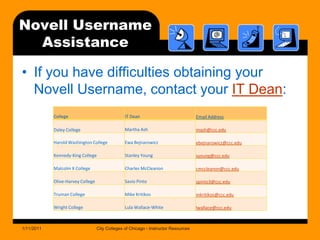
Novell UsernameAssistanceIf you have difficulties obtaining your Novell Username, contact your IT Dean:1/11/2011City Colleges of Chicago - Instructor Resources
Administrative Technologies1/11/2011City Colleges of Chicago - Instructor Resources
AdministrativeTechnologiesGroupWise EmailHR/Employee Self Service (available on-campus only)CCC Alert Faculty Profile DirectoryAll District DirectoryEmployee Portal (available on-campus only)1/11/2011City Colleges of Chicago - Instructor Resources
GroupWise EmailEmail Websitehttp://email.ccc.edu/Support Websitehttp://www.ccc.edu/groupwise/Login withYour Novell Username and Password1/11/2011City Colleges of Chicago - Instructor Resources
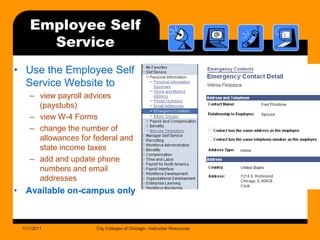
Employee Self ServiceUse the Employee Self Service Website toview payroll advices (paystubs)view W-4 Formschange the number of allowances for federal and state income taxesadd and update phone numbers and email addressesAvailable on-campus only1/11/2011City Colleges of Chicago - Instructor Resources
Employee Self ServiceEmployee Self Service Websitehttp://intranet.co.ccc.edu/peoplesoft_selfservice/Support Websitehttp://intranet.co.ccc.edu/peoplesoft_selfservice/Login withYour Novell Username and Password1/11/2011City Colleges of Chicago - Instructor Resources
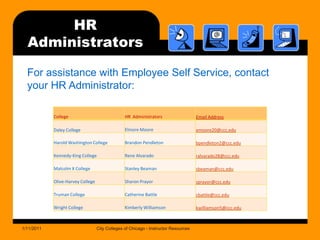
HR Administrators1/11/2011City Colleges of Chicago - Instructor ResourcesFor assistance with Employee Self Service, contact your HR Administrator:
CCC Alert Emergency NotificationCCC Alert is the emergency notification system used to contact students, staff and instructors in the event of an on-campus emergency. You can receive emergency alerts via:City Colleges and personal email accountsMobile and home phone numbersText messagesUpdate your information using the Employee Self Service Website:http://intranet.co.ccc.edu/peoplesoft_selfservice/1/11/2011City Colleges of Chicago - Instructor Resources
CCC Alert Emergency NotificationCCC Alert Websitehttp://www.ccc.edu/alert/Update Phone Numbers and Email addresses using Employee Self Servicehttp://intranet.co.ccc.edu/peoplesoft_selfservice/    (available on-campus only)1/11/2011City Colleges of Chicago - Instructor Resources
Faculty Profile DirectoryThe Faculty Profile Directory allows faculty members to add an online profile including:Contact informationOffice hoursClasses taughtDegrees earnedFavorite websitesStudents search the Faculty Directory for more information about their instructors.1/11/2011City Colleges of Chicago - Instructor Resources
Faculty Profile DirectoryFaculty Profile Directory Websitehttp://projects.ccc.edu/directory/search.aspxLogin to Update your Profilehttp://projects.ccc.edu/directory/login.aspxLogin withYour Novell Username and Password1/11/2011City Colleges of Chicago - Instructor Resources
All District Directorieshttp://www.ccc.eduClick Directories (in the footer on all pages)Many colleges maintain their own directories.1/11/2011City Colleges of Chicago - Instructor Resources
Employee PortalThe Employee Portal is available on campus and allows each District Department to maintain their own departmental documents and forms.Human Resources FormsPeopleSoft SA Job AidsFinance FormsResearch and Evaluation Numbers (APSA)http://portal.intranet.co.ccc.edu/      (available on campus only)http://www.ccc.edu/Files/portalaccess.pdfhttp://ccc.edu/CCCPortal.asp1/11/2011City Colleges of Chicago - Instructor Resources
Instructional Technologies1/11/2011City Colleges of Chicago - Instructor Resources
InstructionalTechnologiesMyFaculty.ccc.eduLibrary SystemAZTEC Blackboard Learning Management System1/11/2011City Colleges of Chicago - Instructor Resources
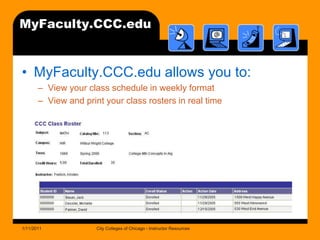
MyFaculty.CCC.eduMyFaculty.CCC.edu allows you to:View your class schedule in weekly formatView and print your class rosters in real time1/11/2011City Colleges of Chicago - Instructor Resources
MyFaculty.CCC.eduMyFaculty.ccc.edu Websitehttp://myfaculty.ccc.eduSupport Websitehttp://www.ccc.edu/sahelp/facultyhome.shtmlLogin withYour Novell Username and Password1/11/2011City Colleges of Chicago - Instructor Resources
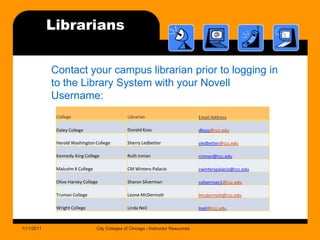
Library SystemAll college library resources are cataloged in one system:http://library.ccc.edu/No login needed for book searchHow to Login to the Library SystemContact your campus librarian prior to logging in with your Novell Username.1/11/2011City Colleges of Chicago - Instructor Resources
Librarians1/11/2011City Colleges of Chicago - Instructor ResourcesContact your campus librarian prior to logging in to the Library System with your Novell Username:
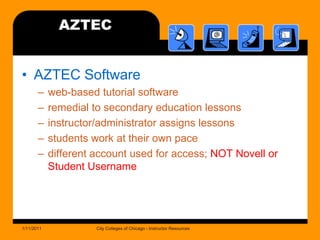
AZTECAZTEC Softwareweb-based tutorial softwareremedial to secondary education lessonsinstructor/administrator assigns lessonsstudents work at their own pacedifferent account used for access; NOT Novell or Student Username1/11/2011City Colleges of Chicago - Instructor Resources
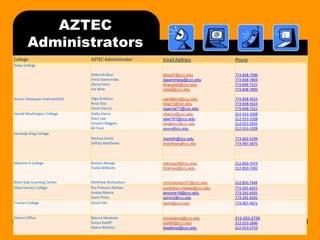
AZTECAdministrators1/11/2011City Colleges of Chicago - Instructor Resources
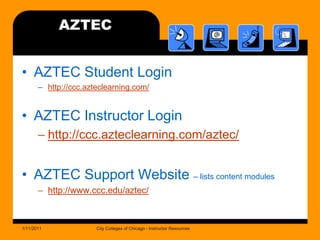
AZTECAZTEC Student Loginhttp://ccc.azteclearning.com/AZTEC Instructor Loginhttp://ccc.azteclearning.com/aztec/AZTEC Support Website – lists content moduleshttp://www.ccc.edu/aztec/1/11/2011City Colleges of Chicago - Instructor Resources
Blackboard LMSBlackboard is a learning management system (LMS) that supports online teaching and learning.Available to all instructors to complement their face-to-face classes.http://ccc.blackboard.comAcademic Affairs PolicyEffective Fall 2010, Academic Affairs policy requires all credit instructors (full-time and adjunct) to post their syllabus in Blackboard. Instructors must also name the file Syllabus and make their course available.Contact your Vice President for more information.1/11/2011City Colleges of Chicago - Instructor Resources
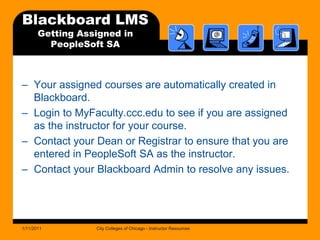
Blackboard LMSGetting Assigned in PeopleSoft SAYour assigned courses are automatically created in Blackboard. Login to MyFaculty.ccc.edu to see if you are assigned as the instructor for your course.Contact your Dean or Registrar to ensure that you are entered in PeopleSoft SA as the instructor.Contact your Blackboard Admin to resolve any issues.1/11/2011City Colleges of Chicago - Instructor Resources
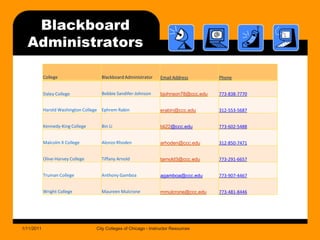
Blackboard Administrators1/11/2011City Colleges of Chicago - Instructor Resources
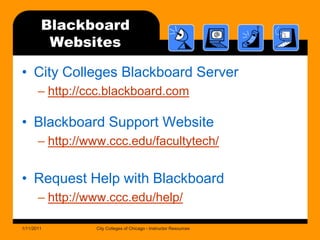
BlackboardWebsitesCity Colleges Blackboard Serverhttp://ccc.blackboard.comBlackboard Support Websitehttp://www.ccc.edu/facultytech/Request Help with Blackboardhttp://www.ccc.edu/help/1/11/2011City Colleges of Chicago - Instructor Resources
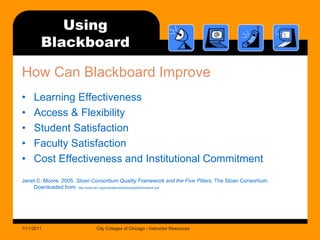
UsingBlackboardHow Can Blackboard ImproveLearning Effectiveness
Access & Flexibility
Student Satisfaction
Faculty Satisfaction

Instructor resources presentation

  • 1.
    Technology Resourcesfor InstructorsatCity Colleges of ChicagoOffice of Information Technology
  • 2.
    AgendaYour Novell UsernameAdministrativeTechnologiesInstructional Technologies1/11/2011City Colleges of Chicago - Instructor Resources
  • 3.
    Online ResourcesAll linksand resources can be found online:Go to http://www.ccc.eduClick Faculty & Staff Resources1/11/2011City Colleges of Chicago - Instructor Resources
  • 4.
    Your Novell Username1/11/2011CityColleges of Chicago - Instructor Resources
  • 5.
    Novell UsernameUse yourNovell Username and password to login toGroupWise EmailHR Self Service (on-campus only)Faculty Profile DirectoryMyFaculty.CCC.eduBlackboard1/11/2011City Colleges of Chicago - Instructor Resources
  • 6.
    Novell UsernameRetrievalRetrieve yourNovell Username and set a password here:http://www.ccc.edu/password/You will need your Employee ID Number to do this.1/11/2011City Colleges of Chicago - Instructor Resources
  • 7.
    Novell UsernameAssistanceIf youhave difficulties obtaining your Novell Username, contact your IT Dean:1/11/2011City Colleges of Chicago - Instructor Resources
  • 8.
    Administrative Technologies1/11/2011City Collegesof Chicago - Instructor Resources
  • 9.
    AdministrativeTechnologiesGroupWise EmailHR/Employee SelfService (available on-campus only)CCC Alert Faculty Profile DirectoryAll District DirectoryEmployee Portal (available on-campus only)1/11/2011City Colleges of Chicago - Instructor Resources
  • 10.
    GroupWise EmailEmail Websitehttp://email.ccc.edu/SupportWebsitehttp://www.ccc.edu/groupwise/Login withYour Novell Username and Password1/11/2011City Colleges of Chicago - Instructor Resources
  • 11.
    Employee Self ServiceUsethe Employee Self Service Website toview payroll advices (paystubs)view W-4 Formschange the number of allowances for federal and state income taxesadd and update phone numbers and email addressesAvailable on-campus only1/11/2011City Colleges of Chicago - Instructor Resources
  • 12.
    Employee Self ServiceEmployeeSelf Service Websitehttp://intranet.co.ccc.edu/peoplesoft_selfservice/Support Websitehttp://intranet.co.ccc.edu/peoplesoft_selfservice/Login withYour Novell Username and Password1/11/2011City Colleges of Chicago - Instructor Resources
  • 13.
    HR Administrators1/11/2011City Collegesof Chicago - Instructor ResourcesFor assistance with Employee Self Service, contact your HR Administrator:
  • 14.
    CCC Alert EmergencyNotificationCCC Alert is the emergency notification system used to contact students, staff and instructors in the event of an on-campus emergency. You can receive emergency alerts via:City Colleges and personal email accountsMobile and home phone numbersText messagesUpdate your information using the Employee Self Service Website:http://intranet.co.ccc.edu/peoplesoft_selfservice/1/11/2011City Colleges of Chicago - Instructor Resources
  • 15.
    CCC Alert EmergencyNotificationCCC Alert Websitehttp://www.ccc.edu/alert/Update Phone Numbers and Email addresses using Employee Self Servicehttp://intranet.co.ccc.edu/peoplesoft_selfservice/ (available on-campus only)1/11/2011City Colleges of Chicago - Instructor Resources
  • 16.
    Faculty Profile DirectoryTheFaculty Profile Directory allows faculty members to add an online profile including:Contact informationOffice hoursClasses taughtDegrees earnedFavorite websitesStudents search the Faculty Directory for more information about their instructors.1/11/2011City Colleges of Chicago - Instructor Resources
  • 17.
    Faculty Profile DirectoryFacultyProfile Directory Websitehttp://projects.ccc.edu/directory/search.aspxLogin to Update your Profilehttp://projects.ccc.edu/directory/login.aspxLogin withYour Novell Username and Password1/11/2011City Colleges of Chicago - Instructor Resources
  • 18.
    All District Directorieshttp://www.ccc.eduClickDirectories (in the footer on all pages)Many colleges maintain their own directories.1/11/2011City Colleges of Chicago - Instructor Resources
  • 19.
    Employee PortalThe EmployeePortal is available on campus and allows each District Department to maintain their own departmental documents and forms.Human Resources FormsPeopleSoft SA Job AidsFinance FormsResearch and Evaluation Numbers (APSA)http://portal.intranet.co.ccc.edu/ (available on campus only)http://www.ccc.edu/Files/portalaccess.pdfhttp://ccc.edu/CCCPortal.asp1/11/2011City Colleges of Chicago - Instructor Resources
  • 20.
    Instructional Technologies1/11/2011City Collegesof Chicago - Instructor Resources
  • 21.
    InstructionalTechnologiesMyFaculty.ccc.eduLibrary SystemAZTEC BlackboardLearning Management System1/11/2011City Colleges of Chicago - Instructor Resources
  • 22.
    MyFaculty.CCC.eduMyFaculty.CCC.edu allows youto:View your class schedule in weekly formatView and print your class rosters in real time1/11/2011City Colleges of Chicago - Instructor Resources
  • 23.
    MyFaculty.CCC.eduMyFaculty.ccc.edu Websitehttp://myfaculty.ccc.eduSupport Websitehttp://www.ccc.edu/sahelp/facultyhome.shtmlLoginwithYour Novell Username and Password1/11/2011City Colleges of Chicago - Instructor Resources
  • 24.
    Library SystemAll collegelibrary resources are cataloged in one system:http://library.ccc.edu/No login needed for book searchHow to Login to the Library SystemContact your campus librarian prior to logging in with your Novell Username.1/11/2011City Colleges of Chicago - Instructor Resources
  • 25.
    Librarians1/11/2011City Colleges ofChicago - Instructor ResourcesContact your campus librarian prior to logging in to the Library System with your Novell Username:
  • 26.
    AZTECAZTEC Softwareweb-based tutorialsoftwareremedial to secondary education lessonsinstructor/administrator assigns lessonsstudents work at their own pacedifferent account used for access; NOT Novell or Student Username1/11/2011City Colleges of Chicago - Instructor Resources
  • 27.
    AZTECAdministrators1/11/2011City Colleges ofChicago - Instructor Resources
  • 28.
    AZTECAZTEC Student Loginhttp://ccc.azteclearning.com/AZTECInstructor Loginhttp://ccc.azteclearning.com/aztec/AZTEC Support Website – lists content moduleshttp://www.ccc.edu/aztec/1/11/2011City Colleges of Chicago - Instructor Resources
  • 29.
    Blackboard LMSBlackboard isa learning management system (LMS) that supports online teaching and learning.Available to all instructors to complement their face-to-face classes.http://ccc.blackboard.comAcademic Affairs PolicyEffective Fall 2010, Academic Affairs policy requires all credit instructors (full-time and adjunct) to post their syllabus in Blackboard. Instructors must also name the file Syllabus and make their course available.Contact your Vice President for more information.1/11/2011City Colleges of Chicago - Instructor Resources
  • 30.
    Blackboard LMSGetting Assignedin PeopleSoft SAYour assigned courses are automatically created in Blackboard. Login to MyFaculty.ccc.edu to see if you are assigned as the instructor for your course.Contact your Dean or Registrar to ensure that you are entered in PeopleSoft SA as the instructor.Contact your Blackboard Admin to resolve any issues.1/11/2011City Colleges of Chicago - Instructor Resources
  • 31.
    Blackboard Administrators1/11/2011City Collegesof Chicago - Instructor Resources
  • 32.
    BlackboardWebsitesCity Colleges BlackboardServerhttp://ccc.blackboard.comBlackboard Support Websitehttp://www.ccc.edu/facultytech/Request Help with Blackboardhttp://www.ccc.edu/help/1/11/2011City Colleges of Chicago - Instructor Resources
  • 33.
    UsingBlackboardHow Can BlackboardImproveLearning Effectiveness
  • 34.
  • 35.
  • 36.