eWalk for Walk-Throughs 2009 ITEC Presentation  by Toy Waterman [email_address]
What is eWalk? eWalk is a free application for Iowa administrators that will collect, analyze and store teacher observation data. The program is used on Blackberry, iTouch, PocketPC, and Palm devices. eWalk software is intended to assist school leaders in gathering data while conducting classroom walk-throughs.
FAQs How did Iowa administrators get eWalk? What does it mean by acquiring an eWalk license? What devices can use eWalk? Why eWalk instead of another app? What templates are available? How do I get started?
How did Iowa administrators get eWalk? 2007 John O’Connell from the Iowa DE at the time negotiated with Media-x First round purchased eWalk licenses lasting two years (Technology funding) First round purchased Palm TX devices AEAs were given the charge to distribute and provide professional development for admins Second round purchased around 500 licenses lasting two years as well (Microsoft Settlement) Second round purchased iTouch devices
What does it mean by acquiring an eWalk license? Each AEA has a designated person who will register an administrator’s DE folder # This person will also have to know the building(s) the administrator is assigned After this registration administrators can login on the Media-x site for the software and full access The license will continue to follow that admin Acquiring the devise is different for each AEA
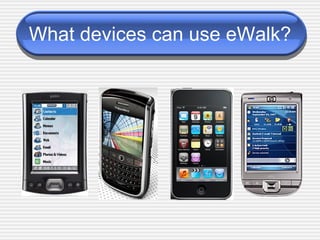
What devices can use eWalk?
Why eWalk instead of another application? Totally digital using mobile devices Web-based, so 24/7 Excellent interface - un-intrusive in the classroom District-wide walk-through data collection / analysis  Templates are created according to district needs
What templates are available? Behaviors and Characteristics Heartland -IA Teaching Standards which covers: IA Teaching Standards Behaviors and Characteristics Assessment & Professional Development Instructional Practice Inventory Iowa Administrative Standards AEA Certified Staff Teacher Librarians Others Create your own
How do I get started? Administrators are registered by their AEA contact for a license and assigned an admin position within a school building(s) Administrator obtains a compatible mobile device and installs eWalk Administrator may receive eWalk training according to his/her AEA’s eWalk procedures Administrator uses the eWalk license for two years, creating walk throughs and reports
Touring the eWalk Process Setting up an account Downloading eWalk software Downloading templates and teachers Updating teacher list for buildings Creating a new walk through Uploading walk throughs Editing Saving and sharing Creating reports Creating customized templates
Support Sites Media-x  http://www.mediax.com/products/ewalk/index.php Heartland AEA eWalk Support Site http://ewalk.pbworks.com
Iowa eWalk Contacts John O’Connell 515-249-0334 [email_address] [email_address] Jerry Schnabel > Director, Information and Technology Services AEA 267  800-542-8375  [email_address]
Questions Toy Waterman [email_address]

ITEC Presentation for eWalk

  • 1.
    eWalk for Walk-Throughs2009 ITEC Presentation by Toy Waterman [email_address]
  • 2.
    What is eWalk?eWalk is a free application for Iowa administrators that will collect, analyze and store teacher observation data. The program is used on Blackberry, iTouch, PocketPC, and Palm devices. eWalk software is intended to assist school leaders in gathering data while conducting classroom walk-throughs.
  • 3.
    FAQs How didIowa administrators get eWalk? What does it mean by acquiring an eWalk license? What devices can use eWalk? Why eWalk instead of another app? What templates are available? How do I get started?
  • 4.
    How did Iowaadministrators get eWalk? 2007 John O’Connell from the Iowa DE at the time negotiated with Media-x First round purchased eWalk licenses lasting two years (Technology funding) First round purchased Palm TX devices AEAs were given the charge to distribute and provide professional development for admins Second round purchased around 500 licenses lasting two years as well (Microsoft Settlement) Second round purchased iTouch devices
  • 5.
    What does itmean by acquiring an eWalk license? Each AEA has a designated person who will register an administrator’s DE folder # This person will also have to know the building(s) the administrator is assigned After this registration administrators can login on the Media-x site for the software and full access The license will continue to follow that admin Acquiring the devise is different for each AEA
  • 6.
    What devices canuse eWalk?
  • 7.
    Why eWalk insteadof another application? Totally digital using mobile devices Web-based, so 24/7 Excellent interface - un-intrusive in the classroom District-wide walk-through data collection / analysis Templates are created according to district needs
  • 8.
    What templates areavailable? Behaviors and Characteristics Heartland -IA Teaching Standards which covers: IA Teaching Standards Behaviors and Characteristics Assessment & Professional Development Instructional Practice Inventory Iowa Administrative Standards AEA Certified Staff Teacher Librarians Others Create your own
  • 9.
    How do Iget started? Administrators are registered by their AEA contact for a license and assigned an admin position within a school building(s) Administrator obtains a compatible mobile device and installs eWalk Administrator may receive eWalk training according to his/her AEA’s eWalk procedures Administrator uses the eWalk license for two years, creating walk throughs and reports
  • 10.
    Touring the eWalkProcess Setting up an account Downloading eWalk software Downloading templates and teachers Updating teacher list for buildings Creating a new walk through Uploading walk throughs Editing Saving and sharing Creating reports Creating customized templates
  • 11.
    Support Sites Media-x http://www.mediax.com/products/ewalk/index.php Heartland AEA eWalk Support Site http://ewalk.pbworks.com
  • 12.
    Iowa eWalk ContactsJohn O’Connell 515-249-0334 [email_address] [email_address] Jerry Schnabel > Director, Information and Technology Services AEA 267 800-542-8375 [email_address]
  • 13.
    Questions Toy Waterman[email_address]