1. A server-class PC with a Pentium* or higher processor.
2. A VGA or higher resolution display adapter (SVGA
recommended).
3. 550 MB of available disk space (50 MB for a boot partition,
500 MB for a NetWare partition).
4. 64 MB of RAM (128 MB recommended to run Java*-based
applications).
5.One or more network boards.
6. A CD-ROM drive
A PS/2* or serial mouse is recommended, but not required
1. DOS 3.3 or later (DOS 7 is included the NetWare 5License)
2. DOS CD-ROM drivers.
3. NetWare 5 Operating System CD-ROM.
4. NetWare 5 License diskette.
5. Novell Client for DOS and Windows 3.1x
6. An IP address
STEP1. Back up any desired data to another
computer or off-line storage media.
STEP2. If the computer already has an operating
system installed, such as Windows, you
should completely remove the operating
system.
STEP3. Boot your computer with DOS 3.3 or later.
You can boot from the NetWare 5 License diskette. DOS 7 and all
required DOS utilities are included on the diskette. Do not use the version
of DOS that ships with Windows 95, Windows 98, or Windows NT
operating systems.
STEP4. Use FDISK to create a 50MB active DOS
partition by typing FDISK. (Create a
primary DOS partition, and make it the active
partition.)
The computer will restart.
STEP5. Format and transfer DOS system files to the
partition by changing to CDROM DRIVE
LETTER: and typing FORMAT C: /S.
.
STEP6. Install the DOS CD-ROM driver for your
CD-ROM device onto the boot partition.
DOS CD-ROM drivers are provided by the
CD-ROM manufacturer.
STEP7. Make sure that the config.sys file contains
the following commands:
FILES=40 and BUFFERS=30
STEP8. Insert the NetWare 5 CD-ROM.
STEP9. At the CD-ROM drive or network drive Prompt,
type INSTALL.
STEP10. Select the Language and Accept the License
Agreement
Press F10 to accept the License Agreement.
STEP11. Select the Type of Installation
STEP12. Select the Regional Settings
STEP13. Select the Mouse and Video Type
STEP14. Select a Platform Support Module and
Storage Adapter
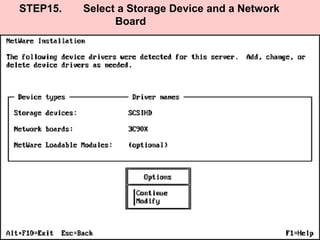
STEP15. Select a Storage Device and a Network
Board
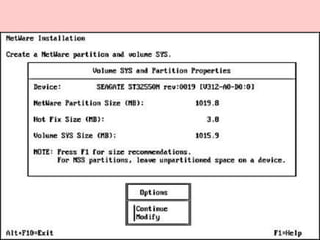
STEP16. Create a NetWare Partition and Volume Sys
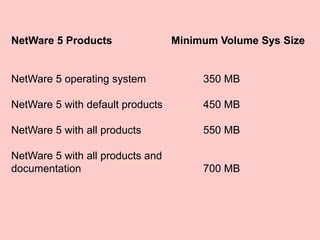
NetWare 5 Products Minimum Volume Sys Size
NetWare 5 operating system 350 MB
NetWare 5 with default products 450 MB
NetWare 5 with all products 550 MB
NetWare 5 with all products and
documentation 700 MB
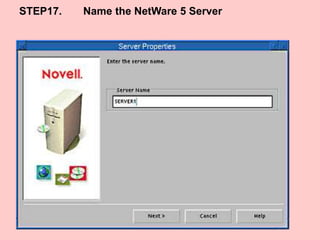
STEP17. Name the NetWare 5 Server
STEP18. Install the NetWare Server File System
STEP19. Install Networking Protocols
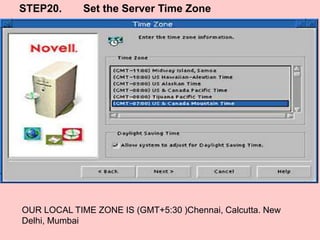
STEP20. Set the Server Time Zone
OUR LOCAL TIME ZONE IS (GMT+5:30 )Chennai, Calcutta. New
Delhi, Mumbai
STEP21. Set Up NDS, Novell’s Directory Technology
Install the Server into an Existing NDS Tree
Create a New NDS Tree
STEP22. Summary
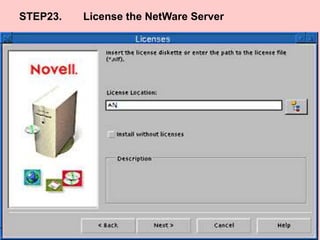
STEP23. License the NetWare Server
STEP24. Install Other Networking Products
STEP25. Customize the NetWare 5 Installation
STEP26. Complete the Server Installation

Installing NetWare 5 Servers

  • 2.
    1. A server-classPC with a Pentium* or higher processor. 2. A VGA or higher resolution display adapter (SVGA recommended). 3. 550 MB of available disk space (50 MB for a boot partition, 500 MB for a NetWare partition). 4. 64 MB of RAM (128 MB recommended to run Java*-based applications). 5.One or more network boards. 6. A CD-ROM drive A PS/2* or serial mouse is recommended, but not required
  • 3.
    1. DOS 3.3or later (DOS 7 is included the NetWare 5License) 2. DOS CD-ROM drivers. 3. NetWare 5 Operating System CD-ROM. 4. NetWare 5 License diskette. 5. Novell Client for DOS and Windows 3.1x 6. An IP address
  • 4.
    STEP1. Back upany desired data to another computer or off-line storage media. STEP2. If the computer already has an operating system installed, such as Windows, you should completely remove the operating system.
  • 5.
    STEP3. Boot yourcomputer with DOS 3.3 or later. You can boot from the NetWare 5 License diskette. DOS 7 and all required DOS utilities are included on the diskette. Do not use the version of DOS that ships with Windows 95, Windows 98, or Windows NT operating systems.
  • 6.
    STEP4. Use FDISKto create a 50MB active DOS partition by typing FDISK. (Create a primary DOS partition, and make it the active partition.) The computer will restart.
  • 7.
    STEP5. Format andtransfer DOS system files to the partition by changing to CDROM DRIVE LETTER: and typing FORMAT C: /S. . STEP6. Install the DOS CD-ROM driver for your CD-ROM device onto the boot partition. DOS CD-ROM drivers are provided by the CD-ROM manufacturer. STEP7. Make sure that the config.sys file contains the following commands: FILES=40 and BUFFERS=30
  • 8.
    STEP8. Insert theNetWare 5 CD-ROM. STEP9. At the CD-ROM drive or network drive Prompt, type INSTALL. STEP10. Select the Language and Accept the License Agreement Press F10 to accept the License Agreement.
  • 9.
    STEP11. Select theType of Installation
  • 10.
    STEP12. Select theRegional Settings
  • 11.
    STEP13. Select theMouse and Video Type
  • 12.
    STEP14. Select aPlatform Support Module and Storage Adapter
  • 13.
    STEP15. Select aStorage Device and a Network Board
  • 14.
    STEP16. Create aNetWare Partition and Volume Sys
  • 16.
    NetWare 5 ProductsMinimum Volume Sys Size NetWare 5 operating system 350 MB NetWare 5 with default products 450 MB NetWare 5 with all products 550 MB NetWare 5 with all products and documentation 700 MB
  • 17.
    STEP17. Name theNetWare 5 Server
  • 18.
    STEP18. Install theNetWare Server File System
  • 21.
  • 22.
    STEP20. Set theServer Time Zone OUR LOCAL TIME ZONE IS (GMT+5:30 )Chennai, Calcutta. New Delhi, Mumbai
  • 23.
    STEP21. Set UpNDS, Novell’s Directory Technology
  • 24.
    Install the Serverinto an Existing NDS Tree
  • 25.
    Create a NewNDS Tree
  • 26.
  • 27.
    STEP23. License theNetWare Server
  • 28.
    STEP24. Install OtherNetworking Products
  • 29.
    STEP25. Customize theNetWare 5 Installation
  • 30.
    STEP26. Complete theServer Installation