Buee Construction and Industrial College
IT SS Department Level I
Program :regular
Occupation: Information Technology Support Service
Unit of Competency: Install Software Application
Learning outcome: 1. Determine software and upgrade requirements
2. Obtain software or software upgrade
3. Install or upgrade software
Prepared by:- HNS Trainer bizuneh Getu
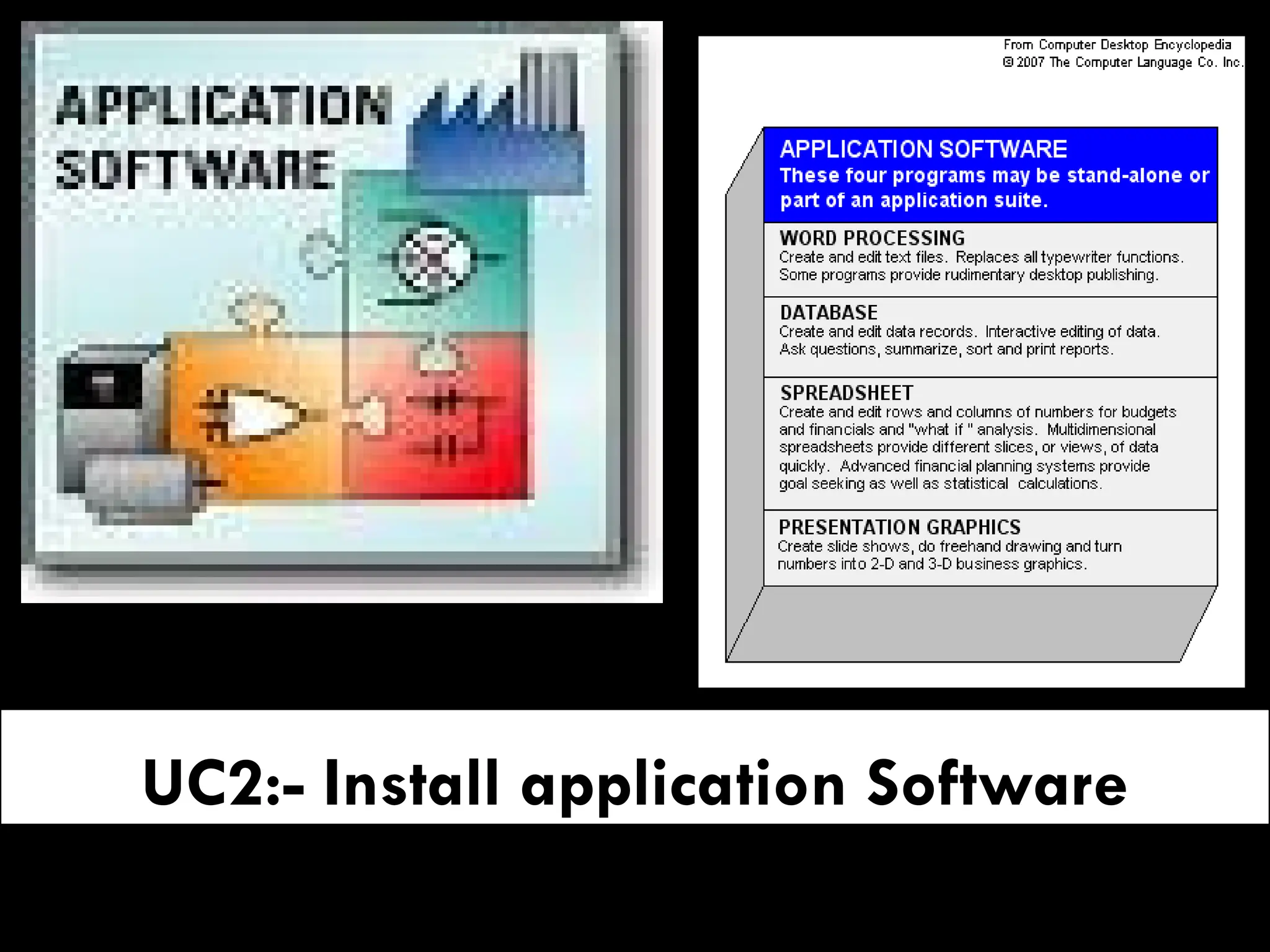
UC2:- Install application Software
 Objective:
 At the end of this Competency the student should be able
to Know how to:
 Determine software and upgrade requirements
 Obtain software or software upgrade
 Install or upgrade software
LO1: Determine software and upgrade
requirements
Objective of this learning outcome
On this learning outcome we have to consider three basic terms
1. What is software?
2. What is upgrading Means?
3. What are the requirement that helps to upgrade a software?
 Computer Software
 determines the tasks a computer can help you accomplish. Some
software helps you create documents, while other software helps you
block viruses or fine-tune your computer’s performance.
 the characteristics of application software, utilities, and device drivers
 What is software?
 Is the instructions that tell a computer how to carry out a task are
referred to as a computer program.
 These programs form the software that prepares a computer to do a
specific task, such as document production, photo editing, virus
protection, file management, or Web browsing.
Software
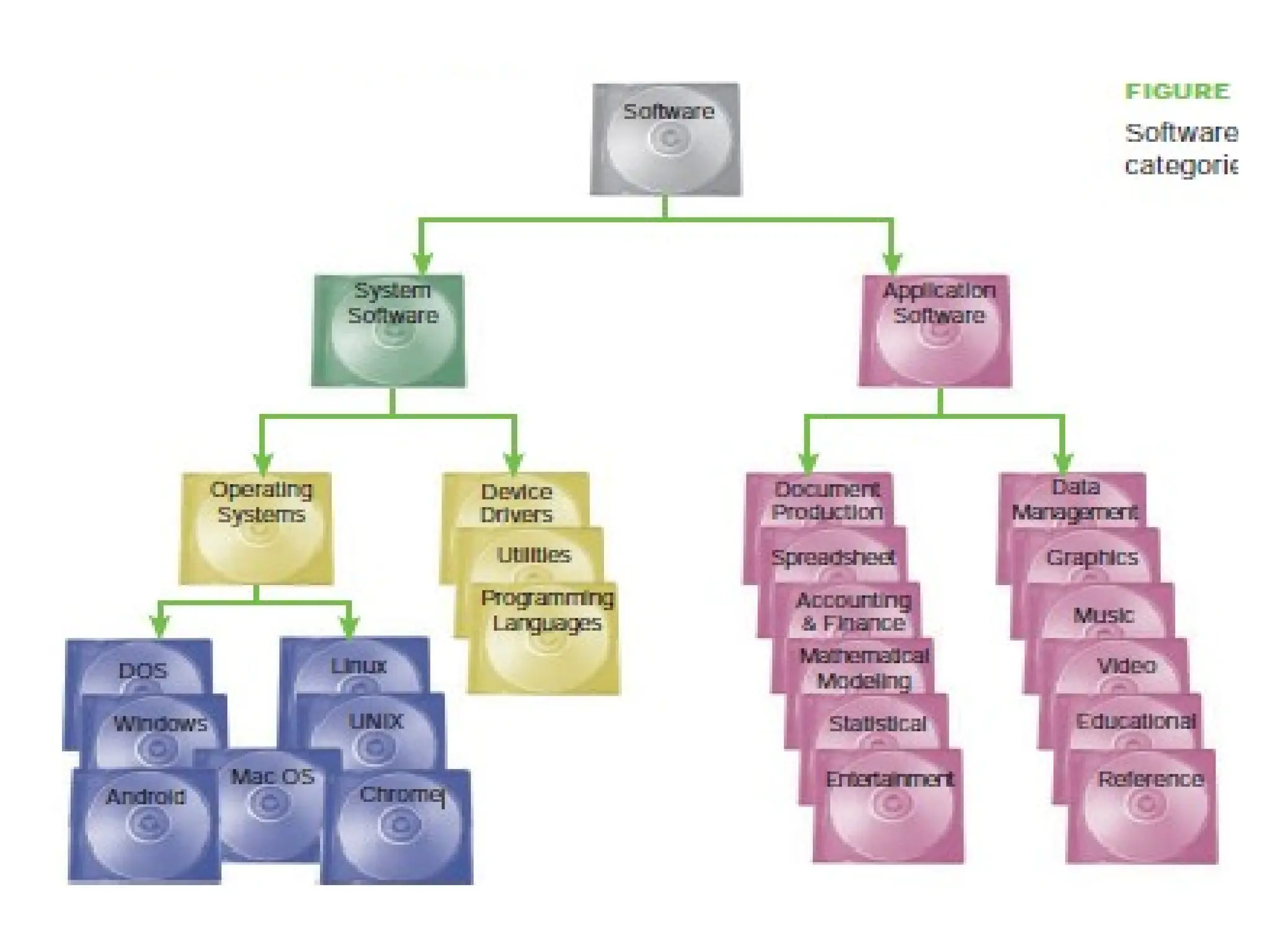
 The two main categories are
1. System Software and
2. Application software.
 System Software
 System software is designed for computer-centric tasks, whereas application
software is designed to help people accomplish real-world tasks.
 For example, you would use system software to diagnose a problem with your
hard disk drive or Internet connection, but you would use application software
to edit a photo or write a term paper.
 System software includes operating systems , utilities, and device drivers.
 Application Software
 Application software can be divided into subcategories according to its use.
Application software
 Why is it called application software?
 Application software utilizes the capacities of a computer directly
for a dedicated task. Application software is able to manipulate
text, numbers and graphics.
 It can be in the form of software focused on a certain single task
like word processing, spreadsheet or playing of audio and video
files.
 A computer certainly has many uses, such as creating documents,
crunching numbers, drawing designs, and editing videos.
 Each use is considered an application, and the software that
provides the computer with instructions for each use is called
application software, an application, or simply an app.
Productivity software
 What is productivity software?
 Some types of application software are referred to as productivity
software.
 Many different definitions exist for this popular term. In general, however,
productivity software can be defined as any type of application software
that has the potential to help people do their work more efficiently.
 The term might have originated in reference to software tools used by
businesses to increase secretarial efficiency at routine office tasks, such as
typing, filing, and basic bookkeeping.
 The applications that are most commonly associated with productivity
software include word processing, spreadsheets, schedulers, and database
management systems.
 Graphics software, presentation software, and desktop publishing software
are also sometimes classified as productivity applications.
Utility software
 What is utility software?
 A type of system software called utility software is designed to help
you monitor and configure settings for your computer system
equipment, the operating system, or application software.
 Like all system software, utilities focus on computer-centric tasks such
as blocking viruses or diagnosing hard disk errors, rather than real-
world tasks such as document production or accounting. Examples of
utility software include setup wizards, communications programs,
security software, and diagnostic tools
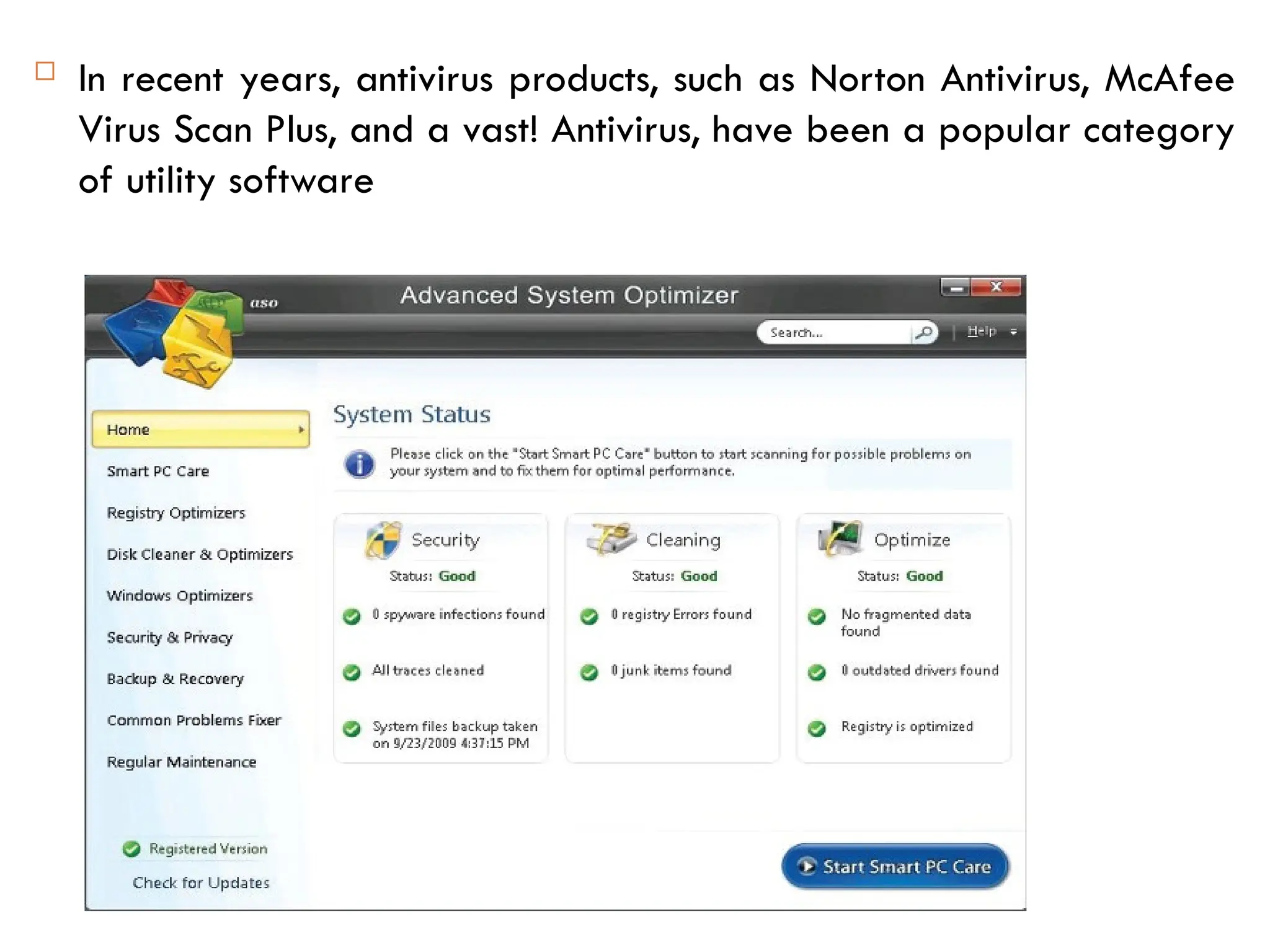
 In recent years, antivirus products, such as Norton Antivirus, McAfee
Virus Scan Plus, and a vast! Antivirus, have been a popular category
of utility software
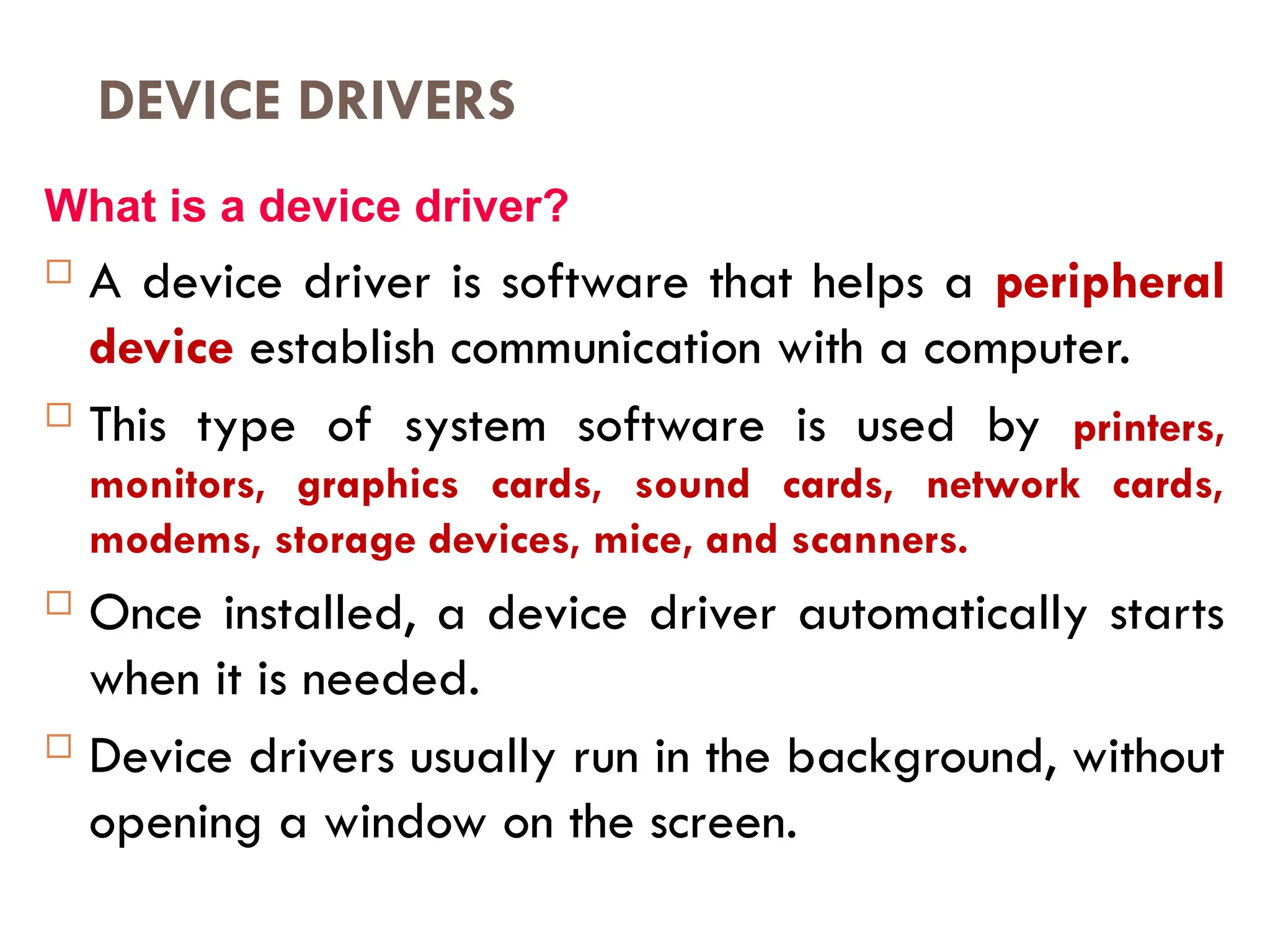
DEVICE DRIVERS
What is a device driver?
 A device driver is software that helps a peripheral
device establish communication with a computer.
 This type of system software is used by printers,
monitors, graphics cards, sound cards, network cards,
modems, storage devices, mice, and scanners.
 Once installed, a device driver automatically starts
when it is needed.
 Device drivers usually run in the background, without
opening a window on the screen.
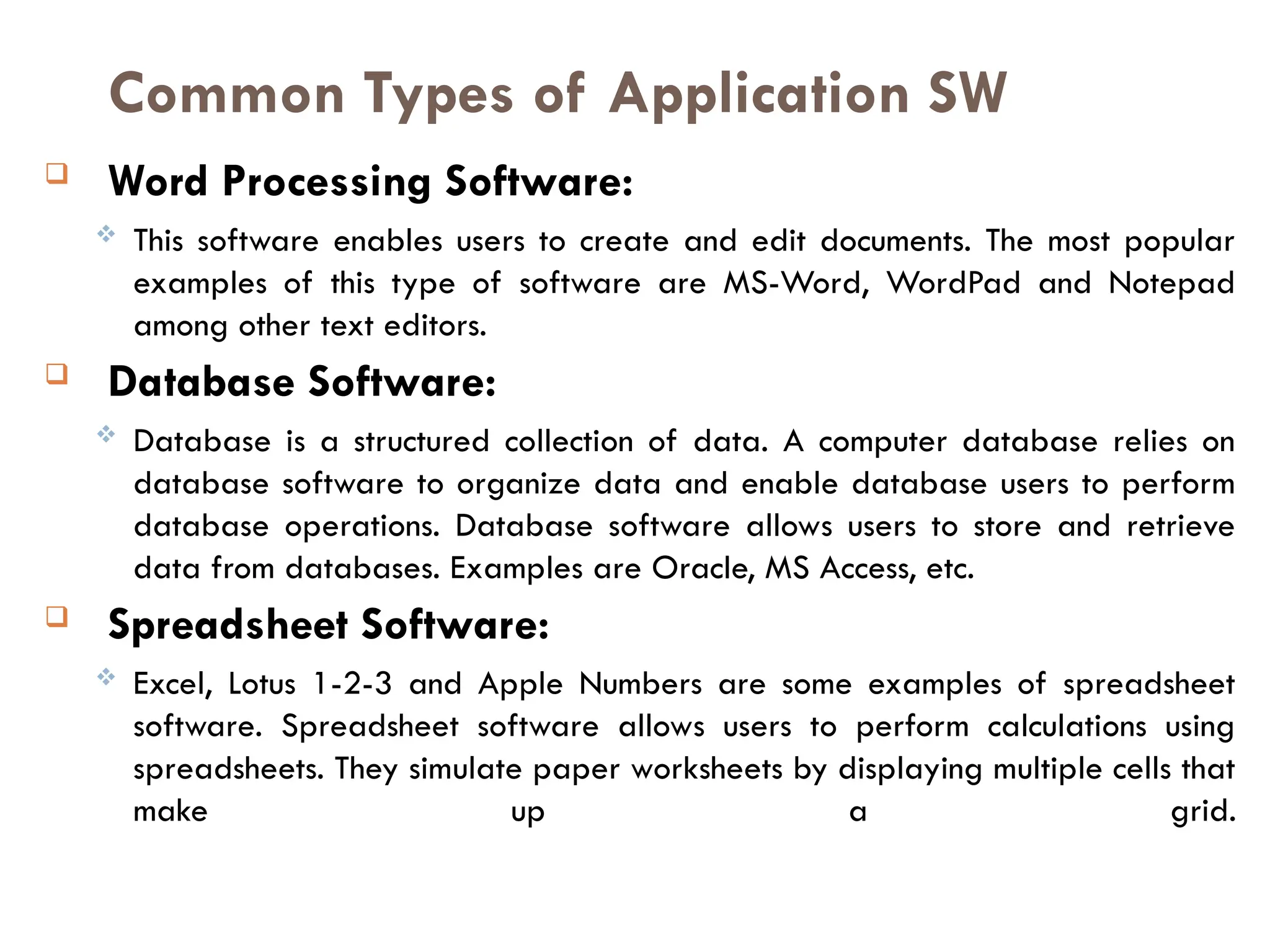
Common Types of Application SW
 Word Processing Software:
 This software enables users to create and edit documents. The most popular
examples of this type of software are MS-Word, WordPad and Notepad
among other text editors.
 Database Software:
 Database is a structured collection of data. A computer database relies on
database software to organize data and enable database users to perform
database operations. Database software allows users to store and retrieve
data from databases. Examples are Oracle, MS Access, etc.
 Spreadsheet Software:
 Excel, Lotus 1-2-3 and Apple Numbers are some examples of spreadsheet
software. Spreadsheet software allows users to perform calculations using
spreadsheets. They simulate paper worksheets by displaying multiple cells that
make up a grid.
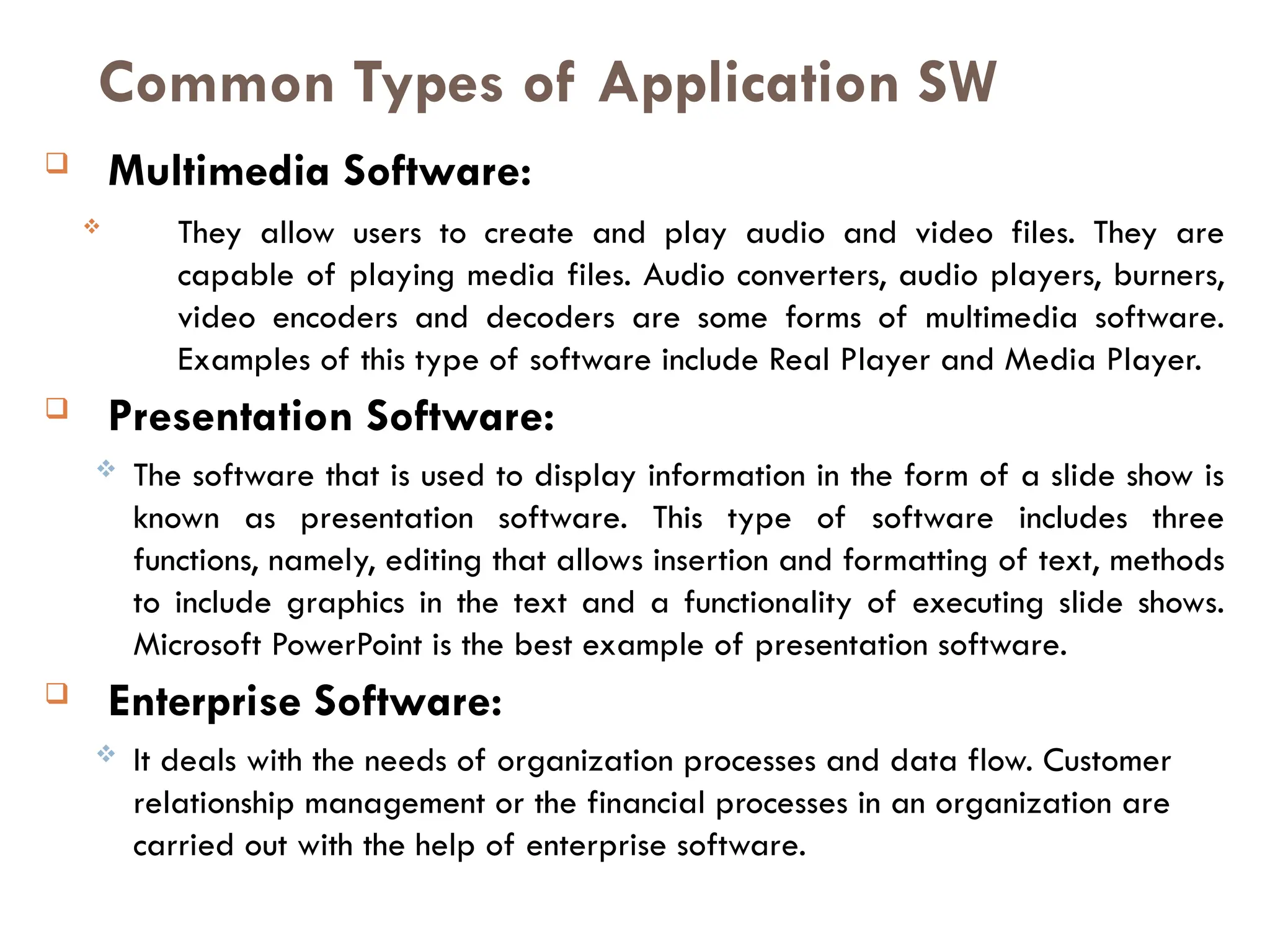
 Multimedia Software:
 They allow users to create and play audio and video files. They are
capable of playing media files. Audio converters, audio players, burners,
video encoders and decoders are some forms of multimedia software.
Examples of this type of software include Real Player and Media Player.
 Presentation Software:
 The software that is used to display information in the form of a slide show is
known as presentation software. This type of software includes three
functions, namely, editing that allows insertion and formatting of text, methods
to include graphics in the text and a functionality of executing slide shows.
Microsoft PowerPoint is the best example of presentation software.
 Enterprise Software:
 It deals with the needs of organization processes and data flow. Customer
relationship management or the financial processes in an organization are
carried out with the help of enterprise software.
Common Types of Application SW
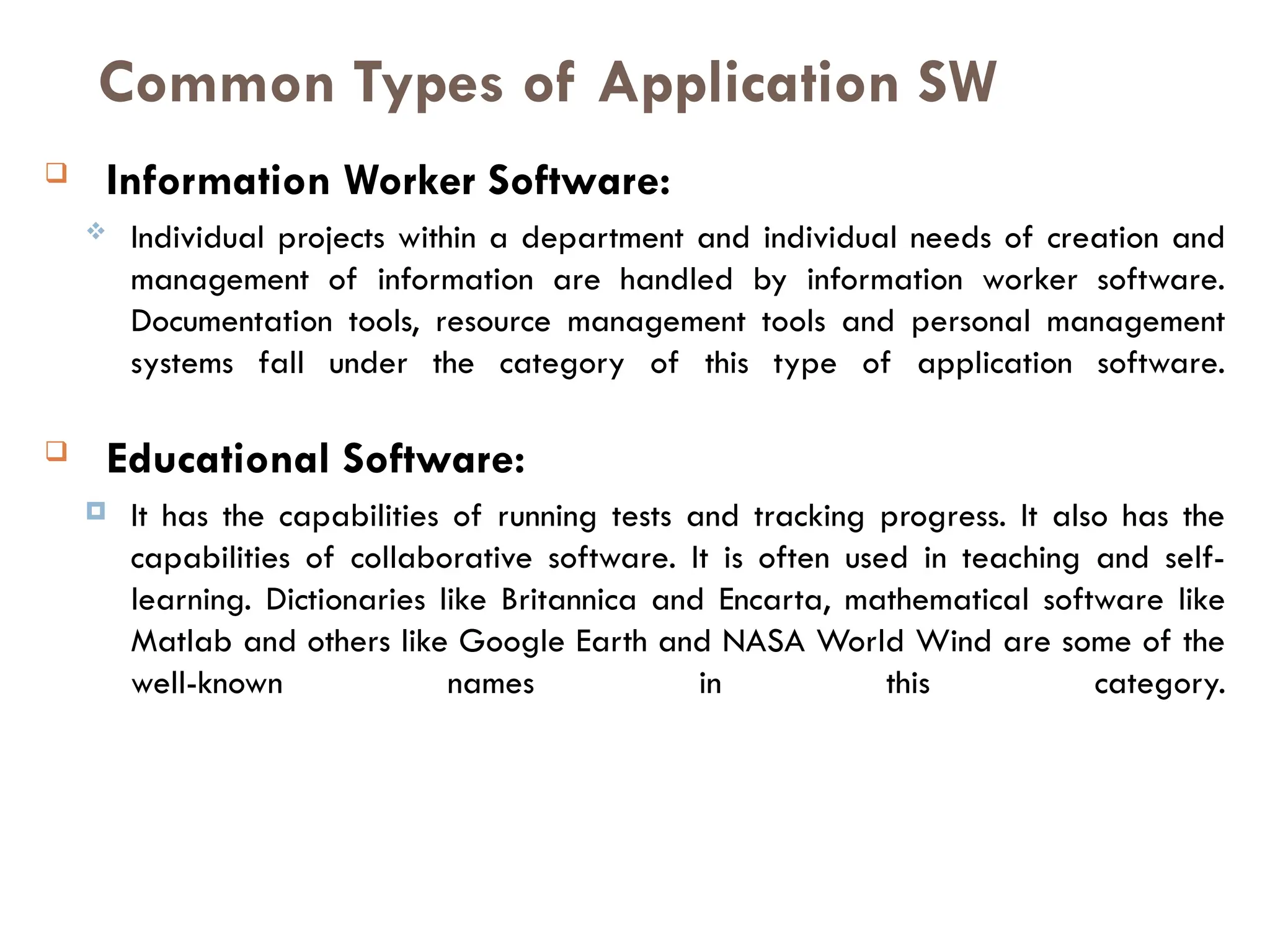
 Information Worker Software:
 Individual projects within a department and individual needs of creation and
management of information are handled by information worker software.
Documentation tools, resource management tools and personal management
systems fall under the category of this type of application software.
 Educational Software:
 It has the capabilities of running tests and tracking progress. It also has the
capabilities of collaborative software. It is often used in teaching and self-
learning. Dictionaries like Britannica and Encarta, mathematical software like
Matlab and others like Google Earth and NASA World Wind are some of the
well-known names in this category.
Common Types of Application SW
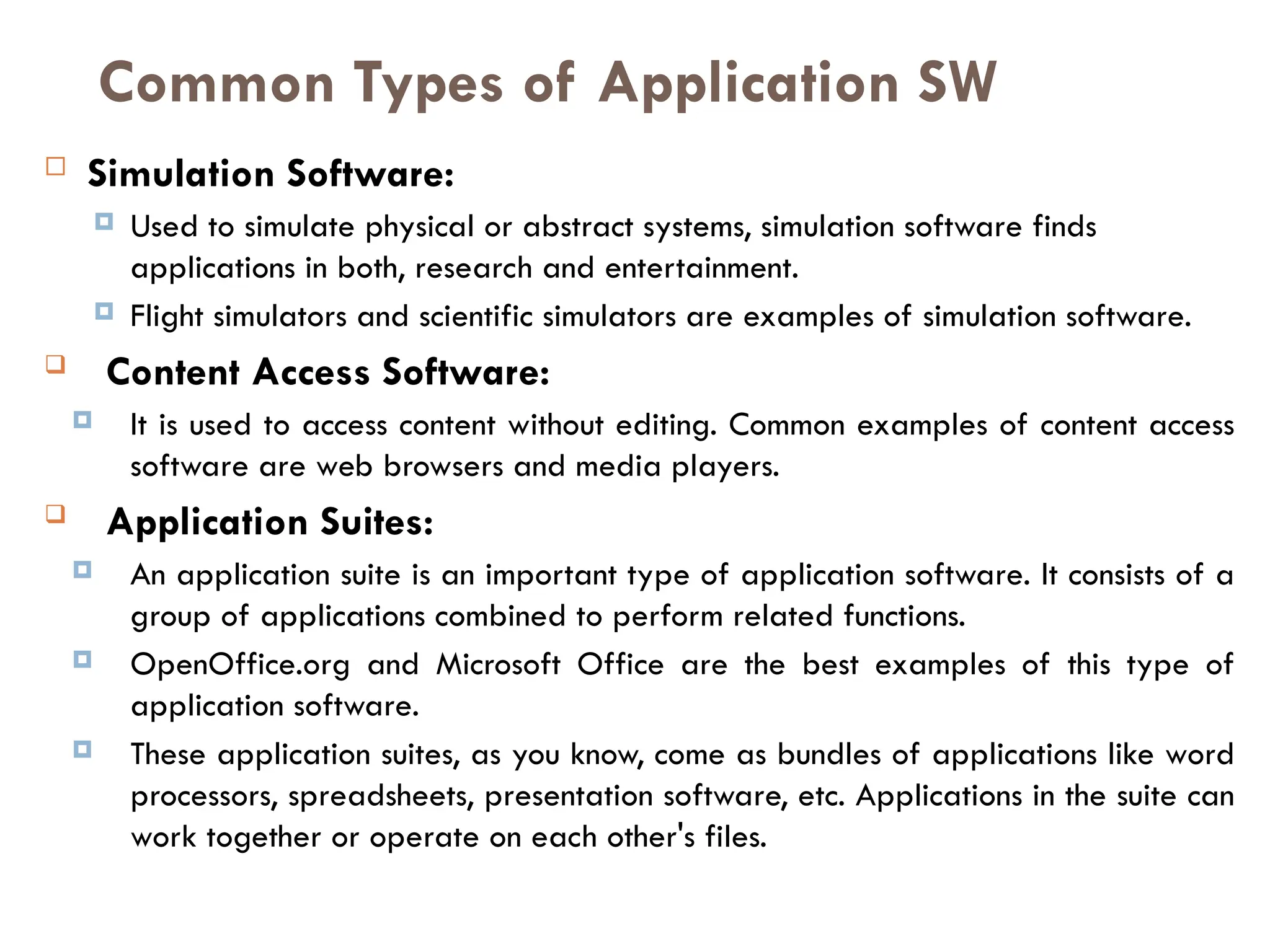
 Simulation Software:
 Used to simulate physical or abstract systems, simulation software finds
applications in both, research and entertainment.
 Flight simulators and scientific simulators are examples of simulation software.
 Content Access Software:
 It is used to access content without editing. Common examples of content access
software are web browsers and media players.
 Application Suites:
 An application suite is an important type of application software. It consists of a
group of applications combined to perform related functions.
 OpenOffice.org and Microsoft Office are the best examples of this type of
application software.
 These application suites, as you know, come as bundles of applications like word
processors, spreadsheets, presentation software, etc. Applications in the suite can
work together or operate on each other's files.
Common Types of Application SW
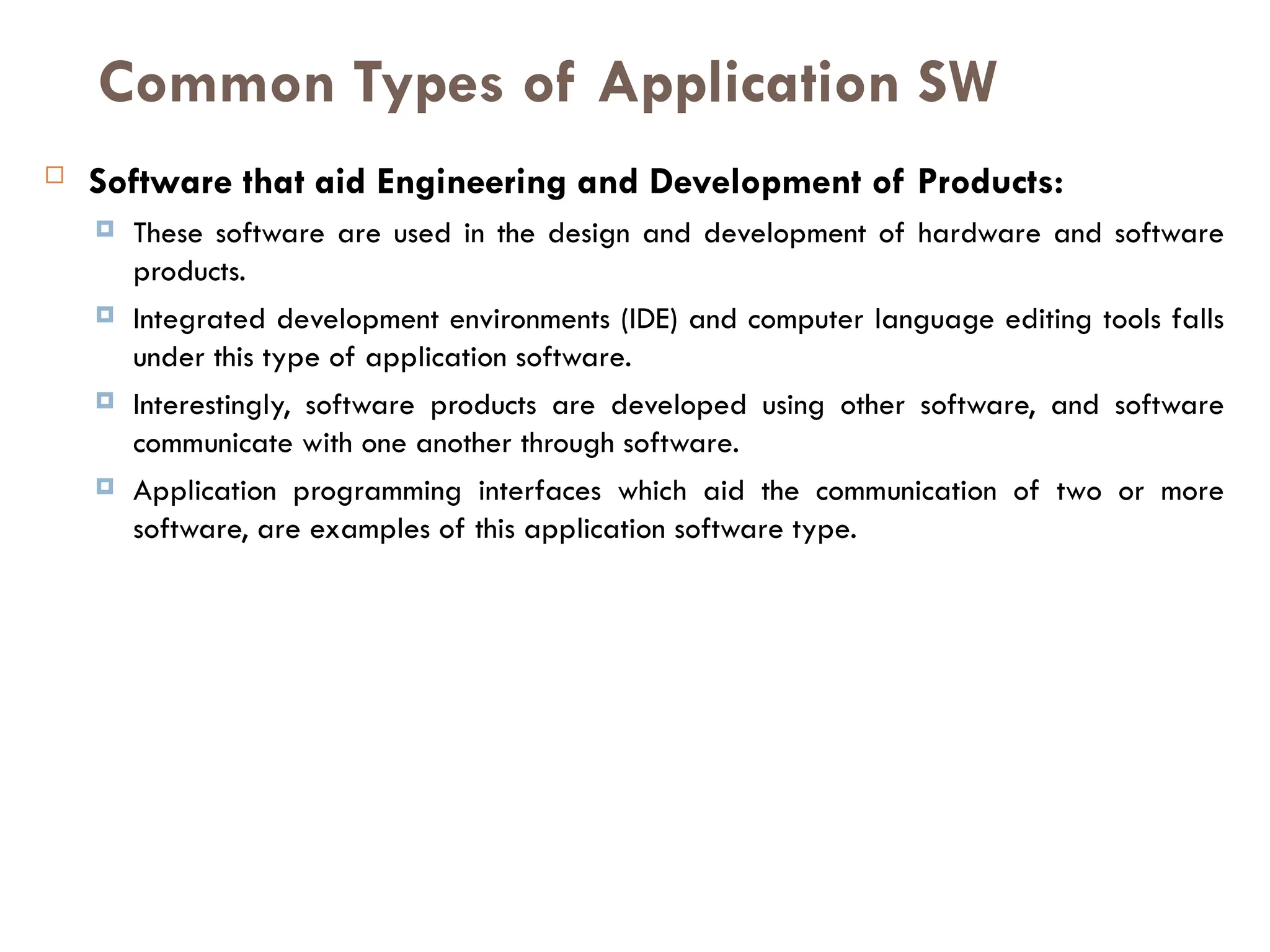
 Software that aid Engineering and Development of Products:
 These software are used in the design and development of hardware and software
products.
 Integrated development environments (IDE) and computer language editing tools falls
under this type of application software.
 Interestingly, software products are developed using other software, and software
communicate with one another through software.
 Application programming interfaces which aid the communication of two or more
software, are examples of this application software type.
Common Types of Application SW
cont.……
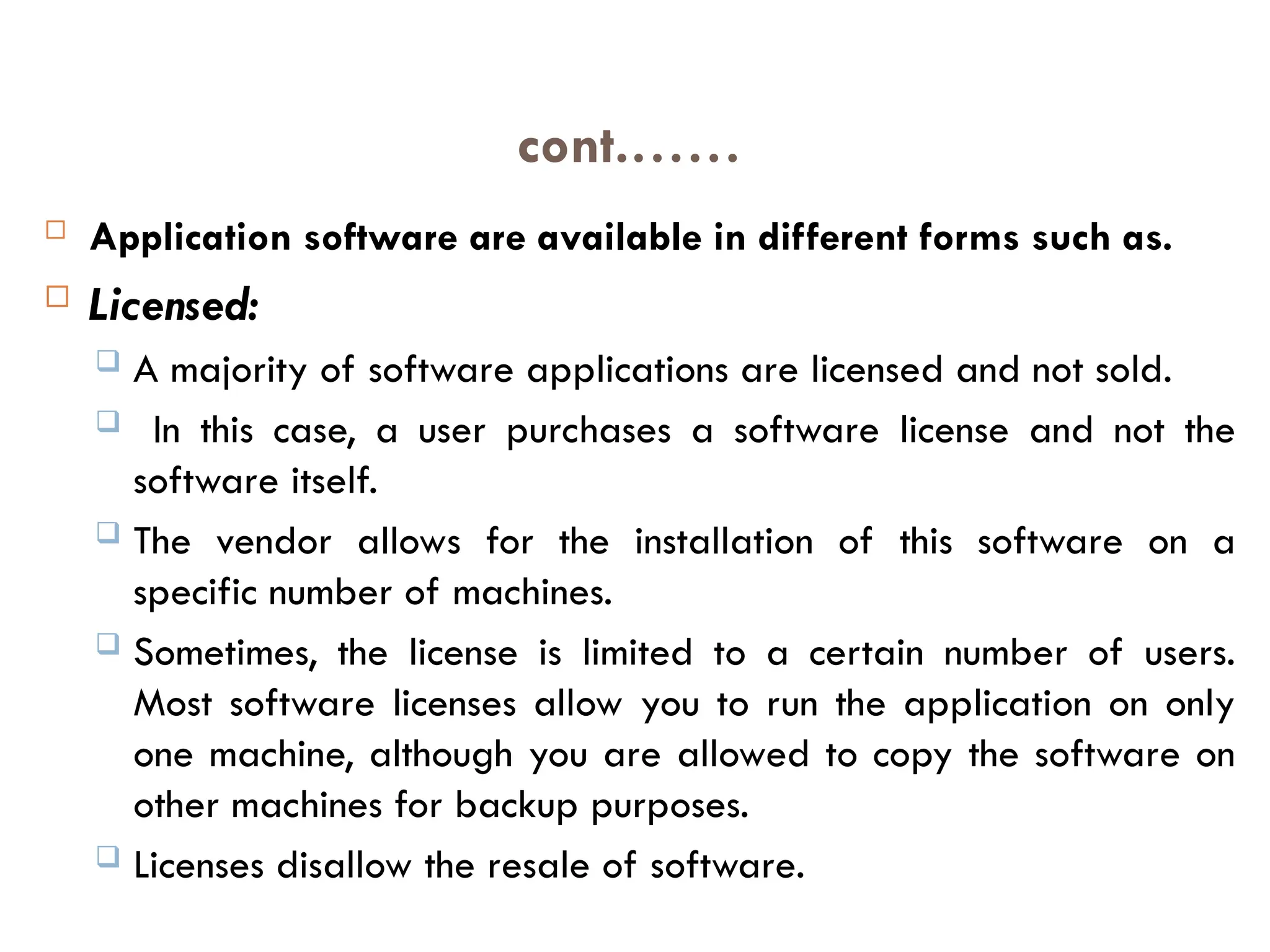
 Application software are available in different forms such as.
 Licensed:
 A majority of software applications are licensed and not sold.
 In this case, a user purchases a software license and not the
software itself.
 The vendor allows for the installation of this software on a
specific number of machines.
 Sometimes, the license is limited to a certain number of users.
Most software licenses allow you to run the application on only
one machine, although you are allowed to copy the software on
other machines for backup purposes.
 Licenses disallow the resale of software.
 As Freeware:
 Application software that can be downloaded, used and copied
without any restrictions is known as freeware.
 Generally small programs are released as freeware and are open
for use.
 Sold:
 As opposed to licensed software, these software are sold to users.
 You need to purchase this type of software from the vendor in which
case, you own a legitimate copy of the software.
 This allows you to resale the software.
Cont..
 As Shareware:
 These application software can be downloaded but you need to pay
some amount for using them. Generally, mid-size software developed
by software companies are made available as shareware.
 Open Source:
 Open source software, as their name suggests, are made available
with their source code.
 The code is open for modification and use.
 People mistake open source software for free. But note that here,
'free' refers to the freely available source code, thus making the
software open for further development by users.
 Needs to be Installed:
 This is true with many application software; for example
spreadsheet software, word processors, data management
software, etc. They need to be installed on your computer hard
drive for use.
 Runs Online:
 Antivirus software runs online. Similarly, Internet games that you
can play online and which don't need to be downloaded fall
under this category.
 Simply put, application software are software designed for specific
purposes, or meant for specific applications. Application software are of
great use in completing individual and organizational tasks, as they have
user-friendly features and are easy and interactive to use.
Upgrading
Upgrading
 Term used to describe updating a software program
or adding a new hardware.
 With software, an upgrade allows a user to get the
latest version of a software program at a discounted
price and not have to purchase the full product.
 For example, a user running Microsoft Windows 95
could purchase the Microsoft Windows 98 upgrade for
a low price when compared to the full version of
Windows 98.
 Below are a few reasons and benefits of upgrading your software products to
the latest version.
1. New features not available or found in previous versions.
2. Often, the new version of a program will have better stability and
increased performance.
3. After so long an older software program will be discontinued and
often no longer supported.
Tip:
Upgrading and updating: a software program are two different things.
When upgrading a software program you will almost always have to
purchase the upgrade. However, most updates are small and usually free
programs that can be run to update the program.
 A hardware upgrade such as a memory upgrade may not
require a user to remove the memory from the computer because
of the availability of additional expansion slots.
 Below is a few reasons and benefits a user should expect to see
when upgrading a hardware device.
 Performance increase.
 The majority of the hardware upgrades performed are
done to increase the performance of the computer.
 Compatibility.
 A user may upgrade one or more components in their
computer to be able to run or use a software program.
Conti…..
 Capacity increase.
 Users may upgrade or add a new device to increase the
overall capacity of the computer.
 For example, adding a new hard drive to allow the
computer to store more information; or increase the memory
to increase the ability of what programs can be opened
and also at the same time increase the performance.
 A software update
 provides bug fixes and minor software enhancements and is made
available by free download.
 Software updates sometimes include new drivers to support the latest
hardware such as printers, CD drives and DVD drives.
 A software update is sometimes called a software patch because it is
applied over software that you already have installed.
 A software update does not provide a full software package
installation.
 A software upgrade
 is a purchase of a newer version of software you currently use of a
more fully-featured version of your current software. There is usually a
cost for a software upgrade, although you can often upgrade at a
reduced price.
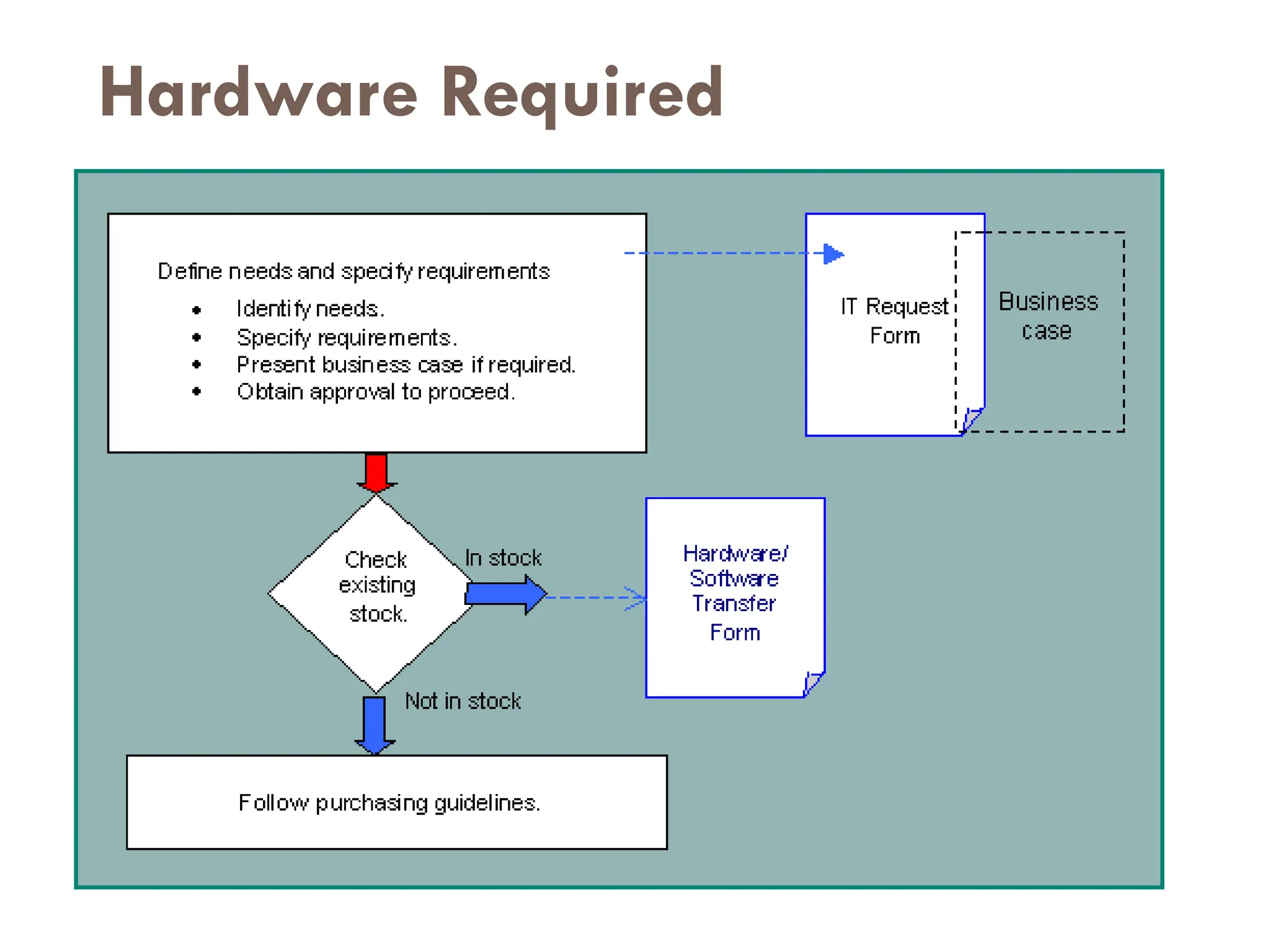
Hardware Required
Cont…
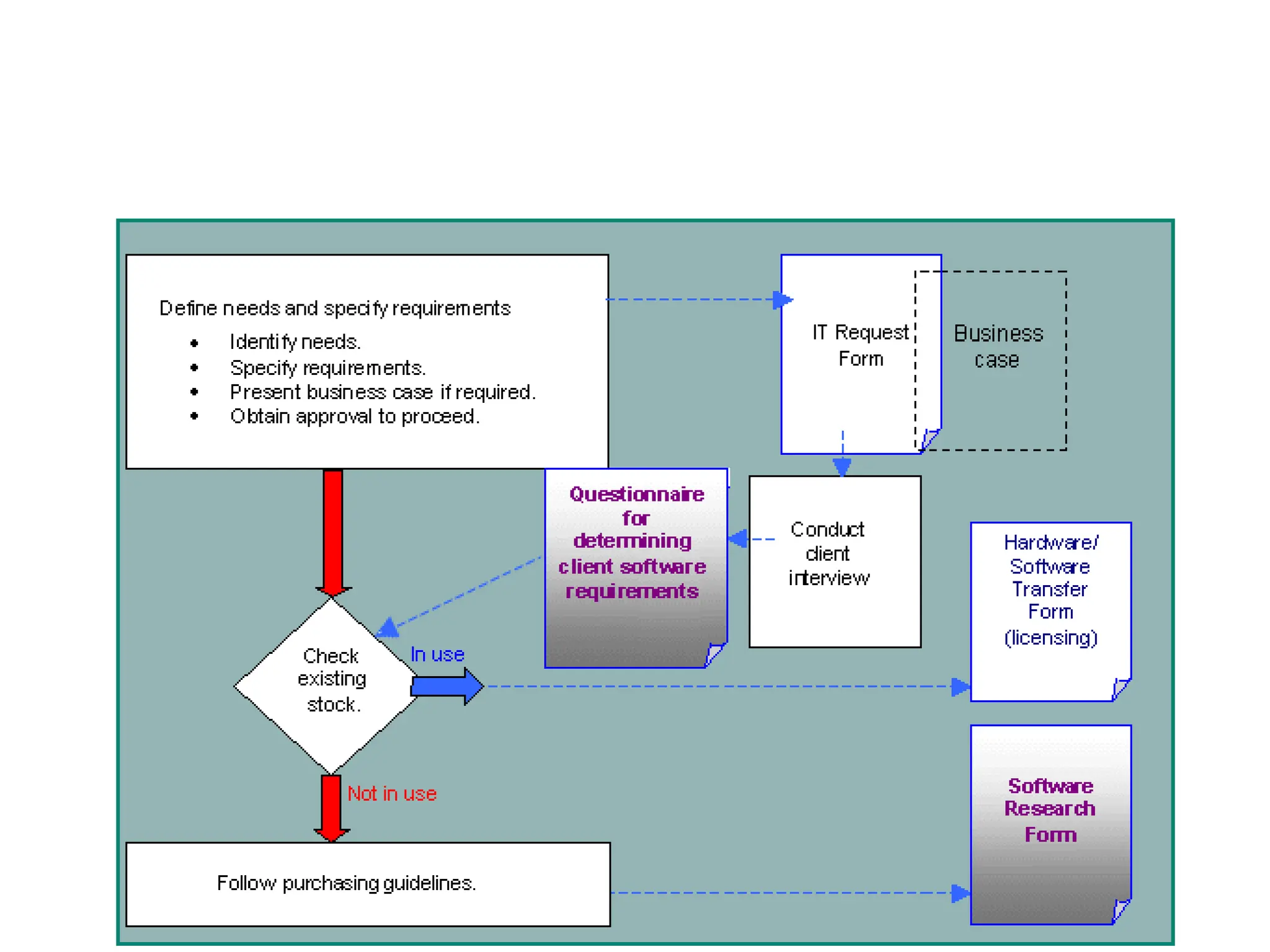
 Identify needs
 An overview of the current situation, problems encountered
and staff/client requests must be entered into the
'Problem/Request' section of the IT Request Form.
 Specify requirements
 Requirements should be discussed with the helpdesk staff.
Recommendations for hardware must be checked against
the company's hardware and software guidelines (see
section below), before being entered into the
'Solutions/Recommendations' section of the IT Request Form.
Cont…
 Present business case
 The need to purchase new IT hardware may be a result of the following:
 Part of the department's strategic or operational planning project.
 Necessity to replace broken or outdated hardware.
 Unforeseen changed circumstances.
 In some cases, a business case may need to be prepared to ensure that all
costs, benefits, options and risks associated with the need are identified.
 Check with your Department Manager to see if this is required. The detail
to which a business case is developed will depend on the cost of the
hardware and the value of the benefits that will be derived. Approval
should be obtained from the Department Manager.
 Obtain approval
 Approval must be obtained from the Department Manager before
proceeding further
Cont…
 Software Needs definition and requirements report
 Software needs and requirements must be fully researched
and documented before a manager can give permission to
proceed with a request for new software.
 An IT Request Form must be completed and submitted to the
Department Manager for approval.
 Once received by the IT Department, an IT officer will then
conduct an interview with the client and complete the
Questionnaire for determining client software requirements
form
Continuous…..
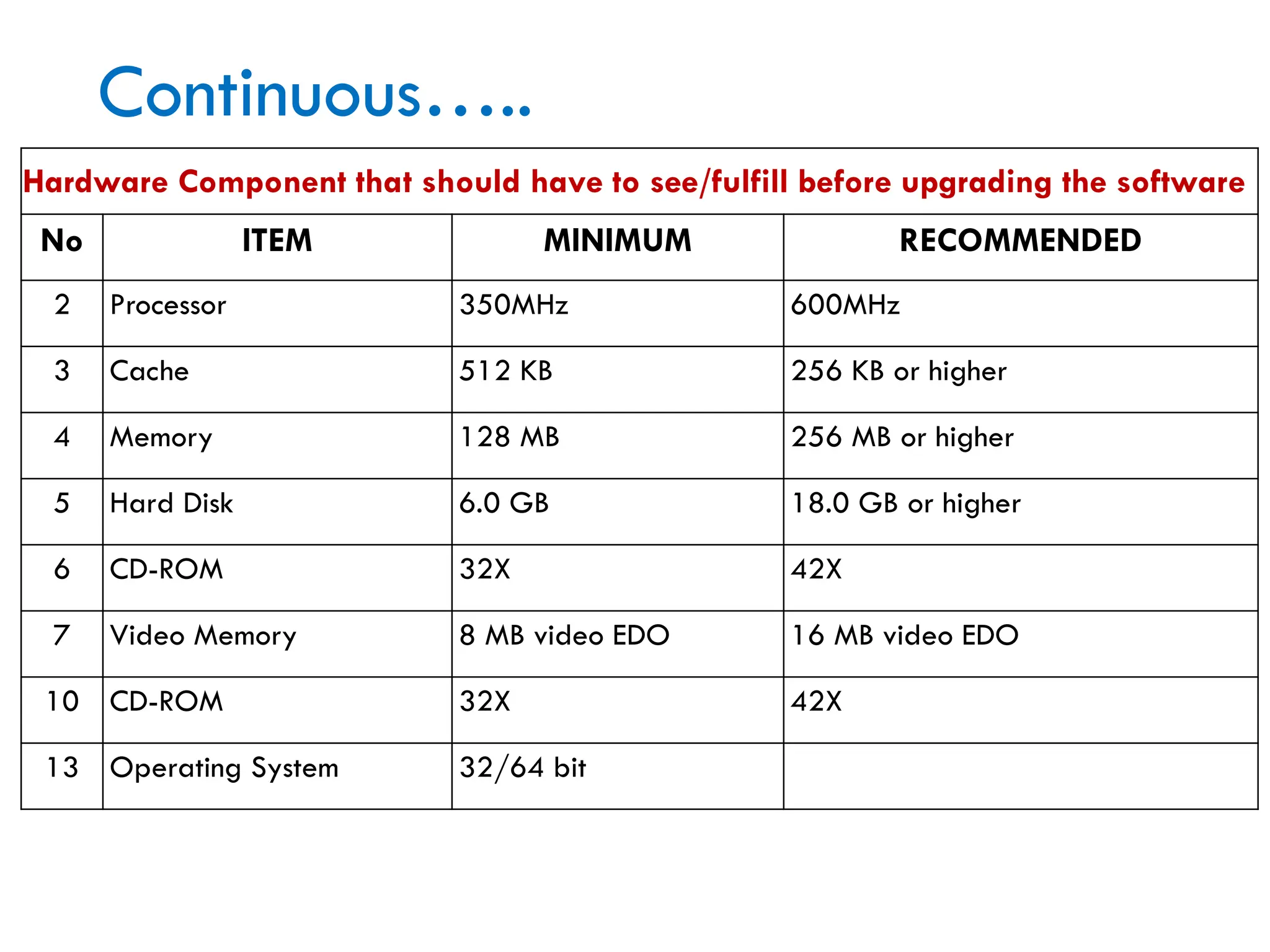
Hardware Component that should have to see/fulfill before upgrading the software
No ITEM MINIMUM RECOMMENDED
2 Processor 350MHz 600MHz
3 Cache 512 KB 256 KB or higher
4 Memory 128 MB 256 MB or higher
5 Hard Disk 6.0 GB 18.0 GB or higher
6 CD-ROM 32X 42X
7 Video Memory 8 MB video EDO 16 MB video EDO
10 CD-ROM 32X 42X
13 Operating System 32/64 bit
Requirements
 Considered Hardware Required before upgrading
 CPU Speed
 Hard disk Capacity
 Memory Capacity/RAM Capacity
 Needs definition and requirements report
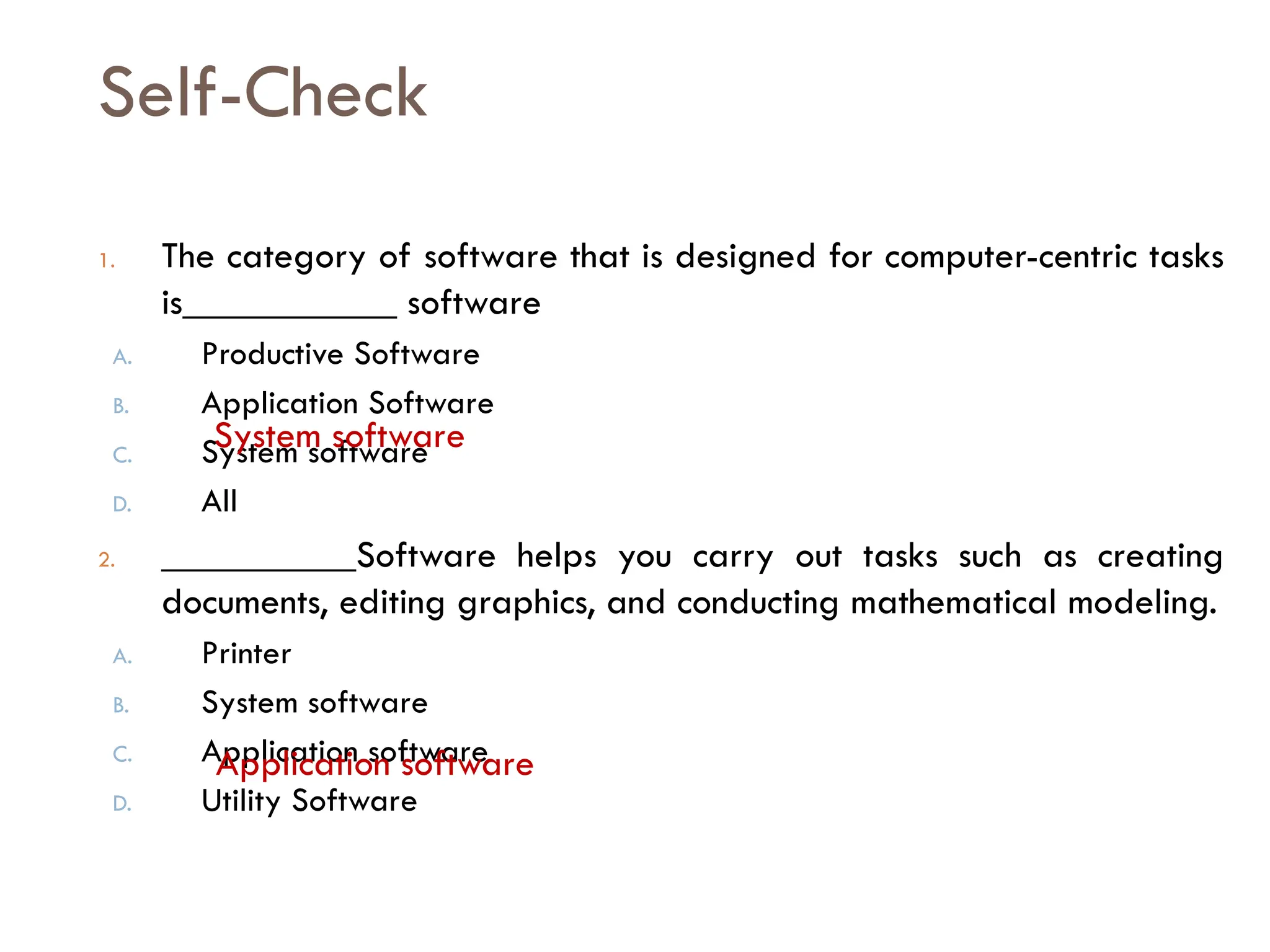
Self-Check
1. The category of software that is designed for computer-centric tasks
is___________ software
A. Productive Software
B. Application Software
C. System software
D. All
2. __________Software helps you carry out tasks such as creating
documents, editing graphics, and conducting mathematical modeling.
A. Printer
B. System software
C. Application software
D. Utility Software
System software
Application software
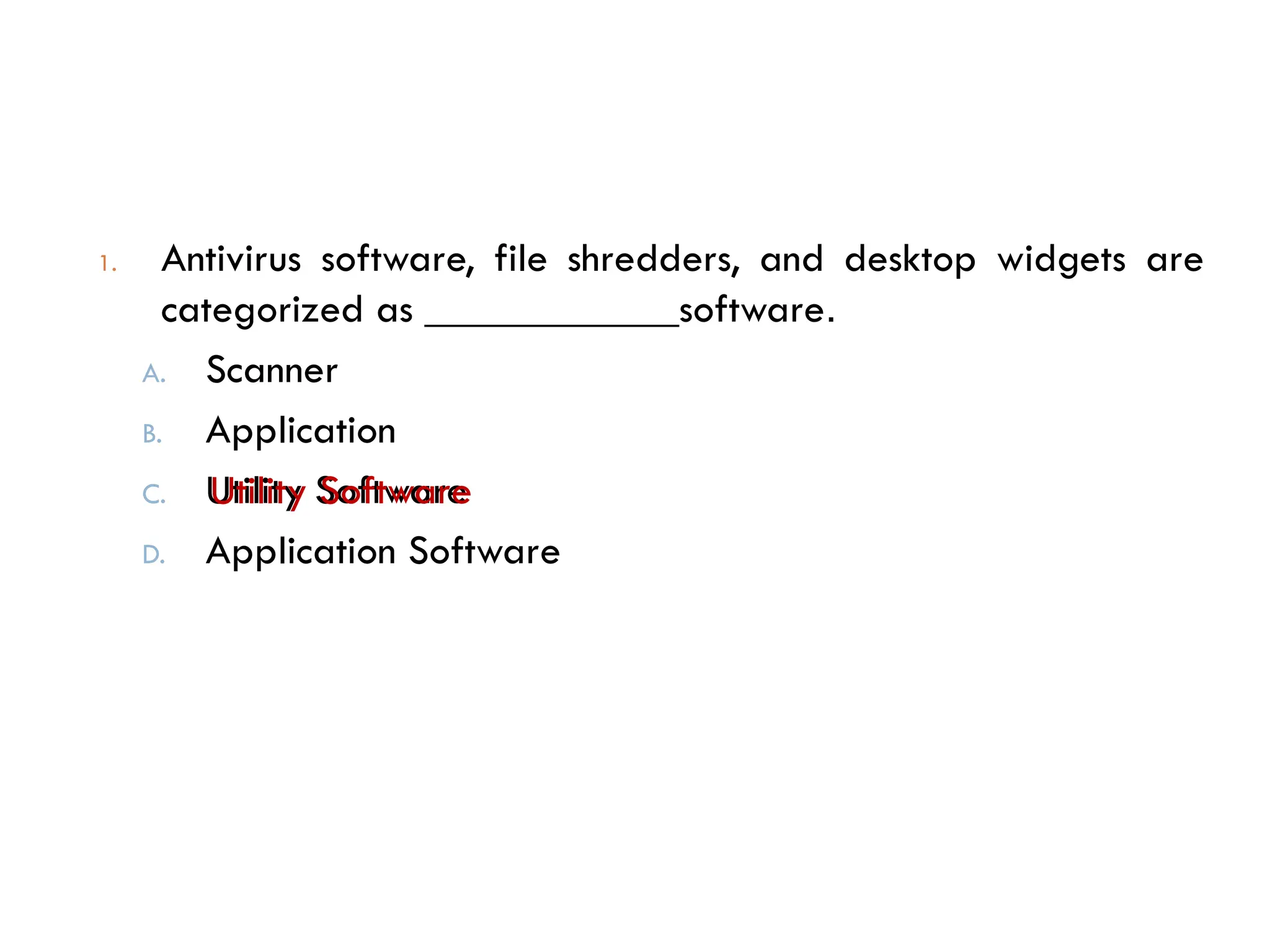
1. Antivirus software, file shredders, and desktop widgets are
categorized as ____________software.
A. Scanner
B. Application
C. Utility Software
D. Application Software
Utility Software
Cont…..
Thanks
for
Your Attention!!!

Install SW application for level one dep.pptx

  • 1.
    Buee Construction andIndustrial College IT SS Department Level I Program :regular Occupation: Information Technology Support Service Unit of Competency: Install Software Application Learning outcome: 1. Determine software and upgrade requirements 2. Obtain software or software upgrade 3. Install or upgrade software Prepared by:- HNS Trainer bizuneh Getu
  • 2.
  • 3.
     Objective:  Atthe end of this Competency the student should be able to Know how to:  Determine software and upgrade requirements  Obtain software or software upgrade  Install or upgrade software
  • 4.
    LO1: Determine softwareand upgrade requirements Objective of this learning outcome On this learning outcome we have to consider three basic terms 1. What is software? 2. What is upgrading Means? 3. What are the requirement that helps to upgrade a software?
  • 5.
     Computer Software determines the tasks a computer can help you accomplish. Some software helps you create documents, while other software helps you block viruses or fine-tune your computer’s performance.  the characteristics of application software, utilities, and device drivers  What is software?  Is the instructions that tell a computer how to carry out a task are referred to as a computer program.  These programs form the software that prepares a computer to do a specific task, such as document production, photo editing, virus protection, file management, or Web browsing.
  • 6.
    Software  The twomain categories are 1. System Software and 2. Application software.  System Software  System software is designed for computer-centric tasks, whereas application software is designed to help people accomplish real-world tasks.  For example, you would use system software to diagnose a problem with your hard disk drive or Internet connection, but you would use application software to edit a photo or write a term paper.  System software includes operating systems , utilities, and device drivers.  Application Software  Application software can be divided into subcategories according to its use.
  • 7.
    Application software  Whyis it called application software?  Application software utilizes the capacities of a computer directly for a dedicated task. Application software is able to manipulate text, numbers and graphics.  It can be in the form of software focused on a certain single task like word processing, spreadsheet or playing of audio and video files.  A computer certainly has many uses, such as creating documents, crunching numbers, drawing designs, and editing videos.  Each use is considered an application, and the software that provides the computer with instructions for each use is called application software, an application, or simply an app.
  • 8.
    Productivity software  Whatis productivity software?  Some types of application software are referred to as productivity software.  Many different definitions exist for this popular term. In general, however, productivity software can be defined as any type of application software that has the potential to help people do their work more efficiently.  The term might have originated in reference to software tools used by businesses to increase secretarial efficiency at routine office tasks, such as typing, filing, and basic bookkeeping.  The applications that are most commonly associated with productivity software include word processing, spreadsheets, schedulers, and database management systems.  Graphics software, presentation software, and desktop publishing software are also sometimes classified as productivity applications.
  • 9.
    Utility software  Whatis utility software?  A type of system software called utility software is designed to help you monitor and configure settings for your computer system equipment, the operating system, or application software.  Like all system software, utilities focus on computer-centric tasks such as blocking viruses or diagnosing hard disk errors, rather than real- world tasks such as document production or accounting. Examples of utility software include setup wizards, communications programs, security software, and diagnostic tools
  • 10.
     In recentyears, antivirus products, such as Norton Antivirus, McAfee Virus Scan Plus, and a vast! Antivirus, have been a popular category of utility software
  • 11.
    DEVICE DRIVERS What isa device driver?  A device driver is software that helps a peripheral device establish communication with a computer.  This type of system software is used by printers, monitors, graphics cards, sound cards, network cards, modems, storage devices, mice, and scanners.  Once installed, a device driver automatically starts when it is needed.  Device drivers usually run in the background, without opening a window on the screen.
  • 13.
    Common Types ofApplication SW  Word Processing Software:  This software enables users to create and edit documents. The most popular examples of this type of software are MS-Word, WordPad and Notepad among other text editors.  Database Software:  Database is a structured collection of data. A computer database relies on database software to organize data and enable database users to perform database operations. Database software allows users to store and retrieve data from databases. Examples are Oracle, MS Access, etc.  Spreadsheet Software:  Excel, Lotus 1-2-3 and Apple Numbers are some examples of spreadsheet software. Spreadsheet software allows users to perform calculations using spreadsheets. They simulate paper worksheets by displaying multiple cells that make up a grid.
  • 14.
     Multimedia Software: They allow users to create and play audio and video files. They are capable of playing media files. Audio converters, audio players, burners, video encoders and decoders are some forms of multimedia software. Examples of this type of software include Real Player and Media Player.  Presentation Software:  The software that is used to display information in the form of a slide show is known as presentation software. This type of software includes three functions, namely, editing that allows insertion and formatting of text, methods to include graphics in the text and a functionality of executing slide shows. Microsoft PowerPoint is the best example of presentation software.  Enterprise Software:  It deals with the needs of organization processes and data flow. Customer relationship management or the financial processes in an organization are carried out with the help of enterprise software. Common Types of Application SW
  • 15.
     Information WorkerSoftware:  Individual projects within a department and individual needs of creation and management of information are handled by information worker software. Documentation tools, resource management tools and personal management systems fall under the category of this type of application software.  Educational Software:  It has the capabilities of running tests and tracking progress. It also has the capabilities of collaborative software. It is often used in teaching and self- learning. Dictionaries like Britannica and Encarta, mathematical software like Matlab and others like Google Earth and NASA World Wind are some of the well-known names in this category. Common Types of Application SW
  • 16.
     Simulation Software: Used to simulate physical or abstract systems, simulation software finds applications in both, research and entertainment.  Flight simulators and scientific simulators are examples of simulation software.  Content Access Software:  It is used to access content without editing. Common examples of content access software are web browsers and media players.  Application Suites:  An application suite is an important type of application software. It consists of a group of applications combined to perform related functions.  OpenOffice.org and Microsoft Office are the best examples of this type of application software.  These application suites, as you know, come as bundles of applications like word processors, spreadsheets, presentation software, etc. Applications in the suite can work together or operate on each other's files. Common Types of Application SW
  • 17.
     Software thataid Engineering and Development of Products:  These software are used in the design and development of hardware and software products.  Integrated development environments (IDE) and computer language editing tools falls under this type of application software.  Interestingly, software products are developed using other software, and software communicate with one another through software.  Application programming interfaces which aid the communication of two or more software, are examples of this application software type. Common Types of Application SW
  • 18.
    cont.……  Application softwareare available in different forms such as.  Licensed:  A majority of software applications are licensed and not sold.  In this case, a user purchases a software license and not the software itself.  The vendor allows for the installation of this software on a specific number of machines.  Sometimes, the license is limited to a certain number of users. Most software licenses allow you to run the application on only one machine, although you are allowed to copy the software on other machines for backup purposes.  Licenses disallow the resale of software.
  • 19.
     As Freeware: Application software that can be downloaded, used and copied without any restrictions is known as freeware.  Generally small programs are released as freeware and are open for use.  Sold:  As opposed to licensed software, these software are sold to users.  You need to purchase this type of software from the vendor in which case, you own a legitimate copy of the software.  This allows you to resale the software.
  • 20.
    Cont..  As Shareware: These application software can be downloaded but you need to pay some amount for using them. Generally, mid-size software developed by software companies are made available as shareware.  Open Source:  Open source software, as their name suggests, are made available with their source code.  The code is open for modification and use.  People mistake open source software for free. But note that here, 'free' refers to the freely available source code, thus making the software open for further development by users.
  • 21.
     Needs tobe Installed:  This is true with many application software; for example spreadsheet software, word processors, data management software, etc. They need to be installed on your computer hard drive for use.  Runs Online:  Antivirus software runs online. Similarly, Internet games that you can play online and which don't need to be downloaded fall under this category.  Simply put, application software are software designed for specific purposes, or meant for specific applications. Application software are of great use in completing individual and organizational tasks, as they have user-friendly features and are easy and interactive to use.
  • 22.
  • 23.
    Upgrading  Term usedto describe updating a software program or adding a new hardware.  With software, an upgrade allows a user to get the latest version of a software program at a discounted price and not have to purchase the full product.  For example, a user running Microsoft Windows 95 could purchase the Microsoft Windows 98 upgrade for a low price when compared to the full version of Windows 98.
  • 24.
     Below area few reasons and benefits of upgrading your software products to the latest version. 1. New features not available or found in previous versions. 2. Often, the new version of a program will have better stability and increased performance. 3. After so long an older software program will be discontinued and often no longer supported. Tip: Upgrading and updating: a software program are two different things. When upgrading a software program you will almost always have to purchase the upgrade. However, most updates are small and usually free programs that can be run to update the program.
  • 25.
     A hardwareupgrade such as a memory upgrade may not require a user to remove the memory from the computer because of the availability of additional expansion slots.  Below is a few reasons and benefits a user should expect to see when upgrading a hardware device.  Performance increase.  The majority of the hardware upgrades performed are done to increase the performance of the computer.  Compatibility.  A user may upgrade one or more components in their computer to be able to run or use a software program.
  • 26.
    Conti…..  Capacity increase. Users may upgrade or add a new device to increase the overall capacity of the computer.  For example, adding a new hard drive to allow the computer to store more information; or increase the memory to increase the ability of what programs can be opened and also at the same time increase the performance.
  • 27.
     A softwareupdate  provides bug fixes and minor software enhancements and is made available by free download.  Software updates sometimes include new drivers to support the latest hardware such as printers, CD drives and DVD drives.  A software update is sometimes called a software patch because it is applied over software that you already have installed.  A software update does not provide a full software package installation.  A software upgrade  is a purchase of a newer version of software you currently use of a more fully-featured version of your current software. There is usually a cost for a software upgrade, although you can often upgrade at a reduced price.
  • 28.
  • 29.
    Cont…  Identify needs An overview of the current situation, problems encountered and staff/client requests must be entered into the 'Problem/Request' section of the IT Request Form.  Specify requirements  Requirements should be discussed with the helpdesk staff. Recommendations for hardware must be checked against the company's hardware and software guidelines (see section below), before being entered into the 'Solutions/Recommendations' section of the IT Request Form.
  • 30.
    Cont…  Present businesscase  The need to purchase new IT hardware may be a result of the following:  Part of the department's strategic or operational planning project.  Necessity to replace broken or outdated hardware.  Unforeseen changed circumstances.  In some cases, a business case may need to be prepared to ensure that all costs, benefits, options and risks associated with the need are identified.  Check with your Department Manager to see if this is required. The detail to which a business case is developed will depend on the cost of the hardware and the value of the benefits that will be derived. Approval should be obtained from the Department Manager.  Obtain approval  Approval must be obtained from the Department Manager before proceeding further
  • 31.
    Cont…  Software Needsdefinition and requirements report  Software needs and requirements must be fully researched and documented before a manager can give permission to proceed with a request for new software.  An IT Request Form must be completed and submitted to the Department Manager for approval.  Once received by the IT Department, an IT officer will then conduct an interview with the client and complete the Questionnaire for determining client software requirements form
  • 33.
    Continuous….. Hardware Component thatshould have to see/fulfill before upgrading the software No ITEM MINIMUM RECOMMENDED 2 Processor 350MHz 600MHz 3 Cache 512 KB 256 KB or higher 4 Memory 128 MB 256 MB or higher 5 Hard Disk 6.0 GB 18.0 GB or higher 6 CD-ROM 32X 42X 7 Video Memory 8 MB video EDO 16 MB video EDO 10 CD-ROM 32X 42X 13 Operating System 32/64 bit
  • 34.
    Requirements  Considered HardwareRequired before upgrading  CPU Speed  Hard disk Capacity  Memory Capacity/RAM Capacity  Needs definition and requirements report
  • 35.
    Self-Check 1. The categoryof software that is designed for computer-centric tasks is___________ software A. Productive Software B. Application Software C. System software D. All 2. __________Software helps you carry out tasks such as creating documents, editing graphics, and conducting mathematical modeling. A. Printer B. System software C. Application software D. Utility Software System software Application software
  • 36.
    1. Antivirus software,file shredders, and desktop widgets are categorized as ____________software. A. Scanner B. Application C. Utility Software D. Application Software Utility Software
  • 37.