Internet
 WWW:
 The World Wide Web
(www,
W3 [citation needed]
) is an
information space where
documents and other
web resources are
identified by URLs,
interlinked by hypertext
links, and can be
accessed via the Internet.
It has become known
simply as the Web.
Browser : Although browsers
are primarily intended to use
the World Wide Web, they
can also be used to access
information provided by
web servers in private
networks or files in file
systems. The major web
browsers are
Firefox, InternetExplorer/Micr
osoft Edge, Google
Chrome, Opera, and Safari.
Internet
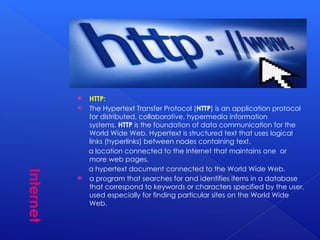
 HTTP:
 The Hypertext Transfer Protocol (HTTP) is an application protocol
for distributed, collaborative, hypermedia information
systems. HTTP is the foundation of data communication for the
World Wide Web. Hypertext is structured text that uses logical
links (hyperlinks) between nodes containing text.
a location connected to the Internet that maintains one or
more web pages.
a hypertext document connected to the World Wide Web.
 a program that searches for and identifies items in a database
that correspond to keywords or characters specified by the user,
used especially for finding particular sites on the World Wide
Web.
Internet
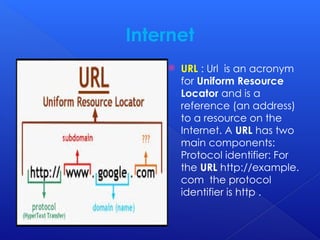
 URL : Url is an acronym
for Uniform Resource
Locator and is a
reference (an address)
to a resource on the
Internet. A URL has two
main components:
Protocol identifier: For
the URL http://example.
com the protocol
identifier is http .
Internet
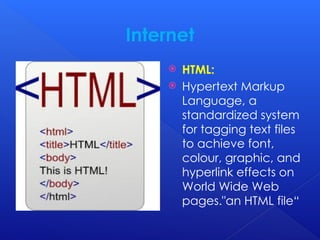
 HTML:
 Hypertext Markup
Language, a
standardized system
for tagging text files
to achieve font,
colour, graphic, and
hyperlink effects on
World Wide Web
pages."an HTML file“
Internet
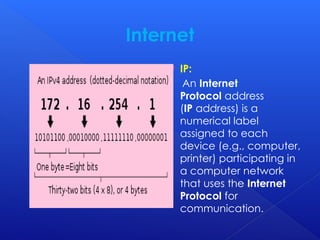
 IP:
An Internet
Protocol address
(IP address) is a
numerical label
assigned to each
device (e.g., computer,
printer) participating in
a computer network
that uses the Internet
Protocol for
communication.
Internet
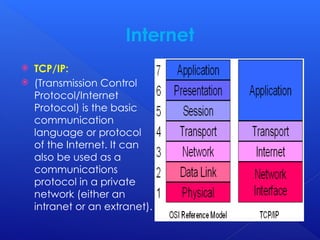
 TCP/IP:
 (Transmission Control
Protocol/Internet
Protocol) is the basic
communication
language or protocol
of the Internet. It can
also be used as a
communications
protocol in a private
network (either an
intranet or an extranet).
Internet
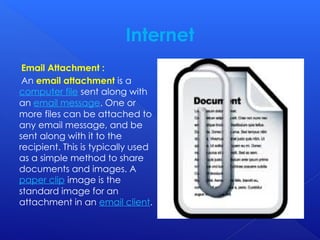
Email Attachment :
An email attachment is a
computer file sent along with
an email message. One or
more files can be attached to
any email message, and be
sent along with it to the
recipient. This is typically used
as a simple method to share
documents and images. A
paper clip image is the
standard image for an
attachment in an email client.
Internet
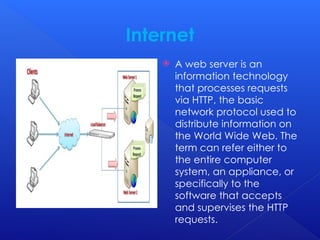
 A web server is an
information technology
that processes requests
via HTTP, the basic
network protocol used to
distribute information on
the World Wide Web. The
term can refer either to
the entire computer
system, an appliance, or
specifically to the
software that accepts
and supervises the HTTP
requests.
Internet
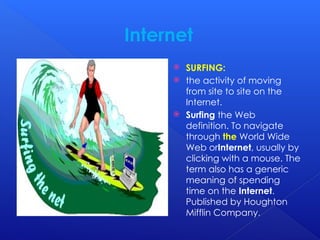
 SURFING:
 the activity of moving
from site to site on the
Internet.
 Surfing the Web
definition. To navigate
through the World Wide
Web orInternet, usually by
clicking with a mouse. The
term also has a generic
meaning of spending
time on the Internet.
Published by Houghton
Mifflin Company.
Internet
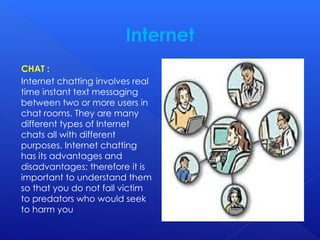
CHAT :
Internet chatting involves real
time instant text messaging
between two or more users in
chat rooms. They are many
different types of Internet
chats all with different
purposes. Internet chatting
has its advantages and
disadvantages; therefore it is
important to understand them
so that you do not fall victim
to predators who would seek
to harm you
Internet
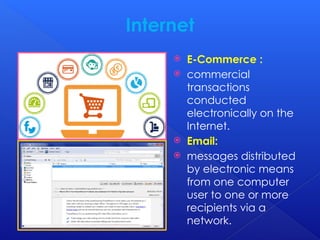
 E-Commerce :
 commercial
transactions
conducted
electronically on the
Internet.
 Email:
 messages distributed
by electronic means
from one computer
user to one or more
recipients via a
network.
Information on Internet & Its Terminology.pptx

Information on Internet & Its Terminology.pptx

  • 1.
    Internet  WWW:  TheWorld Wide Web (www, W3 [citation needed] ) is an information space where documents and other web resources are identified by URLs, interlinked by hypertext links, and can be accessed via the Internet. It has become known simply as the Web.
  • 2.
    Browser : Althoughbrowsers are primarily intended to use the World Wide Web, they can also be used to access information provided by web servers in private networks or files in file systems. The major web browsers are Firefox, InternetExplorer/Micr osoft Edge, Google Chrome, Opera, and Safari.
  • 3.
    Internet  HTTP:  TheHypertext Transfer Protocol (HTTP) is an application protocol for distributed, collaborative, hypermedia information systems. HTTP is the foundation of data communication for the World Wide Web. Hypertext is structured text that uses logical links (hyperlinks) between nodes containing text. a location connected to the Internet that maintains one or more web pages. a hypertext document connected to the World Wide Web.  a program that searches for and identifies items in a database that correspond to keywords or characters specified by the user, used especially for finding particular sites on the World Wide Web.
  • 4.
    Internet  URL :Url is an acronym for Uniform Resource Locator and is a reference (an address) to a resource on the Internet. A URL has two main components: Protocol identifier: For the URL http://example. com the protocol identifier is http .
  • 5.
    Internet  HTML:  HypertextMarkup Language, a standardized system for tagging text files to achieve font, colour, graphic, and hyperlink effects on World Wide Web pages."an HTML file“
  • 6.
    Internet  IP: An Internet Protocoladdress (IP address) is a numerical label assigned to each device (e.g., computer, printer) participating in a computer network that uses the Internet Protocol for communication.
  • 7.
    Internet  TCP/IP:  (TransmissionControl Protocol/Internet Protocol) is the basic communication language or protocol of the Internet. It can also be used as a communications protocol in a private network (either an intranet or an extranet).
  • 8.
    Internet Email Attachment : Anemail attachment is a computer file sent along with an email message. One or more files can be attached to any email message, and be sent along with it to the recipient. This is typically used as a simple method to share documents and images. A paper clip image is the standard image for an attachment in an email client.
  • 9.
    Internet  A webserver is an information technology that processes requests via HTTP, the basic network protocol used to distribute information on the World Wide Web. The term can refer either to the entire computer system, an appliance, or specifically to the software that accepts and supervises the HTTP requests.
  • 10.
    Internet  SURFING:  theactivity of moving from site to site on the Internet.  Surfing the Web definition. To navigate through the World Wide Web orInternet, usually by clicking with a mouse. The term also has a generic meaning of spending time on the Internet. Published by Houghton Mifflin Company.
  • 11.
    Internet CHAT : Internet chattinginvolves real time instant text messaging between two or more users in chat rooms. They are many different types of Internet chats all with different purposes. Internet chatting has its advantages and disadvantages; therefore it is important to understand them so that you do not fall victim to predators who would seek to harm you
  • 12.
    Internet  E-Commerce : commercial transactions conducted electronically on the Internet.  Email:  messages distributed by electronic means from one computer user to one or more recipients via a network.