Ultimatix User Experience Team
Infographics
Presenting data in engaging and interesting way
 What is Infographics
 Why Infographics? And how is it effective?
Brain information processing
Picture superiority effect
Iconic Representation
 Infographics in deep
 Tool for making infographics
 References
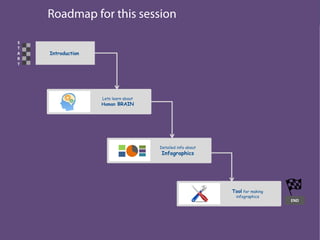
Introduction
S
T
A
R
T
END
Lets learn about
Human BRAIN
Detailed info about
Infographics
Tool for making
infographics
Introduction
S
T
A
R
T
END
Lets learn about
Human BRAIN
Detailed info about
Infographics
Tool for making
infographics
What is Infographics..????
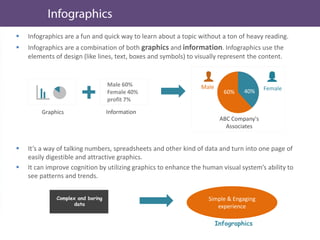
 Infographics are a fun and quick way to learn about a topic without a ton of heavy reading.
 Infographics are a combination of both graphics and information. Infographics use the
elements of design (like lines, text, boxes and symbols) to visually represent the content.
 It’s a way of talking numbers, spreadsheets and other kind of data and turn into one page of
easily digestible and attractive graphics.
 It can improve cognition by utilizing graphics to enhance the human visual system’s ability to
see patterns and trends.
Simple & Engaging
experience
Complex and boring
data
Infographics
Graphics
Male 60%
Female 40%
profit 7%
Information
60% 40%
Male Female
ABC Company's
Associates
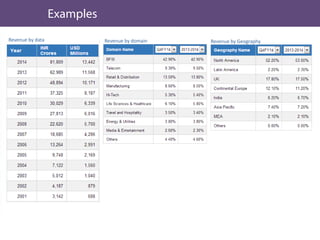
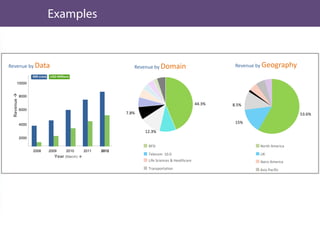
Revenue by data Revenue by domain Revenue by Geography
10000
8000
6000
4000
2000
Revenue
2008 2009 2010 2011 2012
INR crore USD Millions
Year (March) 
BFSI
Telecom 10.0
Life Sciences & Healthcare
Transportation
44.3%
12.3%
7.8%
North America
UK
Ibero America
Asia Pacific
53.6%
15%
8.5%
Revenue by Data Revenue by Domain Revenue by Geography
Why Infographics? And how is it
effective?
Introduction
S
T
A
R
T
END
Lets learn about
Human BRAIN
Detailed info about
Infographics
Tool for making
infographics
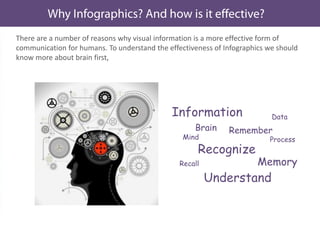
There are a number of reasons why visual information is a more effective form of
communication for humans. To understand the effectiveness of Infographics we should
know more about brain first,
Information
Brain
Mind
Recognize
Understand
Recall
Remember
Memory
Process
Data
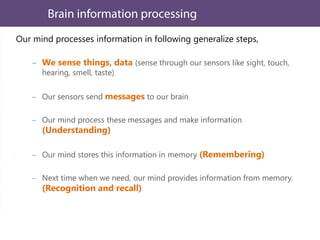
Our mind processes information in following generalize steps,
We sense things, data (sense through our sensors like sight, touch,
hearing, smell, taste)
Our sensors send messages to our brain
Our mind process these messages and make information
(Understanding)
Our mind stores this information in memory (Remembering)
Next time when we need, our mind provides information from memory.
(Recognition and recall)
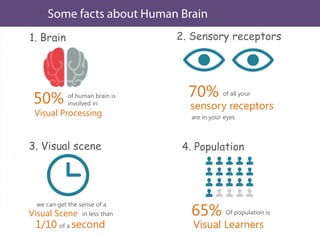
1. Brain
of human brain is
involved in50%
Visual Processing
2. Sensory receptors
of all your70%
sensory receptors
are in your eyes
3. Visual scene
we can get the sense of a
Visual Scene in less than
1/10 of a second
4. Population
Of population is65%
Visual Learners
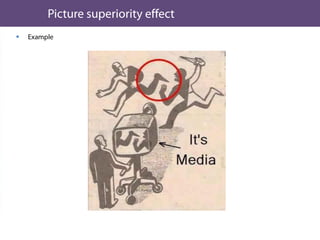
 The picture superiority effect refers to the notion that concepts that are
learned by viewing pictures are more easily and frequently recalled than are
concepts that are learned by viewing their written word form counterparts.
 Pictures are remembered better than words
 A picture is worth a thousand words.

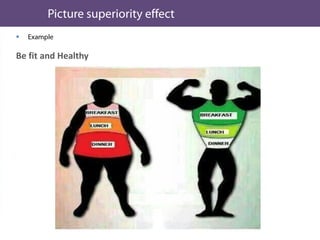
Be fit and Healthy
To be healthy and fit we should always have breakfast. If a
person takes very little breakfast, lunch normally and dinner
in large quantity, the probability of becoming Fat increases.
So it is recommended to take more quantity of breakfast in
food, lunch normally and dinner should be less. This will keep
you fit and healthy.

Be fit and Healthy

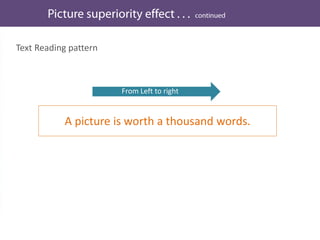
Text Reading pattern
A picture is worth a thousand words.
From Left to right
Our brain processes Picture all at once.
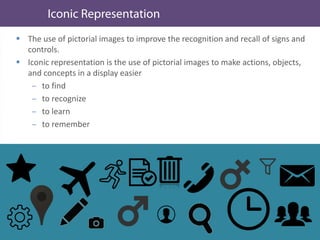
 The use of pictorial images to improve the recognition and recall of signs and
controls.
 Iconic representation is the use of pictorial images to make actions, objects,
and concepts in a display easier
to find
to recognize
to learn
to remember
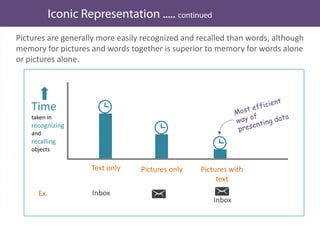
Pictures are generally more easily recognized and recalled than words, although
memory for pictures and words together is superior to memory for words alone
or pictures alone.
Time
taken in
recognizing
and
recalling
objects
Text only Pictures only Pictures with
text
Ex. Inbox
Inbox
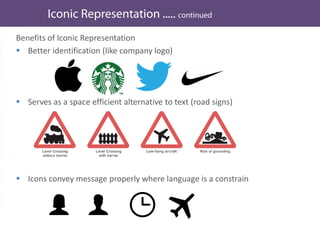
Benefits of Iconic Representation
 Better identification (like company logo)
 Serves as a space efficient alternative to text (road signs)
 Icons convey message properly where language is a constrain
Infographics in deep
Till we have seen
a What are infographics
a How visuals and graphics are imp.
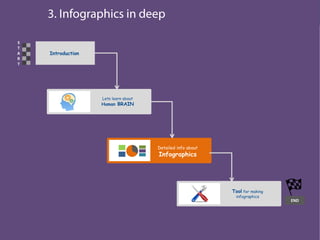
Introduction
S
T
A
R
T
END
Lets learn about
Human BRAIN
Detailed info about
Infographics
Tool for making
infographics
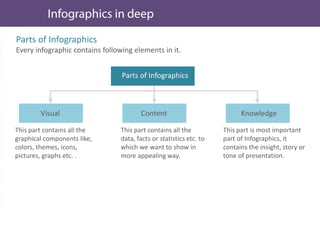
Parts of Infographics
Every infographic contains following elements in it.
This part contains all the
graphical components like,
colors, themes, icons,
pictures, graphs etc. .
This part contains all the
data, facts or statistics etc. to
which we want to show in
more appealing way.
This part is most important
part of Infographics, it
contains the insight, story or
tone of presentation.
Visual Content Knowledge
Parts of Infographics
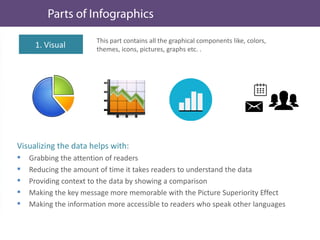
This part contains all the graphical components like, colors,
themes, icons, pictures, graphs etc. .
1. Visual
Visualizing the data helps with:
 Grabbing the attention of readers
 Reducing the amount of time it takes readers to understand the data
 Providing context to the data by showing a comparison
 Making the key message more memorable with the Picture Superiority Effect
 Making the information more accessible to readers who speak other languages
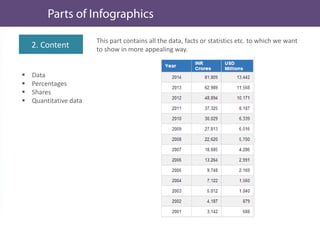
This part contains all the data, facts or statistics etc. to which we want
to show in more appealing way.
 Data
 Percentages
 Shares
 Quantitative data
2. Content
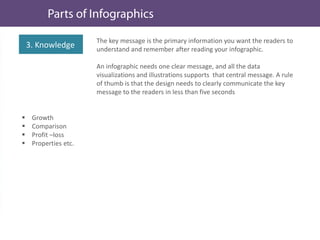
The key message is the primary information you want the readers to
understand and remember after reading your infographic.
An infographic needs one clear message, and all the data
visualizations and illustrations supports that central message. A rule
of thumb is that the design needs to clearly communicate the key
message to the readers in less than five seconds
3. Knowledge
 Growth
 Comparison
 Profit –loss
 Properties etc.
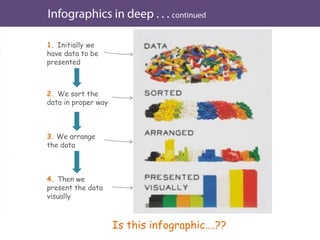
1. Initially we
have data to be
presented
2. We sort the
data in proper way
3. We arrange
the data
4. Then we
present the data
visually
Is this infographic….??
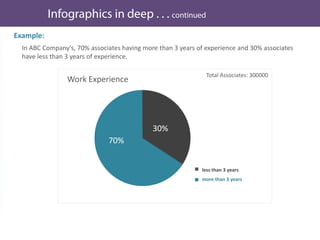
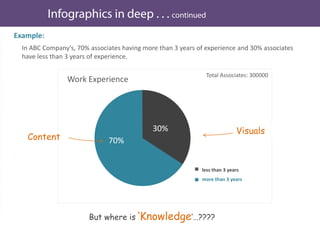
In ABC Company's, 70% associates having more than 3 years of experience and 30% associates
have less than 3 years of experience.
Example:
Work Experience
70%
30%
Total Associates: 300000
less than 3 years
more than 3 years
In ABC Company's, 70% associates having more than 3 years of experience and 30% associates
have less than 3 years of experience.
Example:
Work Experience
70%
30%
Total Associates: 300000
less than 3 years
more than 3 years
Content
Visuals
But where is ‘Knowledge’…????
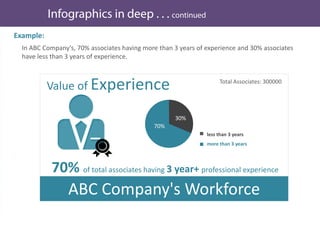
Example:
Value of Experience
less than 3 years
more than 3 years
70%
30%
70% of total associates having 3 year+ professional experience
Total Associates: 300000
ABC Company's Workforce
In ABC Company's, 70% associates having more than 3 years of experience and 30% associates
have less than 3 years of experience.
Example:
Value of Experience
less than 3 years
more than 3 years
70%
30%
70% of total associates having 3 year+ professional experience
Total Associates: 300000
ABC Company's Workforce
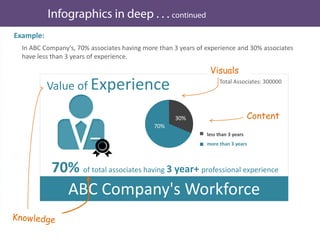
In ABC Company's, 70% associates having more than 3 years of experience and 30% associates
have less than 3 years of experience.
Content
Visuals
Introduction
S
T
A
R
T
END
Lets learn about
Human BRAIN
Detailed info about
Infographics
Tool for making
infographics
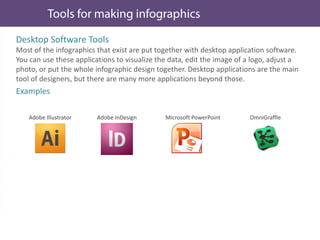
Desktop Software Tools
Most of the infographics that exist are put together with desktop application software.
You can use these applications to visualize the data, edit the image of a logo, adjust a
photo, or put the whole infographic design together. Desktop applications are the main
tool of designers, but there are many more applications beyond those.
Examples
Adobe Illustrator Adobe InDesign Microsoft PowerPoint OmniGraffle
Websites
There are hundreds of websites can help create the different data visualizations that
designers include in their infographic designs. It all depends on what type of
information you have to work with and what story you want to tell. Do you need a
map, a word cloud, a flowchart, a timeline, or a simple bar chart?
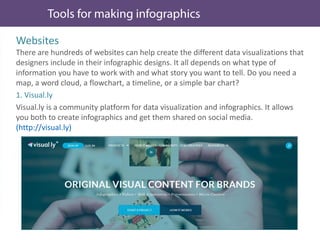
1. Visual.ly
Visual.ly is a community platform for data visualization and infographics. It allows
you both to create infographics and get them shared on social media.
(http://visual.ly)
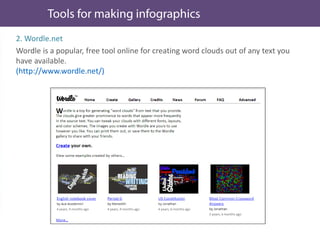
2. Wordle.net
Wordle is a popular, free tool online for creating word clouds out of any text you
have available.
(http://www.wordle.net/)
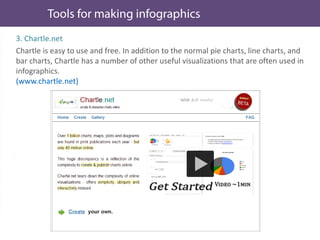
3. Chartle.net
Chartle is easy to use and free. In addition to the normal pie charts, line charts, and
bar charts, Chartle has a number of other useful visualizations that are often used in
infographics.
(www.chartle.net)





Thank you
Abhishek Jain
User Experience Designer
Twitter: @UxdAbhi

Infographics – basic understanding webinar

  • 1.
    Ultimatix User ExperienceTeam Infographics Presenting data in engaging and interesting way
  • 2.
     What isInfographics  Why Infographics? And how is it effective? Brain information processing Picture superiority effect Iconic Representation  Infographics in deep  Tool for making infographics  References
  • 3.
    Introduction S T A R T END Lets learn about HumanBRAIN Detailed info about Infographics Tool for making infographics
  • 4.
    Introduction S T A R T END Lets learn about HumanBRAIN Detailed info about Infographics Tool for making infographics
  • 5.
  • 6.
     Infographics area fun and quick way to learn about a topic without a ton of heavy reading.  Infographics are a combination of both graphics and information. Infographics use the elements of design (like lines, text, boxes and symbols) to visually represent the content.  It’s a way of talking numbers, spreadsheets and other kind of data and turn into one page of easily digestible and attractive graphics.  It can improve cognition by utilizing graphics to enhance the human visual system’s ability to see patterns and trends. Simple & Engaging experience Complex and boring data Infographics Graphics Male 60% Female 40% profit 7% Information 60% 40% Male Female ABC Company's Associates
  • 7.
    Revenue by dataRevenue by domain Revenue by Geography
  • 8.
    10000 8000 6000 4000 2000 Revenue 2008 2009 20102011 2012 INR crore USD Millions Year (March)  BFSI Telecom 10.0 Life Sciences & Healthcare Transportation 44.3% 12.3% 7.8% North America UK Ibero America Asia Pacific 53.6% 15% 8.5% Revenue by Data Revenue by Domain Revenue by Geography
  • 15.
    Why Infographics? Andhow is it effective?
  • 16.
    Introduction S T A R T END Lets learn about HumanBRAIN Detailed info about Infographics Tool for making infographics
  • 17.
    There are anumber of reasons why visual information is a more effective form of communication for humans. To understand the effectiveness of Infographics we should know more about brain first, Information Brain Mind Recognize Understand Recall Remember Memory Process Data
  • 18.
    Our mind processesinformation in following generalize steps, We sense things, data (sense through our sensors like sight, touch, hearing, smell, taste) Our sensors send messages to our brain Our mind process these messages and make information (Understanding) Our mind stores this information in memory (Remembering) Next time when we need, our mind provides information from memory. (Recognition and recall)
  • 19.
    1. Brain of humanbrain is involved in50% Visual Processing 2. Sensory receptors of all your70% sensory receptors are in your eyes 3. Visual scene we can get the sense of a Visual Scene in less than 1/10 of a second 4. Population Of population is65% Visual Learners
  • 20.
     The picturesuperiority effect refers to the notion that concepts that are learned by viewing pictures are more easily and frequently recalled than are concepts that are learned by viewing their written word form counterparts.  Pictures are remembered better than words  A picture is worth a thousand words.
  • 21.
     Be fit andHealthy To be healthy and fit we should always have breakfast. If a person takes very little breakfast, lunch normally and dinner in large quantity, the probability of becoming Fat increases. So it is recommended to take more quantity of breakfast in food, lunch normally and dinner should be less. This will keep you fit and healthy.
  • 22.
  • 23.
  • 24.
    Text Reading pattern Apicture is worth a thousand words. From Left to right
  • 25.
    Our brain processesPicture all at once.
  • 26.
     The useof pictorial images to improve the recognition and recall of signs and controls.  Iconic representation is the use of pictorial images to make actions, objects, and concepts in a display easier to find to recognize to learn to remember
  • 27.
    Pictures are generallymore easily recognized and recalled than words, although memory for pictures and words together is superior to memory for words alone or pictures alone. Time taken in recognizing and recalling objects Text only Pictures only Pictures with text Ex. Inbox Inbox
  • 28.
    Benefits of IconicRepresentation  Better identification (like company logo)  Serves as a space efficient alternative to text (road signs)  Icons convey message properly where language is a constrain
  • 29.
    Infographics in deep Tillwe have seen a What are infographics a How visuals and graphics are imp.
  • 30.
    Introduction S T A R T END Lets learn about HumanBRAIN Detailed info about Infographics Tool for making infographics
  • 31.
    Parts of Infographics Everyinfographic contains following elements in it. This part contains all the graphical components like, colors, themes, icons, pictures, graphs etc. . This part contains all the data, facts or statistics etc. to which we want to show in more appealing way. This part is most important part of Infographics, it contains the insight, story or tone of presentation. Visual Content Knowledge Parts of Infographics
  • 32.
    This part containsall the graphical components like, colors, themes, icons, pictures, graphs etc. . 1. Visual Visualizing the data helps with:  Grabbing the attention of readers  Reducing the amount of time it takes readers to understand the data  Providing context to the data by showing a comparison  Making the key message more memorable with the Picture Superiority Effect  Making the information more accessible to readers who speak other languages
  • 33.
    This part containsall the data, facts or statistics etc. to which we want to show in more appealing way.  Data  Percentages  Shares  Quantitative data 2. Content
  • 34.
    The key messageis the primary information you want the readers to understand and remember after reading your infographic. An infographic needs one clear message, and all the data visualizations and illustrations supports that central message. A rule of thumb is that the design needs to clearly communicate the key message to the readers in less than five seconds 3. Knowledge  Growth  Comparison  Profit –loss  Properties etc.
  • 35.
    1. Initially we havedata to be presented 2. We sort the data in proper way 3. We arrange the data 4. Then we present the data visually Is this infographic….??
  • 36.
    In ABC Company's,70% associates having more than 3 years of experience and 30% associates have less than 3 years of experience. Example: Work Experience 70% 30% Total Associates: 300000 less than 3 years more than 3 years
  • 37.
    In ABC Company's,70% associates having more than 3 years of experience and 30% associates have less than 3 years of experience. Example: Work Experience 70% 30% Total Associates: 300000 less than 3 years more than 3 years Content Visuals But where is ‘Knowledge’…????
  • 38.
    Example: Value of Experience lessthan 3 years more than 3 years 70% 30% 70% of total associates having 3 year+ professional experience Total Associates: 300000 ABC Company's Workforce In ABC Company's, 70% associates having more than 3 years of experience and 30% associates have less than 3 years of experience.
  • 39.
    Example: Value of Experience lessthan 3 years more than 3 years 70% 30% 70% of total associates having 3 year+ professional experience Total Associates: 300000 ABC Company's Workforce In ABC Company's, 70% associates having more than 3 years of experience and 30% associates have less than 3 years of experience. Content Visuals
  • 40.
    Introduction S T A R T END Lets learn about HumanBRAIN Detailed info about Infographics Tool for making infographics
  • 41.
    Desktop Software Tools Mostof the infographics that exist are put together with desktop application software. You can use these applications to visualize the data, edit the image of a logo, adjust a photo, or put the whole infographic design together. Desktop applications are the main tool of designers, but there are many more applications beyond those. Examples Adobe Illustrator Adobe InDesign Microsoft PowerPoint OmniGraffle
  • 42.
    Websites There are hundredsof websites can help create the different data visualizations that designers include in their infographic designs. It all depends on what type of information you have to work with and what story you want to tell. Do you need a map, a word cloud, a flowchart, a timeline, or a simple bar chart? 1. Visual.ly Visual.ly is a community platform for data visualization and infographics. It allows you both to create infographics and get them shared on social media. (http://visual.ly)
  • 43.
    2. Wordle.net Wordle isa popular, free tool online for creating word clouds out of any text you have available. (http://www.wordle.net/)
  • 44.
    3. Chartle.net Chartle iseasy to use and free. In addition to the normal pie charts, line charts, and bar charts, Chartle has a number of other useful visualizations that are often used in infographics. (www.chartle.net)
  • 45.
  • 46.
    Thank you Abhishek Jain UserExperience Designer Twitter: @UxdAbhi