Prof. Anusha J
Dept. of AI and ML
Overview of Computer Networking Basics
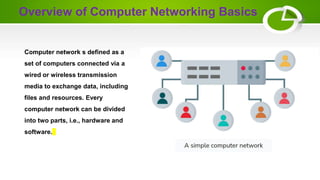
Computer network s defined as a
set of computers connected via a
wired or wireless transmission
media to exchange data, including
files and resources. Every
computer network can be divided
into two parts, i.e., hardware and
software.
Basic Elements of Computer Networking
Node
Link
Protocol
Internet Protocol (IP) address
Domain Name System (DNS)
Firewall
Node
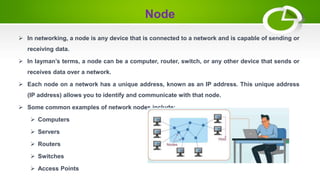
 In networking, a node is any device that is connected to a network and is capable of sending or
receiving data.
 In layman’s terms, a node can be a computer, router, switch, or any other device that sends or
receives data over a network.
 Each node on a network has a unique address, known as an IP address. This unique address
(IP address) allows you to identify and communicate with that node.
 Some common examples of network nodes include:
 Computers
 Servers
 Routers
 Switches
 Access Points
Link
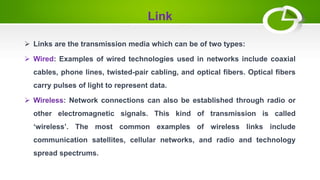
 Links are the transmission media which can be of two types:
: Examples of wired technologies used in networks include coaxial
cables, phone lines, twisted-pair cabling, and optical fibers. Optical fibers
carry pulses of light to represent data.
 Wireless: Network connections can also be established through radio or
other electromagnetic signals. This kind of transmission is called
‘wireless’. The most common examples of wireless links include
communication satellites, cellular networks, and radio and technology
spread spectrums.
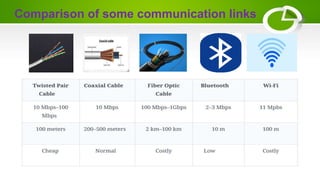
Comparison of some communication links
Protocol
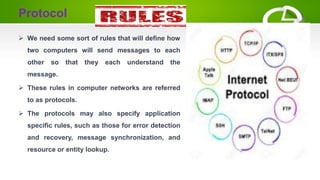
 We need some sort of rules that will define how
two computers will send messages to each
other so that they each understand the
message.
 These rules in computer networks are referred
to as protocols.
 The protocols may also specify application
specific rules, such as those for error detection
and recovery, message synchronization, and
resource or entity lookup.
Internet Protocol (IP) address & Media access
control (MAC) address
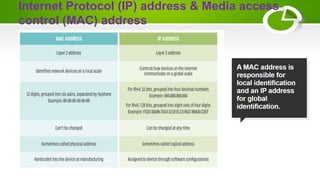
 The IP address refers to a unique 32-bit (IPv4) or 64-bit (IPv6)
address that is assigned to every device in a network. These
addresses can be fixed or random. In case it is fixed, then every
time, that device will get the same IP address when it becomes
part of a network.
 A MAC address is a 12-character long string that is unique for
each device, and it is usually assigned by the manufacturer. It is
to be noted that this address is fixed and cannot be changed.
Internet Protocol (IP) address & Media access
control (MAC) address
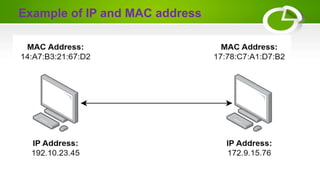
Example of IP and MAC address
Domain Name System (DNS)
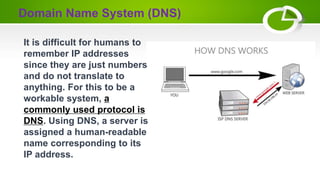
It is difficult for humans to
remember IP addresses
since they are just numbers
and do not translate to
anything. For this to be a
workable system, a
commonly used protocol is
DNS. Using DNS, a server is
assigned a human-readable
name corresponding to its
IP address.
Firewall
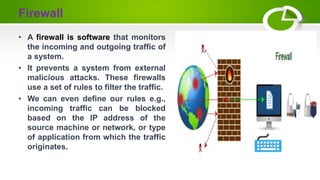
• A firewall is software that monitors
the incoming and outgoing traffic of
a system.
• It prevents a system from external
malicious attacks. These firewalls
use a set of rules to filter the traffic.
• We can even define our rules e.g.,
incoming traffic can be blocked
based on the IP address of the
source machine or network, or type
of application from which the traffic
originates.
Local Area Network (LAN)
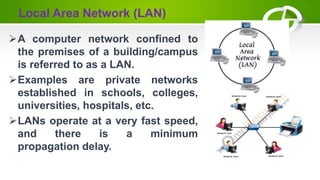
A computer network confined to
the premises of a building/campus
is referred to as a LAN.
Examples are private networks
established in schools, colleges,
universities, hospitals, etc.
LANs operate at a very fast speed,
and there is a minimum
propagation delay.
Metropolitan area network (MAN)
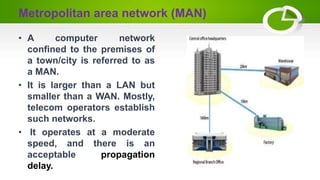
• A computer network
confined to the premises of
a town/city is referred to as
a MAN.
• It is larger than a LAN but
smaller than a WAN. Mostly,
telecom operators establish
such networks.
• It operates at a moderate
speed, and there is an
acceptable propagation
delay.
Wide area network (WAN)
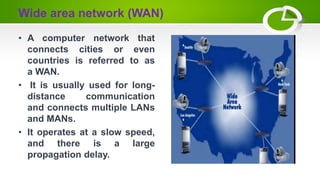
• A computer network that
connects cities or even
countries is referred to as
a WAN.
• It is usually used for long-
distance communication
and connects multiple LANs
and MANs.
• It operates at a slow speed,
and there is a large
propagation delay.
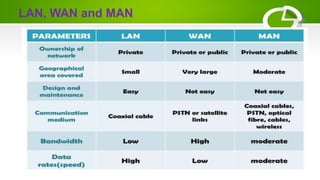
LAN, WAN and MAN
Virtual Local Area Network (VLAN)
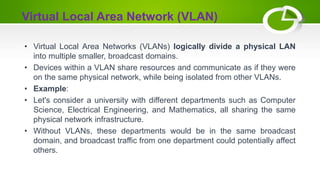
• Virtual Local Area Networks (VLANs) logically divide a physical LAN
into multiple smaller, broadcast domains.
• Devices within a VLAN share resources and communicate as if they were
on the same physical network, while being isolated from other VLANs.
• Example:
• Let's consider a university with different departments such as Computer
Science, Electrical Engineering, and Mathematics, all sharing the same
physical network infrastructure.
• Without VLANs, these departments would be in the same broadcast
domain, and broadcast traffic from one department could potentially affect
others.
By implementing VLANs, the university's network can be logically segmented:
1. Computer Science VLAN (VLAN 10): All devices in the Computer Science department,
including computers, servers, and printers, are part of VLAN 10.
2. Electrical Engineering VLAN (VLAN 20): Devices in the Electrical Engineering department
are grouped into VLAN 20.
3. Mathematics VLAN (VLAN 30): Mathematics department devices belong to VLAN 30.
 In this scenario, even though all departments share the same physical network infrastructure,
they operate in separate VLANs. Devices within the same VLAN can communicate
seamlessly, while communication between devices in different VLANs requires a router or
Layer 3 switch.
 Benefits of using VLANs-
 Improved Network Performance:
 Enhanced Security:
 Increased Manageability:
 Greater Scalability
Virtual Local Area Network (VLAN)
Virtual Private Network (VPN)
• A Virtual Private Network (VPN) is a technology that
enables secure and private communication over a
public network, typically the internet.
• It establishes a secure and encrypted connection,
allowing users to access resources and share data as if
they were directly connected to a private network, even if
they are physically located elsewhere.
Key features and components of a VPN:
• Encryption | Tunneling | Authentication| Anonymity and
Privacy|
Use cases of VPNs
• Secure Remote Access: Employees can securely access their
company's network from anywhere, ensuring the confidentiality
of sensitive data.
• Bypassing Geographical Restrictions: Users can access
content or services that may be restricted in certain regions.
• Enhanced Security: VPNs provide an additional layer of
security when using public Wi-Fi networks, protecting against
potential threats.
• Privacy Protection: VPNs help protect user privacy by
masking their IP addresses and encrypting their internet
connection.
Additionally…
 Personal Area Network - is a small network formed by electronic devices within an
individual's personal space, typically within a few meters. It allows these devices to
communicate and share data wirelessly, creating a convenient and seamless
experience.
 What devices can be part of a PAN?
 Smartphones: For sharing files, streaming media, and playing games with nearby devices.
 Wearables: Smartwatches, fitness trackers, and health monitors can exchange data and
synchronize information.
 Laptops and tablets: Wireless printing, file sharing, and collaboration with nearby devices.
 Headsets and speakers: Stream audio and connect for hands-free communication.
 Gaming peripherals: Wireless controllers and headsets for a more immersive gaming
experience.
 There is a standard for wireless LANs called IEEE 802.11, popularly known as WiFi.
Unique Identifiers of a Network
• Domain name: A domain name is like an address for a website. It's a simpler way
to reach a website than remembering complex numbers.
• Hostname: The hostname is a unique identifier for devices in a network, often
referred to as the computer or site name.
• Internet Protocol (IP) address: An IP address is a number that helps identify
devices on a network.
• MAC Address: A MAC address, which stands for Media Access Control address,
is a unique 12-digit hexadecimal identifier designated to every device connected
to a network.
• Port number: A port number serves as an identifier for a specific process, guiding
internet or network messages to their intended destination when they reach a
server.
• Socket: A socket represents one end of a bidirectional communication channel
between two programs on a network.
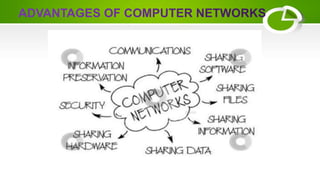
Advantages of Computer Networking
Improved communication and access to information
Efficient resource sharing
Simplified file and data exchange
High versatility
Enhanced cost efficiency
Augmented storage capabilities
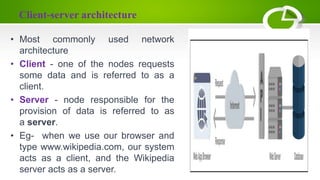
Client-server architecture
• Most commonly used network
architecture
• Client - one of the nodes requests
some data and is referred to as a
client.
• Server - node responsible for the
provision of data is referred to as
a server.
• Eg- when we use our browser and
type www.wikipedia.com, our system
acts as a client, and the Wikipedia
server acts as a server.
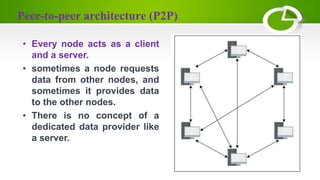
Peer-to-peer architecture (P2P)
• Every node acts as a client
and a server.
• sometimes a node requests
data from other nodes, and
sometimes it provides data
to the other nodes.
• There is no concept of a
dedicated data provider like
a server.
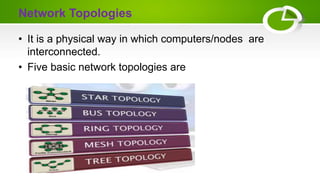
Network Topologies
• It is a physical way in which computers/nodes are
interconnected.
• Five basic network topologies are
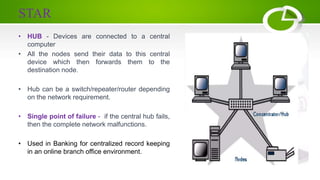
STAR
• HUB - Devices are connected to a central
computer
• All the nodes send their data to this central
device which then forwards them to the
destination node.
• Hub can be a switch/repeater/router depending
on the network requirement.
• Single point of failure - if the central hub fails,
then the complete network malfunctions.
• Used in Banking for centralized record keeping
in an online branch office environment.
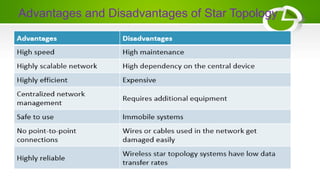
Advantages and Disadvantages of Star Topology
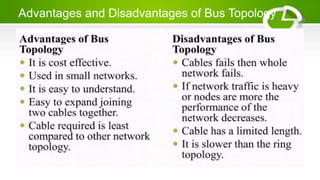
BUS
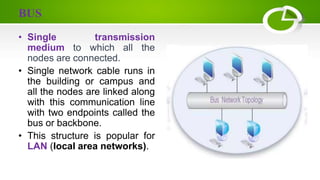
• Single transmission
medium to which all the
nodes are connected.
• Single network cable runs in
the building or campus and
all the nodes are linked along
with this communication line
with two endpoints called the
bus or backbone.
• This structure is popular for
LAN (local area networks).
Advantages and Disadvantages of Bus Topology
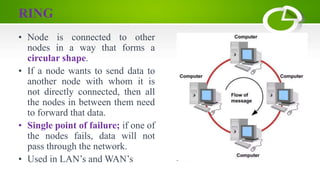
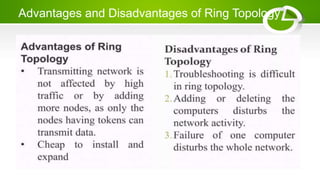
RING
• Node is connected to other
nodes in a way that forms a
circular shape.
• If a node wants to send data to
another node with whom it is
not directly connected, then all
the nodes in between them need
to forward that data.
• Single point of failure; if one of
the nodes fails, data will not
pass through the network.
• Used in LAN’s and WAN’s
Advantages and Disadvantages of Ring Topology
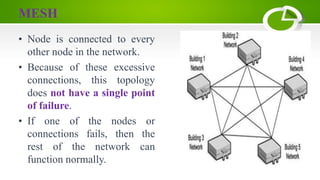
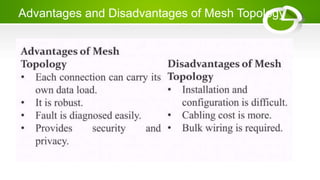
MESH
• Node is connected to every
other node in the network.
• Because of these excessive
connections, this topology
does not have a single point
of failure.
• If one of the nodes or
connections fails, then the
rest of the network can
function normally.
Advantages and Disadvantages of Mesh Topology
Why Standards are Needed ???
• Incompatability - Over the couple of
decades many of the networks that were
bulit used different hardware and software
implementation.
• ISO (International Organization standards)
researched various network schemes.
• Then comes our Referenece Models.
What is a Reference Model ??
• Conceptual layout that describes how communication
between devices should occur.
• A reference model has many advantages
– It defines standards for building network components thereby
permitting multiple vendor development
– Defines which functions should be performed at each layer of
the model thereby promoting the standardization of network.
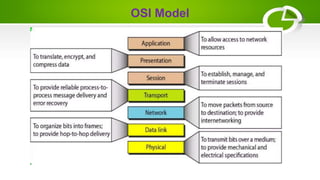
What is OSI ???
• OSI - Open System Interconnection
• Set of protocols that allows any two different systems
to communicate regardless of their underlying
architecture.
• Designed by ISO - International Organizations of
standards.
• It has 7 layers.
• Sketch/Blueprint - It is a theoritical model designed to
show how a protocol stack should be implemented.
Why 7 Layers ???
In 1983, Day and Zimmerman laid down certain principles that were applied to
arrive at the seven layers -
• A layer should be created where a different abstraction is needed.
• Each layer should perform a well defined function.
• The function of each layer should be chosen with an eye towards defining
internationallly standardized protocols.
• The layer boundaries should be chosen to minimize the information flow
across the interfaces.
• The number of layers should be large enough that distinct functions need not
be thrown together in the same layer out of necessity and small anough that
the architecture does not become unwieldy
OSI Model
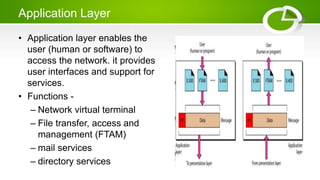
Application Layer
• Application layer enables the
user (human or software) to
access the network. it provides
user interfaces and support for
services.
• Functions -
– Network virtual terminal
– File transfer, access and
management (FTAM)
– mail services
– directory services
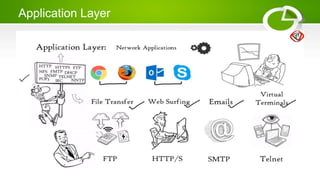
Application Layer
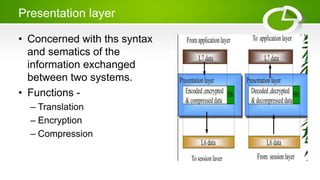
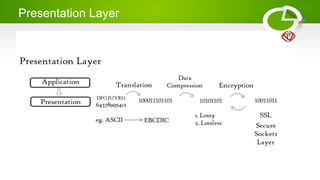
Presentation layer
• Concerned with ths syntax
and sematics of the
information exchanged
between two systems.
• Functions -
– Translation
– Encryption
– Compression
Presentation Layer
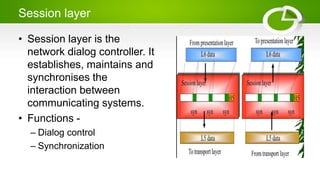
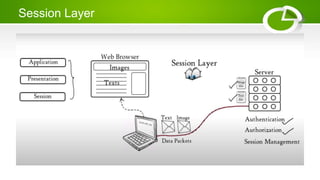
Session layer
• Session layer is the
network dialog controller. It
establishes, maintains and
synchronises the
interaction between
communicating systems.
• Functions -
– Dialog control
– Synchronization
Session Layer
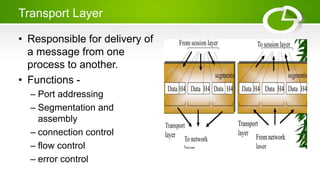
Transport Layer
• Responsible for delivery of
a message from one
process to another.
• Functions -
– Port addressing
– Segmentation and
assembly
– connection control
– flow control
– error control
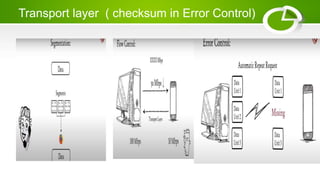
Transport layer ( checksum in Error Control)
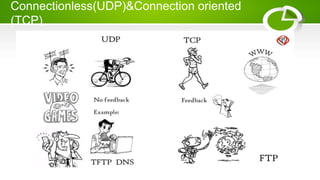
Connectionless(UDP)&Connection oriented
(TCP)
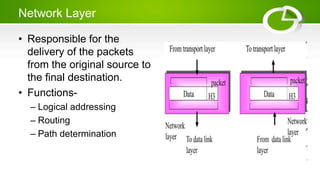
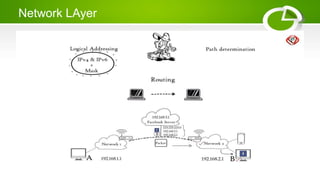
Network Layer
• Responsible for the
delivery of the packets
from the original source to
the final destination.
• Functions-
– Logical addressing
– Routing
– Path determination
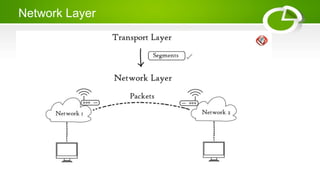
Network Layer
Network LAyer
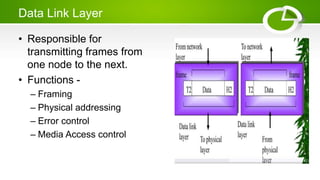
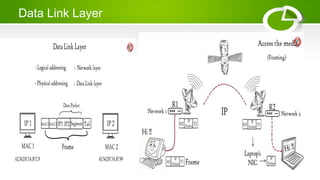
Data Link Layer
• Responsible for
transmitting frames from
one node to the next.
• Functions -
– Framing
– Physical addressing
– Error control
– Media Access control
Data Link Layer
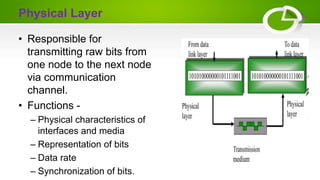
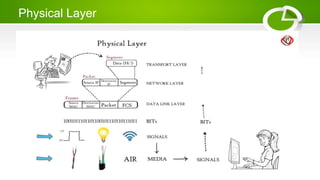
Physical Layer
• Responsible for
transmitting raw bits from
one node to the next node
via communication
channel.
• Functions -
– Physical characteristics of
interfaces and media
– Representation of bits
– Data rate
– Synchronization of bits.
Physical Layer
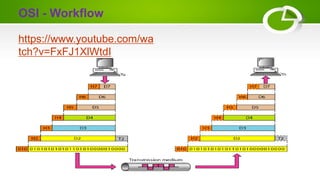
OSI - Workflow
https://www.youtube.com/wa
tch?v=FxFJ1XlWtdI
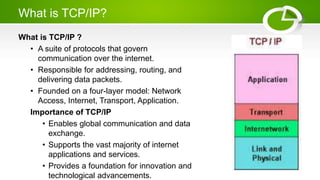
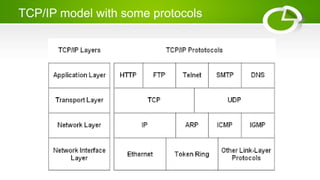
What is TCP/IP?
What is TCP/IP ?
• A suite of protocols that govern
communication over the internet.
• Responsible for addressing, routing, and
delivering data packets.
• Founded on a four-layer model: Network
Access, Internet, Transport, Application.
Importance of TCP/IP
• Enables global communication and data
exchange.
• Supports the vast majority of internet
applications and services.
• Provides a foundation for innovation and
technological advancements.
Layers of the TCP/IP Model
Layer 1: Network Access Layer
• Handles physical transmission of data over various network mediums.
• Examples include Ethernet, Wi-Fi, and cellular networks.
Layer 2: Internet Layer
• Responsible for routing packets across networks based on IP addresses.
• Core protocols: IP (Internet Protocol) and ICMP (Internet Control Message Protocol).
Layer 3: Transport Layer
• Provides reliable data transfer between applications.
• Two main protocols: TCP (Transmission Control Protocol) and UDP (User Datagram
Protocol).
– TCP ensures reliable and ordered delivery with error checking and retransmission.
– UDP prioritizes speed over reliability and is used for time-sensitive applications.
Layer 4: Application Layer
• Defines how applications access and utilize network services.
• Examples include HTTP (web browsing), FTP (file transfer), and SMTP (email).
TCP/IP model with some protocols
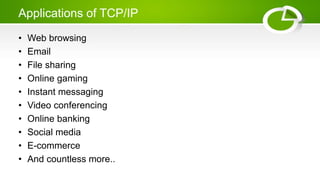
Applications of TCP/IP
• Web browsing
• Email
• File sharing
• Online gaming
• Instant messaging
• Video conferencing
• Online banking
• Social media
• E-commerce
• And countless more..
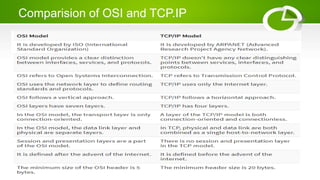
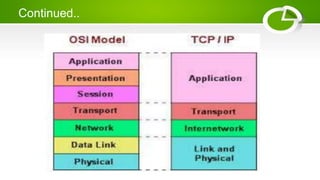
Comparision of OSI and TCP.IP
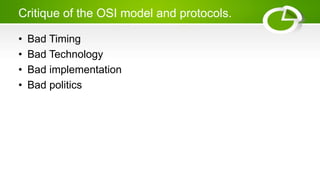
Critique of the OSI model and protocols.
• Bad Timing
• Bad Technology
• Bad implementation
• Bad politics
Crtique of the TCP/IP Reference model
• The model does not clearly distinguish between services, interfaces, and protocols, which
can lead to confusion and ambiguity.
• The model is not designed to be generic and cannot effectively describe new networking
technologies or protocols that deviate from its traditional structure.This limits its applicability
in future network architectures and diverse communication scenarios. BLUETOOTH hard to
explain using TCP/IP
• Link layer is not really a layer at all in the normal sense. It is and interface between Netwrokf
and Data link layers.
• No distingish between physical and data link layer though their work is different.
• Although TCP/IP were carefully thought out and well implemented but other protocols were
ad hoc.
Continued..
Design Issues
Routing: Finding a working path through a network.
• Often there are multiple paths between a source and destination, and in a large
network, there may be some links or routers that are broken.
• Suppose that the network is down in Germany. Packets sent from London to Rome
via Germany will not get through, but we could instead send packets from London to
Rome via Paris. The network should automatically make this decision.
• Sometimes the problem is that the network is oversubscribed because too many
computers want to send too much traffic, and the network cannot deliver it all. This
overloading of the network is called congestion.
Continued…
• An allocation problem that occurs at every level is how to keep
a fast sender from swamping a slow receiver with data.
Feedback from the receiver to the sender is often used. This
subject is called flow control.
• Quality of service - real-time delivery
• Threats Management - confidentiality | Authentication |
integrity .
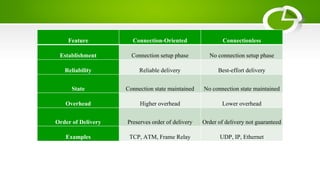
Connection-Oriented Versus Connectionless Service
• Layers can offer two different types of service to the layers above them:
connection-oriented and connectionless.
• Connection-oriented service is modeled after the telephone system. To
talk to someone, you pick up the phone, dial the number, talk, and then hang
up. Similarly, to use a connection-oriented network service, the service user
first establishes a connection, uses the connection, and then releases the
connection.
• Negotiation about the parameters to be used, such as maximum message
size, quality of service required, and other issues are considered.
Continued…
• Connectionless service is modeled after the postal system.
• Each message (letter) carries the full destination address, and each
one is routed through the intermediate nodes inside the system
independent of all the subsequent messages.
• A packet is a message at the network layer.
• When the intermediate nodes receive a message in full before
sending it on to the next node, this is called store-and-forward
switching.
Continued…
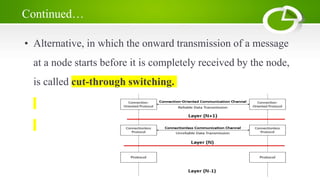
• Alternative, in which the onward transmission of a message
at a node starts before it is completely received by the node,
is called cut-through switching.
Service Primitives
• A service is formally specified by a set of primitives (operations)
available to user processes to access the service.
• These primitives tell the service to perform some action or report
on an action taken by a peer entity.
• If the protocol stack is located in the operating system, the
primitives are normally system calls. These calls cause a trap to
kernel mode, which then turns control of the machine over to the
operating system to send the necessary packets.
• The set of primitives available depends on the nature of the
service being provided. The primitives for connection-oriented
service are different from those of connectionless service.
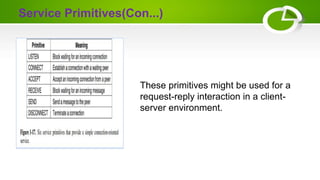
Service Primitives(Con...)
These primitives might be used for a
request-reply interaction in a client-
server environment.
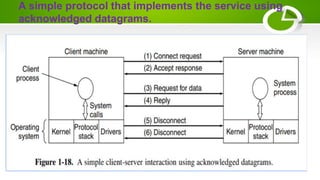
A simple protocol that implements the service using
acknowledged datagrams.
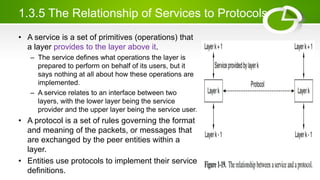
1.3.5 The Relationship of Services to Protocols
• A service is a set of primitives (operations) that
a layer provides to the layer above it.
– The service defines what operations the layer is
prepared to perform on behalf of its users, but it
says nothing at all about how these operations are
implemented.
– A service relates to an interface between two
layers, with the lower layer being the service
provider and the upper layer being the service user.
• A protocol is a set of rules governing the format
and meaning of the packets, or messages that
are exchanged by the peer entities within a
layer.
• Entities use protocols to implement their service
definitions.
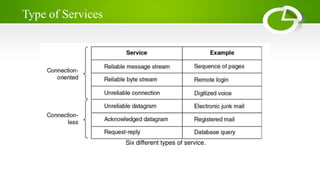
Type of Services
Feature Connection-Oriented Connectionless
Establishment Connection setup phase No connection setup phase
Reliability Reliable delivery Best-effort delivery
State Connection state maintained No connection state maintained
Overhead Higher overhead Lower overhead
Order of Delivery Preserves order of delivery Order of delivery not guaranteed
Examples TCP, ATM, Frame Relay UDP, IP, Ethernet
Internetwork
• A collection of interconnected networks is called an internetwork or internet.
• The Internet uses ISP (internet service provider) networks to connect
enterprise networks, home networks, and many other networks.
• ‘subnet’= it refers to the collection of routers and communication lines owned
by the network operator
• As an analogy, the telephone system consists of telephone switching offices
connected to one another by high-speed lines, and to houses and
businesses by low-speed lines. These lines and equipment, owned and
managed by the telephone company, form the subnet of the telephone
system. The telephones themselves (the hosts in this analogy) are not part of
the subnet.
Network Software
• The first computer networks were designed with the hardware as the main
concern and the software as an afterthought. This strategy no longer works.
Network software is now highly structured.
• To reduce their design complexity, most networks are organized as a stack of
layers or levels, each one built upon the one below it.
• The number of layers, the name of each layer, the contents of each layer,
and the function of each layer differ from network to network.
• The purpose of each layer is to offer certain services to the higher layers
while shielding those layers from the details of how the offered services are
actually implemented.
• In a sense, each layer is a kind of virtual machine, offering certain services to
the layer above it
Network Software
• When layer n on one machine carries on a conversation with layer
n on another machine, the rules and conventions used in this
conversation are collectively known as the layer n protocol.
• Basically, a protocol is an agreement between the communicating
parties on how communication is to proceed.
Network Software (Contd…)
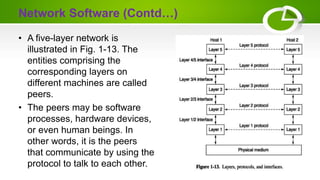
• A five-layer network is
illustrated in Fig. 1-13. The
entities comprising the
corresponding layers on
different machines are called
peers.
• The peers may be software
processes, hardware devices,
or even human beings. In
other words, it is the peers
that communicate by using the
protocol to talk to each other.
Network Software (Contd…)
• In reality, no data are directly transferred from layer n on one
machine to layer n on another machine. Instead, each layer
passes data and control information to the layer immediately
below it, until the lowest layer is reached
• Below layer 1 is the physical medium through which actual
communication occurs. In Fig. 1-13, virtual communication is
shown by dotted lines and physical communication by solid lines
• Between each pair of adjacent layers is an interface.
• The interface defines which primitive operations and services the
lower layer makes available to the upper one.
Network Software (Contd…)
• A set of layers and protocols is called a network architecture.
• The specification of an architecture must contain enough
information to allow an implementer to write the program or build
the hardware for each layer so that it will correctly obey the
appropriate protocol.
Network Software (Contd…)
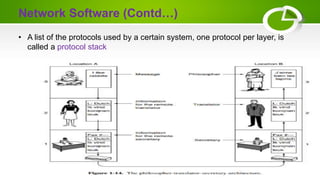
• A list of the protocols used by a certain system, one protocol per layer, is
called a protocol stack
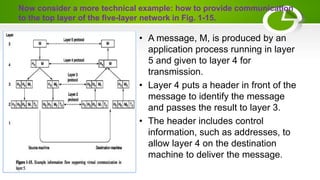
Now consider a more technical example: how to provide communication
to the top layer of the five-layer network in Fig. 1-15.
• A message, M, is produced by an
application process running in layer
5 and given to layer 4 for
transmission.
• Layer 4 puts a header in front of the
message to identify the message
and passes the result to layer 3.
• The header includes control
information, such as addresses, to
allow layer 4 on the destination
machine to deliver the message.
Network Software (Contd…)
• In many networks, no limit is placed on the size of messages transmitted in
the layer 4 protocol but there is nearly always a limit imposed by the layer 3
protocol.
• Consequently, layer 3 must break up the incoming messages into smaller
units, packets, prepending a layer 3 header to each packet. In this example,
M is split into two parts, M1 and M2, that will be transmitted separately.
• Layer 3 decides which of the outgoing lines to use and passes the packets to
layer 2. Layer 2 adds to each piece not only a header but also a trailer, and
gives the resulting unit to layer 1 for physical transmission.
• At the receiving machine the message moves upward, from layer to layer,
with headers being stripped off as it progresses. None of the headers for
layers below n are passed up to layer n.
Network Software (Contd…)
• The important thing to understand about Fig. 1-15 is the relation
between the virtual and actual communication and the difference
between protocols and interfaces. The peer processes in layer 4.
• For example, conceptually think of their communication as being
‘‘horizontal,’’ using the layer 4 protocol. Each one is likely to have
procedures called something like SendToOtherSide and
GetFromOtherSide, even though these procedures actually
communicate with lower layers across the 3/4 interface, and not
with the other side.

Module-1.pptx

  • 1.
  • 4.
    Overview of ComputerNetworking Basics Computer network s defined as a set of computers connected via a wired or wireless transmission media to exchange data, including files and resources. Every computer network can be divided into two parts, i.e., hardware and software.
  • 5.
    Basic Elements ofComputer Networking Node Link Protocol Internet Protocol (IP) address Domain Name System (DNS) Firewall
  • 6.
    Node  In networking,a node is any device that is connected to a network and is capable of sending or receiving data.  In layman’s terms, a node can be a computer, router, switch, or any other device that sends or receives data over a network.  Each node on a network has a unique address, known as an IP address. This unique address (IP address) allows you to identify and communicate with that node.  Some common examples of network nodes include:  Computers  Servers  Routers  Switches  Access Points
  • 7.
    Link  Links arethe transmission media which can be of two types: : Examples of wired technologies used in networks include coaxial cables, phone lines, twisted-pair cabling, and optical fibers. Optical fibers carry pulses of light to represent data.  Wireless: Network connections can also be established through radio or other electromagnetic signals. This kind of transmission is called ‘wireless’. The most common examples of wireless links include communication satellites, cellular networks, and radio and technology spread spectrums.
  • 8.
    Comparison of somecommunication links
  • 9.
    Protocol  We needsome sort of rules that will define how two computers will send messages to each other so that they each understand the message.  These rules in computer networks are referred to as protocols.  The protocols may also specify application specific rules, such as those for error detection and recovery, message synchronization, and resource or entity lookup.
  • 10.
    Internet Protocol (IP)address & Media access control (MAC) address  The IP address refers to a unique 32-bit (IPv4) or 64-bit (IPv6) address that is assigned to every device in a network. These addresses can be fixed or random. In case it is fixed, then every time, that device will get the same IP address when it becomes part of a network.  A MAC address is a 12-character long string that is unique for each device, and it is usually assigned by the manufacturer. It is to be noted that this address is fixed and cannot be changed.
  • 11.
    Internet Protocol (IP)address & Media access control (MAC) address
  • 12.
    Example of IPand MAC address
  • 13.
    Domain Name System(DNS) It is difficult for humans to remember IP addresses since they are just numbers and do not translate to anything. For this to be a workable system, a commonly used protocol is DNS. Using DNS, a server is assigned a human-readable name corresponding to its IP address.
  • 14.
    Firewall • A firewallis software that monitors the incoming and outgoing traffic of a system. • It prevents a system from external malicious attacks. These firewalls use a set of rules to filter the traffic. • We can even define our rules e.g., incoming traffic can be blocked based on the IP address of the source machine or network, or type of application from which the traffic originates.
  • 16.
    Local Area Network(LAN) A computer network confined to the premises of a building/campus is referred to as a LAN. Examples are private networks established in schools, colleges, universities, hospitals, etc. LANs operate at a very fast speed, and there is a minimum propagation delay.
  • 17.
    Metropolitan area network(MAN) • A computer network confined to the premises of a town/city is referred to as a MAN. • It is larger than a LAN but smaller than a WAN. Mostly, telecom operators establish such networks. • It operates at a moderate speed, and there is an acceptable propagation delay.
  • 18.
    Wide area network(WAN) • A computer network that connects cities or even countries is referred to as a WAN. • It is usually used for long- distance communication and connects multiple LANs and MANs. • It operates at a slow speed, and there is a large propagation delay.
  • 19.
  • 20.
    Virtual Local AreaNetwork (VLAN) • Virtual Local Area Networks (VLANs) logically divide a physical LAN into multiple smaller, broadcast domains. • Devices within a VLAN share resources and communicate as if they were on the same physical network, while being isolated from other VLANs. • Example: • Let's consider a university with different departments such as Computer Science, Electrical Engineering, and Mathematics, all sharing the same physical network infrastructure. • Without VLANs, these departments would be in the same broadcast domain, and broadcast traffic from one department could potentially affect others.
  • 21.
    By implementing VLANs,the university's network can be logically segmented: 1. Computer Science VLAN (VLAN 10): All devices in the Computer Science department, including computers, servers, and printers, are part of VLAN 10. 2. Electrical Engineering VLAN (VLAN 20): Devices in the Electrical Engineering department are grouped into VLAN 20. 3. Mathematics VLAN (VLAN 30): Mathematics department devices belong to VLAN 30.  In this scenario, even though all departments share the same physical network infrastructure, they operate in separate VLANs. Devices within the same VLAN can communicate seamlessly, while communication between devices in different VLANs requires a router or Layer 3 switch.  Benefits of using VLANs-  Improved Network Performance:  Enhanced Security:  Increased Manageability:  Greater Scalability Virtual Local Area Network (VLAN)
  • 22.
    Virtual Private Network(VPN) • A Virtual Private Network (VPN) is a technology that enables secure and private communication over a public network, typically the internet. • It establishes a secure and encrypted connection, allowing users to access resources and share data as if they were directly connected to a private network, even if they are physically located elsewhere. Key features and components of a VPN: • Encryption | Tunneling | Authentication| Anonymity and Privacy|
  • 23.
    Use cases ofVPNs • Secure Remote Access: Employees can securely access their company's network from anywhere, ensuring the confidentiality of sensitive data. • Bypassing Geographical Restrictions: Users can access content or services that may be restricted in certain regions. • Enhanced Security: VPNs provide an additional layer of security when using public Wi-Fi networks, protecting against potential threats. • Privacy Protection: VPNs help protect user privacy by masking their IP addresses and encrypting their internet connection.
  • 24.
    Additionally…  Personal AreaNetwork - is a small network formed by electronic devices within an individual's personal space, typically within a few meters. It allows these devices to communicate and share data wirelessly, creating a convenient and seamless experience.  What devices can be part of a PAN?  Smartphones: For sharing files, streaming media, and playing games with nearby devices.  Wearables: Smartwatches, fitness trackers, and health monitors can exchange data and synchronize information.  Laptops and tablets: Wireless printing, file sharing, and collaboration with nearby devices.  Headsets and speakers: Stream audio and connect for hands-free communication.  Gaming peripherals: Wireless controllers and headsets for a more immersive gaming experience.  There is a standard for wireless LANs called IEEE 802.11, popularly known as WiFi.
  • 25.
    Unique Identifiers ofa Network • Domain name: A domain name is like an address for a website. It's a simpler way to reach a website than remembering complex numbers. • Hostname: The hostname is a unique identifier for devices in a network, often referred to as the computer or site name. • Internet Protocol (IP) address: An IP address is a number that helps identify devices on a network. • MAC Address: A MAC address, which stands for Media Access Control address, is a unique 12-digit hexadecimal identifier designated to every device connected to a network. • Port number: A port number serves as an identifier for a specific process, guiding internet or network messages to their intended destination when they reach a server. • Socket: A socket represents one end of a bidirectional communication channel between two programs on a network.
  • 26.
    Advantages of ComputerNetworking Improved communication and access to information Efficient resource sharing Simplified file and data exchange High versatility Enhanced cost efficiency Augmented storage capabilities
  • 27.
    Client-server architecture • Mostcommonly used network architecture • Client - one of the nodes requests some data and is referred to as a client. • Server - node responsible for the provision of data is referred to as a server. • Eg- when we use our browser and type www.wikipedia.com, our system acts as a client, and the Wikipedia server acts as a server.
  • 28.
    Peer-to-peer architecture (P2P) •Every node acts as a client and a server. • sometimes a node requests data from other nodes, and sometimes it provides data to the other nodes. • There is no concept of a dedicated data provider like a server.
  • 30.
    Network Topologies • Itis a physical way in which computers/nodes are interconnected. • Five basic network topologies are
  • 31.
    STAR • HUB -Devices are connected to a central computer • All the nodes send their data to this central device which then forwards them to the destination node. • Hub can be a switch/repeater/router depending on the network requirement. • Single point of failure - if the central hub fails, then the complete network malfunctions. • Used in Banking for centralized record keeping in an online branch office environment.
  • 32.
  • 33.
    BUS • Single transmission mediumto which all the nodes are connected. • Single network cable runs in the building or campus and all the nodes are linked along with this communication line with two endpoints called the bus or backbone. • This structure is popular for LAN (local area networks).
  • 34.
  • 35.
    RING • Node isconnected to other nodes in a way that forms a circular shape. • If a node wants to send data to another node with whom it is not directly connected, then all the nodes in between them need to forward that data. • Single point of failure; if one of the nodes fails, data will not pass through the network. • Used in LAN’s and WAN’s
  • 36.
  • 37.
    MESH • Node isconnected to every other node in the network. • Because of these excessive connections, this topology does not have a single point of failure. • If one of the nodes or connections fails, then the rest of the network can function normally.
  • 38.
  • 39.
    Why Standards areNeeded ??? • Incompatability - Over the couple of decades many of the networks that were bulit used different hardware and software implementation. • ISO (International Organization standards) researched various network schemes. • Then comes our Referenece Models.
  • 40.
    What is aReference Model ?? • Conceptual layout that describes how communication between devices should occur. • A reference model has many advantages – It defines standards for building network components thereby permitting multiple vendor development – Defines which functions should be performed at each layer of the model thereby promoting the standardization of network.
  • 41.
    What is OSI??? • OSI - Open System Interconnection • Set of protocols that allows any two different systems to communicate regardless of their underlying architecture. • Designed by ISO - International Organizations of standards. • It has 7 layers. • Sketch/Blueprint - It is a theoritical model designed to show how a protocol stack should be implemented.
  • 42.
    Why 7 Layers??? In 1983, Day and Zimmerman laid down certain principles that were applied to arrive at the seven layers - • A layer should be created where a different abstraction is needed. • Each layer should perform a well defined function. • The function of each layer should be chosen with an eye towards defining internationallly standardized protocols. • The layer boundaries should be chosen to minimize the information flow across the interfaces. • The number of layers should be large enough that distinct functions need not be thrown together in the same layer out of necessity and small anough that the architecture does not become unwieldy
  • 43.
  • 44.
    Application Layer • Applicationlayer enables the user (human or software) to access the network. it provides user interfaces and support for services. • Functions - – Network virtual terminal – File transfer, access and management (FTAM) – mail services – directory services
  • 45.
  • 46.
    Presentation layer • Concernedwith ths syntax and sematics of the information exchanged between two systems. • Functions - – Translation – Encryption – Compression
  • 47.
  • 48.
    Session layer • Sessionlayer is the network dialog controller. It establishes, maintains and synchronises the interaction between communicating systems. • Functions - – Dialog control – Synchronization
  • 49.
  • 50.
    Transport Layer • Responsiblefor delivery of a message from one process to another. • Functions - – Port addressing – Segmentation and assembly – connection control – flow control – error control
  • 51.
    Transport layer (checksum in Error Control)
  • 52.
  • 53.
    Network Layer • Responsiblefor the delivery of the packets from the original source to the final destination. • Functions- – Logical addressing – Routing – Path determination
  • 54.
  • 55.
  • 56.
    Data Link Layer •Responsible for transmitting frames from one node to the next. • Functions - – Framing – Physical addressing – Error control – Media Access control
  • 57.
  • 58.
    Physical Layer • Responsiblefor transmitting raw bits from one node to the next node via communication channel. • Functions - – Physical characteristics of interfaces and media – Representation of bits – Data rate – Synchronization of bits.
  • 59.
  • 60.
  • 61.
    What is TCP/IP? Whatis TCP/IP ? • A suite of protocols that govern communication over the internet. • Responsible for addressing, routing, and delivering data packets. • Founded on a four-layer model: Network Access, Internet, Transport, Application. Importance of TCP/IP • Enables global communication and data exchange. • Supports the vast majority of internet applications and services. • Provides a foundation for innovation and technological advancements.
  • 62.
    Layers of theTCP/IP Model Layer 1: Network Access Layer • Handles physical transmission of data over various network mediums. • Examples include Ethernet, Wi-Fi, and cellular networks. Layer 2: Internet Layer • Responsible for routing packets across networks based on IP addresses. • Core protocols: IP (Internet Protocol) and ICMP (Internet Control Message Protocol). Layer 3: Transport Layer • Provides reliable data transfer between applications. • Two main protocols: TCP (Transmission Control Protocol) and UDP (User Datagram Protocol). – TCP ensures reliable and ordered delivery with error checking and retransmission. – UDP prioritizes speed over reliability and is used for time-sensitive applications. Layer 4: Application Layer • Defines how applications access and utilize network services. • Examples include HTTP (web browsing), FTP (file transfer), and SMTP (email).
  • 63.
    TCP/IP model withsome protocols
  • 64.
    Applications of TCP/IP •Web browsing • Email • File sharing • Online gaming • Instant messaging • Video conferencing • Online banking • Social media • E-commerce • And countless more..
  • 65.
  • 66.
    Critique of theOSI model and protocols. • Bad Timing • Bad Technology • Bad implementation • Bad politics
  • 67.
    Crtique of theTCP/IP Reference model • The model does not clearly distinguish between services, interfaces, and protocols, which can lead to confusion and ambiguity. • The model is not designed to be generic and cannot effectively describe new networking technologies or protocols that deviate from its traditional structure.This limits its applicability in future network architectures and diverse communication scenarios. BLUETOOTH hard to explain using TCP/IP • Link layer is not really a layer at all in the normal sense. It is and interface between Netwrokf and Data link layers. • No distingish between physical and data link layer though their work is different. • Although TCP/IP were carefully thought out and well implemented but other protocols were ad hoc.
  • 68.
  • 69.
    Design Issues Routing: Findinga working path through a network. • Often there are multiple paths between a source and destination, and in a large network, there may be some links or routers that are broken. • Suppose that the network is down in Germany. Packets sent from London to Rome via Germany will not get through, but we could instead send packets from London to Rome via Paris. The network should automatically make this decision. • Sometimes the problem is that the network is oversubscribed because too many computers want to send too much traffic, and the network cannot deliver it all. This overloading of the network is called congestion.
  • 70.
    Continued… • An allocationproblem that occurs at every level is how to keep a fast sender from swamping a slow receiver with data. Feedback from the receiver to the sender is often used. This subject is called flow control. • Quality of service - real-time delivery • Threats Management - confidentiality | Authentication | integrity .
  • 71.
    Connection-Oriented Versus ConnectionlessService • Layers can offer two different types of service to the layers above them: connection-oriented and connectionless. • Connection-oriented service is modeled after the telephone system. To talk to someone, you pick up the phone, dial the number, talk, and then hang up. Similarly, to use a connection-oriented network service, the service user first establishes a connection, uses the connection, and then releases the connection. • Negotiation about the parameters to be used, such as maximum message size, quality of service required, and other issues are considered.
  • 72.
    Continued… • Connectionless serviceis modeled after the postal system. • Each message (letter) carries the full destination address, and each one is routed through the intermediate nodes inside the system independent of all the subsequent messages. • A packet is a message at the network layer. • When the intermediate nodes receive a message in full before sending it on to the next node, this is called store-and-forward switching.
  • 73.
    Continued… • Alternative, inwhich the onward transmission of a message at a node starts before it is completely received by the node, is called cut-through switching.
  • 74.
    Service Primitives • Aservice is formally specified by a set of primitives (operations) available to user processes to access the service. • These primitives tell the service to perform some action or report on an action taken by a peer entity. • If the protocol stack is located in the operating system, the primitives are normally system calls. These calls cause a trap to kernel mode, which then turns control of the machine over to the operating system to send the necessary packets. • The set of primitives available depends on the nature of the service being provided. The primitives for connection-oriented service are different from those of connectionless service.
  • 75.
    Service Primitives(Con...) These primitivesmight be used for a request-reply interaction in a client- server environment.
  • 76.
    A simple protocolthat implements the service using acknowledged datagrams.
  • 77.
    1.3.5 The Relationshipof Services to Protocols • A service is a set of primitives (operations) that a layer provides to the layer above it. – The service defines what operations the layer is prepared to perform on behalf of its users, but it says nothing at all about how these operations are implemented. – A service relates to an interface between two layers, with the lower layer being the service provider and the upper layer being the service user. • A protocol is a set of rules governing the format and meaning of the packets, or messages that are exchanged by the peer entities within a layer. • Entities use protocols to implement their service definitions.
  • 78.
  • 79.
    Feature Connection-Oriented Connectionless EstablishmentConnection setup phase No connection setup phase Reliability Reliable delivery Best-effort delivery State Connection state maintained No connection state maintained Overhead Higher overhead Lower overhead Order of Delivery Preserves order of delivery Order of delivery not guaranteed Examples TCP, ATM, Frame Relay UDP, IP, Ethernet
  • 80.
    Internetwork • A collectionof interconnected networks is called an internetwork or internet. • The Internet uses ISP (internet service provider) networks to connect enterprise networks, home networks, and many other networks. • ‘subnet’= it refers to the collection of routers and communication lines owned by the network operator • As an analogy, the telephone system consists of telephone switching offices connected to one another by high-speed lines, and to houses and businesses by low-speed lines. These lines and equipment, owned and managed by the telephone company, form the subnet of the telephone system. The telephones themselves (the hosts in this analogy) are not part of the subnet.
  • 81.
    Network Software • Thefirst computer networks were designed with the hardware as the main concern and the software as an afterthought. This strategy no longer works. Network software is now highly structured. • To reduce their design complexity, most networks are organized as a stack of layers or levels, each one built upon the one below it. • The number of layers, the name of each layer, the contents of each layer, and the function of each layer differ from network to network. • The purpose of each layer is to offer certain services to the higher layers while shielding those layers from the details of how the offered services are actually implemented. • In a sense, each layer is a kind of virtual machine, offering certain services to the layer above it
  • 82.
    Network Software • Whenlayer n on one machine carries on a conversation with layer n on another machine, the rules and conventions used in this conversation are collectively known as the layer n protocol. • Basically, a protocol is an agreement between the communicating parties on how communication is to proceed.
  • 83.
    Network Software (Contd…) •A five-layer network is illustrated in Fig. 1-13. The entities comprising the corresponding layers on different machines are called peers. • The peers may be software processes, hardware devices, or even human beings. In other words, it is the peers that communicate by using the protocol to talk to each other.
  • 84.
    Network Software (Contd…) •In reality, no data are directly transferred from layer n on one machine to layer n on another machine. Instead, each layer passes data and control information to the layer immediately below it, until the lowest layer is reached • Below layer 1 is the physical medium through which actual communication occurs. In Fig. 1-13, virtual communication is shown by dotted lines and physical communication by solid lines • Between each pair of adjacent layers is an interface. • The interface defines which primitive operations and services the lower layer makes available to the upper one.
  • 85.
    Network Software (Contd…) •A set of layers and protocols is called a network architecture. • The specification of an architecture must contain enough information to allow an implementer to write the program or build the hardware for each layer so that it will correctly obey the appropriate protocol.
  • 86.
    Network Software (Contd…) •A list of the protocols used by a certain system, one protocol per layer, is called a protocol stack
  • 87.
    Now consider amore technical example: how to provide communication to the top layer of the five-layer network in Fig. 1-15. • A message, M, is produced by an application process running in layer 5 and given to layer 4 for transmission. • Layer 4 puts a header in front of the message to identify the message and passes the result to layer 3. • The header includes control information, such as addresses, to allow layer 4 on the destination machine to deliver the message.
  • 88.
    Network Software (Contd…) •In many networks, no limit is placed on the size of messages transmitted in the layer 4 protocol but there is nearly always a limit imposed by the layer 3 protocol. • Consequently, layer 3 must break up the incoming messages into smaller units, packets, prepending a layer 3 header to each packet. In this example, M is split into two parts, M1 and M2, that will be transmitted separately. • Layer 3 decides which of the outgoing lines to use and passes the packets to layer 2. Layer 2 adds to each piece not only a header but also a trailer, and gives the resulting unit to layer 1 for physical transmission. • At the receiving machine the message moves upward, from layer to layer, with headers being stripped off as it progresses. None of the headers for layers below n are passed up to layer n.
  • 89.
    Network Software (Contd…) •The important thing to understand about Fig. 1-15 is the relation between the virtual and actual communication and the difference between protocols and interfaces. The peer processes in layer 4. • For example, conceptually think of their communication as being ‘‘horizontal,’’ using the layer 4 protocol. Each one is likely to have procedures called something like SendToOtherSide and GetFromOtherSide, even though these procedures actually communicate with lower layers across the 3/4 interface, and not with the other side.