Motivation
 Where we are and where we want to go. The question is
how?
 No system to track the things under roof.
 So we need a system which can track the indoor location
and can show the navigation of the path with less
consumption of battery.
Papers referred
 Modern Wireless Sensor Implementation for Indoor
tracking, Transport and Power Grid Monitoring.
 Improved Wireless Localization of Mobile Device in
Smart Indoor Scenarios.
Objectives
 To build a system which will enable navigation for GPS
isolated areas.
 To build a system which will consume less battery of
devices.
7/24/2018 Indoor tracking using Wi-Fi routers 4
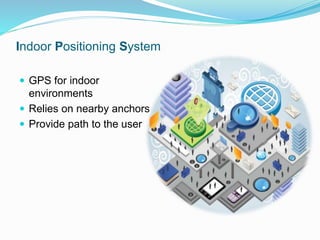
Indoor Positioning System
 GPS for indoor
environments
 Relies on nearby anchors
 Provide path to the user
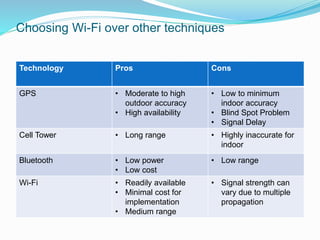
Choosing Wi-Fi over other techniques
Technology Pros Cons
GPS • Moderate to high
outdoor accuracy
• High availability
• Low to minimum
indoor accuracy
• Blind Spot Problem
• Signal Delay
Cell Tower • Long range • Highly inaccurate for
indoor
Bluetooth • Low power
• Low cost
• Low range
Wi-Fi • Readily available
• Minimal cost for
implementation
• Medium range
• Signal strength can
vary due to multiple
propagation
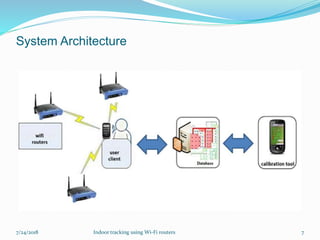
System Architecture
7/24/2018 Indoor tracking using Wi-Fi routers 7
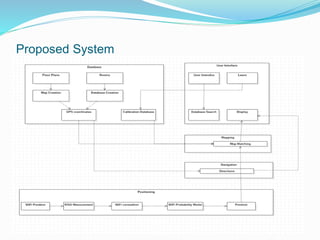
Proposed System
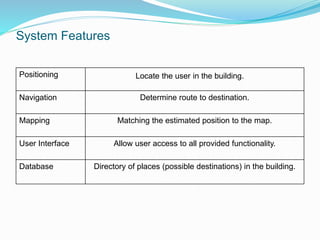
System Features
Positioning Locate the user in the building.
Navigation Determine route to destination.
Mapping Matching the estimated position to the map.
User Interface Allow user access to all provided functionality.
Database Directory of places (possible destinations) in the building.
Positioning
 Decide one’s current
location
 Factors to be considered
while determining the
position:
 Device is static
 Device is mobile
 Methods of positioning:
 Self Positioning
 Remote Positioning
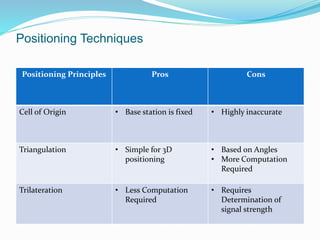
Positioning Techniques
Positioning Principles Pros Cons
Cell of Origin • Base station is fixed • Highly inaccurate
Triangulation • Simple for 3D
positioning
• Based on Angles
• More Computation
Required
Trilateration • Less Computation
Required
• Requires
Determination of
signal strength
Trilateration
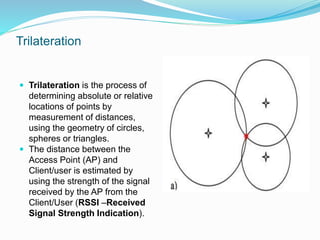
 Trilateration is the process of
determining absolute or relative
locations of points by
measurement of distances,
using the geometry of circles,
spheres or triangles.
 The distance between the
Access Point (AP) and
Client/user is estimated by
using the strength of the signal
received by the AP from the
Client/User (RSSI –Received
Signal Strength Indication).
Mapping
 Mapping a building involves gathering information that
describes the building’s layout and converting this
information into a form that is usable by other processes.
 The location and size of walls, hallways, doors, floors,
staircases, elevators, windows,etc
 2D , 3D
Software Requirements
 Operating system: Windows 7 and above.
 Programming environment: JDK.
 Programming tool: Android development tool.
 Blueprint creation tool : AutoCAD
Languages Required
 Java
 XML
 MySQL
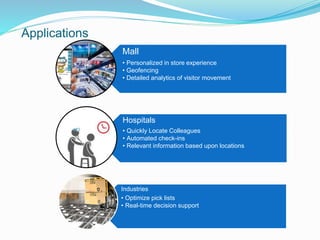
Applications
Mall
• Personalized in store experience
• Geofencing
• Detailed analytics of visitor movement
Hospitals
• Quickly Locate Colleagues
• Automated check-ins
• Relevant information based upon locations
Industries
• Optimize pick lists
• Real-time decision support
Future Scope
 Can be integrated with present outdoor positioning
systems to create a more accurate and advanced
positioning and tracking systems.
 This system can be further optimized by allowing stores
to provide location based promotions through geofencing.
Indoor Mapping & Tracking

Indoor Mapping & Tracking

  • 2.
    Motivation  Where weare and where we want to go. The question is how?  No system to track the things under roof.  So we need a system which can track the indoor location and can show the navigation of the path with less consumption of battery.
  • 3.
    Papers referred  ModernWireless Sensor Implementation for Indoor tracking, Transport and Power Grid Monitoring.  Improved Wireless Localization of Mobile Device in Smart Indoor Scenarios.
  • 4.
    Objectives  To builda system which will enable navigation for GPS isolated areas.  To build a system which will consume less battery of devices. 7/24/2018 Indoor tracking using Wi-Fi routers 4
  • 5.
    Indoor Positioning System GPS for indoor environments  Relies on nearby anchors  Provide path to the user
  • 6.
    Choosing Wi-Fi overother techniques Technology Pros Cons GPS • Moderate to high outdoor accuracy • High availability • Low to minimum indoor accuracy • Blind Spot Problem • Signal Delay Cell Tower • Long range • Highly inaccurate for indoor Bluetooth • Low power • Low cost • Low range Wi-Fi • Readily available • Minimal cost for implementation • Medium range • Signal strength can vary due to multiple propagation
  • 7.
    System Architecture 7/24/2018 Indoortracking using Wi-Fi routers 7
  • 8.
  • 9.
    System Features Positioning Locatethe user in the building. Navigation Determine route to destination. Mapping Matching the estimated position to the map. User Interface Allow user access to all provided functionality. Database Directory of places (possible destinations) in the building.
  • 10.
    Positioning  Decide one’scurrent location  Factors to be considered while determining the position:  Device is static  Device is mobile  Methods of positioning:  Self Positioning  Remote Positioning
  • 11.
    Positioning Techniques Positioning PrinciplesPros Cons Cell of Origin • Base station is fixed • Highly inaccurate Triangulation • Simple for 3D positioning • Based on Angles • More Computation Required Trilateration • Less Computation Required • Requires Determination of signal strength
  • 12.
    Trilateration  Trilateration isthe process of determining absolute or relative locations of points by measurement of distances, using the geometry of circles, spheres or triangles.  The distance between the Access Point (AP) and Client/user is estimated by using the strength of the signal received by the AP from the Client/User (RSSI –Received Signal Strength Indication).
  • 13.
    Mapping  Mapping abuilding involves gathering information that describes the building’s layout and converting this information into a form that is usable by other processes.  The location and size of walls, hallways, doors, floors, staircases, elevators, windows,etc  2D , 3D
  • 14.
    Software Requirements  Operatingsystem: Windows 7 and above.  Programming environment: JDK.  Programming tool: Android development tool.  Blueprint creation tool : AutoCAD
  • 15.
  • 16.
    Applications Mall • Personalized instore experience • Geofencing • Detailed analytics of visitor movement Hospitals • Quickly Locate Colleagues • Automated check-ins • Relevant information based upon locations Industries • Optimize pick lists • Real-time decision support
  • 17.
    Future Scope  Canbe integrated with present outdoor positioning systems to create a more accurate and advanced positioning and tracking systems.  This system can be further optimized by allowing stores to provide location based promotions through geofencing.