©Silberschatz, Korth and Sudarshan
12.1
Database System Concepts
Chapter 12: Indexing and Hashing
n Basic Concepts
n Ordered Indices
n B+-Tree Index Files
n Static Hashing
n Dynamic Hashing
n Comparison of Ordered Indexing and Hashing
n Index Definition in SQL
©Silberschatz, Korth and Sudarshan
12.2
Database System Concepts
Basic Concepts
n Indexing mechanisms used to speed up access to desired data.
 E.g., author catalog in library
n Search Key - attribute to set of attributes used to look up
records in a file.
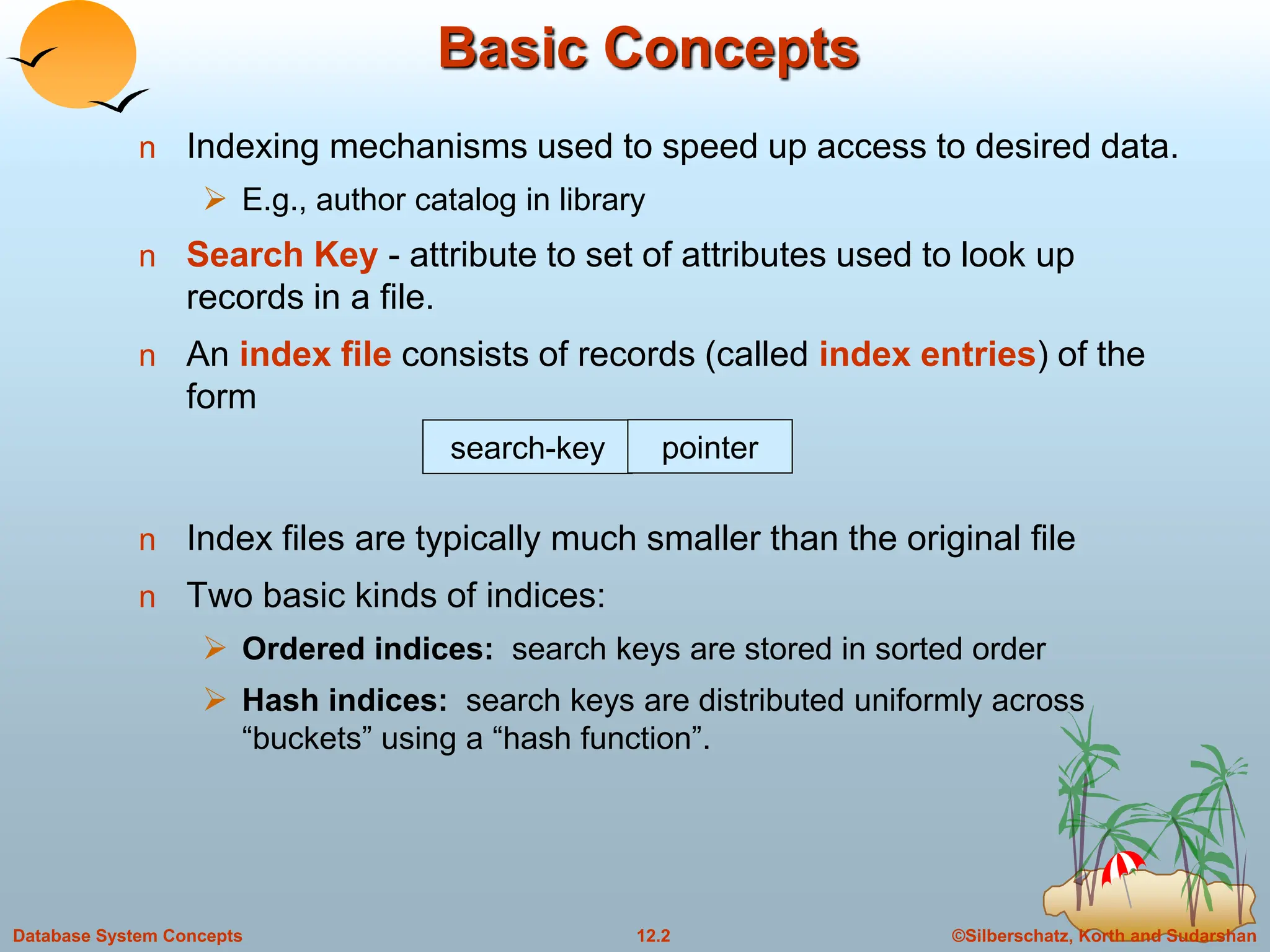
n An index file consists of records (called index entries) of the
form
n Index files are typically much smaller than the original file
n Two basic kinds of indices:
 Ordered indices: search keys are stored in sorted order
 Hash indices: search keys are distributed uniformly across
“buckets” using a “hash function”.
search-key pointer
©Silberschatz, Korth and Sudarshan
12.3
Database System Concepts
Index Evaluation Metrics
n Access types supported efficiently. E.g.,
 records with a specified value in the attribute
 or records with an attribute value falling in a specified range of
values.
n Access time
n Insertion time
n Deletion time
n Space overhead
©Silberschatz, Korth and Sudarshan
12.4
Database System Concepts
Ordered Indices
n In an ordered index, index entries are stored sorted on the
search key value. E.g., author catalog in library.
n Primary index: in a sequentially ordered file, the index whose
search key specifies the sequential order of the file.
 Also called clustering index
 The search key of a primary index is usually but not necessarily the
primary key.
n Secondary index: an index whose search key specifies an order
different from the sequential order of the file. Also called
non-clustering index.
n Index-sequential file: ordered sequential file with a primary index.
Indexing techniques evaluated on basis of:
©Silberschatz, Korth and Sudarshan
12.5
Database System Concepts
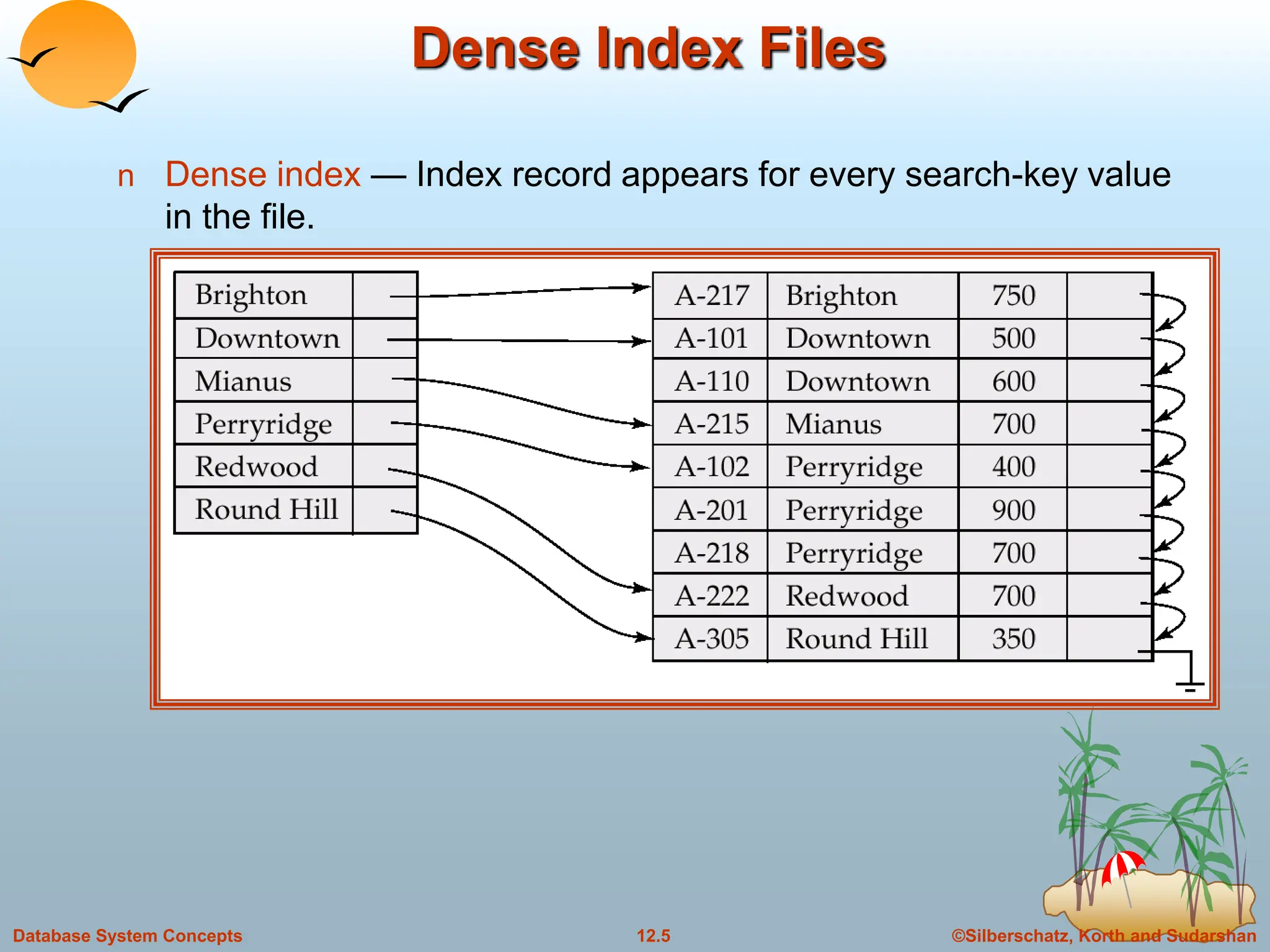
Dense Index Files
n Dense index — Index record appears for every search-key value
in the file.
©Silberschatz, Korth and Sudarshan
12.6
Database System Concepts
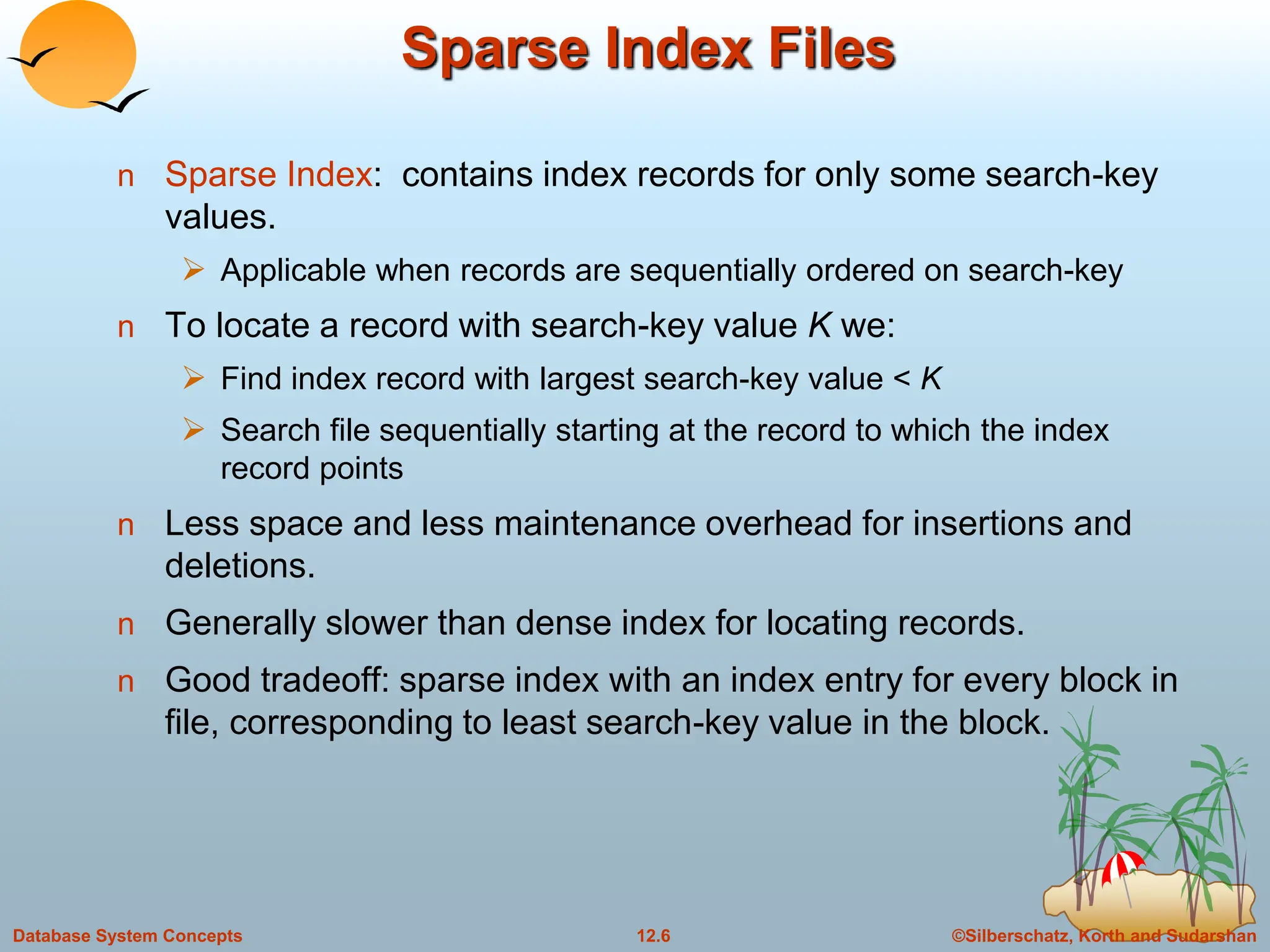
Sparse Index Files
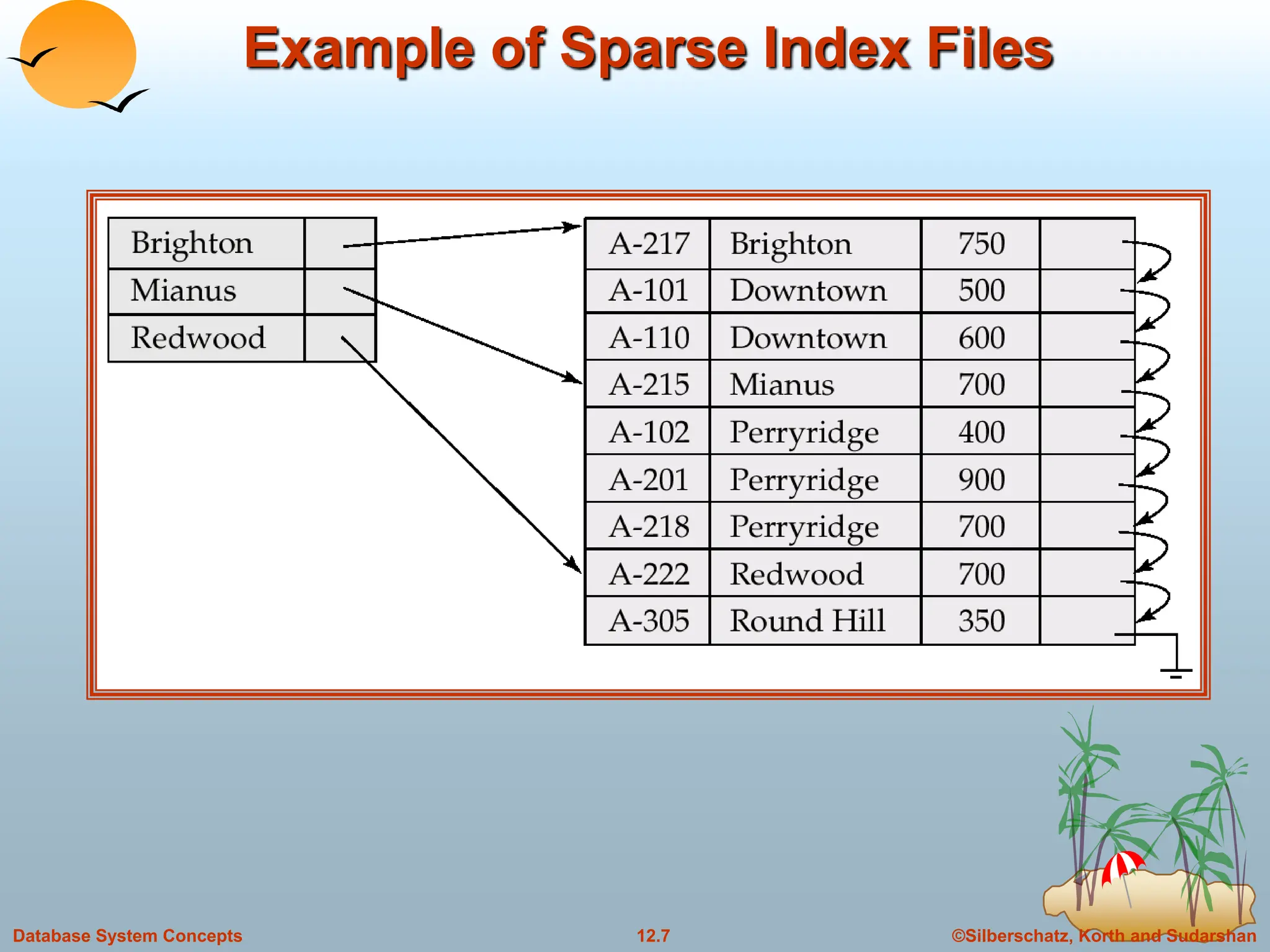
n Sparse Index: contains index records for only some search-key
values.
 Applicable when records are sequentially ordered on search-key
n To locate a record with search-key value K we:
 Find index record with largest search-key value < K
 Search file sequentially starting at the record to which the index
record points
n Less space and less maintenance overhead for insertions and
deletions.
n Generally slower than dense index for locating records.
n Good tradeoff: sparse index with an index entry for every block in
file, corresponding to least search-key value in the block.
©Silberschatz, Korth and Sudarshan
12.7
Database System Concepts
Example of Sparse Index Files
©Silberschatz, Korth and Sudarshan
12.8
Database System Concepts
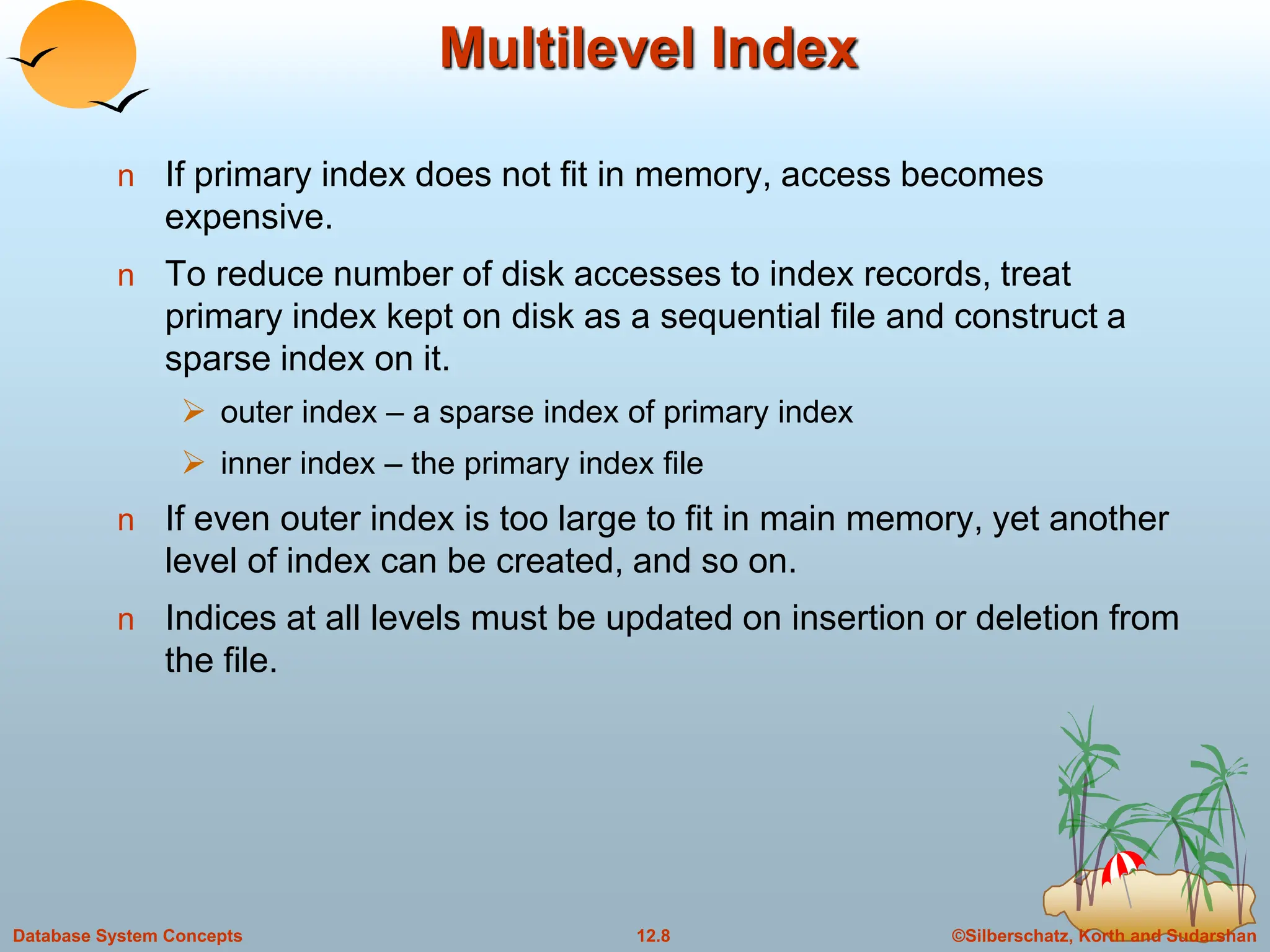
Multilevel Index
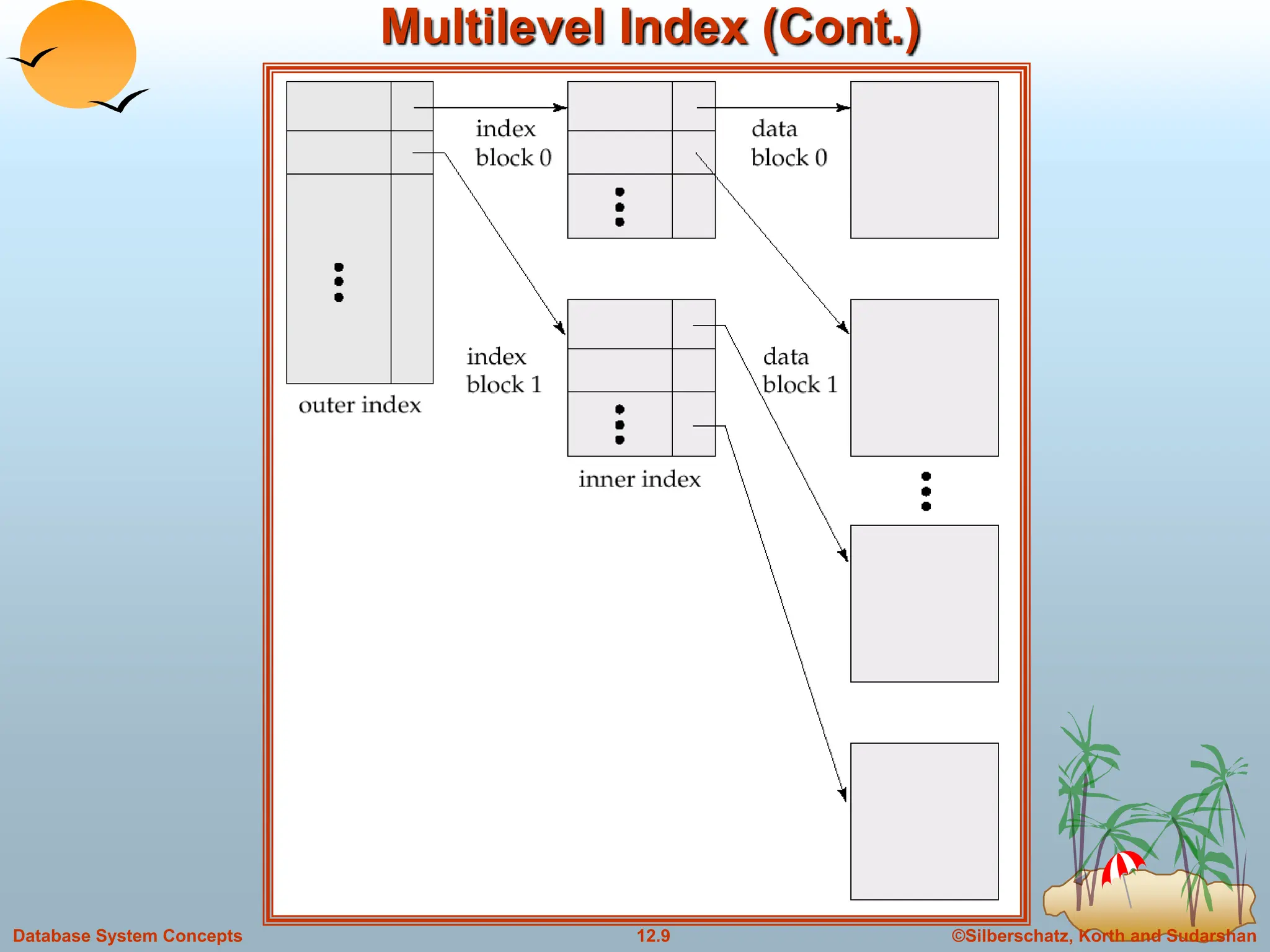
n If primary index does not fit in memory, access becomes
expensive.
n To reduce number of disk accesses to index records, treat
primary index kept on disk as a sequential file and construct a
sparse index on it.
 outer index – a sparse index of primary index
 inner index – the primary index file
n If even outer index is too large to fit in main memory, yet another
level of index can be created, and so on.
n Indices at all levels must be updated on insertion or deletion from
the file.
©Silberschatz, Korth and Sudarshan
12.9
Database System Concepts
Multilevel Index (Cont.)
©Silberschatz, Korth and Sudarshan
12.10
Database System Concepts
Index Update: Deletion
n If deleted record was the only record in the file with its particular
search-key value, the search-key is deleted from the index also.
n Single-level index deletion:
 Dense indices – deletion of search-key is similar to file record
deletion.
 Sparse indices – if an entry for the search key exists in the index, it
is deleted by replacing the entry in the index with the next search-
key value in the file (in search-key order). If the next search-key
value already has an index entry, the entry is deleted instead of
being replaced.
©Silberschatz, Korth and Sudarshan
12.11
Database System Concepts
Index Update: Insertion
n Single-level index insertion:
 Perform a lookup using the search-key value appearing in the
record to be inserted.
 Dense indices – if the search-key value does not appear in the
index, insert it.
 Sparse indices – if index stores an entry for each block of the file, no
change needs to be made to the index unless a new block is
created. In this case, the first search-key value appearing in the
new block is inserted into the index.
n Multilevel insertion (as well as deletion) algorithms are simple
extensions of the single-level algorithms
©Silberschatz, Korth and Sudarshan
12.12
Database System Concepts
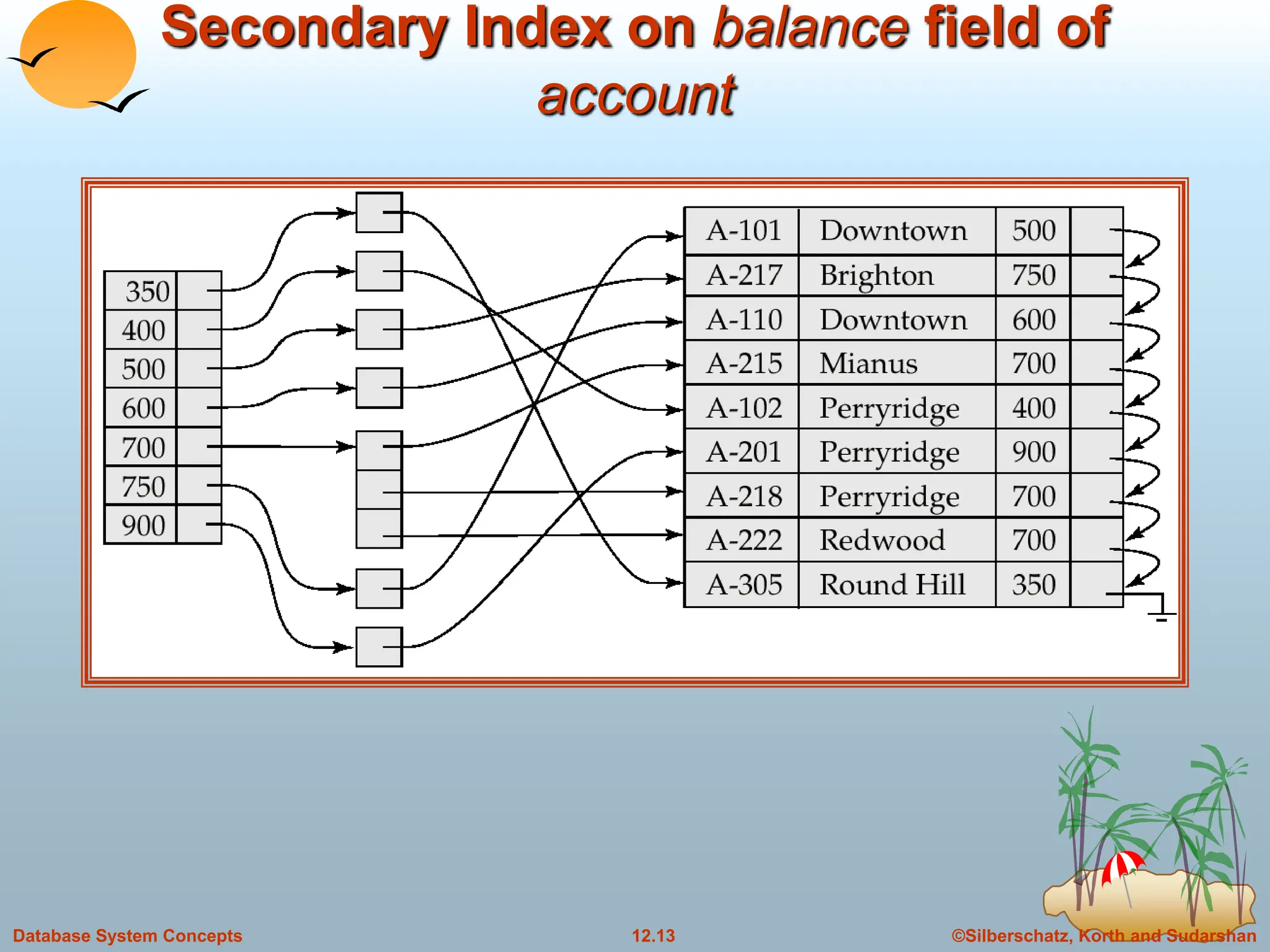
Secondary Indices
n Frequently, one wants to find all the records whose
values in a certain field (which is not the search-key of
the primary index satisfy some condition.
 Example 1: In the account database stored sequentially
by account number, we may want to find all accounts in a
particular branch
 Example 2: as above, but where we want to find all
accounts with a specified balance or range of balances
n We can have a secondary index with an index record
for each search-key value; index record points to a
bucket that contains pointers to all the actual records
with that particular search-key value.
©Silberschatz, Korth and Sudarshan
12.13
Database System Concepts
Secondary Index on balance field of
account
©Silberschatz, Korth and Sudarshan
12.14
Database System Concepts
Primary and Secondary Indices
n Secondary indices have to be dense.
n Clustering index may be sparse.
n A Secondary index on a candidate key looks just like a dense
clustering index, except records are not stored sequentially.
n Indices offer substantial benefits when searching for records.
n When a file is modified, every index on the file must be updated,
Updating indices imposes overhead on database modification.
n Sequential scan using primary index is efficient, but a sequential
scan using a secondary index is expensive
 each record access may fetch a new block from disk
©Silberschatz, Korth and Sudarshan
12.15
Database System Concepts
B+-Tree Index Files
n Disadvantage of indexed-sequential files: performance degrades as
file grows, since many overflow blocks get created. Periodic
reorganization of entire file is required.
n Advantage of B+-tree index files: automatically reorganizes itself with
small, local, changes, in the face of insertions and deletions.
Reorganization of entire file is not required to maintain performance.
n B+ tree index takes the form of balanced tree.
n Disadvantage of B+-trees: extra insertion and deletion overhead,
space overhead.
n Advantages of B+-trees outweigh disadvantages, and they are used
extensively.
B+-tree indices are an alternative to indexed-sequential files.
©Silberschatz, Korth and Sudarshan
12.16
Database System Concepts
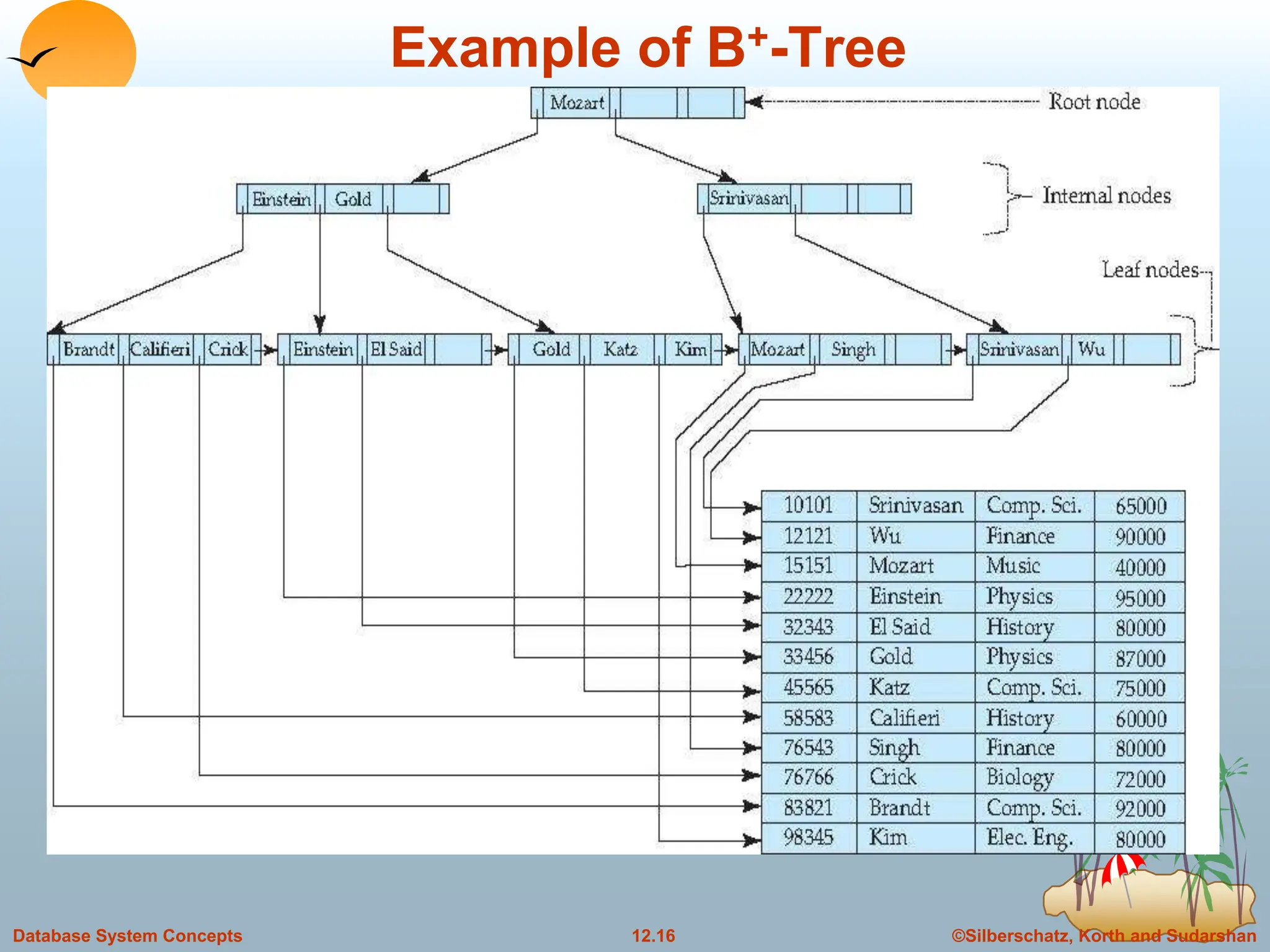
Example of B+-Tree
©Silberschatz, Korth and Sudarshan
12.17
Database System Concepts
B+-Tree Index Files (Cont.)
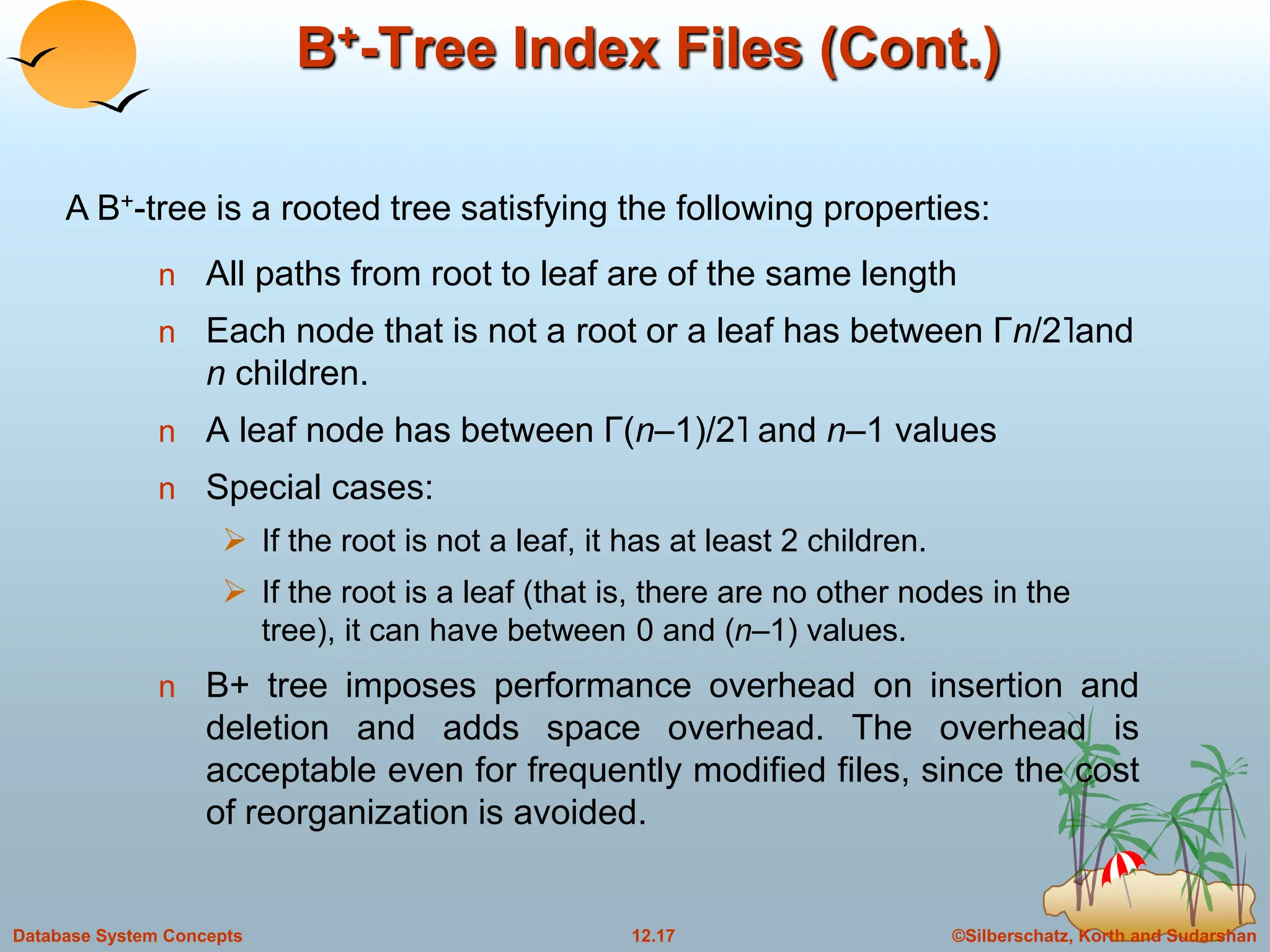
n All paths from root to leaf are of the same length
n Each node that is not a root or a leaf has between Γn/2˥and
n children.
n A leaf node has between Γ(n–1)/2˥ and n–1 values
n Special cases:
 If the root is not a leaf, it has at least 2 children.
 If the root is a leaf (that is, there are no other nodes in the
tree), it can have between 0 and (n–1) values.
n B+ tree imposes performance overhead on insertion and
deletion and adds space overhead. The overhead is
acceptable even for frequently modified files, since the cost
of reorganization is avoided.
A B+-tree is a rooted tree satisfying the following properties:
©Silberschatz, Korth and Sudarshan
12.18
Database System Concepts
B+-Tree Node Structure
n B+ tree index is a multilevel index, but it has a structure different
from that of multilevel index sequential index file.
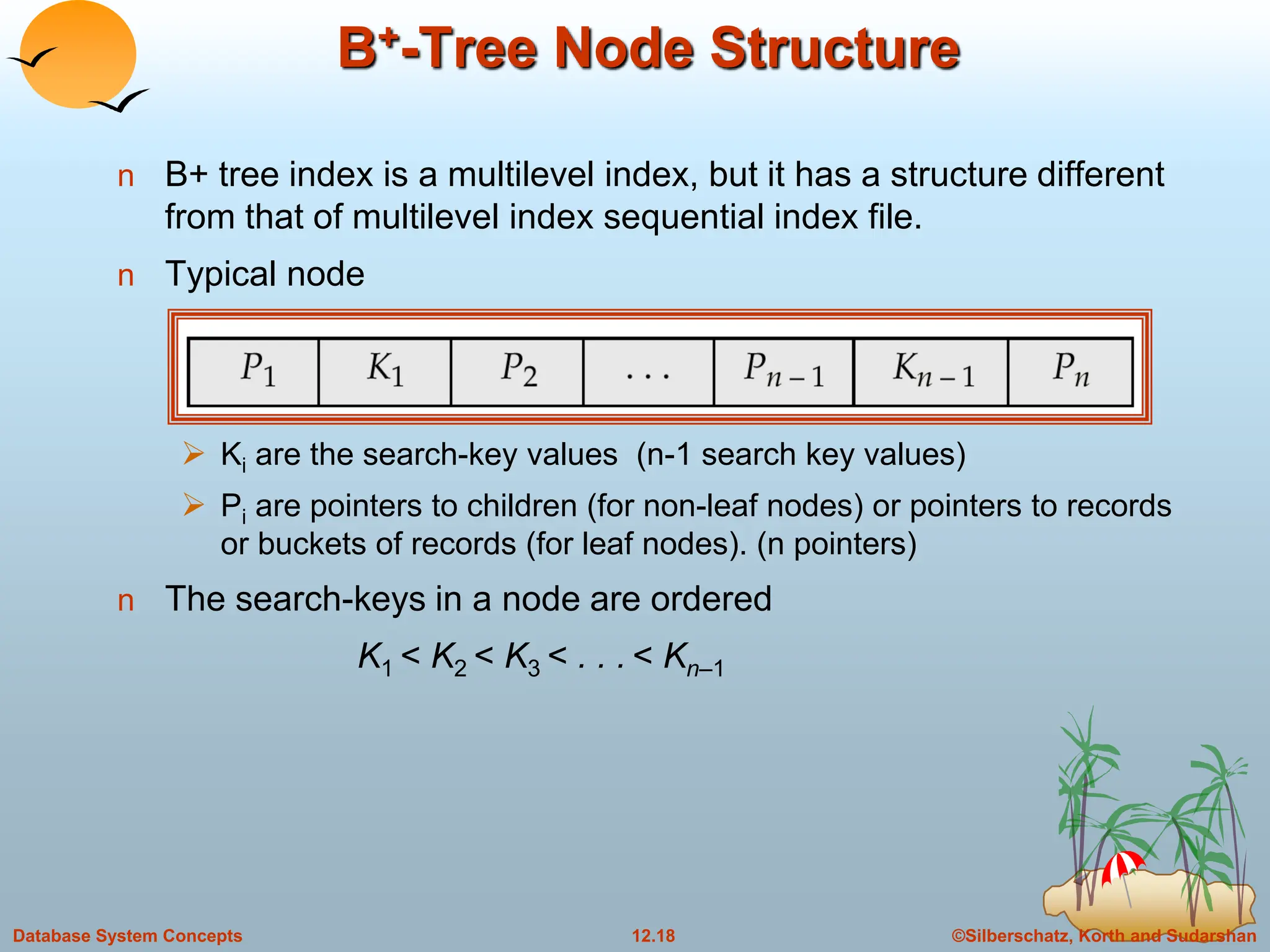
n Typical node
 Ki are the search-key values (n-1 search key values)
 Pi are pointers to children (for non-leaf nodes) or pointers to records
or buckets of records (for leaf nodes). (n pointers)
n The search-keys in a node are ordered
K1 < K2 < K3 < . . . < Kn–1
©Silberschatz, Korth and Sudarshan
12.19
Database System Concepts
Leaf Nodes in B+-Trees
For i = 1, 2, . . ., n–1, pointer Pi either points to a file record with search-
key value Ki, or to a bucket of pointers to file records, each record
having search-key value Ki. Only need bucket structure if search-key
does not form a primary key.
Each leaf can hold up to n-1 values. Leaf can hold as few as [ (n-1)/2]
values. The ranges of values in each leaf do not overlap.
If Li, Lj are leaf nodes and i < j, Li’s search-key values are less than Lj’s
search-key values
Pn points to next leaf node in search-key order
Properties of a leaf node:
©Silberschatz, Korth and Sudarshan
12.20
Database System Concepts
Non-Leaf Nodes in B+-Trees
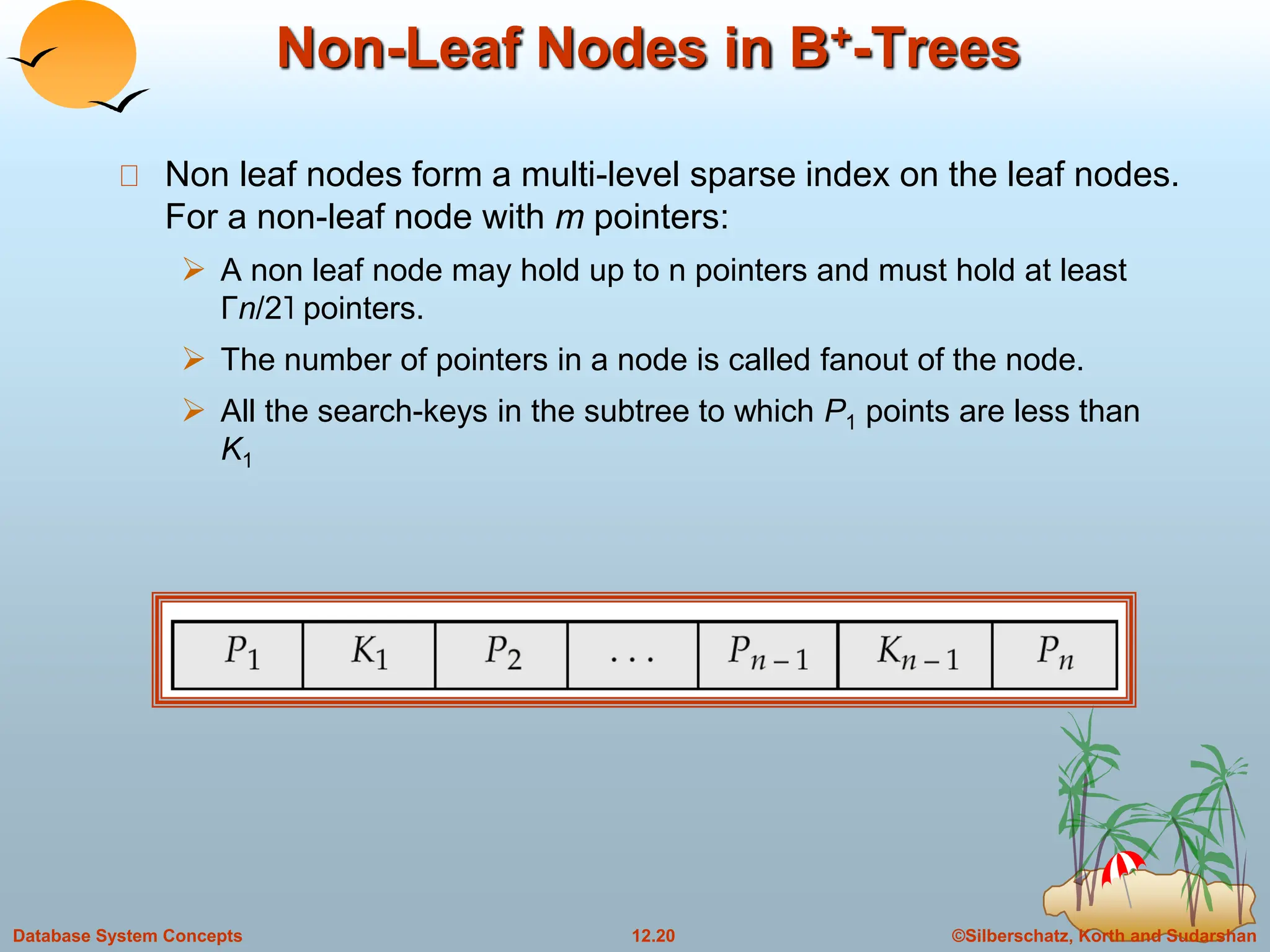
Non leaf nodes form a multi-level sparse index on the leaf nodes.
For a non-leaf node with m pointers:
 A non leaf node may hold up to n pointers and must hold at least
Γn/2˥ pointers.
 The number of pointers in a node is called fanout of the node.
 All the search-keys in the subtree to which P1 points are less than
K1
©Silberschatz, Korth and Sudarshan
12.21
Database System Concepts
Non-Leaf Nodes in B+-Trees
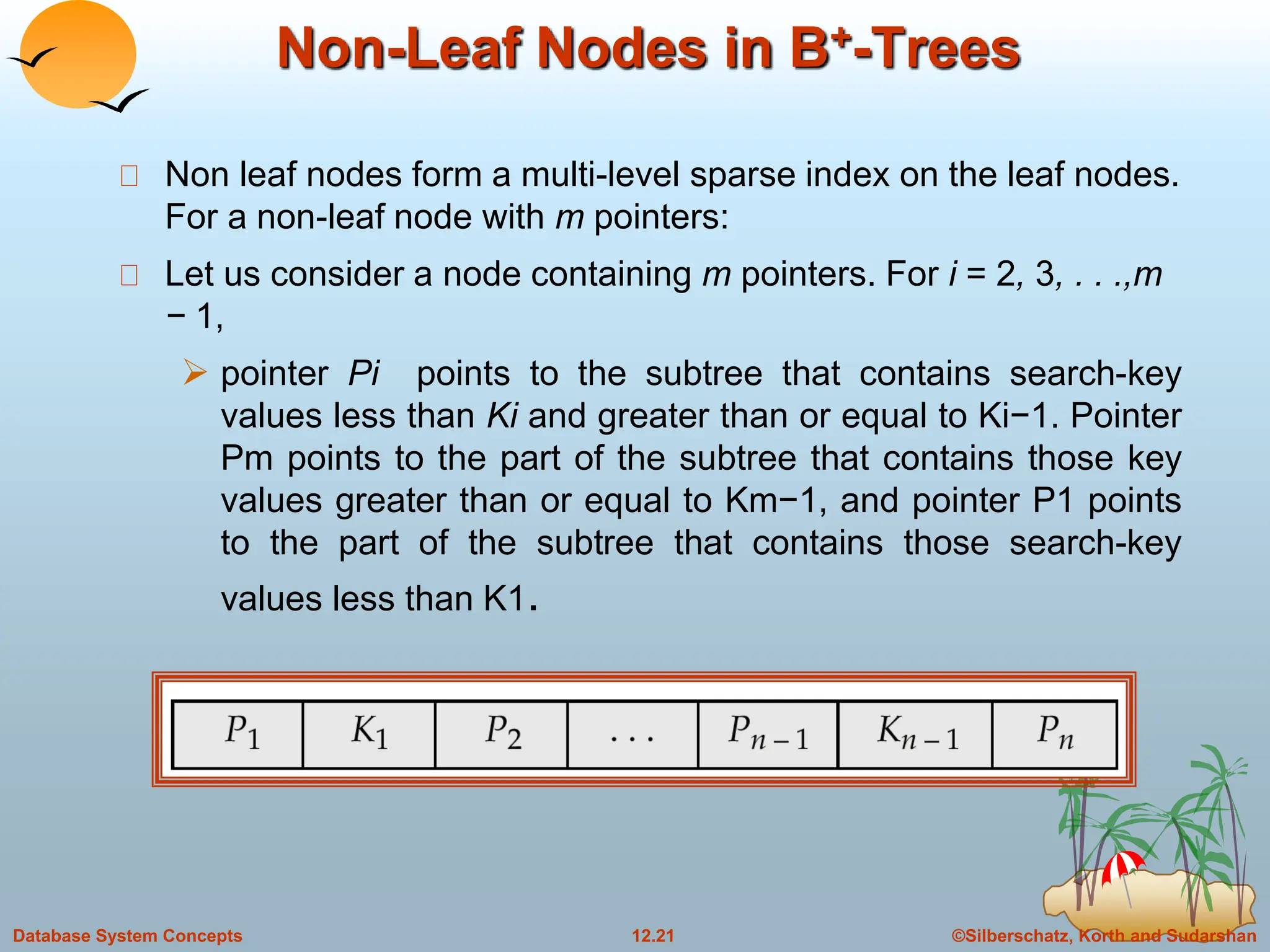
Non leaf nodes form a multi-level sparse index on the leaf nodes.
For a non-leaf node with m pointers:
Let us consider a node containing m pointers. For i = 2, 3, . . .,m
− 1,
 pointer Pi points to the subtree that contains search-key
values less than Ki and greater than or equal to Ki−1. Pointer
Pm points to the part of the subtree that contains those key
values greater than or equal to Km−1, and pointer P1 points
to the part of the subtree that contains those search-key
values less than K1.
©Silberschatz, Korth and Sudarshan
12.22
Database System Concepts
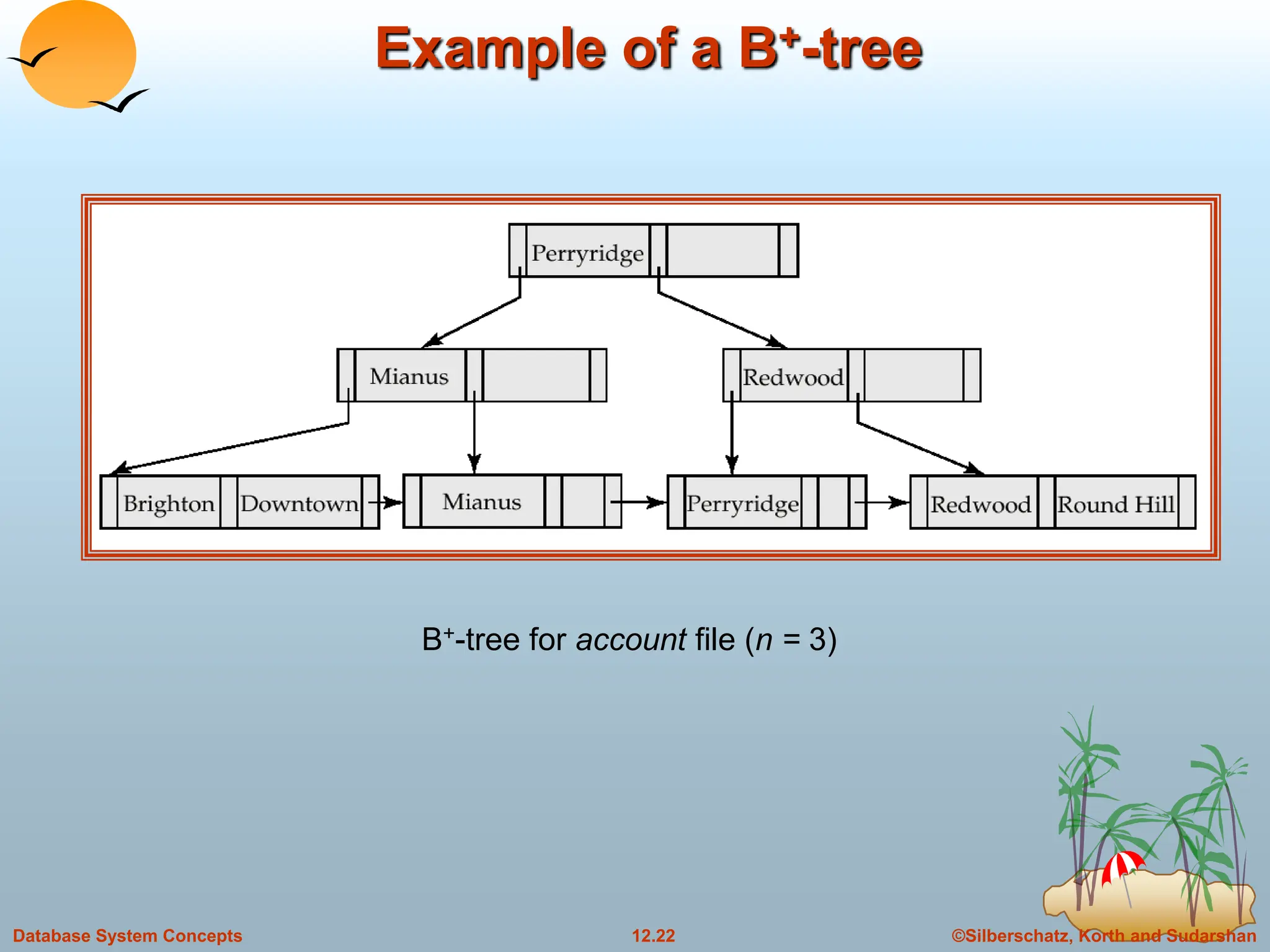
Example of a B+-tree
B+-tree for account file (n = 3)
©Silberschatz, Korth and Sudarshan
12.23
Database System Concepts
Example of B+-tree
Leaf nodes must have between 2 and 4 values
((n–1)/2 and n –1, with n = 5).
Non-leaf nodes other than root must have between 3
and 5 children ((n/2 and n with n =5).
Root must have at least 2 children fewer than [n/2]
pointers.
B+-tree for account file (n = 5)
©Silberschatz, Korth and Sudarshan
12.24
Database System Concepts
Observations about B+-trees
Since the inter-node connections are done by pointers, “logically”
close blocks need not be “physically” close.
The non-leaf levels of the B+-tree form a hierarchy of sparse
indices.
The B+-tree contains a relatively small number of levels
(logarithmic in the size of the main file), thus searches can be
conducted efficiently.
Insertions and deletions to the main file can be handled
efficiently, as the index can be restructured in logarithmic time
(as we shall see).
©Silberschatz, Korth and Sudarshan
12.25
Database System Concepts
Updates on B+-Trees: Insertion
1. Find the leaf node in which the search-key value would appear
2. If the search-key value is already present in the leaf node
1. Add record to the file
2. If necessary add a pointer to the bucket.
3. If the search-key value is not present, then
1. add the record to the main file (and create a bucket if
necessary)
2. If there is room in the leaf node, insert (key-value, pointer)
pair in the leaf node
3. Otherwise, split the node (along with the new (key-value,
pointer) entry) as discussed in the next slide.
©Silberschatz, Korth and Sudarshan
12.26
Database System Concepts
Updates on B+-Trees: Insertion (Cont.)
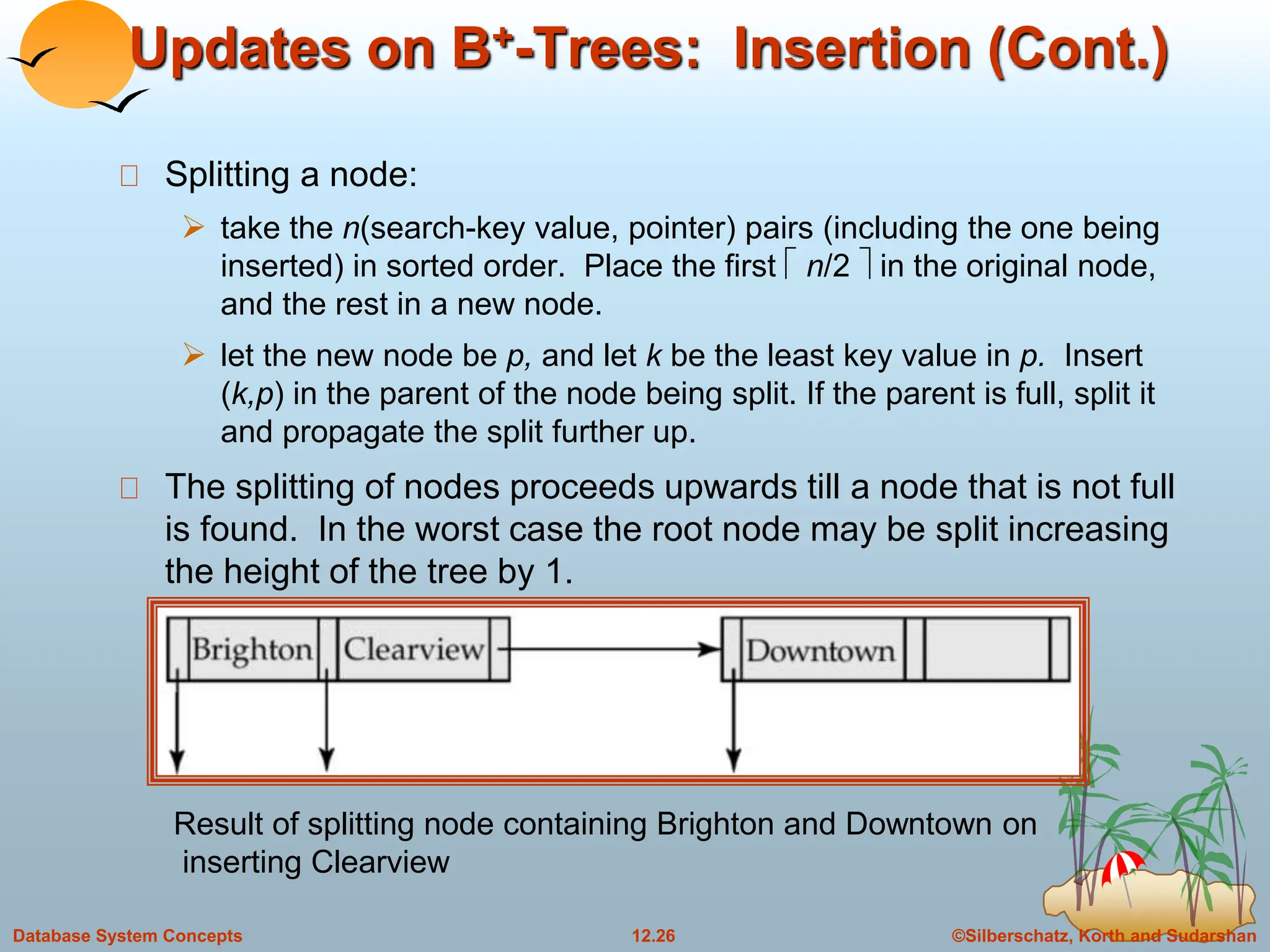
Splitting a node:
 take the n(search-key value, pointer) pairs (including the one being
inserted) in sorted order. Place the first  n/2  in the original node,
and the rest in a new node.
 let the new node be p, and let k be the least key value in p. Insert
(k,p) in the parent of the node being split. If the parent is full, split it
and propagate the split further up.
The splitting of nodes proceeds upwards till a node that is not full
is found. In the worst case the root node may be split increasing
the height of the tree by 1.
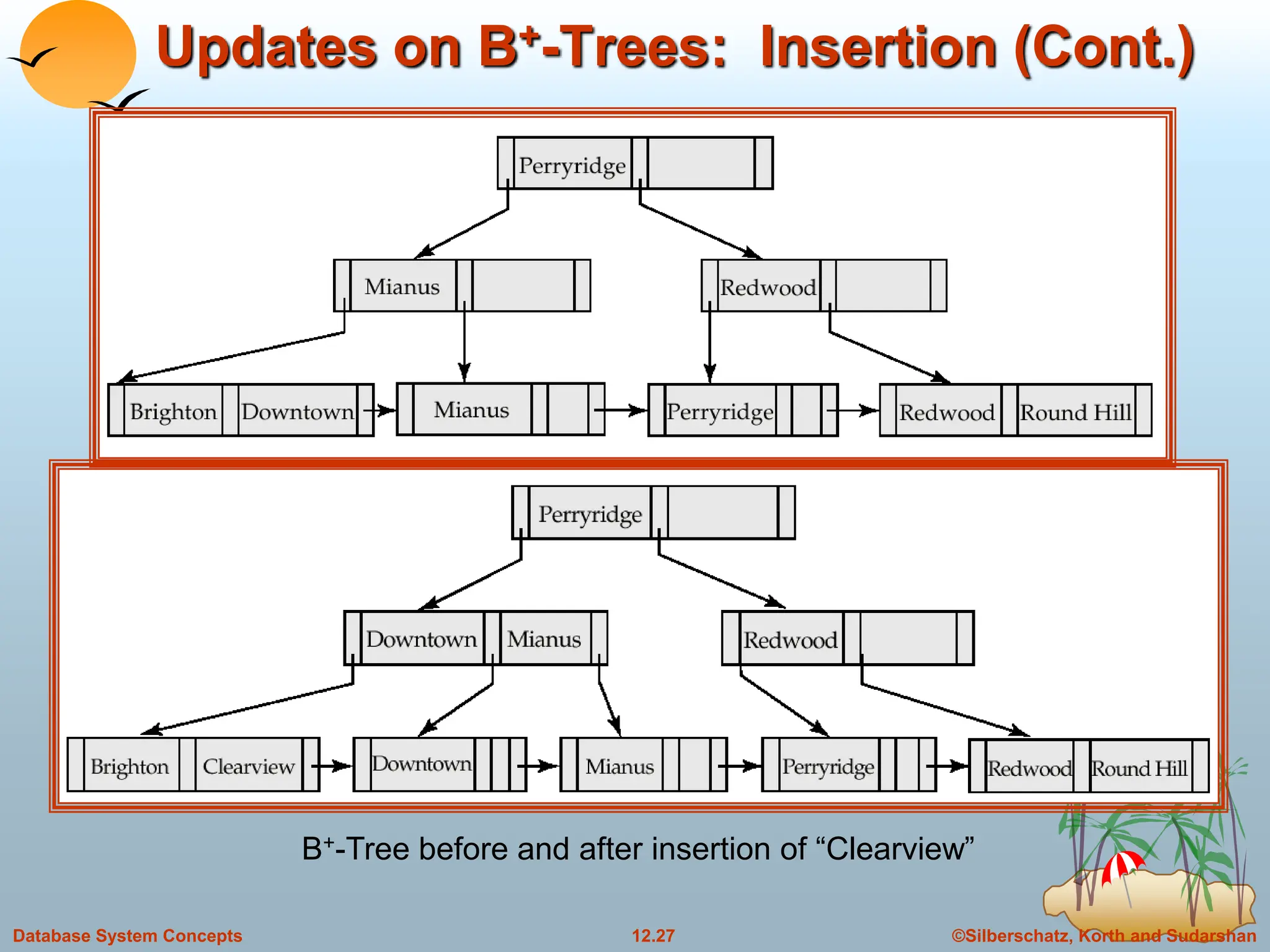
Result of splitting node containing Brighton and Downtown on
inserting Clearview
©Silberschatz, Korth and Sudarshan
12.27
Database System Concepts
Updates on B+-Trees: Insertion (Cont.)
B+-Tree before and after insertion of “Clearview”
©Silberschatz, Korth and Sudarshan
12.28
Database System Concepts
B+-Tree Insertion
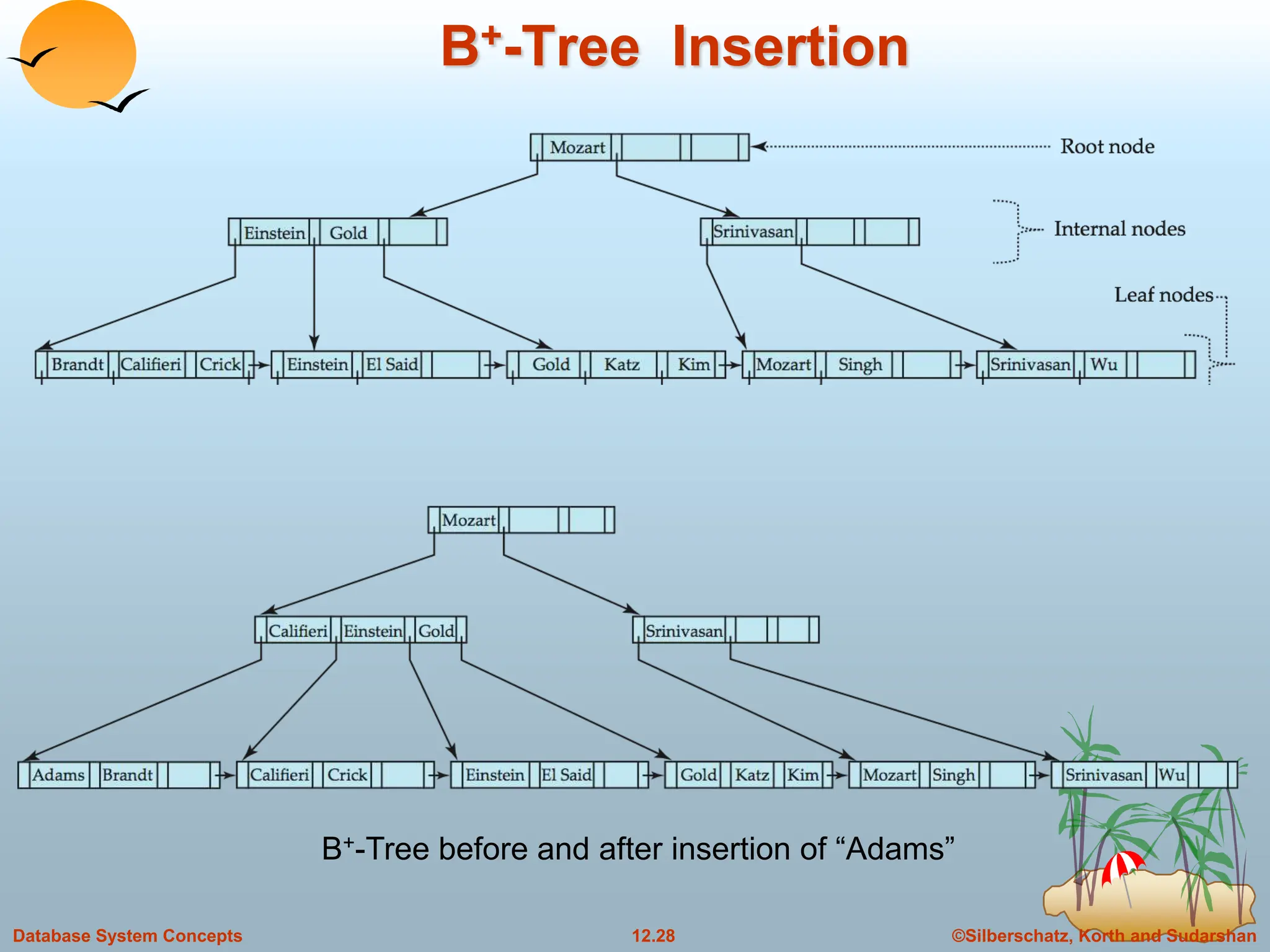
B+-Tree before and after insertion of “Adams”
©Silberschatz, Korth and Sudarshan
12.29
Database System Concepts
B+-Tree Insertion
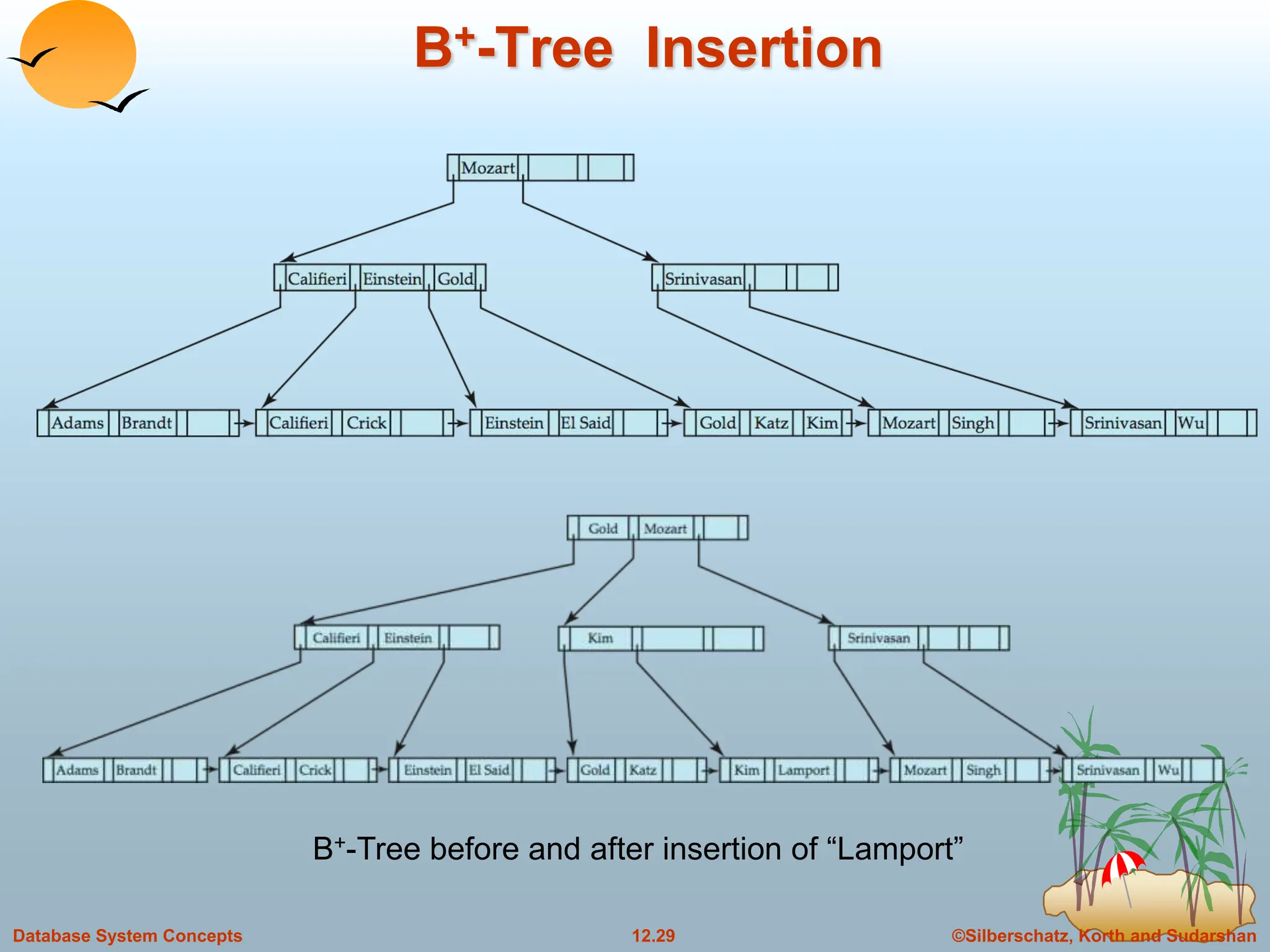
B+-Tree before and after insertion of “Lamport”
©Silberschatz, Korth and Sudarshan
12.30
Database System Concepts
B+-Tree File Organization
Index file degradation problem is solved by using B+-Tree indices.
Data file degradation problem is solved by using B+-Tree File
Organization.
The leaf nodes in a B+-tree file organization store records, instead of
pointers.
Since records are larger than pointers, the maximum number of
records that can be stored in a leaf node is less than the number of
pointers in a nonleaf node.
Leaf nodes are still required to be half full.
Insertion and deletion are handled in the same way as insertion and
deletion of entries in a B+-tree index.
©Silberschatz, Korth and Sudarshan
12.31
Database System Concepts
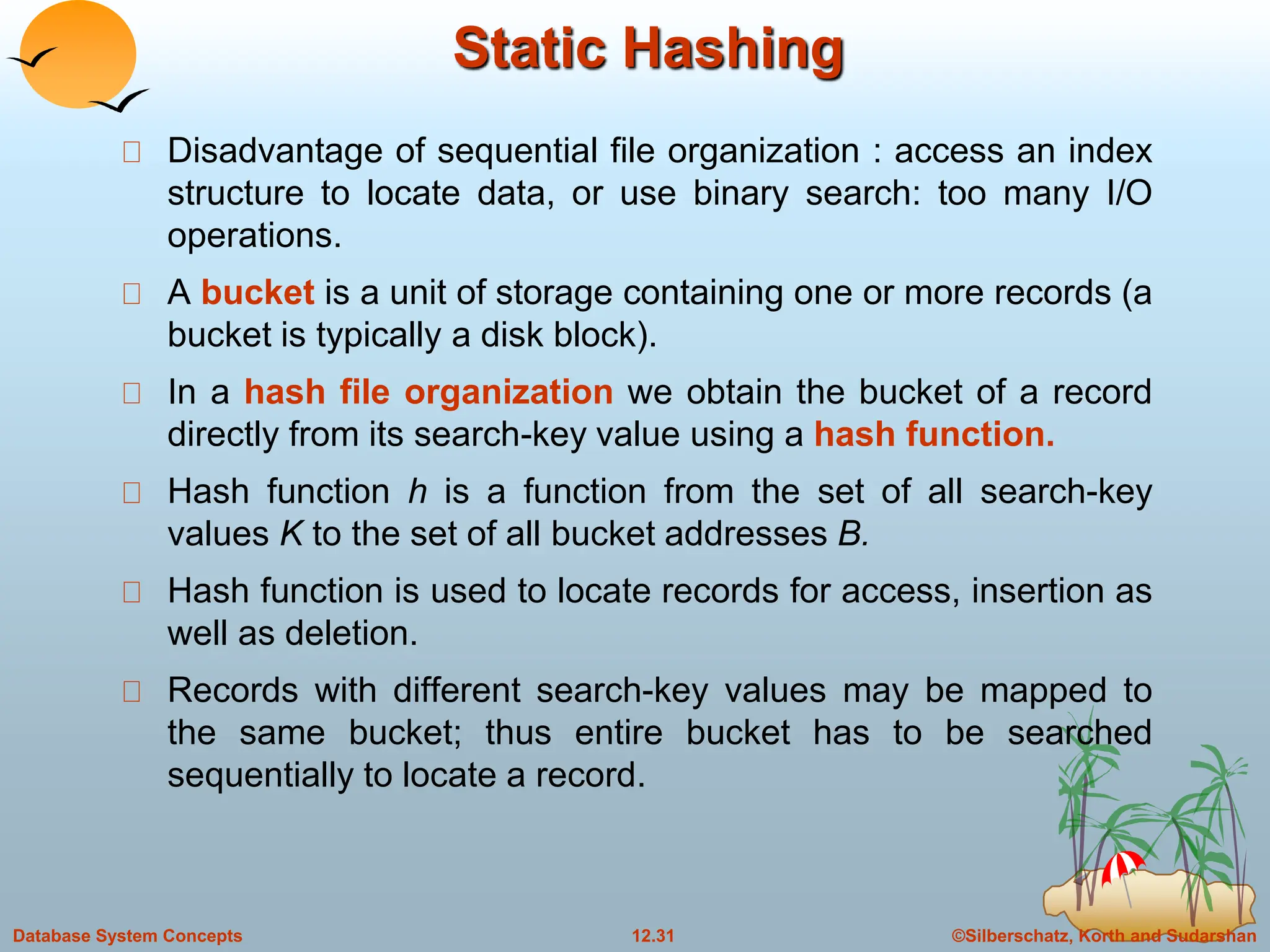
Static Hashing
Disadvantage of sequential file organization : access an index
structure to locate data, or use binary search: too many I/O
operations.
A bucket is a unit of storage containing one or more records (a
bucket is typically a disk block).
In a hash file organization we obtain the bucket of a record
directly from its search-key value using a hash function.
Hash function h is a function from the set of all search-key
values K to the set of all bucket addresses B.
Hash function is used to locate records for access, insertion as
well as deletion.
Records with different search-key values may be mapped to
the same bucket; thus entire bucket has to be searched
sequentially to locate a record.
©Silberschatz, Korth and Sudarshan
12.32
Database System Concepts
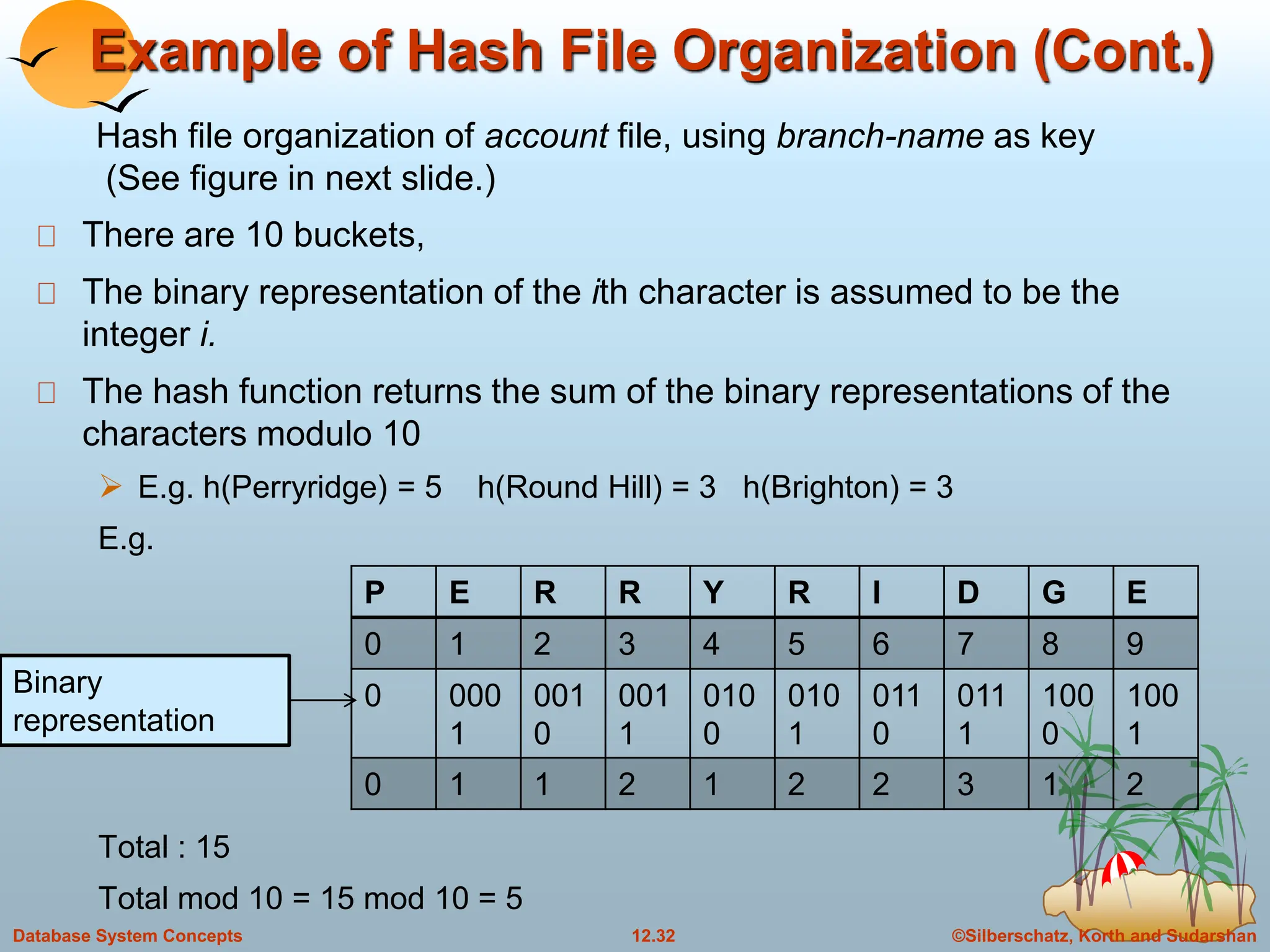
Example of Hash File Organization (Cont.)
There are 10 buckets,
The binary representation of the ith character is assumed to be the
integer i.
The hash function returns the sum of the binary representations of the
characters modulo 10
 E.g. h(Perryridge) = 5 h(Round Hill) = 3 h(Brighton) = 3
E.g.
Total : 15
Total mod 10 = 15 mod 10 = 5
Hash file organization of account file, using branch-name as key
(See figure in next slide.)
P E R R Y R I D G E
0 1 2 3 4 5 6 7 8 9
0 000
1
001
0
001
1
010
0
010
1
011
0
011
1
100
0
100
1
0 1 1 2 1 2 2 3 1 2
Binary
representation
©Silberschatz, Korth and Sudarshan
12.33
Database System Concepts
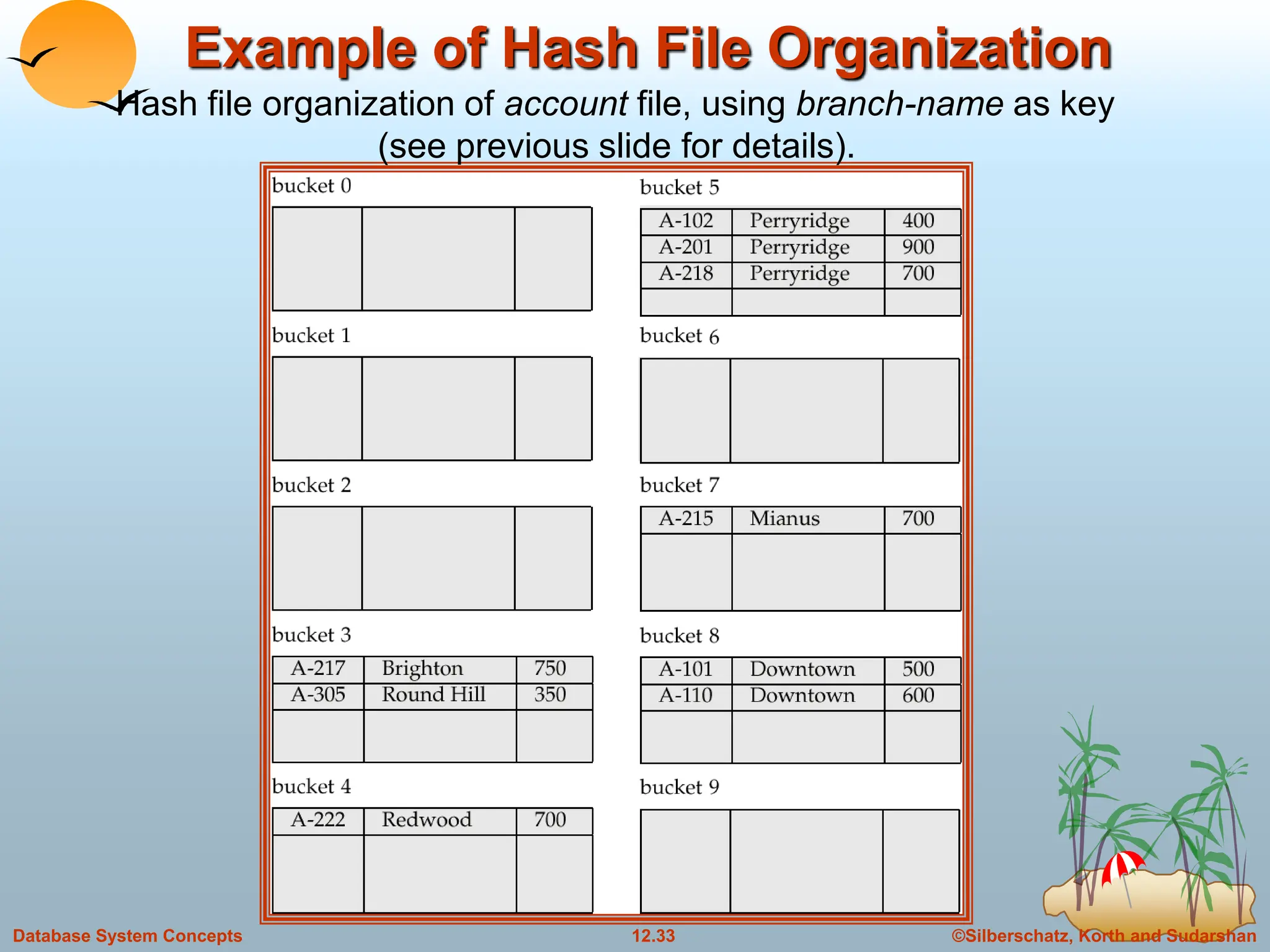
Example of Hash File Organization
Hash file organization of account file, using branch-name as key
(see previous slide for details).
©Silberschatz, Korth and Sudarshan
12.34
Database System Concepts
Hash Functions
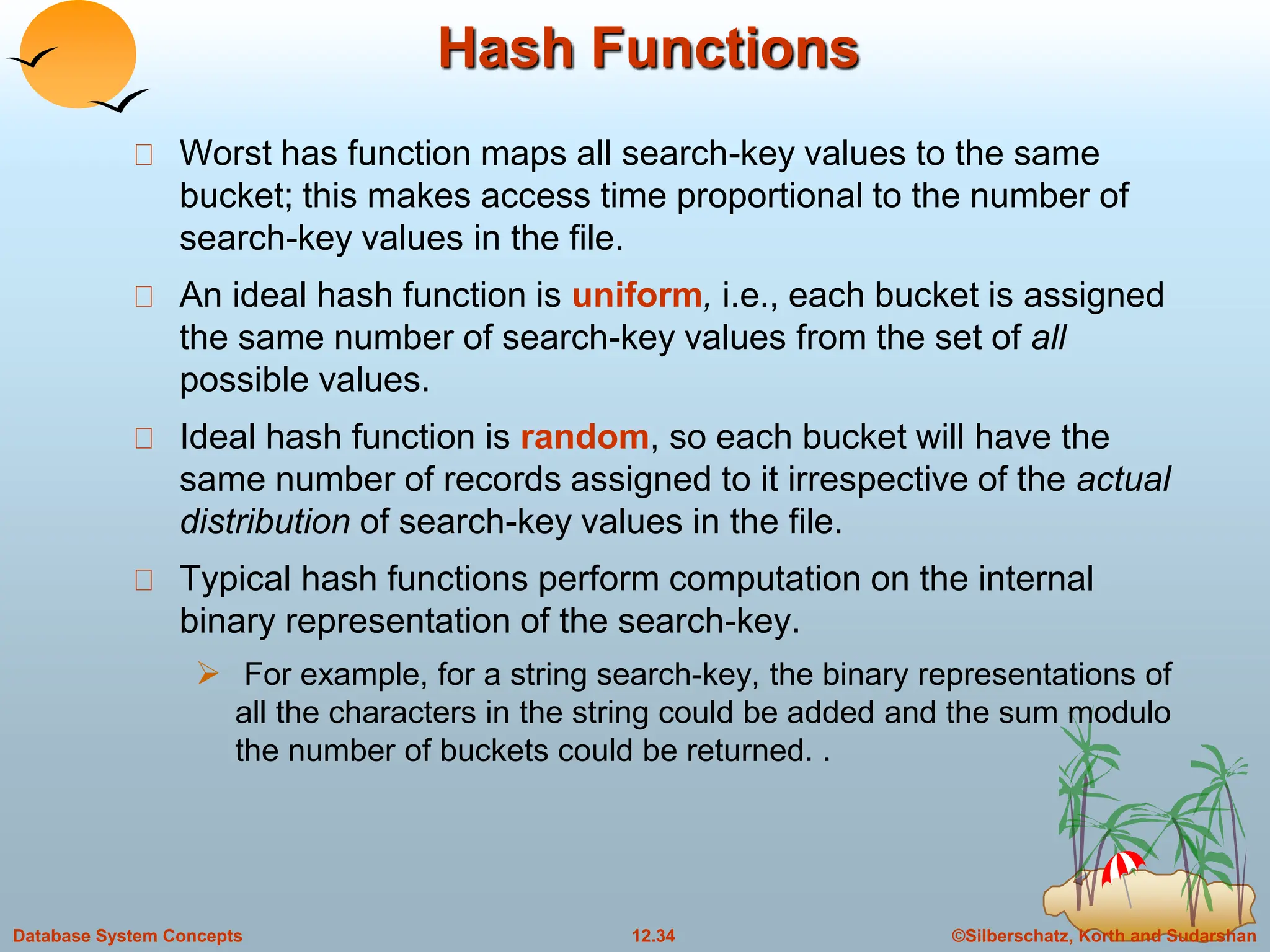
Worst has function maps all search-key values to the same
bucket; this makes access time proportional to the number of
search-key values in the file.
An ideal hash function is uniform, i.e., each bucket is assigned
the same number of search-key values from the set of all
possible values.
Ideal hash function is random, so each bucket will have the
same number of records assigned to it irrespective of the actual
distribution of search-key values in the file.
Typical hash functions perform computation on the internal
binary representation of the search-key.
 For example, for a string search-key, the binary representations of
all the characters in the string could be added and the sum modulo
the number of buckets could be returned. .
©Silberschatz, Korth and Sudarshan
12.35
Database System Concepts
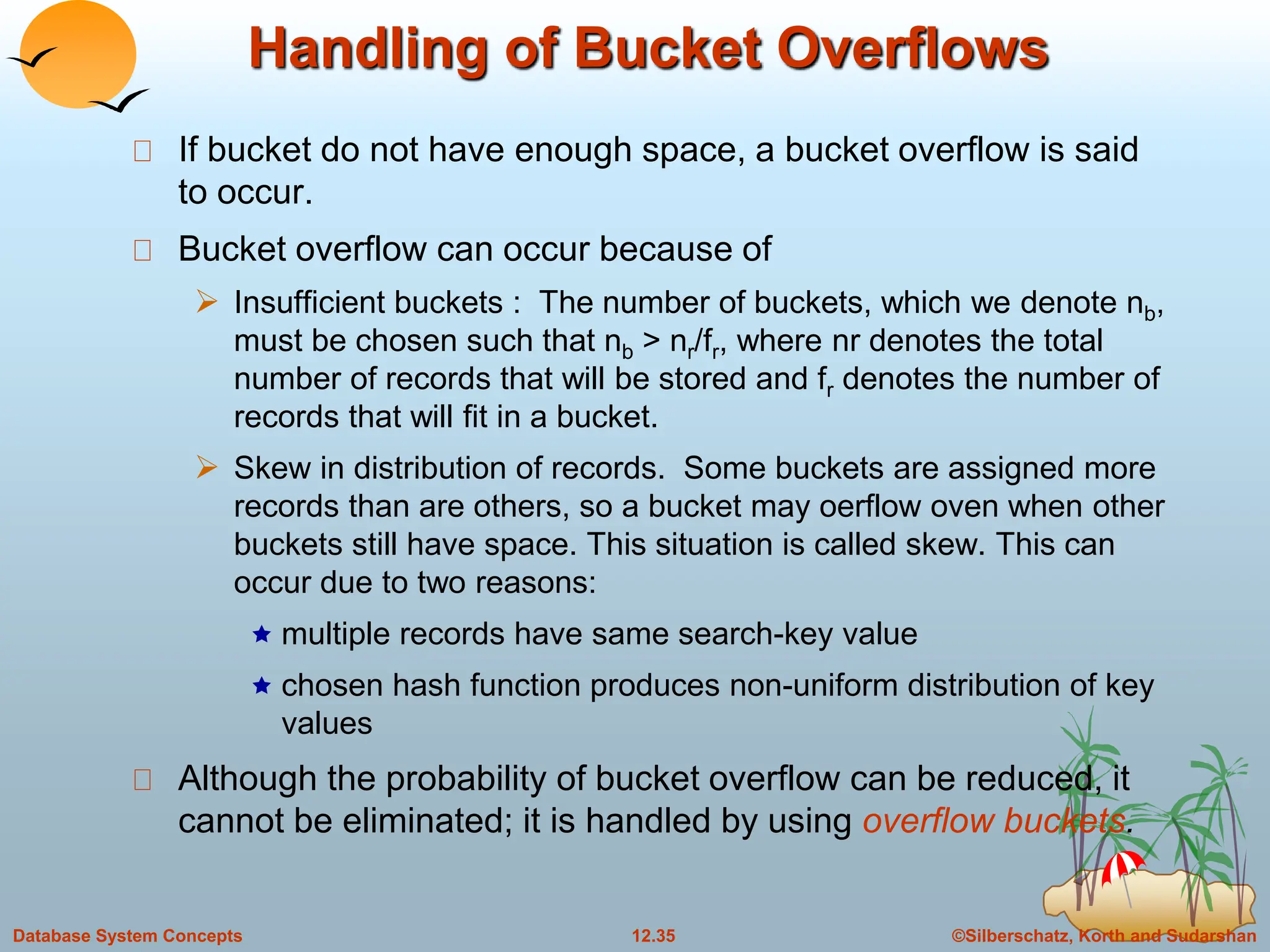
Handling of Bucket Overflows
If bucket do not have enough space, a bucket overflow is said
to occur.
Bucket overflow can occur because of
 Insufficient buckets : The number of buckets, which we denote nb,
must be chosen such that nb > nr/fr, where nr denotes the total
number of records that will be stored and fr denotes the number of
records that will fit in a bucket.
 Skew in distribution of records. Some buckets are assigned more
records than are others, so a bucket may oerflow oven when other
buckets still have space. This situation is called skew. This can
occur due to two reasons:
 multiple records have same search-key value
 chosen hash function produces non-uniform distribution of key
values
Although the probability of bucket overflow can be reduced, it
cannot be eliminated; it is handled by using overflow buckets.
©Silberschatz, Korth and Sudarshan
12.36
Database System Concepts
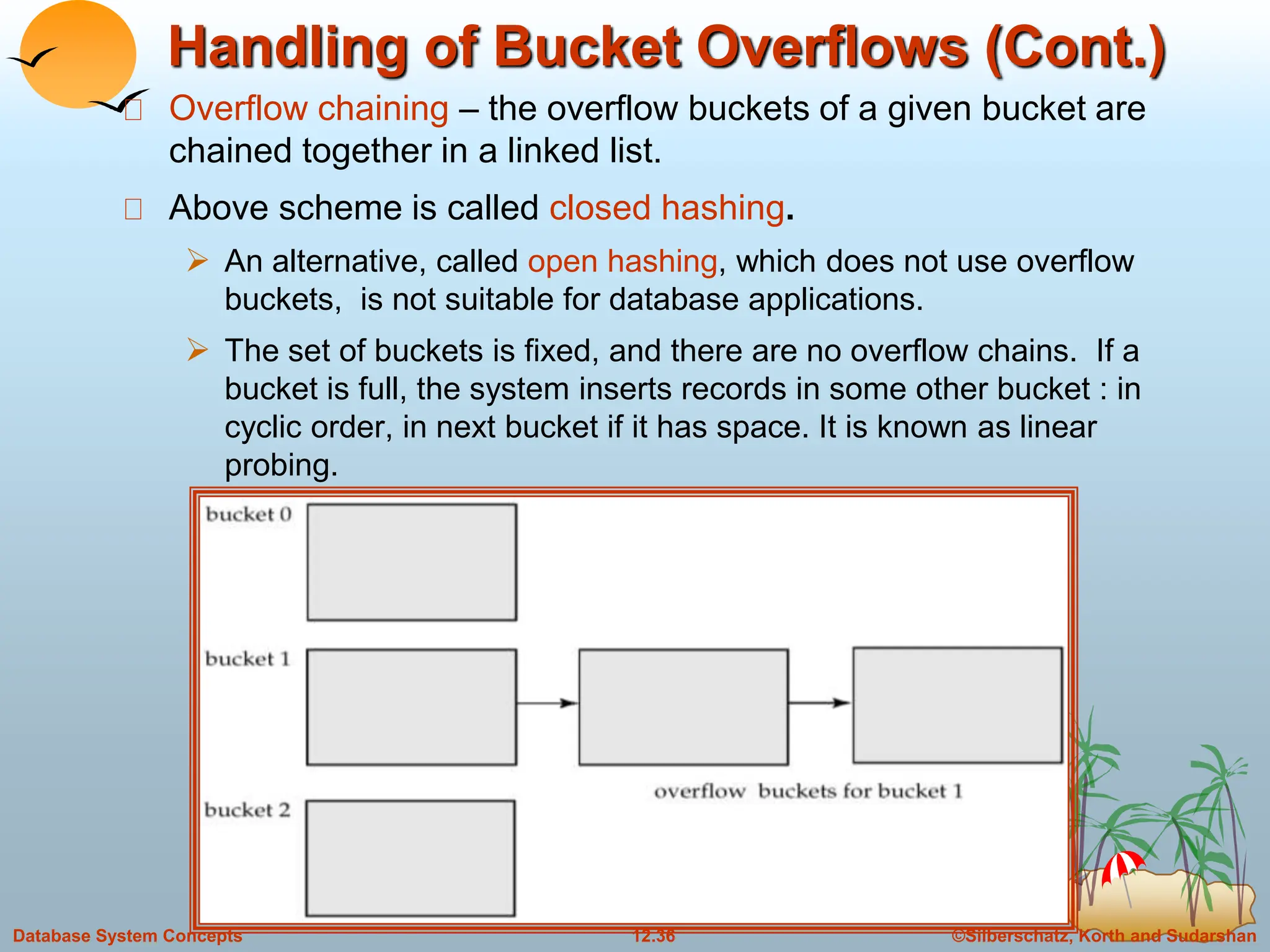
Handling of Bucket Overflows (Cont.)
Overflow chaining – the overflow buckets of a given bucket are
chained together in a linked list.
Above scheme is called closed hashing.
 An alternative, called open hashing, which does not use overflow
buckets, is not suitable for database applications.
 The set of buckets is fixed, and there are no overflow chains. If a
bucket is full, the system inserts records in some other bucket : in
cyclic order, in next bucket if it has space. It is known as linear
probing.
©Silberschatz, Korth and Sudarshan
12.37
Database System Concepts
Hash Indices
Hashing can be used not only for file organization, but also for
index-structure creation.
A hash index organizes the search keys, with their associated
record pointers, into a hash file structure.
We apply a hash function on a search key to identify a bucket,
and store the key and its associated pointers in the bucket (or in
overflow bucket)
Strictly speaking, hash indices are always secondary indices
 if the file itself is organized using hashing, a separate primary hash
index on it using the same search-key is unnecessary.
 However, we use the term hash index to refer to both secondary
index structures and hash organized files.
©Silberschatz, Korth and Sudarshan
12.38
Database System Concepts
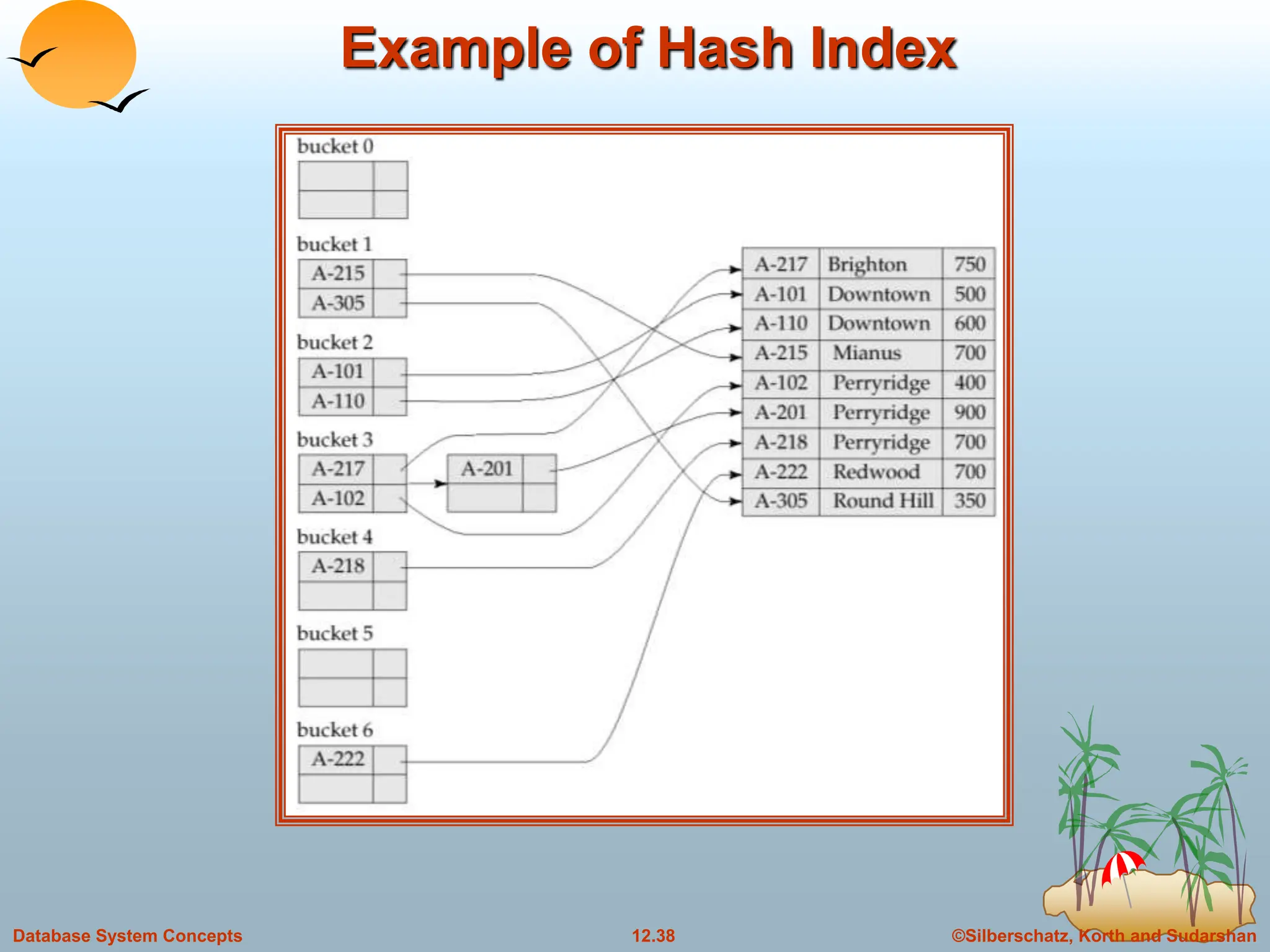
Example of Hash Index
©Silberschatz, Korth and Sudarshan
12.39
Database System Concepts
Deficiencies of Static Hashing
In static hashing, function h maps search-key values to a fixed
set of B of bucket addresses.
 Databases grow with time. If initial number of buckets is too small,
performance will degrade due to too much overflows.
 If file size at some point in the future is anticipated and number of
buckets allocated accordingly, significant amount of space will be
wasted initially.
 If database shrinks, again space will be wasted.
 One option is periodic re-organization of the file with a new hash
function, but it is very expensive.
These problems can be avoided by using techniques that allow
the number of buckets to be modified dynamically.
©Silberschatz, Korth and Sudarshan
12.40
Database System Concepts
Dynamic Hashing
Good for database that grows and shrinks in size
Allows the hash function to be modified dynamically
Extendable hashing – Copes with changes in database size by
splitting an coalescing buckets as the database grows and
shrinks.
As a result space efficiency is retained.
Since the reorganization is performed on only on one bucket at a time,
the resulting performance overhead is acceptably low.
©Silberschatz, Korth and Sudarshan
12.41
Database System Concepts
Extendable Hashing
Extendable hashing – one form of dynamic hashing
Here buckets are created on demand.
 Hash function generates values over a large range — typically b-bit
integers, with b = 32. 232 is 4 billion.
 Use i bits, where 0<=i<=b.
 These i bits are used as an offset into an additional table of bucket
address.
 The value of i grows and shrinks with the size of database.
 Bucket address table size = 2i. Initially i = 0
 Value of i grows and shrinks as the size of the database grows and
shrinks.
 Multiple entries in the bucket address table may point to a bucket.
 Thus, actual number of buckets is < 2i
 The number of buckets also changes dynamically due to coalescing
and splitting of buckets.
©Silberschatz, Korth and Sudarshan
12.42
Database System Concepts
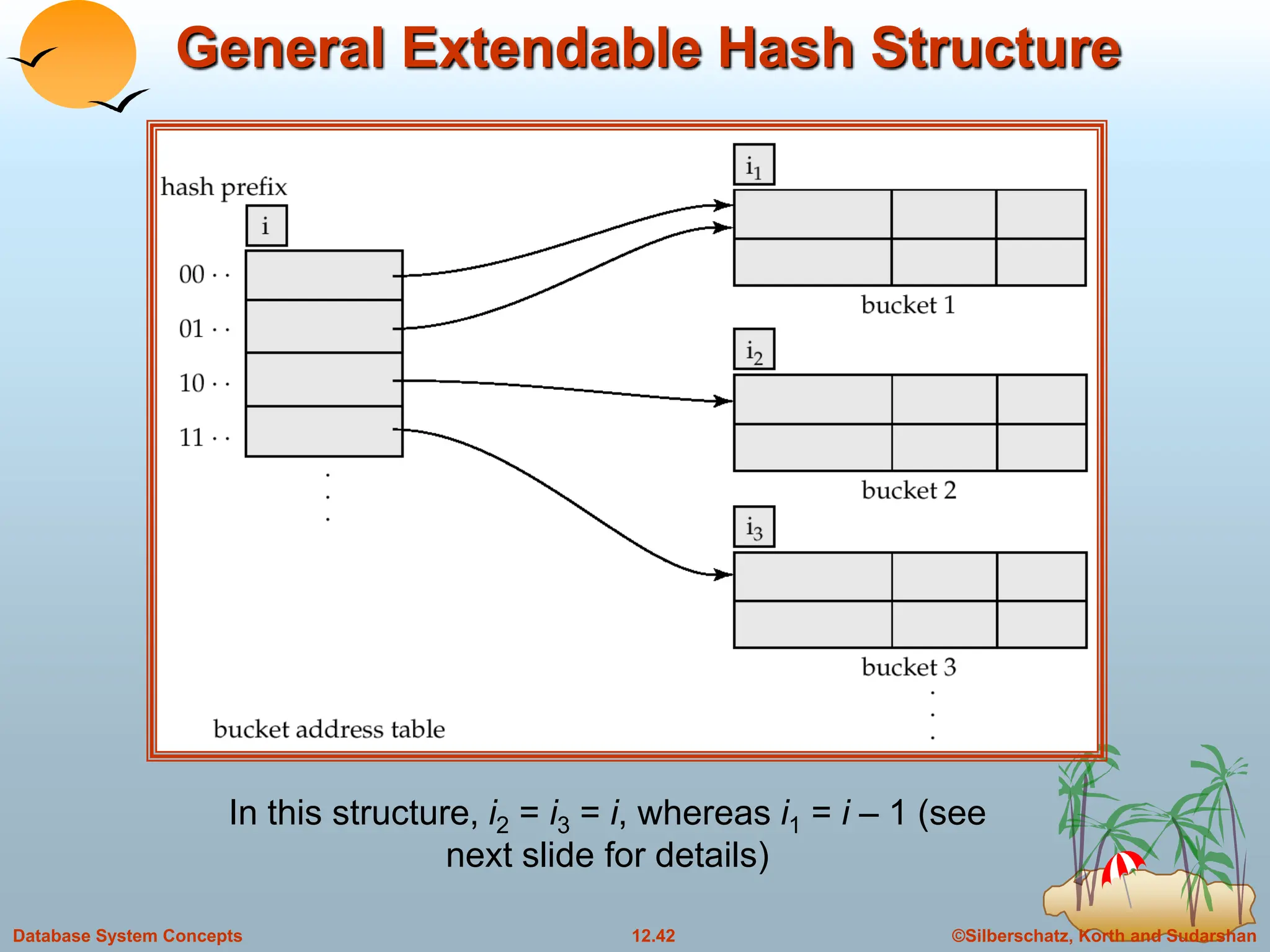
General Extendable Hash Structure
In this structure, i2 = i3 = i, whereas i1 = i – 1 (see
next slide for details)
©Silberschatz, Korth and Sudarshan
12.43
Database System Concepts
Use of Extendable Hash Structure
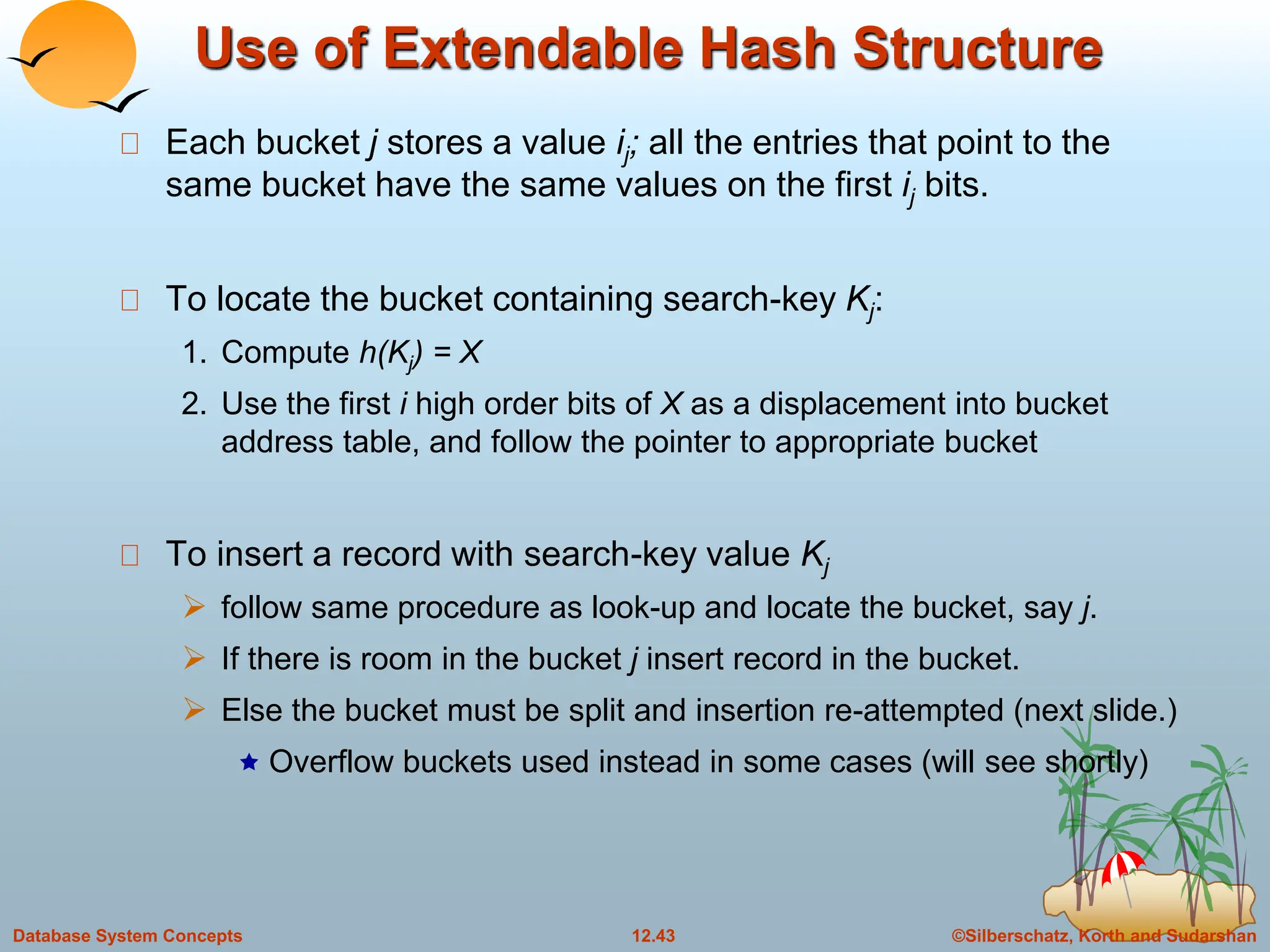
Each bucket j stores a value ij; all the entries that point to the
same bucket have the same values on the first ij bits.
To locate the bucket containing search-key Kj:
1. Compute h(Kj) = X
2. Use the first i high order bits of X as a displacement into bucket
address table, and follow the pointer to appropriate bucket
To insert a record with search-key value Kj
 follow same procedure as look-up and locate the bucket, say j.
 If there is room in the bucket j insert record in the bucket.
 Else the bucket must be split and insertion re-attempted (next slide.)
 Overflow buckets used instead in some cases (will see shortly)
©Silberschatz, Korth and Sudarshan
12.44
Database System Concepts
Updates in Extendable Hash Structure
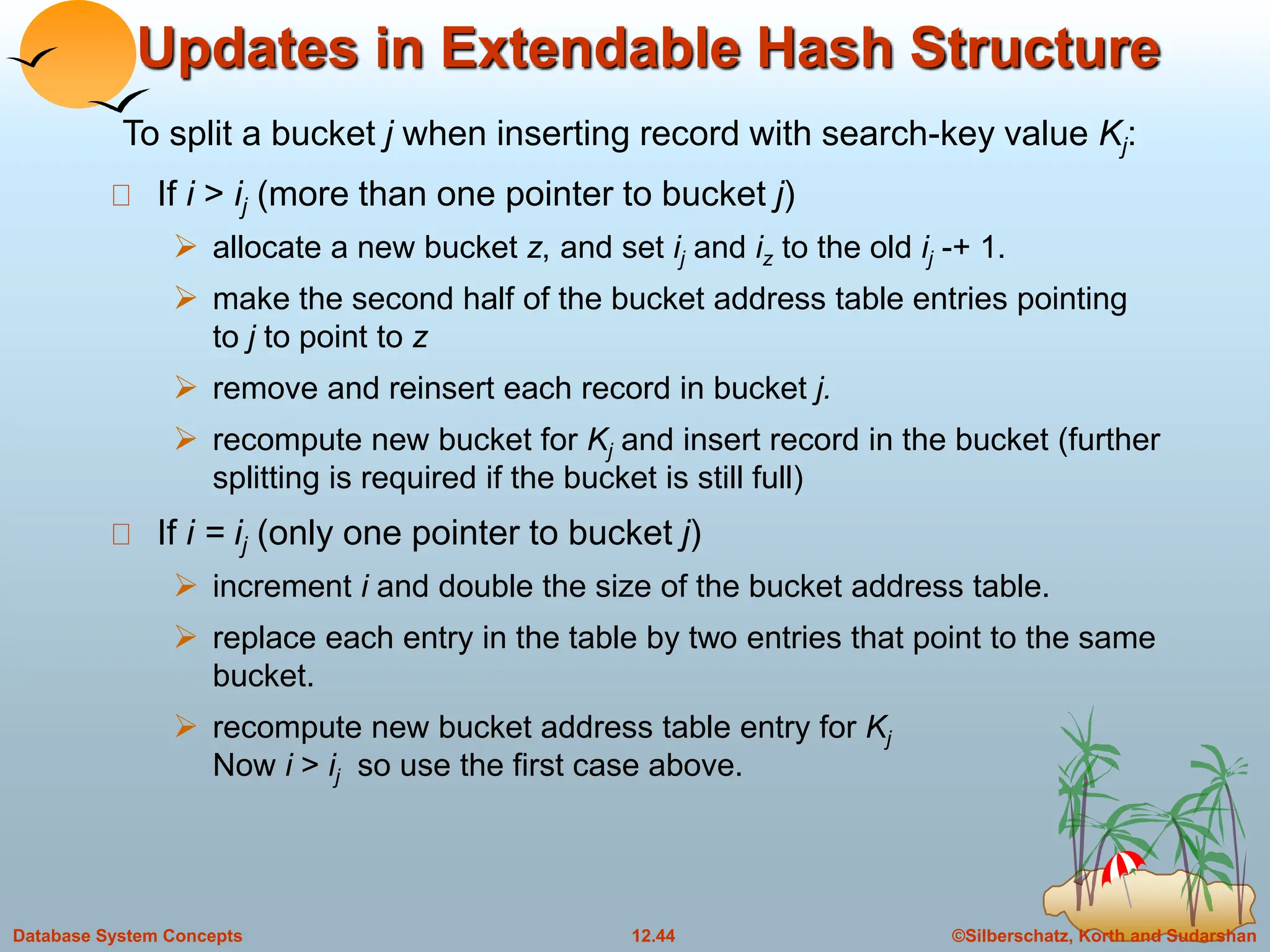
If i > ij (more than one pointer to bucket j)
 allocate a new bucket z, and set ij and iz to the old ij -+ 1.
 make the second half of the bucket address table entries pointing
to j to point to z
 remove and reinsert each record in bucket j.
 recompute new bucket for Kj and insert record in the bucket (further
splitting is required if the bucket is still full)
If i = ij (only one pointer to bucket j)
 increment i and double the size of the bucket address table.
 replace each entry in the table by two entries that point to the same
bucket.
 recompute new bucket address table entry for Kj
Now i > ij so use the first case above.
To split a bucket j when inserting record with search-key value Kj:
©Silberschatz, Korth and Sudarshan
12.45
Database System Concepts
Updates in Extendable Hash Structure
(Cont.)
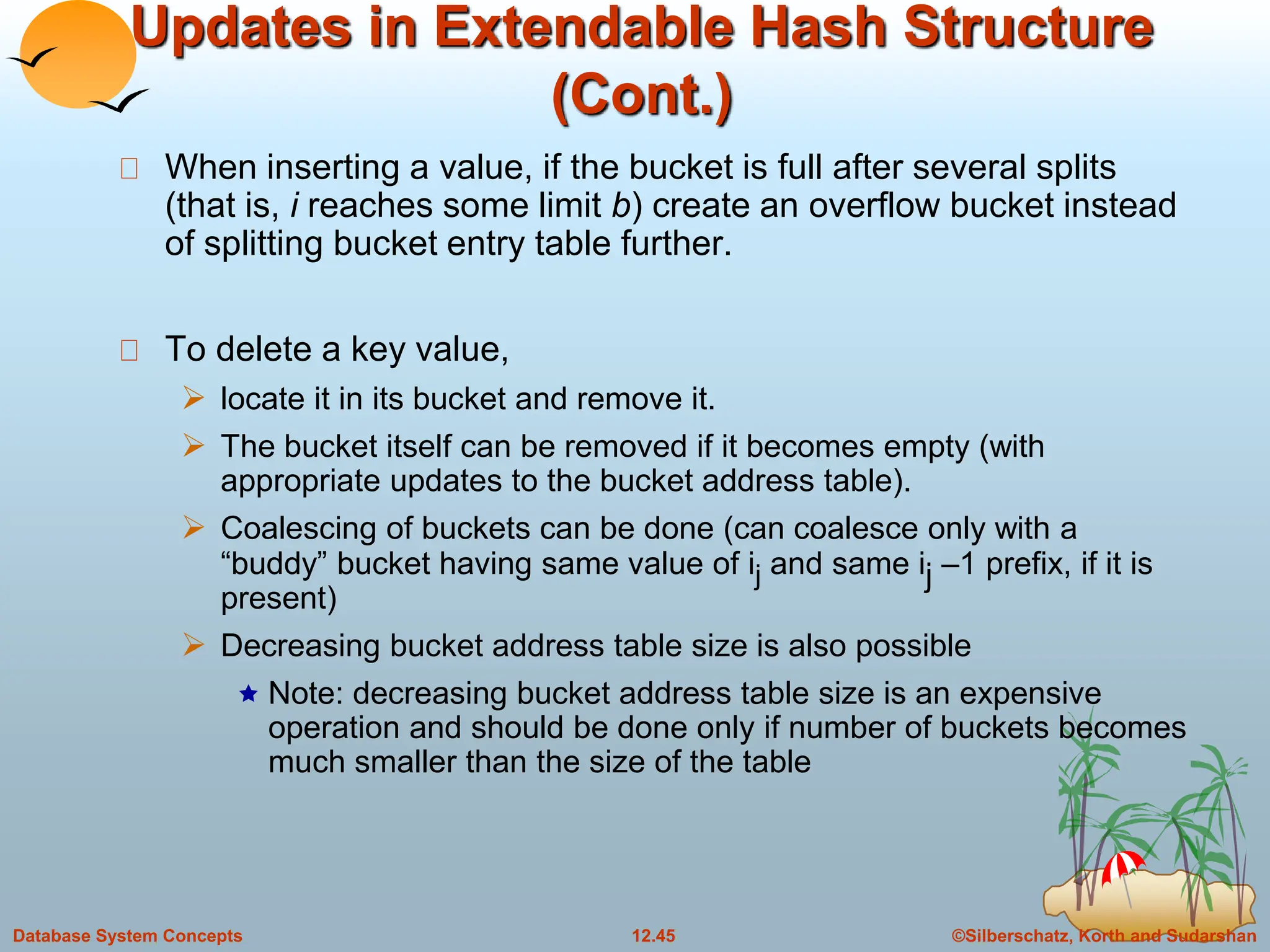
When inserting a value, if the bucket is full after several splits
(that is, i reaches some limit b) create an overflow bucket instead
of splitting bucket entry table further.
To delete a key value,
 locate it in its bucket and remove it.
 The bucket itself can be removed if it becomes empty (with
appropriate updates to the bucket address table).
 Coalescing of buckets can be done (can coalesce only with a
“buddy” bucket having same value of ij and same ij –1 prefix, if it is
present)
 Decreasing bucket address table size is also possible
 Note: decreasing bucket address table size is an expensive
operation and should be done only if number of buckets becomes
much smaller than the size of the table
©Silberschatz, Korth and Sudarshan
12.46
Database System Concepts
Use of Extendable Hash Structure:
Example
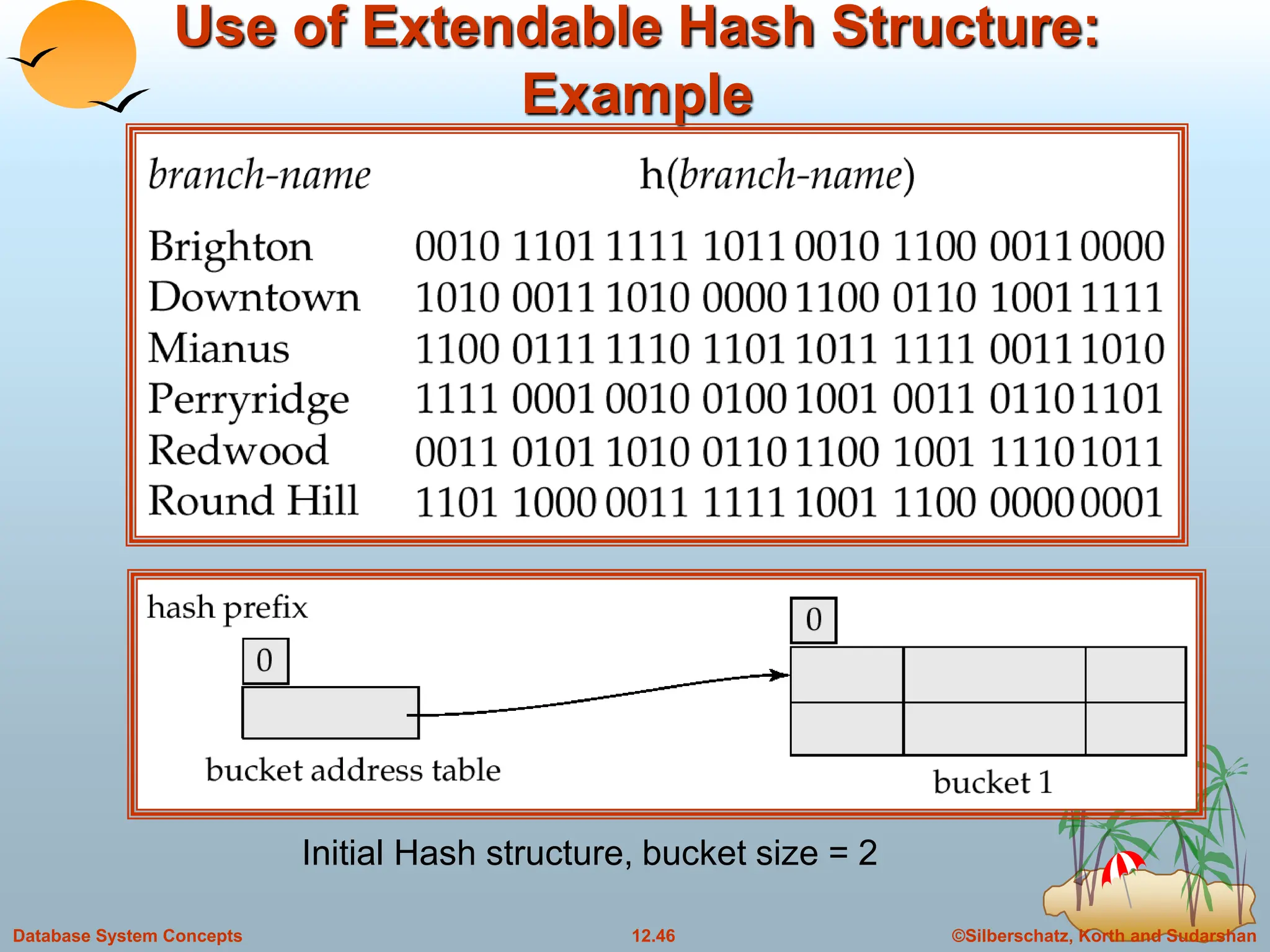
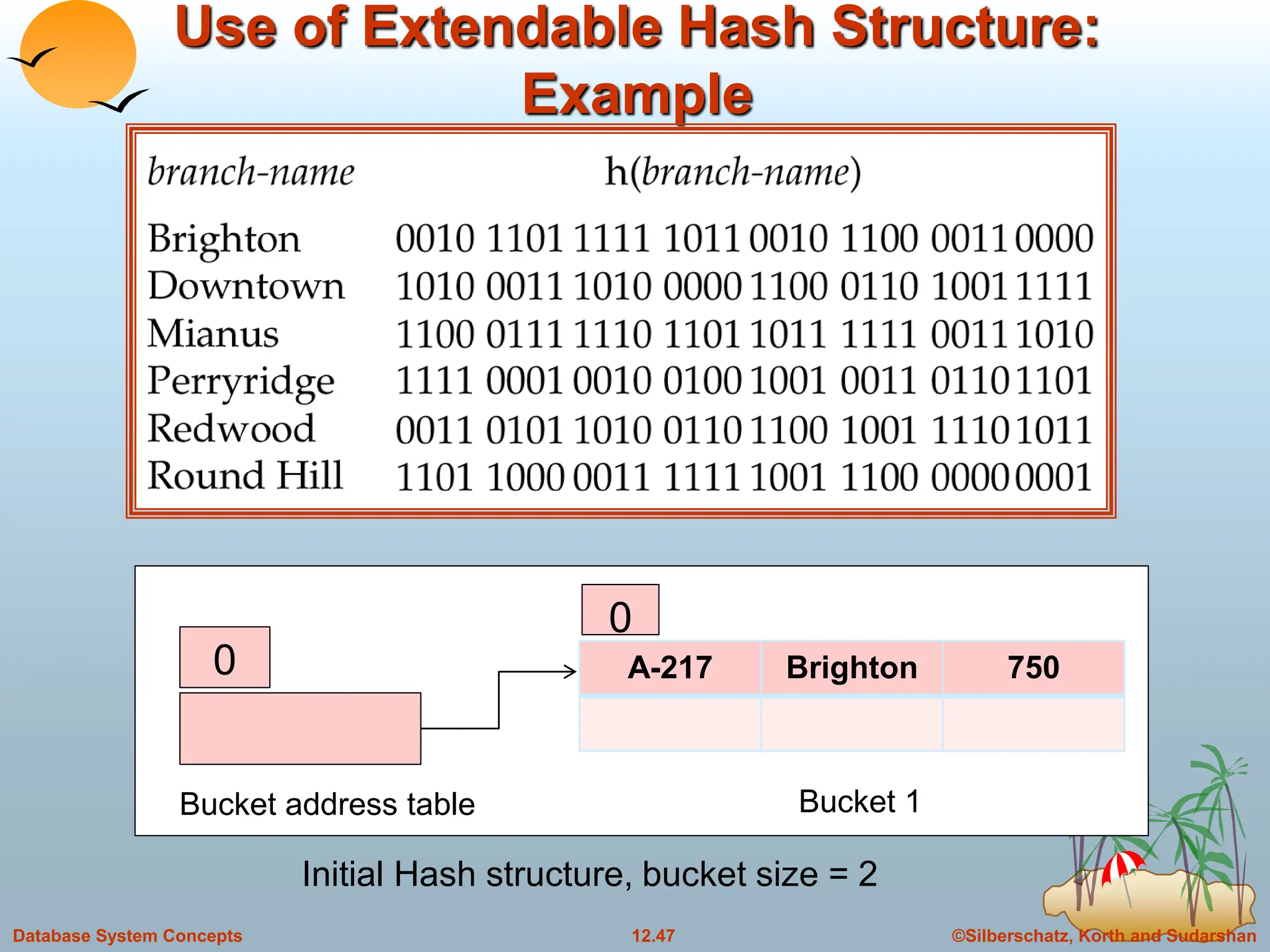
Initial Hash structure, bucket size = 2
©Silberschatz, Korth and Sudarshan
12.47
Database System Concepts
Use of Extendable Hash Structure:
Example
Initial Hash structure, bucket size = 2
0 A-217 Brighton 750
0
Bucket address table Bucket 1
©Silberschatz, Korth and Sudarshan
12.48
Database System Concepts
Use of Extendable Hash Structure:
Example
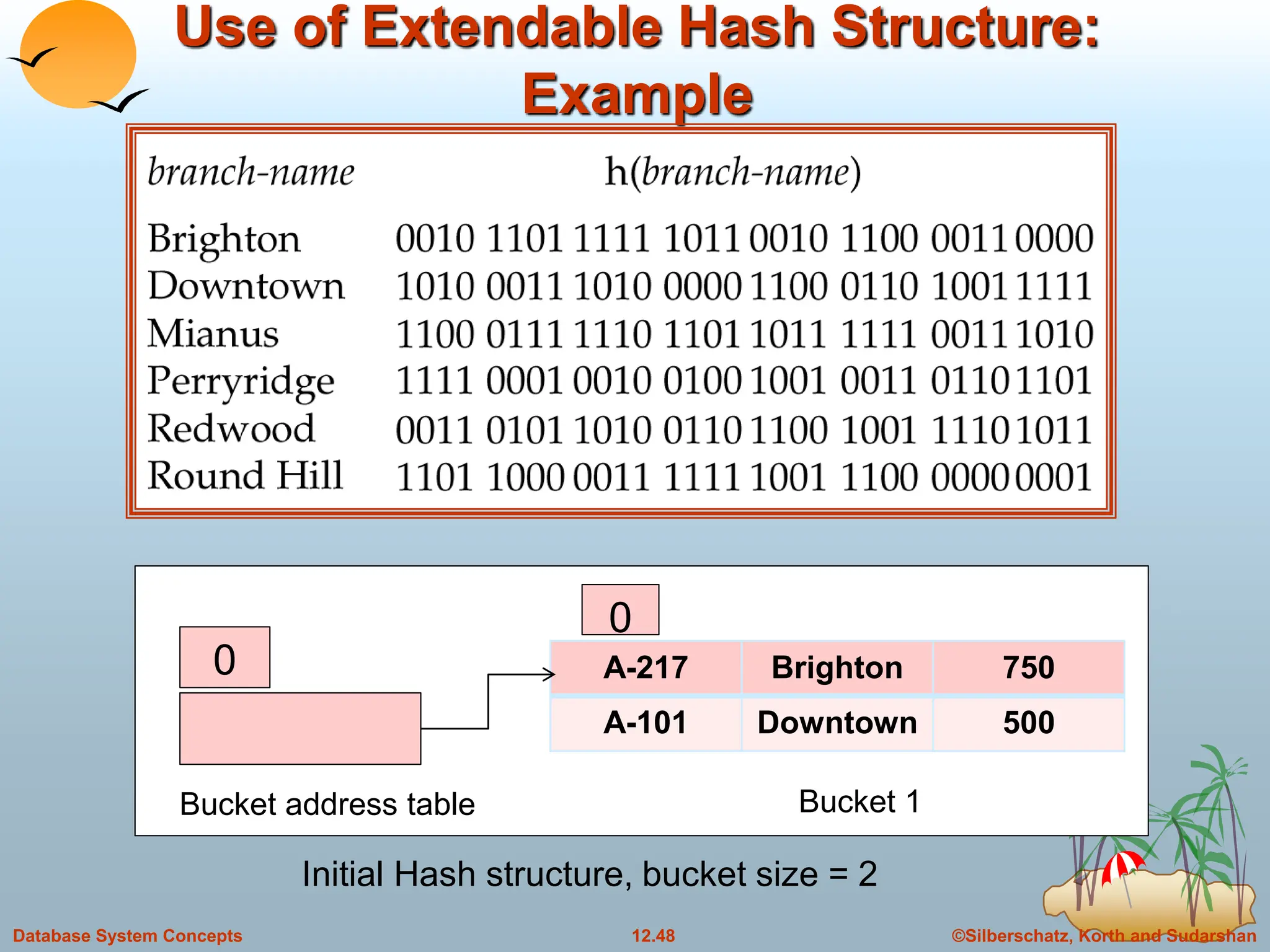
Initial Hash structure, bucket size = 2
0 A-217 Brighton 750
A-101 Downtown 500
0
Bucket address table Bucket 1
©Silberschatz, Korth and Sudarshan
12.49
Database System Concepts
Example (Cont.)
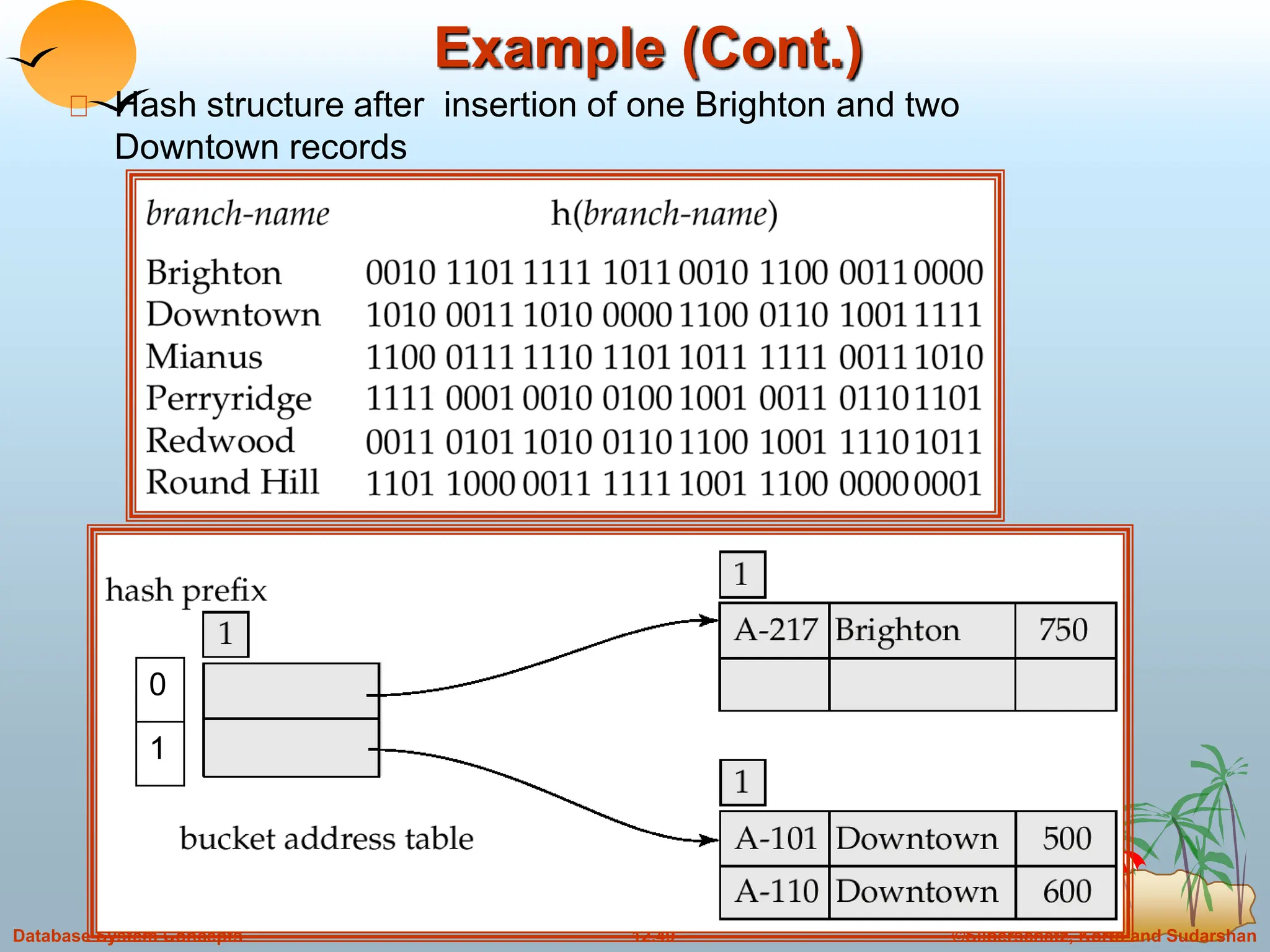
Hash structure after insertion of one Brighton and two
Downtown records
0
1
©Silberschatz, Korth and Sudarshan
12.50
Database System Concepts
Example (Cont.)
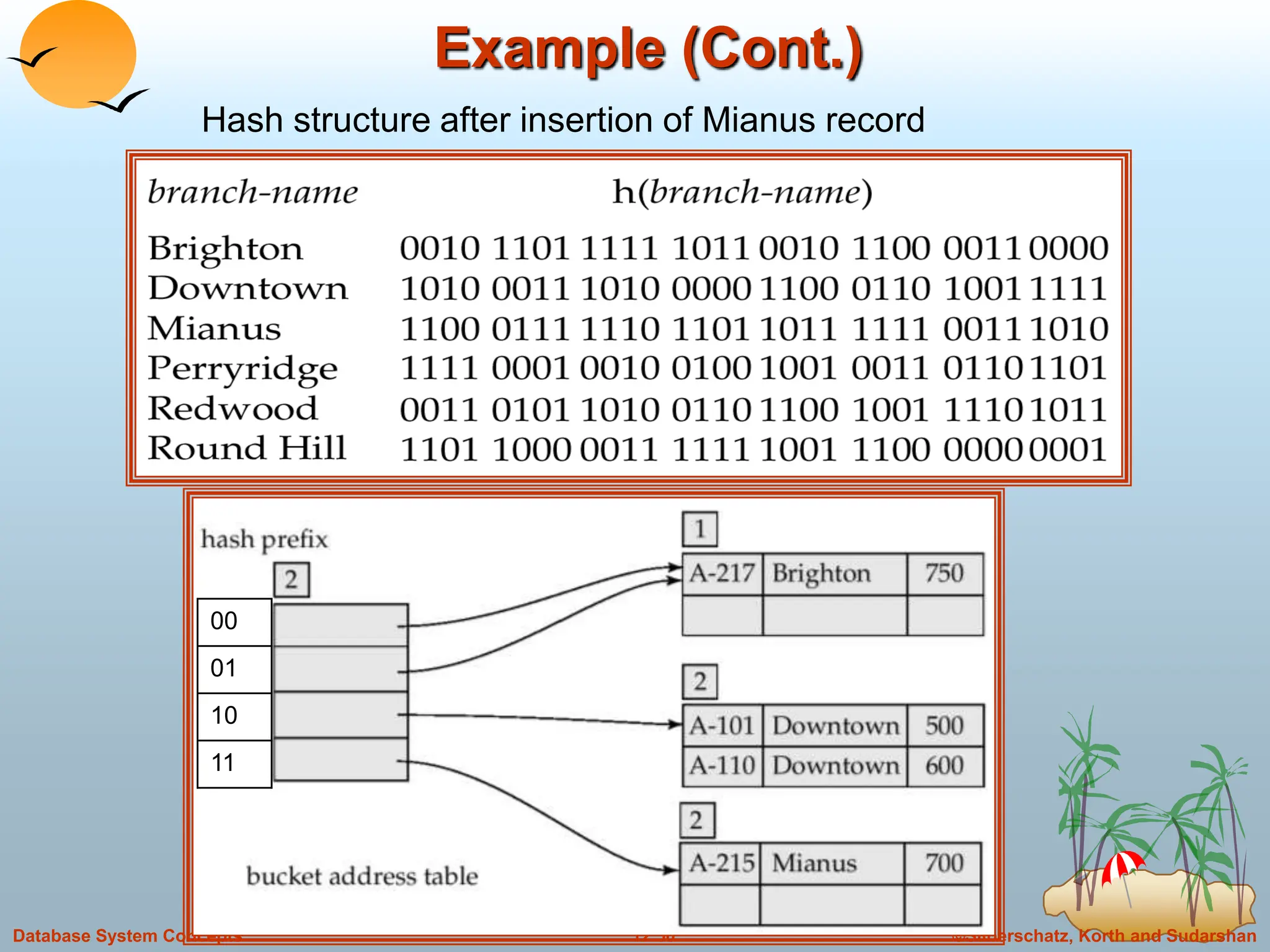
Hash structure after insertion of Mianus record
00
01
10
11
©Silberschatz, Korth and Sudarshan
12.51
Database System Concepts
Comparison of Ordered Indexing and Hashing
Cost of periodic re-organization
Relative frequency of insertions and deletions
Is it desirable to optimize average access time at the expense of
worst-case access time?
Expected type of queries:
 Hashing is generally better at retrieving records having a specified
value of the key.
 If range queries are common, ordered indices are to be preferred
 Queries of form select a1,a2,….., an from r where ai = c : hashing is
better
 Queries of form select a1, a2, a3…., an from r where ai<=c2 and
ai>=c3; indexing is better.
©Silberschatz, Korth and Sudarshan
12.52
Database System Concepts
Index Definition in SQL
Create an index
create index <index-name> on <relation-name>
(<attribute-list>)
E.g.: create index b-index on branch(branch-name)
Use create unique index to indirectly specify and enforce the
condition that the search key is a candidate key is a candidate
key.
 Not really required if SQL unique integrity constraint is supported
To drop an index
drop index <index-name>

Indexing and Hashing.ppt

  • 1.
    ©Silberschatz, Korth andSudarshan 12.1 Database System Concepts Chapter 12: Indexing and Hashing n Basic Concepts n Ordered Indices n B+-Tree Index Files n Static Hashing n Dynamic Hashing n Comparison of Ordered Indexing and Hashing n Index Definition in SQL
  • 2.
    ©Silberschatz, Korth andSudarshan 12.2 Database System Concepts Basic Concepts n Indexing mechanisms used to speed up access to desired data.  E.g., author catalog in library n Search Key - attribute to set of attributes used to look up records in a file. n An index file consists of records (called index entries) of the form n Index files are typically much smaller than the original file n Two basic kinds of indices:  Ordered indices: search keys are stored in sorted order  Hash indices: search keys are distributed uniformly across “buckets” using a “hash function”. search-key pointer
  • 3.
    ©Silberschatz, Korth andSudarshan 12.3 Database System Concepts Index Evaluation Metrics n Access types supported efficiently. E.g.,  records with a specified value in the attribute  or records with an attribute value falling in a specified range of values. n Access time n Insertion time n Deletion time n Space overhead
  • 4.
    ©Silberschatz, Korth andSudarshan 12.4 Database System Concepts Ordered Indices n In an ordered index, index entries are stored sorted on the search key value. E.g., author catalog in library. n Primary index: in a sequentially ordered file, the index whose search key specifies the sequential order of the file.  Also called clustering index  The search key of a primary index is usually but not necessarily the primary key. n Secondary index: an index whose search key specifies an order different from the sequential order of the file. Also called non-clustering index. n Index-sequential file: ordered sequential file with a primary index. Indexing techniques evaluated on basis of:
  • 5.
    ©Silberschatz, Korth andSudarshan 12.5 Database System Concepts Dense Index Files n Dense index — Index record appears for every search-key value in the file.
  • 6.
    ©Silberschatz, Korth andSudarshan 12.6 Database System Concepts Sparse Index Files n Sparse Index: contains index records for only some search-key values.  Applicable when records are sequentially ordered on search-key n To locate a record with search-key value K we:  Find index record with largest search-key value < K  Search file sequentially starting at the record to which the index record points n Less space and less maintenance overhead for insertions and deletions. n Generally slower than dense index for locating records. n Good tradeoff: sparse index with an index entry for every block in file, corresponding to least search-key value in the block.
  • 7.
    ©Silberschatz, Korth andSudarshan 12.7 Database System Concepts Example of Sparse Index Files
  • 8.
    ©Silberschatz, Korth andSudarshan 12.8 Database System Concepts Multilevel Index n If primary index does not fit in memory, access becomes expensive. n To reduce number of disk accesses to index records, treat primary index kept on disk as a sequential file and construct a sparse index on it.  outer index – a sparse index of primary index  inner index – the primary index file n If even outer index is too large to fit in main memory, yet another level of index can be created, and so on. n Indices at all levels must be updated on insertion or deletion from the file.
  • 9.
    ©Silberschatz, Korth andSudarshan 12.9 Database System Concepts Multilevel Index (Cont.)
  • 10.
    ©Silberschatz, Korth andSudarshan 12.10 Database System Concepts Index Update: Deletion n If deleted record was the only record in the file with its particular search-key value, the search-key is deleted from the index also. n Single-level index deletion:  Dense indices – deletion of search-key is similar to file record deletion.  Sparse indices – if an entry for the search key exists in the index, it is deleted by replacing the entry in the index with the next search- key value in the file (in search-key order). If the next search-key value already has an index entry, the entry is deleted instead of being replaced.
  • 11.
    ©Silberschatz, Korth andSudarshan 12.11 Database System Concepts Index Update: Insertion n Single-level index insertion:  Perform a lookup using the search-key value appearing in the record to be inserted.  Dense indices – if the search-key value does not appear in the index, insert it.  Sparse indices – if index stores an entry for each block of the file, no change needs to be made to the index unless a new block is created. In this case, the first search-key value appearing in the new block is inserted into the index. n Multilevel insertion (as well as deletion) algorithms are simple extensions of the single-level algorithms
  • 12.
    ©Silberschatz, Korth andSudarshan 12.12 Database System Concepts Secondary Indices n Frequently, one wants to find all the records whose values in a certain field (which is not the search-key of the primary index satisfy some condition.  Example 1: In the account database stored sequentially by account number, we may want to find all accounts in a particular branch  Example 2: as above, but where we want to find all accounts with a specified balance or range of balances n We can have a secondary index with an index record for each search-key value; index record points to a bucket that contains pointers to all the actual records with that particular search-key value.
  • 13.
    ©Silberschatz, Korth andSudarshan 12.13 Database System Concepts Secondary Index on balance field of account
  • 14.
    ©Silberschatz, Korth andSudarshan 12.14 Database System Concepts Primary and Secondary Indices n Secondary indices have to be dense. n Clustering index may be sparse. n A Secondary index on a candidate key looks just like a dense clustering index, except records are not stored sequentially. n Indices offer substantial benefits when searching for records. n When a file is modified, every index on the file must be updated, Updating indices imposes overhead on database modification. n Sequential scan using primary index is efficient, but a sequential scan using a secondary index is expensive  each record access may fetch a new block from disk
  • 15.
    ©Silberschatz, Korth andSudarshan 12.15 Database System Concepts B+-Tree Index Files n Disadvantage of indexed-sequential files: performance degrades as file grows, since many overflow blocks get created. Periodic reorganization of entire file is required. n Advantage of B+-tree index files: automatically reorganizes itself with small, local, changes, in the face of insertions and deletions. Reorganization of entire file is not required to maintain performance. n B+ tree index takes the form of balanced tree. n Disadvantage of B+-trees: extra insertion and deletion overhead, space overhead. n Advantages of B+-trees outweigh disadvantages, and they are used extensively. B+-tree indices are an alternative to indexed-sequential files.
  • 16.
    ©Silberschatz, Korth andSudarshan 12.16 Database System Concepts Example of B+-Tree
  • 17.
    ©Silberschatz, Korth andSudarshan 12.17 Database System Concepts B+-Tree Index Files (Cont.) n All paths from root to leaf are of the same length n Each node that is not a root or a leaf has between Γn/2˥and n children. n A leaf node has between Γ(n–1)/2˥ and n–1 values n Special cases:  If the root is not a leaf, it has at least 2 children.  If the root is a leaf (that is, there are no other nodes in the tree), it can have between 0 and (n–1) values. n B+ tree imposes performance overhead on insertion and deletion and adds space overhead. The overhead is acceptable even for frequently modified files, since the cost of reorganization is avoided. A B+-tree is a rooted tree satisfying the following properties:
  • 18.
    ©Silberschatz, Korth andSudarshan 12.18 Database System Concepts B+-Tree Node Structure n B+ tree index is a multilevel index, but it has a structure different from that of multilevel index sequential index file. n Typical node  Ki are the search-key values (n-1 search key values)  Pi are pointers to children (for non-leaf nodes) or pointers to records or buckets of records (for leaf nodes). (n pointers) n The search-keys in a node are ordered K1 < K2 < K3 < . . . < Kn–1
  • 19.
    ©Silberschatz, Korth andSudarshan 12.19 Database System Concepts Leaf Nodes in B+-Trees For i = 1, 2, . . ., n–1, pointer Pi either points to a file record with search- key value Ki, or to a bucket of pointers to file records, each record having search-key value Ki. Only need bucket structure if search-key does not form a primary key. Each leaf can hold up to n-1 values. Leaf can hold as few as [ (n-1)/2] values. The ranges of values in each leaf do not overlap. If Li, Lj are leaf nodes and i < j, Li’s search-key values are less than Lj’s search-key values Pn points to next leaf node in search-key order Properties of a leaf node:
  • 20.
    ©Silberschatz, Korth andSudarshan 12.20 Database System Concepts Non-Leaf Nodes in B+-Trees Non leaf nodes form a multi-level sparse index on the leaf nodes. For a non-leaf node with m pointers:  A non leaf node may hold up to n pointers and must hold at least Γn/2˥ pointers.  The number of pointers in a node is called fanout of the node.  All the search-keys in the subtree to which P1 points are less than K1
  • 21.
    ©Silberschatz, Korth andSudarshan 12.21 Database System Concepts Non-Leaf Nodes in B+-Trees Non leaf nodes form a multi-level sparse index on the leaf nodes. For a non-leaf node with m pointers: Let us consider a node containing m pointers. For i = 2, 3, . . .,m − 1,  pointer Pi points to the subtree that contains search-key values less than Ki and greater than or equal to Ki−1. Pointer Pm points to the part of the subtree that contains those key values greater than or equal to Km−1, and pointer P1 points to the part of the subtree that contains those search-key values less than K1.
  • 22.
    ©Silberschatz, Korth andSudarshan 12.22 Database System Concepts Example of a B+-tree B+-tree for account file (n = 3)
  • 23.
    ©Silberschatz, Korth andSudarshan 12.23 Database System Concepts Example of B+-tree Leaf nodes must have between 2 and 4 values ((n–1)/2 and n –1, with n = 5). Non-leaf nodes other than root must have between 3 and 5 children ((n/2 and n with n =5). Root must have at least 2 children fewer than [n/2] pointers. B+-tree for account file (n = 5)
  • 24.
    ©Silberschatz, Korth andSudarshan 12.24 Database System Concepts Observations about B+-trees Since the inter-node connections are done by pointers, “logically” close blocks need not be “physically” close. The non-leaf levels of the B+-tree form a hierarchy of sparse indices. The B+-tree contains a relatively small number of levels (logarithmic in the size of the main file), thus searches can be conducted efficiently. Insertions and deletions to the main file can be handled efficiently, as the index can be restructured in logarithmic time (as we shall see).
  • 25.
    ©Silberschatz, Korth andSudarshan 12.25 Database System Concepts Updates on B+-Trees: Insertion 1. Find the leaf node in which the search-key value would appear 2. If the search-key value is already present in the leaf node 1. Add record to the file 2. If necessary add a pointer to the bucket. 3. If the search-key value is not present, then 1. add the record to the main file (and create a bucket if necessary) 2. If there is room in the leaf node, insert (key-value, pointer) pair in the leaf node 3. Otherwise, split the node (along with the new (key-value, pointer) entry) as discussed in the next slide.
  • 26.
    ©Silberschatz, Korth andSudarshan 12.26 Database System Concepts Updates on B+-Trees: Insertion (Cont.) Splitting a node:  take the n(search-key value, pointer) pairs (including the one being inserted) in sorted order. Place the first  n/2  in the original node, and the rest in a new node.  let the new node be p, and let k be the least key value in p. Insert (k,p) in the parent of the node being split. If the parent is full, split it and propagate the split further up. The splitting of nodes proceeds upwards till a node that is not full is found. In the worst case the root node may be split increasing the height of the tree by 1. Result of splitting node containing Brighton and Downtown on inserting Clearview
  • 27.
    ©Silberschatz, Korth andSudarshan 12.27 Database System Concepts Updates on B+-Trees: Insertion (Cont.) B+-Tree before and after insertion of “Clearview”
  • 28.
    ©Silberschatz, Korth andSudarshan 12.28 Database System Concepts B+-Tree Insertion B+-Tree before and after insertion of “Adams”
  • 29.
    ©Silberschatz, Korth andSudarshan 12.29 Database System Concepts B+-Tree Insertion B+-Tree before and after insertion of “Lamport”
  • 30.
    ©Silberschatz, Korth andSudarshan 12.30 Database System Concepts B+-Tree File Organization Index file degradation problem is solved by using B+-Tree indices. Data file degradation problem is solved by using B+-Tree File Organization. The leaf nodes in a B+-tree file organization store records, instead of pointers. Since records are larger than pointers, the maximum number of records that can be stored in a leaf node is less than the number of pointers in a nonleaf node. Leaf nodes are still required to be half full. Insertion and deletion are handled in the same way as insertion and deletion of entries in a B+-tree index.
  • 31.
    ©Silberschatz, Korth andSudarshan 12.31 Database System Concepts Static Hashing Disadvantage of sequential file organization : access an index structure to locate data, or use binary search: too many I/O operations. A bucket is a unit of storage containing one or more records (a bucket is typically a disk block). In a hash file organization we obtain the bucket of a record directly from its search-key value using a hash function. Hash function h is a function from the set of all search-key values K to the set of all bucket addresses B. Hash function is used to locate records for access, insertion as well as deletion. Records with different search-key values may be mapped to the same bucket; thus entire bucket has to be searched sequentially to locate a record.
  • 32.
    ©Silberschatz, Korth andSudarshan 12.32 Database System Concepts Example of Hash File Organization (Cont.) There are 10 buckets, The binary representation of the ith character is assumed to be the integer i. The hash function returns the sum of the binary representations of the characters modulo 10  E.g. h(Perryridge) = 5 h(Round Hill) = 3 h(Brighton) = 3 E.g. Total : 15 Total mod 10 = 15 mod 10 = 5 Hash file organization of account file, using branch-name as key (See figure in next slide.) P E R R Y R I D G E 0 1 2 3 4 5 6 7 8 9 0 000 1 001 0 001 1 010 0 010 1 011 0 011 1 100 0 100 1 0 1 1 2 1 2 2 3 1 2 Binary representation
  • 33.
    ©Silberschatz, Korth andSudarshan 12.33 Database System Concepts Example of Hash File Organization Hash file organization of account file, using branch-name as key (see previous slide for details).
  • 34.
    ©Silberschatz, Korth andSudarshan 12.34 Database System Concepts Hash Functions Worst has function maps all search-key values to the same bucket; this makes access time proportional to the number of search-key values in the file. An ideal hash function is uniform, i.e., each bucket is assigned the same number of search-key values from the set of all possible values. Ideal hash function is random, so each bucket will have the same number of records assigned to it irrespective of the actual distribution of search-key values in the file. Typical hash functions perform computation on the internal binary representation of the search-key.  For example, for a string search-key, the binary representations of all the characters in the string could be added and the sum modulo the number of buckets could be returned. .
  • 35.
    ©Silberschatz, Korth andSudarshan 12.35 Database System Concepts Handling of Bucket Overflows If bucket do not have enough space, a bucket overflow is said to occur. Bucket overflow can occur because of  Insufficient buckets : The number of buckets, which we denote nb, must be chosen such that nb > nr/fr, where nr denotes the total number of records that will be stored and fr denotes the number of records that will fit in a bucket.  Skew in distribution of records. Some buckets are assigned more records than are others, so a bucket may oerflow oven when other buckets still have space. This situation is called skew. This can occur due to two reasons:  multiple records have same search-key value  chosen hash function produces non-uniform distribution of key values Although the probability of bucket overflow can be reduced, it cannot be eliminated; it is handled by using overflow buckets.
  • 36.
    ©Silberschatz, Korth andSudarshan 12.36 Database System Concepts Handling of Bucket Overflows (Cont.) Overflow chaining – the overflow buckets of a given bucket are chained together in a linked list. Above scheme is called closed hashing.  An alternative, called open hashing, which does not use overflow buckets, is not suitable for database applications.  The set of buckets is fixed, and there are no overflow chains. If a bucket is full, the system inserts records in some other bucket : in cyclic order, in next bucket if it has space. It is known as linear probing.
  • 37.
    ©Silberschatz, Korth andSudarshan 12.37 Database System Concepts Hash Indices Hashing can be used not only for file organization, but also for index-structure creation. A hash index organizes the search keys, with their associated record pointers, into a hash file structure. We apply a hash function on a search key to identify a bucket, and store the key and its associated pointers in the bucket (or in overflow bucket) Strictly speaking, hash indices are always secondary indices  if the file itself is organized using hashing, a separate primary hash index on it using the same search-key is unnecessary.  However, we use the term hash index to refer to both secondary index structures and hash organized files.
  • 38.
    ©Silberschatz, Korth andSudarshan 12.38 Database System Concepts Example of Hash Index
  • 39.
    ©Silberschatz, Korth andSudarshan 12.39 Database System Concepts Deficiencies of Static Hashing In static hashing, function h maps search-key values to a fixed set of B of bucket addresses.  Databases grow with time. If initial number of buckets is too small, performance will degrade due to too much overflows.  If file size at some point in the future is anticipated and number of buckets allocated accordingly, significant amount of space will be wasted initially.  If database shrinks, again space will be wasted.  One option is periodic re-organization of the file with a new hash function, but it is very expensive. These problems can be avoided by using techniques that allow the number of buckets to be modified dynamically.
  • 40.
    ©Silberschatz, Korth andSudarshan 12.40 Database System Concepts Dynamic Hashing Good for database that grows and shrinks in size Allows the hash function to be modified dynamically Extendable hashing – Copes with changes in database size by splitting an coalescing buckets as the database grows and shrinks. As a result space efficiency is retained. Since the reorganization is performed on only on one bucket at a time, the resulting performance overhead is acceptably low.
  • 41.
    ©Silberschatz, Korth andSudarshan 12.41 Database System Concepts Extendable Hashing Extendable hashing – one form of dynamic hashing Here buckets are created on demand.  Hash function generates values over a large range — typically b-bit integers, with b = 32. 232 is 4 billion.  Use i bits, where 0<=i<=b.  These i bits are used as an offset into an additional table of bucket address.  The value of i grows and shrinks with the size of database.  Bucket address table size = 2i. Initially i = 0  Value of i grows and shrinks as the size of the database grows and shrinks.  Multiple entries in the bucket address table may point to a bucket.  Thus, actual number of buckets is < 2i  The number of buckets also changes dynamically due to coalescing and splitting of buckets.
  • 42.
    ©Silberschatz, Korth andSudarshan 12.42 Database System Concepts General Extendable Hash Structure In this structure, i2 = i3 = i, whereas i1 = i – 1 (see next slide for details)
  • 43.
    ©Silberschatz, Korth andSudarshan 12.43 Database System Concepts Use of Extendable Hash Structure Each bucket j stores a value ij; all the entries that point to the same bucket have the same values on the first ij bits. To locate the bucket containing search-key Kj: 1. Compute h(Kj) = X 2. Use the first i high order bits of X as a displacement into bucket address table, and follow the pointer to appropriate bucket To insert a record with search-key value Kj  follow same procedure as look-up and locate the bucket, say j.  If there is room in the bucket j insert record in the bucket.  Else the bucket must be split and insertion re-attempted (next slide.)  Overflow buckets used instead in some cases (will see shortly)
  • 44.
    ©Silberschatz, Korth andSudarshan 12.44 Database System Concepts Updates in Extendable Hash Structure If i > ij (more than one pointer to bucket j)  allocate a new bucket z, and set ij and iz to the old ij -+ 1.  make the second half of the bucket address table entries pointing to j to point to z  remove and reinsert each record in bucket j.  recompute new bucket for Kj and insert record in the bucket (further splitting is required if the bucket is still full) If i = ij (only one pointer to bucket j)  increment i and double the size of the bucket address table.  replace each entry in the table by two entries that point to the same bucket.  recompute new bucket address table entry for Kj Now i > ij so use the first case above. To split a bucket j when inserting record with search-key value Kj:
  • 45.
    ©Silberschatz, Korth andSudarshan 12.45 Database System Concepts Updates in Extendable Hash Structure (Cont.) When inserting a value, if the bucket is full after several splits (that is, i reaches some limit b) create an overflow bucket instead of splitting bucket entry table further. To delete a key value,  locate it in its bucket and remove it.  The bucket itself can be removed if it becomes empty (with appropriate updates to the bucket address table).  Coalescing of buckets can be done (can coalesce only with a “buddy” bucket having same value of ij and same ij –1 prefix, if it is present)  Decreasing bucket address table size is also possible  Note: decreasing bucket address table size is an expensive operation and should be done only if number of buckets becomes much smaller than the size of the table
  • 46.
    ©Silberschatz, Korth andSudarshan 12.46 Database System Concepts Use of Extendable Hash Structure: Example Initial Hash structure, bucket size = 2
  • 47.
    ©Silberschatz, Korth andSudarshan 12.47 Database System Concepts Use of Extendable Hash Structure: Example Initial Hash structure, bucket size = 2 0 A-217 Brighton 750 0 Bucket address table Bucket 1
  • 48.
    ©Silberschatz, Korth andSudarshan 12.48 Database System Concepts Use of Extendable Hash Structure: Example Initial Hash structure, bucket size = 2 0 A-217 Brighton 750 A-101 Downtown 500 0 Bucket address table Bucket 1
  • 49.
    ©Silberschatz, Korth andSudarshan 12.49 Database System Concepts Example (Cont.) Hash structure after insertion of one Brighton and two Downtown records 0 1
  • 50.
    ©Silberschatz, Korth andSudarshan 12.50 Database System Concepts Example (Cont.) Hash structure after insertion of Mianus record 00 01 10 11
  • 51.
    ©Silberschatz, Korth andSudarshan 12.51 Database System Concepts Comparison of Ordered Indexing and Hashing Cost of periodic re-organization Relative frequency of insertions and deletions Is it desirable to optimize average access time at the expense of worst-case access time? Expected type of queries:  Hashing is generally better at retrieving records having a specified value of the key.  If range queries are common, ordered indices are to be preferred  Queries of form select a1,a2,….., an from r where ai = c : hashing is better  Queries of form select a1, a2, a3…., an from r where ai<=c2 and ai>=c3; indexing is better.
  • 52.
    ©Silberschatz, Korth andSudarshan 12.52 Database System Concepts Index Definition in SQL Create an index create index <index-name> on <relation-name> (<attribute-list>) E.g.: create index b-index on branch(branch-name) Use create unique index to indirectly specify and enforce the condition that the search key is a candidate key is a candidate key.  Not really required if SQL unique integrity constraint is supported To drop an index drop index <index-name>