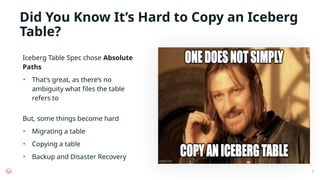
Did You KnowIt’s Hard to Copy an Iceberg
Table?
Iceberg Table Spec chose Absolute
Paths
• That’s great, as there’s no
ambiguity what files the table
refers to
2
But, some things become hard
• Migrating a table
• Copying a table
• Backup and Disaster Recovery
3.
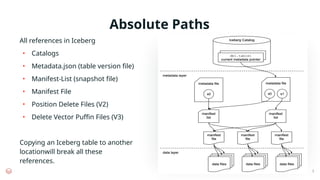
Absolute Paths
All referencesin Iceberg
• Catalogs
• Metadata.json (table version file)
• Manifest-List (snapshot file)
• Manifest File
• Position Delete Files (V2)
• Delete Vector Puffin Files (V3)
Copying an Iceberg table to another
locationwill break all these
references.
3
4.
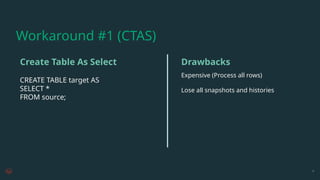
CREATE TABLE targetAS
SELECT *
FROM source;
Expensive (Process all rows)
Lose all snapshots and histories
4
Create Table As Select Drawbacks
Workaround #1 (CTAS)
5.
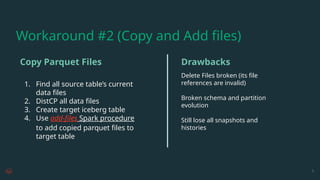
1. Find allsource table’s current
data files
2. DistCP all data files
3. Create target iceberg table
4. Use add-files Spark procedure
to add copied parquet files to
target table
Delete Files broken (its file
references are invalid)
Broken schema and partition
evolution
Still lose all snapshots and
histories
5
Copy Parquet Files Drawbacks
Workaround #2 (Copy and Add files)
6.
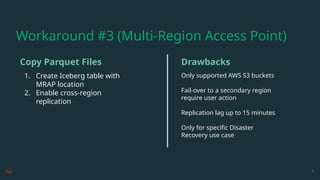
1. Create Icebergtable with
MRAP location
2. Enable cross-region
replication
Only supported AWS S3 buckets
Fail-over to a secondary region
require user action
Replication lag up to 15 minutes
Only for specific Disaster
Recovery use case
6
Copy Parquet Files Drawbacks
Workaround #3 (Multi-Region Access Point)
7.
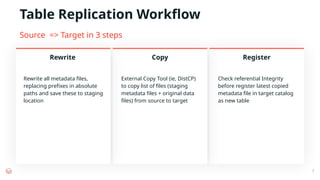
Table Replication Workflow
Rewriteall metadata files,
replacing prefixes in absolute
paths and save these to staging
location
External Copy Tool (ie, DistCP)
to copy list of files (staging
metadata files + original data
files) from source to target
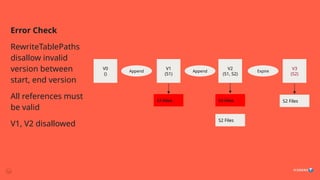
Check referential Integrity
before register latest copied
metadata file in target catalog
as new table
Rewrite Copy Register
7
Source => Target in 3 steps
8.
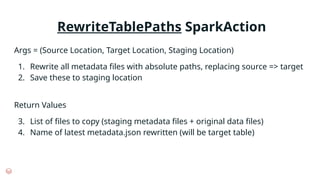
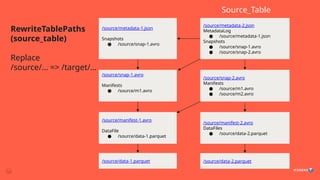
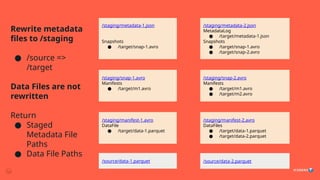
RewriteTablePaths SparkAction
Args =(Source Location, Target Location, Staging Location)
1. Rewrite all metadata files with absolute paths, replacing source => target
2. Save these to staging location
Return Values
3. List of files to copy (staging metadata files + original data files)
4. Name of latest metadata.json rewritten (will be target table)
9.
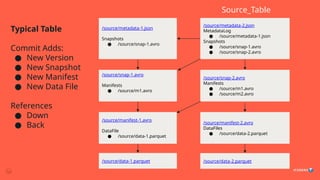
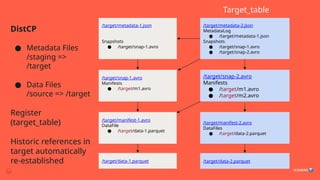
Typical Table
Commit Adds:
●New Version
● New Snapshot
● New Manifest
● New Data File
References
● Down
● Back
/source/metadata-2.json
MetadataLog
● /source/metadata-1.json
Snapshots
● /source/snap-1.avro
● /source/snap-2.avro
/source/snap-1.avro
Manifests
● /source/m1.avro
/source/snap-2.avro
Manifests
● /source/m1.avro
● /source/m2.avro
/source/manifest-1.avro
DataFile
● /source/data-1.parquet
/source/manifest-2.avro
DataFiles
● /source/data-2.parquet
/source/data-2.parquet
/source/data-1.parquet
Source_Table
/source/metadata-1.json
Snapshots
● /source/snap-1.avro
How to handleconcurrent modification to the table?
Problem: Concurrency
23.
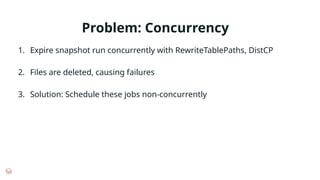
Problem: Concurrency
1. Expiresnapshot run concurrently with RewriteTablePaths, DistCP
2. Files are deleted, causing failures
3. Solution: Schedule these jobs non-concurrently
Problem: Initial Copy
Toomuch data in initial copy (DistCP)
Solution
1. Semantically equivalent to copy + expire
2. Possible to filter source metadata.json during rewrite, for all snapshots
after X
3. Limit further rewrite to references from snapshots after X
4. But, all future incremental copies must also apply the same filter (else we
bring back snapshots unknown in target table)
/source/metadata.json
Snaphots:
[S1, S2, S3]
/target/metadata.json
Snaphots:
[S3]
26.
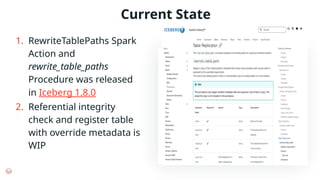
1. RewriteTablePaths Spark
Actionand
rewrite_table_paths
Procedure was released
in Iceberg 1.8.0
2. Referential integrity
check and register table
with override metadata is
WIP
Current State
27.
Contribution Welcome!
1. Communityinterest for Hive to Iceberg migration with in-place
upgrade: https://github.com/apache/iceberg/issues/12762
2. Community interest for support relative path in Iceberg
metadata V4:
#4 Using a query engine, run create table as select *
However, this is slower as all the rows need to be read, deserialized, serialized again, and written. Potentially even shuffled.
What we want is a file level copy.
You also lose all snapshots and histories associated with Iceberg metadatas that are not copied.
#5 A more optimal solution is to copy file by file.
We use an external tool to copy all the files, then use an Iceberg procedure 'add files', which generates metadata files for a file.
However, we have subtle problems by not copying all the original metadata. First, delete files and vectors are copied from the source, but their references still remain on the source side so they are broken.
We also lose snapshots and histories like the first solution.
#6 For Disaster recovery, MRAP is an AWS solution that provides a wrapper around replicated buckets, and behind the scenes you can use the same path to access data from different buckets. So in a sense, it will make it so that all file path references are dynamic and can work for source and destination bucket.
But there's a lot of issues with this. It's only supported for AWS S3, there are user actions to fail over, and replication lags mean that tables are not available synchronously. You may even have broken references are parts of snapshots are copied over, making the replicated Iceberg tabe not very atomic at all.
It is also only for BDR case. We don't have a separate table in the target side.
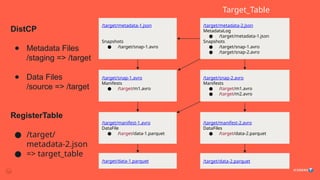
#7 Table in Source Location => Table in Target Location
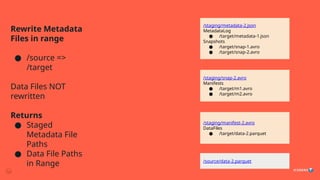
Rewrite all metadata files, replacing prefixes in absolute paths
Save these to staging location
Find a list of files to copy (staging metadata files + original data files)
External Copy Tool (ie, DistCP) from Source to Target
Check Integrity (check all references are valid)
Register latest copied metadata file in target catalog as new table
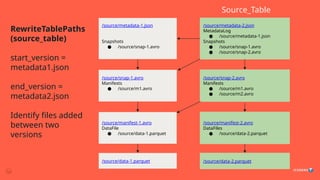
#13 RewriteTablePaths Incremental Mode (vs Full Mode)
Optional ‘start_version’ and ‘end_version’ arguments
Copy only files that are added in this range (between these version files)
#22 RewriteTablePaths Incremental Mode (vs Full Mode)
Optional ‘start_version’ and ‘end_version’ arguments
Copy only files that are added in this range (between these version files)
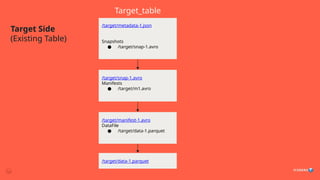
#24 RewriteTablePaths Incremental Mode (vs Full Mode)
Optional ‘start_version’ and ‘end_version’ arguments
Copy only files that are added in this range (between these version files)


![Problem: Initial Copy
Too much data in initial copy (DistCP)
Solution
1. Semantically equivalent to copy + expire
2. Possible to filter source metadata.json during rewrite, for all snapshots
after X
3. Limit further rewrite to references from snapshots after X
4. But, all future incremental copies must also apply the same filter (else we
bring back snapshots unknown in target table)
/source/metadata.json
Snaphots:
[S1, S2, S3]
/target/metadata.json
Snaphots:
[S3]](https://image.slidesharecdn.com/daisincrementalicebergtablereplicationatscale-250711041930-b8b46780/85/Incremental-Iceberg-Table-Replication-at-Scale-25-320.jpg)


![[Deck] What's New in Spark-Iceberg Integration via DSV2.pptx](https://cdn.slidesharecdn.com/ss_thumbnails/deckwhatsnewinspark-icebergintegrationviadsv2-260210005337-25955b12-thumbnail.jpg?width=640&height=640&fit=bounds)


