Incremental Iceberg Table Replication At Scale.pptx
1.
Incremental Iceberg Table
ReplicationAt Scale
Open Lakehouse Meetup | Mountain View | March 11, 2025
Szehon Ho
Software Engineer at Databricks
Apache Iceberg PMC Member
2.
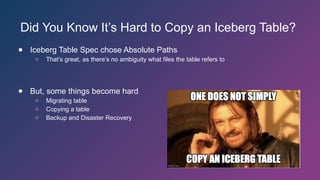
Did You KnowIt’s Hard to Copy an Iceberg Table?
● Iceberg Table Spec chose Absolute Paths
○ That’s great, as there’s no ambiguity what files the table refers to
● But, some things become hard
○ Migrating table
○ Copying a table
○ Backup and Disaster Recovery
3.
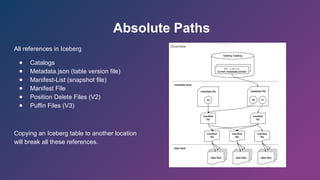
Absolute Paths
All referencesin Iceberg
● Catalogs
● Metadata.json (table version file)
● Manifest-List (snapshot file)
● Manifest File
● Position Delete Files (V2)
● Puffin Files (V3)
Copying an Iceberg table to another location
will break all these references.
4.
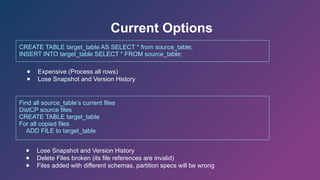
Current Options
CREATE TABLEtarget_table AS SELECT * from source_table;
INSERT INTO target_table SELECT * FROM source_table;
Find all source_table’s current files
DistCP source files
CREATE TABLE target_table
For all copied files
ADD FILE to target_table
● Expensive (Process all rows)
● Lose Snapshot and Version History
● Lose Snapshot and Version History
● Delete Files broken (its file references are invalid)
● Files added with different schemas, partition specs will be wrong
5.
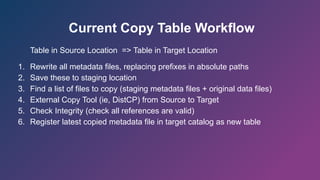
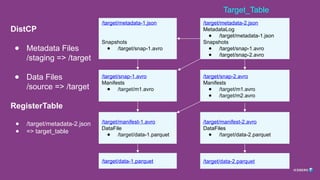
Current Copy TableWorkflow
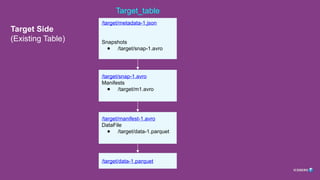
Table in Source Location => Table in Target Location
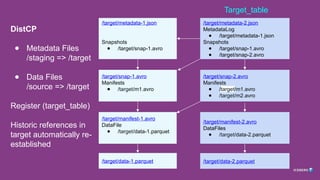
1. Rewrite all metadata files, replacing prefixes in absolute paths
2. Save these to staging location
3. Find a list of files to copy (staging metadata files + original data files)
4. External Copy Tool (ie, DistCP) from Source to Target
5. Check Integrity (check all references are valid)
6. Register latest copied metadata file in target catalog as new table
6.
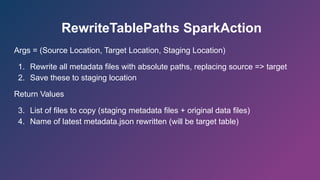
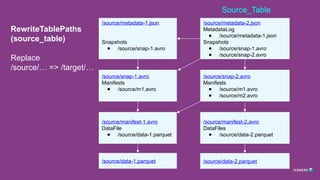
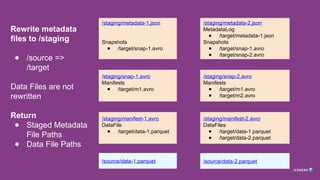
RewriteTablePaths SparkAction
Args =(Source Location, Target Location, Staging Location)
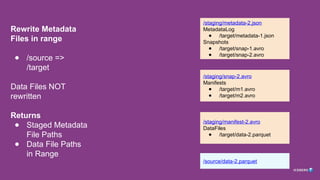
1. Rewrite all metadata files with absolute paths, replacing source => target
2. Save these to staging location
Return Values
3. List of files to copy (staging metadata files + original data files)
4. Name of latest metadata.json rewritten (will be target table)
7.
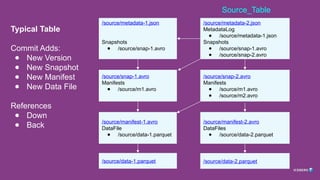
Typical Table
Commit Adds:
●New Version
● New Snapshot
● New Manifest
● New Data File
References
● Down
● Back
/source/metadata-2.json
MetadataLog
● /source/metadata-1.json
Snapshots
● /source/snap-1.avro
● /source/snap-2.avro
/source/metadata-1.json
Snapshots
● /source/snap-1.avro
/source/snap-1.avro
Manifests
● /source/m1.avro
/source/snap-2.avro
Manifests
● /source/m1.avro
● /source/m2.avro
/source/manifest-1.avro
DataFile
● /source/data-1.parquet
/source/manifest-2.avro
DataFiles
● /source/data-2.parquet
/source/data-2.parquet
/source/data-1.parquet
Source_Table
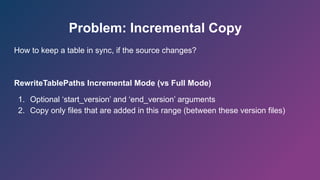
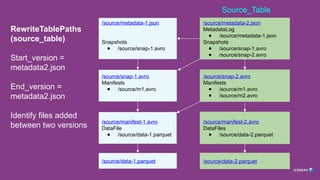
Problem: Incremental Copy
Howto keep a table in sync, if the source changes?
RewriteTablePaths Incremental Mode (vs Full Mode)
1. Optional ‘start_version’ and ‘end_version’ arguments
2. Copy only files that are added in this range (between these version files)
Problem: Concurrency
1. Expiresnapshot run concurrently with RewriteTablePaths, DistCP
2. Files are deleted, causing failures
3. Solution: Schedule these jobs non-concurrently
21.
Problem: Initial Copy
Toomuch data in initial copy (DistCP)
Solution
1. Semantically equivalent to copy + expire
2. Possible to filter source metadata.json during rewrite, for all snapshots after X
3. Limit further rewrite to references from snapshots after X
4. But, all future incremental copies must also apply the same filter (else we
bring back snapshots unknown in target table)
/source/metadata.json
Snaphots:
[S1, S2, S3]
/target/metadata.json
Snaphots:
[S3]
22.
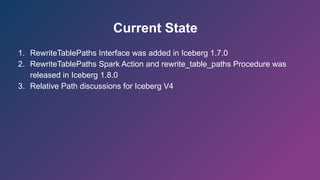
Current State
1. RewriteTablePathsInterface was added in Iceberg 1.7.0
2. RewriteTablePaths Spark Action and rewrite_table_paths Procedure was
released in Iceberg 1.8.0
3. Relative Path discussions for Iceberg V4
Editor's Notes
#1 Denny: Thanks everyone! I now would like to welcome to the stage Szehon Ho who is a software engineer at Databricks, talking about Incremental Iceberg Table Replication At Scale,

![Problem: Initial Copy
Too much data in initial copy (DistCP)
Solution
1. Semantically equivalent to copy + expire
2. Possible to filter source metadata.json during rewrite, for all snapshots after X
3. Limit further rewrite to references from snapshots after X
4. But, all future incremental copies must also apply the same filter (else we
bring back snapshots unknown in target table)
/source/metadata.json
Snaphots:
[S1, S2, S3]
/target/metadata.json
Snaphots:
[S3]](https://image.slidesharecdn.com/incrementalicebergtablereplicationatscale-250324014249-e0b41966/85/Incremental-Iceberg-Table-Replication-At-Scale-pptx-21-320.jpg)