1/8/2014

Incident Management –
Obtaining our #1 Objective
Restore a failed (or failing) service as quickly as
possible so that the requester can continue to use the
service with the minimum of disruption and a
maximum of security

Mark Copeland

Improving Incident Management
Our team’s performance is NOT being questioned! We’re doing a good
job!
– We ALL (including me) need to learn how to improve our ticket
management, so figures match reality and show how good we perform

Objective #1 – Improve service performance on incident management
– Incident management SLA
» Now > 80%
» By end of year > 85%
– Backlog of tickets, none older than 5 days

The goal of Incident Management is to
– Restore a failed (or failing) service as quickly as possible so that the
requester can continue to use the service with the minimum of disruption
and a maximum of security

1
1/8/2014

What is an IT Service?
A Service provided to one or more Customers (company employees),
by an IT Service Provider (IT Dept.)
An IT Service is based on the use of Information Technology and
supports the Customer's Business Process
An IT Service is made up from a combination of people, processes and
technology and should be defined in a Service Level Agreement
An IT Service is not only linked to a specific hardware or software
– For example: the Printing service. Company users are able to print
documents in a good quality to a printer nearby. If the closest printer to
their desk fails, the Printing service goes down. Once they are able to print
to another printer close to their working area, the Printing Service is
restored.

What is an Incident?
An Incident is an unplanned interruption to an existing IT Service or a
reduction in the quality of an IT Service
Incident Service Level Agreement (SLA) between IT and our customers: 48
hours is the maximum time for an IT Service interruption
Most of the incidents across the company meet this SLA
Once the IT service is restored, there’s no longer an incident
The fact that the IT Service is restored doesn’t mean that the specific
hardware/software problem is corrected
Even though the IT Service is restored, a new request may need to be raised to
– Fix a piece of equipment or purchase a replacement (service request)
– Investigate further to find the root cause (problem management)
– Request a change to prevent the incident from happening again (change
management)
– Etc.

2
1/8/2014

Figures Do Count!
As a service provider, IT is measured by its figures
– If our figures are supposed to show the value of our service, then our
figures should describe reality

Figures can be
– Qualitative
» Customer perception / satisfaction
» Customer Complaints
– Quantitative
» Service Level Agreement, ticket ageing, cost saving ideas, etc.

IT figures have an impact on
– IT Balanced Scorecard
– The businesses’ objectives and balanced scorecards

Moving Figures Closer to Reality
Other IT teams asking us for a support service, need to create a Service
Request and assign it to us
Pending-customer tickets can’t live forever
– Set a date and time with the user to resolve the request
– If it does not progress because of the lack of user availability, inform the
user that we’ll close the ticket and help him/her when s/he’s ready
– We need to avoid waiting times like: “I’ll let you know when it’s a good time
for me …. “

If we struggle to solve a request in a reasonable time frame
– Ask other teams for help and assign the case to them
– IT is a big community and if nobody can solve it, then we’ve got our
vendors to provide 3rd line support

3
1/8/2014

Our SLA figures
Incident Management SLAs – Our Team
Goals
– Now > 80%
– By end of year > 85%

We have made, and are continuing to make, EXCELLENT progress!
Month

Overall SLA

P3 SLA

P4 SLA

March

38.78%

29.17%

41.12%

April

44.14%

46.60%

42.37%

May

61.71%

46.81%

65.00%

June MTD 6/11

84.38%

80.00%

85.71%

June MTD 6/19

79.03%

66.67%

81.55%

June MTD 6/26

74.75%

59.38%

77.38%

Our Backlog figures
Backlog of Tickets – Our Team
Goal: No tickets older than 5 days
80

60

40

20

0
Jan 30

Feb 27

Mar 26
0-4 Days

0-4 Days
5-9 Days
10-14 Days
15-30 Days
31 + Days

Jan 30
26
23
9
11
11

5-9 Days

Apr 23
10-14 Days

May 28
15-30 Days

Feb 27 Mar 26 Apr 23 May 28 Jun 18 Jun 26
29
13
16
5
11
11
9
14
12
12
3
6
6
9
15
1
2
4
17
8
6
5
5
2
8
7
5
0
2
1

Jun 18

Jun 26

31 + Days

# of Tickets 6+ Days Old
May 14 May 22 May 29 Jun 05
14
9
20
12

Jun 12
13

Jun 19
10

Jun 26
9

4
1/8/2014

Where Are We At?
Incidents queue does not always match reality
– It hardly happens that a true IT Service interruption is not resolved in a few
hours or days
– Our figures don’t show how well we do perform, so this is where we’re
going to put our focus

Most common reasons of having incidents aging in our queues
– Incident queue holding other support requests than incidents: service
requests, change requests, etc.
– Incidents already solved but still opened in ticket system
– Ticket system searches are not displaying all open incidents in the queue
– Incident not assigned to the proper solver group
– Incident not assigned to an individual
– Incident on hold waiting for the supplier/user feedback

Keep In Mind….
Open Incidents are easier to manage if we have a pre-defined search in
the ticket system to monitor them (one for open incidents, one for open
service requests)
Incidents priorities increase as they get old (aging impacts how well we
deliver the support service to our customer)
Make sure all incidents are assigned to an individual
Make sure the incident queue only holds incidents
– Is the service already restored or a work around in place? If so, then there’s
no incident anymore!

Change an Incident to a Service Request once the user is up and
running (e.g., loaner laptop, secondary printer) but the equipment needs
servicing
– Incident is over as soon as a user is up and running and then becomes a
Service Request because you’re now servicing that piece of equipment

5
1/8/2014

Keep In Mind…. (cont.)
Why is the incident not progressing?
– Waiting for the user?
» Set a date/time to solve the incident
– Still investigating?
» Need a workaround quickly (don’t investigate forever while the IT
Service is not restored!)
– Do we have the knowledge to solve it?
» If not, escalate it to the proper solver group or supplier
– Do we have the resources to take care of it?
» Teamwork needed!

Ticket System SLA Monitor
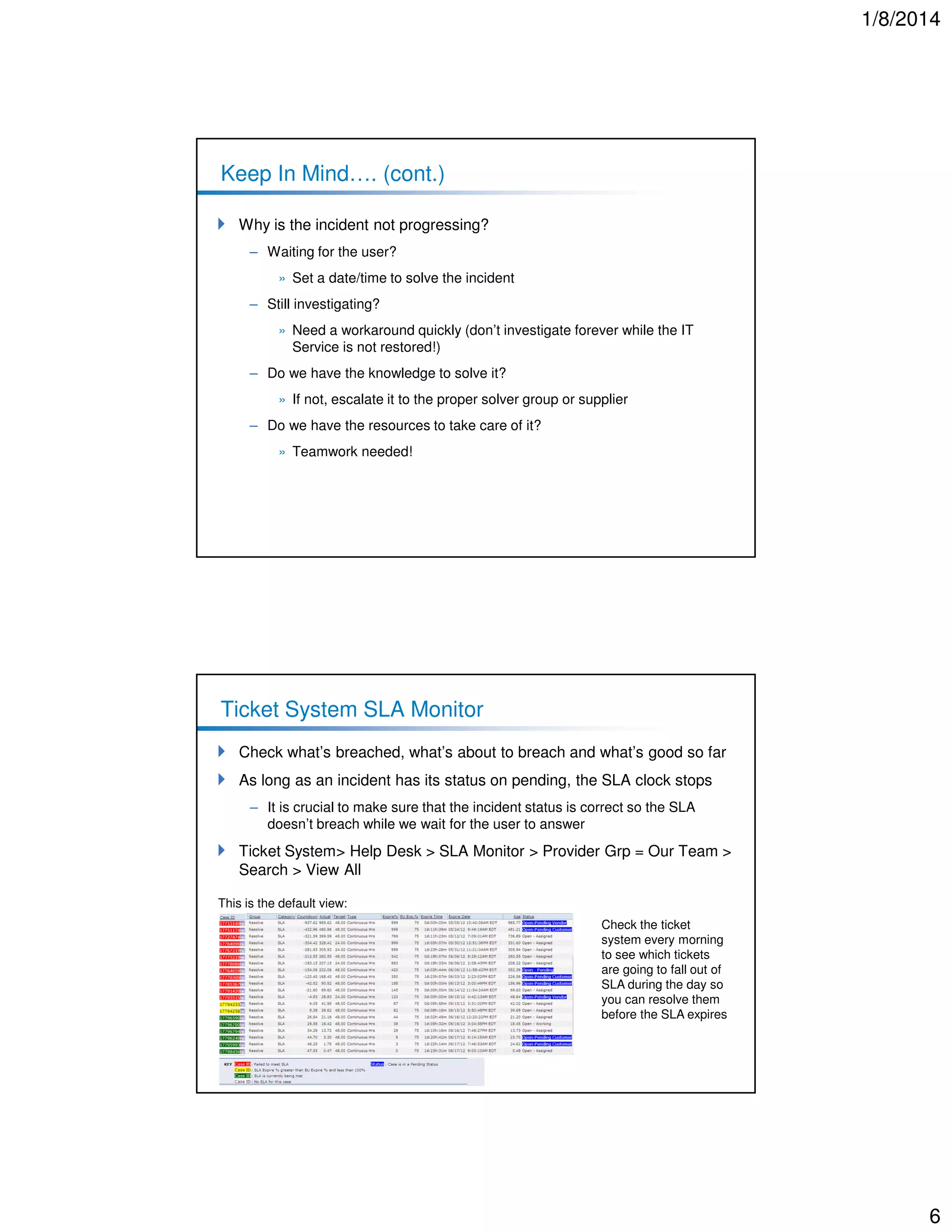
Check what’s breached, what’s about to breach and what’s good so far
As long as an incident has its status on pending, the SLA clock stops
– It is crucial to make sure that the incident status is correct so the SLA
doesn’t breach while we wait for the user to answer

Ticket System> Help Desk > SLA Monitor > Provider Grp = Our Team >
Search > View All
This is the default view:
Check the ticket
system every morning
to see which tickets
are going to fall out of
SLA during the day so
you can resolve them
before the SLA expires

6
1/8/2014

Ticket System SLA Monitor (cont.)
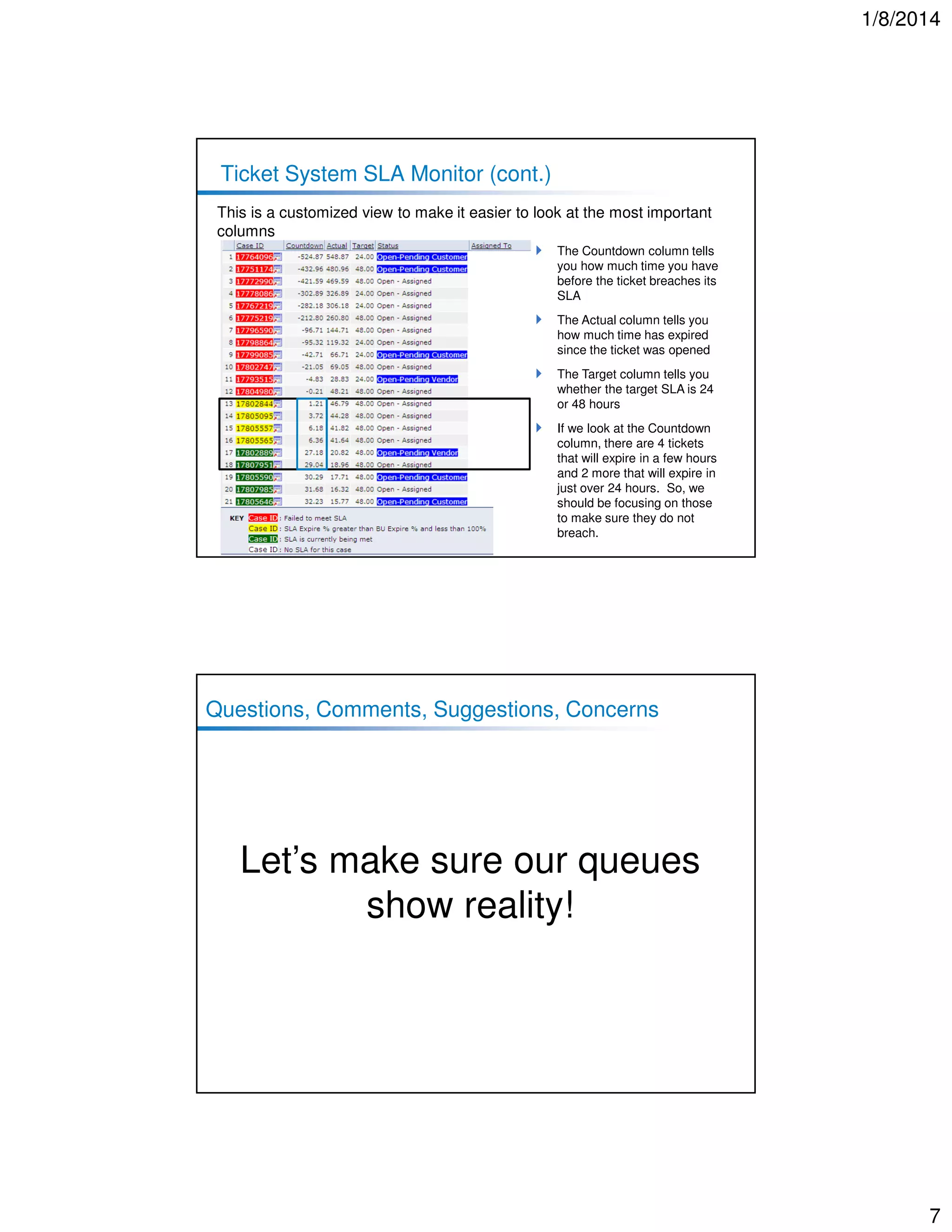
This is a customized view to make it easier to look at the most important
columns
The Countdown column tells
you how much time you have
before the ticket breaches its
SLA
The Actual column tells you
how much time has expired
since the ticket was opened
The Target column tells you
whether the target SLA is 24
or 48 hours
If we look at the Countdown
column, there are 4 tickets
that will expire in a few hours
and 2 more that will expire in
just over 24 hours. So, we
should be focusing on those
to make sure they do not
breach.

Questions, Comments, Suggestions, Concerns

Let’s make sure our queues
show reality!

7

Incident Management - Obtaining Our #1 Objective

  • 1.
    1/8/2014 Incident Management – Obtainingour #1 Objective Restore a failed (or failing) service as quickly as possible so that the requester can continue to use the service with the minimum of disruption and a maximum of security Mark Copeland Improving Incident Management Our team’s performance is NOT being questioned! We’re doing a good job! – We ALL (including me) need to learn how to improve our ticket management, so figures match reality and show how good we perform Objective #1 – Improve service performance on incident management – Incident management SLA » Now > 80% » By end of year > 85% – Backlog of tickets, none older than 5 days The goal of Incident Management is to – Restore a failed (or failing) service as quickly as possible so that the requester can continue to use the service with the minimum of disruption and a maximum of security 1
  • 2.
    1/8/2014 What is anIT Service? A Service provided to one or more Customers (company employees), by an IT Service Provider (IT Dept.) An IT Service is based on the use of Information Technology and supports the Customer's Business Process An IT Service is made up from a combination of people, processes and technology and should be defined in a Service Level Agreement An IT Service is not only linked to a specific hardware or software – For example: the Printing service. Company users are able to print documents in a good quality to a printer nearby. If the closest printer to their desk fails, the Printing service goes down. Once they are able to print to another printer close to their working area, the Printing Service is restored. What is an Incident? An Incident is an unplanned interruption to an existing IT Service or a reduction in the quality of an IT Service Incident Service Level Agreement (SLA) between IT and our customers: 48 hours is the maximum time for an IT Service interruption Most of the incidents across the company meet this SLA Once the IT service is restored, there’s no longer an incident The fact that the IT Service is restored doesn’t mean that the specific hardware/software problem is corrected Even though the IT Service is restored, a new request may need to be raised to – Fix a piece of equipment or purchase a replacement (service request) – Investigate further to find the root cause (problem management) – Request a change to prevent the incident from happening again (change management) – Etc. 2
  • 3.
    1/8/2014 Figures Do Count! Asa service provider, IT is measured by its figures – If our figures are supposed to show the value of our service, then our figures should describe reality Figures can be – Qualitative » Customer perception / satisfaction » Customer Complaints – Quantitative » Service Level Agreement, ticket ageing, cost saving ideas, etc. IT figures have an impact on – IT Balanced Scorecard – The businesses’ objectives and balanced scorecards Moving Figures Closer to Reality Other IT teams asking us for a support service, need to create a Service Request and assign it to us Pending-customer tickets can’t live forever – Set a date and time with the user to resolve the request – If it does not progress because of the lack of user availability, inform the user that we’ll close the ticket and help him/her when s/he’s ready – We need to avoid waiting times like: “I’ll let you know when it’s a good time for me …. “ If we struggle to solve a request in a reasonable time frame – Ask other teams for help and assign the case to them – IT is a big community and if nobody can solve it, then we’ve got our vendors to provide 3rd line support 3
  • 4.
    1/8/2014 Our SLA figures IncidentManagement SLAs – Our Team Goals – Now > 80% – By end of year > 85% We have made, and are continuing to make, EXCELLENT progress! Month Overall SLA P3 SLA P4 SLA March 38.78% 29.17% 41.12% April 44.14% 46.60% 42.37% May 61.71% 46.81% 65.00% June MTD 6/11 84.38% 80.00% 85.71% June MTD 6/19 79.03% 66.67% 81.55% June MTD 6/26 74.75% 59.38% 77.38% Our Backlog figures Backlog of Tickets – Our Team Goal: No tickets older than 5 days 80 60 40 20 0 Jan 30 Feb 27 Mar 26 0-4 Days 0-4 Days 5-9 Days 10-14 Days 15-30 Days 31 + Days Jan 30 26 23 9 11 11 5-9 Days Apr 23 10-14 Days May 28 15-30 Days Feb 27 Mar 26 Apr 23 May 28 Jun 18 Jun 26 29 13 16 5 11 11 9 14 12 12 3 6 6 9 15 1 2 4 17 8 6 5 5 2 8 7 5 0 2 1 Jun 18 Jun 26 31 + Days # of Tickets 6+ Days Old May 14 May 22 May 29 Jun 05 14 9 20 12 Jun 12 13 Jun 19 10 Jun 26 9 4
  • 5.
    1/8/2014 Where Are WeAt? Incidents queue does not always match reality – It hardly happens that a true IT Service interruption is not resolved in a few hours or days – Our figures don’t show how well we do perform, so this is where we’re going to put our focus Most common reasons of having incidents aging in our queues – Incident queue holding other support requests than incidents: service requests, change requests, etc. – Incidents already solved but still opened in ticket system – Ticket system searches are not displaying all open incidents in the queue – Incident not assigned to the proper solver group – Incident not assigned to an individual – Incident on hold waiting for the supplier/user feedback Keep In Mind…. Open Incidents are easier to manage if we have a pre-defined search in the ticket system to monitor them (one for open incidents, one for open service requests) Incidents priorities increase as they get old (aging impacts how well we deliver the support service to our customer) Make sure all incidents are assigned to an individual Make sure the incident queue only holds incidents – Is the service already restored or a work around in place? If so, then there’s no incident anymore! Change an Incident to a Service Request once the user is up and running (e.g., loaner laptop, secondary printer) but the equipment needs servicing – Incident is over as soon as a user is up and running and then becomes a Service Request because you’re now servicing that piece of equipment 5
  • 6.
    1/8/2014 Keep In Mind….(cont.) Why is the incident not progressing? – Waiting for the user? » Set a date/time to solve the incident – Still investigating? » Need a workaround quickly (don’t investigate forever while the IT Service is not restored!) – Do we have the knowledge to solve it? » If not, escalate it to the proper solver group or supplier – Do we have the resources to take care of it? » Teamwork needed! Ticket System SLA Monitor Check what’s breached, what’s about to breach and what’s good so far As long as an incident has its status on pending, the SLA clock stops – It is crucial to make sure that the incident status is correct so the SLA doesn’t breach while we wait for the user to answer Ticket System> Help Desk > SLA Monitor > Provider Grp = Our Team > Search > View All This is the default view: Check the ticket system every morning to see which tickets are going to fall out of SLA during the day so you can resolve them before the SLA expires 6
  • 7.
    1/8/2014 Ticket System SLAMonitor (cont.) This is a customized view to make it easier to look at the most important columns The Countdown column tells you how much time you have before the ticket breaches its SLA The Actual column tells you how much time has expired since the ticket was opened The Target column tells you whether the target SLA is 24 or 48 hours If we look at the Countdown column, there are 4 tickets that will expire in a few hours and 2 more that will expire in just over 24 hours. So, we should be focusing on those to make sure they do not breach. Questions, Comments, Suggestions, Concerns Let’s make sure our queues show reality! 7