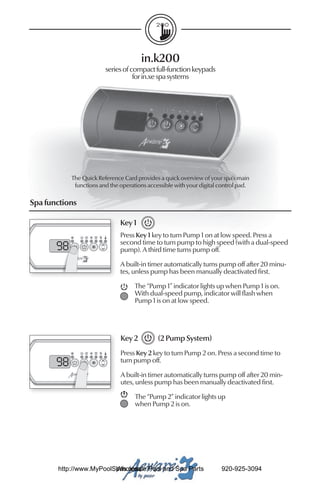
in.k200
                         series of compact full-function keypads
                                    for in.xe spa systems


            The Quick Reference Card provides a quick overview of your spa’s main
             functions and the operations accessible with your digital control pad.

Spa functions

                               Key 1
                               Press Key 1 key to turn Pump 1 on at low speed. Press a
                               second time to turn pump to high speed (with a dual-speed
       ��                      pump). A third time turns pump off.

                               A built-in timer automatically turns pump off after 20 minu-
                               tes, unless pump has been manually deactivated first.

                                     The “Pump 1” indicator lights up when Pump 1 is on.
                                     With dual-speed pump, indicator will flash when
                                     Pump 1 is on at low speed.


                               Key 2          (2 Pump System)
                               Press Key 2 key to turn Pump 2 on. Press a second time to
       ��                      turn pump off.

                               A built-in timer automatically turns pump off after 20 min-
                               utes, unless pump has been manually deactivated first.

                                     The “Pump 2” indicator lights up
                                     when Pump 2 is on.


       http://www.MyPoolSpas.com Pool and Spa Parts
                         Wholesale                                     920-925-3094
Key 2           (2-Pump/ Blower System)
                               Press Key 2 to turn Pump 2 on at high speed. Pressing a
         ��                    second time turns blower on. A third press turns Pump 2
                               off but leaves blower on. A final press turns blower off. A
                               built-in timer automatically turns Pump 2/blower off after
                               20 minutes, unless Pump 2/blower has been manually
                               deactivated first.

                                    The “Pump 2” indicator lights up
                                    when Pump 2/blower is on.


                               Light key
                               Press Light key to turn light on. Press a second time to turn
         ��                    light off. A built-in timer automatically turns light off after
                               2 hours, unless it has been manually deactivated first.

                                    The “Light” indicator lights up
                                    when light is on.


                               Up/Down keys
                               Use Up or Down key to set desired water temperature.
         ��                    The temperature setting will be displayed for 5 seconds to
                               confirm your new selection.

                                    The "Set Point" icon indicates that the display shows the
                                    desired temperature, NOT the current water temperature!


Programming the purge / filter cycles

Programming filter cycles
Depending on system configuration the system performs either purge cycles or filter cycles.

To program the filter cycles, you must enter these parameters: duration and frequency.
During a filter cycle, pumps & blower run at high speed for one minute to purge the
plumbing. Pump 1 or CP then runs at low speed for the remaining of the cycle.


          http://www.MyPoolSpas.com Pool and Spa Parts
                            Wholesale                                 920-925-3094
Setting filter cycle duration

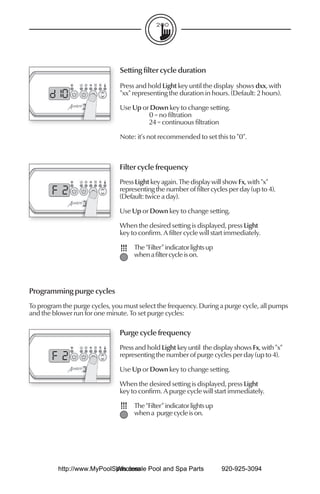
                               Press and hold Light key until the display shows dxx, with
                               "xx" representing the duration in hours. (Default: 2 hours).

                               Use Up or Down key to change setting.
                                        0 = no filtration
                                        24 = continuous filtration

                               Note: it's not recommended to set this to "0".


                               Filter cycle frequency
                               Press Light key again. The display will show Fx, with "x"
        ����                   representing the number of filter cycles per day (up to 4).
                               (Default: twice a day).

                               Use Up or Down key to change setting.

                               When the desired setting is displayed, press Light
                               key to confirm. A filter cycle will start immediately.

                                    The “Filter” indicator lights up
                                    when a filter cycle is on.


Programming purge cycles
To program the purge cycles, you must select the frequency. During a purge cycle, all pumps
and the blower run for one minute. To set purge cycles:

                               Purge cycle frequency
                               Press and hold Light key until the display shows Fx, with "x"
        ����                   representing the number of purge cycles per day (up to 4).

                               Use Up or Down key to change setting.

                               When the desired setting is displayed, press Light
                               key to confirm. A purge cycle will start immediately.

                                    The “Filter” indicator lights up
                                    when a purge cycle is on.


          http://www.MyPoolSpas.com Pool and Spa Parts
                            Wholesale                                  920-925-3094
Water temperature regulation                        Smart Winter Mode
In a regulation cycle, the system first              Our Smart Winter Mode protects your
generates water flow through the heater              system from the cold by turning pumps on
housing and the plumbing, in order                  several times a day to prevent water from
to ensure accurate water temperature                freezing in pipes.
readings as well as avoiding heater
activation in dry conditions.                            The “Smart Winter Mode” indicator
                                                         lights up when the Smart Winter
After verifying pump activation and taking a             Mode is on.
water temperature reading if required, the
system automatically turns the heater on to
reach and maintain water temperature at             Cooldown
Set Point.
     The “Heater” indicator lights up when          While performing this task, the heater is not
     the heater is on. It flashes when there         allowed to turn on and its icon flashes.
     is a request for more heat but the
     heater has not yet started.

Troubleshooting

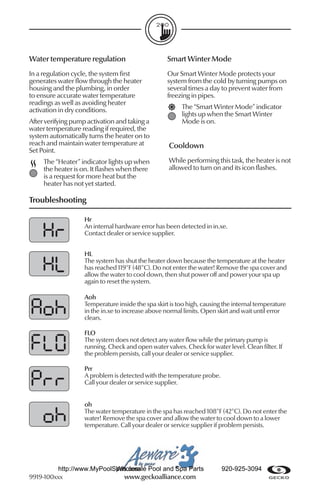
                    Hr
                    An internal hardware error has been detected in in.xe.
                    Contact dealer or service supplier.


                    HL
                    The system has shut the heater down because the temperature at the heater
                    has reached 119°F (48°C). Do not enter the water! Remove the spa cover and
                    allow the water to cool down, then shut power off and power your spa up
                    again to reset the system.

                    Aoh
                    Temperature inside the spa skirt is too high, causing the internal temperature
                    in the in.xe to increase above normal limits. Open skirt and wait until error
                    clears.

                    FLO
                    The system does not detect any water flow while the primary pump is
                    running. Check and open water valves. Check for water level. Clean filter. If
                    the problem persists, call your dealer or service supplier.

                    Prr
                    A problem is detected with the temperature probe.
                    Call your dealer or service supplier.


                    oh
                    The water temperature in the spa has reached 108°F (42°C). Do not enter the
                    water! Remove the spa cover and allow the water to cool down to a lower
                    temperature. Call your dealer or service supplier if problem persists.


         http://www.MyPoolSpas.com Pool and Spa Parts
                           Wholesale                                     920-925-3094
9919-100xxx                  www.geckoalliance.com

In k200 for xe quick reference card

  • 1.
    in.k200 series of compact full-function keypads for in.xe spa systems The Quick Reference Card provides a quick overview of your spa’s main functions and the operations accessible with your digital control pad. Spa functions Key 1 Press Key 1 key to turn Pump 1 on at low speed. Press a second time to turn pump to high speed (with a dual-speed �� pump). A third time turns pump off. A built-in timer automatically turns pump off after 20 minu- tes, unless pump has been manually deactivated first. The “Pump 1” indicator lights up when Pump 1 is on. With dual-speed pump, indicator will flash when Pump 1 is on at low speed. Key 2 (2 Pump System) Press Key 2 key to turn Pump 2 on. Press a second time to �� turn pump off. A built-in timer automatically turns pump off after 20 min- utes, unless pump has been manually deactivated first. The “Pump 2” indicator lights up when Pump 2 is on. http://www.MyPoolSpas.com Pool and Spa Parts Wholesale 920-925-3094
  • 2.
    Key 2 (2-Pump/ Blower System) Press Key 2 to turn Pump 2 on at high speed. Pressing a �� second time turns blower on. A third press turns Pump 2 off but leaves blower on. A final press turns blower off. A built-in timer automatically turns Pump 2/blower off after 20 minutes, unless Pump 2/blower has been manually deactivated first. The “Pump 2” indicator lights up when Pump 2/blower is on. Light key Press Light key to turn light on. Press a second time to turn �� light off. A built-in timer automatically turns light off after 2 hours, unless it has been manually deactivated first. The “Light” indicator lights up when light is on. Up/Down keys Use Up or Down key to set desired water temperature. �� The temperature setting will be displayed for 5 seconds to confirm your new selection. The "Set Point" icon indicates that the display shows the desired temperature, NOT the current water temperature! Programming the purge / filter cycles Programming filter cycles Depending on system configuration the system performs either purge cycles or filter cycles. To program the filter cycles, you must enter these parameters: duration and frequency. During a filter cycle, pumps & blower run at high speed for one minute to purge the plumbing. Pump 1 or CP then runs at low speed for the remaining of the cycle. http://www.MyPoolSpas.com Pool and Spa Parts Wholesale 920-925-3094
  • 3.
    Setting filter cycleduration Press and hold Light key until the display shows dxx, with "xx" representing the duration in hours. (Default: 2 hours). Use Up or Down key to change setting. 0 = no filtration 24 = continuous filtration Note: it's not recommended to set this to "0". Filter cycle frequency Press Light key again. The display will show Fx, with "x" ���� representing the number of filter cycles per day (up to 4). (Default: twice a day). Use Up or Down key to change setting. When the desired setting is displayed, press Light key to confirm. A filter cycle will start immediately. The “Filter” indicator lights up when a filter cycle is on. Programming purge cycles To program the purge cycles, you must select the frequency. During a purge cycle, all pumps and the blower run for one minute. To set purge cycles: Purge cycle frequency Press and hold Light key until the display shows Fx, with "x" ���� representing the number of purge cycles per day (up to 4). Use Up or Down key to change setting. When the desired setting is displayed, press Light key to confirm. A purge cycle will start immediately. The “Filter” indicator lights up when a purge cycle is on. http://www.MyPoolSpas.com Pool and Spa Parts Wholesale 920-925-3094
  • 4.
    Water temperature regulation Smart Winter Mode In a regulation cycle, the system first Our Smart Winter Mode protects your generates water flow through the heater system from the cold by turning pumps on housing and the plumbing, in order several times a day to prevent water from to ensure accurate water temperature freezing in pipes. readings as well as avoiding heater activation in dry conditions. The “Smart Winter Mode” indicator lights up when the Smart Winter After verifying pump activation and taking a Mode is on. water temperature reading if required, the system automatically turns the heater on to reach and maintain water temperature at Cooldown Set Point. The “Heater” indicator lights up when While performing this task, the heater is not the heater is on. It flashes when there allowed to turn on and its icon flashes. is a request for more heat but the heater has not yet started. Troubleshooting Hr An internal hardware error has been detected in in.xe. Contact dealer or service supplier. HL The system has shut the heater down because the temperature at the heater has reached 119°F (48°C). Do not enter the water! Remove the spa cover and allow the water to cool down, then shut power off and power your spa up again to reset the system. Aoh Temperature inside the spa skirt is too high, causing the internal temperature in the in.xe to increase above normal limits. Open skirt and wait until error clears. FLO The system does not detect any water flow while the primary pump is running. Check and open water valves. Check for water level. Clean filter. If the problem persists, call your dealer or service supplier. Prr A problem is detected with the temperature probe. Call your dealer or service supplier. oh The water temperature in the spa has reached 108°F (42°C). Do not enter the water! Remove the spa cover and allow the water to cool down to a lower temperature. Call your dealer or service supplier if problem persists. http://www.MyPoolSpas.com Pool and Spa Parts Wholesale 920-925-3094 9919-100xxx www.geckoalliance.com