9300 SERIES - INCOMING POWER WIRING

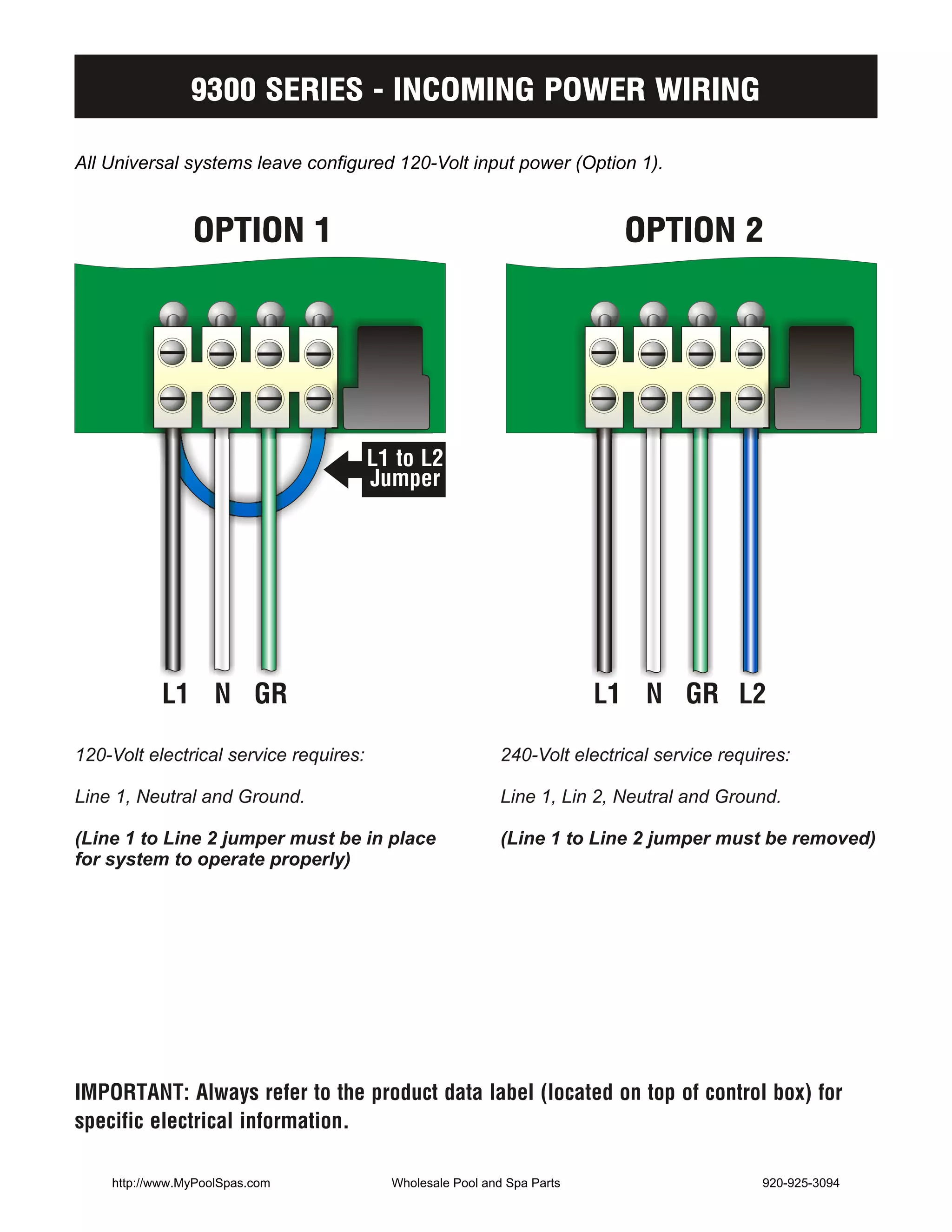
All Universal systems leave configured 120-Volt input power (Option 1).


                OPTION 1                                                   OPTION 2


                                        L1 to L2
                                        Jumper


           L1 N GR                                                       L1 N GR L2

120-Volt electrical service requires:                       240-Volt electrical service requires:

Line 1, Neutral and Ground.                                 Line 1, Lin 2, Neutral and Ground.

(Line 1 to Line 2 jumper must be in place                   (Line 1 to Line 2 jumper must be removed)
for system to operate properly)


IMPORTANT: Always refer to the product data label (located on top of control box) for
specific electrical information.

    http://www.MyPoolSpas.com             Wholesale Pool and Spa Parts                       920-925-3094
9300 SERIES - STANDARD LOW LEVEL PROGRAMMING

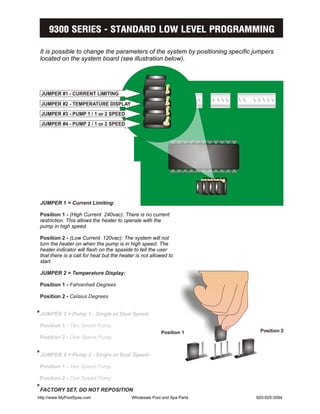
 It is possible to change the parameters of the system by positioning specific jumpers
 located on the system board (see illustration below).


 JUMPER #1 - CURRENT LIMITING
 JUMPER #2 - TEMPERATURE DISPLAY
 JUMPER #3 - PUMP 1 / 1 or 2 SPEED
 JUMPER #4 - PUMP 2 / 1 or 2 SPEED


 JUMPER 1 = Current Limiting:

 Position 1 - (High Current 240vac): There is no current
 restriction. This allows the heater to operate with the
 pump in high speed.

 Position 2 - (Low Current 120vac): The system will not
 turn the heater on when the pump is in high speed. The
 heater indicator will flash on the spaside to tell the user
 that there is a call for heat but the heater is not allowed to
 start.

 JUMPER 2 = Temperature Display:

 Position 1 - Fahrenheit Degrees

 Position 2 - Celsius Degrees


*JUMPER 3 = Pump 1 - Single or Dual Speed:
 Position 1 - Two Speed Pump
                                                         Position 1              Position 2
 Position 2 - One Speed Pump


*JUMPER 4 = Pump 2 - Single or Dual Speed:
 Position 1 - Two Speed Pump

 Position 2 - One Speed Pump
*FACTORY SET, DO NOT REPOSITION
http://www.MyPoolSpas.com                  Wholesale Pool and Spa Parts        920-925-3094
9300 SERIES - BASIC OPERATION
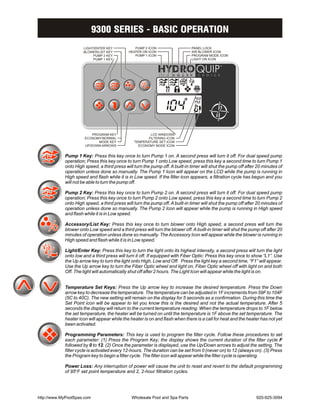
                     LIGHT/ENTER KEY            PUMP 2 ICON                   PANEL LOCK
                     BLOWER/LIST KEY         HEATER ON ICON                   AIR BLOWER ICON
                          PUMP 2 KEY            PUMP 1 ICON                   PROGRAM MODE ICON
                          PUMP 1 KEY                                          LIGHT ON ICON


                          PROGRAM KEY                   LCD WINDOWS
                      ECONOMY/NORMAL                   FILTERING ICON
                             MODE KEY           TEMPERATURE SET ICON
                      UP/DOWN ARROWS              ECONOMY MODE ICON


            Pump 1 Key: Press this key once to turn Pump 1 on. A second press will turn it off. For dual speed pump
            operation; Press this key once to turn Pump 1 onto Low speed, press this key a second time to turn Pump 1
            onto High speed, a third press will turn the pump off. A built-in timer will shut the pump off after 20 minutes of
            operation unless done so manually. The Pump 1 Icon will appear on the LCD while the pump is running in
            High speed and flash while it is in Low speed. If the filter icon appears, a filtration cycle has begun and you
            will not be able to turn the pump off.

            Pump 2 Key: Press this key once to turn Pump 2 on. A second press will turn it off. For dual speed pump
            operation; Press this key once to turn Pump 2 onto Low speed, press this key a second time to turn Pump 2
            onto High speed, a third press will turn the pump off. A built-in timer will shut the pump off after 20 minutes of
            operation unless done so manually. The Pump 2 Icon will appear while the pump is running in High speed
            and flash while it is in Low speed.

            Accessory/List Key: Press this key once to turn blower onto High speed, a second press will turn the
            blower onto Low speed and a third press will turn the blower off. A built-in timer will shut the pump off after 20
            minutes of operation unless done so manually. The Accessory Icon will appear while the blower is running in
            High speed and flash while it is in Low speed.

            Light/Enter Key: Press this key to turn the light onto its highest intensity, a second press will turn the light
            onto low and a third press will turn it off. If equipped with Fiber Optic: Press this key once to show “L1”. Use
            the Up arrow key to turn the light onto High, Low and Off. Press the light key a second time, “F1” will appear.
            Use the Up arrow key to turn the Fiber Optic wheel and light on, Fiber Optic wheel off with light on and both
            Off. The light will automatically shut off after 2 hours. The Light Icon will appear while the light is on.


            Temperature Set Keys: Press the Up arrow key to increase the desired temperature. Press the Down
            arrow key to decrease the temperature. The temperature can be adjusted in 1F increments from 59F to 104F
            (5C to 40C). The new setting will remain on the display for 5 seconds as a confirmation. During this time the
            Set Point icon will be appear to let you know this is the desired and not the actual temperature. After 5
            seconds the display will return to the current temperature reading. When the temperature drops to 1F below
            the set temperature, the heater will be turned on until the temperature is 1F above the set temperature. The
            heater icon will appear while the heater is on and flash when there is a call for heat and the heater has not yet
            been activated.

            Programming Parameters: This key is used to program the filter cycle. Follow these procedures to set
            each parameter: (1) Press the Program Key; the display shows the current duration of the filter cycle F
            followed by 0 to 12. (2) Once the parameter is displayed, use the Up/Down arrows to adjust the setting. The
            filter cycle is activated every 12-hours. The duration can be set from 0 (never on) to 12 (always on). (3) Press
            the Program key to begin a filter cycle. The filter icon will appear while the filter cycle is operating.

            Power Loss: Any interruption of power will cause the unit to reset and revert to the default programming
            of 95BF set point temperature and 2, 2-hour filtration cycles.


http://www.MyPoolSpas.com                     Wholesale Pool and Spa Parts                                      920-925-3094
9300 SERIES - ERROR MESSAGES
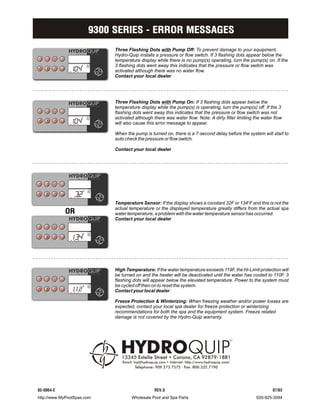
                            Three Flashing Dots with Pump Off: To prevent damage to your equipment,
                            Hydro-Quip installs a pressure or flow switch. If 3 flashing dots appear below the
                            temperature display while there is no pump(s) operating, turn the pump(s) on. If the
                            3 flashing dots went away this indicates that the pressure or flow switch was
              ...           activated although there was no water flow.
                            Contact your local dealer


                            Three Flashing Dots with Pump On: If 3 flashing dots appear below the
                            temperature display while the pump(s) is operating, turn the pump(s) off. If the 3
                            flashing dots went away this indicates that the pressure or flow switch was not
                            activated although there was water flow. Note: A dirty filter limiting the water flow
              ...           will also cause this error message to appear.

                            When the pump is turned on, there is a 7-second delay before the system will start to
                            auto check the pressure or flow switch.

                            Contact your local dealer


                32
              ...
                            Temperature Sensor: If the display shows a constant 32F or 134BF and this is not the
            OR
                            actual temperature or the displayed temperature greatly differs from the actual spa
                            water temperature, a problem with the water temperature sensor has occurred.
                            Contact your local dealer


                34
              ...


                            High Temperature: If the water temperature exceeds 119F, the Hi-Limit protection will
                            be turned on and the heater will be deactivated until the water has cooled to 110F. 3
                            flashing dots will appear below the elevated temperature. Power to the system must
                            be cycled off then on to reset the system.
              ...2          Contact your local dealer

                            Freeze Protection & Winterizing: When freezing weather and/or power losses are
                            expected, contact your local spa dealer for freeze protection or winterizing
                            recommendations for both the spa and the equipment system. Freeze related
                            damage is not covered by the Hydro-Quip warranty.


85-0064-E                                       REV.0                                                       07/03
http://www.MyPoolSpas.com           Wholesale Pool and Spa Parts                                    920-925-3094

85 0064-e standard-installation insert_web

  • 1.
    9300 SERIES -INCOMING POWER WIRING All Universal systems leave configured 120-Volt input power (Option 1). OPTION 1 OPTION 2 L1 to L2 Jumper L1 N GR L1 N GR L2 120-Volt electrical service requires: 240-Volt electrical service requires: Line 1, Neutral and Ground. Line 1, Lin 2, Neutral and Ground. (Line 1 to Line 2 jumper must be in place (Line 1 to Line 2 jumper must be removed) for system to operate properly) IMPORTANT: Always refer to the product data label (located on top of control box) for specific electrical information. http://www.MyPoolSpas.com Wholesale Pool and Spa Parts 920-925-3094
  • 2.
    9300 SERIES -STANDARD LOW LEVEL PROGRAMMING It is possible to change the parameters of the system by positioning specific jumpers located on the system board (see illustration below). JUMPER #1 - CURRENT LIMITING JUMPER #2 - TEMPERATURE DISPLAY JUMPER #3 - PUMP 1 / 1 or 2 SPEED JUMPER #4 - PUMP 2 / 1 or 2 SPEED JUMPER 1 = Current Limiting: Position 1 - (High Current 240vac): There is no current restriction. This allows the heater to operate with the pump in high speed. Position 2 - (Low Current 120vac): The system will not turn the heater on when the pump is in high speed. The heater indicator will flash on the spaside to tell the user that there is a call for heat but the heater is not allowed to start. JUMPER 2 = Temperature Display: Position 1 - Fahrenheit Degrees Position 2 - Celsius Degrees *JUMPER 3 = Pump 1 - Single or Dual Speed: Position 1 - Two Speed Pump Position 1 Position 2 Position 2 - One Speed Pump *JUMPER 4 = Pump 2 - Single or Dual Speed: Position 1 - Two Speed Pump Position 2 - One Speed Pump *FACTORY SET, DO NOT REPOSITION http://www.MyPoolSpas.com Wholesale Pool and Spa Parts 920-925-3094
  • 3.
    9300 SERIES -BASIC OPERATION LIGHT/ENTER KEY PUMP 2 ICON PANEL LOCK BLOWER/LIST KEY HEATER ON ICON AIR BLOWER ICON PUMP 2 KEY PUMP 1 ICON PROGRAM MODE ICON PUMP 1 KEY LIGHT ON ICON PROGRAM KEY LCD WINDOWS ECONOMY/NORMAL FILTERING ICON MODE KEY TEMPERATURE SET ICON UP/DOWN ARROWS ECONOMY MODE ICON Pump 1 Key: Press this key once to turn Pump 1 on. A second press will turn it off. For dual speed pump operation; Press this key once to turn Pump 1 onto Low speed, press this key a second time to turn Pump 1 onto High speed, a third press will turn the pump off. A built-in timer will shut the pump off after 20 minutes of operation unless done so manually. The Pump 1 Icon will appear on the LCD while the pump is running in High speed and flash while it is in Low speed. If the filter icon appears, a filtration cycle has begun and you will not be able to turn the pump off. Pump 2 Key: Press this key once to turn Pump 2 on. A second press will turn it off. For dual speed pump operation; Press this key once to turn Pump 2 onto Low speed, press this key a second time to turn Pump 2 onto High speed, a third press will turn the pump off. A built-in timer will shut the pump off after 20 minutes of operation unless done so manually. The Pump 2 Icon will appear while the pump is running in High speed and flash while it is in Low speed. Accessory/List Key: Press this key once to turn blower onto High speed, a second press will turn the blower onto Low speed and a third press will turn the blower off. A built-in timer will shut the pump off after 20 minutes of operation unless done so manually. The Accessory Icon will appear while the blower is running in High speed and flash while it is in Low speed. Light/Enter Key: Press this key to turn the light onto its highest intensity, a second press will turn the light onto low and a third press will turn it off. If equipped with Fiber Optic: Press this key once to show “L1”. Use the Up arrow key to turn the light onto High, Low and Off. Press the light key a second time, “F1” will appear. Use the Up arrow key to turn the Fiber Optic wheel and light on, Fiber Optic wheel off with light on and both Off. The light will automatically shut off after 2 hours. The Light Icon will appear while the light is on. Temperature Set Keys: Press the Up arrow key to increase the desired temperature. Press the Down arrow key to decrease the temperature. The temperature can be adjusted in 1F increments from 59F to 104F (5C to 40C). The new setting will remain on the display for 5 seconds as a confirmation. During this time the Set Point icon will be appear to let you know this is the desired and not the actual temperature. After 5 seconds the display will return to the current temperature reading. When the temperature drops to 1F below the set temperature, the heater will be turned on until the temperature is 1F above the set temperature. The heater icon will appear while the heater is on and flash when there is a call for heat and the heater has not yet been activated. Programming Parameters: This key is used to program the filter cycle. Follow these procedures to set each parameter: (1) Press the Program Key; the display shows the current duration of the filter cycle F followed by 0 to 12. (2) Once the parameter is displayed, use the Up/Down arrows to adjust the setting. The filter cycle is activated every 12-hours. The duration can be set from 0 (never on) to 12 (always on). (3) Press the Program key to begin a filter cycle. The filter icon will appear while the filter cycle is operating. Power Loss: Any interruption of power will cause the unit to reset and revert to the default programming of 95BF set point temperature and 2, 2-hour filtration cycles. http://www.MyPoolSpas.com Wholesale Pool and Spa Parts 920-925-3094
  • 4.
    9300 SERIES -ERROR MESSAGES Three Flashing Dots with Pump Off: To prevent damage to your equipment, Hydro-Quip installs a pressure or flow switch. If 3 flashing dots appear below the temperature display while there is no pump(s) operating, turn the pump(s) on. If the 3 flashing dots went away this indicates that the pressure or flow switch was ... activated although there was no water flow. Contact your local dealer Three Flashing Dots with Pump On: If 3 flashing dots appear below the temperature display while the pump(s) is operating, turn the pump(s) off. If the 3 flashing dots went away this indicates that the pressure or flow switch was not activated although there was water flow. Note: A dirty filter limiting the water flow ... will also cause this error message to appear. When the pump is turned on, there is a 7-second delay before the system will start to auto check the pressure or flow switch. Contact your local dealer 32 ... Temperature Sensor: If the display shows a constant 32F or 134BF and this is not the OR actual temperature or the displayed temperature greatly differs from the actual spa water temperature, a problem with the water temperature sensor has occurred. Contact your local dealer 34 ... High Temperature: If the water temperature exceeds 119F, the Hi-Limit protection will be turned on and the heater will be deactivated until the water has cooled to 110F. 3 flashing dots will appear below the elevated temperature. Power to the system must be cycled off then on to reset the system. ...2 Contact your local dealer Freeze Protection & Winterizing: When freezing weather and/or power losses are expected, contact your local spa dealer for freeze protection or winterizing recommendations for both the spa and the equipment system. Freeze related damage is not covered by the Hydro-Quip warranty. 85-0064-E REV.0 07/03 http://www.MyPoolSpas.com Wholesale Pool and Spa Parts 920-925-3094