DRUPALCON
Improving Your Onsite Search
iFactory
● Boston-based digital agency
● Serving higher ed since 1992
● Acquired by RDW Group in 2004
● Broad, national higher ed client
base
○ Community colleges. State. Ivies.
Grad. Undergrad.
● Regularly recommends Drupal to
clients
● Organic vs. Onsite Search
● Why Is Onsite Search a Big
Deal?
● Ways to Improve
○ SEO Best Practices
○ Search Interfaces
○ Capturing and Analyzing Data
○ Make the Most of Drupal
● Q&A
Agenda
organic vs. onsite
search
Organic vs. onsite search
Organic Search: Site traffic that comes in from Google or Bing.
Onsite Search: Searches using the website’s onsite search engine, such as Solr or
Elasticsearch or even (gulp) Google Custom Search
Organic vs. onsite search
Many users, especially in higher ed, rely on organic search to find what they
need on a website, even if that site has a search box.
Why? Because Google and Bing’s results are often more accurate and easier on
the eyes.
Here are a few examples of how Google search results are more effective than
what appears on a page of onsite search results for some of our higher ed clients.
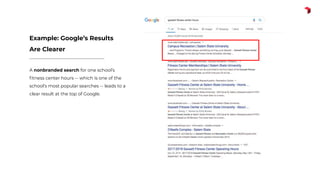
A nonbranded search for one school’s
fitness center hours -- which is one of the
school’s most popular searches -- leads to a
clear result at the top of Google.
Example: Google’s Results
Are Clearer
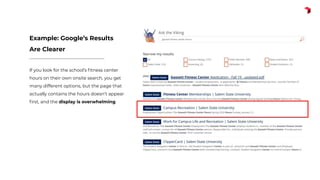
If you look for the school’s fitness center
hours on their own onsite search, you get
many different options, but the page that
actually contains the hours doesn’t appear
first, and the display is overwhelming.
Example: Google’s Results
Are Clearer
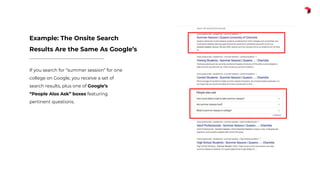
If you search for “summer session” for one
college on Google, you receive a set of
search results, plus one of Google’s
“People Also Ask” boxes featuring
pertinent questions.
Example: The Onsite Search
Results Are the Same As Google’s
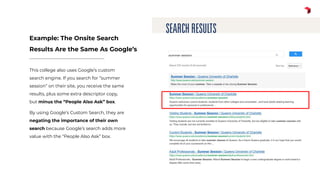
This college also uses Google’s custom
search engine. If you search for “summer
session” on their site, you receive the same
results, plus some extra descriptor copy,
but minus the “People Also Ask” box.
By using Google’s Custom Search, they are
negating the importance of their own
search because Google’s search adds more
value with the “People Also Ask” box.
Example: The Onsite Search
Results Are the Same As Google’s
why is onsite search a
big deal?
Why is onsite search a big deal?
You may have noticed a trend …
If you consider SEO opportunities for higher-ed clients, you may see that many of
the popular search terms for both organic and onsite search are highly specific
and relate to offerings that would interest the following groups:
● Prospectives who are leaning toward “yes” (46% of seniors and 50% of
juniors will use your onsite search)
● Current students
Sample onsite search terms
Here are a few examples:
● Academic calendar
● Bookstore
● Campus maps
● Financial aid office
● Fitness center hours
● Library
● Summer session
● Transcripts
Onsite search and retention
My past work suggests that those who are already enrolled at your school (or
using your product) are using both onsite and organic search engines to find
specific information.
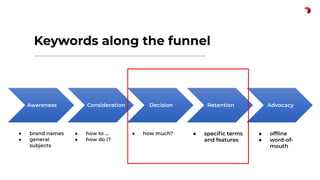
These clients are in the decision and retention stage of the funnel. You either
want them to come back or at least leave satisfied with what they found.
Keywords along the funnel
Awareness Consideration Decision Retention Advocacy
● brand names
● general
subjects
● how to ...
● how do i?
● how much? ● specific terms
and features
● offline
● word-of-
mouth
Onsite search and retention
Quality onsite search results help keep users on your site instead of turning to
Google or Bing.
If they turn to Google or Bing, then you could be missing out on opportunities to
● Present yourself as a reliable resource
● Block out competitors, and
● Increase customer satisfaction
For that reason, consider optimizing your onsite search results as much as you
would your organic search results.
ways to improve
Ways to improve
● Apply basic SEO principles to all content
● Remember tagging and taxonomy
● Consider the overall search results design for your site
● Access and analyze terms captured by onsite search to create better content
● Make the most of the options Drupal has to offer
ways to improve: seo
best practices
SEO best practices: Keywords
If you feel your onsite search needs improvement, you should also look at how
your team handles search engine optimization in general.
● Are you looking at the keywords that lead to your site?
● Are you talking to your users about the terms they use? (“graduation”
versus “commencement”)
Keyword research is about way more than ranking on Google. Keyword research
helps you understand how users think.
SEO best practices: Metadata
Once you have the keywords, though, most of SEO is about old-fashioned
metadata grunt work.
Search engines, whether it’s Google or Solr, do not show good results unless your
team fills out metadata that tells the engine what your content is about.
SEO best practices: Metadata
This means that it’s up to your team to make sure all pages have the following
fields filled out:
● Clear URL Structure
● Page Title
● Page Description
● Alt Text
And if these fields feature some keyword research, all the better.
SEO best practices: Metadata
I’ve worked with a few teams that did everything right in terms of SEO. They
talked to their students. They researched keywords. They put those keywords in
their body copy … and yet their audit uncovered missing page descriptions.
This usually happens because team members get in a hurry and forget to add
the Page Description in particular. Or they forget to mark up their headings
properly, which is will also cause accessibility-related headaches.
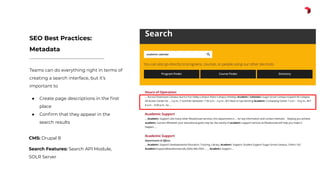
Teams can do everything right in terms of
creating a search interface, but it’s
important to
● Create page descriptions in the first
place
● Confirm that they appear in the
search results
SEO Best Practices:
Metadata
CMS: Drupal 8
Search Features: Search API Module,
SOLR Server
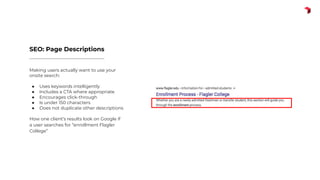
Making users actually want to use your
onsite search:
● Uses keywords intelligently
● Includes a CTA where appropriate
● Encourages click-through
● Is under 150 characters
● Does not duplicate other descriptions
How one client’s results look on Google if
a user searches for “enrollment Flagler
College”
SEO: Page Descriptions
SEO best practices: Metadata
To prevent this, your SEO needs to be baked into your governance.
For the sake of onsite and organic search, you cannot forget those elements.
Either your CMS needs to require it before a page goes live, or it must be part
of your workflow.
In fact, it may be more important for onsite search because a lot of last-minute
pages are things you forgot, or things that seem obscure to you but not your
clients.
ways to improve:
tagging and taxonomy
Tagging and taxonomy
Taxonomy is part of Drupal core, so you want to categorize your content and tag
it properly based on your client’s needs.
A solid taxonomy impacts way more than search. It also affects
● Related Links
● Events
● News
● Other dynamic modules
Tagging and taxonomy
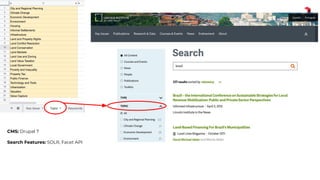
● The taxonomy can help you organize your content on the back end while
improving its display on the front end.
● For that reason, it is well worth taking the time to create a taxonomy and
share it with your Drupal developers.
● A thorough list in an Excel doc can turn into a valuable search filter
CMS: Drupal 7
Search Features: SOLR, Facet API
ways to improve:
search interfaces
Search interfaces
Consider the overall search design:
● Search box
● Search results
● Alternatives
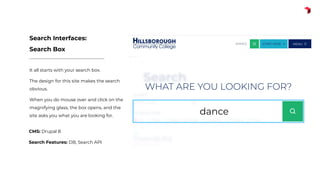
It all starts with your search box.
The design for this site makes the search
obvious.
When you do mouse over and click on the
magnifying glass, the box opens, and the
site asks you what you are looking for.
Search Interfaces:
Search Box
CMS: Drupal 8
Search Features: DB, Search API
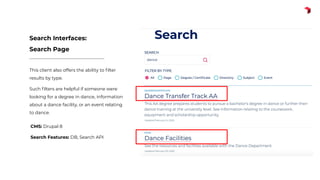
This client also offers the ability to filter
results by type.
Such filters are helpful if someone were
looking for a degree in dance, information
about a dance facility, or an event relating
to dance.
Search Interfaces:
Search Page
CMS: Drupal 8
Search Features: DB, Search API
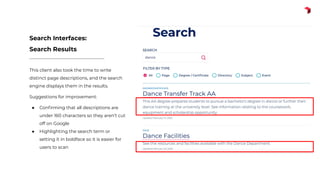
This client also took the time to write
distinct page descriptions, and the search
engine displays them in the results.
Suggestions for improvement:
● Confirming that all descriptions are
under 160 characters so they aren’t cut
off on Google
● Highlighting the search term or
setting it in boldface so it is easier for
users to scan
Search Interfaces:
Search Results
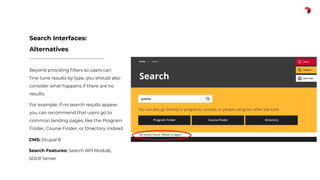
Beyond providing filters so users can
fine-tune results by type, you should also
consider what happens if there are no
results.
For example, if no search results appear,
you can recommend that users go to
common landing pages, like the Program
Finder, Course Finder, or Directory instead.
Search Interfaces:
Alternatives
CMS: Drupal 8
Search Features: Search API Module,
SOLR Server
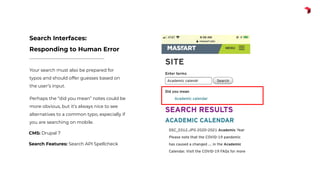
Your search must also be prepared for
typos and should offer guesses based on
the user’s input.
Perhaps the “did you mean” notes could be
more obvious, but it’s always nice to see
alternatives to a common typo, especially if
you are searching on mobile.
Search Interfaces:
Responding to Human Error
CMS: Drupal 7
Search Features: Search API Spellcheck
ways to improve:
analyze terms
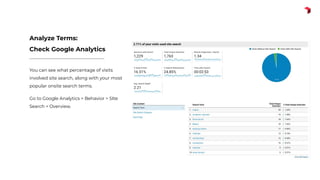
You can see what percentage of visits
involved site search, along with your most
popular onsite search terms.
Go to Google Analytics > Behavior > SIte
Search > Overview.
Analyze Terms:
Check Google Analytics
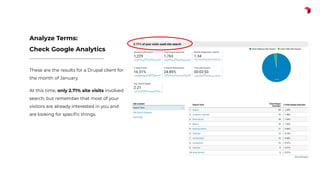
These are the results for a Drupal client for
the month of January.
At this time, only 2.71% site visits involved
search, but remember that most of your
visitors are already interested in you and
are looking for specific things.
Analyze Terms:
Check Google Analytics
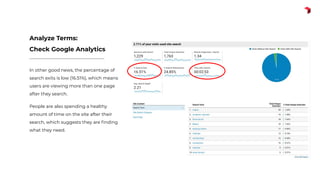
In other good news, the percentage of
search exits is low (16.51%), which means
users are viewing more than one page
after they search.
People are also spending a healthy
amount of time on the site after their
search, which suggests they are finding
what they need.
Analyze Terms:
Check Google Analytics
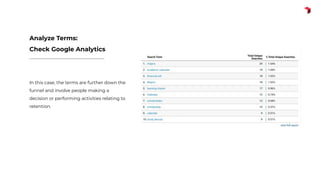
In this case, the terms are further down the
funnel and involve people making a
decision or performing activities relating to
retention.
Analyze Terms:
Check Google Analytics
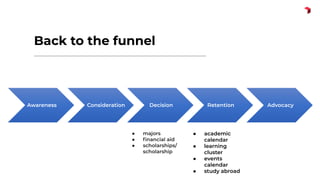
Back to the funnel
Awareness Consideration Decision Retention Advocacy
● majors
● financial aid
● scholarships/
scholarship
● academic
calendar
● learning
cluster
● events
calendar
● study abroad
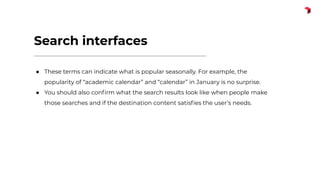
Search interfaces
● These terms can indicate what is popular seasonally. For example, the
popularity of “academic calendar” and “calendar” in January is no surprise.
● You should also confirm what the search results look like when people make
those searches and if the destination content satisfies the user’s needs.
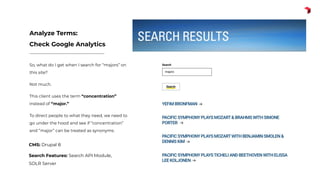
So, what do I get when I search for “majors” on
this site?
Not much.
This client uses the term “concentration”
instead of “major.”
To direct people to what they need, we need to
go under the hood and see if “concentration”
and “major” can be treated as synonyms.
Analyze Terms:
Check Google Analytics
CMS: Drupal 8
Search Features: Search API Module,
SOLR Server
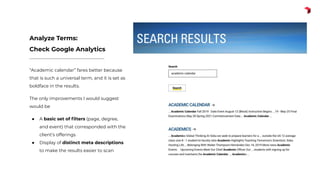
“Academic calendar” fares better because
that is such a universal term, and it is set as
boldface in the results.
The only improvements I would suggest
would be
● A basic set of filters (page, degree,
and event) that corresponded with the
client’s offerings
● Display of distinct meta descriptions
to make the results easier to scan
Analyze Terms:
Check Google Analytics
ways to improve:
drupal-specific
recommendations
Drupal Tools
● iFactory often uses Drupal’s Search API, combined with SOLR
● Other search platforms include Elasticsearch and Lunr.js
● To set up a faceted search, use Facets for Drupal 8+ and Facets API for Drupal 7
● To enable autocomplete, you can also use Search API Autocomplete
● And to generate “Did You Mean?” alternatives, use Search API Spellcheck
q&a
in conclusion
The takeaway
If you are spending time and money on search engine optimization, consider
spending time on how your onsite search works as well.
PS: Fill out those meta descriptions.
Want the full presentation?
● I’ll post the Slideshare link and Google Slides link on Twitter @pepperypen
● LinkedIn: caroline-roberts-68bb72
● Email: caroline@ifactory.com
thank you

Improving Your Onsite Search

  • 1.
  • 2.
    iFactory ● Boston-based digitalagency ● Serving higher ed since 1992 ● Acquired by RDW Group in 2004 ● Broad, national higher ed client base ○ Community colleges. State. Ivies. Grad. Undergrad. ● Regularly recommends Drupal to clients
  • 3.
    ● Organic vs.Onsite Search ● Why Is Onsite Search a Big Deal? ● Ways to Improve ○ SEO Best Practices ○ Search Interfaces ○ Capturing and Analyzing Data ○ Make the Most of Drupal ● Q&A Agenda
  • 4.
  • 5.
    Organic vs. onsitesearch Organic Search: Site traffic that comes in from Google or Bing. Onsite Search: Searches using the website’s onsite search engine, such as Solr or Elasticsearch or even (gulp) Google Custom Search
  • 6.
    Organic vs. onsitesearch Many users, especially in higher ed, rely on organic search to find what they need on a website, even if that site has a search box. Why? Because Google and Bing’s results are often more accurate and easier on the eyes. Here are a few examples of how Google search results are more effective than what appears on a page of onsite search results for some of our higher ed clients.
  • 7.
    A nonbranded searchfor one school’s fitness center hours -- which is one of the school’s most popular searches -- leads to a clear result at the top of Google. Example: Google’s Results Are Clearer
  • 8.
    If you lookfor the school’s fitness center hours on their own onsite search, you get many different options, but the page that actually contains the hours doesn’t appear first, and the display is overwhelming. Example: Google’s Results Are Clearer
  • 9.
    If you searchfor “summer session” for one college on Google, you receive a set of search results, plus one of Google’s “People Also Ask” boxes featuring pertinent questions. Example: The Onsite Search Results Are the Same As Google’s
  • 10.
    This college alsouses Google’s custom search engine. If you search for “summer session” on their site, you receive the same results, plus some extra descriptor copy, but minus the “People Also Ask” box. By using Google’s Custom Search, they are negating the importance of their own search because Google’s search adds more value with the “People Also Ask” box. Example: The Onsite Search Results Are the Same As Google’s
  • 11.
    why is onsitesearch a big deal?
  • 12.
    Why is onsitesearch a big deal? You may have noticed a trend … If you consider SEO opportunities for higher-ed clients, you may see that many of the popular search terms for both organic and onsite search are highly specific and relate to offerings that would interest the following groups: ● Prospectives who are leaning toward “yes” (46% of seniors and 50% of juniors will use your onsite search) ● Current students
  • 13.
    Sample onsite searchterms Here are a few examples: ● Academic calendar ● Bookstore ● Campus maps ● Financial aid office ● Fitness center hours ● Library ● Summer session ● Transcripts
  • 14.
    Onsite search andretention My past work suggests that those who are already enrolled at your school (or using your product) are using both onsite and organic search engines to find specific information. These clients are in the decision and retention stage of the funnel. You either want them to come back or at least leave satisfied with what they found.
  • 15.
    Keywords along thefunnel Awareness Consideration Decision Retention Advocacy ● brand names ● general subjects ● how to ... ● how do i? ● how much? ● specific terms and features ● offline ● word-of- mouth
  • 16.
    Onsite search andretention Quality onsite search results help keep users on your site instead of turning to Google or Bing. If they turn to Google or Bing, then you could be missing out on opportunities to ● Present yourself as a reliable resource ● Block out competitors, and ● Increase customer satisfaction For that reason, consider optimizing your onsite search results as much as you would your organic search results.
  • 17.
  • 18.
    Ways to improve ●Apply basic SEO principles to all content ● Remember tagging and taxonomy ● Consider the overall search results design for your site ● Access and analyze terms captured by onsite search to create better content ● Make the most of the options Drupal has to offer
  • 19.
    ways to improve:seo best practices
  • 20.
    SEO best practices:Keywords If you feel your onsite search needs improvement, you should also look at how your team handles search engine optimization in general. ● Are you looking at the keywords that lead to your site? ● Are you talking to your users about the terms they use? (“graduation” versus “commencement”) Keyword research is about way more than ranking on Google. Keyword research helps you understand how users think.
  • 21.
    SEO best practices:Metadata Once you have the keywords, though, most of SEO is about old-fashioned metadata grunt work. Search engines, whether it’s Google or Solr, do not show good results unless your team fills out metadata that tells the engine what your content is about.
  • 22.
    SEO best practices:Metadata This means that it’s up to your team to make sure all pages have the following fields filled out: ● Clear URL Structure ● Page Title ● Page Description ● Alt Text And if these fields feature some keyword research, all the better.
  • 23.
    SEO best practices:Metadata I’ve worked with a few teams that did everything right in terms of SEO. They talked to their students. They researched keywords. They put those keywords in their body copy … and yet their audit uncovered missing page descriptions. This usually happens because team members get in a hurry and forget to add the Page Description in particular. Or they forget to mark up their headings properly, which is will also cause accessibility-related headaches.
  • 24.
    Teams can doeverything right in terms of creating a search interface, but it’s important to ● Create page descriptions in the first place ● Confirm that they appear in the search results SEO Best Practices: Metadata CMS: Drupal 8 Search Features: Search API Module, SOLR Server
  • 25.
    Making users actuallywant to use your onsite search: ● Uses keywords intelligently ● Includes a CTA where appropriate ● Encourages click-through ● Is under 150 characters ● Does not duplicate other descriptions How one client’s results look on Google if a user searches for “enrollment Flagler College” SEO: Page Descriptions
  • 26.
    SEO best practices:Metadata To prevent this, your SEO needs to be baked into your governance. For the sake of onsite and organic search, you cannot forget those elements. Either your CMS needs to require it before a page goes live, or it must be part of your workflow. In fact, it may be more important for onsite search because a lot of last-minute pages are things you forgot, or things that seem obscure to you but not your clients.
  • 27.
  • 28.
    Tagging and taxonomy Taxonomyis part of Drupal core, so you want to categorize your content and tag it properly based on your client’s needs. A solid taxonomy impacts way more than search. It also affects ● Related Links ● Events ● News ● Other dynamic modules
  • 29.
    Tagging and taxonomy ●The taxonomy can help you organize your content on the back end while improving its display on the front end. ● For that reason, it is well worth taking the time to create a taxonomy and share it with your Drupal developers. ● A thorough list in an Excel doc can turn into a valuable search filter
  • 30.
    CMS: Drupal 7 SearchFeatures: SOLR, Facet API
  • 31.
  • 32.
    Search interfaces Consider theoverall search design: ● Search box ● Search results ● Alternatives
  • 33.
    It all startswith your search box. The design for this site makes the search obvious. When you do mouse over and click on the magnifying glass, the box opens, and the site asks you what you are looking for. Search Interfaces: Search Box CMS: Drupal 8 Search Features: DB, Search API
  • 34.
    This client alsooffers the ability to filter results by type. Such filters are helpful if someone were looking for a degree in dance, information about a dance facility, or an event relating to dance. Search Interfaces: Search Page CMS: Drupal 8 Search Features: DB, Search API
  • 35.
    This client alsotook the time to write distinct page descriptions, and the search engine displays them in the results. Suggestions for improvement: ● Confirming that all descriptions are under 160 characters so they aren’t cut off on Google ● Highlighting the search term or setting it in boldface so it is easier for users to scan Search Interfaces: Search Results
  • 36.
    Beyond providing filtersso users can fine-tune results by type, you should also consider what happens if there are no results. For example, if no search results appear, you can recommend that users go to common landing pages, like the Program Finder, Course Finder, or Directory instead. Search Interfaces: Alternatives CMS: Drupal 8 Search Features: Search API Module, SOLR Server
  • 37.
    Your search mustalso be prepared for typos and should offer guesses based on the user’s input. Perhaps the “did you mean” notes could be more obvious, but it’s always nice to see alternatives to a common typo, especially if you are searching on mobile. Search Interfaces: Responding to Human Error CMS: Drupal 7 Search Features: Search API Spellcheck
  • 38.
  • 39.
    You can seewhat percentage of visits involved site search, along with your most popular onsite search terms. Go to Google Analytics > Behavior > SIte Search > Overview. Analyze Terms: Check Google Analytics
  • 40.
    These are theresults for a Drupal client for the month of January. At this time, only 2.71% site visits involved search, but remember that most of your visitors are already interested in you and are looking for specific things. Analyze Terms: Check Google Analytics
  • 41.
    In other goodnews, the percentage of search exits is low (16.51%), which means users are viewing more than one page after they search. People are also spending a healthy amount of time on the site after their search, which suggests they are finding what they need. Analyze Terms: Check Google Analytics
  • 42.
    In this case,the terms are further down the funnel and involve people making a decision or performing activities relating to retention. Analyze Terms: Check Google Analytics
  • 43.
    Back to thefunnel Awareness Consideration Decision Retention Advocacy ● majors ● financial aid ● scholarships/ scholarship ● academic calendar ● learning cluster ● events calendar ● study abroad
  • 44.
    Search interfaces ● Theseterms can indicate what is popular seasonally. For example, the popularity of “academic calendar” and “calendar” in January is no surprise. ● You should also confirm what the search results look like when people make those searches and if the destination content satisfies the user’s needs.
  • 45.
    So, what doI get when I search for “majors” on this site? Not much. This client uses the term “concentration” instead of “major.” To direct people to what they need, we need to go under the hood and see if “concentration” and “major” can be treated as synonyms. Analyze Terms: Check Google Analytics CMS: Drupal 8 Search Features: Search API Module, SOLR Server
  • 46.
    “Academic calendar” faresbetter because that is such a universal term, and it is set as boldface in the results. The only improvements I would suggest would be ● A basic set of filters (page, degree, and event) that corresponded with the client’s offerings ● Display of distinct meta descriptions to make the results easier to scan Analyze Terms: Check Google Analytics
  • 47.
  • 48.
    Drupal Tools ● iFactoryoften uses Drupal’s Search API, combined with SOLR ● Other search platforms include Elasticsearch and Lunr.js ● To set up a faceted search, use Facets for Drupal 8+ and Facets API for Drupal 7 ● To enable autocomplete, you can also use Search API Autocomplete ● And to generate “Did You Mean?” alternatives, use Search API Spellcheck
  • 49.
  • 50.
  • 51.
    The takeaway If youare spending time and money on search engine optimization, consider spending time on how your onsite search works as well. PS: Fill out those meta descriptions.
  • 52.
    Want the fullpresentation? ● I’ll post the Slideshare link and Google Slides link on Twitter @pepperypen ● LinkedIn: caroline-roberts-68bb72 ● Email: caroline@ifactory.com
  • 53.