Implementation of
Kernel API
Khushi Singh
Table of Contents
System Call
kernel Application
Programming
Interface
02
03
01
kernel
3
In computing, the kernel is the central component of most computer
operating systems; It is a bridge between applications and the actual data
processing done at the hardware level.
It acts as an interface between the user applications and the hardware.
The sole aim of kernel is to manage the communication between the
software (user level applications) and the hardware (CPU, disk memory
etc)
kernel architecture
4
Objectives of Kernel :
5
The sole aim of kernel is to manage the communication between the software
(user level applications) and the hardware (CPU, disk memory etc)
To control task management.
To establish communication between user level application and hardware.
To decide state of incoming processes.
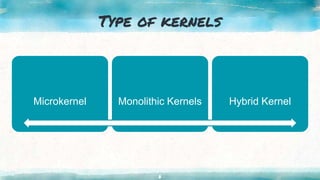
Type of kernels
6
Microkernel Monolithic Kernels Hybrid Kernel
Monolithic Kernels
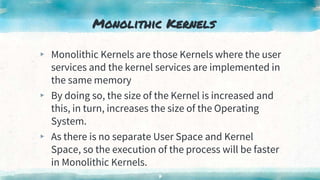
▸ Monolithic Kernels are those Kernels where the user
services and the kernel services are implemented in
the same memory
▸ By doing so, the size of the Kernel is increased and
this, in turn, increases the size of the Operating
System.
▸ As there is no separate User Space and Kernel
Space, so the execution of the process will be faster
in Monolithic Kernels.
7
microkernel
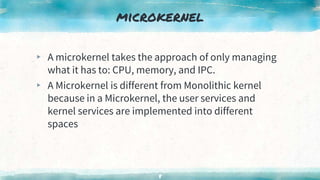
▸ A microkernel takes the approach of only managing
what it has to: CPU, memory, and IPC.
▸ A Microkernel is different from Monolithic kernel
because in a Microkernel, the user services and
kernel services are implemented into different
spaces
8
Hybrid Kernel
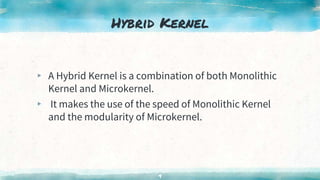
▸ A Hybrid Kernel is a combination of both Monolithic
Kernel and Microkernel.
▸ It makes the use of the speed of Monolithic Kernel
and the modularity of Microkernel.
9
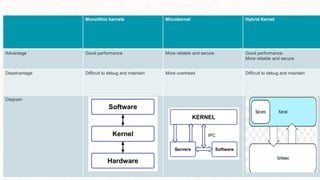
Monolithic kernels Microkernel Hybrid Kernel
Advantage Good performance More reliable and secure Good performance
More reliable and secure
Disadvantage Difficult to debug and maintain More overhead Difficult to debug and maintain
Diagram
Application Programming Interface
11
▸ An API (Application Programming Interface) is a set of functions that
allows applications to access data and interact with external software
components, operating systems, or microservices.
API in Operating Systems
▸ The interface between an operating system and an application is
specified with an API. For example- Posix has API’s that can convert
an application written for one POSIX Operating System to one that
can be used on another POSIX operating system.
system call
12
A system call is a mechanism that provides
the interface between a process and the
operating system.
It is a programmatic method in which a
computer program requests a service from the
kernel of the OS.
How System Call Works?
13
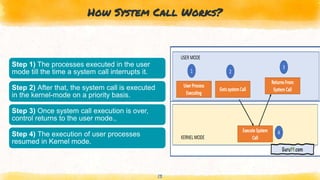
Step 1) The processes executed in the user
mode till the time a system call interrupts it.
Step 2) After that, the system call is executed
in the kernel-mode on a priority basis.
Step 3) Once system call execution is over,
control returns to the user mode.,
Step 4) The execution of user processes
resumed in Kernel mode.
14
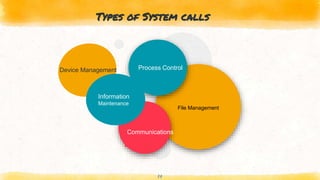
File Management
Types of System calls
Process Control
Information
Maintenance
Communications
Device Management
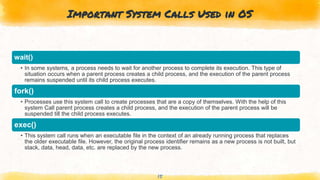
Important System Calls Used in OS
15
wait()
• In some systems, a process needs to wait for another process to complete its execution. This type of
situation occurs when a parent process creates a child process, and the execution of the parent process
remains suspended until its child process executes.
fork()
• Processes use this system call to create processes that are a copy of themselves. With the help of this
system Call parent process creates a child process, and the execution of the parent process will be
suspended till the child process executes.
exec()
• This system call runs when an executable file in the context of an already running process that replaces
the older executable file. However, the original process identifier remains as a new process is not built, but
stack, data, head, data, etc. are replaced by the new process.
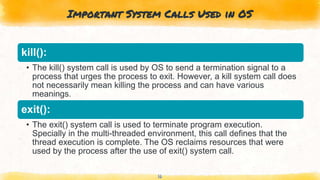
Important System Calls Used in OS
16
kill():
• The kill() system call is used by OS to send a termination signal to a
process that urges the process to exit. However, a kill system call does
not necessarily mean killing the process and can have various
meanings.
exit():
• The exit() system call is used to terminate program execution.
Specially in the multi-threaded environment, this call defines that the
thread execution is complete. The OS reclaims resources that were
used by the process after the use of exit() system call.
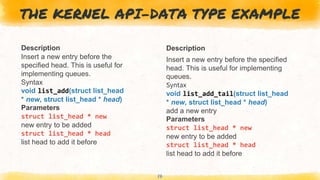
THE KERNEL API-DATA TYPE EXAMPLE
Description
Insert a new entry before the
specified head. This is useful for
implementing queues.
Syntax
void list_add(struct list_head
* new, struct list_head * head)
Parameters
struct list_head * new
new entry to be added
struct list_head * head
list head to add it before
Description
Insert a new entry before the specified
head. This is useful for implementing
queues.
Syntax
void list_add_tail(struct list_head
* new, struct list_head * head)
add a new entry
Parameters
struct list_head * new
new entry to be added
struct list_head * head
list head to add it before
17
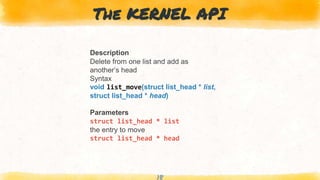
The KERNEL API
Description
Delete from one list and add as
another’s head
Syntax
void list_move(struct list_head * list,
struct list_head * head)
Parameters
struct list_head * list
the entry to move
struct list_head * head
18
“
19
Thank you

Implementation of Kernel API

  • 1.
  • 2.
    Table of Contents SystemCall kernel Application Programming Interface 02 03 01
  • 3.
    kernel 3 In computing, thekernel is the central component of most computer operating systems; It is a bridge between applications and the actual data processing done at the hardware level. It acts as an interface between the user applications and the hardware. The sole aim of kernel is to manage the communication between the software (user level applications) and the hardware (CPU, disk memory etc)
  • 4.
  • 5.
    Objectives of Kernel: 5 The sole aim of kernel is to manage the communication between the software (user level applications) and the hardware (CPU, disk memory etc) To control task management. To establish communication between user level application and hardware. To decide state of incoming processes.
  • 6.
    Type of kernels 6 MicrokernelMonolithic Kernels Hybrid Kernel
  • 7.
    Monolithic Kernels ▸ MonolithicKernels are those Kernels where the user services and the kernel services are implemented in the same memory ▸ By doing so, the size of the Kernel is increased and this, in turn, increases the size of the Operating System. ▸ As there is no separate User Space and Kernel Space, so the execution of the process will be faster in Monolithic Kernels. 7
  • 8.
    microkernel ▸ A microkerneltakes the approach of only managing what it has to: CPU, memory, and IPC. ▸ A Microkernel is different from Monolithic kernel because in a Microkernel, the user services and kernel services are implemented into different spaces 8
  • 9.
    Hybrid Kernel ▸ AHybrid Kernel is a combination of both Monolithic Kernel and Microkernel. ▸ It makes the use of the speed of Monolithic Kernel and the modularity of Microkernel. 9
  • 10.
    Monolithic kernels MicrokernelHybrid Kernel Advantage Good performance More reliable and secure Good performance More reliable and secure Disadvantage Difficult to debug and maintain More overhead Difficult to debug and maintain Diagram
  • 11.
    Application Programming Interface 11 ▸An API (Application Programming Interface) is a set of functions that allows applications to access data and interact with external software components, operating systems, or microservices. API in Operating Systems ▸ The interface between an operating system and an application is specified with an API. For example- Posix has API’s that can convert an application written for one POSIX Operating System to one that can be used on another POSIX operating system.
  • 12.
    system call 12 A systemcall is a mechanism that provides the interface between a process and the operating system. It is a programmatic method in which a computer program requests a service from the kernel of the OS.
  • 13.
    How System CallWorks? 13 Step 1) The processes executed in the user mode till the time a system call interrupts it. Step 2) After that, the system call is executed in the kernel-mode on a priority basis. Step 3) Once system call execution is over, control returns to the user mode., Step 4) The execution of user processes resumed in Kernel mode.
  • 14.
    14 File Management Types ofSystem calls Process Control Information Maintenance Communications Device Management
  • 15.
    Important System CallsUsed in OS 15 wait() • In some systems, a process needs to wait for another process to complete its execution. This type of situation occurs when a parent process creates a child process, and the execution of the parent process remains suspended until its child process executes. fork() • Processes use this system call to create processes that are a copy of themselves. With the help of this system Call parent process creates a child process, and the execution of the parent process will be suspended till the child process executes. exec() • This system call runs when an executable file in the context of an already running process that replaces the older executable file. However, the original process identifier remains as a new process is not built, but stack, data, head, data, etc. are replaced by the new process.
  • 16.
    Important System CallsUsed in OS 16 kill(): • The kill() system call is used by OS to send a termination signal to a process that urges the process to exit. However, a kill system call does not necessarily mean killing the process and can have various meanings. exit(): • The exit() system call is used to terminate program execution. Specially in the multi-threaded environment, this call defines that the thread execution is complete. The OS reclaims resources that were used by the process after the use of exit() system call.
  • 17.
    THE KERNEL API-DATATYPE EXAMPLE Description Insert a new entry before the specified head. This is useful for implementing queues. Syntax void list_add(struct list_head * new, struct list_head * head) Parameters struct list_head * new new entry to be added struct list_head * head list head to add it before Description Insert a new entry before the specified head. This is useful for implementing queues. Syntax void list_add_tail(struct list_head * new, struct list_head * head) add a new entry Parameters struct list_head * new new entry to be added struct list_head * head list head to add it before 17
  • 18.
    The KERNEL API Description Deletefrom one list and add as another’s head Syntax void list_move(struct list_head * list, struct list_head * head) Parameters struct list_head * list the entry to move struct list_head * head 18
  • 19.