IIS Intro
MUHAMMAD AMIR – XAVOR LAHORE
IIS
Internet Information Services (IIS, formerly Internet Information Server) is an extensible web
server created by Microsoft for use with Windows NT family.[2] IIS
supports HTTP, HTTPS, FTP, FTPS, SMTP and NNTP. It has been an integral part of the Windows NT
family since Windows NT 4.0, though it may be absent from some editions (e.g. Windows XP
Home edition). IIS is not turned on by default when Windows is installed. The IIS Manager is
accessed through the Microsoft Management Console or Administrative Tools in the Control
Panel.
IIS
In IIS, you can create sites, applications, and virtual directories to share information with users
over the Internet, an intranet, or an extranet.
 Site: A site is a container for applications and virtual directories, and you can access it through
one or more unique bindings.
 Applications: An application is a group of files that delivers content or provides services over
protocols, such as HTTP. When you create an application in IIS, the application's path becomes
part of the site's URL.
 Virtual Directories: A virtual directory is a directory name (also referred to as path) that you
specify in IIS and map to a physical directory on a local or remote server. The directory name
then becomes part of the application's URL.
http://www.iis.net/learn/get-started/planning-your-iis-architecture/understanding-sites-
applications-and-virtual-directories-on-iis
IIS
 Classic Mode: is where IIS only works with ISAPI extensions and ISAPI filters directly. This is
how IIS 6 and below behaved. Using classic mode, ASP.NET is simply an ISAPI extension
(aspnet_isapi.dll) and an ISAPI filter (aspnet_filter.dll). When using classic mode the server uses
two pipelines to handle requests, one for native code and the other for managed code. In this
mode the application doesn't take full advantage of everything IIS 7.X has to offer.
 Integrated mode: handles all requests through a unified pipeline for IIS and is tightly
integrated with ASP.NET through that same pipeline. ASP.NET sees every relevant request and
manipulates things along the way rather than acting as an external plugin. With integrated mode
ASP.NET runs much more efficiently in IIS and will yield greater performance for your site.
Some legacy code may require that you run in classic mode to execute without error. To take full
advantage of IIS we strongly encourage you to review your code if your application throws an
error in Integrated but runs fine in Classic.
IIS
App-Pool:
 Application pools allow you to isolate your applications from one another, even if they are
running on the same server. This way, if there is an error in one app, it won't take down other
applications.
 Additionally, applications pools allow you to separate different apps which require different
levels of security.
Here's a good resource: http://www.developer.com/net/asp/article.php/2245511/IIS-and-
ASPNET-The-Application-Pool.htm
IIS Some Components
 Connection String
 Application Settings
 Mime-type
 Configuration Editor
 Default Document
 Directory Browsing
 IsAPI Filters
IIS Some Components
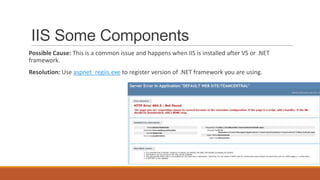
Possible Cause: This is a common issue and happens when IIS is installed after VS or .NET
framework.
Resolution: Use aspnet_regiis.exe to register version of .NET framework you are using.
IIS Some Components
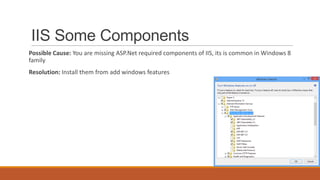
Possible Cause: You are missing ASP.Net required components of IIS, its is common in Windows 8
family
Resolution: Install them from add windows features

IIS 7.0 +

  • 1.
    IIS Intro MUHAMMAD AMIR– XAVOR LAHORE
  • 2.
    IIS Internet Information Services(IIS, formerly Internet Information Server) is an extensible web server created by Microsoft for use with Windows NT family.[2] IIS supports HTTP, HTTPS, FTP, FTPS, SMTP and NNTP. It has been an integral part of the Windows NT family since Windows NT 4.0, though it may be absent from some editions (e.g. Windows XP Home edition). IIS is not turned on by default when Windows is installed. The IIS Manager is accessed through the Microsoft Management Console or Administrative Tools in the Control Panel.
  • 3.
    IIS In IIS, youcan create sites, applications, and virtual directories to share information with users over the Internet, an intranet, or an extranet.  Site: A site is a container for applications and virtual directories, and you can access it through one or more unique bindings.  Applications: An application is a group of files that delivers content or provides services over protocols, such as HTTP. When you create an application in IIS, the application's path becomes part of the site's URL.  Virtual Directories: A virtual directory is a directory name (also referred to as path) that you specify in IIS and map to a physical directory on a local or remote server. The directory name then becomes part of the application's URL. http://www.iis.net/learn/get-started/planning-your-iis-architecture/understanding-sites- applications-and-virtual-directories-on-iis
  • 4.
    IIS  Classic Mode:is where IIS only works with ISAPI extensions and ISAPI filters directly. This is how IIS 6 and below behaved. Using classic mode, ASP.NET is simply an ISAPI extension (aspnet_isapi.dll) and an ISAPI filter (aspnet_filter.dll). When using classic mode the server uses two pipelines to handle requests, one for native code and the other for managed code. In this mode the application doesn't take full advantage of everything IIS 7.X has to offer.  Integrated mode: handles all requests through a unified pipeline for IIS and is tightly integrated with ASP.NET through that same pipeline. ASP.NET sees every relevant request and manipulates things along the way rather than acting as an external plugin. With integrated mode ASP.NET runs much more efficiently in IIS and will yield greater performance for your site. Some legacy code may require that you run in classic mode to execute without error. To take full advantage of IIS we strongly encourage you to review your code if your application throws an error in Integrated but runs fine in Classic.
  • 5.
    IIS App-Pool:  Application poolsallow you to isolate your applications from one another, even if they are running on the same server. This way, if there is an error in one app, it won't take down other applications.  Additionally, applications pools allow you to separate different apps which require different levels of security. Here's a good resource: http://www.developer.com/net/asp/article.php/2245511/IIS-and- ASPNET-The-Application-Pool.htm
  • 6.
    IIS Some Components Connection String  Application Settings  Mime-type  Configuration Editor  Default Document  Directory Browsing  IsAPI Filters
  • 7.
    IIS Some Components PossibleCause: This is a common issue and happens when IIS is installed after VS or .NET framework. Resolution: Use aspnet_regiis.exe to register version of .NET framework you are using.
  • 8.
    IIS Some Components PossibleCause: You are missing ASP.Net required components of IIS, its is common in Windows 8 family Resolution: Install them from add windows features

Editor's Notes

  • #4 A Virtual Folder or Virtual Directory is just a link to a physical folder somewhere on the server. This folder becomes part of the website structure and you can use the virtual directory in the path part of URLs. Code that executes in Virtual Directories will execute in the same "Application" as it's parent.An Application is where the code that runs inside that "folder" has it's own Session state and Application state. It is in effect a new standalone application living underneath the root application.
  • #5 Code that runs under the control of the common language runtime (CLR) is known as managed code. Code that does not run under the CLR is known as native code. Native code is the code whose memory is not "managed", as in, memory isn't freed for you (C++' delete and C's free, for instance), no reference counting, no garbage collection. Managed code, you guessed it, is the code whose memory is free and allocated for you, garbage collection and other goodies.Mixed code is when you have managed code that calls onto an unmanaged layer. Normally, when you have a pure unmanaged C++ DLL and you call it from .NET using P/invoke.