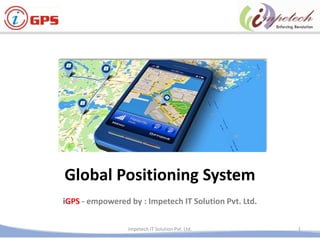
Global Positioning System
iGPS - empowered by : Impetech IT Solution Pvt. Ltd.
1Impetech IT Solution Pvt. Ltd.
2Impetech IT Solution Pvt. Ltd.
Tracking
Just a click away ..
Solution Overview
3Restricted
Student
Onboarding / Off
boarding
Student Arrival /
Departure Notification
Mobile App
Access/Web Based
Access / SMS Alert
Live Monitoring
Tracking of Vehicle
- Antitheft Mechanism
- Over speed Driving /
SOS /Emergency Alert
One Step
Solution
for
Tracking
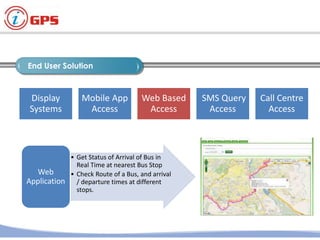
End User Solution
4Restricted
Display
Systems
Mobile App
Access
Web Based
Access
SMS Query
Access
Call Centre
Access
• Get Status of Arrival of Bus in
Real Time at nearest Bus Stop
• Check Route of a Bus, and arrival
/ departure times at different
stops.
Web
Application
Operation Control Centre
5Restricted
• Dedicated Field Application
Engineer for Installation and Unit
maintenances.
Dedicated
FAE
• Continuous Monitoring for
working status of Units and
Maintenance
Centralized
Monitoring
Dedicated
FAE
Continuous
Monitoring
Alert
Engine
MIS
Reports
Live
Tracking
Operation Control Centre
6Restricted
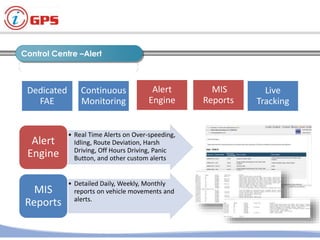
• Real Time Alerts on Over-speeding,
Idling, Route Deviation, Harsh
Driving, Off Hours Driving, Panic
Button, and other custom alerts
Alert
Engine
• Detailed Daily, Weekly, Monthly
reports on vehicle movements and
alerts.
MIS
Reports
Dedicated
FAE
Continuous
Monitoring
Alert
Engine
MIS
Reports
Live
Tracking
Operation Control Centre
7Restricted
OCC Setup
• Live Tracking of Vehicles on
Dashboard,
• Real Time Status Updates
• Real Time Alerts Tracking
• Location Monitoring of
Vehicles
• Road Side Assistance for
Vehicles
Live
Tracking
of
Vehicles
Dedicated
FAE
Continuous
Monitoring
Alert
Engine
MIS
Reports
Live
Tracking
Vehicle Tracking
8
• Live Tracking of Vehicles on
Dashboard,
• Vehicle and Driver details
• Real Time address Updates
• Real Time Alerts Tracking
• Location Monitoring of
Vehicles
• Road Side Assistance for
Vehicles
Live
Tracking
of
Vehicles
Dedicated
FAE
Continuous
Monitoring
Alert
Engine
MIS
Reports
Live
Tracking
9Restricted
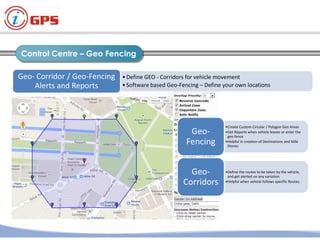
• Define GEO - Corridors for vehicle movement
• Software based Geo-Fencing – Define your own locations
Geo- Corridor Alerts and
Reports
•Create Custom Circular / Polygon Geo Areas
•Get Reports when vehicle leaves or enter
the geo fence
•Helpful in creation of Destinations and Mile
Stones
Geo-
Fencing
•Define the routes to be taken by the
vehicle, and get alerted on any variation
•Helpful when vehicle follows specific
Routes.
Geo-
Corridors
Control Centre – Geo Tracking
10Restricted
•Define GEO - Corridors for vehicle movement
•Software based Geo-Fencing – Define your own locations
Geo- Corridor / Geo-Fencing
Alerts and Reports
•Create Custom Circular / Polygon Geo Areas
•Get Reports when vehicle leaves or enter the
geo fence
•Helpful in creation of Destinations and Mile
Stones
Geo-
Fencing
•Define the routes to be taken by the vehicle,
and get alerted on any variation
•Helpful when vehicle follows specific Routes.
Geo-
Corridors
Control Centre – Geo Fencing
Control Centre –Alert
11
• Real Time Alerts on Over-speeding,
Idling, Route Deviation, Harsh
Driving, Off Hours Driving, Panic
Button, and other custom alerts
Alert
Engine
• Detailed Daily, Weekly, Monthly
reports on vehicle movements and
alerts.
MIS
Reports
Dedicated
FAE
Continuous
Monitoring
Alert
Engine
MIS
Reports
Live
Tracking
Control Panel
12
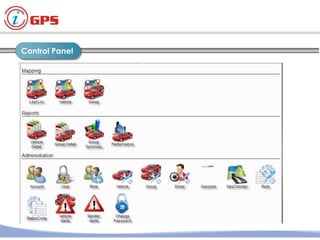
Control Panel
13
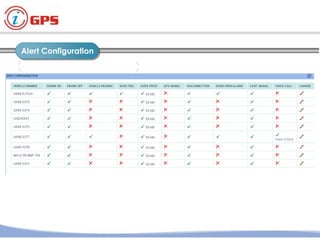
Alert Configuration
14
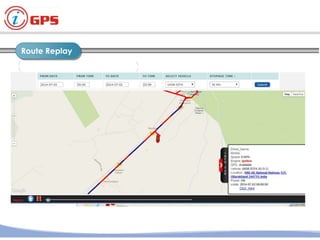
Route Replay
15
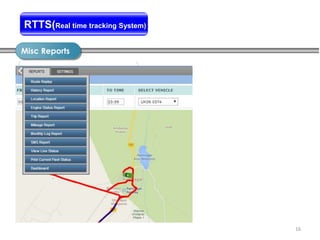
Misc Reports
16
Report DetailsRTTS(Real time tracking System)
17
RFID / UHF – Tracking
Hardware & Installation Location
18
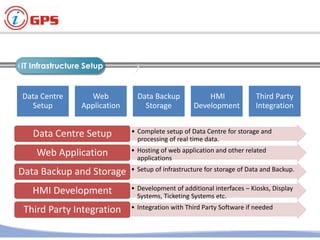
IT Infrastructure Setup
19Restricted
Infrastructure Setup
• Complete setup of Data Centre for storage and
processing of real time data.
Data Centre Setup
• Hosting of web application and other related
applications
Web Application
• Setup of infrastructure for storage of Data and Backup.Data Backup and Storage
• Development of additional interfaces – Kiosks, Display
Systems, Ticketing Systems etc.
HMI Development
• Integration with Third Party Software if neededThird Party Integration
Data Centre
Setup
Web
Application
Data Backup
Storage
HMI
Development
Third Party
Integration
IGPS
Features &
Specifications
Use Case 1:
FMS
Use Case 2:
RSMS
Use Case 3:
REMS
Technology
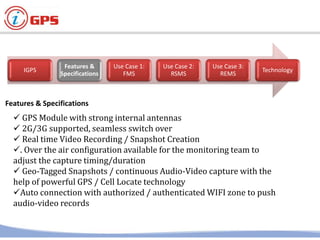
 GPS Module with strong internal antennas
 2G/3G supported, seamless switch over
 Real time Video Recording / Snapshot Creation
. Over the air configuration available for the monitoring team to
adjust the capture timing/duration
 Geo-Tagged Snapshots / continuous Audio-Video capture with the
help of powerful GPS / Cell Locate technology
Auto connection with authorized / authenticated WIFI zone to push
audio-video records
Features & Specifications
IGPS
Features &
Specifications
Use Case 1:
FMS
Use Case 2:
RSMS
Use Case 3:
REMS
Technology
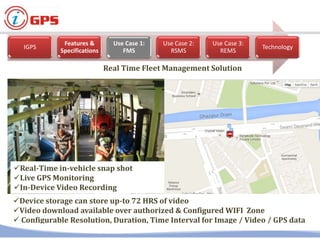
Real-Time in-vehicle snap shot
Live GPS Monitoring
In-Device Video Recording
Device storage can store up-to 72 HRS of video
Video download available over authorized & Configured WIFI Zone
 Configurable Resolution, Duration, Time Interval for Image / Video / GPS data
Real Time Fleet Management Solution
IGPS
Features &
Specifications
Use Case 1:
FMS
Use Case 2:
RSMS
Use Case 3:
REMS
Technology
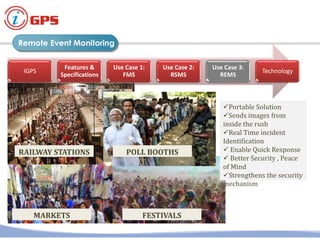
Portable Solution
Sends images from
inside the rush
Real Time incident
Identification
 Enable Quick Response
 Better Security , Peace
of Mind
Strengthens the security
mechanism
RAILWAY STATIONS POLL BOOTHS
MARKETS FESTIVALS
Remote Event Monitoring
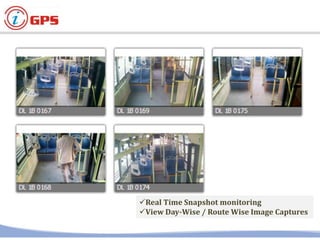
Real Time Snapshot monitoring
View Day-Wise / Route Wise Image Captures
High Resolution Images upto 8 MP
Wide Capture Angle
 Geo-Tagged, with Location and Timestamp
Customizable Dashboard with current
status and location of vehicles
Additional Parameters including
Speed, Distance, Voltage, Status
Live Location Monitoring with GPS
Camera with other Parameters
Contact Us
Impetech IT Solution Pvt. Ltd.
Impetech Global Business Center,
Ganadhish Empire, Rahatni Corner, Pune - 411027
Email : info@impetechglobal.com
Impetech IT Solution Pvt Ltd 27

iGPS- Vehicle & Personal Tracking Solution

  • 1.
    Global Positioning System iGPS- empowered by : Impetech IT Solution Pvt. Ltd. 1Impetech IT Solution Pvt. Ltd.
  • 2.
    2Impetech IT SolutionPvt. Ltd. Tracking Just a click away ..
  • 3.
    Solution Overview 3Restricted Student Onboarding /Off boarding Student Arrival / Departure Notification Mobile App Access/Web Based Access / SMS Alert Live Monitoring Tracking of Vehicle - Antitheft Mechanism - Over speed Driving / SOS /Emergency Alert One Step Solution for Tracking
  • 4.
    End User Solution 4Restricted Display Systems MobileApp Access Web Based Access SMS Query Access Call Centre Access • Get Status of Arrival of Bus in Real Time at nearest Bus Stop • Check Route of a Bus, and arrival / departure times at different stops. Web Application
  • 5.
    Operation Control Centre 5Restricted •Dedicated Field Application Engineer for Installation and Unit maintenances. Dedicated FAE • Continuous Monitoring for working status of Units and Maintenance Centralized Monitoring Dedicated FAE Continuous Monitoring Alert Engine MIS Reports Live Tracking
  • 6.
    Operation Control Centre 6Restricted •Real Time Alerts on Over-speeding, Idling, Route Deviation, Harsh Driving, Off Hours Driving, Panic Button, and other custom alerts Alert Engine • Detailed Daily, Weekly, Monthly reports on vehicle movements and alerts. MIS Reports Dedicated FAE Continuous Monitoring Alert Engine MIS Reports Live Tracking
  • 7.
    Operation Control Centre 7Restricted OCCSetup • Live Tracking of Vehicles on Dashboard, • Real Time Status Updates • Real Time Alerts Tracking • Location Monitoring of Vehicles • Road Side Assistance for Vehicles Live Tracking of Vehicles Dedicated FAE Continuous Monitoring Alert Engine MIS Reports Live Tracking
  • 8.
    Vehicle Tracking 8 • LiveTracking of Vehicles on Dashboard, • Vehicle and Driver details • Real Time address Updates • Real Time Alerts Tracking • Location Monitoring of Vehicles • Road Side Assistance for Vehicles Live Tracking of Vehicles Dedicated FAE Continuous Monitoring Alert Engine MIS Reports Live Tracking
  • 9.
    9Restricted • Define GEO- Corridors for vehicle movement • Software based Geo-Fencing – Define your own locations Geo- Corridor Alerts and Reports •Create Custom Circular / Polygon Geo Areas •Get Reports when vehicle leaves or enter the geo fence •Helpful in creation of Destinations and Mile Stones Geo- Fencing •Define the routes to be taken by the vehicle, and get alerted on any variation •Helpful when vehicle follows specific Routes. Geo- Corridors Control Centre – Geo Tracking
  • 10.
    10Restricted •Define GEO -Corridors for vehicle movement •Software based Geo-Fencing – Define your own locations Geo- Corridor / Geo-Fencing Alerts and Reports •Create Custom Circular / Polygon Geo Areas •Get Reports when vehicle leaves or enter the geo fence •Helpful in creation of Destinations and Mile Stones Geo- Fencing •Define the routes to be taken by the vehicle, and get alerted on any variation •Helpful when vehicle follows specific Routes. Geo- Corridors Control Centre – Geo Fencing
  • 11.
    Control Centre –Alert 11 •Real Time Alerts on Over-speeding, Idling, Route Deviation, Harsh Driving, Off Hours Driving, Panic Button, and other custom alerts Alert Engine • Detailed Daily, Weekly, Monthly reports on vehicle movements and alerts. MIS Reports Dedicated FAE Continuous Monitoring Alert Engine MIS Reports Live Tracking
  • 12.
  • 13.
  • 14.
  • 15.
  • 16.
  • 17.
    17 RFID / UHF– Tracking
  • 18.
  • 19.
    IT Infrastructure Setup 19Restricted InfrastructureSetup • Complete setup of Data Centre for storage and processing of real time data. Data Centre Setup • Hosting of web application and other related applications Web Application • Setup of infrastructure for storage of Data and Backup.Data Backup and Storage • Development of additional interfaces – Kiosks, Display Systems, Ticketing Systems etc. HMI Development • Integration with Third Party Software if neededThird Party Integration Data Centre Setup Web Application Data Backup Storage HMI Development Third Party Integration
  • 21.
    IGPS Features & Specifications Use Case1: FMS Use Case 2: RSMS Use Case 3: REMS Technology  GPS Module with strong internal antennas  2G/3G supported, seamless switch over  Real time Video Recording / Snapshot Creation . Over the air configuration available for the monitoring team to adjust the capture timing/duration  Geo-Tagged Snapshots / continuous Audio-Video capture with the help of powerful GPS / Cell Locate technology Auto connection with authorized / authenticated WIFI zone to push audio-video records Features & Specifications
  • 22.
    IGPS Features & Specifications Use Case1: FMS Use Case 2: RSMS Use Case 3: REMS Technology Real-Time in-vehicle snap shot Live GPS Monitoring In-Device Video Recording Device storage can store up-to 72 HRS of video Video download available over authorized & Configured WIFI Zone  Configurable Resolution, Duration, Time Interval for Image / Video / GPS data Real Time Fleet Management Solution
  • 23.
    IGPS Features & Specifications Use Case1: FMS Use Case 2: RSMS Use Case 3: REMS Technology Portable Solution Sends images from inside the rush Real Time incident Identification  Enable Quick Response  Better Security , Peace of Mind Strengthens the security mechanism RAILWAY STATIONS POLL BOOTHS MARKETS FESTIVALS Remote Event Monitoring
  • 24.
    Real Time Snapshotmonitoring View Day-Wise / Route Wise Image Captures
  • 25.
    High Resolution Imagesupto 8 MP Wide Capture Angle  Geo-Tagged, with Location and Timestamp
  • 26.
    Customizable Dashboard withcurrent status and location of vehicles Additional Parameters including Speed, Distance, Voltage, Status Live Location Monitoring with GPS Camera with other Parameters
  • 27.
    Contact Us Impetech ITSolution Pvt. Ltd. Impetech Global Business Center, Ganadhish Empire, Rahatni Corner, Pune - 411027 Email : info@impetechglobal.com Impetech IT Solution Pvt Ltd 27