
Clouds Hands On
    Tutorial

           Srinath Perera Ph.D.
 Senior Software Architect, WSO2 Inc.
Member, Apache Software Foundation
Visiting Faculty, University of Moratuwa
   Research Scientist, Lanka Software
               Foundation
Outline
                                              • What is Cloud
                                                Computing?
                                              • What can I do with
                                                the Cloud?
                                              • How to do it?
                                              • Conclusion


photo by John Trainoron Flickr http://www.flickr.com/photos/trainor/2902023575/, Licensed under CC
Quick EC2 Demo
• Lets us start our own Virtual machines in the
  cloud.
• We call the virtual machines, AMIs (Amazon
  machine images)
• You can reuse other’s AMIs or create your
  own.
What is Cloud?
    • Based on the idea that
      computation and storage can
      be rented as a utility from data
      centers that runs somewhere
      (in the cloud) on demand.
    • Remote resources that are
      rented
       – On demand and in elastic
         manner
       – Pay as you go
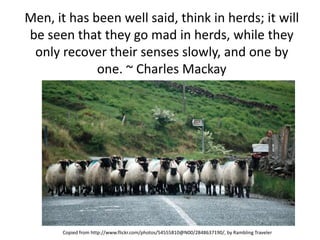
Men, it has been well said, think in herds; it will
be seen that they go mad in herds, while they
 only recover their senses slowly, and one by
             one. ~ Charles Mackay


       Copied from http://www.flickr.com/photos/54555810@N00/2848637190/, by Rambling Traveler
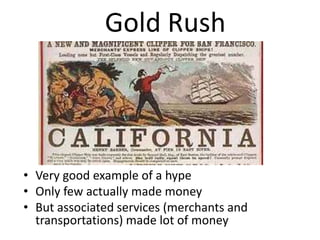
Gold Rush


• Very good example of a hype
• Only few actually made money
• But associated services (merchants and
  transportations) made lot of money
The Cloud Bandwagon
                                                • Is Cloud a hype? Of
                                                  course it is!
                                                • Is it Just hype? may be
                                                  not, thats what we will
                                                  discuss.
                                                • But don’t get me wrong,
                                                • even if it is a hype, that
                                                  doesn’t mean we should
                    Image from
                                                  not be talking about it.
http://www.flickr.com/photos/88929764@N00/443
                     6978855/
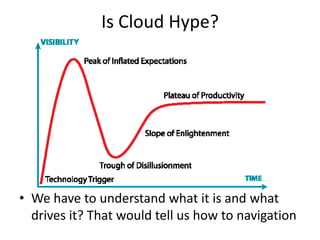
Is Cloud Hype?


• We have to understand what it is and what
  drives it? That would tell us how to navigation
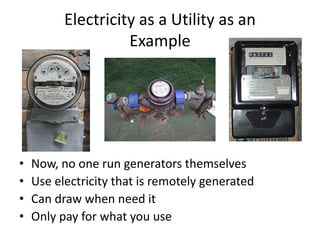
Electricity as a Utility as an
                    Example


•   Now, no one run generators themselves
•   Use electricity that is remotely generated
•   Can draw when need it
•   Only pay for what you use
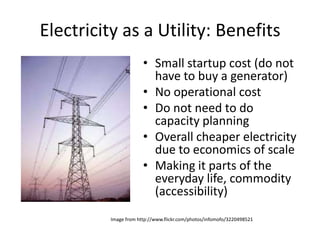
Electricity as a Utility: Benefits
                       • Small startup cost (do not
                         have to buy a generator)
                       • No operational cost
                       • Do not need to do
                         capacity planning
                       • Overall cheaper electricity
                         due to economics of scale
                       • Making it parts of the
                         everyday life, commodity
                         (accessibility)
          Image from http://www.flickr.com/photos/infomofo/3220498521
Benefits of Cloud Computing

            • Avoid/reduce operational
            • costs by outsourcing
            • Can scale up and down as
              needed
            • Pay as you go
            • Making it parts of the
              everyday life,
              commodity(accessibility)
            • Cheaper computing power
              due to economy of scale
Drivers of Cloud
     • Unused computing power
       at Google, Amazon
     • Max load >> average load
     • High operational cost,
       need for outsourcing
     • Availability of large scale
       solutions and
       infrastructure as side
       efforts of high tech
       company operations
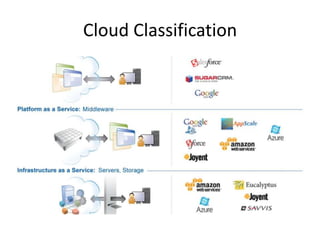
Cloud Classification
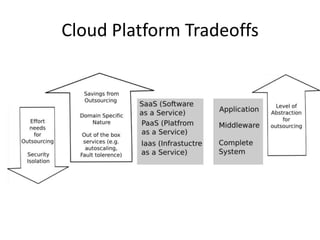
Cloud Platform Tradeoffs
Private Cloud
                                                  • Run a Cloud within the
                                                    organization (mainly due to
                                                    security concerns).


• e.g. Amazon Virtual Private Cloud (VPC), IBM private
  cloud, WSO2 Stratos private Cloud
• Idea is optimizing resource sharing, utilizations, and
  operations
   – e.g. testing environments
• Connection to public Cloud is possible (e.g. Amazon VPC
  uses VPN)        Image http://www.flickr.com/photos/glasgows/536185797/, Some rights reserved by M Glasgow
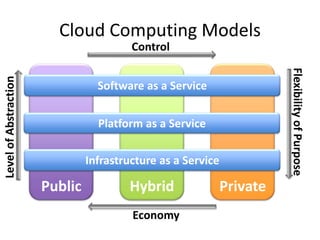
Cloud Computing Models
                                         Control


                                                                        Flexibility of Purpose
Level of Abstraction


                                  Software as a Service


                                  Platform as a Service

                                Infrastructure as a Service

                       Public           Hybrid                Private
                                         Economy
What can we do with
    the Cloud?
What Can We do with the Cloud?
• If I am a developer, now it is
   – Easy to get access to a machine
   – Easy to host something
• If I am a startup
   – Easy run my new business
   – Easy to run my app
• If I am a Enterprise
   – Outsource functionalities
   – On demand H/W
• If I am a researcher
   – Easy access computing power
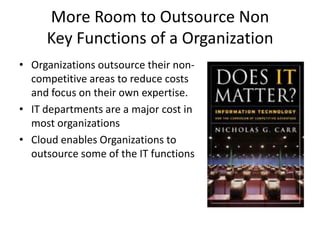
More Room to Outsource Non
     Key Functions of a Organization
• Organizations outsource their non-
  competitive areas to reduce costs
  and focus on their own expertise.
• IT departments are a major cost in
  most organizations
• Cloud enables Organizations to
  outsource some of the IT functions
Small Start Up Cost
• Small start up cost
• Reducing the gap between
  visionaries and dreamers
• New organization has better
  chance for outsourcing
  operations through the Cloud
• Cloud competition likely to
  drive down hosting prizes
1 computer for 100days = 100
            computers for 1 day
• Great tool for occasional
  computations
   – Research labs
• Reporting collecting data for
  a story
   – New york Times tiff to pdf
     conversion
• Rise of analytics
   – great tool for offline analysis
   – Business Intelligence (BI)
   – Audits
Increased Accessibility
           • Large Scale Computation and
             Storage Resources becoming
             a Commodity
           • Computer intensive desktop
             apps (e.g. Excel, 3D Max)
           • Normal people, not just
             organizations can have
             access to computing power
             and storage
Creating and Deploying my Sample
         App in the Cloud
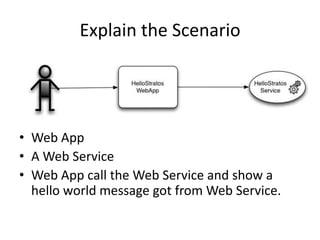
Explain the Scenario


• Web App
• A Web Service
• Web App call the Web Service and show a
  hello world message got from Web Service.
Demo It Locally
•   Install WSAS
•   Show consoles
•   Install the Service
•   Try the Service
•   Install the Web App
•   Try the Web app
•   Show SOAP traces
IaaS (Infrastructure As a Service)
• Let users allocate and use a computer on-
  demand, and can be returned when not
  needed.
• Once allocated, node behaves as a normal
  node.
• None or minimal add-on services
E.g. Amazon Web Services
• Several Services
   – S3 Storage
   – EC2 computing cloud
• Based on Virtualization, where each user is given a
  virtual machine and charged by the hour
• Need least amount of changes to move apps to the
  Cloud. They in a way replace hosting services
• Least amount of out of the box services (e.g. DOS
  attack prevention) and advanced services like scaling
  etc., are a responsibility of the user.
• Often the best choice for ad-hoc computer users.
Demo 1
•   Login to the AMI
•   Download WSAS and install
•   Login and show the console
•   Upload the Service
•   Tryout the service
•   Upload the Webapp
•   Tryout the Web App
•   Show SOAP traces
Demo 2
• However, if we shutdown the Instance, all is
  lost
• Create and save the AMI
• Restart and show
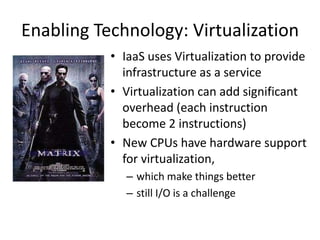
Enabling Technology: Virtualization
           • IaaS uses Virtualization to provide
             infrastructure as a service
           • Virtualization can add significant
             overhead (each instruction
             become 2 instructions)
           • New CPUs have hardware support
             for virtualization,
              – which make things better
              – still I/O is a challenge
Pros & Cons
•   Very easy to start
•   Minimal changes to the App
•   But not many add on features
•   Lack of persistence make life tricky
PaaS (Platform as a Service)
• It provide servers (middleware platforms) as a
  service
• Can deploy your application artifacts in the
  cloud
• Unlike IaaS, it can give you add on services.
  But it will only support specific application
  types.
Why PaaS?
• IaaS only provides limited saving to someone
  who needs to outsource their IT functions
• SaaS is great when they can be used
  • They are usually very specific (e.g. email, CRM ..)
  • If they match, then great, but if they are not, not
    much choice for the user.
• PaaS stays in the middle ground
  • Framework to host your apps
  • Hopefully you can move your apps as it is (well not
    the case with Azure or App Engine, but it is possible
    with WSO2 Stratos !!!).
Google App Engine
• Support Java and Python
• Support web requests and run user written
  web applications in an isolated environment
• Java version is based on servlets
• Support storage based on Big table,
  memcache based cache, and auto scaling
• Can write apps locally, test it, and then upload
  to the Cloud
WSO2 Stratos
• Support Java based SOA artifacts (services,
  workflows, mediation) , messaging, CEP, Rules,
  etc
• Support running user written web applications in
  an isolated environment
• Built on Open source projects like Axis2, ODE etc
• Support storage based on MySQL, Cassandra, and
  HDFS
• Can write apps locally, test it, and then upload to
  the Cloud
Show Stratos
• Create an Account
• Compare with Local Server
Stratos Demo
•   Upload the Service
•   Try out the Service
•   Show with SOAP Tracer
•   Upload the Web App
•   Try out the Web App
•   Enable Security
Add-On the Features
•   Edit Web app security
•   Mediate requests
•   Add Throttling
•   Add Caching
•   Create and use Data sources
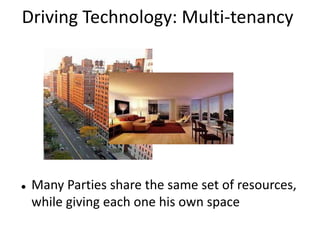
Driving Technology: Multi-tenancy


   Many Parties share the same set of resources,
    while giving each one his own space
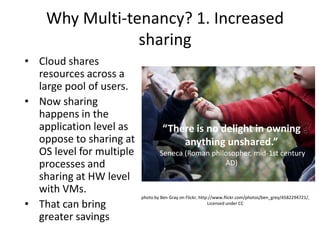
Why Multi-tenancy? 1. Increased
                sharing
• Cloud shares
  resources across a
  large pool of users.
• Now sharing
  happens in the
  application level as             “There is no delight in owning
  oppose to sharing at                 anything unshared.”
  OS level for multiple           Seneca (Roman philosopher, mid-1st century
  processes and                                     AD)
  sharing at HW level
  with VMs.
                          photo by Ben Gray on Flickr, http://www.flickr.com/photos/ben_grey/4582294721/,
• That can bring                                           Licensed under CC


  greater savings
Why Multi-tenancy? 2. Provide “pay
           for what you use”
•   Often there will be many accounts in
    a PaaS or a SaaS, but only a fraction
    of them will be in use.
•   We cannot allocate runtime resource
    per account (disk may be ok, as it is
    cheap). For example, we cannot run
    a VM per account.
•   By sharing the same server with
    many users, Multi-tenancy provides
    much reduced runtime cost per
    server.
Multi-tenancy vs. Virtual Machines
•   Multi-tenancy provides much fine
    grained sharing by many applications
    sharing the same server.
•   Say there are 100k accounts, but 10k
    active users at a time. VM based
    model needs 100k VMs, which
    means there is a cost incurred per
    account.


•   With Multi-tenancy one server can handle many accounts, and by
    mixing and matching heavy and light users, Multi-tenancy can
    operate with much less number of servers.

             photo by hans s on Flickr, http://www.flickr.com/photos/archeon/2359334908/
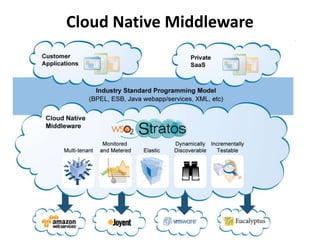
Cloud Native
• Elastic (Uses the cloud efficiently)
        • Scales up and down as needed
        • Works with the underlying IaaS
• Self-service (in the hands of users)
        • De-centralized creation and management of tenants
        • Automated Governance across tenants
• Multi-tenant (Only costs when you use it)
        • Virtual isolated instances with near zero incremental cost
        • Implies you have a proper identity model
• Granularly Billed and Metered (pay for just what you use)
        • Allocate costs to exactly who uses them
• Distributed/Dynamically Wired (works properly in the cloud)
        • Supports deploying in a dynamically sized cluster
        • Finds services across applications even when they move
• Incrementally Deployed and Tested (seamless live upgrades)
        • Supports continuous update, side-by-side operation, in-place testing and
          incremental production
Cloud Native Middleware
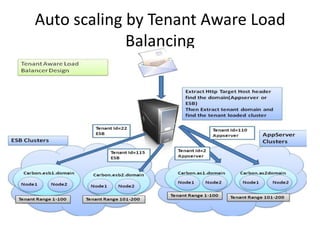
Auto scaling by Tenant Aware Load
             Balancing
Software as a Service
•   Provide a complete package as a service
•   Very easy to get started
•   Generally only provide limited customizability
•   Might provide higher level domain specific
    abstractions and functionality
SaaS Example: Salesforce
• Provide support for CRM (Customer
  Relationship Management) software as a
  Service
• The application available out of the box users
• just configure and use it.
• Salesforce handles all the details, and a ideal
  choice for outsourcing IT functions
• However, applications are very specific and
  customizations are limited.
SaaS App Market
• Mobile apps, Browser Apps etc often depends
  on backend, that need to be hosted and
  running.
• Also, there is the old user case of service
  market place (e.g. Map Service, targeted
  advertising suggestions)
• PaaS could provide an ideal environment to
  develop and run them.
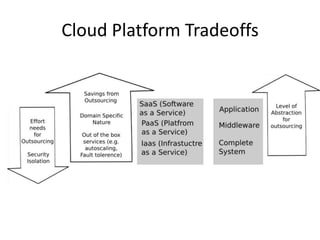
Cloud Platform Tradeoffs
Wrapping Up
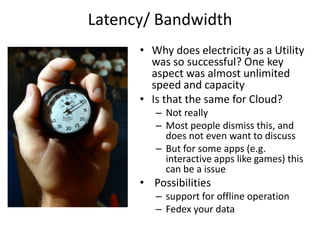
Latency/ Bandwidth
      • Why does electricity as a Utility
        was so successful? One key
        aspect was almost unlimited
        speed and capacity
      • Is that the same for Cloud?
         – Not really
         – Most people dismiss this, and
           does not even want to discuss
         – But for some apps (e.g.
           interactive apps like games) this
           can be a issue
      • Possibilities
         – support for offline operation
         – Fedex your data
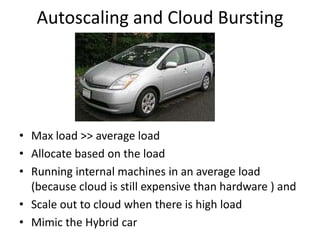
Autoscaling and Cloud Bursting


• Max load >> average load
• Allocate based on the load
• Running internal machines in an average load
  (because cloud is still expensive than hardware ) and
• Scale out to cloud when there is high load
• Mimic the Hybrid car
Performance


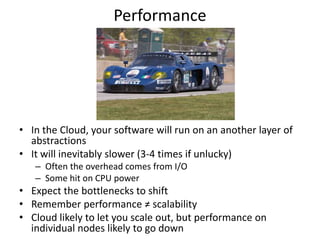
• In the Cloud, your software will run on an another layer of
  abstractions
• It will inevitably slower (3-4 times if unlucky)
   – Often the overhead comes from I/O
   – Some hit on CPU power
• Expect the bottlenecks to shift
• Remember performance ≠ scalability
• Cloud likely to let you scale out, but performance on
  individual nodes likely to go down
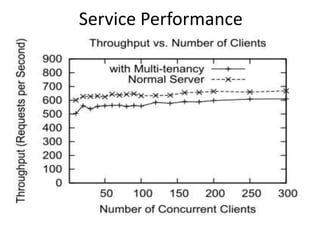
Service Performance
Security
• With cloud you will run your apps and put your
  data in an outsider's administrative domain, Can
  we trust the outsiders to not look at our data?
  – Well it depends. But concern is normal for any out
    sourcing
• Can we trust their security measures? Does the
  isolations are good enough?
• If we are keeping data owned by others, what are
  the legal implications etc.
Look back: Recommendations


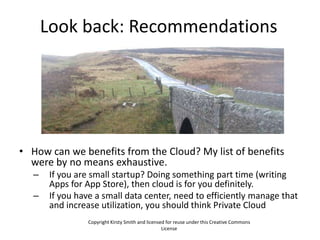
• How can we benefits from the Cloud? My list of benefits
  were by no means exhaustive.
   –    If you are small startup? Doing something part time (writing
        Apps for App Store), then cloud is for you definitely.
   –    If you have a small data center, need to efficiently manage that
        and increase utilization, you should think Private Cloud
                  Copyright Kirsty Smith and licensed for reuse under this Creative Commons
                                                    License
Look back: Recommendations (Contd.)

• If your services have a Max load >> Average load, you
  should think about crowd bursting
• If you do heavy computations once in a while
  (analytics, audits), then use IaaS there.
• If you want to outsource some of your IT functions,
  think SaaS
• Before leap think about 3 major concerns of Cloud?
   – Security/ Privacy, Latency and Performance
• How much sharing and savings I need?
   – IaaS, PaaS, SaaS
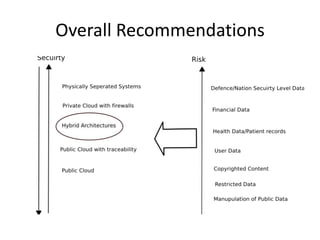
Overall Recommendations
Questions?


Copyright by romainguy, and licensed for reuse under CC License
    http://www.flickr.com/photos/romainguy/249370084

IEEE Cloud 2012: Clouds Hands-On Tutorial

  • 1.
    Clouds Hands On Tutorial Srinath Perera Ph.D. Senior Software Architect, WSO2 Inc. Member, Apache Software Foundation Visiting Faculty, University of Moratuwa Research Scientist, Lanka Software Foundation
  • 2.
    Outline • What is Cloud Computing? • What can I do with the Cloud? • How to do it? • Conclusion photo by John Trainoron Flickr http://www.flickr.com/photos/trainor/2902023575/, Licensed under CC
  • 3.
    Quick EC2 Demo •Lets us start our own Virtual machines in the cloud. • We call the virtual machines, AMIs (Amazon machine images) • You can reuse other’s AMIs or create your own.
  • 4.
    What is Cloud? • Based on the idea that computation and storage can be rented as a utility from data centers that runs somewhere (in the cloud) on demand. • Remote resources that are rented – On demand and in elastic manner – Pay as you go
  • 5.
    Men, it hasbeen well said, think in herds; it will be seen that they go mad in herds, while they only recover their senses slowly, and one by one. ~ Charles Mackay Copied from http://www.flickr.com/photos/54555810@N00/2848637190/, by Rambling Traveler
  • 6.
    Gold Rush • Verygood example of a hype • Only few actually made money • But associated services (merchants and transportations) made lot of money
  • 7.
    The Cloud Bandwagon • Is Cloud a hype? Of course it is! • Is it Just hype? may be not, thats what we will discuss. • But don’t get me wrong, • even if it is a hype, that doesn’t mean we should Image from not be talking about it. http://www.flickr.com/photos/88929764@N00/443 6978855/
  • 8.
    Is Cloud Hype? •We have to understand what it is and what drives it? That would tell us how to navigation
  • 9.
    Electricity as aUtility as an Example • Now, no one run generators themselves • Use electricity that is remotely generated • Can draw when need it • Only pay for what you use
  • 10.
    Electricity as aUtility: Benefits • Small startup cost (do not have to buy a generator) • No operational cost • Do not need to do capacity planning • Overall cheaper electricity due to economics of scale • Making it parts of the everyday life, commodity (accessibility) Image from http://www.flickr.com/photos/infomofo/3220498521
  • 11.
    Benefits of CloudComputing • Avoid/reduce operational • costs by outsourcing • Can scale up and down as needed • Pay as you go • Making it parts of the everyday life, commodity(accessibility) • Cheaper computing power due to economy of scale
  • 12.
    Drivers of Cloud • Unused computing power at Google, Amazon • Max load >> average load • High operational cost, need for outsourcing • Availability of large scale solutions and infrastructure as side efforts of high tech company operations
  • 13.
  • 14.
  • 15.
    Private Cloud • Run a Cloud within the organization (mainly due to security concerns). • e.g. Amazon Virtual Private Cloud (VPC), IBM private cloud, WSO2 Stratos private Cloud • Idea is optimizing resource sharing, utilizations, and operations – e.g. testing environments • Connection to public Cloud is possible (e.g. Amazon VPC uses VPN) Image http://www.flickr.com/photos/glasgows/536185797/, Some rights reserved by M Glasgow
  • 16.
    Cloud Computing Models Control Flexibility of Purpose Level of Abstraction Software as a Service Platform as a Service Infrastructure as a Service Public Hybrid Private Economy
  • 17.
    What can wedo with the Cloud?
  • 18.
    What Can Wedo with the Cloud? • If I am a developer, now it is – Easy to get access to a machine – Easy to host something • If I am a startup – Easy run my new business – Easy to run my app • If I am a Enterprise – Outsource functionalities – On demand H/W • If I am a researcher – Easy access computing power
  • 19.
    More Room toOutsource Non Key Functions of a Organization • Organizations outsource their non- competitive areas to reduce costs and focus on their own expertise. • IT departments are a major cost in most organizations • Cloud enables Organizations to outsource some of the IT functions
  • 20.
    Small Start UpCost • Small start up cost • Reducing the gap between visionaries and dreamers • New organization has better chance for outsourcing operations through the Cloud • Cloud competition likely to drive down hosting prizes
  • 21.
    1 computer for100days = 100 computers for 1 day • Great tool for occasional computations – Research labs • Reporting collecting data for a story – New york Times tiff to pdf conversion • Rise of analytics – great tool for offline analysis – Business Intelligence (BI) – Audits
  • 22.
    Increased Accessibility • Large Scale Computation and Storage Resources becoming a Commodity • Computer intensive desktop apps (e.g. Excel, 3D Max) • Normal people, not just organizations can have access to computing power and storage
  • 23.
    Creating and Deployingmy Sample App in the Cloud
  • 24.
    Explain the Scenario •Web App • A Web Service • Web App call the Web Service and show a hello world message got from Web Service.
  • 25.
    Demo It Locally • Install WSAS • Show consoles • Install the Service • Try the Service • Install the Web App • Try the Web app • Show SOAP traces
  • 26.
    IaaS (Infrastructure Asa Service) • Let users allocate and use a computer on- demand, and can be returned when not needed. • Once allocated, node behaves as a normal node. • None or minimal add-on services
  • 27.
    E.g. Amazon WebServices • Several Services – S3 Storage – EC2 computing cloud • Based on Virtualization, where each user is given a virtual machine and charged by the hour • Need least amount of changes to move apps to the Cloud. They in a way replace hosting services • Least amount of out of the box services (e.g. DOS attack prevention) and advanced services like scaling etc., are a responsibility of the user. • Often the best choice for ad-hoc computer users.
  • 28.
    Demo 1 • Login to the AMI • Download WSAS and install • Login and show the console • Upload the Service • Tryout the service • Upload the Webapp • Tryout the Web App • Show SOAP traces
  • 29.
    Demo 2 • However,if we shutdown the Instance, all is lost • Create and save the AMI • Restart and show
  • 30.
    Enabling Technology: Virtualization • IaaS uses Virtualization to provide infrastructure as a service • Virtualization can add significant overhead (each instruction become 2 instructions) • New CPUs have hardware support for virtualization, – which make things better – still I/O is a challenge
  • 31.
    Pros & Cons • Very easy to start • Minimal changes to the App • But not many add on features • Lack of persistence make life tricky
  • 32.
    PaaS (Platform asa Service) • It provide servers (middleware platforms) as a service • Can deploy your application artifacts in the cloud • Unlike IaaS, it can give you add on services. But it will only support specific application types.
  • 33.
    Why PaaS? • IaaSonly provides limited saving to someone who needs to outsource their IT functions • SaaS is great when they can be used • They are usually very specific (e.g. email, CRM ..) • If they match, then great, but if they are not, not much choice for the user. • PaaS stays in the middle ground • Framework to host your apps • Hopefully you can move your apps as it is (well not the case with Azure or App Engine, but it is possible with WSO2 Stratos !!!).
  • 34.
    Google App Engine •Support Java and Python • Support web requests and run user written web applications in an isolated environment • Java version is based on servlets • Support storage based on Big table, memcache based cache, and auto scaling • Can write apps locally, test it, and then upload to the Cloud
  • 35.
    WSO2 Stratos • SupportJava based SOA artifacts (services, workflows, mediation) , messaging, CEP, Rules, etc • Support running user written web applications in an isolated environment • Built on Open source projects like Axis2, ODE etc • Support storage based on MySQL, Cassandra, and HDFS • Can write apps locally, test it, and then upload to the Cloud
  • 36.
    Show Stratos • Createan Account • Compare with Local Server
  • 37.
    Stratos Demo • Upload the Service • Try out the Service • Show with SOAP Tracer • Upload the Web App • Try out the Web App • Enable Security
  • 38.
    Add-On the Features • Edit Web app security • Mediate requests • Add Throttling • Add Caching • Create and use Data sources
  • 39.
    Driving Technology: Multi-tenancy  Many Parties share the same set of resources, while giving each one his own space
  • 40.
    Why Multi-tenancy? 1.Increased sharing • Cloud shares resources across a large pool of users. • Now sharing happens in the application level as “There is no delight in owning oppose to sharing at anything unshared.” OS level for multiple Seneca (Roman philosopher, mid-1st century processes and AD) sharing at HW level with VMs. photo by Ben Gray on Flickr, http://www.flickr.com/photos/ben_grey/4582294721/, • That can bring Licensed under CC greater savings
  • 41.
    Why Multi-tenancy? 2.Provide “pay for what you use” • Often there will be many accounts in a PaaS or a SaaS, but only a fraction of them will be in use. • We cannot allocate runtime resource per account (disk may be ok, as it is cheap). For example, we cannot run a VM per account. • By sharing the same server with many users, Multi-tenancy provides much reduced runtime cost per server.
  • 42.
    Multi-tenancy vs. VirtualMachines • Multi-tenancy provides much fine grained sharing by many applications sharing the same server. • Say there are 100k accounts, but 10k active users at a time. VM based model needs 100k VMs, which means there is a cost incurred per account. • With Multi-tenancy one server can handle many accounts, and by mixing and matching heavy and light users, Multi-tenancy can operate with much less number of servers. photo by hans s on Flickr, http://www.flickr.com/photos/archeon/2359334908/
  • 43.
    Cloud Native • Elastic(Uses the cloud efficiently) • Scales up and down as needed • Works with the underlying IaaS • Self-service (in the hands of users) • De-centralized creation and management of tenants • Automated Governance across tenants • Multi-tenant (Only costs when you use it) • Virtual isolated instances with near zero incremental cost • Implies you have a proper identity model • Granularly Billed and Metered (pay for just what you use) • Allocate costs to exactly who uses them • Distributed/Dynamically Wired (works properly in the cloud) • Supports deploying in a dynamically sized cluster • Finds services across applications even when they move • Incrementally Deployed and Tested (seamless live upgrades) • Supports continuous update, side-by-side operation, in-place testing and incremental production
  • 44.
  • 45.
    Auto scaling byTenant Aware Load Balancing
  • 46.
    Software as aService • Provide a complete package as a service • Very easy to get started • Generally only provide limited customizability • Might provide higher level domain specific abstractions and functionality
  • 47.
    SaaS Example: Salesforce •Provide support for CRM (Customer Relationship Management) software as a Service • The application available out of the box users • just configure and use it. • Salesforce handles all the details, and a ideal choice for outsourcing IT functions • However, applications are very specific and customizations are limited.
  • 48.
    SaaS App Market •Mobile apps, Browser Apps etc often depends on backend, that need to be hosted and running. • Also, there is the old user case of service market place (e.g. Map Service, targeted advertising suggestions) • PaaS could provide an ideal environment to develop and run them.
  • 49.
  • 50.
  • 51.
    Latency/ Bandwidth • Why does electricity as a Utility was so successful? One key aspect was almost unlimited speed and capacity • Is that the same for Cloud? – Not really – Most people dismiss this, and does not even want to discuss – But for some apps (e.g. interactive apps like games) this can be a issue • Possibilities – support for offline operation – Fedex your data
  • 52.
    Autoscaling and CloudBursting • Max load >> average load • Allocate based on the load • Running internal machines in an average load (because cloud is still expensive than hardware ) and • Scale out to cloud when there is high load • Mimic the Hybrid car
  • 53.
    Performance • In theCloud, your software will run on an another layer of abstractions • It will inevitably slower (3-4 times if unlucky) – Often the overhead comes from I/O – Some hit on CPU power • Expect the bottlenecks to shift • Remember performance ≠ scalability • Cloud likely to let you scale out, but performance on individual nodes likely to go down
  • 54.
  • 55.
    Security • With cloudyou will run your apps and put your data in an outsider's administrative domain, Can we trust the outsiders to not look at our data? – Well it depends. But concern is normal for any out sourcing • Can we trust their security measures? Does the isolations are good enough? • If we are keeping data owned by others, what are the legal implications etc.
  • 56.
    Look back: Recommendations •How can we benefits from the Cloud? My list of benefits were by no means exhaustive. – If you are small startup? Doing something part time (writing Apps for App Store), then cloud is for you definitely. – If you have a small data center, need to efficiently manage that and increase utilization, you should think Private Cloud Copyright Kirsty Smith and licensed for reuse under this Creative Commons License
  • 57.
    Look back: Recommendations(Contd.) • If your services have a Max load >> Average load, you should think about crowd bursting • If you do heavy computations once in a while (analytics, audits), then use IaaS there. • If you want to outsource some of your IT functions, think SaaS • Before leap think about 3 major concerns of Cloud? – Security/ Privacy, Latency and Performance • How much sharing and savings I need? – IaaS, PaaS, SaaS
  • 58.
  • 59.
    Questions? Copyright by romainguy,and licensed for reuse under CC License http://www.flickr.com/photos/romainguy/249370084