HOORAY
ICON FONTS
<the workshop>
james williamson | lynda.com
welcome!
8:00 - 9:00: Designing icons
What makes a great icon? Icon design best practices.
Considerations for icon fonts. Sketching icons.

9:00 - 10:00: Constructing glyphs
Setting up glyph templates. Working with sketches. Establishing
grids. Proper path construction. Building Glyphs.

10:00 - 11:00: Building Icon Fonts
Online services. @font-face kit construction. Choosing software.
Setting up font properties & exporting fonts. Creating fonts.

11:00 - 12:00: Using Icon Fonts
Downloading web font kits. Determining code approach.
Structuring HTML. Writing efficient CSS. Stacking icons.
Utilizing Icon Fonts.
Designing Icons
“Icons are little miracle workers. They
circumvent language obstacles, give
concise warnings and directions, convey our
moods and show which buttons to press.”
-John Hicks
What is an icon?
Icons are not logos. Icons don’t communicate
brand or identity, they communicate
instructions, ideas, and actions.
Icons educate.
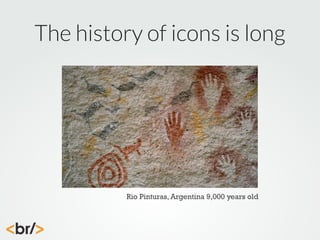
The history of icons is long

Rio Pinturas, Argentina 9,000 years old
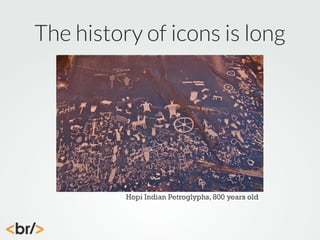
The history of icons is long

Hopi Indian Petroglyphs, 800 years old
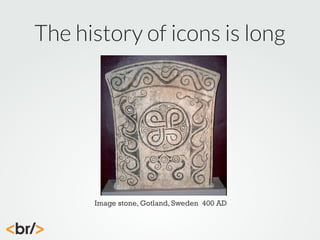
The history of icons is long

Image stone, Gotland, Sweden 400 AD
The evolution of icons represents the
need to have shared imagery which
communicate ideas and information.
Icons are languages.
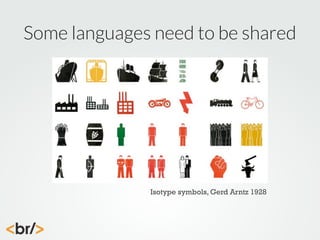
Some languages need to be shared

Isotype symbols, Gerd Arntz 1928
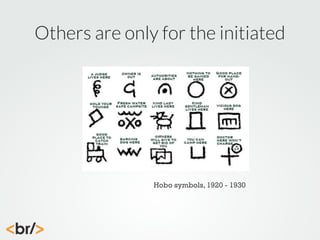
Others are only for the initiated

Hobo symbols, 1920 - 1930
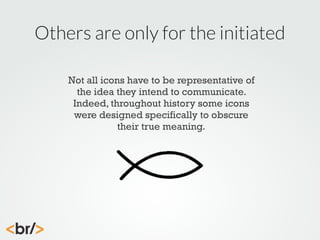
Others are only for the initiated
Not all icons have to be representative of
the idea they intend to communicate.
Indeed, throughout history some icons
were designed specifically to obscure
their true meaning.
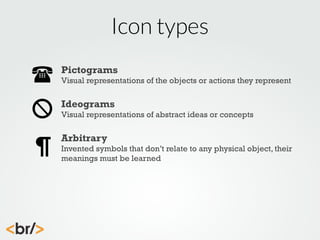
Icon types
Pictograms
Visual representations of the objects or actions they represent

Ideograms
Visual representations of abstract ideas or concepts

Arbitrary
Invented symbols that don’t relate to any physical object, their
meanings must be learned
The approach to designing icons
depends largely upon which type
of icon you’re creating.
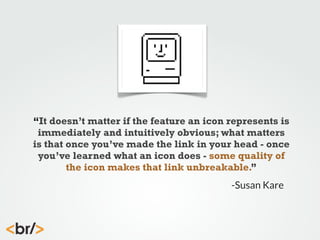
“It doesn’t matter if the feature an icon represents is
immediately and intuitively obvious; what matters
is that once you’ve made the link in your head - once
you’ve learned what an icon does - some quality of
the icon makes that link unbreakable.”
-Susan Kare
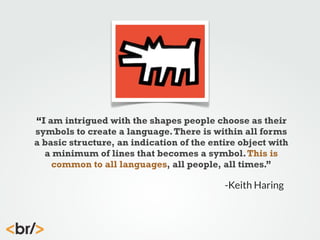
“I am intrigued with the shapes people choose as their
symbols to create a language. There is within all forms
a basic structure, an indication of the entire object with
a minimum of lines that becomes a symbol. This is
common to all languages, all people, all times.”

-Keith Haring
Tips for designing icons
Design icons that function together
Design on a grid and preview them at size
Simplicity is a virtue
Keep perspective consistent
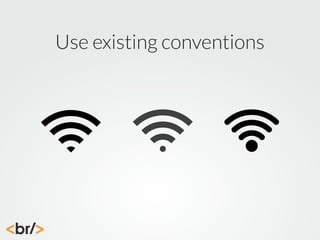
Build on existing conventions
Use existing conventions
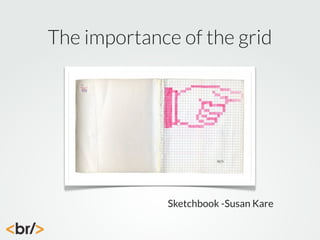
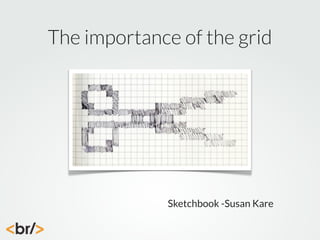
The importance of the grid

Sketchbook -Susan Kare
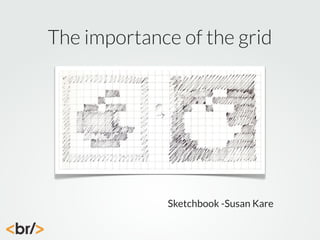
The importance of the grid

Sketchbook -Susan Kare
The importance of the grid

Sketchbook -Susan Kare
The importance of the grid

Sketchbook -Susan Kare
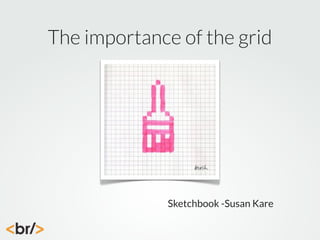
The importance of the grid
When sketching icons, use a grid that represents the
default target size of the icon
This could be multiples of 8, 10, 12, or whatever system
best represents your UI
Sketching within these constraints will result in more
effective, and more creative icons
DESIGN CHALLENGE!
SKETCHING ICONS
Constructing Glyphs
“When we experience disappointment
with the relationship with letters let's not
be afraid to do what come naturally to us:
Let's draw.”
-Gerard Huerta
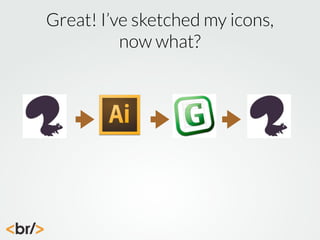
Great! I’ve sketched my icons,
now what?
Drawing vectors
It’s helpful for the vector editor you
use to have solid SVG export or
save capabilitites
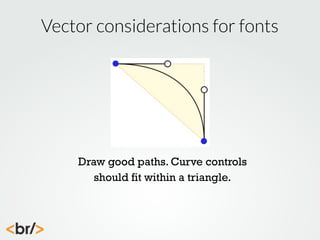
Vector considerations for fonts

Draw good paths. Curve controls
should fit within a triangle.
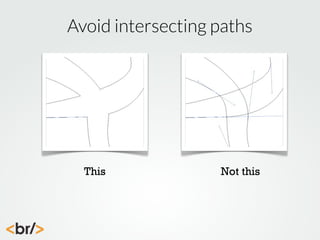
Avoid intersecting paths

This

Not this
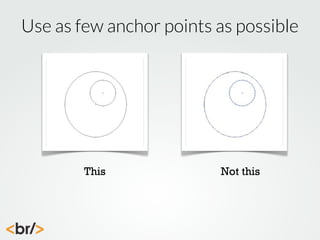
Use as few anchor points as possible

This

Not this
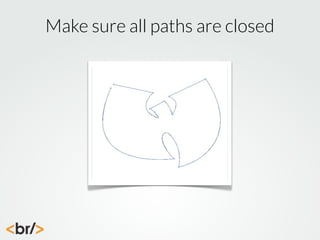
Make sure all paths are closed
Icon Fonts are useful, but force you
into the constraints of storing an
icon in an individual glyph.
Because of this you need to
understand the needs of the font
editor prior to drawing icons.
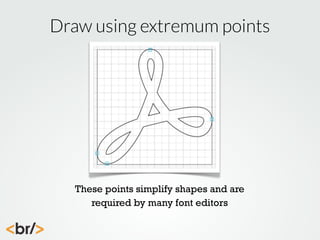
Draw using extremum points

These points simplify shapes and are
required by many font editors
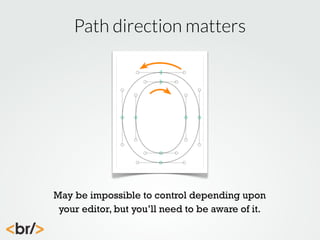
Path direction matters

May be impossible to control depending upon
your editor, but you’ll need to be aware of it.
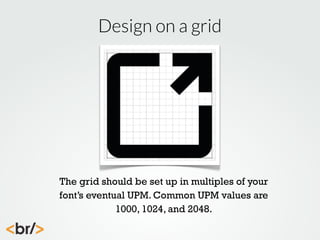
Design on a grid

The grid should be set up in multiples of your
font’s eventual UPM. Common UPM values are
1000, 1024, and 2048.
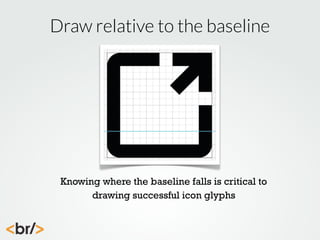
Draw relative to the baseline

Knowing where the baseline falls is critical to
drawing successful icon glyphs
Drawing on grids
When drawing glyphs, set the artboard or document
properties to match the desired grid
The grid should be set to the eventual UPM of the font
Adhering to these rules will deliver crisper fonts that
need less rounding when exported and scaled
DESIGN CHALLENGE!
DRAWING GLYPHS
Creating fonts
“It requires a lot of expert knowledge to create
professional typefaces and it’s a tedious process.”
-Ralf Herrmann
Options for creating icon fonts
Use an online creation service like Icomoon
Build a source SVG font in Inkscape
Use a professional type design tool like Glyphs
Generate web fonts with services like Font Squirrel
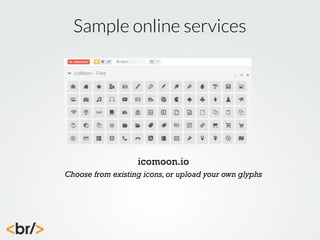
Sample online services

icomoon.io
Choose from existing icons, or upload your own glyphs
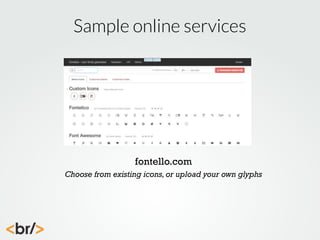
Sample online services

fontello.com
Choose from existing icons, or upload your own glyphs
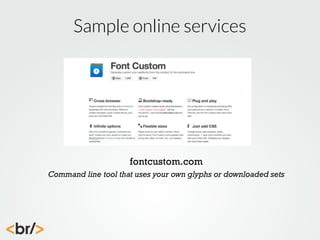
Sample online services

fontcustom.com
Command line tool that uses your own glyphs or downloaded sets
Online services
Fast and easy way to create icon fonts
Most have a large library of existing icons
Many have the ability to upload your own glyphs
Lack fine grained control
DESIGN CHALLENGE!
BUILD A FONT ONLINE
Type design applications
Limited number of tools available
Steep learning curves
Icon fonts will not need/use most features
Most are prohibitively expensive for icon font
creation
Open source solutions are uneven in execution
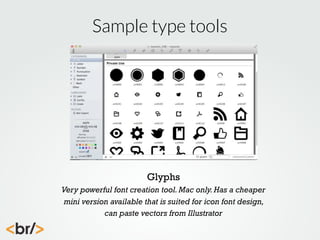
Sample type tools

Glyphs
Very powerful font creation tool. Mac only. Has a cheaper
mini version available that is suited for icon font design,
can paste vectors from Illustrator
Sample type tools

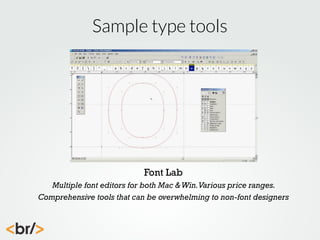
Font Lab
Multiple font editors for both Mac & Win. Various price ranges.
Comprehensive tools that can be overwhelming to non-font designers
Sample type tools

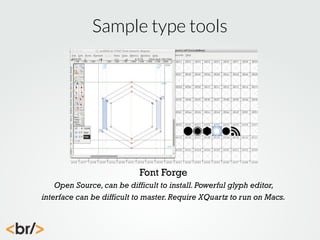
Font Forge
Open Source, can be difficult to install. Powerful glyph editor,
interface can be difficult to master. Require XQuartz to run on Macs.
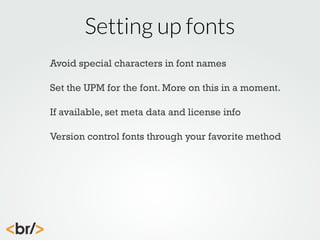
Setting up fonts
Avoid special characters in font names
Set the UPM for the font. More on this in a moment.
If available, set meta data and license info
Version control fonts through your favorite method
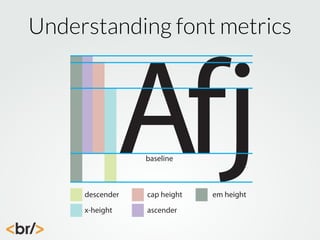
Understanding font metrics

Afj
baseline

descender

cap height

x-height

ascender

em height
Units per em
Units per em (UPM) is the grid used by the font
creation software to render characters
The higher the value, the easier it is for the software
to map glyph points
Higher UPM’s create larger fonts
To maximize crispness, use a UPM that’s a multiple of
your targeted default font size
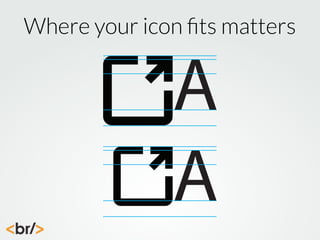
Where your icon fits matters

A
A
Tips for designing glyphs
Be aware of specific font-creation software issues
Monitor path direction and correct it if possible
Use as few points as possible
Clean up paths and add extrems if possible
Organize your glyphs as you encode
Plan for proper encoding
PUA encoded glyphs will fallback to an empty glyph
if the font fails or if @font-face is not supported
BMP encoding runs from E000 - F8FF
You can also use Unicode values that map to common
symbols as a fallback
Use encoding ranges as a way to organize your glyphs
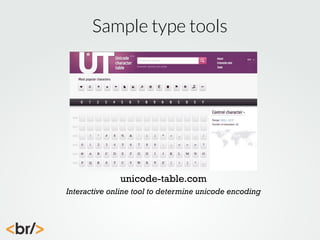
Sample type tools

unicode-table.com
Interactive online tool to determine unicode encoding
DESIGN CHALLENGE!
BUILD AN ICON FONT
Now what?
Most font creation tools will create OTF or TTF
fonts, but not all the formats you need for Web
Fonts, or with the proper subsetting
Great. What now?
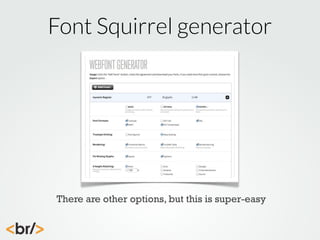
Font Squirrel generator

There are other options, but this is super-easy
DESIGN CHALLENGE!
GENERATE WEB FONTS
Using Icon Fonts
“Icon Fonts are awesome.”
- Chris Coyier
“Hell yeah they are.”

- me
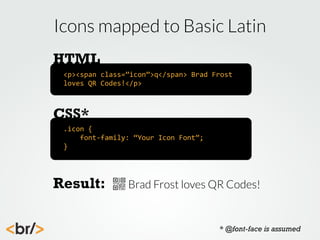
Icons mapped to Basic Latin
HTML
<p><span	
  class=”icon”>q</span>	
  Brad	
  Frost	
  
loves	
  QR	
  Codes!</p>

CSS*
.icon	
  {


  font-­‐family:	
  “Your	
  Icon	
  Font”;
}

Result:

Brad Frost loves QR Codes!

* @font-face is assumed
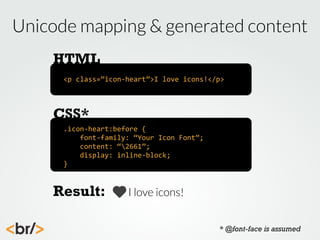
Unicode mapping & generated content
HTML
<p	
  class=”icon-­‐heart”>I	
  love	
  icons!</p>

CSS*
.icon-­‐heart:before	
  {


  font-­‐family:	
  “Your	
  Icon	
  Font”;


  content:	
  “2661”;


  display:	
  inline-­‐block;
}

Result:

I love icons!
* @font-face is assumed
Using the data-icon attribute
HTML
<p	
  data-­‐icon=”&#x2661;”>I	
  love	
  icons!</p>

CSS*
*[data-­‐icon]:before	
  {


  font-­‐family:	
  “Your	
  Icon	
  Font”;


  content:	
  attr(data-­‐icon);


  display:	
  inline-­‐block;
}

Result:

I love icons!
* @font-face is assumed
Using the aria-hidden attribute
HTML
<p><span	
  data-­‐icon=”&#xE001;”	
  aria-­‐hidden=”true”>	
  
</span>I	
  love	
  icons!</p>

CSS*
*[data-­‐icon]:before	
  {


  font-­‐family:	
  “Your	
  Icon	
  Font”;


  content:	
  attr(data-­‐icon);


  display:	
  inline-­‐block;


  speak:	
  none;
}

Result:

I love icons!
* @font-face is assumed
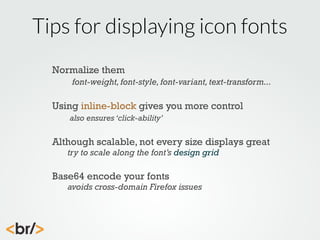
Tips for displaying icon fonts
Normalize them
font-weight, font-style, font-variant, text-transform...

Using inline-block gives you more control
also ensures ‘click-ability’

Although scalable, not every size displays great
try to scale along the font’s design grid

Base64 encode your fonts

avoids cross-domain Firefox issues
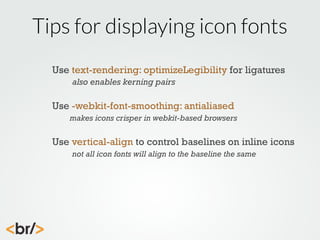
Tips for displaying icon fonts
Use text-rendering: optimizeLegibility for ligatures
also enables kerning pairs

Use -webkit-font-smoothing: antialiased
makes icons crisper in webkit-based browsers

Use vertical-align to control baselines on inline icons
not all icon fonts will align to the baseline the same
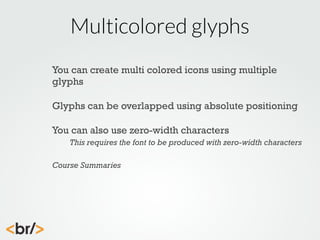
Multicolored glyphs
You can create multi colored icons using multiple
glyphs
Glyphs can be overlapped using absolute positioning
You can also use zero-width characters
This requires the font to be produced with zero-width characters
Course Summaries
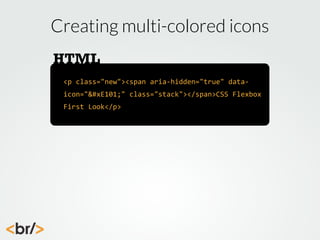
Creating multi-colored icons
HTML
<p	
  class="new"><span	
  aria-­‐hidden="true"	
  data-­‐
icon="&#xE101;"	
  class="stack"></span>CSS	
  Flexbox	
  
First	
  Look</p>
Creating multi-colored icons
CSS*
.complete,	
  .new	
  {
	
   font-­‐size:	
  3em;
	
   font-­‐family:	
  LatoLight;
	
   position:	
  relative;
}
.new	
  span[data-­‐icon]:before	
  {
	
   font-­‐family:	
  myconic;	
  
	
   content:	
  "E003";
	
   position:	
  relative;
	
   speak:	
  none;	
  
	
   font-­‐weight:	
  400;
	
   color:	
  rgb(45,45,45);
}


* @font-face is assumed
Creating multi-colored icons
CSS*
.complete	
  span[data-­‐icon]:after,	
  .new	
  
span[data-­‐icon]:after	
  {
	
   content:	
  attr(data-­‐icon);
	
   font-­‐family:	
  myconic;
	
   position:	
  absolute;
	
   top:	
  0;
	
   left:	
  0;
	
   color:	
  rgb(255,102,0);
}


Result:
* @font-face is assumed
Icon Font Resources
Chris Coyier’s Big List of Icon Fonts
http://css-tricks.com/flat-icons-icon-fonts/

Interactive Unicode Table
http://unicode-table.com

The Noun Project

http://thenounproject.com/

Github: Building Octicons

https://github.com/blog/1135-the-making-of-octicons

Filament Group’s Icon Font Compatibility Table

https://docs.google.com/spreadsheet/ccc?
key=0Ag5_yGvxpINRdHFYeUJPNnZMWUZKR2ItMEpRTXZPdUE#gid=0

Want these slides?

http://www.slideshare.net/jameswillweb
THANK YOU
james williamson | lynda.com
jwilliamson@lynda.com
@jameswillweb on the Twitter
www.simpleprimate.com
Want these slides?
http://www.slideshare.net/jameswillweb

Hooray Icon Fonts workshop

  • 1.
  • 2.
    welcome! 8:00 - 9:00:Designing icons What makes a great icon? Icon design best practices. Considerations for icon fonts. Sketching icons. 9:00 - 10:00: Constructing glyphs Setting up glyph templates. Working with sketches. Establishing grids. Proper path construction. Building Glyphs. 10:00 - 11:00: Building Icon Fonts Online services. @font-face kit construction. Choosing software. Setting up font properties & exporting fonts. Creating fonts. 11:00 - 12:00: Using Icon Fonts Downloading web font kits. Determining code approach. Structuring HTML. Writing efficient CSS. Stacking icons. Utilizing Icon Fonts.
  • 3.
    Designing Icons “Icons arelittle miracle workers. They circumvent language obstacles, give concise warnings and directions, convey our moods and show which buttons to press.” -John Hicks
  • 4.
    What is anicon? Icons are not logos. Icons don’t communicate brand or identity, they communicate instructions, ideas, and actions. Icons educate.
  • 5.
    The history oficons is long Rio Pinturas, Argentina 9,000 years old
  • 6.
    The history oficons is long Hopi Indian Petroglyphs, 800 years old
  • 7.
    The history oficons is long Image stone, Gotland, Sweden 400 AD
  • 8.
    The evolution oficons represents the need to have shared imagery which communicate ideas and information. Icons are languages.
  • 9.
    Some languages needto be shared Isotype symbols, Gerd Arntz 1928
  • 10.
    Others are onlyfor the initiated Hobo symbols, 1920 - 1930
  • 11.
    Others are onlyfor the initiated Not all icons have to be representative of the idea they intend to communicate. Indeed, throughout history some icons were designed specifically to obscure their true meaning.
  • 12.
    Icon types Pictograms Visual representationsof the objects or actions they represent Ideograms Visual representations of abstract ideas or concepts Arbitrary Invented symbols that don’t relate to any physical object, their meanings must be learned
  • 13.
    The approach todesigning icons depends largely upon which type of icon you’re creating.
  • 14.
    “It doesn’t matterif the feature an icon represents is immediately and intuitively obvious; what matters is that once you’ve made the link in your head - once you’ve learned what an icon does - some quality of the icon makes that link unbreakable.” -Susan Kare
  • 15.
    “I am intriguedwith the shapes people choose as their symbols to create a language. There is within all forms a basic structure, an indication of the entire object with a minimum of lines that becomes a symbol. This is common to all languages, all people, all times.” -Keith Haring
  • 16.
    Tips for designingicons Design icons that function together Design on a grid and preview them at size Simplicity is a virtue Keep perspective consistent Build on existing conventions
  • 17.
  • 18.
    The importance ofthe grid Sketchbook -Susan Kare
  • 19.
    The importance ofthe grid Sketchbook -Susan Kare
  • 20.
    The importance ofthe grid Sketchbook -Susan Kare
  • 21.
    The importance ofthe grid Sketchbook -Susan Kare
  • 22.
    The importance ofthe grid When sketching icons, use a grid that represents the default target size of the icon This could be multiples of 8, 10, 12, or whatever system best represents your UI Sketching within these constraints will result in more effective, and more creative icons
  • 23.
  • 24.
    Constructing Glyphs “When weexperience disappointment with the relationship with letters let's not be afraid to do what come naturally to us: Let's draw.” -Gerard Huerta
  • 25.
    Great! I’ve sketchedmy icons, now what?
  • 26.
  • 27.
    It’s helpful forthe vector editor you use to have solid SVG export or save capabilitites
  • 28.
    Vector considerations forfonts Draw good paths. Curve controls should fit within a triangle.
  • 29.
  • 30.
    Use as fewanchor points as possible This Not this
  • 31.
    Make sure allpaths are closed
  • 32.
    Icon Fonts areuseful, but force you into the constraints of storing an icon in an individual glyph. Because of this you need to understand the needs of the font editor prior to drawing icons.
  • 33.
    Draw using extremumpoints These points simplify shapes and are required by many font editors
  • 34.
    Path direction matters Maybe impossible to control depending upon your editor, but you’ll need to be aware of it.
  • 35.
    Design on agrid The grid should be set up in multiples of your font’s eventual UPM. Common UPM values are 1000, 1024, and 2048.
  • 36.
    Draw relative tothe baseline Knowing where the baseline falls is critical to drawing successful icon glyphs
  • 37.
    Drawing on grids Whendrawing glyphs, set the artboard or document properties to match the desired grid The grid should be set to the eventual UPM of the font Adhering to these rules will deliver crisper fonts that need less rounding when exported and scaled
  • 38.
  • 39.
    Creating fonts “It requiresa lot of expert knowledge to create professional typefaces and it’s a tedious process.” -Ralf Herrmann
  • 40.
    Options for creatingicon fonts Use an online creation service like Icomoon Build a source SVG font in Inkscape Use a professional type design tool like Glyphs Generate web fonts with services like Font Squirrel
  • 41.
    Sample online services icomoon.io Choosefrom existing icons, or upload your own glyphs
  • 42.
    Sample online services fontello.com Choosefrom existing icons, or upload your own glyphs
  • 43.
    Sample online services fontcustom.com Commandline tool that uses your own glyphs or downloaded sets
  • 44.
    Online services Fast andeasy way to create icon fonts Most have a large library of existing icons Many have the ability to upload your own glyphs Lack fine grained control
  • 45.
  • 46.
    Type design applications Limitednumber of tools available Steep learning curves Icon fonts will not need/use most features Most are prohibitively expensive for icon font creation Open source solutions are uneven in execution
  • 47.
    Sample type tools Glyphs Verypowerful font creation tool. Mac only. Has a cheaper mini version available that is suited for icon font design, can paste vectors from Illustrator
  • 48.
    Sample type tools FontLab Multiple font editors for both Mac & Win. Various price ranges. Comprehensive tools that can be overwhelming to non-font designers
  • 49.
    Sample type tools FontForge Open Source, can be difficult to install. Powerful glyph editor, interface can be difficult to master. Require XQuartz to run on Macs.
  • 50.
    Setting up fonts Avoidspecial characters in font names Set the UPM for the font. More on this in a moment. If available, set meta data and license info Version control fonts through your favorite method
  • 51.
  • 52.
    Units per em Unitsper em (UPM) is the grid used by the font creation software to render characters The higher the value, the easier it is for the software to map glyph points Higher UPM’s create larger fonts To maximize crispness, use a UPM that’s a multiple of your targeted default font size
  • 53.
    Where your iconfits matters A A
  • 54.
    Tips for designingglyphs Be aware of specific font-creation software issues Monitor path direction and correct it if possible Use as few points as possible Clean up paths and add extrems if possible Organize your glyphs as you encode
  • 55.
    Plan for properencoding PUA encoded glyphs will fallback to an empty glyph if the font fails or if @font-face is not supported BMP encoding runs from E000 - F8FF You can also use Unicode values that map to common symbols as a fallback Use encoding ranges as a way to organize your glyphs
  • 56.
    Sample type tools unicode-table.com Interactiveonline tool to determine unicode encoding
  • 57.
  • 58.
    Now what? Most fontcreation tools will create OTF or TTF fonts, but not all the formats you need for Web Fonts, or with the proper subsetting Great. What now?
  • 59.
    Font Squirrel generator Thereare other options, but this is super-easy
  • 60.
  • 61.
    Using Icon Fonts “IconFonts are awesome.” - Chris Coyier “Hell yeah they are.” - me
  • 62.
    Icons mapped toBasic Latin HTML <p><span  class=”icon”>q</span>  Brad  Frost   loves  QR  Codes!</p> CSS* .icon  {        font-­‐family:  “Your  Icon  Font”; } Result: Brad Frost loves QR Codes! * @font-face is assumed
  • 63.
    Unicode mapping &generated content HTML <p  class=”icon-­‐heart”>I  love  icons!</p> CSS* .icon-­‐heart:before  {        font-­‐family:  “Your  Icon  Font”;        content:  “2661”;        display:  inline-­‐block; } Result: I love icons! * @font-face is assumed
  • 64.
    Using the data-iconattribute HTML <p  data-­‐icon=”&#x2661;”>I  love  icons!</p> CSS* *[data-­‐icon]:before  {        font-­‐family:  “Your  Icon  Font”;        content:  attr(data-­‐icon);        display:  inline-­‐block; } Result: I love icons! * @font-face is assumed
  • 65.
    Using the aria-hiddenattribute HTML <p><span  data-­‐icon=”&#xE001;”  aria-­‐hidden=”true”>   </span>I  love  icons!</p> CSS* *[data-­‐icon]:before  {        font-­‐family:  “Your  Icon  Font”;        content:  attr(data-­‐icon);        display:  inline-­‐block;        speak:  none; } Result: I love icons! * @font-face is assumed
  • 66.
    Tips for displayingicon fonts Normalize them font-weight, font-style, font-variant, text-transform... Using inline-block gives you more control also ensures ‘click-ability’ Although scalable, not every size displays great try to scale along the font’s design grid Base64 encode your fonts avoids cross-domain Firefox issues
  • 67.
    Tips for displayingicon fonts Use text-rendering: optimizeLegibility for ligatures also enables kerning pairs Use -webkit-font-smoothing: antialiased makes icons crisper in webkit-based browsers Use vertical-align to control baselines on inline icons not all icon fonts will align to the baseline the same
  • 68.
    Multicolored glyphs You cancreate multi colored icons using multiple glyphs Glyphs can be overlapped using absolute positioning You can also use zero-width characters This requires the font to be produced with zero-width characters Course Summaries
  • 69.
    Creating multi-colored icons HTML <p  class="new"><span  aria-­‐hidden="true"  data-­‐ icon="&#xE101;"  class="stack"></span>CSS  Flexbox   First  Look</p>
  • 70.
    Creating multi-colored icons CSS* .complete,  .new  {   font-­‐size:  3em;   font-­‐family:  LatoLight;   position:  relative; } .new  span[data-­‐icon]:before  {   font-­‐family:  myconic;     content:  "E003";   position:  relative;   speak:  none;     font-­‐weight:  400;   color:  rgb(45,45,45); }   * @font-face is assumed
  • 71.
    Creating multi-colored icons CSS* .complete  span[data-­‐icon]:after,  .new   span[data-­‐icon]:after  {   content:  attr(data-­‐icon);   font-­‐family:  myconic;   position:  absolute;   top:  0;   left:  0;   color:  rgb(255,102,0); }   Result: * @font-face is assumed
  • 72.
    Icon Font Resources ChrisCoyier’s Big List of Icon Fonts http://css-tricks.com/flat-icons-icon-fonts/ Interactive Unicode Table http://unicode-table.com The Noun Project http://thenounproject.com/ Github: Building Octicons https://github.com/blog/1135-the-making-of-octicons Filament Group’s Icon Font Compatibility Table https://docs.google.com/spreadsheet/ccc? key=0Ag5_yGvxpINRdHFYeUJPNnZMWUZKR2ItMEpRTXZPdUE#gid=0 Want these slides? http://www.slideshare.net/jameswillweb
  • 73.
    THANK YOU james williamson| lynda.com jwilliamson@lynda.com @jameswillweb on the Twitter www.simpleprimate.com Want these slides? http://www.slideshare.net/jameswillweb