© 2015 IBM Corporation
Streams Security
User Authentication with Client
Certificates
IBM Streams Version 4.1
Scott Timmerman
Streams Developement
stimmer@us.ibm.com
2 © 2015 IBM Corporation
Important Disclaimer
THE INFORMATION CONTAINED IN THIS PRESENTATION IS PROVIDED FOR INFORMATIONAL
PURPOSES ONLY.
WHILE EFFORTS WERE MADE TO VERIFY THE COMPLETENESS AND ACCURACY OF THE
INFORMATION CONTAINED IN THIS PRESENTATION, IT IS PROVIDED “AS IS”, WITHOUT WARRANTY
OF ANY KIND, EXPRESS OR IMPLIED.
IN ADDITION, THIS INFORMATION IS BASED ON IBM’S CURRENT PRODUCT PLANS AND STRATEGY,
WHICH ARE SUBJECT TO CHANGE BY IBM WITHOUT NOTICE.
IBM SHALL NOT BE RESPONSIBLE FOR ANY DAMAGES ARISING OUT OF THE USE OF, OR
OTHERWISE RELATED TO, THIS PRESENTATION OR ANY OTHER DOCUMENTATION.
NOTHING CONTAINED IN THIS PRESENTATION IS INTENDED TO, OR SHALL HAVE THE EFFECT OF:
• CREATING ANY WARRANTY OR REPRESENTATION FROM IBM (OR ITS AFFILIATES OR ITS OR
THEIR SUPPLIERS AND/OR LICENSORS); OR
• ALTERING THE TERMS AND CONDITIONS OF THE APPLICABLE LICENSE AGREEMENT
GOVERNING THE USE OF IBM SOFTWARE.
IBM’s statements regarding its plans, directions, and intent are subject to change or
withdrawal without notice at IBM’s sole discretion. Information regarding potential
future products is intended to outline our general product direction and it should not
be relied on in making a purchasing decision. The information mentioned regarding
potential future products is not a commitment, promise, or legal obligation to deliver
any material, code or functionality. Information about potential future products may
not be incorporated into any contract. The development, release, and timing of any
future features or functionality described for our products remains at our sole
discretion.
THIS INFORMATION IS BASED ON IBM’S CURRENT PRODUCT PLANS AND STRATEGY, WHICH ARE SUBJECT TO CHANGE BY IBM WITHOUT NOTICE.
IBM SHALL NOT BE RESPONSIBLE FOR ANY DAMAGES ARISING OUT OF THE USE OF, OR OTHERWISE RELATED TO, THIS PRESENTATION OR ANY OTHER DOCUMENTATION.
3 © 2015 IBM Corporation
Agenda
 Introduction to User Authentication with Client Certificates
 Public Key Infrastructure Terms and Concepts
 Demonstrate configuring Streams to authenticate using client certificates
4 © 2015 IBM Corporation
Introduction to User Authentication with Client
Certificates
Client certificates provide another option for user authentication. InfoSphere
Streams 4.1 attempts user authentication as follows.
1.If configured, authenticates using a login module. If user can not authenticate,
continues to the next step.
2.If configured, authenticates using a client certificate. If user can not authenticate,
continues to the next step.
3.Uses default authentication method (PAM or LDAP) specified when domain was
created.
Benefits of user authentication using client certificates
 Enhanced user security
 No user password required
 User management alternative to PAM or LDAP
How does user authentication with client certificates work?
• Need to understand Public Key Infrastructure terms and concepts
• Demonstration provides a practical example.
5 © 2015 IBM Corporation
Public Key Infrastructure Terms and Concepts
 Public Key Infrastructure (PKI) is a series of standards and processes used
to ensure secure electronic transfer of information. It is a system for
creation, storage and distribution of digital certificates based on public key
cryptography.
 Public Key Cryptography uses public and private keys for encrypting and
decrypting data.
– Public key is shared but the private key must be kept secret.
– Public and private keys are matched by an asymmetric mathematical
algorithm where the complexity ensures the practical impossibility of
determining the private key.
– Data is encrypted using one key and decrypted using the other.
6 © 2015 IBM Corporation
Public Key Infrastructure Terms and Concepts
 Digital Certificate is an encoded file used to prove the identity of the owner.
The following are some of the contents of a X.509 v3 certificate.
– Version: Specification version of the certificate
– Serial number: Unique ID of the certificate
– Subject: Distinguished name of owning entity
– Issuer: Distinguished name of entity that issued the certificate
– Validity period: Start and end dates
– Subject Public Key Info: Public key & encryption algorithm
– X509v3 extensions:
• Basic Constraints: Identifies whether subject is a CA, etc.
• Authority Key ID: Derived from the public key of the Issuer
• Subject Key ID: Derived from the public key of the Subject
• Key Usage: Purpose of public key contained in the certificate
– X509v3 extended extensions:
• Extended Key Usage: Additional purposes of public key contain in the
certificate. (i.e. whether subject can be used for client authentication)
7 © 2015 IBM Corporation
Public Key Infrastructure Terms and Concepts
 Certificate Authority (CA) is a trusted entity that has its own certificate and
does the following.
– Verifies the identity of a subject
• Anyone can create a certificate but a CA ensures the subject's identity
– Issues digital certificates
• Signs the digital certificate with the CA's private key
– Renews digital certificates
• Re-issues a certificate with new validity dates
– Revokes digital certificates
• Certificates that are no longer trusted are revoked
– Maintains a list of all certificates issued and revoked
 Certificate revocation status can be checked with the following methods.
– Certificate Revocation List (CRL)
• List of certificates revoked by a CA
• Must be created and available after a certificate has been revoked
– Online Status Protocol (OCSP)
• An OCSP response provides real time access to a certificate's revocation
status.
8 © 2015 IBM Corporation
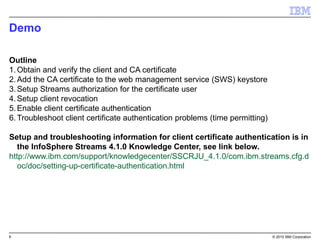
Demo
Outline
1.Obtain and verify the client and CA certificate
2.Add the CA certificate to the web management service (SWS) keystore
3.Setup Streams authorization for the certificate user
4.Setup client revocation
5.Enable client certificate authentication
6.Troubleshoot client certificate authentication problems (time permitting)
Setup and troubleshooting information for client certificate authentication is in
the InfoSphere Streams 4.1.0 Knowledge Center, see link below.
http://www.ibm.com/support/knowledgecenter/SSCRJU_4.1.0/com.ibm.streams.cfg.d
oc/doc/setting-up-certificate-authentication.html
9 © 2015 IBM Corporation
Demo
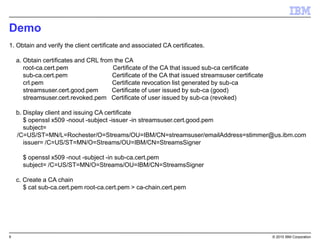
1. Obtain and verify the client certificate and associated CA certificates.
a. Obtain certificates and CRL from the CA
root-ca.cert.pem Certificate of the CA that issued sub-ca certificate
sub-ca.cert.pem Certificate of the CA that issued streamsuser certificate
crl.pem Certificate revocation list generated by sub-ca
streamsuser.cert.good.pem Certificate of user issued by sub-ca (good)
streamsuser.cert.revoked.pem Certificate of user issued by sub-ca (revoked)
b. Display client and issuing CA certificate
$ openssl x509 -noout -subject -issuer -in streamsuser.cert.good.pem
subject=
/C=US/ST=MN/L=Rochester/O=Streams/OU=IBM/CN=streamsuser/emailAddress=stimmer@us.ibm.com
issuer= /C=US/ST=MN/O=Streams/OU=IBM/CN=StreamsSigner
$ openssl x509 -nout -subject -in sub-ca.cert.pem
subject= /C=US/ST=MN/O=Streams/OU=IBM/CN=StreamsSigner
c. Create a CA chain
$ cat sub-ca.cert.pem root-ca.cert.pem > ca-chain.cert.pem
10 © 2015 IBM Corporation
Demo
(Step 1. continued)
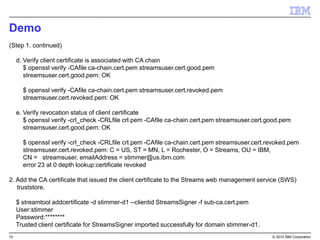
d. Verify client certificate is associated with CA chain
$ openssl verify -CAfile ca-chain.cert.pem streamsuser.cert.good.pem
streamsuser.cert.good.pem: OK
$ openssl verify -CAfile ca-chain.cert.pem streamsuser.cert.revoked.pem
streamsuser.cert.revoked.pem: OK
e. Verify revocation status of client certificate
$ openssl verify -crl_check -CRLfile crl.pem -CAfile ca-chain.cert.pem streamsuser.cert.good.pem
streamsuser.cert.good.pem: OK
$ openssl verify -crl_check -CRLfile crl.pem -CAfile ca-chain.cert.pem streamsuser.cert.revoked.pem
streamsuser.cert.revoked.pem: C = US, ST = MN, L = Rochester, O = Streams, OU = IBM,
CN = streamsuser, emailAddress = stimmer@us.ibm.com
error 23 at 0 depth lookup:certificate revoked
2. Add the CA certificate that issued the client certificate to the Streams web management service (SWS)
truststore.
$ streamtool addcertificate -d stimmer-d1 --clientid StreamsSigner -f sub-ca.cert.pem
User:stimmer
Password:********
Trusted client certificate for StreamsSigner imported successfully for domain stimmer-d1.
11 © 2015 IBM Corporation
Demo
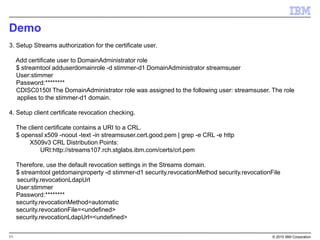
3. Setup Streams authorization for the certificate user.
Add certificate user to DomainAdministrator role
$ streamtool adduserdomainrole -d stimmer-d1 DomainAdministrator streamsuser
User:stimmer
Password:********
CDISC0150I The DomainAdministrator role was assigned to the following user: streamsuser. The role
applies to the stimmer-d1 domain.
4. Setup client certificate revocation checking.
The client certificate contains a URI to a CRL.
$ openssl x509 -noout -text -in streamsuser.cert.good.pem | grep -e CRL -e http
X509v3 CRL Distribution Points:
URI:http://streams107.rch.stglabs.ibm.com/certs/crl.pem
Therefore, use the default revocation settings in the Streams domain.
$ streamtool getdomainproperty -d stimmer-d1 security.revocationMethod security.revocationFile
security.revocationLdapUrl
User:stimmer
Password:********
security.revocationMethod=automatic
security.revocationFile=<undefined>
security.revocationLdapUrl=<undefined>
12 © 2015 IBM Corporation
Demo
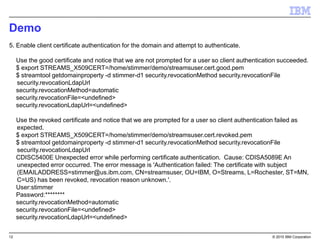
5. Enable client certificate authentication for the domain and attempt to authenticate.
Use the good certificate and notice that we are not prompted for a user so client authentication succeeded.
$ export STREAMS_X509CERT=/home/stimmer/demo/streamsuser.cert.good.pem
$ streamtool getdomainproperty -d stimmer-d1 security.revocationMethod security.revocationFile
security.revocationLdapUrl
security.revocationMethod=automatic
security.revocationFile=<undefined>
security.revocationLdapUrl=<undefined>
Use the revoked certificate and notice that we are prompted for a user so client authentication failed as
expected.
$ export STREAMS_X509CERT=/home/stimmer/demo/streamsuser.cert.revoked.pem
$ streamtool getdomainproperty -d stimmer-d1 security.revocationMethod security.revocationFile
security.revocationLdapUrl
CDISC5400E Unexpected error while performing certificate authentication. Cause: CDISA5089E An
unexpected error occurred. The error message is 'Authentication failed: The certificate with subject
(EMAILADDRESS=stimmer@us.ibm.com, CN=streamsuser, OU=IBM, O=Streams, L=Rochester, ST=MN,
C=US) has been revoked, revocation reason unknown.'.
User:stimmer
Password:********
security.revocationMethod=automatic
security.revocationFile=<undefined>
security.revocationLdapUrl=<undefined>
13 © 2015 IBM Corporation
Questions?

IBM Streams V4.1 and User Authentication with Client Certificates

  • 1.
    © 2015 IBMCorporation Streams Security User Authentication with Client Certificates IBM Streams Version 4.1 Scott Timmerman Streams Developement stimmer@us.ibm.com
  • 2.
    2 © 2015IBM Corporation Important Disclaimer THE INFORMATION CONTAINED IN THIS PRESENTATION IS PROVIDED FOR INFORMATIONAL PURPOSES ONLY. WHILE EFFORTS WERE MADE TO VERIFY THE COMPLETENESS AND ACCURACY OF THE INFORMATION CONTAINED IN THIS PRESENTATION, IT IS PROVIDED “AS IS”, WITHOUT WARRANTY OF ANY KIND, EXPRESS OR IMPLIED. IN ADDITION, THIS INFORMATION IS BASED ON IBM’S CURRENT PRODUCT PLANS AND STRATEGY, WHICH ARE SUBJECT TO CHANGE BY IBM WITHOUT NOTICE. IBM SHALL NOT BE RESPONSIBLE FOR ANY DAMAGES ARISING OUT OF THE USE OF, OR OTHERWISE RELATED TO, THIS PRESENTATION OR ANY OTHER DOCUMENTATION. NOTHING CONTAINED IN THIS PRESENTATION IS INTENDED TO, OR SHALL HAVE THE EFFECT OF: • CREATING ANY WARRANTY OR REPRESENTATION FROM IBM (OR ITS AFFILIATES OR ITS OR THEIR SUPPLIERS AND/OR LICENSORS); OR • ALTERING THE TERMS AND CONDITIONS OF THE APPLICABLE LICENSE AGREEMENT GOVERNING THE USE OF IBM SOFTWARE. IBM’s statements regarding its plans, directions, and intent are subject to change or withdrawal without notice at IBM’s sole discretion. Information regarding potential future products is intended to outline our general product direction and it should not be relied on in making a purchasing decision. The information mentioned regarding potential future products is not a commitment, promise, or legal obligation to deliver any material, code or functionality. Information about potential future products may not be incorporated into any contract. The development, release, and timing of any future features or functionality described for our products remains at our sole discretion. THIS INFORMATION IS BASED ON IBM’S CURRENT PRODUCT PLANS AND STRATEGY, WHICH ARE SUBJECT TO CHANGE BY IBM WITHOUT NOTICE. IBM SHALL NOT BE RESPONSIBLE FOR ANY DAMAGES ARISING OUT OF THE USE OF, OR OTHERWISE RELATED TO, THIS PRESENTATION OR ANY OTHER DOCUMENTATION.
  • 3.
    3 © 2015IBM Corporation Agenda  Introduction to User Authentication with Client Certificates  Public Key Infrastructure Terms and Concepts  Demonstrate configuring Streams to authenticate using client certificates
  • 4.
    4 © 2015IBM Corporation Introduction to User Authentication with Client Certificates Client certificates provide another option for user authentication. InfoSphere Streams 4.1 attempts user authentication as follows. 1.If configured, authenticates using a login module. If user can not authenticate, continues to the next step. 2.If configured, authenticates using a client certificate. If user can not authenticate, continues to the next step. 3.Uses default authentication method (PAM or LDAP) specified when domain was created. Benefits of user authentication using client certificates  Enhanced user security  No user password required  User management alternative to PAM or LDAP How does user authentication with client certificates work? • Need to understand Public Key Infrastructure terms and concepts • Demonstration provides a practical example.
  • 5.
    5 © 2015IBM Corporation Public Key Infrastructure Terms and Concepts  Public Key Infrastructure (PKI) is a series of standards and processes used to ensure secure electronic transfer of information. It is a system for creation, storage and distribution of digital certificates based on public key cryptography.  Public Key Cryptography uses public and private keys for encrypting and decrypting data. – Public key is shared but the private key must be kept secret. – Public and private keys are matched by an asymmetric mathematical algorithm where the complexity ensures the practical impossibility of determining the private key. – Data is encrypted using one key and decrypted using the other.
  • 6.
    6 © 2015IBM Corporation Public Key Infrastructure Terms and Concepts  Digital Certificate is an encoded file used to prove the identity of the owner. The following are some of the contents of a X.509 v3 certificate. – Version: Specification version of the certificate – Serial number: Unique ID of the certificate – Subject: Distinguished name of owning entity – Issuer: Distinguished name of entity that issued the certificate – Validity period: Start and end dates – Subject Public Key Info: Public key & encryption algorithm – X509v3 extensions: • Basic Constraints: Identifies whether subject is a CA, etc. • Authority Key ID: Derived from the public key of the Issuer • Subject Key ID: Derived from the public key of the Subject • Key Usage: Purpose of public key contained in the certificate – X509v3 extended extensions: • Extended Key Usage: Additional purposes of public key contain in the certificate. (i.e. whether subject can be used for client authentication)
  • 7.
    7 © 2015IBM Corporation Public Key Infrastructure Terms and Concepts  Certificate Authority (CA) is a trusted entity that has its own certificate and does the following. – Verifies the identity of a subject • Anyone can create a certificate but a CA ensures the subject's identity – Issues digital certificates • Signs the digital certificate with the CA's private key – Renews digital certificates • Re-issues a certificate with new validity dates – Revokes digital certificates • Certificates that are no longer trusted are revoked – Maintains a list of all certificates issued and revoked  Certificate revocation status can be checked with the following methods. – Certificate Revocation List (CRL) • List of certificates revoked by a CA • Must be created and available after a certificate has been revoked – Online Status Protocol (OCSP) • An OCSP response provides real time access to a certificate's revocation status.
  • 8.
    8 © 2015IBM Corporation Demo Outline 1.Obtain and verify the client and CA certificate 2.Add the CA certificate to the web management service (SWS) keystore 3.Setup Streams authorization for the certificate user 4.Setup client revocation 5.Enable client certificate authentication 6.Troubleshoot client certificate authentication problems (time permitting) Setup and troubleshooting information for client certificate authentication is in the InfoSphere Streams 4.1.0 Knowledge Center, see link below. http://www.ibm.com/support/knowledgecenter/SSCRJU_4.1.0/com.ibm.streams.cfg.d oc/doc/setting-up-certificate-authentication.html
  • 9.
    9 © 2015IBM Corporation Demo 1. Obtain and verify the client certificate and associated CA certificates. a. Obtain certificates and CRL from the CA root-ca.cert.pem Certificate of the CA that issued sub-ca certificate sub-ca.cert.pem Certificate of the CA that issued streamsuser certificate crl.pem Certificate revocation list generated by sub-ca streamsuser.cert.good.pem Certificate of user issued by sub-ca (good) streamsuser.cert.revoked.pem Certificate of user issued by sub-ca (revoked) b. Display client and issuing CA certificate $ openssl x509 -noout -subject -issuer -in streamsuser.cert.good.pem subject= /C=US/ST=MN/L=Rochester/O=Streams/OU=IBM/CN=streamsuser/emailAddress=stimmer@us.ibm.com issuer= /C=US/ST=MN/O=Streams/OU=IBM/CN=StreamsSigner $ openssl x509 -nout -subject -in sub-ca.cert.pem subject= /C=US/ST=MN/O=Streams/OU=IBM/CN=StreamsSigner c. Create a CA chain $ cat sub-ca.cert.pem root-ca.cert.pem > ca-chain.cert.pem
  • 10.
    10 © 2015IBM Corporation Demo (Step 1. continued) d. Verify client certificate is associated with CA chain $ openssl verify -CAfile ca-chain.cert.pem streamsuser.cert.good.pem streamsuser.cert.good.pem: OK $ openssl verify -CAfile ca-chain.cert.pem streamsuser.cert.revoked.pem streamsuser.cert.revoked.pem: OK e. Verify revocation status of client certificate $ openssl verify -crl_check -CRLfile crl.pem -CAfile ca-chain.cert.pem streamsuser.cert.good.pem streamsuser.cert.good.pem: OK $ openssl verify -crl_check -CRLfile crl.pem -CAfile ca-chain.cert.pem streamsuser.cert.revoked.pem streamsuser.cert.revoked.pem: C = US, ST = MN, L = Rochester, O = Streams, OU = IBM, CN = streamsuser, emailAddress = stimmer@us.ibm.com error 23 at 0 depth lookup:certificate revoked 2. Add the CA certificate that issued the client certificate to the Streams web management service (SWS) truststore. $ streamtool addcertificate -d stimmer-d1 --clientid StreamsSigner -f sub-ca.cert.pem User:stimmer Password:******** Trusted client certificate for StreamsSigner imported successfully for domain stimmer-d1.
  • 11.
    11 © 2015IBM Corporation Demo 3. Setup Streams authorization for the certificate user. Add certificate user to DomainAdministrator role $ streamtool adduserdomainrole -d stimmer-d1 DomainAdministrator streamsuser User:stimmer Password:******** CDISC0150I The DomainAdministrator role was assigned to the following user: streamsuser. The role applies to the stimmer-d1 domain. 4. Setup client certificate revocation checking. The client certificate contains a URI to a CRL. $ openssl x509 -noout -text -in streamsuser.cert.good.pem | grep -e CRL -e http X509v3 CRL Distribution Points: URI:http://streams107.rch.stglabs.ibm.com/certs/crl.pem Therefore, use the default revocation settings in the Streams domain. $ streamtool getdomainproperty -d stimmer-d1 security.revocationMethod security.revocationFile security.revocationLdapUrl User:stimmer Password:******** security.revocationMethod=automatic security.revocationFile=<undefined> security.revocationLdapUrl=<undefined>
  • 12.
    12 © 2015IBM Corporation Demo 5. Enable client certificate authentication for the domain and attempt to authenticate. Use the good certificate and notice that we are not prompted for a user so client authentication succeeded. $ export STREAMS_X509CERT=/home/stimmer/demo/streamsuser.cert.good.pem $ streamtool getdomainproperty -d stimmer-d1 security.revocationMethod security.revocationFile security.revocationLdapUrl security.revocationMethod=automatic security.revocationFile=<undefined> security.revocationLdapUrl=<undefined> Use the revoked certificate and notice that we are prompted for a user so client authentication failed as expected. $ export STREAMS_X509CERT=/home/stimmer/demo/streamsuser.cert.revoked.pem $ streamtool getdomainproperty -d stimmer-d1 security.revocationMethod security.revocationFile security.revocationLdapUrl CDISC5400E Unexpected error while performing certificate authentication. Cause: CDISA5089E An unexpected error occurred. The error message is 'Authentication failed: The certificate with subject (EMAILADDRESS=stimmer@us.ibm.com, CN=streamsuser, OU=IBM, O=Streams, L=Rochester, ST=MN, C=US) has been revoked, revocation reason unknown.'. User:stimmer Password:******** security.revocationMethod=automatic security.revocationFile=<undefined> security.revocationLdapUrl=<undefined>
  • 13.
    13 © 2015IBM Corporation Questions?