Types and Service in Cloud:
• Introduction
• Cloud Reference Model Architecture
• Infrastructure / Hardware as a Service
• Platform as a Service
• Software as a Service
• Types of Clouds
• Public Clouds
• Private Clouds
• Hybrid Clouds
• Community Clouds
• Economics of the Cloud
• Open Challenges
• Cloud Definition
• Cloud Interoperability and Standards Scalability
• Fault Tolerance Security, Trust, and Privacy
• Organizational Aspects.
Introduction
• Cloud Computing can be defined as the practice of using a
network of remote servers hosted on the Internet to store,
manage, and process data, rather than a local server or a
personal computer. Companies offering such kinds of cloud
computing services are called cloud providers and typically
charge for cloud computing services based on usage. Grids and
clusters are the foundations for cloud computing.
Cloud Reference Model
• The cloud computing reference model is an abstract model that
divides a cloud computing environment into abstraction layers and
cross-layer functions to characterize and standardize its functions.
This reference model divides cloud computing activities and functions
into three cross-layer functions and five logical layers.
• Each of these layers describes different things that might be present
in a cloud computing environment, such as computing systems,
networking, storage equipment, virtualization software, security
measures, control and management software, and so forth. It also
explains the connections between these organizations. The five layers
are the Physical layer, virtual layer, control layer, service orchestration
layer, and service layer.
Cloud Reference Model
Infrastructure / Hardware as a Service
• Iaas is also known as Hardware as a Service (HaaS). It is one of the
layers of the cloud computing platform. It allows customers to
outsource their IT infrastructures, such as servers, networking,
processing, storage, virtual machines, and other resources. Customers
access these resources on the Internet using a pay-as-per-use model.
Some of the Primary Characteristics of IaaS
are:
• Scalability: IaaS enables users to adjust computing capacity according to their demands without requiring
long lead times or up-front hardware purchases.
• Virtualization: IaaS uses virtualization technology to generate virtualized instances that can be managed and
delivered on-demand by abstracting physical computer resources.
• Resource Pooling: This feature enables users to share computer resources, such as networking and storage,
among a number of users, maximizing resource utilization and cutting costs.
• Elasticity: IaaS allows users to dynamically modify their computing resources in response to shifting demand,
ensuring optimum performance and financial viability.
• Self-Service: IaaS offers consumers "self-service" portals that let them independently deploy, administer, and
monitor their computing resources without the assistance of IT employees.
• Availability: To ensure the high availability and reliability of services, IaaS providers often run redundant and
geographically dispersed data centers.
• Security: To safeguard their infrastructure and client data, IaaS companies adopt security measures,
including data encryption, firewalls, access controls, and threat detection.
• Customization: IaaS enables users to alter the operating systems, application stacks, and security settings of
their virtualized instances to suit their unique requirements.
IaaS provider provides the following
services
• Computing: To provision virtual machines (VMs) for end users, IaaS providers offer virtual central processing units (CPUs) and
virtual main memory. As a result, users may run their workloads and apps on the provider's infrastructure without having to worry
about managing the underlying hardware.
• Storage: Back-end storage services are provided by IaaS providers, enabling users to store and access their files and data. This
offers scalable and trustworthy storage solutions for a variety of use cases and can include block storage, object storage, or file
storage alternatives.
• Network: IaaS providers provide networking tools, including routers, switches, and bridges for the VMs through Network as a
Service (NaaS). This enables connectivity and communication between VMs and other resources while also allowing customers to
create and maintain their network architecture within the IaaS environment.
• Load balancers: Infrastructure-layer load balancing services are provided by IaaS providers. Incoming network traffic is split up
among many virtual machines (VMs) or resources by load balancers, resulting in effective resource management and excellent
application and service availability.
• Security: Security features and services are frequently offered by IaaS providers as part of their offering. To safeguard data and
resources housed on the IaaS platform, this can include network security, firewall configurations, access controls, encryption, and
other security measures.
• Backup and disaster recovery services are provided by some IaaS providers, enabling customers to create backup copies of their
data and software and put recovery plans in place in the event of data loss or system problems. This promotes business continuity
and data security.
• Monitoring and Management: IaaS suppliers provide tools and services for monitoring and controlling the resources and
infrastructure. This can involve managing VMs, storage, and network configurations using management panels or APIs, as well as
measuring resource utilization, automating scaling, and monitoring performance.
Advantages of IaaS Cloud Computing Layer
• Shared infrastructure:IaaS allows multiple users to share the same
physical infrastructure.
• Web access to the resources:Iaas allows IT users to access resources over
the internet.
• Pay-as-per-use model:IaaS providers provide services based on a pay-as-
per-use basis. The users are required to pay for what they have used.
• Focus on the core business: IaaS providers focus on the organization's
core business rather than on IT infrastructure.
• On-demand scalability:On-demand scalability is one of the biggest
advantages of IaaS. Using IaaS, users do not worry about upgrading
software and troubleshooting issues related to hardware components.
Disadvantages of IaaS Cloud Computing Layer
• Security: In the IaaS context, security is still a major problem. Although IaaS companies have security safeguards in place, it is
difficult to achieve 100% protection. To safeguard their data and applications, customers must verify that the necessary security
configurations and controls are in place.
• Maintenance and Upgrade: The underlying infrastructure is maintained by IaaS service providers, but they are not required to
automatically upgrade the operating systems or software used by client applications. Compatibility problems could come from
this, making it harder for customers to maintain their current software.
• Interoperability Issues: Interoperability Problems: Because of interoperability problems, moving virtual machines (VMs) from one
IaaS provider to another can be difficult. As a result, consumers may find it challenging to transfer providers or integrate their IaaS
resources with other platforms or services. This may result in vendor lock-in.
• Performance Variability: Due to shared resources and multi-tenancy, the performance of VMs in the IaaS system can change.
During times of high demand or while sharing resources with other users on the same infrastructure, customers' performance may
fluctuate.
• Dependency on Internet Connectivity: Internet access is crucial to IaaS, which is largely dependent on it. Any interruptions or
connectivity problems could hinder access to cloud infrastructure and services, which would have an impact on productivity and
business operations.
• Learning Curve and Complexity: Learning Curve and Complexity: Using and administering IaaS calls for a certain amount of
technical know-how and comprehension of cloud computing principles. To efficiently use and manage the IaaS resources,
organizations may need to spend money on IT employee training or turn to outside experts.
• Cost Management: Cost Control: IaaS provides scalability and flexibility, but it can also result in difficult cost control. In order to
prevent unforeseen charges, customers must keep an eye on and manage their resource utilization. Higher costs may be the result
of inefficient use of resources or improper resource allocation.
Top Iaas Providers who are providing IaaS
cloud computing platform
IaaS Vendor Iaas Solution Details
Amazon Web Services Elastic, Elastic Compute Cloud (EC2)
MapReduce, Route 53, Virtual Private
Cloud, etc.
The cloud computing platform pioneer
Amazon offers auto-scaling, cloud
monitoring, and load-balancing features as
part of its portfolio.
Netmagic Solutions Netmagic IaaS Cloud Netmagic runs from data centers in
Mumbai, Chennai, and Bangalore and a
virtual data center in the United States.
Plans are underway to extend services to
West Asia.
Rackspace Cloud servers, cloud files, cloud sites, etc. The cloud computing platform vendor
focuses primarily on enterprise-level
hosting services.
Reliance Communications Reliance Internet Data Center RIDC supports both traditional hosting and
cloud services, with data centers in
Mumbai, Bangalore, Hyderabad, and
Chennai. The cloud services offered by
RIDC include IaaS and SaaS.
Sify Technologies Sify IaaS Sify's cloud computing platform is powered
by HP's converged infrastructure. The
vendor offers all three types of cloud
services: IaaS, PaaS, and SaaS.
Platform as a Service | PaaS
• Platform as a Service (PaaS) provides a runtime environment. It allows
programmers to easily create, test, run, and deploy web applications.
You can purchase these applications from a cloud service provider on
a pay-as-per-use basis and access them using an Internet connection.
In PaaS, back-end scalability is managed by the cloud service provider,
so end-users do not need to worry about managing the
infrastructure.
Services Provided by PaaS are
• Programming Languages: A variety of programming languages are supported by PaaS
providers, allowing developers to choose their favorite language to create apps.
Languages including Java, Python, Ruby,.NET, PHP, and Node.js are frequently supported.
• Application Frameworks: Pre-configured application frameworks are offered by PaaS
platforms, which streamline the development process. These frameworks include
features like libraries, APIs, and tools for quick development, laying the groundwork for
creating scalable and reliable applications. Popular application frameworks include
Laravel, Django, Ruby on Rails, and Spring Framework.
• Databases: Managed database services are provided by PaaS providers, making it simple
for developers to store and retrieve data. These services support relational databases
(like MySQL, PostgreSQL, and Microsoft SQL Server) and NoSQL databases (like
MongoDB, Cassandra, and Redis). For its database services, PaaS platforms often offer
automated backups, scalability, and monitoring tools.
• Additional Tools and Services: PaaS providers provide a range of extra tools and services
to aid in the lifecycle of application development and deployment. These may consist of
the following:
• Development Tools: to speed up the development process, these include integrated development
environments (IDEs), version control systems, build and deployment tools, and debugging tools.
• Collaboration and Communication: PaaS platforms frequently come with capabilities for team
collaboration, including chat services, shared repositories, and project management software.
• Analytics and Monitoring: PaaS providers may give tools for tracking application performance,
examining user behavior data, and producing insights to improve application behavior and
address problems.
• Security and Identity Management: PaaS systems come with built-in security features like access
control, encryption, and mechanisms for authentication and authorization to protect the privacy
of applications and data.
• Scalability and load balancing: PaaS services frequently offer automatic scaling capabilities that
let applications allocate more resources as needed to manage a spike in traffic or demand. To
improve performance and availability, load balancing features divide incoming requests among
various instances of the application.
Paas Architecture:
Development and Deployment Tools:
• Development Tools: To assist developers in writing and testing their code, PaaS providers provide a variety of development tools,
including integrated development environments (IDEs), software development kits (SDKs), and programming languages. These
tools are frequently accessible via a web-based interface, making using them from any location simple.
• Tools for Deployment: PaaS providers offer tools for deployment that make it simple for developers to upload their apps to the
cloud. These technologies automate processes like scalability, configuration management, and code deployment.
• Database Administration: PaaS companies provide tools and services for database management to assist developers in creating
and maintaining their databases. This comprises backup and recovery services and tools for database design, migration, and
replication.
• Integration with Other Services: PaaS companies offer integration with outside services, including analytics platforms, messaging
services, and payment gateways. This eliminates the need for writing proprietary code and enables developers to quickly integrate
these services into their applications.
• Security: To assist developers in protecting their apps and data, PaaS providers offer security tools and services. This includes tools
like firewalls, access controls, and encryption, in addition to adherence to regulatory requirements like GDPR and HIPAA.
• Analytical and Monitoring Tools: These are provided by PaaS providers to assist developers in keeping track of the functionality of
their apps and spotting problems. These technologies offer in-the-moment insights into resource use, application usage, and other
indicators.
Advantages of PaaS
Simplified Development
• PaaS allows developers to focus on development and innovation without worrying about infrastructure
management.
Lower risk
• No need for up-front investment in hardware and software. Developers only need a PC and an internet
connection to start building applications.
Prebuilt business functionality
• Some PaaS vendors also provide already defined business functionality so that users can avoid building
everything from very scratch and hence can directly start the projects only.
Instant community
PaaS vendors frequently provide online communities where the developer can get ideas, share experiences,
and seek advice from others.
Scalability
Applications deployed can scale from one to thousands of users without any changes to the applications.
Disadvantages of PaaS Loud Computing Layer
Vendor lock-in
• One has to write the applications according to the platform provided by the PaaS vendor, so the
migration of an application to another PaaS vendor would be a problem.
Data Privacy
• Corporate data, whether it can be critical or not, will be private, so if it is not located within the
walls of the company, there can be a risk in terms of privacy of data.
Integration with the rest of the systems applications
It may happen that some applications are local, and some are in the cloud. So there will be chances
of increased complexity when we want to use data in the cloud with the local data.
• Limited Customization and Control: The degree of customization and control over the underlying
infrastructure is constrained by PaaS platforms' frequent provision of pre-configured services and
their relative rigidity.
• Organizations can evaluate the viability of PaaS solutions for their unique requirements by taking
into account these characteristics, as well as the trade-offs and potential difficulties involved in
implementing such platforms.
PaaS Providers
Providers Services
Google App Engine (GAE) App Identity, URL Fetch, Cloud
storage client library, Logservice
Salesforce.com Faster implementation, Rapid
scalability, CRM Services, Sales
cloud, Mobile connectivity,
Chatter.
Windows Azure Compute, security, IoT, Data
Storage.
AppFog Justcloud.com, SkyDrive,
GoogleDocs
Openshift RedHat, Microsoft Azure.
Cloud Foundry from VMware Data, Messaging, and other
services.
Software as a Service | SaaS
• SaaS is also known as "On-Demand Software." It is a software
distribution model in which services are hosted by a cloud service
provider. These services are available to end-users over the internet,
so the end-users do not need to install any software on their devices
to access these services.
Characteristics of SaaS:
• Web-based Delivery: SaaS apps can be accessed from anywhere with an internet connection because they
are supplied over the internet, often through a web browser. Users no longer need to install and maintain
software programs on their local machines as a result.
• Multiple Users or "tenants" can access SaaS applications from a single instance of the program thanks to the
concept of multi-tenancy. As a result, the provider can serve several clients with the same application
without administering unique program instances for every client.
• Automatic Updates: SaaS providers are in charge of keeping the software up to date and making sure that
everyone has access to the newest features and security patches. Users are no longer required to manually
install updates or fixes as a result.
• Scalable: SaaS systems are scalable, which can readily grow or shrink in response to user demand. This frees
up enterprises from worrying about infrastructure or licensing fees and lets them add or remove users as
needed.
• Pricing on a Subscription Basis: SaaS programs are frequently sold using a subscription-based pricing model,
in which customers pay a monthly or yearly price to access the program. As a result, companies won't need
to invest significantly in software licenses upfront.
• Data Security, including data encryption, access restrictions, and backups, is the responsibility of SaaS
providers. Users no longer need to handle their own data security because of this.
Access to Software Applications Over the
Internet:
• The majority of the time, SaaS companies host software programs on their own servers and
provide them online. Using their login information, users can access the software through a web
browser or mobile app, authenticating and gaining access to it.
• Users don't need to install or maintain any software on their local machines because the provider
hosts and maintains it. As a result, users may easily access the program from any location with an
internet connection and on any device that can run mobile apps or web surfing.
• All users have access to the most recent features and security updates because the provider is in
charge of keeping the program updated and maintained. Users are no longer required to
manually install updates or fixes as a result.
• Users often pay a monthly or yearly charge to access the software through subscription-based
SaaS providers. Because they don't have to make a significant upfront investment in software
licenses, businesses are able to budget for their software costs more effectively as a result.
• In general, SaaS gives enterprises a practical way to use and access software programs without
having to worry about infrastructure or software upkeep. Providers are in charge of keeping the
software up to date so that all users have access to the newest features and security patches.
Users can access the software from any location with an internet connection.
Pricing Models: Subscription or User-Based
• Most SaaS companies use a subscription-based pricing structure; however, some may
also provide a usage-based pricing structure. Users that choose a subscription-based
pricing model for their software access pay a set monthly or yearly charge.
• The cost may vary according to the usage of the software's capabilities or the number of
users. Businesses benefit from predictability and consistency thanks to this strategy
because they can more efficiently budget for their software expenses.
• In a usage-based pricing model, the costs are determined by how the program is actually
used, such as the volume of data processed, the number of API requests, or the number
of transactions.
• For companies with erratic usage patterns or those that only want the program
sometimes, this model may be more adaptable and economical.
• According to their business strategy and the demands of their clients, SaaS providers may
offer either a subscription-based or a usage-based pricing plan. SaaS offers organizations
a cost-effective option to access and use software products without having to worry
about infrastructure or software maintenance, regardless of the price model.
Services Provided by SaaS:
• Business Services - SaaS Provider provides various business services to start up the business. The
SaaS business services include ERP (Enterprise Resource Planning), CRM (Customer Relationship
Management), billing, and sales.
• Document Management - SaaS document management is a software application offered by a
third party (SaaS provider) to create, manage, and track electronic documents.
• Examples: Slack, Samepage, Box, and Zoho Forms.
• Social Networks - As we all know, social networking sites are used by the general public, so social
networking service providers use SaaS for their convenience and handle the general public's
information.
• Mail Services - To handle the unpredictable number of users and load on e-mail services, many e-
mail providers offer their services using SaaS.
• Collaboration Tools: SaaS companies provide collaboration solutions that let teams collaborate
effectively no matter where they are physically located. Platforms for project management, apps
for team communication, and file-sharing services are some of these resources.
• Examples include Slack, Microsoft Office 365, and Google Workspace (formerly G Suite).
• Human Resources Management: SaaS-based HR management systems give companies tools to simplify key
HR procedures, such as employee onboarding, payroll administration, timekeeping, performance reviews,
and employee self-service portals.
• Workday, BambooHR, and ADP Workforce Now, as examples.
• Customer Support and Help Desk: SaaS platforms provide customer support and help desk solutions that
enable firms to manage customer inquiries, track support tickets, and promptly address customer issues.
• For instance, Salesforce Service Cloud, Freshdesk, and Zendesk.
• Marketing and Sales Automation: To increase productivity and boost income, firms can automate marketing
campaigns, lead generation, customer relationship management, and sales activities using SaaS marketing
and sales automation technologies.
• Examples include Marketo, Pardot, and HubSpot.
• E-commerce Platforms: SaaS-based e-commerce platforms make it simpler for businesses to launch and run
online storefronts, maintain product catalogs, handle payments, and keep track of orders.
• Examples include WooCommerce (a WordPress plugin), BigCommerce, and Shopify.
Advantages of SaaS Cloud Computing
• SaaS is easy to buy:SaaS pricing is based on a monthly fee or annual fee subscription, so it allows organizations to access business
functionality at a low cost, which is less than licensed applications. Unlike traditional software, which is sold as a licensed base
with an up-front cost (and often an optional ongoing support fee), SaaS providers are generally pricing the applications using a
subscription fee, most commonly a monthly or annual fee.
• One to Many:SaaS services are offered as a one-to-many model means a single instance of the application is shared by multiple
users.
• Less hardware required for SaaS:The software is hosted remotely, so organizations do not need to invest in additional hardware.
• Low maintenance required for SaaS:Software as a service removes the need for installation, set-up, and daily maintenance for
organizations. The initial set-up cost for SaaS is typically less than the enterprise software. SaaS vendors are pricing their
applications based on some usage parameters, such as the number of users using the application. So SaaS does easy to monitor
and automatic updates
• No special software or hardware versions are required:All users will have the same version of the software and typically access it
through the web browser. SaaS reduces IT support costs by outsourcing hardware and software maintenance and support to the
IaaS provider.
• Multidevice support:SaaS services can be accessed from any device, such as desktops, laptops, tablets, phones, and thin clients
• API Integration:SaaS services easily integrate with other software or services through standard APIs
• No client-side installation:SaaS services are accessed directly from the service provider using an internet connection, so they do
not need to require any software installation.
Disadvantages of SaaS Cloud Computing
• Security:Actually, data is stored in the cloud, so security may be an issue for some
users. However, cloud computing is not more secure than in-house deployment.
• Latency issue:Since data and applications are stored in the cloud at a variable
distance from the end-user, there is a possibility that there may be greater
latency when interacting with the application compared to local deployment.
Therefore, the SaaS model is not suitable for applications whose demand
response time is in milliseconds.
• Total Dependency on the Internet:Without an internet connection, most SaaS
applications are not usable.
• Switching between SaaS vendors is difficult:Switching SaaS vendors involves the
difficult and slow task of transferring very large data files over the internet and
then converting and importing them into another SaaS also.
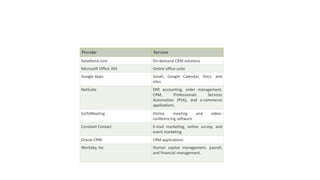
Popular SaaS Providers
Provider Services
Salseforce.com On-demand CRM solutions
Microsoft Office 365 Online office suite
Google Apps Gmail, Google Calendar, Docs, and
sites
NetSuite ERP, accounting, order management,
CRM, Professionals Services
Automation (PSA), and e-commerce
applications.
GoToMeeting Online meeting and video-
conferencing software
Constant Contact E-mail marketing, online survey, and
event marketing
Oracle CRM CRM applications
Workday, Inc Human capital management, payroll,
and financial management.
Types of Cloud
• Cloud computing is a revolutionary technology transforming how we store, access, and process
data. It simply refers to delivering computing resources, such as servers, storage, databases,
software, and applications, over the Internet. Cloud computing uses a network of remote
computer systems housed on the net to save and process data rather than relying on physical
infrastructure.
• Cloud service companies use advanced security techniques, which include encryption, firewalls,
and access restrictions, to secure your data from unauthorized access. Moreover, because your
information is saved in the cloud, it is secure even if your nearby devices are damaged, misplaced,
or stolen. Redundancy and cloud backups guarantee that your data may be restored promptly and
effectively in case of any unexpected situations.
Public Cloud
• Public clouds are managed by third parties which provide cloud
services over the internet to the public, these services are available
as pay-as-you-go billing models.
• They offer solutions for minimizing IT infrastructure costs and
become a good option for handling peak loads on the local
infrastructure. Public clouds are the go-to option for small
enterprises, which can start their businesses without large upfront
investments by completely relying on public infrastructure for their
IT needs.
• The fundamental characteristics of public clouds are multitenancy.
A public cloud is meant to serve multiple users, not a single
customer. A user requires a virtual computing environment that is
separated, and most likely isolated, from other users.
Example: .
• Amazon elastic compute cloud (EC2), IBM SmartCloud Enterprise,
Microsoft, Google App Engine, Windows Azure Services Platform
Characteristics of Public Cloud
• Accessibility: Public cloud services are available to anyone with an internet connection. Users can access
their data and programs at any time and from anywhere.
• Shared Infrastructure: Several users share the infrastructure in public cloud settings. Cost reductions and
effective resource use are made possible by this.
• Scalability: By using the public cloud, users can easily adjust the resources they need based on their
requirements, allowing for quick scaling up or down.
• Pay-per-Usage: When using the public cloud, payment is based on usage, so users only pay for the resources
they actually use. This helps optimize costs and eliminates the need for upfront investments.
• Managed by Service Providers: Cloud service providers manage and maintain public cloud infrastructure.
They handle hardware maintenance, software updates, and security tasks, relieving users of these
responsibilities.
• Reliability and Redundancy: Public cloud providers ensure high reliability by implementing redundant
systems and multiple data centers. By doing this, the probability of losing data and experiencing service
disruptions is reduced.
• Security Measures: Public cloud providers implement robust security measures to protect user data. These
include encryption, access controls, and regular security audits.
Advantages of Public Cloud
• Public cloud is owned at a lower cost than the private and hybrid cloud.
• Public cloud is maintained by the cloud service provider, so do not need to worry about
the maintenance.
• Public cloud is easier to integrate. Hence it offers a better flexibility approach to
consumers.
• Public cloud is location independent because its services are delivered through the
internet.
• Public cloud is highly scalable as per the requirement of computing resources.
• It is accessible by the general public, so there is no limit to the number of users.
• Rapid deployment of services and applications.
• Reduced time and effort in hardware procurement and setup.
• The cloud provider offers a range of services and resources that you can avail of.
• Built-in redundancy and resilience for enhanced reliability.
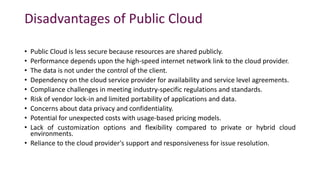
Disadvantages of Public Cloud
• Public Cloud is less secure because resources are shared publicly.
• Performance depends upon the high-speed internet network link to the cloud provider.
• The data is not under the control of the client.
• Dependency on the cloud service provider for availability and service level agreements.
• Compliance challenges in meeting industry-specific regulations and standards.
• Risk of vendor lock-in and limited portability of applications and data.
• Concerns about data privacy and confidentiality.
• Potential for unexpected costs with usage-based pricing models.
• Lack of customization options and flexibility compared to private or hybrid cloud
environments.
• Reliance to the cloud provider's support and responsiveness for issue resolution.
Private Cloud
• Private cloud is also known as an internal cloud or corporate cloud. It
is used by organizations to build and manage their own data centers
internally or by the third party. It can be deployed using Opensource
tools such as Openstack and Eucalyptus.
• Examples: VMware vSphere, OpenStack, Microsoft Azure Stack,
Oracle Cloud at Customer, and IBM Cloud Private.
Characteristics of Private Cloud
• Exclusive Use: Private cloud is dedicated to a single organization, ensuring the resources and services are
tailored to its needs. It is like having a personal cloud environment exclusively for that organization.
• Control and Security: Private cloud offers organizations higher control and security than public cloud
options. Organizations have more control over data governance, access controls, and security measures.
• Customization and Flexibility: Private cloud allows organizations to customize the infrastructure according to
their specific requirements. They can configure resources, networks, and storage to optimize performance
and efficiency.
• Scalability and Resource Allocation: The private cloud can scale and allocate resources. According to
demand, businesses may scale up or down their infrastructure, effectively using their resources.
• Performance and dependability: Private clouds give businesses more control over the infrastructure at the
foundation, improving performance and dependability.
• Compliance and Regulatory Requirements: Organizations may more easily fulfill certain compliance and
regulatory standards using the private cloud. It provides the freedom to put in place strong security
measures, follow data residency laws, and follow industry-specific norms.
• Hybrid Cloud Integration: Private cloud can be integrated with public cloud services, forming a hybrid cloud
infrastructure. This integration allows organizations to leverage the benefits of both private and public
clouds.
Advantages of Private Cloud
• Private cloud provides a high level of security and privacy to the users.
• Private cloud offers better performance with improved speed and space capacity.
• It allows the IT team to quickly allocate and deliver on-demand IT resources.
• The organization has full control over the cloud because it is managed by the
organization itself. So, there is no need for the organization to depends on anybody.
• It is suitable for organizations that require a separate cloud for their personal use and
data security is the first priority.
• Customizable to meet specific business needs and compliance regulations.
• Higher reliability and uptime compared to public cloud environments.
• Seamless integration with existing on-premises systems and applications.
• Better compliance and governance capabilities for industry-specific regulations.
• Enhanced flexibility in resource allocation and application deployment.
Disadvantages of Private Cloud
• Skilled people are required to manage and operate cloud services.
• Private cloud is accessible within the organization, so the area of operations is limited.
• Private cloud is not suitable for organizations that have a high user base, and organizations that
do not have the prebuilt infrastructure, sufficient manpower to maintain and manage the cloud.
• Higher upfront costs and ongoing maintenance expenses.
• Scaling resources can be challenging compared to public or hybrid cloud options.
• Relies on internal IT staff for management and troubleshooting.
• Slower deployment timelines and implementation compared to public cloud solutions.
• Limited access to the latest advancements and innovations offered by public cloud providers.
• Reduced flexibility and agility compared to public cloud options.
• Challenges in keeping up with hardware and software upgrades and compatibility.
• Higher risks of technology becoming outdated and the need for regular infrastructure updates.
Hybrid Cloud
• Hybrid Cloud is a combination of the public cloud and the private cloud.
• Hybrid cloud is partially secure because the services which are running on
the public cloud can be accessed by anyone, while the services which are
running on a private cloud can be accessed only by the organization's
users. In a hybrid cloud setup, organizations can leverage the benefits of
both public and private clouds to create a flexible and scalable computing
environment. The public cloud portion allows using cloud services provided
by third-party providers, accessible over the Internet.
• Example: Google Application Suite (Gmail, Google Apps, and Google Drive),
Office 365 (MS Office on the Web and One Drive), Amazon Web Services.
Characteristics of Hybrid Cloud
• Integration of Public and Private Clouds: Hybrid cloud seamlessly integrates public and private clouds, allowing organizations to
leverage both advantages. It provides a unified platform where workloads and data can be deployed and managed across both
environments.
• Flexibility and Scalability: Hybrid cloud offers resource allocation and scalability flexibility. Organizations can dynamically scale
their infrastructure by utilizing additional resources from the public cloud while maintaining control over critical workloads on the
private cloud.
• Enhanced Security and Control: Hybrid cloud allows organizations to maintain higher security and control over their sensitive data
and critical applications. Private cloud components provide a secure and dedicated environment, while public cloud resources can
be used for non-sensitive tasks, ensuring a balanced approach to data protection.
• Cost Optimization: Hybrid cloud enables organizations to optimize costs by utilizing the cost-effective public cloud for non-
sensitive workloads while keeping mission-critical applications and data on the more cost-efficient private cloud. This approach
allows for efficient resource allocation and cost management.
• Data and Application Portability: Organizations can move workloads and data between public and private clouds as needed with a
hybrid cloud. This portability offers agility and the ability to adapt to changing business requirements, ensuring optimal
performance and responsiveness.
• Compliance and Regulatory Compliance: Hybrid cloud helps organizations address compliance and regulatory requirements more
effectively. Sensitive data and applications can be kept within the private cloud, ensuring compliance with industry-specific
regulations while leveraging the public cloud for other non-sensitive operations.
• Disaster Recovery and Business Continuity: Hybrid cloud facilitates robust disaster recovery and business continuity strategies.
Organizations can replicate critical data and applications between the private and public clouds, ensuring redundancy and
minimizing the risk of data loss or service disruptions.
Advantages of Hybrid Cloud
• Hybrid cloud is suitable for organizations that require more security than the public cloud.
• Hybrid cloud helps you to deliver new products and services more quickly.
• Hybrid cloud provides an excellent way to reduce the risk.
• Hybrid cloud offers flexible resources because of the public cloud and secure resources because of the
private cloud.
• Hybrid facilitates seamless integration between on-premises infrastructure and cloud environments.
• Hybrid provides greater control over sensitive data and compliance requirements.
• Hybrid enables efficient workload distribution based on specific needs and performance requirements.
• Hybrid offers cost optimization by allowing organizations to choose the most suitable cloud platform for
different workloads.
• Hybrid enhances business continuity and disaster recovery capabilities with private and public cloud
resources.
• Hybrid supports hybrid cloud architecture, allowing applications and data to be deployed across multiple
cloud environments based on their unique requirements.
Disadvantages of Hybrid Cloud
• In Hybrid Cloud, security feature is not as good as the private cloud.
• Managing a hybrid cloud is complex because it is difficult to manage more than one type of deployment
model.
• In the hybrid cloud, the reliability of the services depends on cloud service providers.
• Potential challenges in data integration and ensuring seamless connectivity between different cloud
platforms.
• Higher costs due to the need for managing and integrating multiple cloud environments.
• Increased complexity in data governance and compliance management across different cloud providers.
• Dependency on stable and high-bandwidth internet connections for efficient hybrid cloud operations.
• Potential compatibility issues between various cloud platforms and applications.
• Risk of vendor lock-in and limited portability of applications and data across different cloud providers.
• Requires skilled IT staff with expertise in managing hybrid cloud environments.
Community Cloud
• Community cloud allows systems and services to be accessible by a
group of several organizations to share the information between the
organization and a specific community. It is owned, managed, and
operated by one or more organizations in the community, a third
party, or a combination of them.
• In a community cloud setup, the participating organizations, which
can be from the same industry, government sector, or any other
community, collaborate to establish a shared cloud infrastructure.
This infrastructure allows them to access shared services,
applications, and data relevant to their community.
• Example: Health Care community cloud
Characteristics of Community Cloud
• Shared Infrastructure: Community cloud provides a shared infrastructure accessible to a specific community of organizations. The
participating organizations can leverage this common cloud infrastructure to meet their shared computing needs and objectives.
• Community-specific Services: The community cloud provides resources, apps, and services adapted to the participating
organizations' demands. These services are created to meet the community's specific requirements and difficulties while
promoting effective communication and information exchange.
• Community Ownership and Management: The community cloud is owned, managed, and operated by one or more organizations
from the community, a third party, or a combination of both. The involved organizations have a say in the governance and
decision-making procedures to ensure that the cloud infrastructure meets their shared objectives.
• Enhanced Security and Compliance: Community cloud emphasizes security and compliance measures relevant to the specific
community. It allows for implementing robust security controls, access management, and compliance frameworks that meet the
community's regulatory requirements and industry standards.
• Cost Sharing and Efficiency: Participating organizations in a community cloud benefit from cost sharing. By sharing the
infrastructure and resources, the costs associated with establishing and maintaining the cloud environment are distributed among
the community members. This leads to cost efficiency and reduced financial burden for individual organizations.
• Collaboration and Knowledge Sharing: The community cloud encourages communication and information exchange amongst
participating businesses. It gives community members a forum for project collaboration, information sharing, and resource
exploitation. This encourages creativity, education, and effectiveness within the neighborhood.
• Scalability and Flexibility: Community cloud enables organizations to scale up or reduce their resources in response to demand.
This allows the community to adjust to shifting computing requirements and efficiently use cloud resources as needed.
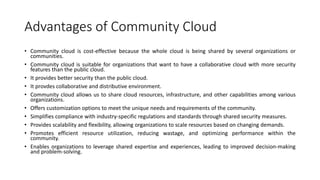
Advantages of Community Cloud
• Community cloud is cost-effective because the whole cloud is being shared by several organizations or
communities.
• Community cloud is suitable for organizations that want to have a collaborative cloud with more security
features than the public cloud.
• It provides better security than the public cloud.
• It provdes collaborative and distributive environment.
• Community cloud allows us to share cloud resources, infrastructure, and other capabilities among various
organizations.
• Offers customization options to meet the unique needs and requirements of the community.
• Simplifies compliance with industry-specific regulations and standards through shared security measures.
• Provides scalability and flexibility, allowing organizations to scale resources based on changing demands.
• Promotes efficient resource utilization, reducing wastage, and optimizing performance within the
community.
• Enables organizations to leverage shared expertise and experiences, leading to improved decision-making
and problem-solving.
Disadvantages of Community Cloud
• Community cloud is not a good choice for every organization.
• Security features are not as good as the private cloud.
• It is not suitable if there is no collaboration.
• The fixed amount of data storage and bandwidth is shared among all community members.
• Challenges in ensuring consistent performance and availability when multiple organizations share
the same resources.
• Limited scalability options as the shared resources determine the community cloud's capacity.
• Potential conflicts of interest among community members regarding resource allocation and
usage.
• Transparent governance and agreement frameworks are required to address potential disputes
and ensure fair resource distribution.
• Inadequate technical support and service level agreements (SLAs) compared to private or public
cloud options.

cloud deployment and types of cloud computing .pdf

  • 1.
    Types and Servicein Cloud: • Introduction • Cloud Reference Model Architecture • Infrastructure / Hardware as a Service • Platform as a Service • Software as a Service • Types of Clouds • Public Clouds • Private Clouds • Hybrid Clouds • Community Clouds • Economics of the Cloud • Open Challenges • Cloud Definition • Cloud Interoperability and Standards Scalability • Fault Tolerance Security, Trust, and Privacy • Organizational Aspects.
  • 2.
    Introduction • Cloud Computingcan be defined as the practice of using a network of remote servers hosted on the Internet to store, manage, and process data, rather than a local server or a personal computer. Companies offering such kinds of cloud computing services are called cloud providers and typically charge for cloud computing services based on usage. Grids and clusters are the foundations for cloud computing.
  • 3.
    Cloud Reference Model •The cloud computing reference model is an abstract model that divides a cloud computing environment into abstraction layers and cross-layer functions to characterize and standardize its functions. This reference model divides cloud computing activities and functions into three cross-layer functions and five logical layers. • Each of these layers describes different things that might be present in a cloud computing environment, such as computing systems, networking, storage equipment, virtualization software, security measures, control and management software, and so forth. It also explains the connections between these organizations. The five layers are the Physical layer, virtual layer, control layer, service orchestration layer, and service layer.
  • 4.
  • 6.
    Infrastructure / Hardwareas a Service • Iaas is also known as Hardware as a Service (HaaS). It is one of the layers of the cloud computing platform. It allows customers to outsource their IT infrastructures, such as servers, networking, processing, storage, virtual machines, and other resources. Customers access these resources on the Internet using a pay-as-per-use model.
  • 8.
    Some of thePrimary Characteristics of IaaS are: • Scalability: IaaS enables users to adjust computing capacity according to their demands without requiring long lead times or up-front hardware purchases. • Virtualization: IaaS uses virtualization technology to generate virtualized instances that can be managed and delivered on-demand by abstracting physical computer resources. • Resource Pooling: This feature enables users to share computer resources, such as networking and storage, among a number of users, maximizing resource utilization and cutting costs. • Elasticity: IaaS allows users to dynamically modify their computing resources in response to shifting demand, ensuring optimum performance and financial viability. • Self-Service: IaaS offers consumers "self-service" portals that let them independently deploy, administer, and monitor their computing resources without the assistance of IT employees. • Availability: To ensure the high availability and reliability of services, IaaS providers often run redundant and geographically dispersed data centers. • Security: To safeguard their infrastructure and client data, IaaS companies adopt security measures, including data encryption, firewalls, access controls, and threat detection. • Customization: IaaS enables users to alter the operating systems, application stacks, and security settings of their virtualized instances to suit their unique requirements.
  • 9.
    IaaS provider providesthe following services
  • 10.
    • Computing: Toprovision virtual machines (VMs) for end users, IaaS providers offer virtual central processing units (CPUs) and virtual main memory. As a result, users may run their workloads and apps on the provider's infrastructure without having to worry about managing the underlying hardware. • Storage: Back-end storage services are provided by IaaS providers, enabling users to store and access their files and data. This offers scalable and trustworthy storage solutions for a variety of use cases and can include block storage, object storage, or file storage alternatives. • Network: IaaS providers provide networking tools, including routers, switches, and bridges for the VMs through Network as a Service (NaaS). This enables connectivity and communication between VMs and other resources while also allowing customers to create and maintain their network architecture within the IaaS environment. • Load balancers: Infrastructure-layer load balancing services are provided by IaaS providers. Incoming network traffic is split up among many virtual machines (VMs) or resources by load balancers, resulting in effective resource management and excellent application and service availability. • Security: Security features and services are frequently offered by IaaS providers as part of their offering. To safeguard data and resources housed on the IaaS platform, this can include network security, firewall configurations, access controls, encryption, and other security measures. • Backup and disaster recovery services are provided by some IaaS providers, enabling customers to create backup copies of their data and software and put recovery plans in place in the event of data loss or system problems. This promotes business continuity and data security. • Monitoring and Management: IaaS suppliers provide tools and services for monitoring and controlling the resources and infrastructure. This can involve managing VMs, storage, and network configurations using management panels or APIs, as well as measuring resource utilization, automating scaling, and monitoring performance.
  • 11.
    Advantages of IaaSCloud Computing Layer • Shared infrastructure:IaaS allows multiple users to share the same physical infrastructure. • Web access to the resources:Iaas allows IT users to access resources over the internet. • Pay-as-per-use model:IaaS providers provide services based on a pay-as- per-use basis. The users are required to pay for what they have used. • Focus on the core business: IaaS providers focus on the organization's core business rather than on IT infrastructure. • On-demand scalability:On-demand scalability is one of the biggest advantages of IaaS. Using IaaS, users do not worry about upgrading software and troubleshooting issues related to hardware components.
  • 12.
    Disadvantages of IaaSCloud Computing Layer • Security: In the IaaS context, security is still a major problem. Although IaaS companies have security safeguards in place, it is difficult to achieve 100% protection. To safeguard their data and applications, customers must verify that the necessary security configurations and controls are in place. • Maintenance and Upgrade: The underlying infrastructure is maintained by IaaS service providers, but they are not required to automatically upgrade the operating systems or software used by client applications. Compatibility problems could come from this, making it harder for customers to maintain their current software. • Interoperability Issues: Interoperability Problems: Because of interoperability problems, moving virtual machines (VMs) from one IaaS provider to another can be difficult. As a result, consumers may find it challenging to transfer providers or integrate their IaaS resources with other platforms or services. This may result in vendor lock-in. • Performance Variability: Due to shared resources and multi-tenancy, the performance of VMs in the IaaS system can change. During times of high demand or while sharing resources with other users on the same infrastructure, customers' performance may fluctuate. • Dependency on Internet Connectivity: Internet access is crucial to IaaS, which is largely dependent on it. Any interruptions or connectivity problems could hinder access to cloud infrastructure and services, which would have an impact on productivity and business operations. • Learning Curve and Complexity: Learning Curve and Complexity: Using and administering IaaS calls for a certain amount of technical know-how and comprehension of cloud computing principles. To efficiently use and manage the IaaS resources, organizations may need to spend money on IT employee training or turn to outside experts. • Cost Management: Cost Control: IaaS provides scalability and flexibility, but it can also result in difficult cost control. In order to prevent unforeseen charges, customers must keep an eye on and manage their resource utilization. Higher costs may be the result of inefficient use of resources or improper resource allocation.
  • 13.
    Top Iaas Providerswho are providing IaaS cloud computing platform
  • 14.
    IaaS Vendor IaasSolution Details Amazon Web Services Elastic, Elastic Compute Cloud (EC2) MapReduce, Route 53, Virtual Private Cloud, etc. The cloud computing platform pioneer Amazon offers auto-scaling, cloud monitoring, and load-balancing features as part of its portfolio. Netmagic Solutions Netmagic IaaS Cloud Netmagic runs from data centers in Mumbai, Chennai, and Bangalore and a virtual data center in the United States. Plans are underway to extend services to West Asia. Rackspace Cloud servers, cloud files, cloud sites, etc. The cloud computing platform vendor focuses primarily on enterprise-level hosting services. Reliance Communications Reliance Internet Data Center RIDC supports both traditional hosting and cloud services, with data centers in Mumbai, Bangalore, Hyderabad, and Chennai. The cloud services offered by RIDC include IaaS and SaaS. Sify Technologies Sify IaaS Sify's cloud computing platform is powered by HP's converged infrastructure. The vendor offers all three types of cloud services: IaaS, PaaS, and SaaS.
  • 15.
    Platform as aService | PaaS • Platform as a Service (PaaS) provides a runtime environment. It allows programmers to easily create, test, run, and deploy web applications. You can purchase these applications from a cloud service provider on a pay-as-per-use basis and access them using an Internet connection. In PaaS, back-end scalability is managed by the cloud service provider, so end-users do not need to worry about managing the infrastructure.
  • 16.
  • 17.
    • Programming Languages:A variety of programming languages are supported by PaaS providers, allowing developers to choose their favorite language to create apps. Languages including Java, Python, Ruby,.NET, PHP, and Node.js are frequently supported. • Application Frameworks: Pre-configured application frameworks are offered by PaaS platforms, which streamline the development process. These frameworks include features like libraries, APIs, and tools for quick development, laying the groundwork for creating scalable and reliable applications. Popular application frameworks include Laravel, Django, Ruby on Rails, and Spring Framework. • Databases: Managed database services are provided by PaaS providers, making it simple for developers to store and retrieve data. These services support relational databases (like MySQL, PostgreSQL, and Microsoft SQL Server) and NoSQL databases (like MongoDB, Cassandra, and Redis). For its database services, PaaS platforms often offer automated backups, scalability, and monitoring tools. • Additional Tools and Services: PaaS providers provide a range of extra tools and services to aid in the lifecycle of application development and deployment. These may consist of the following:
  • 18.
    • Development Tools:to speed up the development process, these include integrated development environments (IDEs), version control systems, build and deployment tools, and debugging tools. • Collaboration and Communication: PaaS platforms frequently come with capabilities for team collaboration, including chat services, shared repositories, and project management software. • Analytics and Monitoring: PaaS providers may give tools for tracking application performance, examining user behavior data, and producing insights to improve application behavior and address problems. • Security and Identity Management: PaaS systems come with built-in security features like access control, encryption, and mechanisms for authentication and authorization to protect the privacy of applications and data. • Scalability and load balancing: PaaS services frequently offer automatic scaling capabilities that let applications allocate more resources as needed to manage a spike in traffic or demand. To improve performance and availability, load balancing features divide incoming requests among various instances of the application.
  • 19.
  • 21.
    Development and DeploymentTools: • Development Tools: To assist developers in writing and testing their code, PaaS providers provide a variety of development tools, including integrated development environments (IDEs), software development kits (SDKs), and programming languages. These tools are frequently accessible via a web-based interface, making using them from any location simple. • Tools for Deployment: PaaS providers offer tools for deployment that make it simple for developers to upload their apps to the cloud. These technologies automate processes like scalability, configuration management, and code deployment. • Database Administration: PaaS companies provide tools and services for database management to assist developers in creating and maintaining their databases. This comprises backup and recovery services and tools for database design, migration, and replication. • Integration with Other Services: PaaS companies offer integration with outside services, including analytics platforms, messaging services, and payment gateways. This eliminates the need for writing proprietary code and enables developers to quickly integrate these services into their applications. • Security: To assist developers in protecting their apps and data, PaaS providers offer security tools and services. This includes tools like firewalls, access controls, and encryption, in addition to adherence to regulatory requirements like GDPR and HIPAA. • Analytical and Monitoring Tools: These are provided by PaaS providers to assist developers in keeping track of the functionality of their apps and spotting problems. These technologies offer in-the-moment insights into resource use, application usage, and other indicators.
  • 22.
    Advantages of PaaS SimplifiedDevelopment • PaaS allows developers to focus on development and innovation without worrying about infrastructure management. Lower risk • No need for up-front investment in hardware and software. Developers only need a PC and an internet connection to start building applications. Prebuilt business functionality • Some PaaS vendors also provide already defined business functionality so that users can avoid building everything from very scratch and hence can directly start the projects only. Instant community PaaS vendors frequently provide online communities where the developer can get ideas, share experiences, and seek advice from others. Scalability Applications deployed can scale from one to thousands of users without any changes to the applications.
  • 23.
    Disadvantages of PaaSLoud Computing Layer Vendor lock-in • One has to write the applications according to the platform provided by the PaaS vendor, so the migration of an application to another PaaS vendor would be a problem. Data Privacy • Corporate data, whether it can be critical or not, will be private, so if it is not located within the walls of the company, there can be a risk in terms of privacy of data. Integration with the rest of the systems applications It may happen that some applications are local, and some are in the cloud. So there will be chances of increased complexity when we want to use data in the cloud with the local data. • Limited Customization and Control: The degree of customization and control over the underlying infrastructure is constrained by PaaS platforms' frequent provision of pre-configured services and their relative rigidity. • Organizations can evaluate the viability of PaaS solutions for their unique requirements by taking into account these characteristics, as well as the trade-offs and potential difficulties involved in implementing such platforms.
  • 24.
  • 25.
    Providers Services Google AppEngine (GAE) App Identity, URL Fetch, Cloud storage client library, Logservice Salesforce.com Faster implementation, Rapid scalability, CRM Services, Sales cloud, Mobile connectivity, Chatter. Windows Azure Compute, security, IoT, Data Storage. AppFog Justcloud.com, SkyDrive, GoogleDocs Openshift RedHat, Microsoft Azure. Cloud Foundry from VMware Data, Messaging, and other services.
  • 26.
    Software as aService | SaaS • SaaS is also known as "On-Demand Software." It is a software distribution model in which services are hosted by a cloud service provider. These services are available to end-users over the internet, so the end-users do not need to install any software on their devices to access these services.
  • 27.
    Characteristics of SaaS: •Web-based Delivery: SaaS apps can be accessed from anywhere with an internet connection because they are supplied over the internet, often through a web browser. Users no longer need to install and maintain software programs on their local machines as a result. • Multiple Users or "tenants" can access SaaS applications from a single instance of the program thanks to the concept of multi-tenancy. As a result, the provider can serve several clients with the same application without administering unique program instances for every client. • Automatic Updates: SaaS providers are in charge of keeping the software up to date and making sure that everyone has access to the newest features and security patches. Users are no longer required to manually install updates or fixes as a result. • Scalable: SaaS systems are scalable, which can readily grow or shrink in response to user demand. This frees up enterprises from worrying about infrastructure or licensing fees and lets them add or remove users as needed. • Pricing on a Subscription Basis: SaaS programs are frequently sold using a subscription-based pricing model, in which customers pay a monthly or yearly price to access the program. As a result, companies won't need to invest significantly in software licenses upfront. • Data Security, including data encryption, access restrictions, and backups, is the responsibility of SaaS providers. Users no longer need to handle their own data security because of this.
  • 28.
    Access to SoftwareApplications Over the Internet: • The majority of the time, SaaS companies host software programs on their own servers and provide them online. Using their login information, users can access the software through a web browser or mobile app, authenticating and gaining access to it. • Users don't need to install or maintain any software on their local machines because the provider hosts and maintains it. As a result, users may easily access the program from any location with an internet connection and on any device that can run mobile apps or web surfing. • All users have access to the most recent features and security updates because the provider is in charge of keeping the program updated and maintained. Users are no longer required to manually install updates or fixes as a result. • Users often pay a monthly or yearly charge to access the software through subscription-based SaaS providers. Because they don't have to make a significant upfront investment in software licenses, businesses are able to budget for their software costs more effectively as a result. • In general, SaaS gives enterprises a practical way to use and access software programs without having to worry about infrastructure or software upkeep. Providers are in charge of keeping the software up to date so that all users have access to the newest features and security patches. Users can access the software from any location with an internet connection.
  • 29.
    Pricing Models: Subscriptionor User-Based • Most SaaS companies use a subscription-based pricing structure; however, some may also provide a usage-based pricing structure. Users that choose a subscription-based pricing model for their software access pay a set monthly or yearly charge. • The cost may vary according to the usage of the software's capabilities or the number of users. Businesses benefit from predictability and consistency thanks to this strategy because they can more efficiently budget for their software expenses. • In a usage-based pricing model, the costs are determined by how the program is actually used, such as the volume of data processed, the number of API requests, or the number of transactions. • For companies with erratic usage patterns or those that only want the program sometimes, this model may be more adaptable and economical. • According to their business strategy and the demands of their clients, SaaS providers may offer either a subscription-based or a usage-based pricing plan. SaaS offers organizations a cost-effective option to access and use software products without having to worry about infrastructure or software maintenance, regardless of the price model.
  • 30.
    Services Provided bySaaS: • Business Services - SaaS Provider provides various business services to start up the business. The SaaS business services include ERP (Enterprise Resource Planning), CRM (Customer Relationship Management), billing, and sales. • Document Management - SaaS document management is a software application offered by a third party (SaaS provider) to create, manage, and track electronic documents. • Examples: Slack, Samepage, Box, and Zoho Forms. • Social Networks - As we all know, social networking sites are used by the general public, so social networking service providers use SaaS for their convenience and handle the general public's information. • Mail Services - To handle the unpredictable number of users and load on e-mail services, many e- mail providers offer their services using SaaS. • Collaboration Tools: SaaS companies provide collaboration solutions that let teams collaborate effectively no matter where they are physically located. Platforms for project management, apps for team communication, and file-sharing services are some of these resources. • Examples include Slack, Microsoft Office 365, and Google Workspace (formerly G Suite).
  • 31.
    • Human ResourcesManagement: SaaS-based HR management systems give companies tools to simplify key HR procedures, such as employee onboarding, payroll administration, timekeeping, performance reviews, and employee self-service portals. • Workday, BambooHR, and ADP Workforce Now, as examples. • Customer Support and Help Desk: SaaS platforms provide customer support and help desk solutions that enable firms to manage customer inquiries, track support tickets, and promptly address customer issues. • For instance, Salesforce Service Cloud, Freshdesk, and Zendesk. • Marketing and Sales Automation: To increase productivity and boost income, firms can automate marketing campaigns, lead generation, customer relationship management, and sales activities using SaaS marketing and sales automation technologies. • Examples include Marketo, Pardot, and HubSpot. • E-commerce Platforms: SaaS-based e-commerce platforms make it simpler for businesses to launch and run online storefronts, maintain product catalogs, handle payments, and keep track of orders. • Examples include WooCommerce (a WordPress plugin), BigCommerce, and Shopify.
  • 32.
    Advantages of SaaSCloud Computing • SaaS is easy to buy:SaaS pricing is based on a monthly fee or annual fee subscription, so it allows organizations to access business functionality at a low cost, which is less than licensed applications. Unlike traditional software, which is sold as a licensed base with an up-front cost (and often an optional ongoing support fee), SaaS providers are generally pricing the applications using a subscription fee, most commonly a monthly or annual fee. • One to Many:SaaS services are offered as a one-to-many model means a single instance of the application is shared by multiple users. • Less hardware required for SaaS:The software is hosted remotely, so organizations do not need to invest in additional hardware. • Low maintenance required for SaaS:Software as a service removes the need for installation, set-up, and daily maintenance for organizations. The initial set-up cost for SaaS is typically less than the enterprise software. SaaS vendors are pricing their applications based on some usage parameters, such as the number of users using the application. So SaaS does easy to monitor and automatic updates • No special software or hardware versions are required:All users will have the same version of the software and typically access it through the web browser. SaaS reduces IT support costs by outsourcing hardware and software maintenance and support to the IaaS provider. • Multidevice support:SaaS services can be accessed from any device, such as desktops, laptops, tablets, phones, and thin clients • API Integration:SaaS services easily integrate with other software or services through standard APIs • No client-side installation:SaaS services are accessed directly from the service provider using an internet connection, so they do not need to require any software installation.
  • 33.
    Disadvantages of SaaSCloud Computing • Security:Actually, data is stored in the cloud, so security may be an issue for some users. However, cloud computing is not more secure than in-house deployment. • Latency issue:Since data and applications are stored in the cloud at a variable distance from the end-user, there is a possibility that there may be greater latency when interacting with the application compared to local deployment. Therefore, the SaaS model is not suitable for applications whose demand response time is in milliseconds. • Total Dependency on the Internet:Without an internet connection, most SaaS applications are not usable. • Switching between SaaS vendors is difficult:Switching SaaS vendors involves the difficult and slow task of transferring very large data files over the internet and then converting and importing them into another SaaS also.
  • 34.
  • 35.
    Provider Services Salseforce.com On-demandCRM solutions Microsoft Office 365 Online office suite Google Apps Gmail, Google Calendar, Docs, and sites NetSuite ERP, accounting, order management, CRM, Professionals Services Automation (PSA), and e-commerce applications. GoToMeeting Online meeting and video- conferencing software Constant Contact E-mail marketing, online survey, and event marketing Oracle CRM CRM applications Workday, Inc Human capital management, payroll, and financial management.
  • 36.
    Types of Cloud •Cloud computing is a revolutionary technology transforming how we store, access, and process data. It simply refers to delivering computing resources, such as servers, storage, databases, software, and applications, over the Internet. Cloud computing uses a network of remote computer systems housed on the net to save and process data rather than relying on physical infrastructure. • Cloud service companies use advanced security techniques, which include encryption, firewalls, and access restrictions, to secure your data from unauthorized access. Moreover, because your information is saved in the cloud, it is secure even if your nearby devices are damaged, misplaced, or stolen. Redundancy and cloud backups guarantee that your data may be restored promptly and effectively in case of any unexpected situations.
  • 37.
    Public Cloud • Publicclouds are managed by third parties which provide cloud services over the internet to the public, these services are available as pay-as-you-go billing models. • They offer solutions for minimizing IT infrastructure costs and become a good option for handling peak loads on the local infrastructure. Public clouds are the go-to option for small enterprises, which can start their businesses without large upfront investments by completely relying on public infrastructure for their IT needs. • The fundamental characteristics of public clouds are multitenancy. A public cloud is meant to serve multiple users, not a single customer. A user requires a virtual computing environment that is separated, and most likely isolated, from other users.
  • 38.
    Example: . • Amazonelastic compute cloud (EC2), IBM SmartCloud Enterprise, Microsoft, Google App Engine, Windows Azure Services Platform
  • 39.
    Characteristics of PublicCloud • Accessibility: Public cloud services are available to anyone with an internet connection. Users can access their data and programs at any time and from anywhere. • Shared Infrastructure: Several users share the infrastructure in public cloud settings. Cost reductions and effective resource use are made possible by this. • Scalability: By using the public cloud, users can easily adjust the resources they need based on their requirements, allowing for quick scaling up or down. • Pay-per-Usage: When using the public cloud, payment is based on usage, so users only pay for the resources they actually use. This helps optimize costs and eliminates the need for upfront investments. • Managed by Service Providers: Cloud service providers manage and maintain public cloud infrastructure. They handle hardware maintenance, software updates, and security tasks, relieving users of these responsibilities. • Reliability and Redundancy: Public cloud providers ensure high reliability by implementing redundant systems and multiple data centers. By doing this, the probability of losing data and experiencing service disruptions is reduced. • Security Measures: Public cloud providers implement robust security measures to protect user data. These include encryption, access controls, and regular security audits.
  • 40.
    Advantages of PublicCloud • Public cloud is owned at a lower cost than the private and hybrid cloud. • Public cloud is maintained by the cloud service provider, so do not need to worry about the maintenance. • Public cloud is easier to integrate. Hence it offers a better flexibility approach to consumers. • Public cloud is location independent because its services are delivered through the internet. • Public cloud is highly scalable as per the requirement of computing resources. • It is accessible by the general public, so there is no limit to the number of users. • Rapid deployment of services and applications. • Reduced time and effort in hardware procurement and setup. • The cloud provider offers a range of services and resources that you can avail of. • Built-in redundancy and resilience for enhanced reliability.
  • 41.
    Disadvantages of PublicCloud • Public Cloud is less secure because resources are shared publicly. • Performance depends upon the high-speed internet network link to the cloud provider. • The data is not under the control of the client. • Dependency on the cloud service provider for availability and service level agreements. • Compliance challenges in meeting industry-specific regulations and standards. • Risk of vendor lock-in and limited portability of applications and data. • Concerns about data privacy and confidentiality. • Potential for unexpected costs with usage-based pricing models. • Lack of customization options and flexibility compared to private or hybrid cloud environments. • Reliance to the cloud provider's support and responsiveness for issue resolution.
  • 42.
    Private Cloud • Privatecloud is also known as an internal cloud or corporate cloud. It is used by organizations to build and manage their own data centers internally or by the third party. It can be deployed using Opensource tools such as Openstack and Eucalyptus. • Examples: VMware vSphere, OpenStack, Microsoft Azure Stack, Oracle Cloud at Customer, and IBM Cloud Private.
  • 43.
    Characteristics of PrivateCloud • Exclusive Use: Private cloud is dedicated to a single organization, ensuring the resources and services are tailored to its needs. It is like having a personal cloud environment exclusively for that organization. • Control and Security: Private cloud offers organizations higher control and security than public cloud options. Organizations have more control over data governance, access controls, and security measures. • Customization and Flexibility: Private cloud allows organizations to customize the infrastructure according to their specific requirements. They can configure resources, networks, and storage to optimize performance and efficiency. • Scalability and Resource Allocation: The private cloud can scale and allocate resources. According to demand, businesses may scale up or down their infrastructure, effectively using their resources. • Performance and dependability: Private clouds give businesses more control over the infrastructure at the foundation, improving performance and dependability. • Compliance and Regulatory Requirements: Organizations may more easily fulfill certain compliance and regulatory standards using the private cloud. It provides the freedom to put in place strong security measures, follow data residency laws, and follow industry-specific norms. • Hybrid Cloud Integration: Private cloud can be integrated with public cloud services, forming a hybrid cloud infrastructure. This integration allows organizations to leverage the benefits of both private and public clouds.
  • 44.
    Advantages of PrivateCloud • Private cloud provides a high level of security and privacy to the users. • Private cloud offers better performance with improved speed and space capacity. • It allows the IT team to quickly allocate and deliver on-demand IT resources. • The organization has full control over the cloud because it is managed by the organization itself. So, there is no need for the organization to depends on anybody. • It is suitable for organizations that require a separate cloud for their personal use and data security is the first priority. • Customizable to meet specific business needs and compliance regulations. • Higher reliability and uptime compared to public cloud environments. • Seamless integration with existing on-premises systems and applications. • Better compliance and governance capabilities for industry-specific regulations. • Enhanced flexibility in resource allocation and application deployment.
  • 45.
    Disadvantages of PrivateCloud • Skilled people are required to manage and operate cloud services. • Private cloud is accessible within the organization, so the area of operations is limited. • Private cloud is not suitable for organizations that have a high user base, and organizations that do not have the prebuilt infrastructure, sufficient manpower to maintain and manage the cloud. • Higher upfront costs and ongoing maintenance expenses. • Scaling resources can be challenging compared to public or hybrid cloud options. • Relies on internal IT staff for management and troubleshooting. • Slower deployment timelines and implementation compared to public cloud solutions. • Limited access to the latest advancements and innovations offered by public cloud providers. • Reduced flexibility and agility compared to public cloud options. • Challenges in keeping up with hardware and software upgrades and compatibility. • Higher risks of technology becoming outdated and the need for regular infrastructure updates.
  • 46.
    Hybrid Cloud • HybridCloud is a combination of the public cloud and the private cloud. • Hybrid cloud is partially secure because the services which are running on the public cloud can be accessed by anyone, while the services which are running on a private cloud can be accessed only by the organization's users. In a hybrid cloud setup, organizations can leverage the benefits of both public and private clouds to create a flexible and scalable computing environment. The public cloud portion allows using cloud services provided by third-party providers, accessible over the Internet. • Example: Google Application Suite (Gmail, Google Apps, and Google Drive), Office 365 (MS Office on the Web and One Drive), Amazon Web Services.
  • 47.
    Characteristics of HybridCloud • Integration of Public and Private Clouds: Hybrid cloud seamlessly integrates public and private clouds, allowing organizations to leverage both advantages. It provides a unified platform where workloads and data can be deployed and managed across both environments. • Flexibility and Scalability: Hybrid cloud offers resource allocation and scalability flexibility. Organizations can dynamically scale their infrastructure by utilizing additional resources from the public cloud while maintaining control over critical workloads on the private cloud. • Enhanced Security and Control: Hybrid cloud allows organizations to maintain higher security and control over their sensitive data and critical applications. Private cloud components provide a secure and dedicated environment, while public cloud resources can be used for non-sensitive tasks, ensuring a balanced approach to data protection. • Cost Optimization: Hybrid cloud enables organizations to optimize costs by utilizing the cost-effective public cloud for non- sensitive workloads while keeping mission-critical applications and data on the more cost-efficient private cloud. This approach allows for efficient resource allocation and cost management. • Data and Application Portability: Organizations can move workloads and data between public and private clouds as needed with a hybrid cloud. This portability offers agility and the ability to adapt to changing business requirements, ensuring optimal performance and responsiveness. • Compliance and Regulatory Compliance: Hybrid cloud helps organizations address compliance and regulatory requirements more effectively. Sensitive data and applications can be kept within the private cloud, ensuring compliance with industry-specific regulations while leveraging the public cloud for other non-sensitive operations. • Disaster Recovery and Business Continuity: Hybrid cloud facilitates robust disaster recovery and business continuity strategies. Organizations can replicate critical data and applications between the private and public clouds, ensuring redundancy and minimizing the risk of data loss or service disruptions.
  • 48.
    Advantages of HybridCloud • Hybrid cloud is suitable for organizations that require more security than the public cloud. • Hybrid cloud helps you to deliver new products and services more quickly. • Hybrid cloud provides an excellent way to reduce the risk. • Hybrid cloud offers flexible resources because of the public cloud and secure resources because of the private cloud. • Hybrid facilitates seamless integration between on-premises infrastructure and cloud environments. • Hybrid provides greater control over sensitive data and compliance requirements. • Hybrid enables efficient workload distribution based on specific needs and performance requirements. • Hybrid offers cost optimization by allowing organizations to choose the most suitable cloud platform for different workloads. • Hybrid enhances business continuity and disaster recovery capabilities with private and public cloud resources. • Hybrid supports hybrid cloud architecture, allowing applications and data to be deployed across multiple cloud environments based on their unique requirements.
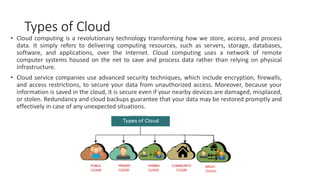
  • 49.
    Disadvantages of HybridCloud • In Hybrid Cloud, security feature is not as good as the private cloud. • Managing a hybrid cloud is complex because it is difficult to manage more than one type of deployment model. • In the hybrid cloud, the reliability of the services depends on cloud service providers. • Potential challenges in data integration and ensuring seamless connectivity between different cloud platforms. • Higher costs due to the need for managing and integrating multiple cloud environments. • Increased complexity in data governance and compliance management across different cloud providers. • Dependency on stable and high-bandwidth internet connections for efficient hybrid cloud operations. • Potential compatibility issues between various cloud platforms and applications. • Risk of vendor lock-in and limited portability of applications and data across different cloud providers. • Requires skilled IT staff with expertise in managing hybrid cloud environments.
  • 50.
    Community Cloud • Communitycloud allows systems and services to be accessible by a group of several organizations to share the information between the organization and a specific community. It is owned, managed, and operated by one or more organizations in the community, a third party, or a combination of them. • In a community cloud setup, the participating organizations, which can be from the same industry, government sector, or any other community, collaborate to establish a shared cloud infrastructure. This infrastructure allows them to access shared services, applications, and data relevant to their community. • Example: Health Care community cloud
  • 51.
    Characteristics of CommunityCloud • Shared Infrastructure: Community cloud provides a shared infrastructure accessible to a specific community of organizations. The participating organizations can leverage this common cloud infrastructure to meet their shared computing needs and objectives. • Community-specific Services: The community cloud provides resources, apps, and services adapted to the participating organizations' demands. These services are created to meet the community's specific requirements and difficulties while promoting effective communication and information exchange. • Community Ownership and Management: The community cloud is owned, managed, and operated by one or more organizations from the community, a third party, or a combination of both. The involved organizations have a say in the governance and decision-making procedures to ensure that the cloud infrastructure meets their shared objectives. • Enhanced Security and Compliance: Community cloud emphasizes security and compliance measures relevant to the specific community. It allows for implementing robust security controls, access management, and compliance frameworks that meet the community's regulatory requirements and industry standards. • Cost Sharing and Efficiency: Participating organizations in a community cloud benefit from cost sharing. By sharing the infrastructure and resources, the costs associated with establishing and maintaining the cloud environment are distributed among the community members. This leads to cost efficiency and reduced financial burden for individual organizations. • Collaboration and Knowledge Sharing: The community cloud encourages communication and information exchange amongst participating businesses. It gives community members a forum for project collaboration, information sharing, and resource exploitation. This encourages creativity, education, and effectiveness within the neighborhood. • Scalability and Flexibility: Community cloud enables organizations to scale up or reduce their resources in response to demand. This allows the community to adjust to shifting computing requirements and efficiently use cloud resources as needed.
  • 52.
    Advantages of CommunityCloud • Community cloud is cost-effective because the whole cloud is being shared by several organizations or communities. • Community cloud is suitable for organizations that want to have a collaborative cloud with more security features than the public cloud. • It provides better security than the public cloud. • It provdes collaborative and distributive environment. • Community cloud allows us to share cloud resources, infrastructure, and other capabilities among various organizations. • Offers customization options to meet the unique needs and requirements of the community. • Simplifies compliance with industry-specific regulations and standards through shared security measures. • Provides scalability and flexibility, allowing organizations to scale resources based on changing demands. • Promotes efficient resource utilization, reducing wastage, and optimizing performance within the community. • Enables organizations to leverage shared expertise and experiences, leading to improved decision-making and problem-solving.
  • 53.
    Disadvantages of CommunityCloud • Community cloud is not a good choice for every organization. • Security features are not as good as the private cloud. • It is not suitable if there is no collaboration. • The fixed amount of data storage and bandwidth is shared among all community members. • Challenges in ensuring consistent performance and availability when multiple organizations share the same resources. • Limited scalability options as the shared resources determine the community cloud's capacity. • Potential conflicts of interest among community members regarding resource allocation and usage. • Transparent governance and agreement frameworks are required to address potential disputes and ensure fair resource distribution. • Inadequate technical support and service level agreements (SLAs) compared to private or public cloud options.