SMB
Présentation BIM Revit MEP
• 1/COORDINATION
• 2/DATA ANALYSIS
2019/03/29 Y.OBRY SMB/SE 1
SMB
Présentation BIM Revit MEP
• 1/COORDINATION
A) Benefits of BIM integration
– Coordination between the work packages in 3D more efficient than 2D
– Empower work packages integrating directly the others packages while
the conception
– Direct and indisputable visibility of clashes
2019/03/29 Y.OBRY SMB/SE 2
SMB
Présentation BIM Revit MEP
– Example of 2D synthesis drawing :
2019/03/29 Y.OBRY SMB/SE 3
SMB
Présentation BIM Revit MEP
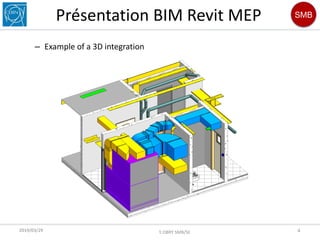
– Example of a 3D integration
2019/03/29 Y.OBRY SMB/SE 4
SMB
Présentation BIM Revit MEP
B) Using Navisworks for the BIM coordinator
– Free installation on any post (internet or CMF)
– Lightweight and easily transmissible file
2019/03/29 Y.OBRY SMB/SE 5
SMB
Présentation BIM Revit MEP
2019/03/29 Y.OBRY SMB/SE 6
– Navigation in Navisworks Manage
SMB
Présentation BIM Revit MEP
2019/03/29 Y.OBRY SMB/SE 7
– Measurement
SMB
Présentation BIM Revit MEP
2019/03/29 Y.OBRY SMB/SE 8
– Properties of objects
SMB
Présentation BIM Revit MEP
2019/03/29 Y.OBRY SMB/SE 9
– Automatic clash detection in Navisworks Manage
SMB
Présentation BIM Revit MEP
2019/03/29 Y.OBRY SMB/SE 10
SMB
Présentation BIM Revit MEP
– Clash report in html format
2019/03/29 Y.OBRY SMB/SE 11
SMB
Présentation BIM Revit MEP
2019/03/29 Y.OBRY SMB/SE 12
SMB
Présentation BIM Revit MEP
C) Video presentation of building 38
2019/03/29 Y.OBRY SMB/SE 13
SMB
Présentation BIM Revit MEP
• 2/DATA ANALYSIS
– Concentration of information in a single file
2019/03/29 Y.OBRY SMB/SE 14
SMB
Présentation BIM Revit MEP
2019/03/29 Y.OBRY SMB/SE 15
SMB
Présentation BIM Revit MEP
2019/03/29 Y.OBRY SMB/SE 16
– Using a BIM tool like Revit saves us from filling in the same information
multiple times
CAMM code
Equipment
quantity
Integration
GIS
Functional
position
EAM
Construction
drawings
SMB
Présentation BIM Revit MEP
2019/03/29 Y.OBRY SMB/SE 17
A) Descriptive Estimated Quantities (DQE)
SMB
Présentation BIM Revit MEP
2019/03/29 Y.OBRY SMB/SE 18
– Descriptive Estimated Quantities Circuit V24
SMB
Présentation BIM Revit MEP
2019/03/29 Y.OBRY SMB/SE 19
– Duct quantity
SMB
Présentation BIM Revit MEP
2019/03/29 Y.OBRY SMB/SE 20
– Air terminals quantity
SMB
Présentation BIM Revit MEP
2019/03/29 Y.OBRY SMB/SE 21
B) Functional Position (PF)
– Excel format example
SMB
Présentation BIM Revit MEP
2019/03/29 Y.OBRY SMB/SE 22
– Revit schedule Example
SMB
Présentation BIM Revit MEP
2019/03/29 Y.OBRY SMB/SE 23
– Creating Functional Positions in EAM
Excel > EAM
Schedule Revit > Excel > EAM
Schedule Revit > EAM
SMB
Présentation BIM Revit MEP
2019/03/29 Y.OBRY SMB/SE 24
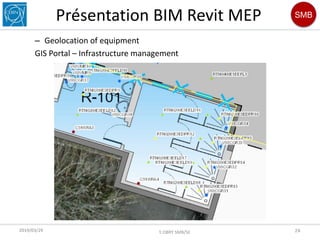
– Geolocation of equipment
GIS Portal – Infrastructure management
SMB
Présentation BIM Revit MEP
2019/03/29 Y.OBRY SMB/SE 25
– Equipment Datasheets
SMB
Présentation BIM Revit MEP
2019/03/29 Y.OBRY SMB/SE 26
– Example CAMM code in Autocad
SMB
Présentation BIM Revit MEP
2019/03/29 Y.OBRY SMB/SE 27
– Example CAMM code in Revit
SMB
Présentation BIM Revit MEP
2019/03/29 Y.OBRY SMB/SE 28
– Integration of CAMM codes in the GIS
Autocad > GIS Portal
Revit > Autocad > GIS Portal
Revit > GIS Portal
SMB
Présentation BIM Revit MEP
• CONCLUSION
– SMB-SE-HE and their consultants use Autodesk-Revit and Autodesk-
Navisworks for the design and the integration
– The advantage of a standardized format being the ease of information
exchange (3D and data)
– Possible connection from the 3D model with the GIS and GMAO (EAM)
2019/03/29 Y.OBRY SMB/SE 29
HVAC coordination and data analysis revit

HVAC coordination and data analysis revit