HUMAN TO MACHINE
INTERACTION
CONTENTS
• INTRODUCTION AND HISTORY
• COMPONENTS OF HMI
• DESIGN PRINCIPLES AND ITERATIVE PROCESS
• METHODOLOGIES AND RELATED TECHNOLOGIES INVOLVED
• CURRENT EMERGING TRENDS IN HMI AND ITS APPLICATION IN REAL
WORLD
INTRODUCTION
• Human–computer interaction (HCI) is research in the design and the use of computer technology, which focuses on
the interfaces between people (users) and computers. HCI researchers observe the ways humans interact with computers
and design technologies that allow humans to interact with computers in novel ways. A device that allows interaction
between a human being and a computer is known as a "Human-computer Interface (HCI)".
• Humans interact with computers in many ways, and the interface between the two is crucial to facilitating this interaction.
HCI is also sometimes termed human-machine interaction (HMI), man-machine interaction (MMI), or computer-human
interaction (CHI). Desktop applications, internet browsers, handheld computers, and computer kiosks make use of the
prevalent graphical user interfaces (GUI) of today. Voice user interfaces (VUI) are used for speech recognition and
synthesizing systems, and the emerging multi-modal and Graphical user interfaces (GUI) allow humans to engage
with embodied character agents in a way that cannot be achieved with other interface paradigms.
HISTORY
• HCI arose as a field from intertwined roots in computer graphics, operating systems, HF, ergonomics, industrial
engineering, cognitive psychology, and computer science.
• The early history of computer graphics, involving cathode-ray tube (CRT) displays and pen devices, led to the
development of much of today's HCI techniques in the area of GUIs. The direct-manipulation interaction techniques,
where users performed actions on screen entities to represent commands. The program allowed users to draw lines,
circles, and points on a computer's CRT display using a light pen. While these tasks are simple to program and use
with today's computer hardware, software, and interfaces, nearly 40 years ago this was a revolutionary effort that
required immense computing power. Sutherland's program assigned characteristics to graphic objects and built
relationships between objects. Users could move, copy, scale, zoom, rotate objects, and save object characteristics.
COMPONENTS OF HMI
• The human–computer interface can be described as the point of communication between
the human user and the computer. The flow of information between the human and
computer is defined as the loop of interaction. The loop of interaction has several aspects
to it, including:
• Visual Based: The visual-based human–computer interaction is probably the most
widespread human–computer interaction (HCI) research area.
• Audio Based: The audio-based interaction between a computer and a human is another
important area of HCI systems. This area deals with information acquired by different
audio signals.
• Task environment: The conditions and goals set upon the user.
• Machine environment: The computer's environment is connected to, e.g., a laptop in a
college student's dorm room.
COMPONENTS OF HMI
• Areas of the interface: Non-overlapping areas involve the processes related to
humans and computers themselves, while the overlapping areas only involve the
processes related to their interaction.
• Input flow: The flow of information begins in the task environment when the user
has some task requiring using their computer.
• Output: The flow of information that originates in the machine environment.
• Feedback: Loops through the interface that evaluate, moderate, and confirm
processes as they pass from the human through the interface to the computer and
back.
• Fit: This matches the computer design, the user, and the task to optimize the
human resources needed to accomplish the task.
COMPONENTS OF HMI
The building block of HMI involves the following components:
1. Operator Console: The operator console is a very important part of HMI as it has various units like visual
display units (VDUs), pointer/cursor, keyboard, and communication facilities, etc. The VSUs are basically
monitoring screens like CRT, LED, LCD, etc. with antiglare screen coating. The work of cursor is performed
by mouse, trackball, or the touch-screen facility. All the monitors share a keyboard and cursor which moves
through all the screens without user intervention.
In SCADA systems, a single operator handles around 3 to 4 monitors so as to have a display facility with full
graphics that facilitates proper planning and monitoring of the system. Audible alarms are also present at the
operator console that intimates the operator regarding the event occurring in the system and also informs the
user whenever there is a need to change the existing event.
COMPONENTS OF HMI
2. Operator Dialogue: Dialogue boxes act as a communication bridge between the operator and the
computer. It pops up whenever there is any information to be given or in case of any query while
operating. The engineer must design it in the easiest possible way so that its commands are simple and
easily understandable. The function keys present in the keyboard are programmed so that any major
changes do not require much of the operator’s efforts.
3. Mimic Diagram: In the large station center, a mimic diagram is a crucial component through which
the operator gets the full view of the processes under control. This needs large multiple screen
displays like LCDs or LEDs with SCADA operability. There is a mosaic map board either of static or
dynamic nature which is directly linked to HMI. So, this offers upgradations of the map board directly
at the time when HMIs are upgraded.
COMPONENTS OF HMI
4. Peripheral devices: The peripheral devices used in interconnection with HMIs are
printers. Majorly these are of 3 types, one is used to print the alarms and SOEs. A color
printer is used to capture screenshots. While the third one is a laser printer which is black
and white that prints the latest reports.
DESIGN PRINCIPLES AND ITERATIVE
PROCESS
DESIGN PRINCIPLES
1. Know Your User
• For most industrial human-machine interfaces, the user is either the machine or system operator or maintenance personnel. Focus on what
these users will want to know and control and how they would like to interact with the system. Having a separate interface or screen for each
type of user might be important in a complex system. Don't try to stuff all the information for each user into a single interface or group of
screens.
2. Simplicity
• The interface should be simple, even intuitive. The less training required to use the interface the more it will be used and appreciated. Keep the
clutter down. Use more screens with less information on each and provide clear navigation controls between the screens.
3. Visibility
• There should be visibility into all areas without overwhelming the user with extraneous or unneeded information. Use a color-coded navigation
bar to give an overview of the system-wide status. Use animation to draw attention to faults and other issues. Provide intuitive navigational links
to allow quick access to faults and recovery procedures.
DESIGN PRINCIPLES AND ITERATIVE
PROCESS
4. Consistency
• If your HMI contains multiple interfaces or screens, their information displays, layout, and actions should be consistent with the other screens.
Don't put navigational buttons at the bottom of one screen and at the top of another, and use standardized color codes throughout the
interface.
5. Organize technology around the user’s goals, tasks and abilities.
• Task analyses need to be conducted to check if the system provides the needed information.
6. Organize technology around the way users process information and make decisions.
• People first act to classify and understand a situation. Experts use pattern matching to draw upon long-term memory in order to quickly
understand a situation. Decision makers must do more than simply perceive the state of their environment in order to have good situation
awareness. They must understand the integrated meaning in light of their goals; they must understand the situation as a whole.
7. Keep the user in control and aware of the state of the system.
• High levels of automation can actually put users out-of-the-loop leading to low levels of situation awareness. If their awareness is compromised,
their ability to be an effective decision maker is also compromised.
DESIGN PRINCIPLES AND ITERATIVE
PROCESS
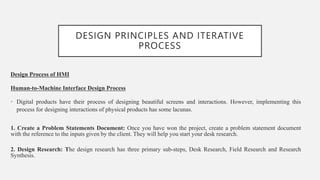
Design Process of HMI
Human-to-Machine Interface Design Process
• Digital products have their process of designing beautiful screens and interactions. However, implementing this
process for designing interactions of physical products has some lacunas.
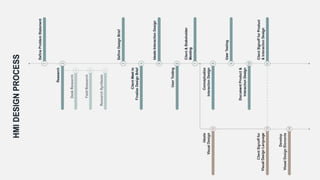
1. Create a Problem Statements Document: Once you have won the project, create a problem statement document
with the reference to the inputs given by the client. They will help you start your desk research.
2. Design Research: The design research has three primary sub-steps, Desk Research, Field Research and Research
Synthesis.
DESIGN PRINCIPLES AND ITERATIVE
PROCESS
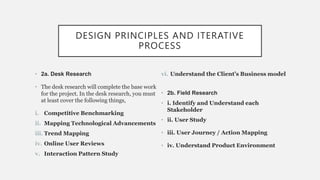
• 2a. Desk Research
• The desk research will complete the base work
for the project. In the desk research, you must
at least cover the following things,
i. Competitive Benchmarking
ii. Mapping Technological Advancements
iii. Trend Mapping
iv. Online User Reviews
v. Interaction Pattern Study
vi. Understand the Client’s Business model
• 2b. Field Research
• i. Identify and Understand each
Stakeholder
• ii. User Study
• iii. User Journey / Action Mapping
• iv. Understand Product Environment
DESIGN PRINCIPLES AND ITERATIVE
PROCESS
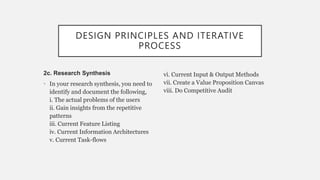
2c. Research Synthesis
• In your research synthesis, you need to
identify and document the following,
i. The actual problems of the users
ii. Gain insights from the repetitive
patterns
iii. Current Feature Listing
iv. Current Information Architectures
v. Current Task-flows
vi. Current Input & Output Methods
vii. Create a Value Proposition Canvas
viii. Do Competitive Audit
DESIGN PRINCIPLES AND ITERATIVE
PROCESS
3. Define Design Brief
• After the design research, you now have good knowledge about the product, user,
ecosystem and project. Now, you accurately define the design brief, this brief will be
same for Product Designers, Interaction Designers and Visual Designers.
Make User-Persona derived from the design brief and research synthesis.
4. Client Meeting
• Meet your client and show your research document. Help them understand your
design brief and get a go-ahead for it.
DESIGN PRINCIPLES AND ITERATIVE
PROCESS
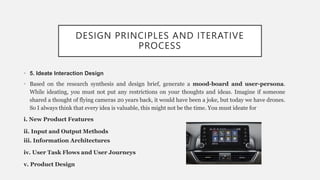
• 5. Ideate Interaction Design
• Based on the research synthesis and design brief, generate a mood-board and user-persona.
While ideating, you must not put any restrictions on your thoughts and ideas. Imagine if someone
shared a thought of flying cameras 20 years back, it would have been a joke, but today we have drones.
So I always think that every idea is valuable, this might not be the time. You must ideate for
i. New Product Features
ii. Input and Output Methods
iii. Information Architectures
iv. User Task Flows and User Journeys
v. Product Design
DESIGN PRINCIPLES AND ITERATIVE
PROCESS
6. User Testing
• Do User-Testing on low-fidelity wireframes and product mockups. Use a basic level of
the heuristic evaluation method to see if you are heading in the right direction. The
examination of approaches and not of features will happen in this phase.
7. Client & Stakeholder Meet
• Arrange a meeting with Client and Stakeholders, to discuss your directions, approaches
and new features. Finalize the interaction design direction.
DESIGN PRINCIPLES AND ITERATIVE
PROCESS
8. Conceptualize Interaction Design
• Now is the time to refine your ideas. Start applying real-life restrictions of material, technology, cost,
manufacturing constraints, business constraints, etc. to the ideas you had generated in the ideation phase.
Refine the designs until they become appropriate enough for production. The output of the
conceptualization phase must be in the form of refined high fidelity wireframes and product prototype.
9. User Testing
• Do User-Testing on high-fidelity wireframes and product prototypes. Use a high level of the heuristic
evaluation method to see if your ideas are appropriate for development. Examine each idea, feature, input
and output method, information architecture, user task flow and journey and overall product design in
detail. Check if the product satisfies the ergonomic needs. If you find any ambiguity, improve your designs.
DESIGN PRINCIPLES AND ITERATIVE
PROCESS
10. Develop Product and Interaction Design Document
• Document the design approach, user testing results and full development journey of the final
product to show it to the client, remember to add reasoning for your every decision, this will build
the confidence of your client.
11. Client Signoff for Product Design and Interaction Design
• Meet your client, present the document you created. Once the client agrees with your interaction
design outcome, get the design signed-off. It will hence avoid any further unwanted changes from
the client in your interaction designs.
DESIGN PRINCIPLES AND ITERATIVE
PROCESS
12. Ideate Visual Design Language
• The interaction design mood-board and style will help the visual designers to create their mood-
boards and design styles. This step can happen in parallel to Interaction Design Conceptualization
Phase (Point No. 8) if you have a separate visual design team.
13. Client Signoff for Visual Design
• The visual design language can be verified and signed-off at the same time when the interaction
design signoff meeting is happening. The visual design team must show different design languages
and also example screens for the client to picture the outcome.
14. Develop Visual Design Elements
• In this phase, the production of the whole project will start.
METHODOLOGIES AND RELATED
TECHNOLOGIES INVOLVED
• Various strategies delineating methods for human–PC interaction design have developed since the conception
of the field during the 1980s. Most plan philosophies come from a model for how clients, originators, and
specialized frameworks interface. Early techniques treated clients' psychological procedures as unsurprising
and quantifiable and urged plan specialists to look at subjective science to establish zones, (for example,
memory and consideration) when structuring UIs. Present-day models, in general, center around a steady input
and discussion between clients, creators, and specialists and push for specialized frameworks to be folded with
the sorts of encounters clients need to have, as opposed to wrapping user experience around a finished
framework.
• Activity theory: utilized in HCI to characterize and consider the setting where human cooperations with PCs
occur. Action hypothesis gives a structure for reasoning about activities in these specific circumstances and
illuminates the design of interactions from an action-driven perspective.
• User-centered design (UCD): a cutting-edge, broadly-rehearsed plan theory established on the possibility that
clients must become the overwhelming focus in the plan of any PC framework. Clients, architects, and
specialized experts cooperate to determine the requirements and restrictions of the client and make a
framework to support these components.
METHODOLOGIES AND RELATED
TECHNOLOGIES INVOLVED
• Frequently, client-focused plans are informed by ethnographic investigations of situations in which clients
will associate with the framework. This training is like participatory design, which underscores the
likelihood for end-clients to contribute effectively through shared plan sessions and workshops.
• Principles of UI design: These standards may be considered during the design of a client interface:
resistance, effortlessness, permeability, affordance, consistency, structure, and feedback.
• Value sensitive design (VSD): A technique for building innovation that accounts for the individuals who
utilize the design straightforwardly, and just as well for those whom the design influences, either directly
or indirectly. VSD utilizes an iterative planning process that includes three kinds of examinations:
theoretical, exact, and specialized. Applied examinations target the understanding and articulation of the
different parts of the design, and its qualities or any clashes that may emerge for the users of the design.
Exact examinations are subjective or quantitative plans to explore things used to advise the creators'
understanding regarding the clients' qualities, needs, and practices. Specialized examinations can
include either investigation of how individuals use related advances or the framework plans.
5 FUTURE HUMAN-MACHINE
INTERFACES (HMI) TRENDS
1. Artificial vision:
Increasing competition and the need to contain costs are forcing companies to
achieve zero-defect production. This requires a more reliable and accurate quality
control system, which guarantees the compliance of each piece. Including the
integration of innovative technologies such as artificial vision, which will enable HMI
devices to automatically perform control, measurement and classification functions.
2. Wearable HMIs :
The human-machine interface of the future will get even more interactive. The growing
popularity of wearable devices in the consumer market (IDC estimates an average growth of
over 20% per year) will also be reflected in the manufacturing sector. This is also due to the
National Industry 4.0 Plan, which mentions arable devices among the technologies subject
to hyper-depreciation. For example, operators will likely wear bracelets that alert them of
alarms with a specific code so that they can intervene in a timely manner.
3. Natural language processing:
Natural Language Processing (NLP) technology is a hot topic in the industry, especially in
relation to user interfaces. The language processing process makes it possible for the
operators and systems to interact using verbal language. This opens the door to highly
interesting applications, making production more immediate and efficient.
4. Blind HMI:
Among the future HMI trends, human-machine interfaces might become blind
devices inside the panel. In this case, operators will interact with the machine and
display the production pages directly on their tablet. Alternatively, the display can be
host inside the machine, while the operation will take place via an input device. For
example, a tablet with a dedicated app.
5. More efficiency:
Production efficiency is one of Industry 4.0 priorities and this will affect the
evolution of HMIs. Companies need technological solutions that simplify the
interaction between men and machines to increase productivity and cut resources
and time waste. One of the key factors to improve efficiency is device flexibility.
Hence, it’s important that HMIs will be highly customizable according to each
company’s needs. Talking of configurability and efficiency, discover ERGO,
our new concept of human-machine interface.
COMMON APPLICATIONS FOR HMI
The human machine interface (HMI) market has exploded in terms of
popularity in recent years. Not to be confused with a user interface (UI), HMIs
typically focus on industrial applications and uses. However, this doesn’t
necessarily mean that they aren’t used for other purposes. HMIs are found in
both commercial and consumer applications, some of which may already
know.
Automotive Dashboards:
Several of the world’s leading automakers are now adding HMIs into their vehicles.
A typical in-car HMI may consists of a touchscreen-enabled interface through which
the driver or passenger can control systems like the heating, air conditioning, turn-
by-turn navigation, radio/stereo, and more. And this isn’t a trend that will going
away anytime soon, as industry experts predict that more automakers will jump on
board with HMI technology in the years to come.
Equipment/Machinery Monitoring:
Another common application for HMI involves the monitoring of equipment and/or
machinery. This is particularly common in factories and other industrial settings, as
workers rely on HMIs to ensure their equipment is running properly. The HMI is
connected to the respective equipment and/or machinery, sending it valuable data
about its processes. If the equipment begins to fail, workers will notice the change in
the HMI.
Electronic Displays:
Of course, HMIs can also be used for electronic displays. An HMI, in its most basic
form, is nothing more than an interface through which a human operator controls a
machine. So, an HMI could essentially be a touchscreen interface that is used to
display e-ink text. You’ll frequently find HMI electronic displays such as this being
used in offices and similar commercial workplaces.
Building Automation:
Home and building automation has become a hot topic as of late. It involves
connecting multiple indoor systems together so they can be controlled from a single
interface. Some of the systems connected in building automation may include
heating and air, humidity, lights, and security systems. HMIs are frequently used in
building automation, as it streamlines the process while providing the owner with a
convenient control interface.
Audio/Video Production:
One of the lesser-known applications for HMIs is audio/video production. A/V
companies may use HMIs to control their microphones and video cameras.
THANK YOU

Human Computer Interface.pptx

  • 1.
  • 2.
    CONTENTS • INTRODUCTION ANDHISTORY • COMPONENTS OF HMI • DESIGN PRINCIPLES AND ITERATIVE PROCESS • METHODOLOGIES AND RELATED TECHNOLOGIES INVOLVED • CURRENT EMERGING TRENDS IN HMI AND ITS APPLICATION IN REAL WORLD
  • 3.
    INTRODUCTION • Human–computer interaction(HCI) is research in the design and the use of computer technology, which focuses on the interfaces between people (users) and computers. HCI researchers observe the ways humans interact with computers and design technologies that allow humans to interact with computers in novel ways. A device that allows interaction between a human being and a computer is known as a "Human-computer Interface (HCI)". • Humans interact with computers in many ways, and the interface between the two is crucial to facilitating this interaction. HCI is also sometimes termed human-machine interaction (HMI), man-machine interaction (MMI), or computer-human interaction (CHI). Desktop applications, internet browsers, handheld computers, and computer kiosks make use of the prevalent graphical user interfaces (GUI) of today. Voice user interfaces (VUI) are used for speech recognition and synthesizing systems, and the emerging multi-modal and Graphical user interfaces (GUI) allow humans to engage with embodied character agents in a way that cannot be achieved with other interface paradigms.
  • 4.
    HISTORY • HCI aroseas a field from intertwined roots in computer graphics, operating systems, HF, ergonomics, industrial engineering, cognitive psychology, and computer science. • The early history of computer graphics, involving cathode-ray tube (CRT) displays and pen devices, led to the development of much of today's HCI techniques in the area of GUIs. The direct-manipulation interaction techniques, where users performed actions on screen entities to represent commands. The program allowed users to draw lines, circles, and points on a computer's CRT display using a light pen. While these tasks are simple to program and use with today's computer hardware, software, and interfaces, nearly 40 years ago this was a revolutionary effort that required immense computing power. Sutherland's program assigned characteristics to graphic objects and built relationships between objects. Users could move, copy, scale, zoom, rotate objects, and save object characteristics.
  • 5.
    COMPONENTS OF HMI •The human–computer interface can be described as the point of communication between the human user and the computer. The flow of information between the human and computer is defined as the loop of interaction. The loop of interaction has several aspects to it, including: • Visual Based: The visual-based human–computer interaction is probably the most widespread human–computer interaction (HCI) research area. • Audio Based: The audio-based interaction between a computer and a human is another important area of HCI systems. This area deals with information acquired by different audio signals. • Task environment: The conditions and goals set upon the user. • Machine environment: The computer's environment is connected to, e.g., a laptop in a college student's dorm room.
  • 6.
    COMPONENTS OF HMI •Areas of the interface: Non-overlapping areas involve the processes related to humans and computers themselves, while the overlapping areas only involve the processes related to their interaction. • Input flow: The flow of information begins in the task environment when the user has some task requiring using their computer. • Output: The flow of information that originates in the machine environment. • Feedback: Loops through the interface that evaluate, moderate, and confirm processes as they pass from the human through the interface to the computer and back. • Fit: This matches the computer design, the user, and the task to optimize the human resources needed to accomplish the task.
  • 7.
    COMPONENTS OF HMI Thebuilding block of HMI involves the following components: 1. Operator Console: The operator console is a very important part of HMI as it has various units like visual display units (VDUs), pointer/cursor, keyboard, and communication facilities, etc. The VSUs are basically monitoring screens like CRT, LED, LCD, etc. with antiglare screen coating. The work of cursor is performed by mouse, trackball, or the touch-screen facility. All the monitors share a keyboard and cursor which moves through all the screens without user intervention. In SCADA systems, a single operator handles around 3 to 4 monitors so as to have a display facility with full graphics that facilitates proper planning and monitoring of the system. Audible alarms are also present at the operator console that intimates the operator regarding the event occurring in the system and also informs the user whenever there is a need to change the existing event.
  • 8.
    COMPONENTS OF HMI 2.Operator Dialogue: Dialogue boxes act as a communication bridge between the operator and the computer. It pops up whenever there is any information to be given or in case of any query while operating. The engineer must design it in the easiest possible way so that its commands are simple and easily understandable. The function keys present in the keyboard are programmed so that any major changes do not require much of the operator’s efforts. 3. Mimic Diagram: In the large station center, a mimic diagram is a crucial component through which the operator gets the full view of the processes under control. This needs large multiple screen displays like LCDs or LEDs with SCADA operability. There is a mosaic map board either of static or dynamic nature which is directly linked to HMI. So, this offers upgradations of the map board directly at the time when HMIs are upgraded.
  • 9.
    COMPONENTS OF HMI 4.Peripheral devices: The peripheral devices used in interconnection with HMIs are printers. Majorly these are of 3 types, one is used to print the alarms and SOEs. A color printer is used to capture screenshots. While the third one is a laser printer which is black and white that prints the latest reports.
  • 10.
    DESIGN PRINCIPLES ANDITERATIVE PROCESS DESIGN PRINCIPLES 1. Know Your User • For most industrial human-machine interfaces, the user is either the machine or system operator or maintenance personnel. Focus on what these users will want to know and control and how they would like to interact with the system. Having a separate interface or screen for each type of user might be important in a complex system. Don't try to stuff all the information for each user into a single interface or group of screens. 2. Simplicity • The interface should be simple, even intuitive. The less training required to use the interface the more it will be used and appreciated. Keep the clutter down. Use more screens with less information on each and provide clear navigation controls between the screens. 3. Visibility • There should be visibility into all areas without overwhelming the user with extraneous or unneeded information. Use a color-coded navigation bar to give an overview of the system-wide status. Use animation to draw attention to faults and other issues. Provide intuitive navigational links to allow quick access to faults and recovery procedures.
  • 11.
    DESIGN PRINCIPLES ANDITERATIVE PROCESS 4. Consistency • If your HMI contains multiple interfaces or screens, their information displays, layout, and actions should be consistent with the other screens. Don't put navigational buttons at the bottom of one screen and at the top of another, and use standardized color codes throughout the interface. 5. Organize technology around the user’s goals, tasks and abilities. • Task analyses need to be conducted to check if the system provides the needed information. 6. Organize technology around the way users process information and make decisions. • People first act to classify and understand a situation. Experts use pattern matching to draw upon long-term memory in order to quickly understand a situation. Decision makers must do more than simply perceive the state of their environment in order to have good situation awareness. They must understand the integrated meaning in light of their goals; they must understand the situation as a whole. 7. Keep the user in control and aware of the state of the system. • High levels of automation can actually put users out-of-the-loop leading to low levels of situation awareness. If their awareness is compromised, their ability to be an effective decision maker is also compromised.
  • 12.
    DESIGN PRINCIPLES ANDITERATIVE PROCESS Design Process of HMI Human-to-Machine Interface Design Process • Digital products have their process of designing beautiful screens and interactions. However, implementing this process for designing interactions of physical products has some lacunas. 1. Create a Problem Statements Document: Once you have won the project, create a problem statement document with the reference to the inputs given by the client. They will help you start your desk research. 2. Design Research: The design research has three primary sub-steps, Desk Research, Field Research and Research Synthesis.
  • 13.
    DESIGN PRINCIPLES ANDITERATIVE PROCESS • 2a. Desk Research • The desk research will complete the base work for the project. In the desk research, you must at least cover the following things, i. Competitive Benchmarking ii. Mapping Technological Advancements iii. Trend Mapping iv. Online User Reviews v. Interaction Pattern Study vi. Understand the Client’s Business model • 2b. Field Research • i. Identify and Understand each Stakeholder • ii. User Study • iii. User Journey / Action Mapping • iv. Understand Product Environment
  • 14.
    DESIGN PRINCIPLES ANDITERATIVE PROCESS 2c. Research Synthesis • In your research synthesis, you need to identify and document the following, i. The actual problems of the users ii. Gain insights from the repetitive patterns iii. Current Feature Listing iv. Current Information Architectures v. Current Task-flows vi. Current Input & Output Methods vii. Create a Value Proposition Canvas viii. Do Competitive Audit
  • 15.
    DESIGN PRINCIPLES ANDITERATIVE PROCESS 3. Define Design Brief • After the design research, you now have good knowledge about the product, user, ecosystem and project. Now, you accurately define the design brief, this brief will be same for Product Designers, Interaction Designers and Visual Designers. Make User-Persona derived from the design brief and research synthesis. 4. Client Meeting • Meet your client and show your research document. Help them understand your design brief and get a go-ahead for it.
  • 17.
    DESIGN PRINCIPLES ANDITERATIVE PROCESS • 5. Ideate Interaction Design • Based on the research synthesis and design brief, generate a mood-board and user-persona. While ideating, you must not put any restrictions on your thoughts and ideas. Imagine if someone shared a thought of flying cameras 20 years back, it would have been a joke, but today we have drones. So I always think that every idea is valuable, this might not be the time. You must ideate for i. New Product Features ii. Input and Output Methods iii. Information Architectures iv. User Task Flows and User Journeys v. Product Design
  • 18.
    DESIGN PRINCIPLES ANDITERATIVE PROCESS 6. User Testing • Do User-Testing on low-fidelity wireframes and product mockups. Use a basic level of the heuristic evaluation method to see if you are heading in the right direction. The examination of approaches and not of features will happen in this phase. 7. Client & Stakeholder Meet • Arrange a meeting with Client and Stakeholders, to discuss your directions, approaches and new features. Finalize the interaction design direction.
  • 19.
    DESIGN PRINCIPLES ANDITERATIVE PROCESS 8. Conceptualize Interaction Design • Now is the time to refine your ideas. Start applying real-life restrictions of material, technology, cost, manufacturing constraints, business constraints, etc. to the ideas you had generated in the ideation phase. Refine the designs until they become appropriate enough for production. The output of the conceptualization phase must be in the form of refined high fidelity wireframes and product prototype. 9. User Testing • Do User-Testing on high-fidelity wireframes and product prototypes. Use a high level of the heuristic evaluation method to see if your ideas are appropriate for development. Examine each idea, feature, input and output method, information architecture, user task flow and journey and overall product design in detail. Check if the product satisfies the ergonomic needs. If you find any ambiguity, improve your designs.
  • 20.
    DESIGN PRINCIPLES ANDITERATIVE PROCESS 10. Develop Product and Interaction Design Document • Document the design approach, user testing results and full development journey of the final product to show it to the client, remember to add reasoning for your every decision, this will build the confidence of your client. 11. Client Signoff for Product Design and Interaction Design • Meet your client, present the document you created. Once the client agrees with your interaction design outcome, get the design signed-off. It will hence avoid any further unwanted changes from the client in your interaction designs.
  • 21.
    DESIGN PRINCIPLES ANDITERATIVE PROCESS 12. Ideate Visual Design Language • The interaction design mood-board and style will help the visual designers to create their mood- boards and design styles. This step can happen in parallel to Interaction Design Conceptualization Phase (Point No. 8) if you have a separate visual design team. 13. Client Signoff for Visual Design • The visual design language can be verified and signed-off at the same time when the interaction design signoff meeting is happening. The visual design team must show different design languages and also example screens for the client to picture the outcome. 14. Develop Visual Design Elements • In this phase, the production of the whole project will start.
  • 22.
    METHODOLOGIES AND RELATED TECHNOLOGIESINVOLVED • Various strategies delineating methods for human–PC interaction design have developed since the conception of the field during the 1980s. Most plan philosophies come from a model for how clients, originators, and specialized frameworks interface. Early techniques treated clients' psychological procedures as unsurprising and quantifiable and urged plan specialists to look at subjective science to establish zones, (for example, memory and consideration) when structuring UIs. Present-day models, in general, center around a steady input and discussion between clients, creators, and specialists and push for specialized frameworks to be folded with the sorts of encounters clients need to have, as opposed to wrapping user experience around a finished framework. • Activity theory: utilized in HCI to characterize and consider the setting where human cooperations with PCs occur. Action hypothesis gives a structure for reasoning about activities in these specific circumstances and illuminates the design of interactions from an action-driven perspective. • User-centered design (UCD): a cutting-edge, broadly-rehearsed plan theory established on the possibility that clients must become the overwhelming focus in the plan of any PC framework. Clients, architects, and specialized experts cooperate to determine the requirements and restrictions of the client and make a framework to support these components.
  • 23.
    METHODOLOGIES AND RELATED TECHNOLOGIESINVOLVED • Frequently, client-focused plans are informed by ethnographic investigations of situations in which clients will associate with the framework. This training is like participatory design, which underscores the likelihood for end-clients to contribute effectively through shared plan sessions and workshops. • Principles of UI design: These standards may be considered during the design of a client interface: resistance, effortlessness, permeability, affordance, consistency, structure, and feedback. • Value sensitive design (VSD): A technique for building innovation that accounts for the individuals who utilize the design straightforwardly, and just as well for those whom the design influences, either directly or indirectly. VSD utilizes an iterative planning process that includes three kinds of examinations: theoretical, exact, and specialized. Applied examinations target the understanding and articulation of the different parts of the design, and its qualities or any clashes that may emerge for the users of the design. Exact examinations are subjective or quantitative plans to explore things used to advise the creators' understanding regarding the clients' qualities, needs, and practices. Specialized examinations can include either investigation of how individuals use related advances or the framework plans.
  • 24.
    5 FUTURE HUMAN-MACHINE INTERFACES(HMI) TRENDS 1. Artificial vision: Increasing competition and the need to contain costs are forcing companies to achieve zero-defect production. This requires a more reliable and accurate quality control system, which guarantees the compliance of each piece. Including the integration of innovative technologies such as artificial vision, which will enable HMI devices to automatically perform control, measurement and classification functions.
  • 25.
    2. Wearable HMIs: The human-machine interface of the future will get even more interactive. The growing popularity of wearable devices in the consumer market (IDC estimates an average growth of over 20% per year) will also be reflected in the manufacturing sector. This is also due to the National Industry 4.0 Plan, which mentions arable devices among the technologies subject to hyper-depreciation. For example, operators will likely wear bracelets that alert them of alarms with a specific code so that they can intervene in a timely manner. 3. Natural language processing: Natural Language Processing (NLP) technology is a hot topic in the industry, especially in relation to user interfaces. The language processing process makes it possible for the operators and systems to interact using verbal language. This opens the door to highly interesting applications, making production more immediate and efficient.
  • 26.
    4. Blind HMI: Amongthe future HMI trends, human-machine interfaces might become blind devices inside the panel. In this case, operators will interact with the machine and display the production pages directly on their tablet. Alternatively, the display can be host inside the machine, while the operation will take place via an input device. For example, a tablet with a dedicated app. 5. More efficiency: Production efficiency is one of Industry 4.0 priorities and this will affect the evolution of HMIs. Companies need technological solutions that simplify the interaction between men and machines to increase productivity and cut resources and time waste. One of the key factors to improve efficiency is device flexibility. Hence, it’s important that HMIs will be highly customizable according to each company’s needs. Talking of configurability and efficiency, discover ERGO, our new concept of human-machine interface.
  • 27.
    COMMON APPLICATIONS FORHMI The human machine interface (HMI) market has exploded in terms of popularity in recent years. Not to be confused with a user interface (UI), HMIs typically focus on industrial applications and uses. However, this doesn’t necessarily mean that they aren’t used for other purposes. HMIs are found in both commercial and consumer applications, some of which may already know.
  • 28.
    Automotive Dashboards: Several ofthe world’s leading automakers are now adding HMIs into their vehicles. A typical in-car HMI may consists of a touchscreen-enabled interface through which the driver or passenger can control systems like the heating, air conditioning, turn- by-turn navigation, radio/stereo, and more. And this isn’t a trend that will going away anytime soon, as industry experts predict that more automakers will jump on board with HMI technology in the years to come.
  • 29.
    Equipment/Machinery Monitoring: Another commonapplication for HMI involves the monitoring of equipment and/or machinery. This is particularly common in factories and other industrial settings, as workers rely on HMIs to ensure their equipment is running properly. The HMI is connected to the respective equipment and/or machinery, sending it valuable data about its processes. If the equipment begins to fail, workers will notice the change in the HMI.
  • 30.
    Electronic Displays: Of course,HMIs can also be used for electronic displays. An HMI, in its most basic form, is nothing more than an interface through which a human operator controls a machine. So, an HMI could essentially be a touchscreen interface that is used to display e-ink text. You’ll frequently find HMI electronic displays such as this being used in offices and similar commercial workplaces.
  • 31.
    Building Automation: Home andbuilding automation has become a hot topic as of late. It involves connecting multiple indoor systems together so they can be controlled from a single interface. Some of the systems connected in building automation may include heating and air, humidity, lights, and security systems. HMIs are frequently used in building automation, as it streamlines the process while providing the owner with a convenient control interface.
  • 32.
    Audio/Video Production: One ofthe lesser-known applications for HMIs is audio/video production. A/V companies may use HMIs to control their microphones and video cameras.
  • 33.