SLIDESMANIA.C
INTRODUCTION TO HUMAN
COMPUTER INTERACTION
[HCI]
SLIDESMANIA.C
Lesson Objectives:
➔ Describe the Human-Computer Interaction (HCI).
➔ Understand some of the areas where HCI can be implemented
with distinctive importance.
➔ Discuss the historical evolution of HCI.
SLIDESMANIA.C
SLIDESMANIA.C
INTRODUCTI
ON
SLIDESMANIA.C
Human Computer Interface (HCI) was previously
known as the man-machine studies or man-
machine interaction. It deals with the design,
execution and assessment of computer systems
and
related phenomenon that are for human use. HCI
can be used in all disciplines wherever there is a
possibility of computer installation
SLIDESMANIA.C
HCI can be used in all disciplines wherever there is
a possibility of computer installation. Some of
the areas where HCI can be implemented with
distinctive importance as mentioned to the following:
SLIDESMANIA.C
COMPUTER
SCIENCE
For application design and
engineering.
SLIDESMANIA.C
PSYCHOLOGY
For application of theories and
analytical purpose.
SLIDESMANIA.C
SOCIOLOGY
For interaction between technology
and organization.
SLIDESMANIA.C
INDUSTRIAL
DESIGN
For interactive products like mobile
phones, microwave oven, etc.
SLIDESMANIA.C
The world’s leading organization in HCI is ACM −
SIGCHI, which stands for Association for
Computer Machinery − Special Interest Group on
Computer–Human Interaction. SIGCHI defines
Computer Science to be the core discipline of HCI.
In India, it emerged as an interaction proposal,
mostly based in the field of Design.
SLIDESMANIA.C
Objectives:
The intention of this subject is to learn the ways of designing
user-friendly interfaces or interactions. Considering which, we
will learn the following:
➔ Ways to design and assess interactive systems
➔ Ways to reduce design time through cognitive system and task
models
➔ Procedures and heuristics for interactive system design
SLIDESMANIA.C
HISTORICAL
EVOLUTION
From the initial computers performing
batch processing to the user-centric
design, there were several milestones
which are mentioned:
SLIDESMANIA.C
Early computer (e.g. ENIAC,
1946)
-Improvement in the H/W
technology brought massive
increase in computing power.
People started thinking on
innovative ideas.
SLIDESMANIA.C
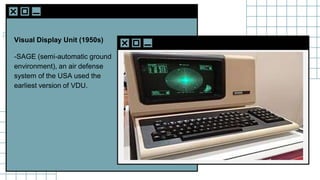
Visual Display Unit (1950s)
-SAGE (semi-automatic ground
environment), an air defense
system of the USA used the
earliest version of VDU.
SLIDESMANIA.C
Development of the
Sketchpad (1962)
-Ivan Sutherland developed
Sketchpad and proved that
computer can be used for more
than data processing.
SLIDESMANIA.C
Douglas Engelbart
introduced the idea of
programming toolkits (1963)
-Smaller systems created
larger systems and
components.
SLIDESMANIA.C
Introduction of Word
Processor, Mouse (1968)
-Design of NLS (oNLine
System).
SLIDESMANIA.C
Introduction of personal
computer Dynabook (1970s)
-Developed smalltalk at Xerox
PARC.
SLIDESMANIA.C
Windows and WIMP
interfaces
-Simultaneous jobs at one
desktop, switching between
work and screens, sequential
interaction.
SLIDESMANIA.C
The idea of metaphor
-Xerox star and alto were the
first systems to use the concept
of metaphors, which led to
spontaneity of the interface.
SLIDESMANIA.C
Direct Manipulation
introduced by Ben
Shneiderman (1982)
-First used in Apple Mac PC
(1984) that reduced the
chances for syntactic errors.
SLIDESMANIA.C
Vannevar Bush introduced
Hypertext (1945)
-To denote the non-linear
structure of text.
SLIDESMANIA.C
Multimodality
(1980)
SLIDESMANIA.C
Computer Supported
Cooperative Work (1990’s)
-Computer mediated
communication.
SLIDESMANIA.C
WWW (1989)
-The first graphical browser
(Mosaic) came in 1993.
SLIDESMANIA.C
Ubiquitous Computing
-Currently the most active
research area in HCI. Sensor
based/context aware
computing also known as
pervasive computing.
SLIDESMANIA.C
SLIDESMANIA.C
Thank you!
GUIDELINES IN
HCI
Lesson Objectives:
Learn all the guidelines of HCI in different aspects
Understand the eight golden rule of Shneiderman
Understand heuristic evaluation and interface design guidelines
01
02
04
Know the seven principles of Norman
03
Table of
Contents
Shneiderman’s
Eight Golden
Rules
Norman’s Seven
Principles
Interface Design
Guidelines
Heuristic
Evaluation
Ben
Shneiderman
American computer scientist
consolidated some implicit facts about
designing and came up with the
following eight general guidelines:
Shneiderman’s Eight Golden Rules:
Strive for Consistency
Cater to Universal Usability
Design Dialogs to yield closure
01
02
04
Offer Informative feedback
03
Shneiderman’s Eight Golden Rules:
Prevent Errors
Permit easy reversal of actions
Reduce short term memory load
05
06
08
Support internal locus of control
07
These guidelines are beneficial for normal
designers as well as interface designers. Using
these eight guidelines, it is possible to differentiate
a good interface design from a bad one. These
are beneficial in experimental assessment of
identifying better GUIs.
Shneiderman’s Eight Golden Rules
Donald
Norman
To assess the interaction between
human and computers, He proposed in
1988 his 7 principles which is the seven
stages that can be used to transform
difficult tasks.
Norman’s Seven Principles:
Use both knowledge in world & knowledge in the head
Simplify task structures
Get the mapping right (User mental model = Conceptual model = Designed model)
01
02
04
Make things visible
03
Norman’s Seven Principles:
Convert constrains into advantages (Physical constraints, Cultural
constraints, Technological constraints)
Design for Error
05
06
When all else fails − Standardize
07
Jakob Nielsen
is a User Advocate and principal of the Nielsen Norman
Group which he co-founded with Dr. Donald A. Norman
(former VP of research at Apple Computer). Dr. Nielsen
established the "discount usability engineering"
movement for fast and cheap improvements of user
interfaces and has invented several usability methods,
including heuristic evaluation. He holds 79 United States
patents, mainly on ways of making the Internet easier to
use.
Heuristics evaluation is a methodical procedure to check
user interface for usability problems.
Once a usability problem is detected in design, they are
attended as an integral part of constant
design processes. Heuristic evaluation method includes
some usability principles such as Nielsen’s ten
Usability principles
Heuristic Evaluation
Nielsen's Ten Heuristic Principles:
Visibility of system status
Match between system and real world
Consistency and standards
01
02
04
User control and freedom
03
05 Error prevention
Nielsen's Ten Heuristic Principles:
Recognition rather than Recall
Flexibility and efficiency of use
Help, diagnosis and recovery from errors
06
07
09
Aesthetic and minimalist design
08
10 Documentation and Help
Interface Design
Guidelines
Some more important HCI design guidelines are
presented in this section. General interaction,
information display, and data entry are three
categories of HCI design guidelines that are
explained next:
Guidelines for general interaction are
comprehensive advices that focus on general
instructions such as:
General Interaction
General Interaction:
Be consistent
Offer significant feedback
Authorize easy reversal of most actions
01
02
04
Ask for authentication of any non-trivial critical action
03
05 Lessen the amount of information that must be remembered in between actions
General Interaction:
Seek competence in dialogue, motion and thought
Excuse mistakes
Deliver help services that are context sensitive
06
07
09
Classify activities by function and establish screen geography accordingly
08
10 Use simple action verbs or short verb phrases to name commands
Information provided by the HCI should not be
incomplete or unclear or else the application will
not meet the requirements of the user. To
provide better display, the following guidelines
are prepared:
Information Display
Information Display:
Exhibit only that information that is applicable to the present context
Don't burden the user with data, use a presentation layout that allows rapid integration
of information
Permit the user to maintain visual context
01
02
04
Use standard labels, standard abbreviations and probable colors
03
05 Generate meaningful error messages
Information Display:
Use upper and lower case, indentation and text grouping to aid in understanding
Use windows (if available) to classify different types of information
Consider the available geography of the display screen and use it efficiently
06
07
09
Use analog displays to characterize information that is more easily integrated with this
form of representation
08
The following guidelines focus on data entry that
is another important aspect of HCI:
Data Entry
Data Entry:
Reduce the number of input actions required of the user
Uphold steadiness between information display and data input
Interaction should be flexible but also tuned to the user's favored mode of input
01
02
04
Let the user customize the input
03
Data Entry:
Disable commands that are unsuitable in the context of current actions
Allow the user to control the interactive flow
Remove "mickey mouse" input
05
06
08
Offer help to assist with all input actions
07
Thank
you!
SLIDESMANIA.C
ELEMENTS AND
PRINCIPLES OF
DESIGN
SLIDESMANIA.C
● Know the design and colour that can be applied to HCI design.
● Understand the different elements of design.
● Understand the principles of design that can be used in HCI.
Lesson
Objectives:
SLIDESMANIA.C
Design and
Colour
SLIDESMANIA.C
Design and Colour
The elements and principles of design are
the building blocks used to create a work of
art. The elements of design can be thought
of as the things that make up a painting,
drawing, design etc. Good or bad - all
paintings will contain most of if not all, the
seven elements of design. The Principles of
design can be thought of as what we do to
the elements of design. How we apply the
Principles of design determines how
successful we are in creating a work of art.
SLIDESMANIA.C
Elements and
Principles of
Design
SLIDESMANIA.C
Elements and Principles of Design
SLIDESMANIA.C
Elements and Principles of Design
SLIDESMANIA.C
Elements and Principles of Design
SLIDESMANIA.C
Elements and Principles of Design
SLIDESMANIA.C
Elements and Principles of Design
SLIDESMANIA.C
Elements and Principles of Design
SLIDESMANIA.C
Elements and Principles of Design
SLIDESMANIA.C
Elements and Principles of Design
SLIDESMANIA.C
Elements and Principles of Design
SLIDESMANIA.C
Elements and Principles of Design
SLIDESMANIA.C
SHAPE
A shape is a self-contained defined
area of geometric or organic form. A
positive shape in a painting
automatically creates a negative shape.
Elements and Principles of Design
SLIDESMANIA.C
SIZE
Size is simply the relationship of the
area occupied by one shape to that of
another.
Elements and Principles of Design
SLIDESMANIA.C
COLOR
Also called as Hue.
Elements and Principles of Design
SLIDESMANIA.C
VALUE
Value is the lightness or darkness of a
colour. Value is also called Tone.
Elements and Principles of Design
SLIDESMANIA.C
GRADATION
Gradation of size and direction produce
linear perspective. Gradation of colour
from warm to cool and tone from dark to
light produce aerial perspective.
Gradation can add interest and
movement to a shape. A gradation from
dark to light will cause the eye to move
along a shape.
Elements and Principles of Design
SLIDESMANIA.C
HARMONY
Harmony in painting is the visually
satisfying effect of combining similar,
related elements. Examples are
adjacent colours, similar shapes and
related textures.
Elements and Principles of Design
SLIDESMANIA.C
UNITY
Relating the design elements to the the
idea being expressed in a painting
reinforces the principal of unity.eg. a
painting with an active aggressive subject
would work better with a dominant oblique
direction, course, rough texture, angular
lines etc. whereas a quiet passive subject
would benefit from horizontal lines, soft
texture and less tonal contrast. Unity in a
painting also refers to the visual linking of
various elements of the work.
Elements and Principles of Design
SLIDESMANIA.C
Thank you!

Human Computer Interaction Prelim Lesson