HUBOT
A LOOK INSIDE OUR ROBOT FRIEND
1.   Setting Up Hubot
2.   Coffeescript Primer
3.   Hubot Overview
4.   APIs
(disclaimer: this assumes OSX. commands should
       translate easily to windows and linux.)
PREREQUISITES
              Install Node
           be isalnd
            rw ntl oe
           Install and run Redis
add / s / o a / h r / p / i to your path
     urlclsaenmbn
         Install Hubot
    nmisal- cfe-cit
     p ntl g ofesrp
         nmisal- hbt
          p ntl g uo
      An Heroku account is suggested.
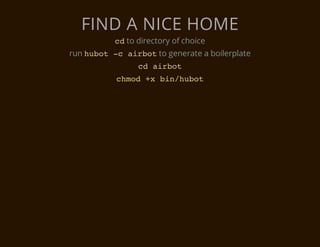
FIND A NICE HOME
          c to directory of choice
           d
run h b t - a r o to generate a boilerplate
     uo c ibt
                c aro
                 d ibt
           cmd+ bnhbt
            ho x i/uo
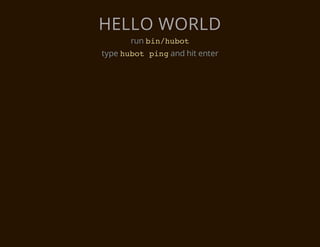
HELLO WORLD
      run b n h b t
           i/uo
type h b t p n and hit enter
      uo ig
A BRIEF DIVERSION INTO
     COFFEESCRIPT
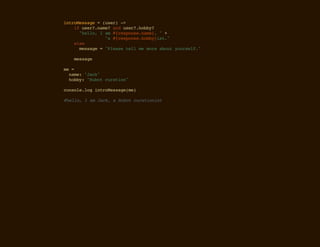
itoesg =(sr -
nrMsae   ue) >
  i ue?nm?adue?hby
   f sr.ae n sr.ob?
    "el,Ia #rsos.ae,"+
     hlo  m {epnenm}
         " #rsos.ob}s.
          a {epnehbyit"
  es
   le
    msae="laetl m mr aotyusl.
     esg  Pes el e oe bu oref"

  msae
   esg

m =
 e
  nm:"ak
   ae Jc"
  hby "uo crto"
   ob: Hbt uain

cnoelgitoesg(e
osl.o nrMsaem)

#el,Ia Jc,aHbtcrtoit
hlo   m ak  uo uains
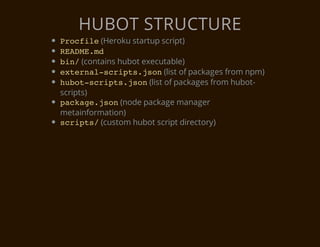
HUBOT STRUCTURE
P o f l (Heroku startup script)
 rcie
RAM.d
 EDEm
b n (contains hubot executable)
 i/
e t r a - c i t . s n(list of packages from npm)
 xenlsrpsjo
h b t s r p s j o (list of packages from hubot-
 uo-cit.sn
scripts)
p c a e j o (node package manager
 akg.sn
metainformation)
s r p s (custom hubot script directory)
 cit/
A HUBOT SCRIPT
    EXAMPLE
  CREATE AND EDIT
SRPSGOBECFE
CIT/ODY.OFE
gobe =[
 odys
  "y,{ae.,
   Be nm}"
  "ae,{ae.,
   Ltr nm}"
  "aecr,{ae.
   Tk ae nm}"
]

gobe=(ae -
ody   nm) >
 idx=pren(ahrno( *gobe.egh
  ne  asItMt.adm)  odyslnt)
 msae=gobe[ne]
  esg  odysidx
 msaerpae/nm},nm)
  esg.elc({ae/ ae;

mdl.xot =(oo)-
oueeprs     rbt >
 rbtha /beltr,(*/,(s)-
  oo.er (y|ae)?s.)i mg >
   i rbtnm.ooeCs( = mgmth2.ooeCs(
    f oo.aetLwrae) = s.ac[]tLwrae)
     beesg =gobemgmsaeue.ae
      yMsae  ody(s.esg.srnm)
     mgsn(yMsae
      s.edbeesg)
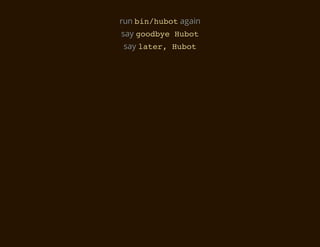
run b n h b tagain
     i/uo
say g o b e H b t
     ody uo
say l t r H b t
     ae, uo
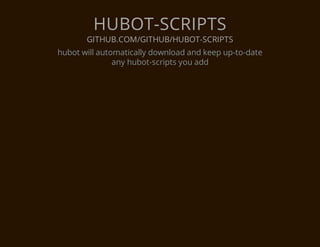
HUBOT-SCRIPTS
       GITHUB.COM/GITHUB/HUBOT-SCRIPTS
hubot will automatically download and keep up-to-date
               any hubot-scripts you add
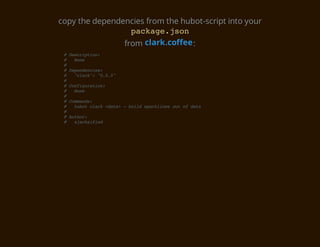
copy the dependencies from the hubot-script into your
                  pcaejo
                   akg.sn
                from clark.coffee :
 #Dsrpin
   ecito:
 # Nn
    oe
 #
 #Dpnece:
   eednis
 # "lr" ".."
    cak: 005
 #
 #Cniuain
   ofgrto:
 # Nn
    oe
 #
 #Cmad:
   omns
 # hbtcak<aa -bidsakie oto dt
    uo lr dt> ul prlns u f aa
 #
 #Ato:
   uhr
 # aakiid
    jcsfe
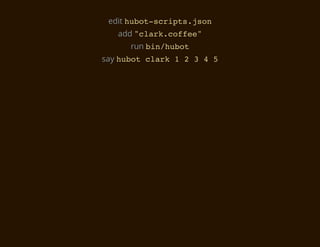
edit h b t s r p s j o
       uo-cit.sn
   add " l r . o f e
        cakcfe"
      run b n h b t
           i/uo
say h b t c a k 1 2 3 4 5
     uo lr
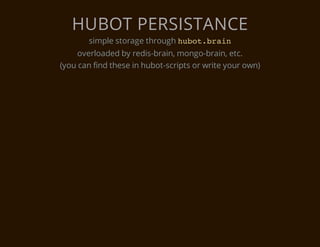
HUBOT PERSISTANCE
       simple storage through h b t b a n
                               uo.ri
     overloaded by redis-brain, mongo-brain, etc.
(you can find these in hubot-scripts or write your own)
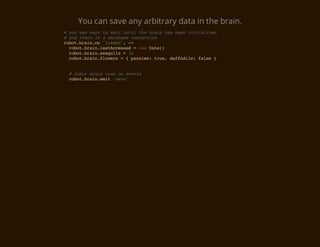
You can save any arbitrary data in the brain.
#yumywn t wi utltebanhsbe iiilzd
  o a at o at ni h ri a en ntaie
#adteei adtbs cneto
  n hr s  aaae oncin
rbtbano 'odd,-
oo.ri.n lae' >
 rbtbanlsAcse =nwDt(
  oo.ri.atcesd    e ae)
 rbtbansaul =1
  oo.ri.egls   2
 rbtbanfoes={pnis tu,dfois fle}
  oo.ri.lwr     ase: re afdl: as


 #hbtbanrn o eet
   uo ri us n vns
 rbtbanei 'ae
  oo.ri.mt sv'
HUBOT HTTP LISTENER
   CREATE AND EDIT
  SRPSSYCFE
   CIT/A.OFE
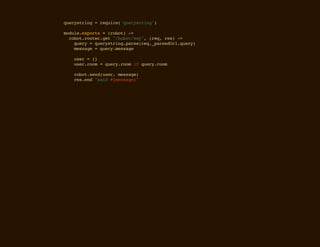
qeytig=rqie'ursrn'
ursrn   eur(qeytig)

mdl.xot =(oo)-
oueeprs    rbt >
 rbtrue.e "hbtsy,(e,rs -
  oo.otrgt /uo/a" rq e) >
   qey=qeytigprerq_asdr.ur)
    ur  ursrn.as(e.preUlqey
   msae=qeymsae
    esg  ur.esg

  ue ={
   sr  }
  ue.om=qeyro i qeyro
   srro  ur.om f ur.om

  rbtsn(sr msae
   oo.edue, esg)
  rsed"ad#msae"
   e.n si {esg}
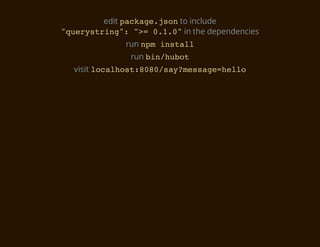
edit p c a e j o to include
              akg.sn
" u r s r n " " = 0 1 0 in the dependencies
 qeytig: > .."
              run n m i s a l
                   p ntl
               run b n h b t
                    i/uo
  visit l c l o t 8 8 / a ? e s g = e l
         oahs:00symsaehlo
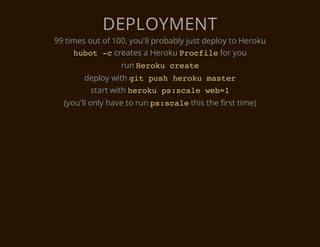
DEPLOYMENT
99 times out of 100, you'll probably just deploy to Heroku
     h b t - creates a Heroku P o f l for you
      uo c                          rcie
                  run H r k c e t
                       eou rae
        deploy with g t p s h r k m s e
                     i uh eou atr
         start with h r k p : c l w b 1
                     eou ssae e=
  (you'll only have to run p : c l this the first time)
                            ssae
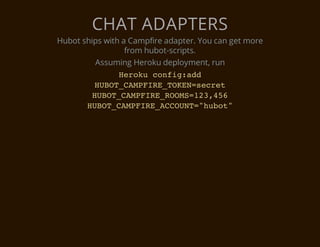
CHAT ADAPTERS
Hubot ships with a Campfire adapter. You can get more
                  from hubot-scripts.
         Assuming Heroku deployment, run
                Hrk cni:d
                  eou ofgad
         HBTCMFR_OE=ert
          UO_APIETKNsce
         HBTCMFR_OM=2,5
          UO_APIEROS1346
       HBTCMFR_CON=hbt
         UO_APIEACUT"uo"
Hubot: a look inside our robot friend

Hubot: a look inside our robot friend

  • 2.
    HUBOT A LOOK INSIDEOUR ROBOT FRIEND
  • 3.
    1. Setting Up Hubot 2. Coffeescript Primer 3. Hubot Overview 4. APIs
  • 5.
    (disclaimer: this assumesOSX. commands should translate easily to windows and linux.)
  • 6.
    PREREQUISITES Install Node be isalnd rw ntl oe Install and run Redis add / s / o a / h r / p / i to your path urlclsaenmbn Install Hubot nmisal- cfe-cit p ntl g ofesrp nmisal- hbt p ntl g uo An Heroku account is suggested.
  • 7.
    FIND A NICEHOME c to directory of choice d run h b t - a r o to generate a boilerplate uo c ibt c aro d ibt cmd+ bnhbt ho x i/uo
  • 8.
    HELLO WORLD run b n h b t i/uo type h b t p n and hit enter uo ig
  • 9.
    A BRIEF DIVERSIONINTO COFFEESCRIPT
  • 10.
    itoesg =(sr - nrMsae ue) > i ue?nm?adue?hby f sr.ae n sr.ob? "el,Ia #rsos.ae,"+ hlo m {epnenm} " #rsos.ob}s. a {epnehbyit" es le msae="laetl m mr aotyusl. esg Pes el e oe bu oref" msae esg m = e nm:"ak ae Jc" hby "uo crto" ob: Hbt uain cnoelgitoesg(e osl.o nrMsaem) #el,Ia Jc,aHbtcrtoit hlo m ak uo uains
  • 11.
    HUBOT STRUCTURE P of l (Heroku startup script) rcie RAM.d EDEm b n (contains hubot executable) i/ e t r a - c i t . s n(list of packages from npm) xenlsrpsjo h b t s r p s j o (list of packages from hubot- uo-cit.sn scripts) p c a e j o (node package manager akg.sn metainformation) s r p s (custom hubot script directory) cit/
  • 12.
    A HUBOT SCRIPT EXAMPLE CREATE AND EDIT SRPSGOBECFE CIT/ODY.OFE
  • 13.
    gobe =[ odys "y,{ae., Be nm}" "ae,{ae., Ltr nm}" "aecr,{ae. Tk ae nm}" ] gobe=(ae - ody nm) > idx=pren(ahrno( *gobe.egh ne asItMt.adm) odyslnt) msae=gobe[ne] esg odysidx msaerpae/nm},nm) esg.elc({ae/ ae; mdl.xot =(oo)- oueeprs rbt > rbtha /beltr,(*/,(s)- oo.er (y|ae)?s.)i mg > i rbtnm.ooeCs( = mgmth2.ooeCs( f oo.aetLwrae) = s.ac[]tLwrae) beesg =gobemgmsaeue.ae yMsae ody(s.esg.srnm) mgsn(yMsae s.edbeesg)
  • 15.
    run b nh b tagain i/uo say g o b e H b t ody uo say l t r H b t ae, uo
  • 16.
    HUBOT-SCRIPTS GITHUB.COM/GITHUB/HUBOT-SCRIPTS hubot will automatically download and keep up-to-date any hubot-scripts you add
  • 17.
    copy the dependenciesfrom the hubot-script into your pcaejo akg.sn from clark.coffee : #Dsrpin ecito: # Nn oe # #Dpnece: eednis # "lr" ".." cak: 005 # #Cniuain ofgrto: # Nn oe # #Cmad: omns # hbtcak<aa -bidsakie oto dt uo lr dt> ul prlns u f aa # #Ato: uhr # aakiid jcsfe
  • 18.
    edit h bt s r p s j o uo-cit.sn add " l r . o f e cakcfe" run b n h b t i/uo say h b t c a k 1 2 3 4 5 uo lr
  • 20.
    HUBOT PERSISTANCE simple storage through h b t b a n uo.ri overloaded by redis-brain, mongo-brain, etc. (you can find these in hubot-scripts or write your own)
  • 21.
    You can saveany arbitrary data in the brain. #yumywn t wi utltebanhsbe iiilzd o a at o at ni h ri a en ntaie #adteei adtbs cneto n hr s aaae oncin rbtbano 'odd,- oo.ri.n lae' > rbtbanlsAcse =nwDt( oo.ri.atcesd e ae) rbtbansaul =1 oo.ri.egls 2 rbtbanfoes={pnis tu,dfois fle} oo.ri.lwr ase: re afdl: as #hbtbanrn o eet uo ri us n vns rbtbanei 'ae oo.ri.mt sv'
  • 22.
    HUBOT HTTP LISTENER CREATE AND EDIT SRPSSYCFE CIT/A.OFE
  • 23.
    qeytig=rqie'ursrn' ursrn eur(qeytig) mdl.xot =(oo)- oueeprs rbt > rbtrue.e "hbtsy,(e,rs - oo.otrgt /uo/a" rq e) > qey=qeytigprerq_asdr.ur) ur ursrn.as(e.preUlqey msae=qeymsae esg ur.esg ue ={ sr } ue.om=qeyro i qeyro srro ur.om f ur.om rbtsn(sr msae oo.edue, esg) rsed"ad#msae" e.n si {esg}
  • 24.
    edit p ca e j o to include akg.sn " u r s r n " " = 0 1 0 in the dependencies qeytig: > .." run n m i s a l p ntl run b n h b t i/uo visit l c l o t 8 8 / a ? e s g = e l oahs:00symsaehlo
  • 25.
    DEPLOYMENT 99 times outof 100, you'll probably just deploy to Heroku h b t - creates a Heroku P o f l for you uo c rcie run H r k c e t eou rae deploy with g t p s h r k m s e i uh eou atr start with h r k p : c l w b 1 eou ssae e= (you'll only have to run p : c l this the first time) ssae
  • 26.
    CHAT ADAPTERS Hubot shipswith a Campfire adapter. You can get more from hubot-scripts. Assuming Heroku deployment, run Hrk cni:d eou ofgad HBTCMFR_OE=ert UO_APIETKNsce HBTCMFR_OM=2,5 UO_APIEROS1346 HBTCMFR_CON=hbt UO_APIEACUT"uo"