Prince singh
Prince1020.wordpress.com/ps Page 1
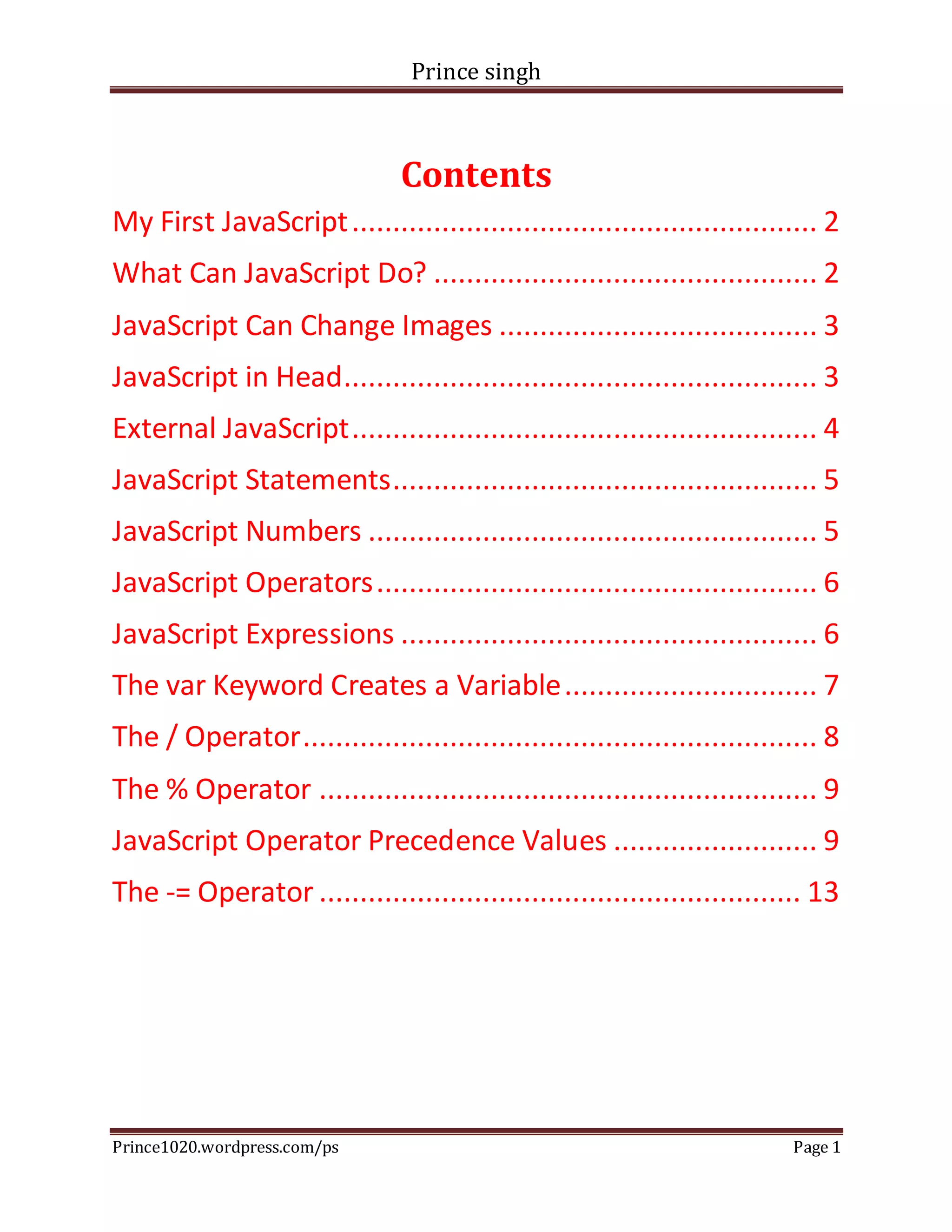
Contents
My First JavaScript......................................................... 2
What Can JavaScript Do? ............................................... 2
JavaScript Can Change Images ....................................... 3
JavaScript in Head.......................................................... 3
External JavaScript......................................................... 4
JavaScript Statements.................................................... 5
JavaScript Numbers ....................................................... 5
JavaScript Operators...................................................... 6
JavaScript Expressions ................................................... 6
The var Keyword Creates a Variable............................... 7
The / Operator............................................................... 8
The % Operator ............................................................. 9
JavaScript Operator Precedence Values ......................... 9
The -= Operator ........................................................... 13
Prince singh
Prince1020.wordpress.com/ps Page 2
My First JavaScript
<!DOCTYPE html>
<html>
<body>
<h1>My FirstJavaScript</h1>
<buttontype="button"
onclick="document.getElementById('demo').innerHTML= Date()">
Clickme to displayDate andTime.</button>
<p id="demo"></p>
</body>
</html>
What Can JavaScript Do?
<!DOCTYPE html>
<html>
<body>
<h1>What Can JavaScriptDo?</h1>
<p id="demo">JavaScriptcanchange HTML content.</p>
<buttontype="button"
onclick="document.getElementById('demo').innerHTML= 'HelloJavaScript!'">
ClickMe!</button>
</body>
</html>
Prince singh
Prince1020.wordpress.com/ps Page 3
JavaScript Can Change Images
<!DOCTYPE html>
<html>
<body>
<h1>JavaScriptCan Change Images</h1>
<img id="myImage"onclick="changeImage()"src="pic_bulboff.gif"width="100"height="180">
<p>Clickthe lightbulbto turnon/off the light.</p>
<script>
functionchangeImage() {
var image = document.getElementById('myImage');
if (image.src.match("bulbon")) {
image.src= "pic_bulboff.gif";
} else {
image.src= "pic_bulbon.gif";
}
}
</script>
</body>
</html>
JavaScript in Head
<!DOCTYPE html>
<html>
Prince singh
Prince1020.wordpress.com/ps Page 4
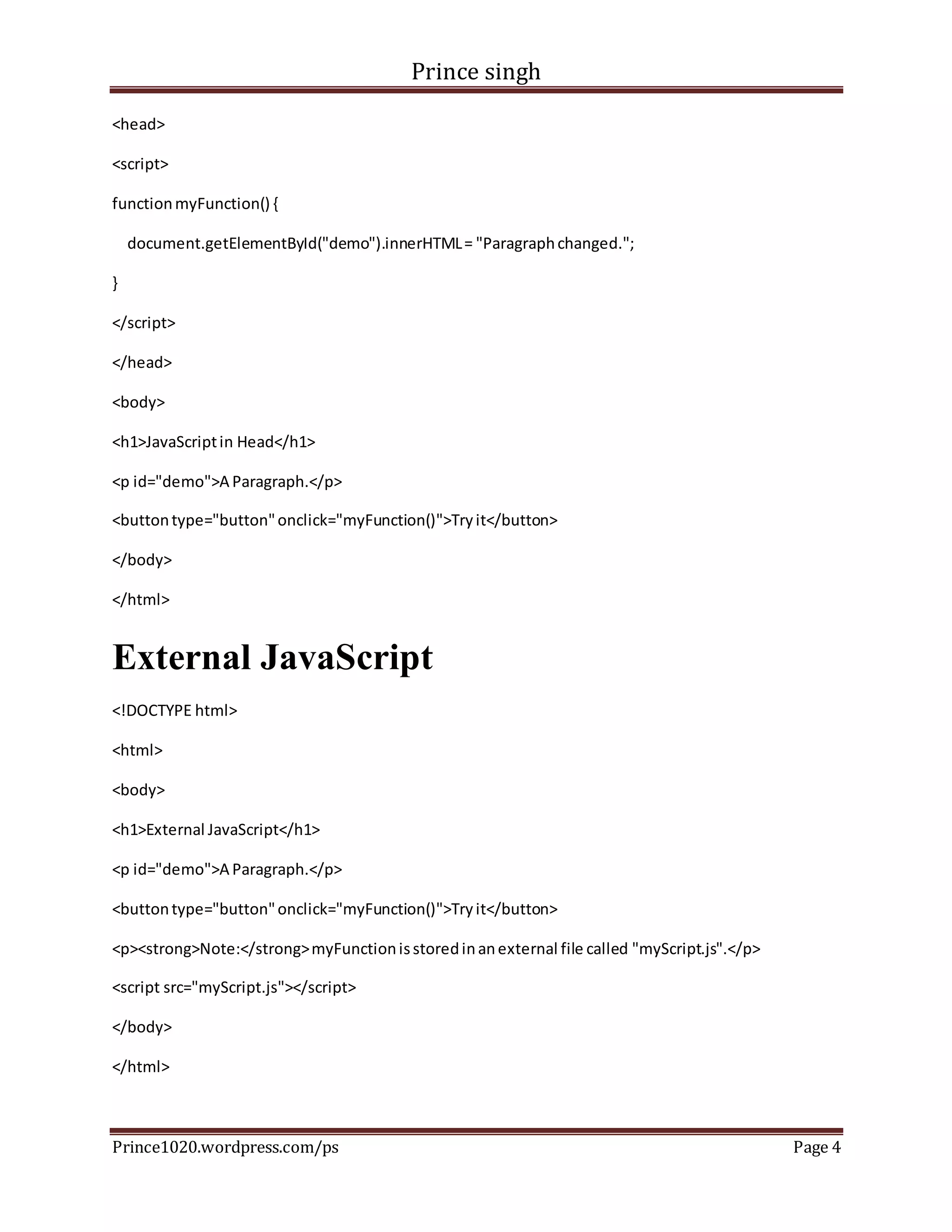
<head>
<script>
functionmyFunction() {
document.getElementById("demo").innerHTML= "Paragraphchanged.";
}
</script>
</head>
<body>
<h1>JavaScriptin Head</h1>
<p id="demo">A Paragraph.</p>
<buttontype="button"onclick="myFunction()">Tryit</button>
</body>
</html>
External JavaScript
<!DOCTYPE html>
<html>
<body>
<h1>External JavaScript</h1>
<p id="demo">A Paragraph.</p>
<buttontype="button"onclick="myFunction()">Tryit</button>
<p><strong>Note:</strong>myFunctionisstoredinanexternal file called "myScript.js".</p>
<script src="myScript.js"></script>
</body>
</html>
Prince singh
Prince1020.wordpress.com/ps Page 5
JavaScript Statements
<!DOCTYPE html>
<html>
<body>
<h1>JavaScriptStatements</h1>
<p>Statementsare separatedbysemicolons.</p>
<p>The variablesx,y,andz are assignedthe values5,6, and 11:</p>
<p id="demo"></p>
<script>
var x = 5;
var y = 6;
var z = x + y;
document.getElementById("demo").innerHTML= z;
</script>
</body>
</html>
JavaScript Numbers
<!DOCTYPE html>
<html>
<body>
<h1>JavaScriptNumbers</h1>
<p>Numbercan be written withorwithoutdecimals.</p>
Prince singh
Prince1020.wordpress.com/ps Page 6
<p id="demo"></p>
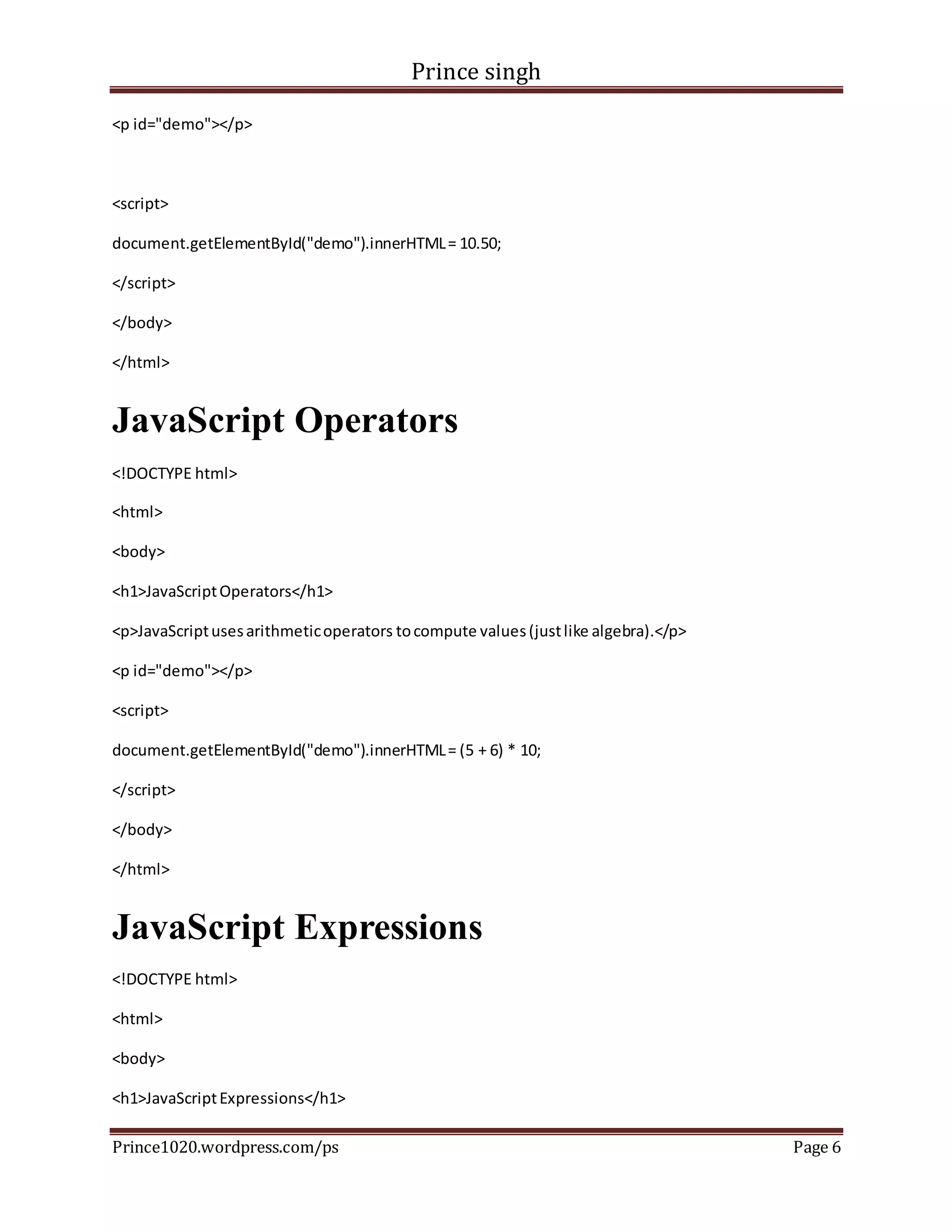
<script>
document.getElementById("demo").innerHTML= 10.50;
</script>
</body>
</html>
JavaScript Operators
<!DOCTYPE html>
<html>
<body>
<h1>JavaScriptOperators</h1>
<p>JavaScriptusesarithmeticoperators tocompute values(justlike algebra).</p>
<p id="demo"></p>
<script>
document.getElementById("demo").innerHTML= (5 + 6) * 10;
</script>
</body>
</html>
JavaScript Expressions
<!DOCTYPE html>
<html>
<body>
<h1>JavaScriptExpressions</h1>
Prince singh
Prince1020.wordpress.com/ps Page 7
<p>Expressionscompute tovalues.</p>
<p id="demo"></p>
<script>
document.getElementById("demo").innerHTML= 5 * 10;
</script>
</body>
</html>
The var Keyword Creates a Variable
<!DOCTYPE html>
<html>
<body>
<h1>The var KeywordCreatesaVariable</h1>
<p id="demo"></p>
<script>
var x = 5 + 6;
var y = x * 10;
document.getElementById("demo").innerHTML= y;
</script>
</body>
</html>
Multiple statements on one line is allowed.
<!DOCTYPE html>
<html>
Prince singh
Prince1020.wordpress.com/ps Page 8
<body>
<p>Multiple statementsonone line isallowed.</p>
<p id="demo1"></p>
<script>
a = 1; b = 2; c = a + b;
document.getElementById("demo1").innerHTML= c;
</script>
</body>
</html>
The / Operator
<!DOCTYPE html>
<html>
<body>
<h1>The / Operator</h1>
<p id="demo"></p>
<script>
var x = 5;
var y = 2;
var z = x /y;
document.getElementById("demo").innerHTML= z;
</script>
</body>
</html>
Prince singh
Prince1020.wordpress.com/ps Page 9
The % Operator
<!DOCTYPE html>
<html>
<body>
<h1>The % Operator</h1>
<p id="demo"></p>
<script>
var x = 5;
var y = 2;
var z = x %y;
document.getElementById("demo").innerHTML= z;
</script>
</body>
</html>
JavaScript Operator Precedence Values
Value Operator Description Example
19 ( ) Expression grouping (3 + 4)
18 . Member person.name
Prince singh
Prince1020.wordpress.com/ps Page 10
18 [] Member person["name"]
17 () Function call myFunction()
17 new Create new Date()
16 ++ Postfix Increment i++
16 -- Postfix Decrement i--
15 ++ Prefix Increment ++i
15 -- Prefix Decrement --i
15 ! Logical not !(x==y)
15 typeof Type typeof x
Prince singh
Prince1020.wordpress.com/ps Page 11
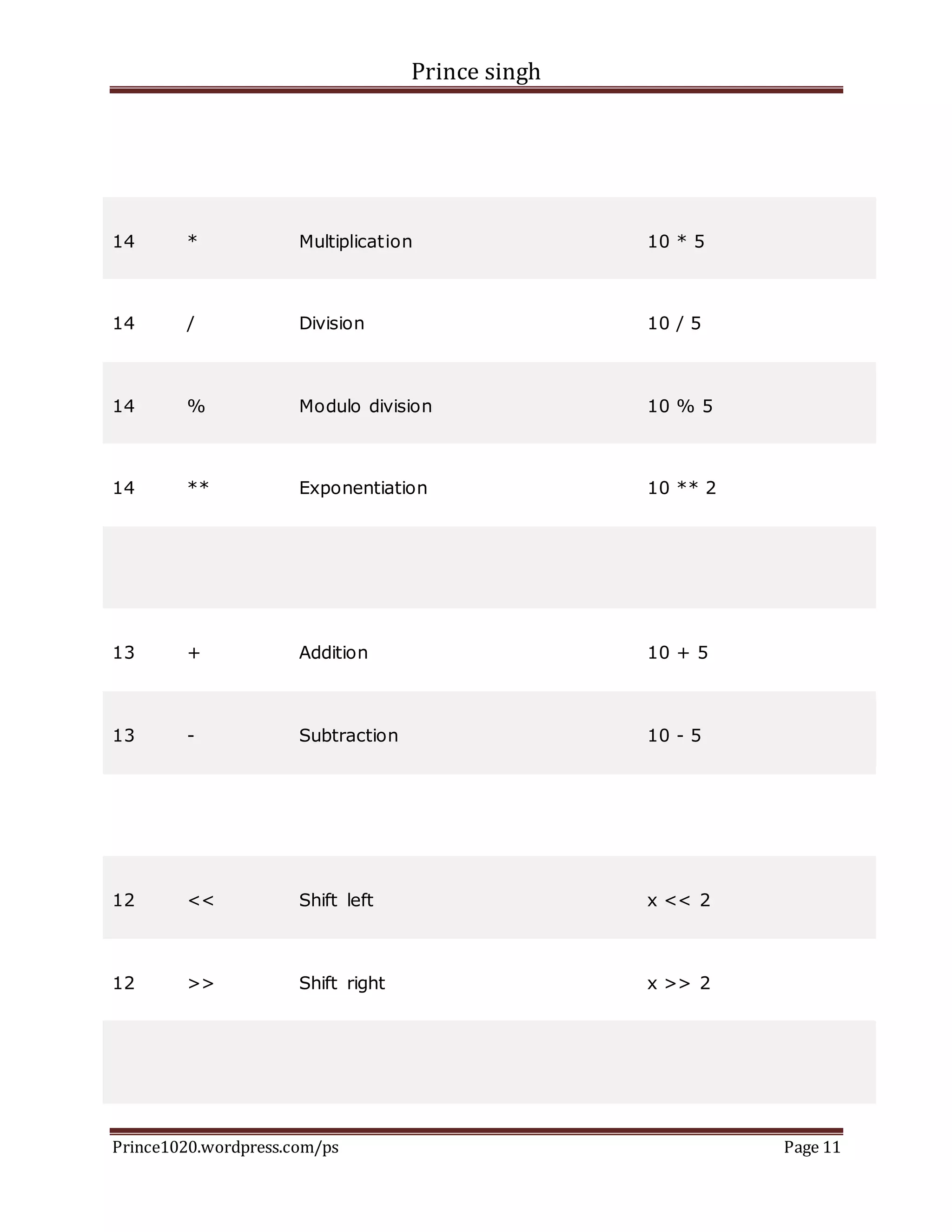
14 * Multiplication 10 * 5
14 / Division 10 / 5
14 % Modulo division 10 % 5
14 ** Exponentiation 10 ** 2
13 + Addition 10 + 5
13 - Subtraction 10 - 5
12 << Shift left x << 2
12 >> Shift right x >> 2
Prince singh
Prince1020.wordpress.com/ps Page 12
11 < Less than x < y
11 <= Less than or equal x <= y
11 > Greater than x > y
11 >= Greater than or equal x >= y
10 == Equal x == y
10 === Strict equal x === y
10 != Unequal x != y
10 !== Strict unequal x !== y
6 && And x && y
5 || Or x || y
Prince singh
Prince1020.wordpress.com/ps Page 13
3 = Assignment x = y
3 += Assignment x += y
3 -= Assignment x -= y
3 *= Assignment x *= y
3 /= Assignment x /= y
The -= Operator
<!DOCTYPE html>
<html>
<body>
<h1>The -= Operator</h1>
<p id="demo"></p>
<script>
var x = 10;
x -= 5;
document.getElementById("demo").innerHTML= x;
</script>
Prince singh
Prince1020.wordpress.com/ps Page 14
</body>
</html>

HTML_HHC

  • 1.
    Prince singh Prince1020.wordpress.com/ps Page1 Contents My First JavaScript......................................................... 2 What Can JavaScript Do? ............................................... 2 JavaScript Can Change Images ....................................... 3 JavaScript in Head.......................................................... 3 External JavaScript......................................................... 4 JavaScript Statements.................................................... 5 JavaScript Numbers ....................................................... 5 JavaScript Operators...................................................... 6 JavaScript Expressions ................................................... 6 The var Keyword Creates a Variable............................... 7 The / Operator............................................................... 8 The % Operator ............................................................. 9 JavaScript Operator Precedence Values ......................... 9 The -= Operator ........................................................... 13
  • 2.
    Prince singh Prince1020.wordpress.com/ps Page2 My First JavaScript <!DOCTYPE html> <html> <body> <h1>My FirstJavaScript</h1> <buttontype="button" onclick="document.getElementById('demo').innerHTML= Date()"> Clickme to displayDate andTime.</button> <p id="demo"></p> </body> </html> What Can JavaScript Do? <!DOCTYPE html> <html> <body> <h1>What Can JavaScriptDo?</h1> <p id="demo">JavaScriptcanchange HTML content.</p> <buttontype="button" onclick="document.getElementById('demo').innerHTML= 'HelloJavaScript!'"> ClickMe!</button> </body> </html>
  • 3.
    Prince singh Prince1020.wordpress.com/ps Page3 JavaScript Can Change Images <!DOCTYPE html> <html> <body> <h1>JavaScriptCan Change Images</h1> <img id="myImage"onclick="changeImage()"src="pic_bulboff.gif"width="100"height="180"> <p>Clickthe lightbulbto turnon/off the light.</p> <script> functionchangeImage() { var image = document.getElementById('myImage'); if (image.src.match("bulbon")) { image.src= "pic_bulboff.gif"; } else { image.src= "pic_bulbon.gif"; } } </script> </body> </html> JavaScript in Head <!DOCTYPE html> <html>
  • 4.
    Prince singh Prince1020.wordpress.com/ps Page4 <head> <script> functionmyFunction() { document.getElementById("demo").innerHTML= "Paragraphchanged."; } </script> </head> <body> <h1>JavaScriptin Head</h1> <p id="demo">A Paragraph.</p> <buttontype="button"onclick="myFunction()">Tryit</button> </body> </html> External JavaScript <!DOCTYPE html> <html> <body> <h1>External JavaScript</h1> <p id="demo">A Paragraph.</p> <buttontype="button"onclick="myFunction()">Tryit</button> <p><strong>Note:</strong>myFunctionisstoredinanexternal file called "myScript.js".</p> <script src="myScript.js"></script> </body> </html>
  • 5.
    Prince singh Prince1020.wordpress.com/ps Page5 JavaScript Statements <!DOCTYPE html> <html> <body> <h1>JavaScriptStatements</h1> <p>Statementsare separatedbysemicolons.</p> <p>The variablesx,y,andz are assignedthe values5,6, and 11:</p> <p id="demo"></p> <script> var x = 5; var y = 6; var z = x + y; document.getElementById("demo").innerHTML= z; </script> </body> </html> JavaScript Numbers <!DOCTYPE html> <html> <body> <h1>JavaScriptNumbers</h1> <p>Numbercan be written withorwithoutdecimals.</p>
  • 6.
    Prince singh Prince1020.wordpress.com/ps Page6 <p id="demo"></p> <script> document.getElementById("demo").innerHTML= 10.50; </script> </body> </html> JavaScript Operators <!DOCTYPE html> <html> <body> <h1>JavaScriptOperators</h1> <p>JavaScriptusesarithmeticoperators tocompute values(justlike algebra).</p> <p id="demo"></p> <script> document.getElementById("demo").innerHTML= (5 + 6) * 10; </script> </body> </html> JavaScript Expressions <!DOCTYPE html> <html> <body> <h1>JavaScriptExpressions</h1>
  • 7.
    Prince singh Prince1020.wordpress.com/ps Page7 <p>Expressionscompute tovalues.</p> <p id="demo"></p> <script> document.getElementById("demo").innerHTML= 5 * 10; </script> </body> </html> The var Keyword Creates a Variable <!DOCTYPE html> <html> <body> <h1>The var KeywordCreatesaVariable</h1> <p id="demo"></p> <script> var x = 5 + 6; var y = x * 10; document.getElementById("demo").innerHTML= y; </script> </body> </html> Multiple statements on one line is allowed. <!DOCTYPE html> <html>
  • 8.
    Prince singh Prince1020.wordpress.com/ps Page8 <body> <p>Multiple statementsonone line isallowed.</p> <p id="demo1"></p> <script> a = 1; b = 2; c = a + b; document.getElementById("demo1").innerHTML= c; </script> </body> </html> The / Operator <!DOCTYPE html> <html> <body> <h1>The / Operator</h1> <p id="demo"></p> <script> var x = 5; var y = 2; var z = x /y; document.getElementById("demo").innerHTML= z; </script> </body> </html>
  • 9.
    Prince singh Prince1020.wordpress.com/ps Page9 The % Operator <!DOCTYPE html> <html> <body> <h1>The % Operator</h1> <p id="demo"></p> <script> var x = 5; var y = 2; var z = x %y; document.getElementById("demo").innerHTML= z; </script> </body> </html> JavaScript Operator Precedence Values Value Operator Description Example 19 ( ) Expression grouping (3 + 4) 18 . Member person.name
  • 10.
    Prince singh Prince1020.wordpress.com/ps Page10 18 [] Member person["name"] 17 () Function call myFunction() 17 new Create new Date() 16 ++ Postfix Increment i++ 16 -- Postfix Decrement i-- 15 ++ Prefix Increment ++i 15 -- Prefix Decrement --i 15 ! Logical not !(x==y) 15 typeof Type typeof x
  • 11.
    Prince singh Prince1020.wordpress.com/ps Page11 14 * Multiplication 10 * 5 14 / Division 10 / 5 14 % Modulo division 10 % 5 14 ** Exponentiation 10 ** 2 13 + Addition 10 + 5 13 - Subtraction 10 - 5 12 << Shift left x << 2 12 >> Shift right x >> 2
  • 12.
    Prince singh Prince1020.wordpress.com/ps Page12 11 < Less than x < y 11 <= Less than or equal x <= y 11 > Greater than x > y 11 >= Greater than or equal x >= y 10 == Equal x == y 10 === Strict equal x === y 10 != Unequal x != y 10 !== Strict unequal x !== y 6 && And x && y 5 || Or x || y
  • 13.
    Prince singh Prince1020.wordpress.com/ps Page13 3 = Assignment x = y 3 += Assignment x += y 3 -= Assignment x -= y 3 *= Assignment x *= y 3 /= Assignment x /= y The -= Operator <!DOCTYPE html> <html> <body> <h1>The -= Operator</h1> <p id="demo"></p> <script> var x = 10; x -= 5; document.getElementById("demo").innerHTML= x; </script>
  • 14.