Expressions in JavaScript
Jerry Cain
CS 106AJ
October 1, 2018
slides courtesy of Eric Roberts
What is JavaScript?
• JavaScript was developed at the Netscape Communications
Corporation in 1995, reportedly by a single programmer in
just 10 days. The language, which was called Mocha at the
time, was designed to serve as a programming language that
could be embedded in web pages viewed in the browser.
• JavaScript has since become the dominant language for all
interactive web content and appears in some surveys as the
most popular language in the computing industry.
• As always, the focus of any of the CS 106A courses is to
teach you the fundamentals of programming, rather than to
teach the details of any particular language.
• To this end, CS 106AJ does not try to teach all of JavaScript,
but focuses instead on what the JavaScript expert and
evangelist Douglas Crockford calls "the good parts".
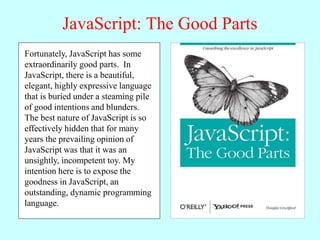
JavaScript: The Good Parts
JavaScript is a language with more
than its share of bad parts. It went
from non-existence to global
adoption in an alarmingly short
period of time. It never had an
interval in the lab when it could be
tried out and polished. It went
straight into Netscape Navigator 2
just as it was, and it was very rough.
When Java applets failed,
JavaScript became the “Language
of the Web” by default. JavaScript’s
popularity is almost completely
independent of its qualities as a
programming language.
Fortunately, JavaScript has some
extraordinarily good parts. In
JavaScript, there is a beautiful,
elegant, highly expressive language
that is buried under a steaming pile
of good intentions and blunders.
The best nature of JavaScript is so
effectively hidden that for many
years the prevailing opinion of
JavaScript was that it was an
unsightly, incompetent toy. My
intention here is to expose the
goodness in JavaScript, an
outstanding, dynamic programming
language.
Arithmetic Expressions
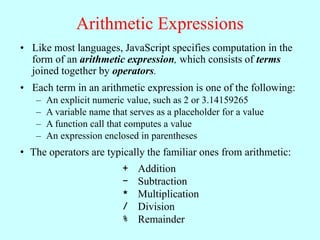
• Like most languages, JavaScript specifies computation in the
form of an arithmetic expression, which consists of terms
joined together by operators.
• Each term in an arithmetic expression is one of the following:
– An explicit numeric value, such as 2 or 3.14159265
– A variable name that serves as a placeholder for a value
– A function call that computes a value
– An expression enclosed in parentheses
• The operators are typically the familiar ones from arithmetic:
+ Addition
– Subtraction
* Multiplication
/ Division
% Remainder
The Remainder Operator
• The result of the % operator make intuitive sense only if both
operands are positive integers. The examples in the book do
not depend on knowing how % works with negative numbers
or numbers that have fractional parts.
• The remainder operator turns out to be useful in a surprising
number of programming applications and is well worth a bit
of study.
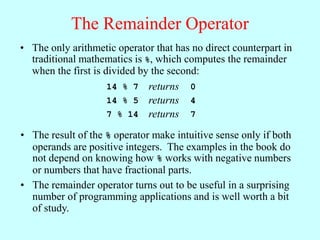
• The only arithmetic operator that has no direct counterpart in
traditional mathematics is %, which computes the remainder
when the first is divided by the second:
14 % 7 returns 0
14 % 5 returns 4
7 % 14 returns 7
Using the JavaScript Console
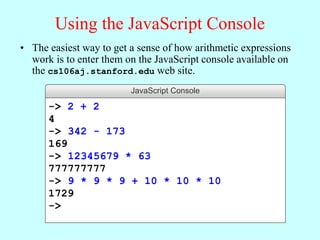
• The easiest way to get a sense of how arithmetic expressions
work is to enter them on the JavaScript console available on
the cs106aj.stanford.edu web site.
JavaScript Console
-> 2 + 2
4
-> 342 - 173
169
-> 12345679 * 63
777777777
-> 9 * 9 * 9 + 10 * 10 * 10
1729
->
Variables
• The simplest terms that appear in expressions are constant
literals and variables. A variable is a placeholder for a value
that can be updated as the program runs.
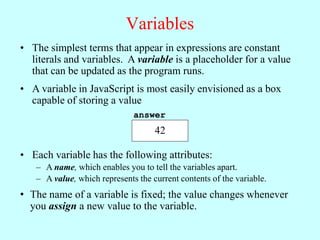
• A variable in JavaScript is most easily envisioned as a box
capable of storing a value
• Each variable has the following attributes:
– A name, which enables you to tell the variables apart.
– A value, which represents the current contents of the variable.
• The name of a variable is fixed; the value changes whenever
you assign a new value to the variable.
answer
42
Variable Declarations
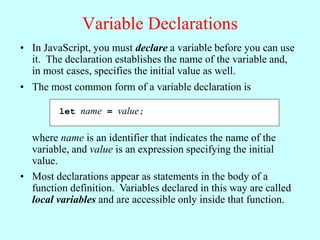
• In JavaScript, you must declare a variable before you can use
it. The declaration establishes the name of the variable and,
in most cases, specifies the initial value as well.
let name = value;
• The most common form of a variable declaration is
where name is an identifier that indicates the name of the
variable, and value is an expression specifying the initial
value.
• Most declarations appear as statements in the body of a
function definition. Variables declared in this way are called
local variables and are accessible only inside that function.
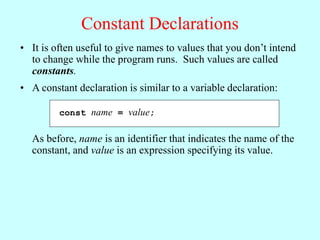
Constant Declarations
• It is often useful to give names to values that you don’t intend
to change while the program runs. Such values are called
constants.
const name = value;
• A constant declaration is similar to a variable declaration:
As before, name is an identifier that indicates the name of the
constant, and value is an expression specifying its value.
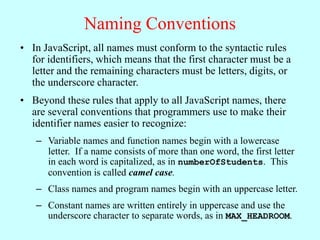
Naming Conventions
• In JavaScript, all names must conform to the syntactic rules
for identifiers, which means that the first character must be a
letter and the remaining characters must be letters, digits, or
the underscore character.
• Beyond these rules that apply to all JavaScript names, there
are several conventions that programmers use to make their
identifier names easier to recognize:
– Variable names and function names begin with a lowercase
letter. If a name consists of more than one word, the first letter
in each word is capitalized, as in numberOfStudents. This
convention is called camel case.
– Class names and program names begin with an uppercase letter.
– Constant names are written entirely in uppercase and use the
underscore character to separate words, as in MAX_HEADROOM.
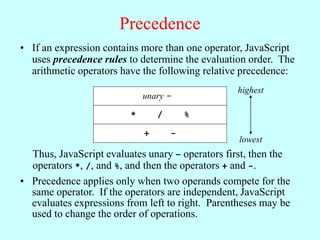
Precedence
• If an expression contains more than one operator, JavaScript
uses precedence rules to determine the evaluation order. The
arithmetic operators have the following relative precedence:
unary -
* / %
+ -
highest
lowest
Thus, JavaScript evaluates unary – operators first, then the
operators *, /, and %, and then the operators + and -.
• Precedence applies only when two operands compete for the
same operator. If the operators are independent, JavaScript
evaluates expressions from left to right. Parentheses may be
used to change the order of operations.
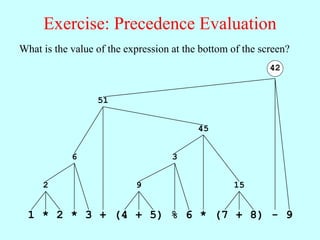
Exercise: Precedence Evaluation
What is the value of the expression at the bottom of the screen?
1 * 2
2
* 3
6
+ 4 + 5
9
( ) % 6
3
* 7 + 8
15
( )
45
51
- 9
42
Assignment Statements
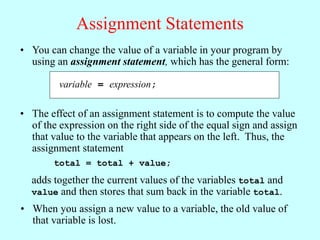
variable = expression;
• You can change the value of a variable in your program by
using an assignment statement, which has the general form:
• The effect of an assignment statement is to compute the value
of the expression on the right side of the equal sign and assign
that value to the variable that appears on the left. Thus, the
assignment statement
total = total + value;
adds together the current values of the variables total and
value and then stores that sum back in the variable total.
• When you assign a new value to a variable, the old value of
that variable is lost.
Shorthand Assignments
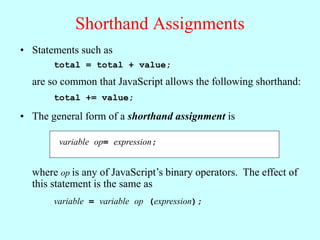
• Statements such as
total = total + value;
are so common that JavaScript allows the following shorthand:
total += value;
variable op= expression;
• The general form of a shorthand assignment is
where op is any of JavaScript’s binary operators. The effect of
this statement is the same as
variable = variable op (expression);
Increment and Decrement Operators
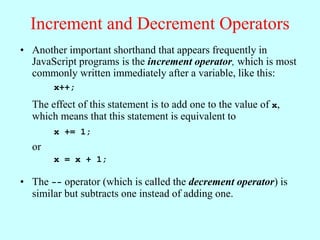
• Another important shorthand that appears frequently in
JavaScript programs is the increment operator, which is most
commonly written immediately after a variable, like this:
x++;
The effect of this statement is to add one to the value of x,
which means that this statement is equivalent to
x += 1;
or
x = x + 1;
• The -- operator (which is called the decrement operator) is
similar but subtracts one instead of adding one.
Functions Revisited
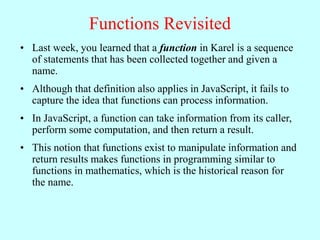
• Last week, you learned that a function in Karel is a sequence
of statements that has been collected together and given a
name.
• Although that definition also applies in JavaScript, it fails to
capture the idea that functions can process information.
• In JavaScript, a function can take information from its caller,
perform some computation, and then return a result.
• This notion that functions exist to manipulate information and
return results makes functions in programming similar to
functions in mathematics, which is the historical reason for
the name.
Functions in Mathematics
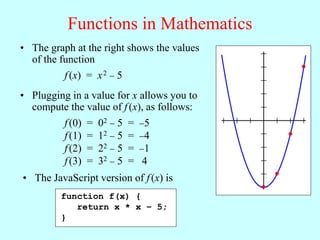
• Plugging in a value for x allows you to
compute the value of f(x), as follows:
• The graph at the right shows the values
of the function
f(x) = x2  5
f(0) = 02  5 = 5
f(1) = 12  5 = 4
f(2) = 22  5 = 1
f(3) = 32  5 = 4
• The JavaScript version of f(x) is
function f(x) {
return x * x – 5;
}
Writing JavaScript Functions
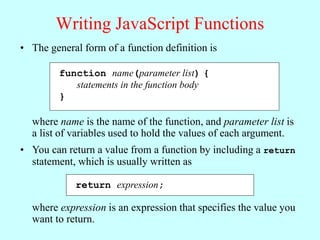
• The general form of a function definition is
function name(parameter list) {
statements in the function body
}
where name is the name of the function, and parameter list is
a list of variables used to hold the values of each argument.
• You can return a value from a function by including a return
statement, which is usually written as
return expression;
where expression is an expression that specifies the value you
want to return.
Examples of Simple Functions
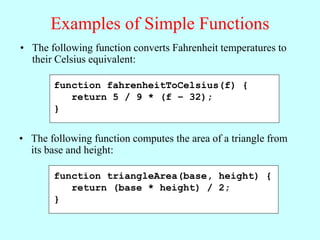
• The following function converts Fahrenheit temperatures to
their Celsius equivalent:
function fahrenheitToCelsius(f) {
return 5 / 9 * (f – 32);
}
• The following function computes the area of a triangle from
its base and height:
function triangleArea(base, height) {
return (base * height) / 2;
}
Libraries
• To make programming easier, all modern languages include
collections of predefined functions. Those collections are
called libraries.
• For programming that involves mathematical calculations, the
most useful library is the Math library, which includes a
number of functions that will be familiar from high-school
mathematics (along with many that probably aren’t). A list of
the most important functions appears on the next slide.
• In JavaScript, each of the functions in the Math library begins
with the library name followed by a dot and then the name of
the function. For example, the function that calculates square
roots is named Math.sqrt.
• You call library functions just like any other function, so that
calling Math.sqrt(16) returns the value 4.
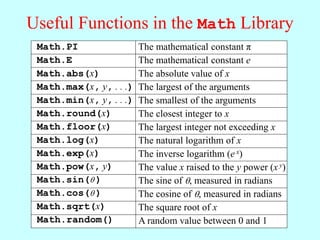
Useful Functions in the Math Library
Math.abs(x)
Math.max(x, y, . . .)
Math.min(x, y, . . .)
Math.round(x)
Math.floor(x)
Math.log(x)
Math.pow(x, y)
Math.sin( )
Math.cos( )
Math.sqrt(x)
Math.PI
Math.E
Math.exp(x)
The mathematical constant π
The mathematical constant e
The absolute value of x
The largest of the arguments
The smallest of the arguments
The closest integer to x
The largest integer not exceeding x
The natural logarithm of x
The inverse logarithm (e x)
The value x raised to the y power (x y)
The sine of , measured in radians
The cosine of , measured in radians
The square root of x
Math.random() A random value between 0 and 1
Exercise: Calculating a Quotient
• It is often useful to be able to compute the quotient of two
numbers, which is the whole number that results if you divide
the first by the second and then throw away any remainder.
• As noted on the prior slide, there is a function called floor in
the Math library that makes the quotient function easier to
write, but it is possible to write it using only JavaScript’s
standard arithmetic operators.
• Get together with your neighbors in the class and come up
with an implementation for a function quotient(x, y) that
returns the quotient of the positive integers x and y.
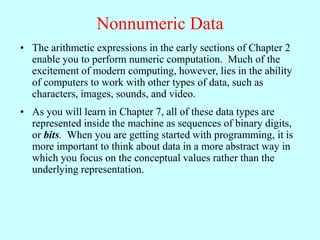
Nonnumeric Data
• The arithmetic expressions in the early sections of Chapter 2
enable you to perform numeric computation. Much of the
excitement of modern computing, however, lies in the ability
of computers to work with other types of data, such as
characters, images, sounds, and video.
• As you will learn in Chapter 7, all of these data types are
represented inside the machine as sequences of binary digits,
or bits. When you are getting started with programming, it is
more important to think about data in a more abstract way in
which you focus on the conceptual values rather than the
underlying representation.
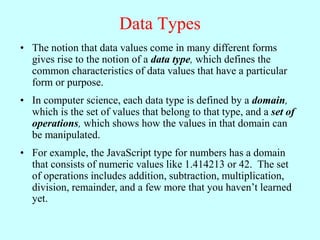
Data Types
• The notion that data values come in many different forms
gives rise to the notion of a data type, which defines the
common characteristics of data values that have a particular
form or purpose.
• In computer science, each data type is defined by a domain,
which is the set of values that belong to that type, and a set of
operations, which shows how the values in that domain can
be manipulated.
• For example, the JavaScript type for numbers has a domain
that consists of numeric values like 1.414213 or 42. The set
of operations includes addition, subtraction, multiplication,
division, remainder, and a few more that you haven’t learned
yet.
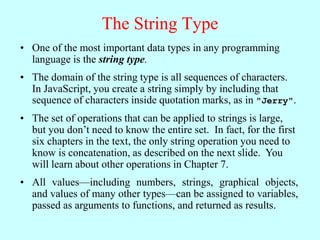
The String Type
• One of the most important data types in any programming
language is the string type.
• The domain of the string type is all sequences of characters.
In JavaScript, you create a string simply by including that
sequence of characters inside quotation marks, as in "Jerry".
• The set of operations that can be applied to strings is large,
but you don’t need to know the entire set. In fact, for the first
six chapters in the text, the only string operation you need to
know is concatenation, as described on the next slide. You
will learn about other operations in Chapter 7.
• All values—including numbers, strings, graphical objects,
and values of many other types—can be assigned to variables,
passed as arguments to functions, and returned as results.
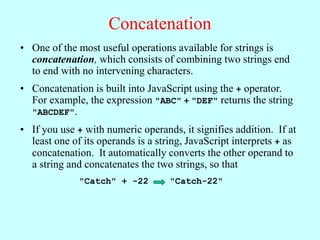
Concatenation
• One of the most useful operations available for strings is
concatenation, which consists of combining two strings end
to end with no intervening characters.
• Concatenation is built into JavaScript using the + operator.
For example, the expression "ABC" + "DEF" returns the string
"ABCDEF".
• If you use + with numeric operands, it signifies addition. If at
least one of its operands is a string, JavaScript interprets + as
concatenation. It automatically converts the other operand to
a string and concatenates the two strings, so that
"Catch" + -22 "Catch-22"
The End

ExpressionsInJavaScriptkkkkkkkkkkkkkkkkk

  • 1.
    Expressions in JavaScript JerryCain CS 106AJ October 1, 2018 slides courtesy of Eric Roberts
  • 2.
    What is JavaScript? •JavaScript was developed at the Netscape Communications Corporation in 1995, reportedly by a single programmer in just 10 days. The language, which was called Mocha at the time, was designed to serve as a programming language that could be embedded in web pages viewed in the browser. • JavaScript has since become the dominant language for all interactive web content and appears in some surveys as the most popular language in the computing industry. • As always, the focus of any of the CS 106A courses is to teach you the fundamentals of programming, rather than to teach the details of any particular language. • To this end, CS 106AJ does not try to teach all of JavaScript, but focuses instead on what the JavaScript expert and evangelist Douglas Crockford calls "the good parts".
  • 3.
    JavaScript: The GoodParts JavaScript is a language with more than its share of bad parts. It went from non-existence to global adoption in an alarmingly short period of time. It never had an interval in the lab when it could be tried out and polished. It went straight into Netscape Navigator 2 just as it was, and it was very rough. When Java applets failed, JavaScript became the “Language of the Web” by default. JavaScript’s popularity is almost completely independent of its qualities as a programming language. Fortunately, JavaScript has some extraordinarily good parts. In JavaScript, there is a beautiful, elegant, highly expressive language that is buried under a steaming pile of good intentions and blunders. The best nature of JavaScript is so effectively hidden that for many years the prevailing opinion of JavaScript was that it was an unsightly, incompetent toy. My intention here is to expose the goodness in JavaScript, an outstanding, dynamic programming language.
  • 4.
    Arithmetic Expressions • Likemost languages, JavaScript specifies computation in the form of an arithmetic expression, which consists of terms joined together by operators. • Each term in an arithmetic expression is one of the following: – An explicit numeric value, such as 2 or 3.14159265 – A variable name that serves as a placeholder for a value – A function call that computes a value – An expression enclosed in parentheses • The operators are typically the familiar ones from arithmetic: + Addition – Subtraction * Multiplication / Division % Remainder
  • 5.
    The Remainder Operator •The result of the % operator make intuitive sense only if both operands are positive integers. The examples in the book do not depend on knowing how % works with negative numbers or numbers that have fractional parts. • The remainder operator turns out to be useful in a surprising number of programming applications and is well worth a bit of study. • The only arithmetic operator that has no direct counterpart in traditional mathematics is %, which computes the remainder when the first is divided by the second: 14 % 7 returns 0 14 % 5 returns 4 7 % 14 returns 7
  • 6.
    Using the JavaScriptConsole • The easiest way to get a sense of how arithmetic expressions work is to enter them on the JavaScript console available on the cs106aj.stanford.edu web site. JavaScript Console -> 2 + 2 4 -> 342 - 173 169 -> 12345679 * 63 777777777 -> 9 * 9 * 9 + 10 * 10 * 10 1729 ->
  • 7.
    Variables • The simplestterms that appear in expressions are constant literals and variables. A variable is a placeholder for a value that can be updated as the program runs. • A variable in JavaScript is most easily envisioned as a box capable of storing a value • Each variable has the following attributes: – A name, which enables you to tell the variables apart. – A value, which represents the current contents of the variable. • The name of a variable is fixed; the value changes whenever you assign a new value to the variable. answer 42
  • 8.
    Variable Declarations • InJavaScript, you must declare a variable before you can use it. The declaration establishes the name of the variable and, in most cases, specifies the initial value as well. let name = value; • The most common form of a variable declaration is where name is an identifier that indicates the name of the variable, and value is an expression specifying the initial value. • Most declarations appear as statements in the body of a function definition. Variables declared in this way are called local variables and are accessible only inside that function.
  • 9.
    Constant Declarations • Itis often useful to give names to values that you don’t intend to change while the program runs. Such values are called constants. const name = value; • A constant declaration is similar to a variable declaration: As before, name is an identifier that indicates the name of the constant, and value is an expression specifying its value.
  • 10.
    Naming Conventions • InJavaScript, all names must conform to the syntactic rules for identifiers, which means that the first character must be a letter and the remaining characters must be letters, digits, or the underscore character. • Beyond these rules that apply to all JavaScript names, there are several conventions that programmers use to make their identifier names easier to recognize: – Variable names and function names begin with a lowercase letter. If a name consists of more than one word, the first letter in each word is capitalized, as in numberOfStudents. This convention is called camel case. – Class names and program names begin with an uppercase letter. – Constant names are written entirely in uppercase and use the underscore character to separate words, as in MAX_HEADROOM.
  • 11.
    Precedence • If anexpression contains more than one operator, JavaScript uses precedence rules to determine the evaluation order. The arithmetic operators have the following relative precedence: unary - * / % + - highest lowest Thus, JavaScript evaluates unary – operators first, then the operators *, /, and %, and then the operators + and -. • Precedence applies only when two operands compete for the same operator. If the operators are independent, JavaScript evaluates expressions from left to right. Parentheses may be used to change the order of operations.
  • 12.
    Exercise: Precedence Evaluation Whatis the value of the expression at the bottom of the screen? 1 * 2 2 * 3 6 + 4 + 5 9 ( ) % 6 3 * 7 + 8 15 ( ) 45 51 - 9 42
  • 13.
    Assignment Statements variable =expression; • You can change the value of a variable in your program by using an assignment statement, which has the general form: • The effect of an assignment statement is to compute the value of the expression on the right side of the equal sign and assign that value to the variable that appears on the left. Thus, the assignment statement total = total + value; adds together the current values of the variables total and value and then stores that sum back in the variable total. • When you assign a new value to a variable, the old value of that variable is lost.
  • 14.
    Shorthand Assignments • Statementssuch as total = total + value; are so common that JavaScript allows the following shorthand: total += value; variable op= expression; • The general form of a shorthand assignment is where op is any of JavaScript’s binary operators. The effect of this statement is the same as variable = variable op (expression);
  • 15.
    Increment and DecrementOperators • Another important shorthand that appears frequently in JavaScript programs is the increment operator, which is most commonly written immediately after a variable, like this: x++; The effect of this statement is to add one to the value of x, which means that this statement is equivalent to x += 1; or x = x + 1; • The -- operator (which is called the decrement operator) is similar but subtracts one instead of adding one.
  • 16.
    Functions Revisited • Lastweek, you learned that a function in Karel is a sequence of statements that has been collected together and given a name. • Although that definition also applies in JavaScript, it fails to capture the idea that functions can process information. • In JavaScript, a function can take information from its caller, perform some computation, and then return a result. • This notion that functions exist to manipulate information and return results makes functions in programming similar to functions in mathematics, which is the historical reason for the name.
  • 17.
    Functions in Mathematics •Plugging in a value for x allows you to compute the value of f(x), as follows: • The graph at the right shows the values of the function f(x) = x2  5 f(0) = 02  5 = 5 f(1) = 12  5 = 4 f(2) = 22  5 = 1 f(3) = 32  5 = 4 • The JavaScript version of f(x) is function f(x) { return x * x – 5; }
  • 18.
    Writing JavaScript Functions •The general form of a function definition is function name(parameter list) { statements in the function body } where name is the name of the function, and parameter list is a list of variables used to hold the values of each argument. • You can return a value from a function by including a return statement, which is usually written as return expression; where expression is an expression that specifies the value you want to return.
  • 19.
    Examples of SimpleFunctions • The following function converts Fahrenheit temperatures to their Celsius equivalent: function fahrenheitToCelsius(f) { return 5 / 9 * (f – 32); } • The following function computes the area of a triangle from its base and height: function triangleArea(base, height) { return (base * height) / 2; }
  • 20.
    Libraries • To makeprogramming easier, all modern languages include collections of predefined functions. Those collections are called libraries. • For programming that involves mathematical calculations, the most useful library is the Math library, which includes a number of functions that will be familiar from high-school mathematics (along with many that probably aren’t). A list of the most important functions appears on the next slide. • In JavaScript, each of the functions in the Math library begins with the library name followed by a dot and then the name of the function. For example, the function that calculates square roots is named Math.sqrt. • You call library functions just like any other function, so that calling Math.sqrt(16) returns the value 4.
  • 21.
    Useful Functions inthe Math Library Math.abs(x) Math.max(x, y, . . .) Math.min(x, y, . . .) Math.round(x) Math.floor(x) Math.log(x) Math.pow(x, y) Math.sin( ) Math.cos( ) Math.sqrt(x) Math.PI Math.E Math.exp(x) The mathematical constant π The mathematical constant e The absolute value of x The largest of the arguments The smallest of the arguments The closest integer to x The largest integer not exceeding x The natural logarithm of x The inverse logarithm (e x) The value x raised to the y power (x y) The sine of , measured in radians The cosine of , measured in radians The square root of x Math.random() A random value between 0 and 1
  • 22.
    Exercise: Calculating aQuotient • It is often useful to be able to compute the quotient of two numbers, which is the whole number that results if you divide the first by the second and then throw away any remainder. • As noted on the prior slide, there is a function called floor in the Math library that makes the quotient function easier to write, but it is possible to write it using only JavaScript’s standard arithmetic operators. • Get together with your neighbors in the class and come up with an implementation for a function quotient(x, y) that returns the quotient of the positive integers x and y.
  • 23.
    Nonnumeric Data • Thearithmetic expressions in the early sections of Chapter 2 enable you to perform numeric computation. Much of the excitement of modern computing, however, lies in the ability of computers to work with other types of data, such as characters, images, sounds, and video. • As you will learn in Chapter 7, all of these data types are represented inside the machine as sequences of binary digits, or bits. When you are getting started with programming, it is more important to think about data in a more abstract way in which you focus on the conceptual values rather than the underlying representation.
  • 24.
    Data Types • Thenotion that data values come in many different forms gives rise to the notion of a data type, which defines the common characteristics of data values that have a particular form or purpose. • In computer science, each data type is defined by a domain, which is the set of values that belong to that type, and a set of operations, which shows how the values in that domain can be manipulated. • For example, the JavaScript type for numbers has a domain that consists of numeric values like 1.414213 or 42. The set of operations includes addition, subtraction, multiplication, division, remainder, and a few more that you haven’t learned yet.
  • 25.
    The String Type •One of the most important data types in any programming language is the string type. • The domain of the string type is all sequences of characters. In JavaScript, you create a string simply by including that sequence of characters inside quotation marks, as in "Jerry". • The set of operations that can be applied to strings is large, but you don’t need to know the entire set. In fact, for the first six chapters in the text, the only string operation you need to know is concatenation, as described on the next slide. You will learn about other operations in Chapter 7. • All values—including numbers, strings, graphical objects, and values of many other types—can be assigned to variables, passed as arguments to functions, and returned as results.
  • 26.
    Concatenation • One ofthe most useful operations available for strings is concatenation, which consists of combining two strings end to end with no intervening characters. • Concatenation is built into JavaScript using the + operator. For example, the expression "ABC" + "DEF" returns the string "ABCDEF". • If you use + with numeric operands, it signifies addition. If at least one of its operands is a string, JavaScript interprets + as concatenation. It automatically converts the other operand to a string and concatenates the two strings, so that "Catch" + -22 "Catch-22"
  • 27.