JavaScript
Interfaces
in HTML5

Aaron Gustafson
Easy Designs, LLC
slideshare.net/AaronGustafson
JavaScript Interfaces


Working with media
JavaScript Interfaces


Working with media
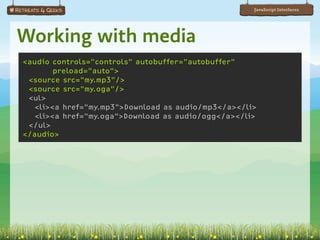
<audio controls="controls" autobuffer="autobuffer"
        preload="auto">
 <source src="my.mp3"/>
 <source src="my.oga"/>
 <ul>
   <li><a href="my.mp3">Download as audio/mp3</a></li>
   <li><a href="my.oga">Download as audio/ogg</a></li>
 </ul>
</audio>
JavaScript Interfaces


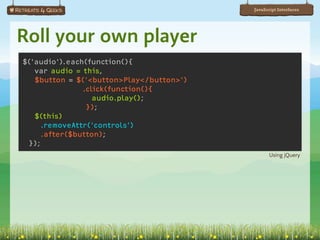
Roll your own player
$('audio').each(function(){
   var audio = this,
   $button = $('<button>Play</button>')
               .click(function(){
                  audio.play();
                });
   $(this)
    .removeAttr('controls')
    .after($button);
 });
                                                 Using jQuery
JavaScript Interfaces


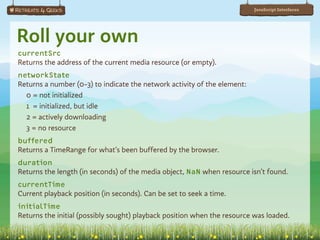
Roll your own
currentSrc
Returns the address of the current media resource (or empty).
networkState
Returns a number (0-3) to indicate the network activity of the element:
  0 = not initialized
  1 = initialized, but idle
  2 = actively downloading
  3 = no resource
buffered
Returns a TimeRange for what’s been buffered by the browser.
duration
Returns the length (in seconds) of the media object, NaN when resource isn’t found.
currentTime
Current playback position (in seconds). Can be set to seek a time.
initialTime
Returns the initial (possibly sought) playback position when the resource was loaded.
JavaScript Interfaces


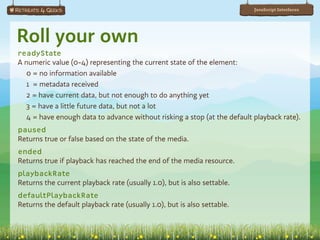
Roll your own
readyState
A numeric value (0-4) representing the current state of the element:
  0 = no information available
  1 = metadata received
  2 = have current data, but not enough to do anything yet
  3 = have a little future data, but not a lot
  4 = have enough data to advance without risking a stop (at the default playback rate).
paused
Returns true or false based on the state of the media.
ended
Returns true if playback has reached the end of the media resource.
playbackRate
Returns the current playback rate (usually 1.0), but is also settable.
defaultPlaybackRate
Returns the default playback rate (usually 1.0), but is also settable.
JavaScript Interfaces


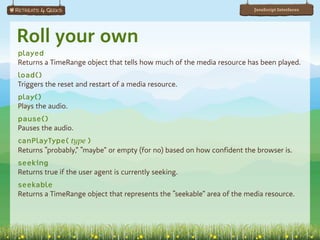
Roll your own
played
Returns a TimeRange object that tells how much of the media resource has been played.
load()
Triggers the reset and restart of a media resource.
play()
Plays the audio.
pause()
Pauses the audio.
canPlayType( type )
Returns “probably,” “maybe” or empty (for no) based on how confident the browser is.
seeking
Returns true if the user agent is currently seeking.
seekable
Returns a TimeRange object that represents the “seekable” area of the media resource.
JavaScript Interfaces


Test for native support
var
audio     = document.createElement('audio'),
test      = { mp3: 'audio/mpeg',
              oga: 'audio/ogg; codecs="vorbis"' },
supported = [];

if ( audio.canPlayType &&
     typeof audio.canPlayType == 'function' )
{
    for ( format in test )
    {
        if ( "" != audio.canPlayType( test[format] ) )
        {
            supported.push(format);
        }
    }
}
JavaScript Interfaces


Something for later…
JavaScript Interfaces


Something for later…
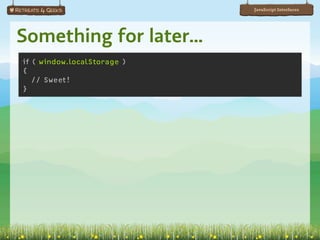
if ( window.localStorage )
{
   // Sweet!
}
JavaScript Interfaces


Something for later…
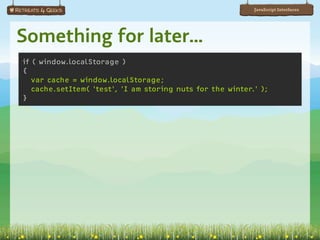
if ( window.localStorage )
{
   var cache = window.localStorage;
   cache.setItem( 'test', 'I am storing nuts for the winter.' );
}
JavaScript Interfaces


Something for later…
JavaScript Interfaces


Something for later…
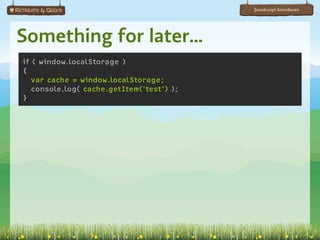
if ( window.localStorage )
{
   var cache = window.localStorage;
   console.log( cache.getItem('test') );
}
JavaScript Interfaces


Something for later…
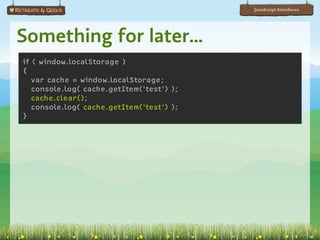
if ( window.localStorage )
{
   var cache = window.localStorage;
   console.log( cache.getItem('test') );
   cache.clear();
   console.log( cache.getItem('test') );
}
JavaScript Interfaces


Something for later…
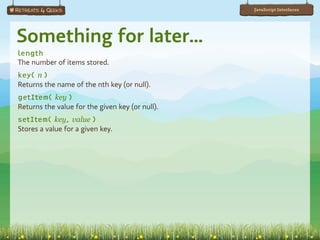
length
The number of items stored.
key( n )
Returns the name of the nth key (or null).
getItem( key )
Returns the value for the given key (or null).
setItem( key, value )
Stores a value for a given key.
JavaScript Interfaces


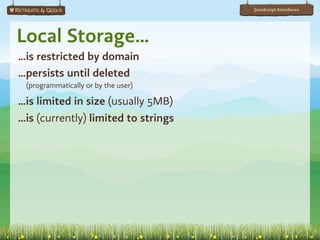
Local Storage…
…is restricted by domain
…persists until deleted
 (programmatically or by the user)

…is limited in size (usually 5MB)
…is (currently) limited to strings
JavaScript Interfaces


Session storage
…is like local storage
…disappears when the browser is closed
JavaScript Interfaces


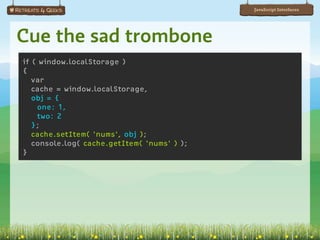
Cue the sad trombone
if ( window.localStorage )
{
   var
   cache = window.localStorage,
   obj = {
    one: 1,
    two: 2
   };
   cache.setItem( 'nums', obj );
   console.log( cache.getItem( 'nums' ) );
}
JavaScript Interfaces


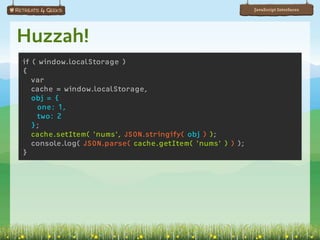
Huzzah!
if ( window.localStorage )
{
   var
   cache = window.localStorage,
   obj = {
    one: 1,
    two: 2
   };
   cache.setItem( 'nums', JSON.stringify( obj ) );
   console.log( JSON.parse( cache.getItem( 'nums' ) ) );
}
JavaScript Interfaces


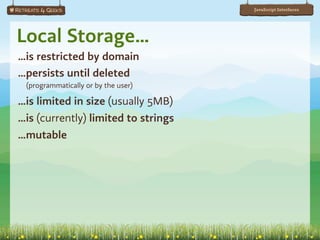
Local Storage…
…is restricted by domain
…persists until deleted
 (programmatically or by the user)

…is limited in size (usually 5MB)
…is (currently) limited to strings
…mutable
JavaScript Interfaces


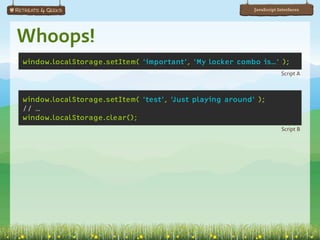
Whoops!
window.localStorage.setItem( ‘important’, ‘My locker combo is…’ );
                                                                      Script A


window.localStorage.setItem( ‘test’, ‘Just playing around’ );
// …
window.localStorage.clear();
                                                                      Script B
JavaScript Interfaces


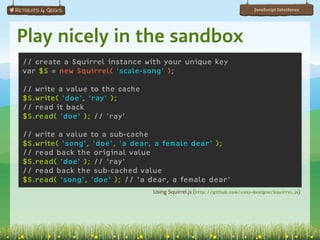
Play nicely in the sandbox
// create a Squirrel instance with your unique key
var $S = new Squirrel( 'scale-song' );

// write a value to the cache
$S.write( 'doe', 'ray' );
// read it back
$S.read( 'doe' ); // 'ray'

// write a value to a sub-cache
$S.write( 'song', 'doe', 'a dear, a female dear' );
// read back the original value
$S.read( 'doe' ); // 'ray'
// read back the sub-cached value
$S.read( 'song', 'doe' ); // 'a dear, a female dear'
                                Using Squirrel.js (http://github.com/easy-designs/Squirrel.js)
JavaScript Interfaces


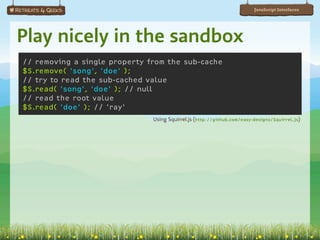
Play nicely in the sandbox
// removing a single property from the sub-cache
$S.remove( 'song', 'doe' );
// try to read the sub-cached value
$S.read( 'song', 'doe' ); // null
// read the root value
$S.read( 'doe' ); // 'ray'
                               Using Squirrel.js (http://github.com/easy-designs/Squirrel.js)
JavaScript Interfaces


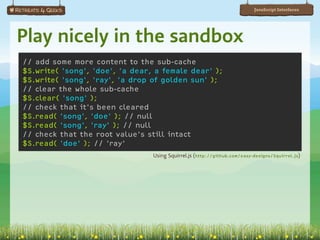
Play nicely in the sandbox
// add some more content to the sub-cache
$S.write( 'song', 'doe', 'a dear, a female dear' );
$S.write( 'song', 'ray', 'a drop of golden sun' );
// clear the whole sub-cache
$S.clear( 'song' );
// check that it's been cleared
$S.read( 'song', 'doe' ); // null
$S.read( 'song', 'ray' ); // null
// check that the root value's still intact
$S.read( 'doe' ); // 'ray'
                                 Using Squirrel.js (http://github.com/easy-designs/Squirrel.js)
JavaScript Interfaces


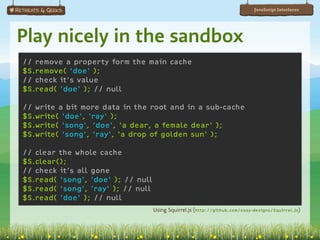
Play nicely in the sandbox
// remove a property form the main cache
$S.remove( 'doe' );
// check it's value
$S.read( 'doe' ); // null

// write a bit more data in the root and in a sub-cache
$S.write( 'doe', 'ray' );
$S.write( 'song', 'doe', 'a dear, a female dear' );
$S.write( 'song', 'ray', 'a drop of golden sun' );

// clear the whole cache
$S.clear();
// check it's all gone
$S.read( 'song', 'doe' ); // null
$S.read( 'song', 'ray' ); // null
$S.read( 'doe' ); // null
                                    Using Squirrel.js (http://github.com/easy-designs/Squirrel.js)
JavaScript Interfaces


When you need a “bigger boat”
JavaScript Interfaces


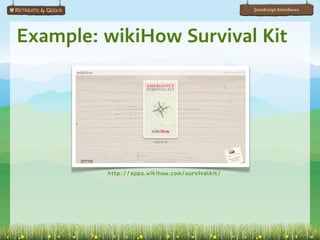
Example: wikiHow Survival Kit


         http://apps.wikihow.com/survivalkit/
JavaScript Interfaces


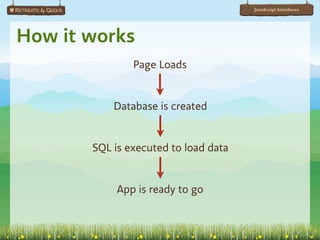
How it works
               Page Loads


           Database is created


       SQL is executed to load data


            App is ready to go
JavaScript Interfaces


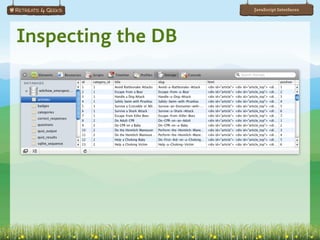
Inspecting the DB
JavaScript Interfaces


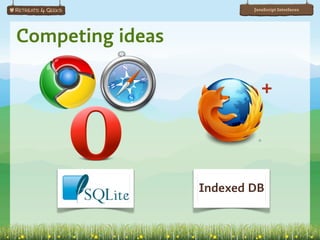
Competing ideas

                             +


                  Indexed DB
JavaScript Interfaces


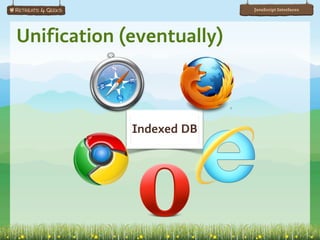
Unification (eventually)


             Indexed DB
JavaScript Interfaces


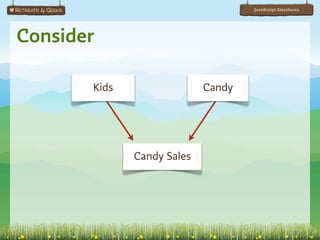
Consider

       Kids                 Candy


              Candy Sales
JavaScript Interfaces


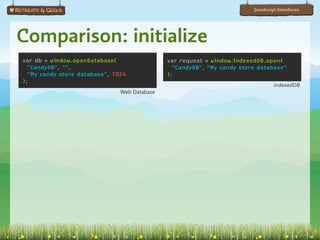
Comparison: initialize
var db = window.openDatabase(                 var request = window.indexedDB.open(
  "CandyDB", "",                                "CandyDB", "My candy store database"
  "My candy store database", 1024             );
);
                                                                                  indexedDB
                               Web Database
JavaScript Interfaces


Comparison: initialize                                                           Web Database

if (db.version != "1")
{
  db.changeVersion( db.version, "1", function(tx){
      // Initialize database
      var tables = [
        { name: "kids", columns: ["id INTEGER PRIMARY KEY", "name TEXT"]},
        { name: "candy", columns: ["id INTEGER PRIMARY KEY", "name TEXT"]},
        { name: "candySales", columns: ["kid_id INTEGER", "candy_id INTEGER",
                                         "date TEXT"]} ],
      len = tables.length, table;
      while ( len-- ) {
        table = tables[len];
        tx.executeSql(
          "CREATE TABLE " + table.name + "(" + table.columns.join(", ") + ");"
        );
      }
   },
   null, function(){ loadData(db); } );
}
else {
  // User has been here before, no initialization required.
  loadData(db);
}
JavaScript Interfaces


Comparison: initialize                                                               indexedDB

request.onsuccess = function(event) {
  var db = event.result;
  if (db.version != "1") {
    // Initialize database
    var createdObjectStoreCount = 0,
    objectStores = [ { name: "kids", keyPath: "id", autoIncrement: true },
                      { name: "candy", keyPath: "id", autoIncrement: true },
                      { name: "candySales", keyPath: "", autoIncrement: true } ],
    len = objectStores.length, params;
 
    while ( len-- ) {
      var params = objectStores[len];
      request = db.createObjectStore(
        params.name, params.keyPath, params.autoIncrement
      );
      request.onsuccess = objectStoreCreated;
    }
  }
  else {
    // User has been here before, no initialization required.
    loadData(db);
  }
};
JavaScript Interfaces


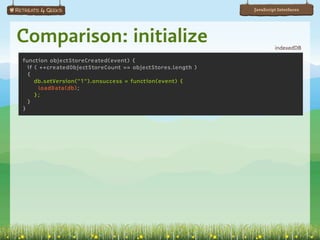
Comparison: initialize                                               indexedDB

function objectStoreCreated(event) {
  if ( ++createdObjectStoreCount == objectStores.length )
  {
     db.setVersion("1").onsuccess = function(event) {
       loadData(db);
     };
  }
}
JavaScript Interfaces


Comparison: create                                                                      The Data

var kids = [ { name: "Anna" }, { name: "Betty" }, { name: "Christine" } ];


var db = window.openDatabase(                  var request = window.indexedDB.open(
 "CandyDB", "1",                                 "CandyDB", "My candy store database"
 "My candy store database", 1024);             );
db.transaction( function(tx){                  request.onsuccess = function(e) {
 var i=0, len=kids.length;                       var objectStore = e.result
 while ( i < len )                                                    .objectStore("kids"),
 {                                               var i=0, len=kids.length;
    var kid = kids[i++];                         while ( i < len ) {
    tx.executeSql(                                 var kid = kids[i++];
      "INSERT INTO kids (name) “ +                 objectStore.add(kid)
      “VALUES (:name);", [kid],                                 .onsuccess = function(e) {
      function(tx, results) {                       console.log(
         console.log(                                  "Saved record for " +
            "Saved record for " +                       kid.name + " with id " +
            kid.name + " with id " +                    e.result );
            results.insertId );                    };
      });                                        }
 }                                             };
});
                                                                                      indexedDB
                                Web Database
JavaScript Interfaces


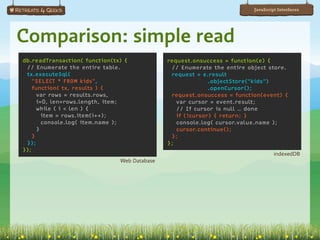
Comparison: simple read
db.readTransaction( function(tx) {            request.onsuccess = function(e) {
 // Enumerate the entire table.                // Enumerate the entire object store.
 tx.executeSql(                                request = e.result
   "SELECT * FROM kids",                                    .objectStore("kids")
   function( tx, results ) {                                .openCursor();
      var rows = results.rows,                 request.onsuccess = function(event) {
      i=0, len=rows.length, item;                var cursor = event.result;
      while ( i < len ) {                        // If cursor is null … done
        item = rows.item(i++);                   if (!cursor) { return; }
        console.log( item.name );                console.log( cursor.value.name );
      }                                          cursor.continue();
    }                                          };
 });                                          };
});
                                                                                  indexedDB
                               Web Database
JavaScript Interfaces


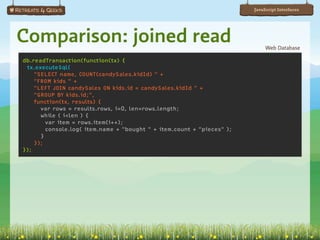
Comparison: joined read                                                      Web Database

db.readTransaction(function(tx) {
 tx.executeSql(
    "SELECT name, COUNT(candySales.kidId) " +
    "FROM kids " +
    "LEFT JOIN candySales ON kids.id = candySales.kidId " +
    "GROUP BY kids.id;",
    function(tx, results) {
      var rows = results.rows, i=0, len=rows.length;
      while ( i<len ) {
        var item = rows.item(i++);
        console.log( item.name + "bought " + item.count + "pieces" );
      }
    });
});
JavaScript Interfaces


Comparison: joined read                                                        indexedDB

var candyEaters = [];
request.onsuccess = function(event) {
  var db = event.result,
  transaction = db.transaction(["kids", "candySales"]);
  transaction.oncomplete = function(){ console.log(candyEaters); },
  kidCursor, saleCursor, salesLoaded=false, count;
 
  var kidsStore = transaction.objectStore("kids");
  kidsStore.openCursor().onsuccess = function(event) {
    kidCursor = event.result;
    count = 0;
    attemptWalk();
  }

 var salesStore = transaction.objectStore("candySales");
 var kidIndex = salesStore.index("kidId");
 kidIndex.openObjectCursor().onsuccess = function(event) {
   saleCursor = event.result;
   salesLoaded = true;
   attemptWalk();
 }

 //…
JavaScript Interfaces


Comparison: joined read                                                              indexedDB

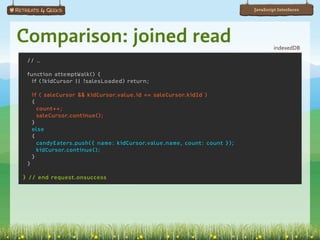
    // …

    function attemptWalk() {
      if (!kidCursor || !salesLoaded) return;
 
        if ( saleCursor && kidCursor.value.id == saleCursor.kidId )
        {
          count++;
          saleCursor.continue();
        }
        else
        {
          candyEaters.push({ name: kidCursor.value.name, count: count });
          kidCursor.continue();
        }
    }

} // end request.onsuccess
JavaScript Interfaces


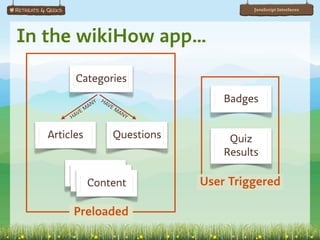
In the wikiHow app…
          Categories

                  A NY
                         HA
                           VE
                                                Badges
             E   M              MA
        H AV                      NY


   Articles                     Questions        Quiz
                                                Results
          Content
           Content
            Content                         User Triggered

         Preloaded
JavaScript Interfaces


Where am I?
JavaScript Interfaces


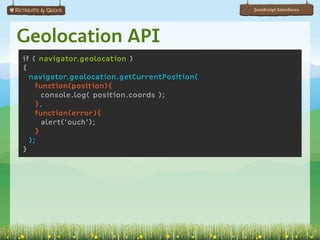
Geolocation API
if ( navigator.geolocation )
{
  navigator.geolocation.getCurrentPosition(
    function(position){
      console.log( position.coords );
    },
    function(error){
      alert('ouch');
    }
  );
}
JavaScript Interfaces


What’s in a name?
function getPlaceFromFlickr( lat, lon, callback )
{
  // the YQL statement
  var yql = 'select * from flickr.places where lat=' +
            lat + ' and lon=' + lon;

 // assembling the YQL webservice API
 var url = 'http://query.yahooapis.com/v1/public/yql?q=' +
           encodeURIComponent(yql) +
           '&format=json&diagnostics=false&callback=' + callback;

 // create a new script node and add it to the document
 var s = document.createElement('script');
 s.setAttribute( 'src', url );
 document.getElementsByTagName('head')[0].appendChild(s);
};

// …
JavaScript Interfaces


What’s in a name?
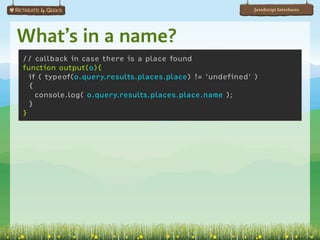
// callback in case there is a place found
function output(o){
  if ( typeof(o.query.results.places.place) != 'undefined' )
  {
    console.log( o.query.results.places.place.name );
  }
}
JavaScript Interfaces


What’s in a name?
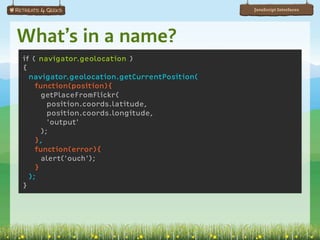
if ( navigator.geolocation )
{
  navigator.geolocation.getCurrentPosition(
    function(position){
      getPlaceFromFlickr(
        position.coords.latitude,
        position.coords.longitude,
        'output'
      );
    },
    function(error){
      alert('ouch');
    }
  );
}
JavaScript Interfaces


Bonus: Offline Cache
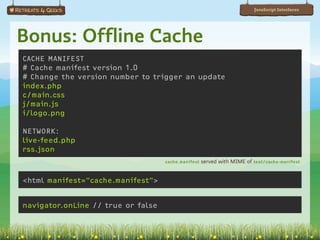
CACHE MANIFEST
# Cache manifest version 1.0
# Change the version number to trigger an update
index.php
c/main.css
j/main.js
i/logo.png

NETWORK:
live-feed.php
rss.json
                                    cache.manifest   served with MIME of text/cache-manifest


<html manifest="cache.manifest">


navigator.onLine // true or false
JavaScript Interfaces


             Slides available at
  http://slideshare.net/AaronGustafson

     This presentation is licensed under
             Creative Commons
Attribution-Noncommercial-Share Alike 3.0

          flickr Photo Credits
          “HTML5 logo in Braille” by Ted Drake
         “Dual Samsung Monitors” by steve-uk
                “Statue of Liberty” by gadl
                   “Lego” by DavePress
            “iFlickr touch screen” by exfordy
               “Green Plant” by kevin1024

HTML5 JavaScript Interfaces

  • 1.
    JavaScript Interfaces in HTML5 Aaron Gustafson EasyDesigns, LLC slideshare.net/AaronGustafson
  • 2.
  • 3.
    JavaScript Interfaces Working withmedia <audio controls="controls" autobuffer="autobuffer" preload="auto"> <source src="my.mp3"/> <source src="my.oga"/> <ul> <li><a href="my.mp3">Download as audio/mp3</a></li> <li><a href="my.oga">Download as audio/ogg</a></li> </ul> </audio>
  • 4.
    JavaScript Interfaces Roll yourown player $('audio').each(function(){ var audio = this, $button = $('<button>Play</button>') .click(function(){ audio.play(); }); $(this) .removeAttr('controls') .after($button); }); Using jQuery
  • 5.
    JavaScript Interfaces Roll yourown currentSrc Returns the address of the current media resource (or empty). networkState Returns a number (0-3) to indicate the network activity of the element: 0 = not initialized 1 = initialized, but idle 2 = actively downloading 3 = no resource buffered Returns a TimeRange for what’s been buffered by the browser. duration Returns the length (in seconds) of the media object, NaN when resource isn’t found. currentTime Current playback position (in seconds). Can be set to seek a time. initialTime Returns the initial (possibly sought) playback position when the resource was loaded.
  • 6.
    JavaScript Interfaces Roll yourown readyState A numeric value (0-4) representing the current state of the element: 0 = no information available 1 = metadata received 2 = have current data, but not enough to do anything yet 3 = have a little future data, but not a lot 4 = have enough data to advance without risking a stop (at the default playback rate). paused Returns true or false based on the state of the media. ended Returns true if playback has reached the end of the media resource. playbackRate Returns the current playback rate (usually 1.0), but is also settable. defaultPlaybackRate Returns the default playback rate (usually 1.0), but is also settable.
  • 7.
    JavaScript Interfaces Roll yourown played Returns a TimeRange object that tells how much of the media resource has been played. load() Triggers the reset and restart of a media resource. play() Plays the audio. pause() Pauses the audio. canPlayType( type ) Returns “probably,” “maybe” or empty (for no) based on how confident the browser is. seeking Returns true if the user agent is currently seeking. seekable Returns a TimeRange object that represents the “seekable” area of the media resource.
  • 8.
    JavaScript Interfaces Test fornative support var audio = document.createElement('audio'), test = { mp3: 'audio/mpeg', oga: 'audio/ogg; codecs="vorbis"' }, supported = []; if ( audio.canPlayType && typeof audio.canPlayType == 'function' ) { for ( format in test ) { if ( "" != audio.canPlayType( test[format] ) ) { supported.push(format); } } }
  • 9.
  • 10.
    JavaScript Interfaces Something forlater… if ( window.localStorage ) { // Sweet! }
  • 11.
    JavaScript Interfaces Something forlater… if ( window.localStorage ) { var cache = window.localStorage; cache.setItem( 'test', 'I am storing nuts for the winter.' ); }
  • 12.
  • 13.
    JavaScript Interfaces Something forlater… if ( window.localStorage ) { var cache = window.localStorage; console.log( cache.getItem('test') ); }
  • 14.
    JavaScript Interfaces Something forlater… if ( window.localStorage ) { var cache = window.localStorage; console.log( cache.getItem('test') ); cache.clear(); console.log( cache.getItem('test') ); }
  • 15.
    JavaScript Interfaces Something forlater… length The number of items stored. key( n ) Returns the name of the nth key (or null). getItem( key ) Returns the value for the given key (or null). setItem( key, value ) Stores a value for a given key.
  • 16.
    JavaScript Interfaces Local Storage… …isrestricted by domain …persists until deleted (programmatically or by the user) …is limited in size (usually 5MB) …is (currently) limited to strings
  • 17.
    JavaScript Interfaces Session storage …islike local storage …disappears when the browser is closed
  • 18.
    JavaScript Interfaces Cue thesad trombone if ( window.localStorage ) { var cache = window.localStorage, obj = { one: 1, two: 2 }; cache.setItem( 'nums', obj ); console.log( cache.getItem( 'nums' ) ); }
  • 19.
    JavaScript Interfaces Huzzah! if (window.localStorage ) { var cache = window.localStorage, obj = { one: 1, two: 2 }; cache.setItem( 'nums', JSON.stringify( obj ) ); console.log( JSON.parse( cache.getItem( 'nums' ) ) ); }
  • 20.
    JavaScript Interfaces Local Storage… …isrestricted by domain …persists until deleted (programmatically or by the user) …is limited in size (usually 5MB) …is (currently) limited to strings …mutable
  • 21.
    JavaScript Interfaces Whoops! window.localStorage.setItem( ‘important’,‘My locker combo is…’ ); Script A window.localStorage.setItem( ‘test’, ‘Just playing around’ ); // … window.localStorage.clear(); Script B
  • 22.
    JavaScript Interfaces Play nicelyin the sandbox // create a Squirrel instance with your unique key var $S = new Squirrel( 'scale-song' ); // write a value to the cache $S.write( 'doe', 'ray' ); // read it back $S.read( 'doe' ); // 'ray' // write a value to a sub-cache $S.write( 'song', 'doe', 'a dear, a female dear' ); // read back the original value $S.read( 'doe' ); // 'ray' // read back the sub-cached value $S.read( 'song', 'doe' ); // 'a dear, a female dear' Using Squirrel.js (http://github.com/easy-designs/Squirrel.js)
  • 23.
    JavaScript Interfaces Play nicelyin the sandbox // removing a single property from the sub-cache $S.remove( 'song', 'doe' ); // try to read the sub-cached value $S.read( 'song', 'doe' ); // null // read the root value $S.read( 'doe' ); // 'ray' Using Squirrel.js (http://github.com/easy-designs/Squirrel.js)
  • 24.
    JavaScript Interfaces Play nicelyin the sandbox // add some more content to the sub-cache $S.write( 'song', 'doe', 'a dear, a female dear' ); $S.write( 'song', 'ray', 'a drop of golden sun' ); // clear the whole sub-cache $S.clear( 'song' ); // check that it's been cleared $S.read( 'song', 'doe' ); // null $S.read( 'song', 'ray' ); // null // check that the root value's still intact $S.read( 'doe' ); // 'ray' Using Squirrel.js (http://github.com/easy-designs/Squirrel.js)
  • 25.
    JavaScript Interfaces Play nicelyin the sandbox // remove a property form the main cache $S.remove( 'doe' ); // check it's value $S.read( 'doe' ); // null // write a bit more data in the root and in a sub-cache $S.write( 'doe', 'ray' ); $S.write( 'song', 'doe', 'a dear, a female dear' ); $S.write( 'song', 'ray', 'a drop of golden sun' ); // clear the whole cache $S.clear(); // check it's all gone $S.read( 'song', 'doe' ); // null $S.read( 'song', 'ray' ); // null $S.read( 'doe' ); // null Using Squirrel.js (http://github.com/easy-designs/Squirrel.js)
  • 26.
    JavaScript Interfaces When youneed a “bigger boat”
  • 27.
    JavaScript Interfaces Example: wikiHowSurvival Kit http://apps.wikihow.com/survivalkit/
  • 28.
    JavaScript Interfaces How itworks Page Loads Database is created SQL is executed to load data App is ready to go
  • 29.
  • 30.
  • 31.
  • 32.
    JavaScript Interfaces Consider Kids Candy Candy Sales
  • 33.
    JavaScript Interfaces Comparison: initialize vardb = window.openDatabase( var request = window.indexedDB.open( "CandyDB", "", "CandyDB", "My candy store database" "My candy store database", 1024 ); ); indexedDB Web Database
  • 34.
    JavaScript Interfaces Comparison: initialize Web Database if (db.version != "1") { db.changeVersion( db.version, "1", function(tx){ // Initialize database var tables = [ { name: "kids", columns: ["id INTEGER PRIMARY KEY", "name TEXT"]}, { name: "candy", columns: ["id INTEGER PRIMARY KEY", "name TEXT"]}, { name: "candySales", columns: ["kid_id INTEGER", "candy_id INTEGER", "date TEXT"]} ],   len = tables.length, table; while ( len-- ) { table = tables[len]; tx.executeSql( "CREATE TABLE " + table.name + "(" + table.columns.join(", ") + ");" ); } }, null, function(){ loadData(db); } ); } else { // User has been here before, no initialization required. loadData(db); }
  • 35.
    JavaScript Interfaces Comparison: initialize indexedDB request.onsuccess = function(event) { var db = event.result; if (db.version != "1") { // Initialize database var createdObjectStoreCount = 0, objectStores = [ { name: "kids", keyPath: "id", autoIncrement: true }, { name: "candy", keyPath: "id", autoIncrement: true }, { name: "candySales", keyPath: "", autoIncrement: true } ], len = objectStores.length, params;   while ( len-- ) { var params = objectStores[len]; request = db.createObjectStore( params.name, params.keyPath, params.autoIncrement ); request.onsuccess = objectStoreCreated; } } else { // User has been here before, no initialization required. loadData(db); } };
  • 36.
    JavaScript Interfaces Comparison: initialize indexedDB function objectStoreCreated(event) { if ( ++createdObjectStoreCount == objectStores.length ) { db.setVersion("1").onsuccess = function(event) { loadData(db); }; } }
  • 37.
    JavaScript Interfaces Comparison: create The Data var kids = [ { name: "Anna" }, { name: "Betty" }, { name: "Christine" } ]; var db = window.openDatabase( var request = window.indexedDB.open( "CandyDB", "1", "CandyDB", "My candy store database" "My candy store database", 1024); ); db.transaction( function(tx){ request.onsuccess = function(e) { var i=0, len=kids.length; var objectStore = e.result while ( i < len ) .objectStore("kids"), { var i=0, len=kids.length; var kid = kids[i++]; while ( i < len ) { tx.executeSql( var kid = kids[i++]; "INSERT INTO kids (name) “ + objectStore.add(kid) “VALUES (:name);", [kid], .onsuccess = function(e) { function(tx, results) { console.log( console.log( "Saved record for " + "Saved record for " + kid.name + " with id " + kid.name + " with id " + e.result ); results.insertId ); }; }); } } }; }); indexedDB Web Database
  • 38.
    JavaScript Interfaces Comparison: simpleread db.readTransaction( function(tx) { request.onsuccess = function(e) { // Enumerate the entire table. // Enumerate the entire object store. tx.executeSql( request = e.result "SELECT * FROM kids", .objectStore("kids") function( tx, results ) { .openCursor(); var rows = results.rows, request.onsuccess = function(event) { i=0, len=rows.length, item; var cursor = event.result; while ( i < len ) { // If cursor is null … done item = rows.item(i++); if (!cursor) { return; } console.log( item.name ); console.log( cursor.value.name ); } cursor.continue(); } }; }); }; }); indexedDB Web Database
  • 39.
    JavaScript Interfaces Comparison: joinedread Web Database db.readTransaction(function(tx) { tx.executeSql( "SELECT name, COUNT(candySales.kidId) " + "FROM kids " + "LEFT JOIN candySales ON kids.id = candySales.kidId " + "GROUP BY kids.id;", function(tx, results) { var rows = results.rows, i=0, len=rows.length; while ( i<len ) { var item = rows.item(i++); console.log( item.name + "bought " + item.count + "pieces" ); } }); });
  • 40.
    JavaScript Interfaces Comparison: joinedread indexedDB var candyEaters = []; request.onsuccess = function(event) { var db = event.result, transaction = db.transaction(["kids", "candySales"]); transaction.oncomplete = function(){ console.log(candyEaters); }, kidCursor, saleCursor, salesLoaded=false, count;   var kidsStore = transaction.objectStore("kids"); kidsStore.openCursor().onsuccess = function(event) { kidCursor = event.result; count = 0; attemptWalk(); } var salesStore = transaction.objectStore("candySales"); var kidIndex = salesStore.index("kidId"); kidIndex.openObjectCursor().onsuccess = function(event) { saleCursor = event.result; salesLoaded = true; attemptWalk(); } //…
  • 41.
    JavaScript Interfaces Comparison: joinedread indexedDB // … function attemptWalk() { if (!kidCursor || !salesLoaded) return;   if ( saleCursor && kidCursor.value.id == saleCursor.kidId ) { count++; saleCursor.continue(); } else { candyEaters.push({ name: kidCursor.value.name, count: count }); kidCursor.continue(); } } } // end request.onsuccess
  • 42.
    JavaScript Interfaces In thewikiHow app… Categories A NY HA VE Badges E M MA H AV NY Articles Questions Quiz Results Content Content Content User Triggered Preloaded
  • 43.
  • 44.
    JavaScript Interfaces Geolocation API if( navigator.geolocation ) { navigator.geolocation.getCurrentPosition( function(position){ console.log( position.coords ); }, function(error){ alert('ouch'); } ); }
  • 45.
    JavaScript Interfaces What’s ina name? function getPlaceFromFlickr( lat, lon, callback ) { // the YQL statement var yql = 'select * from flickr.places where lat=' + lat + ' and lon=' + lon; // assembling the YQL webservice API var url = 'http://query.yahooapis.com/v1/public/yql?q=' + encodeURIComponent(yql) + '&format=json&diagnostics=false&callback=' + callback; // create a new script node and add it to the document var s = document.createElement('script'); s.setAttribute( 'src', url ); document.getElementsByTagName('head')[0].appendChild(s); }; // …
  • 46.
    JavaScript Interfaces What’s ina name? // callback in case there is a place found function output(o){ if ( typeof(o.query.results.places.place) != 'undefined' ) { console.log( o.query.results.places.place.name ); } }
  • 47.
    JavaScript Interfaces What’s ina name? if ( navigator.geolocation ) { navigator.geolocation.getCurrentPosition( function(position){ getPlaceFromFlickr( position.coords.latitude, position.coords.longitude, 'output' ); }, function(error){ alert('ouch'); } ); }
  • 48.
    JavaScript Interfaces Bonus: OfflineCache CACHE MANIFEST # Cache manifest version 1.0 # Change the version number to trigger an update index.php c/main.css j/main.js i/logo.png NETWORK: live-feed.php rss.json cache.manifest served with MIME of text/cache-manifest <html manifest="cache.manifest"> navigator.onLine // true or false
  • 49.
    JavaScript Interfaces Slides available at http://slideshare.net/AaronGustafson This presentation is licensed under Creative Commons Attribution-Noncommercial-Share Alike 3.0 flickr Photo Credits “HTML5 logo in Braille” by Ted Drake “Dual Samsung Monitors” by steve-uk “Statue of Liberty” by gadl “Lego” by DavePress “iFlickr touch screen” by exfordy “Green Plant” by kevin1024