PWAs
Where Do I Begin?
Aaron Gustafson
@AaronGustafson
noti.st/AaronGustafson
What exactly is a
PWA?
Progressive Web App?
What exactly is a
What exactly is a
Progressive Web App?
What exactly is a
Progressive Web App?
What exactly is a
Progressive Web App?
“Progressive Web App”
is a marketing term
Progressive Web App
Progressive Web App
Progressive Web App
Game
Gallery
Book
Newspaper
Art Project
Tool
Progressive Web Site
Who’s behind PWAs?
@AaronGustafson
What’s a PWA, technically?
HTTPS
@AaronGustafson
What’s a PWA, technically?
HTTPS Web App
Manifest
@AaronGustafson
What’s a manifest?
{
"lang": "en",
"short_name": "Wash Post",
"name": "The Washington Post",
"icons": [ { "src": "img/launcher-icon-2x.png",
"sizes": "96x96",
"type": "image/png" } ],
"start_url": "/pwa/",
"display": "standalone",
"orientation": "portrait",
"background_color": "black"
}
@AaronGustafson
What’s a PWA, technically?
HTTPS Web App
Manifest
Service
Worker
Should I believe
the hype?
Maybe?
Starbucks:
2x increase in daily
active users
aka.ms/google-io-2018
Tinder:
Core experience
with 90% less code
aka.ms/tinder-pwa-2017
Trivago:
97% increase in
click-outs to
hotel offers
aka.ms/trivago-pwa-2017
West Elm:
15% increase in
time on site
9% increase in
revenue per visit
aka.ms/west-elm-pwa-2017
@AaronGustafson
Let’s talk about Service Worker
@AaronGustafson
Registering a Service Worker
if ( "serviceWorker" in navigator ) {
navigator.serviceWorker.register( "/serviceworker.min.js" );
}
Path is important!
@AaronGustafson
The Service Worker Lifecycle
Browser
Install Activation Ready
aka.ms/pwa-lifecycle
@AaronGustafson
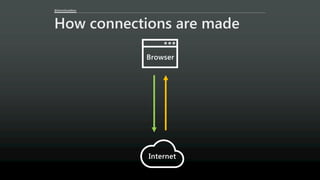
How connections are made
Browser
Internet
@AaronGustafson
Along comes Service Worker
Browser
Internet
Cache
@AaronGustafson
Along comes Service Worker
Browser
Internet
Cache
!
PWAs start with a great web
experience and then enhance
that experience for performance,
resilience, installation,
and engagement
Progressive Web AppProgressive
Enhancement
PWAs start with a great web
experience and then enhance
that experience for performance,
resilience, installation,
and engagement
Progressive Web App
Progressive
/prəˈɡresiv/
happening or developing
gradually or in stages;
proceeding step by step
Patrick Perkins
@AaronGustafson
Consider forbes.com circa 2007
“Mobile first” thinking
isn’t just about mobile
Patrick Perkins
Patrick Perkins
Patrick PerkinsAvinash Arunachalam A M
Step 2

Use markup that supports
the core experience
Avinash Arunachalam A M
@AaronGustafson
What does it mean?
<div class="entry">
<div class="entry__title">Progressive Web Apps and
the Windows Ecosystem</div>
<div class="entry__meta">
<div><b>Published</b> 24 May 2017</div>
<div><b>Reading Time</b> 25 minutes</div>
</div>
<div class="entry__content">
I had the great pleasure of delivering a talk…
<br><br>
I do a lot of traveling and it’s…
</div>
</div>
@AaronGustafson
This is self-contained content
<div class="entry">
<div class="entry__title">Progressive Web Apps and
the Windows Ecosystem</div>
<div class="entry__meta">
<div><b>Published</b> 24 May 2017</div>
<div><b>Reading Time</b> 25 minutes</div>
</div>
<div class="entry__content">
I had the great pleasure of delivering a talk…
<br><br>
I do a lot of traveling and it’s…
</div>
</div>
@AaronGustafson
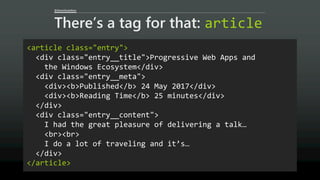
There’s a tag for that: article
<article class="entry">
<div class="entry__title">Progressive Web Apps and
the Windows Ecosystem</div>
<div class="entry__meta">
<div><b>Published</b> 24 May 2017</div>
<div><b>Reading Time</b> 25 minutes</div>
</div>
<div class="entry__content">
I had the great pleasure of delivering a talk…
<br><br>
I do a lot of traveling and it’s…
</div>
</article>
@AaronGustafson
This is the title of the post
<article class="entry">
<div class="entry__title">Progressive Web Apps and
the Windows Ecosystem</div>
<div class="entry__meta">
<div><b>Published</b> 24 May 2017</div>
<div><b>Reading Time</b> 25 minutes</div>
</div>
<div class="entry__content">
I had the great pleasure of delivering a talk…
<br><br>
I do a lot of traveling and it’s…
</div>
</article>
@AaronGustafson
There’s a tag for that: h1-h6
<article class="entry">
<h1 class="entry__title">Progressive Web Apps and
the Windows Ecosystem</h1>
<div class="entry__meta">
<div><b>Published</b> 24 May 2017</div>
<div><b>Reading Time</b> 25 minutes</div>
</div>
<div class="entry__content">
I had the great pleasure of delivering a talk…
<br><br>
I do a lot of traveling and it’s…
</div>
</article>
@AaronGustafson
Various properties of the post
<article class="entry">
<h1 class="entry__title">Progressive Web Apps and
the Windows Ecosystem</h1>
<div class="entry__meta">
<div><b>Published</b> 24 May 2017</div>
<div><b>Reading Time</b> 25 minutes</div>
</div>
<div class="entry__content">
I had the great pleasure of delivering a talk…
<br><br>
I do a lot of traveling and it’s…
</div>
</article>
@AaronGustafson
There’s an element for that: dl
<article class="entry">
<h1 class="entry__title">Progressive Web Apps and
the Windows Ecosystem</h1>
<dl class="entry__meta">
<dt>Published</dt> <dd>24 May 2017</dd>
<dt>Reading Time</dt> <dd>25 minutes</dd>
</dl>
<div class="entry__content">
I had the great pleasure of delivering a talk…
<br><br>
I do a lot of traveling and it’s…
</div>
</article>
@AaronGustafson
Bonus: time
<article class="entry">
<h1 class="entry__title">Progressive Web Apps and
the Windows Ecosystem</h1>
<dl class="entry__meta">
<dt>Published</dt> <dd><time>24 May 2017</time></dd>
<dt>Reading Time</dt> <dd>25 minutes</dd>
</dl>
<div class="entry__content">
I had the great pleasure of delivering a talk…
<br><br>
I do a lot of traveling and it’s…
</div>
</article>
@AaronGustafson
Bonus: time
<time datetime="2017-05-24">
24 May 2017</time>
<time datetime="2017-05-24T11:13:24">
24 May 2017</time>
<time datetime="2017-05-24T11:13:24-04:00">
24 May 2017</time>
@AaronGustafson
“Flow” content with line breaks
<article class="entry">
<h1 class="entry__title">Progressive Web Apps and
the Windows Ecosystem</h1>
<dl class="entry__meta">
<dt>Published</dt> <dd><time …>24 May 2017</time></dd>
<dt>Reading Time</dt> <dd>25 minutes</dd>
</dl>
<div class="entry__content">
I had the great pleasure of delivering a talk…
<br><br>
I do a lot of traveling and it’s…
</div>
</article>
@AaronGustafson
“Flow” content, divided
<article class="entry">
<h1 class="entry__title">Progressive Web Apps and
the Windows Ecosystem</h1>
<dl class="entry__meta">
<dt>Published</dt> <dd><time …>24 May 2017</time></dd>
<dt>Reading Time</dt> <dd>25 minutes</dd>
</dl>
<div class="entry__content">
<div>I had the great pleasure of delivering a…</div>
<div>I do a lot of traveling and it’s…</div>
</div>
</article>
@AaronGustafson
This is meaningful content
<article class="entry">
<h1 class="entry__title">Progressive Web Apps and
the Windows Ecosystem</h1>
<dl class="entry__meta">
<dt>Published</dt> <dd><time …>24 May 2017</time></dd>
<dt>Reading Time</dt> <dd>25 minutes</dd>
</dl>
<div class="entry__content">
<p>I had the great pleasure of delivering a talk…</p>
<p>I do a lot of traveling and it’s…</p>
</div>
</article>
Avinash Arunachalam A M
@AaronGustafson
Readability
Hey Cortana, read me the top three
headlines in today’s New York Times
@AaronGustafson
Access via semantics:
function extractHeadlines( response ){
var $html = document.createElement('div'),
$headings, i=0, headlines=[];
$html.innerHTML = response.contents;
$headings = $html.querySelector('#top-new')
.querySelectorAll('article h1, article h2, article h3');
heading_count = $headings.length;
while (headlines.length < 3) {
let $link = $headings[i].querySelector('a');
if ($link && $link.href) {
headlines.push({
title: $headings[i].innerText.trim(),
link: $link.href
});
}
i++;
}
console.log( headlines );
}
@AaronGustafson
Access via semantics:
function extractHeadlines( response ){
var $html = document.createElement('div'),
$headings, i=0, headlines=[];
$html.innerHTML = response.contents;
$headings = $html.querySelector('#top-new')
.querySelectorAll('article h1, article h2, article h3');
heading_count = $headings.length;
while (headlines.length < 3) {
let $link = $headings[i].querySelector('a');
if ($link && $link.href) {
headlines.push({
title: $headings[i].innerText.trim(),
link: $link.href
});
}
i++;
}
console.log( headlines );
}
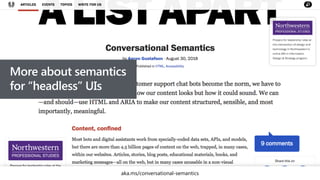
More about semantics
for “headless” UIs
aka.ms/conversational-semantics
aka.ms/dependency-awareness
@AaronGustafson
Let’s say you needed a button…
<input type="submit" value="Sign Up">
<button type="submit">Sign Up</button>
<a class="button" href="#">Sign Up</a>
<div class="button">Sign Up</div>
Sign Up
@AaronGustafson
Let’s compare
Pattern Display Semantics Focusable? Activate By
Submits
Forms
input[type=submit] button button Yes
Mouse, touch,
ENTER, SPACE
Yes
button[type=submit] button button Yes
Mouse, touch,
ENTER, SPACE
Yes
a link
Named
generic
Yes
Mouse, touch,
ENTER
No
div block
Not
exposed
No N/A No
@AaronGustafson
UX gaps that need to be filled
Pattern Display Semantics Focusable? Activate By
Submits
Forms
input[type=submit] button button Yes
Mouse, touch,
ENTER, SPACE
Yes
button[type=submit] button button Yes
Mouse, touch,
ENTER, SPACE
Yes
a link
Named
generic
Yes
Mouse, touch,
ENTER
No
div block
Not
exposed
No N/A No
@AaronGustafson
Moar dependencies
Pattern Display Semantics Focusable? Activate By
Submits
Forms
input[type=submit] None None None None None
button[type=submit] None None None None None
a CSS ARIA None JavaScript JavaScript
div CSS ARIA HTML JavaScript JavaScript
@AaronGustafson
Moar dependencies
Pattern Display Semantics Focusable? Activate By
Submits
Forms
input[type=submit] None None None None None
button[type=submit] None None None None None
a CSS ARIA None JavaScript JavaScript
div CSS ARIA HTML JavaScript JavaScript
@AaronGustafson
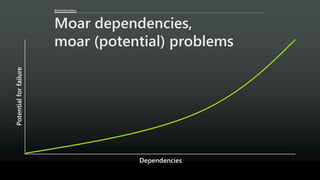
Moar dependencies,
moar (potential) problems
Dependencies
Potentialforfailure
@AaronGustafson
Disaster averted
@AaronGustafson
Moar dependencies,
moar (potential) problems
Dependencies
Potentialforfailure
@AaronGustafson
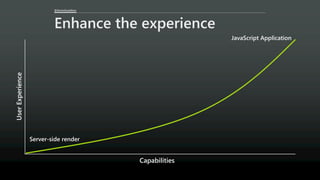
Enhance the experience
Capabilities
UserExperience
@AaronGustafson
Enhancing UX with markup
<input type="email" name="email" id="email"
required aria-required="true">
@AaronGustafson
Enhancing UX with markup
<input type="email" name="email" id="email"
required aria-required="true">
Experience deltas
1. Support for email input type?
2. Validation algorithm implemented?
3. Virtual keyboard?
@AaronGustafson
Enhancing UX with markup
<input type="email" name="email" id="email"
required aria-required="true">
Experience deltas
1. Support for HTML validation?
@AaronGustafson
Enhancing UX with markup
<input type="email" name="email" id="email"
required aria-required="true">
Experience deltas
1. Browser exposure of aria-required property?
2. Assistive tech implementation of aria-required?
@AaronGustafson
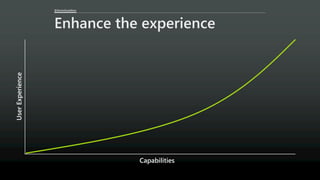
Enhance the experience
Capabilities
UserExperience
Avinash Arunachalam A M
Avinash Arunachalam A MChris Grafton
Step 3

Design in support of the
core experience
@AaronGustafson
Enhance the experience
Capabilities
UserExperience
aka.ms/enhanced-css-layouts
Good design is
problem solving.
— Jeff Veen
@AaronGustafson
Tools for graphic design
Alignment
Balance
Contrast
Emphasis
Gestalt
Harmony
Movement
Proportion
Proximity
Repetition
Rhythm
Unity
White Space
@AaronGustafson
Tools for graphic design
Alignment
Balance
Contrast
Emphasis
Gestalt
Harmony
Movement
Proportion
Proximity
Repetition
Rhythm
Unity
White Space
@AaronGustafson
Alignment
@AaronGustafson
Contrast
@AaronGustafson
Proportion
@AaronGustafson
Proximity
@AaronGustafson
Rhythm
aka.ms/vertical-rhythm
@AaronGustafson
Unity
@AaronGustafson
Unique design considerations
Screen size
Resolution
Brightness
Color density
User preference
Network speed & quality
Assistive technology
@AaronGustafson
Unique design considerations
Screen size
Resolution
Brightness
Color density
User preference
Network speed & quality
Assistive technology
☞
☞
☞
☞
☞
@AaronGustafson
Unique design considerations
Screen size
Resolution
Brightness
Color density
User preference
Network speed & quality
Assistive technology
@AaronGustafson
Examples of user preference
Larger or smaller fonts
@media (min-width: 32em) { … }
High contrast colors
@media (-ms-high-contrast: active) { … }
@media (-ms-high-contrast: white-on-black) { … }
@media (-ms-high-contrast: black-on-white) { … }
Reduced motion
@media (prefers-reduced-motion: reduce) { … }
@AaronGustafson
Assistive technologies
๏ Vision
๏ Screen magnifiers
๏ Screen readers
๏ Braille printers & refreshable
braille displays
๏ High contrast settings
๏ Hearing
๏ Captions & subtitles
๏ Motor/mobility
๏ Speech recognition
๏ Mouse settings
๏ Keyboards & keyboard
overlays
๏ Eye tracking
Confirm Cancel
Confirm Cancel
Don’t rely on color
alone to convey
important information
aka.ms/color-contrast
Good contrast
ensures your
content is readable
Explicit connections
ensure everyone can
follow references
<a href="#figure-3-3">Figure
3.3</a> shows the lodging
article in Safari with only the
default browser styles applied.
…
<figure id="figure-3-3">
…
</figure>
Explicit connections
ensure everyone can
follow references
Consider what
your design
leaves unsaid
aria-label="You can
finish reading “The Web
Should Just Work for
Everyone” in less than
10 minutes"
Consider what
your design
leaves unsaid
@AaronGustafson
Enhance the experience
Capabilities
UserExperience
@AaronGustafson
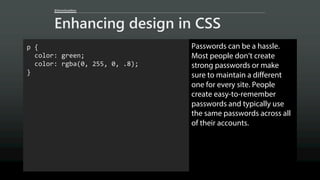
Enhancing design in CSS
p {
color: green;
color: rgba(0, 255, 0, .8);
}
Passwords can be a hassle.
Most people don’t create
strong passwords or make
sure to maintain a different
one for every site. People
create easy-to-remember
passwords and typically use
the same passwords across all
of their accounts.
@AaronGustafson
Enhancing design in CSS
p {
color: green;
color: rgba(0, 255, 0, .8);
}
Older browsers without RGBa
support, ignore the second rule
Passwords can be a hassle.
Most people don’t create
strong passwords or make
sure to maintain a different
one for every site. People
create easy-to-remember
passwords and typically use
the same passwords across all
of their accounts.
@AaronGustafson
Enhancing design in CSS
p {
color: green;
color: rgba(0, 255, 0, .8);
}
Modern browsers with RGBa
support, overwrite the first rule
@AaronGustafson
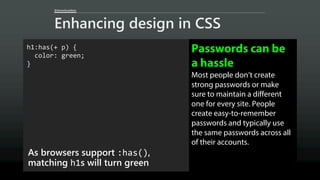
Enhancing design in CSS
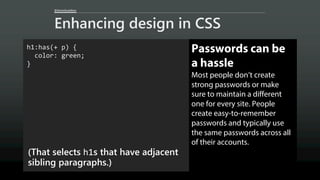
h1:has(+ p) {
color: green;
}
(That selects h1s that have adjacent
sibling paragraphs.)
Passwords can be
a hassle
Most people don’t create
strong passwords or make
sure to maintain a different
one for every site. People
create easy-to-remember
passwords and typically use
the same passwords across all
of their accounts.
@AaronGustafson
Enhancing design in CSS
h1:has(+ p) {
color: green;
}
Browsers that don’t support :has()
ignore the entire rule set
Passwords can be
a hassle
Most people don’t create
strong passwords or make
sure to maintain a different
one for every site. People
create easy-to-remember
passwords and typically use
the same passwords across all
of their accounts.
@AaronGustafson
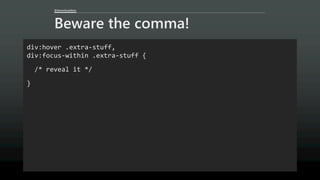
Beware the comma!
div:hover .extra-stuff,
div:focus-within .extra-stuff {
/* reveal it */
}
@AaronGustafson
Beware the comma!
div:hover .extra-stuff,
div:focus-within .extra-stuff {
/* reveal it */
}
Browsers that don’t support :focus-within
@AaronGustafson
Beware the comma!
div:hover .extra-stuff,
div:focus-within .extra-stuff {
/* reveal it */
}
Browsers that do support :focus-within
@AaronGustafson
Enhancing design in CSS
h1:has(+ p) {
color: green;
}
As browsers support :has(),
matching h1s will turn green
Passwords can be
a hassle
Most people don’t create
strong passwords or make
sure to maintain a different
one for every site. People
create easy-to-remember
passwords and typically use
the same passwords across all
of their accounts.
@AaronGustafson
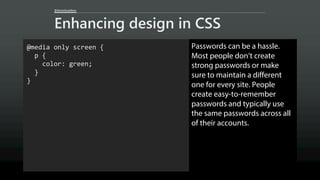
Enhancing design in CSS
@media only screen {
p {
color: green;
}
}
Passwords can be a hassle.
Most people don’t create
strong passwords or make
sure to maintain a different
one for every site. People
create easy-to-remember
passwords and typically use
the same passwords across all
of their accounts.
@AaronGustafson
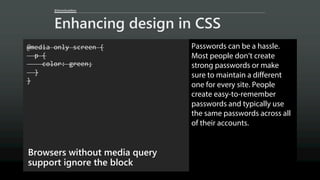
Enhancing design in CSS
@media only screen {
p {
color: green;
}
}
Browsers without media query
support ignore the block
Passwords can be a hassle.
Most people don’t create
strong passwords or make
sure to maintain a different
one for every site. People
create easy-to-remember
passwords and typically use
the same passwords across all
of their accounts.
@AaronGustafson
Enhancing design in CSS
@media only screen {
p {
color: green;
}
}
Browsers with media query support
apply it
Passwords can be a hassle.
Most people don’t create
strong passwords or make
sure to maintain a different
one for every site. People
create easy-to-remember
passwords and typically use
the same passwords across all
of their accounts.
@AaronGustafson
Enhancing design in CSS
@supports (display: grid) {
p {
color: green;
}
}
Passwords can be a hassle.
Most people don’t create
strong passwords or make
sure to maintain a different
one for every site. People
create easy-to-remember
passwords and typically use
the same passwords across all
of their accounts.
@AaronGustafson
Enhancing design in CSS
@supports (display: grid) {
p {
color: green;
}
}
Browsers that don’t grok @supports
ignore the block
Passwords can be a hassle.
Most people don’t create
strong passwords or make
sure to maintain a different
one for every site. People
create easy-to-remember
passwords and typically use
the same passwords across all
of their accounts.
@AaronGustafson
Enhancing design in CSS
@supports (display: grid) {
p {
color: green;
}
}
Browsers that understand
@supports, but don’t support grid
ignore it
Passwords can be a hassle.
Most people don’t create
strong passwords or make
sure to maintain a different
one for every site. People
create easy-to-remember
passwords and typically use
the same passwords across all
of their accounts.
@AaronGustafson
Enhancing design in CSS
@supports (display: grid) {
p {
color: green;
}
}
Browsers that understand
@supports and grid apply it
Passwords can be a hassle.
Most people don’t create
strong passwords or make
sure to maintain a different
one for every site. People
create easy-to-remember
passwords and typically use
the same passwords across all
of their accounts.
Chris Grafton
Chris Grafton
aka.ms/enhanced-css-layouts
@AaronGustafson
Enhance the experience
Capabilities
UserExperience
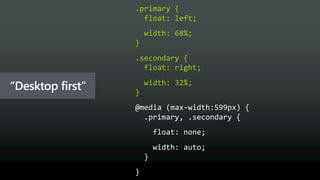
“Mobile first” design
“Desktop first”
.primary {
float: left;
width: 68%;
}
.secondary {
float: right;
width: 32%;
}
“Desktop first”
@media (max-width:599px) {
.primary, .secondary {
float: none;
width: auto;
}
}
“Desktop first”
“Mobile first”
@media (min-width:600px)
“Mobile first”
@AaronGustafson
Also “mobile first”
๏ Selectively deliver advances styles
๏ Isolate large CSS images in min-width
media queries
๏ Don’t hide content images using CSS
๏ Use responsive images
๏ Prefer system fonts
๏ font-display: optional
@AaronGustafson
Enhance the experience
Capabilities
UserExperience
Chris GraftonJacob Creswick
Step 4

Improve the core
experience with JavaScript
Jacob Creswick
Jacob Creswick
@AaronGustafson
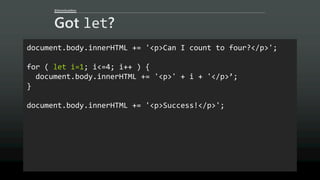
Got let?
document.body.innerHTML += '<p>Can I count to four?</p>';
for ( let i=1; i<=4; i++ ) {
document.body.innerHTML += '<p>' + i + '</p>’;
}
document.body.innerHTML += '<p>Success!</p>';
aka.ms/js-let-down
aka.ms/js-let-down
@AaronGustafson
Moar dependencies,
moar (potential) problems
Dependencies
Potentialforfailure
aka.ms/github-removes-jquery
As part of our refined approach to building frontend features
on GitHub.com, we focused on getting away with regular
HTML foundation as much as we could, and only adding
JavaScript behaviors as progressive enhancement. As a result,
even those web forms and other UI elements that were
enhanced using JS would usually also work with JavaScript
disabled in the browser.
aka.ms/github-removes-jquery
As part of our refined approach to building frontend features
on GitHub.com, we focused on getting away with regular
HTML foundation as much as we could, and only adding
JavaScript behaviors as progressive enhancement. As a result,
even those web forms and other UI elements that were
enhanced using JS would usually also work with JavaScript
disabled in the browser.
Jacob Creswick
@AaronGustafson
Enhance the experience
Capabilities
UserExperience
@AaronGustafson
Detecting support
if ( navigator.credentials ) {
// Actual logic goes here
}
@AaronGustafson
Enhance the experience
Capabilities
UserExperience
Jacob Creswick
@AaronGustafson
Registering a Service Worker
if ( navigator.serviceWorker ) {
navigator.serviceWorker.register('/serviceworker.js’)
.then(function(registration) {
console.log('Success!', registration.scope);
})
.catch(function(error) {
console.error('Failure!', error);
});
}
@AaronGustafson
Object detection FTW!
if ( navigator.serviceWorker ) {
navigator.serviceWorker.register('/serviceworker.js’)
.then(function(registration) {
console.log('Success!', registration.scope);
})
.catch(function(error) {
console.error('Failure!', error);
});
}
@AaronGustafson
Enhance the experience
Capabilities
UserExperience
@AaronGustafson
Enhance the experience
Capabilities
UserExperience
@AaronGustafson
Enhance the Service Worker
Capabilities
UserExperience
Jacob Creswick
@AaronGustafson
Enhance the experience
Capabilities
UserExperience
PWAs start with a great web
experience and then enhance
that experience for performance,
resilience, installation,
and engagement
PWAs start with a great web
experience and then enhance
that experience for performance,
resilience, installation,
and engagement
Design
Markup
JavaScript
Focus
Thank you!
@AaronGustafson
aaron-gustafson.com
noti.st/AaronGustafson

Progressive Web Apps: Where Do I Begin?