HTML5'S ARIA AND A WEB-
ACCESSIBLE DROPDOWN WIDGET
by Dennis E. Lembrée
HTML5 Developer Conference
Palace Hotel, San Francisco
October 15-16, 2012
Confidential and Proprietary 2
AGENDA
• About @DennisL
• About accessibility
• ARIA & HTML5
• Simple example
• Complex example
• Tips
• Questions
• Contact info
Confidential and Proprietary 4
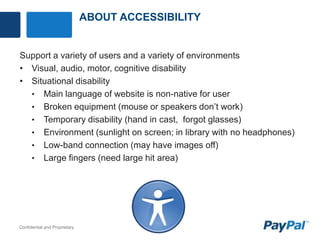
ABOUT ACCESSIBILITY
Support a variety of users and a variety of environments
• Visual, audio, motor, cognitive disability
• Situational disability
• Main language of website is non-native for user
• Broken equipment (mouse or speakers don’t work)
• Temporary disability (hand in cast, forgot glasses)
• Environment (sunlight on screen; in library with no headphones)
• Low-band connection (may have images off)
• Large fingers (need large hit area)
Confidential and Proprietary 7
ABOUT ACCESSIBILITY
Methods for implementation include multiple disciplines:
• Code
• Interaction design
• Visual design
• Content, writing
• Testing
• During development
• QA testing (manual and automated)
• User testing (including users with disabilities)
Confidential and Proprietary 10
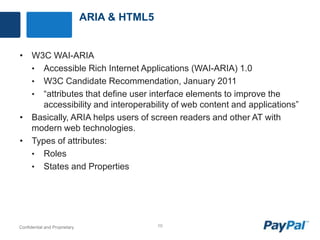
ARIA & HTML5
• W3C WAI-ARIA
• Accessible Rich Internet Applications (WAI-ARIA) 1.0
• W3C Candidate Recommendation, January 2011
• “attributes that define user interface elements to improve the
accessibility and interoperability of web content and applications”
• Basically, ARIA helps users of screen readers and other AT with
modern web technologies.
• Types of attributes:
• Roles
• States and Properties
Confidential and Proprietary 11
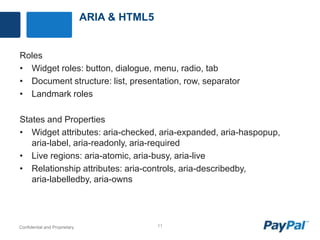
ARIA & HTML5
Roles
• Widget roles: button, dialogue, menu, radio, tab
• Document structure: list, presentation, row, separator
• Landmark roles
States and Properties
• Widget attributes: aria-checked, aria-expanded, aria-haspopup,
aria-label, aria-readonly, aria-required
• Live regions: aria-atomic, aria-busy, aria-live
• Relationship attributes: aria-controls, aria-describedby,
aria-labelledby, aria-owns
Confidential and Proprietary 13
SIMPLE EXAMPLE
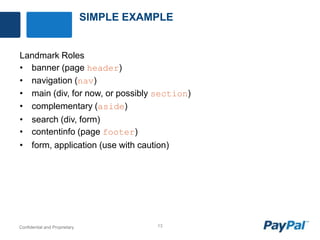
Landmark Roles
• banner (page header)
• navigation (nav)
• main (div, for now, or possibly section)
• complementary (aside)
• search (div, form)
• contentinfo (page footer)
• form, application (use with caution)
Confidential and Proprietary 15
COMPLEX EXAMPLE
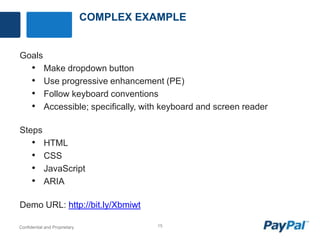
Goals
• Make dropdown button
• Use progressive enhancement (PE)
• Follow keyboard conventions
• Accessible; specifically, with keyboard and screen reader
Steps
• HTML
• CSS
• JavaScript
• ARIA
Demo URL: http://bit.ly/Xbmiwt
Confidential and Proprietary 16
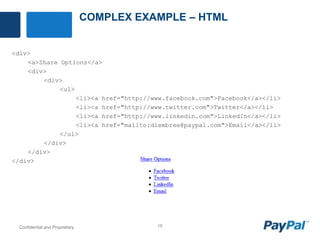
COMPLEX EXAMPLE – HTML
<div>
<a>Share Options</a>
<div>
<div>
<ul>
<li><a href="http://www.facebook.com">Facebook</a></li>
<li><a href="http://www.twitter.com">Twitter</a></li>
<li><a href="http://www.linkedin.com">LinkedIn</a></li>
<li><a href="mailto:dlembree@paypal.com">Email</a></li>
</ul>
</div>
</div>
</div>
Confidential and Proprietary 17
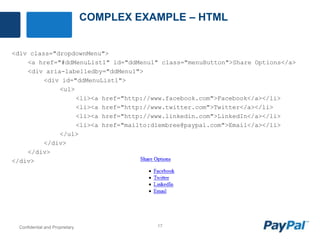
COMPLEX EXAMPLE – HTML
<div class="dropdownMenu">
<a href="#ddMenuList1" id="ddMenu1" class="menuButton">Share Options</a>
<div aria-labelledby="ddMenu1">
<div id="ddMenuList1">
<ul>
<li><a href="http://www.facebook.com">Facebook</a></li>
<li><a href="http://www.twitter.com">Twitter</a></li>
<li><a href="http://www.linkedin.com">LinkedIn</a></li>
<li><a href="mailto:dlembree@paypal.com">Email</a></li>
</ul>
</div>
</div>
</div>
Confidential and Proprietary 18
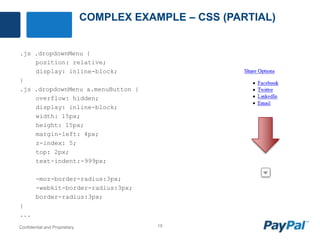
COMPLEX EXAMPLE – CSS (PARTIAL)
.js .dropdownMenu {
position: relative;
display: inline-block;
}
.js .dropdownMenu a.menuButton {
overflow: hidden;
display: inline-block;
width: 15px;
height: 15px;
margin-left: 4px;
z-index: 5;
top: 2px;
text-indent:-999px;
-moz-border-radius:3px;
-webkit-border-radius:3px;
border-radius:3px;
}
...
Confidential and Proprietary 19
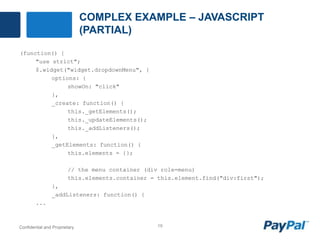
COMPLEX EXAMPLE – JAVASCRIPT
(PARTIAL)
(function() {
"use strict";
$.widget("widget.dropdownMenu", {
options: {
showOn: "click"
},
_create: function() {
this._getElements();
this._updateElements();
this._addListeners();
},
_getElements: function() {
this.elements = {};
// the menu container (div role=menu)
this.elements.container = this.element.find("div:first");
},
_addListeners: function() {
...
Confidential and Proprietary 22
COMPLEX EXAMPLE – DEMO
screen reader demo
Confidential and Proprietary 25
QUESTIONS
Confidential and Proprietary 26
CONTACT INFO
• Email: dlembree@paypal.com
• Web: DennisLembree.com
• Twitter Accounts
• @DennisL
• @WebAxe
• @EasyChirp
• @PayPalInclusive
• Demo URL: http://bit.ly/Xbmiwt

HTML5's ARIA and a Web-Accessible Dropdown Widget

  • 1.
    HTML5'S ARIA ANDA WEB- ACCESSIBLE DROPDOWN WIDGET by Dennis E. Lembrée HTML5 Developer Conference Palace Hotel, San Francisco October 15-16, 2012
  • 2.
    Confidential and Proprietary2 AGENDA • About @DennisL • About accessibility • ARIA & HTML5 • Simple example • Complex example • Tips • Questions • Contact info
  • 4.
    Confidential and Proprietary4 ABOUT ACCESSIBILITY Support a variety of users and a variety of environments • Visual, audio, motor, cognitive disability • Situational disability • Main language of website is non-native for user • Broken equipment (mouse or speakers don’t work) • Temporary disability (hand in cast, forgot glasses) • Environment (sunlight on screen; in library with no headphones) • Low-band connection (may have images off) • Large fingers (need large hit area)
  • 7.
    Confidential and Proprietary7 ABOUT ACCESSIBILITY Methods for implementation include multiple disciplines: • Code • Interaction design • Visual design • Content, writing • Testing • During development • QA testing (manual and automated) • User testing (including users with disabilities)
  • 10.
    Confidential and Proprietary10 ARIA & HTML5 • W3C WAI-ARIA • Accessible Rich Internet Applications (WAI-ARIA) 1.0 • W3C Candidate Recommendation, January 2011 • “attributes that define user interface elements to improve the accessibility and interoperability of web content and applications” • Basically, ARIA helps users of screen readers and other AT with modern web technologies. • Types of attributes: • Roles • States and Properties
  • 11.
    Confidential and Proprietary11 ARIA & HTML5 Roles • Widget roles: button, dialogue, menu, radio, tab • Document structure: list, presentation, row, separator • Landmark roles States and Properties • Widget attributes: aria-checked, aria-expanded, aria-haspopup, aria-label, aria-readonly, aria-required • Live regions: aria-atomic, aria-busy, aria-live • Relationship attributes: aria-controls, aria-describedby, aria-labelledby, aria-owns
  • 13.
    Confidential and Proprietary13 SIMPLE EXAMPLE Landmark Roles • banner (page header) • navigation (nav) • main (div, for now, or possibly section) • complementary (aside) • search (div, form) • contentinfo (page footer) • form, application (use with caution)
  • 15.
    Confidential and Proprietary15 COMPLEX EXAMPLE Goals • Make dropdown button • Use progressive enhancement (PE) • Follow keyboard conventions • Accessible; specifically, with keyboard and screen reader Steps • HTML • CSS • JavaScript • ARIA Demo URL: http://bit.ly/Xbmiwt
  • 16.
    Confidential and Proprietary16 COMPLEX EXAMPLE – HTML <div> <a>Share Options</a> <div> <div> <ul> <li><a href="http://www.facebook.com">Facebook</a></li> <li><a href="http://www.twitter.com">Twitter</a></li> <li><a href="http://www.linkedin.com">LinkedIn</a></li> <li><a href="mailto:dlembree@paypal.com">Email</a></li> </ul> </div> </div> </div>
  • 17.
    Confidential and Proprietary17 COMPLEX EXAMPLE – HTML <div class="dropdownMenu"> <a href="#ddMenuList1" id="ddMenu1" class="menuButton">Share Options</a> <div aria-labelledby="ddMenu1"> <div id="ddMenuList1"> <ul> <li><a href="http://www.facebook.com">Facebook</a></li> <li><a href="http://www.twitter.com">Twitter</a></li> <li><a href="http://www.linkedin.com">LinkedIn</a></li> <li><a href="mailto:dlembree@paypal.com">Email</a></li> </ul> </div> </div> </div>
  • 18.
    Confidential and Proprietary18 COMPLEX EXAMPLE – CSS (PARTIAL) .js .dropdownMenu { position: relative; display: inline-block; } .js .dropdownMenu a.menuButton { overflow: hidden; display: inline-block; width: 15px; height: 15px; margin-left: 4px; z-index: 5; top: 2px; text-indent:-999px; -moz-border-radius:3px; -webkit-border-radius:3px; border-radius:3px; } ...
  • 19.
    Confidential and Proprietary19 COMPLEX EXAMPLE – JAVASCRIPT (PARTIAL) (function() { "use strict"; $.widget("widget.dropdownMenu", { options: { showOn: "click" }, _create: function() { this._getElements(); this._updateElements(); this._addListeners(); }, _getElements: function() { this.elements = {}; // the menu container (div role=menu) this.elements.container = this.element.find("div:first"); }, _addListeners: function() { ...
  • 22.
    Confidential and Proprietary22 COMPLEX EXAMPLE – DEMO screen reader demo
  • 25.
  • 26.
    Confidential and Proprietary26 CONTACT INFO • Email: dlembree@paypal.com • Web: DennisLembree.com • Twitter Accounts • @DennisL • @WebAxe • @EasyChirp • @PayPalInclusive • Demo URL: http://bit.ly/Xbmiwt

Editor's Notes

  • #2 http://html5devconf.com/
  • #4 http://www.dennislembree.com
  • #9 http://www.html5accessibility.com/https://docs.google.com/presentation/d/1VCOM0TDZ3IxtDAc3GzR4Z58MhKIA9nAk4fA8f-7D058/present
  • #10 http://www.w3.org/TR/html5/wai-aria.html#wai-ariahttp://dev.w3.org/html5/spec/wai-aria.html
  • #11 http://www.w3.org/TR/wai-aria/
  • #12 http://www.w3.org/TR/wai-aria/
  • #13 Menu element is not supported yet in browsers not AT.Required supported inconsistently in AT.Landmark roles have good support.
  • #15 http://www.flickr.com/photos/odmag/8034463748/
  • #16 http://weboverhauls.com/sandbox/HTML5_DevConf_ARIA_Example/
  • #24 http://www.paciellogroup.com/blog/2012/06/html5-accessibility-chops-using-aria-notes/