EASI Social Media Series Presented by Dennis Lembrée February 1, 2010 Twitter and Web Accessibility
Agenda What’s Twitter? Issues with Twitter.com Accessible Twitter Applications AccessibleTwitter.com Other Benefits of Web Accessibility & Web Standards Guidelines for Accessible Tweets Contact Details Questions
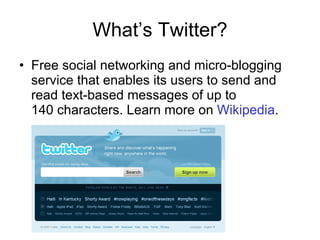
What’s Twitter? Free social networking and micro-blogging service that enables its users to send and read text-based messages of up to 140 characters. Learn more on  Wikipedia .
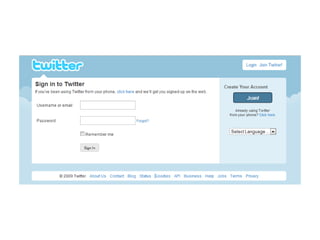
Issues with Twitter.com From the start, there are accessibility issues.  Can you find 3 items on the main Twitter “Sign in” page that could use improvement?
 
Issues with Twitter.com Two “click here” links. Text links are not underlined. Language select dropdown missing submit button (and requires JavaScript.)
Issues with Twitter.com Many web accessibility issues including: Core functionality is not  keyboard  accessible. Poor use of  headings . Much core functionality requires  JavaScript . Many more…
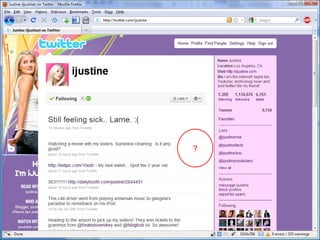
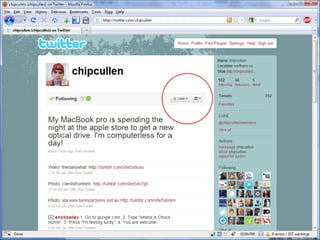
Keyboard Access Keyboard cannot access Favorite, Reply, and Delete links.
?
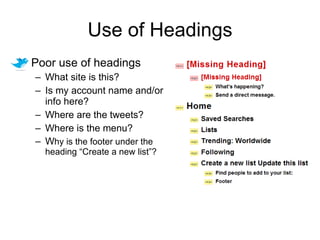
Use of Headings Poor use of headings What site is this? Is my account name and/or info here? Where are the tweets? Where is the menu? W hy is the footer under the heading “Create a new list”?
JavaScript Twitter.com requires JavaScript.  Without it, the user is unable to: Favorite a tweet. Delete a tweet. Access the content under Trending Topics & Followers. Perform core actions on Followers and Following pages. Reply to tweet  does  work without JavaScript.
 
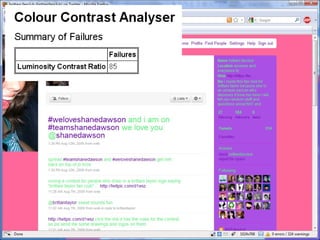
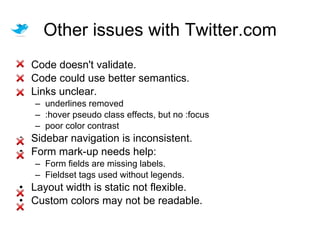
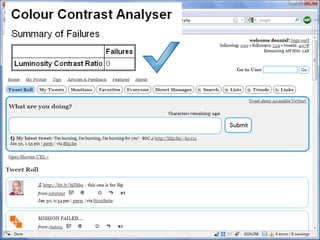
Other issues with Twitter.com Code doesn't validate. Code could use better semantics. Links unclear. underlines removed :hover pseudo class effects, but no :focus poor color contrast Sidebar navigation is inconsistent.  Form mark-up needs help: Form fields are missing labels. Fieldset tags used without legends. Layout width is static, not flexible. Custom colors may not be readable.
 
Accessible Applications Accessible Twitter http://www.accessibletwitter.com/ Slandr Mobile site, web-based http://m.slandr.net/ Qwitter Desktop client for screen readers http://qwitter-client.net/ TwInbox (previously McTwit) Plug-in for MS Outlook http://techhit.com/TwInbox/
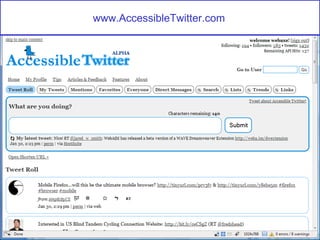
AccessibleTwitter.com Accessible Twitter provides a fully web-accessible and standards-compliant version of the Twitter web site. Winner of the  2009 Access IT @web2.0 Award . Nominated in the  Blind Bargains: 2009 Access Awards  (Best Blindness-related Website).
www.AccessibleTwitter.com
Keyboard Access ALL links are keyboard accessible.
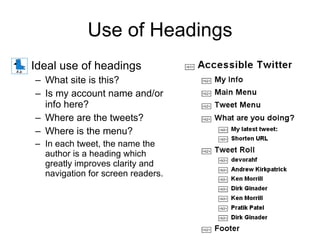
Use of Headings Ideal use of headings What site is this? Is my account name and/or info here? Where are the tweets? Where is the menu? In each tweet, the name the author is a heading which greatly improves clarity and navigation for screen readers.
JavaScript Accessible Twitter is fully functional without JavaScript.
JavaScript Accessible Twitter uses JavaScript to  enhance  behavior. Progress Enhancement is paramount. Hijax  (Jeremy Keith). Unobtrusive, of course.
Other issues with Twitter.com Code doesn't validate. Code could use better semantics. Links unclear. underlines removed :hover pseudo class effects, but no :focus poor color contrast Sidebar navigation is inconsistent.  Form mark-up needs help: Form fields are missing labels. Fieldset tags used without legends. Layout width is static not flexible. Custom colors may not be readable.
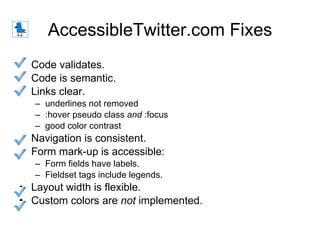
AccessibleTwitter.com Fixes Code validates. Code is semantic. Links clear. underlines not removed :hover pseudo class  and  :focus good color contrast Navigation is consistent.  Form mark-up is accessible: Form fields have labels. Fieldset tags include legends. Layout width is flexible. Custom colors are  not  implemented.
 
More Features Search, saved search, user search. Trends page. Popular Links page ( TweetMeme ). Every pages displays the user’s information.
More Features No hidden links; always displayed.  Favorite, Reply and Re-tweet links. Link to tweet’s “permanent page”. ARIA Landmarks Roles (nav, banner, search, main, etc.)
Quotes from Users “ Wow! You have really made my day, and I am smiling once again. I am so excited that I found your Accessible Twitter. Now I feel that I can be in the cutting edge of everything that is happening in the Twitter Universe”
Quotes from Users “ You can  easily navigate  by several methods; skip links, form fields, headings. Very effective with a screen reader.” [and now ARIA] “ really easy with a  Braille  Display to use” “ From now on my default web interface for Twitter!  Keyboard  accessible == touch accessible!”
Quotes from Users “… seems to work nicely in  Lynx . Main Twitter won't let me login and mobile site won't show followers.” “ Liking it more than twitter.com! Cleaner,  easier , fun!” “ Love this! So clear & Easy # dyslexia ”
Quotes from Users Read these quotes and more: http://accessibletwitter.com/articles.php
Future Enhancements Always evolving. Many enhancements and features are planned including: Twitter Lists  (partially implemented). Caching on Trends and Popular Links pages. Better error handling. Functionality to upload photos via Twitpic and/or yFrog. Open Authentication (instead of Basic).
Other Benefits of Web Accessibility & Web Standards More  usable . Better functionality with  assistive technology  such as text browsers & Braille devices. Keyboard accessibility opens gate for many other types of  input devices . Providing clear, consistent content and navigation benefits those with  cognitive  impairments (and is more usable in general). Use with a  mobile  device is possible.
Guidelines for Accessible Tweets Don’t overuse abbreviations. Shorten link URLs. Use simple language. Don’t use a foreign language without saying so, or by making it obvious (enclosing with quotes, for example).
Contact Details Dennis Lembree I like motorcycling, Star Wars, espresso, Woody Allen movies, and playing guitar. Web Sites www.DennisLembree.com www.WebOverhauls.com WebAxe.blogspot.com Twitter Accounts @Accessible Twitr @WebAxe @DennisL
Questions?