// Freiburg // 11/10/2016 // Frontend Meetup
// WEB ACCESSIBILITY
11. Oktober 2016, Freiburg
ACCESSIBILITY// 3
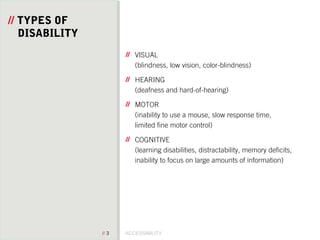
// TYPES OF
DISABILITY
VISUAL
(blindness, low vision, color-blindness)
HEARING
(deafness and hard-of-hearing)
MOTOR
(inability to use a mouse, slow response time,
limited fine motor control)
COGNITIVE
(learning disabilities, distractability, memory deficits,
inability to focus on large amounts of information)
// Reframing Accessibility
We need to change the way we talk about accessibility. Most
people are taught that “web accessibility means that people
with disabilities can use the Web”—the official definition from
the W3C. This is wrong. Web accessibility means that people
can use the web.
Anne Gibson, A LIST APART
// Web designers and developers
should treat accessibility as a
fundamental part of
development and not an
afterthought.
ACCESSIBILITY// 6
// DESIGN
RECOMMEND-
ATIONS
Plan Heading Structure Early
Consider Reading Order
Provide Good Contrast
Watch the Use of CAPS
Use Adequate Font Size
Remember Line Length
Make Sure Links are Recognizable
Ensure Link Text Makes Sense on Its Own
Use Animation, Video, and Audio Carefully
Don't Rely on Colour Alone
ACCESSIBILITY// 7
// DEVELOPER
RECOMMEND-
ATIONS
Alt text only where necessary (not title)
Links must contain text
(screenreader only, if necessary)
Use Semantic Elements correctly, HTML5 where
possible
Apply ARIA Roles responsibly
Navigate site with Keyboard
Set Focus State
Design Accessible Form Controls
Careful using display:none
Skip to content link
Set language
ACCESSIBILITY// 8
// SCREEN READER
ONLY
/*
* Hide only visually, but have it available
* for screen readers
*/
.visuallyhidden {
border: 0;
clip: rect(0 0 0 0);
height: 1px;
margin: -1px;
overflow: hidden;
padding: 0;
position: absolute;
width: 1px;
}
// WAI-ARIA provides attributes
for extending HTML markup
with roles, states and
properties to expose Web
applications to Assistive
Technologies (AT).
ACCESSIBILITY// 10
// WAI-ARIA
ROLES
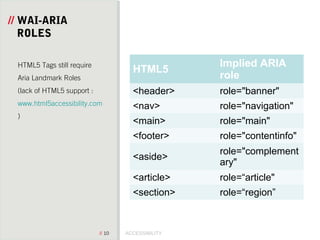
HTML5
Implied ARIA
role
<header> role="banner"
<nav> role="navigation"
<main> role="main"
<footer> role="contentinfo"
<aside>
role="complement
ary"
<article> role=“article"
<section> role=“region”
HTML5 Tags still require
Aria Landmark Roles
(lack of HTML5 support :
www.html5accessibility.com
)
ACCESSIBILITY// 11
// WAI-ARIA
COMMON
STATES &
PROPERTIES Common States:
aria-disabled
aria-hidden
Common Properties:
aria-expanded
aria-controls
aria-describedby
aria-haspopup
aria-label
aria-labelledby
aria-required
ACCESSIBILITY// 12
// WAI-ARIA
MENU
EXAMPLE
<nav role="navigation“>
<ol>
<li><h2><a href="http://...">Home</a></h2></li>
<li>
<h2>
<a id="menu-1" href="http://..." aria-haspopup="true"
aria-controls="menu-1-panel" aria-expanded="true" class="open">Industries</a>
</h2>
<div class=„panel open" id="menu-1-panel" role="group" aria-expanded="true"
aria-hidden="false" aria-labelledby="menu-1">
<h3>Food</h3>
</div>
</li>
</ol>
</nav>
<nav role="navigation“>
<ol>
<li><h2><a href="http://...">Home</a></h2></li>
<li>
<h2>
<a id="menu-1" href="http://..." aria-haspopup="true"
aria-controls="menu-1-panel" aria-expanded="true" class="open">Industries</a>
</h2>
<div class=„panel open" id="menu-1-panel" role="group" aria-expanded="true"
aria-hidden="false" aria-labelledby="menu-1">
<h3>Food</h3>
</div>
</li>
</ol>
</nav>
ACCESSIBILITY// 13
// WAI-ARIA
SEARCH FORM
EXAMPLE
<form role=”search”>
<label for=”search”>Search</label>
<input type=”search” id=” search” name=” search”>
<button>submit</button>
</form>
<form role=”search”>
<label for=”search”>Search</label>
<input type=”search” id=” search” name=” search”>
<button>submit</button>
</form>
ACCESSIBILITY// 14
// SKIP TO
CONTENT
<header role="banner“>
<a id="skip-to-content" href="#content">skip to main content</a>
<h1>Site Name</h1>
<nav role="navigation">
<a href="#">Link1</a>
<a href="#">Link2</a>
<a href="#">Link3</a>
<a href="#">Link4</a>
</nav>
</header>
<main id="content" role="main" tabindex="0">
<header role="banner“>
<a id="skip-to-content" href="#content">skip to main content</a>
<h1>Site Name</h1>
<nav role="navigation">
<a href="#">Link1</a>
<a href="#">Link2</a>
<a href="#">Link3</a>
<a href="#">Link4</a>
</nav>
</header>
<main id="content" role="main" tabindex="0">
#skip-to-content {
padding: 1em;
position: absolute;
top: -40px;
left: 1em;
z-index: 1000;
color: white;
}
#skip-to-content:focus {
position: absolute;
top: 0;
background: #4593ff;
}
#skip-to-content {
padding: 1em;
position: absolute;
top: -40px;
left: 1em;
z-index: 1000;
color: white;
}
#skip-to-content:focus {
position: absolute;
top: 0;
background: #4593ff;
}
HTML
CSS
ACCESSIBILITY// 15
// TOOLS
ChromeVOX
In-Browser Screen Reader Chrome Extension
Accessibility Developer Tools
Chrome Extension for Accessilbity Audits using Web
Developer
http://wave.webaim.org/
https://tenon.io
Online Accesibility Tests
NoCoffee
Vision Simulator Chrome Extension
http://webaim.org/resources/contrastchecker/
Colour Contrast Checker
http://www.paciellogroup.com/resources/contrastana
lyser/
Colour Contrast Analyser
ACCESSIBILITY// 16
// FURTHER
READING
http://webaim.org/resources/designers/#infographic
http://alistapart.com/article/reframing-accessibility-
for-the-web
http://www.w3.org/WAI/
http://webaim.org/
http://a11yproject.com/
https://webaccessibility.withgoogle.com
Google Accessibility free online Course
“Inclusive Design Patterns”, Smashing Mag
ACCESSIBILITY// 17
// KONTAKT
EMMA SEIFRIED
KULTWERK GMBH
HOLBEINSTRASSE 2
79100 FREIBURG
T +49 761.458 95 54-7
F +49 761. 458 95 54-9
EMMA.SEIFRIED@KULTWERK.DE
WWW.KULTWERK.DE

Web Accessibility

  • 1.
    // Freiburg //11/10/2016 // Frontend Meetup
  • 2.
    // WEB ACCESSIBILITY 11.Oktober 2016, Freiburg
  • 3.
    ACCESSIBILITY// 3 // TYPESOF DISABILITY VISUAL (blindness, low vision, color-blindness) HEARING (deafness and hard-of-hearing) MOTOR (inability to use a mouse, slow response time, limited fine motor control) COGNITIVE (learning disabilities, distractability, memory deficits, inability to focus on large amounts of information)
  • 4.
    // Reframing Accessibility Weneed to change the way we talk about accessibility. Most people are taught that “web accessibility means that people with disabilities can use the Web”—the official definition from the W3C. This is wrong. Web accessibility means that people can use the web. Anne Gibson, A LIST APART
  • 5.
    // Web designersand developers should treat accessibility as a fundamental part of development and not an afterthought.
  • 6.
    ACCESSIBILITY// 6 // DESIGN RECOMMEND- ATIONS PlanHeading Structure Early Consider Reading Order Provide Good Contrast Watch the Use of CAPS Use Adequate Font Size Remember Line Length Make Sure Links are Recognizable Ensure Link Text Makes Sense on Its Own Use Animation, Video, and Audio Carefully Don't Rely on Colour Alone
  • 7.
    ACCESSIBILITY// 7 // DEVELOPER RECOMMEND- ATIONS Alttext only where necessary (not title) Links must contain text (screenreader only, if necessary) Use Semantic Elements correctly, HTML5 where possible Apply ARIA Roles responsibly Navigate site with Keyboard Set Focus State Design Accessible Form Controls Careful using display:none Skip to content link Set language
  • 8.
    ACCESSIBILITY// 8 // SCREENREADER ONLY /* * Hide only visually, but have it available * for screen readers */ .visuallyhidden { border: 0; clip: rect(0 0 0 0); height: 1px; margin: -1px; overflow: hidden; padding: 0; position: absolute; width: 1px; }
  • 9.
    // WAI-ARIA providesattributes for extending HTML markup with roles, states and properties to expose Web applications to Assistive Technologies (AT).
  • 10.
    ACCESSIBILITY// 10 // WAI-ARIA ROLES HTML5 ImpliedARIA role <header> role="banner" <nav> role="navigation" <main> role="main" <footer> role="contentinfo" <aside> role="complement ary" <article> role=“article" <section> role=“region” HTML5 Tags still require Aria Landmark Roles (lack of HTML5 support : www.html5accessibility.com )
  • 11.
    ACCESSIBILITY// 11 // WAI-ARIA COMMON STATES& PROPERTIES Common States: aria-disabled aria-hidden Common Properties: aria-expanded aria-controls aria-describedby aria-haspopup aria-label aria-labelledby aria-required
  • 12.
    ACCESSIBILITY// 12 // WAI-ARIA MENU EXAMPLE <navrole="navigation“> <ol> <li><h2><a href="http://...">Home</a></h2></li> <li> <h2> <a id="menu-1" href="http://..." aria-haspopup="true" aria-controls="menu-1-panel" aria-expanded="true" class="open">Industries</a> </h2> <div class=„panel open" id="menu-1-panel" role="group" aria-expanded="true" aria-hidden="false" aria-labelledby="menu-1"> <h3>Food</h3> </div> </li> </ol> </nav> <nav role="navigation“> <ol> <li><h2><a href="http://...">Home</a></h2></li> <li> <h2> <a id="menu-1" href="http://..." aria-haspopup="true" aria-controls="menu-1-panel" aria-expanded="true" class="open">Industries</a> </h2> <div class=„panel open" id="menu-1-panel" role="group" aria-expanded="true" aria-hidden="false" aria-labelledby="menu-1"> <h3>Food</h3> </div> </li> </ol> </nav>
  • 13.
    ACCESSIBILITY// 13 // WAI-ARIA SEARCHFORM EXAMPLE <form role=”search”> <label for=”search”>Search</label> <input type=”search” id=” search” name=” search”> <button>submit</button> </form> <form role=”search”> <label for=”search”>Search</label> <input type=”search” id=” search” name=” search”> <button>submit</button> </form>
  • 14.
    ACCESSIBILITY// 14 // SKIPTO CONTENT <header role="banner“> <a id="skip-to-content" href="#content">skip to main content</a> <h1>Site Name</h1> <nav role="navigation"> <a href="#">Link1</a> <a href="#">Link2</a> <a href="#">Link3</a> <a href="#">Link4</a> </nav> </header> <main id="content" role="main" tabindex="0"> <header role="banner“> <a id="skip-to-content" href="#content">skip to main content</a> <h1>Site Name</h1> <nav role="navigation"> <a href="#">Link1</a> <a href="#">Link2</a> <a href="#">Link3</a> <a href="#">Link4</a> </nav> </header> <main id="content" role="main" tabindex="0"> #skip-to-content { padding: 1em; position: absolute; top: -40px; left: 1em; z-index: 1000; color: white; } #skip-to-content:focus { position: absolute; top: 0; background: #4593ff; } #skip-to-content { padding: 1em; position: absolute; top: -40px; left: 1em; z-index: 1000; color: white; } #skip-to-content:focus { position: absolute; top: 0; background: #4593ff; } HTML CSS
  • 15.
    ACCESSIBILITY// 15 // TOOLS ChromeVOX In-BrowserScreen Reader Chrome Extension Accessibility Developer Tools Chrome Extension for Accessilbity Audits using Web Developer http://wave.webaim.org/ https://tenon.io Online Accesibility Tests NoCoffee Vision Simulator Chrome Extension http://webaim.org/resources/contrastchecker/ Colour Contrast Checker http://www.paciellogroup.com/resources/contrastana lyser/ Colour Contrast Analyser
  • 16.
  • 17.
    ACCESSIBILITY// 17 // KONTAKT EMMASEIFRIED KULTWERK GMBH HOLBEINSTRASSE 2 79100 FREIBURG T +49 761.458 95 54-7 F +49 761. 458 95 54-9 EMMA.SEIFRIED@KULTWERK.DE WWW.KULTWERK.DE

Editor's Notes

  • #3 Intro Designer Recommendations Developer Recommendations WAI-ARIA Web Accessibility Initiative – Accessibile Rich Internet Applications Tools Further Reading
  • #4 VISUAL (blindness, low vision, color-blindness)Markup should be in a logical reading order. Foreground and background colors of text must have enough contrast to be readable without color. HEARING (deafness and hard-of-hearing) All videos should have captions. Don’t convey important information by sound only. MOTOR (inability to use a mouse, slow response time, limited fine motor control)Ensure that users can navigate the site by using the keyboard (tab to move forward and shift+tab for backwards). COGNITIVE (learning disabilities, distractability, memory deficits, inability to focus on large amounts of information)This is a broader disability that is more difficult to code for. In general, developers should strive for organization, clarity, simplicity, and ease of navigation.
  • #5 Web use is constantly changing: Voice Haptische Devices Games console
  • #7 http://webaim.org/resources/designers/ Plan Heading Structure Early Ensure all content and design fits into a logical heading structure. Consider Reading Order The reading order should be the same as the visual order. Provide Good Contrast Be especially careful with light shades of gray, orange, and yellow. Check your contrast levels with our color contrast checker. Use True Text Whenever Possible True text enlarges better, loads faster, and is easier to translate. Use CSS to add visual style. Watch the Use of CAPS All caps can be difficult to read and can be read incorrectly by screen readers. Use Adequate Font Size Font size can vary based on the font chosen, but 10 point is usually a minimum. Remember Line Length Don&amp;apos;t make it too long or too short. Make Sure Links are Recognizable Differentiate links in the body of the page with underlines or something other than color alone. Ensure Link Text Makes Sense on Its Own Avoid &amp;quot;Click Here&amp;quot; in link text. Other ambiguous links, such as &amp;quot;More&amp;quot; or &amp;quot;Continue&amp;quot;, can also be confusing. Screen readers will often jump through links, skipping the content inb etween, to skim through pages Use Animation, Video, and Audio Carefully If used, provide a play/pause button. Avoid flashing or strobing content: It can cause seizures. Don&amp;apos;t Rely on Color Alone Because users often can&amp;apos;t distinguish or may override page colors, color cannot be the only way information is conveyed. Reduce Cognitive Overload
  • #8 Alt text only where necessaryAlternative Text should be based on the function of the graphic, not the appearance. Use blank alt text for decorative images or use CSS. Title should not be used, especially not if meant to convey important information. Links must contain textCorrect Translation of sr-only tags Use Semantic Elements correctly, HTML5 where possibleListen können als solche angesagt werden (typische Ausgabe: „Liste enthält 4 Elemente”) und komplett übersprungen werden können. Allerdings sollten Listen nicht mißbraucht werden, um Trennelemente in einem eigenen List item anzuzeigen (&amp;lt;li class=&amp;quot;divider&amp;quot;&amp;gt;&amp;lt;/li&amp;gt;)Schlechte Beispiel: https://getbootstrap.com/examples/navbar/ Apply ARIA Roles responsibly. First rule of ARIA use:„If you can use a native HTML element [HTML5] or attribute with the semantics and behaviour you require already built in, instead of re-purposing an element and adding an ARIA role, state or property to make it accessible, then do so.“ Navigate Site with KeyboardMake sure everything works on a keyboard. Everything that’s clickable needs to also be tabbable Set Focus StateEnsure keyboard users can visually identify a focused link. Use the standard dotted line or other non-color designators.(Bad example: http://www.spiegel.de/ Good example: http://www.bbc.com/) Design Accessible Form ControlsEnsure form controls have descriptive labels and instructions. Pay close attention to form validation errors and recovery mechanisms.Use Fieldsets and Legends to group related form elements (important for radio buttons and checkboxes) Wichtige Grafiken, wie Logos, nicht als CSS-background-image einbinden. Ansonsten entstehen Probleme für stark sehbehinderte Nutzer, die auf eigene Farben angewiesen sind und mit einem systemweiten Kontrastschema arbeiten (z.B. Windows Kontrast #1) – in diesem Fall werden CSS-Hintergrundbilder grundsätzlich nicht angezeigt, diese Nutzer bekommen also einen großen leeren Bereich präsentiert. Vorschlag: als echtes &amp;lt;img&amp;gt; mit entsprechendem alt-Attribut einbinden Careful using display:none Screen readers sometimes ignore display:none. This means the content will be read despite being “hidden”. Also use visibility: hidden Design a &amp;quot;Skip to Main Content&amp;quot; LinkA link for keyboard users to skip navigation should be at the top of the page. It can be hidden, but should be visible when it receives keyboard focus.(Bad example: http://www.zeit.de/ Good example: http://webaim.org/) Set LanguageDeclaring a language attribute on the html element enables a screen reader to read out the text with correct pronunciation. No-JS alternatives
  • #10 As web pages become more and more complex with dynamic content and advanced user interface controls developed with Ajax, HTML, JavaScript, and related technologies, these user interface controls and content updates are often not accessible to users with disabilities, especially screen reader users and users who cannot use a mouse or other pointing device. First rule: Use a native HTML element or attribute when you can Second rule: Do not change native semantics, unless you really must. Third rule: All interactive elements must have accessible name, role, state and properties as applicable. Fourth rule: All interactive ARIA controls must be usable with the keyboard. Fifth rule: Do not use role=&amp;quot;presentation&amp;quot; or aria-hidden=&amp;quot;true&amp;quot; on a visible focusable element. WAI-ARIA is included in HTML5 making it part of normative language. Before and after example: http://alistapart.com/article/accessibility-the-missing-ingredient
  • #11 &amp;lt;form role=„search“&amp;gt; Unnecessary ARIA Roles: button heading link list / listitem radio (if not styled)