ARIA 1.1/1.2
A Practical Perspective
HOWDY!
Name: Mark Steadman
Title: Director, Mobile Accessibility
Company: Fidelity Investments
Twitter: @Steady5063
Name: Birkir Gunnarsson
Title: Team Lead PI Accessibility
Company: Fidelity Investments
Twitter: @birkir_gun
• Before we begin this talk, we must make one thing clear
• The number one rule of ARIA you will see is “Don’t use ARIA”.
• This could not be farther from the truth.
• True statement should be:
“Only use ARIA, if there is no equivalent in HTML OR
enhancement is needed for HTML content”
Word Of Caution
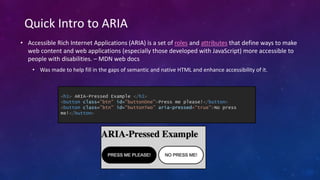
• Accessible Rich Internet Applications (ARIA) is a set of roles and attributes that define ways to make
web content and web applications (especially those developed with JavaScript) more accessible to
people with disabilities. – MDN web docs
• Was made to help fill in the gaps of semantic and native HTML and enhance accessibility of it.
Quick Intro to ARIA
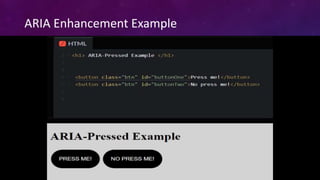
<h1> ARIA-Pressed Example </h1>
<button class="btn" id="buttonOne">Press me please!</button>
<button class="btn" id="buttonTwo” aria-pressed=“true”>No press
me!</button>
ARIA Enhancement Example
How Useful is Your ARIA?
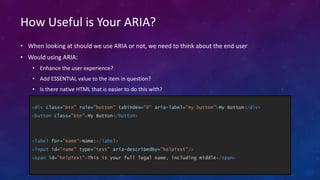
• When looking at should we use ARIA or not, we need to think about the end user
• Would using ARIA:
• Enhance the user experience?
• Add ESSENTIAL value to the item in question?
• Is there native HTML that is easier to do this with?
<div class="btn" role="button" tabindex="0" aria-label="my button">My Button</div>
<button class="btn">My Button</button>
<label for="name">Name:</label>
<input id="name" type="text" aria-describedby="helpText"/>
<span id="helpText">This is your full legal name, including middle</span>
Introducing The ARIA-na Grande Scale!
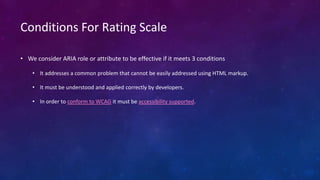
Conditions For Rating Scale
• We consider ARIA role or attribute to be effective if it meets 3 conditions
• It addresses a common problem that cannot be easily addressed using HTML markup.
• It must be understood and applied correctly by developers.
• In order to conform to WCAG it must be accessibility supported.
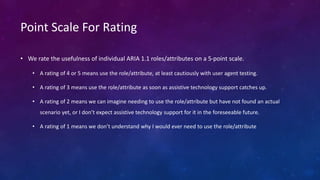
Point Scale For Rating
• We rate the usefulness of individual ARIA 1.1 roles/attributes on a 5-point scale.
• A rating of 4 or 5 means use the role/attribute, at least cautiously with user agent testing.
• A rating of 3 means use the role/attribute as soon as assistive technology support catches up.
• A rating of 2 means we can imagine needing to use the role/attribute but have not found an actual
scenario yet, or I don’t expect assistive technology support for it in the foreseeable future.
• A rating of 1 means we don’t understand why I would ever need to use the role/attribute
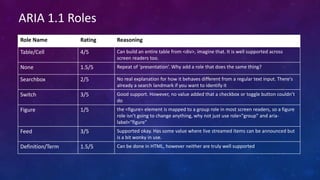
Role Name Rating Reasoning
Table/Cell 4/5 Can build an entire table from <div>, imagine that. It is well supported across
screen readers too.
None 1.5/5 Repeat of ‘presentation’. Why add a role that does the same thing?
Searchbox 2/5 No real explanation for how it behaves different from a regular text input. There's
already a search landmark if you want to identify it
Switch 3/5 Good support. However, no value added that a checkbox or toggle button couldn’t
do
Figure 1/5 the <figure> element is mapped to a group role in most screen readers, so a figure
role isn't going to change anything, why not just use role="group" and aria-
label="figure"
Feed 3/5 Supported okay. Has some value where live streamed items can be announced but
is a bit wonky in use.
Definition/Term 1.5/5 Can be done in HTML, however neither are truly well supported
ARIA 1.1 Roles
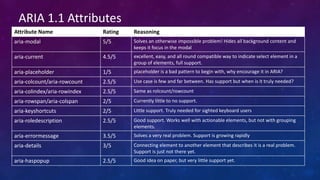
Attribute Name Rating Reasoning
aria-modal 5/5 Solves an otherwise impossible problem! Hides all background content and
keeps it focus in the modal
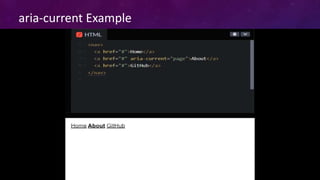
aria-current 4.5/5 excellent, easy, and all round compatible way to indicate select element in a
group of elements, full support.
aria-placeholder 1/5 placeholder is a bad pattern to begin with, why encourage it in ARIA?
aria-colcount/aria-rowcount 2.5/5 Use case is few and far between. Has support but when is it truly needed?
aria-colindex/aria-rowindex 2.5/5 Same as rolcount/rowcount
aria-rowspan/aria-colspan 2/5 Currently little to no support.
aria-keyshortcuts 2/5 Little support. Truly needed for sighted keyboard users
aria-roledescription 2.5/5 Good support. Works well with actionable elements, but not with grouping
elements.
aria-errormessage 3.5/5 Solves a very real problem. Support is growing rapidly
aria-details 3/5 Connecting element to another element that describes it is a real problem.
Support is just not there yet.
aria-haspopup 2.5/5 Good idea on paper, but very little support yet.
ARIA 1.1 Attributes
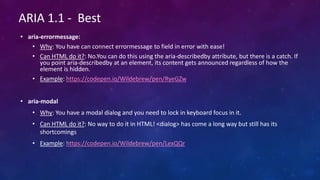
• aria-errormessage:
• Why: You have can connect errormessage to field in error with ease!
• Can HTML do it?: No.You can do this using the aria-describedby attribute, but there is a catch. If
you point aria-describedby at an element, its content gets announced regardless of how the
element is hidden.
• Example: https://codepen.io/Wildebrew/pen/RyeGZw
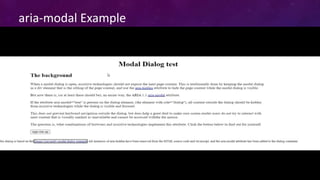
• aria-modal
• Why: You have a modal dialog and you need to lock in keyboard focus in it.
• Can HTML do it?: No way to do it in HTML! <dialog> has come a long way but still has its
shortcomings
• Example: https://codepen.io/Wildebrew/pen/LexQQr
ARIA 1.1 - Best
aria-modal Example
ARIA 1.1 - Best
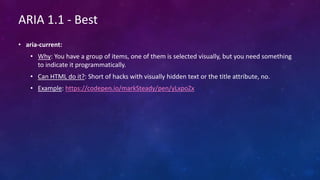
• aria-current:
• Why: You have a group of items, one of them is selected visually, but you need something
to indicate it programmatically.
• Can HTML do it?: Short of hacks with visually hidden text or the title attribute, no.
• Example: https://codepen.io/markSteady/pen/yLxpoZx
aria-current Example
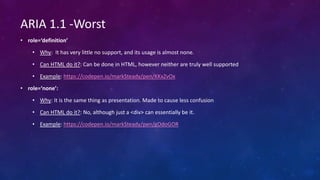
• role=‘definition’
• Why: It has very little no support, and its usage is almost none.
• Can HTML do it?: Can be done in HTML, however neither are truly well supported
• Example: https://codepen.io/markSteady/pen/KKxZvOx
• role=‘none’:
• Why: It is the same thing as presentation. Made to cause less confusion
• Can HTML do it?: No, although just a <div> can essentially be it.
• Example: https://codepen.io/markSteady/pen/gOdoGOR
ARIA 1.1 -Worst
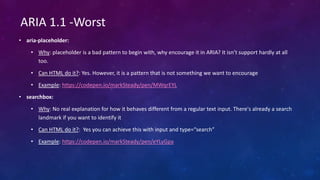
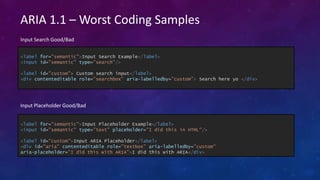
• aria-placeholder:
• Why: placeholder is a bad pattern to begin with, why encourage it in ARIA? It isn’t support hardly at all
too.
• Can HTML do it?: Yes. However, it is a pattern that is not something we want to encourage
• Example: https://codepen.io/markSteady/pen/MWqrEYL
• searchbox:
• Why: No real explanation for how it behaves different from a regular text input. There's already a search
landmark if you want to identify it
• Can HTML do it?: Yes you can achieve this with input and type=“search”
• Example: https://codepen.io/markSteady/pen/eYLyGpa
ARIA 1.1 -Worst
ARIA 1.1 – Worst Coding Samples
<label for="semantic">Input Search Example</label>
<input id="semantic" type=”search"/>
<label id=”custom”> Custom search input</label>
<div contenteditable role="searchbox” aria-labelledby=”custom”> Search here yo </div>
Input Search Good/Bad
<label for="semantic">Input Placeholder Example</label>
<input id="semantic" type=”text" placeholder="I did this in HTML"/>
<label id=”custom">Input ARIA Placeholder</label>
<div id="aria” contenteditable role="textbox” aria-labelledby=”custom”
aria-placeholder="I did this with ARIA">I did this with ARIA</div>
Input Placeholder Good/Bad
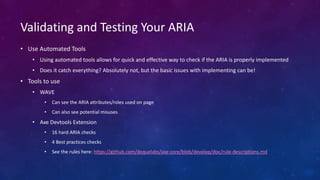
• Use Automated Tools
• Using automated tools allows for quick and effective way to check if the ARIA is properly implemented
• Does it catch everything? Absolutely not, but the basic issues with implementing can be!
• Tools to use
• WAVE
• Can see the ARIA attributes/roles used on page
• Can also see potential misuses
• Axe Devtools Extension
• 16 hard ARIA checks
• 4 Best practices checks
• See the rules here: https://github.com/dequelabs/axe-core/blob/develop/doc/rule-descriptions.md
Validating and Testing Your ARIA
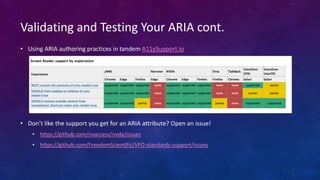
• Using ARIA authoring practices in tandem A11ySupport.io
• Don’t like the support you get for an ARIA attribute? Open an issue!
• https://github.com/nvaccess/nvda/issues
• https://github.com/FreedomScientific/VFO-standards-support/issues
Validating and Testing Your ARIA cont.
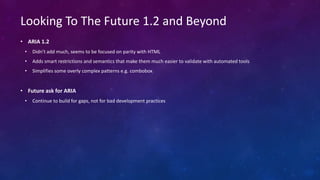
• ARIA 1.2
• Didn't add much, seems to be focused on parity with HTML
• Adds smart restrictions and semantics that make them much easier to validate with automated tools
• Simplifies some overly complex patterns e.g. combobox
• Future ask for ARIA
• Continue to build for gaps, not for bad development practices
Looking To The Future 1.2 and Beyond
ONE ASK BEFORE WE GO….
• Do not over do it and keep it simple
• HTML where you can
• ARIA authoring practices
• A11ysupport.io
• Slay Complexity
• Do not overthink the development of components
• Use the tools available when needed to help fill in the gaps with ARIA

ARIA_11_12_Practical_Perspective.pptx

  • 1.
  • 2.
    HOWDY! Name: Mark Steadman Title:Director, Mobile Accessibility Company: Fidelity Investments Twitter: @Steady5063 Name: Birkir Gunnarsson Title: Team Lead PI Accessibility Company: Fidelity Investments Twitter: @birkir_gun
  • 3.
    • Before webegin this talk, we must make one thing clear • The number one rule of ARIA you will see is “Don’t use ARIA”. • This could not be farther from the truth. • True statement should be: “Only use ARIA, if there is no equivalent in HTML OR enhancement is needed for HTML content” Word Of Caution
  • 4.
    • Accessible RichInternet Applications (ARIA) is a set of roles and attributes that define ways to make web content and web applications (especially those developed with JavaScript) more accessible to people with disabilities. – MDN web docs • Was made to help fill in the gaps of semantic and native HTML and enhance accessibility of it. Quick Intro to ARIA <h1> ARIA-Pressed Example </h1> <button class="btn" id="buttonOne">Press me please!</button> <button class="btn" id="buttonTwo” aria-pressed=“true”>No press me!</button>
  • 5.
  • 6.
    How Useful isYour ARIA? • When looking at should we use ARIA or not, we need to think about the end user • Would using ARIA: • Enhance the user experience? • Add ESSENTIAL value to the item in question? • Is there native HTML that is easier to do this with? <div class="btn" role="button" tabindex="0" aria-label="my button">My Button</div> <button class="btn">My Button</button> <label for="name">Name:</label> <input id="name" type="text" aria-describedby="helpText"/> <span id="helpText">This is your full legal name, including middle</span>
  • 7.
  • 8.
    Conditions For RatingScale • We consider ARIA role or attribute to be effective if it meets 3 conditions • It addresses a common problem that cannot be easily addressed using HTML markup. • It must be understood and applied correctly by developers. • In order to conform to WCAG it must be accessibility supported.
  • 9.
    Point Scale ForRating • We rate the usefulness of individual ARIA 1.1 roles/attributes on a 5-point scale. • A rating of 4 or 5 means use the role/attribute, at least cautiously with user agent testing. • A rating of 3 means use the role/attribute as soon as assistive technology support catches up. • A rating of 2 means we can imagine needing to use the role/attribute but have not found an actual scenario yet, or I don’t expect assistive technology support for it in the foreseeable future. • A rating of 1 means we don’t understand why I would ever need to use the role/attribute
  • 10.
    Role Name RatingReasoning Table/Cell 4/5 Can build an entire table from <div>, imagine that. It is well supported across screen readers too. None 1.5/5 Repeat of ‘presentation’. Why add a role that does the same thing? Searchbox 2/5 No real explanation for how it behaves different from a regular text input. There's already a search landmark if you want to identify it Switch 3/5 Good support. However, no value added that a checkbox or toggle button couldn’t do Figure 1/5 the <figure> element is mapped to a group role in most screen readers, so a figure role isn't going to change anything, why not just use role="group" and aria- label="figure" Feed 3/5 Supported okay. Has some value where live streamed items can be announced but is a bit wonky in use. Definition/Term 1.5/5 Can be done in HTML, however neither are truly well supported ARIA 1.1 Roles
  • 11.
    Attribute Name RatingReasoning aria-modal 5/5 Solves an otherwise impossible problem! Hides all background content and keeps it focus in the modal aria-current 4.5/5 excellent, easy, and all round compatible way to indicate select element in a group of elements, full support. aria-placeholder 1/5 placeholder is a bad pattern to begin with, why encourage it in ARIA? aria-colcount/aria-rowcount 2.5/5 Use case is few and far between. Has support but when is it truly needed? aria-colindex/aria-rowindex 2.5/5 Same as rolcount/rowcount aria-rowspan/aria-colspan 2/5 Currently little to no support. aria-keyshortcuts 2/5 Little support. Truly needed for sighted keyboard users aria-roledescription 2.5/5 Good support. Works well with actionable elements, but not with grouping elements. aria-errormessage 3.5/5 Solves a very real problem. Support is growing rapidly aria-details 3/5 Connecting element to another element that describes it is a real problem. Support is just not there yet. aria-haspopup 2.5/5 Good idea on paper, but very little support yet. ARIA 1.1 Attributes
  • 12.
    • aria-errormessage: • Why:You have can connect errormessage to field in error with ease! • Can HTML do it?: No.You can do this using the aria-describedby attribute, but there is a catch. If you point aria-describedby at an element, its content gets announced regardless of how the element is hidden. • Example: https://codepen.io/Wildebrew/pen/RyeGZw • aria-modal • Why: You have a modal dialog and you need to lock in keyboard focus in it. • Can HTML do it?: No way to do it in HTML! <dialog> has come a long way but still has its shortcomings • Example: https://codepen.io/Wildebrew/pen/LexQQr ARIA 1.1 - Best
  • 13.
  • 14.
    ARIA 1.1 -Best • aria-current: • Why: You have a group of items, one of them is selected visually, but you need something to indicate it programmatically. • Can HTML do it?: Short of hacks with visually hidden text or the title attribute, no. • Example: https://codepen.io/markSteady/pen/yLxpoZx
  • 15.
  • 16.
    • role=‘definition’ • Why:It has very little no support, and its usage is almost none. • Can HTML do it?: Can be done in HTML, however neither are truly well supported • Example: https://codepen.io/markSteady/pen/KKxZvOx • role=‘none’: • Why: It is the same thing as presentation. Made to cause less confusion • Can HTML do it?: No, although just a <div> can essentially be it. • Example: https://codepen.io/markSteady/pen/gOdoGOR ARIA 1.1 -Worst
  • 17.
    • aria-placeholder: • Why:placeholder is a bad pattern to begin with, why encourage it in ARIA? It isn’t support hardly at all too. • Can HTML do it?: Yes. However, it is a pattern that is not something we want to encourage • Example: https://codepen.io/markSteady/pen/MWqrEYL • searchbox: • Why: No real explanation for how it behaves different from a regular text input. There's already a search landmark if you want to identify it • Can HTML do it?: Yes you can achieve this with input and type=“search” • Example: https://codepen.io/markSteady/pen/eYLyGpa ARIA 1.1 -Worst
  • 18.
    ARIA 1.1 –Worst Coding Samples <label for="semantic">Input Search Example</label> <input id="semantic" type=”search"/> <label id=”custom”> Custom search input</label> <div contenteditable role="searchbox” aria-labelledby=”custom”> Search here yo </div> Input Search Good/Bad <label for="semantic">Input Placeholder Example</label> <input id="semantic" type=”text" placeholder="I did this in HTML"/> <label id=”custom">Input ARIA Placeholder</label> <div id="aria” contenteditable role="textbox” aria-labelledby=”custom” aria-placeholder="I did this with ARIA">I did this with ARIA</div> Input Placeholder Good/Bad
  • 19.
    • Use AutomatedTools • Using automated tools allows for quick and effective way to check if the ARIA is properly implemented • Does it catch everything? Absolutely not, but the basic issues with implementing can be! • Tools to use • WAVE • Can see the ARIA attributes/roles used on page • Can also see potential misuses • Axe Devtools Extension • 16 hard ARIA checks • 4 Best practices checks • See the rules here: https://github.com/dequelabs/axe-core/blob/develop/doc/rule-descriptions.md Validating and Testing Your ARIA
  • 20.
    • Using ARIAauthoring practices in tandem A11ySupport.io • Don’t like the support you get for an ARIA attribute? Open an issue! • https://github.com/nvaccess/nvda/issues • https://github.com/FreedomScientific/VFO-standards-support/issues Validating and Testing Your ARIA cont.
  • 21.
    • ARIA 1.2 •Didn't add much, seems to be focused on parity with HTML • Adds smart restrictions and semantics that make them much easier to validate with automated tools • Simplifies some overly complex patterns e.g. combobox • Future ask for ARIA • Continue to build for gaps, not for bad development practices Looking To The Future 1.2 and Beyond
  • 22.
    ONE ASK BEFOREWE GO…. • Do not over do it and keep it simple • HTML where you can • ARIA authoring practices • A11ysupport.io • Slay Complexity • Do not overthink the development of components • Use the tools available when needed to help fill in the gaps with ARIA

Editor's Notes

  • #6 Video Description: Demoing the usage of aria-pressed. There are two buttons present that says “press me” and “no press me”, as the user toggles there them with a screen reader they select one and the announce changes to pressed.
  • #14 Video Description