HTML Tags
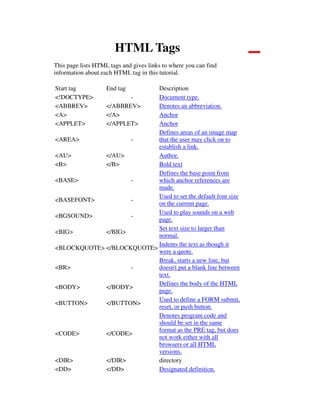
This page lists HTML tags and gives links to where you can find
information about each HTML tag in this tutorial.
Start tag End tag Description
<!DOCTYPE> - Document type.
<ABBREV> </ABBREV> Denotes an abbreviation.
<A> </A> Anchor
<APPLET> </APPLET> Anchor
<AREA> -
Defines areas of an image map
that the user may click on to
establish a link.
<AU> </AU> Author.
<B> </B> Bold text
<BASE> -
Defines the base point from
which anchor references are
made.
<BASEFONT> -
Used to set the default font size
on the current page.
<BGSOUND> -
Used to play sounds on a web
page.
<BIG> </BIG>
Set text size to larger than
normal.
<BLOCKQUOTE> </BLOCKQUOTE>
Indents the text as though it
were a quote.
<BR> -
Break, starts a new line, but
doesn't put a blank line between
text.
<BODY> </BODY>
Defines the body of the HTML
page.
<BUTTON> </BUTTON>
Used to define a FORM submit,
reset, or push button.
<CODE> </CODE>
Denotes program code and
should be set in the same
format as the PRE tag, but does
not work either with all
browsers or all HTML
versions.
<DIR> </DIR> directory
<DD> </DD> Designated definition.
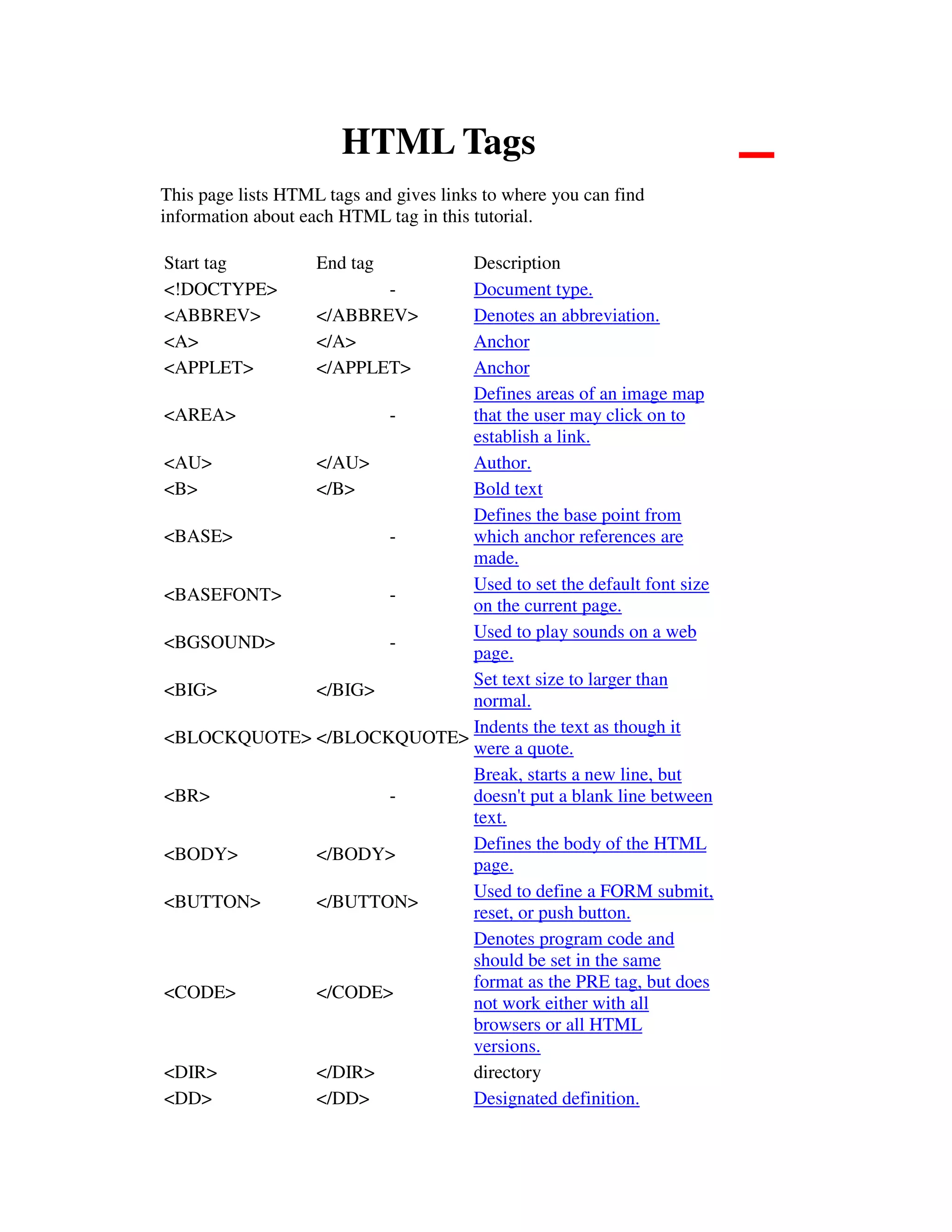
<DEL> </DEL> Denotes deleted text.
<DIV> </DIV>
Used to offset parts of the
HTML document to perform
assignment of special attributes
or controls to that section.
<DFN> </DFN>
Denotes the definition of a
term.
<DL> </DL> Definition list.
<DOCTYPE> - Document type.
<DT> </DT> Definition term.
<EM> </EM>
Sets text in italics and denotes
emphasis.
<FIELDSET> </FIELDSET>
Allows grouping of form
controls.
<FONT> </FONT>
Sets a section of text with a
specific font.
<FORM> </FORM>
Displays a form for user
information.
<FRAME> -
Specifies a frame to be placed
inside a FRAMESET.
<FRAMESET> </FRAMESET>
Used to divide the browser
window into separate frames
that can display multiple
documents.
<H1> </H1> Defines a level 1 header.
<H2> </H2> Defines a level 2 header.
<H3> </H3> Defines a level 3 header.
<H4> </H4> Defines a level 4 header.
<H5> </H5> Defines a level 5 header.
<H6> </H6> Defines a level 6 header.
<HEAD> </HEAD> Defines the head of document.
<HR> -
Horizontal rule, starts a new
line with horizontal graphic line
between sections.
<HTML> </HTML>
Defines an HTML document or
page.
<IMG> -
Used to embed graphics in
HTML pages.
<INPUT> </INPUT> An input element for a form.
<INS> </INS> Denotes inserted text.
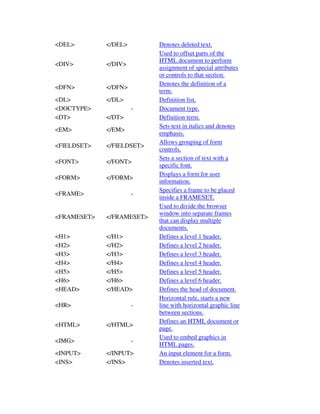
<I> </I> Italics
<KBD> </KBD>
Text to be typed at the
keyboard, such as a computer
command. The test is displayed
in a mono spaced format.
<LABEL> <.LABEL>
Allows an ability to click on a
text label to select a form
control
<LI> - List item in a list.
<MAP> </MAP> Starts a client-side image map.
<MENU> </MENU> A menu list (Depreciated).
<META> -
Meta element defining special
characteristics of the document.
<NOFRAMES> </NOFRAMES>
Used for web browsers that
don't support FRAMESETs.
<NOSCRIPT> </NOSCRIPT>
Used for web browsers that
don't support script code.
<OBJECT> </OBJECT>
Object, the replacement for
Applets and more.
<OL> </OL> Numbered or ordered list.
<OPTGROUP> </OPTGROUP>
Sets up choices inside a
SELECT menu.
<OPTION> </OPTION>
Used to set items in a list of
selectable items in a form.
<P> </P> Paragraph.
<PARAM> -
Used to set up parameters for
the OBJECT and APPLET
elements..
<PRE> </PRE>
Preformatted text. Text
presented as typed with tabs,
spaces and other whitespace.
<Q> </Q> Quotation.
<SAMP> </SAMP> Denotes sample text.
<SCRIPT> </SCRIPT>
Used to embed client side script
in HTML code, usually in the
header.
<SELECT> </SELECT>
Creates a list of items that can
be selected.
<SMALL> </SMALL>
Makes text smaller than
normal.
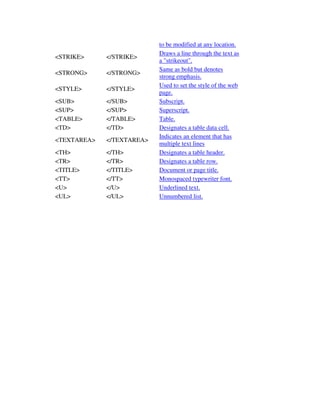
<SPAN> </SPAN> Allows text attributes and color
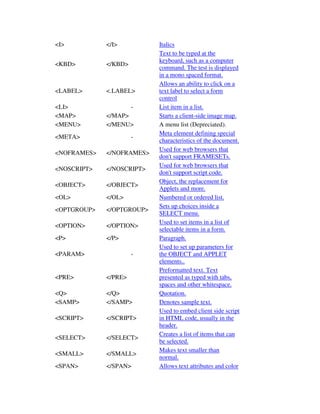
to be modified at any location.
<STRIKE> </STRIKE>
Draws a line through the text as
a "strikeout".
<STRONG> </STRONG>
Same as bold but denotes
strong emphasis.
<STYLE> </STYLE>
Used to set the style of the web
page.
<SUB> </SUB> Subscript.
<SUP> </SUP> Superscript.
<TABLE> </TABLE> Table.
<TD> </TD> Designates a table data cell.
<TEXTAREA> </TEXTAREA>
Indicates an element that has
multiple text lines
<TH> </TH> Designates a table header.
<TR> </TR> Designates a table row.
<TITLE> </TITLE> Document or page title.
<TT> </TT> Monospaced typewriter font.
<U> </U> Underlined text.
<UL> </UL> Unnumbered list.

Html tags

  • 1.
    HTML Tags This pagelists HTML tags and gives links to where you can find information about each HTML tag in this tutorial. Start tag End tag Description <!DOCTYPE> - Document type. <ABBREV> </ABBREV> Denotes an abbreviation. <A> </A> Anchor <APPLET> </APPLET> Anchor <AREA> - Defines areas of an image map that the user may click on to establish a link. <AU> </AU> Author. <B> </B> Bold text <BASE> - Defines the base point from which anchor references are made. <BASEFONT> - Used to set the default font size on the current page. <BGSOUND> - Used to play sounds on a web page. <BIG> </BIG> Set text size to larger than normal. <BLOCKQUOTE> </BLOCKQUOTE> Indents the text as though it were a quote. <BR> - Break, starts a new line, but doesn't put a blank line between text. <BODY> </BODY> Defines the body of the HTML page. <BUTTON> </BUTTON> Used to define a FORM submit, reset, or push button. <CODE> </CODE> Denotes program code and should be set in the same format as the PRE tag, but does not work either with all browsers or all HTML versions. <DIR> </DIR> directory <DD> </DD> Designated definition.
  • 2.
    <DEL> </DEL> Denotesdeleted text. <DIV> </DIV> Used to offset parts of the HTML document to perform assignment of special attributes or controls to that section. <DFN> </DFN> Denotes the definition of a term. <DL> </DL> Definition list. <DOCTYPE> - Document type. <DT> </DT> Definition term. <EM> </EM> Sets text in italics and denotes emphasis. <FIELDSET> </FIELDSET> Allows grouping of form controls. <FONT> </FONT> Sets a section of text with a specific font. <FORM> </FORM> Displays a form for user information. <FRAME> - Specifies a frame to be placed inside a FRAMESET. <FRAMESET> </FRAMESET> Used to divide the browser window into separate frames that can display multiple documents. <H1> </H1> Defines a level 1 header. <H2> </H2> Defines a level 2 header. <H3> </H3> Defines a level 3 header. <H4> </H4> Defines a level 4 header. <H5> </H5> Defines a level 5 header. <H6> </H6> Defines a level 6 header. <HEAD> </HEAD> Defines the head of document. <HR> - Horizontal rule, starts a new line with horizontal graphic line between sections. <HTML> </HTML> Defines an HTML document or page. <IMG> - Used to embed graphics in HTML pages. <INPUT> </INPUT> An input element for a form. <INS> </INS> Denotes inserted text.
  • 3.
    <I> </I> Italics <KBD></KBD> Text to be typed at the keyboard, such as a computer command. The test is displayed in a mono spaced format. <LABEL> <.LABEL> Allows an ability to click on a text label to select a form control <LI> - List item in a list. <MAP> </MAP> Starts a client-side image map. <MENU> </MENU> A menu list (Depreciated). <META> - Meta element defining special characteristics of the document. <NOFRAMES> </NOFRAMES> Used for web browsers that don't support FRAMESETs. <NOSCRIPT> </NOSCRIPT> Used for web browsers that don't support script code. <OBJECT> </OBJECT> Object, the replacement for Applets and more. <OL> </OL> Numbered or ordered list. <OPTGROUP> </OPTGROUP> Sets up choices inside a SELECT menu. <OPTION> </OPTION> Used to set items in a list of selectable items in a form. <P> </P> Paragraph. <PARAM> - Used to set up parameters for the OBJECT and APPLET elements.. <PRE> </PRE> Preformatted text. Text presented as typed with tabs, spaces and other whitespace. <Q> </Q> Quotation. <SAMP> </SAMP> Denotes sample text. <SCRIPT> </SCRIPT> Used to embed client side script in HTML code, usually in the header. <SELECT> </SELECT> Creates a list of items that can be selected. <SMALL> </SMALL> Makes text smaller than normal. <SPAN> </SPAN> Allows text attributes and color
  • 4.
    to be modifiedat any location. <STRIKE> </STRIKE> Draws a line through the text as a "strikeout". <STRONG> </STRONG> Same as bold but denotes strong emphasis. <STYLE> </STYLE> Used to set the style of the web page. <SUB> </SUB> Subscript. <SUP> </SUP> Superscript. <TABLE> </TABLE> Table. <TD> </TD> Designates a table data cell. <TEXTAREA> </TEXTAREA> Indicates an element that has multiple text lines <TH> </TH> Designates a table header. <TR> </TR> Designates a table row. <TITLE> </TITLE> Document or page title. <TT> </TT> Monospaced typewriter font. <U> </U> Underlined text. <UL> </UL> Unnumbered list.