HTML & CSS Best Practices Veronica Rebagliatte rebagliatte.com  2011, August
Contents   HTML  A. Semantics and accessibility Declare your DocType Use relevant title and description tags Separate contents from presentation Use the most semantic markup possible Validate for html4 and check the outline for html5 Consider using microformatting B. Performance Why front-end performance matters Stylesheets at the top, scripts at the bottom Minimize HTTP requests Reduce loading time C. Maintainability and Readability  
CSS   A. Pick the best layout Fixed Fluid Elastic Responsive B. Slice with optimization in mind C. Master the basics Difference between class and ID Precedence of selectors Box model Units Colors D. Get organized
HTML Best Practices
A.Semantics and Accessibility
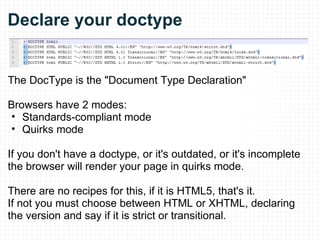
Declare your doctype The DocType is the "Document Type Declaration" Browsers have 2 modes:  Standards-compliant mode Quirks mode If you don't have a doctype, or it's outdated, or it's incomplete the browser will render your page in quirks mode. There are no recipes for this, if it is HTML5, that's it. If not you must choose between HTML or XHTML, declaring the version and say if it is strict or transitional.
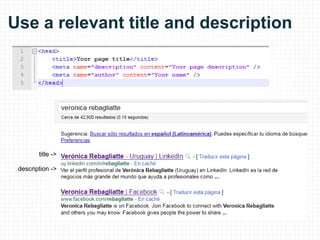
Use a relevant title and description title -> description ->
Separate contents and presentation The same markup must potentially accept several stylesheets. Typical example: zen garden  [1] This allows us to  Have a versatile presentation Improve maintainability What about images? Examples of content images: Company logo Article images Examples of presentational images: Icons Backgrounds
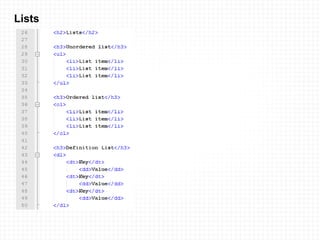
Use semantic markup - HTML4 tags This will make the content accesible  [2]  for both humans and machines, screen-readers, search engines and other user agents. Cite Strong
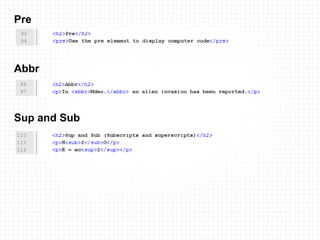
Pre Abbr Sup and Sub
Lists
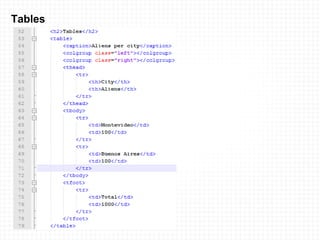
Tables
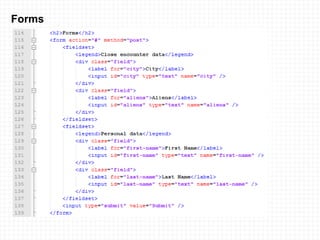
Forms
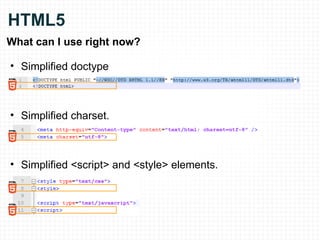
HTML5 What can I use right now? Simplified doctype Simplified charset. Simplified <script> and <style> elements.
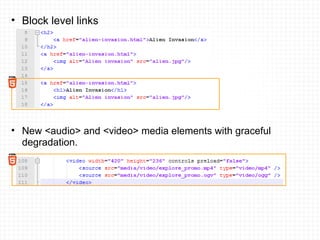
Block level links New <audio> and <video> media elements with graceful degradation.
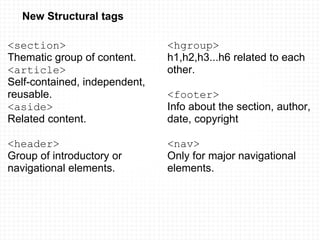
New Structural tags <section>   Thematic group of content.  <article>   Self-contained, independent, reusable.  <aside> Related content. <header> Group of introductory or navigational elements. <hgroup>   h1,h2,h3...h6 related to each other. <footer>   Info about the section, author, date, copyright  <nav>   Only for major navigational elements.
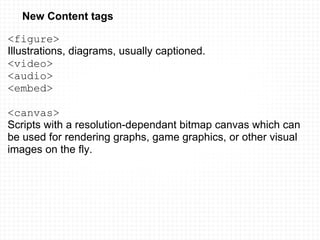
New Content tags <figure> Illustrations, diagrams, usually captioned.  <video>  <audio> <embed>   <canvas> Scripts with a resolution-dependant bitmap canvas which can be used for rendering graphs, game graphics, or other visual images on the fly.
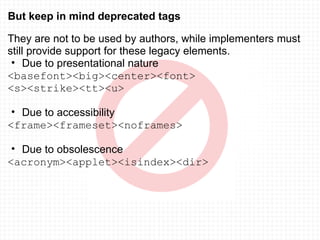
But keep in mind deprecated tags They are not to be used by authors, while implementers must still provide support for these legacy elements. Due to presentational nature <basefont><big><center><font> <s><strike><tt><u> Due to accessibility <frame><frameset><noframes> Due to obsolescence <acronym><applet><isindex><dir>
Validate The  w3c validator[4]  can be a useful tool for debugging.
Check the doc outline  (just for   ) If you are coding in html5 you should also check your document outline with the  html5 outliner[5] The algorithm that HTML5 uses to outline documents lets you make sure to structure the content exactly the way you want. Benefits:  Semantic, accessibility, ease of syndication It's like a TOC, the  <body>  is the root Every new section is a new item in the algorithm. If the section has a heading it is used to name it.   Section Tags article, aside, section, nav, h1...h6
Consider using microformats &quot;Many sites are generated from structured data... search engines, can benefit greatly from direct access to this structured data... and provide richer search results.&quot;  Shema.org[6]
B. Performance
Why front-end performance matters &quot;80% of the end-user response time is spent on the front-end.  Most of this time is tied up in downloading all the components in the page: images, stylesheets, scripts, Flash, etc.  Reducing the number of components in turn reduces the number of HTTP requests required to render the page. This is the key to faster pages&quot; YSlow [8]
Put stylesheets at the top It's what the html  specification[7]  recommends. It allows the page to load progressively. It improves UX, as the user is not faced with a blank page but a progress indicator (the actual page loading). Never use inline styles  as they make new http requests and are harder to maintain. Put scripts at the bottom Otherwise they will block parallel downloads. Never use inline javascript.  That's called obtrusive javascript
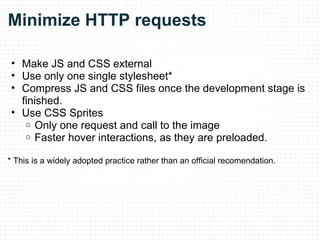
Minimize HTTP requests Make JS and CSS external Use only one single stylesheet* Compress JS and CSS files once the development stage is finished. Use CSS Sprites Only one request and call to the image Faster hover interactions, as they are preloaded. * This is a widely adopted practice rather than an official recomendation.
Reduce loading time Optimize your images  Try converting them to PNG Use tools to reduce their size  [10] Avoid scaling them Optimize your sprites Arrange them horizontally Leave small gaps between the images in a sprite. When a project is finished, Minify JS and CSS with a  compressor [9]  
B. Maintainability and Readability
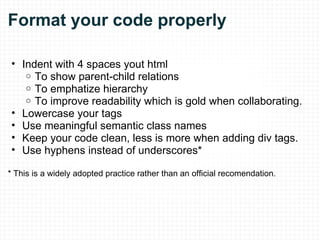
Format your code properly Indent with 4 spaces yout html To show parent-child relations To emphatize hierarchy To improve readability which is gold when collaborating. Lowercase your tags Use meaningful semantic class names Keep your code clean, less is more when adding div tags. Use hyphens instead of underscores* * This is a widely adopted practice rather than an official recomendation.
CSS Best Practices
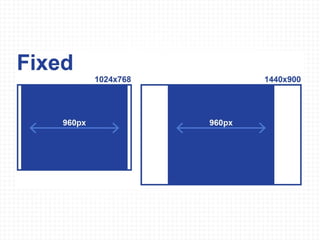
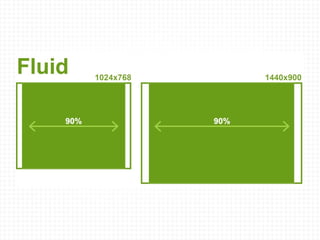
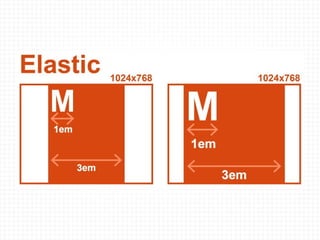
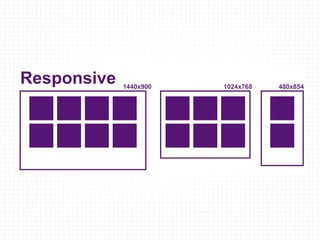
A. Pick the best layout  [11]


B. Slice with optimization  in mind
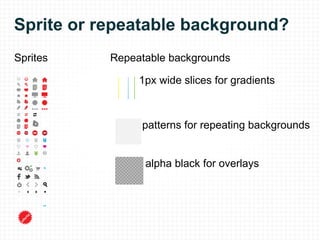
Sprite or repeatable background? Sprites 1px wide slices for gradients patterns for repeating backgrounds Repeatable backgrounds alpha black for overlays
C. Master the basics
Difference between class and ID IDs They are unique Each element can have only one ID Each page can have only one element with that ID They can be used in URLs as anchors IDs have more weight (for specificity) in CSS than classes. Reference for JS through the getElementById function. Classes  Are not unique You can use the same class on multiple elements. You can use multiple classes on the same element. May be used as microformats.
Precedence of selectors It's determined by: Specificity Inheritance The cascade Specificity  [12] Consider a number of 4 digits: abcd which is formed joining... a. count 1 if the declaration is from a 'style' attribute, else counts 0 b.  counts the number of ID attributes in the selector c.  count the number of other attributes in the selector d.  count the number of element names and pseudo-elements in the selector !important  is a hack that takes precedence over all.     
Inheritance If you set a property for the parent, the child element inherits it. However, not all the properties are inherited (Ex: margin, padding, border) The Cascade At the highest level, the cascade controls the precedence. I works following this steps: Find all declarations matching the selector Sort by origin (author styles, user styles, browser defaults) Calculate specificity If there's a draw between declarations, the last wins. Also the last stylesheets overrides the ones before it.
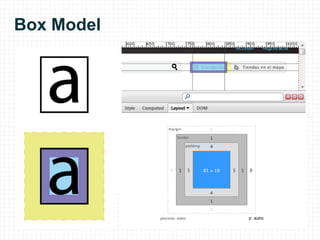
Box Model
Units Ems (em) The “em” is a scalable unit, equal to the current font-size. Pixels (px) Pixels are the most accurate unit. They are fixed size. Percent (%) Much like the &quot;em&quot;. Scalable and accessible.  Mostly used for blocks, than for text itself. Point(pt) Only for print css.
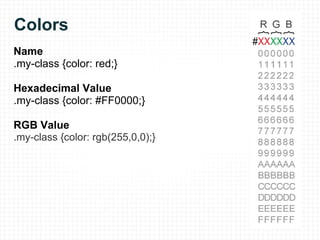
Colors Name .my-class {color: red;} Hexadecimal Value .my-class {color: #FF0000;} RGB Value .my-class {color: rgb(255,0,0);}
D. Get organized
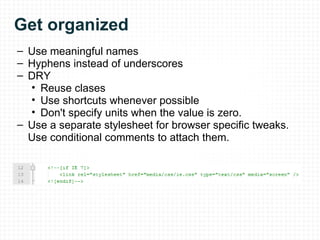
Get organized Use meaningful names Hyphens instead of underscores DRY Reuse clases Use shortcuts whenever possible Don't specify units when the value is zero. Use a separate stylesheet for browser specific tweaks. Use conditional comments to attach them.
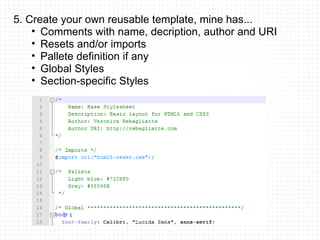
5. Create your own reusable template, mine has... Comments with name, decription, author and URI Resets and/or imports Pallete definition if any Global Styles Section-specific Styles
Tools Firebug YSlow Pixel Perfect CSS CheatSheets Smush-it
References [1]     http://www.csszengarden.com/   [2]     http://www.w3.org/WAI/intro/accessibility.php [3]     http://caniuse.com/ [4]     http://validator.w3.org/ [5]     http://gsnedders.html5.org/outliner/ [6]     http://schema.org/ [7]     http://www.w3.org/TR/html401/ [8]     http://developer.yahoo.com/performance/rules.html [9]     http://developer.yahoo.com/yui/compressor/ [10]   http://www.smushit.com/ysmush.it/ [11]   http://coding.smashingmagazine.com/2009/06/02/fixed-vs-fluid-vs-elastic-layout-whats-the-right-one-for-you/ [12]   http://www.w3.org/TR/CSS2/cascade.html#specificity
Thanks!

Html & CSS - Best practices 2-hour-workshop

  • 1.
    HTML & CSSBest Practices Veronica Rebagliatte rebagliatte.com 2011, August
  • 2.
    Contents   HTML A. Semantics and accessibility Declare your DocType Use relevant title and description tags Separate contents from presentation Use the most semantic markup possible Validate for html4 and check the outline for html5 Consider using microformatting B. Performance Why front-end performance matters Stylesheets at the top, scripts at the bottom Minimize HTTP requests Reduce loading time C. Maintainability and Readability  
  • 3.
    CSS   A.Pick the best layout Fixed Fluid Elastic Responsive B. Slice with optimization in mind C. Master the basics Difference between class and ID Precedence of selectors Box model Units Colors D. Get organized
  • 4.
  • 5.
  • 6.
    Declare your doctypeThe DocType is the &quot;Document Type Declaration&quot; Browsers have 2 modes:  Standards-compliant mode Quirks mode If you don't have a doctype, or it's outdated, or it's incomplete the browser will render your page in quirks mode. There are no recipes for this, if it is HTML5, that's it. If not you must choose between HTML or XHTML, declaring the version and say if it is strict or transitional.
  • 7.
    Use a relevanttitle and description title -> description ->
  • 8.
    Separate contents andpresentation The same markup must potentially accept several stylesheets. Typical example: zen garden  [1] This allows us to  Have a versatile presentation Improve maintainability What about images? Examples of content images: Company logo Article images Examples of presentational images: Icons Backgrounds
  • 9.
    Use semantic markup- HTML4 tags This will make the content accesible [2] for both humans and machines, screen-readers, search engines and other user agents. Cite Strong
  • 10.
    Pre Abbr Supand Sub
  • 11.
  • 12.
  • 13.
  • 14.
    HTML5 What canI use right now? Simplified doctype Simplified charset. Simplified <script> and <style> elements.
  • 15.
    Block level linksNew <audio> and <video> media elements with graceful degradation.
  • 16.
    New Structural tags<section>   Thematic group of content.  <article>   Self-contained, independent, reusable.  <aside> Related content. <header> Group of introductory or navigational elements. <hgroup>   h1,h2,h3...h6 related to each other. <footer>   Info about the section, author, date, copyright  <nav>   Only for major navigational elements.
  • 17.
    New Content tags<figure> Illustrations, diagrams, usually captioned.  <video>  <audio> <embed>   <canvas> Scripts with a resolution-dependant bitmap canvas which can be used for rendering graphs, game graphics, or other visual images on the fly.
  • 18.
    But keep inmind deprecated tags They are not to be used by authors, while implementers must still provide support for these legacy elements. Due to presentational nature <basefont><big><center><font> <s><strike><tt><u> Due to accessibility <frame><frameset><noframes> Due to obsolescence <acronym><applet><isindex><dir>
  • 19.
    Validate The w3c validator[4] can be a useful tool for debugging.
  • 20.
    Check the docoutline (just for   ) If you are coding in html5 you should also check your document outline with the  html5 outliner[5] The algorithm that HTML5 uses to outline documents lets you make sure to structure the content exactly the way you want. Benefits:  Semantic, accessibility, ease of syndication It's like a TOC, the  <body>  is the root Every new section is a new item in the algorithm. If the section has a heading it is used to name it.   Section Tags article, aside, section, nav, h1...h6
  • 21.
    Consider using microformats&quot;Many sites are generated from structured data... search engines, can benefit greatly from direct access to this structured data... and provide richer search results.&quot; Shema.org[6]
  • 22.
  • 23.
    Why front-end performancematters &quot;80% of the end-user response time is spent on the front-end.  Most of this time is tied up in downloading all the components in the page: images, stylesheets, scripts, Flash, etc.  Reducing the number of components in turn reduces the number of HTTP requests required to render the page. This is the key to faster pages&quot; YSlow [8]
  • 24.
    Put stylesheets atthe top It's what the html specification[7] recommends. It allows the page to load progressively. It improves UX, as the user is not faced with a blank page but a progress indicator (the actual page loading). Never use inline styles as they make new http requests and are harder to maintain. Put scripts at the bottom Otherwise they will block parallel downloads. Never use inline javascript. That's called obtrusive javascript
  • 25.
    Minimize HTTP requestsMake JS and CSS external Use only one single stylesheet* Compress JS and CSS files once the development stage is finished. Use CSS Sprites Only one request and call to the image Faster hover interactions, as they are preloaded. * This is a widely adopted practice rather than an official recomendation.
  • 26.
    Reduce loading timeOptimize your images  Try converting them to PNG Use tools to reduce their size  [10] Avoid scaling them Optimize your sprites Arrange them horizontally Leave small gaps between the images in a sprite. When a project is finished, Minify JS and CSS with a  compressor [9]  
  • 27.
  • 28.
    Format your codeproperly Indent with 4 spaces yout html To show parent-child relations To emphatize hierarchy To improve readability which is gold when collaborating. Lowercase your tags Use meaningful semantic class names Keep your code clean, less is more when adding div tags. Use hyphens instead of underscores* * This is a widely adopted practice rather than an official recomendation.
  • 29.
  • 30.
    A. Pick thebest layout  [11]
  • 31.
  • 32.
  • 33.
  • 34.
  • 35.
    B. Slice withoptimization  in mind
  • 36.
    Sprite or repeatablebackground? Sprites 1px wide slices for gradients patterns for repeating backgrounds Repeatable backgrounds alpha black for overlays
  • 37.
  • 38.
    Difference between classand ID IDs They are unique Each element can have only one ID Each page can have only one element with that ID They can be used in URLs as anchors IDs have more weight (for specificity) in CSS than classes. Reference for JS through the getElementById function. Classes  Are not unique You can use the same class on multiple elements. You can use multiple classes on the same element. May be used as microformats.
  • 39.
    Precedence of selectorsIt's determined by: Specificity Inheritance The cascade Specificity [12] Consider a number of 4 digits: abcd which is formed joining... a. count 1 if the declaration is from a 'style' attribute, else counts 0 b.  counts the number of ID attributes in the selector c.  count the number of other attributes in the selector d.  count the number of element names and pseudo-elements in the selector !important is a hack that takes precedence over all.     
  • 40.
    Inheritance If youset a property for the parent, the child element inherits it. However, not all the properties are inherited (Ex: margin, padding, border) The Cascade At the highest level, the cascade controls the precedence. I works following this steps: Find all declarations matching the selector Sort by origin (author styles, user styles, browser defaults) Calculate specificity If there's a draw between declarations, the last wins. Also the last stylesheets overrides the ones before it.
  • 41.
  • 42.
    Units Ems (em)The “em” is a scalable unit, equal to the current font-size. Pixels (px) Pixels are the most accurate unit. They are fixed size. Percent (%) Much like the &quot;em&quot;. Scalable and accessible.  Mostly used for blocks, than for text itself. Point(pt) Only for print css.
  • 43.
    Colors Name .my-class{color: red;} Hexadecimal Value .my-class {color: #FF0000;} RGB Value .my-class {color: rgb(255,0,0);}
  • 44.
  • 45.
    Get organized Usemeaningful names Hyphens instead of underscores DRY Reuse clases Use shortcuts whenever possible Don't specify units when the value is zero. Use a separate stylesheet for browser specific tweaks. Use conditional comments to attach them.
  • 46.
    5. Create yourown reusable template, mine has... Comments with name, decription, author and URI Resets and/or imports Pallete definition if any Global Styles Section-specific Styles
  • 47.
    Tools Firebug YSlowPixel Perfect CSS CheatSheets Smush-it
  • 48.
    References [1]    http://www.csszengarden.com/   [2]     http://www.w3.org/WAI/intro/accessibility.php [3]     http://caniuse.com/ [4]     http://validator.w3.org/ [5]     http://gsnedders.html5.org/outliner/ [6]     http://schema.org/ [7]     http://www.w3.org/TR/html401/ [8]     http://developer.yahoo.com/performance/rules.html [9]     http://developer.yahoo.com/yui/compressor/ [10]   http://www.smushit.com/ysmush.it/ [11]   http://coding.smashingmagazine.com/2009/06/02/fixed-vs-fluid-vs-elastic-layout-whats-the-right-one-for-you/ [12]   http://www.w3.org/TR/CSS2/cascade.html#specificity
  • 49.