Modern front end development   Standards & best practices Tricode Professional Services www.tricode.nl 23-07-2009 Sander van Beek
The front end Most visible part of your application; make sure it radiates quality! You are not forced to obey the standards as much as in ‘back end’ programming
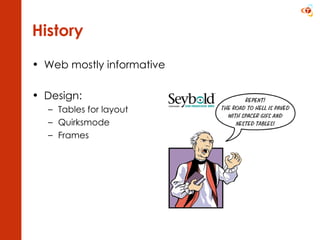
History Web mostly informative Design: Tables for layout Quirksmode Frames
Recent trends More interaction More users Higher bandwidth Mobile readers Mashups More variety in browsers (FF / mac more popular, google chrome, etc)
Considerations Performance Search engine optimization Privacy (P3P) Accessibility ( Web Content Accessibility Guidelines, Section 508, Waarmerk drempelvrij) Security (phishing, spam) Design patterns (http://developer.yahoo.com/ypatterns/index.php)
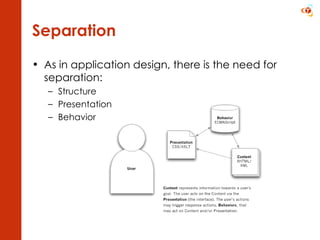
Separation As in application design, there is the need for separation: Structure Presentation Behavior
(X)HTML Structure
(X)HTML Current standards: HTML 4.01 / XHTML 1.1 In progress: HTML 5.0 Why XHTML? More strict syntax, so easier/faster parsing  Extensible (namespaces) W3C valid (validator.w3.org)
Semantics: know your tags! (1/2) Block level address, blockquote, div, dl, fieldset, form, h1, h2, h3, h4, h5, h6, hr, noframes, noscript, ol, p, pre, table, ul Generally speaking followed by a newline Inline* a, abbr, acronym, br, cite, code, dfn, kbd, q, samp, script, span, var  * left out all markup related tags (i, b, etc)
Semantics: know your tags! (2/2) So this is OK: <div><p><span class=”red”>My</span> text</p></div> But not: <span class=”blue”><h1>My header</h1></span>
Common pitfalls (1/3) Always use a doctype Strict  and  transitional  (clean vs marked up) Specify encoding Don’t use style tags/attributes <font>, <b>, <i>  color, border, margin Non existing tags or attributes <blink>  and  <marquee> ,  <body marginwidth=”0”>
Common pitfalls (2/3) No alt text for images Improper formatted HTML: Missing quotations:  <font color=#ffffff> Improper nesting:  <b><i>bla</b></i> Misuse of tags Div or span for headers, tables for layout Using text level tags to do block level stuff Non-unique id attribute
Common pitfalls (3/3) Improper tables / use of tables Missing closing tags  (</td>, </tr>  and  </table> ) Inconsistent number of cells Using  <td>  for header rows (use  <th> !) Surrounding table cells with formatting ( <b><tr>) Forms <form>  inside table, improper use of POST/GET (standards!) Inline scripts: Missing type, missing  <noscript>
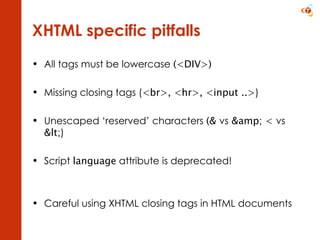
XHTML specific pitfalls All tags must be lowercase  (<DIV>) Missing closing tags ( <br>, <hr>, <input ..> ) Unescaped ‘reserved’ characters  (&  vs  &amp; <  vs  &lt; ) Script  language  attribute is deprecated! Careful using XHTML closing tags in HTML documents
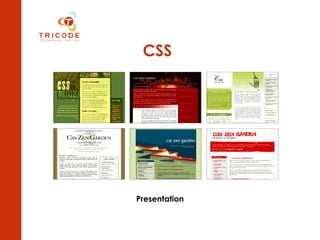
CSS Presentation
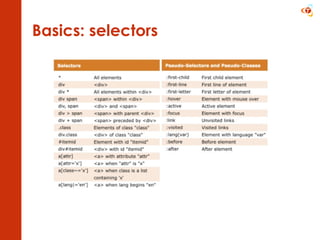
Basics: selectors
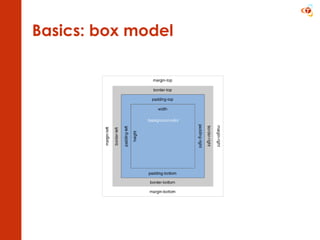
Basics: box model
Basics: positioning Static (default) Relative Relative to parent, remains in page Absolute  Taken out of the page Upper left corner of parent: x =0, y = 0 Fixed
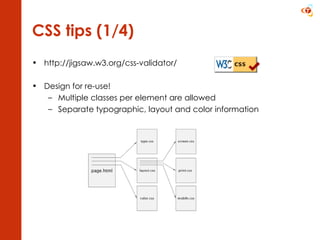
CSS tips (1/4) http://jigsaw.w3.org/css-validator/ Design for re-use! Multiple classes per element are allowed Separate typographic, layout and color information
CSS tips (2/4) Consider using a reset.css or framework  Don’t use inline CSS or style blocks EM versus PX (relative vs fixed) Use web safe / web smart colors Decorative images via CSS, informative images in HTML Keep pages usable with keyboard ( outline: 0)
CSS tips (3/4) Compress CSS (minify/csstidy) Sprites Use generic fonts font-family: Arial, Verdana, Helvetica, sans-serif;   .PNG versus .GIF Correct order of pseudo classes :link { color: blue; } a:visited { color: purple; }  a:hover { color: purple; }  a:active { color: red; }
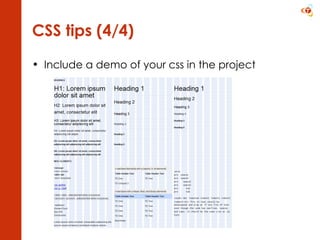
CSS tips (4/4) Include a demo of your css in the project
JavaScript Behavior
JavaScript Use a framework (jQuery, YUI, prototype, mootools, etc) Javascript should be unobtrusive Bind to elements instead of inline code Use a framework to do this Progressive enhancement Page should be useable without a mouse Use the onclick event for nothing more then links! Don’t alter styling directly from JS Compress (minify)
Further reading W3C consortium  http://www.w3.org A list apart  http://www.alistapart.com/ Naar voren  http://www.naarvoren.nl   Eric Meyers blog  http://meyerweb.com Quirksmode  http://www.quirksmode.org/   CSS Zen garden  http://www.csszengarden.com/   De webrichtlijnen  http://www.webrichtlijnen.nl/   Stichting drempelvrij  http://www.drempelvrij.nl/

Modern front end development

  • 1.
    Modern front enddevelopment Standards & best practices Tricode Professional Services www.tricode.nl 23-07-2009 Sander van Beek
  • 2.
    The front endMost visible part of your application; make sure it radiates quality! You are not forced to obey the standards as much as in ‘back end’ programming
  • 3.
    History Web mostlyinformative Design: Tables for layout Quirksmode Frames
  • 4.
    Recent trends Moreinteraction More users Higher bandwidth Mobile readers Mashups More variety in browsers (FF / mac more popular, google chrome, etc)
  • 5.
    Considerations Performance Searchengine optimization Privacy (P3P) Accessibility ( Web Content Accessibility Guidelines, Section 508, Waarmerk drempelvrij) Security (phishing, spam) Design patterns (http://developer.yahoo.com/ypatterns/index.php)
  • 6.
    Separation As inapplication design, there is the need for separation: Structure Presentation Behavior
  • 7.
  • 8.
    (X)HTML Current standards:HTML 4.01 / XHTML 1.1 In progress: HTML 5.0 Why XHTML? More strict syntax, so easier/faster parsing Extensible (namespaces) W3C valid (validator.w3.org)
  • 9.
    Semantics: know yourtags! (1/2) Block level address, blockquote, div, dl, fieldset, form, h1, h2, h3, h4, h5, h6, hr, noframes, noscript, ol, p, pre, table, ul Generally speaking followed by a newline Inline* a, abbr, acronym, br, cite, code, dfn, kbd, q, samp, script, span, var * left out all markup related tags (i, b, etc)
  • 10.
    Semantics: know yourtags! (2/2) So this is OK: <div><p><span class=”red”>My</span> text</p></div> But not: <span class=”blue”><h1>My header</h1></span>
  • 11.
    Common pitfalls (1/3)Always use a doctype Strict and transitional (clean vs marked up) Specify encoding Don’t use style tags/attributes <font>, <b>, <i> color, border, margin Non existing tags or attributes <blink> and <marquee> , <body marginwidth=”0”>
  • 12.
    Common pitfalls (2/3)No alt text for images Improper formatted HTML: Missing quotations: <font color=#ffffff> Improper nesting: <b><i>bla</b></i> Misuse of tags Div or span for headers, tables for layout Using text level tags to do block level stuff Non-unique id attribute
  • 13.
    Common pitfalls (3/3)Improper tables / use of tables Missing closing tags (</td>, </tr> and </table> ) Inconsistent number of cells Using <td> for header rows (use <th> !) Surrounding table cells with formatting ( <b><tr>) Forms <form> inside table, improper use of POST/GET (standards!) Inline scripts: Missing type, missing <noscript>
  • 14.
    XHTML specific pitfallsAll tags must be lowercase (<DIV>) Missing closing tags ( <br>, <hr>, <input ..> ) Unescaped ‘reserved’ characters (& vs &amp; < vs &lt; ) Script language attribute is deprecated! Careful using XHTML closing tags in HTML documents
  • 15.
  • 16.
  • 17.
  • 18.
    Basics: positioning Static(default) Relative Relative to parent, remains in page Absolute Taken out of the page Upper left corner of parent: x =0, y = 0 Fixed
  • 19.
    CSS tips (1/4)http://jigsaw.w3.org/css-validator/ Design for re-use! Multiple classes per element are allowed Separate typographic, layout and color information
  • 20.
    CSS tips (2/4)Consider using a reset.css or framework Don’t use inline CSS or style blocks EM versus PX (relative vs fixed) Use web safe / web smart colors Decorative images via CSS, informative images in HTML Keep pages usable with keyboard ( outline: 0)
  • 21.
    CSS tips (3/4)Compress CSS (minify/csstidy) Sprites Use generic fonts font-family: Arial, Verdana, Helvetica, sans-serif; .PNG versus .GIF Correct order of pseudo classes :link { color: blue; } a:visited { color: purple; } a:hover { color: purple; } a:active { color: red; }
  • 22.
    CSS tips (4/4)Include a demo of your css in the project
  • 23.
  • 24.
    JavaScript Use aframework (jQuery, YUI, prototype, mootools, etc) Javascript should be unobtrusive Bind to elements instead of inline code Use a framework to do this Progressive enhancement Page should be useable without a mouse Use the onclick event for nothing more then links! Don’t alter styling directly from JS Compress (minify)
  • 25.
    Further reading W3Cconsortium http://www.w3.org A list apart http://www.alistapart.com/ Naar voren http://www.naarvoren.nl Eric Meyers blog http://meyerweb.com Quirksmode http://www.quirksmode.org/ CSS Zen garden http://www.csszengarden.com/ De webrichtlijnen http://www.webrichtlijnen.nl/ Stichting drempelvrij http://www.drempelvrij.nl/