HTML an
Introduction
to web page
Programming
Topics to
be
covered
• HTML Introduction
• HTML Basic tags
• HTML Elements
• HTML Attributes
• HTML Formatting
• HTML Phrase tags
• HTML Meta tags
• HTML Comments
• HTML Tables
• HTML List
• HTML Text Links
• HTML Image Links
• HTML Frames
• HTML iFrames
• HTML Blocks
• HTML Backgrounds
• HTML Colors
• HTML Fonts
• HTML Forms
• HTML Emebedded
Multimedia
• HTML Marquees
• HTML Header
• HTML Stylesheet
• HTML Javascript
• HTML Layouts
20XX 2
Introduction
Presentation title
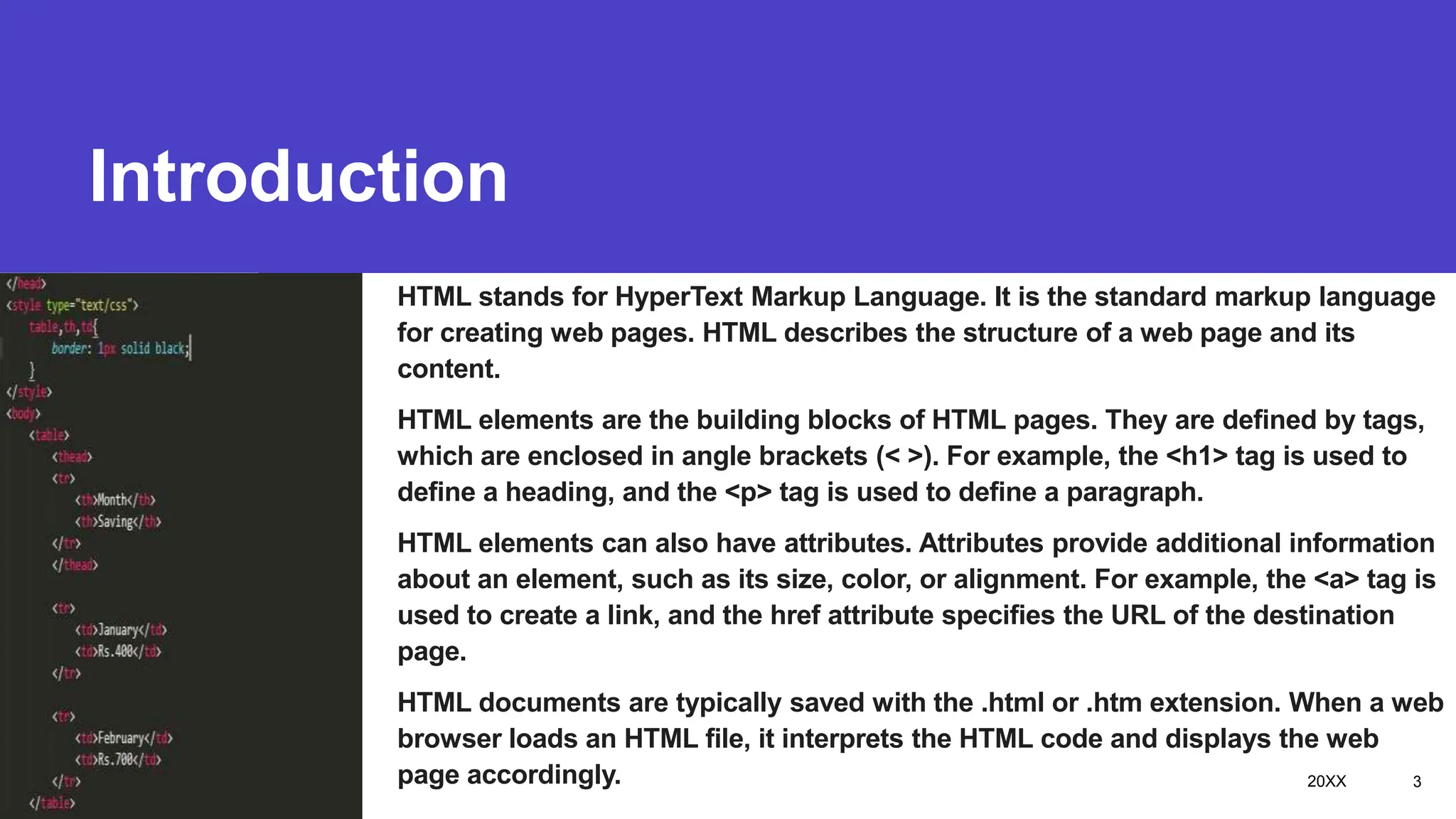
HTML stands for HyperText Markup Language. It is the standard markup language
for creating web pages. HTML describes the structure of a web page and its
content.
HTML elements are the building blocks of HTML pages. They are defined by tags,
which are enclosed in angle brackets (< >). For example, the <h1> tag is used to
define a heading, and the <p> tag is used to define a paragraph.
HTML elements can also have attributes. Attributes provide additional information
about an element, such as its size, color, or alignment. For example, the <a> tag is
used to create a link, and the href attribute specifies the URL of the destination
page.
HTML documents are typically saved with the .html or .htm extension. When a web
browser loads an HTML file, it interprets the HTML code and displays the web
page accordingly. 20XX 3
HTML Basic Tags
Subtitle
Presentation title 20XX 4
Presentation title 20XX 5
Presentation title 20XX 6
Heading
Tag
Presentation title 20XX 7
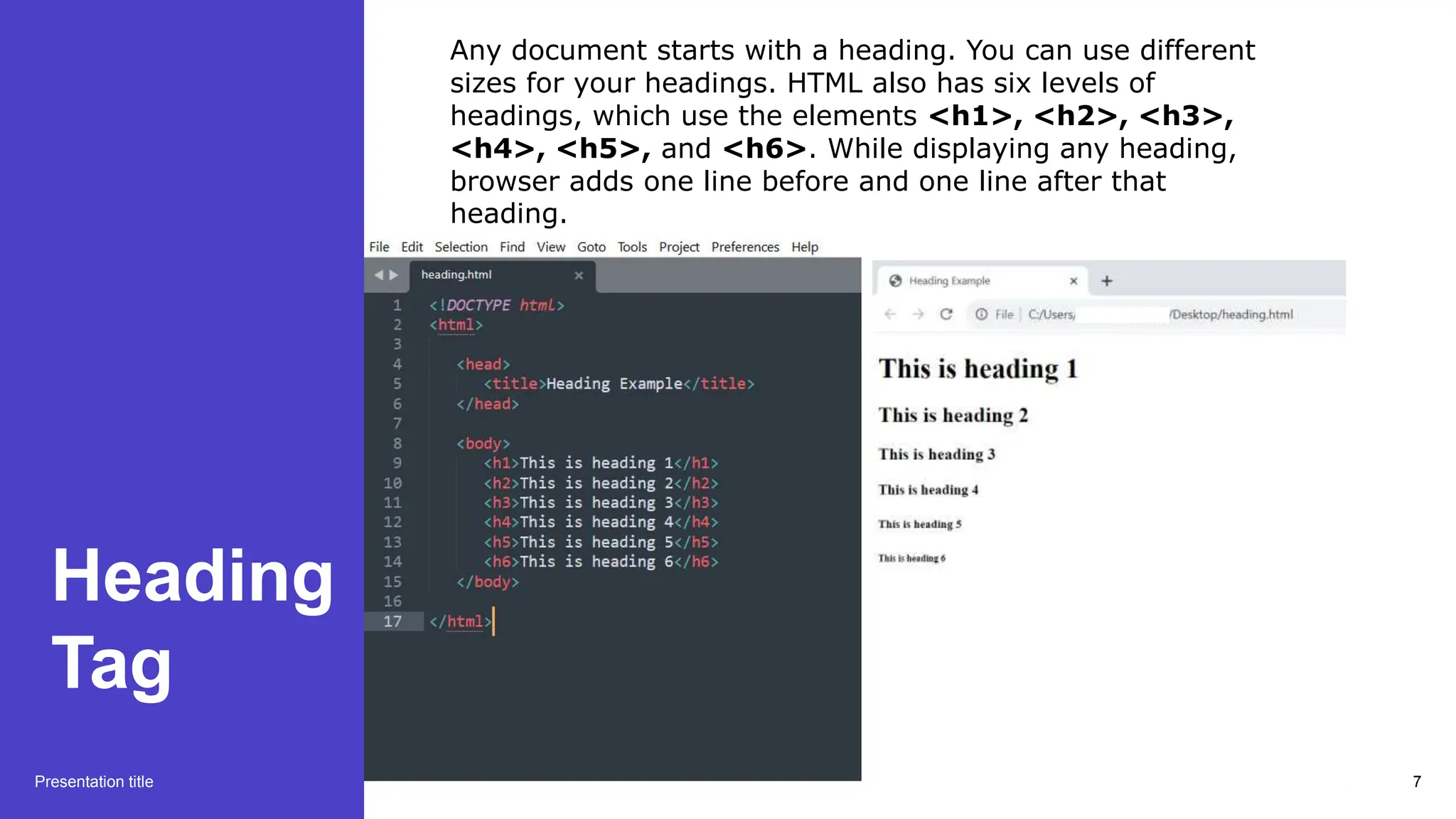
Any document starts with a heading. You can use different
sizes for your headings. HTML also has six levels of
headings, which use the elements <h1>, <h2>, <h3>,
<h4>, <h5>, and <h6>. While displaying any heading,
browser adds one line before and one line after that
heading.
Paragraph
Tag
Presentation title 20XX 8
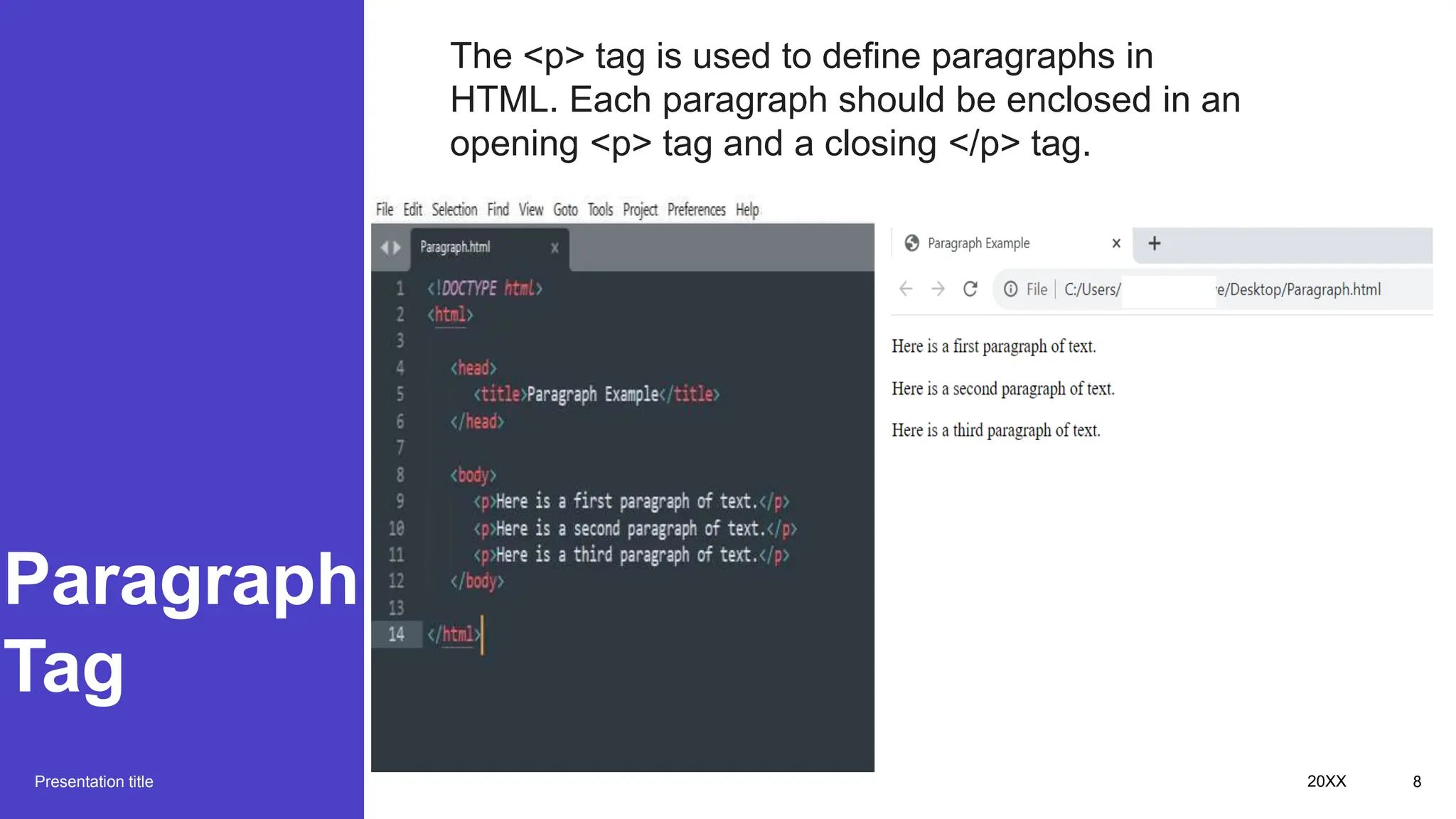
The <p> tag is used to define paragraphs in
HTML. Each paragraph should be enclosed in an
opening <p> tag and a closing </p> tag.
The way to get
started is to quit talking
and begin doing.
Walt Disney
Presentation title 20XX 9
Line
Brake
Tag
Presentation title 20XX 10
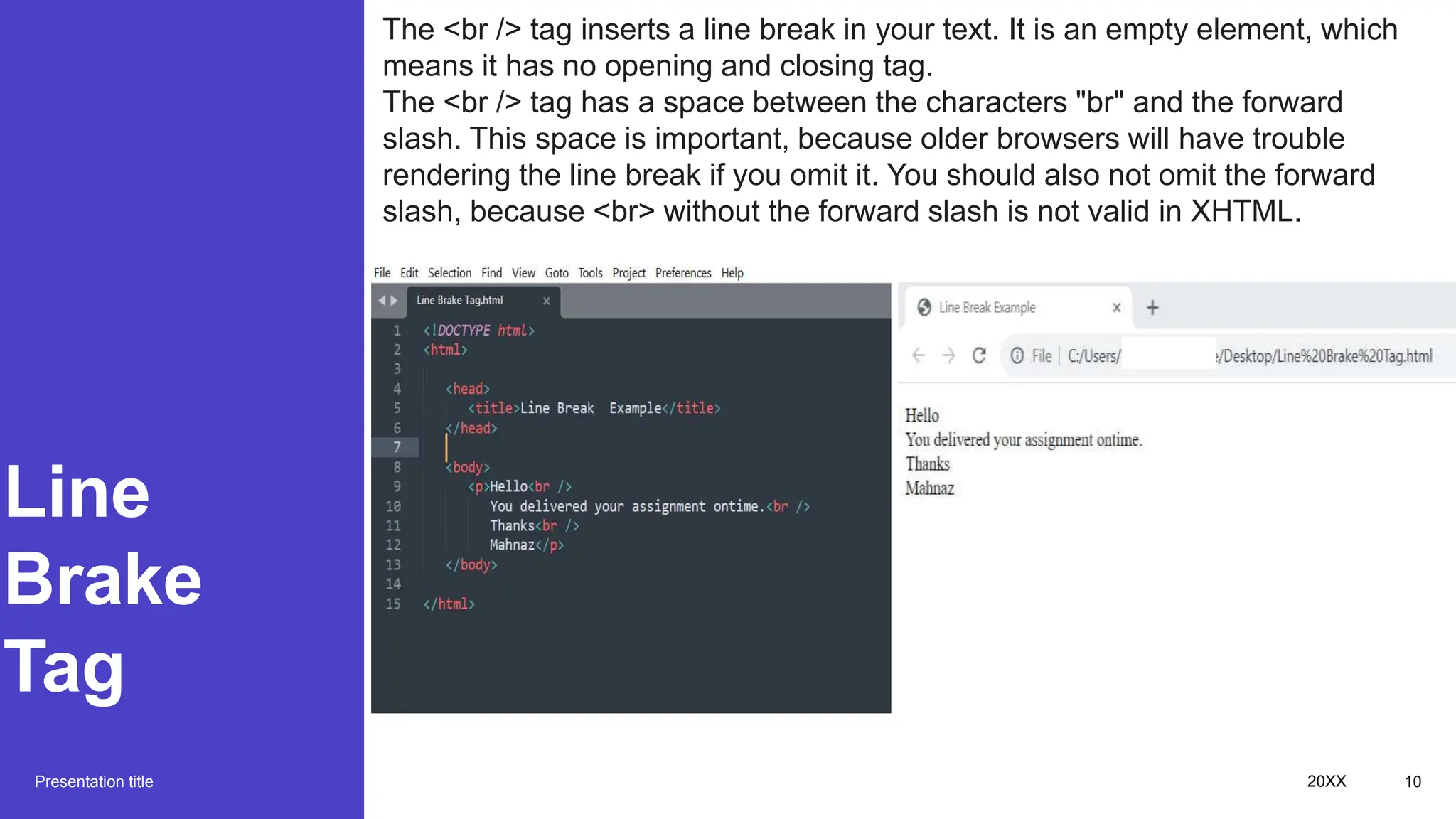
The <br /> tag inserts a line break in your text. It is an empty element, which
means it has no opening and closing tag.
The <br /> tag has a space between the characters "br" and the forward
slash. This space is important, because older browsers will have trouble
rendering the line break if you omit it. You should also not omit the forward
slash, because <br> without the forward slash is not valid in XHTML.
Centering
Content
Presentation title 20XX 11
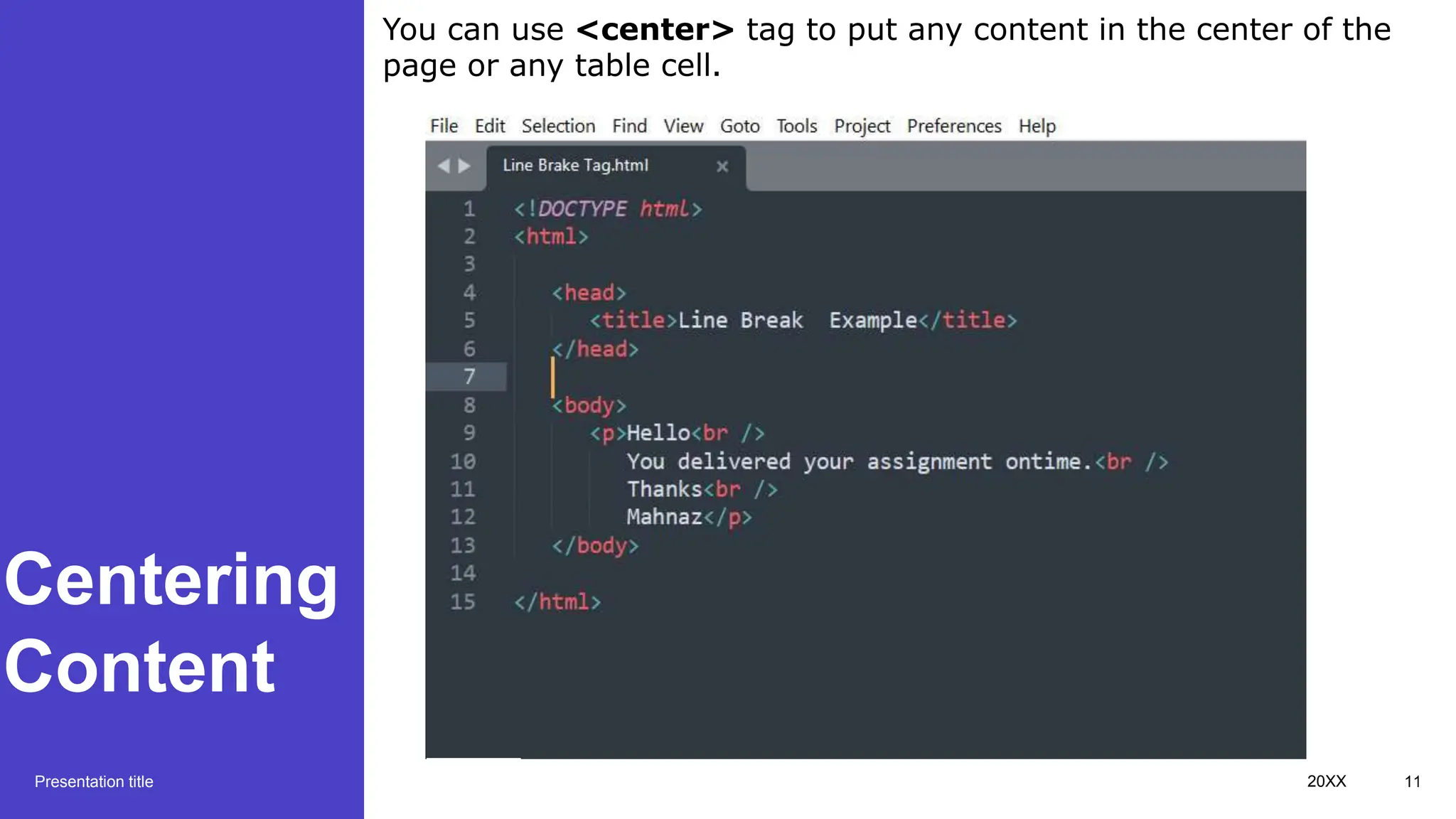
You can use <center> tag to put any content in the center of the
page or any table cell.
Centering
Content
Presentation title 20XX 12
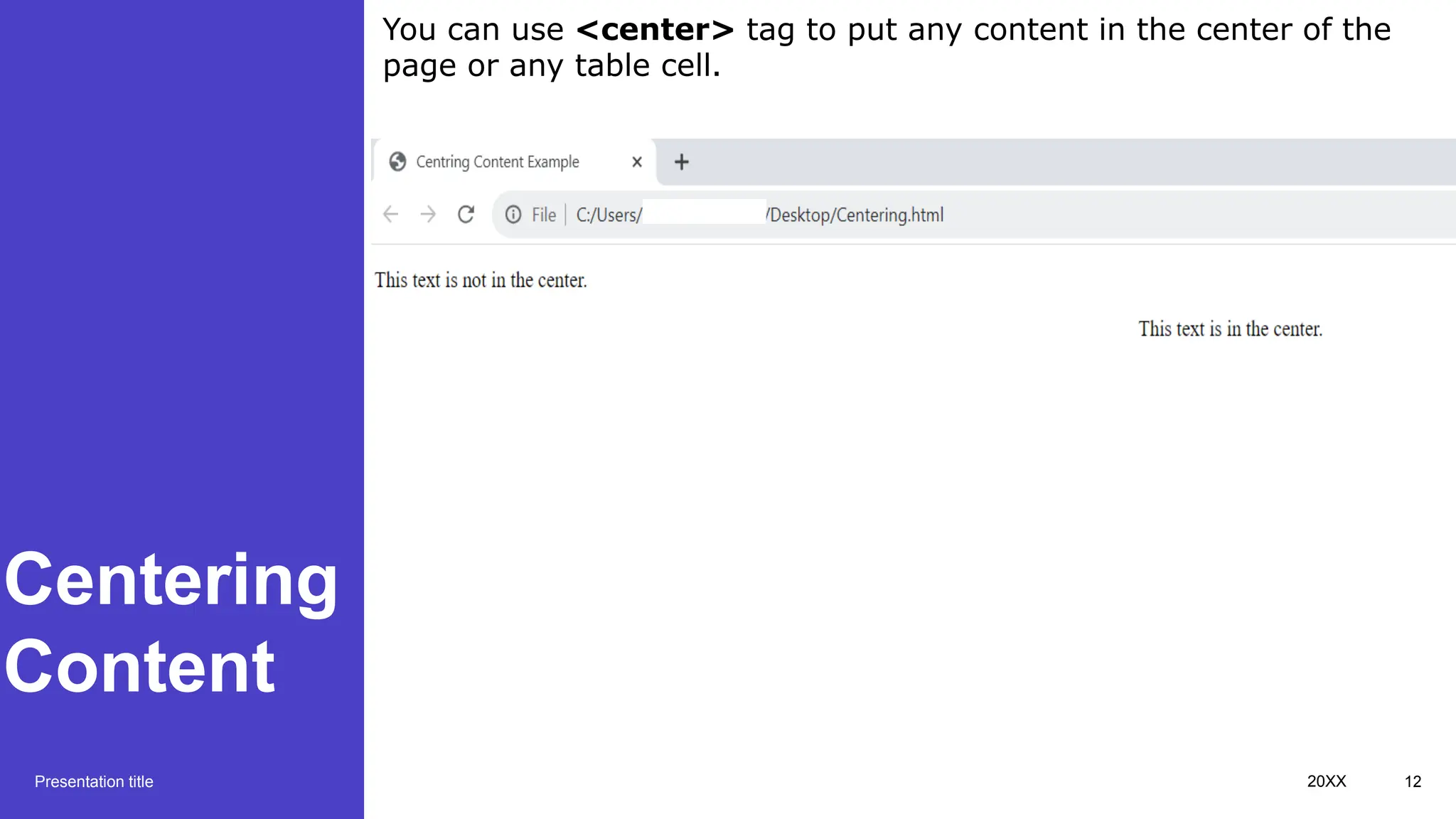
You can use <center> tag to put any content in the center of the
page or any table cell.
Horizontal
Lines
Presentation title 20XX 13
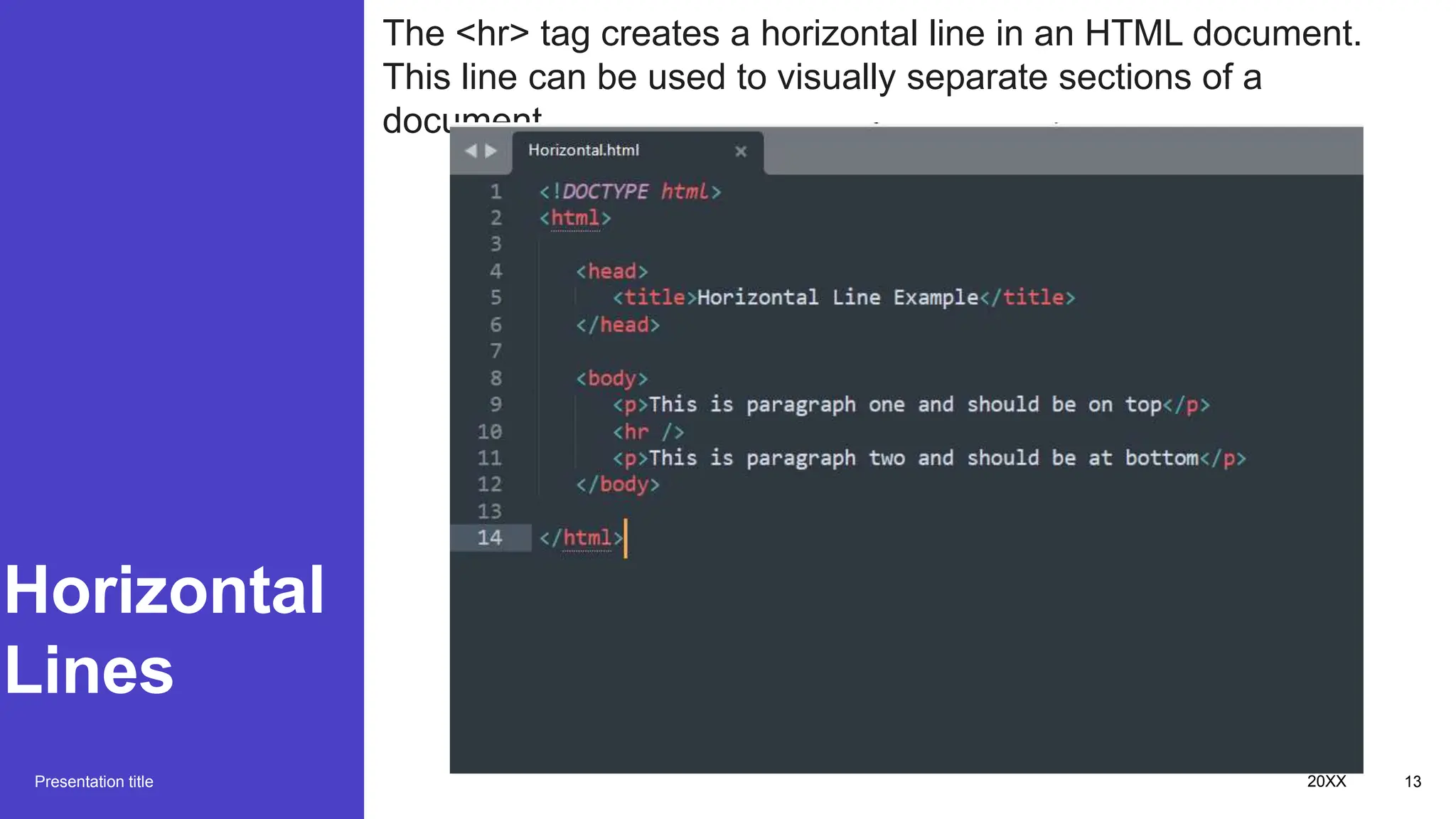
The <hr> tag creates a horizontal line in an HTML document.
This line can be used to visually separate sections of a
document.
Horizontal
Lines
Presentation title 20XX 14
The <hr> tag creates a horizontal line in an HTML document.
This line can be used to visually separate sections of a
document.
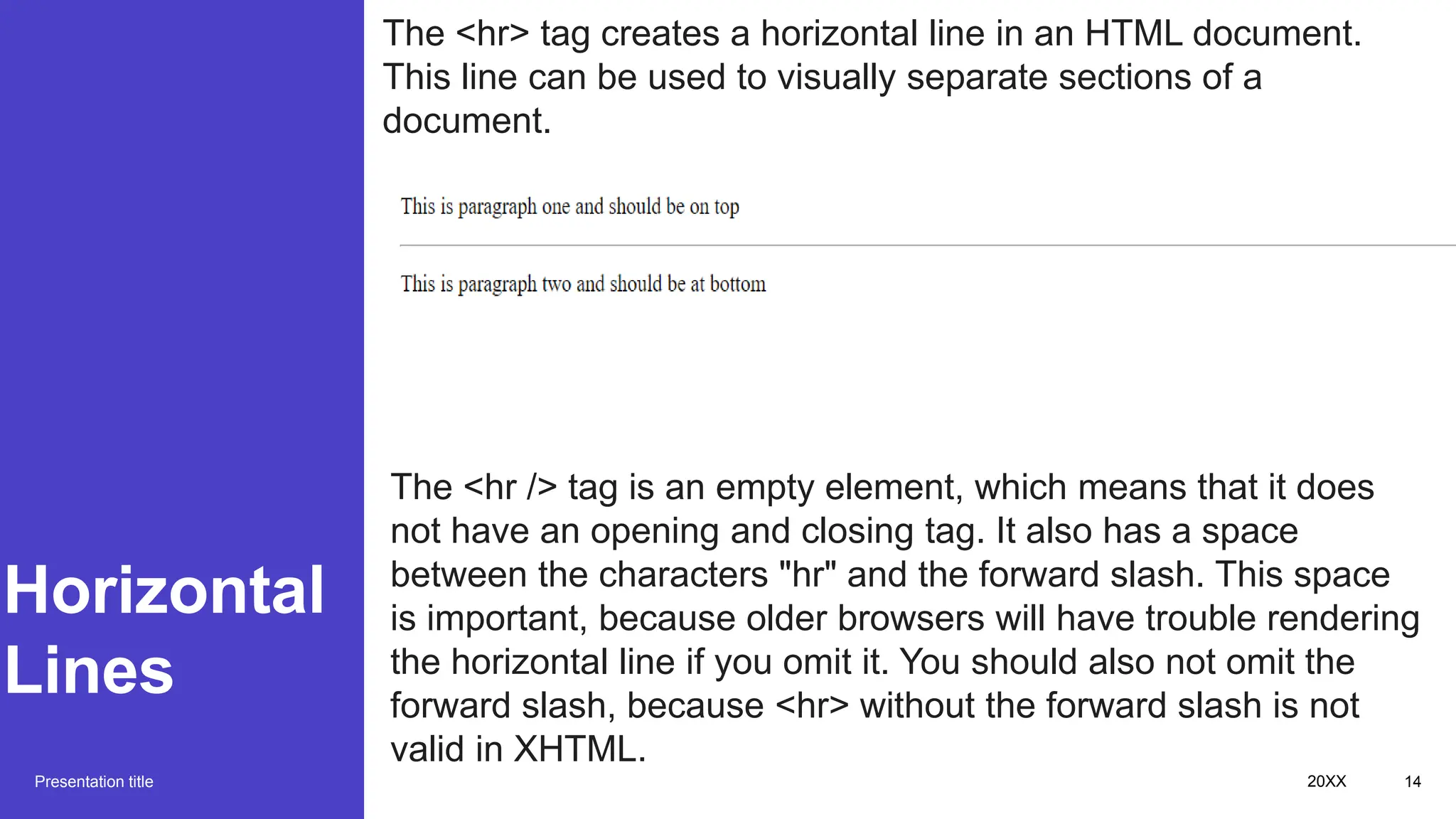
The <hr /> tag is an empty element, which means that it does
not have an opening and closing tag. It also has a space
between the characters "hr" and the forward slash. This space
is important, because older browsers will have trouble rendering
the horizontal line if you omit it. You should also not omit the
forward slash, because <hr> without the forward slash is not
valid in XHTML.
Non
Breaking
Spaces
Presentation title 20XX 15
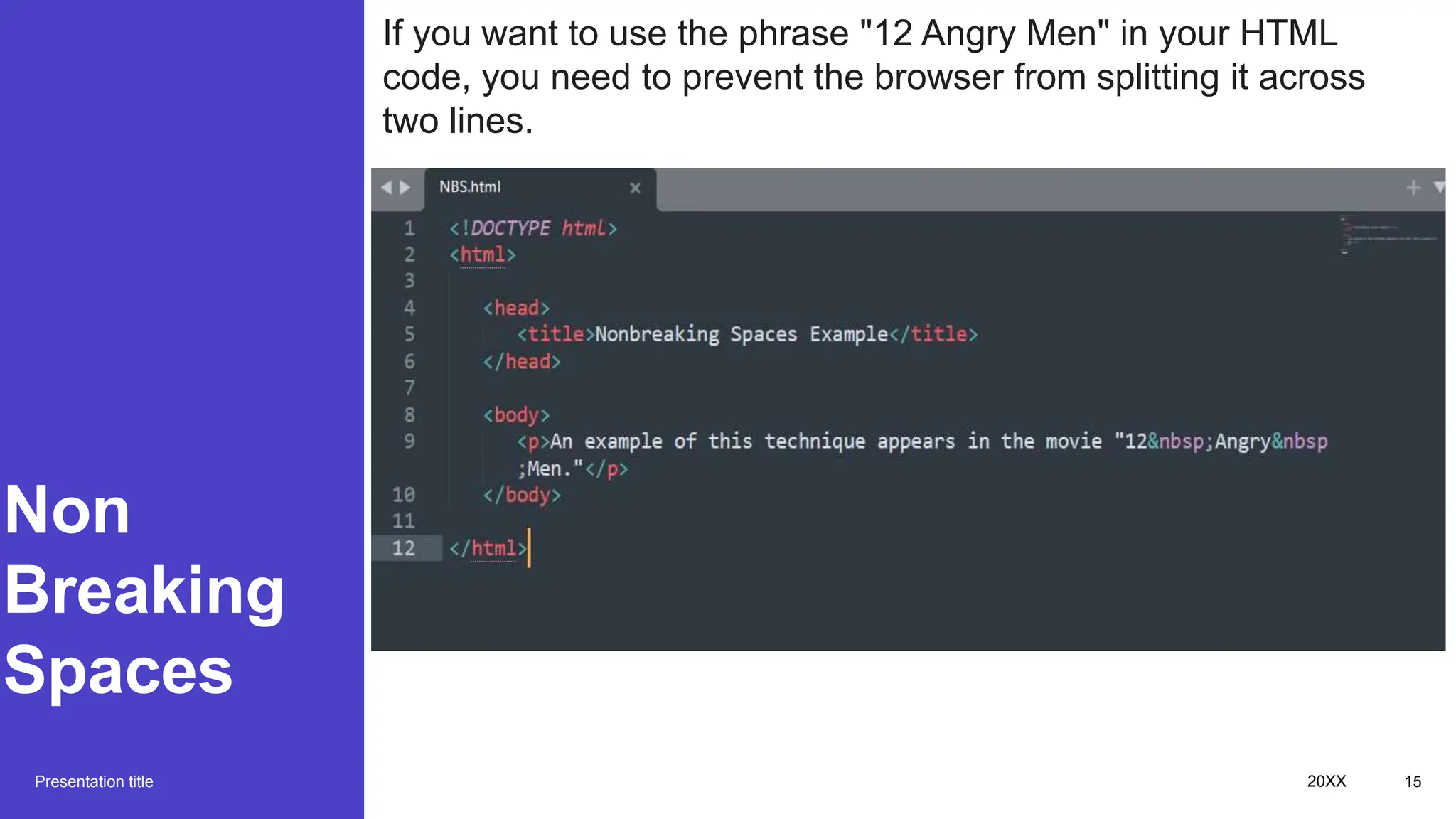
If you want to use the phrase "12 Angry Men" in your HTML
code, you need to prevent the browser from splitting it across
two lines.
Non
Breaking
Spaces
Presentation title 20XX 16
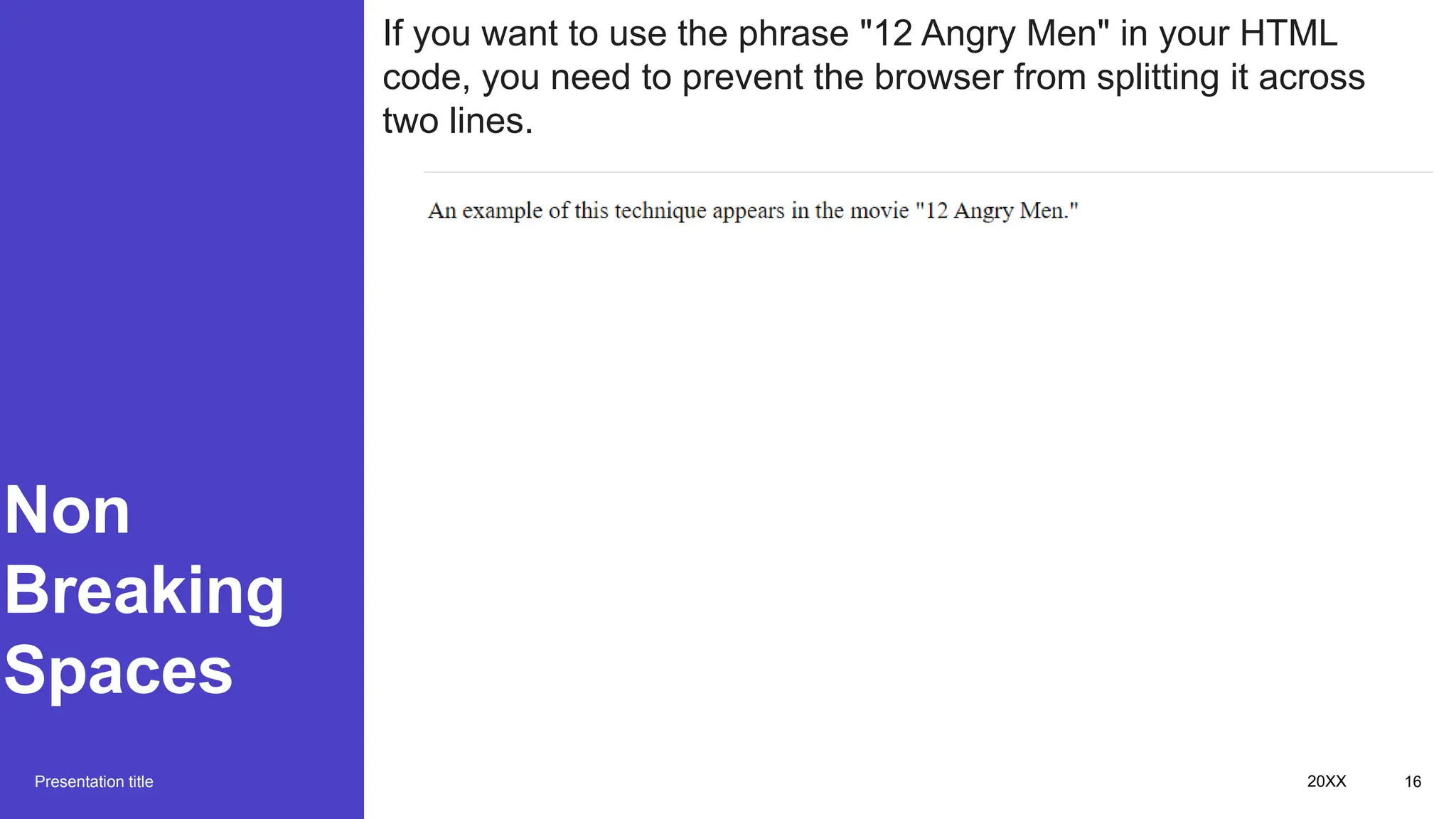
If you want to use the phrase "12 Angry Men" in your HTML
code, you need to prevent the browser from splitting it across
two lines.
HTML - Elements
Subtitle
Presentation title 20XX 17
Additional content
Subtitle
• Add text, images, art, and
videos.
• Add transitions,
animations, and motion.
• Save to OneDrive, to get
to your presentations from
your computer, tablet, or
phone.
Subtitle
• This PowerPoint theme
uses its own unique set of
colors, fonts, and effects
to create the overall look
and feel of these slides.
• PowerPoint has tons of
themes to give your
presentation just the right
personality.
Subtitle
• Open the Design Ideas
pane for instant slide
makeovers.
• When we have design
ideas, we’ll show them to
you right there.
Presentation title 20XX 18
Summary
With PowerPoint, you can create
presentations and share your work with
others, wherever they are. Type the text
you want here to get started. You can also
add images, art, and videos on this
template. Save to OneDrive and access
your presentations from your computer,
tablet, or phone.
Presentation title 20XX 19
Thank you
Presenter
name
Email
address
Website
Presentation title 20XX 20

HTML an Introduction to web page.pptx

  • 1.
  • 2.
    Topics to be covered • HTMLIntroduction • HTML Basic tags • HTML Elements • HTML Attributes • HTML Formatting • HTML Phrase tags • HTML Meta tags • HTML Comments • HTML Tables • HTML List • HTML Text Links • HTML Image Links • HTML Frames • HTML iFrames • HTML Blocks • HTML Backgrounds • HTML Colors • HTML Fonts • HTML Forms • HTML Emebedded Multimedia • HTML Marquees • HTML Header • HTML Stylesheet • HTML Javascript • HTML Layouts 20XX 2
  • 3.
    Introduction Presentation title HTML standsfor HyperText Markup Language. It is the standard markup language for creating web pages. HTML describes the structure of a web page and its content. HTML elements are the building blocks of HTML pages. They are defined by tags, which are enclosed in angle brackets (< >). For example, the <h1> tag is used to define a heading, and the <p> tag is used to define a paragraph. HTML elements can also have attributes. Attributes provide additional information about an element, such as its size, color, or alignment. For example, the <a> tag is used to create a link, and the href attribute specifies the URL of the destination page. HTML documents are typically saved with the .html or .htm extension. When a web browser loads an HTML file, it interprets the HTML code and displays the web page accordingly. 20XX 3
  • 4.
  • 5.
  • 6.
  • 7.
    Heading Tag Presentation title 20XX7 Any document starts with a heading. You can use different sizes for your headings. HTML also has six levels of headings, which use the elements <h1>, <h2>, <h3>, <h4>, <h5>, and <h6>. While displaying any heading, browser adds one line before and one line after that heading.
  • 8.
    Paragraph Tag Presentation title 20XX8 The <p> tag is used to define paragraphs in HTML. Each paragraph should be enclosed in an opening <p> tag and a closing </p> tag.
  • 9.
    The way toget started is to quit talking and begin doing. Walt Disney Presentation title 20XX 9
  • 10.
    Line Brake Tag Presentation title 20XX10 The <br /> tag inserts a line break in your text. It is an empty element, which means it has no opening and closing tag. The <br /> tag has a space between the characters "br" and the forward slash. This space is important, because older browsers will have trouble rendering the line break if you omit it. You should also not omit the forward slash, because <br> without the forward slash is not valid in XHTML.
  • 11.
    Centering Content Presentation title 20XX11 You can use <center> tag to put any content in the center of the page or any table cell.
  • 12.
    Centering Content Presentation title 20XX12 You can use <center> tag to put any content in the center of the page or any table cell.
  • 13.
    Horizontal Lines Presentation title 20XX13 The <hr> tag creates a horizontal line in an HTML document. This line can be used to visually separate sections of a document.
  • 14.
    Horizontal Lines Presentation title 20XX14 The <hr> tag creates a horizontal line in an HTML document. This line can be used to visually separate sections of a document. The <hr /> tag is an empty element, which means that it does not have an opening and closing tag. It also has a space between the characters "hr" and the forward slash. This space is important, because older browsers will have trouble rendering the horizontal line if you omit it. You should also not omit the forward slash, because <hr> without the forward slash is not valid in XHTML.
  • 15.
    Non Breaking Spaces Presentation title 20XX15 If you want to use the phrase "12 Angry Men" in your HTML code, you need to prevent the browser from splitting it across two lines.
  • 16.
    Non Breaking Spaces Presentation title 20XX16 If you want to use the phrase "12 Angry Men" in your HTML code, you need to prevent the browser from splitting it across two lines.
  • 17.
  • 18.
    Additional content Subtitle • Addtext, images, art, and videos. • Add transitions, animations, and motion. • Save to OneDrive, to get to your presentations from your computer, tablet, or phone. Subtitle • This PowerPoint theme uses its own unique set of colors, fonts, and effects to create the overall look and feel of these slides. • PowerPoint has tons of themes to give your presentation just the right personality. Subtitle • Open the Design Ideas pane for instant slide makeovers. • When we have design ideas, we’ll show them to you right there. Presentation title 20XX 18
  • 19.
    Summary With PowerPoint, youcan create presentations and share your work with others, wherever they are. Type the text you want here to get started. You can also add images, art, and videos on this template. Save to OneDrive and access your presentations from your computer, tablet, or phone. Presentation title 20XX 19
  • 20.