HTML5 SVG
SVG
SVG stands for Scalable Vector Graphics and it is a language for describing 2D-graphics and
graphical applications in XML and the XML is then rendered by an SVG viewer.
SVG is mostly useful for vector type diagrams like Pie charts, Two-dimensional graphs in an
X, Y coordinate system etc.
SVG became a W3C Recommendation 14. January 2003 and you can check latest version
of SVG specification at SVG Specification.
Viewing SVG Files
Most of the web browsers can display SVG just like they can display PNC, GIF, and JPG.
Internet Explorer users may have to install the Adobe SVG Viewer to be able to view SVG
in the browser
Embedding SVG in HTML5
HTML5 allows embedding SVG directly using <svg>...</svg> tag which has following simple
syntax -
<svg xmlns - " http : / /www.w3. org/2@00/svg" ></svg>
HTML5 – SVG Circle
Following is the HTML5 version of an SVG example which would draw a circle using
<circle> tag -
< ! DOCTYPE html>
<html>
<head>
</head>
<body>
<svg height="100" width="100">
<circle cx="50" cy="50" r="40"
stroke="black" stroke-width="3" fill="red" />
</svg>
</body>
</html>
SVG Circle
HTML5 – SVG Rectangle
Following is the HTML5 version of an SVG example which would draw a rectangle using <rect> tag
< ! DOCTYPE html>
<html>
<head>
</head>
<body>
<svg width="400" height="110">
<rect width="300" height="100"
style="fill:rgb(0,0,255);stroke-
width:3;stroke:rgb(0,0,0)" />
</svg>
</body>
</html>
SVG – Rectangle
HTML5- SVG Line
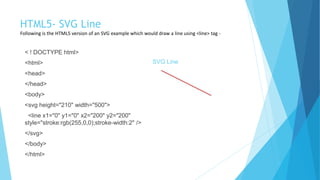
Following is the HTML5 version of an SVG example which would draw a line using <line> tag -
< ! DOCTYPE html>
<html>
<head>
</head>
<body>
<svg height="210" width="500">
<line x1="0" y1="0" x2="200" y2="200"
style="stroke:rgb(255,0,0);stroke-width:2" />
</svg>
</body>
</html>
SVG Line
HTML5 – SVG Ellipse
Following is the HTML5 version of an SVG example which would draw an ellipse using <ellipse> tag -
< ! DOCTYPE html>
<html>
<head>
</head>
<body>
<svg height="140" width="500">
<ellipse cx="200" cy="80" rx="100" ry="50"
style="fill:yellow;stroke:purple;stroke-width:2" />
</svg>
</body>
</html>
SVG Ellipse

Html 5 svg

  • 1.
  • 2.
    SVG SVG stands forScalable Vector Graphics and it is a language for describing 2D-graphics and graphical applications in XML and the XML is then rendered by an SVG viewer. SVG is mostly useful for vector type diagrams like Pie charts, Two-dimensional graphs in an X, Y coordinate system etc. SVG became a W3C Recommendation 14. January 2003 and you can check latest version of SVG specification at SVG Specification.
  • 3.
    Viewing SVG Files Mostof the web browsers can display SVG just like they can display PNC, GIF, and JPG. Internet Explorer users may have to install the Adobe SVG Viewer to be able to view SVG in the browser Embedding SVG in HTML5 HTML5 allows embedding SVG directly using <svg>...</svg> tag which has following simple syntax - <svg xmlns - " http : / /www.w3. org/2@00/svg" ></svg>
  • 4.
    HTML5 – SVGCircle Following is the HTML5 version of an SVG example which would draw a circle using <circle> tag - < ! DOCTYPE html> <html> <head> </head> <body> <svg height="100" width="100"> <circle cx="50" cy="50" r="40" stroke="black" stroke-width="3" fill="red" /> </svg> </body> </html> SVG Circle
  • 5.
    HTML5 – SVGRectangle Following is the HTML5 version of an SVG example which would draw a rectangle using <rect> tag < ! DOCTYPE html> <html> <head> </head> <body> <svg width="400" height="110"> <rect width="300" height="100" style="fill:rgb(0,0,255);stroke- width:3;stroke:rgb(0,0,0)" /> </svg> </body> </html> SVG – Rectangle
  • 6.
    HTML5- SVG Line Followingis the HTML5 version of an SVG example which would draw a line using <line> tag - < ! DOCTYPE html> <html> <head> </head> <body> <svg height="210" width="500"> <line x1="0" y1="0" x2="200" y2="200" style="stroke:rgb(255,0,0);stroke-width:2" /> </svg> </body> </html> SVG Line
  • 7.
    HTML5 – SVGEllipse Following is the HTML5 version of an SVG example which would draw an ellipse using <ellipse> tag - < ! DOCTYPE html> <html> <head> </head> <body> <svg height="140" width="500"> <ellipse cx="200" cy="80" rx="100" ry="50" style="fill:yellow;stroke:purple;stroke-width:2" /> </svg> </body> </html> SVG Ellipse